
Firefox 121 is aiming to ship with Wayland support enabled by default rather than falling back to XWayland on modern Linux desktops. So far things are looking up for this indeed remaining the case for next month’s Firefox 121 stable release…
Source: Phoronix – Firefox 121 Is Looking Good For Having Wayland Enabled By Default
Monthly Archives: November 2023
FFmpeg 6.1 drops a Heaviside dose of codec magic
You may never have heard of it, but you almost certainly use it, possibly many times a dayNew versions of this amazingly versatile tool, used in most streaming video services and devices, don’t come along very often.…
Source: LXer – FFmpeg 6.1 drops a Heaviside dose of codec magic
iRobot's Roomba Combo j7+ is $305 off for Black Friday
Sometimes Black Friday is about picking up a fun new gadget and other times it’s about getting a really good deal on that practical item you need. The majorly discounted iRobot’s Roomba Combo j7+ falls deeply into that latter category, but the $305 savings is enough to get anyone excited. You can access the deal at Wellbots with Engadget’s exclusive coupon ENGBF305 — and get free shipping.
The iRobot Roomba Combo j7+ is a 2-in-1 vacuum and mop for cleaning all types of floors. It can do both tasks in the same go (without you needing to interfere) due to its retractable mop pad. The Roomba reportedly has a 96.4 percent debris removal rate, using iRobot’s Edge-Sweeping Brush, Dual Multi-Surface Rubber Brushes and Power-Lifting Suction. The combo device also includes advances obstacle avoidance, home mapping and self emptying. Plus, you can control it through an app or with voice control services like Alexa or Google.
We found the Roomba Combo j7+ took a little adjusting to during our test, but grew to appreciate features like its awareness of high-traffic zones. In fact, we recently named it the best robot vacuum and mop 2-in-1 on the market — with the standard j7+ as the runner up for best standard midrange.
Your Black Friday Shopping Guide: See all of Yahoo’s Black Friday coverage, here. Follow Engadget for Black Friday tech deals. Learn about Black Friday trends on In The Know. Hear from Autoblog’s experts on the best Black Friday deals for your car, garage, and home, and find Black Friday sales to shop on AOL, handpicked just for you.
This article originally appeared on Engadget at https://www.engadget.com/irobots-roomba-combo-j7-is-305-off-for-black-friday-150050432.html?src=rss
Source: Engadget – iRobot’s Roomba Combo j7+ is 5 off for Black Friday
Steam Deck LCD review (2023): Still one of the best handheld PCs
I legitimately feel bad for anyone who bought a Steam Deck right before Valve’s surprise reveal of the new and improved OLED model. The announcement came out of nowhere and the Steam Deck OLED is a better version of the LCD original, at roughly the same price point. So, I understand why the r/SteamDeck forum was immediately flooded with new owners lamenting their life choices. To these people, and to anyone with the debut hardware, I want to make it perfectly clear: The Steam Deck LCD is one of the best handheld PCs on the market.
Valve still thinks it’s pretty good, too. The company is continuing to sell the 256GB LCD version of the Steam Deck at a reduced price of $399, with two OLED models above it. This is the review for people eyeing Valve’s entry-level handheld, and for any original Steam Deck owners who could use a little reassurance these days. (It’s OK, buddy.)
My review of the Steam Deck in February 2022 started with a delirious metaphor: “The Steam Deck is what happens when the Vita and the Wii U get drunk on Linux and make a big baby together.” Nearly two years later, I stand by this sentiment completely. The Steam Deck is portable and it supports multiple input methods, much like the Vita, but it’s so bulky that it never leaves my house, just like ye olde Wii U. It also natively runs Steam, which is a massive boon for players who value ease-of-use.
The 256GB Steam Deck is powerful enough to run most Steam games, even AAA titles like Elden Ring, Armored Core VI and Cyberpunk 2077. It has a custom 7nm AMD APU, 16GB of fast RAM, a 40Whr battery, and a 7-inch, 800p LCD with a max refresh rate of 60Hz. The handheld offers a peak brightness of 400 nits, which is about the same as the Switch OLED.
The Steam Deck LCD performs like a champ. Visually striking games like The Cosmic Wheel Sisterhood, Dave the Diver and Rollerdrome look and play beautifully on the display. It has its limitations: blacks aren’t quite as black as they could be, and dark backgrounds stand out from the bezels with a gray tinge. The Steam Deck LCD’s constrained color gamut is perceptible, but it isn’t tragic, and it’s not even a consideration in the heat of a good game.
Alongside standard dual-analog inputs, the 256GB Steam Deck has a touchscreen, two haptic pads on either side of the display and four back-panel buttons that have a nice, bassy click. I tend to play indie games, generally ranging in size from 200MB to 80GB, and I currently have 22 titles installed on my Deck, with 9GB of room to breathe. Storage space hasn’t been a major issue.
Heat, on the other hand, has been an issue. The Steam Deck LCD generates enough heat to make my palms clammy after about 30 minutes, and it feels like a lot of warmth collects in the grips. The whole thing gets slightly toasty while running games, but it’s never become unbearably hot or overheated on me. The fan persistently blows warm air from the top of the machine, but not in an obnoxious way.
Battery life on the Steam Deck LCD isn’t stellar, but this also isn’t a huge issue for a device that stays in my home. Valve says the Steam Deck LCD can last up to eight hours on a single charge but, in practice, the longest run I’ve achieved is four and a half hours. Lowering brightness and refresh rate can of course help, but honestly, I’ve never had a battery emergency with the Steam Deck LCD — it’s always at home, close to a charging cable, safe and warm (probably thanks to the thermals).
Engadget
I’ve used various adjectives to describe the Steam Deck, including monstrous, massive, hefty, beefy and beastly. All of these words remain accurate, and I may even introduce some new ones today. The Steam Deck LCD is 11.7 inches long, 4.6 inches tall, 1.9 inches thick, and it weighs 1.5 pounds. For comparison, the Switch Lite and Vita each weigh about half a pound, and the Wii U gamepad weighs slightly more than 1 pound. My hands are smaller than average (but I’m not, like, toddler-sized), and the Steam Deck looks and feels freakish when I hold it. My palms get crampy after just 10 minutes of play, and even mid-game I find myself regularly searching for more comfortable ways to hold it. This is also true for the OLED model, which uses the same chassis and is essentially the same weight.
To counteract the Steam Deck’s heft, I’ve developed a strange habit. I have an assortment of stuffed animals (I like claw machines, sue me), and a few of them are perfect props for the Steam Deck, allowing me to rest the device on my lap without straining my neck. The stuffed roast chicken is particularly useful in this regard, and it’s rarely far from the Steam Deck.
There’s another, non-stuffed solution for Steam Deck neck and sweaty, crampy palms — the Docking Station. Put simply, it’s brilliant and I love it. With the Docking Station and recent software updates, Valve is leaning into the at-home nature of the Steam Deck, allowing players to connect the device to external displays, like gaming monitors and TVs. On external screens, the Steam Deck LCD supports HDR and VRR, even though the device’s display can’t sustain these features. I’ve mainly used the Docking Station in the living room, turning my Deck into a revamped Steam Machine, and every game I’ve booted up looks lovely on the larger screen. In docked mode, there’s no difference between the OLED and LCD Steam Decks — they have the same performance targets and they can both handle external HDR and VRR.
Bluetooth is hit-or-miss on the Steam Deck LCD. In my recent testing, I was able to easily pair an 8bitdo Ultimate Controller and my old Galaxy Buds Plus with the handheld, but I still haven’t been able to get my new Galaxy Buds2 Pro to connect. This has been an issue with the Steam Deck LCD since day one, so while it’s not surprising any longer, it’s still frustrating at times.
The biggest difference between the Steam Deck at launch and today is Steam itself. There are four labels for games signifying how well they’ll perform on the handheld: Verified, Playable, Unsupported and Unknown. When the device first landed, only about 10 percent of my Steam library was Verified to run on Deck, and it was hard to tell what that meant, anyway. Nowadays, 30 percent of my library is Verified, and 74 percent of it is Verified or Playable. Verified titles work seamlessly on the Steam Deck, and Playable games aren’t far off — they often have small optimization requirements that don’t interrupt the actual gameplay, like needing to use the on-screen keyboard. According to a quick Steam search, there are currently 11,229 Verified or Playable Steam Deck games. That’s a larger library than any console that’s been released to date.
Valve
Today, most mainstream games are Verified or Playable on Steam Deck at launch (RIP Starfield and Star Wars Jedi: Survivor). Generally, if a new game supports gamepad input, it tends to translate well to the handheld. Having a robust, built-in game store is huge for people who just want to pick up a portable PC and start playing, and it’s an edge that the Steam Deck specifically has over the rest of the handheld market.
The handheld PC segment has exploded over the past two years and there’s now a constant stream of new devices rolling out from the likes of Ayaneo, Lenovo, Ayn and ASUS. The Steam Deck has traditionally been cheaper than the others, with the $399 model offering unbeatable value. In the Steam Deck’s initial rollout, Valve offered just 64GB of storage at that price point, making the current deal even sweeter. While competitors are closer than ever on price — and at the high-end, ahead on performance — a handheld like the Steam Deck LCD still typically costs around $600.
Its clearest contender is, of course, the Steam Deck OLED. I’m not trying to undo all the work I’ve done here, but if you have the extra cash, go ahead and grab the OLED version. The Steam Deck OLED comes in two flavors: 512GB for $549 and 1TB for $649. These are fantastic price points, especially considering the new model features a 7.4-inch OLED display with native HDR, faster frame rates, pure blacks and a peak brightness of 1,000 nits. The new model has improved Bluetooth and Wi-Fi, better thermals and weight distribution, a longer battery life, and cute orange accents. The OLED version is the same size as the LCD edition, and it doesn’t offer upgrades in terms of actual processing power, but it is simply better inside and out. Just remember: This does not mean the LCD model is trash.
Compared with the wider handheld sector, the Steam Deck LCD offers a fantastic return on investment. It’s easy to use out of the box, it offers a variety of input methods and it’s cheaper than anything comparable in its category. The main drawbacks are its size and battery life — but if it’s not too big for you, and if you plan to play at home most often, it’s an excellent bit of hardware.
Two years on, and I’m still using my Steam Deck LCD in the same way, as an in-home portable device. My Steam Deck travels from the living room, to the office, to the bedroom, and back again throughout the week, just like it did when I first got my tiny hands on it. The main differences are that, nowadays, its library is much larger and I always have a suitably sized stuffed animal in tow.
This article originally appeared on Engadget at https://www.engadget.com/steam-deck-lcd-review-2023-still-one-of-the-best-handheld-pcs-140044516.html?src=rss
Source: Engadget – Steam Deck LCD review (2023): Still one of the best handheld PCs
Why You Shouldn't Fertilize Your Houseplants During the Winter
After spending the spring, summer, and part of the fall tending to your garden and yard, you may be tempted to turn your attention towards the houseplants lining your windowsill. The colder winter months may seem like the ideal time to focus on your ferns, and fertilize your fiddle-leaf fig, but doing so may end up hurting your houseplants—not helping them. Here’s why you should hold off on fertilizing your indoor plants during the winter, and allow them to hibernate instead.
Why you shouldn’t fertilize your houseplants during the winter
Most of the species we keep as houseplants are tropical natives, which is why they wouldn’t survive if you left them outside in a cold climate. But the change of seasons also affects their life indoors, according to Amy Simone, a master gardener at the University of Vermont Extension.
In climates with traditionally hot summers and cold, snowy winters, tropical houseplants feel more or less at home during the spring and summer months. But that changes once the colder weather of fall and winter hits, and the plants enter “a period of rest,” Simone explains.
The drop in temperature, coupled with decreased daylight hours this time of year result in reduced plant growth, according to a resource from the University of Maryland Extension. Because they’re neither expanding their roots nor sprouting new shoots, houseplants don’t need fertilizer during the winter.
But surely a little fertilizer can’t hurt, right? Actually, it can, says Simone. Unnecessary or excessive fertilizer can lead to a buildup of salts in the soil, which can end up harming the plant.
If you’ve already fertilized your houseplant during the winter and now notice white, chalky salt deposits on the surface of the soil or the outside of the pot—or that your plant is yellowing, wilting, or browning at the tips—that’s probably a sign of high soluble salt levels, according to another resource from the University of Maryland Extension.
The good news is that you can fix this pretty easily by flushing the soil with clean water, allowing it to run out the bottom of the pot, and repeating the process until you’ve flushed it with at least as much water as the pot holds (e.g. two gallons of water for a two-gallon pot).
When to start fertilizing houseplants again
It may seem like a long time, but Simone recommends going the entire winter without your fertilizing tropical houseplants. You’ll know it’s time to start fertilizing again when you spot signs of new growth, which, she says, typically happens around March.
Source: LifeHacker – Why You Shouldn’t Fertilize Your Houseplants During the Winter
You Can Stop Drafts From Coming Through Your Electrical Sockets
After installing weatherstripping around your windows and doors and sealing any gaps in your walls that you could find, you probably thought that your home was ready for the drop in temperatures. But then one night you’re sitting in your living room and feel a stream of cold air hit your neck at the same time that you heard a gust of wind outside. You come to the chilling conclusion that you missed a spot and determine that the draft is coming from your electrical outlet. This is actually a fairly common problem—especially in older homes—and one that has a simple and inexpensive fix: Insulating your electrical outlets. Here’s how to do it.
If you’re shopping for gaskets to seal your power outlets, here are some recommendations from this article:
Why is cold air coming through my outlet?
Unless properly insulated, electrical outlets and light switches located indoors on exterior walls may have gaps that allow outside air to enter your home. This may not seem like a big deal, but given that these air leaks may cause you to turn up the heat in the winter (or the AC in the summer) they could end up increasing your energy bills.
Plus, as a resource from the U.S. Department of Energy’s (DOE) Oak Ridge National Laboratory points out, if outside air is able to get inside your home, moisture can, too. For example, if moist air condenses inside your walls, you may not be able to see the water as it accumulates, which could potentially lead to mold growth, wet insulation, or eventually, structural damage.
But that’s not all: The same gaps that allow cold air inside provide similar access to insects, dirt, dust, and pollen.
How do I stop cold air from coming through my outlet?
The easiest way to insulate an electrical outlet or light switch is to install a gasket. Also known as outlet sealers and outlet insulators, gaskets are precut pieces of fire-retardant foam that fit over outlets and under wall plates.
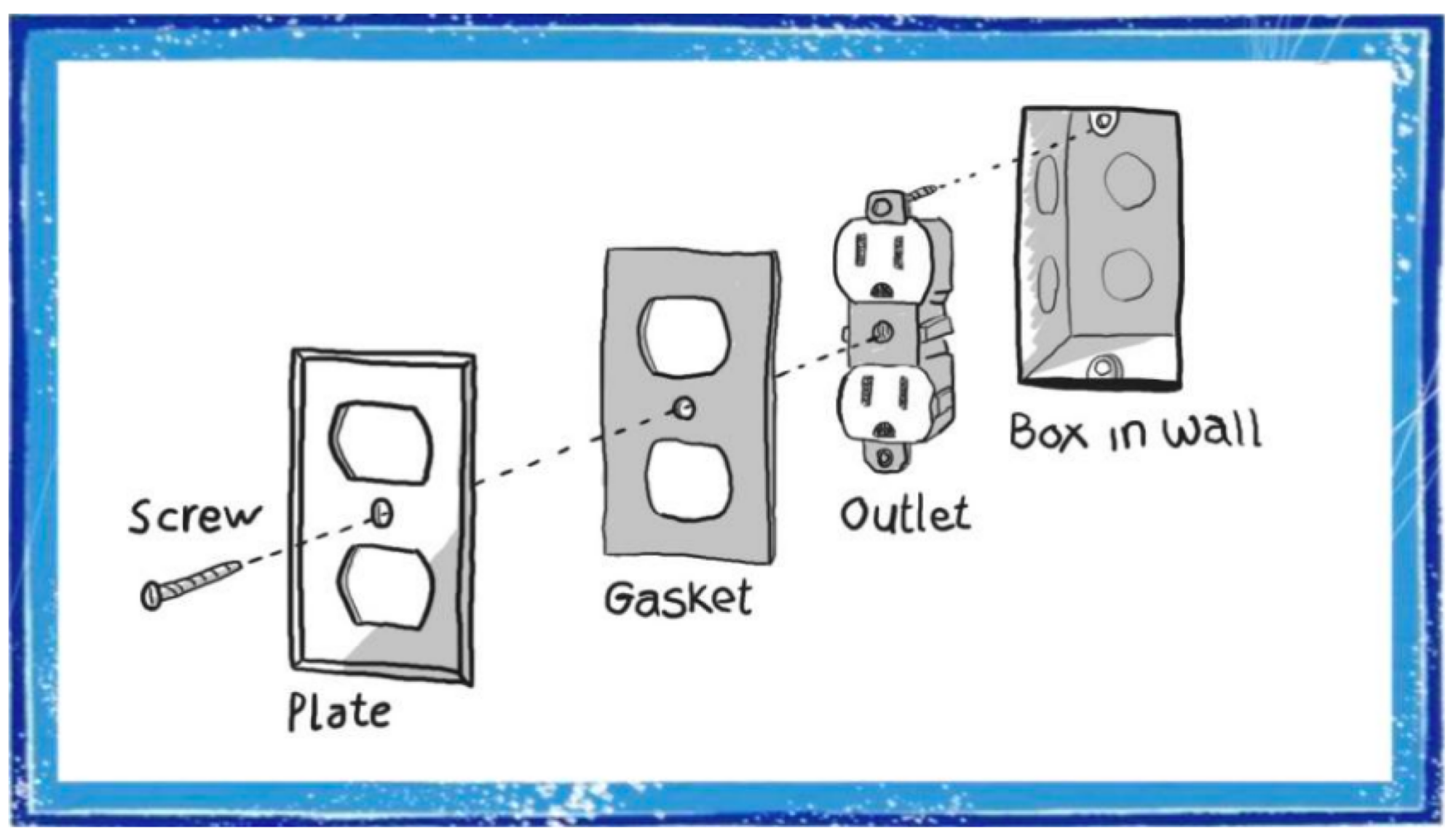
Credit: City of Flagstaff Sustainability Program/Screenshot
Follow the installation instructions on the packaging, which will likely be something along the lines of:
-
Start by visiting your circuit breaker box and turning off the breaker that supplies power to the outlet.
-
Use a screwdriver to remove the wall plate covering the outlet. (Put the screws in safe spot.)
-
Place the gasket around the outlets and press in the foam.
-
Reattach the wall plate.
-
Turn the breaker back on.
As long as you’re insulating one of your outlets, you might as well insulate the rest—or at least those on exterior walls. This makes even more sense because gaskets typically come in multipacks, including those from three of the most recognizable brand names in the gasket game: Frost King ($6.10 for a six-pack), Duck Brand ($8.49 for a 24-piece variety pack), and Stick ‘N’ Seal ($9.99 for 18 outlet gaskets and 6 switch gaskets).
Source: LifeHacker – You Can Stop Drafts From Coming Through Your Electrical Sockets
Debian's MIPS64EL CPU Port Is At Risk Due To Declining Hardware Access
Debian’s MIPS64EL that is a 64-bit little endian port using the N64 ABI is at risk due to declining access for building the Debian 64-bit MIPS packages. MIPS64EL is now being treated as an “out of sync” architecture due to lacking sufficient build daemon resources for timely building new packages and if the situation doesn’t improve, it may not be suitable as a release architecture for Debian 13 “Trixie”…
Source: Phoronix – Debian’s MIPS64EL CPU Port Is At Risk Due To Declining Hardware Access
Allie's Christmas Pudding Chronicles: Steaming the Pud
Welcome back to my Christmas Pudding Chronicles. This is a holiday series where I, an outsider to the British tradition of figgy pudding, muddle my way through making one. Hopefully, you’ll enjoy my musings about the experience, and maybe even be inspired to join along. Making a Christmas pudding traditionally starts five Sundays before Christmas, but if you decide to join along later, that’s totally fine. You can steam this thing and set it on fire the same day if you want to. (If you read last week’s post on fruit soaking, that will make sense, I swear.) Otherwise, you’ll be “curing the cake” with me once a week with a dose of brandy until the big day. But before I get too ahead of myself, today is important. It’s steaming day.
A Christmas pudding is a steamed cake, and like I mentioned, it takes place five Sundays before Christmas. That’s the Sunday after Thanksgiving, so if you’re starting this around then, you’re right on time. Also called Stir-up Sunday, this is the day you get to mix all of the ingredients together and make wishes while you stir. You can tuck clean tokens into the batter for a lucky person to find on Christmas day, or go without. I don’t like surprise hard things in my food, so I abstained. Then you’ll steam the cake for five hours. I know, it’s a while, but pick a day where you’re mostly near the kitchen and the time will go by easily.
Ingredients and considerations
If you didn’t know already, I’m using Nigella Lawson’s recipe as a guideline. I made a couple minor changes here and there, and I’ll go over them in a second.
Here are the ingredients I used:
-
Soaked fruit from week 1 (minus 50 grams, read the note below)
-
50 grams of candied orange peel, chopped
-
150 grams (¾ cup, packed) dark brown sugar
-
100 grams all-purpose flour (about 1 cup minus one tablespoons flour)
-
1 teaspoon ground cinnamon
-
¼ teaspoon ground cloves
-
1 teaspoon baking powder
-
¼ teaspoon salt
-
125 grams fresh bread crumbs
-
75 grams beef tallow (substitutes available below)
-
75 grams butter, frozen and grated
-
3 eggs
-
Zest of one lemon
-
1 small apple, grated
-
2 teaspoons honey
This Christmas pudding experience is a little window into how I work with recipes in general. I’m using the Nigella recipe, but I’m also poring over numerous other recipes to compare the tools they use, how they wrap their pudding for steaming, and what ingredients they mirror, omit, or add in. When appropriate, I use all these tidbits and figure out what I want to put into my pudding.
The first change I made was with my dried fruit. Last week, I wrote about preparing the fruit to soak, and I did it almost completely according to the recipe. However, a few days later I was browsing other recipes and saw a few folks like to add dried, candied orange peel. I do love candied orange peel. So instead of feeling like I missed out on a citrusy opportunity, I bought some candied peel, dammit. This morning, I scooped out 50 grams of the soaked fruit and replaced it, by weight, with my newly acquired orange peel. That was my choice, but you can stick to the recipe. I think the point here is, you can use other stuff. Use dried cranberries, cherries, or apricots. Some folks add nuts to their pudding. As long as you have about four cups of dried, chopped fruit and maybe nuts, Bob’s your uncle. (Right? No? It’s fine.)

Credit: Allie Chanthorn Reinmann
Besides some quick regional switches (dark brown sugar is very similar to the muscovado sugar in Nigella’s recipe), I only had to address the fresh bread crumbs and the beef suet. Fresh bread crumbs isn’t a term I hear a lot, but it’s just making your own bread crumbs instead of buying them in a can. I used about five and a half slices of basic sandwich bread—the soft, light kind—dried them, and then blended them in a food processor until they were crumbs. You can leave bread out overnight to dry, or dry them in the oven instead.
Then there was suet. This is a food from a different region, so some items are more available in different places. Nigella’s recipe, and many others, use grated beef suet. Beef suet is the hard fat found around the kidneys of cows. Although this ingredient might be readily available in the U.K., it’s not a popular cooking or baking fat in all parts of the United States. After looking online, where you can get shredded beef suet, I got lost in the beef fats of the internet and ended up ordering tallow by accident. Tallow is the fat rendered from beef suet.
Some recipes use vegetable suet, others use butter, and others still combine grated butter and shortening. I decided to use half grated butter and half tallow. I’m hoping I’ll still get the pockets of butter from grating the hard fat, and whatever valuable beefiness there is to be had from the tallow. That being said, I think you can use any saturated fat you have available to you, and if you can grate it, even better. I must say, tallow is a tad pungent. Not of beef, but more of grease. It’s not bad, but it’s not great. We’ll see if the smell lingers in five weeks. Keep that in mind as you choose your fat.
How to make the pudding

Credit: Allie Chanthorn Reinmann
I had a really fun time making this pudding. It feels like a cross between making a cake and a meatloaf. The best part is that, according to almost every recipe I read, you can just mix all of the ingredients together however the heck you want, just get ‘em mixed. My baking habits had me mix my dry ingredients first. I mixed the flour, spices, salt, and baking powder together, and dumped them into the bowl of bread crumbs. Then I added the brown sugar to the mixed fruits. I grabbed a big bowl and whisked together the eggs, grated Fuji apple, lemon zest, and honey. Then I added my fats to the egg mixture and mixed. I dumped in the fruit mixture and mixed. I dumped in the dry ingredients and mixed. With so many cakes and dishes that you have to mix or fold or whisk just-so, I had a great time mixing this because it felt like I couldn’t do anything wrong. I made some wishes along the way (that’s part of Stir-up Sunday) and I was ready to steam.
Preparing the vessel and the pot
I needed:
-
1 6-cup glass bowl
-
1 large pot (that the bowl can fit into)
-
18 inches of aluminum foil
-
16 inches of parchment paper
-
Kitchen string
I buttered a 6-cup glass bowl and cut a small circle of parchment to sit on the bottom. I read that this helps the pudding come out later, and the last thing I want to risk is my meatloaf cake sticking in the bowl. I smashed the mixture into a buttered glass bowl to squish out as much air as possible and smoothed the top. One blog mentioned running your finger around the edge to “seal” it, so I did that too. If nothing else, it made my pudding look neater. Then I topped it with another circle of parchment.
This is the slightly annoying part. You have to cover the pudding very well but allow it to expand for steam on the inside. Since it’ll be in a pot with boiling water for some time, there’s a chance that condensation can drip into the pudding if it’s not tightly covered. That would lead to a mushy pud. So, I learned how to make a parchment and foil cover with a pleat in the middle to account for expansion. Who knew that would be something I did this year?
To do this, lay out the sheet of foil. Lay the parchment sheet on top of it the same direction. Trim the parchment so it’s about a half-inch smaller than the foil on all sides. Both materials need to be bigger than the top of your bowl by at least an inch all around, but extra length is better because we’ll trim it later.
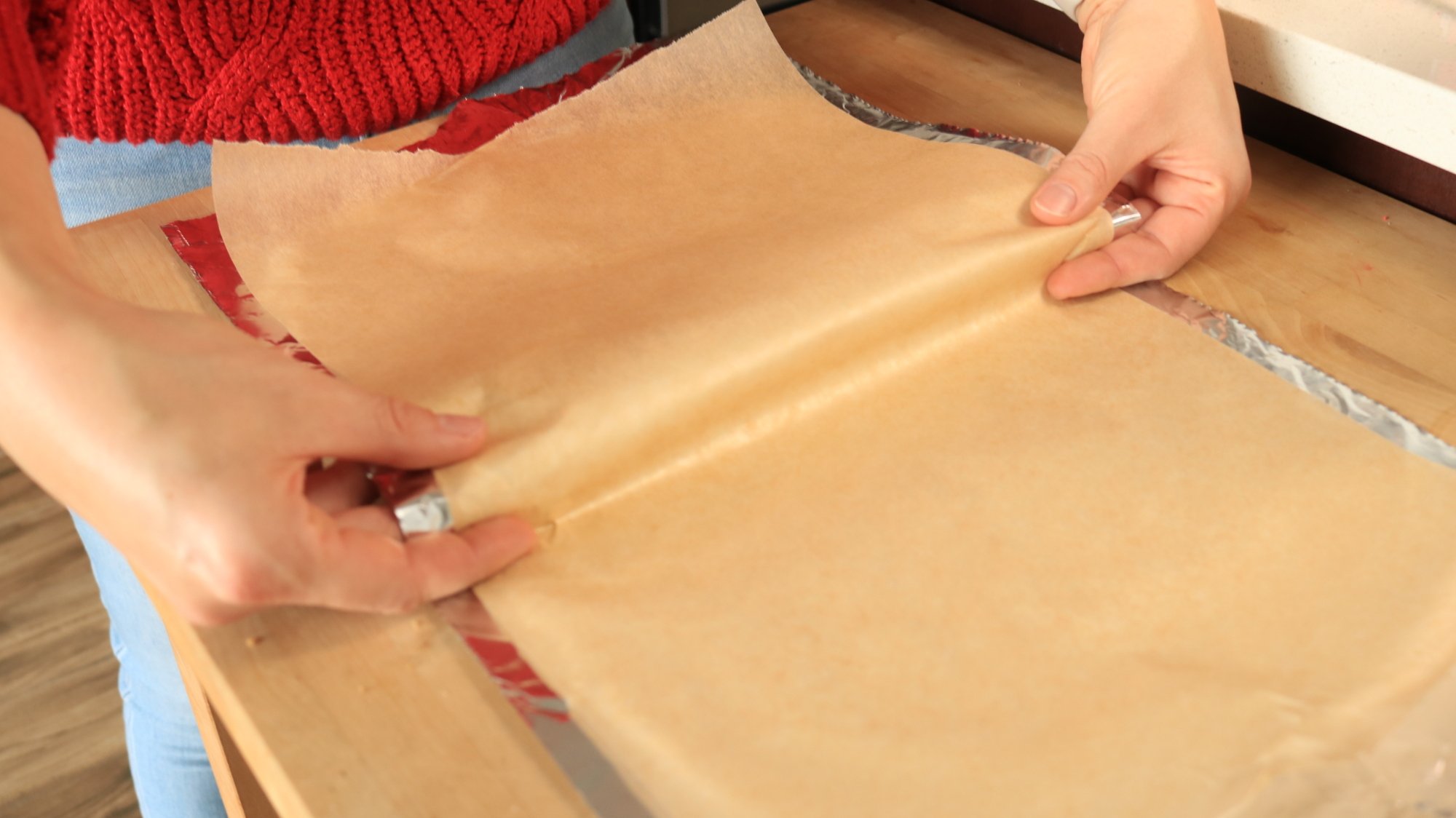
Use your fingers to fold the parchment over itself.
Credit: Allie Chanthorn Reinmann
Credit: Allie Chanthorn Reinmann
Use your fingers on opposite sides to hook the center of the foil and parchment. Bring about an inch forward to overlap the bottom. Then press it down into a crease.
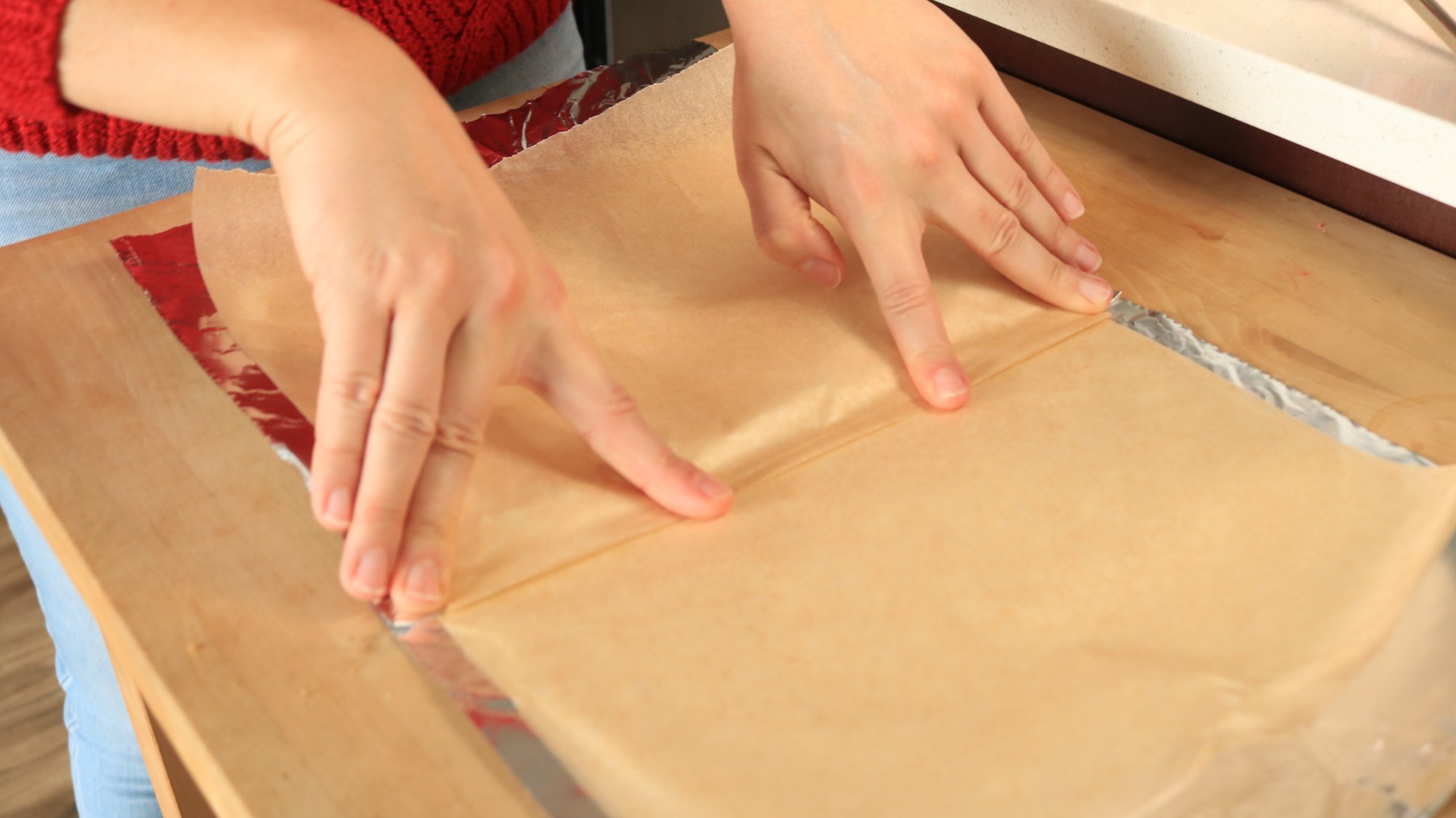
Use your fingers to press the pleat and crease the paper and the foil together.
Credit: Allie Chanthorn Reinmann
Credit: Allie Chanthorn Reinmann
Now you have a pleat so your pudding can release steam without popping the seal. Flip the sheet over so the parchment is face-down and arrange it over your pudding bowl so the crease is in the center. Clamp the foil down tightly all around.
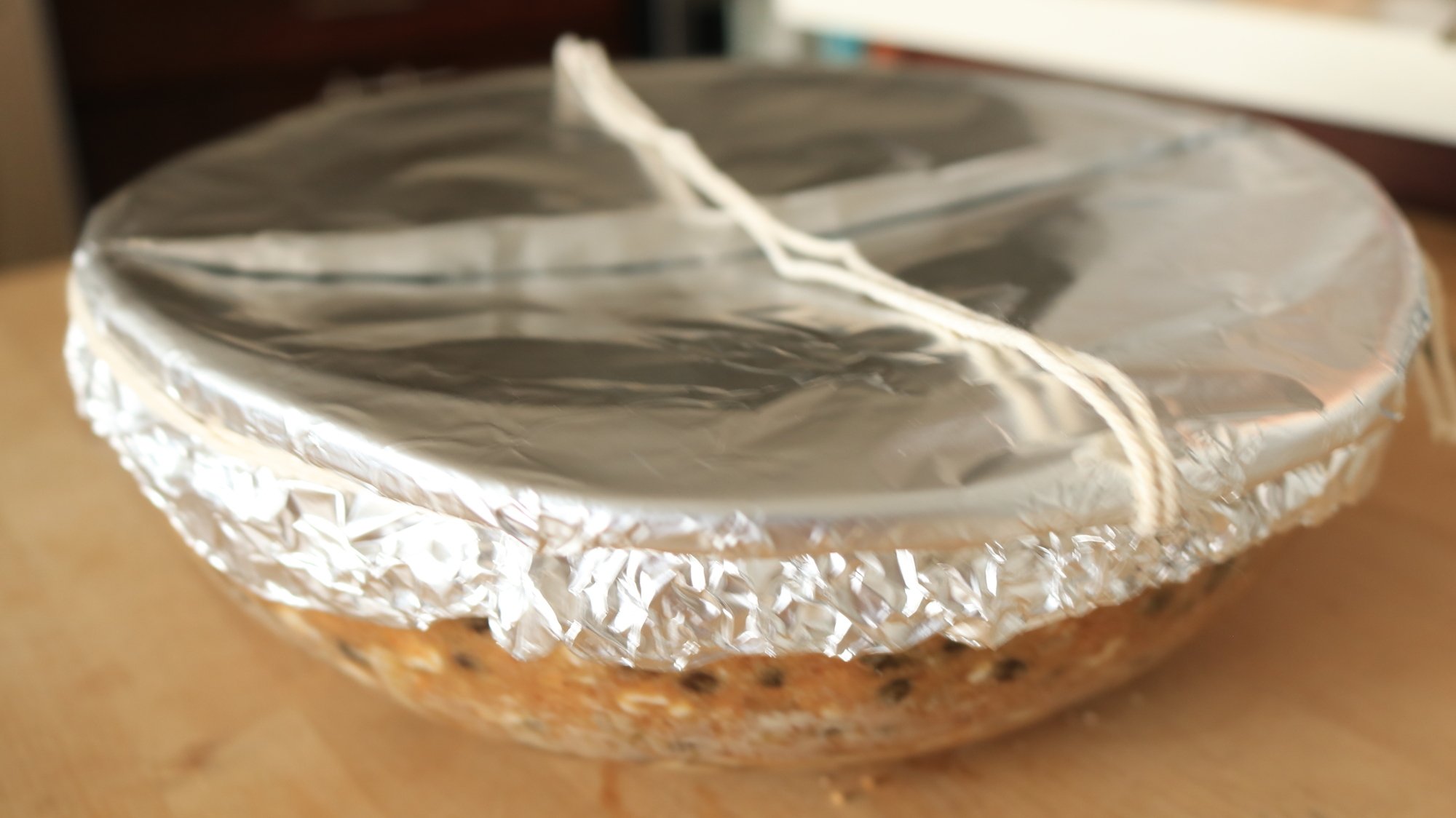
The pudding bowl is covered, the lid is sealed with string, and there is an optional string handle.
Credit: Allie Chanthorn Reinmann
Credit: Allie Chanthorn Reinmann
Use the kitchen string to go around the edge of the bowl twice. Make sure it’s as tight as possible without ripping anything. Tie the string. Now you can go around the bowl and trim all but an inch of the overhanging foil and parchment. Tuck the foil under to contain the parchment and press it against the bowl to tidy it up. You can make a little “handle” of string if you want, but this is optional. Just thread more kitchen string across the bowl, anchoring on the string you used to seal the foil. Be careful it doesn’t pull the main string off though. It can help later when you need to pull the hot bowl out of the pot.
Steam it
To steam the pudding, you need to have something at the bottom so the bowl isn’t touching direct heat. That could be a steamer basket if you have a short one, but keep in mind that the lid has to close tightly once the pudding is added. I didn’t have a steamer basket short enough to do the trick, so I used the ring of a mason jar lid. Put the pudding on top of your steamer (or jar ring), and use a kettle to pour hot water down the side of the pot. You want to pour in enough water to come up the sides of the bowl about an inch, or halfway up the side. Take care that the waterline does not come up to your foil lid.

My steamer “basket” is a mason jar lid’s ring.
Credit: Allie Chanthorn Reinmann
Credit: Allie Chanthorn Reinmann
The first thing I did was immediately pour water on top of my foil lid. That was awesome. (Don’t do that.) Luckily my lid was secure so I mopped it up and then carefully added water to my pot. I covered it with a lid and snapped the heat on. I started on medium heat and waited about five minutes until I heard the water boiling. Then I lowered the heat down to a low flame. I only wanted a simmer. As long as it’s steaming, we’re in good shape. I set my timer for five hours, and got on with my day.

I used a kettle to pour water into my steaming contraption. All it needs now is a lid.
Credit: Allie Chanthorn Reinmann
Credit: Allie Chanthorn Reinmann
Keep in mind that you don’t want the pot to boil dry, so after an hour open the lid to see if you need to top up the water. If your lid is tight, you might only need to top it up once or twice. My lid was kind of loose. I could always see steam escaping out the edge. I kept my water kettle full and hot so once an hour I could top up the water level.
Once the time was finished, I turned off the heat and took out the pudding to cool on a wire rack. There’s not a good way to check if your pudding is done. You shouldn’t open the top because it would be hard to seal back up again if it needed more time. But I wasn’t worried. Frankly, if it’s not cooked through in five hours then something is wrong with that cake and more time won’t fix it.

The finished pudding has risen fully, is slightly pulling away from the sides of the bowl, and is not soggy.
Credit: Allie Chanthorn Reinmann
Credit: Allie Chanthorn Reinmann
After cooling it for about 20 minutes, I cut the strings and took off the lid. It smelled like someone just opened the door of a gingerbread bakery in my home. I tell you—it smelled like Christmas. Any doubts I had about the pudding looking like meatloaf, smelling like beef grease, and having to make a pleated outfit for its debut steaming were put to rest. I’m very excited for this pudding to work out. I wrapped it with plastic wrap and put it safely away in the microwave. (Not to cook it. My microwave sometimes acts as storage space. It’s New York.) Now I just have to feed it brandy for a month, and hope for the best. I’ll be buying a nice brandy, and we’ll see how that goes next week.
Source: LifeHacker – Allie’s Christmas Pudding Chronicles: Steaming the Pud
The Week's Best Gaming Stories, From Pokimane to Adults-Only N64

From mergers to memes, the landscape of interactive entertainment is always in motion. Here’s your cheat sheet for the week’s most important stories in gaming.
Source: Kotaku – The Week’s Best Gaming Stories, From Pokimane to Adults-Only N64
TUXEDO Computers Launches First All-AMD Linux Gaming Laptop
Bavarian Linux PC vendor TUXEDO Computers announced this morning the launch of the TUXEDO Sirius 16 Gen1, their first all-AMD powered Linux gaming laptop…
Source: Phoronix – TUXEDO Computers Launches First All-AMD Linux Gaming Laptop
EU, Chinese, French Regulators Seeking Info on Graphic Cards, Nvidia Says
Regulators in the European Union, China and France have asked for information on Nvidia’s graphic cards, with more requests expected in the future, the U.S. chip giant said in a regulatory filing. From a report: Nvidia is the world’s largest maker of chips used both for artificial intelligence and for computer graphics. Demand for its chips jumped following the release of the generative AI application ChatGPT late last year. The California-based company has a market share of around 80% via its chips and other hardware and its powerful software that runs them.
Its graphics cards are high-performance devices that enable powerful graphics rendering and processing for use in video editing, video gaming and other complex computing operations. The company said this has attracted regulatory interest around the world. “For example, the French Competition Authority collected information from us regarding our business and competition in the graphics card and cloud service provider market as part of an ongoing inquiry into competition in those markets,” Nvidia said in a regulatory filing dated Nov. 21.


Read more of this story at Slashdot.
Source: Slashdot – EU, Chinese, French Regulators Seeking Info on Graphic Cards, Nvidia Says
Do we really need another non-open source available license?
No, but here comes the Functional Source License to further muddy the open-source licensing waters. Opinion Way back when we loaded software with punch cards and magnetic tape, all programs were “free software” and “open source.” Then along came proprietary software, and everything changed. But programmers rebelled and developed the first formal definitions of free and open source software.…
Source: LXer – Do we really need another non-open source available license?
The Week's Hottest Takes, From Scott Pilgrim To TLOU 2

Gamers are a passionate bunch, and we’re no exception. These are the week’s most interesting perspectives on the wild, wonderful, and sometimes weird world of video game news.
Source: Kotaku – The Week’s Hottest Takes, From Scott Pilgrim To TLOU 2
KDE Is Down To Just One Wayland Showstopper Bug Remaining
The KDE Plasma 6.0 feature freeze is quickly approaching and the Plasma Wayland showstopper bug list is nearly cleared out for being able to endorse the Plasma Wayland session over X11…
Source: Phoronix – KDE Is Down To Just One Wayland Showstopper Bug Remaining
Who is the Mystery Payer of Sandlers' (Software Freedom Conservancy) Quarter Million Dollars (Huge Salary) Per Year?
Donate today to fund Sandler’s $250,000 per annum salary and $500/hour motions to gag Professor Eben Moglen (with help from real lawyers, who later do blog posts that further demonise Professor Moglen).
Source: LXer – Who is the Mystery Payer of Sandlers’ (Software Freedom Conservancy) Quarter Million Dollars (Huge Salary) Per Year?
Brazil Signs On To Global Climate Deal To Triple Renewable Energy
Brazil has signed onto an agreement to triple renewable energy globally by 2030 and shift away from using coal, the country’s Foreign Ministry said on Friday, joining a prospective deal backed by the European Union, U.S. and United Arab Emirates. From a report: South America’s largest country is now one of roughly 100 countries that have signed onto the deal, according to a European official familiar with the matter. Sources told Reuters earlier this month the aim is for the deal to be officially adopted by leaders attending the United Nation’s COP28 climate negotiations that begins next week in Dubai.
Brazil’s embassy in Abu Dhabi said in a letter to the United Arab Emirates’ Foreign Ministry that it would join the deal titled the “Global Renewables and Energy Efficiency Targets Pledge.” A spokesperson for Brazil’s Foreign Ministry confirmed the country has decided to join the pact. Brazil is already a major player in renewable energy. More than 80% of the country’s electricity comes from renewable sources, led by hydropower with solar and wind energy expanding rapidly.


Read more of this story at Slashdot.
Source: Slashdot – Brazil Signs On To Global Climate Deal To Triple Renewable Energy
Elon Musk's X could lose $75 million in ad revenue following antisemitic content backlash
X, the social network formerly known as Twitter, typically earns the most money in the last months of the year, as brands ramp up their advertising campaigns for the holiday shopping season. According to The New York Times, though, the company’s earnings report for this quarter might look different than usual. Based on internal documents The Times has seen, over 100 brands and even other types of advertisers, such as political candidates, have fully paused their ads on the website, while dozens more are considering pulling their campaigns. If advertisers don’t come back, X could lose up to $75 million in ad revenue earnings this year.
The documents reportedly track how X would be affected by brands leaving the website, including the first ones that paused their ads shortly after Elon Musk’s controversial tweet, wherein he agreed with an antisemitic conspiracy theory. Shortly after he posted his tweet, media watchdog Media Matters published a report showing ads on the website right next to antisemitic content. In response, X filed a lawsuit against the organization, accusing it of “knowingly and maliciously [manufacturing] side-by-side images depicting advertisers’ posts on X Corp.’s social media platform beside Neo-Nazi and white national fringe content.”
X said in its complaint that Media Matters deliberately created an environment to show ads from some of the platform’s biggest advertisers next to “extreme, fringe content.” Linda Yaccarino, the company’s CEO, defended X in a post and said that only two users saw Apple’s ad next to unpalatable content on the platform. One of them was Media Matters, she added. The organization called X’s lawsuit “frivolous” in a statement to Engadget and said it looks forward to winning in court.
IBM, Apple and Disney were among the brands that quickly pulled their ads from X after the incidents. Lionsgate specifically cited Musk’s tweet as its reason for suspending its advertising campaigns, while Ubisoft was one of the first video game companies to withdraw its ads from X. According to The Times’ report, Airbnb has halted over $1 million worth of advertising on X, and Netflix has pulled $3 million in ads. X could also lose $4 million in ad revenue due to Microsoft’s subsidiaries pausing their campaigns. Uber and Coca-Cola are two other well-known brands that have chosen to put their advertising on X on hold.
In a statement to the publication, the company said the figures it viewed were either outdated or “represented an internal exercise to evaluate total risk.” It also said that the revenue at risk was only around $11 million and that the exact amount keeps fluctuating as some advertisers return or increase their ad spending.
This article originally appeared on Engadget at https://www.engadget.com/elon-musks-x-could-lose-75-million-in-ad-revenue-following-antisemitic-content-backlash-075316116.html?src=rss
Source: Engadget – Elon Musk’s X could lose million in ad revenue following antisemitic content backlash
Building RHEL and RHEL UBI images with mkosi
Mkosi is a lightweight tool to build images from distribution packages. This article describes how to use mkosi to build images with packages from RHEL (Red Hat Enterprise Linux) and RHEL UBI. RHEL Universal Base Image is a subset of RHEL that is freely available without a subscription. Mkosi features Mkosi supports a few output […]
Source: LXer – Building RHEL and RHEL UBI images with mkosi
File-Sharing Giant Uloz Bans File-Sharing Citing EU's Digital Services Act
TorrentFreak: File-sharing and hosting giant Uloz has announced a radical change to its business model. The Czech site has been under fire for some time and was recently branded a ‘notorious market’ by the MPA. However, Uloz says that an imminent ban on file-sharing in favor of a private, cloud-based storage model, is due to the strict conditions imposed by the EU’s Digital Services Act.


Read more of this story at Slashdot.
Source: Slashdot – File-Sharing Giant Uloz Bans File-Sharing Citing EU’s Digital Services Act
Mesa 23.3-rc5 Released With The Latest Open-Source GPU Driver Fixes
Eric Engestrom on Friday released the fifth weekly release candidate of Mesa 23.3 with this quarterly stable release hopefully debuting in the next week…
Source: Phoronix – Mesa 23.3-rc5 Released With The Latest Open-Source GPU Driver Fixes