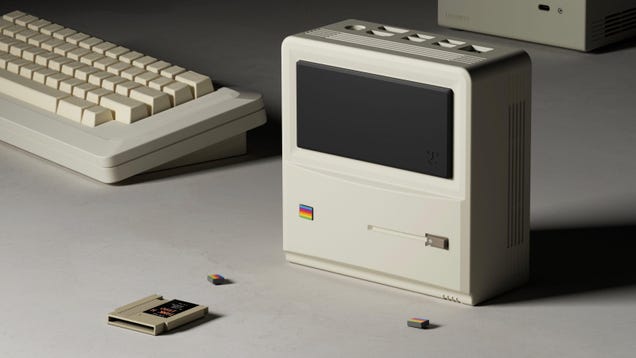
This ‘Little Mac’ Is a Pint-Sized Windows Version of Apple’s Famed PC

How best can you display the advances in technology over the years? Let’s take a PC like the landmark original 1984 Apple Macintosh—later rebranded the Macintosh 128K—and shrink it by more than half. Then, boost its processing capability and memory by a factor of thousands or even tens of thousands—AKA modern mobile…

Read more…


Source: Gizmodo – This ‘Little Mac’ Is a Pint-Sized Windows Version of Apple’s Famed PC

Upgrade Your Leftover-Turkey Sandwich With Thai Curry Paste

Sure, the leftover Thanksgiving turkey sandwich is a classic for a reason, but part of the joy of eating is refreshing the classics. When you’ve layered sandwich bread with turkey and mashed potatoes so many times it’s become a chore, it’s time to reach for a new flavor. Get excited again for that leftover poultry and make a turkey sandwich—but not the kind stacked with cranberry and stuffing. Instead, clear out your fridge and your sinuses with a fiery Thai curry turkey sandwich.

Since poultry has a reputation for drying out in the fridge and losing flavor, I wanted to add powerful ingredients and a bit of moisture. I reached for a can of massaman curry. Thai curry is something I keep stocked in my cabinets, and I find that the flavors pair up brilliantly with any protein. Thai curries use a varying combination of ingredients, like shallots, ginger, makrut lime leaf, garlic, and chilies, depending on the type you choose, but something you can count on is that it will be flavorful. Toss cold, shredded turkey with a tablespoon of curry paste and you’ll trigger a bright new outlook on all of your holiday leftovers. 

Thai curry paste can be pounded or processed at home, but my family has always used premade Maesri brand cans for cooking. You can find Maesri in Asian grocery stores, but big box grocery stores like Shoprite and Whole Foods carry different brands of Thai curry as well. The benefit of jarred curries is that you can use a spoonful and close up the lid again. (The cans can be a little annoying if you don’t use the whole thing.)

Ingredients for a sandwich on a cutting board

Credit: Allie Chanthorn Reinmann

A Thai turkey curry sandwich will be a bit spicy, of course, but you can control that with this recipe. Thai curry paste is powerful, even in small quantities, but not every curry packs the same amount of heat. Heat is a personal preference, but if I want mild spice I’ll use massaman, yellow, or red curry paste. For medium heat, I use pad prik king paste. To make myself sweat I’ll use green curry paste. Use any of these according to your preference, and then control the heat further. Use just a teaspoon or so of paste and mix it with two tablespoons of mayonnaise. The mayo will cut the spice level down further because of the fats involved. Taste it. If you’re spiced out, add more mayo. If the flavor is too weak, add more Thai curry paste. Toss a cup of shredded turkey with the mixture and load it onto a couple slices of bread.

This hack is especially helpful in this final day or so of turkey scraps, but you can ignite your taste buds with this recipe any time during the year using leftover chicken or pork. I like to make a quick, crunchy slaw with shredded cabbage tossed with lime juice and salt. These are some classic Thai ingredients and it rounds out the flavors of the sandwich beautifully. The massaman turkey filling is spicy and sweet, and the slaw is crunchy, salty, and tart. 

For even more of a flavor boost, add a couple leaves of torn basil (Thai basil if you can get it), and a chopped raw Thai chili pepper. Those last ingredients will really rock your sinuses, and make it the kind of sandwich that you can’t stop talking about (even while you’re actively eating the sandwich).

Thai Curry Turkey Sandwich recipe

Ingredients:

  • 1 cup shredded turkey

  • ½ tablespoon to 2 tablespoons Thai curry (adjust according to taste)

  • 2 tablespoons mayonnaise

  • 1 Thai chili, chopped (optional)

  • 2-4 leaves Thai basil,  (optional)

  • ¼ cup shredded cabbage

  • 2 teaspoons fresh lime juice

  • ⅛ teaspoon salt

  • 2 slices of sandwich bread, toasted

1. In a small bowl, toss the cabbage together with the lime juice and salt. Set aside on the countertop for 10 minutes, tossing periodically.

2. In a different bowl, mix curry paste with mayonnaise until combined. Taste the mixture and add more curry paste if desired. Mix the shredded turkey into the dressing. Mix in the chopped chili and basil, if using.

3. Mound the turkey mixture onto a slice of toasted bread. Add the cabbage slaw and top it with the other slice of bread. Give the sandwich a press with your hands, and enjoy.


Source: LifeHacker – Upgrade Your Leftover-Turkey Sandwich With Thai Curry Paste

Google Will Begin Purging Gmail And Photos Accounts In 3 Days, How To Take Action

Google Will Begin Purging Gmail And Photos Accounts In 3 Days, How To Take Action
In less than 72 hours from now, Google will start deleting Google accounts that have been deemed inactive. If you want to save your content, there are some things you can do to ensure that your account and associated content is not caught in the snare of the accounts purge. However, the clock is ticking, so you best jump straight to it after

Source: Hot Hardware – Google Will Begin Purging Gmail And Photos Accounts In 3 Days, How To Take Action

Boost Your Home Network With HOT Holiday Deals On Wi-Fi Routers Up To Half Off

Boost Your Home Network With HOT Holiday Deals On Wi-Fi Routers Up To Half Off
Is a sluggish internet connection slowing you down and putting you in a bad mood for the holiday? If you’ve gone through the usual troubleshooting steps and determined that your crusty-old wireless router is to blame, then cheer up because there are a bunch of deals on fast models to turn that ‘Bah humbug!’ into Buddy the Elf-level enthusiasm.

To

Source: Hot Hardware – Boost Your Home Network With HOT Holiday Deals On Wi-Fi Routers Up To Half Off

The best Cyber Monday laptop deals that are still live today

Cyber Monday is behind us, but we’re still seeing a number of noteworthy deals on laptops that are worth your money. While the number of deals is no where near where it was yesterday, there are still a number of the best Cyber Monday laptop deals available right now. If you’re looking to gift a new notebook this holiday season or just upgrade your own aging device, you still have time to save hundreds on machines from Dell, Lenovo, HP, Microsoft and others. Some of the deals have brought record lows to top picks from our guides to the best gaming laptops, MacBooks, Chromebooks and Windows laptops and others. Here are the best Cyber Monday laptop deals that are still live today.

Best Cyber Monday MacBook deals

Apple MacBook Air (13-inch, M1)

The older 13-inch MacBook Air that was released in 2020 and uses Apple’s M1 chip is also on sale, with an entry-level config available for $750 at Amazon and Best Buy. We’ve seen this deal a handful of times over the last few months, but it matches the lowest price we’ve seen. It’s really worth stepping up to the M2 Air if you can: It’ll get you a more modern design, a faster chip, a sharper webcam and improved speakers. The 8GB of RAM and 256GB SSD in this config is only suitable for casual use, and this model will almost certainly be discontinued when we get the inevitable M3 refresh. But if you’re on a stricter budget and really want a MacBook, the M1 Air is still well-built, long-lasting and fast enough for the essentials. We currently highlight it in our guide to the best budget laptops.

Best Cyber Monday Chromebook deals

Lenovo IdeaPad Flex 5i Chromebook Plus

The Lenovo IdeaPad Flex 5i Chromebook Plus is down to $379 at Best Buy, which is $120 off its list price. This is the latest iteration of the top pick in our Chromebook buying guide. Its 14-inch, 1,920 x 1,200 IPS touchscreen is good for the money, and it’s plenty fast for the web browsing and light work you’d do with Chrome OS. Both its keyboard and trackpad are comfortable, plus it comes with a decent 1080p webcam. This model comes with an Intel Core i3-1315U processor, 8GB of RAM, 128GB of eMMC storage, one USB-A port, two USB-C 3.2 ports and a microSD card slot. The chassis isn’t especially light at 3.6 pounds, and we found the battery to last roughly seven hours in testing, which is just OK. But for less than $400, this is a strong value.

Best Cyber Monday Windows laptop deals

Dell XPS 13 (9315)

Dell’s XPS 13 is down to $799 for a configuration with a Core i7-1250U processor, 16GB of RAM, a 512GB SSD and a 13.4-inch, 1,920 x 1,200 resolution display. That’s $300 off Dell’s list price and only a little bit higher than the lowest price we’ve seen. The XPS 13 is the top pick in our guide to the best Windows laptops thanks to its svelte design, dependable keyboard and trackpad, lengthy battery life and solid display. You’re not getting the latest processor here, but this model is still performant enough for everyday work. The main issue here is port selection: There’s only two Thunderbolt 4 ports and no dedicated headphone jack. Still, if you can tolerate using a dongle every now and then, this is a good price for a high-quality ultrabook.

Dell XPS 15 (9530)

If you want a larger Windows workstation, the 15.6-inch Dell XPS 15 is also on sale. One variant with a Core i7-13700H processor, 16GB of RAM, a 1TB SSD, an Intel Arc 370M GPU and a 1,920 x 1,200 IPS display is available for $1,099. That’s $500 off Dell’s MSRP and the lowest historical price we could find for this config. Performance in this model should be good for most, though other versions with a richer 3.5K OLED panel, stronger GPUs and extra RAM and storage are similarly discounted.

We gave the 2022 version of the XPS 15 a review score of 93, calling it “the best 15-inch Windows laptop” in the process. This latest iteration uses a newer generation of Intel chips, but it doesn’t make too many changes in terms of design, which is largely a good thing. It still looks sharp and feels well-made, with slim bezels, an aluminum chassis and a soft carbon fiber deck. Its memory and storage are user-replaceable, and it’s not crazy huge for a 15-inch machine, either. Its webcam is still limited to a measly 720p, however, and it doesn’t offer a 120Hz display option. It doesn’t have any USB-A ports, either, though it does include two Thunderbolt 4 ports alongside a USB-C 3.2 Gen 2 port and a headphone jack.

HP Pavilion Aero 13

The HP Pavilion Aero 13 is down to $530 for a model with an AMD Ryzen 5 7535U processor, 16GB of RAM and a 256GB SSD. This notebook goes on sale fairly often, but this is the lowest price we’ve seen for this config. It’s also $20 lower than the deal we saw on Black Friday. 

The Pavilion Aero 13 is the top Windows pick in our budget laptop buying guide. It’s impressively light (2.2 pounds) and slim (0.67 inches) for the money, while its 13.3-inch, 1,920 x 1,200 IPS display is sufficiently bright and colorful. It comes with a solid backlit keyboard and the essential ports as well. It’s still a budget laptop, so it doesn’t have the sturdiest chassis, and it’s saddled with a 720p webcam. You’ll also have to navigate some bloatware. But if you want a cheaper notebook that doesn’t totally sacrifice aesthetics, it’s a decent option.

Microsoft Surface Laptop Studio 2

The Microsoft Surface Laptop Studio 2 is down to $2,043 at Amazon for a configuration with a Core i7-13700H, 16GB of RAM, a 512GB SSD and an Nvidia GeForce RTX 4050 GPU. We gave the Surface Laptop Studio 2 a score of 85 in our review. The big hook is its hinged touch display, which lets the bottom of the screen pivot and tilt over the keyboard like an easel for digital artists. We found the 14.4-inch, 2,400 x 1,600 resolution panel to look great more generally, while its battery life, build quality and overall performance all impressed as well. It’s slightly bulkier than competing models, and it’s still expensive even at this price, but this deal makes it a little more approachable for those who want a laptop for media editing and like the hinged design.

Microsoft Surface Pro 9

A configuration of Microsoft’s Surface Pro 9 with a Core i5-1235U processor, 16GB of RAM, a 256GB SSD and Microsoft’s Surface Pro Keyboard is down to $1,000 at Best Buy. That’s $540 off Microsoft’s list price. If you don’t need the keyboard, a variant with a stronger Intel Core i7-1255U chip is down to $1,097 at Amazon (or $1,100 at B&H and Best Buy). That’s an all-time low and roughly $200 off the config’s usual street price. Another Core i7 model with 512GB of storage is on sale for $300 more.

The Surface Pro 9 tops our guide to the best 2-in-1 tablets. While its 12th-gen chip is about to be two generations old, this is still the device to get if you want the functionality of a laptop in the slim design of a tablet. We’re past the point of the year when Microsoft would normally announce a refresh, but the current model should still be useful if you’re coming from an older Surface in desperate need of an upgrade.

Best Cyber Monday gaming laptop deals

ASUS ROG Zephyrus G14

The ASUS ROG Zephyrus G14 is still available for $1,200 at Best Buy for a configuration with a Ryzen 9 7940HS processor, 16GB of RAM, a 512GB SSD and a GeForce RTX 4060 GPU. That matches the lowest price we’ve seen and takes $400 off ASUS’ list price. This model also has a 14-inch 1440p display with a 165Hz refresh rate. The ROG Zephyrus G14 is the top overall recommendation in our guide to the best gaming laptops. It’s a compact notebook that’s plenty capable for triple-A gaming but doesn’t totally sacrifice the “laptop” part of the phrase “gaming laptop.” It’s relatively light and portable at 3.6 pounds, and its keyboard and trackpad both work well. Its 720p webcam could stand to be sharper, though.

MSI Stealth 14 Studio

The MSI Stealth 14 Studio is another gaming laptop we like, and right now Best Buy has it for $1,100. This model includes a Core i7-13620H chip, 16GB of RAM, a 1TB SSD, an RTX 4060 GPU and a 14-inch 1,920 x 1,200 display with a 165Hz refresh rate. We gave the Stealth 14 Studio a score of 87 in our review this past June; like the ROG Zephyrus G14, it’s light for the category at 3.75 pounds and it offers capable performance for everyday gaming. This config is a lower-end model than the one we reviewed — it has a slightly slower CPU and its display isn’t as sharp or fast — but the gist is the same. Its biggest flaws are its middling 720p webcam and the fact that it can run hot under load. It’s still a gaming laptop, so battery life isn’t amazing either.

Whether you should get this config over the ROG Zephyrus G14 deal above comes down to whether you can sacrifice a higher-res display for more storage space. The G14 has more ports as well, though the Stealth 14 Studio includes a Thunderbolt 4 port, which may be important if you ever plan on connecting an external GPU.

Razer Blade 15

The Razer Blade 15 is down to $2,100 at Amazon, B&H and Newegg for a config with a Core i7-13800H, 16GB of RAM, a 1TB SSD, an RTX 4060 GPU and a 15.6-inch IPS display with a 1440p resolution and a 240Hz refresh rate. That’s $400 off and the lowest price we’ve seen for this 2023 model. The Blade 15 is the high-end pick in our gaming laptop buying guide. This model is powerful enough to play most modern games at high settings in 1080p or 1440p, but the main reason to buy any Blade is its design, which is slimmer and generally more premium than most gaming notebooks. Just don’t expect it to last super long on a charge or stay especially cool under load. We gave the 2022 version of the Blade 15 a review score of 86 last year.

Your Cyber Monday Shopping Guide: See all of Yahoo’s Cyber Monday coverage, here. Follow Engadget for Cyber Monday tech deals. Learn about Cyber Monday trends on In The Know. Hear from Autoblog’s experts on the best Cyber Monday deals for your car, garage, and home, and find Cyber Monday sales to shop on AOL, handpicked just for you.

This article originally appeared on Engadget at https://www.engadget.com/the-best-cyber-monday-laptop-deals-that-are-still-live-today-153010578.html?src=rss

Source: Engadget – The best Cyber Monday laptop deals that are still live today

Bethesda Fires Back At Starfield Complaints On Steam As Game Goes On Sale

Bethesda Fires Back At Starfield Complaints On Steam As Game Goes On Sale
Bethesda is defending Starfield, its latest role-playing game 25 years in the making, from negative comments on the game’s Steam page. Starfield is currently on sale, bringing in a new batch of gamers with opinions that Bethesda feels they need to respond to. As of this article going live, the game has an overall review sentiment of “Mixed”

Source: Hot Hardware – Bethesda Fires Back At Starfield Complaints On Steam As Game Goes On Sale

NASA Sends A Teaspoon Of The Most Dangerous Rock In The Solar System To The UK

NASA Sends A Teaspoon Of The Most Dangerous Rock In The Solar System To The UK
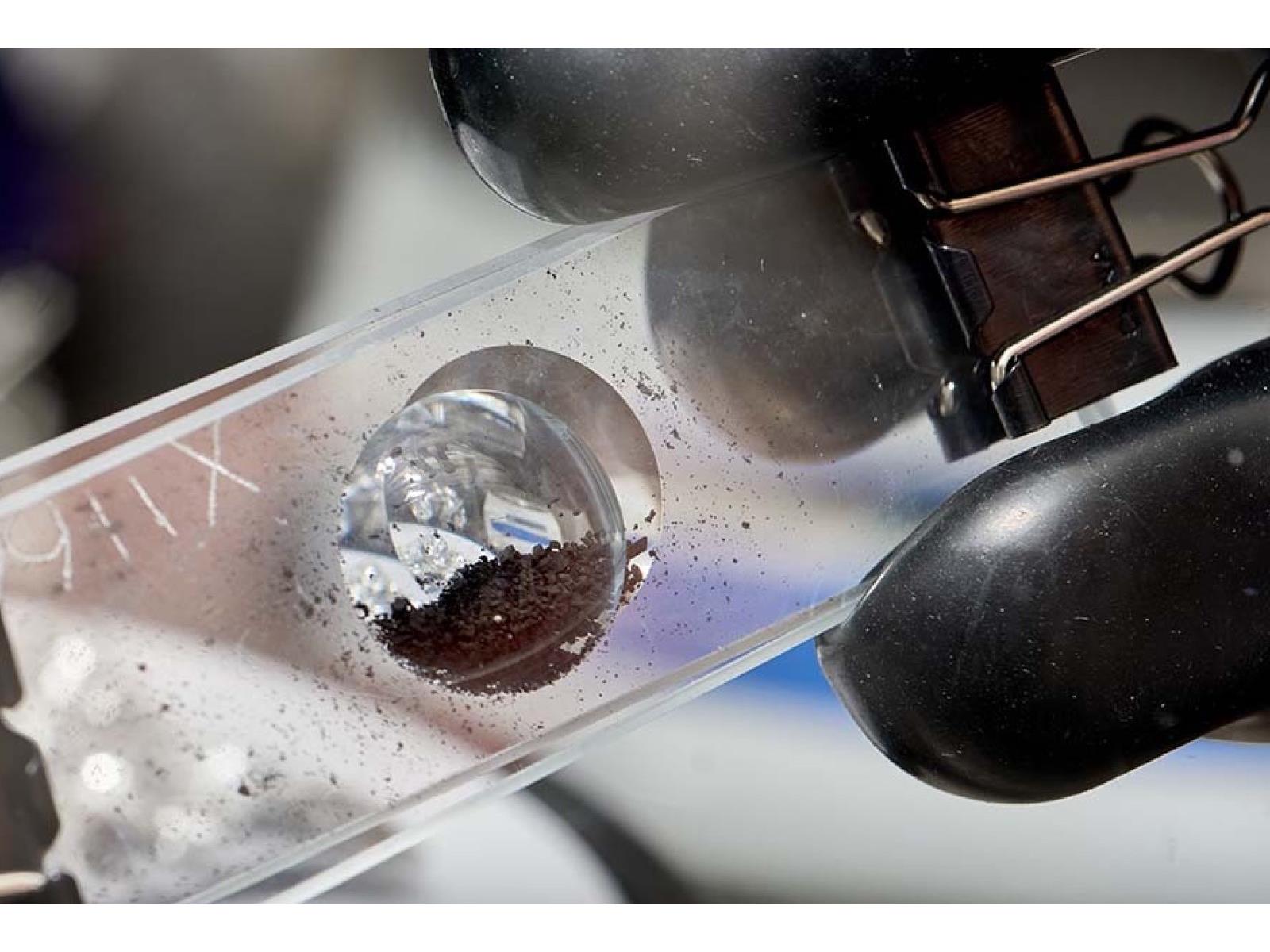
NASA delivered a teaspoon size sample of the asteroid Bennu to be studied in the labs at the Natural History Museum in London. NASA describes the 500-meter (0.3 miles) wide asteroid as being the most dangerous rock in the solar system because it has a chance of hitting Earth within the next 300 years.

Scientists at the Natural History Museum

Source: Hot Hardware – NASA Sends A Teaspoon Of The Most Dangerous Rock In The Solar System To The UK

Internet Use Does Not Appear To Harm Mental Health, Oxford Study Finds

A study of more than 2 million people’s internet use found no “smoking gun” for widespread harm to mental health from online activities such as browsing social media and gaming, despite widely claimed concerns that mobile apps can cause depression and anxiety. From a report: Researchers at the Oxford Internet Institute, who said their study was the largest of its kind, said they found no evidence to support “popular ideas that certain groups are more at risk” from the technology. However, Andrew Przybylski, professor at the institute — part of the University of Oxford — said that the data necessary to establish a causal connection was “absent” without more co-operation from tech companies. If apps do harm mental health, only the companies that build them have the user data that could prove it, he said.

“The best data we have available suggests that there is not a global link between these factors,” said Przybylski, who carried out the study with Matti Vuorre, a professor at Tilburg University. Because the “stakes are so high” if online activity really did lead to mental health problems, any regulation aimed at addressing it should be based on much more “conclusive” evidence, he added. “Global Well-Being and Mental Health in the Internet Age” was published in the journal Clinical Psychological Science on Tuesday. In their paper, Przybylski and Vuorre studied data on psychological wellbeing from 2.4 million people aged 15 to 89 in 168 countries between 2005 and 2022, which they contrasted with industry data about growth in internet subscriptions over that time, as well as tracking associations between mental health and internet adoption in 202 countries from 2000-19.

Read more of this story at Slashdot.


Source: Slashdot – Internet Use Does Not Appear To Harm Mental Health, Oxford Study Finds

Starfield Isn’t Boring Actually, Bethesda Tells Steam Reviewers

The meta-narrative around Starfield just took a very weird turn. Steam reviews for the sprawling sci-fi RPG recently fell to “mixed” on Valve’s storefront, and now Bethesda employees are arguing with players in the comments about why the game isn’t as boring and soulless as some of them claim.

Read more…


Source: Kotaku – Starfield Isn’t Boring Actually, Bethesda Tells Steam Reviewers

What we bought: Casio’s latest flagship digital piano doubles as drool-worthy furniture

Casio’s instrument division has been around a long time, as anyone who got into music as a kid by making fart noises into an SK-1 knows. However, the company is mostly known for entry-level digital pianos that get the job done, but don’t offer much by way of modern conveniences. In recent years, Casio has been dipping its toes into the waters of high-end instruments like the Privia PX-S7000.

The latest Privia entry is a sizable leap over most starter pianos. This is a serious instrument for serious players, with that quad-speaker system, 88 hybrid hammer action keys that feel fantastic, plenty of high-tech bells and whistles and, most importantly, access to three realistic-sounding piano models, along with 400 other instruments. Oh, and it has a hefty $2,400 price tag to match.

All of that is well and good, but let’s talk about why I really decided to splurge on this thing over the myriad of other digital pianos out there — it’s absolutely gorgeous. It hits that sweet spot between a musical instrument and a piece of high-end furniture. I fell in love pretty much instantly when I saw it online. I wasn’t able to try it out ahead of time, as my options here in Minnesota are limited when it comes to testing synths and digital instruments, so I just went for it. My plan was to return the thing if it was a lemon but, as you can see, it’s still there. It’s not a lemon. Maybe it’s a strawberry? Those are pretty.

I had just moved into a mostly-bare new home and had an entire house to fill for the first time in my life. I wanted something that tied the living room together and I don’t really understand visual art, so I went with what I know: expensive musical instruments. It did the trick. It looks stunning sitting there and almost makes up for the lack of wall art.

The piano itself has elegant spruce sides, and it ships with a sleek and sturdy wooden beech stand. There’s also a nice-looking three-pedal unit that attaches near the bottom, providing yet another feature that makes this digital piano feel, well, not-so digital. It weighs just 60 pounds, so it was easy for me to try out different placements on the fly without destroying my back. Real pianos weigh hundreds and even thousands of pounds — I’ve ruined enough friendships in my life asking people to help me move them around, thank you very much.

I ended up with the black model, though it’s also available in white and “harmonious mustard.” Personally, I think the mustard is the most attractive option, but the eye-popping paint job adds another $200 to the price. I’m financially irresponsible, but even I have my limits. I still lust over that warm and luscious yellow, though.

Casio Privia PX-S7000
Photo by Lawrence Bonk / Engadget

The Privia PX-S7000 is not just a conversation piece, it also sounds and feels eerily similar to playing the real thing. The three primary piano models are excellent, but digital recreations of classic instruments are nothing new. This instrument combines those excellent piano models with a realistic-sounding speaker system and a keybed that’s incredibly satisfying to play.

The keybed feels great, with a textured surface on each key that calls to mind, you guessed it, an actual piano. There’s a proprietary technology here, called Smart Hybrid Hammer Action, but I don’t really understand the specifics. All I know is that the keys spring back nicely and do their part to keep the illusion going that you’re playing an analog instrument. There’s a heaviness to the key presses and an oh-so-satisfying thunk as each press returns to the resting position. It’s just plain fun to play. (Though I’m not exactly Rachmaninoff. I’m more of a dime-store Paul McCartney.)

Another proprietary system, Casio’s Multi-Dimensional Morphing AiR Sound Source, helps increase the fun factor by adding a bit of damper, string and aliquot resonance with each press. This tech is based on the sound engine from the even more expensive Celviano line of digital pianos, so it’s nice to see it pop up in a cheaper model. There’s also some counterweight and damping voodoo going on underneath the hood. This is the closest I’ve ever felt to the “real thing” with a digital instrument, though I haven’t spent any time with ultra-high-end digital pianos as a comparison point. I have, though, spent hundreds and hundreds of hours playing real pianos, starting in my grandmother’s den as a wee tyke.

When I’m playing the Privia SX-7000, it sounds like the tones are coming from everywhere at once, thanks to the quad-speaker spatial sound system. They really put me in the center of the action and, believe it or not, this actually makes me play better, especially when compared to my caveman plunks on a MIDI controller.

The main draws here are the three piano models, but this is a digital instrument in the year 2023, so there’s some high-tech fun to be had. Casio has introduced a new feature that pairs analog piano sounds and electric tones with on-board effects to recreate the vibe of classic songs. For instance, you can tap away at a piano that sounds like John Lennon’s Imagine, Queen’s Bohemian Rhapsody, Stevie Wonder’s Superstition and dozens more. There’s even a microphone input and 25 vocal effects options for sing-alongs. I’ve used both to great effect. Starting with a famous piano sound helps me drum up song ideas and plugging a mic in lets me hear my vocals at a decent volume without having to emote like Whitney Houston during the last key change of I Will Always Love You.

All modern digital pianos have a few hundred additional sounds for those times you want to hear an average-sounding bass, and the Privia’s no different. There are 400 sounds to choose from, ranging from good to barely OK. All of the usual bases are covered here, from synth-heavy pads to drum kits and woodwinds. None of these sounds are truly mind-blowing, but they can help generate ideas in a pinch. If I’m recording, however, I prefer a virtual instrument with more control options.

One modern convenience that I enjoy is the included Bluetooth adapter. This is only for incoming sounds, but it’s still pretty cool. I’ve spent many hours streaming music from my phone to the piano and playing along with it. It’s an efficient way to learn new songs.

The piano integrates with a Casio app that offers piano lessons and the like, which I haven’t tried because I like learning in my own way. The app also displays PDF scores on your phone or tablet that you can play along to, though I haven’t experimented much with this feature because I (ducks) can’t read music.

The added features are cool — it’s 2023 after all — but the true draw of the Privia SX-7000 is three-fold: it looks great, it sounds great and it feels like playing a real piano. It’s also really expensive, costing around $2,400, so this isn’t for casual hobbyists. I bought it fully expecting to regret my purchase, but that regret never came. Instead, I feel a spark of joy whenever I see it sitting there, inviting me to play Imagine until I’m blue in the face.

This article originally appeared on Engadget at https://www.engadget.com/what-we-bought-casios-latest-flagship-digital-piano-doubles-as-drool-worthy-furniture-150038288.html?src=rss

Source: Engadget – What we bought: Casio’s latest flagship digital piano doubles as drool-worthy furniture

No, NameDrop on iPhone Won’t Automatically Share Your Contact Information

According to a report by The Washington Post, police departments and news sites are spreading misinformation about “NameDrop,” a new feature in iOS 17. These outlets claim that simply bringing your iPhone close to another iPhone allows the other user to steal your contact information, without your consent or any action on your part. If that sounds scary, don’t worry: It’s pure hogwash.

Yes, NameDrop is enabled by default on all iPhones running iOS 17.1 or higher, and Apple Watches running watchOS 10.1 and higher. But it can be only used intentionally, and only with your consent. That’s what a lot of news outlets and law enforcement agencies are getting wrong. The City of Chester Police Department in Ohio says, “This feature allows the sharing of your contact info just by bringing your phones close together.” Of course it’s going to seem dangerous.

How NameDrop actually works

First of all, both iPhones or Apple Watches have to be unlocked. Then, the two devices have to be very close to each other, almost touching. When they come in close contact, your iPhone will prompt you, asking if you want to share your contact information and your Contact Poster, with the other iPhone. From here, you get two options: Receive Only and Share. It’s only when you tap Share that the two iPhones will do the dance of swapping contact details. If you choose Receive Only, the other person’s contact details will show up for you if they choose to share, but your contact details will remain private.

If your iPhone is locked, and there’s an unknown iPhone on top of it, this won’t work. Even if it’s unlocked, without your action, there’s no risk of losing your personal information. Rest assured, your contact details are safe. Hypothetically, this could be a problem if your iPhone is both unlocked and in someone else’s hands. But if that’s the case, you have a much bigger problem than losing your email address and phone number.

How to disable NameDrop on your iPhone

Still, if you want to disable the feature, it can be done from Settings > General > AirDrop > Bringing Devices Together > Off. But again, we wouldn’t recommend this, as it’s not worth losing the excellent AirDrop bump gesture.


Source: LifeHacker – No, NameDrop on iPhone Won’t Automatically Share Your Contact Information

Job losses likely at VW as the people’s car brand becomes uncompetitive

Tiguan, Touran, Seat Tarraco assembly, mechanical screw connection.

Enlarge / The VW plant in Wolfsburg, Germany. (credit: Volkswagen)

The Volkswagen passenger car brand looks set to lay off workers, according to a report in Reuters. The news organization saw a post on VW’s intranet quoting CEO Thomas Schaffer, who blamed low productivity and high costs for the impending cuts.

“With many of our pre-existing structures, processes and high costs, we are no longer competitive as the Volkswagen brand,” Schaffer said at a staff meeting.

VW accounts for the highest volume among the different brands owned by VW Group but is much less profitable than either Audi or Porsche. In June, VW Group announced a $10.9 billion (10 billion euro) cost-cutting plan for the namesake brand.

Read 4 remaining paragraphs | Comments


Source: Ars Technica – Job losses likely at VW as the people’s car brand becomes uncompetitive

Evernote Pushes Users To Upgrade

After making steep cuts to personnel earlier this year, Evernote’s Milan-based owner Bending Spoons is now experimenting with a new plan that would push more users to upgrade to paid versions of its service. From a report: The company confirmed to TechCrunch it’s been running a small test that placed limits on the number of notes free users could create, but said the new plan is not yet finalized. TechCrunch was alerted to the test by an Evernote user who logged in to a pop-up message that informed them that unless they upgraded to a paid plan, they would now be limited to only 1 notebook and 50 notes. That change would dramatically limit the service for longtime Evernote users who have accumulated hundreds or thousands of notes over the years.

Read more of this story at Slashdot.


Source: Slashdot – Evernote Pushes Users To Upgrade

Warn Your Loved Ones Not To Fall For These Trending Holiday Email Scams

Warn Your Loved Ones Not To Fall For These Trending Holiday Email Scams
The holiday season is upon us, which means a barrage of sales on services and products as people find themselves in the gift-giving mood. It’s also a time for feasting, and not just on turkey and ham—like nasty little cockroaches and termites, scammers come out of the woodwork during the holiday season in hopes of feasting on victims who are

Source: Hot Hardware – Warn Your Loved Ones Not To Fall For These Trending Holiday Email Scams

The Differences Between a Drill, Impact Driver, and Hammer Drill (and When to Use Each)

If you’re considering a new tool purchase, or just trying to choose the right tool for your project, all the different options can seem confusing. Drills, impact drivers, and hammer drills have a lot in common, and they even have some overlapping features, but there are some key differences. Here’s a guide to these tools and their features to help you tackle your DIY venture with confidence.

Why are these tools similar?

These tools will all drive a screw with the right bit in them. They’re all designed to hold a bit and rotate for drilling into material like lumber and they will all drive hardware (e.g., a screw). Because of this, you might think of them as being interchangeable, but the amount of power they can exert is quite different.

Drills

A cordless drill is intended to primarily be used to drill holes into materials such as lumber or similar materials. What makes a drill different from an impact driver and a hammer drill is that it doesn’t include an impact as a part of its mechanical function. This reduces the amount of power that the drill exerts and makes it a gentler option. A traditional drill can be used for driving screws and sometimes even nuts, although it won’t provide as much assistance to the user when it comes to additional torque. A drill is best suited for drilling into more delicate materials and driving screws with a controlled amount of torque to prevent splitting. The other benefit of a regular cordless drill as opposed to an impact driver or a hammer drill: It’s much quieter.

Impact drivers

An impact driver is designed to assist the user with driving longer or wider hardware using extra torque. This is caused by the striking force of an internal hammer and anvil controlled by a spring that adds extra force at regular intervals to drive the rotating shaft faster, thus giving the driver more force. Impact drivers will also turn a drill bit, although they require an adapter or a quarter-inch hex shank attachment for a bit to be compatible with them. If you’re working with longer or wider hardware, or working with tougher material that you’re trying to drill through, an impact driver will work well.

Hammer drills

A hammer drill is like a traditional drill crossed with an impact driver and it’s larger and more powerful than a regular driver. A hammer drill has a larger, half-inch chuck, and looks and functions similarly to a regular drill except that it has spring-driven hammer and anvil component, much like an impact driver. These drills are generally used for drilling through more challenging materials like concrete or stone. It’s usually a good idea for safety’s sake to use the extra control handle that often comes with this type of drill, as the amount of force it can exert can be stronger than your bare hands. 

Choosing the right tool for the job

The more force a drill can exert, the higher the risk of causing splitting or snapping of hardware, so it’s a good idea to use proportional force to the project you’re working on. Driving hardware or a drill bit too fast can cause it to snap. Excessive force can also cause heat to damage the bit or the hardware. For more delicate, wood projects, a regular drill works well. For slightly larger projects, or for driving larger hardware, an impact driver is a good fit. For masonry or extra large bolts, using a hammer drill will do the job.


Source: LifeHacker – The Differences Between a Drill, Impact Driver, and Hammer Drill (and When to Use Each)

Study finds no “smoking gun” for mental health issues due to Internet usage

Read 11 remaining paragraphs | Comments


Source: Ars Technica – Study finds no “smoking gun” for mental health issues due to Internet usage