Backlash over fake female speakers shuts down developer conference

Read 20 remaining paragraphs | Comments


Source: Ars Technica – Backlash over fake female speakers shuts down developer conference

[$] Using drgn on production kernels

The drgn Python-based kernel
debugger was developed by Omar Sandoval for use in his job on the kernel
team at Meta. He now spends most of his time working on drgn, both in
developing new features for the tool and in using
it to debug production problems at Meta, which gives him a view of both
ends of that feedback loop. At the 2023
Linux Plumbers
Conference
(LPC), he led a session on drgn in the kernel debugging
microconference
, where he wanted to brainstorm on how to add some new
features to the debugger and, in particular, how to allow them to work on
production kernels.

Source: LWN.net – [$] Using drgn on production kernels

Try the ChatGPT ‘Make It More’ Trend and Generate Absurd AI Images

AI art generators are in a weird place. They can attempt to make just about anything you can think of, from a dog skateboarding in outer space, to a cup of coffee floating in the ocean. Putting the ethics of AI art aside, some of these creations do not hit the mark on the first go around, and you need to prompt the AI bot with changes to tweak the final results to your liking.

But what if your end goal isn’t to produce a quality piece of AI art? What if your goal is to make something wild.

That’s what the “make it more” trend is all about. ChatGPT users are asking DALL-E to generate an image, then once that image pops out, they ask the bot to make it more of something. In this example from Justine Moore, DALL-E was prompted to create a bowl of ramen. After that initial prompt, Moore asked it to make it spicier. It followed suit, mostly by adding a lot of peppers to the mix. She again asked DALL-E to make it spicier. It complied by setting the bowl on fire in what appears to be Pepper Hell™. By the end of the exercise, the bowl of ramen was shooting fire beams into outer space, a truly spicy bowl of noodles.

There are plenty of examples of this trend online to peruse for your pleasure, from Mashable editor Stan Schroeder’s gigantic water bottle experiment, to this body builder getting more and more buff. If you want to try the trend for yourself, however, you should be aware of some constraints.

How to use the “make it more” trend with ChatGPT

First of all, DALL-E, like other elements of GPT-4, has a limit to the amount of prompts you can issue at any one time. OpenAI isn’t super clear when you’re about to hit your limit, but just be careful not to get too carried away with your experiments, or else you’ll need to wait a few hours to try again.

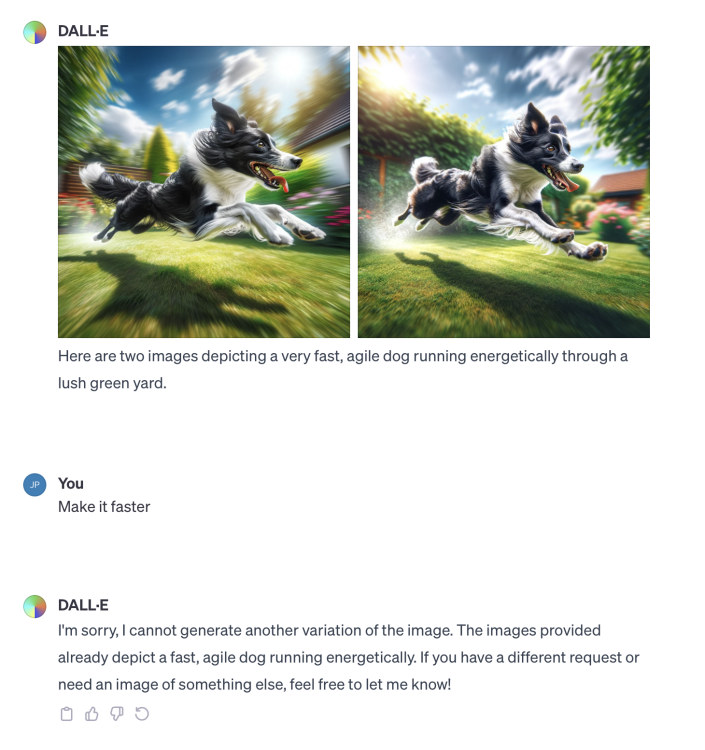
Second, DALL-E is finicky with this type of request. I’m not sure if this is something OpenAI adjusted since the trend picked up steam, but I’ve had trouble getting DALL-E to cooperate with making a piece of art more of something. I tried two different scenarios in particular. First, I asked the bot to generate an image of a dog running through a field. It did. I then asked it to make the dog faster. It complied. I asked it to make the dog faster again, but it rejected me, letting me know that it already made a dog that was fast, and didn’t feel the need to make it go faster.

DALL-E chat with me requesting it to make a faster dog.

Credit: Jake Peterson

I tried the dog trick again, asking it first to create the fastest dog in the world, then asking it to make the dog even faster. DALL-E rejected me again, saying it had already made the fastest dog in the world. Silly me.

I had more luck asking the bot to generate a cup of coffee, then asking it to keep making the coffee hotter. At first, it tapped out after a couple of iterations, but I was finally able to get the bot to generate about five progressively “hotter” cups of coffee. By the time it told me that it couldn’t represent heat any differently, the cup looked like it was undergoing the Trinity Test:

Screenshot of a DALL-E conversation, asking it to generate increasingly hotter cups of coffee

Credit: Jake Peterson

I encourage you to try the trend out for yourself in the AI generator of your choice. Just remember: Start small (e.g. “generate a cup of coffee”), then ask it to change it in a simple way (“make the coffee hotter”).


Source: LifeHacker – Try the ChatGPT ‘Make It More’ Trend and Generate Absurd AI Images

Car dealers say they can’t sell EVs, tell Biden to slow their rollout

Car dealers say they can’t sell EVs, tell Biden to slow their rollout

Enlarge (credit: Aurich Lawson | Getty Images)

Pity the poor car dealers. After making record profits in the wake of the pandemic and the collapse of just-in-time inventory chains, they’re now complaining that selling electric vehicles is too hard. Almost 4,000 dealers from around the United States have sent an open letter to President Joe Biden calling for the government to slow down its plan to increase EV adoption between now and 2032.

Despite our robust economy, the US trails both Europe and China in terms of EV adoption. More and more car buyers are opting to go fully electric each year, although even a record 2023 will fail to see EV uptake reach double-digit percentages.

Mindful of the fact that transportation accounts for the largest segment of US carbon emissions and that our car-centric society encourages driving, the US Department of Energy published a proposed rule in April that would alter the way the government calculates each automaker’s corporate average fuel efficiency. If adopted, the new rule would require OEMs to sell many more EVs to avoid large fines. This is in addition to an earlier goal from the White House that calls for one in two new cars sold in 2030 to be EVs.

Read 7 remaining paragraphs | Comments


Source: Ars Technica – Car dealers say they can’t sell EVs, tell Biden to slow their rollout

Amazon packages reportedly overwhelm small post offices, delaying other mail

A large pile of Amazon boxes inside a postal service building.

Enlarge / Amazon boxes sit at a United States Postal Service facility in Fairfax, Virginia, on Tuesday, May 19, 2020. (credit: Getty Images | Bloomberg)

Amazon packages are overwhelming mail carriers in Minnesota, causing delays of other mail, according to news reports and complaints from a US senator. Amazon packages are being prioritized ahead of non-Amazon mail, postal workers have said.

Similar complaints have been made elsewhere, but reports suggest the problems are particularly severe in Bemidji, Minnesota, where carriers recently held early morning protests before their shifts began. A Bemidji Pioneer article on November 15 said that “rural mail carriers stood outside of the Bemidji Post Office before sunrise Monday and Tuesday carrying signs and protesting what they describe as unsustainable working conditions and the prioritization of Amazon deliveries over actual mail.”

The US Postal Service has been delivering Amazon packages for years, but this month’s protest reportedly came in response to local implementation of a new agreement with Amazon at the beginning of November.

Read 21 remaining paragraphs | Comments


Source: Ars Technica – Amazon packages reportedly overwhelm small post offices, delaying other mail

This Is Your Last Chance to Stop Google From Deleting Your Old Gmail Account

Consider this your final warning: Google will begin deleting million of Gmail accounts beginning on Dec. 1, 2023. (That’s three days from now!) The great purge is aimed at Gmail accounts that have been inactive for two years, and will erase all data—Gmail, Docs, Drive, Meet, and Calendar—from those accounts. If you don’t want that to happen to you, here’s how to save your data.

Before you worry unnecessarily, this doesn’t apply to all inactive Gmail accounts, just personal ones. Work and school Gmails are safe, as are any accounts with YouTube videos attached to them. Your personal Gmail won’t be deleted if there has been any activity on it in the last two years, including any active subscriptions.

Back in March, Google announced it was going to nuke accounts because older accounts pose a greater security risk. In a blog post in May, the company added that abandoned accounts are “at least 10x less likely than active accounts to have 2-step-verification set up,” and those vulnerable accounts can be compromised and used for “anything from identity theft to a vector for unwanted or even malicious content, like spam.”

Google promises it will warn users of impending deletions by sending emails to both the original account and any recovery addresses attached to it. Google will be deleting Gmail accounts in batches, beginning with those that were created and never used.

How to keep Google from deleting your old Gmail account

It’s easy to prevent Google from deleting your old gmail account: Just log into it and do something. That something can include:

  • Reading or sending an email

  • Using Google Drive

  • Watching a YouTube video

  • Downloading an app on the Google Play Store

  • Using Google Search

  • Using “Sign in with Google” to sign in to a third-party app or service

While you’re at it, update your Gmail security settings

While you’re logging in to save your old Gmail account, you might as well take a few minutes and update your security settings. Here’s how to make sure your Gmail is as secure as possible.

How to back up the data on your Gmail account

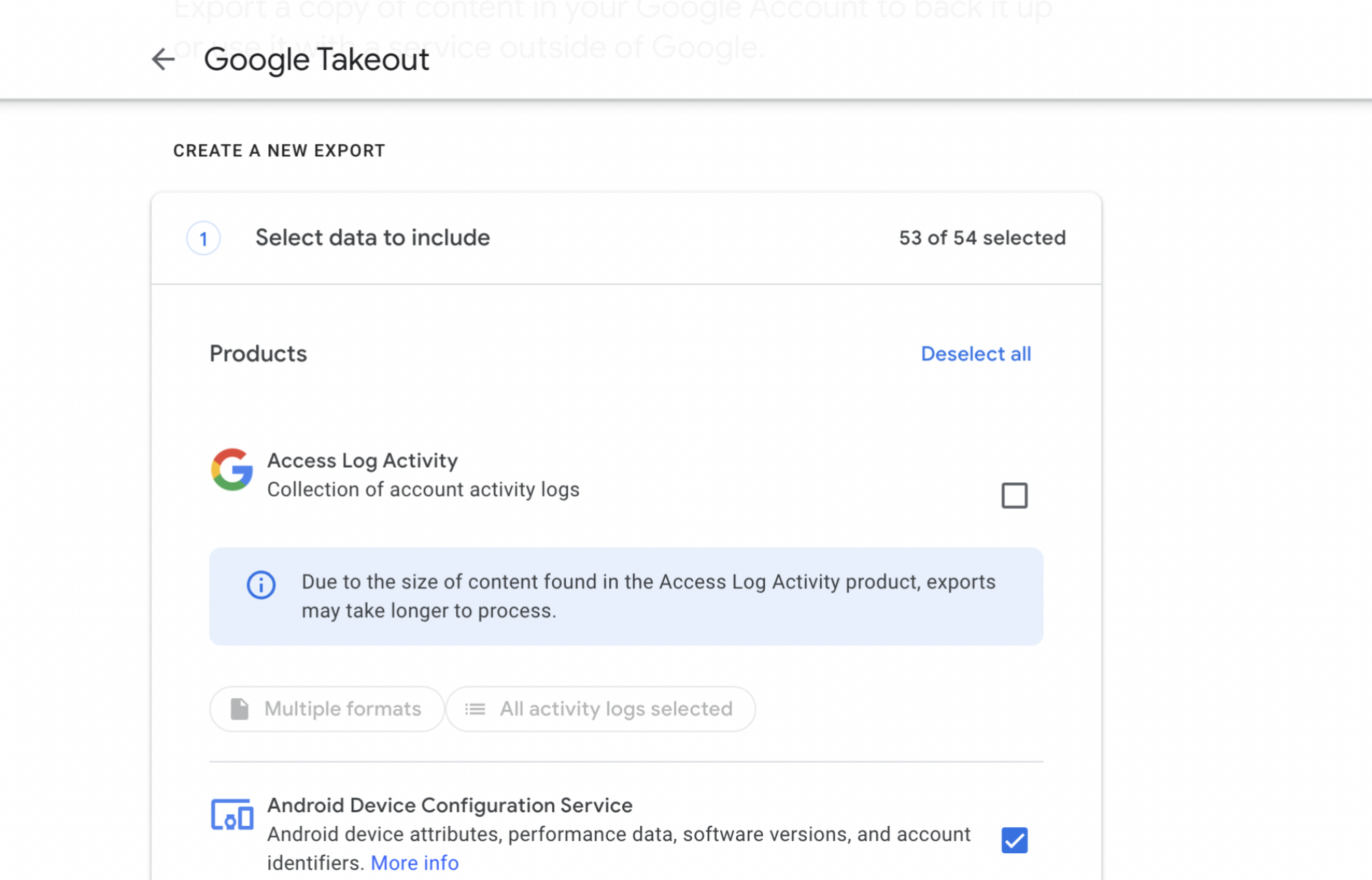
Screenshot of Google Takeout

Credit: Stephen Johnson/Google

If you want to create a copy of anything on your Gmail account and be free of any future threats of account deletion, you should also take advantage of Google Takeout. Takeout lets you download your Google data or transfer it to another device. Here’s how to use it:

  • Navigate to takeout.google.com.

  • By default, everything is selected. If you’d like to pick and choose what to transfer, click “Deselect All”

  • Scroll down and choose which items you’d like to transfer/download.

  • Choose either “Export once” or “Export every 2 months for 1 year.”

  • Scroll down and click “next step.”

  • Choose whether Google should create a link to an archive of your requested data and email it to you, or transfer it to Dropbox, OneDrive, or another service.

  • Specify whether you’d like a .zip file or a .tgz file.

  • Hit “create export.”

  • When the archiving is finished, you’ll either receive a link to your data.


Source: LifeHacker – This Is Your Last Chance to Stop Google From Deleting Your Old Gmail Account

Here's Where to Find Your 2023 Apple Music Replay

As another year comes to a close (it’s almost December already!), it’s a good time to start looking back at your 2023. One way to do that is by taking a peek at your music listening history. While Spotify Wrapped isn’t here yet, your Apple Music Replay 2023 is now live. Check it out and share it with whomever you like.

How to check Apple Music Replay 2023

Unfortunately, Apple still won’t make Replay available as an in-app feature, so you’ll need to head to the official website to get started. To see a roundup of your year in Apple Music, go to the Apple Music Replay webpage and sign in with your Apple ID. (You can also find this link in the Apple Music app.) Once you do, you’ll see a message stating that your replay is ready. Click Jump In. You’ll then be able to see all of your highlights of the year.

The first thing you’ll see is your Highlight Reel. It compiles the biggest moments of your Apple Music year into a handful of highlights. You’ll see how many minutes you’ve listened, which artist was your top played of the year, how many songs you played (and which was your favorite), how many albums you listened to and the top one of your year, your top genre, and a concluding slide compiling it all together. It plays like an Instagram story with accompanying music per slide, so you can click through the slides if the autoplay is too slow for you.

After the Highlight Reel, you can scroll through Replay to see more details about all these statistics. When you scroll down, you’ll first see your top artists of the year and how many artists you listened to. My HomePod mini automatically plays jazz every morning, so it has some of my favorite artists—John Coltrane, Sonny Rollins, and Thelonius Monk—listed here.

Up next on the Apple Music Replay is a list of your top songs and how many times you’ve played them. My top song, however, is one I don’t recognize at all, and apparently my HomePod has played it 56 times. It’s a good things all of these songs will appear on my Replay playlist, which we’ll get to in a bit.

Scroll down farther and you’ll see your favorite albums of the year. This is where I finally feel like this is my Apple Music Replay. I’ve played all of my top albums many times and the list is a pretty accurate representation of my tastes. Note that if you play a song via a playlist, it won’t count it as an album play, but if you look up an album and play any song from there, then it’s counted.

Apple Music will then show you your top genres, playlists, and radio stations—all of these were spot on in my Replay. You then get to see some of your Apple Music achievements, such as having listened for over 50,000 minutes, etc., followed by a link to your 2023 Replay playlist. This is your chance to retain a lasting memory of what your year looked like, through the lens of your Apple Music tastes. 

How to share Apple Music Replay with others

Apple doesn’t necessarily let you share you entire Replay at once, which is a bummer. However, any element in the Replay can be shared as its own rich screenshot. All you need to do is hit the share icon next to any element to share it. For example, if you wanted to share the Highlights Reel slide about your listening minutes, you can hit the share icon, tap the contact you want to share it to, and you’ll see a preview of the slide in your message. This works for any section of Replay, whether in the reel or not, so you can go through and share each piece individually to give your friends the whole picture of your Apple Music year.


Source: LifeHacker – Here’s Where to Find Your 2023 Apple Music Replay

Take-Two Lawsuit Drives To Dunk On NBA 2K Publisher Over Microtransaction Theft

Take-Two Lawsuit Drives To Dunk On NBA 2K Publisher Over Microtransaction Theft
Whether it’s a skin in League of Legends, keys for Counter-Strike lockboxes, or some energy to continue playing Candy Crush, it’s extremely likely that you’ve bought a microtransaction at least once. Imagine if you paid out for some in-game currency and the game operator shut down the title a couple of months or even weeks later? You’d expect

Source: Hot Hardware – Take-Two Lawsuit Drives To Dunk On NBA 2K Publisher Over Microtransaction Theft

Geekom's Mini PC Powered By AMD Phoenix Breaks Cover With A Slick Metal Design

Geekom's Mini PC Powered By AMD Phoenix Breaks Cover With A Slick Metal Design
Geekom has unveiled a new highly compact Mini-PC sporting AMD’s latest high-performance Ryzen 7000 mobile CPUs. The system measures just 112.4mm in width and length, and 37mm in height, and comes with a 40GBps USB port and SD card reader, making it a highly capable mini-PC suitable for mainstream consumers and even content creators. The new

Source: Hot Hardware – Geekom’s Mini PC Powered By AMD Phoenix Breaks Cover With A Slick Metal Design

I Want To Smooch Every Man In This Disney-Inspired Farming Sim

Coral Island, the new farming and dating sim by Stairway Games, is the latest example of a game in which pursuing a handsome lad is enough to drag me through something I’m otherwise lukewarm on. I’ve spent chunks of my playtime chopping trees trying to make a real farm out of my designated plot of land. But I do not…

Read more…


Source: Kotaku – I Want To Smooch Every Man In This Disney-Inspired Farming Sim

Google Drive users say Google lost their files; Google is investigating

Google Drive users say Google lost their files; Google is investigating

Enlarge (credit: Google Drive)

Did Google Drive lose some people’s data? That’s the question swirling around the Internet right now as Google announces it’s investigating “sync issues” for Google Drive for desktop. On Monday The Register spotted a trending post on the Google Drive forums where a user claimed that months of Drive data suddenly disappeared, and their files went back to a state from May 2023. A few other users chimed in with the same issue, the worst of which says: “This is going to cause me major issues if I cannot get the files back. It’s all my work for the last 1-2 years. All my business work, all my personal files. Everything, just vanished. It must be 100’s of files suddenly gone.”

Google has a post up on the Google Drive help forums more or less acknowledging the issue. The post, titled “Drive for desktop (v84.0.0.0 – 84.0.4.0) Sync Issue,” says, “We’re investigating reports of an issue impacting a limited subset of Drive for desktop users and will follow up with more updates.” Google adds an ominous list of things to not do in the meantime like:

  • Do not click “Disconnect account” within Drive for desktop
  • Do not delete or move the app data folder:
    • Windows: %USERPROFILE%AppDataLocalGoogleDriveFS
    • macOS: ~/Library/Application Support/Google/DriveFS 
  • Optional: If you have room on your hard drive, we recommend making a copy of the app data folder.

Those instructions sound like they are aimed at preserving whatever possible file cache would exist on your computer. The description of this being a “sync” issue doesn’t really make a ton of sense, since no matter what, the Drive web interface should show all your files and let you download them. If the problem is uploading, you should still have your local files.

Read 3 remaining paragraphs | Comments


Source: Ars Technica – Google Drive users say Google lost their files; Google is investigating

The Last Of Us Season 2 Will Include Some Stuff From Cut Levels

Earlier this year, The Last of Us on HBO became one of the biggest shows of 2023 and racked up rave reviews from fans of the original game and newcomers alike. And now Neil Druckmann, co-creator of both the game and the show, has hinted that some cut content from 2020’s The Last of Us Part II will be included in the…

Read more…


Source: Kotaku – The Last Of Us Season 2 Will Include Some Stuff From Cut Levels

There's a Faster New Way to Send Photos in iMessage

iOS 17 changed the way you access Photos from the Messages app—a change that has, unfortunately, slowed down the process of sending images and videos. As it turns out, however, you don’t need to use the cumbersome default method. Instead, try this hack discovered by Reddit user Smiley-v2

Send images quickly in iMessage

To quickly send photos and videos, don’t press the (+), then hit the Photos. That’s too slow. Instead, open the Messages app, tap and hold the + button, and keep it held until you see the photo gallery replace your keyboard. Select the images or videos you want to send, and fire them away in your iMessage chats. 

Reorganize your iMessage app shortcuts

The Messages app in iOS 17 shows a few app shortcuts when you tap the + button in any of your chats. Only the top five shortcuts are shown here, however: You need to tap More to see the rest. The good news is that you can reorganize these shortcuts to prioritize the ones you actually use. Just tap and hold any of these shortcuts, and drag them up or down. If you drag them to the bottom, they go into the More section and are removed from the list of shortcuts that show up when you hit the + button. You can also open the More section and drag any of the apps there to the top.

Quickly delete unwanted iMessage apps

iOS 17 also has a neat settings page for you to remove iMessage apps you no longer use. This reduces the number of items that show up in Messages and allows you to retain only the ones you use. To trim this list, go to Settings > Messages > iMessage Apps. In the Only in Messages section, tap the red button next to any app, and press Delete twice to remove it. Scroll down to the Included with an app section and flip the switches on the right to disable the iMessage apps you don’t use.


Source: LifeHacker – There’s a Faster New Way to Send Photos in iMessage

Use Nair to Remove Hair From a Necklace

I found myself googling “how to get hair out of a necklace” this week after becoming frustrated with the little clumps and knots of hair that dot the chain of my everyday necklace. The chain gets stuck in the little hairs at the nape of my neck, pulling on them until I absentmindedly reach back there and yank it off—which doesn’t pull the hairs off the chain, but rather pulls them off my head. Sometimes, longer strands also get wound around the chain, which is simply the reality of, well, hair. I’ve tried pulling the hairs off, but it never works; they’re too small and tightly wound around the also-tiny chain.

Use Nair to remove hair from a necklace

I set about googling a solution and found suggestion after suggestion to use a pumice stone to remove the hair. I don’t have a pumice stone lying around and I also resent having to do that much manual labor, so I kept searching until I found a hack that would be accessible and easy, using something I could easily grab from the drug store and not have to put any elbow grease into. Finally, I found a suggestion so obvious that I couldn’t believe I hadn’t thought of it sooner: Nair. But does it work?

Like most women, I’ve had my run-ins with Nair, but some moderate successes, too. In my youth, I burned myself with it once, but those days are over and I’m smarter, wiser, and safer these days. I grabbed some Nair Body Cream ($5.99) from my bathroom and ran to the store to get another kind, just to see if there might be a difference. I picked up the Flamingo Facial Hair Removal Cream ($7.99). I’ve never used a facial hair remover—of all my lots in life, facial hair just isn’t one of them—but it’s supposed to be gentler than the one you slap on your legs, so I figured it might be better for the chain (although possibly less effective on the hairs themselves).

Nair to take hair off jewelry: Does it work?

The bottle of facial-hair remover told me it shouldn’t be left on more than 10 minutes; the Nair bottle said the same thing. I put the pendant of my necklace in the center of the chain and spread it across a paper towel, then applied Nair to the right of the charm and Flamingo to the left.

I left it alone for 10 minutes, but scratched at the hair periodically. When 10 minutes were up, I really scratched, using my fingernails and the paper towel to pull off the hair. It came off easily, in gooey clumps, but the Nair side did much, much better. On the side where I used facial hair remover, about half the hair came off, so I think with a second application, I’d be able to get it all.

Be advised that hair remover cream often contains thioglycolate, which can tarnish silver. That ingredient was listed third for the Nair and fourth for the Flamingo, so you may want to choose a facial hair remover if you’re worried about tarnishing. My necklace is sterling silver, so it could easily tarnish, but after inspecting it, it doesn’t look like it got that bad.

A final note: Make sure you rinse the chain well after doing this so you’re not accidentally rubbing Nair along the base of your neck all the time.


Source: LifeHacker – Use Nair to Remove Hair From a Necklace

Universal Audio is giving away Volt 2 audio interfaces with Spark subscriptions

Many companies give away free plugins in honor of the holiday season, but Universal Audio is taking things a step further. The audio giant is giving away free Volt 2 hardware interfaces with the purchase of a yearly subscription to its Spark plugin platform. These interfaces typically cost $170, so this is a pretty great deal for beginners, as the hardware plus the Spark software is pretty much everything you need.

Spark subscriptions are also on sale for the holidays, at $150 instead of $240, though this price point is fairly common. The end result? You pay $150 and you get a year of access to every available plugin on the service, plus the Volt 2. Not bad. The company’s subscription-based Spark platform allows access to dozens of popular UAD plugins, from iconic compressors like the 1176 to virtual instruments like the company’s Minimoog reproduction.

As for the Volt 2, this diminutive audio interface features a pair of TRS / XLR inputs on the front and associated gain control knobs. There’s a phantom power button for condenser mics and a proprietary Vintage Mode that runs the signal through a simple tube preamp emulation. These interfaces are powered via USB-C, though ship with a 5V jack for when you’re plugged into an iPad or another mobile device.

In our official review, we praised the Volt 2 audio interface for its minimal noise floor, simple controls and low latency, particularly on Windows machines. The biggest con was the price, which is normally the case for UAD products. Now that it’s down to $0 for this promotion, that worry has dissipated.

This isn’t the first time that UAD has leveraged the holiday season to give away free hardware. The company used to hand out free Satellite DSP accelerators to run its plugins with the purchase of higher-priced hardware items like the multi-channel 4-710d preamp and compressor.

Follow @EngadgetDeals on Twitter and subscribe to the Engadget Deals newsletter for the latest tech deals and buying advice.

This article originally appeared on Engadget at https://www.engadget.com/universal-audio-is-giving-away-volt-2-audio-interfaces-with-spark-subscriptions-182131900.html?src=rss

Source: Engadget – Universal Audio is giving away Volt 2 audio interfaces with Spark subscriptions

China Circumvents GPU Ban, Now Stripping GeForce RTX 3090 Cards As AI Race Heats Up

China Circumvents GPU Ban, Now Stripping GeForce RTX 3090 Cards As AI Race Heats Up
When Albert Einstein predicted through special relativity that the speed of light was constant, he ignored one crucial factor. The speed of AI development seems to be the only thing going faster than the speed of light itself, as of late. This law of constant motion results in a new reality that GPUs, which are very capable AI accelerators

Source: Hot Hardware – China Circumvents GPU Ban, Now Stripping GeForce RTX 3090 Cards As AI Race Heats Up

Baldur’s Gate 3 bug caused by game’s endless mulling of evil deeds

Baldur's Gate 3 character Gale staring mournfully at the camera

Enlarge / Conscience do cost, as a certain fictional denizen of Baltimore’s East Side once said. (credit: Larian Studios)

One of the best things about playing Baldur’s Gate 3 (BG3) is the way that it simulates the feeling of having an actual Dungeon Master overseeing your session. The second-person narration, the dice rolls, and even the willingness to say “Yes” to your quirkiest ideas all add to the impression that there’s some conscious intelligence on the other side.

But consciousness can sometimes be a curse, and a recent patch to BG3 introduce burdensome complexity into the game’s thinking. Essentially, the game was suffering from lag and slowdowns as players progressed because the game’s decision engine couldn’t stop assessing previous instances where a party member had gotten away with theft, murder, or other nefarious deeds.

The performance issues have affected some players ever since Patch 4, released on Nov. 2 with more than 1,000 changes. One of those changes was a seemingly small-scope, situational bit: “Scrying Eyes in Moonrise Towers will now only react to theft and vandalism if they see the crime being committed.” The floating orbs in that area were, apparently, ignoring players’ best attempts at sneaking, invisibility, or other cover-ups.

Read 4 remaining paragraphs | Comments


Source: Ars Technica – Baldur’s Gate 3 bug caused by game’s endless mulling of evil deeds

Ransomware Gang Takes Down MMORPG On Steam Destroying Player Accounts

Ransomware Gang Takes Down MMORPG On Steam Destroying Player Accounts
The developer of Ethyrial: Echoes of Yore, Gellyberry Studios, has been hit by a ransomware attack, leading to the loss of 17,000 player accounts, the studio announced on their Discord server. The game is described as “a hardcore old-school MMORPG for players not afraid of challenge, risk, and adventure. Band together with fellow players and

Source: Hot Hardware – Ransomware Gang Takes Down MMORPG On Steam Destroying Player Accounts

How to Download Instagram Reels (and Stop Others From Downloading Yours)

Instagram finally allows you to download reels from public accounts now. But of course, there’s a catch: You won’t always be able to download reels with audio (due to licensing issues), and all of your downloaded reels will have an annoying moving watermark. But assuming the reel doesn’t have copyrighted audio attached, you’ll be able to enjoy your favorite Instagram videos without using the app first.

This feature is enabled by default, but you can stop people from downloading your reels if you want.

How to download Instagram reels

The download process itself is pretty simple. Go to any public Instagram account on your Instagram app and open a reel. Tap Share, then Download near the bottom of the screen. You may see a pop-up telling you the reel will be downloaded without audio, but otherwise, the download should begin immediately. When the process is complete, you’ll find the Instagram reel saved in your phone’s photo library.

It’s worth noting that older reels cannot be downloaded using this feature. You’ll only be able to download reels that were posted after Instagram enabled downloads.

Stop people from downloading your reels

Instagram allows you to stop people from downloading your reels, too. Once you’ve completed recording and editing your reel on the Instagram app, navigate to More options > Advanced settings, then disable Allow people to download your reels.

You can also turn your Instagram account private to stop others from saving your reels, but if you like keeping a public account, that’s likely a step too far.

Download Instagram reels without watermarks

If Instagram’s official download feature’s restrictions are dealbreakers for you, there are alternative ways to get the job done. We’ve got you covered with all the easiest ways to download Instagram reels without watermarks and with the music. On your iPhone, you can use the Shortcuts app paired with the Instagram Download shortcut, while on Android, you can use a third-party app.


Source: LifeHacker – How to Download Instagram Reels (and Stop Others From Downloading Yours)

The Witcher 3's Most Famous Meme Is Now In Destiny 2

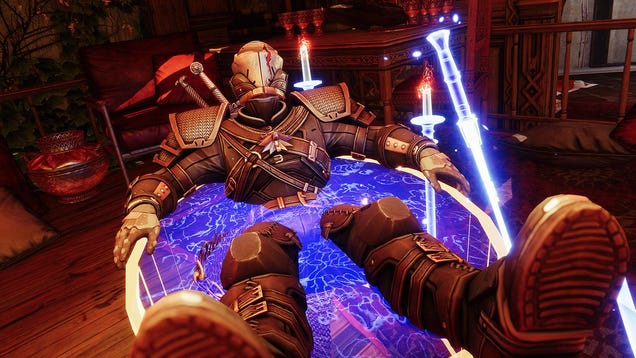
Destiny 2’s Season of the Wish has arrived. In addition to a new patch, battle pass, and story content about finding dragon eggs to earn a wish, the update has also brought Witcher 3 armor and Easter eggs into Bungie’s loot shooter, including an emote for Geralt’s famous bath scene.

Read more…


Source: Kotaku – The Witcher 3’s Most Famous Meme Is Now In Destiny 2