Wikipedia will not comply with any age checks required under the Online Safety Bill, its foundation says. From a report: Rebecca MacKinnon, of the Wikimedia Foundation, which supports the website, says it would “violate our commitment to collect minimal data about readers and contributors.” A senior figure in Wikimedia UK fears the site could be blocked as a result. But the government says only services posing the highest risk to children will need age verification. Wikipedia has millions of articles in hundreds of languages, written and edited entirely by thousands of volunteers around the world.
It is the eighth most-visited site in the UK, according to data from analytics company SimilarWeb. The Online Safety Bill, currently before Parliament, places duties on tech firms to protect users from harmful or illegal content and is expected to come fully into force some time in 2024. Neil Brown, a solicitor specialising in internet and telecoms law, says that under the bill, services likely to be accessed by children must have “proportionate systems and processes” designed to prevent them from encountering harmful content. That could include age verification.
Having seemingly exhausted 40 years worth of games starring a certain heroic plumber, Lego is now looking to draw inspiration from other adjacent Nintendo franchises for new sets to add to the Lego Super Mario collection, starting with Donkey Kong and all of his Kong kin.
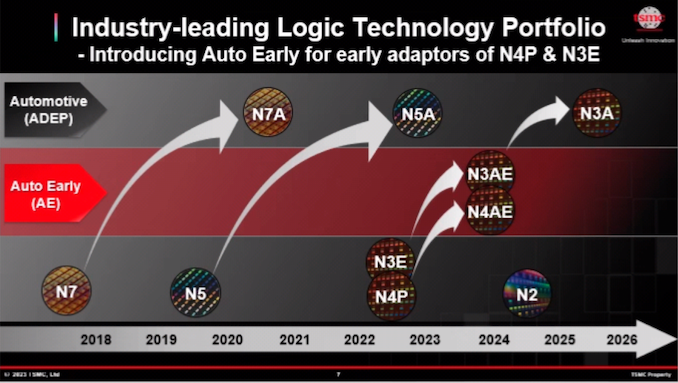
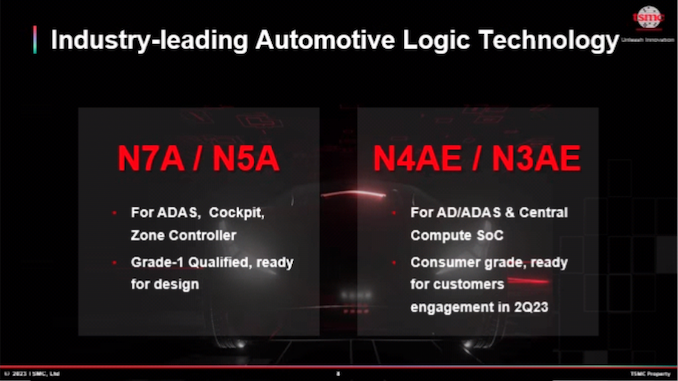
As the final set of announcements from this week’s North American Technology Symposium, TSMC closed out their fab roadmap updates with some fresh news on their automotive-centric processes. For their automotive customers, TSMC is gearing up to deliver a pair of new specialized process nodes for the market, N4AE and N3AE, which are aimed at delivering early versions of TSMC’s forthcoming automotive-grade process nodes for use by clients who need to get an early start with design and/or production.
The automotive industry is notoriously conservative when it comes to chip manufacturing, as automotive products are expected to meet a much higher bar in terms of safety and reliability. For good reason, the automotive industry is traditionally a generation or so behind in terms of the silicon lithography process nodes used, as they wait for them to become truly proven processes. With that said, the trend towards software-defined vehicles is driving a quick ramp-up in demand for more performant processors – and more chips altogether – which has been spurring the industry to close the gap a bit and transition to newer nodes sooner.
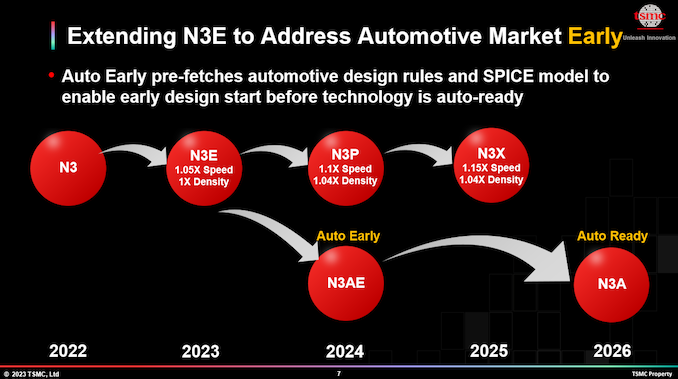
In order to meet that expected demand, this week TSMC announced its Automotive Early (AE) fabrication processes, which are aimed at helping automakers start earlier on the design of new chips for leading-edge nodes. Essentially stepping-stone nodes along the path to developing a full, automotive-grade N3A process, TSMC’s N3AE (3nm class) and N4AE (4nm class) technologies are slated to offer consumer-grade reliability and will come with automotive-specific process design kits (PDKs) based on N3E and N4P respectively.
For customers who need a traditional, high-reliability automotive-grade chip, N3AE can be used by chip designers later this year to start developing automotive grade products that, in turn, will be fabbed on the fully-qualified automotive-grade N3A production node in a couple of years. Alternatively, customers who want to bring chips to the market sooner to drive less critical systems in a car – such as digital cockpits and other non-critical systems – can plan to go into production with N4AE. Production on an Automotive Early node means forgoing some of the benefits of a fully qualified automotive process node – essentially building chips that are closer to consumer grade – but it will allow chip designers to get their chips in production on cutting-edge nodes upwards of a year sooner.
Traditionally, automakers and developers of automotive-grade electronics demanded their chips to be qualified for quality and reliability both in terms of functional safety (classified by ASIL system) and physical robustness (classified by AEC-Q100 standards). Improving the physical robustness of chips requires process technologies and design rules that have been specifically developed/tweaked meet those higher requirements, and typically it takes foundries and their automotive chip partners two or three years to develop an automotive-grade process technology. For example, TSMC has been making chips for smartphones and PCs on its N5 (5nm-class) fabrication process since 2020, but automotive grade N5A is only finally set to be ready this year.
At the same time, not all systems inside a vehicle need to comply with the most stringent integrity and reliability standards. For example, chips powering infotainment, digital cockpit, and advanced driver assistance systems (ADAS) do not have to be AEC-Q100 Grade 1 (handle temperatures between -40°C and +150°C). These systems also tend to require a lot of processing horsepower, leading to them significantly benefiting from leading-edge nodes.
TSMC said that its N3AE (3nm Auto Early) will be launched in 2023 and will provide automotive process design kits (PDKs) based on N3E. It will enable customers to initiate designs on the 3nm node specifically for automotive applications, ultimately leading to the N3A process, which is expected to be fully qualified for automotive use in 2025.
Meanwhile, customers in more of a hurry will also have N4AE as an option. N4AE is based on TSMC’s existing N4P process technology, and customers will be able to start risk production on N4AE a year sooner, in 2024. Presumably, given its heritage from N4P, N4AE would also be a good candidate for incorporating IP already designed for N4P (which there is already piles of), further reducing the time to market.
TSMC did not touch upon which of its customers are interested in using its N3AE and N4AE process technologies for their automotive SoCs, but there are several usual suspects that have been offering high-performance feature-rich automotive SoCs for years.
Email is old. In its earliest incarnation, email dates back to 1965—a time when computers were the size of elephants and only a small number of nerds had regular access to them—and the kind of email we recognize today dates back to the early 1970s.
For some reason, I have a Moon Pie-branded tin that is absolutely stuffed with old wine corks I’ve collected over the years. I don’t know what I’m saving them for; all they do is remind me that I’ve spent a fair amount of money of mid-priced wine, yet I cannot let them go. (It might be tempting to think that I’m…
Twitter became less useful on Thursday after New York City’s transit operator said it would stop tweeting about service outages because “the reliability of the platform can no longer be guaranteed.” It’s the latest in a growing number of government agencies ditching Elon Musk’s social network.
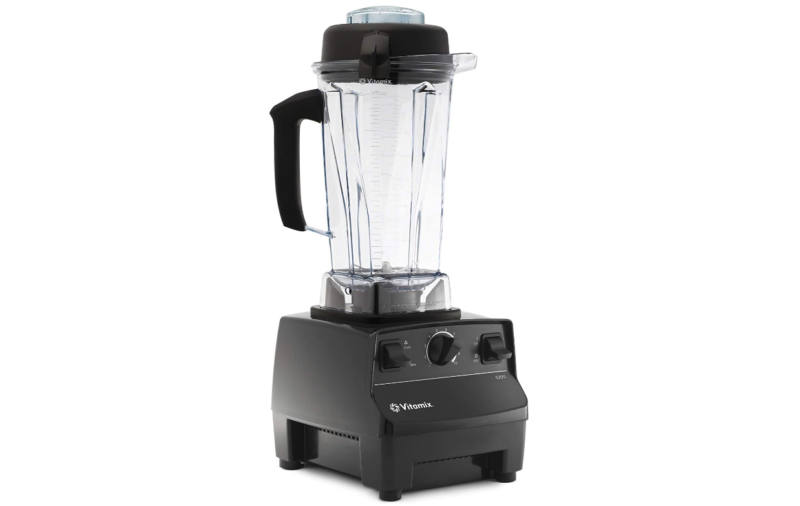
Enlarge/ The Vitamix 5200 is widely considered the best blender on the market.
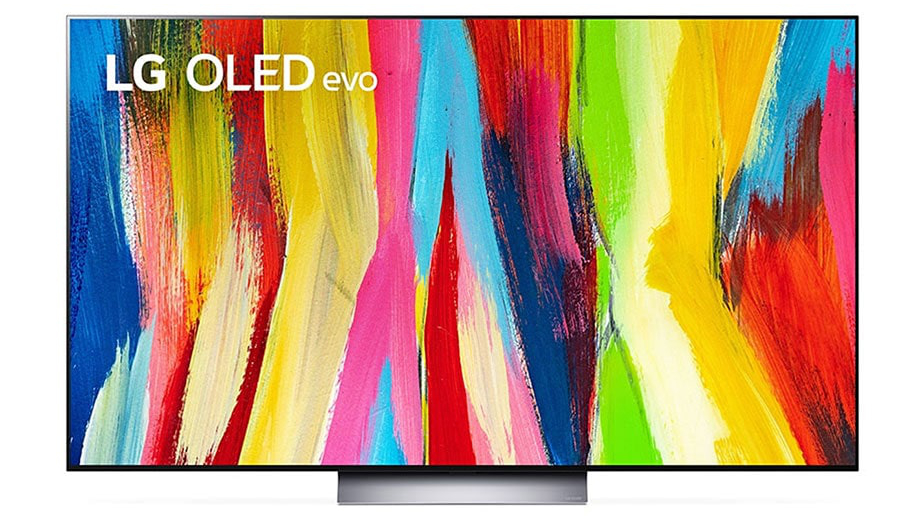
Today’s best deals include a range of Roomba robot vacuums, internal SSDs from Samsung and SK Hynix, one of the best blenders money can buy, and LG’s well-reviewed 48-inch C2 4K TV. LG’s C series TVs have been widely praised for delivering inky blacks, excellent contrast, wide viewing angles, smooth motion, and gaming-friendly features.
Compared to the C1, the 2022 C2 improves peak brightness (specifically in the 55-inch size, not the 42- and 48-inch models) and supports 48Gbps of bandwidth (up from 40Gbps) to the four HDMI 2.1 ports. The C2 also natively supports Dolby Atmos and Dolby Vision, as well as a variable refresh rate for smoother gameplay. The 48-inch C2 is currently just $20 shy of the lowest price we’ve ever tracked, about $650 off MSRP and at least $100 off the typical street price.
LG C2 (2022) 48-inch 4K OLED TV for $849 ($1,499) at Amazon, Walmart (price in cart)
Samsung’s 980 Pro internal SSDs have been a crowd favorite for building high-performance gaming PCs or upgrading the storage on a PS5. Samsung rates its write speeds at up to 7,000MB, and it comes with or without a heatsink. It has been on sale for the past few weeks at lower prices than usual. So, although it’s not currently at the lowest price we’ve tracked, it can still be a nice pick up. If you do nab one, make sure to update the device’s firmware to the latest version. Samsung’s 980 and 990 SSDs have recently been suffering some reliability and data loss issues, but Samsung says it has addressed the problems via updated firmware.
The big day is here. We’re of course talking about the release of Star Wars Jedi: Survivor, the relatively short-awaited sequel to Star Wars Jedi: Fallen Order. Unfortunately, it’s release on PC is hampered by performance issues, which thus far have earned it a ‘Mostly Negative’ rating on Steam. However, EA has promised weeks of patches. In
I don’t know why we’re seeing a flood of Android tablets this season. It could be because the operating system can finally handle the scale of all sorts of screen sizes. Or it’s the long-awaited arrival of the Pixel Tablet that’s made every other manufacturer feel like it needs to follow in its still-unreleased…
Windows Terminal is billed as “a modern, fast, efficient, powerful, and productive terminal application for users of command-line tools and shells like Command Prompt, PowerShell, and WSL”.
The OnePlus Pad. It’s got a keyboard. [credit:
Ron Amadeo ]
Android tablets are supposed to be making a comeback, and along with Google’s push for new software, which started in 2021, we’re also getting waves of new Android tablet hardware. One of the most anticipated is probably the OnePlus Pad, a mid-range tablet that, at $479, looks squarely aimed at the entry-level iPad. OnePlus was probably hoping the headline-grabbing 144 Hz LCD at this price would convert some buyers, but it’s not possible to get a good 144 Hz display at this price point. The OnePlus Pad’s display is smeary and ugly, and it made me want to put it down about as soon as I picked it up.
The display looks fine if nothing is moving, but the second you have to scroll anywhere, everything turns to mush. Text on the display is a streaky, blurry mess in motion to the point where it’s pretty hard to read smaller text sizes until scrolling stops. Smaller text gets noticeably thinner and lighter colored during scrolling, usually going from a solid black to a shimmery gray. It feels like either the display has a weird subpixel layout that doesn’t look good in motion, or OnePlus’ software uses a strange anti-alias effect during scrolling that looks different from a stationary picture.
Whatever happened here, the point is that scrolling a page with text on the OnePlus Pad is difficult to read and often physically uncomfortable to view. As one of the primary uses of a tablet, this is a total deal-breaker and completely negates whatever else is going on here. Apple’s scale usually gives it better component prices. Considering that the base model $449 iPad still ships with a smaller (10.9-inch), lower resolution (2360×1640) display, the OnePlus cranking the spec sheet up to a 144 Hz, 11.61-inch, 2800×2000 panel seems to have involved completely throwing image quality out the window. Big displays are expensive, and I don’t think this display stat line works at this price right now.
I really thought we were done with Android tablets. Google itself hasn’t released one in years, though that’ll change soon with the forthcoming Pixel Tablet. Samsung has hit on a high-end formula that works pretty well, Amazon’s cheap Fire tablets technically run Android… and that’s basically it. Plenty of manufacturers have tried, but for various reasons Android tablets have never caught on.
Despite that market reality, OnePlus is taking its first shot at this market with the $479 OnePlus Pad. As the price hints, OnePlus isn’t going right after high-end tablets like Samsung’s Galaxy S8 lineup or Apple’s iPad Air or Pro. Instead, this tablet reminds me more of Apple’s 10th-generation iPad, in style, substance and price. And the fact that OnePlus is also making a keyboard folio and a stylus shows they’re serious about making a tablet built for more than just watching movies or browsing the web. But while OnePlus made a lovely piece of hardware, Android’s large-screen limitations continue to hamper the overall experience.
Hardware
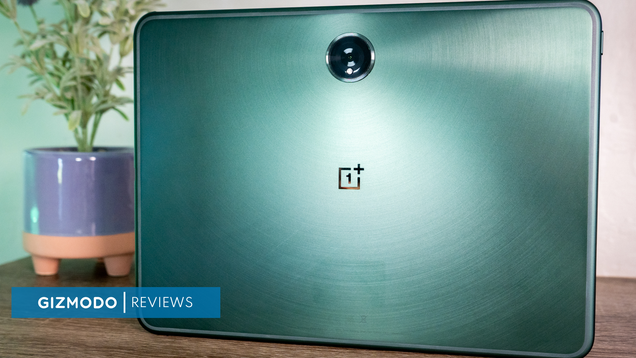
The OnePlus Pad makes a great first impression. That starts with its striking metallic green color and subtle rounded brushing of the metal that surrounds the centered camera bump on the tablet’s back. I’m a little surprised that OnePlus isn’t offering the Pad in a more generic color like black or silver, but the green makes it stand out a bit without being something most people will object to.
Despite having a relatively large, 11.6-inch display, it’s light and easy to hold with one hand. That’s due in part to the tiny 6.7mm bezel surrounding the display. That’s slightly thinner than the one on my 11-inch iPad Pro and noticeably thinner than the one on the current Air or 10th-generation iPad. OnePlus used a rather unusual screen ratio here, 7:5, but I definitely prefer that over the 16:9 ratio so common on other devices. Movies and shows will have more noticeable black bars, but everything else benefits from more vertical screen real estate.
Photo by Nathan Ingraham / Engadget
Besides the screen, there’s nothing else of note on the front of the Pad aside from the landscape-oriented 8-megapixel camera for video chat. On the sides, you’ll notice the power button and two volume buttons, a USB-C port and four speakers. As with most successful tablet designs, it’s a screen-first device that is light and easy to hold, which is probably the most important thing.
There’s a lot to like about the OnePlus Tab’s screen besides just the size. OnePlus says it’s a Dolby Vision panel with HDR, and its 2,800 x 2,000 resolution works out to 296 pixels per inch. Even though it’s an LCD, lacking the extreme contrast ratios you’ll find on OLED or mini-LED panels, it’s still an extremely bright and vibrant display, whether you’re looking through photos, watching a movie or playing games. It also has a 144Hz refresh rate, though most apps max out at 120Hz. Still, that’s better than any iPad in this price range.
The four-speaker system is also much better than I expected, given the Tab’s svelte profile. It can get surprisingly loud, pumping out enough volume for watching movies on your own or with a friend. But more importantly than just the level, the sound is clear and balanced. You’ll still likely want to opt for headphones during any more serious listening session, but these speakers definitely do the job in a pinch.
On the inside is MediaTek’s Dimensity 9000, a Cortex-X2 processor which runs at 3.05 GHz; that’s paired with 8GB of RAM and 128GB of storage.
Accessories
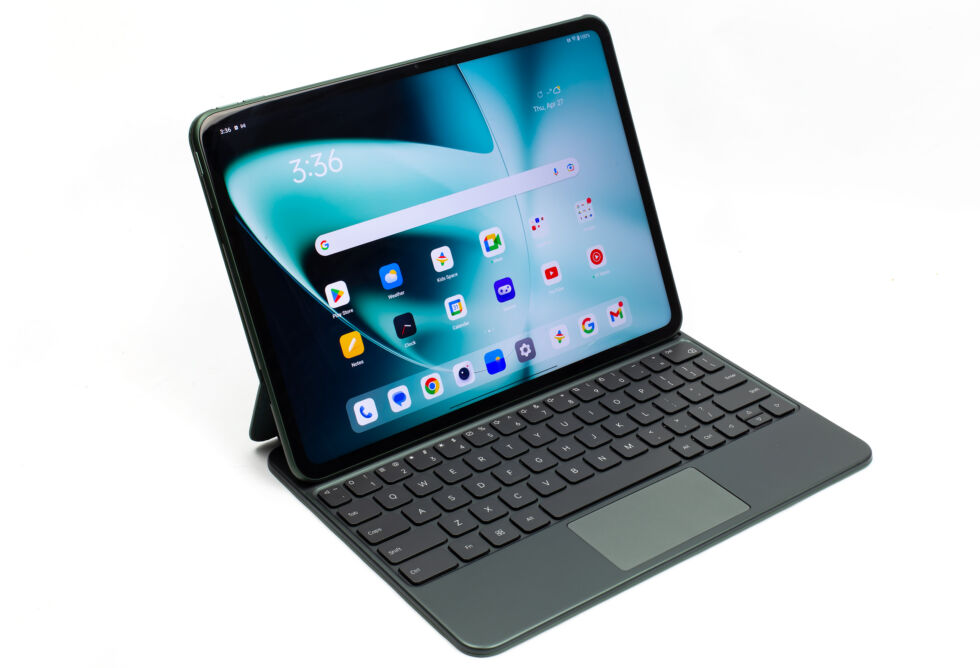
Unsurprisingly, OnePlus made a keyboard folio and stylus to go along with the Tab.Also unsurprisingly, the tablet isn’t bundled with either, so you’ll need to shell out extra cash to complete your rig. The $149 keyboard includes a trackpad and connects directly to the Pad via pogo pins, so it doesn’t need its own power or a Bluetooth connection. It’s thin and attaches easily to the Pad without adding any significant weight or bulk, which is a nice change of pace from the comfortable but heavy Magic Keyboard that goes along with my iPad Pro.
The keyboard is a bit of a mixed bag, though. On the plus side, it’s just big enough to be comfortable to type on for extended periods of time. Like the keyboard on the similarly-sized iPad Air or Pro, there’s a little learning curve, but the keys are a good size and have decent travel. The space key was a lot less reliable than I hoped, though (apologies to my editor who had to fix the numerous missing spaces in this draft). The trackpad, on the other hand, was a bit more problematic. It wasn’t great at rejecting input from the edge of my hands, so it often moved the cursor randomly around as I was typing this review. It was incredibly frustrating and almost made me give up on it entirely. I eventually managed to hold my hands to minimize the mistaken input, but it still happened often enough to be maddening.
Photo by Nathan Ingraham / Engadget
The trackpad itself was generally fine for moving through the OnePlus Pad’s interface, but it felt just a little slow to respond to everything I was doing, whether scrolling, swiping or clicking on things. This is a recurring theme with the whole OnePlus Pad experience, unfortunately. The trackpad itself is small, but I’m plenty comfortable with a similar-sized one on my iPad.
The last nit I’ll pick about the keyboard folio is that you can’t adjust the angle of the screen at all. The folio holds it in a fixed position, so hopefully that works for you. This isn’t dissimilar to some other keyboard folios for other tablets in this price range, so I will only complain so much, but it would still be nice if it was adjustable.
There’s also a stylus available for the Pad, the $99 OnePlus Stylo. Like the second-generation Apple Pencil, the Stylo magnetically attaches to the top of the Pad for power and convenient storage. I love this trick on the iPad, and I love it here as well. The Stylo itself is a round (aside from the flat charging edge), fairly nondescript piece of hardware that serves its purpose well.
I have zero visual arts skills, so I can’t say exactly how it compares to using an iPad and Apple Pencil for serious creative work. But, OnePlus says it has 4,096 levels of pressure and 60 degrees of tilt, which should make it a versatile instrument. And in a little testing taking notes and scribbling around in the OnePlus Notes app, I was immediately impressed at the total lack of lag. If you can find the right drawing software, the OnePlus Pad and the Stylo could make a reasonably affordable and powerful drawing kit.
Photo by Nathan Ingraham / Engadget
Software experience
As with basically every Android tablet I’ve ever used, the thing that is holding the OnePlus Pad back isn’t its hardware, but the software. The Pad runs Android 13.1 with OnePlus’ Oxygen OS on top of it. For the most part, Oxygen OS represents a minor re-skinning of the Android UI, along with a couple custom OnePlus apps as well as some handy tricks if you also use a OnePlus phone. Unfortunately, I didn’t have access to a OnePlus phone for this review, but these features are worth noting.
For starters, OnePlus has a cellular data sharing feature that lets the Pad jump onto the 5G signal from a OnePlus smartphone. It’s automatically enabled when the phone is near the Pad. Obviously, tethering another device to a smartphone signal isn’t new technology, but OnePlus is definitely trying to make it more seamless. Furthermore, OnePlus built in an “Auto Connect” feature between the Pad and a compatible phone, which means you can receive notifications, share clipboard data for instant copy and pasting, and see text messages and phone calls on the Pad. If you’re in the OnePlus ecosystem already, this is a solid reason to consider the Pad over another competing tablet.
OnePlus also did a decent job of including some apps that take advantage of the Pad’s screen – the Notes app uses multiple panes to show your list of notes as well as whatever you’re working on, or you can go into a full-screen focus mode. It also has a to-do app built in and works well with the Stylo if you want to draw or take handwritten notes. The Weather app, meanwhile, feels like a clone of what you might find on the iPad, but it’s still useful and takes advantage of a bigger screen, rather than feeling like a blown-up phone app.
Photo by Nathan Ingraham / Engadget
Naturally, Google has done a great job of making its apps work on a larger screen, as well. Chrome, Gmail, Photos, Drive, Docs, Meet and basically anything else I tried from Google felt native, which goes a long way towards making the OnePlus Pad feel useful.
The experience isn’t so great once you start using third-party apps, though. If you’ve ever read a review of an Android tablet, you’ve heard this complaint before. There just aren’t enough Android apps designed to take advantage of a bigger screen. Comparing things like Slack and Twitter to their iPad counterparts shows that the developers haven’t taken larger-screen Android devices into account. On the iPad, both apps have multiple panes which makes it much easier to get things done. On the Pad, Slack just shows any conversation you’re in at full width. Similarly, tweets stretch across the entire screen and images or video aren’t scaled down at all. Todoist, another app I use constantly, has a sidebar, but it automatically hides whenever I tap on an item, so I have to keep resummoning it.
There are also numerous apps, like Reddit and Instagram, that simply don’t run in landscape orientation at all. Even worse, some apps throw you from landscape into portrait mode. For example, HBO Max seems to work fine in landscape mode, but when I exit a movie, the screen jumps to portrait mode. There are also plenty of strange bugs throughout the system. More than once, I tried playing a video in HBO Max or the Google TV app only to have it refuse to load. This happened in both apps back-to-back and was only cleared up after rebooting the tablet. Another fun one is the notification I get every single time I open up the keyboard folio that tells me to “configure physical keyboard,” which brings up a menu with basically nothing you can actually configure.
Probably the most frustrating thing for me was simply trying to work across multiple apps. Pressing alt-tab brings up a view of recently-used apps, but the implementation is poor. If you tap alt-tab once and don’t hold anything, all it does is zoom out of the app you’re in and then drop you back. On basically every other computer I can think of, this key command brings you straight to the last app you were using. If you keep holding alt and press tab again, you’ll start cycling through your recent apps – but there’s absolutely no visual indicator to show which you have selected, so it’s useless. Swiping up on the trackpad with three fingers and holding for a second also drops you into this view, and you can then swipe around with the trackpad and click on the app you want. That’s marginally better, but not having a reliable keyboard shortcut for moving between apps is infuriating.
Just as you can on an iPad, you can split an app view and run two apps side-by-side. This generally works fine – but if you exit out to the home screen, the only way to get that dual view back is by going into the aforementioned app switching view. Tapping the app’s icon on the home screen will bring that app back up in full screen, forgetting the configuration you had before
Despite all this, the OnePlus Pad is fairly responsive, at least. Websites and apps loaded quickly, but scrolling through sites or my long list of emails felt a little bit choppy. That’s despite the screen’s high refresh rate. Similarly, games I tried (including Genshin Impact, Asphalt 9 and my go-to Alto’s Odyssey) mostly worked fine, but had occasional moments where it felt the hardware was struggling slightly. For a tablet priced under $500, the OnePlus Pad more or less met my expectations – but it’s not as smooth as even the most basic iPad.
One area where the OnePlus Pad is definitively great is on battery life. I can get about 10 hours doing my normal work routine on the device, jumping between multiple apps, playing occasional games, watching some videos and streaming music. More extensive gaming sessions will always run the battery down quicker, as will jacking up the screen brightness, but I don’t think anyone who tries this tablet will need to worry about reaching for the charger too often.
Photo by Nathan Ingraham / Engadget
Wrap-up
After using the OnePlus Pad for a few weeks, I’m left struggling with who this device is for. Die-hard Android fans are probably better served by a Samsung tablet, though people who use a OnePlus phone will appreciate the way the two devices work together. For the price, the OnePlus Pad does a fair few things well, at least. The battery is very good, the Stylo is a solid drawing tool and the screen is better than one you’ll find on a similarly-priced iPad.
But the app ecosystem for large-screen Android devices remains dire, and the experience of using Android on a tablet still does not feel fully baked. Most Android users who have a passing interest in using a tablet will likely still be better off with an iPad. They’re faster, less buggy and have a wildly better app ecosystem. And the price comparison doesn’t exactly work out well in the OnePlus Pad’s favor, either. The kit I tested cost $730, while you can get a 10th-generation iPad with its keyboard folio and pencil for $800.
If you’re absolutely not willing to consider Apple hardware, we’re just a few weeks away from Google taking the wraps off the Pixel Tablet. While that won’t solve the third-party app issue (after more than a decade, I don’t know what will), I do think it’s worth waiting to see what Google has in store before committing to new hardware. Unless, of course, you’re a die-hard OnePlus fan – but even those folks should think long and hard before pulling the trigger here.
This article originally appeared on Engadget at https://www.engadget.com/oneplus-pad-review-solid-hardware-thats-let-down-by-android-130039695.html?src=rss
I really thought we were done with Android tablets. Google itself hasn’t released one in years, though that’ll change soon with the forthcoming Pixel Tablet. Samsung has hit on a high-end formula that works pretty well, Amazon’s cheap Fire tablets technically run Android… and that’s basically it. Plenty of manufacturers have tried, but for various reasons Android tablets have never caught on.
Despite that market reality, OnePlus is taking its first shot at this market with the $479 OnePlus Pad. As the price hints, OnePlus isn’t going right after high-end tablets like Samsung’s Galaxy S8 lineup or Apple’s iPad Air or Pro. Instead, this tablet reminds me more of Apple’s 10th-generation iPad, in style, substance and price. And the fact that OnePlus is also making a keyboard folio and a stylus shows they’re serious about making a tablet built for more than just watching movies or browsing the web. But while OnePlus made a lovely piece of hardware, Android’s large-screen limitations continue to hamper the overall experience.
Hardware
The OnePlus Tab makes a great first impression. That starts with its striking metallic green color and subtle rounded brushing of the metal that surrounds the centered camera bump on the tablet’s back. I’m a little surprised that OnePlus isn’t offering the Tab in a more generic color like black or silver, but the green makes it stand out a bit without being something most people will object to.
Despite having a relatively large, 11.6-inch display, it’s light and easy to hold with one hand. That’s due in part to the tiny 6.7mm bezel surrounding the display. That’s slightly thinner than the one on my 11-inch iPad Pro and noticeably thinner than the one on the current Air or 10th-generation iPad. OnePlus used a rather unusual screen ratio here, 7:5, but I definitely prefer that over the 16:9 ratio so common on other devices. Movies and shows will have more noticeable black bars, but everything else benefits from more vertical screen real estate.
Photo by Nathan Ingraham / Engadget
Besides the screen, there’s nothing else of note on the front of the Pad aside from the landscape-oriented 8-megapixel camera for video chat. On the sides, you’ll notice the power button and two volume buttons, a USB-C port and four speakers. As with most successful tablet designs, it’s a screen-first device that is light and easy to hold, which is probably the most important thing.
There’s a lot to like about the OnePlus Tab’s screen besides just the size. OnePlus says it’s a Dolby Vision panel with HDR, and its 2,800 x 2,000 resolution works out to 296 pixels per inch. Even though it’s an LCD, lacking the extreme contrast ratios you’ll find on OLED or mini-LED panels, it’s still an extremely bright and vibrant display, whether you’re looking through photos, watching a movie or playing games. It also has a 144Hz refresh rate, though most apps max out at 120Hz. Still, that’s better than any iPad in this price range.
The four-speaker system is also much better than I expected, given the Tab’s svelte profile. It can get surprisingly loud, pumping out enough volume for watching movies on your own or with a friend. But more importantly than just the level, the sound is clear and balanced. You’ll still likely want to opt for headphones during any more serious listening session, but these speakers definitely do the job in a pinch.
On the inside is MediaTek’s Dimensity 9000, a Cortex-X2 processor which runs at 3.05 GHz; that’s paired with 8GB of RAM and 128GB of storage.
Accessories
Unsurprisingly, OnePlus made a keyboard folio and stylus to go along with the Tab.Also unsurprisingly, the tablet isn’t bundled with either, so you’ll need to shell out extra cash to complete your rig. The $149 keyboard includes a trackpad and connects directly to the Tab via pogo pins, so it doesn’t need its own power or a Bluetooth connection. It’s thin and attaches easily to the Tab without adding any significant weight or bulk, which is a nice change of pace from the comfortable but heavy Magic Keyboard that goes along with my iPad Pro.
The keyboard is a bit of a mixed bag, though. On the plus side, it’s just big enough to be comfortable to type on for extended periods of time. Like the keyboard on the similarly-sized iPad Air or Pro, there’s a little learning curve, but the keys are a good size and have decent travel. The space key was a lot less reliable than I hoped, though (apologies to my editor who had to fix the numerous missing spaces in this draft). The trackpad, on the other hand, was a bit more problematic. It wasn’t great at rejecting input from the edge of my hands, so it often moved the cursor randomly around as I was typing this review. It was incredibly frustrating and almost made me give up on it entirely. I eventually managed to hold my hands to minimize the mistaken input, but it still happened often enough to be maddening.
Photo by Nathan Ingraham / Engadget
The trackpad itself was generally fine for moving through the OnePlus Pad’s interface, but it felt just a little slow to respond to everything I was doing, whether scrolling, swiping or clicking on things. This is a recurring theme with the whole OnePlus Pad experience, unfortunately. The trackpad itself is small, but I’m plenty comfortable with a similar-sized one on my iPad.
The last nit I’ll pick about the keyboard folio is that you can’t adjust the angle of the screen at all. The folio holds it in a fixed position, so hopefully that works for you. This isn’t dissimilar to some other keyboard folios for other tablets in this price range, so I will only complain so much, but it would still be nice if it was adjustable.
There’s also a stylus available for the Pad, the $99 OnePlus Stylo. Like the second-generation Apple Pencil, the Stylo magnetically attaches to the top of the Pad for power and convenient storage. I love this trick on the iPad, and I love it here as well. The Stylo itself is a round (aside from the flat charging edge), fairly nondescript piece of hardware that serves its purpose well.
I have zero visual arts skills, so I can’t say exactly how it compares to using an iPad and Apple Pencil for serious creative work. But, OnePlus says it has 4,096 levels of pressure and 60 degrees of tilt, which should make it a versatile instrument. And in a little testing taking notes and scribbling around in the OnePlus Notes app, I was immediately impressed at the total lack of lag. If you can find the right drawing software, the OnePlus Pad and the Stylo could make a reasonably affordable and powerful drawing kit.
Photo by Nathan Ingraham / Engadget
Software experience
As with basically every Android tablet I’ve ever used, the thing that is holding the OnePlus Pad back isn’t its hardware, but the software. The Pad runs Android 13.1 with OnePlus’ Oxygen OS on top of it. For the most part, Oxygen OS represents a minor re-skinning of the Android UI, along with a couple custom OnePlus apps as well as some handy tricks if you also use a OnePlus phone. Unfortunately, I didn’t have access to a OnePlus phone for this review, but these features are worth noting.
For starters, OnePlus has a cellular data sharing feature that lets the Pad jump onto the 5G signal from a OnePlus smartphone. It’s automatically enabled when the phone is near the Pad. Obviously, tethering another device to a smartphone signal isn’t new technology, but OnePlus is definitely trying to make it more seamless. Furthermore, OnePlus built in an “Auto Connect” feature between the Pad and a compatible phone, which means you can receive notifications, share clipboard data for instant copy and pasting, and see text messages and phone calls on the Pad. If you’re in the OnePlus ecosystem already, this is a solid reason to consider the Pad over another competing tablet.
OnePlus also did a decent job of including some apps that take advantage of the Pad’s screen – the Notes app uses multiple panes to show your list of notes as well as whatever you’re working on, or you can go into a full-screen focus mode. It also has a to-do app built in and works well with the Stylo if you want to draw or take handwritten notes. The Weather app, meanwhile, feels like a clone of what you might find on the iPad, but it’s still useful and takes advantage of a bigger screen, rather than feeling like a blown-up phone app.
Photo by Nathan Ingraham / Engadget
Naturally, Google has done a great job of making its apps work on a larger screen, as well. Chrome, Gmail, Photos, Drive, Docs, Meet and basically anything else I tried from Google felt native, which goes a long way towards making the OnePlus Pad feel useful.
The experience isn’t so great once you start using third-party apps, though. If you’ve ever read a review of an Android tablet, you’ve heard this complaint before. There just aren’t enough Android apps designed to take advantage of a bigger screen. Comparing things like Slack and Twitter to their iPad counterparts shows that the developers haven’t taken larger-screen Android devices into account. On the iPad, both apps have multiple panes which makes it much easier to get things done. On the Pad, Slack just shows any conversation you’re in at full width. Similarly, tweets stretch across the entire screen and images or video aren’t scaled down at all. Todoist, another app I use constantly, has a sidebar, but it automatically hides whenever I tap on an item, so I have to keep resummoning it.
There are also numerous apps, like Reddit and Instagram, that simply don’t run in landscape orientation at all. Even worse, some apps throw you from landscape into portrait mode. For example, HBO Max seems to work fine in landscape mode, but when I exit a movie, the screen jumps to portrait mode. There are also plenty of strange bugs throughout the system. More than once, I tried playing a video in HBO Max or the Google TV app only to have it refuse to load. This happened in both apps back-to-back and was only cleared up after rebooting the tablet. Another fun one is the notification I get every single time I open up the keyboard folio that tells me to “configure physical keyboard,” which brings up a menu with basically nothing you can actually configure.
Probably the most frustrating thing for me was simply trying to work across multiple apps. Pressing alt-tab brings up a view of recently-used apps, but the implementation is poor. If you tap alt-tab once and don’t hold anything, all it does is zoom out of the app you’re in and then drop you back. On basically every other computer I can think of, this key command brings you straight to the last app you were using. If you keep holding alt and press tab again, you’ll start cycling through your recent apps – but there’s absolutely no visual indicator to show which you have selected, so it’s useless. Swiping up on the trackpad with three fingers and holding for a second also drops you into this view, and you can then swipe around with the trackpad and click on the app you want. That’s marginally better, but not having a reliable keyboard shortcut for moving between apps is infuriating.
Just as you can on an iPad, you can split an app view and run two apps side-by-side. This generally works fine – but if you exit out to the home screen, the only way to get that dual view back is by going into the aforementioned app switching view. Tapping the app’s icon on the home screen will bring that app back up in full screen, forgetting the configuration you had before
Despite all this, the OnePlus Pad is fairly responsive, at least. Websites and apps loaded quickly, but scrolling through sites or my long list of emails felt a little bit choppy. That’s despite the screen’s high refresh rate. Similarly, games I tried (including Genshin Impact, Asphalt 9 and my go-to Alto’s Odyssey) mostly worked fine, but had occasional moments where it felt the hardware was struggling slightly. For a tablet priced under $500, the OnePlus Pad more or less met my expectations – but it’s not as smooth as even the most basic iPad.
One area where the OnePlus Pad is definitively great is on battery life. I can get about 10 hours doing my normal work routine on the device, jumping between multiple apps, playing occasional games, watching some videos and streaming music. More extensive gaming sessions will always run the battery down quicker, as will jacking up the screen brightness, but I don’t think anyone who tries this tablet will need to worry about reaching for the charger too often.
Photo by Nathan Ingraham / Engadget
Wrap-up
After using the OnePlus Pad for a few weeks, I’m left struggling with who this device is for. Die-hard Android fans are probably better served by a Samsung tablet, though people who use a OnePlus phone will appreciate the way the two devices work together. For the price, the OnePlus Pad does a fair few things well, at least. The battery is very good, the Stylo is a solid drawing tool and the screen is better than one you’ll find on a similarly-priced iPad.
But the app ecosystem for large-screen Android devices remains dire, and the experience of using Android on a tablet still does not feel fully baked. Most Android users who have a passing interest in using a tablet will likely still be better off with an iPad. They’re faster, less buggy and have a wildly better app ecosystem. And the price comparison doesn’t exactly work out well in the OnePlus Pad’s favor, either. The kit I tested cost $730, while you can get a 10th-generation iPad with its keyboard folio and pencil for $800.
If you’re absolutely not willing to consider Apple hardware, we’re just a few weeks away from Google taking the wraps off the Pixel Tablet. While that won’t solve the third-party app issue (after more than a decade, I don’t know what will), I do think it’s worth waiting to see what Google has in store before committing to new hardware. Unless, of course, you’re a die-hard OnePlus fan – but even those folks should think long and hard before pulling the trigger here.
This article originally appeared on Engadget at https://www.engadget.com/oneplus-tab-review-solid-hardware-thats-let-down-by-android-130039871.html?src=rss
An anonymous reader quotes a report from The Hacker News: Google on Wednesday said it obtained a temporary court order in the U.S. to disrupt the distribution of a Windows-based information-stealing malware called CryptBot and “decelerate” its growth. The tech giant’s Mike Trinh and Pierre-Marc Bureau said the efforts are part of steps it takes to “not only hold criminal operators of malware accountable, but also those who profit from its distribution.” CryptBot is estimated to have infected over 670,000 computers in 2022 with the goal of stealing sensitive data such as authentication credentials, social media account logins, and cryptocurrency wallets from users of Google Chrome. The harvested data is then exfiltrated to the threat actors, who then sell the data to other attackers for use in data breach campaigns. CryptBot was first discovered in the wild in December 2019.
The malware has been traditionally delivered via maliciously modified versions of legitimate and popular software packages such as Google Earth Pro and Google Chrome that are hosted on fake websites. […] The major distributors of CryptBot, per Google, are suspected to be operating a “worldwide criminal enterprise” based out of Pakistan. Google said it intends to use the court order, granted by a federal judge in the Southern District of New York, to “take down current and future domains that are tied to the distribution of CryptBot,” thereby kneecapping the spread of new infections.
We didn’t need the cinematic corporate bipoic Air to remind us of the indelible mark Michael Jordan has made not just on basketball, but on the shoe game. The birth of the Air Jordans in 1985 meant big things for the company, but it also blew the starting whistle on an entire culture built around sneakers. Kicks…
This week, Devindra chats with Sam Rutherford about his recent experiences with ASUS’s ROG Ally, a powerful new Steam Deck competitor, and Nintendo’s long-awaited The Legend of Zelda: Tears of the Kingdom. The ROG Ally sounds like one of the best portable gaming systems yet, though we’re still waiting for pricing details. And Zelda was apparently a blast to play, but of course it was. Also, Devindra and Podcast Producer Ben Ellman dive into the latest news, including the FAA grounding SpaceX’s Starship and Grimes’ decision to let people run free with her AI voice.
Listen below or subscribe on your podcast app of choice. If you’ve got suggestions or topics you’d like covered on the show, be sure to email us or drop a note in the comments! And be sure to check out our other podcasts, the Morning After and Engadget News!
UK regulator blocks Microsoft’s acquisition of Activision/Blizzard – 34:04
Indiana Jones and the Dial of Destiny features 25 mins of de-aged Harrison Ford – 39:54
This week in AI: Snapchat users revolt against AI assistant, Grimes offers 50/50 credit to songs with her AI voice – 43:19
Working on – 50:21
Pop culture picks – 52:07
Livestream
Credits Hosts: Devindra Hardawar and Sam Rutherford Producer: Ben Ellman Music: Dale North and Terrence O’Brien Livestream producers: Julio Barrientos Graphic artist: Luke Brooks and Joel Chokkattu
This article originally appeared on Engadget at https://www.engadget.com/engadget-podcast-asus-rog-ally-zelda-tears-of-the-kingdom-123035085.html?src=rss
The concept of an omelette is enticing and simple: Wrap tasty stuff in an egg blanket. In practice, however, it can be so frustratingly hard to get “right” that even celebrity chef judges will quiz other professionals on if they can make a perfect French-style omelette or not. No one’s day (or career) should ride on…
Russia has formally agreed to remain aboard the International Space Station (ISS) until 2028, NASA has announced. Yuri Borisov, the Director General of Roscosmos, previously said that the country was pulling out of the ISS after 2024 so it can focus on building its own space station. “After 2024” is pretty vague, though, and even Roscosmos official Sergei Krikalev said it could mean 2025, 2028 or 2030. Now, we have a more solid idea of until when Russia intends to remain a partner. To note, the United States, Japan, Canada and the participating countries of the ESA (European Space Agency) have previously agreed to keep the ISS running until 2030.
After the United States and other countries imposed sanctions on Russia following the invasion of Ukraine, former Roscosmos director Dmitry Rogozin spoke up and threatened to stop working with his agency’s western counterparts. “I believe that the restoration of normal relations between the partners at the International Space Station and other projects is possible only with full and unconditional removal of illegal sanctions,” Rogozin said at the time.
While Roscosmos has now agreed to continue cooperating with its fellow ISS partners, the increasing tension between Russia and the US even before the invasion of Ukraine began prompted NASA to prepare for the possibility of the former leaving the space station. NASA and the White House reportedly drew plans to pull astronauts out of the station if Russia leaves abruptly, as well as to keep the ISS running without the Russian thrusters keeping the flying lab in orbit.
Private space companies had reportedly been called in to help out, and a previous report said Boeing already formed a team of engineers to figure out how to control the ISS without Russia’s thrusters. It’s unclear if the remaining ISS partners will use any of those contingencies after 2028 and if a private space corp will step in to keep the space station running. It’s worth noting, however, that NASA and other space agencies are already preparing to leave Low Earth Orbit to explore the moon.
This article originally appeared on Engadget at https://www.engadget.com/russia-will-continue-supporting-the-international-space-station-until-2028-121505126.html?src=rss