One of the most visible anti-mask and anti-vax demonstrator in Japan has been a cosplayer named Rengoku Kazuaki. Dressed as Kyojuro Rengoku from Demon Slayer, he stood out with his spiky wig, flowing cape, and protest signs.
The official YouTube client for android is full of ads and other tracking scripts. If you use it, then you will be forced to watch tens of intrusive ads from video to video, and your privacy will be under attack because of Google’s tracking activities.
Ten years ago, Raspberry Pi started shipping its first computers in order to inspire young people to reimagine the role of technology in their lives. What started with a low-cost, high-performance computer has grown into a movement of millions of people of all ages and backgrounds.
Today, Raspberry Pi is the UK’s best-selling computer, and the Raspberry Pi Foundation is one of the world’s leading educational non-profits. Raspberry Pi computers make technology accessible to people and businesses all over the world. They are used everywhere from homes and schools to factories, offices, and shops.
Visit the history of Raspberry Pi
To help celebrate this 10-year milestone, we’ve partnered with The National Museum of Computing, located at the historic Bletchley Park, to open a new temporary exhibit dedicated to telling the story of the Raspberry Pi computer, the Raspberry Pi Foundation, and the global community of innovators, learners, and educators we’re a part of.
In the exhibit, you’ll be able to get hands-on with Raspberry Pi computers, hear the story of how Raspberry Pi came to be, and see a few of the many ways that Raspberry Pi has made an impact on the world.
Join us for the exhibition opening
We know that not everyone will be able to experience the exhibit in person, and so we’ll live-stream the grand opening this Saturday 5 March 2022 at 11:15am GMT. Keep an eye on our social media channels for the link to watch the video feed. If you’re able to make it to the National Museum of Computing on Saturday, tickets are available to purchase.
This week the governors of Colorado, New Mexico, Utah and Wyoming announced plans for a “hydrogen hub,” reports the Associated Press.
The states hope to use $8 billion in recently approved federal infrastructure funding to make hydrogen — the most abundant element in the universe — “more available and useful as clean-burning fuel for cars, trucks and trains.”
Hydrogen can be derived from water using an electric current and when burned emits only water vapor as a byproduct. The fuel could theoretically reduce greenhouse emissions and air pollution, depending on how it’s obtained. As with electric vehicles, however, hydrogen’s potential has been limited by infrastructure. Lack of fueling stations limits the market for hydrogen-fueled vehicles. Few hydrogen-fueled vehicles limits investment in producing and moving hydrogen….
Critics point out that as it’s now produced, hydrogen isn’t green, carbon-free or unlimited. Currently nearly all hydrogen commercially produced in the U.S. comes not from water but natural gas, according to the U.S. Energy Information Administration. While advocates say using fossil fuels to produce hydrogen now can help to develop a clean industry later, environmentalists are skeptical. “It’s essentially a push for expanded oil and gas development. More oil and gas development is completely at odds with the need to confront the climate crisis and drastically reduce our dependence on fossil fuels,” Jeremy Nichols with the Santa Fe, New Mexico-based environmental group WildEarth Guardians said by email.
Colorado, New Mexico and Wyoming rank seventh, eighth and ninth, respectively, for U.S. onshore gas production. Utah also is significant gas-producing state, according to the Energy Information Administration.
Microsoft’s Xbox Series S is a bestseller for a reason: it’s a solid next-generation console that is almost always in stock and often enjoys the odd discount between retailers. If you’ve been waiting for one such price drop, Woot has come in clutch with one of the best deals we’ve seen to date. Today, the Xbox Series S is on sale for just $250, which is $50 or almost 17 percent off the regular $300 price.
In our review, we noted that the Xbox Series S was a “formidable next-gen console wrapped up in an adorable package,” while also confirming that it was “incredible value.” That’s all because of its compact design (at least compared to the sizeable Sony PS5), improved game performance and its impressive backward-compatible library.
The console can handle games at up to 1440p and hit variable refresh rates up to 120fps, though not many games can do both at the same time. It can’t handle 4K like the Xbox Series X or PS5, however.
Although it does lack storage, the Xbox Series S is one of the best console deals without a discount, so if you’re keen on adding to your console collection, the $250 price tag may prove tempting. You’d better act quickly if you want one, though, as the Woot deal will disappear within by the end of today or when stock sells out, whichever comes first.
All products recommended by Engadget are selected by our editorial team, independent of our parent company. Some of our stories include affiliate links. If you buy something through one of these links, we may earn an affiliate commission.
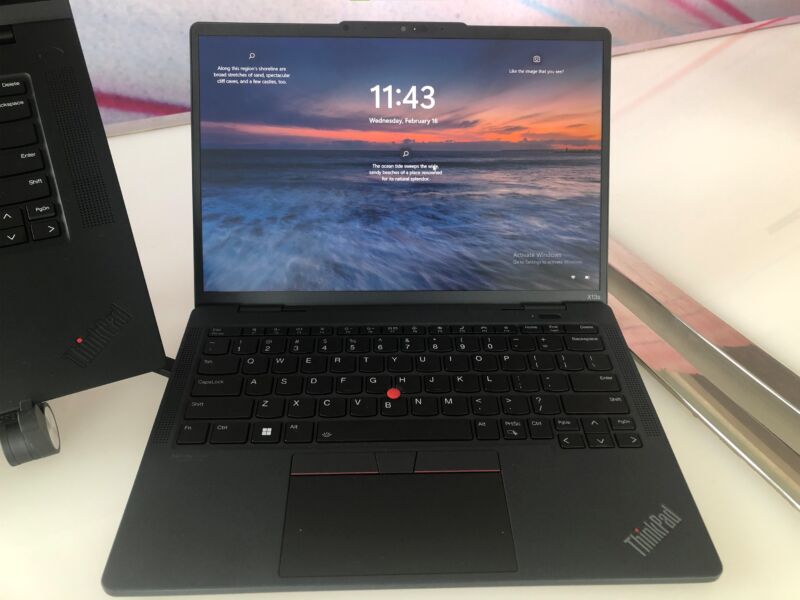
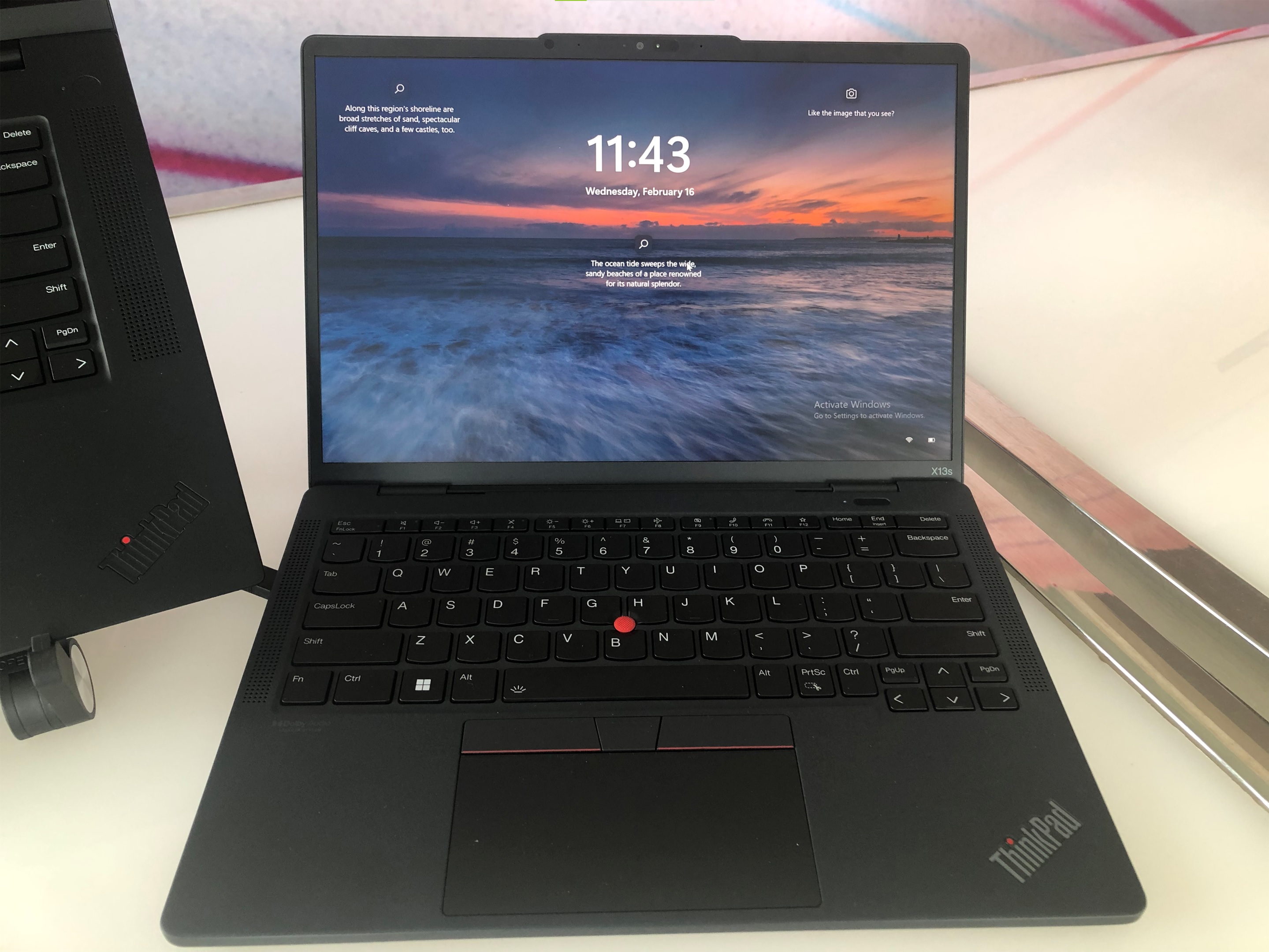
Unlike Apple’s M1 MacBooks, ARM-based Windows on Snapdragon laptops haven’t enjoyed quite the same level of success or popularity. But Lenovo is hoping to change that – at least for enterprise customers – with the new ThinkPad X13s.
The ThinkPad X13s’ secret weapon is its Snapdragon 8cx Gen 3 chip, which Lenovo says is the first time Qualcomm’s newest laptop processor has been featured in a commercial device. By leveraging improved energy efficiency and a low-power 400-nit 13.3-inch display, Lenovo says the ThinkPad X13s can last up to 28 hours on a single charge. That said, I’m going to want to confirm this myself, because I’ve definitely been burned by shorter-than-expected longevity on previous Windows on Snapdragon machines.
Sam Rutherford/Engadget
In keeping with the ThinkPad X13s’ focus on mobile productivity, the laptop also features a fanless design while weighing just 2.5 pounds, with top and bottom panels made from 90 percent recycled magnesium. And to make sure you have a speedy internet connection wherever you go, the laptop also supports 5G (both sub-6GHz and mmWave) and WiFi 6E. Other specs include up to 32GB of RAM, up to 1TB of PCIe storage, and two USB-C 3.2 Gen 2 ports (but no Thunderbolt 4, cause that’s an Intel thing).
Inside, the laptop comes pre-installed with Windows 11 Pro, with Lenovo relying on a number of Qualcomm’s collaboration features like AI-based auto-framing for its 5MP webcam and intelligent noise suppression that works with the laptop’s triple microphone setup. There’s even a human presence detection feature that can automatically dim or turn off the laptop’s display when it detects that you have looked away to protect sensitive data from prying eyes.
Sam Rutherford/Engadget
Now I know I’m not exactly Lenovo’s target audience for the ThinkPad X13s, and I probably wouldn’t buy a Windows on Snapdragon laptop for myself since they often struggle to run games (even casual titles). But even so, during my brief hands-on time with the device, I found that there’s a lot to like. Its design is quite sleek even by ThinkPad standards, while its magnesium chassis adds durability without a significant increase in weight. And of course, there’s that claimed 28 hours of battery which should last for days of real-world use (assuming the laptop can live up to Lenovo’s figures).
The only issue I noticed during my brief time with the notebook was a touchpad that felt softer and spongier than I’d like. Though since it’s a ThinkPad, you can always use Lenovo’s iconic TrackPoint nub instead. Thankfully, the X13s’ keyboard felt crisp with plenty of key travel, so there shouldn’t be much of a learning curve for ThinkPad diehards.
Sam Rutherford/Engadget
For a low power display, the laptop’s screen is admirably bright, and the auto-framing camera worked like a charm, even if it was a touch too aggressive zooming in and out when I moved my head back and forth. You even get built-in IR cameras for facial recognition and Windows Hello face login. And thanks to the App Assure program, enterprise customers can get help directly from Microsoft to ensure all of a company’s corporate software runs smoothly on the X13s’ Arm-based processor.
So despite a bumpy reception for previous Windows on Snapdragon machines, between the Snapdragon 8cx Gen 3 and Lenovo’s willingness to put that chip in a ThinkPad for the first time, we could be looking at a new era for ARM-based Windows notebooks.
The ThinkPad X13s is slated to go on sale sometime in May starting at $1,100.
Catch up on all of the news from MWC 2022 right here!
Lenovo isn’t just devoting its energy to high-end laptops at Mobile World Congress 2022. The company has revamped its IdeaPad Gaming lineup with systems aimed at relative newcomers to portable PC gameplay. The AMD-powered IdeaPad Gaming 3 and Intel-based IdeaPad Gaming 3i both sport 15- and 16-inch screens (including a 1600p 165Hz display option on 16-inch models) and a “cleaner” overall design with better port access and improved cooling to keep them quiet. You can also expect the latest CPU options, including Ryzen 6000 H-series chips in the Gaming 3 and up to 12th-gen Core for the Gaming 3i.
Your video choices vary depending on your processor. IdeaPad Gaming 3 buyers will have to make do with up to GeForce RTX 3050 Ti graphics, while Gaming 3i buyers can max out their laptops with either an RTX 3060 or Intel’s Arc. You do get to use speedier DDR5 memory in the AMD-based machines where you ‘settle’ for DDR4 in the Intel variants, however. Both PC families are otherwise very similar, with support for up to 32GB of RAM and 1TB of SSD storage. You’ll have to be content with one USB-C 3.2 port, but there are two USB-A 3.2 ports as well as HDMI 2.0 and Ethernet.
Legion M600s Qi gaming mouse
Lenovo
The 15-inch models debut first, with the IdeaPad Gaming 3i arriving in April with a $990 starting price. The similarly-sized Gaming 3 surfaces in May for $930. Wait until June and you can buy the 16-inch versions of either computer, beginning at $1,140 for the Gaming 3 and $1,490 for the Gaming 3i. Regardless of the PC you own, there’s a $100 Legion M600s Qi mouse (shown at middle) due in September that promises a 19,000DPI sensor, “lossless” Bluetooth and USB connections, RGB lighting and its namesake Qi wireless charging.
And yes, there are some comparatively ordinary IdeaPads for those less interested in gaming than creativity. The IdeaPad Flex 5 and Flex 5i (below) convertible laptops respectively use AMD Ryzen 5000 U-series and Intel 12th-gen Core U-series processors while coming in 14- and 16-inch variants. They’re thinner and lighter than their predecessors with weight starting at 3.3lbs. You can only splurge for an 1800p OLED screen with the 14-inch Flex 5i, but everyone has the option of upgrading to 1400p (14-inch models) or 1600p (16-inch) LCDs if the default 1200p display isn’t enough.
Both updated 2-in-1 laptops are decidedly more affordable than their gaming-oriented siblings. The Flex 5i is the most affordable of the two, and will arrive in May starting at $620 for a 14-inch version and $900 for the 16-inch edition. Opt for the Flex 5 and you’ll find a higher $690 starting price when it ships in May, but a low $750 entry point for its 16-inch counterpart.
IdeaPad Flex 5i (14-inch)
Lenovo
Catch up on all of the news from MWC 2022 right here!
Lenovo’s ThinkPad X13s will be the first ThinkPad to use an Arm-based processor, Qualcomm’s Snapdragon 8cx Gen 3, Lenovo announced on Friday.
ThinkPads represent Lenovo’s most powerful laptop lineup, and they’re marketed to enterprises and power users. It’s interesting to see one of the machines foregoing the new Intel 12th-generation and AMD Ryzen 6000 laptop chips to put Windows 11 Pro on Arm. We briefly saw the ThinkPad X13s in person, and it had a lighter, cheaper plastic feel to it but also sported a textured matte finish.
The 8cx Gen 3 is the first 5 nm Windows PC SoC. It has four Arm Cortex-X1 cores at up to 3 GHz and four Cortex-A78 cores at 2.4 GHz. Qualcomm’s chip enables the ThinkPad X13s’ fanless design and longer claimed battery life. The upcoming ThinkPad is 0.53 inches thick and 2.35 pounds and comes with a 49.5 WHr battery that Lenovo claims can last up to 28 hours, based on local video playback.
Lenovo is coming to Mobile World Congress 2022 with a small flood of IdeaPad tablets, including one of the relatively few Windows tablets on the market. The IdeaPad Duet 5i (shown above) mates a 12.3-inch Surface-style detachable tablet with Windows 11 and Intel’s 12th-gen Core ultraportable chips. It won’t have the 13-inch 120Hz display of the Surface Pro 8, but the size and refresh rate might be worth the tradeoff if you’re more interested in CPU power or portability.
The Duet 5i supports up to a Core i7-1255U chip, 16GB of LPDDR4x memory (sorry, no DDR5 here) and 1TB of SSD storage. The two USB-C 3.2 ports, 11 hours of claimed battery life and 5MP front and rear cameras won’t stand out, but you might appreciate the color-accurate 1600p screen, optional pen input and a relatively light 1.8lbs body.
The Windows tablet won’t ship until July, but it will start at $750 with a keyboard cover included. Even with baseline specs (a Pentium 8505, 4GB of RAM and 128GB of storage), it may represent a better value than some Windows slates.
IdeaPad Flex 5i Chromebook
Lenovo
There are plenty of choices if you prefer Google-powered devices. Lenovo is trotting out three Chrome OS IdeaPad devices, including the 14-inch Flex 5i Chromebook (middle), 15-inch Flex 3i Chromebook and 11-inch Duet 3 Chromebook. The Flex 5i convertible is a clear step up from past models with up to 12th-gen Core processors, a 16:10 ratio full HD display, 8GB of RAM, 512GB of storage and a 1080p webcam. The more modest Flex 3i peaks with a Pentium N6000 chip, 8GB of RAM, 128GB of eMMC storage and a 720p camera. And the Duet 3 detachable may be worth noting if you’re looking for an upgrade from its predecessors — you’ll find a Snapdragon 7c Gen 2 chip, up to 8GB of RAM and as much as 256GB of eMMC storage.
The Flex 3i and Duet 3 Chromebook models will arrive in May, both of which start at $400. Wait until June and you can buy the Flex 5i Chromebook starting at $500.
There is one Android model in the mix. The third-generation Tab M10 Plus you see below is a solid budget Android 12 tablet with either a Snapdragon 680 (with 4GB or 6GB of RAM) or MediaTek G80 (3GB or 4GB of RAM), a 10.6-inch 2,000 x 1,200 pen-optional display and up to 128GB of expandable storage. You’ll also find 8MP front and rear cameras and a lone USB-C 2.0 port. It doesn’t ship until June, but the $190 entry price could make it a relatively easy choice.
Tab M10 Plus
Lenovo
Catch up on all of the news from MWC 2022 right here!
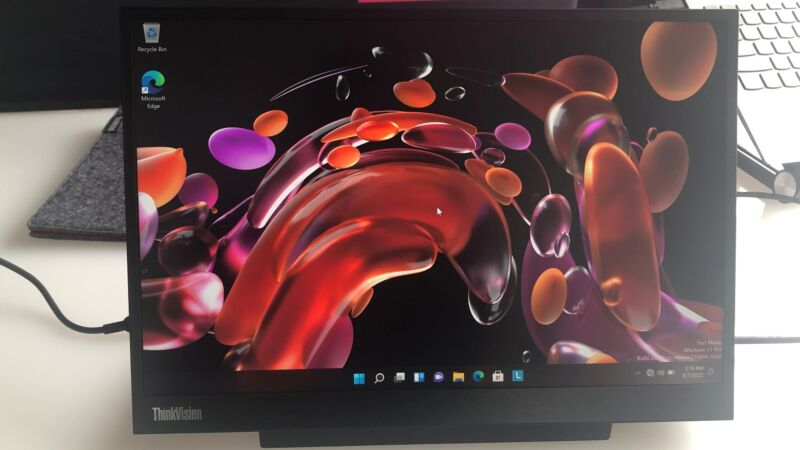
We’ve been watching PC screensget taller, especially those of laptops, and now Lenovo is bringing that trend to its ThinkVision line of small screens. Today, it announced the ThinkVision M14d, Lenovo’s first portable monitor with a 16:10 aspect ratio.
Lenovo’s other portable monitors, as well as most PC displays, use the 16:9 aspect ratio these days. But more customers are embracing options with additional vertical space, citing a nostalgia for screens of the past and more length to display long articles, spreadsheets, and such as marked improvements. Lenovo is touting the display as the first 14-inch, 16:10 portable monitor, based on research analyst Omdia conducted in December.
But that doesn’t mean you have to stay committed to 16:10. Lenovo demoed the monitor’s 16:9 button to Ars Technica. It takes the screen from 16:10 to 16:9, or vice versa, with one press.
Lenovo has refreshed its ThinkPad lineup once again with the latest version of its beefy X1 Extreme laptop. The performance-focused ThinkPad X1 Extreme Gen 5 is powered by a 12th-gen Intel Core i9 H-Series processor up to i9 and supports NVIDIA’s latest GeForce RTX laptop GPUs.
Vapor chamber cooling and integrated liquid metal thermal paste deliver up to a 10 percent performance boost, Lenovo claims. The system can have up to 64GB of DDR5 memory and up to 8TB of SSD storage. In other words, this isn’t exactly an entry-level laptop.
There’s Dolby Voice noise canceling support, along with a Dolby Atmos speaker system. Some of the display options include Dolby Vision support. There’s a 16-inch, 16:10 aspect ratio panel option with a refresh rate of 165Hz and low-blue-light tech. Other options have features such as touch input, factory color calibration and up to 600 nit brightness with 4K resolution.
Lenovo
In addition, the laptop comes with a 90Wh battery, WiFi 6/6E and 5G connectivity, a Full HD front-facing camera and a SD Express 7.0 card reader. Like other current ThinkPad X1 Models, Tile’s tracking tech is built in. You’ll be able to track the laptop for up to 14 days, even when it’s switched off.
The ThinkPad X1 Extreme Gen 5 will be available in June. It starts at $2,049.
On top of that, Lenovo has revealed new business-centric ThinkPad T series laptops. The company is largely moving that lineup to panels with a 16:10 aspect ratio and low-blue-light tech. As with the X1 Extreme, there are Full HD camera options and support for Dolby Audio, Dolby Voice and WiFi 6E.
Lenovo
There’s a new 16-inch ThinkPad T16 alongside the 14-inch ThinkPad T14s Gen 3 and T14 Gen 3. The business-focused laptops will run on either 12th-gen Intel Core or AMD Ryzen Pro 6000 Series processors. Opting for an Intel-powered model means you can add a NVIDIA GeForce MX 550 or RTX 2050 GPU. Otherwise, the systems will use integrated graphics. There are two battery options for each device too, as well as built-in Tile support.
The ThinkPad T14 Gen 3 and T16 will be available in April, starting at $1,399 and $1,419, respectively, for Intel models. AMD-powered versions of either size start at $1,299. Timing and pricing for the ThinkPad T14s Gen 3 are a bit different. Intel models will arrive in June, starting at $1,529, while AMD versions will be available in May from $1,399.
Lenovo
Meanwhile, Lenovo says the ThinkVision M14d monitor is the world’s first 14-inch mobile display with a 16:10 aspect ratio. It has an IPS 2.2K panel with a resolution of 2240 x 1400. There’s power passthrough support, so you’ll only need one USB-C cable connected to a computer or tablet. There’s a second USB-C port to which you can connect certain peripherals, such as an external storage drive or a phone.
The ThinkVision M14d, which comes with a protective sleeve, weighs less than 1.3 pounds (600 grams) and has a 60Hz refresh rate. It will ship in July and cost $299.
Lenovo also announced the ThinkBook 14s Yoga Gen 2 and ThinkBook 13s Gen 4, which have dual-tone color highlights and an anodized aluminum exterior design. They run on 12th-gen Intel Core processors and have Thunderbolt 4 and WiFi 6E connectivity. The 2-in-1s will be available in April, starting at $849 for both the 13-inch and 14-inch variants.
Lenovo
Catch up on all of the news from MWC 2022 right here!
Is Linux more challenging to use than Windows or macOS? No. You may not have access to all the same apps, but there is a reason Linux has become dominant on supercomputers, servers, and even Mars-bound rovers. Linux is often the best tool for the job, and the same can be true on your laptop. There are multiple areas where Linux is often easier than Windows and macOS.
TCL’s affordable 30-series smartphone family has just grown considerably with no less than five new models, making for a total of seven. The new devices start at just €139 for the TCL 30 E and go up to €249 for the TCL 5G, while offering some nice features like 50-megapixel triple cameras on all models, along with AMOLED displays and 5,000 mAh batteries. Along with the phones, TCL introduced the NXTPAPER MAX 10, the latest and largest tablet using its full color paper-like display.
The new smartphone models are the TCL 30 5G (€249), TCL 30+ (€199), TCL 30 (€179 ), and TCL 30 SE (€149 ) and TCL 30 E (€139). They share some common features, with all models having a 50-megapixel main rear camera setup and 5,000 mAh minimum batteries. All but the TCL 30 E have rear triple AI cameras as well, with the 30 E packing having a dual rear cameras. The TCL 30 5G, TCL 30+, and TCL 30 also have slightly bigger 5010mAh batteries and support 18W fast charging.
The top-end TCL 30 5G is the only model with 5G capability, and also offers an ultrawide front camera. You also get a 6.7-inch 60 Hz FHD+ AMOLED screen, MediaTek Dimensity 700 CPU, 4GB of RAM and 64GB of expandable storage.
TCL
The next two models, the TCL 30+ and TCL 30 have similar features, but lack 5G support and have lower-end MediaTek Helio G37 chipsets. The TCL 30+ has an ultrawide front camera like the 5G model, but that’s missing on the TCL 30. Finally, the TCL 30 SE and 30 E (above) step things down another notch, as it were, with smaller 6.52-inch mini-notch displays, slightly smaller batteries with no fast charging and MediaTek G25 chipsets.
As the prices imply, all the models are set to be launched in Europe. Given that the first two 30-sieres models came to the US, we can hope that some or all of the models might be sold here too — but TCL has yet to say which other regions will get them.
TCL
On top of the smartphones, TCL launched another tablet that uses its color paper-like screen, the NXTPAPER MAX 10 (above). It follows last year’s 8.88-inch NXTPAPER and uses the same low-power reflective LCD that “reuses natural light” so there’s no need for backlighting, according to TCL. However, it packs a larger 10.36-inch display with an 83% screen-to-body ratio.
Other features include 4G or WiFi connectivity, a MediaTek MT8788 chipset, 13-megapixel rear/8-megapixel front cameras and an 8,000 mAh battery. It goes on sale starting in Asia from mid Q2 2022 and will be available starting from €269 in Europe, but again, TCL didn’t say where else it would be sold.
GitHub’s Copilot is an AI-powered autocompletion tool for coders, but the FSF has come up with a new way to describe it:
Service as a Software Substitute (SaaSS).
But they also feel the service “immediately raised serious questions for the free software movement and our ability to safeguard user and developer freedom” — which is why last July they’d put out a call for papers from the free software community. And they’re now announcing the results:
[W]e concluded there were five papers that would be best suited to inform the community and foster critical conversations to help guide our actions in the search for solutions…. The papers contain opinions with which the Free Software Foundation (FSF) may or may not agree, and any views expressed by the authors do not necessarily represent the FSF. They were selected because we thought they advanced discussion of important questions, and did so clearly….
The five papers are:
Copilot, copying, commons, community, culture Copyright implications of the use of code repositories to train a machine learning model
If software is my copilot, who programmed my software? Interpreting docstrings without common sense On the nature of AI code copilots
The FSF adds:
“If this subject is of interest to you, we recommend you read this selection of papers and share your thoughts and feedback. Several of the authors have agreed to participate in follow-up discussions which will be held via IRC, LibrePlanet Wiki, and LibrePlanet Discuss mailing list…. Whether or not you are able to attend any of the live events, we encourage you to contribute to the discussion on the wiki and mailing list. As stakeholders in free software, the preservation of user freedom and copyleft, we would like to engage the community in any possible actions that must be taken.”
When I first got started with a Raspberry Pi, I would often use it to tackle some long running scripts – like the continuous monitoring of a video feed, or a small script that gathered data from the web. The problem I faced was how to stay connected to the Pi long enough so that the script wouldn’t terminate.
Facebook has taken down a network of fake accounts attempting to spread Russian disinformation in Ukraine. The company said it had removed about 40 accounts, pages and groups from Facebook and Instagram that were detected over the last 48 hours. The company has also worked to stop hacking attempts targeting Ukrainians military and government officials on recent days.
In a briefing Sunday night, Meta’s Director of Threat Disruption David Agranovich said the accounts in question hadn’t yet gained a large following when they were identified by the company’s security researchers. He said the accounts had about 4,000 followers and Facebook and about 500 on Instagram.
The fake personas, which were targeting people in Ukraine, were being used to prop up fake news websites that published claims aimed at “undermining the Ukrainian government and boosting the activities of Russian actors,” according to Nathaniel Gleicher, the company’s head of security policy. “They would publish claims about the West betraying Ukraine and about Ukraine being a failed state,” Agranovich said. “They also claimed to be based in Kyiv, and posed as news editors, as a former aviation engineer, as the author of a scientific publication.”
The company said in a statement that its investigation into these accounts is ongoing but that it has linked the people behind the fake accounts to a previous takedown of fake accounts in 2020. Facebook security researchers at the time said the activity was traced to “individuals in Russia, the Donbass region in Ukraine and two media organizations in Crimea — NewsFront and SouthFront.”
Separately, Facebook researchers warned that a handful of Ukrainian journalists, military officials and other public figures have been targeted with hacking attempts in recent days. The activity, which Facebook is attributing to an entity known to security researchers as “Ghostwriter,” is also meant to spread disinformation. Facebook said Ghostwriter typically uses phishing attacks to take over email accounts and social media accounts in order to post disinformation while posing as public figures.
“We detected attempts to target people on Facebook, and post YouTube videos portraying Ukrainian troops as weak and surrendering to Russia, including a video claiming to show Ukrainian soldiers surrendering,” Agranovich said. Facebook isn’t speculating who is behind Ghostwriter but other researchers have linked the attacks to Belarus.
The takedowns come as Facebook has tried to contain Russia’s ability to wield disinformation on its platform. Facebook said last week that it was forming a security operations center to monitor the situation in Ukraine and help it respond quickly to threats and misinformation. The social network has also encouraged people in Ukraine to lock down their accounts, and Gleicher said Sunday that Facebook would also be enabling its “lock profile” tool in Russia as well.
At the same time, Russia has said it plans to restrict access to Facebook in the country after the company declined to remove fact checks from Russian state media outlets. Gleicher for now the company hasn’t seen signs that its services are being blocked successfully. “We do believe that we’re still accessible in the country,” he said. He also confirmed that Facebook is “fully blocking the ability of a number of Russian state media entities from broadcasting into Ukraine.”
When asked if Facebook was considering blocking Russian state media globally — following an EU ban on two prominent outlets — Gleicher didn’t rule out the possibility. “Given the situation and how quickly things are moving, we’re continuing to evaluate a full range of options.”
With Ubuntu 22.04 LTS just around the corner, we are all waiting eagerly to experience the list of features in Ubuntu 22.04 being introduced.
Without a full-fledged hands-on with Ubuntu 22.04, I can’t say for certain if it is impressive. But, I do have some thoughts on the things I want to see in Ubuntu 22.04.
It’s probably a bit too late to make some requests for changes, but I’d like to hope for the best!
Written in GTK, Foliate is a great ebook viewer/reader software with lots of cool features. While its interface may look simple, don’t be fooled because Foliate comes with numerous options and nifty tools that go beyond just reading ebooks.
Foliate’s user interface has two main views, Library and Catalogs. While in the Catalogs section you’ll be able to browse and download free ebooks from some well-known sources, the Library view is the place you’ll find every ebook that you’ve downloaded through the app or manually opened with reading progress information.
Whenever you do a login, logout, or attempt to log in, everything gets recorded on your system, and there is a specific command that you can use to find out who has logged into your Linux system.
In this article, you will see a binary file that is responsible for maintaining records and how to read the binary file using the “utmpdump“ utility.