Reddit user “Ok_Lingonberry3296” has posted the
results of an extensive investigation into the companies that are
pushing US state legislatures to enact age-verification bills.
I’ve been pulling public records on the wave of “age verification”
bills moving through US state legislatures. IRS 990 filings, Senate
lobbying disclosures, state ethics databases, campaign finance
records, corporate registries, WHOIS lookups, Wayback Machine
archives. What started as curiosity about who was pushing these
bills turned into documenting a coordinated influence operation
that, from a privacy standpoint, is building surveillance
infrastructure at the operating system level while the company
behind it faces zero new requirements for its own platforms.
(See also this article for a look at the
California law.)
Qualys has sent out a
somewhat breathless advisory describing a number of vulnerabilities in
the AppArmor security module, which is used in a number of Debian-based
distributions (among others).
This “CrackArmor” advisory exposes a confused-deputy flaw allowing
unprivileged users to manipulate security profiles via
pseudo-files, bypass user-namespace restrictions, and execute
arbitrary code within the kernel. These flaws facilitate local
privilege escalation to root through complex interactions with
tools like Sudo and Postfix, alongside denial-of-service attacks
via stack exhaustion and Kernel Address Space Layout Randomization
(KASLR) bypasses via out-of-bounds reads.
Earlier this month were various Linux 7.0 file-system benchmarks showing how XFS is leading the race in the overall upstream Linux file-system performance on this forthcoming kernel. Stemming from that testing some premium supporters requested a fresh look at the historical performance of XFS as well as EXT4. So today’s article is a look at how XFS and EXT4 have performed on every kernel release going back to Linux 6.12 LTS.
In 2019, researchers published a way to identify which file-backed pages
were being accessed on a system using timing information from the page cache,
leading to a handful of unpleasant consequences and a change to the design of
the mincore() system call. Discussion at the time led to a number of ad-hoc patches to address the
problem. The lack of new page-cache attacks suggested that attempts to fix
things in a piecemeal fashion had succeeded. Now, however, Sudheendra Raghav Neela,
Jonas Juffinger, Lukas Maar, and Daniel Gruss have found a new set of
holes in the Linux kernel’s page-cache-timing protections that allow
the same general class of attack.
Legendary programmer and former Oculus CTO John Carmack doesn’t think Meta’s developer incentive structure is healthy for the Horizon Store ecosystem, calling it “wasteful churn.”
The News
While Carmack departed Meta in 2022, concluding his “decade in VR,” the one-time Oculus CTO has never been one to mince words when it comes to virtual reality.
In a recent X post, Carmack lays out what appears to be a pretty clear inequity: why does Meta fund third-party titles when they’re just going to turn around and tax them 30% on every transaction?
“Companies like Meta subsidize third party developers in various ways to help grow their platforms, then take 30% of the developer revenue right back with the platform tax, which is a wasteful churn,” Carmack says.
John Carmack at Oculus Connect (2018) | Image courtesy Meta
To avoid unnecessarily circulating money between platform and developer, Carmack points to Epic Games’ fee structure, which doesn’t take anything from developers for the first $1 million per year in revenue.
“You would still need explicit subsidies to get certain types of games / apps created at all, but it perfectly rewards what you actually want: increased economic activity, versus a biased pre-selection process,” Carmack continues.
Tagging Epic CEO Tim Sweeney, Carmack muses whether Meta could even actually pay developers extra for early revenue instead of charging an initial platform fee—something radically different from directly hand-picking projects and applying its usual 30% cut.
Tim Sweeney at GDC 2016 | Image courtesy Wikimedia Commons
“If it wasn’t so easily exploited by buying your own app, a negative rate ‘earned income tax credit’ for initial revenue would actually be a good incentive for a platform like Quest.”
In response, Sweeney says the $1 million no-fee threshold works and hasn’t been abused, although that’s partly because Epic’s fees are relatively low to begin with—a meager 12% cut.
“There hasn’t been significant gaming of the system. Thankfully there are enough benefits to curation and reputation in having one >$1M app than to breaking it up into a near-duplicate set of <$1M apps. But this assumes a modest take rate. At 30% behavior may change,” Sweeney says.
My Take
PC gaming is much more flexible than Quest when it comes to sourcing games; PC users can choose from any number of store, including Steam, Epic Games Store, or GOG. This is unfortunately not the case for Quest.
But let’s not conflate the two too much though. Meta subsidizes Quest hardware to make back money with app sales—basically what console manufacturers have always done.
The wrinkle is that Quest users can download and install alternate app stores, like SideQuest, which uses Quest’s ability to sideload Android APKs. But it’s no real competitor to the Horizon Store, and I don’t expect it ever will be.
SideQuest | Image captured by Road to VR
It’s unlikely Meta would disable sideloading, although would-be competitors are probably still cautious from incurring Meta’s wrath. In SideQuest’s case, it’s now mostly an app discovery layer and installer, with many of its app listings now linking directly to Horizon Store.
And from what I’ve seen, I just don’t think Meta would allow real app store competition anywhere near Quest—similar to how Apple doesn’t allow Epic to bring its Games Store to the iPhone ecosystem—the subject of a massive 2021 lawsuit that Apple mostly won.
No competition means no incentive to change. And more importantly, it means nobody can swoop in and by flaunt a better fee structure (and free games) like Epic Games Store seems to be doing as it attempts to pry away users from Steam. Notably, Steam features a 30% platform fee that then descends to 25% after $10 million revenue, and 20% after $50 million.
FreeRDP as this open-source and cross-platform Remote Desktop Protocol (RDP) implementation is out with FreeRDP 3.24 to ship new security fixes as well as other improvements…
This week’s picks are a real blend of event types and lengths! We’ve got a fundraiser of epic proportions, two very different races, an “easy” banded group ride, and a long unbanded group ride. Take your pick, and Ride On!
Evenement Gran Fondo Enfant Soleil
Good Cause Epic Distance
This annual Canadian fundraiser fondo always gets featured here, for three reasons: it gets a big turnout (the most signups of any event this weekend, so far), some of the ride length options are a bit crazy, and it’s for a good cause! Five different lengths to choose from, all starting at separate times: 300km, 225km, 150km, 75km, 35km. Everyone will be on Watopia’s Waistband route.
Some may just ride this for a challenging effort, but it’s also a fundraiser. See event description for details.
These are the most popular races happening on Zwift right now, so if you’re looking for some healthy competition, check ’em out! You’ll also get to experience new routes and earn some fun unlocks.
The Herd Omnium has happened each sprint since 2021, and this year, for the first time ever, they’re using ZwiftRacing.app vELO categories. There are three different leagues, so you can pick the one that fits your schedule best:
The Omnium consists of 6 different short races – 3 held on Saturday, and 3 held on Sunday.
Saturday and Sunday in three different timeslots Click a timezone link above to join
BMTR Flat 100 (Miles)
Popular Ride Legacy Leader Endurance Challenge Kit Unlock
A regularly featured event here on Zwift Insider, the BMTR Flat 100 always gets lots of joiners because it’s well-led and run consistently week after week, year after year.
This week’s ride is on London’s Greater London Flat, with three pace groups to choose from.
This banded ride on Watopia’s Three Step Sisters (43.5km, 669m) lets you ride at whatever pace you’d like, while hanging with the group. Get some elevation in while enjoying the friendly and welcoming Bikealicious atmosphere!
We choose each weekend’s Notable Events based on a variety of factors including:
Is the event unique/innovative in some way?
Are celebrities (pro riders, etc) attending/leading?
Are signup counts already high, meaning the event is extra-popular?
Does the ride include desirable unlocks or prizes?
Does the event appeal to ladies on Zwift? (We like to support this under-represented group!)
Is it for a good cause?
Is it just plain crazy (extra long races, world record attempts, etc)?
Is it a long-running, popular weekly event with a dedicated leader who deserves a shout out?
In the end, we want to call attention to events that are extra-special and therefore extra-appealing to Zwifters. If you think your event qualifies, comment below with a link/details and we may just include it in an upcoming post!
The march of 32in wheels shows no sign of slowing, with the supersized standard now creeping into yet another corner of cycling: BMX.
The SE Bikes Colossal Ripper is claimed to be the world’s first production cruiser BMX bike built around 32in wheels.
Cruiser, or wheelie bikes are typically built with large wheels, a tall front end and geometry designed specifically to make pulling extended wheelies easier. The scene is huge in urban areas of the US, and the bikes are an increasingly common sight in the UK.
The Colossal Ripper takes this concept to the extreme, and SE says the bike has been tested over the past year, claiming it “wheelies like a dream and cruises like nothing else on the market”.
Although they sit philosophically in the same camp as traditional bikes, this towering rig is about as far removed from traditional BMX race or park bikes as it’s possible to get – even if it still looks terrific fun.
The bike is offered in a polished alloy or sky blue finish. Build highlights include a three-piece BMX crankset, front and rear hydraulic disc brakes, a four-piece handlebar designed by the brand, and the company’s own 2.4in-wide SE Bozack tyres.
Priced at $1,299.99 / £969.99, the Colossal Ripper is available internationally through selected retailers.
Fwupd developer Richard Hughes released fwupd 2.1.1 today as a major update of this open-source Linux firmware update utility that introduces numerous new features and extends hardware support.
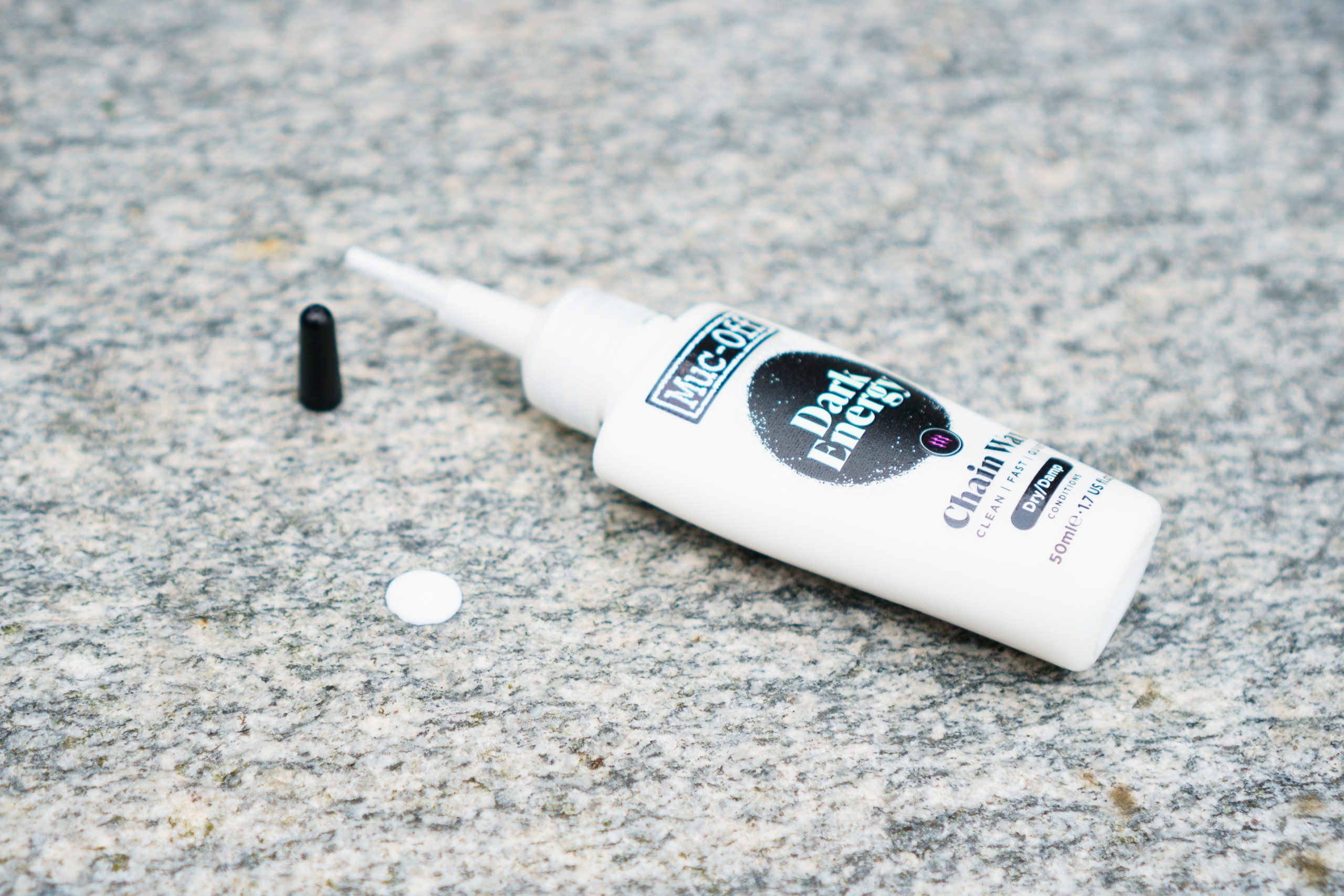
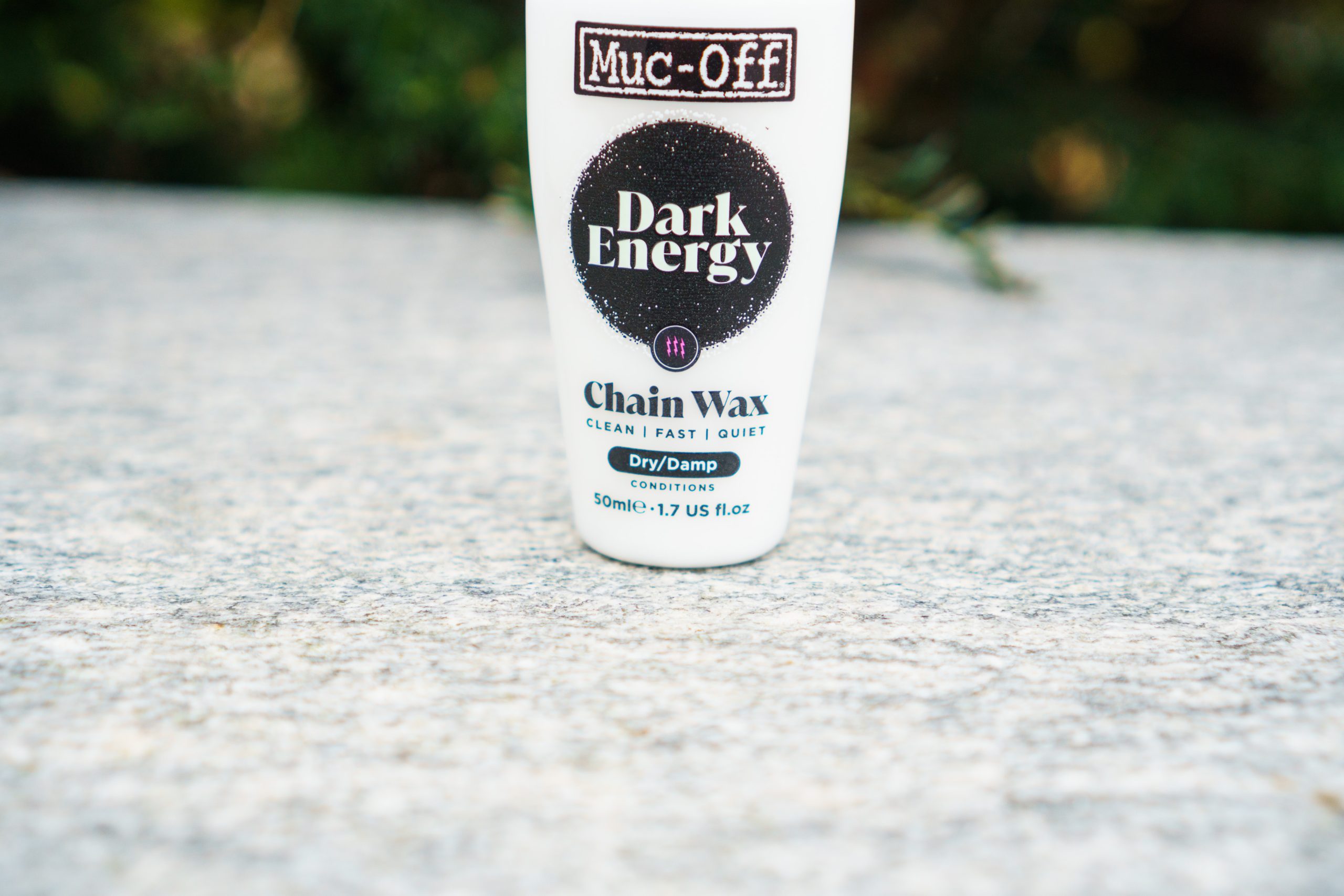
Muc-Off has announced the release of its new Dark Energy – a wax chain lube that it claims beats major competitors for both efficiency and durability.
The result of four years of research and development, and testing by its sponsored pro teams, Muc-Off says its performance claims have been validated by independent test labs, as well as its own internal processes.
Designed for use in dry-to-damp conditions, Muc-Off says a chain treated with Dark Energy wax lube can go up to 300 miles / 482 kilometres between applications.
PFAS- and PFTE-free, Muc-Off Dark Energy chain lube is said to be made from “plant-derived, inherently biodegradable wax” (as opposed to paraffin wax, which is derived from petroleum or other hydrocarbons).
It costs £15 / $15 / €15 for a 50ml bottle, or £23 / $25 / €30 for a 120ml bottle – making it much cheaper than the brand’s Ludicrous AF lube, which costs £40 for a 50ml bottle.
Alongside the Dark Energy lube, Muc-Off is also launching a ‘Chain Wax Cleaner’, which helps strip a chain of factory grease and/or other contaminants, so it is prepared for the application of wax lubes.
Until now, Muc-Off has made mostly oil-based lubes. Simon von Bromley / Our Media
Wax-based chain lubricants have been growing in popularity for a number of years, with many WorldTour teams now using immersively waxed chains in search of drivetrain efficiency gains.
As a result, many brands have developed and marketed wax-based lubes, including CeramicSpeed, Silca and AbsoluteBlack.
Muc-Off, though, has stuck largely to oil-based lubes, until now – previously claiming its Ludicrous AF lube was “the world’s fastest chain lube”.
Muc-Off has developed its own chain cleaner to prep chains for Dark Energy wax lube. Simon von Bromley / Our Media
Given this, our first question to Muc-Off when it told us about Dark Energy was why it had decided to make a wax-based chain lube at all.
According to the brand, it simply wasn’t possible previously to hit the “sweet spot” of low friction and high durability it demands of its high-performance lubes.
It did, however, point out that it has previously produced wax-based lubes (such as its ‘Dry wax lube’ from 2008), and that it has “evaluated wax formulas in development and testing for many years alongside oils”.
Our samples arrived in a presentation box, but we imagine you’ll just find the bottles in shops. Simon von Bromley / Our Media
Muc-Off also noted it tested “a prototype C4 wax with Chris Froome and Team Sky way back in 2014”, although this was never made publicly available.
The difference now, Muc-Off says, is that it has developed a “unique next gen blend of waxes”, with a focus on “how the different mix of advanced waxes behave in race conditions at WorldTour level”.
Although Muc-Off’s press materials note the wax in Dark Energy is “plant-derived”, it declined to specify the exact formula for “confidentiality” reasons.
How does Muc-Off Dark Energy stack up against the competition?
Muc-Off says Dark Energy beats the competition for efficiency and durability. Simon von Bromley / Our Media
Muc-Off was coy when asked how Dark Energy compares to Ludicrous AF in terms of drivetrain efficiency, noting simply that the latter “remains one of our most efficient lubes to date”.
It also said Ludicrous AF “really comes into its own in wet and harsh conditions”, and noted that “at unbound last year, some riders were trying to top up their wax during the race itself”.
In contrast, Muc-Off views Dark Energy as an option for “dry to damp conditions”, and cites the “cleanliness and quietness” of waxed drivetrains as a key differentiator.
WIth regards to performance versus competitor wax lubes, Muc-Off was more forthcoming.
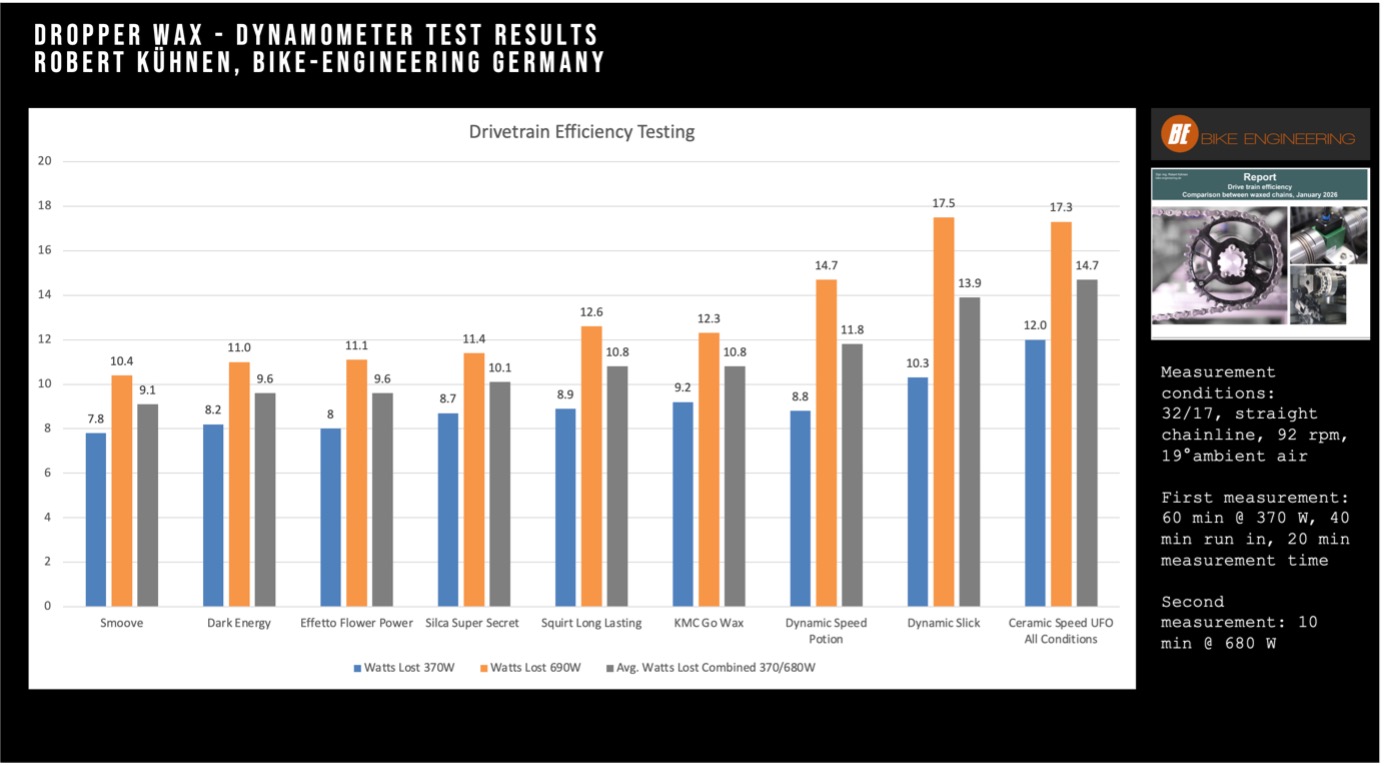
Muc-Off provided data from Bike Engineering to show Dark Energy is more efficient than the competition. Muc-Off
“Dark Energy is one of the fastest dropper waxes out there”, it says, according to both its own internal tests and those performed by the German test lab Bike Engineering.
A chart from the Bicycle Engineering tests (above) shows Dark Energy besting key competitors such as Silca Super Secret, Squirt and CeramicSpeed UFO All Conditions, in terms of efficiency, although Smoove comes out marginally ahead.
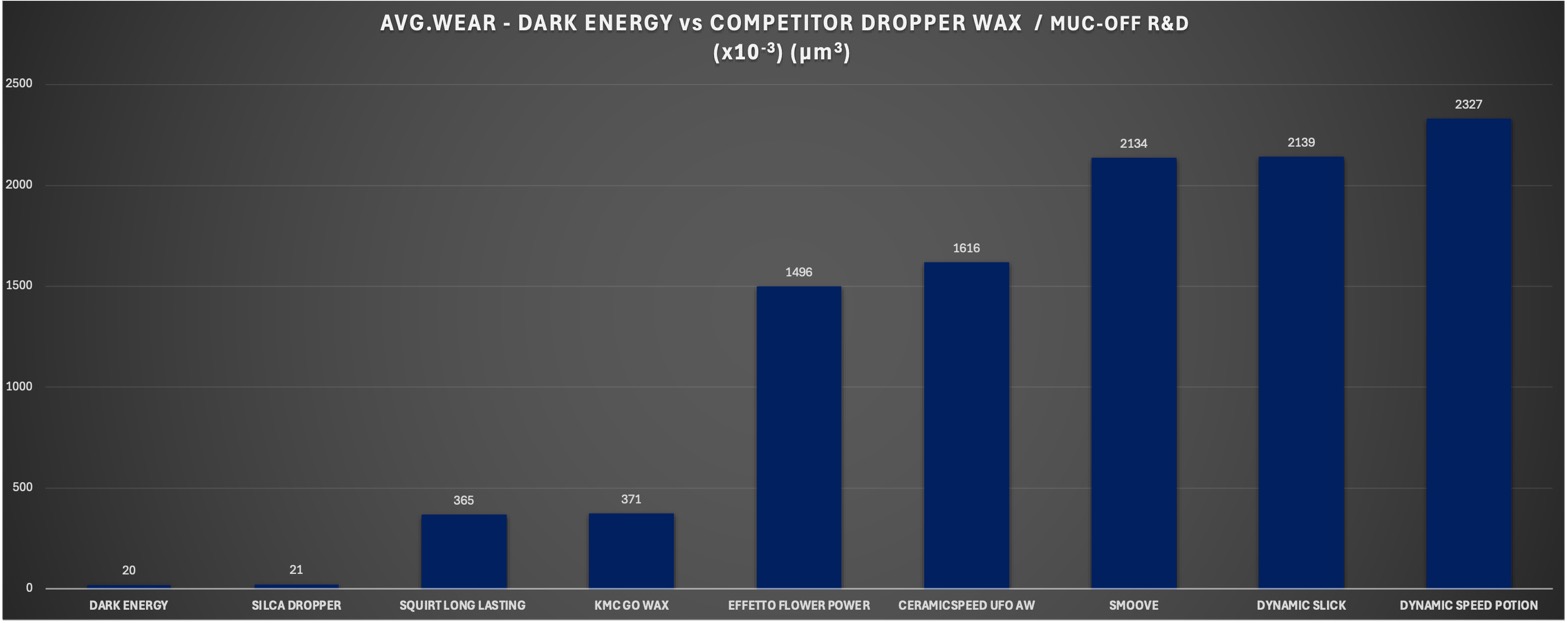
Muc-Off also provided an ‘average wear’ chart from its own internal tests showing Dark Energy’s claimed low drivetrain-wear rates compared to other wax lubes.
Muc-Off claims its own testing shows Dark Energy lube can reduce drivetrain wear compared to the competition. Muc-Off
“The real story”, Muc-Off says, “is that Dark Energy is not just efficient, but it can also deliver up to 300 miles of durability and low wear characteristics.”
For context, this is a similar figure to what Silca claims for its EnduranceChip wax additive – which is claimed to help an immersively waxed chain last up to 550 kilometres / 340 miles before it needs to be re-waxed.
CeramicSpeed’s UFO Drip All Conditions drip lube is claimed to “last 300km / 180 miles in generally dry and clean conditions”.
“Creating a [wax lube] formula that hits all those goals is a huge challenge as some formulas may be fast but then suffer with wear (and vice versa).”
Despite these performance claims, Muc-Off acknowledges that oil-based chain lubes remain the easiest to use.
Like other wax lubes, Dark Energy must be applied to a scrupulously clean chain and needs time to ‘cure’ before it can be ridden.
A fix is on the way to the Linux 7.0 kernel today for addressing an idle power issue with AMD RDNA4 GPUs reporting high power consumption and full utilization even after being “idle” following compute workloads like Llama.cpp…
For going along with the Intel IVPU kernel accelerator driver in the mainline Linux kernel is the Intel NPU driver support in user-space. Released yesterday was the Intel NPU Driver 1.30 milestone for advancing the Intel NPU user-space support on Linux with this open-source support for Core Ultra SoCs…
GNOME’s GitLab infrastructure has already been using Anubis for a while to help fend off bots and AI scraper traffic from wreacking havoc on their server resources and also their hosting budget. GNOME recently began redirecting some GitLab traffic to their GitHub repositories as another step in dealing with bots/scrapers. Now they have taken an added step of using the commercial, closed-source Fastly in their battle with bots…
Intel’s LLM-Scaler project that makes it easy to deploy various large language models on modern Arc Graphics hardware is out with a new test release to expand its LLM coverage…
The BeagleBoard.org Foundation has introduced BeagleBadge, an open-source wearable development platform for IoT and embedded applications. The badge integrates a 4.2-inch ePaper display, onboard sensors, wireless connectivity, and expansion interfaces in a compact board for prototyping wearable and interactive systems. The platform is built around the Texas Instruments AM62L Sitara SoC. The AM62L32 integrates a […]
Little Nightmares VR: Altered Echoes is coming to Steam VR, PlayStation VR2, and Meta Quest in April.
Bandai Namco announced that Little Nightmares VR: Altered Echoes, the first VR game set in the Little Nightmares universe, will launch next month on Quest, PlayStation VR2, and SteamVR.
Developed by Iconik, Little Nightmares VR puts players in control of Dark Six, a mysterious character who has appeared in previous games in the series. Together, players and Dark Six will embark on a journey to uncover her deepest secrets, reunite with Six, and become whole again.
0:00
/1:45
The game is presented from a first-person perspective, with players solving puzzles, fleeing horrors, and witnessing the eerie, atmospheric world of Nightmares in ways never before experienced thanks to the immersion of VR.







 Evenement Gran Fondo Enfant Soleil
 Good Cause
  Zwift Games, Stage 4