
Lenovo is looking to break barriers with two new ThinkPad entries that advance the mobile market in completely different ways. The first is the more traditional ThinkPad X1 Nano, which is the lightest ThinkPad that the company has ever created, while the second is the equally fascinating ThinkPad X1 Fold. We’ve talked about the ThinkPad X1
Source: Hot Hardware – Lenovo ThinkPad X1 Nano Sizzles With 2-Pound Chassis And Tiger Lake, ThinkPad X1 Fold Finally Priced
Monthly Archives: September 2020
Lenovo pushes boundaries with two Tiger Lake X1 designs—Nano and Fold
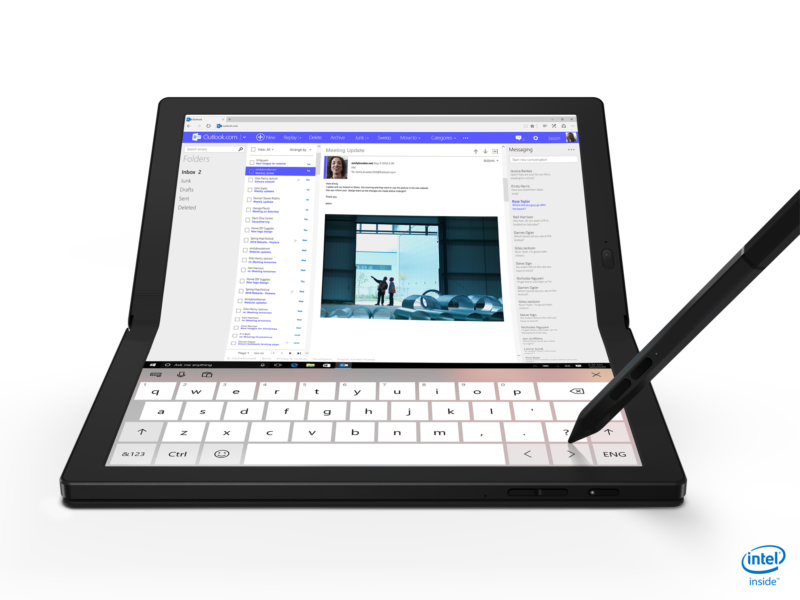
Enlarge / The X1 Fold is aiming for the same basic target as the Samsung Galaxy Fold—but in a more laptop-ish form factor. (credit: Lenovo)
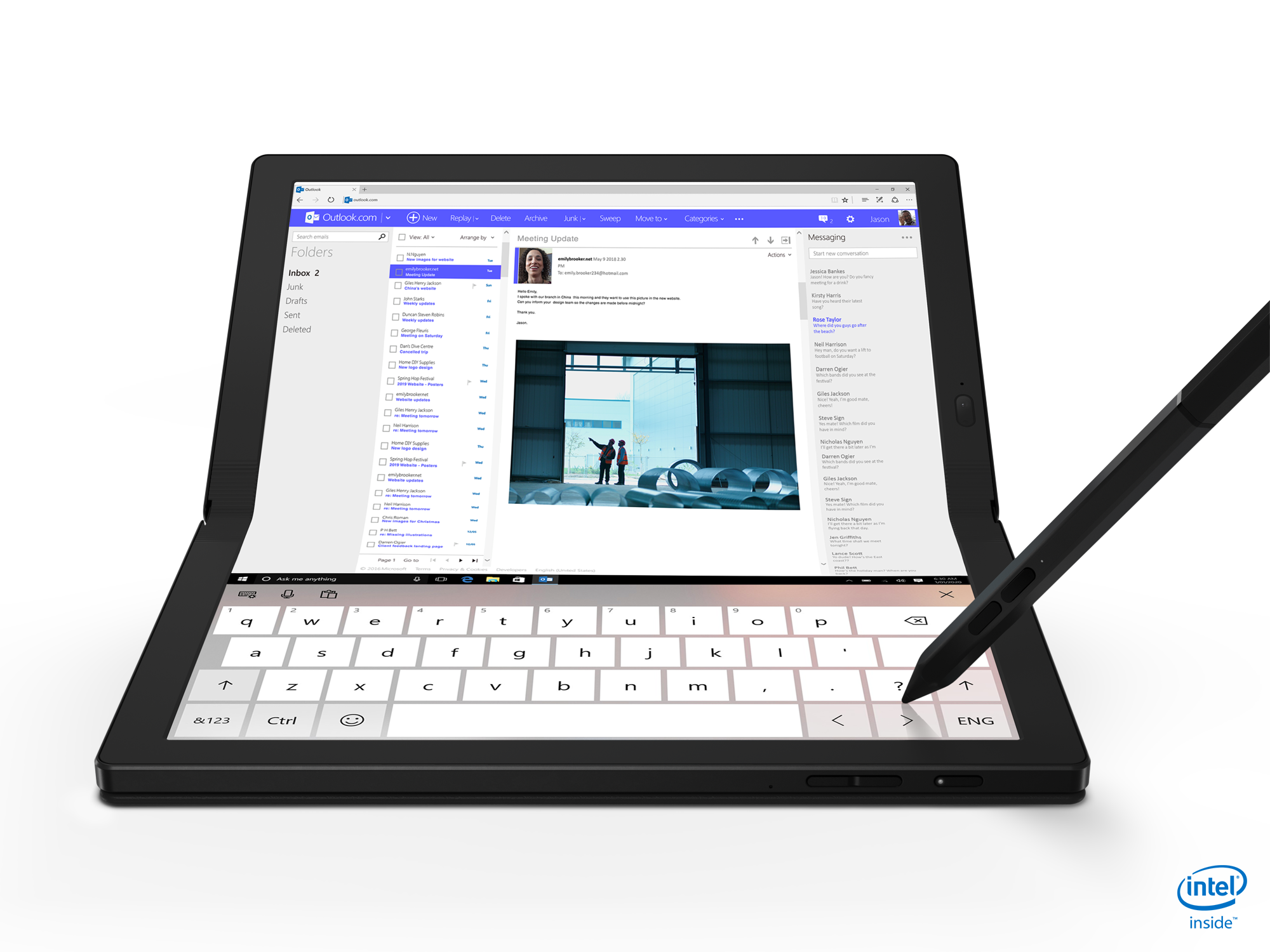
Lenovo is following on Dell’s heels with an announcement of two 13-inch Intel Tiger Lake powered laptops of its own—but Lenovo’s new designs are considerably further “out there” than Dell’s. Lenovo’s two new designs are the X1 Nano—a traditional but ultralight laptop weighing in at less than two pounds—and X1 Fold, a not-exactly-laptop design with a folding screen.
Yes, you read that right—the X1 Fold is to feature a folding LCD display, aiming at the same basic target Samsung did with the Galaxy Fold. Our own Ron Amadeo reviewed the Galaxy Fold in January and was very unimpressed, but it has been nearly a year, and Lenovo may well have figured out a few things that Samsung did not. We’re reserving judgment on the X1 Fold until we can get one in our hands.
X1 Nano
-
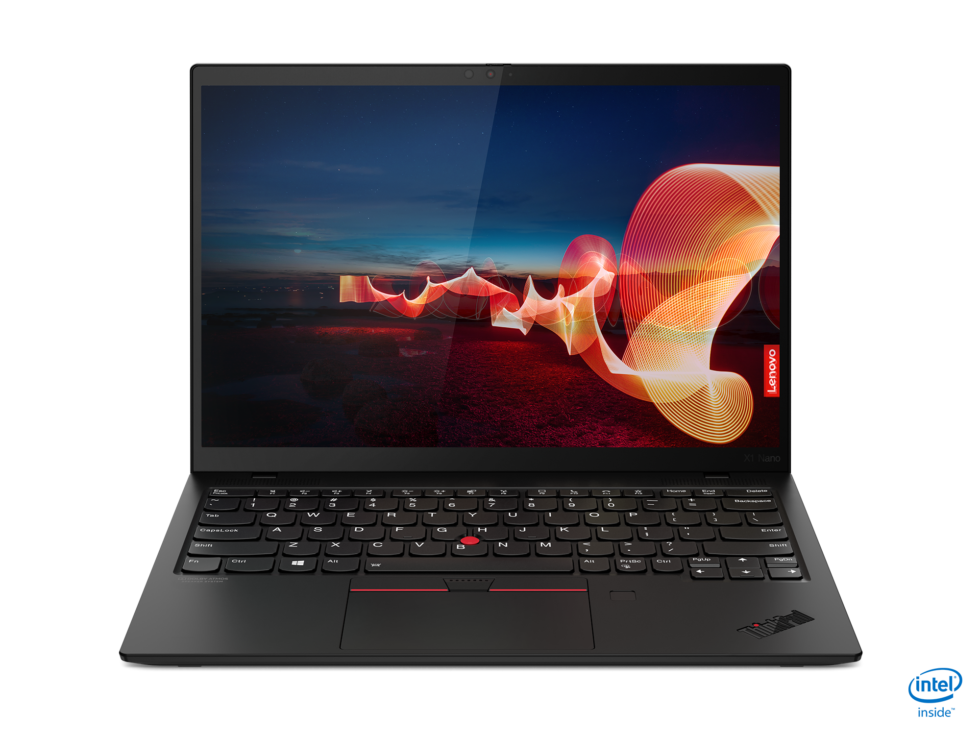
Extremely thin laptop is extremely thin. [credit:
Lenovo ]
The X1 Nano is a pretty straightforward design—it’s extremely sleek and lightweight, but apart from that, it’s a standard 13-inch laptop. It will be available in black, as shown above, with no further colors announced at this time.
Read 11 remaining paragraphs | Comments
Source: Ars Technica – Lenovo pushes boundaries with two Tiger Lake X1 designs—Nano and Fold
NetBSD Has Some Wayland Support But X11 Is Far More Mature
Following the news yesterday of NetBSD changing its default X11 window manager after two decades with TWM to now using CTWM by default, some wondered why they don’t jump on the Wayland bandwagon…
Source: Phoronix – NetBSD Has Some Wayland Support But X11 Is Far More Mature
MinisForum Unveils EliteMini H31G: 65W CPU & 75W GPU in a Compact Mini-PC
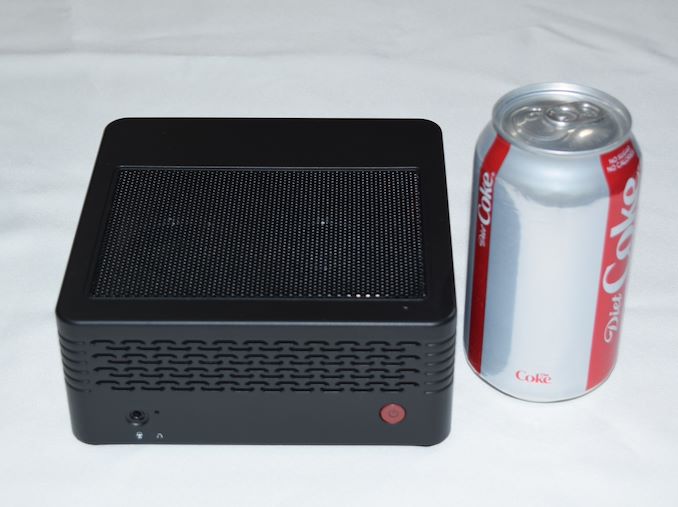
MinisForum has been making some interesting moves in the last few months with their computing platforms, ranging from the DMAF5 based on the Ryzen 3000H-series SoCs to the Ice Lake-based DeskMini X35G. In early August, they reached out to us to pitch their first mini-PC sporting a discrete GPU – the EliteMini H31G. Intrigued by their claims of being able to cram a 65W CPU and a 75W GPU in a chassis measuring approximately 15cm x 15cm x 6cm, we accepted their offer of a review unit to put through our standard mini-PC benchmarking process. The sample arrived last week, but we have a few thoughts to share.
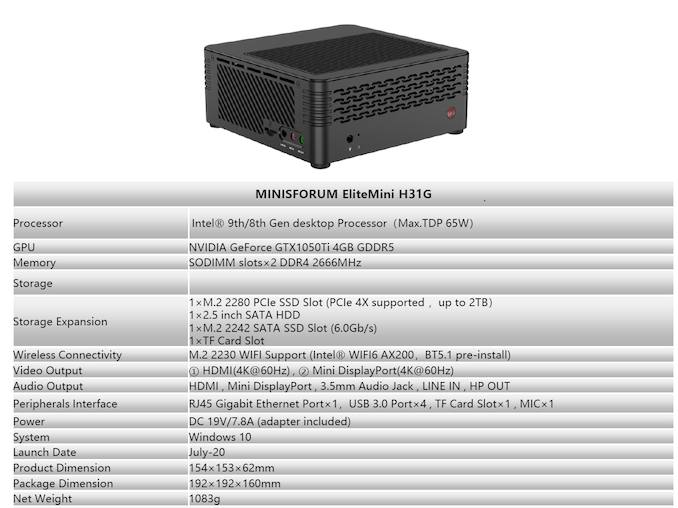
The EliteMini H31G is a compact mini-PC smaller than other dGPU-equipped mini-PCs we have reviewed before like the ASRock DeskMini Z370 GTX 1060 and the Ghost Canyon NUC. A look at the unit reminded me of the GIGABYTE BRIX Gaming BXi5G-760 we had reviewed back in 2014. Our review sample came with a Core i5-9500F 65W CPU pre-installed, along with a GTX 1050 Ti MXM card with a TDP of 75W. As the naming of the kit indicates, the board uses a H310 PCH.
The system uses a unique integrated dual-fan cooling system – the first time we have seen this type of design in a mini-PC. The dual-fan configuration in the BRIX Gaming kit was just two fans crammed into one end of the case, while the cooling kit in the H31G appears to be much better thought out. Obviously, these are early days and I am not passing any judgement on the effectiveness without putting it through our thermal stress test. The BRIX Gaming kit was cooling a 47W CPU and a 100W GPU, while the H31G is handling a 65W CPU and a 75W GPU. There was a reason for GIGABYTE to redesign their Gaming BRIX units from scratch for the newer iterations – so I am really looking forward to seeing how the H31G handles thermal stress from both the CPU and GPU simultaneously. Readers interested in a full breakdown of the cooling system should view the official launch video of the EliteMini H31G.
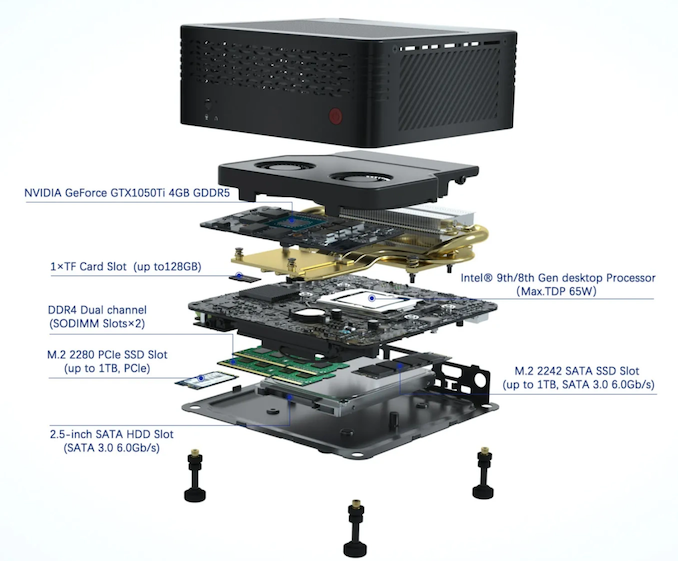
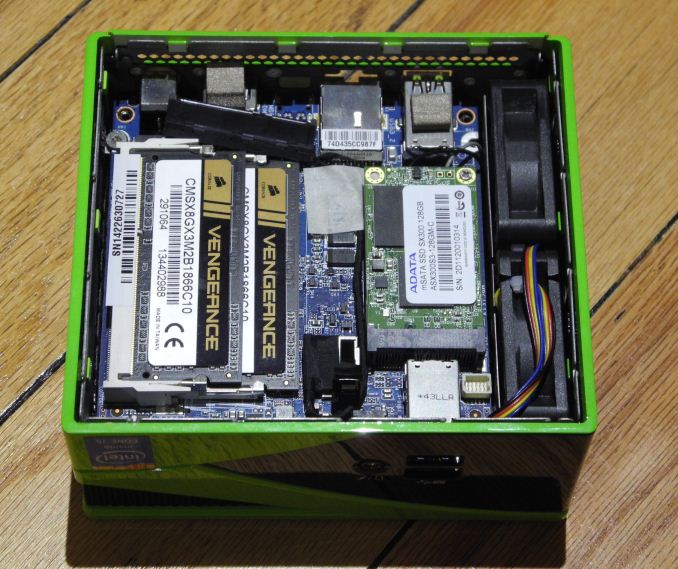
Our review sample shipped with a single 8GB DDR4 SODIMM, and a 256GB Kingston M.2 2280 NVMe drive. The system’s performance is bound to be better with both SODIMM slots occupied, but we are proceeding with the review of the supplied configuration as-is (it happens to be one of the pre-built configurations available for purchase). The gallery below shows some of the internals of the system, and a size comparison against other mini-PCs with dGPUs.
Gallery: MinisForum EliteMini H31G


Based on our experience with setting up the system and our first round of benchmarking, we found some minor annoyances and a few interesting aspects:
- All the USB ports are in a corner of the system rear panel. Usually, mini-PC manufacturers spread out the USB ports – some in the front panel and some in the back.
- The microSD (TF card) slot, and the line in / mic in / headphones out port on the side panel are enabled by a ‘daughterboard’ inside the system. The daughterboard also includes a M.2 2242 SATA slot. Given the support for a 2.5″ SATA drive, we would have gladly given up the M.2 2242 SATA slot for a couple of additional USB 3.0 ports in the daughterboard.
- Another curious feature is the support for two sets of audio outputs – one in the front panel without the LINE IN (headphone jack), and another with the TF daughterboard. Having never seen two sets of built-in analog audio ports in any mini-PC before, I would like to hear from readers if there are any specific scenarios or use-cases that MinisForum might be targeting here.
The barebones version (without a CPU, but with the MXM GTX 1050 Ti module) is priced at $399. Our review configuration (Core i5-9500F, 8GB RAM, 256GB SSD) is priced at $629. The main challenge for MinisForum is that the system design, though unique, carries technology that is almost 3 years old at this point – a Kaby Lake or Coffee Lake desktop CPU, along with a Pascal GPU. Fortunately, the system is priced accordingly. The ASRock Deskmini Z370 GTX 1060 was launched at $800 – the MinisForum EliteMini H31G is being marketed for half of that. It would have been preferable for MinisForum to use a more modern CPU and GPU for this project. That said, having an effective working system based on older components might just give them the impetus to use the design with newer CPUs and GPUs.
Source: AnandTech – MinisForum Unveils EliteMini H31G: 65W CPU & 75W GPU in a Compact Mini-PC
5 ways to conduct user research with an open source mindset
There are common beliefs about user experiences—the best ones are user-centered, iterative, and intuitive. When user experience (UX) research is conducted, user stories about these experiences are collected—but the research methods chosen inform user experiences, too.So, what makes for an engaging research experience, and how can methods evolve alongside products to better connect with users?read more
Source: LXer – 5 ways to conduct user research with an open source mindset
Double Up on Amazon Echo Dots with This $40 Prime 2-Pack

Amazon Echo Dot 2-Pack | $40 | Amazon | Promo code: DOTPRIME2PK
Source: Gizmodo – Double Up on Amazon Echo Dots with This Prime 2-Pack
The Morning After: Our first impressions of the Xbox Series X
We’re still not sure if foldable phones are a real improvement over existing tech, but Lenovo is already pushing forward with a foldable PC. It’s different from your average laptop or 2-in-1 because the Thinkpad X1 Fold wraps around a 13.3-inch flexi…
Source: Engadget – The Morning After: Our first impressions of the Xbox Series X
Amazon's personal shopping subscription now includes men's fashion
Amazon’s personal shopping subscription service, launched in July for women’s fashion, is now available for men (via TechCrunch). “Personal Shopper by Prime Wardrobe” will now offer thousands of menswear items from brands like Adidas, Lacoste, Scotch…
Source: Engadget – Amazon’s personal shopping subscription now includes men’s fashion
MoltenVK 1.1 Update Brings Big Improvements For Vulkan On macOS
MoltenVK 1.1 is out as a big update for this graphics translation layer for getting the Vulkan API running on macOS and iOS devices by translating calls to Apple’s Metal API…
Source: Phoronix – MoltenVK 1.1 Update Brings Big Improvements For Vulkan On macOS
Many Android phones will offer Bing alongside Google search in Europe
As part of an antitrust settlement in Europe, Google has to offer new Android users a choice of downloading a rival search product. These choice slots are auctioned off, and Google has just published the options that will be presented to users betwee…
Source: Engadget – Many Android phones will offer Bing alongside Google search in Europe
Watch Tonight's Debate Between Trump and Biden on YouTube, Facebook, and More

The first of three presidential debates between Donald Trump and Joe Biden is being held today in Ohio starting at 9 p.m. ET, 6 p.m. PT. And if you’re looking for livestreams on YouTube, Facebook, and more, we’ve got you covered with the links below.
Source: Gizmodo – Watch Tonight’s Debate Between Trump and Biden on YouTube, Facebook, and More
Mesa 20.2 Released With RADV ACO By Default, Initial RDNA2 Graphics Support
Mesa 20.2 has managed to release just before the end of the the quarter. This Mesa Q3’2020 graphics driver update is coming out about one month behind schedule but the wait is worthwhile given many open-source OpenGL and Vulkan driver updates…
Source: Phoronix – Mesa 20.2 Released With RADV ACO By Default, Initial RDNA2 Graphics Support
SMARC module delivers Elkhart Lake with up to 256GB UFS
Advantech’s Linux-ready “SOM-2532” SMARC 2.1 module is built around Intel’s Atom-class, 10nm Elkhart Lake platform and supplies up to 16GB LPDDR4-3200, 256GB UFS 2.1, dual GbE with TSN, dual USB 3.1 Gen 2, dual CAN, and triple 4K support. Advantech is one of the early adopters of Intel’s newly announced Elkhart Lake Atom x6000E, Pentium, […]
Source: LXer – SMARC module delivers Elkhart Lake with up to 256GB UFS
Amazon One uses your palm to approve store purchases
Amazon is putting contactless payments in the palm of your hand. No, seriously. Today, the company has revealed Amazon One, a service that uses your unique palm signature to authenticate purchases and let you into gated locations, such as offices, gy…
Source: Engadget – Amazon One uses your palm to approve store purchases
Lenovo's Thinkpad X1 Fold is available for pre-order starting at $2,499
After five years of development, Lenovo is almost ready to start shipping the Thinkpad X1 Fold, which it claims is the first PC with a foldable display. It has opened up pre-orders for the device, which starts at $2,499.The Thinkpad X1 Fold has a 13….
Source: Engadget – Lenovo’s Thinkpad X1 Fold is available for pre-order starting at ,499
Lenovo's 2-pound Thinkpad X1 Nano features Intel's latest processors
Lenovo has announced its latest addition to the ThinkPad X1 collection: the X1 Nano. The company says its features should make it a sleek but powerful laptop ideal for business professionals. For one thing, the newest ThinkPad is powered by 11th Gen…
Source: Engadget – Lenovo’s 2-pound Thinkpad X1 Nano features Intel’s latest processors
Lenovo’s latest ThinkBook 15 has built-in wireless earbuds
Lenovo’s new hardware includes the ThinkBook 15 Gen 2 i with built-in wireless earbuds. When you need the earbuds, a small storage tray pops out of the laptop, and they connect instantly. When you’re done, tuck the earbuds back inside the ThinkBook 1…
Source: Engadget – Lenovo’s latest ThinkBook 15 has built-in wireless earbuds
Lenovo Finally Jumped the Shark on Wireless Earbuds with the ThinkBook 15 Gen 2
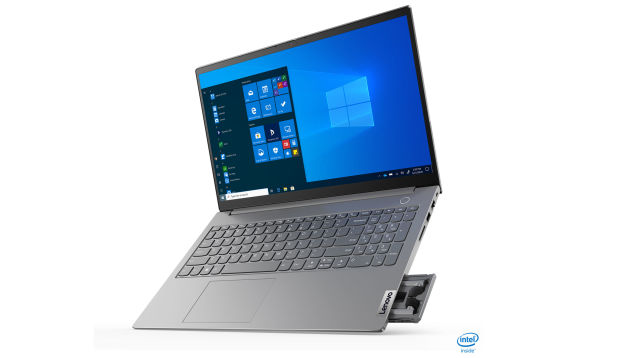
With companies continuing to push people towards wireless audio this was an inevitability. Today Lenovo took things to their natural conclusion with the ThinkBook 15 Gen 2, which is the world’s first laptop to feature a pair of built-in wireless earbuds.
Source: Gizmodo – Lenovo Finally Jumped the Shark on Wireless Earbuds with the ThinkBook 15 Gen 2
Google Removes 17 Android Apps Caught Engaging In WAP Billing Fraud
Google has recently removed 17 Android applications from the official Play Store because they were infected with the Joker (aka Bread) malware. ZDNet reports: “This spyware is designed to steal SMS messages, contact lists, and device information, along with silently signing up the victim for premium wireless application protocol (WAP) services,” Zscaler security researcher Viral Gandhi said this week. The 17 malicious apps were uploaded on the Play Store this month and didn’t get a chance to gain a following, having been downloaded more than 120,000 times before being detected.
Following its internal procedures, Google removed the apps from the Play Store, used the Play Protect service to disable the apps on infected devices, but users still need to manually intervene and remove the apps from their devices. But this recent takedown also marks the third such action from Google’s security team against a batch of Joker-infected apps over the past few months. […] The way these infected apps usually manage to sneak their way past Google’s defenses and reach the Play Store is through a technique called “droppers,” where the victim’s device is infected in a multi-stage process. Malware authors begin by cloning the functionality of a legitimate app and uploading it on the Play Store. This app is fully functional, requests access to dangerous permissions, but also doesn’t perform any malicious actions when it’s first run.
Because the malicious actions are usually delayed by hours or days, Google’s security scans don’t pick up the malicious code, and Google usually allows the app to be listed on the Play Store. But once on a user’s device, the app eventually downloads and “drops” (hence the name droppers, or loaders) other components or apps on the device that contain the Joker malware or other malware strains.


Read more of this story at Slashdot.
Source: Slashdot – Google Removes 17 Android Apps Caught Engaging In WAP Billing Fraud
Lenovo Announces The ThinkPad X1 Nano: Intel Evo And 2K Display
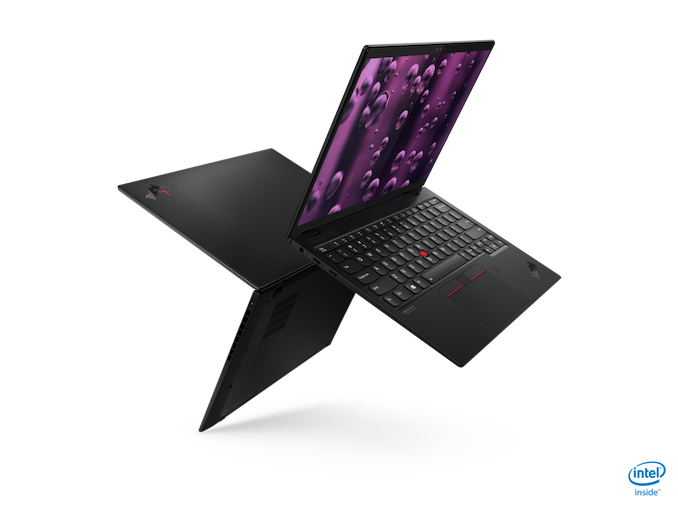
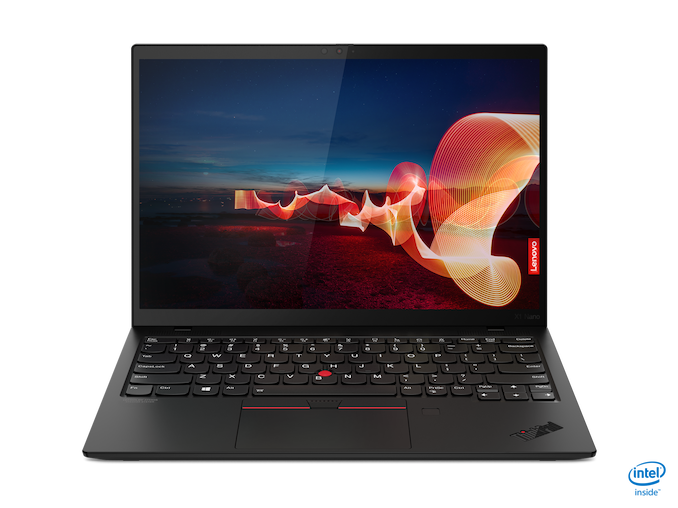
The fall rush of laptop announcements is upon us, thanks to Intel announcing their latest 11th generation Core processor, codenamed Tiger Lake, and packaged as part of the Intel Evo program. Today Lenovo is announcing the new ThinkPad X1 Nano, featuring Intel’s Evo platform, as well as a few tweaks to the traditional ThinkPad design.
| Lenovo ThinkPad X1 Nano | |||||
| Component | X1 Nano | ||||
| CPU | Up to 11th Gen Intel Core i7 | ||||
| Memory | Up to 16 GB LPDDR4x | ||||
| Display | 13-inch 2160×1350 Dolby Vision 100% sRGB 450-nit With or without Touch |
||||
| Storage | Up to 1 TB PCIe NVMe | ||||
| Wireless | Intel AX201 Wi-Fi 6 LTE 5G CAT20 LTE 4G CAT9 Bluetooth 5.0 |
||||
| I/O | Thunderbolt 4 x 2 Headset 3.5mm |
||||
| Webcam | IR with Human Presence | ||||
| Battery | 48 Wh Up to 65-Watt Type-C Adapter |
||||
| Dimensions | 292.8 x 207.7 x 13.87 mm 11.5 x 8.15 x 0.55 inches |
||||
| Weight | Starting at 962 grams / 2.12 lbs | ||||
| Starting Price (USD) | $1,399 | ||||
| Availability | Q4 2020 | ||||
Powering the new ThinkPad X1 Nano will be Intel’s newest 10 nm design, Tiger Lake, with up to a Core i7 processor. That also means it will feature the full 96 Execution Unit Intel Iris Xe graphics, and up to 16 GB of LPDDR4x memory. The X1 Nano will offer up to 1 TB of PCIe storage, and the 48 Wh battery is rated up to 17.3 hours.
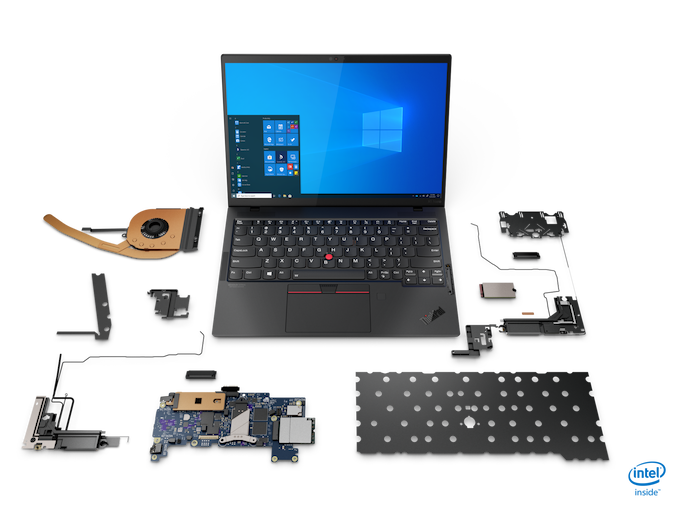
Lenovo has finally made the jump back to 16:10 displays, with the X1 Nano featuring a 13-inch panel with a somewhat odd, but effective, 2160×1350 display. This “2K” display is a nice step up over a more traditional 1920×1200, coming in at 195 pixels-per-inch. It may seem like a small jump over the 170 pixels-per-inch of the 1920×1200, but will allow 200% scaling to work perfectly. It also won’t impact the battery life as dramatically as a “4K” panel would, so it seems like a nice balance. As seems to be the norm with Lenovo displays of late, this 100% sRGB panel features Dolby Vision, and can be had with or without touch.
The new laptop is also light. The ThinkPad X1 Nano weighs in at just 2.12 lbs. The device measures in at 11.5 x 8.15 x 0.55 inches, so it is not the thinnest, nor the lightest, but it is close.
There is plenty of connectivity as well, with Lenovo outfitting the X1 Nano with two Thunderbolt 4 ports. Not only does Thunderbolt 4 offer more performance, security, and features compared to Thunderbolt 3, it also provides full access to data, power, and video guaranteed in every port, unlike USB which has a long list of optional features.
Lenovo is implementing Intel’s Wi-Fi 6 solution, which is of course part of the Intel Evo platform, but they are enhancing that with LTE 5G CAT20 for those that need network on the go.
As a proper ThinkPad, the X1 Nano also takes security seriously, with a dTPM 2.0 chip, IR camera and Match on Chip fingerprint reader for Windows Hello logins, and a ThinkShutter camera cover.
The new X1 Nano will be available in Q4 2020, starting at $1399.
Source: Lenovo


Source: AnandTech – Lenovo Announces The ThinkPad X1 Nano: Intel Evo And 2K Display