
A proposal was submitted today for launching the RISC-V Compiler Collaboration “RVCC” as an LLVM Incubator project to focus on compiler optimizations for better performance on RISC-V. But before getting too excited, there is already some opposition to the proposal…
Xbox’s Big Summer Showcase Returns With Deep Dive On Gears Of War: E-Day

Microsoft’s new gaming boss says she hears the community on the importance of Xbox FanFest
Trump convenes “God Squad” to override Endangered Species Act, up oil production
The Trump administration is turning to the nuclear option on endangered-species protections in the name of national security.
A rarely tapped panel nicknamed the “God Squad” will meet Tuesday to discuss whether overriding Endangered Species Act regulations for all federally regulated fossil fuel operations in the Gulf of Mexico is more important than preventing the extinction of several imperiled species. That includes sea turtles and a whale species down to its last 51 individuals.
Interior Secretary Doug Burgum announced the upcoming Endangered Species Committee meeting last week, with no details on specific projects in the Gulf or the basis for what would constitute an extraordinary action. Only twice in the panel’s nearly half-century has it ever lifted restrictions.
Why You Need an MP3 Player in 2026 (and What to Buy)
We may earn a commission from links on this page.
One of the easiest ways to turn off the noise of the world is to outsource what the phone does to other devices—ones that aren’t perpetually online or requiring a subscription to function. This led me to rediscover an old favorite: the MP3 player.
MP3 players are now, not surprisingly, far more capable than they were two decades ago. They come in a variety of shapes and sizes, many of which emulate the design of favorite legacy MP3 players, and are manufactured by companies you’ve likely never heard of, like FiiO and AGPTEK. They come with support for the latest music codecs, Bluetooth, FM Radio, built-in speakers, and even features that smartphone manufacturers have long since dropped, like expansion slots and the standard headphone jack.
But if you’re really nostalgic for the old days, you can recommission a vintage Apple iPod or a Microsoft Zune. There are even creative modders who will customize a traditional one.
Whatever way you decide to participate, embracing the standalone MP3 player means joining a movement in defiance of the current trend of streaming everything. Here’s how I got started with an MP3 player, and where to start if you’re interested in reviving your own for modern-day use.
These MP3 players are a turnkey solution
Let’s be realistic: MP3 players are no longer the de facto gadget category they once were. You can’t find them at brick-and-mortar stores or online the way you used to. But you can find some reasonably priced ones on Amazon and other global gadget markets.
The most common and well-rated brand you’ll see pop up on Amazon is AGPTEK. The company is based in Brooklyn and sells nearly everything in the gadget spectrum. It’s one of those “parts bin” brands, which have access to reliable, off-the-shelf components to make reasonably priced gadgets without the high cost.
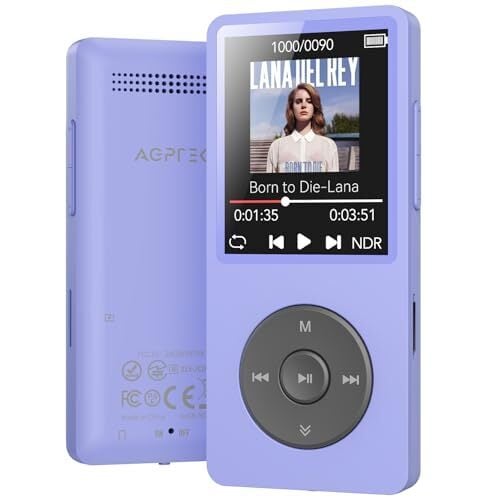
AGPTEK offers several music players, but its most popular is the A02. It became a legend for its 70-hour battery life, and it’s the one I brought home because of its impressive feature set. The AGPTEK A02 uses the latest Bluetooth 5.3 codec. I can move around the house with the player in my pocket or leave it on my desk, and I still have clear sound on the other side of the house. It uses USB-C for charging and data transfer, and there’s a microSD slot that supports up to 128GB of storage if you need more than its 64GB internal storage. There’s a physical lock switch to keep you from accidentally skipping a track, too.
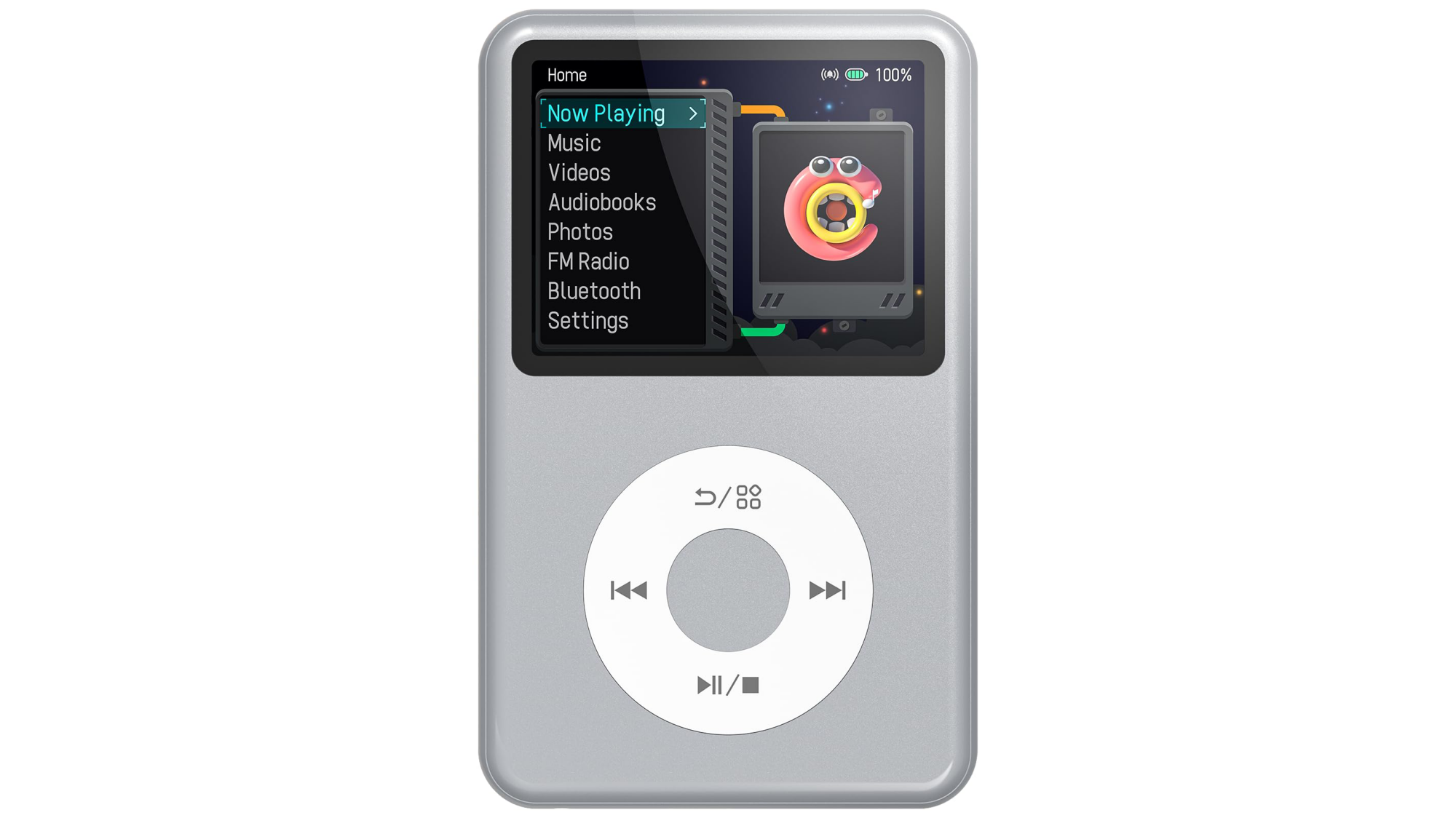
The Innioasis Y1.
Credit: Innioasis/Amazon
Credit: Innioasis/Amazon
Innioasis is another brand you’ll see floating around—they’re known for their iPod knockoffs. They sell touchscreen MP3 players, too, but it’s the “iPod tribute” ones that get the most traction. The most popular model is the Y1, which looks like an iPod Classic. The $50 device comes with USB-C and Bluetooth, rather than relying on a 30-Pin proprietary charging cable like back in the day. You don’t need special software to drag and drop music onto the device. Most models come with 128GB of internal storage.
Innioasis’s touch-screen models are hybrid digital music players: They have wifi access so that you can download Spotify playlists and Audible audiobooks. They can’t access the internet outside of that hot zone, however, so if you want new music and you’re out on a run, you’ll have to wait until you get back to the internet.
These high-end options for great for audiophiles
The Sony Walkman NW-A306 is a premium digital music player. It has high-end internals like Sony’s proprietary S-Master HX digital amplifier, which reduces distortion and noise across different frequencies, and high-quality film capacitors that make audio sound clearer than a phone’s standard DAC (digital-to-analog converter). These are usually parts reserved for Sony’s high-end home stereo systems, but here they’re shrunk into a smaller footprint.
For those on a tighter budget who still want a full-featured MP3 player, the brand FiiO is the current darling of the audiophile community. The JM21 player is slim and runs a Qualcomm Snapdragon 680 chip, which you’d typically find in an Android phone. It has Dual Cirrus Logic CS43198 DAC chips, which means it delivers music with fully balanced audio, the same way Sony’s music players do. It also features both a standard 3.5mm and a 4.4mm headphone jack if you have high-end studio cans you’d rather listen through.
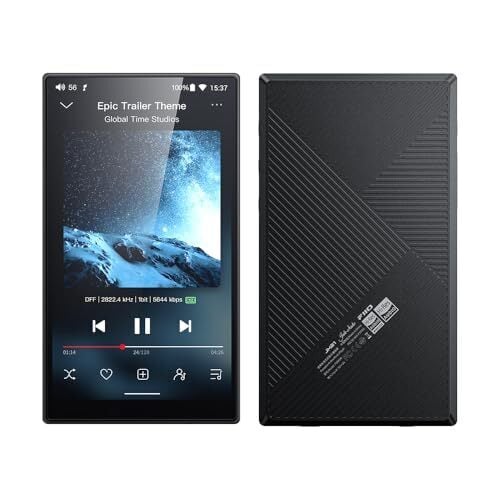
Deciding between these two depends on whether you prioritize usability or power. Sony’s players, like the NW-A306 and the slightly larger NW-ZX707, are small and offer up to 36 hours of battery life. They also feature a Sony-piloted AI-powered tool called DSEE Ultimate, which upscales low-quality audio to sound more high-resolution. That said, Sony users have complained that the device can feel sluggish compared to even a modern midrange Android device. It’s not exactly high-powered.
The FiiO is an easier sell because it just got refreshed. The JM21 has a 700 mW output, so it won’t start crackling as your headphones get louder. Users prefer the interface to that of the Sony MP3 players, too. They’ve also mentioned that the soundstage, or the perceived “distance” between instruments, feels much wider. However, the MP3 player is a bit of a “brick” compared to Sony’s lighter builds. The battery life is only 12-15 hours, and it doesn’t have Sony’s AI-assisted audio processing, so if your audio files are bad, you’ll hear it all.
Should you resurrect your iPod?
If you aren’t interested in buying something new, you might find yourself drawn to the do-it-yourself world of MP3 player revival. You take a twenty-year-old device, gut it, replace its parts with modern components, and then you have yourself Frankenstein’s digital music player for the new age.
Right now, iPods are the ones getting the most modding. The fragile, spinning mechanical hard drive of the original iPod Classic is typically the first thing to fail, so modders use iFlash adapters to load music from microSD cards instead. By removing that hard drive, you also make space for a battery, which can add more life to the iPod—some modders figured out how to run it for over 100 hours of continuous play. If you do decide to go this route, there are kits you can buy, like the Classic Connect 2, which lets you add Bluetooth, USB-C charging, and wireless charging to the classic iPod shell.
Even if you have an older iPod lying around that’s still working, you can break free from the ghost of iTunes by installing Rockbox. This open-source firmware, which finally landed a stable release in 2025, enables vintage iPods to play lossless FLAC files, add custom themes, and other shenanigans that you wouldn’t consider doing to an mp3 player, but you can.
People are also reviving Microsoft’s original attempt at the “iPod Killer”: the Zune. The Zune 30 is particularly popular for these modding projects because its internal layout is spacious. Modders can swap the original hard drive for a larger-capacity solid-state drive and drop in a bigger battery. And yes, they’re bringing wireless charging to the Zune through aftermarket hacks, too.
I am personally on a journey to attempt to revive a Sony Walkman NW-HD5. It has its own community of modders who have figured out how to replace the 1.8-inch drive with flash storage. That model also had a user-replaceable battery from the get-go, and you can find higher-capacity batteries on places like AliExpress to fully revive it. Rockbox also works with the Sony NW-HD5. It’s a tinkering hobby that will keep me busy for a while.
Ubuntu MATE Leader Stepping Down, Seeking New Contributors
After starting and leading the Ubuntu MATE flavor since 2014, Martin Wimpress announced he’s looking to step down from leading this flavor of Ubuntu Linux with the MATE desktop environment. He’s hoping for new passionate contributors to keep it going…
Rspamd 4.0 Released For Open-Source Spam Filtering
Rspamd 4.0 is out today as a big update to this powerful open-source spam filtering system…
This Wearable Action Camera Is $70 Off for Amazon’s Big Spring Sale
We may earn a commission from links on this page. Deal pricing and availability subject to change after time of publication.
Action cameras usually ask you to choose between size and capability—smaller ones are easier to wear but often compromise video quality or controls. The Insta360 Go Ultra tries to bridge that gap. It’s a tiny, wearable camera that can also behave like a more traditional action cam when you need it to. Right now, it’s down to $379.99 (originally $449.99) during Amazon’s Big Spring Sale (ending March 31), which is its lowest price yet, according to price trackers. It also helps that it earned an “excellent” rating from PCMag, which gives some context to what you’re getting here.
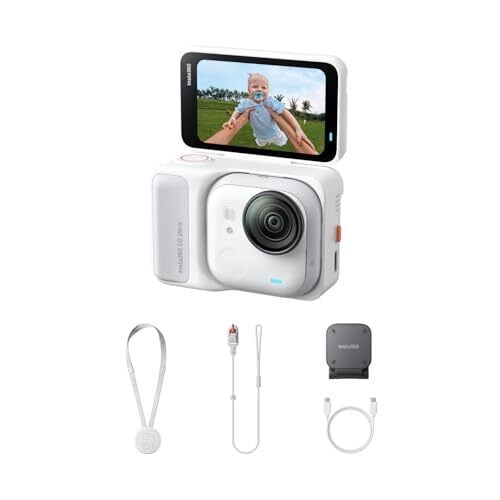
What makes this camera interesting in daily use is how flexible it feels. The main camera unit is small enough to clip to your shirt or wear on a magnetic pendant, so you can record hands-free without thinking about framing. When you want more control, you snap it into the Action Pod, which adds a 2.5-inch flip-up touchscreen and turns it into something closer to a GoPro-style setup. Video quality is a clear step up from older Go models—it shoots stabilized 4K at 60fps, and the larger 1/1.28-inch sensor helps in low light, so evening clips or indoor footage don’t fall apart as quickly. Stabilization, too, works well for walking or biking, and the wide field of view keeps things immersive.
The Go Ultra also supports HDR, multiple shooting modes, and a tutorial-led app-based editing, so putting together a usable clip doesn’t take much effort, even if it takes a bit of getting used to. Video is limited to 8-bit color, so there’s not much room for heavy editing or color grading. You’ll also need a microSD card since there’s no built-in storage.
Audio is decent for casual use, but wind and distance can affect clarity unless you connect an external mic or supported earbuds. Also, its battery life depends heavily on how you use it—the standalone camera lasts around 30 to 36 minutes at 4K60 before heating becomes an issue, while the Action Pod stretches that to about two hours, according to the PCMag review. Compared to something like the DJI Osmo Action 5 Pro, what you’re paying for here is the compact, wearable design rather than raw video flexibility.
Our Best Editor-Vetted Amazon Big Spring Sale Deals Right Now
Deals are selected by our commerce team
Microsoft Confirms ‘This Is An Xbox’ Campaign Is Dead And Reveals Why

Microsoft has been quietly removing references to its viral ‘This is an Xbox’ marketing campaign and lest there was any doubt about why, the company confirmed in a statement the reasoning behind its decision to move on. Simply put, new Xbox boss Asha Sharma made the decision to abandon the controversial campaign because it did not align with
How to Buy (and Actually Own) Your Movies and TV Shows in 2026
We may earn a commission from links on this page.
Watching a show or a movie has quite literally never been easier. The streaming services you already subscribe to have more content than you could possible ever watch. If something you want to see is only on a specific platform, you can subscribe to it. If it’s only available to buy or rent digitally, you can do that too. But with the rise of streaming, the concept of owning and curating a home video collection has fallen away. It seems fewer and fewer of us want a collection of discs in our homes. We’d prefer everything to fit neatly into our smart TVs.
But streaming isn’t perfect—far from it. Maybe you were counting on watching something on a service you already pay for, but discover it’s now gone; maybe that movie isn’t streaming anywhere at all, and there’s no way to watch it online. Owning a physical copy of a show or movie really is the only way to guarantee that you’ll be able to watch it whenever (or wherever) you want.
Plus, building a collection of films perfectly suited to your tastes is just fun—entertainment feels less ephemeral when you can tie it to a physical object rather than an icon in a sea of them on the Netflix home screen. If you want to go back to how things used to be, here’s how to go about starting your own home video collection in 2026:
Buying movies and shows digitally isn’t the same as owning them
Modern streaming devices and TVs aren’t exactly gatekeeping you from purchasing movies or TV shows. If you want to, you can still buy them through your Apple TV, Fire TV, Roku, Google TV, or through the various apps you use. Prime Video will happily sell you Titanic; Apple will let you buy a “box set” of every season of The Office; you can even buy The Dark Knight on YouTube, by way of Google Play Movies & TV.
The thing is, buying digitally isn’t really ownership. It might feel that way: You have to click a “Buy” button, pay a good chunk of change, and you get access to that content at any time from any compatible, connected device. But when you buy a digital show or movie through Apple, Amazon, or Google, what you’re actually paying for isn’t ownership rights, but a license. You’re paying for the privilege of viewing that content for as long as the platform has the rights to it. If Prime Video loses the rights to Titanic, so do you, even if you paid $19 for it.
That’s not to say digital content doesn’t have its place. These stores are particularly great for renting movies when the flick you want to watch isn’t available on streaming. It might also make sense for you to “buy” shows and movies on these platforms, as the license can cost less than the price of a movie ticket, and you can definitely get your money’s worth in viewings this way. I have a number of movies I bought on iTunes a decade ago that I still have access to, and I watch them regularly across all my Apple devices. But back when I bought them, I assumed I owned them. I was wrong, and that’s why I haven’t clicked “buy” on one of those platforms in years.
True ownership requires buying physical media
If you want to truly own your TV shows and movies, and know for sure that you won’t lose access to them, you need to invest in physical media. In 2026, that largely means on a disc. If you’ve fully transitioned to the streaming lifestyle, the idea of bringing DVDs and Blu-rays into your home might sound downright medieval—but without them, your collection is forever at the mercy of the platforms that license said content.
Here’s the real kicker, though: Even when buying your shows and movies physically, you’re still just buying a license to watch that content—that’s why you can’t publicly screen a movie just because you own the DVD; you still have to pay for the rights to show it outside of your home. Technically, the companies that own the content can revoke that license at any time—it’s just way more difficult to cut someone off when they have a physical disc. That gets a bit dicier with modern Blu-rays and Blu-ray players, which connect to the internet, and could theoretically block your access in the future. But as far as I know, there’s no documented case of this happening, whereas marketplaces like Prime Video have lost licenses and revoked users’ content. So generally, if you buy a movie or a TV show on a disc, you own it, for all intents and purposes.
There are many video formats out there, especially if you’re interesting in owning legacy media (from VHS, to Betamax, to LaserDisc). But for now, let’s assume you want to start a collection of DVDs and Blu-rays. They’re the easiest physical media to buy when it comes to shows and movies, and the most versatile when it comes to playback.
Physical media often looks and sounds better than a digital copy
This isn’t an opinion driven by nostalgia: While streaming quality can be excellent, modern discs will always be superior. Sure, your 4K Prime Video stream is going to crush a low-resolution DVD, but even a 1080p Blu-ray has it beat in certain categories. A 4K Blu-ray, meanwhile, is the absolute gold standard.
The main reason comes down to bitrates—the amount of information displayed on your screen at once. In general, the higher the bitrate, the more visual detail a video will have at any given moment. This is different than resolution, which is simply total number of pixels a video contains. (4K has roughly 8.3 million pixels per frame—3,840 pixels by 2,160 pixels—while 1080p has just over two million pixels per frame—1,920 pixels by 1,080 pixels).
When you buy shows and movies digitally, you’re only really sold on the resolution—whether the content is “HD” (1080p) or 4K—and not the bitrate. While that 4K stream has more available pixels to work with than a 1080p disc, if the disc’s bitrate is higher, it can show more details in its two million pixels than the 4K stream can show in its 8.3 million. While discs can run off of the information they contain alone, streaming has to contend with all sorts of variables with your home internet connections—and, thus, it has to compromise on the bitrate.
Take The Dark Knight, for example: I have the 1080p Blu-ray, which has a bitrate of 24 Mbps. I also have a license for the 4K Dolby Vision version from Apple TV. After hacking my Apple TV a bit, I was able to see the streaming data, which showed that while the maximum bitrate was 24.24 Mbps, my average hovered around 15 Mbps. That’s still a good amount of data, but it’s interesting to see that even at 4K resolution and in Dolby Vision HDR audio, my Apple TV stream moves less data than my 1080p Blu-ray. I have a good internet connection, but maybe if I were able to connect my Apple TV directly to the router via ethernet, I could get that 24.24 Mbps bitrate and match that of the Blu-ray. But what if I upgrade to the 4K Blu-ray, since that has a bitrate of 47.16 Mbps and supports HDR?
While a 4K stream may be comparable (or even preferable) to a 1080p Blu-ray, the Blu-ray (4K or not) will always outclass it in the audio department. Streaming audio bitrates are more compressed than discs, even more than the video bitrates. While my Apple TV copy of The Dark Knight could theoretically reach the bitrate of my Blu-ray copy, its audio maxes out at 383.88 kbps. The Blu-ray, however, has support for 16-bit 48kHz Dolby TrueHD 5.1 audio, which has a variable bitrate, but should theoretically reach 4,608 kbps (16 bits times 48 kHz times six audio channels)—as well as Dolby Digital 5.1 at 640 kbps. Simply put, you get a lot more audio data from the disc. The 4K Blu-ray ups that to DTS-HD Master Audio 5.1 at 24-bit 48kHz, which applying the same math gets you 6,912 kbps.
The big caveat here is that all of this is dependent on the TV and sound system you use to experience your movies or shows. If you use your TV’s built-in, backwards-facing speakers, you might not notice the uptick in quality. But if you have at least a soundbar, if not a more elaborate home theater setup, discs are definitely going to sound better. The same goes for picture quality: If you have a high-quality TV panel, you’ll notice sharper scenes, more film grain, and a lack of compression, especially in dark scenes.
Where to buy Blu-rays and DVDs in 2026
The good news is, even in 2026, it’s not hard to find physical shows and movies to buy. You don’t need to find specialty stores or shop secondhand: major retailers like Walmart and Target still sell physical media of all kinds, including Blu-rays and DVDs. You can walk into a Walmart right now and buy Zootopia 2 on Blu-ray, or head to Target and buy Vice on DVD. But for a more curated selection, you’ll definitely want to keep tabs on Amazon, or even Best Buy. Barnes & Noble famously sells The Criterion Collection Blu-ray and DVDs, though you can always buy directly through Criterion.
You might think that because “nobody” buys discs anymore, that these things would be dirt cheap. Au contraire: Physical media can get pricey, especially Blu-ray (and particularly 4K Blu-ray). My recommend is to follow a site that tracks deals on physical media, like Blu-ray.com. You can sort by type (4K Blu-ray, Blu-ray, DVD, etc.) or just browse all types of deals to see if any of your favorites get to a price you find acceptable. But if you’re getting into this type of collecting, and especially if you’re buying new movies and TV shows, be prepared to spend some cash (there’s a reason folks in the r/Criterion Reddit group mark the Barnes & Noble semi-annual 50% off sale on their calendars).
You’ll need something to play your DVDs and Blu-rays
If you’re all-in on streaming, you might not actually have anything to play a DVD or Blu-ray on. If so, you’ll need to remedy that. Believe it or not, there are companies still making Blu-ray players, though the numbers are dwindling. Two companies, Pioneer and Reavon, abandoned the market in 2025, but there are still good options out there, with Sony and Panasonic leading the pack. CNET recommends the Sony UBP-X700M, which you can pick up for under $300 used on Amazon.
On the flip side, if you have a game console, like a PlayStation or Xbox, you already have a Blu-ray player—with some caveats: The Xbox models, as well as the PS5, don’t support Dolby Vision HDR, only HDR10. If you’re looking for Dolby Vision, you’ll need to buy a dedicated player. But if all you want is a machine to reliably play your budding movie collection, your PlayStation or Xbox will work just fine. (Just make sure you buy one with a disc drive.)

You can rip your discs to enjoy the flexibility of digital ownership
If you want the permanence of physical media and the convenience of digital ownership, you can actually take things full circle and create your own private streaming service. You can take any of the physical discs you buy, rip the video files, and upload them to a private server. You can then use a program like Plex or Jellyfin to access those files from anywhere. You can watch them from your own home, of course, but also stream them when traveling. Plus, it serves as a backup method: Should something happen to the disc (or should the movie studio actually somehow revoke your Blu-ray license) you always have a backup copy of your disc.
You may need some extra hardware to get this done, however. If you’re ripping DVDs, you’ll need a DVD player connected to your computer, and a program like Handbrake. If you’re ripping Blu-rays, you’ll similarly need a Blu-ray player that can connect to your computer, and a program like MakeMKV. While ripping DVDs is pretty straightforward, ripping Blu-rays can get a bit tricky, especially if they’re 4K, so you might want to follow a full guide for the best results.
As for the legality of this method, well, most films are encoded onto discs with digital rights management software (DRM), and while making a backup copy is often considered fair use, bypassing DRM in the U.S. is also a violation of the Digital Millennium Copyright Act, which means it’s illegal. You know, technically. And while I won’t encourage you to break the law, if you invite me over to stream a movie from your personal Plex server, I promise not to tell on you.
RADV Vulkan Video Adds Low-Latency Encode/Decode Options
The Mesa Radeon “RADV” Vulkan driver has added new low-latency Vulkan Video encode/decode options for those seeking better performance…
What happened to Amelia Earhart? New book takes on the case.
Famed aviator Amelia Earhart mysteriously disappeared in 1937 during an attempt to become the first female pilot to circumnavigate the globe. Speculative theories abound about what really happened to Earhart, but while tantalizing hints of her fate have popped up from time to time over the last 90 years, none have proved conclusive. The people behind those theories, and the extraordinary woman who still inspires them, are the focus of an eminently readable new book, Lost: Amelia Earhart’s Three Mysterious Deaths and One Extraordinary Life, by Rachel Hartigan.
A former editor of The Washington Post’s Book World, Hartigan worked for National Geographic magazine for 12 years, covering such diverse topics as the genetics of persimmon trees and the history of women’s suffrage. So why a book about Amelia Earhart? Hartigan acknowledged that she asked that question herself “in the darkest moments of writing.”
After all, there are countless biographies for readers of all ages, as well as books touting various theories about Earhart’s disappearance, not to mention occasional news coverage about the latest attempts to locate Earhart’s plane or her remains. (Just last fall, we reported on Laurie Gwen Shapiro’s The Aviator and the Showman, a biography exploring Earhart’s unconventional marriage to George Putnam, a flamboyant publisher with a flair for marketing.) “I just didn’t feel there was a book that tied everything together,” Hartigan told Ars. “You get these news stories of people saying they know where Amelia Earhart is, but you don’t have any context beyond the immediate story, all the things that make it a full picture.”
This Philips Smart Lock Is 35% Off for Amazon’s Big Spring Sale
We may earn a commission from links on this page. Deal pricing and availability subject to change after time of publication.
Amazon’s Big Spring Sale is still going strong, and smart home upgrades are getting some real price cuts. One among them is the Philips Wi-Fi Smart Lock with Handle, which is down to $149.99 (originally $229.99)—its lowest price so far, according to price trackers. That drop makes it a more approachable way to switch from a traditional lock to something smarter without committing to a full security system. It’s a complete set with handles included, so you’re not mixing and matching parts or dealing with awkward installs that don’t look right on your door.
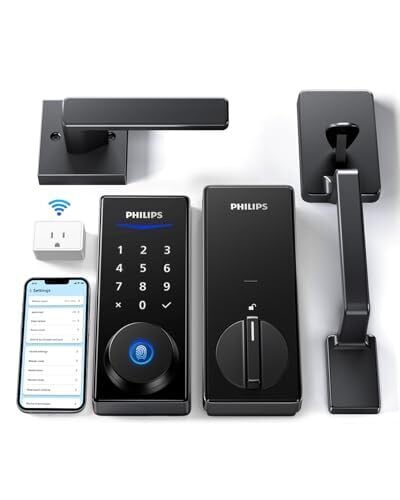
This lock focuses on flexibility in how you get in and out. You can unlock it with your fingerprint, a PIN, the Philips app, a physical key, or even voice commands through Alexa or Google Assistant. Fingerprint unlock is fast—around 0.3 seconds, according to the manufacturer.
The app adds another layer of control. You can lock or unlock your door remotely, check access history, and create temporary or one-time PINs for guests, deliveries, or house help. That comes in handy if you don’t want to hand out permanent access. The auto-lock feature also helps cover those moments when you forget to lock the door, with a timer you can set between 30 and 180 seconds.
That said, there are a few things to keep in mind—the wifi features depend on the included gateway, so you’ll need to set that up for remote access and voice control. Installation is straightforward for most standard doors, but you may need to drill if your door isn’t a perfect fit. And this is still a smart lock, so battery management and occasional maintenance are part of the experience.
Our Best Editor-Vetted Amazon Big Spring Sale Deals Right Now
Deals are selected by our commerce team
This LG Smart Window AC With Heating and Smart Controls Is Just $400 Right Now
We may earn a commission from links on this page. Deal pricing and availability subject to change after time of publication.
Most window air conditioners follow a simple formula: cool the room, maybe add a fan setting, and leave it at that. The LG LW8023HRSM window air conditioner, currently on sale for $399.99 on StackSocial, takes a slightly more flexible approach. It still installs like a typical window unit, but it adds heating and smart controls, making daily use easier. For someone cooling a bedroom, small apartment living room, or home office, the main appeal here is convenience. You can control the unit with a remote, the onboard buttons, or the LG ThinQ app on your phone. If you already use Amazon Alexa or Google Assistant, you can also adjust the temperature with a voice command instead of getting up to press buttons.
The cooling capacity is 7,600 BTU, which LG recommends for rooms up to 330 square feet. In practical terms, that size works well for most bedrooms, studio apartments, or compact office spaces. It should bring the temperature down fairly quickly after a hot afternoon, especially if the room stays closed. This unit also includes 3,850 BTU of heating, which can be helpful during cooler months when you want a little warmth without turning on central heat. You can also switch between cool, heat, fan, and dehumidify modes, depending on what the room needs that day. Two cooling speeds and two fan speeds give you some control over how aggressively the unit runs. Airflow is adjustable in four directions, so you can angle the air away from your bed or couch.
LG lists the noise level at about 50–52 dB, so it produces a steady background hum, but not enough to drown out conversation or a TV. Rounding things out, there’s a 24-hour programmable timer that lets you schedule the AC to turn on before you get home or shut off overnight. You’ll also find an auto-restart function that restores your previous settings after a power outage, so you don’t have to reset everything. The main limitation is coverage—at this size, it’s built for smaller rooms, not large open living spaces. But if you want a window unit that cools reliably and gives you a few more ways to control it, this one fits the role without stepping into premium pricing.
Our Best Editor-Vetted Tech Deals Right Now
Deals are selected by our commerce team
You Can Get This 13-Inch M4 iPad Pro on Sale for $900 Right Now
We may earn a commission from links on this page. Deal pricing and availability subject to change after time of publication.
Apple’s latest tablet is still one of the most powerful pieces of hardware you can carry in a backpack, and right now, the refurbished 13-inch M4 iPad Pro is on sale for $899.99 on StackSocial. That price gets you the 256GB Wi-Fi model in Space Black with a Grade-A rating, meaning it should look and work like new with little to no visible wear. If you need more storage or cellular, prices scale up: 256GB with Wi-Fi + 5G is $999.99, 512GB Wi-Fi is $1,044.99, and configurations go up to 2TB with Wi-Fi + 5G at $1,674.99. All models include a USB-C charger and a 30-day third-party parts-and-labor warranty, and they ship only within the contiguous U.S.
The 13-inch OLED display is sharp at 2,752 by 2,064 pixels, and it gets extremely bright for HDR video. Colors look rich without being oversaturated, and scrolling feels smooth thanks to the adaptive refresh rate. The M4 chip inside is the same class of processor Apple puts in its laptops, so this tablet can handle heavy tasks like editing high-resolution photos, cutting 4K or even 8K video, or juggling multiple apps without slowing down. It’s also thin at 0.20 inches and weighs about 1.28 pounds, so it’s easier to carry than most laptops. Battery life is rated up to 10 hours for web browsing or video playback, though demanding work will likely get you closer to seven hours, notes this PCMag review.
Beyond performance, it covers the basics well. There are 12MP cameras on both sides for video calls and quick photos, speakers that sound fuller than most tablets, clear microphones, Face ID for unlocking, and a Thunderbolt/USB 4 port for connecting a monitor or fast external drive. It runs iPadOS 17 and will support future updates, including iOS 18 and beyond. Accessories like the Apple Pencil Pro and Magic Keyboard work with it, but they are sold separately and add a noticeable amount to the total cost.
Even at a discount, this is a high-end tablet, suitable if you want more than what a standard iPad offers for streaming, email, and casual browsing. It makes sense if you want top-tier power in a thin, touch-first device.
Our Best Editor-Vetted Apple Deals Right Now
Apple Watch Series 10 GPS 46mm with Jet Black Aluminium Case with Black Sport Band
—
$392.09
(List Price $429.00)
Apple Watch Series 10 GPS 46mm with Jet Black Aluminium Case with Black Sport Band
—
$392.09
(List Price $429.00)
Deals are selected by our commerce team
Zwift Camp: Breakthrough Announced, Begins April 6
Table of Contents
This season, Zwift is leaning heavily into the Zwift Camp concept, launching a three-camp series that kicked off with Zwift Camp: Baseline in September.
Next week (Monday, April 6), the third and final Camp of the season begins. Named “Zwift Camp: Breakthrough”, it’s a 5-stage workout series all about helping you transition to outdoor riding. Dive into all the details below!
Breakthrough Basics
After Zwift Camp: Baseline showed us our power bests across various intervals, and Zwift Camp: Build pushed us to get stronger, Zwift Camp: Breakthrough is here to help us transition confidently into outdoor riding.
The Camp consists of five different workouts, spread across five weeks. You can finish each workout once and complete the Camp, but you can also do a workout multiple times if you’re looking for additional training.
Instead of targeting power intervals like the first two camps, ZC: Breakthrough workouts target your technique while helping you build enduring fitness:
- Stage 1: The Foundation
- Stage 2: Body Control
- Stage 3: Cadence Mastery
- Stage 4: Standing Skills
- Stage 5: Flow Session
Workouts + Schedule
Stages can be completed as on-demand (solo) efforts whenever you’d like, or you can join a scheduled group event.
- Stage 1: April 6-12
- Foundations: Good posture and a cleaner pedal stroke save you tons of energy. It’s how you make outdoor rides feel effortless. The workout reinforces “calm control” while you build sustainable fitness with mostly steady work, then finishes by sharpening leg speed so you can stay smooth across different cadences.
- Unlock: Oakley Velo Kato Glasses
- Route: Triple Twist
- Stage 2: April 13-19
- Body Control: Riding outdoors is all about tiny adjustments. When your position changes, staying steady is what keeps rides calm and efficient. The workout guides riders through hand-position changes, one-leg focus drills, and calm upper-body control so adjustments feel natural, not messy, and you stay efficient and confident outside.
- Unlock: Princeton Wake 6560 Wheels Lava Red Colorway
- Route: Island Hopper
- Stage 3: April 20-26
- Cadence Mastery: We’re teaching cadence adaptability: staying smooth and in control even when rhythm changes (wind, terrain, surges, group pace). The workout emphasizes switching between higher and lower stroke speeds while keeping power steady, so outdoor riding feels composed instead of chaotic.
- Unlock: Pinarello Dogma F 2024 Starry Red Colorway
- Route: Green to Screen
- Stage 4: April 27-May 3
- Standing Skills: The goal is to make standing feel just as smooth and confident as sitting. The workout focuses on clean seated-to-standing transitions while maintaining control, building confidence for rollers, small rises, quick changes in pace, and “stretch-and-reset” moments outdoors.
- Route: Gentil 8
- Standing Skills: The goal is to make standing feel just as smooth and confident as sitting. The workout focuses on clean seated-to-standing transitions while maintaining control, building confidence for rollers, small rises, quick changes in pace, and “stretch-and-reset” moments outdoors.
- Stage 5: May 4-10
- Flow Session: The “put it all together” capstone. This is practice for the real world—you’re training control, not just fitness. Posture, pedal stroke, cadence control, and standing transitions blended into one steady, outdoor-ready rhythm. The script positions it as the final integration—helping riders feel calm, smooth, and capable when roads, terrain, and pace change.
- Unlock: Zwift Camp: Breakthrough Kit
- Route: Big Flat 8
- Make-Up Events: May 11-17
Sign up at zwift.com/zwift-camp > (events coming soon)
Each stage is a week long, with events beginning at 9am PST on Monday and scheduled hourly on the hour until 8am PST the following Monday.
Progressive Unlocks
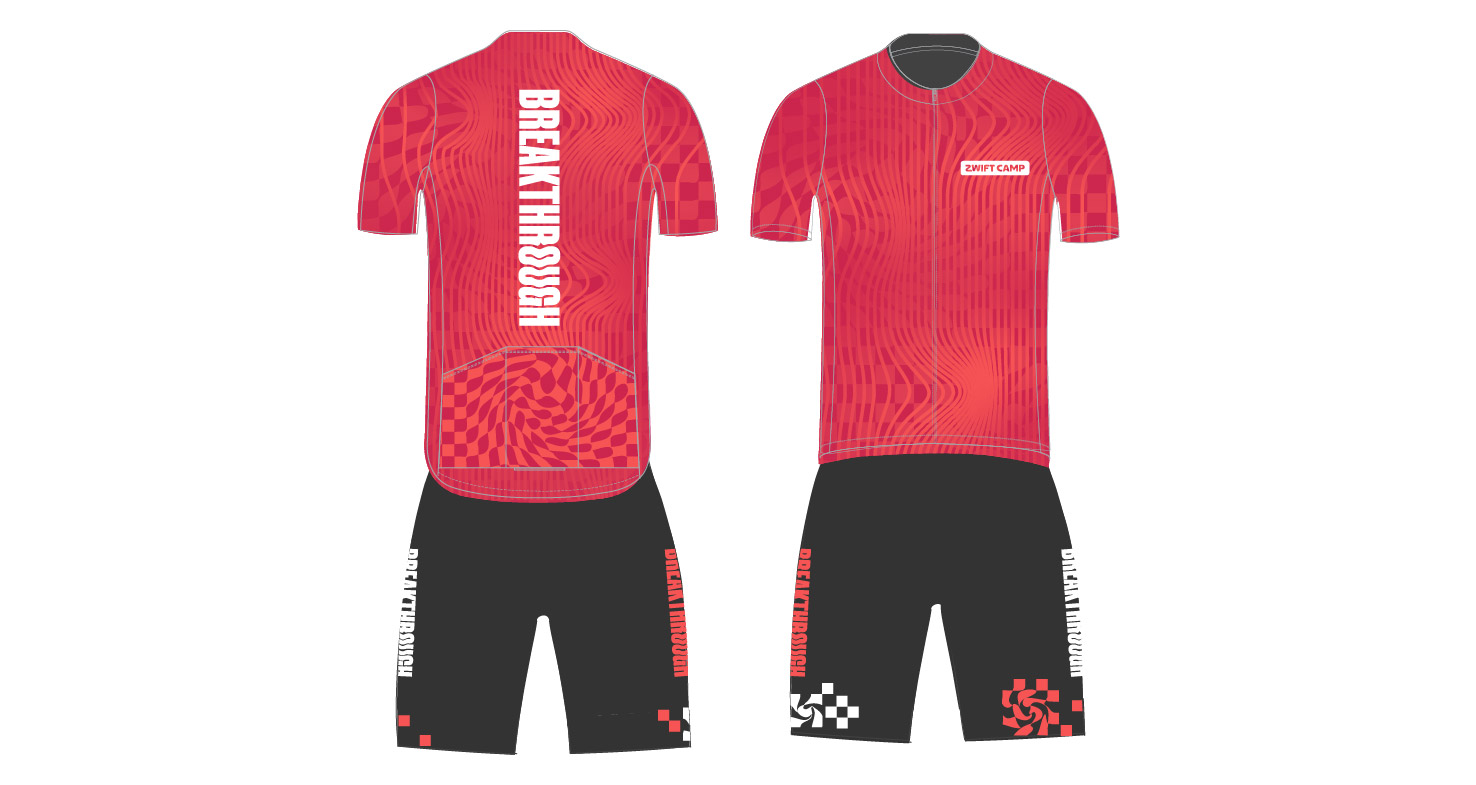
Four unlocks are available as you work your way through Zwift Camp: Breakthrough:
- Complete Stage 1: Oakley Velo Kato glasses
- Complete Stage 2: Lava Red Colorway for Princetown Carbonworks Wake 6560 wheels*
- Complete Stage 3: Starry Red Colorway for Pinarello Dogma F 2024 frame*
- Complete all 5 Stages: Zwift Camp: Breakthrough cycling kit
*These unlocks are for colorways only. You must still purchase the base Princetown Carbonworks Wake 6560 wheels and Pinarello Dogma F 2024 frame in the DropShop.
Questions or Comments?
What do you think of this last Zwift Camp of the season? Planning to participate? Got questions? Share your thoughts below!
Sophie Turner Injury Halts Tomb Raider TV Series Production

Filming has stopped from anywhere between two weeks and forever, depending on who you believe
New Company Hopes to Build Age-Verification Tech into Vape Cartridges
Their goal is to use biometric data and blockchain to build age-verification measures directly into disposable vape cartridges.
Wired reports on a partnership between vape/cartridge manufacturer Ispire Technology and regulatory consulting company Chemular (which specializes in the nicotine market) — which they’ve named “Ike Tech”:
[Using blockchain-based security, the e-cig cartridge] would use a camera to scan some form of ID and then also take a video of the user’s face. Once it verifies your identity and determines you’re old enough to vape, it translates that information into anonymized tokens. That info goes to an identity service like ID.me or Clear. If approved, it bounces back to the app, which then uses a Bluetooth signal to give the vape the OK to turn on.
“Everything is tokenized,” [says Ispire CEO Michael Wang]. “As a result of this process, we don’t communicate consumer personal private information.” He says the process takes about a minute and a half… After that onetime check, the Bluetooth connection on the phone will recognize when the vape cartridge is nearby and keep it unlocked. Move the vape too far away from the phone, and it shuts off again. Based on testing, the companies behind Ike Tech claim this process has a 100 percent success rate in age verification, more or less calling the tech infallible. “The FDA told us it’s the holy grail technology they were looking for,” Wang says. “That’s word-for-word what they said when we met with them….”
Wang says the goal is to implement additional features in the verification process, like geo-fencing, which would force the vape to shut off while near a school or on an airplane. In the future, the plan is to license this biometric verification tech to other e-cig companies. The tech may also grow to include fingerprint readers and expand to other product categories; Wang suggests guns, which have a long history of age-verification features not quite working.


Read more of this story at Slashdot.
Project Hail Mary is already Amazon MGM’s highest-grossing film ever
It’s safe to say that Project Hail Mary is a success. The movie has taken in over $300 million globally, making it the best showing for Amazon MGM yet, Variety reports. Amazon bought MGM for $8.5 billion in 2022.
Creed III previously held the record for Amazon MGM, having grossed $276 million. Notably, the achievement for Amazon MGM is just versus its own markers, rather than against other production companies. But it’s certainly notable given streamers aren’t known for focusing on theatrical releases.
With that said, Amazon MGM has pivoted recently, announcing last April that it planned to release 14 films in theaters this year. These titles include Is God Is (May 15), Masters of the Universe (June 5), and Verity (October 2).
Project Hail Mary is based on a 2021 novel by Andy Weir, author of The Martian. It follows Ryan Gosling as high school teacher Ryland Grace, who wakes up on a spacecraft with no idea who he is or why he’s there. It has garnered mostly positive reviews and a 95 percent rating on Rotten Tomatoes.
This article originally appeared on Engadget at https://www.engadget.com/entertainment/tv-movies/project-hail-mary-is-already-amazon-mgms-highest-grossing-film-ever-112955144.html?src=rss
Tadej Pogačar’s Milan–San Remo jersey is up for auction, but be prepared to spend a lot of cash
The all-white world champion’s skinsuit worn by Tadej Pogačar when he won this year’s Milan-San Remo is up for auction.
Pogačar crashed on the approach to the Cipressa with 32km to go, but still rode back to the bunch in the ripped skinsuit and won the race in a two-up sprint against Tom Pidcock.
Now the skinsuit, described as ‘exactly as it was that day’, complete with a torn race number and road grime, although with the addition of his teammates’ signatures, is up for auction on GalaBid.com.

The highest bid for the skinsuit stands at €60,100 with 13 days until the auction closes, so there’s still time for you to up the ante.
Alternatively, you could sit it out to see if Pogačar wins Paris-Roubaix to seal his fifth and final Monument and puts that jersey up for auction as well.
If you do submit the winning bid for the Milan-San Remo skinsuit, you’ll not only bag yourself a piece of cycling history. Pogačar has pledged to double the winning sum and donate the total to his foundation, which supports children and young people in need.
Of course, the Milan-San Remo jersey may turn out to be a bargain if Pogačar does win Paris-Roubaix. Particularly if he crashes on the way.
Apple’s Early Days: Massive Oral History Shares Stories About Young Wozniak and Jobs
Apple’s 50th anniversary is this week — and Fast Company’s Harry McCracken just published an 11,000-word oral history with some fun stories from Apple’s earliest days and the long and winding road to its very first home computers:
Steve Wozniak, cofounder, Apple: I told my dad when I was in high school, “I’m going to own a computer someday.” My dad said, “It costs as much as a house.” And I sat there at the table — I remember right where we were sitting — and I said, “I’ll live in an apartment.” I was going to have a computer if it was ever possible. I didn’t need a house.
Woz even remembers trying to build a home computer early on with a teenaged Steve Jobs and Bill Fernandez from rejected parts procured from local electronics companies. Woz designed it — “not from anybody else’s design or from a manual. And Fernandez was one of those kids that could use a soldering iron.”
Bill Fernandez: The computer was very basic. It was working, and we were starting to talk about how we could hook a teletype up to it. Mrs. Wozniak called a reporter from the San Jose Mercury, and he came over with a photographer. We set up the computer on the floor of Steve Wozniak’s bedroom.
Well, the core integrated circuit that ran the power supply that I built was an old reject part. We turned on the computer, and the power supply smoked and burnt out the circuitry. So we didn’t get our photos in the paper with an article about the boy geniuses.
But within a few years Jobs and Wozniak both wound up with jobs at local tech companies. Atari cofounder Nolan Bushnell remembers that Steve Jobs “wasn’t a good engineer, but he was a great technician. He was pristine in his ability to solder, which was actually important in those days.” Meanwhile Allen Baum had shared Wozniak’s high school interest in computers, and later got Woz a job working at Hewlett-Packard — where employees were allowed to use stockroom parts for private projects. (“When he needed some parts, even if we didn’t have them, I could order them.”) Baum helped with the Apple I and II, and joined Apple a decade later.
Wozniak remembers being inspired to build that first Apple I by the local Homebrew Computing Club, people “talking about great things that would happen to society, that we would be able to communicate like we never did [before] and educate in new ways. And being a geek would be important and have value.” And once he’d built his first computer, “I wanted these people to help create the revolution. And so I passed out my designs with no copyright notices — public domain, open source, everything. A couple of other people in the club did build it.”
But Woz and Jobs had even tried pitching the computer as a Hewlett-Packard product, Woz remembers:
Steve Wozniak: I showed them what it would cost and how it would work and what it could do with my little demos. They had all the engineering people and the marketing people, and they turned me down. That was the first of five turndowns from Hewlett-Packard. Steve Jobs and I had to go into business on our own.
In the end, Randy Wigginton, Apple employee No. 6 remembers witnessing Jobs, Wozniak, and Ronald Wayne the signing of Apple’s founding contract, “which is pretty funny, because I was 15 at the time.” And it was Allen Baum’s father who gave Wozniak and Jobs the bridge loan to buy the parts they’d need for their first 500 computers.
After all the memories, the article concludes that “Trying to connect every dot between Apple, the tiny, dirt-poor 1970s startup, and Apple, the $3.7 trillion 21st-century global colossus, is impossible.”
But this much is clear: The company has always been at its best when its original quirky humanity and willingness to be an outlier shine through.
Mark Johnson, Apple employee No. 13: I was in Cupertino just yesterday. It’s totally different. They own Cupertino now.
Jonathan Rotenberg, who cofounded the Boston Computer Society in 1977 at age 13: People want to hate Apple, because it is big and powerful. But Apple has an underlying moral purpose that is immensely deep and expansive…
Mike Markkula, the early retiree from Intel whose guidance and money turned the garage startup into a company: The culture mattered. People were there for the right reasons — to build something transformative — not just to make money. That alignment produced extraordinary results…
Steve Wozniak: Everything you do in life should have some element of joy in it. Even your work should have an element of joy… When you’re about to die, you have certain memories. And for me, it’s not going to be Apple going public or Apple being huge and all that. It’s really going to be stories from the period when humble people spotted something that was interesting and followed it
I’ll be thinking of that when I die, along with a lot of pranks I played. The important things.


Read more of this story at Slashdot.