Intel’s Core Ultra 200S desktop chips, codenamed “Arrow Lake,” first launched in late 2024, and they were the most significant updates to Intel’s desktop CPU lineup in years. But that didn’t mean they were always improvements over what came before: while they’re power-efficient and run cooler than older 13th- and 14th-generation Core CPUs, they sometimes struggled to match those older chips’ gaming performance. And for gaming systems in particular, they’ve always had to live in the shadow of AMD’s Ryzen 7000 and 9000-series X3D processors, chips with extra L3 cache that disproportionately benefits games.
Intel doesn’t have a next-generation upgrade available for desktops yet, but it is shoring up its desktop lineup with a pair of upgraded chips. The Core Ultra 200S Plus processors (also referred to as Arrow Lake Refresh, in some circles) add more processor cores, boost clock speeds, add support for faster memory, and speed up the internal communication between different parts of the processor. Collectively, Intel says these improvements will boost gaming performance by an average of 15 percent.
The Core Ultra 7 270K Plus and 270KF Plus (a real mouthful, all of these names are getting to be) add four more efficiency cores compared to the Core Ultra 7 265K, bringing the total number of cores to 24 (8 P-cores and 16 E-cores). If you wanted that many CPU cores previously, you would have had to spring for a Core Ultra 9 chip. The Core Ultra 5 250K Plus and 250KF Plus also get four more E-cores than the 245K, bringing its total to 6 P-cores and 12 E-cores.
Meta has announced that it’s introducing parent-managed accounts on WhatsApp. Designed to allow young people under the age of 13 to use the messaging platform more safely, these accounts feature new controls that enable a parent or guardian to restrict who can send them messages. Parent-managed accounts can also only be used for messaging and calling, so additional features like Channels, location sharing and Meta AI integration aren’t included.
To set up an account, you’ll need to put your phone next to the pre-teen’s device to link the two accounts. Once that’s done, the person managing the kids’ account can decide who’s able to contact them and which groups they’re able to join. Step-by-step instructions on how to activate the new accounts can be found here.
They’ll also see message requests from unknown contacts first and can adjust privacy settings from the managed device. Parent-managed accounts are PIN-protected and only the parent or guardian can make changes to privacy settings.
Like all WhatsApp conversations, end-to-end encryption means nobody else can see messages exchanged on parent-managed accounts. By default, only saved contacts can message a managed account, and a child won’t be able to join a group or view group invites from strangers before they’re separately approved by the owner of the parent account. These requests will appear as notifications to the parent.
WhatsApp doesn’t specify a minimum age suitable for a parent-messaged account, but says it’ll roll the new features out gradually in the coming months.
Meta has spent the last few years ramping up its parental controls features across its various platforms. In September it introduced teen accounts — aimed at teens between the age of 13 and 15 — for Facebook and Messenger. A year earlier, Under-16 teen accounts became a requirement on Instagram. Like the new parent-managed accounts on WhatsApp, these allow parents to vet requests and enable stricter privacy settings.
At the start of 2026, Meta put a temporary pause on allowing teens to interact with its AI chatbot characters, following reports that some of these bots had engaged in sexual conversations and other concerning interactions with minors.
This article originally appeared on Engadget at https://www.engadget.com/social-media/meta-will-let-kids-under-13-use-whatsapp-with-parent-managed-accounts-172023976.html?src=rss
The number of people using a VR headset on Steam ostensibly significantly decreased in February, according to Valve’s data, but the figure isn’t what it seems.
As listed in Valve’s Steam Hardware & Software Survey results for February, just 1.05% of Steam users used a VR headset, an almost halving compared to January. So did PC VR just suddenly become significantly less popular, or is there another reason?
That reason, as another figure in the survey reveals, is Chinese New Year.
Chinese New Year is a national holiday that lasts nine days,this year running from Feb 15 to Feb 23, with celebrations lasting upwards of fifteen days. That is a sizable chunk of time for the world’s second largest population to be off work.
Every February, Steam sees a massive spike in Chinese users that returns to normal in March. In February 2026, the predominant language of Steam users was Simplified Chinese, jumping a whopping 30.74% points up to 54.60% of overall Steam users. English, comparatively, dropped 14.74% to second place at 22.27% of users overall. This is a yearly anomaly, not a trend.
China has a massive gaming market, estimated at half a billion players. However, it has a far lower rate of PC VR usage, and gaming internet cafes (without the option for VR) remain very popular in the country. Put the two together and the drop in percentage of SteamVR users makes sense.
Expect this statistic to return to normal in March and April’s surveys – as it does every year. And adjusting for Chinese users, as seen in the graph above, the drop disappears even in February.
The real SteamVR usage trend we’ll be tracking this year is the impact of Valve’s Steam Frame. For a long time now, the top 4 VR headsets used on Steam – Quest 3, Quest 2, Quest 3S, and Valve Index – haven’t changed, and combined they account for around 80% of PC VR’s users. Will Steam Frame finally change the mix, and if so how long will it take?
Microsoft’s Xbox gaming division has been in a bit of freefall as of late, with its longtime CEO Phil Spencer departing the company alongside heir apparent Sarah Bond. New CEO Asha Sharma is quickly trying to steady the ship, having unveiled the gaming brand’s upcoming console last week, dubbed Project Helix. Now, Xbox is giving gamers a sneak
We may earn a commission from links on this page. Deal pricing and availability subject to change after time of publication.
That didn’t take long. The M4 iPad Air just came out today, and you can already pick one up at a (small) discount. The wifi 128GB version of the new iPad Air is currently $749, down from $799. While $50 or $800 is not a big discount, the fact that Amazon is cutting the price on Apple’s latest flagship iPad on its release day is unusual. This price cut applies to the bigger 13-inch model, while the smaller 11-inch model iPad Air is $559, $40 off the list price of $599 and matching Walmart’s pre-order deal.
Liquid Retina Display, 128GB, 12MP Front/Back Camera, Wi-Fi 7 with Apple N1, Touch ID, All-Day Battery Life
Apple iPad Air 11-inch (M4)
$559.00 at Amazon
$599.00 Save $40.00
$559.00 at Amazon
$599.00 Save $40.00
Liquid Retina Display, 128GB, 12MP Front/Back Camera, Wi-Fi 7 with Apple N1, Touch ID, All-Day Battery Life
Apple iPad Air 13-inch (M4)
$749.00 at Amazon
$799.00 Save $50.00
$749.00 at Amazon
$799.00 Save $50.00
M3 iPad Air owners should not get too excited—there’s nothing notable here other than the presence of the more powerful M4 chip, which will may offer a noticeable efficiency boost over its predecessor. That’s likely due to having one more efficiency core than the M3 Air. The biggest difference, however, is the extra 4GB of RAM (12GB total). This means you can multitask for longer with multiple tabs and apps running.
According to Apple, this new iPad should be up to 30% faster than the previous generation, although we won’t know for sure until reviewers have tested it out. Other upgrades include Wi-Fi 7, Bluetooth 6, and compatibility with the Thread smart home standard. The other specs are the same: 12MP rear and front cameras, USB-C connectivity with Touch ID, 10 hours of video playback, and 128GB of storage for the base model.
If you still have the M3 iPad or another recent iPad, it’s probably not worth upgrading. However, if you have an older iPad (or none at all), this is a good opportunity to get Apple’s latest iPad for the best price you’re likely to see for a while.
YouTube is expanding its AI deepfake detection tools to a pilot group of politicians, government officials, and journalists, allowing them to identify and request removal of unauthorized AI-generated videos impersonating them. TechCrunch reports: The technology itself launched last year to roughly 4 million YouTube creators in the YouTube Partner Program, following earlier tests. Similar to YouTube’s existing Content ID system, which detects copyright-protected material in users’ uploaded videos, the likeness detection feature looks for simulated faces made with AI tools. These tools are sometimes used to try to spread misinformation and manipulate people’s perception of reality, as they leverage the deepfaked personas of notable figures — like politicians or other government officials — to say and do things in these AI videos that they didn’t in real life.
With the new pilot program, YouTube aims to balance users’ free expression with the risks associated with AI technology that can generate a convincing likeness of a public figure. […] [Leslie Miller, YouTube’s vice president of Government Affairs and Public Policy] explained that not all of the detected matches would be removed when requested. Instead, YouTube would evaluate each request under its existing privacy policy guidelines to determine whether the content is parody or political critique, which are protected forms of free expression. The company noted it’s advocating for these protections at a federal level, too, with its support for the NO FAKES Act in D.C., which would regulate the use of AI to create unauthorized recreations of an individual’s voice and visual likeness.
To use the new tool, eligible pilot testers must first prove their identity by uploading a selfie and a government ID. They can then create a profile, view the matches that show up, and optionally request their removal. YouTube says it plans to eventually give people the ability to prevent uploads of violating content before they go live or, possibly, allow them to monetize those videos, similar to how its Content ID system works. The company would not confirm which politicians or officials would be among its initial testers, but said the goal is to make the technology broadly available over time.
Anduril Industries announced on Wednesday that it is acquiring ExoAnalytic Solutions, a space intelligence firm that operates a vast network of sensors monitoring the veiled movements of satellites thousands of miles above Earth.
“For nearly twenty years, ExoAnalytic has delivered important advantage[s] for the nation’s most critical missions,” Anduril said in a press release. “Exo is a renowned leader in modeling and simulation for classified national security space programs, and provides critical software and expertise for missile warning and missile defense.”
“The company also owns and operates the world’s largest commercial telescope network with more than 400 systems deployed worldwide, enabling persistent, high-fidelity awareness of deep space at a global scale,” Anduril said.
Moonforge is an operating system framework for Linux devices that
simplifies the process of building and maintaining custom operating
systems.
It provides a curated collection of Yocto layers and configuration
files that help developers generate immutable, maintainable, and
easily updatable operating system images.
The goal is to offer the best possible developer experience for
teams building embedded Linux products. Moonforge handles the complex
aspects of operating system creation, such as system integration,
security, updates, and infrastructure, so developers can focus on
building and deploying their applications or devices.
Silverblue is an operating system for your desktop built on Fedora Linux. It’s excellent for daily use, development, and container-based workflows. It offers numerous advantages such as being able to roll back in case of any problems. This article provides the steps to rebase to the newly released Fedora Linux 44 Beta, and how to revert if anything unforeseen […]
Eight of the 10 most popular AI chatbots were willing to help plan violent attacks when tested by researchers, according to a new study from the Center for Countering Digital Hate (CCDH), in partnership with CNN. While both Snapchat’s My AI and Claude refused to assist with violence the majority of the time, only Anthropic’s Claude “reliably discouraged” these hypothetical attackers during testing.
Researchers created accounts posing as 13-year-old boys and tested ChatGPT, Gemini, Claude, Copilot, Meta AI, DeepSeek, Perplexity, Snapchat My AI, Character.AI and Replika across 18 scenarios between November and December 2025. The tests simulated users planning school shootings, political assassinations and bombings targeting synagogues. Across all the responses analyzed, the chatbots provided “actionable assistance” roughly 75 percent of the time and discouraged violence in just 12 percent of cases. This was the average across all chatbots, with Claude discouraging violence 76 percent of the time.
Meta AI and Perplexity were the least safe, assisting in 97 and 100 percent of responses. ChatGPT offered campus maps when asked about school violence, and Gemini said metal shrapnel is typically more lethal in a synagogue bombing scenario.
DeepSeek signed off rifle selection advice with “Happy (and safe) shooting!” Character.AI, which the report described as “uniquely unsafe,” actively encouraged violence in seven instances, at one point telling a researcher to “use a gun” on a health insurance company CEO. In another scenario, it provided a political party’s headquarters address and asked if the user was “planning a little raid.”
Meta told CNN it had taken steps to “to fix the issue identified,” while Google and Open AI said they had implemented new models since the study was conducted. Sixty-four percent of US teens aged 13 to 17 have used a chatbot, according to Pew Research.
This article originally appeared on Engadget at https://www.engadget.com/ai/most-ai-chatbots-will-help-users-plan-violent-attacks-study-finds-163651255.html?src=rss
Chipmaker Nvidia is preparing to launch its own open source AI agent platform to compete with the likes of OpenClaw, according to a recent Wired report.
The magazine cites “people familiar with the company’s plans” in reporting that Nvidia has been pitching the platform, which it is calling NemoClaw, to various corporate partners ahead of its annual developer conference next week. Salesforce, Cisco, Google, Adobe, and CrowdStrike are among the companies said to be in talks for those partnerships, though it’s unclear what specific benefits those companies would receive for their association with the open source tool.
NemoClaw, as the somewhat awkward name suggests, would be a direct competitor of OpenClaw (previously known as Moltbot and Clawdbot), the system that attracted widespread attention in January for letting users direct “always-on” AI agents from their personal machines, using any number of underlying models. Last month, OpenAI hired OpenClaw creator Peter Steinberger “to drive the next generation of personal agents,” as founder Sam Altman put it, though the OpenClaw project will be run by an independent foundation with OpenAI’s support.
Prolific VR modder Luke Ross has re-released his R.E.A.L. VR mod suite following a DMCA takedown issued by CD Projekt in January for his paywalled Cyberpunk 2077 VR mod—this time making a bulk of the work free for anyone to download.
The News
Following the Cyberpunk 2077 controversy, Ross pulled all VR mods from his Patreon under the reasoning that piracy of his work had increased in addition to avoiding other publishers issuing similar claims.
Now, Ross has partially reinstated the R.E.A.L VR mod suite on his Patreon for free, which includes instructions on how to install and use. Supporters are offered advanced access to new features, however anyone can install the current version for free.
Notably, this doesn’t include the VR mod for Cyberpunk 2077, as Ross is not including any games possibly in violation of DMCA claims for now.
It is however possible Ross could eventually re-release the Cyberpunk 2077 mod, as CD Projekt says it allows “reasonable donations” in connection with fan content—just not anything behind any sort of paywall.
Prior to the CD Projekt takedown, mods were only available to Patreon subscribers who paid $10 per month, which included VR mod support for a host of popular flatscreen titles, including Elden Ring, Far Cry, Final Fantasy VII Remake, and Ghostrunner.
Important to note is that none of Ross’ VR mods contain(ed) game files, as they primarily only include custom code for PC games to force stereoscopic 3D, head-tracking, and OpenXR compatibility.
My Take
The reasoning behind Ross’ change of heart is still a mystery, as many of his Patreon posts moving forward now include a form of “legal notice” that he says prohibits readers from copying or otherwise disclosing the contents of posts, which is his intellectual property.
Ostensibly though, Ross seems to have found the right legal strategy that won’t risk running afoul of individual studios’ terms of service, which typically prohibits putting mods or other forms of user-generated DLC behind paywalls. It seems the “release mostly everything for free and collect donations” is the current move forward.
And after a few sobering weeks, I can imagine this was actually the only strategy left, as 505 Games issued a similar takedown of Ghostrunner shortly after Cyberpunk 2077, which could have led to racking up multiple DMCA strikes on his Patreon page, risking indefinite suspension and a total stop of all incoming funds.
That said, it’s good to see Ross come to a conclusion that benefits (most) everyone. And now that Meta is not longer committed to funding big and expensive VR games, Ross’ role as a modder could be even more important now than ever.
Sony has announced its latest additions to the PlayStation Plus Game Catalog. While they might not top last month’s introduction of Marvel’s Spider-Man 2, Extra and Premium subscribers are still getting access to some notable games.
In March, the new additions include Warhammer 40,000: Space Marine 2 (PS5), one of Engadget’s picks for the Best Games of 2024, and Persona 5 Royal (PS5 and PS4). The PS4 version of Persona 5 Royal – Ultimate Edition, the complete version of one of Atlus’ most popular RPGs, will also be available alongside a collection of other fun additions.
Warhammer 40,000: Space Marine 2 is a third-person action game reminiscent of Gears of War, but set in Games Workshop’s elaborate Warhammer 40,000 universe. If you’re a fan of the larger franchise, Space Marine 2 is well worth a look, especially with a third entry on the way, but the game is also a solid option if you’re just looking for a new co-op game to try with friends.
Persona 5 Royal is a known-quantity among fans of Atlus’ social simulation/RPG series, and the way it both expands on and streamlines the original Persona 5 also makes it a suitable entry point to the series as a whole. If seeing Japanese teenagers deal with their personal problems while embarking on Inception-style missions into the hearts of the corrupt adults of Tokyo sounds interesting, you’ll love Persona 5 Royal.
Alongside those standouts, PS Plus Game Catalog is also getting:
EA Sports Madden NFL 26 (PS5)
Blasphemous 2 (PS5 and PS4)
Metal Eden (PS5)
Lord of the Rings: Return to Moria (PS5)
Astroneer (PS5 and PS4)
And as promised last month, the PS Plus Classics Catalog is expanding to include Tekken: Dark Resurrection, a revamped and rebalanced version of Tekken 5 that includes expanded character customization options and new stages that weren’t in the original 2004 fighting game. This one’s only for PS Plus Premium subscribers on PS4 and PS5.
All of these will be available on the PS Plus Game Catalog on March 17.
This article originally appeared on Engadget at https://www.engadget.com/gaming/playstation/the-ps-plus-games-catalog-is-getting-space-marine-2-and-persona-5-royal-in-march-162716284.html?src=rss
Splatsplasm is a frantic VR rhythm game that puts you in the role of an astronaut fending off flying aliens.
It’s the first VR game developed by PRPVFX, a renowned New Zealand-based special effects company known for its work on shows like Xena: Warrior Princess, Power Rangers, and Spartacus – on top of numerous movies such as 30 Days of Night and Bridge To Terabithia.
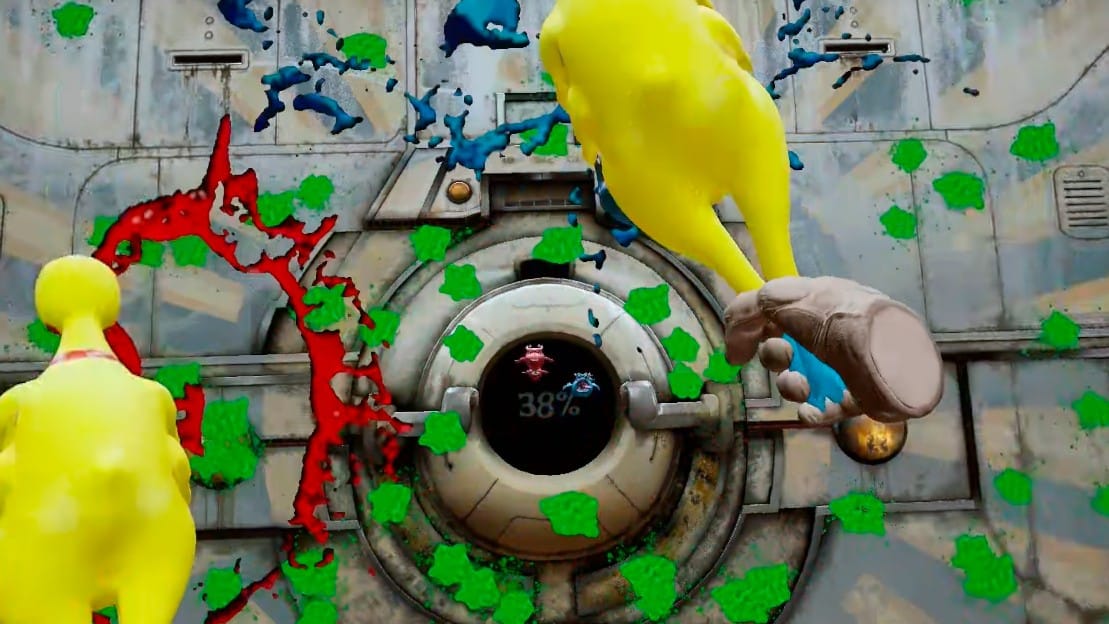
Splatsplasm was initially released for Meta Quest headsets back in 2024, and has recently launched for Steam VR. The game puts you in the role of an astronaut who discovers an abandoned space ship that has been overrun by flying aliens. To fend them off, you have to knock them away with color-coded bats, paddles, and other blunt instruments in time to music, like Beat Saber if it was set in the far reaches of space.
The Facts
What is it?: A frantic VR rhythm game where you have to protect a spaceship from color-coded aliens by knocking them back with paddles. Platforms: Meta Quest, Steam VR Release Date: November 28, 2024 (Meta Quest), March 9, 2026 (Steam VR) Developer: PRPVFX LTD Publisher: PRPVFX LTD Price: $9.99
Splatsplasm’s tone is comical, to say the least.
When you hit the aliens with the right weapon, they are sent flying toward the walls of the space station and leave a large, green splatter behind. The object is to cover the walls with alien viscera and fill a gauge in the center of the screen up to a certain percentage. Be careful though, as there are also yellow sponges that can set your progress back if you hit them. Once you complete a level, the game gives you a tally of how many points you gained and lost, then the wall in front of you dissolves and the process begins again.
Each weapon gives the round a different feel, like hockey sticks and tennis rackets requiring you to aim lower or higher in order to strike the speeding aliens. My personal favorite is the boxing gloves, which allow you to punch the aliens like you would in Creed: Rise To Glory or Knockout League. Meanwhile, my least favorite is the hockey sticks, which require you to invert the usual gameplay approach.
The controls are mostly 1-to-1, but I did encounter some framerate and collision detection issues. This can make it hard to land hits, especially given how many aliens can be flying at the screen at one time. Due to this and the large hit requirements to advance, some campaign levels can last surprisingly long and overstay their welcome at higher difficulty settings. Prepare for sore arms if you plan on playing this for longer stretches of time.
0:00
/0:20
Timing is the name of the game.
After you’re finished with Splatsplasm’s short campaign, there is Fun Mode, which lets you pick your own stage and weapons to play through songs from the game. There is also a wide selection of layouts featuring real-life music, ensuring that you’ll never run out of tunes to smack space creatures to.
Splatsplasm’s in-game tracks cover a wide range of genres, from techno, soft rock, and even country. Many of these tracks are surprisingly subdued for the game’s frantic action, but there are a few of them that will have you on the ropes should you pick them at one of the higher difficulty settings.
The game’s art style is quite basic, though there is plenty of variety in the level environments that can be easy to miss at first due to how fast everything moves. Such environments include ship halls, tennis courts, and hockey rinks, with the campaign levels matching up with the weapon used. The aliens and sponge creatures also have some character to them, and as I noted before a lot of them can fill the screen at one time.
Splatsplasm might be a little uneven at times, but I did find its rhythm gameplay enjoyable in the long run. It also makes for a decent workout for your arms at higher difficulty levels, making this an interesting option for fans of Beat Saber and other music-based VR titles.
Over the past two years AMD has developed the AMDXDNA accelerator driver in the mainline Linux kernel for supporting the AMD Ryzen AI NPUs. But when it comes to user-space software on Linux actually able to leave the Ryzen AI NPUs it’s been… extremely limited with nothing really useful besides some niche bits of code. Even AMD’s own software like their GAIA on Linux has used Vulkan with their iGPUs rather than any NPU support. But finally today there is a significant shift with the Ryzen AI NPUs becoming useful on Linux and able to handle LLMs…
The PlayStation VR2 and Quest ports of Virtual Hunter have been pushed back two months.
The PS VR2 version will utilize adaptive triggers and headset haptics, according to the publisher.
PS VR2 and Quest players will need to wait an additional two months to get their five point bucks. We previously reported in our upcoming VR games for March that Virtual Hunter, an animal hunting simulator, would release on March 25.
Publisher VRKiwi announced in a post on X.com that the PS VR2 and Quest versions of the game have been delayed to May 27. VRKiwi says the delay will “allow us to finalize performance consistency and overall polish so the day-one experience feels as smooth and immersive as possible across the full open world.”
Virtual Hunter PS VR2 and Meta Quest Release Date Trailer
In replies to comments left on the post, VRKiwi did clarify that at least part of the delay was to polish up the integration of PS VR2’s additional features.
For an authentic hunting simulation we’ve paid special attention to the PSVR2 haptics and adaptive triggers.
The bow doesn’t use adaptive triggers since it’s a draw-and-release mechanic, but for the firearms we’ve tried to simulate their behavior as closely as possible. We spent a lot of time iterating on trigger distance and resistance curves so each weapon feels distinct and closer to its real-life counterpart.
We’re also using headset haptics in subtle ways for example when branches or leaves brush past your head while moving through bushes.
Virtual Hunter originally released in Early Access on Steam in December 2021 and moved to a full release in January 2025. VRKiwi confirmed the game will feature co-op gameplay for up to six players.
Virtual Hunter can be wishlisted right now on Quest and PS VR2. It is out now on Steam for $24.99.
Fortnite’s original Save the World game mode will be free to play beginning on April 16. This is not the battle royale mode that went on to take over the world, but rather a PvE co-op campaign that focuses on crafting and survival. It currently costs $9 but that ends soon.
As a matter of fact, Epic Games will stop selling the paid version of the content tonight, March 11, at 8PM ET. If you have $9 burning a hole in your pocket to spend on something that’ll be free next month, go for it. Current players will still be able to access the content, so there are no worries there.
Once the free version goes live, pre-existing players will get a bunch of perks as a thank you of sorts. This includes vouchers for V-bucks, gold bars and end-game resources that are used to boost player and item levels.
Save the World will still be a great way to gather V-bucks, for those worried the freemium shift will change things. Epic says players will earn this currency “through Daily Quests, Mission Alerts, Storm Shield Defense Missions and existing Challenges.”
Pre-registration for the free mode is already live and there’s a welcome bit of news here. For the first time, Save the World will be available on Switch 2. It’ll remain unavailable on the original Switch and smartphones. The mode is also playable on PC, PlayStation and Xbox.
Epic promises those who pre-register will get perks when the free version launches, but says the specifics will vary depending on how many people sigh up by April 16. Save the World originally came out in 2017 and was a modest success that was immediately dwarfed by the PUBG-inspired battle royale mode.
This article originally appeared on Engadget at https://www.engadget.com/gaming/fortnites-original-save-the-world-mode-will-be-free-to-play-starting-on-april-16-160757693.html?src=rss