South Korea Set To Get a Fully Functioning Google Maps

South Korea has reversed a two-decade policy and approved the export of high-precision map data, paving the way for a fully functional Google Maps in the country. Reuters reports: The approval was made “on the condition that strict security requirements are met,” the Ministry of Land, Infrastructure and Transport said in a statement. Those conditions include blurring military and other sensitive security-related facilities, as well as restricting longitude and latitude coordinates for South Korean territory on products such as Google Maps and Google Earth, it said.

The decision is expected to hurt Naver and Kakao — local internet giants which currently dominate the country’s market for digital map services. But it will appease Washington, which has urged Seoul to tackle what it says is discrimination against U.S. tech companies. South Korea, still technically at war with North Korea, had shot down Google’s previous bids in 2007 and 2016 to be allowed to export the data, citing the risks that information about sensitive military and security facilities could be exposed. “Google can now come in, slash usage fees, and take the market,” said Choi Jin-mu, a geography professor at Kyung Hee University. “If Naver and Kakao are weakened or pushed out and Google later raises prices, that becomes a monopoly. Then, even companies that rely on map services — logistics firms, for example — become dependent, and in the long run, even government GIS (geographic information) systems could end up dependent on Google or Apple. That’s the biggest concern.”


Read more of this story at Slashdot.

Riding An Omnidirectional Motorball

You may recall (although I won’t fault you if you don’t) engineer James Bruton previously building an omnidirectional motorbike on two balls. But do you know what’s better than two balls? “Three balls?” Agreed, but James decided to go the less is more route anyways and made an omnidirectional motorball that balances on a single ball. To each their own. Now make one that balances on no balls at all and we’ve finally got hover technology.

FCC approves the merger of cable giants Cox and Charter

The Federal Communications Commission has given the go ahead for two of the US’ biggest cable providers, Charter Communications and Cox Communications, to merge. Charter announced its intention to acquire Cox for $34.5 billion in May 2025, with specific plans to inherit Cox’s managed IT, commercial fiber and cloud businesses, while folding the company’s residential cable service into a subsidiary.

“By approving this deal, the FCC ensures big wins for Americans,” FCC Chairman Brendan Carr said in a statement. “This deal means that jobs are coming back to America that had been shipped overseas. It means that modern, high-speed networks will get built out in more communities across rural America. And it means that customers will get access to lower priced plans. On top of this, the deal enshrines protections against DEI discrimination.”

The FCC claims that Charter plans to invest “billions” to upgrade its network following the closure of the deal, leading to “faster broadband and lower prices.” The company’s “Rural Construction Initiative” will also extend those improvements to rural states lacking in consistent internet service, a project the FCC was heavily invested in during the Biden administration, but has been pulling back from since President Donald Trump appointed Carr. The FCC also claims Charter will onshore jobs currently handled off-shore by Cox employees and commit to “new safeguards to protect against DEI discrimination,” which essentially amounts to hiring, recruiting and promoting employees based on “skills, qualifications, and experience.”

While Carr’s FCC paints a rosy picture of Charter’s acquisition, history has provided multiple examples of mergers having the opposite effect on jobs and pricing. For example, redundancies created when T-Mobile merged with Sprint in 2020 led to a wave of layoffs at the carrier. And funnily enough in 2018, not long after Charter’s merger with Time Warner Cable was approved by the FCC, the company raised prices on its Spectrum service by over $91 a year. 

The FCC’s obsession with diversity, equity and inclusion as part of the deal is stranger, if only because it appears to fall outside of the commission’s purpose of maintaining fair competition in the telecommunications industry. It does fit with other mergers the FCC has approved under Carr, however. Skydance’s acquisition of Paramount was approved in 2025 under the condition it wouldn’t establish any DEI programs.

This article originally appeared on Engadget at https://www.engadget.com/big-tech/fcc-approves-the-merger-of-cable-giants-cox-and-charter-230258865.html?src=rss

Trump Orders Federal Agencies To Stop Using Anthropic AI Tech ‘Immediately’

President Donald Trump has ordered all U.S. federal agencies to “immediately cease” using Anthropic’s AI technology, escalating a standoff after the company sought limits on Pentagon use of its models. CNBC reports: The company, which in July signed a $200 million contract with Pentagon, wants assurances that the Defense Department will not use its AI models will not be used for fully autonomous weapons or mass domestic surveillance of Americans. The Pentagon had set a deadline of 5:01 p.m. ET Friday for Anthropic to agree to its demands to allow the Pentagon to use the technology for all lawful purposes. If Anthropic did not meet that deadline, Pete Hegseth threatened to label the company a “supply chain risk” or force it to comply by invoking the Defense Production Act.

“The Leftwing nut jobs at Anthropic have made a DISASTROUS MISTAKE trying to STRONG-ARM the Department of War, and force them to obey their Terms of Service instead of our Constitution,” Trump said in a post on Truth Social. “Their selfishness is putting AMERICAN LIVES at risk, our Troops in danger, and our National Security in JEOPARDY.”

“Therefore, I am directing EVERY Federal Agency in the United States Government to IMMEDIATELY CEASE all use of Anthropic’s technology,” Trump wrote. “We don’t need it, we don’t want it, and will not do business with them again! There will be a Six Month phase out period for Agencies like the Department of War who are using Anthropic’s products, at various levels,” Trump said. On Friday, OpenAI said it would also draw the same red lines as Anthropic: no AI for mass surveillance or autonomous lethal weapons.


Read more of this story at Slashdot.

Under a Paramount-WBD merger, two struggling media giants would unite

Netflix has dropped out of the bidding war for Warner Bros. Discovery (WBD), making Paramount Skydance the expected owner of WBD. A Paramount-WBD merger remains subject to regulatory approval, but it’s likely that we will see a Paramount-Skydance-Warner-Bros.-Discovery media giant.

Such a conglomerate would unite two legacy media companies that have struggled with profitability for years and have strongly invested in streaming and cable.

With Paramount inching closer to WBD ownership, let’s look at what the union implies for streaming and cable.

Read full article

Comments

10 Hacks Every Oura Ring User Should Know

We may earn a commission from links on this page.

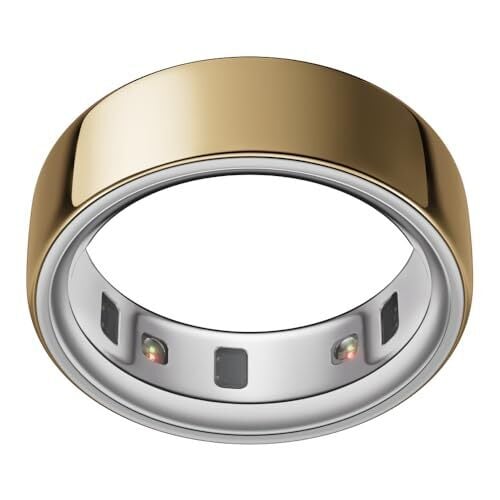
I’ve been tracking my sleep and recovery with the Oura ring for nearly five years now, and today I’ll share with you several of my favorite and most-overlooked features—including one feature you should turn off, and one feature you can use even if your subscription is expired. 

Turn off blood oxygen sensing to save battery

The Oura ring uses significantly more battery with blood oxygen sensing turned on. It may make sense to use this feature if you have a specific health concern, but most of us don’t need it on a daily basis. 

You’ll find Blood Oxygen Sensing under the hamburger menu, and can turn it off from there. You’ll lose the “average blood oxygen” and “breathing regularity” metrics, but you’ll gain an extra day or so of battery life. 

Sync workouts so you don’t have to log them all with your ring

I’ve said it before and I’ll say it again: the Oura ring is not a great workout tracker. Wearing the ring interferes with weightlifting workouts and it doesn’t have enough precision to seriously track other workouts like running. 

Oura is a great companion to other workout apps, though. If you track workouts with another device or even with a phone app like Apple’s Fitness app, you can make sure those workouts get synced properly so they show up in your Oura timeline. Go to Settings, and then to Apple Health (iPhone) or Health Connect (Android). Turn on those integrations from there. 

Tag auto-detected workouts (and laugh, if appropriate)

Aside from synced workouts, Oura will automatically detect workouts it thinks you’re doing. You’ll then see a card asking you to label the workout. Don’t just ignore those cards—Oura learns from your tags. 

So if you went for a walk, make sure that activity is tagged as a walk. But sometimes it will tag another activity as a workout when it actually wasn’t. I’ve seen hair brushing and yarn winding tagged as various forms of exercise. Take a look at the time the activity was logged, and think back to what you were actually doing at the time. (You can dismiss the activity if it wasn’t a workout or isn’t something you care to track.) 

Consider the charging case

The Oura ring only needs to be charged once or twice a week, but that means it’s hard to get into a routine of charging it regularly. I found that the perfect balance was charging it while I’m at the gym; some people prefer to charge while they’re in the shower. 

Short top-ups every few days are ideal for battery health. (Daily charging is arguably too much; only charging when the battery is dead is probably too little.) Oura recommends keeping the battery between 25% and 80% most of the time, if you can. 

So figure out where and when is most convenient to charge, and keep a charger there. That’s why the charging case is convenient—you can carry it in your gym bag, for example. Unfortunately it costs an extra $99 to buy the charging case, but nobody ever said owning an Oura ring is cheap. 

Check the ring’s tags and trends

The Trends item in the hamburger menu is one of Oura’s best hidden features. Tap it and you’ll be able to see things that have changed over the past several weeks. For example, as I’m writing this, I can see that my resting heart rate has improved over the past 8 weeks, getting back to my “baseline” after some time in which it was higher than normal.

If you’ve been diligent about tagging behaviors and lifestyle factors, you can see their effects on your readiness, sleep, activity, or stress. For example, I’m curious whether my mood is better when I take a vitamin D supplement in the winter. Mood isn’t one of the items that Oura tracks, but I can tap Trends and then choose from Stress or Sleep or even Activity (all things that suffer when I’m feeling down) and see whether the days I tagged “vitamins” tend to correlate with higher or lower levels. 

Log meals without tracking calories

Meal tracking was introduced as a companion to glucose tracking, but you don’t need to track your glucose to use the meals feature. Log your meals (you can even snap a picture of your plate) and Oura will give you feedback on how healthy the meal is, and keep track of whether you’re eating on a regular schedule or not. Calorie tracking is not involved. In fact, if you’d rather keep calories out of your Oura app entirely, check out the next item. 

Adjust your activity goal

Oura will give you an activity goal each day, usually a certain number of calories. If you feel your goals are too ambitious (or not ambitious enough), go to the Activity screen and select Edit activity goal. You can choose a different goal, and you can also choose whether you’d like to see this goal in calories or in steps. 

If you want to avoid seeing calories anywhere in the app, there’s a toggle for that. On the same screen, select Calorie opt out. This sets your target to steps and ensures that calorie mentions anywhere else in the app will be hidden. You can also access the calorie opt out from Settings and then Activity

Use Rest Mode for travel, menstrual cycles, and more

Oura has a Rest Mode setting that is intended for when you’re sick or recovering from an injury. (Oura may even prompt you to turn it on if your data indicates you may not be feeling well.) 

But it’s useful for more than just that. Rest Mode pauses your goals, and stops giving you readiness scores. It’s great for any time you don’t want the app to bother you about what you should be doing. I’ve seen Oura users say they use it for days of their menstrual cycle when they aren’t feeling up to their usual activity; it’s also useful for travel when you know you’ll be stuck in a car or airplane all day, or when your sleep will suffer due to jet lag. 

Use Labs to participate in studies (and get a sneak peek at new features)

If you like to beta test new features, check out the Labs item in the hamburger menu. The offerings will change from time to time, but often they are new features in the making. Right now, the only offering I see is a blood pressure profile study, in which Oura is collecting data to hopefully offer blood pressure estimates in the app in the future. 

When I signed up for this, I had to fill out a questionnaire and sign a research consent. (Not all Oura Labs items are studies, but they can be.) I can see that Oura thinks I probably don’t have hypertension (correct) and that it’s basing that in part on my good resting heart rate and activity level. Other Oura features like meal tracking and Symptom Radar first made their appearances in Labs. 

Download your data from the cloud

This is one of Oura’s lesser-known features: a web dashboard where you can view long-term trends, and a “membership hub” where you can download all your data. This spreadsheet download is available even if you don’t have an active subscription, but you do need a subscription for the trend viewer and for all of the software features I mentioned above. 

For the web viewer, go to cloud.ouraring.com. Here, if you click on Trends, you can see all your data—five years’ worth, for me. You can even compare two variables and see a calculation that shows if they’re correlated. My sleep score and total sleep time are highly correlated; my HRV and sleep time are not. 

To download CSV spreadsheets of your data (with or without a subscription), go to the membership hub and sign in. Select Export data and then Request your data. You’ll get a zip file filled with spreadsheets you can analyze to your heart’s content.

Trump orders federal agencies to drop Anthropic services amid Pentagon feud

President Donald Trump has ordered all US government agencies to stop using Claude and other Anthropic services, escalating an already volatile feud between the Department of Defense and company over AI safeguards. Taking to Truth Social on Friday afternoon, the president said there would be a six-month phase out period for federal agencies, including the Defense Department, to migrate off of Anthropic’s products. 

“The Leftwing nut jobs at Anthropic have made a DISASTROUS MISTAKE trying to STRONG-ARM the Department of War, and force them to obey their Terms of Service instead of our Constitution,” the president wrote. “Anthropic better get their act together, and be helpful during this phase out period, or I will use the Full Power of the Presidency to make them comply, with major civil and criminal consequences to follow.”  

Before today, US Defense Secretary Pete Hegseth had threatened to label Anthropic a “supply chain risk” if it did not agree to withdraw safeguards that insist Claude not be used for mass surveillance against Americans or in fully autonomous weapons. 

Anthropic did not immediately respond to Engadget’s comment request. Earlier in the day, a spokesperson for the company said the contract Anthropic received after CEO Dario Amodei outlined Anthropic’s position made “virtually no progress” on preventing the outlined misuses.

“New language framed as a compromise was paired with legalese that would allow those safeguards to be disregarded at will. Despite DOW’s recent public statements, these narrow safeguards have been the crux of our negotiations for months,” the spokesperson said. “We remain ready to continue talks and committed to operational continuity for the Department and America’s warfighters.” 

Advocacy groups like the Center for Democracy and Technology (CDT) quickly came out against the president’s threats. “This action sets a dangerous precedent. It chills private companies’ ability to engage frankly with the government about appropriate uses of their technology, which is especially important in national security settings that so often have reduced public visibility,” said CDT President and CEO Alexandra Givens, in a statement shared with Engadget. “These threats undermine the integrity of the innovation ecosystem, distort market incentives and normalize an expansive view of executive power that should worry Americans all across the political spectrum.”

For now, it appears the AI industry is united behind Anthropic. On Friday, hundreds of Google and OpenAI employees signed an open letter urging their companies to stand in “solidarity” with the lab. According to an internal memo seen by Axios, OpenAI CEO Sam Altman said the ChatGPT maker would draw the same red line as Anthropic.  

This article originally appeared on Engadget at https://www.engadget.com/ai/trump-orders-federal-agencies-to-drop-anthropic-services-amid-pentagon-feud-222029306.html?src=rss

US Military Accidentally Shoots Down Border Protection Drone With Laser

An anonymous reader quotes a report from the Associated Press: The U.S. military used a laser Thursday to shoot down a “seemingly threatening” drone flying near the U.S.-Mexico border. It turned out the drone belonged to Customs and Border Protection, lawmakers said. The case of mistaken identity prompted the Federal Aviation Administration to close additional airspace around Fort Hancock, about 50 miles (80 kilometers) southeast of El Paso. The military is required to formally notify the FAA when it takes any counter-drone action inside U.S. airspace.

It was the second time in two weeks that a laser was fired in the area. The last time it was CBP that used the weapon and nothing was hit. That incident occurred near Fort Bliss and prompted the FAA to shut down air traffic at El Paso airport and the surrounding area. This time, the closure was smaller and commercial flights were not affected. The FAA, CBP and the Pentagon confirmed the incident in a joint statement, saying the military “employed counter-unmanned aircraft system authorities to mitigate a seemingly threatening unmanned aerial system operating within military airspace.”

“At President Trump’s direction, the Department of War, FAA, and Customs and Border Patrol are working together in an unprecedented fashion to mitigate drone threats by Mexican cartels and foreign terrorist organizations at the U.S.-Mexico Border,” the statement said. The report notes that 27,000 drones were detected within 1,600 feet of the southern border in the last six months of 2024.

Illinois Democratic U.S. Sen. Tammy Duckworth, the ranking member on the Senate’s Aviation Subcommittee, is calling for an independent investigation to look into the matter. “The Trump administration’s incompetence continues to cause chaos in our skies,” Duckworth said.


Read more of this story at Slashdot.

How to Manage Your Increasingly Desperate App Notifications

My best friend messaged me on Facebook Messenger. It wasn’t urgent, so I swiped the notification away, making a mental note to reply later. Ten minutes later, Facebook sends another notification. “Reminder: [My friend] sent you a message.” This is clingy, even for Facebook. And it’s not the only app increasingly desperate for any crumb of attention.

In just the last couple months, I’ve personally gotten dozens of what I can only call desperation notifications. Push alerts from apps that don’t really need anything, but would really like it if I gave them some attention anyway. These include, but are not nearly limited to, the following:

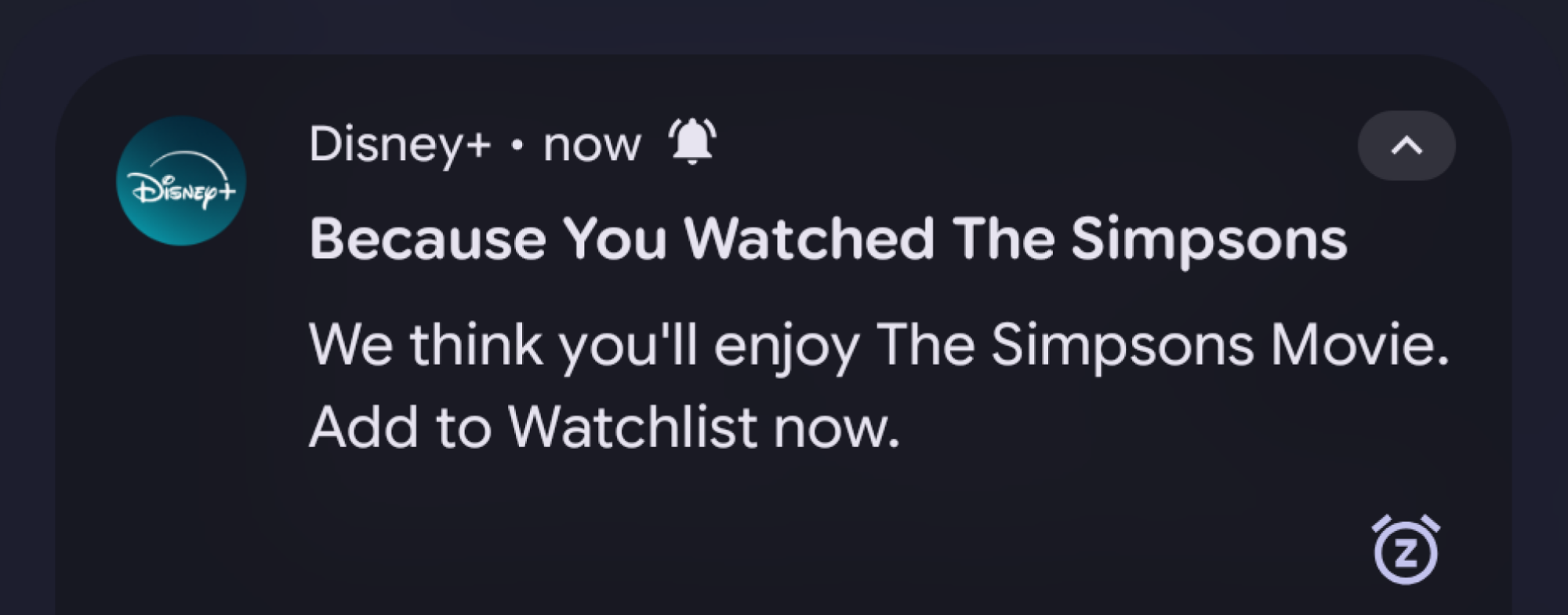
  • The Disney+ app let me know that because I watched The Simpsons, I might be interested in watching The Simpsons Movie (which I also recently watched).

  • Discord informed me that someone in a server I’m also in updated their status, which is, I guess, a thing you can do in Discord.

  • Venmo would like me to know I can fund my Kalshi account with my Venmo balance. (I do not and will never have a Kalshi account.)

  • Reddit began sending push alerts for news stories from communities I wasn’t subscribed to and had never visited.

  • Duet sent an aggressive half-dozen notifications within 15 minutes of closing the app, including multiple alerts that read “She just likes you.” Which is a surprisingly exasperated tone for a dating app.

  • GrubHub asked me if I wanted to order food, precisely five minutes after I ordered food.

Some of these are obviously just advertisements disguised as alerts—its own annoying problem—but just as many seem to be little more than a reminder that an app exists. And if you could please open the app and boost its engagement numbers, that would be great.

Are app notifications really getting worse?

Disney+ notification that reads "Because you watched The Simpsons, we think you'll enjoy The Simpsons Movie."
Wow, I hadn’t thought of that, thanks Disney+.
Credit: Lifehacker

While it’s always hard to quantify vibes-based annoyances, there’s at least some data to back up the idea that companies are getting increasingly desperate for your notification attention. According to a 2025 analysis from the Reuters Institute for the Study of Journalism, news publishers have increasingly relied on push notifications to reach their audiences, as a way to avoid relying too much on platforms like Google or social media apps.

However, this bid for direct attention comes at a cost—and in the midst of an arms race with platforms. According to the Reuters report, 79% of respondents don’t get any news alerts at all, and 43% of those are because users actively disabled the notifications. Worse yet, iOS and Android have both experimented with questionably reliable AI summaries of notifications, making them even more annoying to deal with.

This report only examines one small segment of the notifications you might sift through on any given day, but it’s instructive of a broader trend. We increasingly live in an attention economy, where seemingly unrelated industries are in competition for your eyeballs. Which is how you end up with companies like Netflix investing in video games, or the video game industry competing with gambling sites and porn.

In that context, your notifications become the frontline in the battle for your attention. No, it doesn’t take a genius to know that someone who watched The Simpsons might be interested in watching The Simpsons. But if a quick notification can remind me to watch more of the show today, rather than play more Pathologic 3, that’s a win for Disney.

And any win is going to be worth it to most companies right now. Broadly speaking, the economy isn’t doing so hot. So, if a company can do something to show that engagement in their app went up by even 5%, they likely will. And sending more notifications is generally one of the cheaper and easier ways to juice internal numbers.

How to decrease app notification spam

Android notification with settings to sort incoming alerts.

Credit: Lifehacker

There’s at least one silver lining to the whole notification arms race problem: There are a lot of tools available to help get your alerts under control. Some are baked right into your phone’s OS, but there are also third-party tools you can use to enforce some peace and quiet. Here are some of the best options available.

Use your phone’s OS-level settings to manage notifications

Both major smartphone platforms have pretty robust tools to dictate what kind of alerts you can receive, and how disruptive they can be. We have full guides on tools for managing your Android and iOS notifications, but even if you don’t want to dive too deep into your phone’s settings, you can slowly whittle away the most annoying alerts as you receive them.

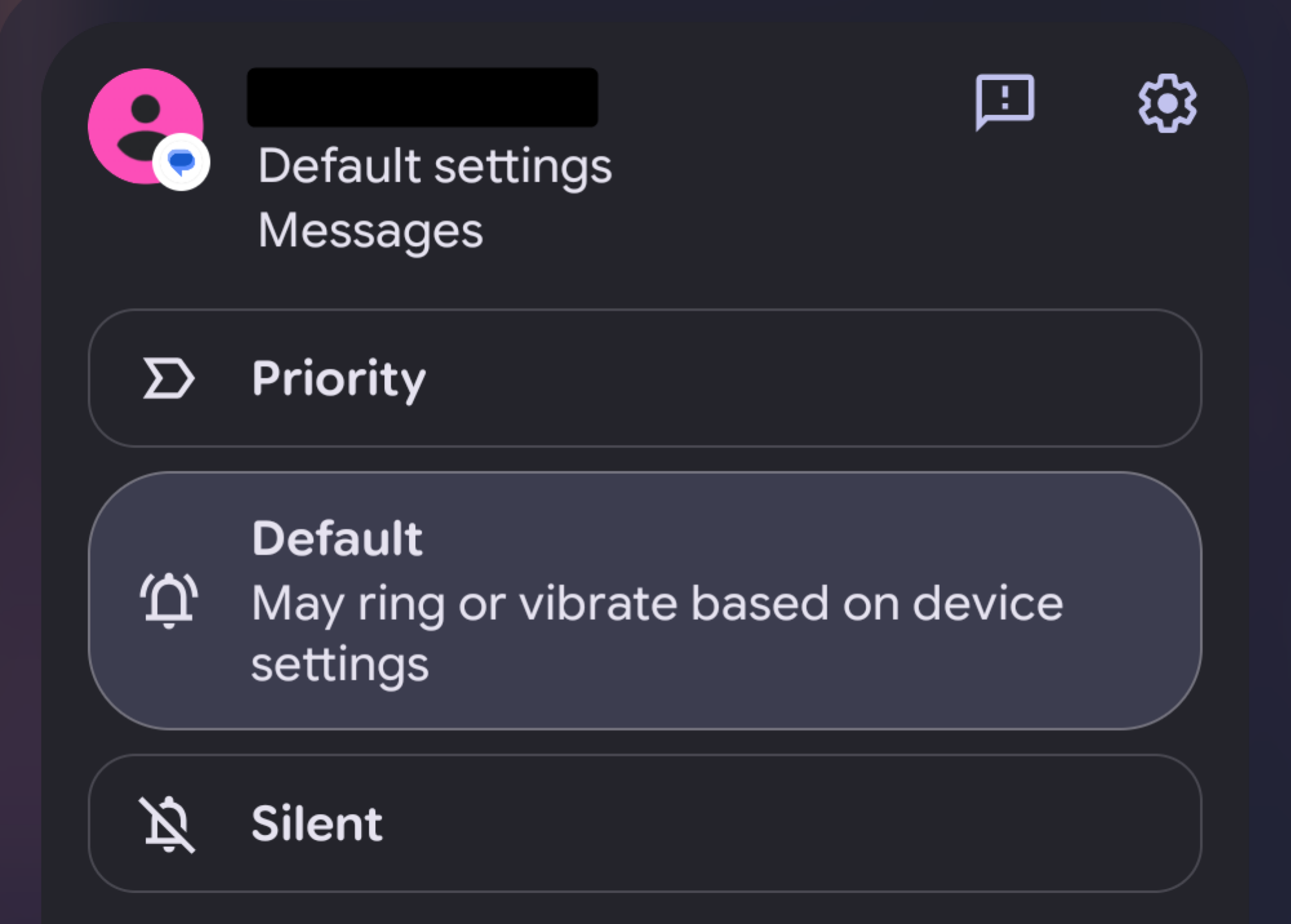
On Android, you can long-press a notification in your shade to find options to tweak or suppress the alerts. Most notifications can be sorted into either Priority, Default, or Silent, which behave differently depending on your default settings. You can also tap the Settings gear icon to dive into the app’s specific notification settings to disable categories of alerts. These will vary by app, but in many cases you can disable things like advertisements or news alerts without turning off messages you actually care about.

On iOS, you can find similar tools by swiping on a notification and tapping Options. Here, you’ll find quick shortcuts to do things like mute notifications from an app for a short period of time, or jump to more in-depth settings to disable categories of notifications. In my experience, it’s often easier to tweak these settings whenever I receive a particularly annoying alert, rather than audit all my notification settings at once.

Explore each app’s notification settings

Most apps have their own category of notification settings that can be adjusted individually. In some cases, these can overlap with the same settings you’ll find using the above method, but just as often, you’ll find a lot more toggles that don’t. Though, some apps are shadier than others in terms of how easy it is to find these settings.

For one instructive example, in the Reddit app, you can navigate to Settings > Account Settings > Manage notifications to find a lengthy list of possible alerts you can receive. That’s already pretty buried, but if you sign into the app with multiple accounts, you’ll need to go through this process for each account you’re signed into. Otherwise, notifications you turned off for one account might still pop up via another.

Most apps aren’t quite this chaotic, but it can still be annoying to dig through all the tedious menus. In some cases, this might be your only option, though. On Android, Reddit only has one notification category using the previous method, meaning you can only turn all notifications on or off at once. So, if you’re not finding the tools you need to selectively mute certain alerts in the OS-level settings, it might be worth digging through the app’s menus.

When all else fails, use third-party tools

It shouldn’t really be necessary to install an app just to get other apps to shut up, but if we must, then we must. BuzzKill, for Android, is a simple $4 app that gives you more robust tools to filter, manage, or suppress notifications than any of the built-in notification management settings.

What sets BuzzKill apart is that, on top of filtering notifications by which app is sending them, it can also filter alerts by things like words they contain, whether they have an image attached, or whether they’re part of a group chat. So, if you want to keep getting news alerts, but you’re just sick of hearing about that one guy who’s always in the headlines for some reason, you can selectively filter those out.

Unfortunately, this one’s likely to stay Android only, as iOS generally keeps apps in tighter sandboxes. BuzzKill needs to be able to read notifications from other apps in order to filter them, and that’s not something iOS generally allows apps to do. So, if you’re in the Apple ecosystem, you’ll have to stick with built-in tools for now.

More broadly, it also can’t hurt to let app developers know when you’re annoyed by their incessant pings. Companies might try to boost their engagement by testing how much they can poke your attention span before you turn them off (or uninstall the app) entirely. But turning off unnecessary alerts can send a signal that they’ve gone too far in the wrong direction. Sending feedback reports, where possible, can potentially send an even stronger signal.

Paramount agrees to buy Warner Bros. Discovery, pays Netflix $2.8 billion for breakup

Paramount Skydance and Warner Bros. Discovery are officially merging. The studio paid Netflix the $2.8 billion termination fee it was owed for breaking its original deal to buy Warner Bros. earlier today, and the historic film studio has now formally accepted Paramount’s offer.

Along with the deal, which values Warner Bros. Discovery at $31 per share, Paramount is making several commitments to assuage the fears of regulators and the entertainment community. Those include a guarantee that the new company will produce 30 theatrical films annually, that theatrical releases will have a minimum 45-day window in theaters before they’re brought to video on demand (something Netflix ultimately also agreed to) and that deal itself will close by Q3 2026.

This turnaround in Paramount’s fortunes has happened quickly. Warner Bros. Discovery announced that Paramount’s offer was superior to Netflix’s on Thursday, and not long after the streaming service said that it wouldn’t provide a counter offer, effectively abandoning its previous agreement.

Ultimately, Netflix and Paramount were vying for different parts of Warner Bros. Disocvery. Netflix was primarily interested in Warner Bros. proper, while Paramount Skydance wanted the whole company, cable networks and all. Either deal would need to be approved by regulators, which is the hurdle Paramount and Warner Bros. Discovery face now. The general assumption has been that the close relationship Paramount CEO David Ellison and his billionaire father Larry Ellison have with the Trump administration would smooth over any issues, but the deal will receive scrutiny abroad and likely also at the state level, based on a recent post from California Attorney General Rob Bonta.

Paramount Skydance has proven its willingness to comply with President Donald Trump, but delays in closing the deal could be costly. The company is on the hook to pay Warner Bros. Discovery “a daily ticking fee equal to $0.25 per share per quarter beginning after September 30, 2026.” The company also has to pay $7 billion to Warner Bros. Discovery if the deal is terminated for regulatory reasons. Netflix lost the battle for Warner Bros. Discovery, but getting a competitor to potentially overpay for the studio might be its own reward.

This article originally appeared on Engadget at https://www.engadget.com/entertainment/paramount-agrees-to-buy-warner-bros-discovery-pays-netflix-28-billion-for-breakup-215936514.html?src=rss

The New Ultrahuman Ring Pro Has a Surprisingly Feature-Filled Charging Case

We may earn a commission from links on this page.

Ultrahuman just launched its newest ring, the Ultrahuman Ring Pro. While it’s not yet available in the U.S., I’m excited for this to come to the market. The real game changer here isn’t what’s on the ring, but what Ultrahuman has managed to do with the charging case—that is, a lot more than just charging. 

Specs of the Ultrahuman Ring Pro

According to Ultrahuman, the new ring retails for $429 and has: 

  • 15-day battery life—that’s more than RingConn’s battery life and about double Oura’s

  • Storage for 250 days of data

  • Whole sizes 5 to 14

  • A faster processor that Ultrahuman says allows for more accurate data processing

  • Break points allowing the ring to be cut apart easily in emergencies

Physically, the ring looks similar to the Ultrahuman Ring Air, which I’ve previously reviewed. It has a smooth internal surface (no sensor bumps) with a small flat area at the base of the finger. 

The charging case is the real innovation here

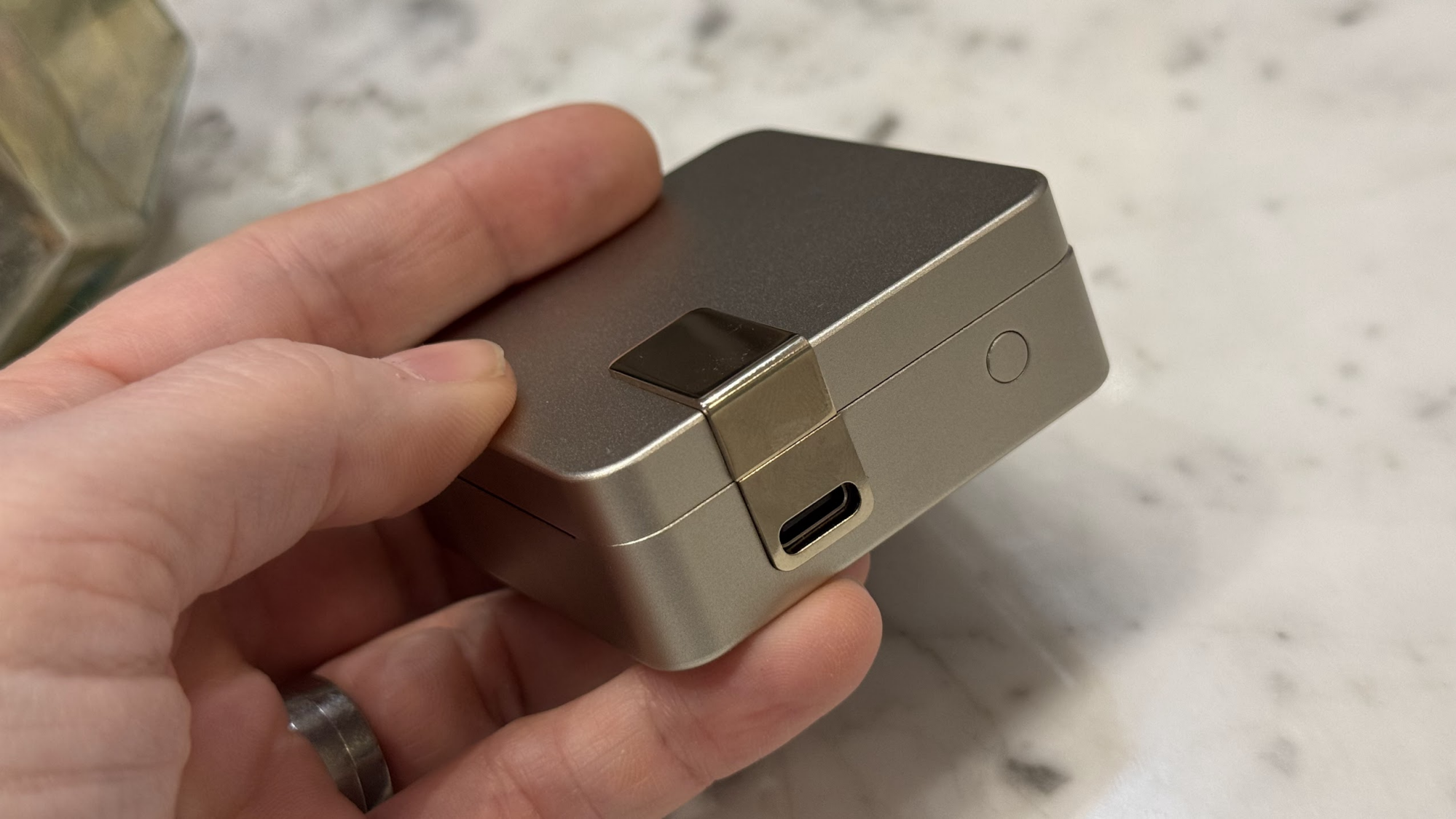
Ultrahuman Ring Pro charging case

Credit: Beth Skwarecki

What really intrigues me about this ring is not the ring itself, or even the fact that it has a charging case, but the fact that Ultrahuman is now using the charging case as a device in its own right. I haven’t seen anything like this from other smart ring manufacturers, and it’s a brilliant idea. 

For example, smart rings can’t easily act as an alarm, because then they would need components that can vibrate or make noise—thus adding to the bulk of the ring and reducing battery life. But a charging case can easily act as an alarm clock, especially since you’re likely to have it on your nightstand already. (Ultrahuman’s app has an alarm feature, but it didn’t play well with my iPhone’s silent mode and I didn’t find it reliable.) 

The charging case for the Ultrahuman Ring Pro also has LED indicators, can charge wirelessly, and has a USB-C port. The case has features for diagnostics and troubleshooting, including a button to hard reset the ring if needed. The case can also store up to a year’s worth of ring data and sync it to your phone later.

And you know what else I love about the new case? It isn’t sized to the ring. The ring attaches magnetically to the pins on the post, leaving empty space around it if the ring is a large size, and less empty space if it’s a smaller size. If you ever needed to replace the case, you wouldn’t need to find one in your specific size.

Why we can’t get this ring in the U.S. (yet?)

Legal action behind the scenes has been messing with the U.S. market for smart rings. About a year ago, there were plenty of options, but then Oura made the case to the U.S. International Trade Commission (ITC) that it believes its smart ring patent covers the design of nearly every smart ring out there. The ITC agreed, and Ultrahuman was one of the companies that needed to pull its rings from the U.S. market

Ultrahuman said almost immediately that it was working on a new ring design anyway, one that is so differently constructed that it can’t possibly run afoul of the ITC ruling. The Ring Pro appears to be the design it was referring to, with Ultrahuman conspicuously referring to its “unibody architecture” rather than using a design with a transparent lining (that transparent lining is one of the features of the patent at issue). 

It seems there is still a possibility that this approach may pay off. A spokesperson told me by email today: “We are working through the necessary steps to bring Ring PRO to our U.S. customers and hope to share good news soon.”

Photons that aren’t actually there influence superconductivity

Despite the headline, this isn’t really a story about superconductivity—at least not the superconductivity that people care about, the stuff that doesn’t require exotic refrigeration to work. Instead, it’s a story about how superconductivity can be used as a test of some of the weirder consequences of quantum mechanics, one that involves non-existent particles of light that still act like they exist.

Researchers have found a way to get these virtual photons to influence the behavior of a superconductor, ultimately making it worse. That may in the end tell us something useful about superconductivity, but it’ll probably take a little while.

Virtual reality

The story starts with quantum field theory, which is incredibly complex, but the simplified version is that even empty space is filled with fields that could govern the interactions of any quantum objects in or near that space. You can think of different particles as energetic excitements of these fields—so a photon is simply an energetic state of the quantum field.

Read full article

Comments

White House Stalls Release of Approved US Science Budgets

An anonymous reader shares a report: Weeks after the U.S. Congress rejected unprecedented cuts to science budgets that the administration of US President Donald Trump had sought for 2026, funding to several agencies that award research grants is still not freely flowing.

One reason is that the White House Office of Management and Budget (OMB) has been slow to authorize its release. The US National Institutes of Health (NIH) has so far not received approval to spend any of the research funding allocated in a budget bill signed into law on 3 February. The US National Science Foundation (NSF) was authorized to spend its funding just last week. And NASA has had its full funding authorized for release, but with an unusual restriction that limits spending on ten specific programmes — many of which the Trump team had tried to cancel last year.


Read more of this story at Slashdot.

‘The Death of Spotify: Why Streaming is Minutes Away From Being Obsolete’

An anonymous reader shares a column: I’m going to take the diplomatic hat off here and say with brutal honesty: basically everybody in the music business hates Spotify except for the people who work there. It’s a platform that sucks artists for everything they have, it actively prevents community building, and, despite all of that, the platform still struggles to maintain a healthy profit margin.

The streaming business model is fundamentally broken. And eventually, its demise will become more and more obvious to recognize. I’ll break down exactly why the DSP era is coming to a grinding halt, why the major labels are quietly terrified, and why the artists who don’t pivot now are going to go down with the ship.

[…] Jimmy Iovine put it bluntly: “The streaming services have a bad situation, there’s no margins, they’re not making any money.” This model only works for Apple, Amazon, and Google, because they don’t need their music platforms to be wildly profitable. Amazon uses music as a loss-leader to keep you paying for Prime. Apple uses it to sell $1,000 iPhones. As for Spotify, or any standalone music streaming company, they’re kind of screwed. And guess what — when the platform’s margins are structurally squeezed, guess who gets squeezed first? The artists.

[…] What if Jimmy is right? If the DSPs are “minutes away from obsolete,” what replaces them? Well, I’m not sure the DSPs are going to disappear overnight, but if you’re an artist or a manager trying to sustain yourself in this evolving music economy, the answer is direct ownership. The artists who will survive the next five years are the ones who are quietly shifting their focus away from the “ATM Machine.”

They are building their own cultural hangars. They are capturing phone numbers on Laylo. They are driving fans to private Discord servers. They are focusing on ARPF (Average Revenue Per Fan) through high-margin merch, vinyl, and hard tickets, rather than begging for fractions of a penny from a playlist placement. We are witnessing the death of the “Mass Audience” and the birth of the “Micro-Community.”


Read more of this story at Slashdot.

Peloton Just Launched a 12-Week Hyrox Training Program

If you’ve been eyeing a Hyrox race, but weren’t sure how to train for one, Peloton may have just solved your problem. The fitness platform announced today the launch of a 12-week Hyrox training program, timed specifically for athletes preparing for the upcoming Hyrox NYC events taking place May 28-31 and June 4-7, 2026. And if you’re not racing in New York, don’t worry—the program lives in Peloton’s library for all members, meaning you can start it 12 weeks out from any Hyrox event on your calendar.

What is Hyrox, anyway?

Before diving into the program, a quick primer for the uninitiated. As my colleague Beth Skwarecki explains here, your friend who used to be obsessed with Crossfit is probably now obsessed with Hyrox (unofficially short for “hybrid rockstar”). Hyrox is a fitness competition designed for athletes who don’t quite see themselves as pure endurance athletes or pure strength athletes, but something in between. 

What seems to make Hyrox unique—or at least, uniquely appealing—is its consistency. Unlike Crossfit competitions, where the format can change dramatically from event to event, every single Hyrox race follows the same predictable structure: eight 1-kilometer runs, with a functional fitness station in between each one. Those stations include things like sled pushes, wall balls, rowing, and ski erg work, adding up to roughly 5 miles of running plus eight rounds of serious effort. Because the format never changes, you can compare your finish time against anyone else who has ever raced Hyrox, much like comparing marathon times.

But one thing that sets Hyrox training apart from something like classic marathon prep is that it’s inherently communal. While you can train for a race on your own with nothing but a good pair of shoes, Hyrox training requires access to a rowing machine, a ski erg, a sled, and a wall ball target—in other words, the sort of equipment that’s hard to come by outside of gyms geared toward this kind of training. (For the record, most Crossfit gyms and a growing number of commercial gyms can accommodate these types of workouts, but it’s worth calling ahead.) That shared training environment tends to foster a community that athletes say is a big part of the draw.

What Peloton’s Hyrox program offers

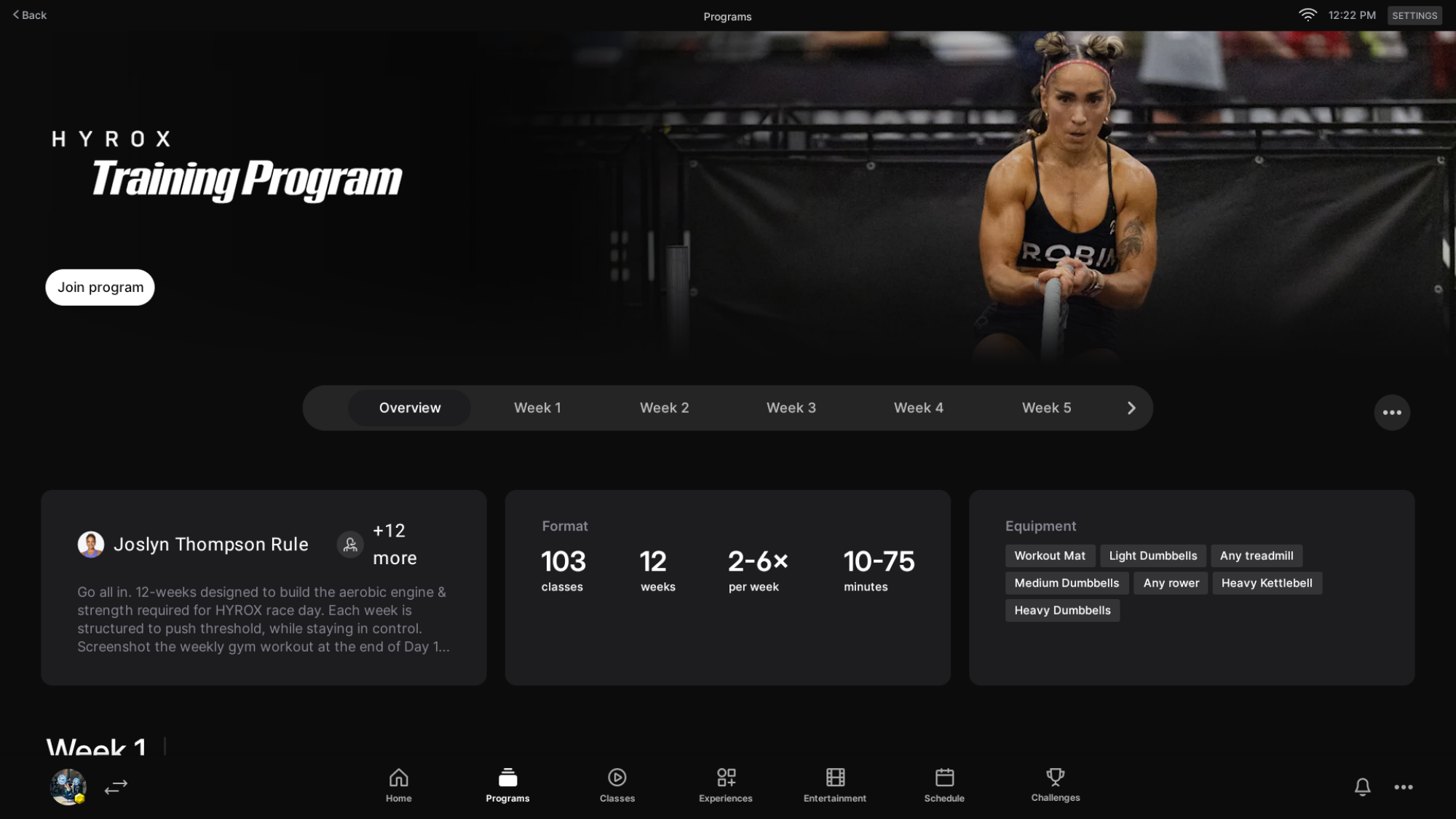
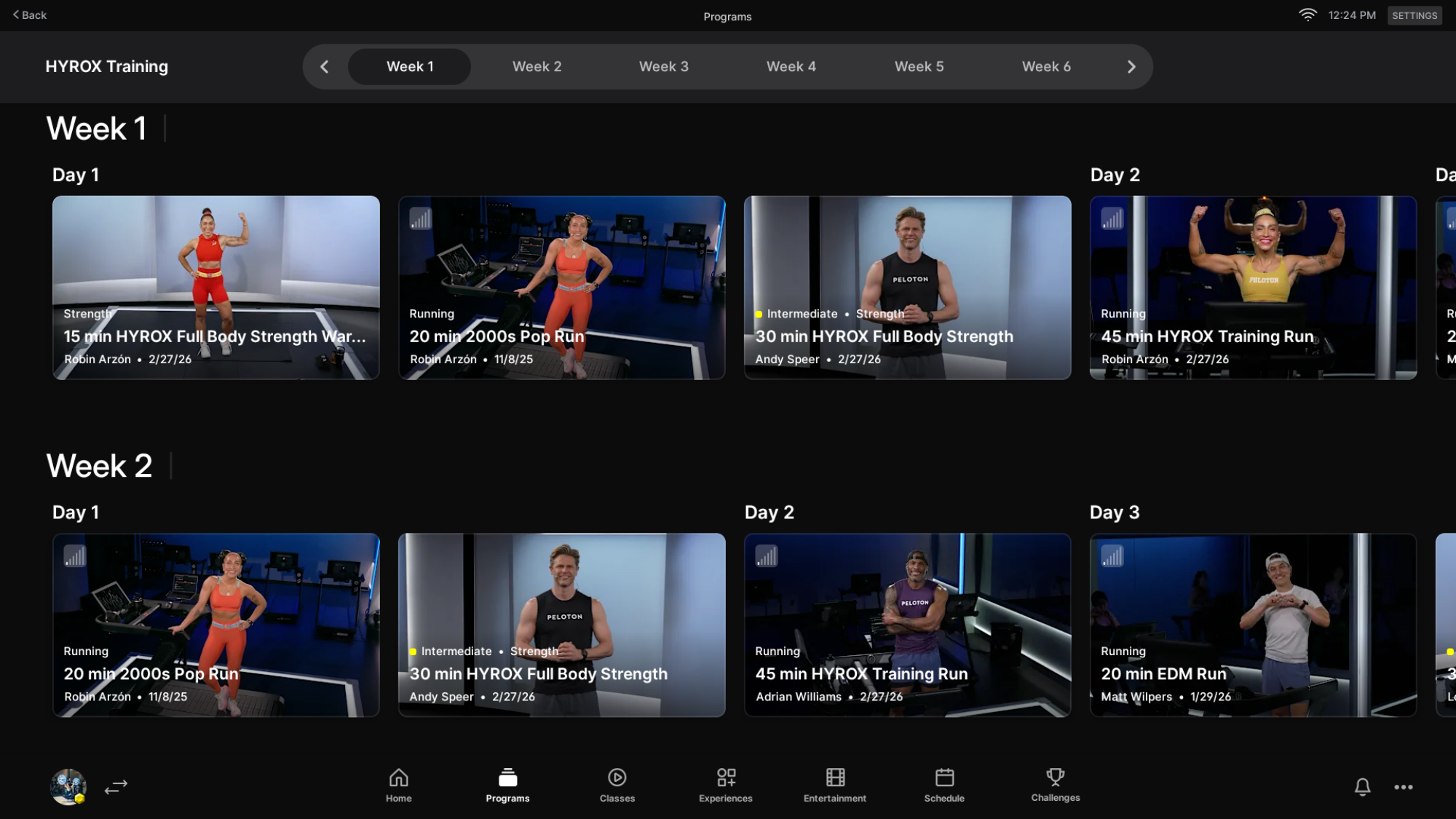
Peloton’s new 12-week program is structured around six training days per week, with many days including both a strength and a run component. Classes include strength, running, rowing, tread bootcamps, mobility and stretching, and meditation. As a regular ol’ race runner myself, I’m drawn to the ways these classes cover so many different disciplines.

Overview of the Peloton Hyrox training program.
My colleague Beth shares a screenshot of the Peloton Hyrox training program.
Credit: Beth Skwarecki

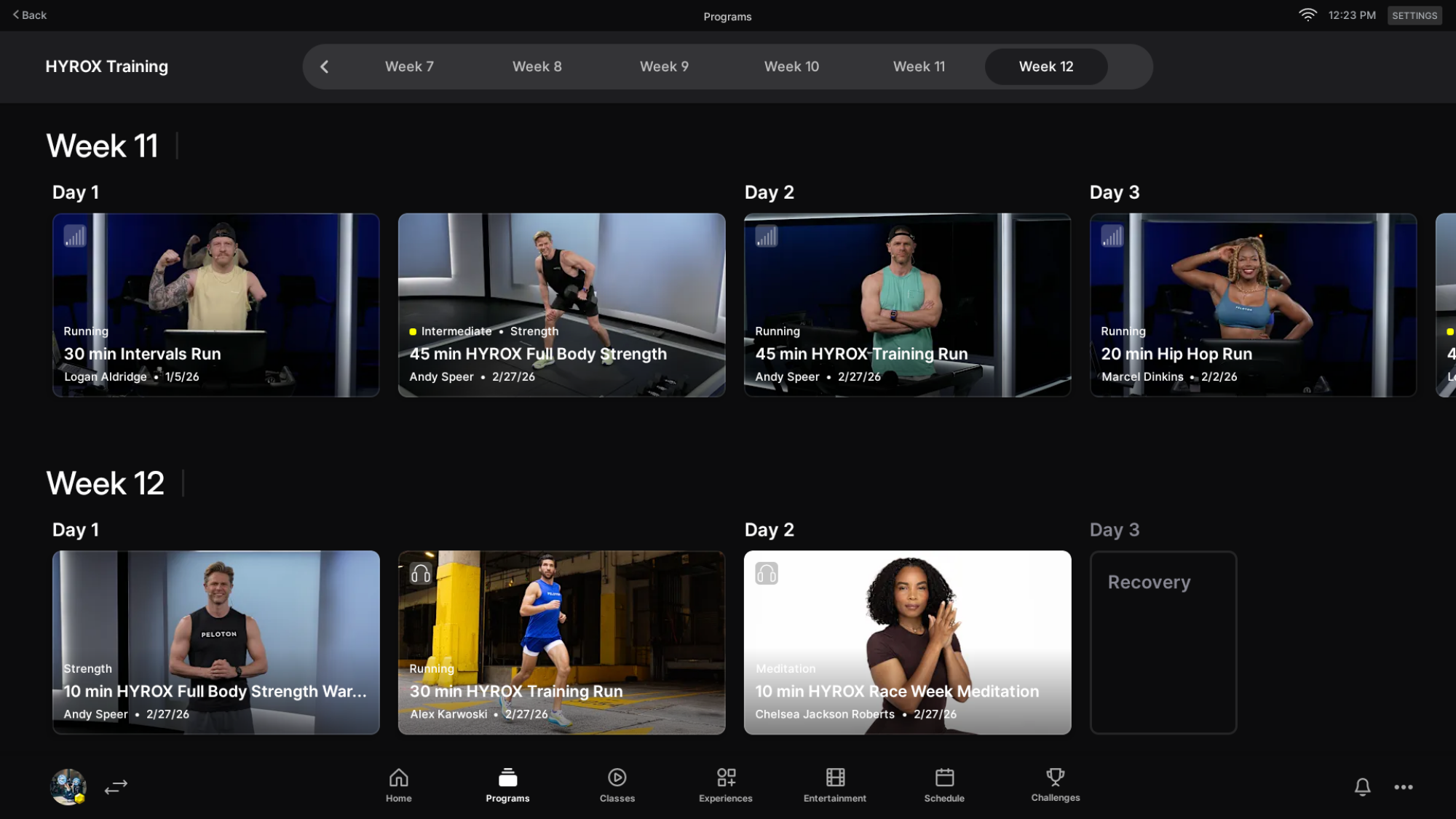
Week 12 is race week, so the training load lightens considerably as athletes taper toward the starting line. There aren’t many workouts that final week, but one notable inclusion is a Hyrox pre-race meditation, which I find speaks to the program’s whole community-based philosophy. 

Week one of the Peloton Hyrox training program.
Credit: Beth Skwarecki

Week 12 of the Peloton Hyrox training program.
Credit: Beth Skwarecki

How Peloton’s Hyrox program is built

The program is grounded in five core principles that Peloton describes as the five pillars of Hyrox performance:

  • Aerobic Power: Threshold work starts on Day 1, teaching athletes how to manage effort and develop sustainable high gears over time.

  • Simple Tools, High Impact: The program leans on running, the erg, and strength training as its primary vehicles for building hybrid endurance.

  • Efficiency Over Speed: Rather than chasing raw pace, the focus is on smart pacing and clean technique that conserves energy across transitions.

  • Progressive Volume: Training load builds deliberately over the weeks, developing the ability to perform under cumulative fatigue.

  • Performance Drivers: Recovery, fueling, and mindset are treated as training components, not afterthoughts.

Taking a look at the program here, its structure reflects these principles in a clear arc. The first six weeks focus on building what Peloton calls the “aerobic engine” and establishing threshold control, laying the foundation before intensity picks up. By Week 7, athletes complete a 75-minute simulation designed to test their pacing strategy and transition skills under realistic race conditions. The final weeks then shift toward what the program describes as “real demand” training, simulating the fatigue carryover of heavy sled pushes and wall balls bleeding into running. Like with any good training program, the goal is to arrive at race day sharp and well-prepared, not worn down.

How to join the Peloton Hyrox training program

Needless to say, you need an active Peloton membership. And for now, the Hyrox program can only be joined from the Peloton app or Peloton hardware like the Peloton Bikes, Tread, Row, and Guide. You can’t join from the Peloton website or TV apps. To find it on your device, you can browse the programs area, find the Hyrox Training program, and hit join. 

OpenAI Secures $110 Billion From Amazon, NVIDIA And Softbank For A Big AI Expansion

OpenAI Secures $110 Billion From Amazon, NVIDIA And Softbank For A Big AI Expansion
The AI money spigot shows no signs of being turned off any time soon, as OpenAI shared that it has received $110B of investment in a new round of funding. OpenAI says these investments will enable it to meet the demand for its services, and that “providing everyone access to our products requires three things: compute, distribution, and capital.”

This