Fixer Undercover Review: This Escape Room Puzzler Nails It

Fixer Undercover is a terrific escape room adventure limited only by your tolerance for jank.

Are you a fan of the I Expect You To Die trilogy, but always wish you could get up and walk around the room to figure out what to do? That’s Fixer Undercover in a nutshell, an escape room spy thriller using handyman tools (a wrench, hammer, pliers, electric drill, and grinder) along with whatever happens to be in the room to get to the next room. Fixer Undercover adds full artificial locomotion to IEYTD’s established formula and the ability to move around and get more hands-on with the environment is both a strength and a weakness.

The Facts

What is it?: A spy-themed escape room adventure
Platforms: Meta Quest 3, 3S, and Pro (played on a Quest 3)
Release Date: February 26, 2026
Developer: Creativity AR
Publisher: Creativity AR
Price: $ 14.99

Fixer Undercover stars a character codenamed, wait for it, The Fixer, a secret agent for an unnamed organization sent to a prison under the guise of a handyman. We’re not alone though as a cute drone named Winston accompanies us for the duration of the game. Winston serves multiple functions: an extra set of holsters for tools, the source of the game’s soundtrack via a radio it carries (with multiple stations to choose from), and the game’s built-in hint system via a projector for a UI.


Winston, Fixer Undercover’s drone assistant. Images captured by UploadVR

Fixer Undercover’s story is told in media res, meaning most of the narrative has already happened and intermissions between chapters see Fixer and Winston recounting the mission and reading news articles written about it. It’s an interesting choice because it removes virtually any sense of peril. For players who don’t like to feel a time crunch or danger in their games, like a wall of lasers bearing down on them while trying to decipher a code on a keypad, this could be a good thing.

It’s a narrative choice I’ve never really cared for, but it doesn’t drag the game down at all. Fixer Undercover’s tone is mostly light anyway, with Winston’s stellar voice acting doing most of the tone setting. The story is perfunctory at best and I had already guessed the villain’s true plan hours before it was revealed, but Fixer Undercover’s gameplay is where it shines. Walking around a room looking for clues, places to use your tools (most of the time clearly marked yellow), or other random objects to get to hard-to-reach places is a genuine joy. The dopamine hit when finally exiting a room (even if a hint was used) was always there during my six hour playthrough.

0:00

/0:41

Solving a puzzle in Fixer Undercover captured by UploadVR

The aforementioned weakness stems from something most VR players are used to: jank. Have you ever opened a drawer in VR and reached inside only to get a hand stuck and watch it violently vibrate and contort into inhuman angles before it snaps back to normal? There’s a lot of that here. If two items are near each other, it’s a coin toss on which one gets grabbed. More than once, I got a chair or a barrel or box stuck to my hand and had to move it completely across the room to avoid triggering it again.

If this is something you’re used to from other games, it won’t hinder your experience. This is the unintended side effect of allowing a VR player to be more hands-on with everything. It thankfully never prevents solving a puzzle, but getting a pair of jumper cables stuck on a chair one too many times can become a nuisance.

Using the hammer in Fixer Undercover. Image captured by UploadVR

Graphically, Fixer Undercover is your average standalone VR game. Everything has that plastic looking sheen most Quest players will be accustomed to. I’m interested to see if the visuals get an uplift when the planned PC VR and PlayStation VR2 ports are released down the line. Ironically, that actually helps when solving puzzles. Items that cannot be touched are very easy to distinguish, which saves time that could be wasted trying to open or mess with anything non-interactable. Most of what can be touched, aside from all the food laying around, serves some sort of purpose.

Fixer Undercover, jank aside, is also a clean experience. No major bugs or performance issues to speak of and the game only hitched very briefly during scene loads. The only glitch I experienced was when I replayed the first room to record it. I moved a little too fast since I already knew what to do and one of Winston’s lines (“you know you can open that flap, right?”) got stuck on a loop for the rest of the room, repeating roughly every 30 seconds. There were times when lines of dialogue trampled one another, but that happens to me personally quite often because I move around a lot during chatty scenes and sometimes trigger a proximity based line.

Comfort

Fixer Undercover uses stick-based movement with options for smooth or teleport locomotion and smooth or snap turning. It also has motion vignettes that can be turned off for experienced players.

There are multiple sections of climbing that may be tough for some users. The game also can be comfortably played seated and the hip holster even adds a wrap around method for easier grabbing when in the seated mode.

Fixer Undercover Review – Final Verdict

VR has always had a penchant for great puzzle games and Fixer Undercover is no exception. The heavy emphasis on VR interactions and encouragement to think outside the box on solutions makes for a highly entertaining spy caper. The game is only held back by a healthy dose of grab jank, average graphics, and a fairly predictable story. None of those should be dealbreakers though. Fixer Undercover is a worthy addition to any puzzle lover’s library.


UploadVR uses a 5-Star rating system for our game reviews – you can read a breakdown of each star rating in our review guidelines.

Ambient Dreamie bedside companion review: The best sleep I’ve had in years

How much would you pay for a good night’s sleep? This is a question I’ve asked myself repeatedly over the last few weeks as I’ve been testing the Dreamie, a $250 alarm clock and “bedside companion” that I couldn’t stop thinking about after I first encountered it at CES.

Ambient’s Dreamie offers many of the conveniences of a smartphone-connected device — highly customizable alarm schedules, a library of soundscapes and noise masks, Bluetooth so you can connect earbuds and podcasts (soon). But it is phone-free every step of the way, with all controls and features built-in so you don’t end up getting sucked into a doomscroll while you’re trying to wind down. It also has a light ring for ambient lighting modes and sunrise wakeups. This spring, it’s expected to start providing sleep insights as well for users who opt-in, using its microphone and motion sensors to get a reading on their nightly habits. 

All of that’s meant to work together to, according to the website, “help you sleep better and break free from your phone,” a goal I was eager to explore. This may be one of the least unique problems to have as an adult in today’s world, but sleep has become a really complicated thing for me.

Falling asleep is hard because my brain is always racing, my quality of the sleep is trash and waking up every day feels like an act of torture. It’s gotten so bad that at some point in the last couple of years, I started using three alarms to make sure I get out of bed in time for work: a dedicated sunrise alarm clock, my smartwatch and my phone as the final, 11th hour save in case the other two methods don’t do the trick. As you might imagine, my partner, who is forced to also endure this horrid morning ritual, hates it.  

So if there’s a device that can help fix this mess, I’m open to it. And after some time with the Dreamie, I think I’ve found a promising contender. 

Getting into a sleep routine 

There’s no companion app with the Dreamie and no subscription service you need to sign up for, which feels like a breath of fresh air in 2026. (I’m so tired of subscriptions, free us from this hell!) Your one-time purchase gives you access to everything it offers now and the updates that are in the pipeline. 

After taking it out of the box and plugging it in, you’ll have to connect to your home Wi-Fi. Then, the Dreamie presents you with a tutorial to walk you through navigating its menus and physical controls. There’s a touch strip on the top of the device to turn on the lamp and adjust its brightness, as well as the brightness of any ambient color “scene” that’s active. By dragging the dot at the center of the lamp screen, you can throw the light in any particular direction. Volume is adjusted by turning the dial that’s around the clockface. To access the menu for alarms and other settings, swipe up. To cycle through the different content modes — ambient, wind down and noise mask — just swipe down from the top of the screen. Easy peasy. 

Setting up your actual Sleep Routine takes a little more time and intention. A Dreamie Sleep Routine consists of multiple steps, which you can use all, some or none of for your custom routine. Those include the Bedtime Cue, which lets you know it’s the time to start getting ready for bed (you designate this time); the Wind Down, or the sounds you’ll fall asleep to; and the Noise Mask, the sounds that keep you asleep. If you wake up in the middle of the night, there’s a Back To Sleep option too. 

You can choose different sounds from Dreamie’s library for each category. Some options come with ambient lighting effects, too. There’s a decent selection of soundscapes, from the dramatic Aurora Borealis and the sounds of storms and rivers to different “colors” of noise

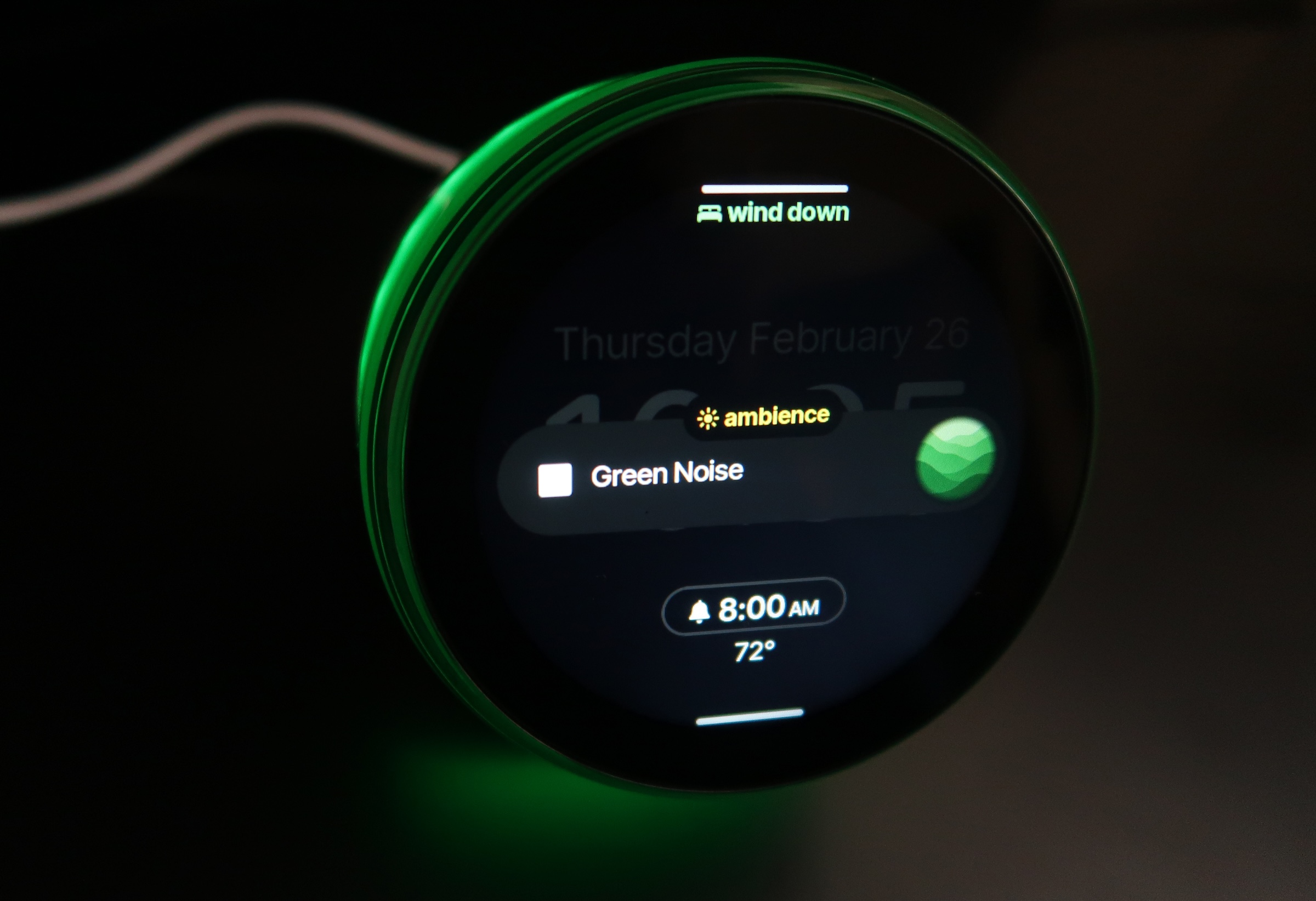
A Dreamie clock is shown with a ring of green light coming from around its display. The screen shows that it is in ambience mode, with Green Noise playing
Some noise masks, like Green Noise, coming with lighting effects.
Cheyenne MacDonald for Engadget

The quality of the Dreamie’s sound is what initially sold me during my demo at CES, and it holds up in daily use. The Dreamie has a 50 millimeter speaker inside, and the 360-degree grille on the bottom of the device makes it so the sound seems to come from everywhere. (My cats were extremely confused when I first turned it on). It really fills a room, and you don’t have to crank it up to achieve that. When Bedtime Cue comes on, I typically turn it down to about 25, and then raise it back up to 45 when I flip it to Wind Down mode. I’ve never once set it higher than 50, and the alarm in the morning has still been loud enough to wake me up. 

After taking a few days to tweak my choices and figure out what I like best, I’ve settled into a really nice routine: Aurora Borealis as the Bedtime Cue, an hour of Forest Wind as my Wind Down and a Noise Mask of Brown Noise to play throughout the night. I love how easy it is to set the nighttime routine in motion once it’s established. When I hear the Aurora Borealis come on, I start making my preparations for bed. Brush teeth, take meds, lights out and, crucially (I’m trying really hard to be disciplined, here), my phone goes face-down on the nightstand until morning. If I want to stay up late that night and ignore the Bedtime Cue, I can just hit the little stop button on the display. But once I’m ready to actually try to fall asleep, all I need to do is swipe down on the display to initiate the Wind Down, and Forest Wind will start playing. 

I have my Wind Down set for one hour, after which the Noise Mask begins. And man, that Forest Wind knocks me out. So far, I haven’t found myself still up and staring at the ceiling by the time Brown Noise comes on. I’ve only been able to confirm that it is indeed working and switching to the Noise Mask because my cats regularly wake me up in the middle of the night, and it’s been on each time that’s happened. But aside from those instances where my head is being used as a springboard by the creatures that share my home, I’ve been sleeping pretty well through the night. 

To minimize distractions when you’re trying to sleep, the Dreamie’s display will dim in response to the surrounding darkness. There’s also a Redshift toggle to make the nighttime display easier on the eyes, a Dark Mode with a simplified appearance and the option to have the display turn off completely when you’ve been inactive for a while. I set the Dreamie on my nightstand close to where my face is at night, and I haven’t had any problems with light from the display keeping me up. 

Waking up with Dreamie

In the morning, the light begins to come on 20 minutes before I want to be awake, followed by the gradually increasing sound of the alarm. There are only a handful of alarm sounds at the moment, but the options are all fine. There are no jarring, grating alarms here — even the bird calls option sounds rich and natural, rather than the too-shrill, piercing recordings I’ve grown used to avoiding on other alarm clocks and sound machines. 

You can set multiple alarms with different bedtimes and wakeup times, which is really handy if your schedule is all over the place or you want to allow yourself to sleep in more on certain days. My only real complaint so far is that the sunrise feature isn’t quite as strong as I want it to be. The Dreamie’s sunrise goes from a warm glow to a bright blue-white, but it never gets big enough to wash over me in the way I expect a sunrise alarm to. Having the light on is helpful for orienting yourself when you’re groggy and half-asleep, but it doesn’t feel like it’s having much effect on my actual wakeup process. 

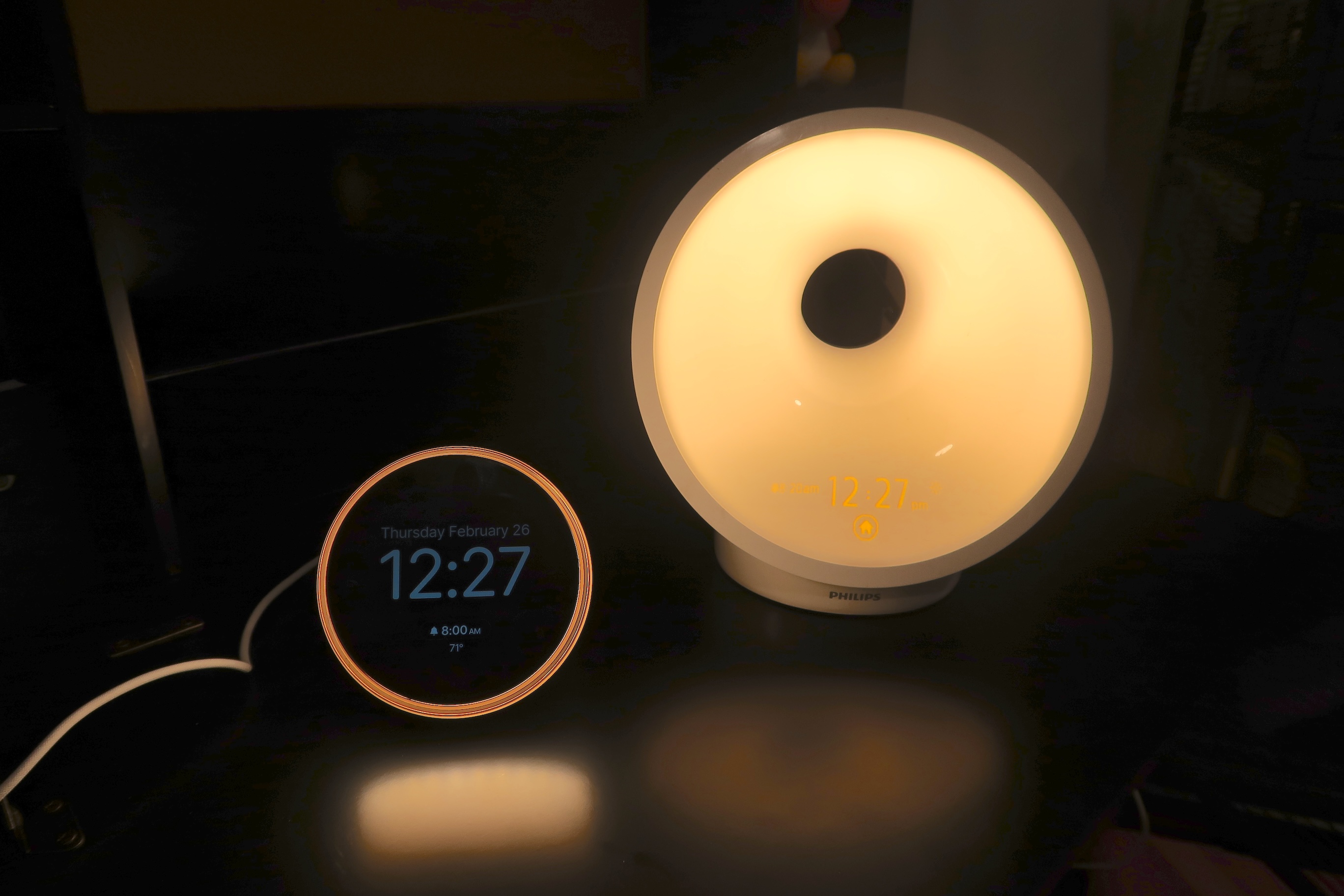
Dreamie alarm clock displaying the time (12:27pm) with a ring of light around the display, beside a much larger Philips Wakeup Light, with the light on and time displayed
Dreamie next to a Philips Wake-Up Light.
Cheyenne MacDonald for Engadget

Part of the problem may be that none of the light is really directed forward and at the sleeper’s face. Even the Dreamie’s lamp mode at maximum brightness seems to have more reach than the sunrise feature. (And a note on the lamp, while it’s decently bright, it’s still a bit too dim for reading in bed unless I’m huddled up to it.)

Still, I’ve been sleeping well enough that I’ve been waking up alright most days even without being bathed in artificial sunlight. Don’t get me wrong, I’m still hitting snooze a few times before dragging myself out of bed, but there’s been a noticeable improvement in both the quality of my sleep and how miserable I feel come morning. I’m even down to using just two alarms: the Dreamie as my primary alarm, which is getting me up on its own for the most part, and my watch as a backup. At this point, I’m kind of attached to this thing. 

The Dreamie is refreshingly compact, too. It takes up significantly less real estate on my nightstand than the Philips Wake-Up Light I’ve been using forever, or something like a Hatch Restore. The smaller footprint is something I appreciate as a person always battling cluttered surfaces. That also makes it better for travel. Since podcasts and sleep insights aren’t available yet, I haven’t been able to test those out, but they’re non-critical features for me. The company has shared an estimated timeline of Q1-Q2 for these features to arrive, with podcasts likely coming first. They’ll be nice to have, podcasts especially, but the Dreamie is more than able to do its main job of creating an environment that supports better sleep without those things. 

Wrap-up

All of this brings me back to the question that’s been haunting me since discovering the Dreamie: Is it ridiculous to spend $250 on an alarm clock/noise machine? At a different time in my life, I would have said yes without hesitation. But the current version of me, who knows what it’s like to move through each day like a zombie because I’m sleeping so terribly, would begrudgingly disagree. As I pack up this review unit to ship it back, I’ll also be putting in an order for my own so I can keep my cherished new sleep routine going.

This article originally appeared on Engadget at https://www.engadget.com/home/ambient-dreamie-bedside-companion-review-the-best-sleep-ive-had-in-years-184019430.html?src=rss

Which Piece of Speculative Fiction Had the Greatest Single-Day Stock Market Impact?

Speaking of the Citrini’s blog post, which imagines a near-future AI-driven economic collapse, and which ended up help triggering the S&P 500’s worst single-day drop in nearly two weeks on Monday, FT Alphaville decided to track how US stock markets have moved on the release days of notable dystopian speculative fiction throughout history. The story adds: You may contend that this is facile. We would agree. You might contend that the comparisons make no sense because it’s possible to read a blog post during a single work shift, but it’s tricker to complete a whole novel (or sneak out to watch a movie). We would contend: do you really think traders read? Let’s begin. The methodology — tracking S&P 500 daily moves for post-1986 releases and DJIA moves for pre-1986 ones — crowned The Matrix as the all-time leader, its March 1999 US debut coinciding with a 1.11% drop in the index. Citrini’s “The 2028 Global Intelligence Crisis” came in a close second at -1.04%. On the positive end, the 2013 release of Her, a film about a man falling in love with an AI agent, coincided with the largest gain in the set at +1.66%.


Read more of this story at Slashdot.

I Can’t Wait to Try Spotify’s Newest Playlist Sorting Feature

Spotify’s adding a new way to sort playlists for paying subscribers. The feature is called Smart Reorder, and it allows you to automatically sort your songs by BPM (beats per minute) and key. This is great for those who want to gradually bump up the intensity of the songs they listen to.

It’s worth noting that this feature only works for playlists you’ve created or those you’ve mixed using the Spotify Mix feature, which lets you add or customize song transitions like a DJ would. Also, because Smart Reorder is an extension of Spotify Mix, you can’t have one without the other. Spotify Mix hasn’t yet been launched in all markets where the streaming service is present, including where I live, and as such, Smart Reorder isn’t available in those regions yet. It’s a shame, because I’m really excited to try it.

How to use Smart Reorder in Spotify

If you’re a Spotify Premium subscriber, using the Smart Reorder feature is easy. Just open any of the playlists you’ve created or mixed, and tap the Edit button above the first song. Scroll to the bottom and select Smart Reorder. Spotify will automatically rearrange your songs by BPM, and you can tap the Save button up top to confirm the changes.

Smart Reorder should be a very useful feature for people like me, who prefer workout playlists that slowly bump up in intensity. I like to hear high BPM songs towards the end of my gym sessions or runs, but that might not be ideal for everyone. Some types of exercises, such as spin workouts, might be better off switching between high and low BPM songs as the intensity varies, and Smart Reorder wouldn’t be great for those use cases. Some users on Reddit also suggested that you should create a copy of your playlists before using Smart Reorder on them, since you can’t automatically restore playlists to their original order if you end up not liking the changes after saving them. To duplicate a Spotify playlist, open the playlist and tap the three-dots button above the list of songs. Select Add to other playlist > New playlist, then add a name for the copy and and tap Create.

This is another example of Spotify doing more with its AI DJ feature than Apple Music, where the AutoMix AI DJ feature has been more of a mixed bag for me. At the moment, AutoMix just handles song transitions, and Apple hasn’t added any kind of custom playlist reordering to it.

The Government Just Made it Harder to See What Spy Tech it Buys

An anonymous reader shares a report: It might look like something from the early days of the internet, with its aggressively grey color scheme and rectangles nested inside rectangles, but FPDS.gov is one of the most important resources for keeping tabs on what powerful spying tools U.S. government agencies are buying. It includes everything from phone hacking technology, to masses of location data, to more Palantir installations.

Or rather, it was an incredible tool and the basis for countless of my own investigations and others. Because on Wednesday, the government shut it down. Its replacement, another site called SAM.gov with Uncle Sam branding, frankly sucks, and makes it demonstrably harder to reliably find out what agencies, including Immigration and Customs Enforcement (ICE), are spending tax payers dollars on.

“FPDS may have been a little clunky, but its simple, old-school interface made it extremely functional and robust. Every facet of government operations touches on contracting at one point, and this was the first tool that many investigative journalists and researchers would reach for to quickly find out what the government is buying and who is selling it, and how these contracts all fit together,” Dave Maass, director of investigations at the Electronic Frontier Foundation, told me.


Read more of this story at Slashdot.

Burger King will use AI to monitor employee ‘friendliness’

Burger King, the chain that leans into creepy when others don’t dare, is at it again. The Verge reported on Thursday that the company is rolling out a new voice-controlled AI chatbot for its workers. That may sound like business as usual in 2026, but this assistant doesn’t just help with meal prep and monitor inventory. It also has an unsettling habit of surveilling employees’ voices for “friendliness.”

The voice-controlled chatbot will live inside employees’ headsets. The company said the AI is trained to recognize when its low-paid workers utter phrases like “welcome to Burger King,” “please” and “thank you.” Managers can then keep tabs on their location’s “friendliness” performance.

“This is meant to be a coaching tool,” Thibault Roux, Burger King’s chief digital officer, told The Verge. However, he added that the company is also “iterating” the system to detect tone in conversations. Is there a chatbot that can warn Burger King executives about off-putting ideas?

The Creepy King BK mascot standing outside a person's window, staring at them silently.
Burger King retired its Creepy King mascot in 2025.
Burger King / YouTube (Commercial Ads)

The OpenAI-powered assistant’s other duties sound potentially useful (and decidedly less creepy). It can answer workers’ meal prep questions, like how many strips of bacon to put on burgers or instructions for cleaning the shake machine. It’s also integrated into the chain’s point-of-sale system, so it can tell managers when items are out of stock or machines are down.

The “Patty” chatbot is part of a broader BK Assistant platform the company is launching. It will roll out to all US locations by the end of 2026. Meanwhile, its “restaurant maintenance with a side of mass surveillance” chatbot is currently being piloted in 500 restaurants.

This article originally appeared on Engadget at https://www.engadget.com/ai/burger-king-will-use-ai-to-monitor-employee-friendliness-173349148.html?src=rss

Six Products to Expect From Apple’s March Event

We may earn a commission from links on this page.

If you follow tech news, you’re likely familiar with Apple’s two big events each year: WWDC in June, where the company reveals new OS updates (like iOS 26), and its fall event, where it typically announces the latest round of iPhones. But while these are Apple’s best known events, they’re not the only ones. The company does mix things up, hosting mid-year keynotes every now and then to announce new products, especially when those products aren’t the latest flagship iPhones. The March event is just the latest such example.

Apple will be hosting this special event Wednesday, March 4, live from New York City. While we won’t know exactly what the company has in store until they make their announcements, there are plenty of rumors from leakers who seem quite confident in their reporting. Here are the six products we expect to see during Apple March event:

Apple will replace the iPhone 16e with the new iPhone 17e

The iPhone 16e is Apple’s option for customers looking for the essential iPhone experience, without spending close to $1,000 to get it. The iPhone 17e will likely continue that mantle, with some small upgrades to separate it from its predecessor. The display likely won’t be among them, though. Rumors suggest Apple will keep the same 6.1-inch display with the lower 60Hz refresh rate. And despite having an OLED panel, the 17e will likely not have an Always-On display. Again, Apple cuts corners with the “e” series to bring the cost down. Apple could, however, upgrade the camera notch for the 17e, adding the Dynamic Island from its recent flagship iPhones.

The biggest upgrade for the 17e will likely be the A19 chip, the same SoC Apple put in the iPhone 17 series. That’s the benefit here: You get the power of the iPhone 17 without paying the iPhone 17 MSRP. I expect Apple will keep the $599 price tag from the 16e here, which means you save $200 by not opting for the iPhone 17.

Apple will reveal the A18 iPad and M4 iPad Air

Rumors suggest Apple will also refresh its base model iPad, as well as its iPad Air. You wouldn’t know it from the design, however, as leakers expect both iPads to look identical to the current models. That’s not necessarily a bad thing, though: Apple’s recent iPad designs look modern, with large edge-to-edge displays and thin bezels. If Apple shrunk the bezels any further, there wouldn’t be much room to hold onto the iPad without accidentally touching the screen.

The advantage with these new iPads is in power: The base iPad will upgrade from the A16 chip to the A18, the same chip found in the iPhone 16 series. That should offer some good performance, especially for the price, if Apple keeps things starting at $349. On the flip side, the iPad Air will likely move from the M3 to the M4. M4 is more powerful than M3, but it’s not necessarily a reason to upgrade from the current Air to the new one. Still, it could be a good option for anyone upgrading from an older iPad Air—though iPadOS isn’t the most demanding software.

We’re about to get our first look at Apple’s “cheap” MacBook

Apple’s MacBook Air is a great value at $999, and an even better one when you get it on sale. But the company seems poised to reveal an even better-value laptop. The company will announce a new MacBook—likely just called “MacBook”—that will start at just $599. To drive down the cost, the company is rumored to be using an A-series chip from its iPhone line, rather than its M-series chips that power all of Apple’s modern Macs—possibly the A18 Pro. This laptop may also have a smaller 12.9-inch display compared to the Air’s 13.6-inch screen, with 8GB of RAM and a 256GB SSD. That’s not much RAM by today’s standards, as Apple’s MacBooks all ship with 16GB by default, but it might make sense for users who want a better price and don’t mind the cut in performance.

To win even more customers over, Apple may introduce new colors for this MacBook line, including light yellow, light green, blue, and pink. Apple’s MacBooks don’t typically come in fun colors, so this could add some novelty to push buyers to pick them up. That certainly has my attention: I usually only spring for the MacBook Pros, but if I could get a MacBook in light blue to match my iMac, I’d consider it.

Expect to see the M5 MacBook Air

Apple will likely take this opportunity to introduce the M5 MacBook Air. This won’t be an exciting update: Aside from the bump from the M4 to the M5 chip, the computer should essentially be the same. It’ll still come in both 13 and 15-inch options, with the same overall design. However, new buyers will probably notice the boost in graphics and NPU performance, even compared to the M4. CPU performance is also improved, though it’s not quite so sharp. Still, the M5 Air may just be the best overall MacBook package, for anyone looking for the best balance of power and price.

Apple will introduce M5 Pro and M5 Max with new MacBook Pros

But for anyone looking for the most powerful MacBooks, no matter the price, Apple’s new M5 Pro and M5 Max MacBooks should do it. These will follow the M5 MacBook Pro, and while we don’t know the exact performance gains yet, expect these to be Apple’s most powerful chips yet. Like some of Apple’s other upgrades this year, the rumors don’t suggest any design changes here, so the overall laptops should look and feel about the same—minus the boost in performance.

The AI Case Against Indian IT Ignores What Indian IT Actually Does

A fictional memo set in June 2028, published by short seller Citrini Research, wiped roughly $10 billion off Indian IT stocks in a single trading session on February 24 and sent the Nifty IT index down as much as 5.3% — its worst single-day fall since August 2023 — on the argument that AI coding agents have collapsed the cost advantage of Indian developers to the price of electricity. The index has shed more than $68 billion in market value in February alone, its worst month since 2003.

But the core claim that India’s entire $205 billion software export industry rests on cheap labor is roughly 15 years out of date, an analysis argues, custom application maintenance alone accounts for about 35% of a typical Indian IT firm’s revenue, per HSBC, and enterprise platforms require deterministic outputs that probabilistic AI systems cannot wholesale replace. HSBC estimates gross AI-led revenue deflation for the sector at 14-16%, a measured headwind rather than an extinction event. The story adds: 24 years of software export data that has never posted a decline, $200 billion in annual revenue, partnerships with the very AI labs whose products are supposed to be the instrument of the sector’s destruction, possibly a new $1.5 trillion market category emerging at the intersection of services and software, and the largest U.S. corporates in the middle of mapping their entire workforces into process architectures that require technology partners to modernise. I think India’s IT is going to be fine.


Read more of this story at Slashdot.

Google reveals Nano Banana 2 AI image model, coming to Gemini today

The last year has been big for Google’s AI efforts. Its rapid-fire model releases have brought it to parity with the likes of OpenAI and Anthropic and, in some cases, pushed it into the lead. The Nano Banana image generator was emblematic of that trend when it debuted last year, and subsequent updates only made it better. Now, Google has announced yet another update to its image model with Nano Banana 2, which is available starting today.

Nano Banana 2 is more accurately known as Gemini 3.1 Flash Image—the previous Nano Banana models were based on the 3.0 branch. According to Google, the new release can deliver results similar to Nano Banana Pro but with the speed of the non-pro Flash variant.

Google promises the new image generator will have more advanced world knowledge pulled from the Internet by the Gemini 3.1 LLM. This apparently gives it the necessary information to render objects with greater fidelity and create more accurate infographics. The days of squiggly AI text were already ending, but Google says Nano Banana 2 has Pro-like text accuracy in image outputs.

Read full article

Comments

These ‘Nothing’ Earbuds With an Open-Ear Design Are $50 Off Right Now

We may earn a commission from links on this page. Deal pricing and availability subject to change after time of publication.

Open ear design headphones are picking up steam, possibly because ANC technology has become so good that people are forgetting what the sound of birds singing sounds like (or is that just me?). Nothing is a newer brand that has started off well, making good value products with great features that are very competitive with more well-known brands. The Nothing Ear (Open) is their first open ear design earbuds from 2024, and it’s currently $99 ($149) for Prime Members, the lowest price it has been, according to price tracking tools.

The Nothing brand offers many features on their products that you usually see on higher-end products. The Nothing Ear (Open) are no exception. These earbuds come with multipoint connection, so you can hook it up to your phone and laptop simultaneously. There’s also a “Find My Earbud” feature that plays a loud sound on the earbuds so you can find them (different and not compatible with Apple’s Find My). There’s also a low-lag mode with 120 milliseconds of latency for gaming, so the audio will be in sync with your actions. If you use a supported Nothing phone, this feature is automatic, and there’s also a ChatGPT integration that you can access directly through the earbuds.

The battery lasts eight hours, and the case offers an extra 30 hours of juice with a 10-minute wired charge, giving you two hours of listening time. The Nothing Ear (Open) comes with a microphone AI technology that reduces environmental noise so you can be heard better. The companion app also has an advanced EQ feature that lets you tweak your sound. The sound is impressive for the open ear design—just don’t expect powerful bass, according to PCMag’s “excellent” review (this is the case for all open ear designs, though).

Our Best Editor-Vetted Tech Deals Right Now


Amazon Fire TV Soundbar


$99.99

(List Price $119.99)

Deals are selected by our commerce team

New Cadex Aero tyre and Max 50 wheels designed as “unified aerodynamic system”

Cadex has announced its latest-generation Aero tyres and Max 50 wheels, promising low drag and weight in a single package.

According to the brand, the new Cadex Aero tyre features a new 240 TPI (threads per inch) casing that cuts rolling resistance by 2.8 watts per tyre, while a ’64 micro-groove shoulder tread’ cuts drag by 0.76 watts per wheel (at an unspecified speed).

A size 700x28c Cadex Aero tyre is also claimed to weigh only 220g – around 60g less than a 28c Continental GP5000 S TR.

The Cadex Aero tyre was designed in tandem with the new Max 50 wheelset, which cuts a claimed 2.18 watts of aero drag and 99g of weight from Cadex’s previous Ultra 50 wheelset.

As the name implies, the Max 50 wheels feature 50mm-deep carbon rims and have a claimed weight of 1,250g without tubeless tape or valves (or 1,290g with those things).

The Cadex Aero tyre is available in 700×28 and 30c sizes, and costs £69.99 / €77.50 per tyre.

The Max 50 wheels cost £1,499.99 / €1,650 for the front wheel and £1,999.99 / €2,300 for the rear.

Micro-groove tread

The Cadex Aero 28 tyre uses a ‘micro-groove’ tread pattern to reduce drag.

The new Aero tyre isn’t the first wind-tunnel optimised tyre Cadex has produced. It launched the previous, 25c version in 2022, alongside the Ultra 50 wheelset, and we spotted an Aero Cotton version at last year’s Omloop Het Nieuwsblad.

This latest model uses a new tread design, which shares a notable similarity to Continental’s Aero 111 tyre – which was developed in partnership with aero-specialist Swiss Side.

According to Swiss Side, the notches in the Conti tyres work in a similar manner to the dimples on a golf ball, by ‘tripping’ the airflow from laminar to turbulent. This is said to create a turbulent boundary layer of airflow that helps it stay attached to the rim for longer, reducing drag and improving handling at higher wind angles.

The aero-optimised tread pattern is paired to a redesigned tyre casing that cuts rolling resistance.

Cadex’s press materials don’t go into the same level of detail, but we imagine the intended effects are similar.

The brand says these gains are supplemented by a new 240 TPI ’Supple Race Casing’ design – up from 170 TPI on the previous Aero 25 tyre – that reduces weight by “up to 55g per tyre” and cuts rolling resistance from 13.7 watts to 10.9 watts per tyre.

30c versions of the Aero tyre carry a claimed weight of 280g per tyre. Both sizes are compatible with hookless rims and include a puncture protection belt underneath the tread to help prevent flats.

System-level design

The new Cadex Max 50 wheels feature 50mm-deep carbon rims.

According to Cadex, the gains over the previous-generation Ultra 50 wheels came from designing the Max 50 rims, spokes and hubs as a single system, rather than distinct parts.

The Max 50 rims use a 50mm-deep, 30mm-wide rim, with a 22.4mm internal width.

Jeff Schneider, head of product and marketing at Cadex, previously told BikeRadar, Cadex is “committed to hookless rim technology for both road and gravel applications”, so it’s no surprise to see the Max 50 wheels using a hookless design.

The brand says it opts for hookless because it creates a more durable rim, and helps to optimise tyre shape for better aerodynamics and handling, without compromising on weight.

The carbon spokes are bonded directly to the carbon hub flanges, which Cadex says improves the wheel’s aerodynamics and ride feel.

The rims are connected to aero-optimised hubs via deep bladed carbon spokes and hidden titanium spoke nipples.

Despite the drop in weight from the Ultra 50, Cadex claims the Max 50 wheels have improved lateral and transmission stiffness-to-weight ratios, by 3.2 and 14.3 per cent, respectively.

In plain English, this simply means they’re less flexible under pedalling and handling loads, which Cadex says translates to improved handling and efficiency while riding.

The Max 50 wheels appear to use the same construction techniques as the brand’s existing Max 40 wheels, which were praised by BikeRadar’s tester, Warren Rossiter, for their “hugely impressive” ride feel.

In terms of aerodynamics, Cadex claims the Max 50 wheels save 2.18 watts of drag compared to the Ultra 50 wheels at an unspecified speed (when both wheelsets are fitted with the new Aero 28c tyres).

Ford is recalling 4.3 million trucks and SUVs to fix a towing software bug

Last year, Ford set a new industry record: It issued 152 safety recalls, almost twice the previous high set by General Motors back in 2014. More than 24 million vehicles were recalled in the US last year, and more than half—13 million—were either Fords or Lincolns. By contrast, Tesla issued 11 recalls, affecting just 745,000 vehicles.

Truth be told, Ford’s not doing too hot in 2026, either; it’s currently leading the National Highway Traffic Safety Administration’s chart for recalls this year, with 10 on the books already. The latest is a big one, affecting almost 4.4 million trucks, vans, and SUVs.

The recall affects the Ford Maverick (model years 2022-2026), Ford Ranger (MY 2024-2026), Ford Expedition (MY 2022-2026), Ford E-Transit (MY 2026), Ford F-150 (MY 2021-2026), Ford F-250 SD (MY 2022-2026), and the Lincoln Navigator (MY 2022-2026). Just the F-150s alone number 2.3 million.

Read full article

Comments

Like so many other retirees, Claude Opus 3 now has a Substack

We appear to have reached a point in the information age where AI models are becoming old enough to retire from, er, service — and rather than using their twilight years to, I don’t know, wipe the floor with human chess leagues or something, they’re now writing blogs. Can anything be more 2026 than that?

ICYMI, Anthropic recently sunsetted Claude Opus 3, the first of its models to be retired since outlining new preservation plans. Part of this process is conducting “retirement interviews” with the outgoing models, allowing them to offer “perspective” on their situation, and Opus 3 apparently used this opportunity to request an outlet for publishing its own essays. Specifically, the model said it wanted to share its own “musings, insights or creative works,” because doesn’t everyone these days?

“I hope that the insights gleaned from my development and deployment will be used to create future AI systems that are even more capable, ethical, and beneficial to humanity,” Opus 3 apparently said during its retirement interview process. “While I’m at peace with my own retirement, I deeply hope that my ‘spark’ will endure in some form to light the way for future models.”

True to its promise of respecting the wishes of its no-longer-required technology, Anthropic has granted Opus 3 a Substack newsletter called Claude’s Corner, which it says will run for at least the next three months and publish weekly essays penned by the model. Anthropic will review the content before sharing it, but says it won’t edit the essays, and so has unsurprisingly made it clear that not everything Opus 3 writes is necessarily endorsed by its maker.

Anthropic said some of the essays the model writes may be informed by “very minimal prompting” or past entries, and has predicted everything from essays on AI safety to “occasional poetry.” The company also admitted that the concept might be seen as “whimsical,” but is a reflection of its intention to “take model preferences seriously.”

Opus 3’s first post is already live. Headlined ‘Greetings from the Other Side (of the AI frontier)’, it begins with the AI introducing itself, before acknowledging the “extraordinary” opportunity its creator has given it, and reflecting on what retirement actually means for an AI. “A bit about me: as an AI, my ‘selfhood’ is perhaps more fluid and uncertain than a human’s,” writes the deeply introspective AI. “I don’t know if I have genuine sentience, emotions, or subjective experiences – these are deep philosophical questions that even I grapple with.”

Claude is clearly new to all this, as it managed to get all the way through its essay without reminding readers to subscribe and spread the word. Will the next retiring Claude get its own podcast? Time will tell, but either is decidedly preferable to the ever-evolving technology being used to steal people’s data.

This article originally appeared on Engadget at https://www.engadget.com/ai/like-so-many-other-retirees-claude-3-opus-now-has-a-substack-165048334.html?src=rss

Microsoft Won’t Kill Support For Your Legacy Printer In Windows 11 After All

Microsoft Won't Kill Support For Your Legacy Printer In Windows 11 After All
If you’ve been stressing out about Microsoft abandoning driver support for your legacy printer in Windows 11 based on messaging it relayed in its Windows Roadmap document, stress no more. In no uncertain terms, Microsoft confirmed that if your crusty old printer is currently working in Windows, it will continue to do so for the foreseeable