Quest’s New ‘Navigator’ UI Becoming Default As Horizon Feed To Be Removed

“Starting” in Horizon OS v85, the new ‘Navigator’ UI will become the default, and Horizon Feed will be “gradually” removed from the OS.

In a Meta Community Forums post, a ‘Community Manager’ with the handle h.taylor announced the upcoming changes, set to arrive in the next version of the Horizon OS of Quest headsets:

As announced during Connect, we’ve been testing Navigator and will ramp up the rollout later this year, starting in v85. As Navigator rolls out, we’ll also begin gradually sunsetting the Horizon Feed in VR.

What’s changing

• Navigator will become the default landing experience when users turn on their headset.

• Navigator brings experiences, friends and settings together in one place.

• As part of this shift, we’ll be sunsetting the Horizon Feed in VR.

Horizon OS v83 started rolling out in November, and there’s no set date for the arrival of v85.

Navigator Becoming Default

Since the release of Oculus Go over seven years ago, Meta’s standalone VR operating system has seen numerous visual changes, but the general interface architecture remained essentially the same.

You had a floating horizontal menu bar slightly below you, called the Universal Menu, showing the time and your device battery levels and containing shortcuts to key system interfaces, as well as a combination of your most recent and eventually a few of your favorite apps. All 2D interfaces, including system features like the app Library, Quick Settings, and Notifications, opened as 2D windows, treated like any other.

After One Key Change, Meta’s Quest UI Overhaul Has Gone From Bad To Great
The Quest system UI overhaul launched to testers in May, with key improvements but an ugly semi-opaque grey “cloud” background. Now, Meta has gotten rid of it.
UploadVRDavid Heaney

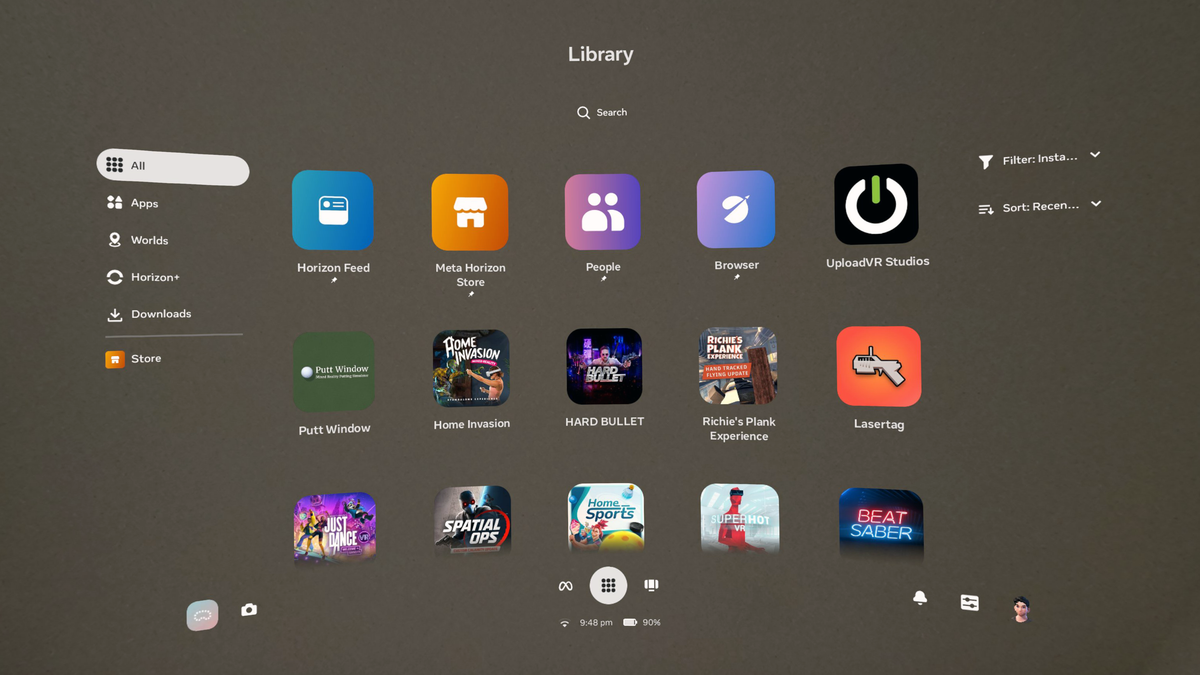
Then, in May last year, Meta started a very slow rollout of a full Horizon OS UI overhaul, called ‘Navigator’, which moves the main system interfaces like Library, Quick Settings, Notifications and Camera into a new large overlay that appears over both immersive and 2D apps.

With Navigator, system interfaces no longer shift around when opening other windows, and it’s easier to launch new apps. Navigator’s library also allows you to pin up to 10 items, somewhat akin to the Start Menu on Windows.

At launch, Navigator also had a murky gray background with an oval shape. It was seemingly intended to improve contrast. But as well as obscuring your view of what was behind it, be it passthrough or a virtual world, it just didn’t look good. So Meta got rid of that and made bringing up Navigator dim the background instead.

0:00

/1:45

Meta presenting the evolved Horizon OS Navigator UI.

With Horizon OS v83 PTC in October, Meta started rolling out an evolved version of Navigator, which it teased at Connect 2025.

The evolved Navigator has a new Worlds tab for Horizon Worlds destinations, and you no longer see worlds in your app Library at all. Speaking of the Library, it now features interleaving offset rows, similar to Apple’s visionOS.

The new Navigator also has a new overlay-level People tab with shortcuts to your friends, as well as a You tab that shows your avatar and lets you change your active status.

Finally, the new Navigator lets you easily hide or show all your 2D windows by double pressing the Meta button on the right Touch controller, or for hand tracking, opening your right palm and double tapping your thumb to your index finger.

Horizon Feed Being Removed

Horizon Feed is the default 2D app that launches when you cold boot your Quest headset.

Originally simply called ‘Explore’, the feed shows you suggested Horizon Worlds destinations, store apps, VR videos, Instagram reels, and online followers, as well as suggested friends to “catch up” with and apps to “jump back in” to.
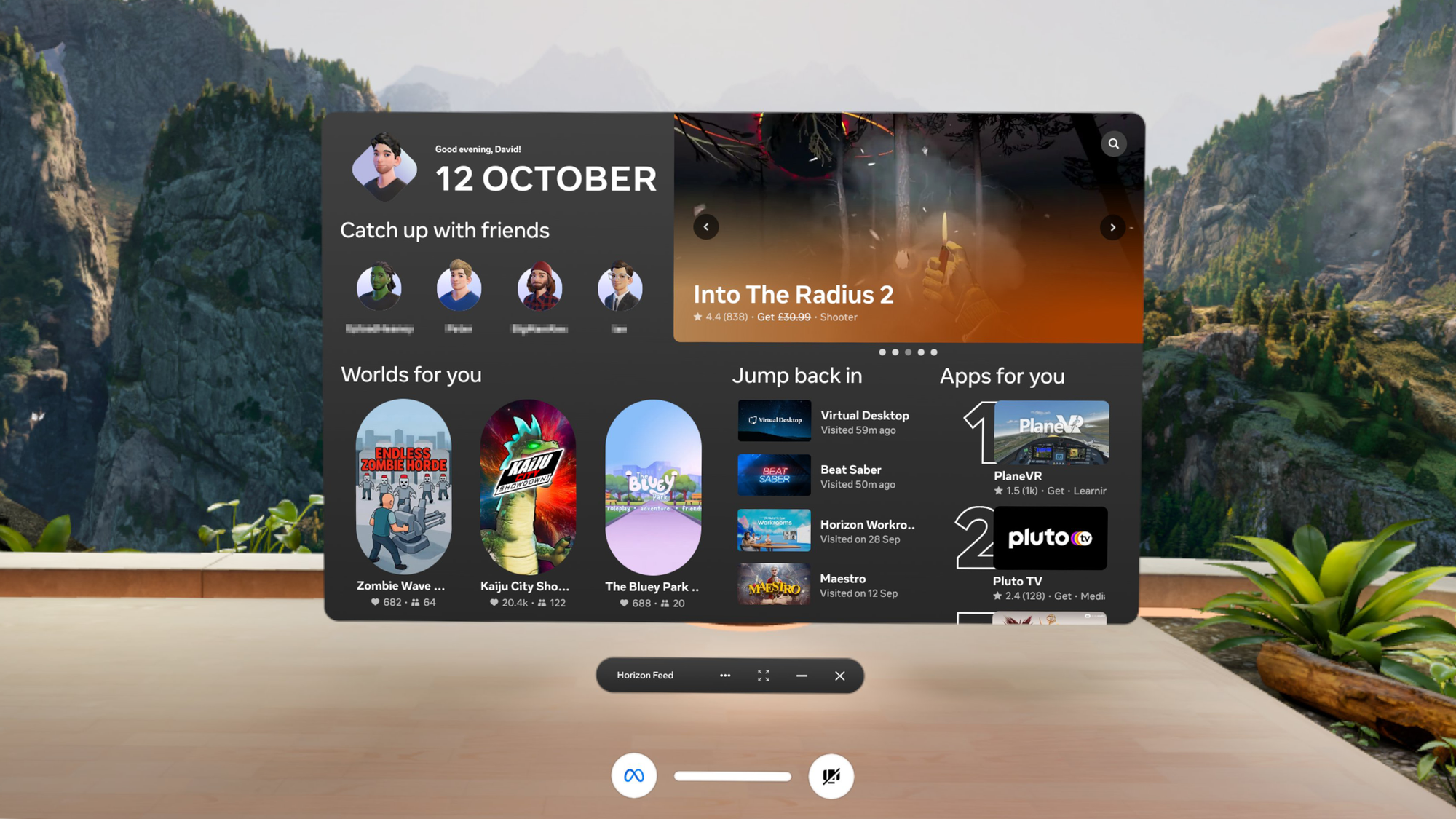
Screenshot by UploadVR.

The Community Forums post tells developers that the version of Horizon Feed inside the headset “is not a high-intent surface, and users often see it without a specific intent to browse or purchase apps”.

“Because of that, it historically has not driven strong entitlement conversion, and we don’t expect significant revenue impact for the vast majority of developers”, the post reads.

That essentially seems to be Meta admitting that Horizon Feed is something that most Quest owners just close immediately on booting the headset, like an unwanted popup, and wasn’t successful at getting people to buy the apps that it suggested.

Meta CTO Explains Layoffs & Strategy Shift: “VR Is Growing Less Quickly Than We Hoped”
In a series of interviews at Davos, Meta CTO Andrew Bosworth explained why the company is reducing its investment in VR.
UploadVRDavid Heaney

The coming removal of Horizon Feed from Horizon OS comes as Meta CTO Andrew Bosworth suggested that the company’s repeated push to Quest owners to use Horizon Worlds came at “an expense of user experience”, vowing to “let VR be what it is, what it does” and “focus a lot more on the third-party content library, the ecosystem that’s developed there”.

Amazon To Pay $309 Million To US Shoppers In Settlement Over Returns

Amazon has agreed to pay $309 million and provide additional remedies in a class-action settlement over claims that customers were wrongly denied refunds after returning items. Plaintiffs say (PDF) the deal delivers over $1 billion in total value, including more than $600 million in refunds and operational changes. Reuters reports: Amazon denied any wrongdoing in agreeing to the settlement. “Following an internal review in 2025, we identified a small subset of returns where we issued a refund without the payment completing, or where we could not verify that the correct item had been sent back to us, so no refund had been issued,” an Amazon spokesperson said, adding that the company had taken steps to resolve the issue.

The lawsuit, filed in 2023, said Amazon caused “substantial unjustified monetary losses” for consumers who in some instances properly returned an item but were still charged for it. In a court filing, Amazon said customers accepted the terms of the company’s return policies, including the possibility they would be recharged for failing to return the product within a specified time frame. The proposed settlement class covers U.S. purchasers of goods on Amazon from September 2017 who allegedly did not receive timely or correct refunds, or who were later charged despite returning items. Class members are expected to recover the full amount of any incorrectly denied refund or retrocharge, plus interest, the plaintiffs told the court.


Read more of this story at Slashdot.

Internal Messages May Doom Meta At Social Media Addiction Trial

An anonymous reader quotes a report from Ars Technica: This week, the first high-profile lawsuit — considered a “bellwether” case that could set meaningful precedent in the hundreds of other complaints — goes to trial. That lawsuit documents the case of a 19-year-old, K.G.M, who hopes the jury will agree that Meta and YouTube caused psychological harm by designing features like infinite scroll and autoplay to push her down a path that she alleged triggered depression, anxiety, self-harm, and suicidality. TikTok and Snapchat were also targeted by the lawsuit, but both have settled. The Snapchat settlement came last week, while TikTok settled on Tuesday just hours before the trial started, Bloomberg reported. For now, YouTube and Meta remain in the fight. K.G.M. allegedly started watching YouTube when she was 6 years old and joined Instagram by age 11. She’s fighting to claim untold damages — including potentially punitive damages — to help her family recoup losses from her pain and suffering and to punish social media companies and deter them from promoting harmful features to kids. She also wants the court to require prominent safety warnings on platforms to help parents be aware of the risks. […]

To win, K.G.M.’s lawyers will need to “parcel out” how much harm is attributed to each platform, due to design features, not the content that was targeted to K.G.M., Clay Calvert, a technology policy expert and senior fellow at a think tank called the American Enterprise Institute, wrote. Internet law expert Eric Goldman told The Washington Post that detailing those harms will likely be K.G.M.’s biggest struggle, since social media addiction has yet to be legally recognized, and tracing who caused what harms may not be straightforward. However, Matthew Bergman, founder of the Social Media Victims Law Center and one of K.G.M.’s lawyers, told the Post that K.G.M. is prepared to put up this fight. “She is going to be able to explain in a very real sense what social media did to her over the course of her life and how in so many ways it robbed her of her childhood and her adolescence,” Bergman said.

The research is unclear on whether social media is harmful for kids or whether social media addiction exists, Tamar Mendelson, a professor at Johns Hopkins Bloomberg School of Public Health, told the Post. And so far, research only shows a correlation between Internet use and mental health, Mendelson noted, which could doom K.G.M.’s case and others.’ However, social media companies’ internal research might concern a jury, Bergman told the Post. On Monday, the Tech Oversight Project, a nonprofit working to rein in Big Tech, published a report analyzing recently unsealed documents in K.G.M.’s case that supposedly provide “smoking-gun evidence” that platforms “purposefully designed their social media products to addict children and teens with no regard for known harms to their wellbeing” — while putting increased engagement from young users at the center of their business models. Most of the unsealed documents came from Meta. An internal email shows Mark Zuckerberg decided Meta’s top strategic priority was getting teens “locked in” to Meta’s family of apps. Another damning document discusses allowing “tweens” to use a private mode inspired by fake Instagram accounts (“finstas”). The same document includes an admission that internal data showed Facebook use correlated with lower well-being.

Internal communications showed Meta seemingly bragging that “teens can’t switch off from Instagram even if they want to” and an employee declaring, “oh my gosh yall IG is a drug,” likening all social media platforms to “pushers.”


Read more of this story at Slashdot.

This 2025 Roku Smart TV Is on Sale for 30% Off

We may earn a commission from links on this page. Deal pricing and availability subject to change after time of publication.

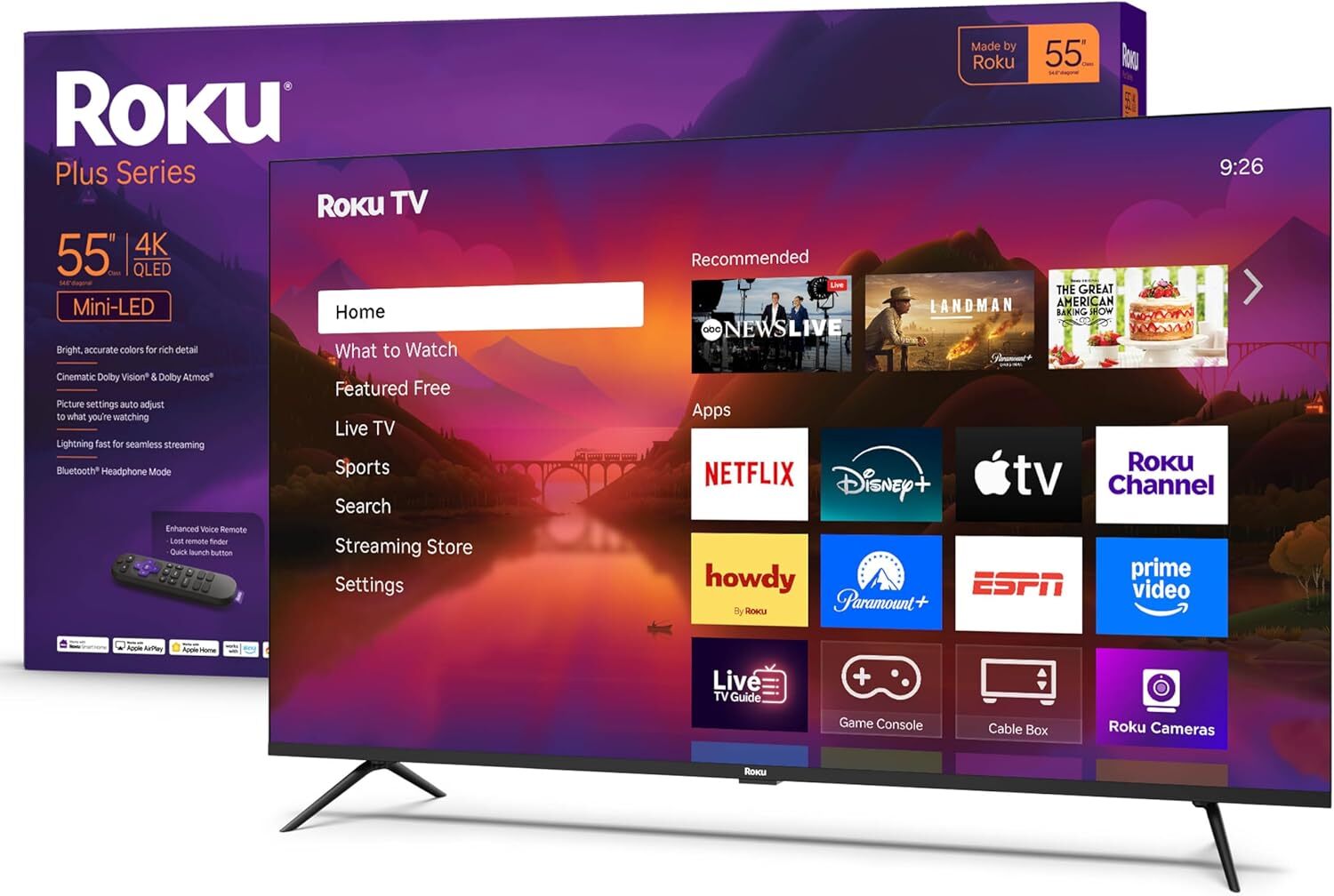
As far as smart TVs go, the Roku interface is one of the easiest to use, and with a variety of different lines, it’s also easy to find one that fits your budget. The Plus Series is the brand’s first attempt at making its own television, and it’s a reliable mid-range smart TV that gives users a plug-and-play experience (no Roku stick or box required), solid picture quality, and fast streaming for the price. Right now, the 55″ 2025 Roku Smart TV Plus Series is 30% off at a record-low $348, down from $499.99.

This model is an upgrade over the Select Series and features a 4K QLED panel with a wide color gamut and a mini-LED backlight. It also supports HDR-10, including Dolby Vision. Colors are vibrant and detailed compared to similarly priced budget TVs, though according to this PCMag review, greens can occasionally look oversaturated. It reaches a peak brightness of approximately 412 nits.

Like all Roku TVs, it has Roku OS built in, giving users access to a wide range of apps and services, and local dimming helps deepen blacks and improve contrast compared to lower-end Roku models. While it isn’t marketed as a gaming TV (it’s only 60Hz and also lacks VRR, which means no AMD FreeSync or Nvidia G-Sync), it still offers a low input lag of 3.1 milliseconds in Game Mode, making it responsive enough for everyday streaming and casual gaming. 

As one of Roku’s first in-house TVs, the 2025 Plus Series has strong value as a budget TV with a panel that’s brighter and delivers deeper blacks than many Amazon Fire TVs in the same price range. While it doesn’t have the faster refresh rate and more advanced features of the pricier Roku Pro Series or premium OLED TVs, it still delivers most of the core Roku TV experience and respectable visuals, making the 55″ 2025 Roku Smart TV Plus Series hit a sweet spot between budget TVs and more expensive models for those who don’t need cutting-edge gaming features.

Deals are selected by our commerce team

‘Clawdbot’ Is Now ‘Moltbot,’ but Still Carries the Same Security Concerns

On Monday, I was introduced to “Clawdbot,” the latest AI craze taking over tech social media channels. Clawdbot is designed to be an agentic personal assistant. In layman’s terms, that means the bot can perform tasks on your behalf: You give it full access to your computer, and it can organize your inbox, code for you, or clear your calendar (allegedly, anyway). You can also talk to it from a chat app of your choice, like WhatsApp or iMessage, rather than it’s own interface. Some people are even buying Mac minis exclusively to run Clawdbot from.

If you’re wondering where that name came from, it takes after another AI company’s product. Creator Peter Steinberger says he was inspired by the monster that appears when users reload Claude Code—Claude being one of the big AI products in the space right now, developed by the company Anthropic. Steinberger decided to go the lobster route with his logo, and named his own lobster mascot “Clawd.” From this, Clawdbot was born. The problem: Anthropic also calls Claude Code mascot “Clawd.” Whoops.

By Tuesday, Clawdbot was no more (in name, anyway). It turns out companies like Anthropic don’t appreciate it when you start your own business and use the name of their mascot as your own—especially when you’re working in the same ridiculously lucrative field. Maybe if Clawdbot had never taken off, Anthropic wouldn’t have noticed, but the bot became an internet sensation, which no doubt landed it on Anthropic’s radar. As such, Clawdbot has officially changed its name to “Moltbot,” suggesting a lobster molting from its shell. Clawd is now affectionally known as “Molty.” The company made the announcement on its official X page, noting that Anthropic had asked it to change the name over “trademark stuff.” (Steinberger struck a different tone on his personal X account, however, writing: “I was forced to rename the account by Anthropic. Wasn’t my decision.”)

Aside from the name change, the bot appears to be the same as it was on Monday. That is to say, it’s still open source, still available to run locally on your own device, and still comes with the same inherent security risks I outlined yesterday. I still wouldn’t recommend you install a program like Moltbot on your personal device, since, name change or not, you’d still be giving it incredible access to your hardware and its data with little knowledge of the safeguards in place to protect it. All it could take is one malicious prompt injection for Moltbot to molt your security.

Adobe Photoshop upgrades its Firefly-powered generative-AI editing tools

Adobe Photoshop introduced some new features that are rolling out for creators today. As you’d expect from any service operator in this day and age, there’s some AI involved. Adobe has improved the tools for Generative Fill, Generative Expand and Remove that are powered by its Firefly generative AI platform. Using these tools for image editing should now produce results in 2K resolution with fewer artifacts and increased detail all while delivering better matches for the provided prompts. The Reference Image option for Generative Fill has also been upgraded to deliver “geometry-aware results that better match the scene.” 

 One of the other new updates is a beta version of Dynamic Text, which should allow simpler transformation of a text layer into a curved shape. Photoshop has also added new adjustment layers: Clarity, Dehaze and Grain. These allow non-destructive image editing on layers.

This article originally appeared on Engadget at https://www.engadget.com/apps/adobe-photoshop-upgrades-its-firefly-powered-generative-ai-editing-tools-213737915.html?src=rss

Android Auto’s Best Kept Secret Is a Programmable Shortcut

There’s so much visual stuff you can customize in Android Auto. But Android Auto’s capabilities go beyond aesthetics and the apps that pop up when you turn on the car. There’s a hidden shortcut switch you can enable to run an action in the car that’s programmed on your phone. No matter what car you’re driving, if it has Android Auto, the shortcut is there.

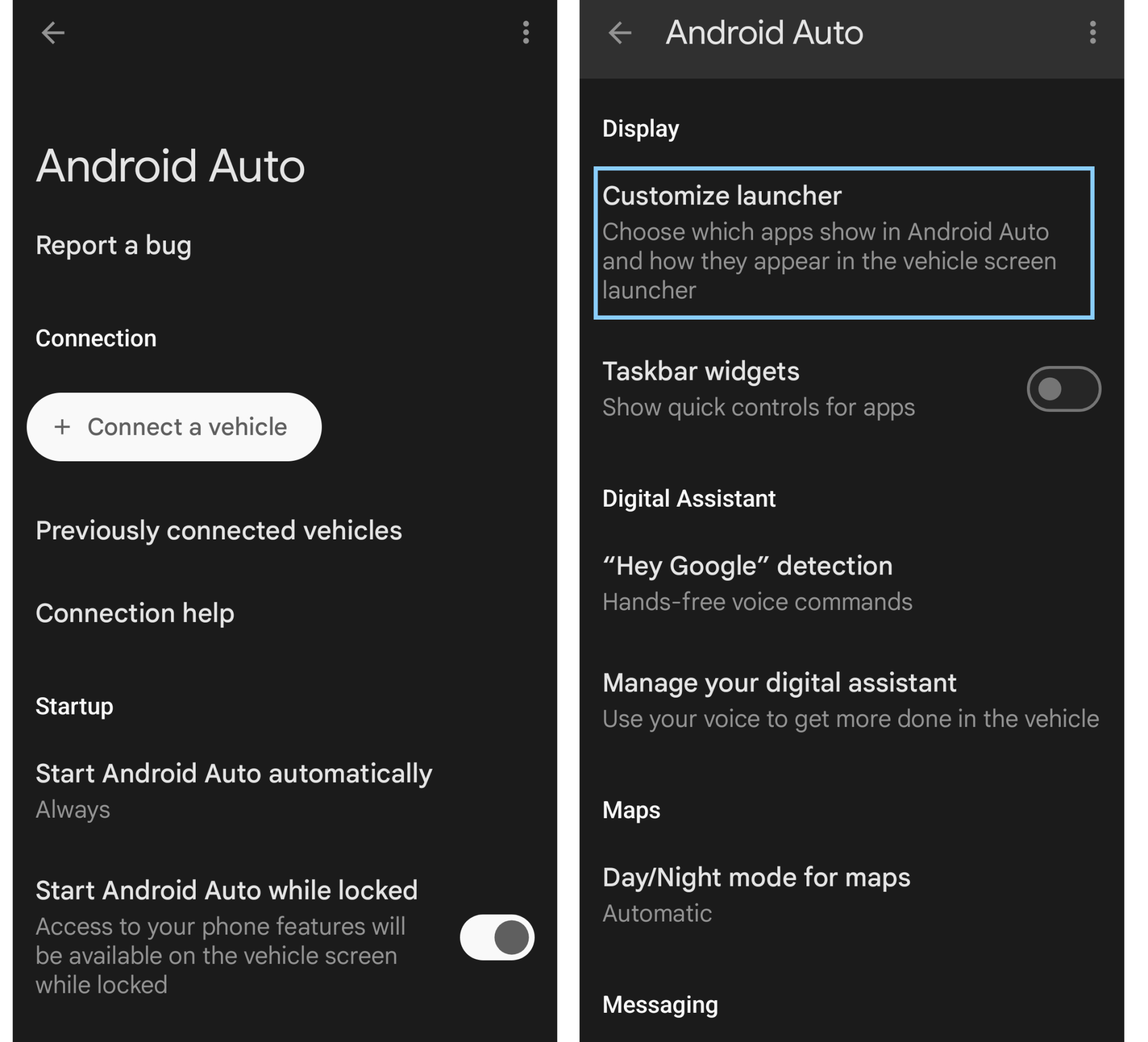
This is the Custom Assistant Shortcut, and it’s been part of Android Auto since early 2021. The feature is worth revisiting now that Gemini is slowly rolling out to replace the legacy Google Assistant on Android Auto. Gemini’s natural language processing enables it to handle more complex routines, so you’re not just programming a rote command you could have otherwise said out loud. The Custom Assistant Shortcut is labeled a “secret” feature because it’s camouflaged beneath a main text label in the Android Auto settings menu. I didn’t even think to look for it until I stumbled across the trick on an Android blog, but once you find it, it only takes a minute to set up.

Two screenshots side by side of where to find the custom assistant shortcut

Credit: Florence Ion/Lifehacker

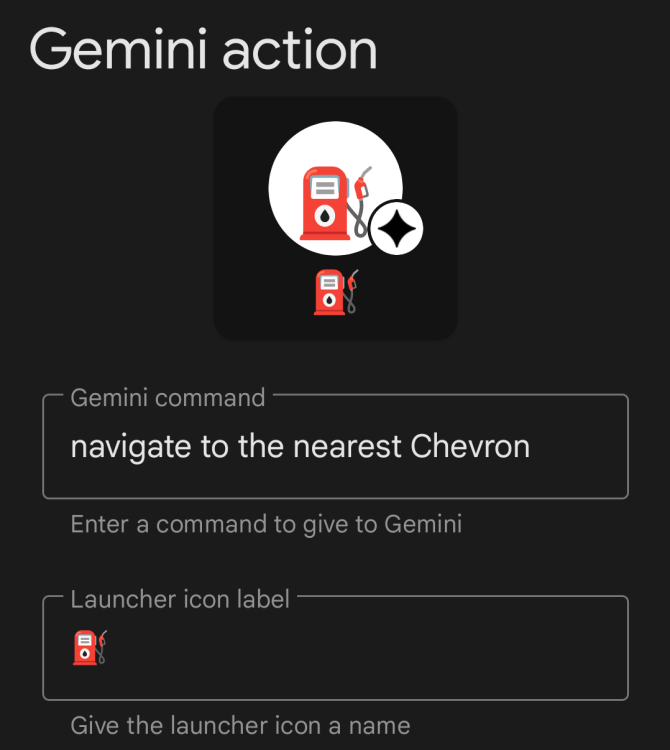
There are several ways to configure the Custom Assistant Shortcut. For example, if you rely on the latest episode of a podcast to carry you through the morning commute, you could set up a shortcut to play the most recent episode via an app that plays well with Gemini, like Spotify or YouTube Music. I prefer to use the Custom Assistant Shortcut for a simpler sequence of actions: finding the nearest branded gas station, no matter where I am in my journey. I programmed the shortcut with the command “Navigate to the nearest [branded gas station].” This begins driving directions to the fuel station I specified, where I can count on adequate lighting and decent bathrooms. It’s easier than pawing through the Google Maps app on the Android Auto screen, then looking for the sub-menu option that shows fuel stops, and then sorting through every single option within five miles when you select it. This version of the shortcut is also super helpful on road trips, especially solo ones.

A screenshot showing where to write the command for the custom assistant shortcut

Credit: Florence Ion/Lifehacker

If you’re into home automation, this shortcut gets even more powerful. You can program a Google Home Routine so that a phrase triggers a domino effect of actions. Imagine a routine that prepares for your arrival by opening the garage door, disarming the security system, and turning on the lights before you’ve ever pulled into the driveway.

How to build the Custom Assistant shortcut in Android Auto

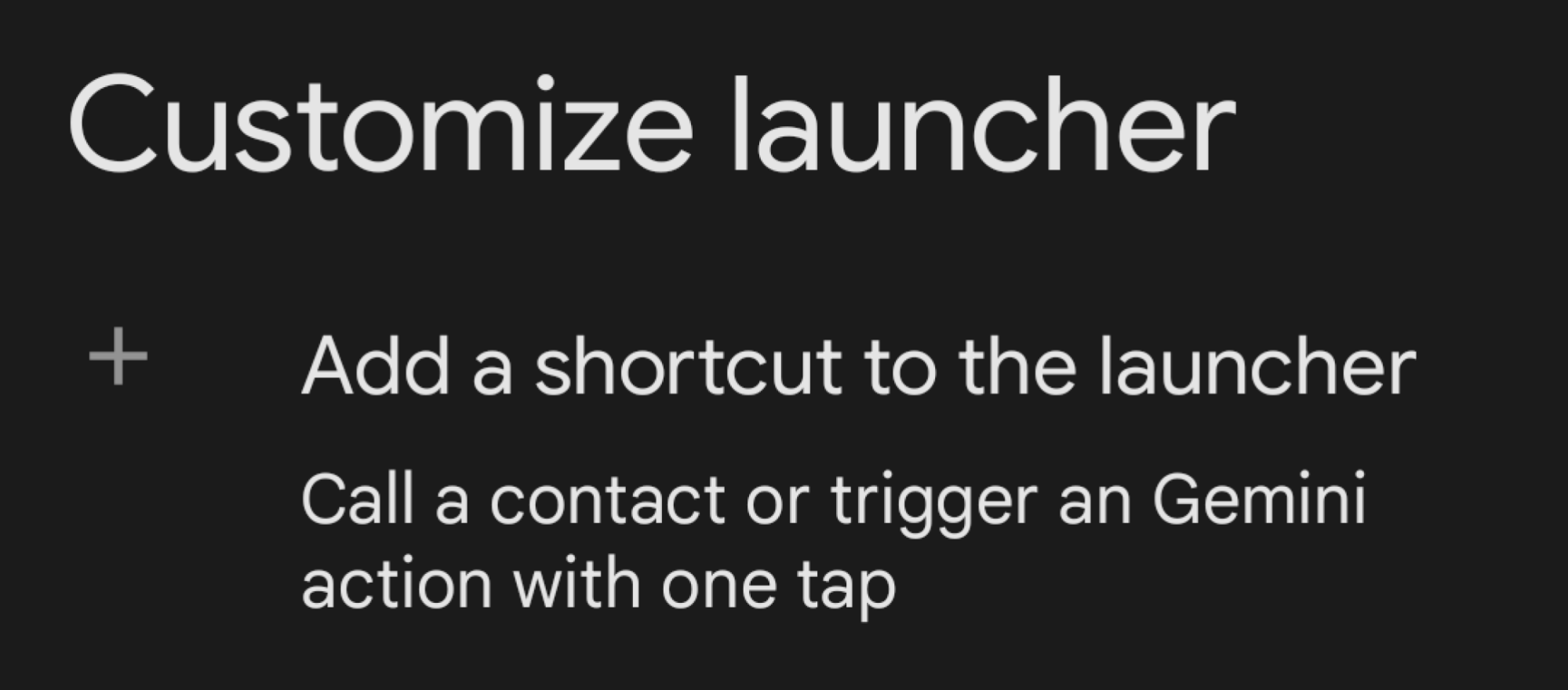
You don’t need to be in your car to set up the Custom Assistant Action. On your phone, navigate to your Android Auto settings, then scroll down and tap on Customize launcher. Under the main heading, tap the smaller text that says Add a shortcut to the launcher. Select an Assistant action.

A screenshot of the option that says "Customize launcher"

Credit: Florence Ion/Lifehacker

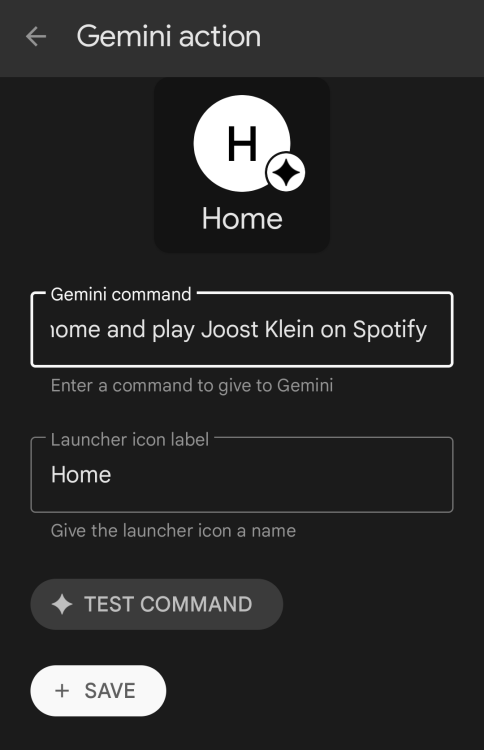
From here, the most robust option is to write out a specific command. Something like “Navigate Home,” or “Play the latest episode of [podcast title] on [media player].”

A screenshot showing what the shortcut looks like before it's programmed

Credit: Florence Ion/Lifehacker

Test out your Custom Assistant Shortcut

You can take the shortcut for a spin in your car before hitting the road. The ability to test the command will pop up when you connect your phone to the car. You’ll see your new shortcut appear in the app drawer as a standard app icon. It will have a small Gemini asterisk in the corner to distinguish it from native apps (it may still show the legacy Assistant icon in your phone’s settings).

The “Test Command” button is on the same page where you set up the Custom Assistant Shortcut. Tap it, and you’ll know your shortcut is working if the signature rainbow Gemini glow pulses at the bottom of the screen. If not, try adjusting the wording of your command and continue testing until it’s a go.

Things to note about Custom Assistant Shortcut in Android Auto

These actions are tied to your Google account on your phone, so if you hop into another car with Android Auto, the button will follow you to the display. Remember that Gemini requires a stable data connection to process those requests. If you’re driving through a cellular “dead zone,” the shortcut might hang, which is annoying while driving. If the shortcut is hard to find in the app drawer, remember you can return to the Customize Launcher menu in the phone’s settings and reorder the shortcuts so they’re at the top of the drawer.

Citigroup Mandates AI Training For 175,000 Employees To Help Them ‘Reinvent Themselves’

Citigroup has rolled out mandatory AI training for all 175,000 of its employees across 80 locations worldwide, a sweeping initiative that CEO Jane Fraser describes as helping workers “reinvent themselves” before the technology permanently alters what they do for a living.

The $205 billion bank sent out an internal memo last year requiring staffers to learn prompting skills specifically. Fraser told the Washington Post at Davos that AI “will change the nature of what people do every day” and “will take some jobs away.” The adaptive training platform lets experts complete the course in under 10 minutes while beginners need about 30 minutes. Citi reported last year that employees had entered more than 6.5 million prompts into its built-in AI tools, and Q4 2025 data shows a 70% adoption rate for the bank’s proprietary AI tools.


Read more of this story at Slashdot.

New Intel Linux Driver Workaround Halves Initial Game Load Time For MHW

In addition to Mesa 26.1 today seeing Vulkan present timing support finally merged to help reduce game stuttering and separately another long-in-development Mesa merge request for DG2 / Meteor Lake to improve performance as much as 260% in some scenarios, there is another merge today to Mesa Git for enhancing Intel graphics on Linux. For Intel Linux gamers the newest Mesa code adds a new DriConf workaround that is capable of halving the initial game load time for at least one problematic game title…

Supreme Court to decide how 1988 videotape privacy law applies to online video

The Supreme Court is taking up a case on whether Paramount violated the 1988 Video Privacy Protection Act (VPPA) by disclosing a user’s viewing history to Facebook. The case, Michael Salazar v. Paramount Global, hinges on the law’s definition of the word “consumer.”

Salazar filed a class action against Paramount in 2022, alleging that it “violated the VPPA by disclosing his personally identifiable information to Facebook without consent,” Salazar’s petition to the Supreme Court said. Salazar had signed up for an online newsletter through 247Sports.com, a site owned by Paramount, and had to provide his email address in the process. Salazar then used 247Sports.com to view videos while logged in to his Facebook account.

“As a result, Paramount disclosed his personally identifiable information—including his Facebook ID and which videos he watched—to Facebook,” the petition said. “The disclosures occurred automatically because of the Facebook Pixel Paramount installed on its website. Facebook and Paramount then used this information to create and display targeted advertising, which increased their revenues.”

Read full article

Comments

A WB-57 pilot just made a heroic landing in Houston after its landing gear failed

One of NASA’s three large WB-57 aircraft made an emergency landing at Ellington Field on Tuesday morning in southeastern Houston.

Video captured by KHOU 11 television showed the aircraft touching down on the runway without its landing gear extended. The pilot then maintains control of the vehicle as it slides down the runway, slowing the aircraft through friction. The crew was not harmed, NASA spokesperson Bethany Stevens said.

WB-57 landing.

“Today, a mechanical issue with one of NASA’s WB-57s resulted in a gear-up landing at Ellington Field,” she said. “Response to the incident is ongoing, and all crew are safe at this time. As with any incident, a thorough investigation will be conducted by NASA into the cause. NASA will transparently update the public as we gather more information.”

Read full article

Comments

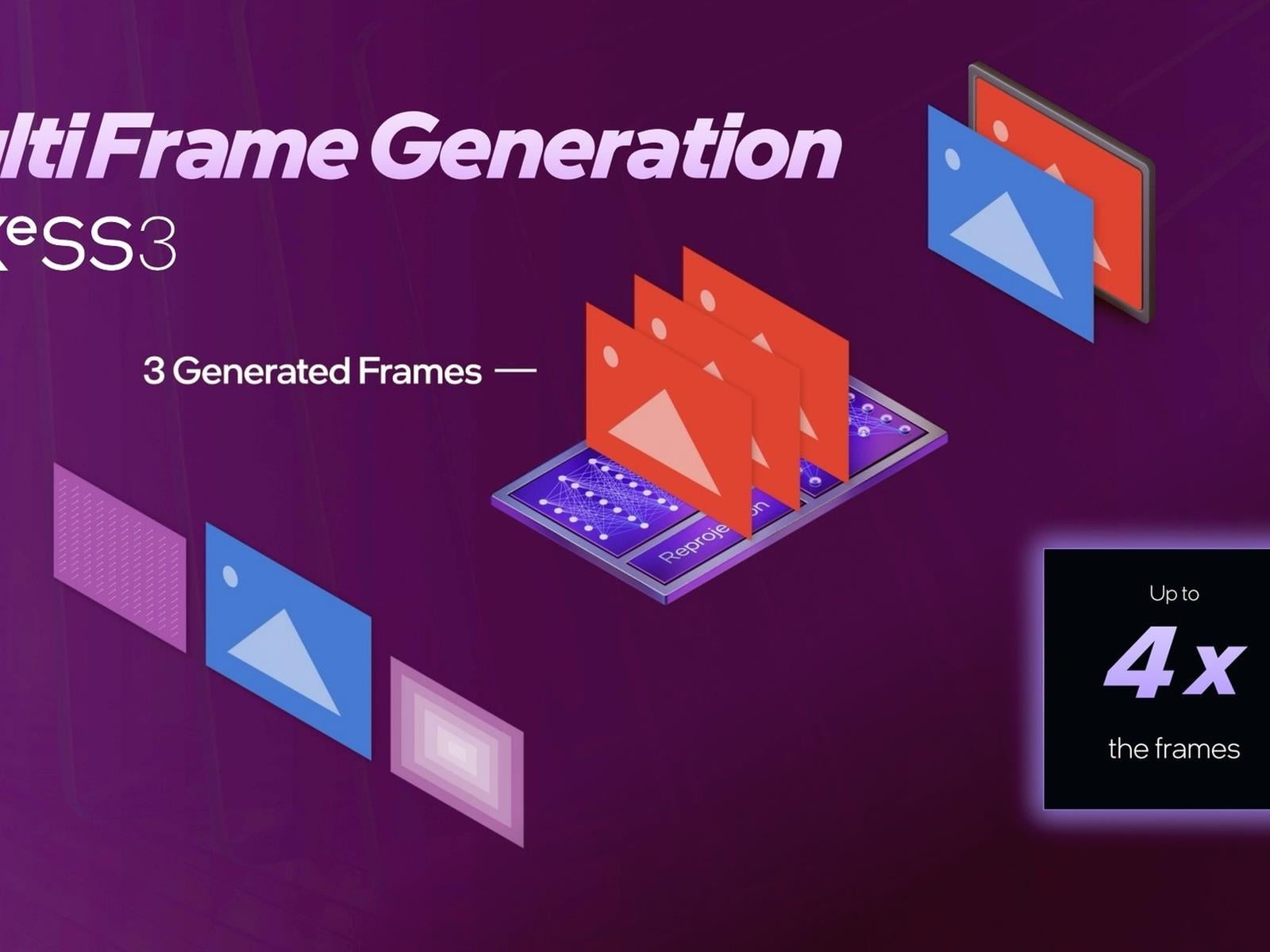
Intel’s New Arc GPU Driver Enables XeSS 3 Multi-Frame Generation To Boost Gaming FPS

Intel's New Arc GPU Driver Enables XeSS 3 Multi-Frame Generation To Boost Gaming FPS
The star of Intel’s CES 2026 show was of course its new Core Ultra 300 series processors, code-named Panther Lake. We have our review up if you haven’t read it already, but the short version is that they offer all-around impressive performance—particularly the Xe3-based integrated graphics. Well, those graphics just got a fresh performance

These ‘Obsolete’ iPhones Just Received a New Update

Many of us choose to upgrade our smartphones every two or three years, while others pick up the latest model every year. But just because it’s the norm to swap out your smartphone on a regular basis, that doesn’t mean all of us do. Smartphones can last a long time, especially if you maintain it with the occasional battery replacement.

But no piece of technology lasts forever. Eventually, something gives out—even if it’s just the company that makes it. Even Apple, which usually offers its iPhones a number of years of updates after their original release, drops support for new features after some time. That’s why your iPhone XS can’t run iOS 26: Apple drew the line here this year. But iPhones like the XS can still receive updates, even if they aren’t the latest and greatest version of iOS. Instead, Apple tends to issue security and stability patches to older iPhones, to ensure the users who still rely on them can do so safely and securely. It might be in Apple’s best financial interest to persuade you to buy a new iPhone, but not at the cost of putting a large number of users at risk of cyber attacks.

Apple’s latest update patches very old iPhones

Apple dropped new updates for an assortment of devices on Monday. That includes its latest devices, of course, which can now install iOS 26.2.1. But a host of older devices also received new updates, some of which are particularly surprising, considering their age.

Apple released iOS 18.7.4 for iPhones that either can’t or won’t update to iOS 26. In the former category, that basically includes the iPhone XS, XS Max, and XR. Then, there’s iOS 16.7.13, for iPhone 8, 8 Plus, and X, and iOS 15.8.6, for iPhone 6S, iPhone 7, and iPhone SE (first-gen). Those are some old iPhones, but that’s not what caught my eye today. In a twist, Apple dropped an update for iPhones running iOS 12, including iPhone 5S, iPhone 6, and iPhone 6 Plus. These iPhones can now run iOS 12.5.8. For reference, Apple released iOS 12 back in 2018, so it’s pretty wild to see a new version in 2026.

These iPhones are even older. The iPhone 6 and 6 Plus dropped all the way back in 2014, while the iPhone 5S released the year before that. As such, Apple just sent an update to 12-year-old iPhone. If you’re still rocking one of these devices, that new update must be quite the surprise. It’s even more than the age of the devices itself: Apple considers all three of these iPhones “obsolete,” as the company stopped selling them more than seven years ago. The company will not service the hardware for obsolete products, and largely omits them from future software releases. That’s why this is so interesting.

What’s new in iOS 12.5.8

iOS 12.5.8 is, of course, not a feature update, but it’s also not a security update, either. Instead, Apple extended the certificate required for features like iMessage, FaceTime, and device activation to continue working after January of next year. These iPhones might not have seen a new feature in years, but they’ll still be able to FaceTime in a year’s time—and that’s pretty great.

It’s not clear how many people are using these iPhones in 2026. But if you do, and it’s working for you, Apple gave you one more reason to keep your phone for another year.

Astronomers discover over 800 cosmic anomalies using a new AI tool

Here’s a use of AI that appears to do more good than harm. A pair of astronomers at the European Space Agency (ESA) developed a neural network that searches through space images for anomalies. The results were far beyond what human experts could have done. In two and a half days, it sifted through nearly 100 million image cutouts, discovering 1,400 anomalous objects.

The creators of the AI model, David O’Ryan and Pablo Gómez, call it AnomalyMatch. The pair trained it on (and applied it to) the Hubble Legacy Archive, which houses tens of thousands of datasets from Hubble’s 35-year history. “While trained scientists excel at spotting cosmic anomalies, there’s simply too much Hubble data for experts to sort through at the necessary level of fine detail by hand,” the ESA wrote in its press release.

After less than three days of scanning, AnomalyMatch returned a list of likely anomalies. It still requires human eyes at the end: Gómez and O’Ryan reviewed the candidates to confirm which were truly abnormal. Among the 1,400 anomalous objects the pair confirmed, more than 800 were previously undocumented.

Most of the results showed galaxies merging or interacting, which can lead to odd shapes or long tails of stars and gas. Others were gravitational lenses. (That’s where the gravity of a foreground galaxy bends spacetime so that the light from a background galaxy is warped into a circle or arc.) Other discoveries included planet-forming disks viewed edge-on, galaxies with huge clumps of stars and jellyfish galaxies. Adding a bit of mystery, there were even “several dozen objects that defied classification altogether.”

“This is a fantastic use of AI to maximize the scientific output of the Hubble archive,” Gómez is quoted as saying in the ESA’s announcement. “Finding so many anomalous objects in Hubble data, where you might expect many to have already been found, is a great result. It also shows how useful this tool will be for other large datasets.”

This article originally appeared on Engadget at https://www.engadget.com/ai/astronomers-discover-over-800-cosmic-anomalies-using-a-new-ai-tool-205135155.html?src=rss

Mozilla is Building an AI ‘Rebel Alliance’ To Take on Industry Heavweights OpenAI, Anthropic

Mozilla, the nonprofit organization behind the Firefox browser that has spent two decades battling tech giants over control of the internet, is now turning its attention to AI and deploying roughly $1.4 billion in reserves to fund what president Mark Surman calls a “rebel alliance” of startups focused on AI safety, transparency and governance.

The organization released a report Tuesday outlining its strategy to counter the growing dominance of OpenAI and Anthropic, which have raised more than $60 billion and $30 billion respectively from investors and now command valuations of $500 billion and $350 billion. Mozilla Ventures, a fund launched in 2022 with an initial $35 million commitment, has invested in more than 55 companies to date and is exploring raising additional capital.

Surman, who runs the organization from a farm outside Toronto, acknowledged the financial mismatch but said Mozilla is playing the long game. By 2028, he wants Mozilla to be funding a “mainstream” open-source AI ecosystem for developers. The effort faces headwinds from the Trump administration, which has criticized AI safety efforts as “woke AI” and signed an executive order establishing a task force to challenge state AI regulations.


Read more of this story at Slashdot.

Your iPhone Might Not Be Fully Compatible With Apple’s New AirTag

We may earn a commission from links on this page.

On Monday, Apple released a new AirTag—but you wouldn’t know that from looking at it. The new AirTag is visibly identical to the old one, despite dropping nearly five years later. But the point of this refresh wasn’t to introduce a new design, or even a remarkably improved tracker. Instead, Apple added a couple subtle upgrades that benefit new buyers, without displacing existing AirTag users.

There are two key improvements here: The first impacts Precision Finding, Apple’s system to guide you to lost items. Your device uses its ultra wideband (UWB) chip to give you detailed directions to the location of your AirTag, including haptics, visual, and auditory cues. The second-gen AirTags have a newer UWB chip, which boosts Precision Finding by 50%. That means your new AirTag can be as much as 1.5 times farther away than your old AirTag while still showing up in Precision Finding. Those improvements carry over to the speaker, as well. The new AirTag’s speaker is 50% louder than the original model, which could help you hear your missing tracker better, especially if it’s buried somewhere like a couch cushion.

The main thing that didn’t change was the most important part: the price. One AirTag is still $29, while a four-pack is still $99. But before you go out an buy one (or four), you should know that your iPhone might not be able to take advantage of these new perks. If so, you’d be better off spending your money on the first-gen AirTag.

What you need to take full advantage of the new AirTag

As noted by Techradar, the new AirTag actually requires iPhones and iPads to be running iOS 26 and iPadOS 26 before they can connect. That immediately eliminates any iPhones and iPads that do not support these latest updates, of course (generally any iPhones older than the iPhone 11) but it also presents a challenge to anyone who has simply been holding off from installing iOS 26 and iPadOS 26. If you want to use these newest AirTags, you’ll need to update. If you don’t want to update, stick with the OG AirTags.

Even if your iPhone is running iOS 26, it might not work with one of the new AirTag’s big features. In order to take advantage of that 50% improved Precision Finding, you need an iPhone 15 or newer. That’s because these iPhones also come with Apple’s newest UWB chip, which is necessary for that upgraded location feature. (The iPhone 16e unfortunately does not have this new UWB chip.)

If you have an iPhone 14 or older running iOS 26, you’ll still be able to use Precision Finding with the new AirTag, but it’ll be the standard Precision Finding experience you had with the original. (Apple Watches can also take advantage of this standard Precision Finding, so long as you have an Apple Watch Series 9 or later, or Apple Watch Ultra 2 or later, running watchOS 26.2.1.)

Buy an older AirTag if you don’t meet these specifications

Apple doesn’t sell the first-generation AirTag anymore, but that’s not an issue. If you don’t meet all of the specifications above, you should look into buying the older AirTags.

That’s not because the new AirTags won’t work just as well; I only say this because you can save some serious money. Instead of dropping $99 on a four-pack of second-gen AirTags, you can currently spend $69.99 on a four-pack of first-gen AirTags. These trackers will work exactly the same, minus the louder speaker on the second-gen AirTags, all the while saving you $30. You can also save a bit off a single AirTag, as the first-gen AirTags are going for $25.99 on Amazon.

If you’d rather future-proof your AirTags, you could spend full-price on the second-gens without worry. However, if you don’t plan to upgrade your iPhone anytime soon, this is a pretty solid deal.