Suunto’s New Route Planner Is Free and Awesome

Something you don’t see every day: a sports tech company actually giving away premium features for free. Suunto’s route-planning tool lets you create and download GPX files without even creating an account. No paywall, no trial period—just open the page and start planning routes. And the tool itself works great.

What you can do with the Suunto Routeplanner

The tool packs in everything you’d expect from a paid service, and then some:

  • Route creation that uses different map types (outdoor, satellite, even specialized ones for winter and avalanche terrain)

  • Routing that optimizes for your activity (running, hiking, cycling, mountaineering, roller skating, and more), using actual heat map data from real athletes

  • Heat map overlays for about a dozen different sports so you can see where people actually go

  • Elevation profiles with ascent and descent numbers (crucial for not dying on climbs you didn’t see coming)

  • Export routes as GPX files that work with basically any GPS device

  • Shareable link generation (good for six months) so you can send routes to friends without making them create accounts either

  • Ability to import and modify existing GPX or FIT files from other platforms

  • Optional account sync if you own Suunto or Hammerhead gear

You don’t even need to be in Suunto’s ecosystem to use this. I was able to export a map to my Garmin watch with no problem. If you do have a Suunto or Hammerhead device, you can link your account and routes will sync automatically.

How to use the Suunto Routeplanner

Go to routeplanner.suunto.com. From there, creating a route is pretty straightforward. If you let your browser share your location, it’ll center on where you are. If not, just search for wherever you want to start.

The controls on the right side let you switch between map types. The usual suspects are there: outdoor, satellite, light, dark. But then it gets weird in the best ways with a winter map, an avalanche terrain map for backcountry stuff, and, in a show of national pride, a dedicated Finland Terrain map. Respect.

To actually connect points on the map, you have the following options:

  • Free drawing (no automatic routing)

  • Any road or path (ideal for activities by foot)

  • All road types—avoiding hills (ideal for bikes)

  • All road types (still ideal for bikes)

  • Paved roads (ideal for road cycling)

After you create your route, you simply download the GPX file and throw it on whatever GPS device you own.

The six-month shareable links are a nice touch too. You can plan a route for a group ride or run, send everyone the link, and they can grab it without jumping through hoops. It’s the kind of friction-free sharing that should be standard but somehow isn’t.

Why you should try the Suunto Routeplanner

Strava and Komoot have trained users to expect paywalls for route planning. Of course, this could be strategic on Suunto’s part, to give away the software in the hopes of selling the hardware. Or maybe it’s just goodwill after years of user complaints about Suunto closing their tracking system Movescount. Either way, users win. You get a legitimately useful tool without opening your wallet or handing over your email address.

If you’re already paying for route planning elsewhere, try this first. Worst case, you waste five minutes. Best case, you cancel a subscription and pocket the savings. Even if you’e not looking to save money, having another route planning option in your toolkit doesn’t hurt.

30,000 More UPS Jobs On the Chopping Block as Amazon Era Ends

UPS said today it plans to eliminate an additional 30,000 operational jobs this year as the shipping giant continues to wind down its partnership with Amazon — previously its largest customer — and push forward a broader turnaround strategy under CEO Carol Tome.

CFO Brian Dykes said on an earnings call that the cuts will be accomplished through attrition and a voluntary separation program for full-time drivers. The company also plans to further deploy automation across its network. UPS has identified 24 buildings for closure in the first half of 2026 and expects to reduce operational hours by approximately 25 million as the Amazon relationship unwinds.

Last year, UPS eliminated 48,000 jobs — 34,000 operational and 14,000 management — and closed 93 buildings. The company expects $3 billion in total savings from the Amazon unwind.


Read more of this story at Slashdot.

Strava deletes 2.3m electric bike activities to clean up ride-segment leaderboards

Strava has completed one of its largest data clean-ups yet and removed 2.3m electric bike activities from its leaderboards. 

The cycling and fitness app used three machine-learning tools to address anomalous activities showing up in its results. 

James, a Strava engineer, explained on Reddit that these include: enhanced ebike detection to catch activities recorded on ebikes but uploaded as regular rides; processing the top 100 activities on every global ride-segment leaderboard; and a model to better identify when a bike ride is uploaded as a run. 

The result is 2.3m ebike activities have been removed, alongside 1.6m vehicle activities, and 293,000 athletes have had spots in top 10s restored. 

This is the second data clean-up Strava has completed in the last year. In May 2025, Strava revealed it had removed 4.45m activities after it introduced its ‘auto-flagging’ tool Themis in February. 

The tool catches activities recorded in vehicles before they appeared on KOM/QOM leaderboards by analysing 57 factors, such as speed and acceleration.

Strava said at the time that the tool had led to users flagging 72 per cent fewer activities as “in a vehicle” due to the system catching them first. 

The latest crackdown fulfils Strava’s promise in February last year to investigate ebike rides on rider leaderboards. 

But as James the Strava engineer wrote in his Reddit post: “Data integrity work is never really ‘done,’ and we know there’s still more to improve when it comes to removing anomalous activities.”

You may like

NASA Says AI Found Hundreds Of Hidden Galaxies And Cosmic Oddities In Hubble Data

NASA Says AI Found Hundreds Of Hidden Galaxies And Cosmic Oddities In Hubble Data
Deep in the digital bedrock of 35 years of Hubble observation archives, a new AI tool has uncovered more than 800 previously undocumented cosmic anomalies in a scant two and a half days. 

Using a sophisticated neural network called AnomalyMatch, astronomers have unearthed nearly 1,400 bizarre astronomical objects hidden within the Hubble

10 Hacks Every ‘Google TV Streamer’ User Should Know

The launch of the Google TV Streamer marked a significant shift for the company’s streaming lineup, moving away from the behind-the-TV Chromecast dongles it popularized and introducing a pill-shaped set-top box that blends in nicely on a shelf of tchotchkes. It’s hiding a worthy processor, double the memory you’d get from a streaming stick, and enough storage to download what you need to run all of your apps. It even acts as a smart hub, with Matter and Thread built in.

It’s taken me a long time to do anything with the Google TV Streamer. I reluctantly brought it into my home after realizing something more robust, but dated, like the Nvidia Shield, would be too much to manage alongside maintaining a home server. But since then, I’ve tweaked several things on the set-top box and enabled features I hadn’t been using, turning it into a helpful hub in my living room.

Enable “Find my remote” to never lose your Google TV Streamer remote again

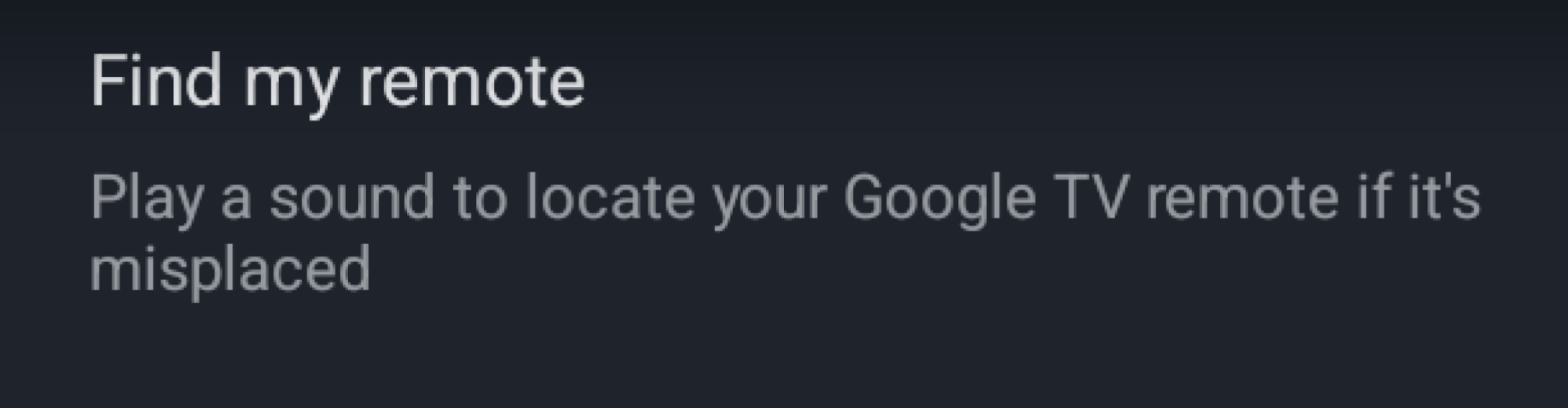
This sounds like an obvious tip, but I’ve had the Google TV Streamer since it debuted in 2024, and it wasn’t until this week, while writing this piece, that I finally enabled the remote finder. I had skipped it during the initial setup. The option is available in Settings > Remotes & Accessories. You’ll see the Find my remote option in there.

a screenshot showing the find my remote option in the settings panel

Credit: Florence Ion/Lifehacker

The Google TV Streamer has a physical button on the back of the device that lets you locate your remote if it’s stuck somewhere on the couch. But what if you can’t reach the streamer behind the TV? Try one of your Google-enabled voice devices instead. If you have a Nest speaker or a Pixel phone nearby, say “Hey Google, find my remote.” The remote should start chirping if you’ve set it up.

Set up the Google TV Streamer remote shortcut

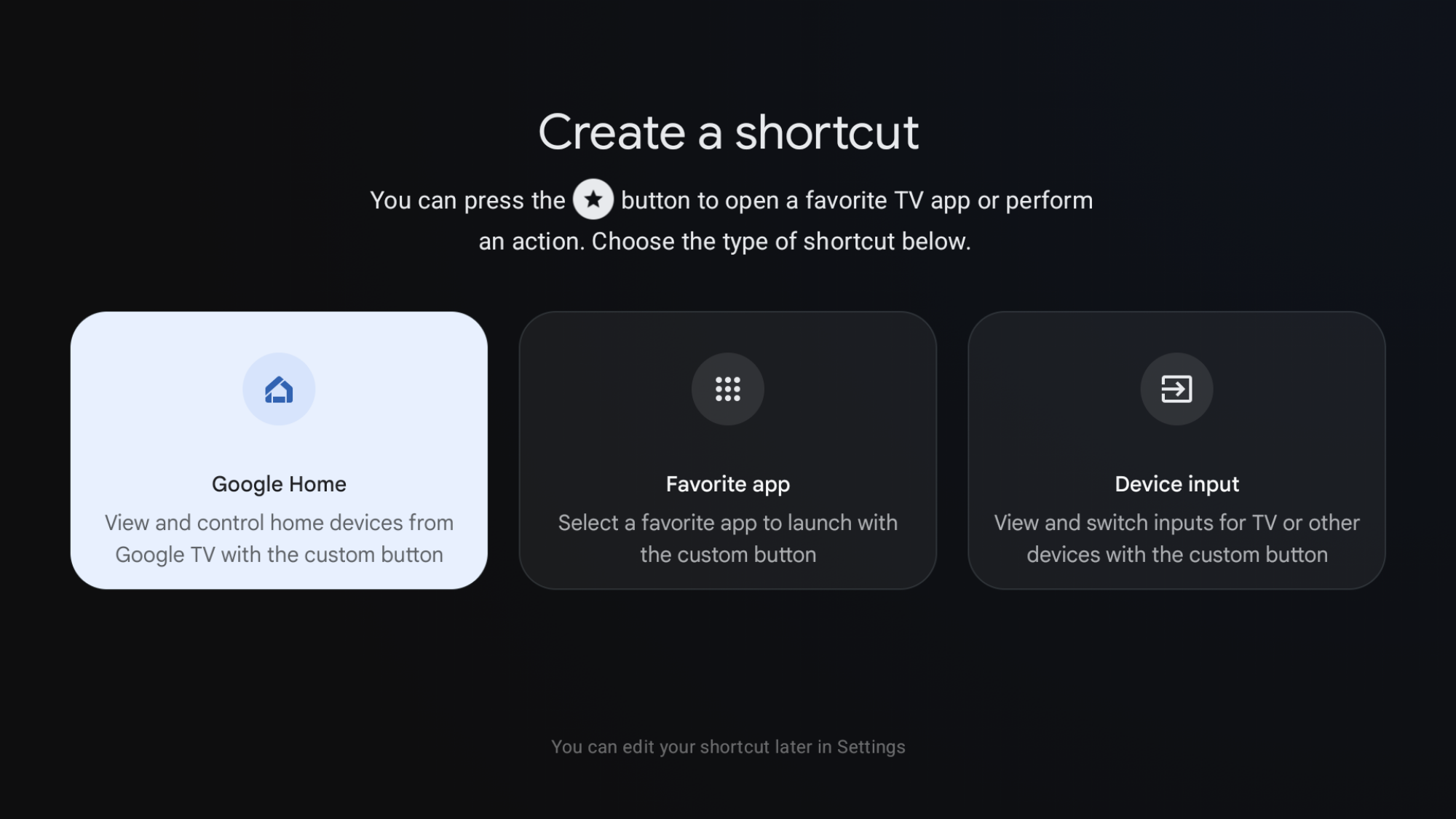
The remotes that come with the Google TV Streamer feature a tiny, unregistered button with a star icon right next to the power button. By default, this shortcut does nothing! But you can change that in the device’s system preferences.

a screenshot showing the three options available

Credit: Florence Ion/Lifehacker

In Settings > Remotes & Accessories > Set up remote buttons, select one of three options for customizing the shortcut button. I set it up as my Google Home shortcut so I can easily turn the lights on and off from the couch. You can also set it up as a launcher for another app installed on the set-top box. Or create a shortcut to cycle through device inputs—this button is on legacy Chromecast devices with an included remote. It was removed from this generation of streaming devices, so if you miss it, you can spoof it back.

For serious power users, map the shortcut to an app like Projectivity Launcher to make it a more powerful launcher button.

Remap other buttons on your Google TV Streamer remote to be more useful

a screenshot of a button mapper app
What Button Mapper looks like running on Google TV.
Credit: Florence Ion/Lifehacker

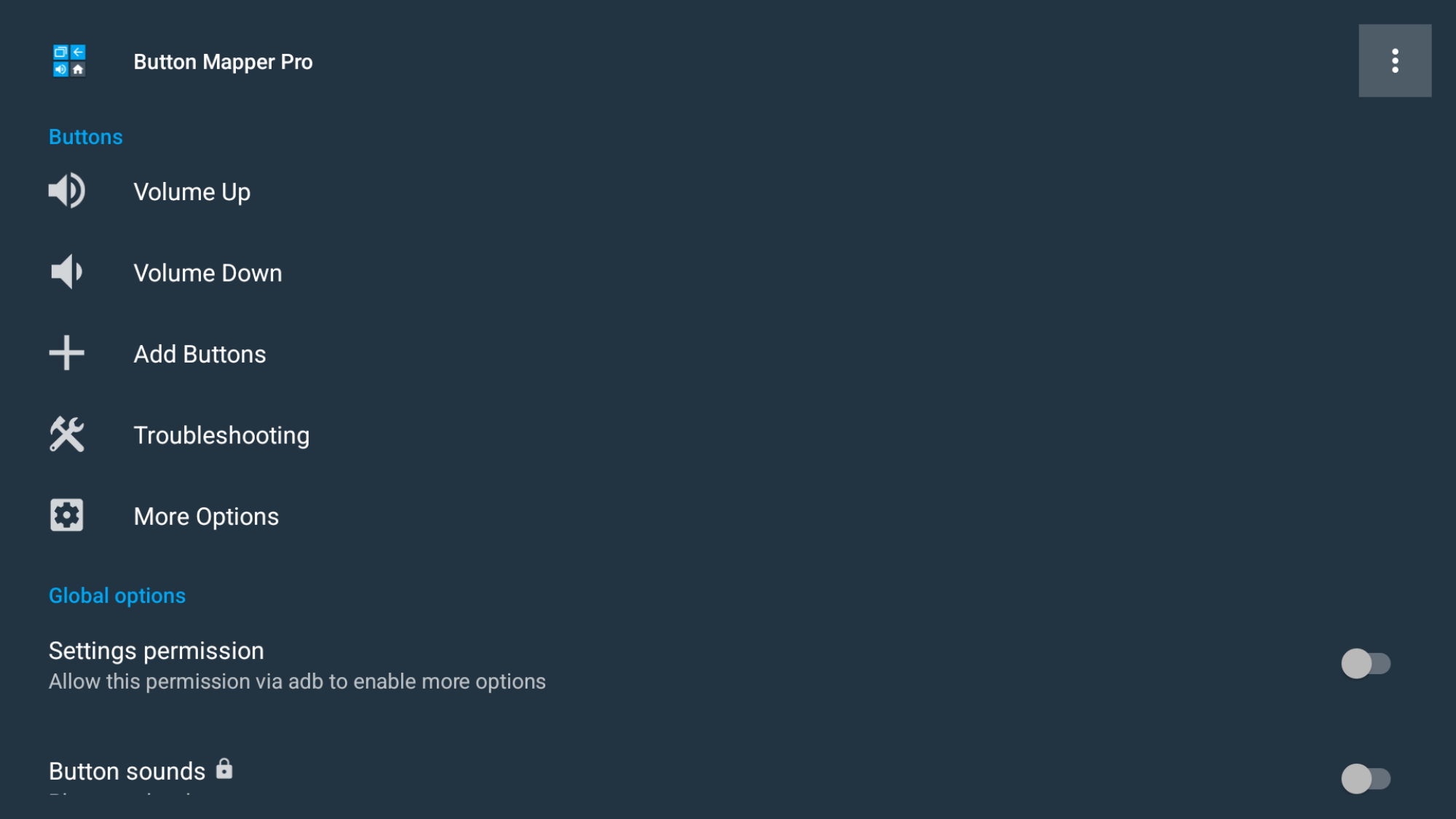
Don’t care for the default YouTube or Netflix buttons included on the Google TV Streamer remote? You can remap them with a third-party app, then affix a small sticker to indicate what it does. Install an app like Button Mapper or tvQuickActions. Then go to Google TV Settings > System > Accessibility, and turn on the service. After that, you can head back into the app to adjust what those physical buttons do. You can set them as shortcuts to other apps, or even something cheekier for others to discover when they press the button.

Remove the clutter from the Google TV Streamer home screen

a screenshot showing where the option is

Credit: Florence Ion/Lifehacker

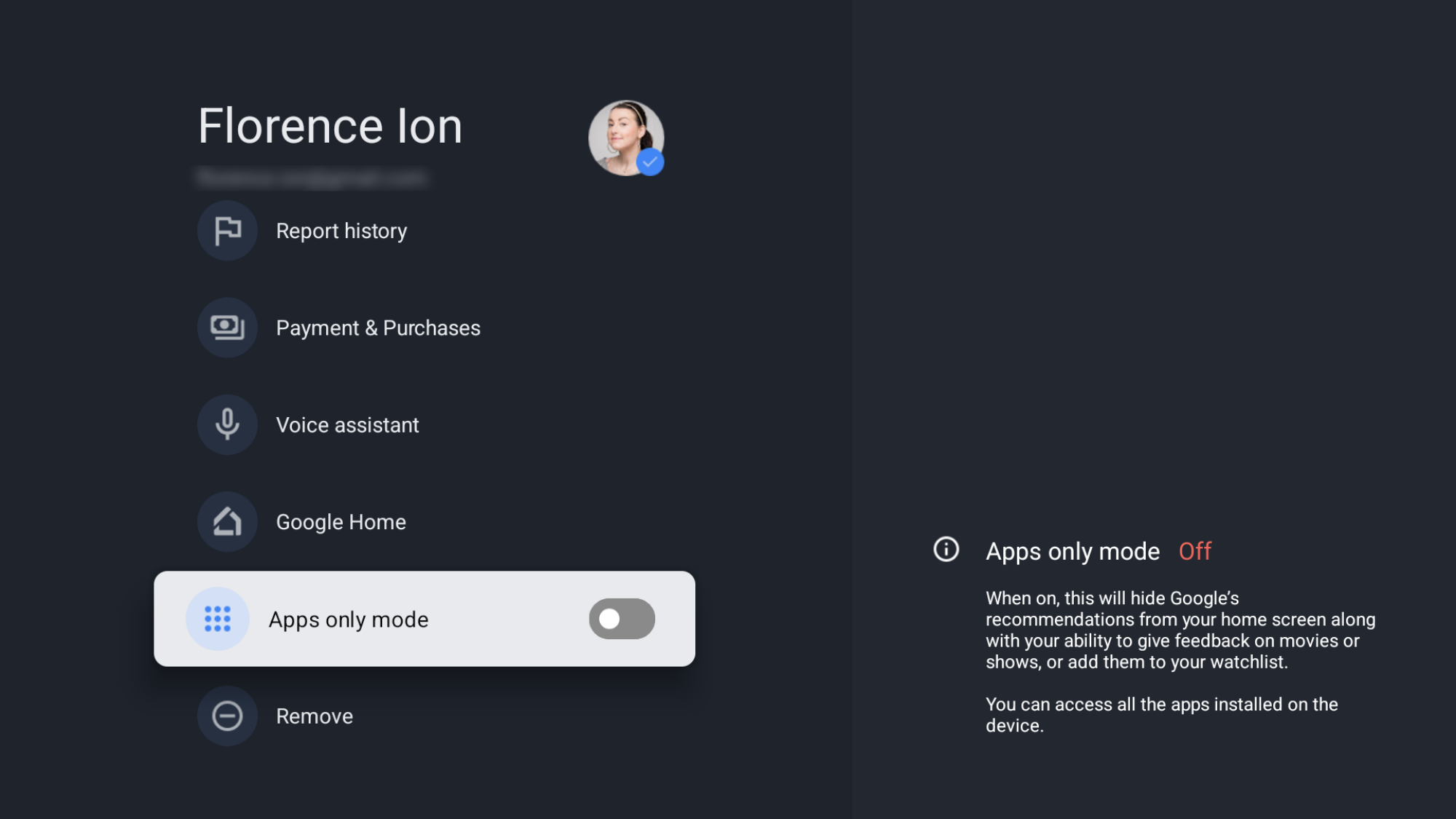
Can’t stand all the recommendations and sponsored content Google TV suggests in the main carousel? You can effectively shut off some of the clutter so it doesn’t visually overwhelm you. Go to Settings > Accounts & Sign-In > Your Account. and toggle on Apps only mode.

This clears the clutter and “sponsored” content, leaving you with just app icons. Keep in mind that this turns off the “Watchlist” feature that’s tied to your account and some Gemini voice search capabilities for specific content.

Enable Google TV Streamer “Developer options” for more customization

a screenshot showing the developer options toggle

Credit: Florence Ion/Lifehacker

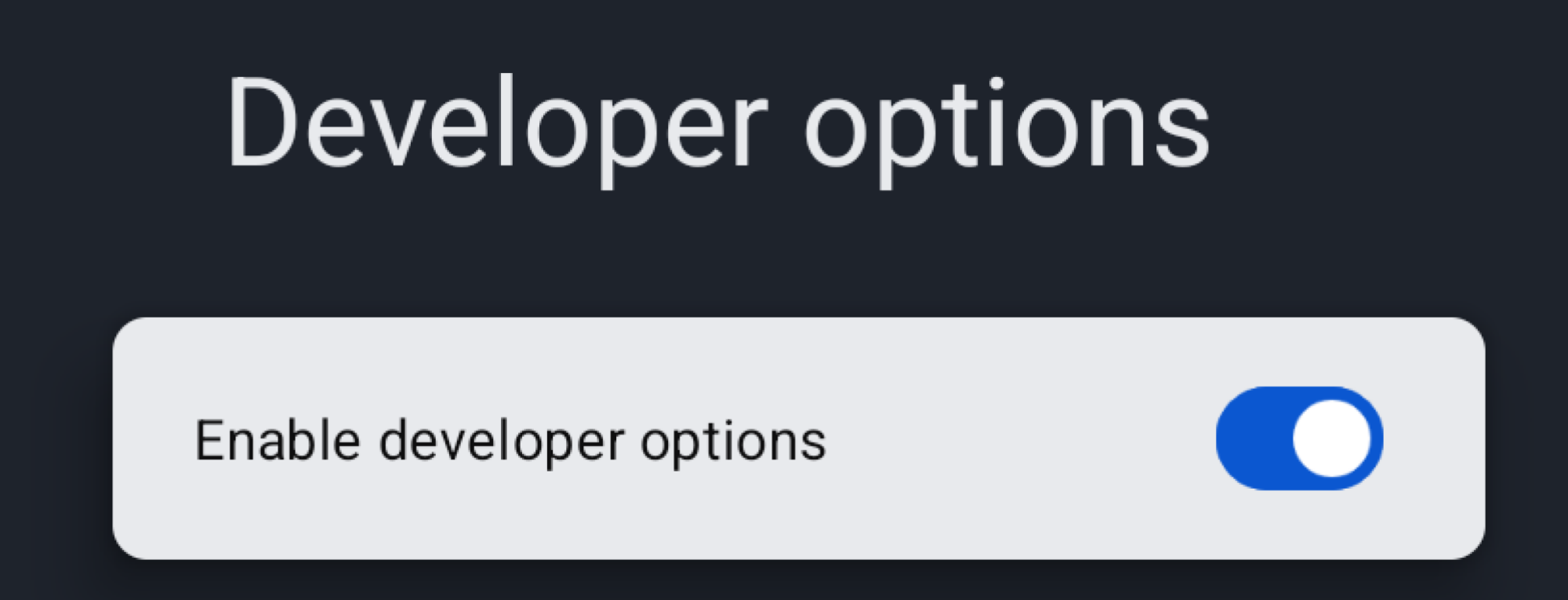
You’ll need to enable developer options to enable features like faster animations and side-loading apps. It’s easy to set up, and it’s just like on an Android smartphone. Head into Settings > System > About, then tap Android TV OS Build 7 times.

You’ll see a little dialog pop up to let you know you’ve got developer access. Once enabled, a new menu will appear under Settings > System > Developer options.

Limit animations to make navigation faster

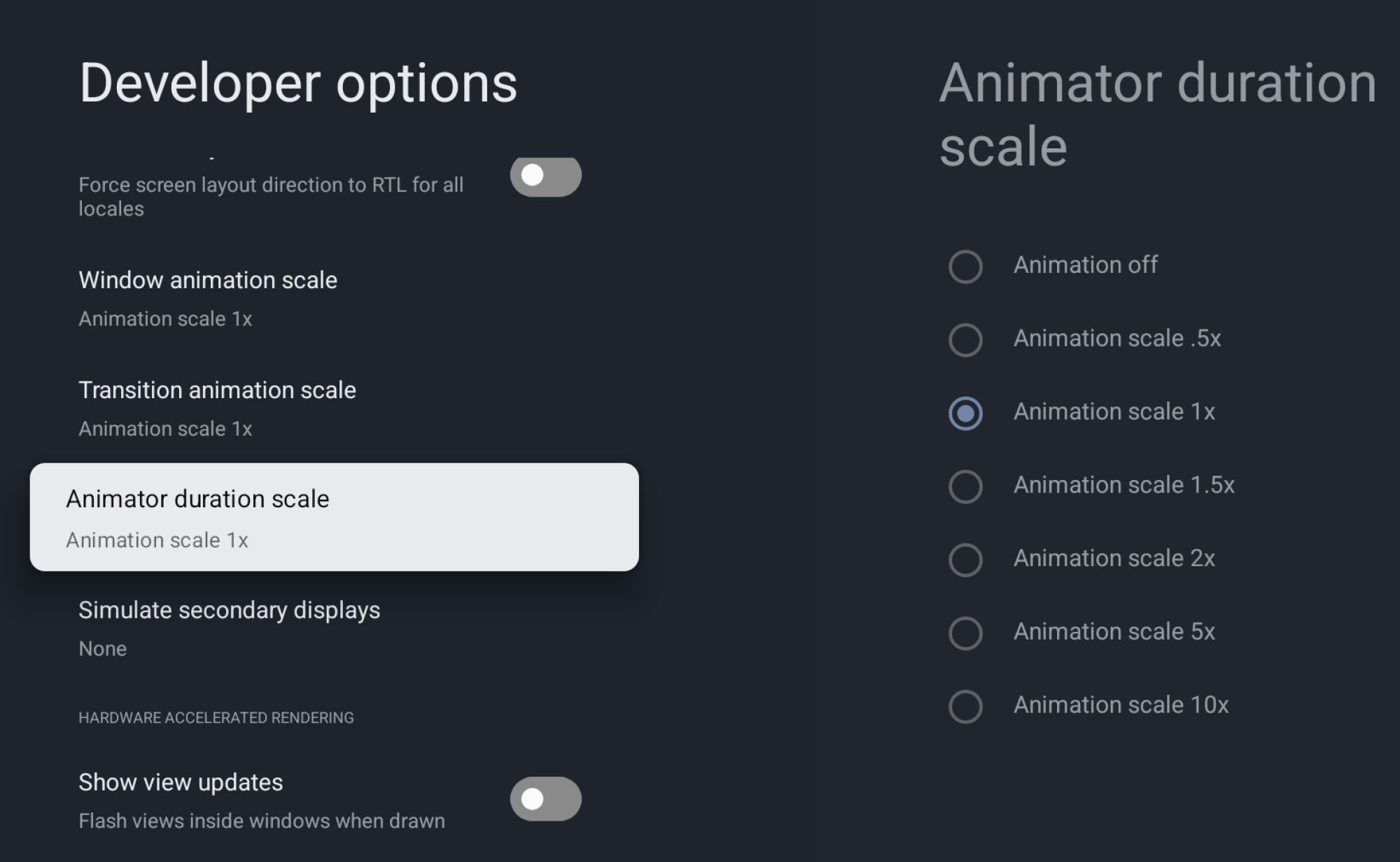
The Google TV interface is organized and functional, but its animations can slow down menu navigation. You can eliminate these animations and tweak other visual elements to speed things up deep within the developer settings.

A screenshot of the Animator duraction scale setting

Credit: Florence Ion/Lifehacker

In Developer Options, scroll down to Window animation scale, Transition animation scale, and Animator duration scale. Change one of these, or all three, from 1x to Animation off to turn off animations completely. You can also go the other way and effectively “overclock” the animations to speed them up, making them appear smoother.

Side-load apps or an alternative launcher

With developer options turned on, you can enable USB and wireless debugging to use apps like Send Files to TV and atvTools to sideload APKs. But first, enable the “Allow installs from unknown sources” option in the Developer Options under Security settings. This allows APKs you’ve transferred over to the device to run on the streamer.

Why would you want to go through the fuss of connecting to the Google TV Streamer this way? Because then you could access alternative streaming apps not available in the Play Store, or even an alternative launcher, like LeanbackLauncher.

Pair headphones to your Google TV Streamer for private listening

a screenshot of the Bluetooth audio menu on Google TV

Credit: Florence Ion/Lifehacker

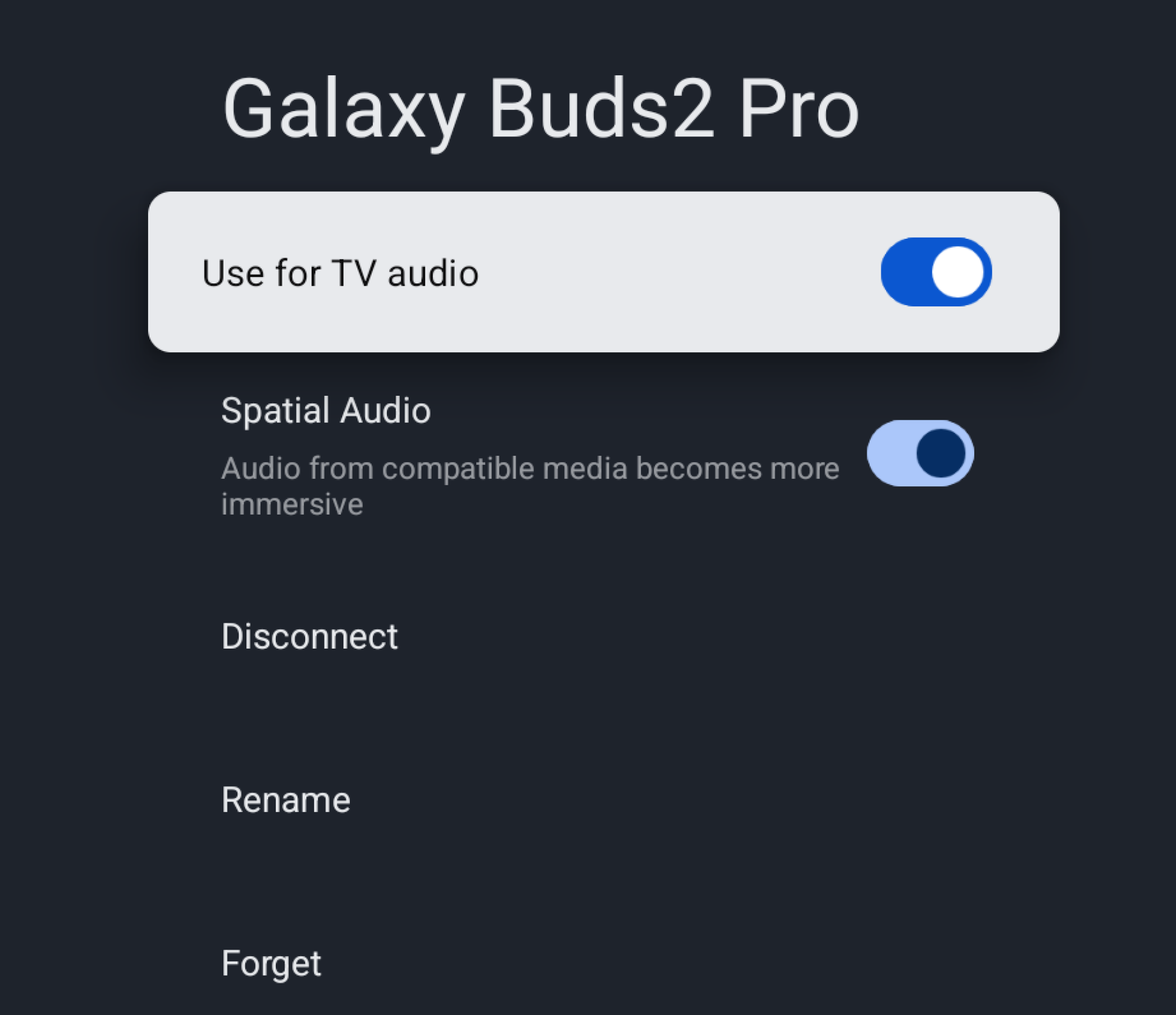
This is one of my favorite little hacks that comes especially in handy when living in a house occupied by other people. When I do my workouts in the living room, I use a set of Bluetooth earbuds connected to the Google TV Streamer so I can hear the instructor’s directions even when I’m face down in a plank and my kid is screaming in the background.

The ability is available in the same submenu where you set up your remote. In Settings > Remote & Accessories > Pair Remote/Accessory, put your audio device into Bluetooth pairing mode, then watch it come up on the screen as an option. If you’re successful, you can now pop on the buds when you need to. Be aware that audio latency can occur, and you might need to restart the connection—it is Bluetooth, after all.  

Force your Google TV Streamer to choose the best resolution, regardless of bandwidth

If you don’t care about your bandwidth and want full-resolution streaming at all times, you can set the best resolution to display as the default in your Google TV Streamer preferences. Go to Settings > Display & Sound > Resolution. Switch the Resolution from “Automatic” to 4K 60Hz, or whatever your TV’s peak is. Once this is enabled, the Google TV Streamer won’t downscale to 1080p. If you’re a sucker for HDR, this is the same menu where you can turn it on so that it’s always in high definition.

Use the USB-C port to add accessories and turn your Google TV Streamer into an all-in-one media center

The USB-C port can do more than charge up the Google TV Streamer. You can plug in a power delivery hub with extra ports to add components like external storage and effectively run your own all-in-one home media center. Those power delivery hubs usually include extra USB ports for peripherals, so you can hook up things like keyboards and game controllers for extra fun.

The origin story of syphilis goes back far longer than we thought

When King Charles VIII of France occupied Naples in 1495, his army of nearly 20,000 mercenaries became the ground zero of the “Great Pox,” the first massive venereal syphilis pandemic in Europe, which went on to cause up to 5 million deaths. For a long time, the siege of Naples was considered the first time syphilis entered European accounts and culture. “But the evolutionary history of Treponema pallidum, the lineage of bacteria including the one that causes syphilis, goes way deeper in time,” says Elizabeth Nelson, an anthropologist at the Southern Methodist University.

Nelson and her colleagues found a 5,500-year-old Treponema pallidum genome in an individual excavated from a rock shelter in Colombia—a discovery that shows pathogens causing treponemal diseases like syphilis, bejel, or yaws are several millennia older than we thought. And this means we might have been thinking about the origins of syphilis in an entirely wrong way.

The blame game

While the French occupation of Naples did not introduce syphilis to this world, it created the perfect storm that shaped the perception of this disease and its origins for centuries to come. The first ingredient of this storm was the French army and its leader. Charles VIII invaded Naples with a vast melting pot of brigands and mercenaries from all over Europe, including the French, Swiss, Poles, and Spaniards. The king himself wasn’t exactly the epitome of morality. Chroniclers like Johannes Burckard noted his “fondness of copulation” and reported that, once he’d been with a woman, he “cared no more about her” and immediately sought another partner—a behavior eagerly mirrored by his soldiers.

Read full article

Comments

SK Hynix Spins Off Solidigm To Form A $10 Billion AI Company In The US

SK Hynix Spins Off Solidigm To Form A $10 Billion AI Company In The US
SK hynix is making a major investment on U.S. soil with the formation of an AI solutions firm that it is tentatively calling AI Company (or AI Co.). Most of the finer grain details are light at the moment, though from a high-level overview, the South Korean memory chip maker says its new firm will be focused on finding “new AI growth engines.”

As

Android’s Full Desktop Mode Surfaces in Accidental Chromium Leak

A bug report filed on the Chromium Issue Tracker inadvertently exposed Google’s desktop Android interface for the first time, revealing a system codenamed “Aluminum OS” running on existing Chromebook hardware. The report, ostensibly about Chrome Incognito tabs, included screen captures from an HP Elite Dragonfly 13.5 Chromebook running Android 16.

The status bar has been redesigned for large screens — taller than the tablet version, displaying time with seconds, date, battery, Wi-Fi, a notification bell, keyboard language indicator and a Gemini icon. The taskbar remains identical to the current implementation, though the mouse cursor now features a subtle tail. Chrome’s interface includes an Extensions button, a feature currently exclusive to the desktop browser. Window controls mirror ChromeOS, placing minimize, fullscreen, and close buttons at the top-right.


Read more of this story at Slashdot.

This Free Site Shows You Sports Highlights Minus the Spoilers

Part of the fun of watching sports is that you don’t know what’s going to happen. TV shows and movies follow story beats, meaning you can usually get a sense for where things are heading, but sports do not work that way. The totally unexpected can, and does, frequently occur—and that’s the reason people keep tuning in, whether their team is dominating or an underdog.

Sometimes, though, you can’t catch the game live, but still want a bit of that feeling. That’s why leagues offer extended highlights, featuring all the key moments, complete with the commentary from the broadcast. These can feel almost like watching the full game, and I love catching up with them the next day alongside my morning coffee. The problem: you’ll typically find those videos on sites full of spoilers about who won, whether that’s via a scoreboard at the top of the site or headlines blaring the results. If you’re hoping for even a fraction of the fun of watching sports live, that’s a problem.

Don’t Tell Me The Score is your solution. This simple website offers highlights for NFL, NHL, MLB, and NBA games, with no scores or spoilers of any kind. The site interface shows only a bunch of icons representing all upcoming and recent games. Color logos means there are highlights are already available, and you can click or tap to start watching.

The highlights for an Anaheim/Edmonton NHL game are shown

Credit: Justin Pot

This is my favorite way to catch up on games I missed. The videos, which are sourced from the league’s official YouTube channels, tend to be a little over 10 minutes, meaning you’ll see the highs and lows, but it won’t take up hours of your day, and you won’t know who won going in (provided you’ve also taken care to avoid spoilers via the TV, newspapers, social media, push notifications, or ill-timed texts from friends).

This tends to work really well, with one big hiccup: NFL videos can’t be watched on the site itself, as the NFL prevents their highlights from being embedded on other sites. This means you’ll need to click a link to watch the highlights on YouTube’s website. This is a little annoying, but the YouTube pages usually don’t include spoilers either, as long as you steer clear of the comments.

I wish more leagues were supported—soccer highlights aren’t offered at all, for example, and neither are the increasingly popular women’s leagues. But if you’re a fan of one of the “big four” North American sports, like watching highlights, and don’t want to get spoiled first, Don’t Tell Me The Score is worth adding to your daily rotation.

Apple TV offers first look at Ted Lasso season 4

Last year fans of Ted Lasso received the good news that the show would be returning for a fourth season, despite having referred to its third season as its “final” one. Now Apple TV has shared some still images and further confirmation that production is underway.

As first shared by The A.V. Club, this latest batch of still images depicts the eponymous coach back in action, this time coaching a women’s soccer team. A description of the upcoming season shared with the outlet reads, “In season four, Ted returns to Richmond, taking on his biggest challenge yet: coaching a second division women’s football team. Throughout the course of the season, Ted and the team learn to leap before they look, taking chances they never thought they would.”

The images also feature returning cast members such as Hannah Waddingham, who plays Greyhounds owner Rebecca Welton, and Annette Badland, who plays pub owner Mae Green. Also shown are newcomers Grant Feely as Ted’s son and Tanya Reynolds as an assistant coach.

Apple shared that the show is returning this summer, but no specific date has been announced.

This article originally appeared on Engadget at https://www.engadget.com/entertainment/streaming/apple-tv-offers-first-look-at-ted-lasso-season-4-141538177.html?src=rss

China Shifts Stance On NVIDIA H200 Chip Imports During CEO’s Visit

China Shifts Stance On NVIDIA H200 Chip Imports During CEO's Visit
At long last, Beijing has given several domestic tech giants its stamp of approval to buy H200 chips based on NVIDIA’s Hopper architecture, with the green light coming while NVIDIA CEO Jensen Huang was visiting China, Reuters reports. Sources who are purportedly familiar with the matter told the outlet that ByteDance, the owner of TikTok,

Instead of ‘Hitting Your Steps,’ Just Focus on Sitting Less

Hitting 10,000 steps every day is a bullshit goal. Step counts can feel daunting, especially for people who work desk jobs or have physical limitations. The mere pressure to hit 10,000 steps can become its own source of stress—miss the goal by a few thousand steps, and it’s easy to feel like the whole day was a wash. Rather than obsessing over hitting a specific step count, consider shifting your focus to a simpler, more achievable goal: sitting less. This reframing is not only easier to sustain, it could be just as beneficial for your health.

Why you should break up sitting time

“Spending the bulk of your time seated is a major contributor to increasing the risk of heart attack and stroke,” says Pamela Light, a certified personal trainer at Bay Club. And if you think you can’t afford to take movement breaks during a busy workday, know that you don’t need to transform into a marathon runner or achieve some lofty daily step count to see real health benefits. Simply interrupting your sitting time throughout the day can make a meaningful difference.

“Just ten minutes of movement is enough to reduce risk of cardiovascular disease and diabetes, while slowing down muscle loss,” Light says. And the science backs this up. In fact, a 2022 study published in JAMA Internal Medicine suggests that ten minutes of moderate exercise daily would prevent more than 111,000 premature deaths a year. Small changes could have a major impact on your life.

How to break up your sitting time

The beauty of this approach is its simplicity and flexibility, especially compared to the stress of 10,000 steps. You don’t need to do jumping jacks in the middle of your office or draw attention to yourself. Instead, try incorporating more movement to things you already do throughout the day. This could look like cleaning up around home, checking in with co-workers, helping with an extra chore, or walking around the block.

Even bathroom breaks become opportunities for movement. “Go to a restroom further away or on a different floor and take the stairs. Once inside, do 10 squats,” Light says. “They don’t have to be huge or perfect, but giving the large muscles of your legs a chance to flex and release will feel great on your joints, boost your mood, and help your body to pull nutrients from the blood and into the muscles.”

Other ideas include pacing during phone calls and setting timers to remind yourself to take breaks. Besides, I know that when I get a chance to move, the time away from my desk will makes me more productive when I get back to it.

The bottom line

Instead of chasing an arbitrary step count number that might feel out of reach, simply commit to stand up and move for a few minutes. Take a lap around the office, do some chair squats, or just stand and stretch for a moment. Instead of feeling guilty about what you didn’t do, you can feel good about the small moments of movement you incorporated throughout your day.

Plus, achievable goals are the ones we’re most likely to stick with. If you’re someone recovering from an injury, managing a chronic condition, working a demanding job, or simply new to thinking about movement, getting up once an hour is an achievable place to start.

Snap is spinning off its AR glasses into a separate business

Snap’s augmented reality glasses business will now be its own entity, with the company establishing Specs Inc. as a wholly owned subsidiary. It will enable Snap to more easily secure investors and partnerships for its wearables, as well as to grow Specs into a distinct brand while running it within Snap Inc. As The Information reported in mid-2025, Snap was thinking of ways to raise outside money for its AR glasses to be able to better compete with Meta, which has a lot more money to spend on development. It was already considering spinning off the business back then.

“Specs are launching at an important time, as artificial intelligence transforms the way that we use our computers,” the company said in its announcement. The glasses’ operating system can help you get things done faster based on what they see and what they know about your behaviors. Snap also says that its smartglasses can keep you present in the moment with friends and family unlike phones and computers, since they superimpose digital tools over your view of the real world. In addition, the company believes Specs can help reduce waste over time as its digital tools can replace physical objects, such as manuals and whiteboards.

Snap didn’t say whether Specs Inc. already has investors lined up, but it is already hiring for over 100 roles around the world. The new subsidiary is expected to launch Snap’s next generation of standalone AR glasses sometime this year. Company CEO Evan Spiegel previously said that the model will be lighter, have a much smaller form factor and have more capabilities than its older smartglasses, which are mostly developer-focused.

This article originally appeared on Engadget at https://www.engadget.com/wearables/snap-is-spinning-off-its-ar-glasses-into-a-separate-business-140000659.html?src=rss

LinkedIn will let you show off your vibe coding expertise

LinkedIn has long been a platform for showing off professional accomplishments. Now, the company is leaning into the rise of vibe coding by allowing users to show off their proficiency with various AI coding tools directly on their profiles.

The company is partnering with Replit, Lovabl, Descript and Relay.app  on the feature and is working on integrations with fellow Microsoft-owned GitHub as well as Zapier.  LinkedIn has always allowed users to add various skills and certifications to their profiles. But what makes the latest update a bit different is that users aren’t self-reporting their own qualifications. Instead, LinkedIn is allowing the companies behind the AI tools to assess an individual’s relative skill and assign a level of proficiency that goes directly to their profile. 

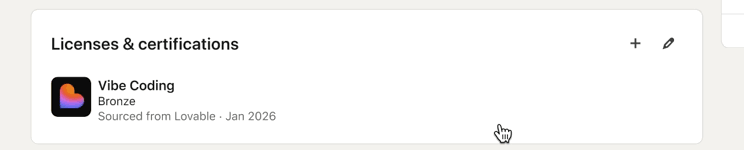
For example, AI app maker Lovabl could award someone a “bronze” in “vibe coding,” while the platform Replit uses numerical levels and Relay.app may determine that someone is an “intermediate” level “AI Agent Builder,” according to screenshots shared by LinkedIn. These levels should dynamically update as people get more experience using the relevant tools, according to LinkedIn.

Lovabl's vibe coding rating system.
Lovabl’s vibe coding rating system.
LinkedIn

Of course, the update also comes at a time when companies have used these same kinds of AI tools to lay off thousands of workers. So while there’s may be value in showing off your vibe coding skills, there are still many workers who likely aren’t as excited about  ceding more ground to AI. When I asked, LinkedIn’s head of career products Pat Whealan about this he said that 

 AI-specific skills are an increasingly important signal to recruiters and the latest update will make it easier for them to assess candidates’ skills. But he added that the intention isn’t to make AI-specific skills the sole focus. “This is less about replacing any of those other existing signals, and more about showing new ways that people are doing work,” he tells Engadget. “And how do we give a verifiable signal to both hirers and other people looking at their profile, that they actually are using these tools on a regular basis.”

This article originally appeared on Engadget at https://www.engadget.com/ai/linkedin-will-let-you-show-off-your-vibe-coding-expertise-140000776.html?src=rss