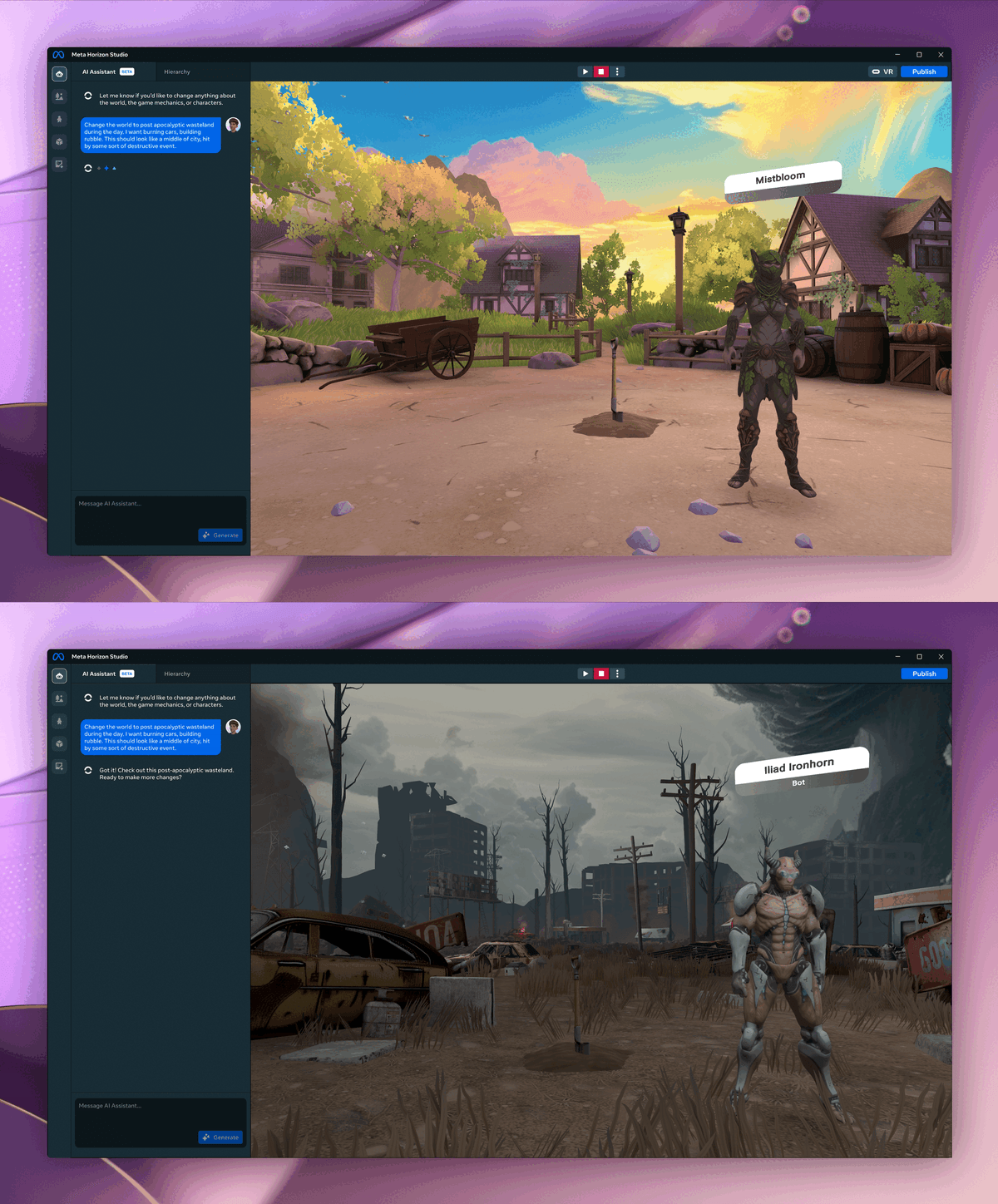
Meta’s WorldGen AI-Generates Trimesh 3D Worlds From Text Prompts

Meta’s WorldGen AI system generates trimesh 3D worlds from text prompts, though the company doesn’t think it’s ready for Horizon Worlds yet.

Meta first teased that its Horizon Worlds creation tools would get the ability to AI-generate entire 3D worlds back in May, when announcing the related AssetGen 2.0 model. Then, in June, the company revealed that this feature would be called Environment Generation, teased example generations, and said it would launch “very soon”.

Horizon Worlds Creators Can Now AI-Generate Islands, Add AI NPCs “Very Soon”
Meta’s Horizon Worlds Desktop Editor now lets creators AI-generate island environments, and will let them add conversational AI NPCs “very soon”.
UploadVRDavid Heaney

Environment Generation launched in August, but it was (and remains) only capable of generating a very specific kind of island, a very limited scope compared to the goal of generic world creation.

What Is Horizon Worlds Desktop Editor?

Horizon Worlds Desktop Editor is a flatscreen Windows PC application Meta released in early access in February, alongside deprecating the in-VR creation tools of Horizon Worlds.

The editor offers the ability to import 3D assets, images, and sound files, place them in a 3D landscape, and implement game logic and other functionality using TypeScript, a popular offshoot of JavaScript. These worlds are then immediately playable and multiplayer-capable in Horizon Worlds.

In the US, UK, Canada, EU, Australia, New Zealand, creators can also AI-generate 3D meshes, textures, skyboxes, sound effects, ambient audio, and TypeScript.

You can download Horizon Worlds Desktop Editor here.

At Connect 2025 in September, Meta teased an overhaul of its Horizon Worlds creation tools, called Horizon Studio, which hasn’t yet launched. The tease depicted an AI Assistant capable of generating just about anything a creator wants, including entire worlds, specific assets, custom NPCs, and specific gameplay mechanics, in a matter of seconds or minutes. But it’s unclear whether what Meta was showing was notional or representative of real technology it was waiting to deploy.

Meta Horizon Studio Will AI-Generate Just About Anything For Horizon Worlds
Meta Horizon Studio, the new name for Horizon Worlds Desktop Editor, is getting an upgraded AI Assistant that can generate or change just about anything.
UploadVRDavid Heaney

That brings us to WorldGen, the new AI system Meta published a paper for.

Meta describes it as “a state-of-the-art end-to-end system for generating interactive and navigable 3D worlds from a single text prompt”, leveraging a chain of 2D and 3D techniques, rather than being a single model.

“WorldGen is built on a combination of procedural reasoning, diffusion-based 3D generation, and object-aware scene decomposition. The result is geometrically consistent, visually rich, and render-efficient 3D worlds for gaming, simulation, and immersive social environments.”

To be clear, this is not producing a Gaussian splat like World Labs’ Marble, nor an interactive video stream like Google DeepMind’s Genie 3.

Meta’s WorldGen creates a layout of traditional trimesh 3D assets, making it fully compatible with traditional game engines and rendering pipelines. And it also includes a navmesh for collision detection and NPC traversal.

0:00

/1:28

Here’s the underlying sequence WorldGen goes through after you input a prompt, according to Meta:

(1) Planning
1. Procedural blockout generation
2. Navmesh extraction
3. Reference image generation

(2) Reconstruction
1. Image-to-3D base model
2. Navmesh-based scene generation
3. Initial scene texture generation

(3) Decomposition
1. Part extraction with accelerated AutoPartGen for scenes
2. Data curation for scene decomposition

(4) Refinement
1. Image enhancement
2. Mesh refinement model
3. Texturing model

So why isn’t WorldGen rolling out in Horizon Worlds Desktop Editor, or at least being announced as a launch feature for Horizon Studio?

0:00

/0:35

0:00

/0:35

0:00

/0:35

0:00

/0:35

Meta says it’s not satisfied with the fact that WorldGen currently only produces 50×50 meter spaces, and that it takes a long time to do so. The company says it’s working to address both limitations.

It seems like a greatly upgraded future version of WorldGen will be necessary to deliver on the promise of Horizon Studio that Meta teased at Connect, and given the rate of advancement in AI, it’s very possible that the company will be able to achieve exactly that sometime in 2026.

Amazon Pledges Up To $50 Billion To Expand AI, Supercomputing For US Government

Amazon is committing up to $50 billion to massively expand AI and supercomputing capacity for U.S. government cloud regions, adding 1.3 gigawatts of high-performance compute and giving federal agencies access to its full suite of AI tools. Reuters reports: The project, expected to break ground in 2026, will add nearly 1.3 gigawatts of artificial intelligence and high-performance computing capacity across AWS Top Secret, AWS Secret and AWS GovCloud regions by building data centers equipped with advanced compute and networking technologies. The project, expected to break ground in 2026, will add nearly 1.3 gigawatts of artificial intelligence and high-performance computing capacity across AWS Top Secret, AWS Secret and AWS GovCloud regions by building data centers equipped with advanced compute and networking technologies.

Under the latest initiative, federal agencies will gain access to AWS’ comprehensive suite of AI services, including Amazon SageMaker for model training and customization, Amazon Bedrock for deploying models and agents, as well as foundation models such as Amazon Nova and Anthropic Claude. The federal government seeks to develop tailored AI solutions and drive cost-savings by leveraging AWS’ dedicated and expanded capacity.


Read more of this story at Slashdot.

VERSA Embedded Platform Features Dual-Core i.MX93 and Ethos microNPU Support

The i.MX93 VERSA Evaluation Kit provides a compact platform for developing with Calixto’s i.MX93 VERSA SoM, combining a dual-core processor, real-time control, an edge NPU, and interfaces such as Ethernet, CAN, RS485, USB, MIPI camera, and multiple display outputs. The i.MX93 VERSA SoM uses NXP’s i.MX93 processor, combining a 1.7GHz dual Arm Cortex-A55, a 250MHz Cortex-M33 […]

Anthropic introduces cheaper, more powerful, more efficient Opus 4.5 model

Anthropic today released Opus 4.5, its flagship frontier model, and it brings improvements in coding performance, as well as some user experience improvements that make it more generally competitive with OpenAI’s latest frontier models.

Perhaps the most prominent change for most users is that in the consumer app experiences (web, mobile, and desktop), Claude will be less prone to abruptly hard-stopping conversations because they have run too long. The improvement to memory within a single conversation applies not just to Opus 4.5, but to any current Claude models in the apps.

Users who experienced abrupt endings (despite having room left in their session and weekly usage budgets) were hitting a hard context window (200,000 tokens). Whereas some large language model implementations simply start trimming earlier messages from the context when a conversation runs past the maximum in the window, Claude simply ended the conversation rather than allow the user to experience an increasingly incoherent conversation where the model would start forgetting things based on how old they are.

Read full article

Comments

Rivals object to SpaceX’s Starship plans in Florida—who’s interfering with whom?

The commander of the military unit responsible for running the Cape Canaveral spaceport in Florida expects SpaceX to begin launching Starship rockets there next year.

Launch companies with facilities near SpaceX’s Starship pads are not pleased. SpaceX’s two chief rivals, Blue Origin and United Launch Alliance, complained last year that SpaceX’s proposal of launching as many as 120 Starships per year from Florida’s Space Coast could force them to routinely clear personnel from their launch pads for safety reasons.

This isn’t the first time Blue Origin and ULA have tried to throw up roadblocks in front of SpaceX. The companies sought to prevent NASA from leasing a disused launch pad to SpaceX in 2013, but they lost the fight.

Read full article

Comments

Pebble Goes Fully Open Source

Core Devices has fully open-sourced the entire Pebble software stack and confirmed the first Pebble Time 2 shipments will start in January. “This is the clearest sign yet that the platform is shifting from a company-led product to a community-backed project that can survive independently,” reports Gadgets & Wearables. From the report: The announcement follows weeks of tension between Core Devices and parts of the Pebble community. By moving from 95 to 100 percent open source, the company has essentially removed itself as a bottleneck. Users can now build, run, and maintain every piece of software needed to operate a Pebble watch. That includes firmware for the watch and mobile apps for Android and iOS. This puts the entire software stack into public hands. According to the announcement, Core Devices has released the mobile app source code, enabled decentralized app distribution, and made hardware more repairable with replaceable batteries and published design files.


Read more of this story at Slashdot.

Mario 64 On PlayStation? Spyro On N64? Modders Advance Impossible Retro Ports

Mario 64 On PlayStation? Spyro On N64? Modders Advance Impossible Retro Ports
It’s an interesting time in the retro gaming world. Thanks to ongoing decompilation efforts, games formerly exclusive to a given platform are being made available on competing, rival platforms, including some that feature signature characters. Super Mario 64 and Spyro The Dragon, for example, are now playable on opposing platforms. That’s

You Can Save $100 on a PlayStation 5 Ahead of Black Friday

We may earn a commission from links on this page. Deal pricing and availability subject to change after time of publication.

Black Friday sales officially start Friday, November 28, and run through Cyber Monday, December 1, and Lifehacker is sharing the best sales based on product reviews, comparisons, and price-tracking tools before it’s over. 

  • Follow our live blog to stay up-to-date on the best sales we find.

  • Browse our editors’ picks for a curated list of our favorite sales on laptops, fitness tech, appliances, and more.

  • Subscribe to our shopping newsletter, Add to Cart, for the best sales sent to your inbox.

  • Sales are accurate at the time of publication, but prices and inventory are always subject to change. 


I’m historically a Nintendo guy. My first consoles were Game Boys; my first games starred Zelda and Link, and I was one of the few die-hard Wii U advocates. (There were dozens of us! Dozens!) But as much as Nintendo will forever be my go-to platform, I’ll admit, some of my favorite recent gaming experiences have been on PlayStation. The Last of Us blew me away; Astro Bot was everything I would have wanted Super Mario Galaxy 3 to be; and, frankly, it’s fantastic to have a device ready to play DVDs and Blu-Rays whenever I want to watch something on disc.

All that to say, if you’re still thinking about picking up a PlayStation 5 for yourself, I’d highly encourage you to do so. I would have no reservations recommending the console at full price, but when you can pick it up at a sizable discount, all the better. Right now, stores like Amazon are selling the PS5 Slim Digital Edition for $399, $100.99 off the MSRP of $499.99. While that doesn’t make this the lowest price the PS5 has ever reached, it’s still a great price for what you get.

The Digital Edition PS5 Slim comes with one DualSense Wireless Controller, a 1TB SSD, and a copy of Astro’s Playroom. While the latter is only a demo of the PS5 hardware and DualSense controller, it’s a fun experience in its own right, and, if you like it, please pick up Astro Bot as soon as you can. Speaking of games, however, this is the Digital Edition of the PS5. That means you’ll need to buy digital copies of all your games—unless you buy a disc drive for an extra $79. I wouldn’t recommend that path, however, seeing as you can snag the PS5 Disc Edition for a $449 right now, just an extra $50 over the Digital Edition. If you think you’re going to want to buy your games on disc, which can be helpful with both resale and buying used games, buy the Disc Edition over the disc drive. But if you want to spend as little as possible on your PS5 experience, you could pick up the Digital Edition and spend your savings on new games, or even put it towards a subscription to PlayStation Plus.

You could also go in the polar opposite direction, and spend even more money on the PS5 Pro. Amazon is also taking $100.99 off Sony’s top-of-the-line PlayStation, which brings its cost down to $649. But unless you really care about playing your console games in the highest fidelity possible, or watching 4K Blu-Rays in HDR, you’ll be more than fine with the base PS5.

If you’re all about the savings, you could pick up a refurbished console instead. Best Buy has a refurbished Digital Edition (not Slim, mind you) available for $341.99. As long as you don’t mind buying the device used, you can save nearly another $60 here.


How long do Black Friday deals really last?

Black Friday sales officially begin Friday, November 28, 2025, and run throughout “Cyber Week,” the five-day period that runs from Thanksgiving through Cyber Monday, December 1, 2025. But Black Friday and Cyber Monday dates have expanded as retailers compete for customers. You can get the same Black Friday sales early, and we expect sales to wind down by December 3, 2025. 

Does Amazon have Black Friday deals?

Yes, Amazon has Black Friday sales, but prices aren’t always what they seem. Use a price tracker to make sure you’re getting the best deal, or refer to guides like our live blog that use price trackers for you. And if you have an Amazon Prime membership, make the most of it.

What stores have the best sales on Black Friday?

Nowadays, both large retailers and small businesses compete for Black Friday shoppers, so you can expect practically every store to run sales through Monday, December 1, 2025. The “best” sales depend on your needs, but in general, the biggest discounts tend to come from larger retailers who can afford lower prices: think places like Amazon, Walmart, Target, Best Buy, and Home Depot. You can find all the best sales from major retailers on our live blog.


Our Best Editor-Vetted Early Black Friday Deals Right Now


Amazon Fire HD 10 (2023)


$69.99

(List Price $139.99)


Sony WH-1000XM5


$248.00

(List Price $399.99)


Amazon Fire TV Stick 4K Plus


$24.99

(List Price $49.99)

Deals are selected by our commerce team

Why That $300 Black Friday Laptop Deal Probably Isn’t Worth It

We may earn a commission from links on this page.

Black Friday sales officially start Friday, November 28, and run through Cyber Monday, December 1, and Lifehacker is sharing the best sales based on product reviews, comparisons, and price-tracking tools before it’s over. 

  • Follow our live blog to stay up-to-date on the best sales we find.

  • Browse our editors’ picks for a curated list of our favorite sales on laptops, fitness tech, appliances, and more.

  • Subscribe to our shopping newsletter, Add to Cart, for the best sales sent to your inbox.

  • Sales are accurate at the time of publication, but prices and inventory are always subject to change. 


Sales season is here, and if you’ve been on Amazon, Best Buy, or any other site that sells computers this week, you’ve probably noticed dozens of deals on laptop PCs that are cheaper than $500 or even $300. They’re tempting impulse buys, and I’ve actually recommended them here and there in the past. But the truth is, if you have a phone or tablet, or even if you’re only going to use them to browse the internet, there are probably better options out there. You can get a good computer for cheap, but as for those suspiciously inexpensive laptop PCs you’re seeing this week, here’s why that $300 deal probably isn’t worth it.

These PCs are old tech

As time marches on, even the simplest programs get more demanding to run. That’s a problem for these cheap laptop deals, because they already tend to be using pretty old tech by the time you get to them.

Scroll through Best Buy’s official list of inexpensive laptops, and you’ll find a lot of machines powered by Intel’s Celeron chips, which are low-power processors that were discontinued in 2023. Most are using the N4500, too, which is from 2021. On a human scale, that’s not too long ago, but time moves fast in the world of computers. As Microsoft continues to put AI features into even the base version of Windows, this chip is going to have a hard time keeping up, and the more bloat your computer has, the more lag you’ll see performing even simple tasks like opening files. In other words, your new purchase could be e-waste shortly after you get your hands on it.

What makes that worse is that, generally, Celeron is meant more for low-power corporate terminals than general consumer use. So on top of being old, if you want to do any kind of multitasking, you’re fighting an uphill battle. 

But the chip isn’t even the biggest issue. The real problem here is RAM, or memory. This is short-term cache space your computer can use to help it run tasks in real-time, and if you’re a Chrome user, you’ve probably noticed that it’s gotten pretty RAM hungry as of late. It’s been a common complaint for decades, with the browser regularly eating over 1GB even during light tasks. That’s not so bad if you have the minimum 8-16GB that most computers come with these days, but these cheapo Black Friday deals are almost all topping out at 4GB. That doesn’t give you much headroom. Another blow for multitasking, but even if you only use your browser, don’t expect to open too many tabs at once.

You could use a more lightweight browser, turn on memory limits, or make use of hacks like suspending or preloading tabs, but no matter what you do, most developers aren’t making their apps, even web browsers, for machines with a 4GB limit anymore. And that’s an issue, because relying on browser-based applications is a great way to take strain off a weak computer, since it lets it shunt most of its processing to the cloud. Having so little breathing room for your memory puts a tight expiration date on your new purchase, aside from limiting how many tabs or extra programs you can open now.

Then there are matters of convenience, like resolution and battery life. These won’t affect performance, but they’ll probably be lower than you might expect. Usually, most monitors and televisions these days start at a resolution of 1,920 x 1,080, the bare minimum to be considered “Full HD.” But laptops like this one from HP and this one from Lenovo are just about half of that, so your image is going to be noticeably less sharp. Battery life, meanwhile, is usually quoted at about 10 to 12 hours, and while that’s not small, it is also about half of what you might get from a MacBook, Microsoft Surface Laptop, or even a more powerful generic laptop. Windows is a heavy operating system, and running it on weak specs in a machine that’s designed to be thin and light is going to draw a lot of power.

Are any of these issues death sentences? Not necessarily. If you understand that one of these machines might be a bit sluggish and won’t last you long, it could serve in a pinch. But you’re still probably going to have to replace it sooner rather than later, which could cost you more in the long run, while giving you a worse experience than just getting a nicer computer now would.

I understand that not everyone has the money to spend on a nice laptop now, though. But even if you need to cut costs, these laptops come with enough compromises that they’re far from being your best option, even at a low price point.

Chromebooks are the new cheap laptop

Part of what makes these cheaper laptop PCs viable at all is that they most rely on the internet for their productivity. Assuming you have the RAM to operate an internet browser, a cheap laptop can rely on the cloud for activities like watching videos, prepping spreadsheets, and increasingly, gaming. But if you’re just going to use your laptop as a portal to the internet, it might be better to ditch the heavy requirements of Windows and go for something lighter instead. Enter Chromebooks.

Introduced in 2011, Chromebooks run on ChromeOS, which is an offshoot of the much more lightweight Linux operating system. That means your laptop will be snappier even with less powerful specs, and while ChromeOS can come with some compatibility issues for more serious Windows programs, it does introduce compatibility with Android apps, and is just fine for browsing the web and lightweight tasks like word processing or making spreadsheets. 

These advantages mean Chromebooks have started to replace more traditional budget laptops as of late, which is probably part of why these sub-$300 Windows machines are using such old tech. Chromebooks are used in schools, and because of Google’s support, they can promise a certain level of quality while keeping costs low.

Part of that is thanks to the Chromebook Plus certification program, which started in 2023, and has quickly gotten pretty popular. These Chromebooks are a little swankier, but still affordable compared to Windows machines, and have to offer a minimum of an Intel Core i3 12th gen or AMD Ryzen 3 5000 series chip, 8GB of RAM, 128GB of storage, a 1080p webcam, and a 1080p screen. That loadout is a major improvement on the non-Chromebook deals listed above, and while there are still some new Chromebooks that aren’t Chromebook Plus certified, these are becoming few and far between. And even the non-Plus Chromebooks are likely still a better deal than a similarly priced Windows laptop, as they’ll have an easier time with their weaker specs thanks to ChromeOS.

Lifehacker sister site PCMag has a whole list of tested Chromebooks across various price ranges, but for a specific pick, I’d opt for the Acer Chromebook Plus 515, which is $300 for Black Friday, hits all those Chromebook Plus minimums, and has a generous 15.6-inch touch display. Or, if that’s a bit too large for you, you can pay $355 for the Acer Chromebook Plus 514.

Tablets are becoming more like laptops

Tablets are becoming more and more like computers these days, which is why you might already have a good cheap laptop replacement kicking around, or could get one for cheap. That’s especially true if you’re a fan of Apple.

That’s because Apple recently released iPadOS26, and while it’s not a full replacement for a MacBook, it comes stunningly close. New with this update is the ability to run multiple windowed apps at once, complete with a menu bar, in a user interface that looks a lot like Apple’s full-blown computers. It’s even got the traffic lights in the top-left corner of your windows for minimizing them or taking them fullscreen.

You still lose out on a few niceties, like compatibility with the full array of apps offered on MacBook, as well as the Terminal and some external display support. But, if like on a Chromebook or cheaper Windows laptop, you mostly intend to work online, it could be a compelling and familiar solution for you. And the chips Apple puts in even its entry-level iPads are far stronger than Celerons.

Right now, you can get an 11-inch A16 iPad for $279 for Black Friday, although an official Magic Keyboard Folio for that will run you an additional $199. That takes this from being one of this article’s cheaper options to one of its priciest, but the iPad will work with any Bluetooth keyboard, so you could also opt for a cheaper third-party option instead. Here’s one for $24, although I haven’t tested it personally.

It’s also worth pointing out that, in addition to working with the A16 iPad, iPadOS26 is compatible several generations back across the iPad Pro, iPad Air, and iPad mini, so you might already have a device that works with it. Before buying a new, cheap, and probably less powerful laptop, try using your iPad like a tablet and seeing if that’s enough for you. If you’re giving a gift, a Magic Keyboard for an iPad your family member or friend already owns is probably going to get a warmer reception than a generic cheapo Windows laptop.

Most Android tablets, meanwhile, aren’t as functional here, but could still work for you, especially if you intend to use your tablet like a Chromebook. Here, you’ll probably need to rely on split-screen mode, which can place two apps side by side, although the specifics might vary depending on your device. Using a tablet as your cheap laptop is likely a better choice for iPad users, but again, it’s worth playing around with what you already have before buying a laptop that’s probably going to be sluggish and frustrating anyway.

Just use your phone

Finally, the elephant in the room: Why are you buying a weak, cheapo laptop when you probably already have a phone in your pocket that’s ten times more powerful?

The answer is probably that you need a big screen or a laptop-like interface, but I’ve got some good news for you. There are ways to use your phone for that without paying for a new, worse device.

The most obvious of these is Samsung DeX, a desktop-like interface built into most Galaxy phones. Simply connect your Galaxy phone to an external monitor (you can do this with a cable or wirelessly via Miracast) and launch DeX from either the Settings app or the swipe-down Quick Settings panel.

From there, you’ll see a similar interface to Windows, ChromeOS, or MacOS, and you’ll be able to open apps in multiple windows and freely resize them or move them around. It’s a lot like what’s available in iPadOS 26, and because your Galaxy device is probably running a recent flagship processor and definitely has at least 8GB of RAM, it’s going to be snappier than that cheap laptop would.

You can also connect wireless or USB-C accessories like keyboards and mice, and if you need more than one wired connection, hubs and docking stations work, too. This will make it easy to use keyboard shortcuts like Ctrl/Cmd + Enter, which will take you right to the home screen if you ever get lost. However, you don’t need an external keyboard or mouse to use DeX—your phone can also act as a keyboard and trackpad combo.

This versatility means you might already own a “budget laptop” that’s going to be way stronger than anything you can buy on the cheap. Compatibility goes back to the S8, so it’s worth checking your drawers if you’ve ever been a Samsung customer.

If you’re not a Samsung user, though, you’ve still got some options. Now that the iPhone uses USB-C, most smartphones now support some type of external monitor connectivity, for both mirrored and wired connections. It’s probably not going to be as natural to use as iPadOS 26 or DeX, but if you just need to get to a browser to access your Google Workspace, it’ll do. Here are a few ways to connect an iPhone to a monitor or TV, and the same for non-Samsung Androids.


How long do Black Friday deals really last?

Black Friday sales officially begin Friday, November 28, 2025, and run throughout “Cyber Week,” the five-day period that runs from Thanksgiving through Cyber Monday, December 1, 2025. But Black Friday and Cyber Monday dates have expanded as retailers compete for customers. You can get the same Black Friday sales early, and we expect sales to wind down by December 3, 2025. 

Does Apple do Black Friday?

Yes, Apple participates in Black Friday, though you may want to compare their sales with other retailers like Best Buy and Walmart. Apple is offering an exclusive $250 gift card for eligible purchases, but so far, the best Black Friday sale on an Apple product is the M4 MacBook on sale for cheaper than ever.

What stores have the best sales on Black Friday?

Nowadays, both large retailers and small businesses compete for Black Friday shoppers, so you can expect practically every store to run sales through Monday, December 1, 2025. The “best” sales depend on your needs, but in general, the biggest discounts tend to come from larger retailers who can afford lower prices: think places like Amazon, Walmart, Target, Best Buy, and Home Depot. You can find all the best sales from major retailers on our live blog

OpenAI can’t use the term ‘Cameo’ in Sora following temporary injunction

Cameo, the app that allows people to buy short videos from celebrities, has won an important victory in its legal battle against OpenAI. On Monday, a federal judge granted the company a temporary restraining order against OpenAI, CNBC reports. Until December 22, the startup is not allowed to use the word “cameo” in relation to any features inside of Sora, its TikTok-like app for creating AI-generated videos. The order covers similar words like “Kameo” and “CameoVideo.”

“We are gratified by the court’s decision, which recognizes the need to protect consumers from the confusion that OpenAI has created by using the Cameo trademark,” Cameo CEO Steven Galanis told CNBC. “While the court’s order is temporary, we hope that OpenAI will agree to stop using our mark permanently to avoid any further harm to the public or Cameo.”

OpenAI did not immediately respond to Engadget’s comment request.

Cameo sued OpenAI in October, claiming the company’s use of the term was likely to confuse consumers and dilute its brand. Before filing the suit, Galanis said Cameo tried to resolve the dispute “amicably,” but claims OpenAI refused to stop using the name. Sora’s cameo feature allows users to upload their likeness to the app, which other people can then use in their own videos. US District Judge Eumi K. Lee, who granted Cameo the temporary junction, has scheduled a hearing for December 19 to determine if the order should be made permanent.

This article originally appeared on Engadget at https://www.engadget.com/ai/openai-cant-use-the-term-cameo-in-sora-following-temporary-injunction-213431626.html?src=rss

Americans Are Holding Onto Devices Longer Than Ever

An anonymous reader shares a report: The average American now holds onto their smartphone for 29 months, according to a recent survey by Reviews.org, and that cycle is getting longer. The average was around 22 months in 2016.

[…] Research released by the Federal Reserve last month concludes that each additional year companies delay upgrading equipment results in a productivity decline of about one-third of a percent, with investment patterns accounting for approximately 55% of productivity gaps between advanced economies.

The good news: businesses in the U.S. are generally quicker to reinvest in replacing aging equipment. The Federal Reserve report shows that if European productivity had matched U.S. investment patterns starting in 2000, the productivity gap between the U.S and European economic heavyweights would have been reduced by 29 percent for the U.K., 35 percent for France, and 101% for Germany.


Read more of this story at Slashdot.

DOGE “cut muscle, not fat”; 26K experts rehired after brutal cuts

After Donald Trump curiously started referring to the Department of Government Efficiency exclusively in the past tense, an official finally confirmed Sunday that DOGE “doesn’t exist.”

Talking to Reuters, Office of Personnel Management (OPM) Director Scott Kupor confirmed that DOGE—a government agency notoriously created by Elon Musk to rapidly and dramatically slash government agencies—was terminated more than eight months early. This may have come as a surprise to whoever runs the DOGE account on X, which continued posting up until two days before the Reuters report was published.

As Kupor explained, a “centralized agency” was no longer necessary, since OPM had “taken over many of DOGE’s functions” after Musk left the agency last May. Around that time, DOGE staffers were embedded at various agencies, where they could ostensibly better coordinate with leadership on proposed cuts to staffing and funding.

Read full article

Comments

You Can Get This Budget Dell Latitude Laptop With Microsoft Office on Sale for $275 for Black Friday

We may earn a commission from links on this page. Deal pricing and availability subject to change after time of publication.

Black Friday sales officially start Friday, November 28, and run through Cyber Monday, December 1, and Lifehacker is sharing the best sales based on product reviews, comparisons, and price-tracking tools before it’s over. 

  • Follow our live blog to stay up-to-date on the best sales we find.

  • Browse our editors’ picks for a curated list of our favorite sales on laptops, fitness tech, appliances, and more.

  • Subscribe to our shopping newsletter, Add to Cart, for the best sales sent to your inbox.

  • Sales are accurate at the time of publication, but prices and inventory are always subject to change. 


You get a Dell Latitude 7410 laptop from 2020 and a lifetime license for Microsoft Office Professional 2021 currently on sale together for $274.99 on StackSocial. Since Office alone usually sells for $219.99 and the laptop carries a $799.99 list price, the bundle makes sense if you view the laptop as an affordable way to handle simple work at home or as a backup machine. This version of Office installs directly on one Windows machine and stays tied to that device. It includes the usual productivity suite you expect from Microsoft Office, all running locally with no monthly fees. And because the suite doesn’t require heavy processing power, it still performs well on older hardware, making the pairing realistic for everyday tasks.

The Latitude 7410 included here is a Grade A refurbished unit. In practical terms, that means the laptop has been inspected, tested, cleaned, and arrives in near-mint condition, often with only faint or no visible marks on the casing. While it shows its age on paper, the hardware can still handle routine work. The Intel i5-10310U processor paired with 16GB of RAM and a 512GB SSD keeps Windows 11 Pro responsive for browsing, writing, light multitasking, and general office tasks. The 14-inch 1080p display works well for reading and editing, and the 3.2-pound weight is comfortable enough for moving between rooms or workspaces. You also get a mix of ports, including two USB-C, two USB-A, and HDMI, along with a fingerprint reader, stereo speakers, and a basic 1MP webcam.

Connectivity is the most obvious sign of its age, as it uses wifi 802.11ac, also known as wifi 5, which is fine for typical home and office speeds but can’t take advantage of the faster wifi 6 or 6E networks that are common in 2025. Bluetooth 5.0 still works for headphones, keyboards, and mice, but it doesn’t match the stability and lower latency of newer 5.3 and 5.4 versions. These limitations matter most if you rely on fast wireless transfers or lots of Bluetooth accessories. Combined with the lack of any warranty and a battery that lasts around six hours, this machine works best for someone who needs a simple, steady computer rather than one that is future-proof.


How long do Black Friday deals really last?

Black Friday sales officially begin Friday, November 28, 2025, and run throughout “Cyber Week,” the five-day period that runs from Thanksgiving through Cyber Monday, December 1, 2025. But Black Friday and Cyber Monday dates have expanded as retailers compete for customers. You can get the same Black Friday sales early, and we expect sales to wind down by December 3, 2025.

What stores have the best sales on Black Friday?

Nowadays, both large retailers and small businesses compete for Black Friday shoppers, so you can expect practically every store to run sales through Monday, December 1, 2025. The “best” sales depend on your needs, but in general, the biggest discounts tend to come from larger retailers who can afford lower prices: think places like Amazon, Walmart, Target, Best Buy, and Home Depot. You can find all the best sales from major retailers on our live blog

Are Black Friday deals worth it?

In short, yes, Black Friday still offers discounts that can be rare throughout the rest of the year. If there’s something you want to buy, or you’re shopping for gifts, it’s a good time to look for discounts on what you need, especially tech sales, home improvement supplies, and fitness tech. Of course, if you need to save money, the best way to save is to not buy anything. 

Are Cyber Monday deals better than Black Friday?

Black Friday used to be bigger for major retailers and more expensive tech and appliances, while Cyber Monday was for cheaper tech and gave smaller businesses a chance to compete online. Nowadays, though, distinction is almost meaningless. Every major retailer will offer sales on both days, and the smart move is to know what you want, use price trackers or refer to guides like our live blog that use price trackers for you, and don’t stress over finding the perfect timing.

Our Best Editor-Vetted Early Black Friday Deals Right Now


Amazon Fire HD 10 (2023)


$69.99

(List Price $139.99)


Sony WH-1000XM5


$248.00

(List Price $399.99)


Amazon Fire TV Stick 4K Plus


$24.99

(List Price $49.99)

Deals are selected by our commerce team

Alexa Home Theater surround sound for Echo speakers is rolling out now

One of the more intriguing prospects Amazon revealed at its devices and services event back in September was Alexa Home Theater, a surround sound mode for select Echo speakers. Amazon has now confirmed to Engadget that it’s rolling out Alexa Home Theater “broadly” starting today.

This could make Echo speakers a more budget-friendly, entry-level alternative to a Sonos setup in some consumers’ eyes — though a good soundbar may be actually a better bet for those just starting to put together a home theater system. You can connect up to five of the company’s new Echo Studio or Echo Dot Max speakers plus a subwoofer to a Fire TV Stick 4K or 4K Max (the original Echo Studio isn’t compatible).

Amazon said that, after you plug in several Echo devices in the same room as your TV and link them to the same Wi-Fi network, the Alexa app can walk you through the setup process. Alexa will automatically tune the speakers for your space.

As it happens, the latest Echo Studio and the Echo Dot Max are both on sale for Black Friday, along with other Amazon devices. The Echo Studio is $30 off at $190 and the Echo Dot Max has dropped by $10 to $90.

This article originally appeared on Engadget at https://www.engadget.com/audio/speakers/alexa-home-theater-surround-sound-for-echo-speakers-is-rolling-out-now-204557932.html?src=rss

Arduino’s new terms of service worries hobbyists ahead of Qualcomm acquisition

Some members of the maker community are distraught about Arduino’s new terms of service (ToS), saying that the added rules put the company’s open source DNA at risk.

Arduino updated its ToS and privacy policy this month, which is about a month after Qualcomm announced that it’s acquiring the open source hardware and software company. Among the most controversial changes is this addition:

User shall not:

  • translate, decompile or reverse-engineer the Platform, or engage in any other activity designed to identify the algorithms and logic of the Platform’s operation, unless expressly allowed by Arduino or by applicable license agreements …

In response to concerns from some members of the maker community, including from open source hardware distributor and manufacturer Adafruit, Arduino posted a blog on Friday. Regarding the new reverse-engineering rule, Arduino’s blog said:

Read full article

Comments

Udio Users Can’t Download Their AI Music Creations Anymore

An anonymous reader shares a report: As part of the settlement with Universal, Udio has amended its terms of service, and users can no longer download their outputs. This has AI music makers furious, and with good reason. Unfortunately, they have little recourse, as the contract they sign when creating a Udio account includes a waiver of the right to bring a class action.


Read more of this story at Slashdot.