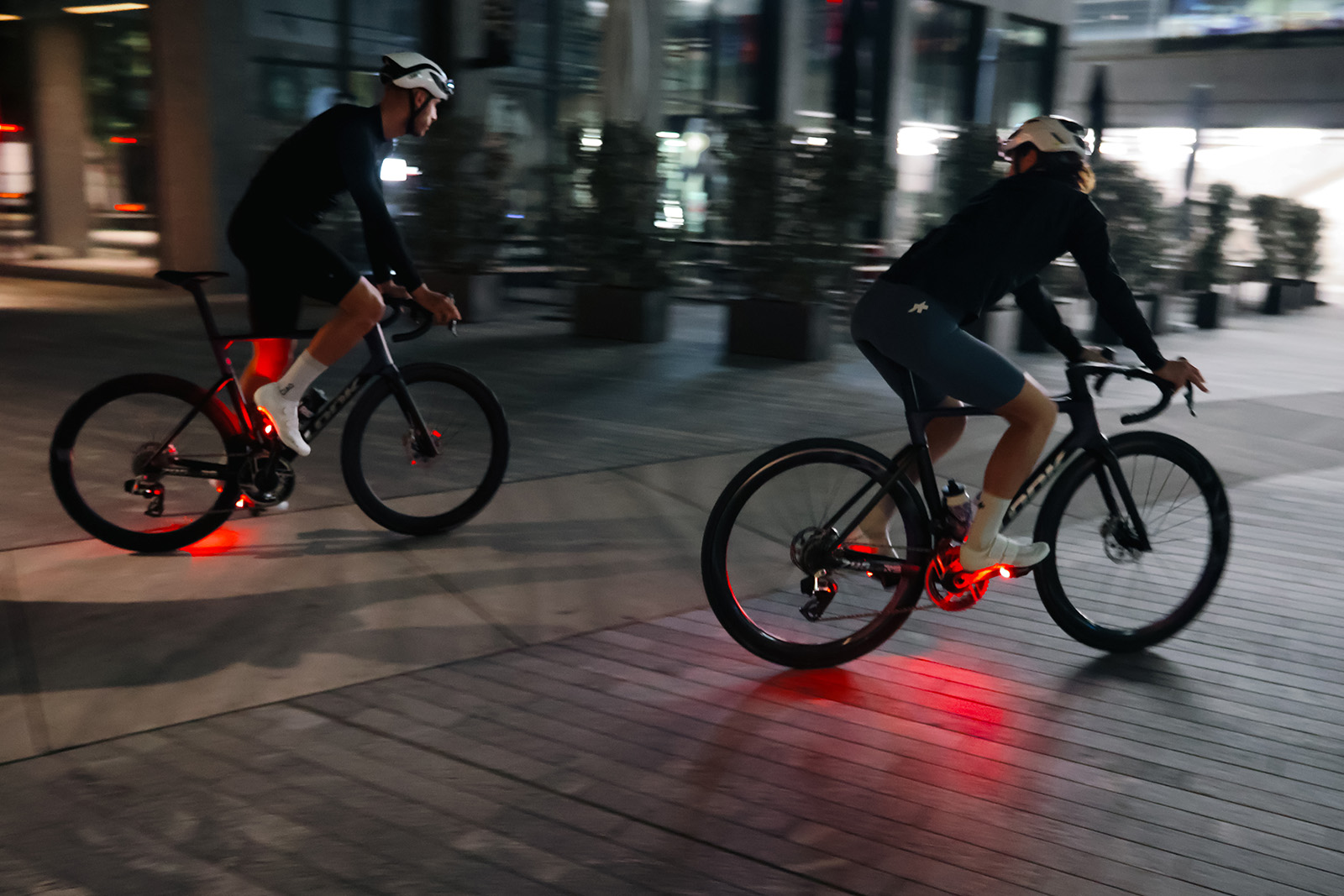
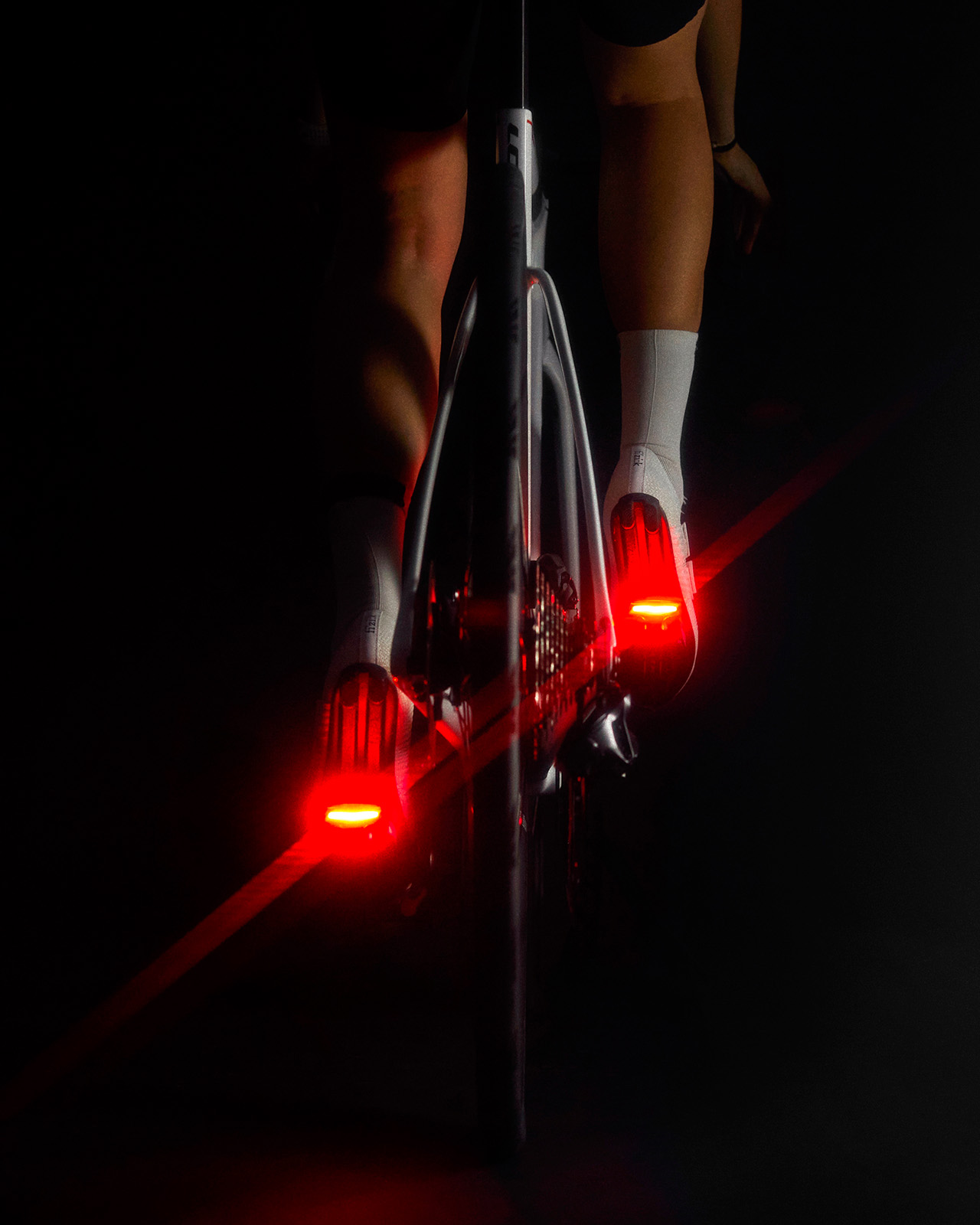
Look says its new Keo Vision pedal collection emphasises safety and performance, thanks to integrated lights that will ensure you’re visible from up to 1km away.
The lights integrate into the rear of the road bike pedals and are said to highlight your “biomotion”. In other words, they’ll rise and fall as you pedal, which Look says “increases visibility by 5.5 times” compared to a bike light mounted on your seatpost.
Look adds that the two moving lights help drivers perceive speed and distance more accurately.
“Offering 180° visibility and four versatile light modes—including both continuous and flashing patterns—these lights are engineered to adapt to any riding condition, guaranteeing optimal safety in all environments,” Look says.
The pedals are said to make you 5.5 times more visible than a bike light mounted to your seatpost. Look
Look already offers the Geo City pedals with integrated lights, but these flat pedals are aimed at city riding rather than performance road cycling.
Alexandre Lavaud, head of product at Look, says integrating and “miniaturising” the light technology to fit into a road bike pedal “was a real challenge.” But Lavaud says the result is “not just a pedal; it’s a commitment to a safer, more confident ride for everyone”.
Look’s Keo Vision collection will be available from 1 November and will include two models, the Keo Blade Ceramic Vision and Keo 2 Max Vision.
The Keo Blade Ceramic Vision (€249.90) has a carbon body, ceramic bearings and a 705mm² contact surface for optimal performance.
The Keo 2 Max Vision (€124.90) has a composite body and steel bearing and a slightly smaller contact surface at 500mm².
The lights weigh 20g and have a claimed battery life of 40 hours. Look
Both models feature the integrated lights with four modes (day flash, night flash, steady and night steady).
There will also be a Keo Vision kit available. The kit allows owners of the Keo Blade V4 pedals to add lights to their pedals for €60.
The lights themselves are said to only weigh 20g each and have a battery life of 40 hours. They charge in just 2 hours via a USB-C cable.
This isn’t the only change Look has made to its road bike pedal range in recent weeks. Earlier in October, the French company added wider Q-Factor options to its Keo range.
Right now, if you live in the U.S. and you’re familiar with lock screen ads, it’s probably from your e-reader, your PC, or maybe even your refrigerator. Plenty of devices with screens in them like to subsidize costs by running ads, but American smart phones have been surprisingly good at keeping your lock screen clear. Until now.
“Nothing” experiments with lock screen ads
If you haven’t heard of Nothing, I don’t blame you. The Android phone company made waves back in 2022, largely on the back of its founder, OnePlus co-founder Carl Pei, but it only recently started making phones on par with flagship devices like the Google Pixel or Samsung Galaxy. Mostly, the brand has instead become known for its mid-range accessories and budget phones, which pack in a lot of power for their price points, but otherwise stand out through trendy and minimalistic designs. It’s a smaller market, but a loyal one.
That’s why it’s a bit odd to see the company put both its minimalism and fandom at risk by putting ads on its lock screens, via a new “Lock Glimpse” feature.
Added in Nothing OS 4.0 late last week, when turned on, the feature will show you one of a rotating selection of wallpapers, which all feature linked content via text at the bottom of the image. For instance, a wallpaper showing a strawberry sundae might look spiffy, but in practicality, it’s essentially an ad for a page with a strawberry ice cream recipe. Don’t take my word for it—if you’re looking for a smoking gun, Reddit users have found permissions agreements linking the feature to Chinese digital ad company BOYUAN (more on that later).
To Nothing’s credit, the feature is off by default for now. But the company’s response to the backlash paints a picture that those fans may not be happy with, regardless of where they live.
“Moving forward, on select non-flagship devices, we’ll start including a carefully considered selection of third-party apps and services that don’t disrupt the Nothing OS experience you love,” Nothing posted to its site over the weekend. Lock Glimpse was stated as one such service.
The reason for all this? Cost.
Nothing’s post was upfront about the “razor-thin margins” the company has to operate on to keep up with major players like Apple and Google, and said that both Lock Glimpse and “pre-installed partner apps” would be a way to continue to hit the mid-budget price point it’s become known for.
Worse, while the company said the feature would continue to remain off-by-default on its current Phone (3a) model, it made no such promises about the upcoming Phone (3a) Lite, which comes out later this week, and is the “first entry-level smartphone with Nothing’s signature transparent design.”
While Nothing said it intends to give users “full control over features like Lock Glimpse” in the future, it’s not hard to imagine a future where the feature is enabled by default, and pre-installed alongside apps that the owner didn’t ask for, even on global releases.
Nothing’s lock screen ads matter, even if you don’t own a Nothing phone
Again, Nothing isn’t the first smartphone brand to push lock screen ads. Other low-budget or mid-budget phone companies do so as well—most notably Motorola with a feature called Glance and OnePlus with a feature called Lock Screen Magazine. But Nothing’s decision to join the flock points to a potential sea change, both in terms of manufacture and distribution.
First, Nothing does not focus on hardware so much as experience. Even its most powerful phone at the moment uses a Qualcomm Snapdragon 8s chip, which is a weaker version of the Snapdragon 8 line you’ll find in phones like the Samsung Galaxy series. The selling point, then, comes in software like Nothing OS, which the company pitches as “clean,” “beautifully functional,” and “mindful.”
Lock screen ads don’t match that vision, at least to me, and that Nothing felt compelled to include them means it’s willing to risk its main differentiating factor to up earnings. By my measure, that’s a canary in the coal mine for the pressures any smartphone company that’s not big enough to eat development costs is facing right now. Nothing tends to be pretty upfront in its communication, so I’ve reached out for more information and will update this post if I hear back, but it’s not a great sign for the industry at large.
Which brings me to my second point: While Motorola and OnePlus’ lock screen ads have been around for a while now, they’ve only recently started making their way to the U.S. via test launches, and Nothing’s implementation both makes them live for everyone with an impacted phone, regardless of region, and breaks promises the company behind most of these ads has made before.
As it turns out, BOYAUN, the company behind Nothing’s Lock Glimpse feature, also powers Glance and Lock Screen Magazine. And while Glance had previously told Android Police that it doesn’t plan to introduce lock screen ads in the U.S. like it has in regions like India, instead relying on charging users a “subscription fee for access to premium news on their lock screen,” here they are.
I try to avoid speculation when I can, but taken together, these two facts mean it’s very possible that other low- and mid-budget phones will follow Nothing’s lead in the future. Lock screen ads have been bad enough abroad, but it’s something that U.S. users now may have to get used to.
The silver lining
That said, while lock screen ads are something to be ready for, they aren’t necessarily going to ruin your phone. They’re just going to make it more annoying to set up.
I believe Nothing when it says it will give users control over Lock Glimpse, largely because even Glance and Lock Screen Magazine can be turned off. The latter two being far less image focused companies than Nothing, it would be strange to see Nothing break its promise here if they aren’t. The same goes for Nothing saying pre-installed apps will be “easy to remove.”
But still, any extra steps you require of a user means more people are just going to put up with the default. Don’t be surprised if, once more phones start to display lock screen ads out of the box, you see your less tech-literate friends end up using them without even knowing that’s the case.
Which is why this is still an issue, and why it’s reassuring that, at least in Nothing’s case, Lock Glimpse is only coming to certain phones (again, Nothing’s blog said that flagships models will be spared). Being that this brand is already a bit niche, it’s probably not going to be the company to normalize lock screen ads, especially because the cheaper models that are more likely to get Lock Glimpse have limited carrier support in the U.S.
Still, Nothing’s phones with Lock Glimpse are technically available here, and so they might be the first time some Americans are seeing lock screen ads. Plus, they’re also exposed to the same market pressures as all of their competitors, which means they’re probably not the last time we’ll see them, either. Lock screen ads in the U.S. are now no longer a question of “if.” Just of “when.”
For the first time, George Orwell’s Animal Farm and 1984 have been translated into Welsh, with localized titles, character names, and even a Welsh version of Newspeak. The BBC reports: Animal Farm, a 1945 political allegory inspired by the Russian Revolution, is set in north-west Wales in the Welsh edition, Foel yr Anifeiliaid, with Orwell’s classic characters given Welsh names to add authenticity. Mil Naw Wyth Deg Pedwar, or 1984, Orwell’s vision of a bleak totalitarian future, published in 1949, contains a Welsh version of Newspeak, the novel’s fictional language. Both books remain “seminal works with timeless relevance,” said Welsh book publisher Melin Bapur, and feel “particularly relevant now in an age of ‘alternative facts’, AI, and misinformation.”
Amazon has announced an approximately 14,000 person reduction in its corporate workforce. The news follows an earlier report from Reuters that up to 30,000 people could be let go. However, the exact number of layoffs is unclear, with the 14,000 figure being cushioned by planned hirings.
Engadget has reached out to Amazon for exact layoff numbers, but Bloomberg reports that impacted jobs are within teams such as video games, logistics, payments and cloud-computing.
The impetus for this reduction is, of course, AI. In the announcement, Beth Galetti, Amazon’s senior vice president of people experience and technology, states that Amazon is “performing well” but “that the world is changing quickly.”
Galetti continues: “This generation of AI is the most transformative technology we’ve seen since the Internet, and it’s enabling companies to innovate much faster than ever before (in existing market segments and altogether new ones). We’re convicted that we need to be organized more leanly, with fewer layers and more ownership, to move as quickly as possible for our customers and business.”
This article originally appeared on Engadget at https://www.engadget.com/big-tech/amazon-cuts-its-workforce-by-14000-in-further-embrace-of-ai-125548323.html?src=rss
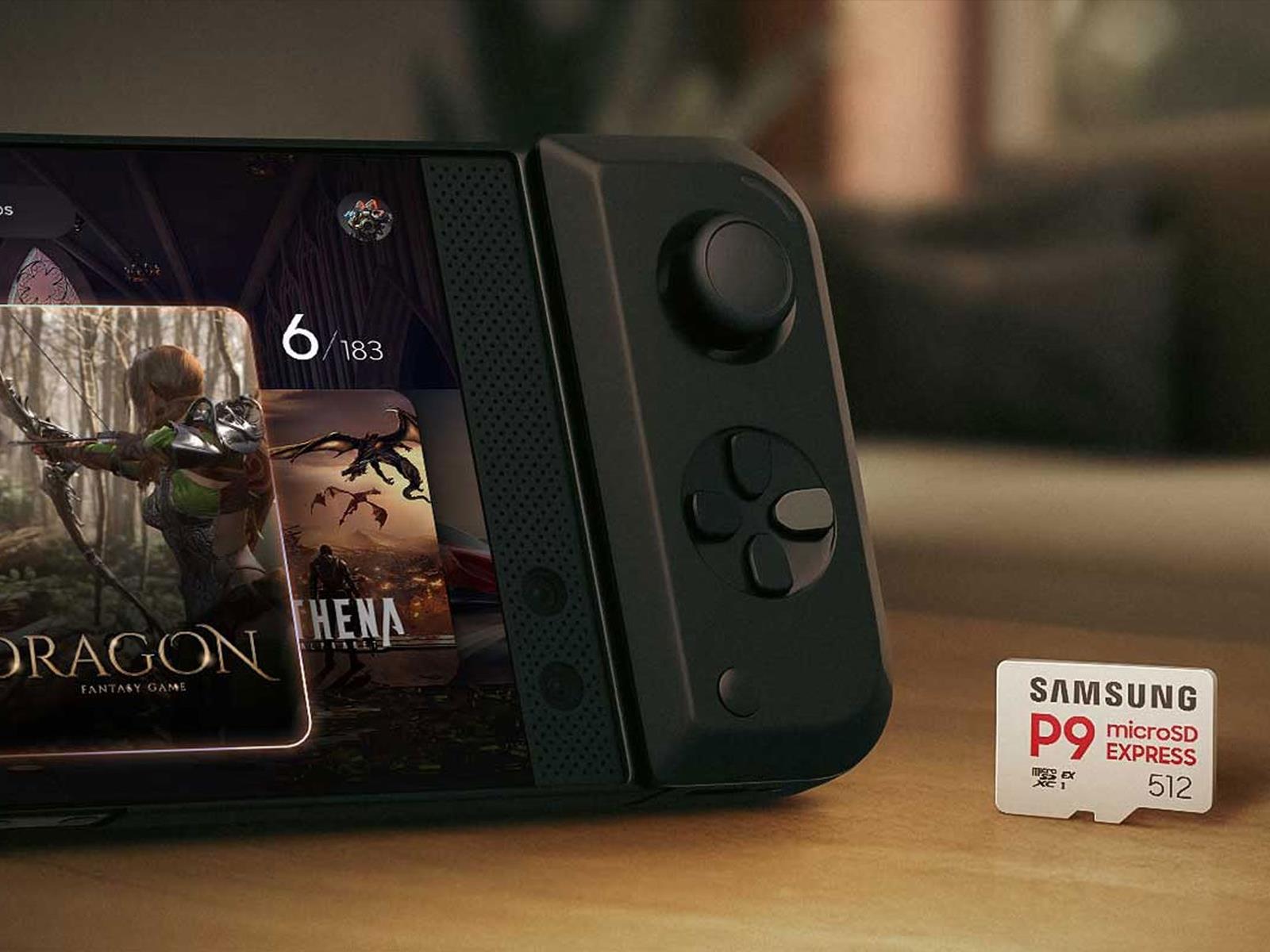
Samsung is expanding its range of storage card solutions with the release of the P9 Express, a microSD Express memory card with enough speed to keep up with gaming handhelds like Nintendo’s Switch 2. While not exclusively aimed at the Switch 2, Nintendo’s newest console is a big reason why we’re starting to see more microSD Express memory
Foundation says it won’t compromise policy of inclusivity even if that cash would’ve really helpedThe Python Software Foundation (PSF) has walked away from a $1.5 million government grant and you can blame the Trump administration’s war on woke for effectively weakening some open source security. …
We may earn a commission from links on this page. Deal pricing and availability subject to change after time of publication.
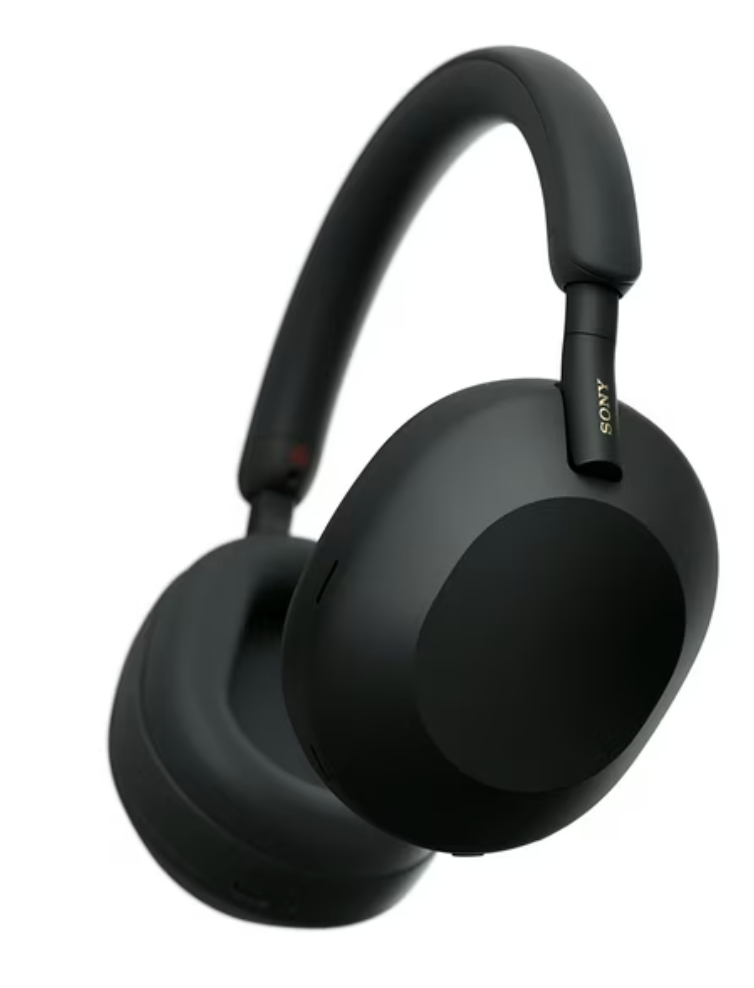
Sony’s WH-1000XM series has long been the gold standard for noise-canceling headphones, and while the new WH-1000XM6 has taken the spotlight, the WH-1000XM5 remains a standout, especially at a lower price. Right now, they’re down to $284.99 at Walmart, a notable drop from their usual $399.99 list price and lower than Amazon’s current $328 listing.
These are the same award-winning headphones that were lauded when they launched in 2022, with PCMag giving them 4.5 out of 5 stars for their sound, noise cancellation, and comfort. They still rank among the best wireless headphones available, and this discount makes them a smarter buy than ever for anyone who doesn’t need the very latest model.
The WH-1000XM5 uses 30mm carbon fiber drivers powered by Sony’s Integrated Processor V1, and that combo still sounds excellent in 2025. Music has depth and balance, with enough punch to handle bass-heavy tracks without losing detail in vocals or instruments. What’s impressive is how little the audio quality changes when ANC is turned on, something cheaper models often struggle with. The noise cancellation itself is among the strongest you’ll find, easily cutting out low-frequency hums from engines or chatter in public spaces. As for connectivity, these headphones connect over Bluetooth 5.2 and support AAC, SBC, and LDAC codecs (meaning you get high-resolution audio over Bluetooth, provided your device supports it), plus multipoint pairing if you juggle between devices.
Comfort and design are other strengths. The lightweight frame and soft-fit leather earcups make long sessions easy, whether you’re working, commuting, or zoning out on a flight. That said, the touch controls on the earcups can take some getting used to—swipes for volume, taps for play/pause—but you can fine-tune them in the Sony Sound Connect app, which also lets you tweak EQ settings and ANC sensitivity. Battery life is solid at around 30 hours with ANC on, and they charge quickly through USB-C. There’s also a 3.5mm audio jack for wired listening when you don’t want to think about battery life.
Among the usual slew of AI enhancements to its Creative Cloud apps, Adobe has introduced a new Photoshop AI Assistant to help automate repetitive chores and provide personalized recommendations. At Adobe Max 2025, the company also introduced new tools for Photoshop, Premiere and Lightroom, while launching a new AI generative model and bringing in new third party models from Topaz and others.
A key new feature in Photoshop and Express (Adobe’s all-in-one design, photo, and video tool) is the AI Assistant that lets you can chat with in a conversational manner to gain “more control, power and potential time-savings,” according to Adobe. With that, you can tell it to take on a series of creative tasks like color correction on resizing. You can easily switch between prompts with the agent and manual tools like sliders to adjust brightness and contrast. It can also provide personalized recommendations and offer tutorials on how to accomplish complex tasks.
In a brief demo, Adobe showed that when you switch to Photoshop’s “agentic” mode in those apps, it minimizes the usual complex interface and leaves you with a simple prompt-based UI. You can then type in the task you want to accomplish, and the agent will perform those steps automatically. You can then jump back into the full interface to fine tune the result by changing things like brightness or levels.
Along with the AI Assistant, Adobe introduced a few other AI tools for Photoshop. Chief among those are new partner models for generative fill that lets you easily remove unwanted objects and fill in the hole left behind. Those include Google Gemini 2.5 f!ash, Black Forest Labs FLUX.1 Kontext and Adobe’s latest Firefly Image Models. It also introduced Firefly Image Model 5, Adobe’s most advanced image generation model yet.
Photoshop also gains new Generative Upscale option that uses Topaz Lab’s AI to upscale small, cropped and other low-resolution images into 4K with “realistic detail,” Adobe says. Another feature, Harmonize, lets you place objects or people into different environments in a realistic manner, eliminating much of work necessary for such compositing. Harmonize also matches the light, color and tone of foreground objects and people to the background.
Adobe
Premiere, meanwhile, introduced a similar feature called AI Object Mask that performs automatic identification and isolation of people and objects in video, so they can be edited and tracked without any manual rotoscoping. The app also gains new rectangle, ellipse and pen masking in Premiere to make targeted adjustments, along with a fast vector mask for quicker tracking.
Finally, LIghtroom is getting a new feature called Assisted Culling. It lets you quickly and easily identify the best images in a large photo collection, with the ability to filter for things like focus level, angles and degrees of sharpness.
Photoshop’s Generative Fill with Partner Models, Generative Upscale and Harmonize are now available to customers today. Premiere’s AI Object Mask, Rectangle, Ellipse and Pen Masking and Fast Vector Mask, along with Lightroom’s AI Assisted Culling, launch today in beta. Adobe’s Photoshop AI Assistant, meanwhile, will be available through a private beta waitlist.
This article originally appeared on Engadget at https://www.engadget.com/apps/adobes-new-photoshop-ai-assistant-can-automate-repetitive-tasks-120032017.html?src=rss
Adobe has released the latest version of Firefly that now leans heavily on AI for nearly every facet of video and image post-production. The updated app can now use AI to generate narration, music, images and video clips, while even helping you to brainstorm ideas and piece together clips. Many creators may find it distasteful to lean on AI for nearly every aspect of production, but Adobe calls it “a tool for, not a replacement of, human creativity.”
Firefly has mostly been a content generation tool until now, but Adobe has now introduced the Firefly video editor into private beta. It’s a web-based multitrack timeline editor, not unlike Adobe Premiere Pro, that lets you generate, organize, trim and arrange clips, with tools to add voiceovers, soundtracks and titles. You can organize existing Firefly content or generate new ones inside the editor (with presets like claymation, anime and 2D), and combine that with captured media. All that can be edited with “frame-by-frame precision or through a built-in transcript,” Adobe said.
On top of video, Firefly eliminates the need for humans to make voiceovers and music, too. Adobe’s new Generate Soundtrack (public beta) is a Firefly Audio Model-powered AI music generator that lets you select a style or comes up with one to match any clip you upload. It then syncs and times it precisely with that footage.
Generate Speech, meanwhile, does the same thing for voiceovers. It gives you a choice between Firefly’s Speech Model and one for ElevenLabs, letting you generate “lifelike voices in multiple languages, and fine-tune emotion, pacing and emphasis for natural, expressive delivery.”
Adobe
Adobe is also expanding access to its Fire!y Creative Production tool directly in the Fire!y app as a private beta to start with. It’s a complete AI-powered batch image editing system that lets creators piece together clips, automatically replace backgrounds, apply uniform color grading and crop in via a prompt-driven, no code interface.
Then there’s Fire!y Boards, an “AI-powered ideation surface” to brainstorm new concepts. A feature called “Rotate Object” helps you convert 2D images into 3D so you can position objects and people in different poses and rotate them to new perspectives. Two others, PDF exporting and bulk image downloading, speed the the process of sharing visual concepts across projects.
Finally, Prompt to Edit (available now on Firefly) is a conversational editing interface that allows you to use everyday language to describe the edits you want to make to an image, much as you’d use text-to-image tools like Midjourney to create new images. It’s available with Adobe’s latest Fire!y Image Model 5 AI, along with partner models from Black Forest Labs, Google and OpenAI.
With Firefly’s AI now able to handle every aspect of production, you may be wondering if this will result in a wave of unwatchable AI “slop” appearing on YouTube and elsewhere. The answer is “probably,” but it won’t necessarily be cheap. Standalone Firefly subscriptions are $10/month for the basic plan (20 five-second videos), $20/month for the the Pro plan (40 five-second videos) and $199 for the Premium plan (unlimited videos). However, Adobe is throwing in free image and video generation (with some restrictions) for all Firefly and Creative Cloud Pro customers until December 1st. All the new tools are now available either as part of the update, in public beta or in private beta as mentioned above.
This article originally appeared on Engadget at https://www.engadget.com/apps/adobes-firefly-can-now-use-ai-to-generate-soundtracks-speech-and-video-120018593.html?src=rss
Insta360 has launched a new camera that sits between the X4 and its current flagship, the X5. The company says the new Insta360 X4 Air is lightest-ever 8K 360-degree camera at just 165 grams. It is definitely lighter than the 200-gram X5 and the 203-gram X4 cameras, but the company says it packs flagship-level features. The camera has 1/1.8-inch sensors and can capture footage with a 134 percent increase in pixel area per frame compared to recording by the X4. It has lenses that users can replace in seconds, with optical coating that doubles its drop resistance compared to its predecessor. The camera is also waterproof up to 49 feet underwater.
The company explained that while the “X5 is engineered for precision, X4 Air is made for freedom.” It’s compatible with most X5 accessories, but since the camera itself is lighter, the whole setup will still be easier to handle. The X4 Air also has a built-in wind guard like the X5 and captures footage from every angle with its dual fisheye lenses. You can later reframe your footage in the Insta360 app to give your viewers various perspectives of what you shot. It has gesture controls and other intelligent tools the X5 also has, and its Invisible Selfie Stick enables drone-like shots like in other Insta360 cameras. Being lighter, however, means it has a battery with a lower capacity: It can last around 88 minutes while shooting at 8K 30fps, whereas the X5 can last up to 100 minutes.
Insta360 X4 Air comes in black or white and is now available for certain regions on the company’s website and on Amazon. It’s coming “soon” in the US and Canada. The Standard bundle will set you back $400, while the Starter bundle that comes with a 114cm invisible selfie stick, a lens cap and an extra battery will cost you $440. Whatever you choose, you’re getting a free one-year subscription to the Insta360+ cloud service with 200GB of storage with your purchase.
This article originally appeared on Engadget at https://www.engadget.com/cameras/insta360-x4-air-is-a-lightweight-8k-360-degree-camera-120017733.html?src=rss
Adobe Max kicked off today with a slew of announcements — mostly in the world of AI. But the company also used its creative conference to share that Adobe Premiere’s video editing tools are being integrated into YouTube Shorts.
It’s no secret that YouTube has been taking every step it can to make Shorts compete with TikTok and Instagram Reels. Now, YouTube creators will be able to access Premiere mobile in Shorts by clicking on “Edit in Adobe Premiere.” It will include Adobe’s editing tools, generative sound effects and, of course, a range of AI features powered by Firefly.
YouTube Shorts creators will also see “exclusive” options like a range of effects, presets and transitions. Similarly, they can choose to go for an existing template designed for Shorts or customize ones that can be shared among creators. Adobe Premiere arrived on iOS devices in September, but creators have to export content to YouTube.
In a statement, Adobe’s chief technology officer and senior vice president of digital media, Ely Greenfield, referred to YouTube as “the world’s biggest stage.” He continued, “YouTube Shorts has become the ultimate launchpad for creators, and bringing Adobe Premiere mobile’s pro-grade video editing tools to millions of YouTube creators helps them make standout content and reach new audiences.”
The exact timeframe isn’t clear, with Adobe simply saying that Premiere mobile is coming to YouTube Shorts “soon.”
This article originally appeared on Engadget at https://www.engadget.com/entertainment/youtube/youtube-shorts-will-integrate-adobe-premieres-video-editing-tools-120013562.html?src=rss
When the first big wave of handheld PCs hit the market two to three years ago, they were designed as more travel-friendly and convenient alternatives to traditional gaming rigs. That meant reduced performance in exchange for increased portability. However, there will always be enthusiasts who want more: increased horsepower, better battery life and all sorts of extra features. Out of all the handhelds on the market today, there’s practically no device with more tools and special equipment than the Lenovo Legion Go 2. However, just like a luxury SUV, this bucket of components commands a hefty premium and has capabilities that you might not use every day. But if you are the type of person who’s looking for a flagship portable PC with all the bells and whistles, the Legion Go 2 is a true utility gaming handheld.
Design
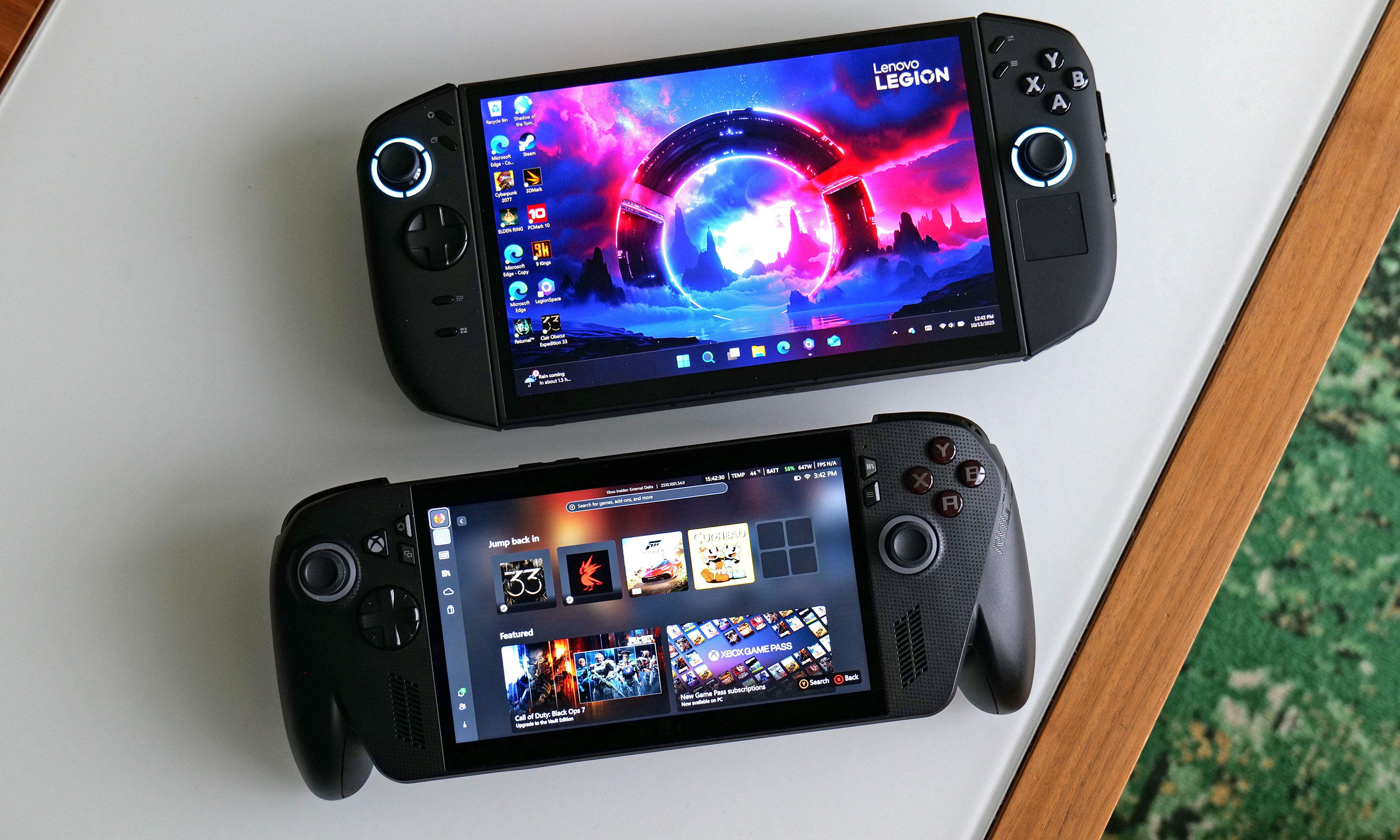
The Legion Go 2 looks like a Switch 2 that’s fattened up before hibernating for the winter. It has the same basic design with detachable controllers on either side and a screen in the middle; it’s just way bigger and bulkier. The Legion Go 2 weighs two pounds and measures 11.6 inches wide (with its controllers attached) compared to 1.6 pounds and 11.4 inches for the ROG Xbox Ally X (and that’s including its big, pronounced grips). Both devices make the Switch 2 look downright petite with its 1.2 pounds and 10.7-inch-wide frame.
Both the Legion Go 2’s left and right controllers can be detached. However, Lenovo used regular old latches instead of magnets, so removing them is clunkier compared to the Switch 2.
Sam Rutherford for Engadget
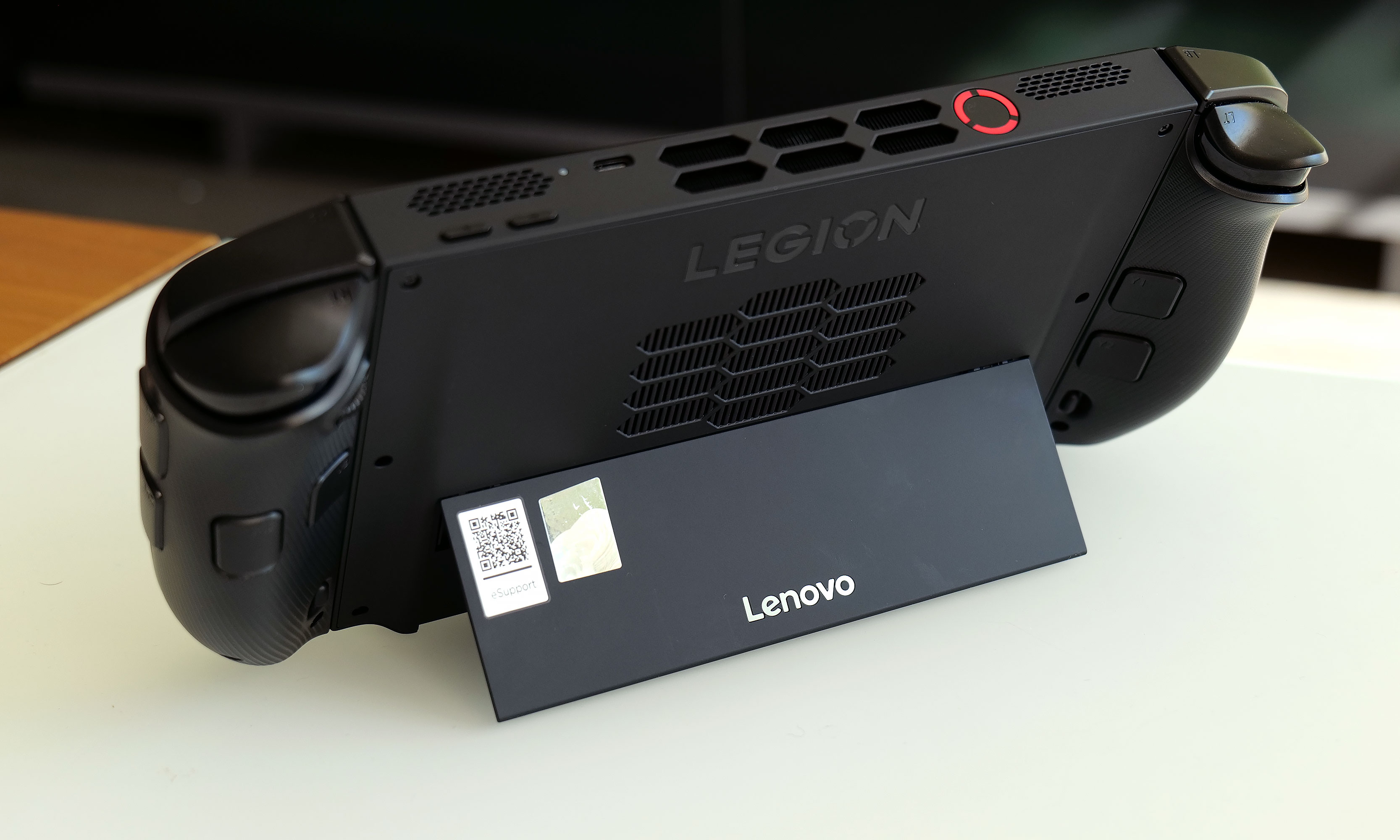
Unfortunately, without the magnets that Nintendo uses on the Joy-Con, disconnecting the gamepads on the Legion Go 2 isn’t nearly as smooth or easy, but it’s still relatively manageable. On the flipside, Lenovo uses Hall Effect sensors for its joysticks, which makes them super responsive, even though they’re lighter to push around. I appreciate that, unlike many of its rivals, Lenovo kept the kickstand from its predecessor, as it’s super handy if you want to prop the Legion Go 2 up and use it like a mini desktop.
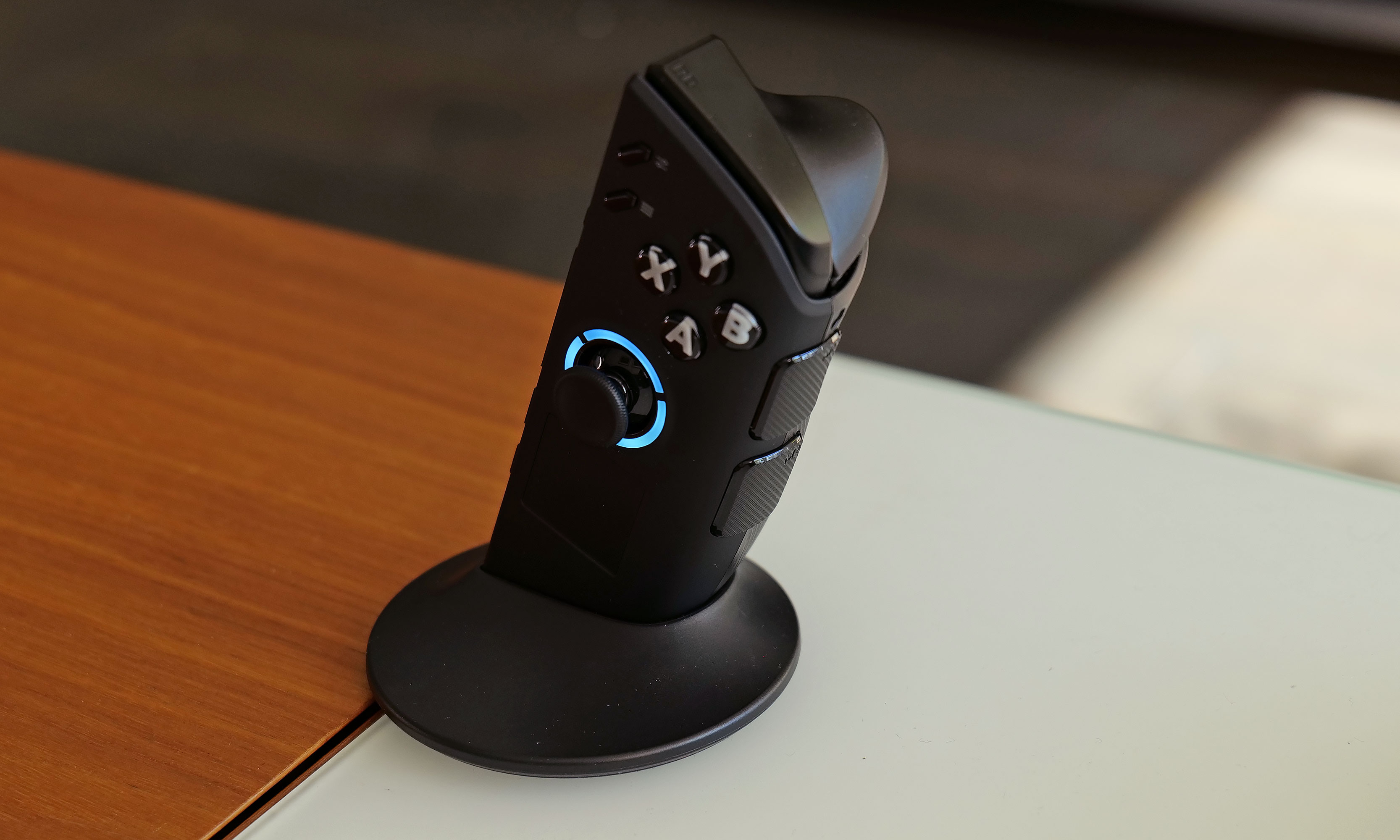
Elsewhere, there is a familiar layout for the Legion Go 2’s D-pad, face buttons and shoulder triggers/bumpers, along with two pairs of paddles around back. Critically, Lenovo retained the built-in touchpad on the right controller, which is super handy for those times when you need to mouse around in the Windows 11 desktop. And like its predecessor, you can detach the right gamepad, flick the hidden switch on the bottom into FPS mode and then combine it with Lenovo’s included base to create a vertical mouse of sorts.
Here’s how the size of the Lenovo Legion Go 2 (top) compares to a major rival like the ROG Xbox Ally X (bottom).
Sam Rutherford for Engadget
Ostensibly, this setup is meant for people who want extra precision in shooters and there is even an extra set of mouse buttons and an embedded scroll wheel on the controller for that reason. The one hiccup for me is that the puck isn’t that much smaller than a typical travel mouse. If I really want ultimate control in FPS games, I’m going to use one of those instead of Lenovo’s more awkward alternative.
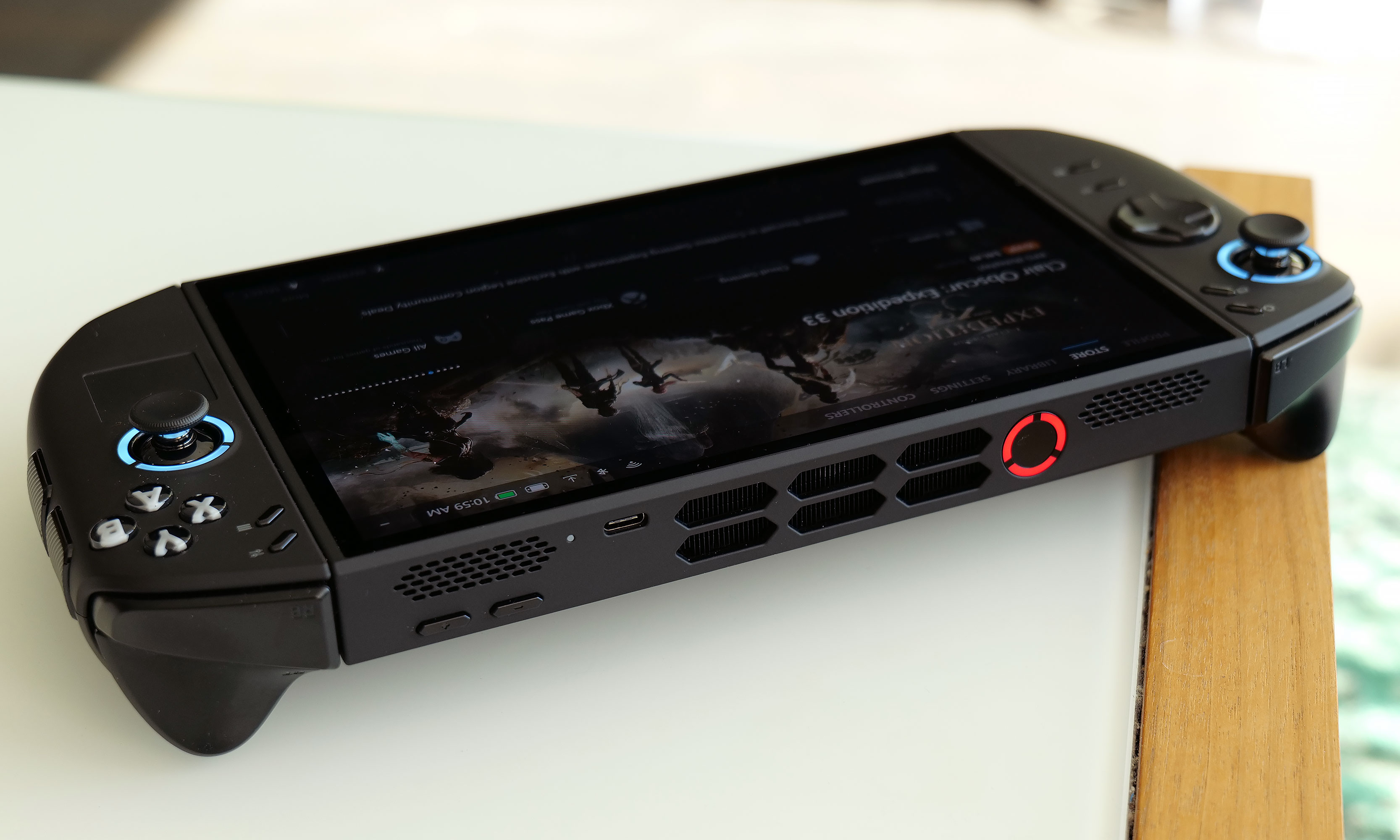
As for connectivity, the Legion Go 2 features two USB-C ports (one on top and one on bottom) which support data (up to 40 Gbps), power delivery and display output. There’s also a microSD card slot for expandable storage and a 3.5mm audio jack.
While a lot of rival handhelds skip this feature, I appreciate that Lenovo still put a kickstand on the back of the Legion Go 2.
Sam Rutherford for Engadget
I have two small nitpicks with the Legion Go 2’s design (aside from its size). First, the headphone port is on the bottom, which isn’t ideal as I feel like the top USB-C connector is easier to use when gaming while plugged into the wall. Secondly, Lenovo’s fingerprint reader (which is built into the power button) is rather finicky. I didn’t have issues unlocking the device, but the sensor is so sensitive that often when I pressed the power button to put the Legion Go 2 into sleep mode, the screen turned off before turning itself on again. This resulted in multiple occasions where I thought I put the handheld to sleep inside the included case (kudos to Lenovo for that freebie) only to come back to a device that was very much awake and felt like it was on the verge of cooking itself inside its padded enclosure.
Display
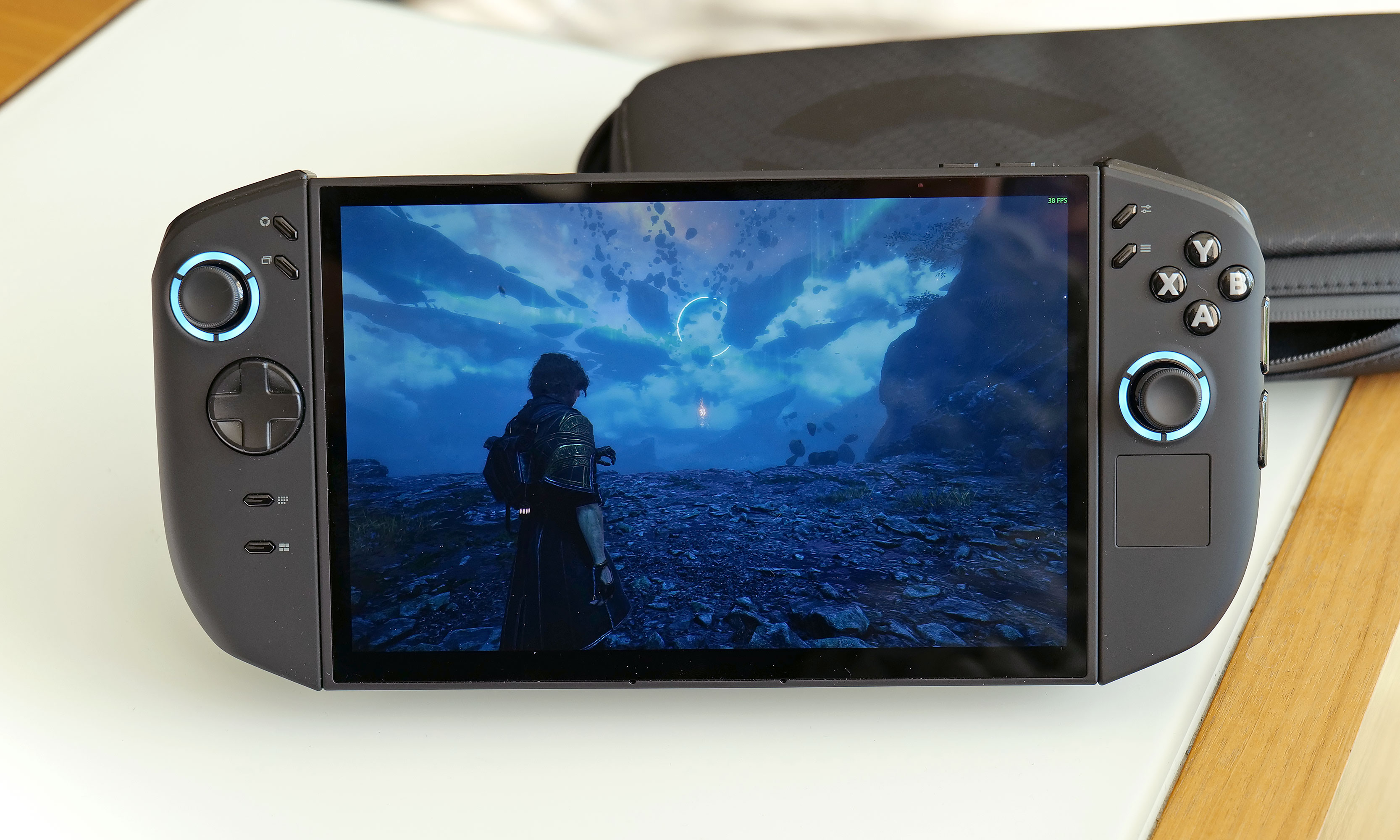
One of the best features on the Legion Go 2 is its massive 8.8-inch OLED display.
Sam Rutherford for Engadget
If money and size are not an issue, Lenovo’s massive OLED display is the biggest reason to choose the Legion Go 2 over rivals like the ROG Xbox Ally X. At 8.8 inches, it’s significantly larger than the 7-inch panel on the ASUS or the 7.9-inch screen on a Switch 2. Not only are its colors super rich and saturated, it has a slightly higher 144Hz refresh rate and a taller 16:10 resolution (1,920 x 1,200). And at 500 nits, it’s just as bright as the screen on the ROG Xbox Ally X. The downside is that if you want to game at the Legion Go 2’s native res, it does take a little bit of extra performance to achieve stable, playable framerates.
Performance and software
The $1,100 base model of the Legion Go 2 comes with an AMD Ryzen Z2 chip with 16GB of memory and 1TB of storage. However, if you want even better performance, you’ll need to upgrade to the $1,350 version that comes with a Z2 Extreme chip and 32GB of RAM, which is the configuration I tested for this review. Frankly, that is a lot of money to drop on a gaming handheld of any kind, though the Legion Go 2 does make up for it with class-leading performance. Well, almost.
If you want big performance, the Z2 Extreme version of the Legion Go 2 is among the best on the market.
Sam Rutherford for Engadget
While the maxed SKUs of both the Legion Go 2 and ROG Xbox Ally x are based on the same Z2 Extreme chip, Microsoft was able to tweak some of Windows 11’s tasks and services that run in the background on Lenovo’s’ rival. And while there isn’t a huge gap between the two, that optimization does make a difference.
Generally, the ROG Xbox Ally produced framerates that were around seven percent higher than what I got from the Legion Go 2 at the same graphics settings and resolution. In Cyberpunk 2077 at 35 watts on medium, 1080p resolution and FSR set to performance, the Legion Go 2 hit 57.5 fps compared to 62.1 fps for the ROG Xbox Ally X. Meanwhile in Returnal at 17 watts on medium, the Lenovo reached 39 fps versus 42 for ASUS. Depending on the game and the exact resolution you’re using, that could mean the difference between something being a good experience or not. For example, in Clair Obscur: Expedition 33 at 1080p on medium, the ROG Xbox Ally X hovered right around 30 fps. Granted, that isn’t ideal, but it’s not bad for a handheld running a relatively new title. But on the Legion Go 2 at its native res, its average framerate was closer to 25 fps, which forced me to drop down to low settings to get a smoother experience.
This is what the Legion Go 2’s controller looks like when you use it in FPS mode.
Sam Rutherford for Engadget
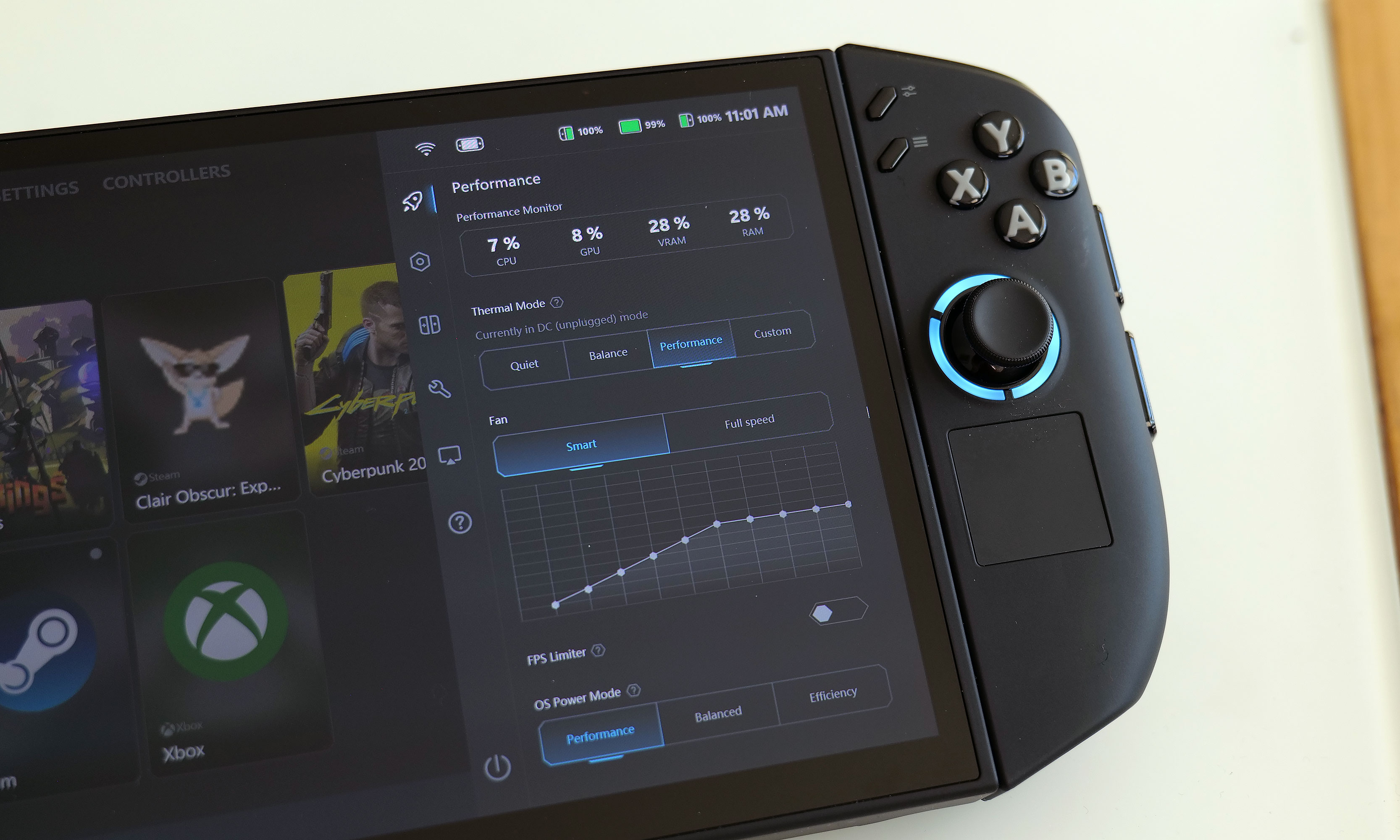
Like a lot of Windows-based handhelds, it’s important to remember that you get more speed when connected to a power outlet. For example, the Legion Go 2’s Performance mode tops out at 20 watts when not plugged in, but increases to 32 watts when it is. And if you want to go all out, you’re best off using the Custom setting, which gives you a sustained TDP of 35 watts and the ability to boost to 45 watts for up to 10 seconds.
As for the software, Lenovo’s Legion Space app has come a long way and it’s turned into a solid one-stop shop for launching games, adjusting settings and tweaking performance. As always with Windows-based handhelds, there’s still a bit of awkwardness during setup when you’re installing titles and having to switch between various menus. Thankfully, Lenovo’s built-in touchpad helps smooth that out quite a bit. I’d also argue that because of that trackpad and the handheld’s adaptable design, the Legion Go 2 is the most well-equipped portable for anyone who wants to use it like a mini PC. You can prop the display up with its kickstand, connect a display via USB-C and pair a wireless keyboard and mouse (or use the right controller in FPS mode) and suddenly you’ve got a little desktop for getting some real work done. (Who are we kidding, this is still going to be used for gaming, just on a bigger display with better controls.)
Battery Life
The top edge of the Legion Go 2 features one USB-C port and its power button/fingerprint reader, while the other is on the bottom along with a 3.5mm audio jack and a microSD card reader.
Sam Rutherford for Engadget
Thanks to a 74WHr cell and a more efficient chip, the Legion Go 2 has gotten a nice bump battery life over its predecessor. However, due to its big display, its longevity isn’t quite as good compared to the ROG Xbox Ally X. I tested this by playing Clair Obscur: Expedition 33 at 1080p on medium graphics and max brightness. The Legion Go 2 did well, lasting almost three hours, though that was 30 minutes shy of what I got from the ROG Xbox Ally X. While you can game for a decent length of time untethered, for any longer trips or time away from an outlet, you’ll definitely want to keep the included 65-watt power adapter close at hand.
Wrap-up
The Lenovo Legion Go 2 is large and in charge — both in price and size. The base model starts at $1,100, which is already $100 more than a fully kitted-out ROG Xbox Ally X with a Ryzen Z2 Extreme chip. Meanwhile, to get the same silicon on Lenovo’s handheld, you have to shell out $1,350, and even then, its performance still lags just a tad behind Microsoft and ASUS’ collab. But what the Legion Go 2 lacks in value, it makes up for in versatility.
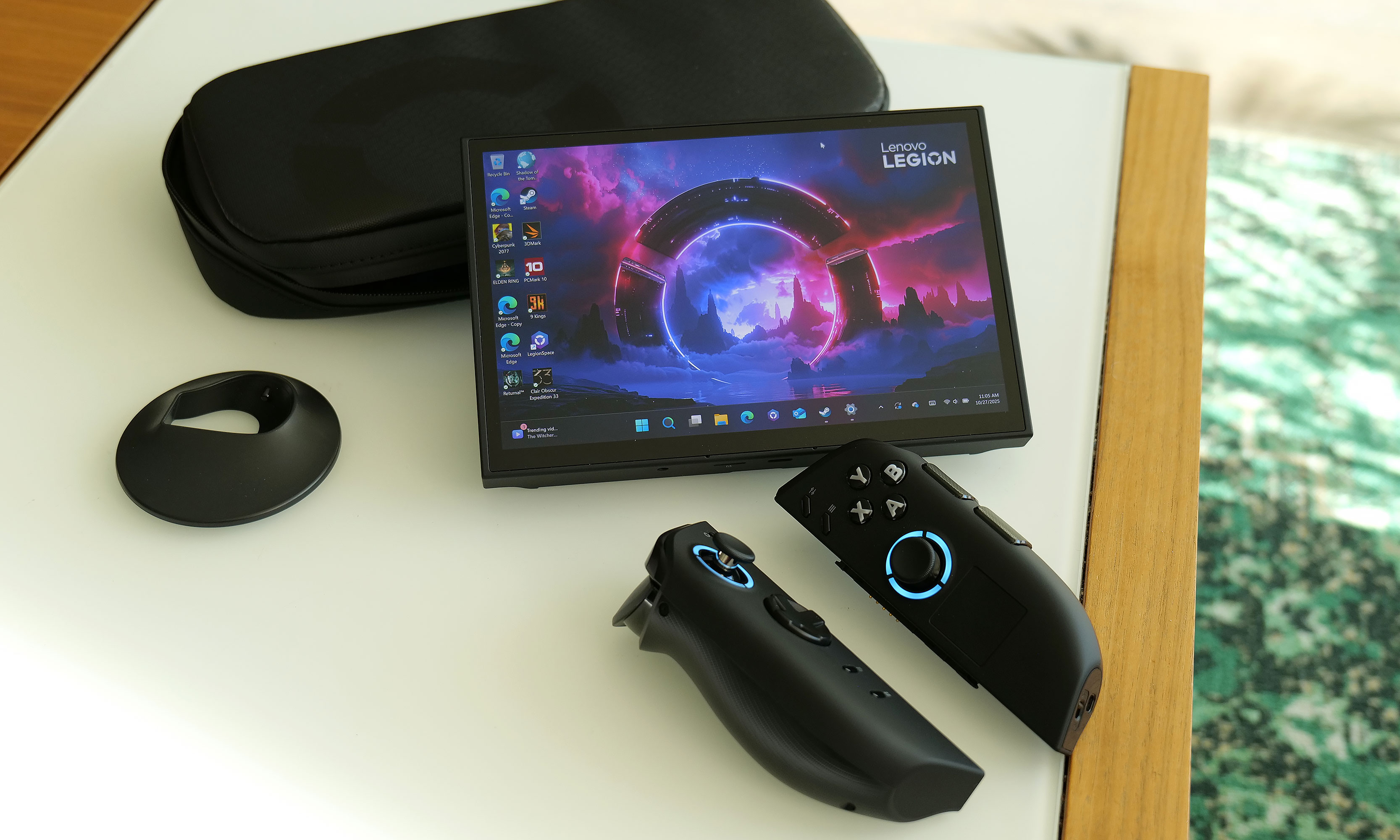
The Legion Go 2 comes with an included case and a puck that turns its right controller into a vertical mouse.
Sam Rutherford for Engadget
Its 8.8-inch OLED display is a huge upgrade in terms of both screen space and image quality, while features like its touchpad, detachable controllers and kickstand make this thing feel more like a portable hybrid PC than a single-purpose gaming machine. Just like an SUV that might go off-road once or twice a year, you might not use the Legion Go 2’s full capabilities all the time, but when you do and everything comes together, you realize all that utility isn’t just for show. While the ROG Xbox Ally X is the better value, I appreciate how Lenovo’s handheld was made to handle a variety of battle conditions.
This article originally appeared on Engadget at https://www.engadget.com/gaming/pc/lenovo-legion-go-2-review-the-utility-pc-gaming-handheld-120000533.html?src=rss
Earlier this month Intel announced Crescent Island as a Xe3P graphics card with 160GB of vRAM optimized for AI inferencing at the enterprise scale. Crescent Island isn’t expected to begin sampling until H2’2026, but already for the upcoming Linux 6.19 kernel initial Crescent Island support is being submitted for the Xe kernel graphics driver…
On Friday, the California Supreme Court ordered the University of California system to release the details of a proposed deal from the federal government that would restore research grants that were suspended by the Trump administration. The proposed deal, first issued in August, had remained confidential as a suit filed by faculty at UCLA made its way through appeals. With California’s top court now weighing in, the university administrators have released the document, still marked “draft” and “confidential attorney work product.”
Most of the demands will seem unsurprising to those familiar with the Trump administration’s interest: an end to all diversity programs and those supporting transgender individuals, plus a sharp crackdown on campus protests. The eye-opening portion comes at the price tag of nearly $1.2 billion paid out, with UCLA covering all the costs of compliance. And, as written, the deal wouldn’t stop the Trump administration from cutting the grants for other reasons or imposing more intrusive regulations, such as those mentioned in its university compact.
Familiar concerns
In many ways, the proposed deal is much more focused than the odd list of demands the administration sent Harvard University earlier this year, in that it targets issues that the administration has focused on repeatedly. These include an end to all diversity programs at both the faculty and student levels. It demands that UCLA agree to “remove explicit or implicit goals for compositional diversity based on race, sex, or ethnicity, including eliminating any secretive or proxy-based ‘diversity’ hiring processes.”
As efforts continue to hold some of the world’s largest fossil fuel corporations liable for destructive and deadly climate impacts, backlash from the politically powerful oil and gas industry and its allies in government is on the rise, bolstered by the Trump administration’s allegiance to fossil fuels.
From lobbying Congress for liability protection to suing states over their climate liability laws and lawsuits, attempts to shield Big Oil from potential liability and to shut down climate accountability initiatives are advancing on multiple fronts.
“The effort has escalated dramatically in the past six or seven months,” said Richard Wiles, president of the Center for Climate Integrity, an organization that advocates for holding fossil fuel companies accountable for selling products they knew were dangerously warming the planet.
Spinning off from Rivian, the TM-B e-bike is Also’s attempt at a do-it-all e-bike. It’s pitching it as flexible enough for commuting, trail riding or kid- and cargo-hauling because its modular frame can swap in bench seats or cargo racks. But the frame only comes in a single size. Still, Also (hate that name) says the standard battery is good for 60 miles of riding and can be charged via USB-C.
Engadget
Besides the modularity, another unique feature is its drive system, called DreamRide. Instead of a mechanical connection between the bike’s rear wheel and the pedals, the TM-B uses “software-defined pedaling,” so pedaling transfers to the generator (and the battery) instead of simply pushing you forward. It’s a different take on e-bike riding, and I’m not entirely sold on it.
From the people that brought you Rivian vehicles, there are plenty more tech touches, including a 5-inch touchscreen display and a built-in security system that automatically locks the frame and rear wheel when you walk away, a la Cowboy and VanMoof.
The first model to ship will be the $4,500 TM-B Limited Launch Edition, which has a range of up to 100 miles. There’s also a $4,500 TM-B Performance model, with a slightly different color scheme, available in the “first half” of 2026. Finally, there’s a base-level TM-B model with a range of up to 60 miles, which only comes with standard ride modes. Also hasn’t announced an exact price but says it will cost less than $4,000 when it ships “later in 2026.”
A preview version of Google’s long-awaited AI health coach launches tomorrow for some Fitbit Premium users in the US. Google says it’ll incorporate user feedback to “add, change or improve features and capabilities.” The company warns users that “initially, there will be some gaps” as it sort of beta tests the coach. The coach can be a sounding board for personal health, fitness and sleep goals and also acts as a personal trainer. Google says it can check progress, create workouts, give advice on trends and review and adjust fitness plans.
The US Customs and Border Protection (CBP) submitted a new measure that allows it — for facial recognition — to photograph any non-US citizen who enters or exits the country. CBP and the Department of Homeland Security want to crack down on threats of terrorism, fraudulent use of travel documents and anyone who exceeds their authorized stay, according to a filing with the government’s Federal Register. The government agency can already request photos and fingerprints from anyone entering the country, but this rule change would allow it to gather photos of anyone exiting as well.
As global temperatures rise, some scientists believe we need to do everything we can to prevent catastrophic warming—no matter how crazy some potential solutions may sound.