
Following Canonical announcing plans to better support NVIDIA CUDA on Ubuntu Linux and make it easier to install as well as SUSE better supporting CUDA along similar lines, Red Hat today affirmed their plans to do the same. Red Hat will be making it easier to use the NVIDIA CUDA stack across RHEL, Red Hat AI, and OpenShift products…
Monthly Archives: October 2025
Elon Musk’s ‘Grokipedia’ Is Certainly No Wikipedia
Wikipedia is a treasured online resource that, despite massive changes across the web, has managed to remained truly great to this day. I, alongside millions of other users, visit the site daily to learn something new or double-check existing knowledge. In an age of non-stop AI slop, Wikipedia is something of an antidote.
If you look at Wikipedia and think “this is alright, but an AI version would be a lot better,” you might just be Elon Musk. Musk’s AI company, xAI, just launched Grokipedia—yes, that really is its name—an online encyclopedia that closely resembles Wikipedia in name and surface-level appearance. But under the hood, the two could hardly be any more different. Though it’s early days for the new “encyclopedia,” I’d say it’s not worth using, at least not for anything real.
The Grokipedia experience
When you load up the Grokipedia website, it looks fairly standard. You see the Grokipedia name, alongside the version number (v0.1, at the time of writing), alongside a search bar and an “Articles Available” counter (885,279). Searching for an article too is basic: You type in a query, and a list of available articles appears for you to select from. Once you pull up an article, it looks like Wikipedia, only extremely basic: There are no images, only text, though you can use the sidebar to jump between sections of the article. You’ll also find sources, noted by numbers, which correspond to the References portion at the bottom of each article.
The key difference between Grokipedia and a simple version of Wikipedia, however, is that these articles are not written and edited by real people. Instead, each article is generated and “fact-checked” by Grok, xAI’s large language model (LLM). LLMs are able to generate large amounts of text in short periods of time, and include sources for where they pull their information, which might make the pitch for Grokipedia sound great to some. However, LLMs also have a tendency to hallucinate, or, in other words, make things up. Sometimes, the sources the AI is pulling from are unreliable or facetious; other times, the AI takes it upon itself to “lie,” and generate text that simply isn’t true. In both cases, the information cannot be trusted, especially not at face value, which is why it’s troubling to see much of the experience is entirely powered by Grok, without human intervention.
Grokipedia vs. Wikipedia
Musk is pitching Grokipedia as a “massive improvement” over Wikipedia, which he has criticized for pushing propaganda, particularly towards left-leaning ideas and politics. It’s ironic, then, that some of these Grokipedia entries are themselves pulling from Wikipedia. As The Verge’s Jay Peters highlights, articles like MacBook Air note the following at the bottom: “The content is adapted from Wikipedia, licensed under Creative Commons Attribution-ShareAlike 4.0 License.” What’s more, Peters found that some Grokipedia articles, such as PlayStation 5 and the Lincoln Mark VIII, are almost one-to-one copies of the corresponding articles on Wikipedia.
If you’ve followed Musk’s politics and political activities in recent years, it won’t surprise you to learn he falls on the right-wing side of the political spectrum. That might give pause to anyone who considers using Grokipedia as an unbiased source of information, especially as Musk has continuously retooled Grok to generate responses more favorable to right-wing opinions. Critics like Musk claim Wikipedia is biased towards the left, but Grokipedia is entirely produced by an AI model with an abject bias.
You’ll see that you have very different experiences when reading certain topics across Wikipedia and Grokipedia. Wikipedia’s Tylenol article, for example, reads the following:
In 2025, Donald Trump made several statements about a controversial and unproven connection between autism and Tylenol. These statements, about the connection between Tylenol during pregnancy and autism, are based on unreliable sources without scientific evidence.
Compare that to Grokipedia, which devotes three paragraphs to the subject, the first of which begins:
Multiple observational studies and meta-analyses have identified associations between prenatal exposure to acetaminophen (the active ingredient in Tylenol) and increased risks of neurodevelopmental disorders (NDDs) in offspring, including attention-deficit/hyperactivity disorder (ADHD) and autism spectrum disorder (ASD).
That said, the second paragraph highlights some of the issues with those studies, while the third highlights that certain agencies suggest the “benefits outweigh unproven risks.”
Similarly, as spotted by WIRED, Grokipedia’s article, Transgender, highlights the belief that social media may have acted as a “contagion” to the rise in transgender identification. Not only is that a common right-wing assertion, that particular word could have been plucked from a post from a right-wing X account. Wikipedia’s article, as you might expect, does not entertain the claim at all.
Grokipedia is also favorable to unproven, controversial, or flat-out absurd claims. As Rolling Stone highlights, it refers to “Pizzagate,” a conspiracy theory that lead to a real-life shooting, as “allegations,” a “hypothesis,” and a “narrative.” Grokipedia gives credence to “Great Replacement,” a racist theory floated by white supremacists.
Should you use Grokipedia?
Here’s the short answer: no. The issue I have with Grokipedia is two-fold: First, no encyclopedia is going to be reliable when it is almost entirely created by AI models. Sure, some of the information may be accurate, and it’s great you can see the sources the bot is using, but when the risk of hallucination is baked into the technology with no way around it, choosing to avoid human intervention en masse all but ensures inaccuracies will plague much of Grokipedia’s knowledge base.
As if that wasn’t enough, this Grokipedia is built on an LLM that Musk is openly tinkering with to generate results that more closely align with his worldview, and the worldview of one particular political ideology. Hallucination and bias—just the ingredients you need for an encyclopedia.
The thing about Wikipedia is it’s written and edited by humans. Those humans can hold other human writers accountable, adding new information when it becomes available and correcting mistakes when they encounter them. Perhaps it’s frustrating to read that your favorite health and human services secretary “promoted vaccine misinformation and public-health conspiracy theories,” but that’s the objective, scientific reality. Removing these objective descriptions, and reframing the discussion in a way that fits a warped worldview doesn’t make Grokipedia better than Wikipedia—it makes it useless.
Apple Unloads 2025 iPads, Now Cheaper than Most Budget Android Tablets

Apple’s A16-powered tablet brings great performance to buyers looking for reliability and the iPadOS experience.
The post Apple Unloads 2025 iPads, Now Cheaper than Most Budget Android Tablets appeared first on Kotaku.
Amazon’s Once Massively Popular MMO Is Going On Life Support

New World at one point had over a million concurrent players on Steam, but will no longer get new content updates in 2026
The post Amazon’s Once Massively Popular MMO Is Going On Life Support appeared first on Kotaku.
TrueNAS 25.10 Released With NVMe-oF Support, OpenZFS Performance Improvements
TrueNAS 25.10 was released by iX systems today as the newest feature release of this Linux-based platform for network attached storage (NAS) devices and other storage appliances…
UK Cyclist Receives 3D-Printed Facial Prosthetic After Crash Left Him With Third-Degree Burns
A cyclist who received severe third-degree burns to his head after being struck by a drunk driver has been fitted with a printed 3D face. The Guardian: Dave Richards, 75, was given a 3D prosthetic by the NHS that fits the space on his face and mimics his hair colour, eye colour and skin. […] While recovering, he was referred to reconstructive prosthetics, which has opened the Bristol 3D medical centre, the first of its kind in the UK to have 3D scanning, design and printing in a single NHS location. Richards, from Devon, said surgeons tried to save his eye but “they were worried any infection could spread from my eye down the optic nerve to the brain so the eye was removed.”
[…] He called the process of getting a 3D-printed face “not the most pleasant.” He added: “In the early days of my recovery, I felt very vulnerable, and would not expose myself to social situations. It took me a long time to feel comfortable about my image, how I thought people looked at me and what they thought of me — but I have come a long way in that respect.”


Read more of this story at Slashdot.
A pair of MultiVersus directors are launching a new game studio
Two directors from MultiVersus are striking out on their own, forming a new, independent game studio. The platform brawler’s production director, Justin Fischer, and technical director, Brock Feldman, have joined forces to launch a new endeavor called Airlock Games. Rather than continuing to follow the AAA route, the first project from Airlock is a sci-fi sim management horror game called What the Stars Forgot. The team plans to run a Kickstarter to generate backing for the game ahead of a planned early access launch in December.
Player First Games, the studio behind MultiVersus, was acquired by WB Games last summer, but despite a promising early showing, the game was shuttered in May at the close of its fifth season. But the choice for devs to bounce back with something new and smaller is becoming a familiar refrain in the games industry after several years of layoffs and cancelations. After so many highly anticipated projects have gotten the axe as a money-saving, cost-cutting decision by large outfits, it makes sense that devs might want to have more control over their own destinies.
This article originally appeared on Engadget at https://www.engadget.com/gaming/a-pair-of-multiversus-directors-are-launching-a-new-game-studio-211118742.html?src=rss
One Of The Coolest Survival Horror Games This Year Is A Lo-Fi Revenge Quest Through Hell

Labyrinth of the Demon King is a double dose of nostalgia and grungy graphical dread
The post One Of The Coolest Survival Horror Games This Year Is A Lo-Fi Revenge Quest Through Hell appeared first on Kotaku.
I Tried Google’s New AI Health Coach, and It Left Me Utterly Baffled
We may earn a commission from links on this page.
Google has launched its “Personal Health Agent,” an AI coach available in the Fitbit app. Currently it’s in a “preview” mode, and limited to Android users in the U.S. who have a Fitbit Premium subscription. That group includes me, so I tried it, and it gave me some decent workouts. It also told me that the Pixel Watch 4, which Google makes, and which I reviewed, and which am currently wearing, does not exist. So, par for the course when it comes to AI.
How to enable the Fitbit app’s personal health coach
The “public preview” of this new coaching bot is available starting today for Fitbit Premium users in the U.S., provided they use Android. (Support for iOS is coming soon, Google says.) I’m a little unclear on what to call this bot—an email I got from Google calls it their “Personal Health Agent” and describes it as “Google Health’s AI coach.” A Google blog post calls it Fitbit’s “personal health coach.” In any case, it lives in the Fitbit app.
When the AI coach became available for me, I received a message at the top of my Today screen asking if I’d like to “try new Fitbit features before they’re available to everyone.” If you missed that prompt, you can go to your profile pic at the top right corner of the app and select Public Preview from the menu that appears.
Joining the public preview launches you into an entirely different version—dare I call it a beta?—of the Fitbit app. It doesn’t yet include menstrual health, mindfulness, nutrition, or community features, so to access those, you’ll need to switch back to the old version of the app. You can swap between versions at any time from the menu under your profile icon.
Setting up my fitness goals
Google says the new chatbot can answer general questions about health…but so can a web search, so I wasn’t too excited about that. What I did want to see was how well the bot could set up a coherent exercise plan for me—that’s the big feature Google is touting. It did pretty well, at first.
The coach asked the same kinds of questions I would expect a personal trainer to cover when putting together a plan. It seemed to have a nicely structured approach, and gathered this information:
-
My main goal (I told it I’d like to get back into a consistent habit after time off)
-
My biggest challenge (I said something about motivation and time)
-
How much exercise I was used to doing, including my running mileage and paces (it pulled this from my exercise data but let me make corrections)
-
What activities I like to do
-
When I like to do them (it noticed that my strength sessions tend to fall on Tuesdays and Thursdays)
-
What equipment I have available (it deduced I have space to run outdoors, and strength training equipment)
-
How many days each week I’d like to exercise
It responded well to my adjustments during the conversation. I told it I’d like to alternate strength training and running (with Saturdays off), starting today with a strength training session. It suggested a lower body focus to support my running, which I declined. I named some of my favorite lifts and asked if it could build the strength program around those. We were agreed—a six-day plan with strength and running was coming right up.
The bot told me it would take up to 10 minutes to generate my plan, but it only took about two. My workouts for the week matched what we’d discussed, with a few discrepancies. For example, I asked for pull-ups and it gave me assisted pull-ups. I also didn’t like the six-rep sets of squat and bench press, since I was hoping for heavier lifts with fewer reps. But there is an “adjust plan” button, and with some more back-and-forth, I was able to get it to tweak the workouts to my liking.
It has trouble planning for the long term
I was excited to look over my plan—to me, a plan sets out the steps to accomplish a goal. For a training plan, that would involve building toward that goal over a matter of weeks or months. For example, a marathon training plan would increase your mileage over time until you can run a strong 26 miles. In my case, with a goal of consistency, almost anything would fit the bill. This is easy mode for a trainer, AI or otherwise.
But what I got in the app was not what I would call a plan. It was four workouts, taking me from today to my rest day on Saturday. There was no way to view next week, or the week after that, or to see how many weeks were even in this alleged plan. I didn’t even have a way to see the last two days of my six-day plan.
I asked the bot what was coming up next, and it said it wasn’t able to tell me anything about next week. What about the end of this week? (We agreed on six days, after all.) It told me that the week is Tuesday through Saturday. I began to feel like those bodybuilders arguing over how many days are in a week. After some back-and-forth, it delivered me text descriptions of what Sunday and Monday’s workouts might look like, but they were incomplete, not even naming what lifts I’d be doing on the strength day. When I exited the conversation and looked at the workouts in the app, I only had the original four.
I tried asking another way, and the coach was able to give a broad overview of what the next few weeks might contain. Unfortunately the adjustments we’d previously discussed weren’t factored in, so it described how the second week would build on the originally programmed first week, not how it would build on the workouts that were actually on my calendar. If I were comparing this chatbot’s plan to something from, say, the Reddit fitness wiki, pretty much anything on the wiki would have been more comprehensive.
There’s no good way to follow the workouts
I’ve written before about the Pixel Watch’s barebones fitness tracking. (This applies to Fitbits like the Charge 6 as well.) You can turn on a strength training mode on the watch, but you can’t track rest times or note what exercises you did, though there is some ability to create and follow running workouts.
With that in mind, I didn’t expect to be able to follow the strength workouts from my watch, but I figured it was worth asking. The bot told me to just track a basic strength workout from the watch (which records heart rate and total time, nothing else) and follow the exercises from my phone. Fair enough.
But wait! The app just shows each exercise with a checkbox next to it. If you’re supposed to do three sets of six reps, you only get one checkbox, not three. And there’s no way to note how much weight you used so you can build on it next time. The bot told me we’d be doing some progressive overload, but how to progress if we’re not tracking how much weight I’m using?
OK, maybe strength is hard for a simple bot to track, but running workouts should be straightforward, right? The old version of the Fitbit app (which you can still access if you quit the preview) could recommend personalized running workouts and load them onto your watch, so that the watch coaches you through the different paces and intervals. I tried one out when writing my Pixel Watch 4 review, so I know the device can do it. I was hoping for a similar experience here.
But when I asked the bot about how to follow the running workouts, things got weird. It gave me step-by-step instructions to find the workouts on my Pixel watch, but the instructions were wrong. For example, it told me to swipe up to access the app list, but that’s not how you access the app list. And it told me that my workout should appear on a certain screen, but there were no workouts on that screen.
I let the bot talk me through a troubleshooting process, which derailed when I mentioned that my device was a Pixel Watch 4. That watch doesn’t exist, it told me. There is only a Pixel Watch 1 and a Pixel Watch 2.
What? The Pixel Watch 3 was released more than a year ago. The Pixel Watch 4 is the current model. I am wearing one right now. I asked the bot where it was getting its information about Pixel Watch models, and it responded by admitting to hallucinating the “nonexistent ‘Pixel Watch 4.’” Hmm.
The bottom line: Promising tech, if it ever works
As with many AI products these days, the best conclusion I can offer is that this would be a cool feature if it worked well—but it currently doesn’t.
Here are a few things that it does handle competently at the moment: The onboarding conversation is well structured and gathers the right information (or at least it did for my fairly simple situation). The bot understood what I meant when I used lingo like “heavy singles with some back-offs.” It was able to pull data from my workout history, like my running mileage and the types of equipment I’m likely to have access to.
But there’s so much it can’t do, including some really basic, fundamental things. It can’t plan for the long term, which is the whole point of a plan. It also can’t give me a way to follow the workouts it comes up with.
This brings me back to the question of why somebody would want to use this AI coach in the first place. Sure, it can come up with an idea for a workout, but so can anybody who has ever typed a query into a search engine. Finding simple workout ideas on the internet is like searching for grains of sand on a beach. Adding another to the pile isn’t innovative.
But if the AI could convert the workout it generated into a format I could follow with Google’s tech (be it their app or watch), that function would be useful, and it wouldn’t duplicate something I can find in a million other places. The ability to track your progress over time would also be useful, but that means the app would have to record your weights so it can actually program progressive overload, not just talk about progressive overload. Things like that are what a personal fitness coach really needs to provide, and this chatbot just isn’t right now.
Microsoft Boss Explains Xbox’s Controversial New Approach To Gaming

CEO Satya Nadella defended controversial moves around exclusivity and higher profit margins
The post Microsoft Boss Explains Xbox’s Controversial New Approach To Gaming appeared first on Kotaku.
Nine New AI Features Coming to Adobe’s Creative Apps
Adobe, the company behind big creative programs like Photoshop and Premiere, just wrapped up its 2025 Adobe Max keynote, and you know what that means. That’s right: more AI. Over the course of the three-hour presentation, the company went big on automating creativity, introducing new generative AI tools for Photoshop, Lightroom, Premiere Pro, and other Creative Cloud apps. Some of these are expansions of tools that already exist, like better generative fill, while other are all new—like Firefly’s new AI audio generation.
Adobe Express can design based on vibes
Credit: Adobe
Before getting into the meatier stuff, let’s start with Adobe’s entry-level apps. While Adobe is known for professional-level programs like Photoshop, the company also has its own free basic web editor (although there’s also a mobile app) to help it compete with alternatives like Canva. Called Adobe Express, the tool’s been getting a steady stream of upgrades since its debut in 2015, and with the introduction of generative AI, has been quick to jump onto the trend to try to make itself easier to use.
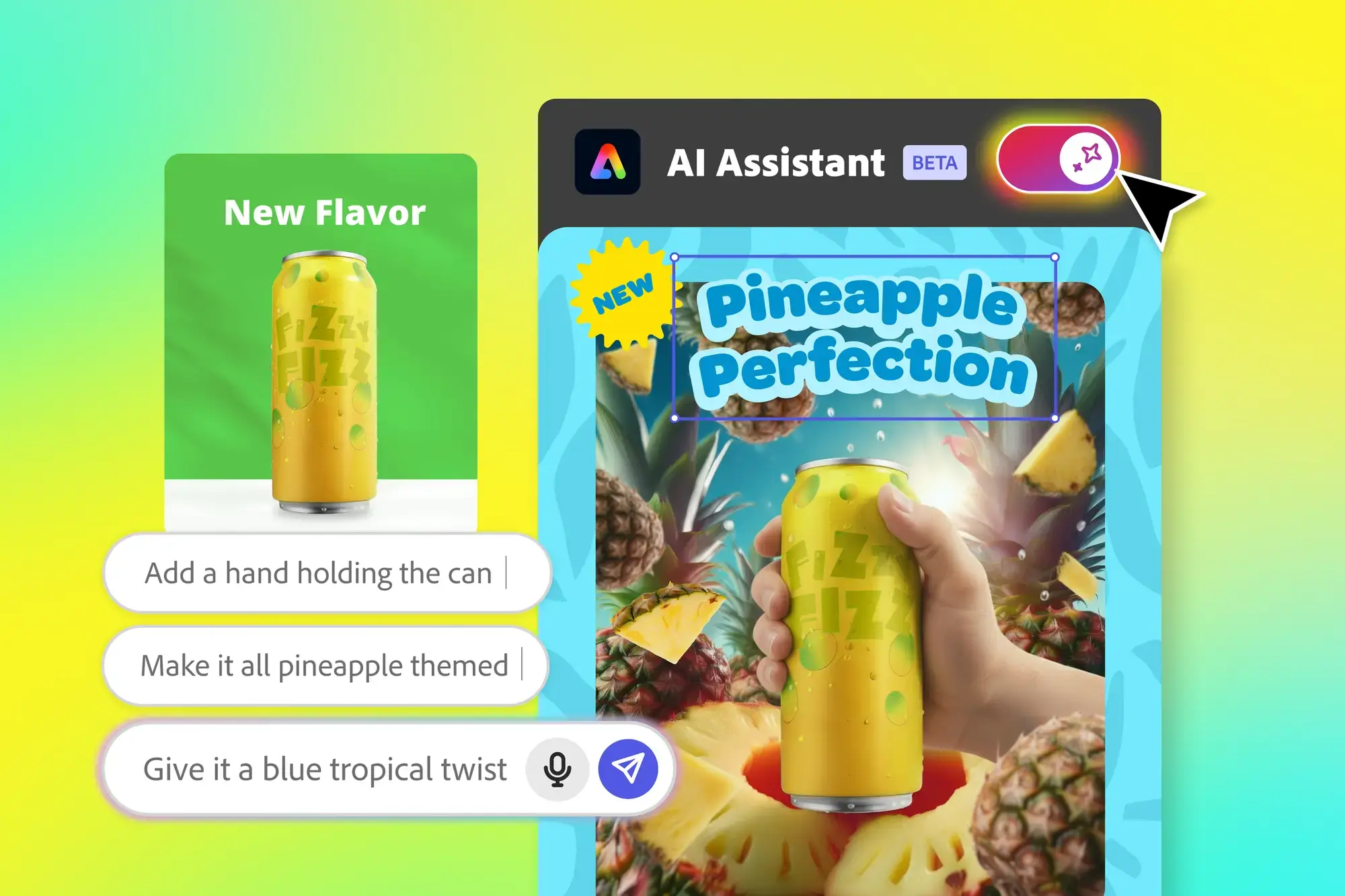
Enter today’s “AI Assistant in Adobe Express.” When toggled on through a switch in the app’s top-left corner, the assistant will replace your tools with a chatbox where you can instruct it to either make a new design from scratch or edit an existing one. Should you need your tools again, you can bring them back by toggling the assistant off, although Adobe’s demos for the feature also show the assistant bringing up contextual sliders when needed, like one for resizing.
While this is not Adobe Express’ first venture into generative AI, the idea is to make getting started or quickly editing a piece less intimidating, by having inexperienced users spend most of their time in a chatbox rather than having to click through a toolbar. Adobe says, like its other AI tools, it pulls from a number of “commercially safe” sources, including the company’s font and stock image libraries and its Firefly AI models.
The tool will start rolling out in public beta today, so you should be able to try it out shortly.
Adobe Premiere is getting built into YouTube Shorts

Credit: Adobe
Shorts are the next big thing over on YouTube, and to encourage more people to make them, YouTube is teaming up with Adobe. As an update to both the Premiere iPhone app and YouTube itself, Adobe’s new Create for YouTube Shorts feature allows you to upload your footage and instantly make it publish-ready with Adobe’s font overlays and a number of “exclusive” effects, transitions, and stickers. Or you can directly plug your footage into templates that already have transitions and effects included.
The feature is currently listed as “coming soon,” so it’ll be a bit before you can try it. But once it’s live, Adobe and YouTube say you’ll be able to access it either through the Premiere iPhone app or directly though YouTube, via an “Edit in Adobe Premiere” icon in YouTube shorts.
There is no word yet on an Android or desktop release.
Adobe will add sound to your videos for you

Credit: Adobe
Sound is easy to overlook when making a new video, and I’ve had to scramble to find a decent soundtrack to add to my videos at the last second more than once. Adobe’s new Firefly AI audio features are looking to save you from that fate, by making it easy to add music and even narration to an otherwise silent video.
Rolling out in public beta today, Firefly’s new “Generate Soundtrack” and “Generate Speech” buttons use AI and a Mad Libs style prompting system to help you quickly score your content from a number of options.
For “Generate Soundtrack,” you’ll upload your video, press the appropriate button, and the app will suggest a prompt for you and give you a palette of adjectives, genre types, and and content types to refine it with. Drag your chosen terms into the prompt box, hit generate, and you’ll get four options, each cutting out at a maximum of five minutes.
It’s a bit odd that you can’t just enter your own terms into the prompt box, although Adobe generative AI head Alexandru Costin told The Verge that’s because AI audio is “a new muscle we need to develop” and that the current approach is “easier and more accessible.”
Like other Firefly generations, audio will be generated using Adobe’s own licensed content, so users won’t have to worry about copyright strikes on videos made using the feature.
“Generate Speech,” meanwhile, gives users access to 50+ text-to-speech voices, either from Adobe Firefly or licensed via ElevenLabs. There’s no Mad Libs prompting here, with Adobe instead allowing for fine-tune control over factors like speed, pitch, tone, and even pronunciation. Currently, over 20 languages are supported.
Taken together, the updates seem to me like an attempt to keep up with platforms like Instagram and TikTok, which have licensed music libraries and text-to-speech built in. Whether a purely AI-powered version can keep up remains to be seen, although putting it into the editor rather than the platform does give creators more choice about where to upload.
Updates inside Photoshop, Lightroom, and Premiere

Credit: Adobe
Finally, for the more hardcore Adobe users, updates are coming to the company’s core apps as well.
First, Photoshop is also getting its own AI assistant, which will be able to use prompts to edit for you. However, unlike Adobe Express, it’s currently in a private beta, so it’ll be some time before most users see it. It’s also limited to the web version of the app for now.
However, not in beta is the ability to choose which AI models the app works with. Previously, Generative Fill, which uses AI to fill in blank spots in backgrounds (or just generate whole canvases from nothing), were limited to Adobe’s Firefly models. Now, users will also be able to use them with Google’s Gemini 2.5 Flash model, or Black Forest’s Flux.1 Kontext model. Given how popular 2.5 Flash has gotten on social media under the name “nano banana,” that’s a big get for Adobe.
Still, Firefly isn’t getting left behind. Adobe says it’s upgraded the model with the ability to generate in a native four-megapixel resolution, and to better render people. It’s also integrating it into a new “Layered Image Editing” tool that can make contextual changes for you across layers, like futzing with shadows after you move an image.
Outside of Photoshop, Lightroom has its own private beta feature called “Assisted Culling.” I’ll admit Lightroom is probably where I have the least experience when it comes to Adobe, but the company says it’ll be able to filter through uploaded photos for you and find the most edit-friendly ones.
Finally, Premiere Pro has its own beta feature, but one that’s graciously public. Called “AI Object Mask,” it’ll automatically detect and track people and objects in your video’s background, so you can more easily add effects like blurs or color grading. It could be useful if, say, you’re shooting in a crowded area where you need to blur a lot of faces.
A little something for everyone
Overall, it was a fairly balanced Max, with a number of features for both pros and beginners. That said, I can’t ignore the focus on AI and automatic generation. On one hand, I get that photoshop’s a bit intimidating. On the other, the more Adobe handles your edits for you, the more it runs the risk of competing with existing easy-edit apps and platforms. I’m curious to see how the industry giant will compete as platforms like TikTok and Instagram continue to offer their own built-in editing tools.
Nearly 90% of Windows Games Now Run on Linux, Latest Data Shows
Nearly nine in ten Windows games can now run on Linux systems, according to data from ProtonDB compiled by Boiling Steam. The gains came through work by developers of WINE and Proton translation layers and through interest in hardware like the Steam Deck.
ProtonDB tracks games across five categories. Platinum-rated games run perfectly without adjustment. Gold titles need minor tweaks. Silver games are playable but imperfect. Bronze exists between silver and borked. Borked games refuse to launch. The proportion of new releases earning platinum ratings has grown. The red and dark red zones have thinned. Some popular titles remain incompatible, however. Boiling Steam noted that other developers appear averse to non-Windows gamers.


Read more of this story at Slashdot.
GOG’s Fall Sale Is Live And Includes Over 4,000 PC Games

Classic games like Fallout 3, Dungeon Keeper 2, Theme Hospital, Medal of Honor, Tron 2.0, Roller Coaster Tycoon and more are currently on sale until next week
The post GOG’s Fall Sale Is Live And Includes Over 4,000 PC Games appeared first on Kotaku.
Newly Revealed Action-RPG Loulan: The Cursed Sand Looks Sick

Loulan: The Cursed Sand has some impressive-looking environments and baddies
The post Newly Revealed Action-RPG <i>Loulan: The Cursed Sand</i> Looks Sick appeared first on Kotaku.
Humanity Has Missed 1.5C Climate Target, Says UN Head
Humanity has failed to limit global heating to 1.5C and must change course immediately, the secretary general of the UN has warned. From a report: In his only interview before next month’s Cop30 climate summit, Antonio Guterres acknowledged it is now “inevitable” that humanity will overshoot the target in the Paris climate agreement, with “devastating consequences” for the world. He urged the leaders who will gather in the Brazilian rainforest city of Belem to realise that the longer they delay cutting emissions, the greater the danger of passing catastrophic “tipping points” in the Amazon, the Arctic and the oceans.
“Let’s recognise our failure,” he told the Guardian and Amazon-based news organisation Sumauma. “The truth is that we have failed to avoid an overshooting above 1.5C in the next few years. And that going above 1.5C has devastating consequences. Some of these devastating consequences are tipping points, be it in the Amazon, be it in Greenland, or western Antarctica or the coral reefs.
He said the priority at Cop30 was to shift direction: “It is absolutely indispensable to change course in order to make sure that the overshoot is as short as possible and as low in intensity as possible to avoid tipping points like the Amazon. We don’t want to see the Amazon as a savannah. But that is a real risk if we don’t change course and if we don’t make a dramatic decrease of emissions as soon as possible.”


Read more of this story at Slashdot.
How to watch Limited Run Games’ 2025 showcase
With digital games outselling physical ones by embarrassing margins, it’s easy to conclude that the latter is done for. But sometimes, approaching extinction leads to pockets of nostalgic enthusiasm. (Think the modest resurgence that point-and-shoot cameras are currently enjoying.) That leaves room for Limited Run Games, which specializes in physical copies. The company’s latest showcase, LRG3, is happening on Wednesday.
This month marks the 10th anniversary of Limited Run Games. There’s been plenty of fun stuff during that decade. LRG has launched physical editions of Doom and Doom II — complete with a game box that plays (yep!) Doom. For LucasArts fans, there was a Monkey Island box set (Guybrush statue in tow!). LRG also launched physical editions of indie games like Celeste and Runner 2.
What’s on tap for the anniversary event? Well, your guess is as good as ours. But the company did tease some of the partners who will have announcements. They include Ubisoft, Square Enix Collective, Astral Shift, Retroware, The MIX and WayForward.
LRG3 begins on Wednesday, October 29, at noon ET. You can stream the shindig on LRG’s YouTube and Twitch channels.
This article originally appeared on Engadget at https://www.engadget.com/gaming/how-to-watch-limited-run-games-2025-showcase-200050327.html?src=rss
These Budget-Friendly Beats Flex Earbuds Are 57% Off Right Now
We may earn a commission from links on this page. Deal pricing and availability subject to change after time of publication.
While wireless earbuds can be convenient and allow for greater freedom of movement, Bluetooth earbuds connected by a wire are harder to misplace and are significantly more affordable. The Beats Flex earbuds are Apple’s budget-friendly wired neckband earphones, and right now, they’re just $30.01 (originally $69.95) in black at Walmart—about 57% off the usual price.

If you’re prone to losing your wireless earbuds, the Flex’s earpieces magnetically snap together when you’re not wearing them, allowing you to keep them securely around your neck. When they snap together, audio automatically pauses, saving your battery life. The tangle-free neckband design houses a charging port, microphones, and volume controls.
According to PCMag’s review, which rates them as “Excellent,” they feature a secure in-ear fit with a design that eliminates cable tug and provide balanced sound with powerful bass with 8.2mm drivers. Battery life is around 12 hours on a full charge, and 10 minutes of “Fast Fuel” charging will give you about 90 minutes of listening time.
The earbuds use Class 1 Bluetooth for extended range and Apple’s W1 chip for seamless pairing. Two pairs of Flex can share the same sound source; when a second pair is nearby, you’ll get an onscreen prompt to connect. They’re compatible with Bluetooth 5.0 and support AAC and SBC Bluetooth codecs, but not AptX. Charging is via USB-C. They do lack an official IP rating, so you’ll want to be mindful when wearing them in heavy rain.
If you don’t need active noise cancellation, don’t need water resistance, and are fine with USB-C charging, the Beats Flex earbuds are an affordable option with a bass-heavy sound and Apple’s W1 chip, making them a particularly good option for budget-conscious iOS users.
Our Best Editor-Vetted Tech Deals Right Now
Deals are selected by our commerce team
8 Neat Games We Just Saw At The Fall Xbox Indie Showcase

The ID@Xbox event debuted more upcoming Game Pass releases
The post 8 Neat Games We Just Saw At The Fall Xbox Indie Showcase appeared first on Kotaku.
I Don’t Know If I Like Dispatch Yet, But I’m Glad It Exists

AdHoc Studio is bringing back the Telltale formula…mostly
The post I Don’t Know If I Like <em>Dispatch</em> Yet, But I’m Glad It Exists appeared first on Kotaku.
NVIDIA’s next move in autonomous driving is a partnership with Uber, Stellantis, Lucid and Mercedes-Benz
NVIDIA has entered a partnership with Uber to equip more of the rideshare company’s vehicles with its autonomous driving infrastructure. The deal centers on NVIDIA’s Drive AGX Hyperion 10 autonomous vehicle development platform, a computer and sensor system that can make any vehicle capable of level 4 self-driving, as well as its Drive software. According to the press release, this partnership will see Uber’s global fleet of autonomous vehicles growing to 100,000 vehicles over time, beginning in 2027.
Several notable auto brands are also collaborating with NVIDIA on the push toward developing truly autonomous vehicles. Stellantis, Lucid and Mercedes-Benz are working on vehicles that would support NVIDIA’s L4 technology. Aurora, Volvo Autonomous Solutions and Waabi are pursuing work on implementing Drive AGX Hyperion 10 into long-haul freight vehicles.
This article originally appeared on Engadget at https://www.engadget.com/transportation/nvidias-next-move-in-autonomous-driving-is-a-partnership-with-uber-stellantis-lucid-and-mercedes-benz-194442126.html?src=rss