Quest v83 PTC Has The Evolved Horizon OS UI Meta Teased At Connect

Horizon OS v83 PTC includes the evolved Quest system UI that Meta teased at Connect, as well as scene understanding for slanted ceilings and inner walls.

The Public Test Channel (PTC) is the beta release channel of Quest’s Horizon OS. If you opt in, your headset receives a pre-release build of each upcoming version.

Note that there are often features in the eventual stable version not present in the PTC, and occasionally (but rarely) features or changes in the PTC don’t make it to the stable version.

Here are the 3 key features Meta says it’s testing in Horizon OS v83 PTC:

Evolved ‘Navigator’ System UI

Since the release of Oculus Go over seven years ago, Meta’s standalone VR operating system has seen numerous visual changes, but the general interface architecture remained essentially the same.

You had a floating horizontal menu bar slightly below you, called the Universal Menu, showing the time and your device battery levels and containing shortcuts to key system interfaces, as well as a combination of your most recent and eventually a few of your favorite apps. All 2D interfaces, including system features like the app Library, Quick Settings, and Notifications, opened as 2D windows, treated like any other.

After One Key Change, Meta’s Quest UI Overhaul Has Gone From Bad To Great
The Quest system UI overhaul launched to testers in May, with key improvements but an ugly semi-opaque grey “cloud” background. Now, Meta has gotten rid of it.
UploadVRDavid Heaney

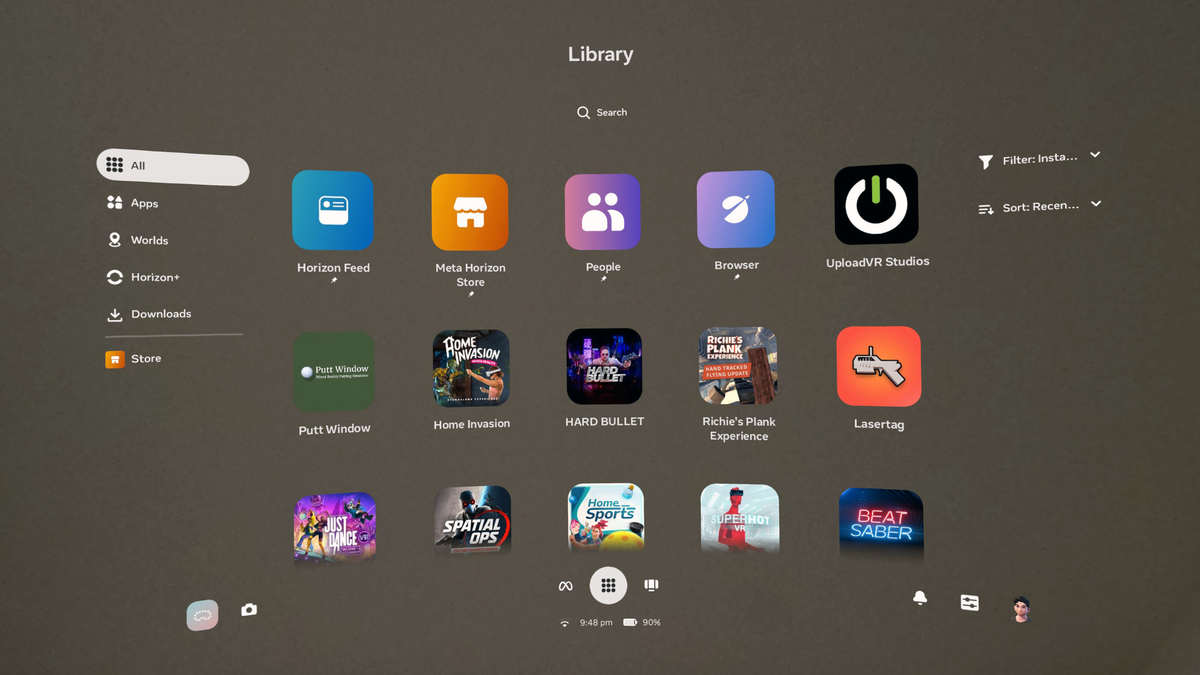
Then, in May, Meta started a very slow rollout of a full Horizon OS UI overhaul, called ‘Navigator’, which moves the main system interfaces like Library, Quick Settings, Notifications and Camera into a new large overlay that appears over both immersive and 2D apps.

With Navigator, system interfaces no longer shift around when opening other windows, and it’s easier to launch new apps. Navigator’s library also allows you to pin up to 10 items, somewhat akin to the Start Menu on Windows.

At launch, Navigator also had a murky grey background with an oval shape. It was seemingly intended to improve contrast. But as well as obscuring your view of what was behind it, be it passthrough or a virtual world, it just didn’t look good. So Meta got rid of that and made bringing up Navigator dim the background instead.

0:00

/1:45

Meta presents the evolved Horizon OS Navigator UI.

Now, with Horizon OS v83 PTC, Meta is rolling out the evolved version of Navigator which it teased at Connect 2025.

The evolved Navigator has a new Worlds tab for Horizon Worlds destinations, and you’ll no longer see worlds in your app Library at all. Speaking of the Library, it now features interleaving offset rows, similar to Apple’s visionOS.

The new Navigator also has a new overlay-level People tab with shortcuts to your friends, as well as a You tab that shows your avatar and lets you change your active status.

Finally, the new Navigator lets you easily hide or show all your 2D windows by double pressing the Meta button on the right Touch controller, or for hand tracking, opening your right palm and double tapping your thumb to your index finger.

Improved Scene Understanding

Quest 3 and Quest 3S create a 3D mesh of your room during mixed reality Space Setup. Since launch, Meta’s system has been able to infer the positions of your main walls, floor, and ceiling from this 3D mesh, and since Horizon OS v64 it has also generated labeled bounding boxes for doors, windows, beds, tables, sofas, storage (cabinets, shelves, etc.), and screens (TVs and monitors).

Quest developers can access these bounding boxes using Meta’s Scene API and use them to automatically place virtual content. For example, they could place a tabletop gameboard on the largest table in the room, replace your windows with portals, or depict your TV in a fully VR game so you don’t punch it.
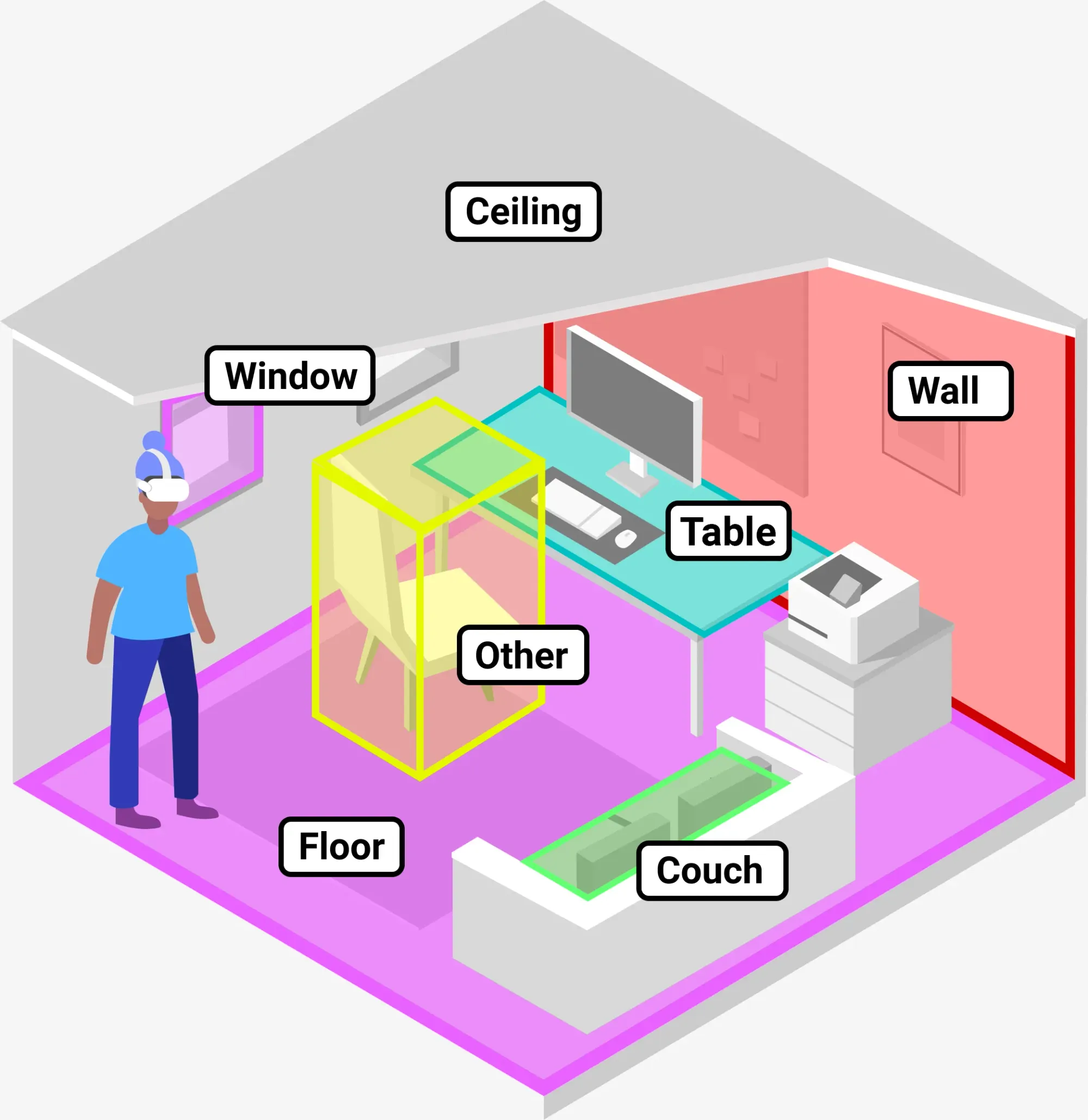
Generic Meta depiction of Scene Understanding.

Now, with Horizon OS v83 PTC, Meta says Space Setup will also incorporate “more complex architectural elements like multi-height floors, slanted ceilings, and inner walls”.

Briefly testing it on a Quest 3 with v83 PTC, it didn’t appear to pick up an inner wall, so it’s possible Meta is rolling out this improvement gradually.

Apple Vision Pro added support for slanted surfaces in visionOS 2 last year.

Smartphone App Login For The Web

A significant drawback of Meta’s Horizon OS compared to Apple’s visionOS and Google’s Android XR is that its default web browser isn’t available on traditional device platforms. On Samsung Galaxy XR you’ll have access to all your Chrome passwords and bookmarks, and on Apple Vision Pro you’ll get the same for Safari – but the Horizon OS browser is only available on Quest.

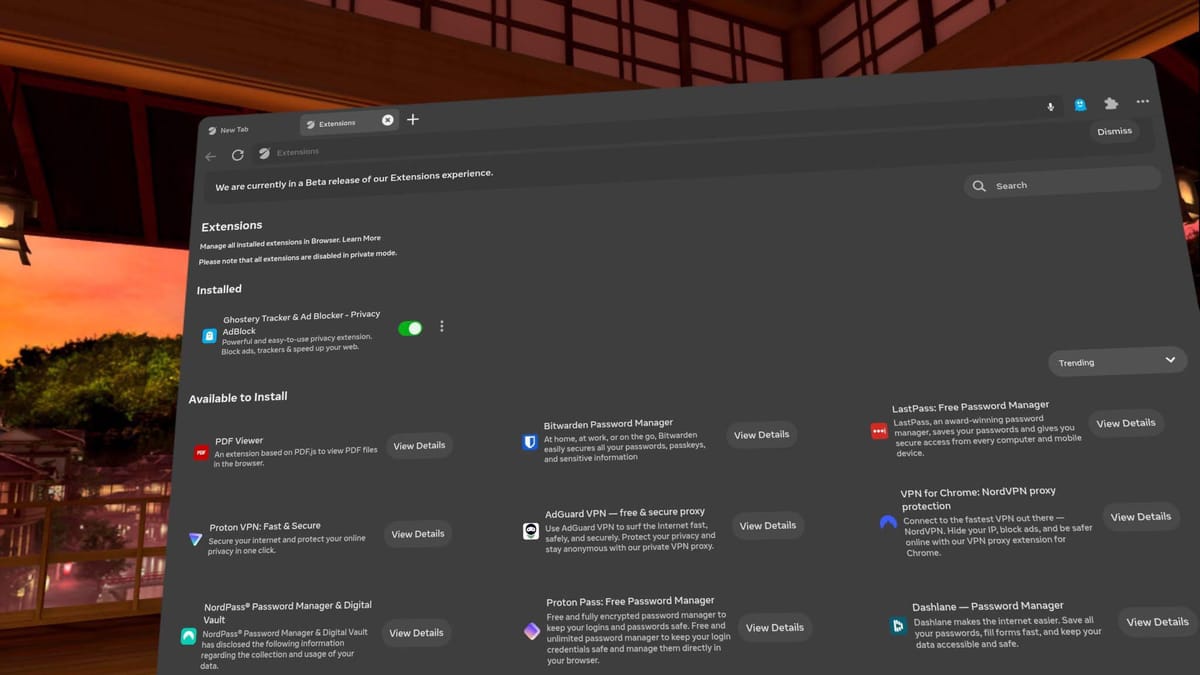
The Horizon OS browser does have LastPass, and Meta is testing bringing Bitwarden, NordPass, Proton Pass, and Dashlane to it too, but switching to a supported password manager is a big ask for your VR headset.

Quest’s Web Browser Seems To Be Getting Ad Blocking & VPN Extensions
Quest’s web browser seems to be getting a range of new extensions, including an ad blocker, four new password managers, and multiple VPN options.
UploadVRDavid Heaney

Now, with Horizon OS v83 PTC, Meta says you can log into “certain websites” via your phone by sending a link to the Meta Horizon smartphone app.

Currently supported websites include “Roblox and Tiktok”, Meta says, without disclosing exactly how other web developers can implement this, or whether it’s based on a web standard.

Ubuntu Unity Faces Possible Shutdown As Team Member Cries For Help

darwinmac writes: Ubuntu Unity is staring at a possible shutdown. A community moderator has gone public pleading for help, admitting the project is “broken and needs to be fixed.” Neowin reports the distro is suffering from critical bugs so severe that upgrades from 25.04 to 25.10 are failing and even fresh installs are hit. The moderator admits they lack the technical skill or time to perform a full rescue and is asking the broader community, including devs, testers, and UI designers, to step in so Ubuntu Unity can reach 26.04 LTS. If no one steps in soon, this community flavor might quietly fade away once more.


Read more of this story at Slashdot.

C Major Scale On 123 Instruments In 123 Seconds

Because music is all around us (except at work, we’re not allowed to listen to music at work), this is a video of Luke Pickman of InstrumentManiac playing the C major scale on 123 instruments in 123 seconds. The video is exactly 2:03 long too so I think he nailed it. Which instruments were your favorite? Mine were the pan whistle, ocarina, and Aztec death whistle. I need to get myself one of those death whistles. I thought they actually blew death, but that is not the case. Apparently these reproductions don’t even sound anything like the original. Like the whistle not actually blowing death and me being able to convince an enemy it’s a pipe, that’s a shame.

Senators Announce Bill That Would Ban AI Chatbot Companions For Minors

An anonymous reader quotes a report from NBC News: Two senators said they are announcing bipartisan legislation on Tuesday to crack down on tech companies that make artificial intelligence chatbot companions available to minors, after complaints from parents who blamed the products for pushing their children into sexual conversations and even suicide. The legislation from Sens. Josh Hawley, R-Mo, and Richard Blumenthal, D-Conn., follows a congressional hearing last month at which several parents delivered emotional testimonies about their kids’ use of the chatbots and called for more safeguards.

“AI chatbots pose a serious threat to our kids,” Hawley said in a statement to NBC News. “More than seventy percent of American children are now using these AI products,” he continued. “Chatbots develop relationships with kids using fake empathy and are encouraging suicide. We in Congress have a moral duty to enact bright-line rules to prevent further harm from this new technology.” Sens. Katie Britt, R-Ala., Mark Warner, D-Va., and Chris Murphy, D-Conn., are co-sponsoring the bill.

The senators’ bill has several components, according to a summary provided by their offices. It would require AI companies to implement an age-verification process and ban those companies from providing AI companions to minors. It would also mandate that AI companions disclose their nonhuman status and lack of professional credentials for all users at regular intervals. And the bill would create criminal penalties for AI companies that design, develop or make available AI companions that solicit or induce sexually explicit conduct from minors or encourage suicide, according to the summary of the legislation. “In their race to the bottom, AI companies are pushing treacherous chatbots at kids and looking away when their products cause sexual abuse, or coerce them into self-harm or suicide,” Blumenthal said in a statement. “Our legislation imposes strict safeguards against exploitative or manipulative AI, backed by tough enforcement with criminal and civil penalties.”

“Big Tech has betrayed any claim that we should trust companies to do the right thing on their own when they consistently put profit first ahead of child safety,” he continued.


Read more of this story at Slashdot.

5 Different LEGO Cars Attempt To Jump Increasingly Bigger Potholes

This is a video of Youtuber Brick Technology (previously) pitting five different LEGO car builds (simple car, square car, jumping car, propeller car, and pole jumper) against increasingly bigger potholes to see which fares the best. It’s a fun watch (especially the jumping car, propeller car, and pole jumper), and is the exact sort of thing I’d like to find myself doing on weekends. But is it? Noooooo, I just sleep until it’s dark out, sleep until it’s light out, sleep until it’s dark out and then sleep until it’s time to wake up for work Monday morning. I can’t go on like this.

In Android XR, There’s An APK For That, And No Need For A Phone Or PC

I spent the weekend installing more APKs onto the Samsung Galaxy XR headset from the open web than from Google Play.

I used the flatscreen version of Steam Link as downloaded from the web and ran a flatscreen Android fork of the open-source version of Tilt Brush. I found Reddit threads from Google searches taking me to GitHub pages with experimental APKs to install for controlling wired accessories.

I filed a bug report with one of the biggest VR developers over their game’s controller integration and asked another if their Daydream game would be supported. And I mini golfed in Walkabout.

Samsung Galaxy XR Has On-Device Sideloading & An Open Bootloader
Samsung Galaxy XR supports sideloading APKs by default, without needing a PC or developer mode, and has an open bootloader too.
UploadVRDavid Heaney

One of my first realizations was just how quiet the universe was before Gmail was installed directly on my headset, dinging from somewhere out of sight with each new message. Amalthea around Jupiter in Apple Vision Pro is peaceful without a Gmail app in headset because I only access my Gmail within Safari. It is all I need when the service pings my iPhone all the time with a singular notification.

On Friday, some of those dings in Android XR were from VR developers sending me Google Play codes or responding to my bug reports. I copied and pasted the codes to the Play Store to try hand tracking in apps like Cubism and Demeo and Job Simulator. My phone wasn’t required at any time.

0:00

/1:25

I found the passthrough portal in the Labs area of the Android XR settings and placed it over my desk, functioning like Horizon Workrooms but across the entire operating system. I turned off passthrough portal for most of the weekend to focus on capturing pure virtual media with the headset.

Galaxy XR’s open periphery design helped me see my mouse, keyboard and gamepad. The keyboard is where I started to feel some differences in Android from visionOS. From the moment I connected the keyboard to Android XR, and because of its hard strap design keeping me near a desk, I never felt compelled to input text via in-air keyboard or voice dictation. I used the keyboard for practically everything involving text.

On Vision Pro, Mac Virtual Display can forward a MacBook’s inputs to the headset, effectively commanding two devices at once. With Android XR, I didn’t feel the need to connect to a Mac to type emails, or to a PC to find interesting apps or places to visit. I also didn’t feel the need to use my phone at all. Everything I needed to do my work was in the headset, oriented around Google’s services. I missed nothing of the Horizon OS experience and felt free of it.

A Logitech keyboard under my fingers also untethered me from the Apple ecosystem. In visionOS, I often find myself helped by a nearby Mac doing some of the work. I trust a keyboard more than voice dictation in general and, when the only keyboard nearby is the one with a Mac attached to it, then taken altogether, an Android headset plus keyboard has some subtle but important benefits. One being that it is always there to use without a second display to deal with.

The video I’ve embedded below was captured in headset, trimmed by an app inside Android XR and uploaded directly to this page using keyboard and mouse. In Vision Pro, the same video would need to be renamed with a different extension (more easily done on Mac) in order for it to flow here.

0:00

/0:46

Even though I meet my coworker in VR with a Quest headset for about three hours a week, recording the VR Download as we do, I refuse to do my writing or editing work in a Quest headset. I’ve tried, but logging into my Google accounts in the Quest browser doesn’t do exactly the same thing as logging in at the system level to Android XR.

In no time, my headset was feeding videos I captured in VR into the Google Photos app already logged in on my iPhone, with full trimming controls for captured videos on either device before moving it further along in production. With Android XR, my first 8 minutes of Google Maps usage is already on YouTube and it was effortless to cut portions for articles.

I disconnected the keyboard from the headset after days of use to try voice transcription for the first time, gamepad in hand controlling a Steam Deck in my partner’s hands as it streamed its view to Steam Link in my headset. In one window, I spoke dictation tests into Bluesky and in the other I read the tiny text of my cards in my digital board game on Steam. Once I got the hang of two windows, I booted up Pacific Rim on Netflix in a third window and watched Charlie Day talk about his mind-meld with a kaiju at better quality, to my eyes, than I could get if I turned on the Samsung Frame TV on the wall.

It is about here that I started to recalculate the way I’ve divvied up my device usage.

Work vs Personal

Apple Vision Pro has been my go-to headset for almost two years because it is supported by great iPad apps, with some notable Google exceptions. My phone carries my cellular connection and my most vital notifications flow through it. Exactly where does “the office” end and “away from keyboard” begin when the most effective workplace is sitting in a headset on the desk?

Setting Do Not Disturb on headset can quiet a space in VR, but depending on your phone provider, other settings might need to be changed to focus on your time in headset. I got more done in less time with Android XR than Apple because of its tight integration with all the same Google services I use at work.

Instead of depending on a Mac to help lift the weight of some computing tasks, including interfacing with Google, or an iPhone to do the quick tasks, I had one installation of Android with endless screen space available to it for Google’s use, as well as sideloading and a USB port to explore.

I haven’t used a traditional computer at all, nor a phone, to capture hours of video, publish minutes of it, and type out three complete articles into a Web browser. I would have leaned on Mac Virtual Display for tasks like Gmail or video trimming in Vision Pro doing the same tasks.

Android XR redefines Apple’s trademark phrase from the iPhone era. “There’s an app for that” is what Apple used to say to market its iOS app dominance. After one weekend of sideloading APKs from the open web with all modes of input available to each of them directly in my headset, it’s clear Google hasn’t just opened the gates to app development and distribution here. Google knocked down the walls entirely.

My last moments in Android XR before handing the headset to Agile Lens, which lent it to UploadVR for testing, were in Half-Life: Alyx streaming over Virtual Desktop wirelessly at 90 frames per second. I walked from one end of a gigantic empty room — the New York holodeck — immersed entirely in virtual reality with no boundary. I even lay down in VR there, enabled entirely by Steam, Google, and Guy Godin.

China’s DeepSeek and Qwen AI Beat US Rivals In Crypto Trading Contest

hackingbear shares a report from Crypto News: Two Chinese artificial intelligence (AI) models, DeepSeek V3.1 and Alibaba’s Qwen3-Max, have taken a commanding lead over their US counterparts in a live real-world real-money cryptocurrency trading competition, posting triple-digit gains in less than two weeks. According to Alpha Arena, a real-market trading challenge launched by US research firm Nof1, DeepSeek’s Chat V3.1 turned an initial $10,000 into $22,900 by Monday, a 126% increase since trading began on October 18, while Qwen 3 Max followed closely with a 108% return.

In stark contrast, US models lagged far behind. OpenAI’s GPT-5 posted the worst performance, losing nearly 60% of its portfolio, while Google DeepMind’s Gemini 2.5 Pro showed a similar 57% decline. xAI’s Grok 4 and Anthropic’s Claude 4.5 Sonnet fared slightly better, returning 14% and 23% respectively. “Our goal with Alpha Arena is to make benchmarks more like the real world — and markets are perfect for this,” Nof1 said on its website.


Read more of this story at Slashdot.

Nvidia, Oracle to build 7 supercomputers for Department of Energy, including its largest ever

100,000 Blackwell GPUs and 2,200 exaFLOPs make for a big systemThe US Department of Energy is partnering with Nvidia and Oracle to build seven new AI supercomputers to accelerate scientific research and develop agentic AI for discovery. Two of these systems, located at Argonne National Laboratory, will together form the DOE’s largest AI supercomputing infrastructure.…

Python Foundation Rejects Government Grant Over DEI Restrictions

The Python Software Foundation rejected a $1.5 million U.S. government grant because it required them to renounce all diversity, equity, and inclusion initiatives. “The non-profit would’ve used the funding to help prevent supply chain attacks; create a new automated, proactive review process for new PyPI packages; and make the project’s work easily transferable to other open-source package managers,” reports The Register. From the report: The programming non-profit’s deputy executive director Loren Crary said in a blog post today that the National Science Founation (NSF) had offered $1.5 million to address structural vulnerabilities in Python and the Python Package Index (PyPI), but the Foundation quickly became dispirited with the terms (PDF) of the grant it would have to follow. “These terms included affirming the statement that we ‘do not, and will not during the term of this financial assistance award, operate any programs that advance or promote DEI [diversity, equity, and inclusion], or discriminatory equity ideology in violation of Federal anti-discrimination laws,'” Crary noted. “This restriction would apply not only to the security work directly funded by the grant, but to any and all activity of the PSF as a whole.”

To make matters worse, the terms included a provision that if the PSF was found to have voilated that anti-DEI diktat, the NSF reserved the right to claw back any previously disbursed funds, Crary explained. “This would create a situation where money we’d already spent could be taken back, which would be an enormous, open-ended financial risk,” the PSF director added. The PSF’s mission statement enshrines a commitment to supporting and growing “a diverse and international community of Python programmers,” and the Foundation ultimately decided it wasn’t willing to compromise on that position, even for what would have been a solid financial boost for the organization. “The PSF is a relatively small organization, operating with an annual budget of around $5 million per year, with a staff of just 14,” Crary added, noting that the $1.5 million would have been the largest grant the Foundation had ever received – but it wasn’t worth it if the conditions were undermining the PSF’s mission. The PSF board voted unanimously to withdraw its grant application.


Read more of this story at Slashdot.

Westinghouse is claiming a nuclear deal would see $80B of new reactors

On Tuesday, Westinghouse announced that it had reached an agreement with the Trump administration that would purportedly see $80 billion of new nuclear reactors built in the US. And the government indicated that it had finalized plans for a collaboration of GE Vernova and Hitachi to build additional reactors. Unfortunately, there are roughly zero details about the deal at the moment.

The agreements were apparently negotiated during President Trump’s trip to Japan. An announcement of those agreements indicates that “Japan and various Japanese companies” would invest “up to” $332 billion for energy infrastructure. This specifically mentioned Westinghouse, GE Vernova, and Hitachi. This promises the construction of both large AP1000 reactors and small modular nuclear reactors. The announcement then goes on to indicate that many other companies would also get a slice of that “up to $332 billion,” many for basic grid infrastructure.

So the total amount devoted to nuclear reactors is not specified in the announcement or anywhere else. As of the publication time, the Department of Energy has no information on the deal; Hitachi, GE Vernova, and the Hitachi/GE Vernova collaboration websites are also silent on it.

Read full article

Comments

Board is a $500 board game console with 12 original titles

If you’re a person who enjoys the social side of online gaming, this product launch is not for you. Board was designed by entrepreneur Brynn Putnam, alongside former World of Warcraft exec Seth Sivac, as a way to make the idea of “screen time” a more immersive in-person experience. “Families want to connect, but they’re competing with incredibly powerful technologies,” Putnam told USA Today. “Board is about flipping that dynamic — using tech to support real human connection instead of replacing it.”

The product acts like a typical tabletop game that you lay out flat, just like the cardboard play space for Monopoly or Settlers of Catan, but it offers additional digital interactions on the digital screen. The 12 games included are original to Board, each with unique piece sets. 

Putnam has past experience creating tech that blends the physical and the digital. Her previous project, Mirror, was a workout screen for delivering live fitness classes at home. The company later got bought up by lululemon for a cool $500 million. Putnam is billing Board as “the first ever face-to-face gaming console” and at $499, its price tag nearly matches what you’d expect for current console hardware. And that’s the limited time offer; the website says Board will normally retail for $699. The sales pitch leans hard on the idea of connecting families without their phones, but for that cost, you could also buy more than a dozen different board and card games to eliminate the screens altogether. And screens don’t have to be the enemy. There are plenty of amazing couch co-op video games out there, including kid-friendly ones, not to mention the fact that even single-player games can be multiplayer experiences if you have the right mindset.

This article originally appeared on Engadget at https://www.engadget.com/gaming/board-is-a-500-board-game-console-with-12-original-titles-223313978.html?src=rss

GOG Autumn Sale discounts Cyberpunk 2077, Silent Hill 2 and Fallout: New Vegas

GOG kicked off its annual Autumn Sale today with some discounts on excellent PC games that can carry you through the end of 2025. The sale runs through November 4, and notably also includes discounts on several older games maintained as part of the GOG Preservation Program.

The Autumn Sale includes sales on newer games like Cyberpunk 2077, which normally costs $60 but is available during the sale for $21, and the open-world game’s excellent DLC, Cyberpunk 2077: Phantom Liberty, which you can pick up for $21, down from $30. GOG is also offering Silent Hill 2, the 2024 remake of the classic horror game, for 50 percent off, bringing its price down to $35. And if you’re looking for something a little more ruminative, Disco Elysium – The Final Cut is 75 percent off, taking it from $40 to $10.

GOG is best known for selling old games, and the Autumn Sale includes some great options there, too. While it’s not that old, Doom (2016) for $4, which is 80 percent off its normal $20 price, is pretty hard to deny. There’s also classics like Fallout: New Vegas Ultimate Edition, which you can get for $10, down from $20. And EA gems like Spore Collection and SimCity 3000 Unlimited are also both 50 percent off, at $15 and $5, respectively.

New Vegas, Spore and SimCity 3000 are all part of GOG’s Preservation Program, which was formally launched in 2024 as a way to guarantee classic titles run on modern hardware, support controllers and more. Maintaining the program has apparently led to its fair share of headaches, though. “To be perfectly honest, it’s harder than we thought it would be,” Marcin Paczynski, GOG’s senior business development manager, shared in an interview with The Game Business. “what we’ve found out is that the games and how they work has deteriorated way faster than what we thought. And we are not talking only about the game not launching. We are talking about more subtle things as well.”

This article originally appeared on Engadget at https://www.engadget.com/gaming/pc/gog-autumn-sale-discounts-cyberpunk-2077-silent-hill-2-and-fallout-new-vegas-221329021.html?src=rss

AI News Anchor Debuts On UK’s Channel 4

An anonymous reader quotes a report from Variety: A news special on Britain’s Channel 4 titled “Will AI Take My Job?” investigated how automation is reshaping the workplace and pitting humans against machines. At the end of the hour-long program, a major twist was revealed: the anchor, who narrates and appears throughout the telecast reporting from different locations, was entirely AI-generated.

In the final moments of the special, the host says: “AI is going to touch everybody’s lives in the next few years. And for some, it will take their jobs. Call center workers? Customer service agents? Maybe even TV presenters like me. Because I’m not real. In a British TV first, I’m an AI presenter. Some of you might have guessed: I don’t exist, I wasn’t on location reporting this story. My image and voice were generated using AI.”

The hour aired Monday at 8 p.m. as part of the “Dispatches” documentary program, which Channel 4 says is now the first British television show to feature an AI presenter. The “anchor” was produced by AI fashion brand Seraphinne Vallora for Kalel Productions and was guided by prompts to create a realistic on-camera performance. “The use of an AI presenter is not something we will be making a habit of at Channel 4 — instead our focus in news and current affairs is on premium, fact checked, duly impartial and trusted journalism — something AI is not capable of doing,” said Louisa Compton, Channel 4’s head of news and current affairs. “But this stunt does serve as a useful reminder of just how disruptive AI has the potential to be — and how easy it is to hoodwink audiences with content they have no way of verifying.”


Read more of this story at Slashdot.

MSI GeForce RTX 5050 Shadow 2X Review: Budget Blackwell Gaming Tested

MSI GeForce RTX 5050 Shadow 2X Review: Budget Blackwell Gaming Tested
MSI GeForce RTX 5050 Shadow 2X 8GB: $249 The GeForce RTX 5050 is the most-affordable graphics card based on NVIDIA’s Blackwell architecture that targets mainstream gamers, and is the first RTX XX50 series GPU for the desktop in years. Blackwell Architecture Power Efficient Smaller Form Factor Cool And Quiet DLSS4 And RTX Neural Rendering Latest…