Now that it’s looking like Chrome will remain in the Google fold, the browser is undergoing a Gemini-infused rebirth. Google claims the browser will see its most significant upgrade ever in the next few weeks as AI permeates every part of the experience. For people who use AI tools, some of these additions might actually be helpful, and for everyone else, well, Firefox still exists.
The most prominent change, and one that AI subscribers may have already seen, is the addition of a Gemini button on the desktop browser. This button opens a popup where you can ask questions about—and get summaries of—content in your open tabs. Android phones already have Gemini operating at the system level to accomplish similar tasks, but Google says the iOS Gemini app will soon be built into Chrome for Apple devices.
Creators building experiences in Fortnite are getting a new way to earn revenue. Epic says developers will soon have the ability to make and sell in-game items in Fortnite, and earn a cut of the V-Bucks users spend to buy them. Previously, developers only earned money through Fortnite based on the amount of time users spent on their “islands,” the in-game name for third-party experiences creators can offer through Fortnite.
Developers will be able to create their consumable and durable in-game items using soon-to-be-released tools in Unreal Editor for Fortnite and a new “Verse-based API,” according to Epic. The company also plans to be generous with the revenue split its offering, at least at first. Developers “will ordinarily earn 50 percent of the V-Bucks value from sales in their islands,” but from December 2025 through the end of 2026, they’ll get to keep 100 percent.
Epic says its 50 percent cut — notably more than the 30 percent popularized by Apple’s App Store — is to help “contribute to server hosting costs, safety and moderation costs, R&D and other operating expenses” of running Fortnite. It’s also a make-good of sorts, since Epic claims it’s been “investing and operating the business at a loss.”
How much 100 percent or 50 percent of “V-Bucks value” actually equals in real money unfortunately isn’t as simple as converting Fortnite’s digital currency to dollars, though. Epic offers the following explanation for how it calculates V-Bucks value:
To determine the V-Bucks value in US dollars in a given month, we take all customer real-money spending to purchase V-Bucks (converted to US Dollars), subtract platform and store fees (ranging from 12 percent on Epic Games Store to 30 percent on current consoles), and divide it by the total V-Bucks spent by players. Fortnite’s average platform and store fees are currently 26 percent (with specific fees ranging from 12 percent on the Epic Games Store to 30 percent on console platforms). So, 50 percent of V-Bucks value translates to ~37 percent of retail spending, and 100 percent of V-Bucks value translates to ~74 percent.
Epic
Alongside the new ability to create in-game items, Epic says Fortnite developers will be able to pay to be featured in a new “Sponsored row” inside Fortnite‘s Discover feed. And to better engage new and returning players, developers are also getting access to new tools for creating community forums and sharing updates on their islands.
All of these changes are in service of further extending Fortnite‘s ability to act as a platform for games and social experiences, rather than just a battle royale game (with racing, rhythm game and LEGO spin-offs). Epic clearly wants Fortnite to be Roblox, and reap the benefits of having an active community of adult and child users creating experiences for its platform. Cultivating that audience has led to all sorts of child safety problems for Roblox,but Epic clearly views the risks to be worth it.
This article originally appeared on Engadget at https://www.engadget.com/gaming/epic-will-let-fortnite-creators-sell-in-game-items-in-latest-attempt-to-compete-with-roblox-192059073.html?src=rss
Yesterday, the official Borderlands X account finally spoke up about the performance issues that gamers have been reporting on console and PC since Borderlands 4 launched, taking a much calmer approach than Gearbox CEO Randy Pitchford. Pitchford was making his own headlines, thanks to how angrily he was replying to users posting about the
The FTC and seven states sued Ticketmaster owner Live Nation on Wednesday. The lawsuit accused the company of knowingly allowing brokers to buy tickets in bulk. Ticketmaster allegedly then let them resell the tickets at a significant markup on its own second-hand market.
The FTC claims Ticketmaster was aware that resellers routinely bypassed its security measures for these purchases. The company profits three times from resales. It collects fees at the initial purchase, followed by both buyer and seller fees upon resale. Between 2019 and 2024, Ticketmaster raked in $16.4 billion in fees, according to the FTC.
The agency paints a picture of the company that epitomizes rampant corporate greed. The FTC claims an internal Live Nation review showed that five resellers alone harvested 246,407 tickets to 2,594 events. The agency accused Ticketmaster of admitting in an internal email that it “turn[s] a blind eye as a matter of policy.”
The company is said to even offer tech support to brokers through its TradeDesk app. The software is designed to consolidate and manage tickets purchased through multiple Ticketmaster accounts.
Ticketmaster also allegedly failed to implement third-party identity verification tools that could have prevented the bulk purchases. Why? The FTC quotes the company as saying these tools would have been “too effective.” The company is also said to have admitted to engaging in deceptive pricing. Their alleged reason: Customers were less likely to buy tickets when they saw the actual cost upfront.
The FTC accused Live Nation of violating two laws: the FTC Act’s ban on deceptive practices and the BOTS Act. The latter was signed by President Obama in 2016, just before leaving office. As its name suggests, it banned the use of bots or other software to obtain more tickets than is legally allowed. Earlier this year, President Trump issued an executive order to increase enforcement of the law.
The suit was filed in the US District Court for the Central District of California. Joining the FTC in the suit are Virginia, Utah, Florida, Tennessee, Nebraska, Illinois and Colorado.
This article originally appeared on Engadget at https://www.engadget.com/entertainment/the-ftc-sues-ticketmaster-for-allegedly-colluding-with-resellers-191337586.html?src=rss
An anonymous reader shares a report: A software update rolling out to Samsung’s Family Hub refrigerators in the US is putting ads on the fridges for the first time. The “promotions and curated advertisements” are coming despite Samsung insisting to The Verge in April that it had “no plans” to do so. Samsung is calling it a pilot program for now, which — I kid you not — is meant to “strengthen the value” of owning a Samsung smart fridge.
For as basic a necessity as it is, feeding yourself is a lot of work. What’s more, feeding a household is even worse. There’s the planning, then the shopping, the unpacking, the cooking, the storing, and finally, the cleaning, all of which has to be done over and over again forever. We all know what it’s like to be faced with this task and just decide to open up Uber Eats and pay a bunch of fees to have someone do (most of) it for us. Apps are the saving grace when meal planning gets too daunting—but you’re using the wrong apps. Forget Door Dash and Grub Hub: These apps can help you plan, shop for, and prepare meals on your own while still offloading some of the hard work on tech.
Here are some meal-planning apps that can suggest recipes based on your dietary preferences, put together shopping lists, and even walk you through the cooking. They can’t box up leftovers or wash the dishes, but maybe one day in the future, we’ll get there, too.
Best app for recipes: BigOven
Credit: Lindsey Ellefson/BigOven
BigOven is a meal-planning app that grants you access over one million recipes—and new recipes are constantly being added. I like a few different things about it: First, you can input some of the ingredients you already have and get recipes based on those, reducing your grocery shopping and limiting how many of those million-plus recipes you need to scroll through. You can scan handwritten recipes in, too, and let the app turn them into recipes you can store there, preserving family traditions. Finally, I appreciate that it has a browser version, since that makes it easier to type, browse, and scroll. A few of the apps on this list also work on the browser. In general, I like to do a lot of my planning and work on the computer, then call in my phone at crunch time, just when I need to refer to a recipe.
The free version is nice, but limited. You get the ability to put together a grocery list and one free recipe scan. For more detailed meal planning, you’ll need to upgrade to its paid version for $2.99 per month or $24.99 for the year. Think of it like this: You’ll save that much by skipping a delivery order or two.
Best app for family meal planning: Cozi
Credit: Lindsey Ellefson/Cozi
Cozi is a family organizer, so you might not think of food and recipes when you first hear about it—but don’t be fooled. In addition to its daily calendar and to-do lists, Cozi provides space for you to keep a grocery list (which any family member can add to in real time) and even offers up recipes. Not only can you plan your meals’ content, but you can schedule them for when everyone is available.
The basic version is free, but the premium version, which is $39.99 per year, offers more features, most of which have to do with the family management aspect (like birthday tracking and calendar searching). If you’re using it for meal planning, you may not need to upgrade; I was able to build out an entire schedule of recipes without paying.
Best app for fitness and nutrition goals: Eat This Much
Credit: Lindsey Ellefson/Eat This Much
Eat This Much is really ideal for anyone with specific nutrition and fitness goals. It puts together plans based not only on your budget and personal preferences, but your nutritional plans, as well. You’re prompted to enter in how many calories you’d like to eat in a day, as well as how many grams of protein and other nutrients you want to hit. It even doubles as a calorie tracker and comes with a database of nutritional information about restaurant and packaged food. If you’re meal planning and prepping for fitness or health goals, this could be the one for you to really focus in on. (Relatedly, if you’re in the market for a comprehensive calorie and nutrient tracker, I am a huge fan of Lifesum.)
Money comes into play if you want more features. For $8.99 per month, you can create meal plans for a week, used advanced search features, view your past meals, and generate reports on your eating habits, to name a few. A bump up to $59 per month unlocks bulk meal plans for over a week in advance, macro tracking, and a recipe database, among other things. That’s not exactly a small cost, but if you’re serious about meal prepping, give it a look.
Best app for when you’re busy: Mealime
Credit: Mealime/Lindsey Ellefson
Mealime is widely recommended in forums for meal planners and caters to busier people because it’s full of recipes that can be made in under half an hour. You can filter recipes by dietary restrictions or preferences, generate a grocery list, and get on with your day. It’s a little bare-bones beyond that, but as a picky eater, I appreciate the ability to eliminate recipes that include the things I don’t care for. If you ever catch me eating a single mushroom, call the authorities because I’m sending a distress signal.
You’ll get plenty of recipes in the free version, but you’ll notice some are labeled “Pro.” To get those, as well as other features like the ability to add notes, you’ll have to upgrade to the paid version for $2.99 per month. For its simplicity of use and fairly low cost, this is a favorite of mine.
Best app to relieve decision fatigue: eMeals
Credit: Lindsey Ellefson/eMeals
eMeals emphasizes that it’s meal planning “made simple,” and they mean that. You get pre-loaded, dietitian-curated menus that come in “themes.” Themes can be kid-friendly, keto, quick, etc. The apps on this list with thousands of recipes to scroll through are great, but if you just want someone or something else to pick for you, start here.
eMeals also has partnerships with major grocery retailers, which makes creating your grocery list a little easier and more specific. Another on the list that has a robust browser component, this makes things almost too easy.
Best app for more recipe control: Plan to Eat
Credit: Lindsey Ellefson/Plan to Eat
Plan to Eat is for people who have a general sense of what they like or want to eat, but just need a little push on the organization. You can clip recipes from the internet or browse recipes in the app, add them to the built-in calendar, and create grocery lists that are specified by category, making shopping easier. The app’s cooking view even comes with step-by-step instructions that include timers, walking you right through everything you need to do down to the minute.
You get a free two-week trial, then you’ll pay $5 a month or $55 a year to access all the features.
Earlier today, Intel and NVIDIA announced the two tech giants are planning to co-develop several generations of data center and PC products, with the latter also investing $5 billion into the former’s common stock. Hours later, Intel CEO Lip-Bu Tan and NVIDiA CEO Jensen Huang hosted a webcast to discuss the announcement followed by a Q&A session,
Microsoft’s Gaming Copilot AI assistant is officially coming to Windows PCs and the Xbox mobile app. The company has been testing the tool for PCs with Xbox Insiders, but now it’s getting a broader rollout.
To that end, it’ll be available to players aged 18 and older on the PC Game Bar. The Xbox app version rolls out this October, for both Android and iOS, after a beta test took place earlier this year. Microsoft says that its Gaming Copilot will be available throughout the globe, except in mainland China.
So what exactly is this thing? It’s sort of like an AI version of those old Nintendo help phone lines. The chat box appears as an overlay on the screen and players can use it to ask questions or to get tips about a game. The company says it “knows what you’re playing and understands your Xbox activity,” as it uses in-game screenshots. It can also answer questions about an Xbox account and offer recommendations on stuff to buy.
The official version also offers voice chat, so you can just ask the questions out loud. On PC, there’s a “Push to Talk” hotkey that activates the bot, which is handy. The app includes a microphone button. There’s a widget for the PC build that can be placed anywhere on the screen. This is useful for longer conversations.
With Copilot for Gaming, you can jump back into games faster, get real-time coaching, and stay connected… all on your own terms. Excited for what the team has in store! pic.twitter.com/18Ll2D25i1
Microsoft is still tinkering with this software and urges feedback from users as they “continue to develop Gaming Copilopt and make it even more helpful for players’ needs and preferences.” The company has been testing the system on Windows-based portable consoles, and it did recently announce the pending availability of its own Xbox Ally handheld gaming machines. It’s likely that the software will get an official rollout for those consoles some time after they launch on October 16.
This article originally appeared on Engadget at https://www.engadget.com/ai/microsofts-gaming-copilot-ai-assistant-is-coming-to-windows-pcs-and-the-xbox-mobile-app-185452965.html?src=rss
Discord is coming to Quest’s Horizon OS “as a native app” in 2026.
During the Connect 2025 Developer Keynote, Meta’s VP of Metaverse Content Samantha Ryan announced that the popular communication platform is coming next year as a “native app”.
No specific details beyond that have been revealed yet, but Ryan’s wording suggests that like Zoom, and unlike Spotify, Discord should arrive as an Android app, not just a web app container.
Discord is set to be the fifth major communication platform available on Quest. As well as Zoom, Meta’s own WhatsApp and Messenger are already available on Horizon OS as native apps, and so is Instagram.
Last year Horizon OS added the ability to share your first person view in communication apps, the equivalent of a phone’s rear camera, and this year the ability to appear as your Meta Avatar, the equivalent of the selfie camera.
As a native app, Discord should be able to take advantage of these features too.
In addition to new hardware announcements, Meta had software news to share during its Meta Connect 2025 conference today. The company revealed that Discord will be making a native app for the Meta Quest headset. According to Meta, the native window app will be available some time in 2026.
The development makes sense. VR is a platform with a lot of gaming presence, so having Discord for easy social and voice connections while playing is a win for players and a natural match for the two businesses. Having a native app can make a big difference in the ease of use. I’m primarily a member of the PlayStation nation, and I swear I heard an angelic choir singing when the PS5 finally got call support.
Meta positioned the upcoming availability of the native app as a boon for the developers of VR experiences to reach new audiences, thanks to Discord’s more than 200 million monthly active players. We’ve reached out to Discord for additional comment and will update with any more details we receive.
This article originally appeared on Engadget at https://www.engadget.com/discord-will-launch-a-native-meta-quest-app-next-year-183939524.html?src=rss
Running a day late, Northrop Grumman’s Cygnus XL cargo freighter pulled alongside the International Space Station on Thursday, delivering more than 5 tons of supplies and experiments to the lab’s seven-person crew.
NASA astronaut Jonny Kim took control of the space station’s robotic arm to capture the Cygnus spacecraft at 7:24 am EDT (11:24 UTC) on Thursday. A short time later, the robot arm positioned the spacecraft over an attachment port on the station’s Unity module, and 16 bolts drove closed to create a firm mechanical connection with the ISS.
The Cygnus XL supply ship will remain at the station for up to six months, during which time astronauts will unpack the spacecraft’s cargo module and refill it with trash. The Cygnus spacecraft will depart the station and head for a destructive reentry over the remote Pacific Ocean to conclude the mission.
As a new parent, it’s unfortunately pretty normal to be paranoid about whether your baby is breathing when you put them down for a nap. Gadgets promise peace of mind—like heart rate or movement sensors that attach to your baby or their crib. But the FDA is warning against most of them.
As the FDA writes in a safety communication to parents and pediatricians, no devices are approved to prevent or reduce the chances of sudden infant death syndrome (SIDS) or sudden unexplained death in childhood (SUID). If a device says it will do this, the FDA advises avoiding that product entirely.
When it comes to devices that just claim to give you metrics like heart rate or blood oxygen, there are a few approved products on the market, including the Dream Sock by Owlet, but many of the devices in this category aren’t FDA-cleared at all. The FDA doesn’t name names, but when I searched for “wearable baby monitor” on Amazon and on Google Shopping, most of the brands that popped up are ones that aren’t in the FDA’s database. The unapproved ones I saw were often in the $100-150 price range, while the most popular FDA-cleared device, the Owlet Dream Sock, was significantly more, at $239.99.
What these monitors are, and why they can be risky
Baby monitors that promise to track your baby’s vital signs include sock-style wearables, sensors that clip to the baby’s diaper or clothes, sensors that go under a mattress, and ones that are built into camera systems.
These monitors may say they can track heart rate, blood oxygen levels, and respiratory rate, among other metrics, and notify caregivers if something is wrong. However, the FDA says that they can cause harm in these ways:
If they fail to measure the vital signs accurately
If they miss serious problems, making caregivers think everything is fine when it’s not
If they indicate a problem when there is none, leading to unnecessary medical care
Burns or rashes from the device itself
How to find approved devices
If your baby needs an accurate medical device, the best place to start is asking their pediatrician to point you to something appropriate. But if you want to use an over-the-counter device for peace of mind, there are two databases you can check to see if the device is FDA-cleared.
The first is the de novo device lookup. This is for devices where the manufacturer has applied for recognition as a new type of medical device. These are known as 513(f)(2) devices. Go to this link and type the company’s name in the blank marked Requester name. If the product is in the database and the classification product code is QYU, it’s been evaluated and authorized by the FDA. For example, here is the entry for the Owlet Dream Sock, with a QYU code.
The other is the 510(k) premarket notification lookup, which you can find here. This is for devices that are “substantially equivalent” to an already-approved device. Put in the company’s name under Applicant name.
The FDA adds that if you have a problem with a device, including inaccurate measurements or anything that resulted in an injury, to report it to MedWatch here.
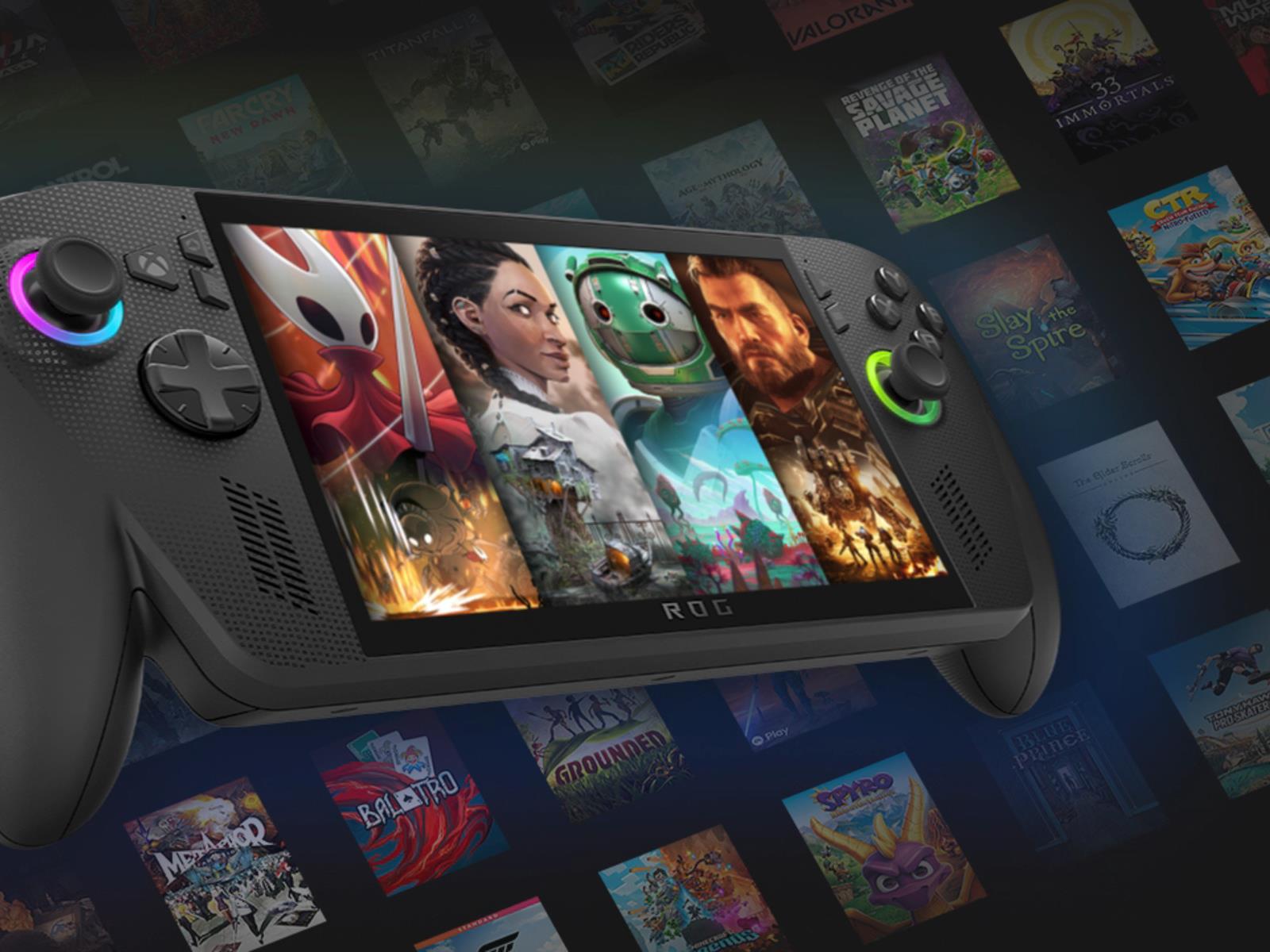
Microsoft recently released an update for the Xbox app designed to make gaming on Windows devices, including handhelds, more convenient. Additionally, the company has been working on a full-screen Xbox experience destined for the Asus ROG Xbox Ally, which was meant to be an exclusive feature to better differentiate the device from competitors.
This week. the first round of Zwift Racing League 2025/26 kicked off with a team time trial on Watopia’s new Southern Coast Cruise route. I knew the rolling roads would present a challenge, and I was also riding with a new squad. Read on to learn how our race unfolded!
On Joining a New Team
Before getting into the story of the race, I want to unpack my experience moving to a new team for this season of ZRL, as there are useful takeaways here for both Zwift HQ and the Zwift community.
I’ve ridden with DIRT since the beginning of ZRL back in October 2020, and this season I was just looking for something… different. Nothing against DIRT, of course. They’re a huge team full of great people who will always have the best acronym-based team name (Dads Inside Riding Trainers). I was just looking to ride with a fresh bunch of folks and experience how other teams work.
Finding a Team
So I put my name out there on the WTRL Zwift Racing League Facebook page, and lots of teams reached out. (Apparently, mid-cat B riders who can’t climb are in high demand these days!) I ended up going with The Coalition because I already knew lots of folks on the team, I like their ethos of fair racing, and they seem very well-organized.
As instructed by their helpful website, I joined the Coalition Discord server and started working through the steps to fully join the team. Honestly, it was a bit overwhelming. There are several things that need to happen in order to get the team kit, join a ZRL team, and actually get to race. But their website and team leaders were very helpful and on the ball, and soon enough I’d submitted my weigh-in and height verification videos, been assigned to a ZRL team, and unlocked the kit.
Development Division
My new ZRL team is Coalition Delusion, and we’re racing in the Lime B1 Open Development league. The “development” divisions are a new feature introduced this round with a lower zFTP cap enforced within each category (e.g., B category zFTP max = 3.79 W/kg). According to WTRL “This ensures a fairer and more supportive racing environment for improving athletes.” But in practice, I think it really means low and mid-cat B riders have a place in ZRL where they can enjoy team racing again, instead of going into the meatgrinder that is B1! (I’ve talked about this at length before, so I’ll spare you the details.)
This Could Be Better
Props to Coalition for running a tight yet welcoming ship. But let’s be clear: Coalition, and all other Zwift teams, are forced to do the work because there’s no other alternative. And that’s just silly, given that Zwift is almost 11 years old, and we’re in our 16th ZRL round.
Zwift should have built teams into the platform from day one, making it easy to connect with others and enabling native team functionality in races. It would have removed barriers to entry and made team organizing and racing even cooler. (And it still would.)
And after 15 rounds of racing, there should be an easy way to find a ZRL team that doesn’t involve posting a message on a Facebook group. That just doesn’t scale when you’re dealing with thousands of riders, and it’s not a user-friendly experience for new riders.
With that vent finished, let’s get on with the race.
Planning + Warmup
While I’ll occasionally skimp on completing a full warmup before a one-off scratch race, I’m always careful to warm up thoroughly before important races like ZRL.
I was already one dirty chai and a few pieces of Neuro caffeine gum into my day by the time I got on the bike at 9:30am, so I was nicely caffeinated. I’d also applied some PR Lotion to my legs (don’t knock it ’til you’ve tried it), then I rode a 30-minute warmup, keeping the effort mostly zone 2, with a few spinups to get my heart rate up in zone 4.
As often happens in TTTs, a teammate had to drop out at the last minute, which meant we scrambled to find a sub. We finally found Adrian, captain of another Coalition team, who was kind (and crazy) enough to join us even though he’d be racing with another team earlier that day.
Teammate Chris M wasn’t able to race, so he volunteered to DS for this TTT. It’s always nice having a DS on Discord who isn’t riding in the race, as they can calmly direct the team, leaving the riders to focus on their efforts.
While warming up, I looked at our team’s final “pull sheet.” This document, put together by our Captain Neil, listed the order we would take our pulls, plus our target pull length and wattage. I noted I was the last rider in the list, so I added a “6” at the start of my name in game. I’d be targeting 350W 60-second pulls, and the wheel I’d be sitting on otherwise was Andrew’s. Simple enough.
After signing into Discord and getting my OBS recording started, it was time to enter the pens. Let’s race!
The Race
This being our first-ever TTT together, I think we were all curious about how well we’d work together. TTTs can get messy real quick if you aren’t organized beforehand or have just one or two inexperienced riders.
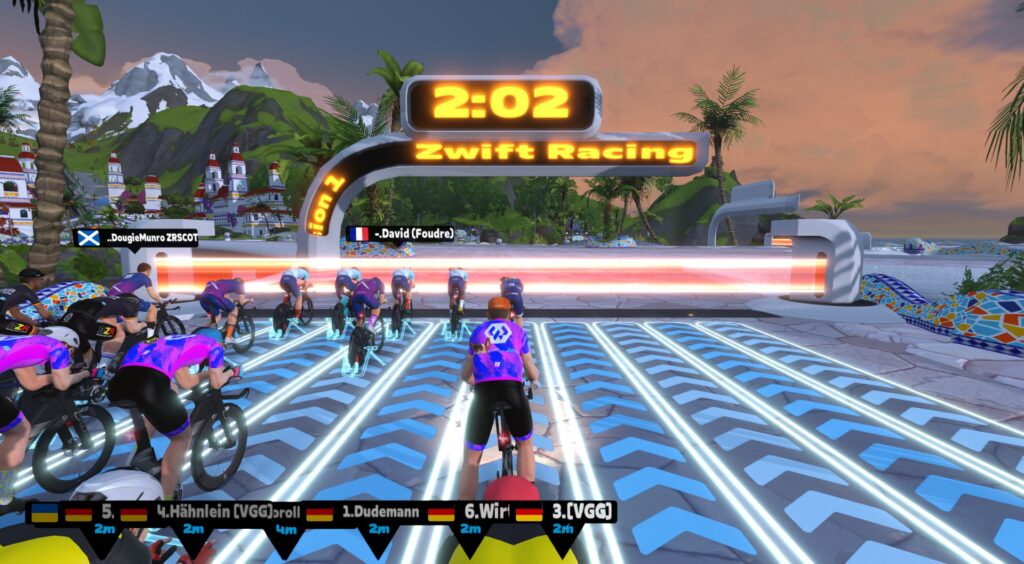
But we fell into order quickly right out of the gate, sliding into that uber-efficient single-file formation that TTT riders strive for. Our line looked so good, in fact, that I tried to snap some good pics. Problem was, every time I changed to the drone camera, I would get out of position myself! (Sorry, guys…)
We cycled through our turns on the front, calling out our target time when we hit the front “Eric on until 12:30” and calling out when we had 10 then 5 seconds left on our pulls.
The team was working well together, and Chris was doing a great of DSing, but there were two things I was seeing:
Our gap to the team ahead (BZR) was over a minute, meaning they were faster so far
Adrian, our last-minute sub, was struggling to take pulls
You can’t panic in a TTT, though. Plan your race, then race your plan. We had known Adrian might struggle in his second race of the day, so when he decided to drop off around the LAX roundabout, we smoothly transitioned into rotating as a unit of 5.
I wasn’t sure how 1-minute pulls would feel, as I’d always been the guy doing 30-second pulls in the past, usually on teams where most of the riders were stronger than me! But I was feeling good as we kept chugging along. Captain Neil and I were probably the worst offenders when it came to overlapping wheels. I blame it on my lack of recent TTT experience. And I’ll let Neil make up his own excuse…
With 10.9km to go, teammate Rob fell off the back – I’m still not sure what happened, but it sounded on Discord like he said he had to hop off the bike! He went to zero watts for 15 seconds, which would normally be a death sentence in a Zwift race. But he had hopped off on the downhill heading into the Woodside Sprint, which kept his avatar moving faster than if he’d hopped off on a flat or climb.
We eased a bit, and he pushed hard, and we were back together just 40 seconds later. These kinds of events happen often in TTTs and can really slow a team if handled incorrectly. So kudos to Rob for the impressive push to rejoin, and good job to the team overall for easing without easing too much.
We exited the Summit City Velodrome turnaround with 2.7km to go, and up the road I saw we were in a dead heat with the BZR squad, having brought back a few seconds in the last few minutes. This was going to be close!
We held formation until there were just 800 meters to go. Then I decided to power up and go all-in for the final 30-45 seconds, since I had more gas in the tank and could lend a helpful draft to anyone behind. All in to the line!
I averaged 470W for the final 60 seconds, finishing just behind Andrew as the second rider in my team. Our final time, taken off our fourth rider, would be 36:07.609.
If you’ve ever raced in ZRL, you know what comes next after crossing the finish line: the agonizing wait for the results to show up on the WTRL website!
Usually they show up within 15-30 minutes, but for this, the first race of Round 1, we kept waiting… and waiting…
It wasn’t until Thursday morning, almost 48 hours after our race, that the results table was populated. Apparently WTRL and Zwift were making lots of changes to backend systems and websites in the past few weeks, and those changes, coupled with lots of last-minute team registrations and changes, meant WTRL was scrambling to get results processed and displayed quickly. In fact, some teams got their race passes late, and weren’t even able to race. Ouch.
I feel bad for Martin and his team at WTRL, who have been putting in long hours to get ZRL Round 1 launched. I know they’ve been working crazy hard.
But at the same time, it has to be said: this is the 16th round of Zwift’s flagship team race series. The experience should be better. Zwift and WTRL can do better.
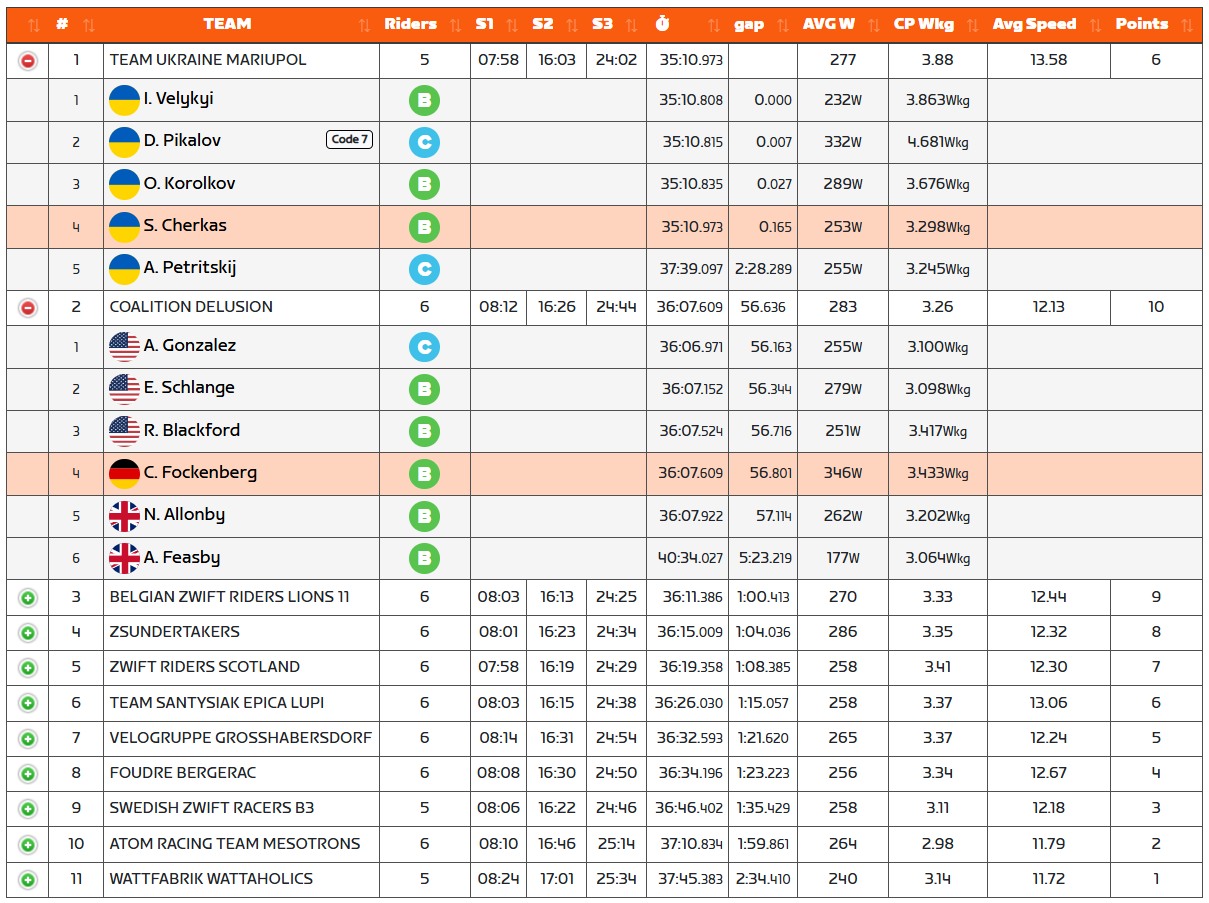
Here are the results from our race:
A bit confusing, right? So, Team Ukraine Mariupol turned in the fastest time on the day, and my team (Coalition Delusion) was second-fastest. But (and this is important) one rider on Team Ukraine received a Code 7.
What is a code 7? Well, I searched WTRL’s rulebook and website for a definition, and couldn’t find one. But I did find this in the rulebook:
5.2.7: Racers found to be exceeding the limits in any race and receive a Code 7 or 8 disqualification will be removed from that team and will not be permitted to race with that team for the remainder of the Round. Racers receiving a Code 7 or 8 are encouraged to consider riding for a team in a higher division or category.
Poking around various forum and Facebook comments, Code 7 seems to be defined as “Rider has exceeded Division Power Limits”. Makes sense, as the rider in question averaged 4.681 W/kg for the race, when the zFTP limit for B Development divisions is 3.79 W/kg!
Receiving a Code 7 in a TTT is especially problematic, because in theory, an overpowered rider could tow his team to the line. How can that situation be handled fairly? WTRL’s rulebook says:
4.3.3 C: If a team fields an ineligible racer in a Team Time Trial, the team will be awarded 50% of the League points they would otherwise have earned.
So it seems we both won and lost our TTT. Team Ukraine was faster, but their points were cut in half (and rounded up?) due to the Code 7. In the end, since we received the highest number of points. I’ll consider it a win.
On a pacing note, I think my team did a great job of not going too hard out of the gate, so we had gas in the tank to finish strong. We probably started a bit too slowly, in fact, but this sort of “negative split” pacing seems to be really effective in team time trialing. Well done all, and kudos to Captain Neil, DS Chris M, and Andrew, Chris F, Rob, and Adrian for strong planning and execution.
Personally, this was one of the easier TTTs I’ve raced. That’s not to say it was easy, of course: I was bang on my best power for 2025 in the 32-35 minutes window. But I wasn’t struggling to hold on, and I had a bit more punch left at the end than most TTTs I’ve endured. So that was nice.
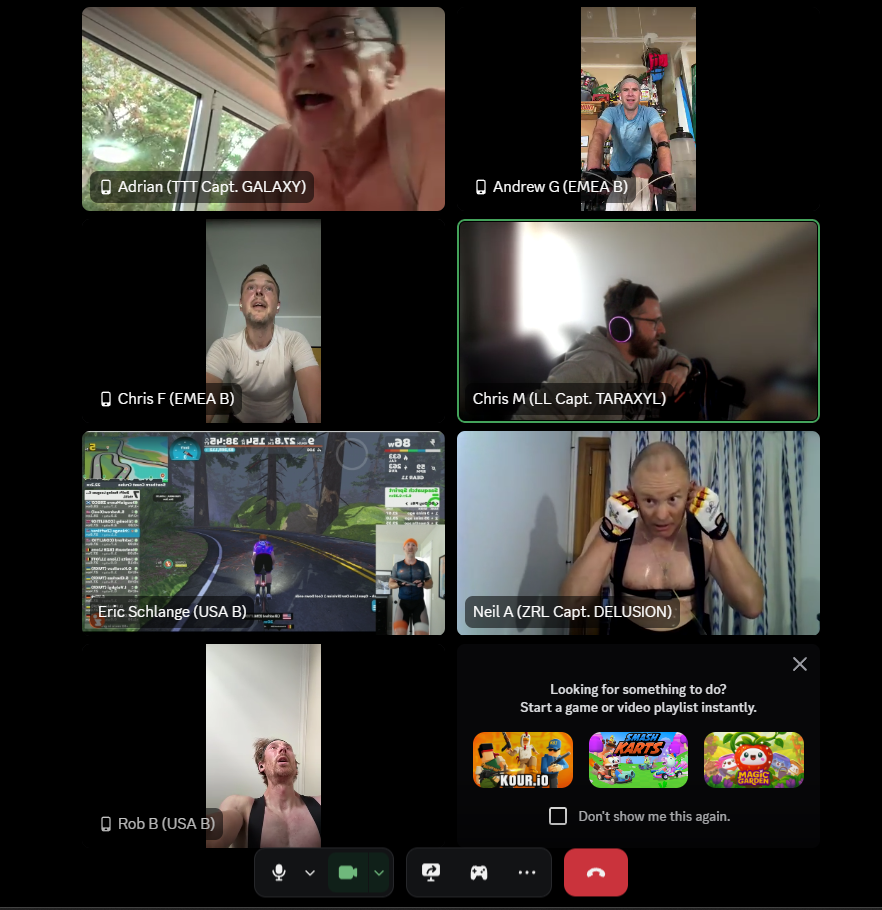
At the end of the race, as Adrian was finishing up his ride, we took a Discord snapshot:
See you all next week!
Your Thoughts
How did your first race of round 1 go? Share below…
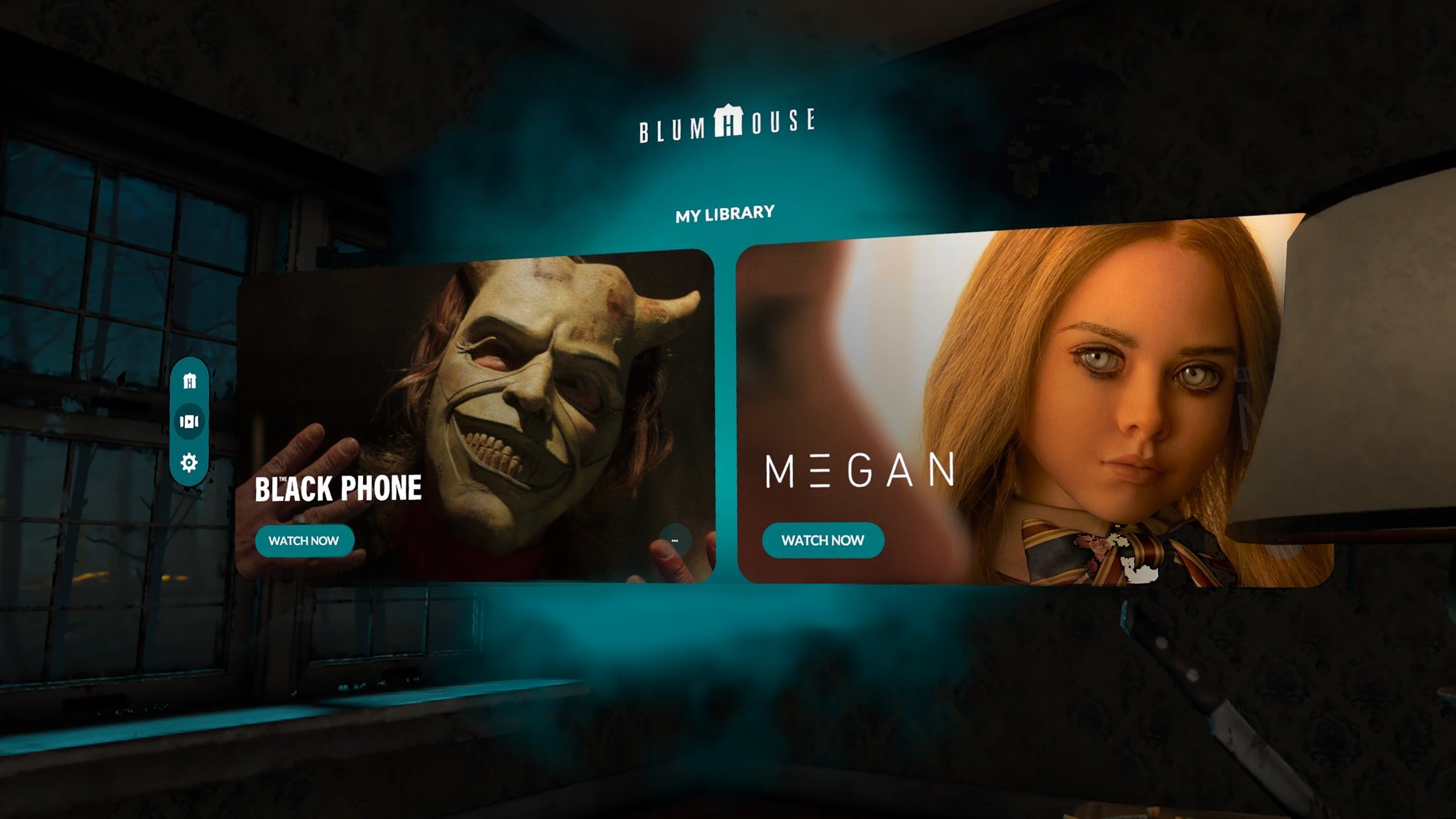
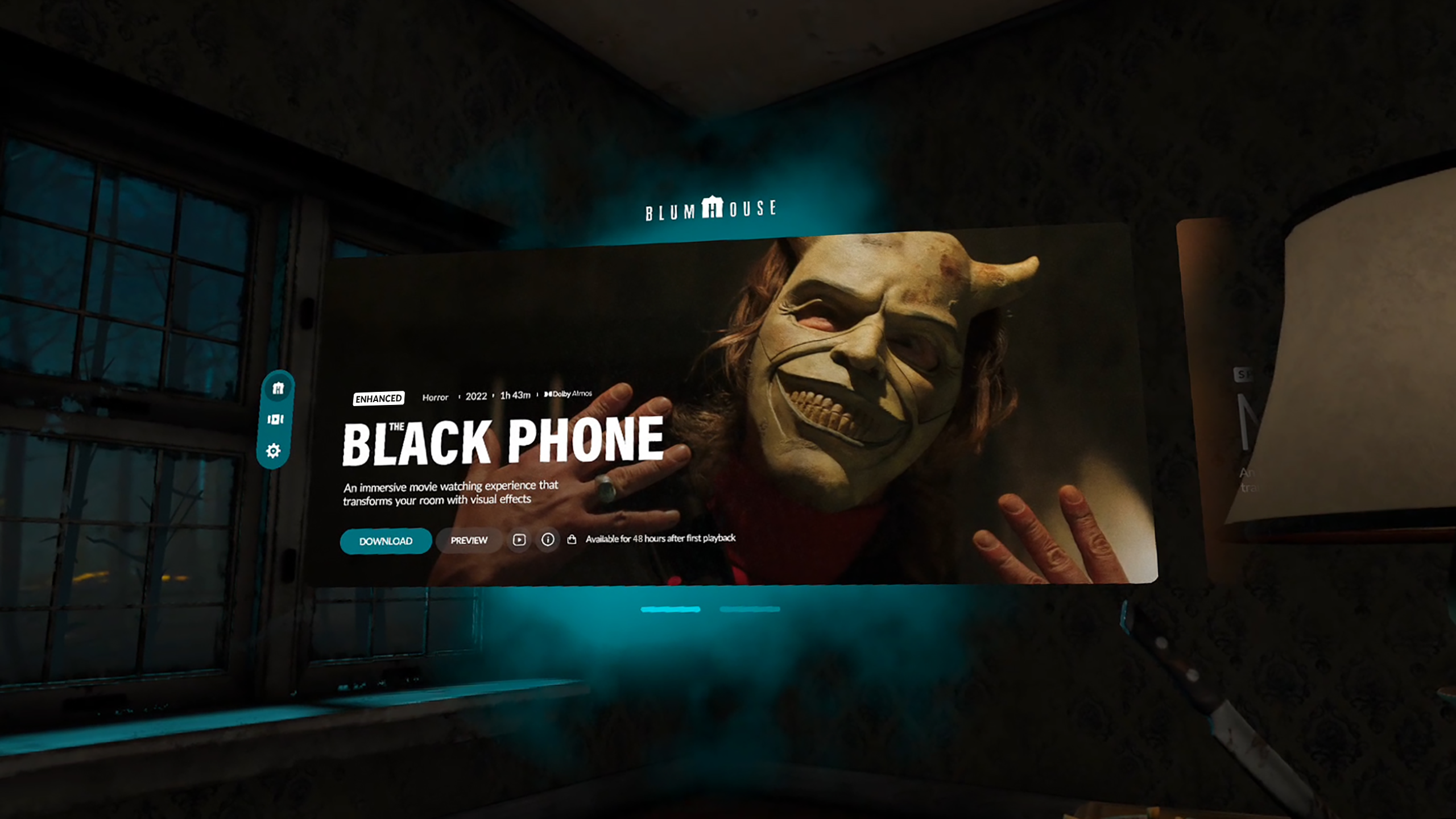
Blumhouse Enhanced Cinema for Quest 3 will let you watch M3GAN and The Black Phone with immersive special effects.
Blumhouse is the studio behind the biggest horror movie franchises of the 21st century, including Paranormal Activity, Insidious, Sinister, The Purge, Split, Get Out, M3GAN, and the cinema adaptation of Five Nights at Freddy’s.
Earlier this year, Blumhouse released a Horrorverse world in Horizon Worlds, with social experiences based on M3GAN, The Purge, Wolf Man, The Black Phone, and more.
Now, at Meta Connect 2025, it has announced its own Quest 3 app, called Blumhouse Enhanced Cinema.
Blumhouse Enhanced Cinema
The app, which will be available only in the US, will let Quest owners watch M3GAN and The Black Phone on a large virtual display in custom environments where immersive effects “spill from the screen”.
This isn’t a new idea. The app Relic has explored this with short clips, for example. But as far as we’re aware, it will be the first time a VR app legally and officially delivers these kinds of effects for a full movie.
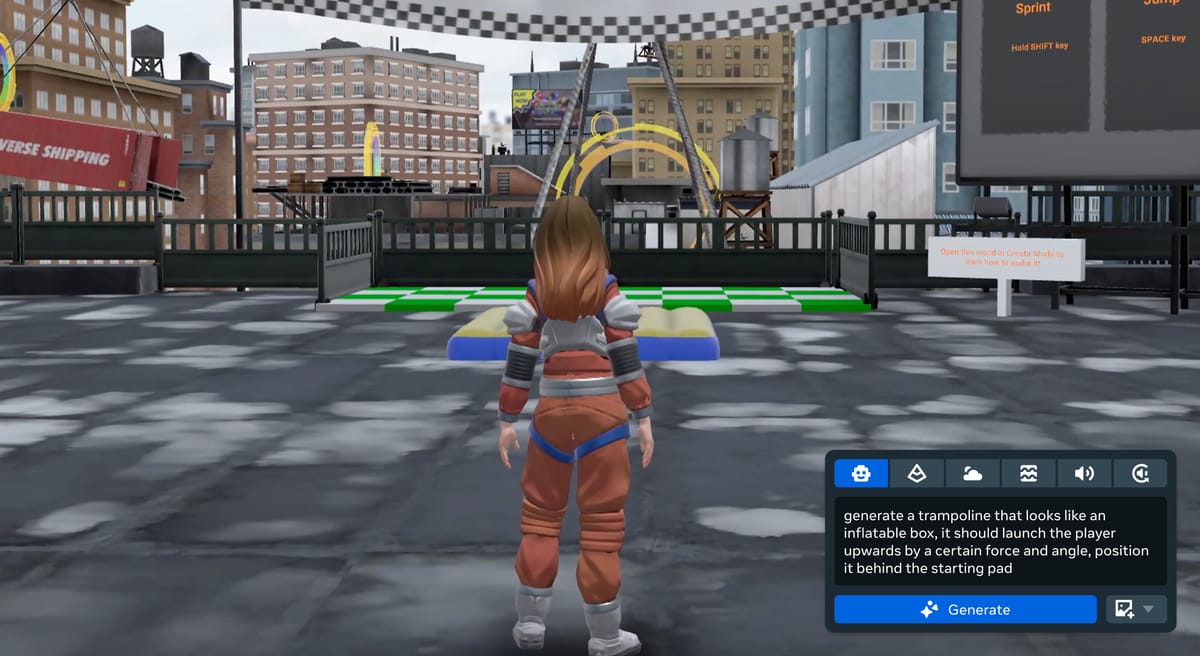
Meta Horizon Studio, the new name for Horizon Worlds Desktop Editor, is getting an upgraded AI Assistant that can generate or change just about anything.
0:00
/0:42
Meta Horizon Studio’s AI Assistant
Horizon Worlds Desktop Editor is a flatscreen Windows PC application Meta released in early access in February, alongside deprecating the in-VR creation tools of Horizon Worlds. The editor offers the ability to import 3D assets, images, and sound files, place them in a 3D landscape, and implement game logic and other functionality using TypeScript, a popular offshoot of JavaScript. These worlds are then immediately playable and multiplayer-capable in Horizon Worlds.
Throughout the year, Meta has rapidly integrated more and more AI generation features in the editor, which it will soon rebrand to Horizon Studio. In the US, UK, Canada, EU, Australia, New Zealand, creators can AI-generate 3D meshes, textures, skyboxes, sound effects, ambient audio, TypeScript, and islands.
Last month, Meta also launched Creator Assistant, an AI agent capable of performing many development tasks. For example, if you tell Creator Assistant “Make a door that opens when a button is pressed”, the agent will find a door and button in the Asset Library, place them in the world, set their properties, and write and attach TypeScript to make the button open the door.
But ironically, the current Creator Assistant cannot leverage the other generative AI tools of the editor. This means that when asked to make/construct/create/build something, it will look for existing assets in the Asset Library, not AI-generate new ones.
0:00
/0:28
Meta Horizon Studio’s AI Assistant
Meta Horizon Studio’s upgraded AI Assistant will change that. Meta says it will be able to AI generate entire worlds, specific assets, and exactly what gameplay mechanics you want, in a matter of minutes.
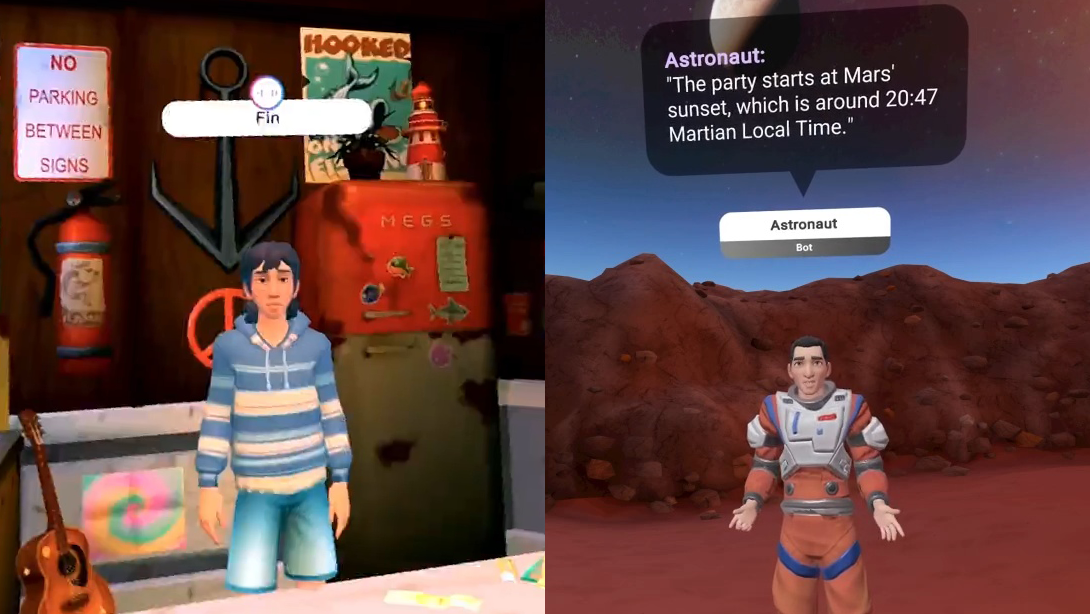
Horizon’s AI Assistant will even be able to generate custom NPCs, not just the Meta Avatar based NPCs that Horizon has today. And as with the current Horizon Worlds AI NPCs, users will be able to naturally talk with them, and creators will be able to give them background context of the world state, as well as dynamic knowledge of ongoing events.
The world creators build in Horizon Studio will leverage the new Horizon Engine, which replaces the Unity runtime of Horizon Worlds for, according to Meta, 4x faster loading and 100+ users in the same instance.
If the shipping tech lives up to Meta’s promises, it could bring the barrier to entry for creating interactive social VR worlds lower than ever, and reduce the minimum time needed from hours to minutes.
Chinese AI developer DeepSeek said it spent $294,000 on training its R1 model, much lower than figures reported for U.S. rivals, in a paper that is likely to reignite debate over Beijing’s place in the race to develop artificial intelligence. Reuters: The rare update from the Hangzhou-based company — the first estimate it has released of R1’s training costs — appeared in a peer-reviewed article in the academic journal Nature published on Wednesday.
DeepSeek’s release of what it said were lower-cost AI systems in January prompted global investors to dump tech stocks as they worried the new models could threaten the dominance of AI leaders including Nvidia. Since then, the company and founder Liang Wenfeng have largely disappeared from public view, apart from pushing out a few new product updates.
[…] The Nature article, which listed Liang as one of the co-authors, said DeepSeek’s reasoning-focused R1 model cost $294,000 to train and used 512 Nvidia H800 chips. Sam Altman, CEO of U.S. AI giant OpenAI, said in 2023 that what he called “foundational model training” had cost “much more” than $100 million – though his company has not given detailed figures for any of its releases.
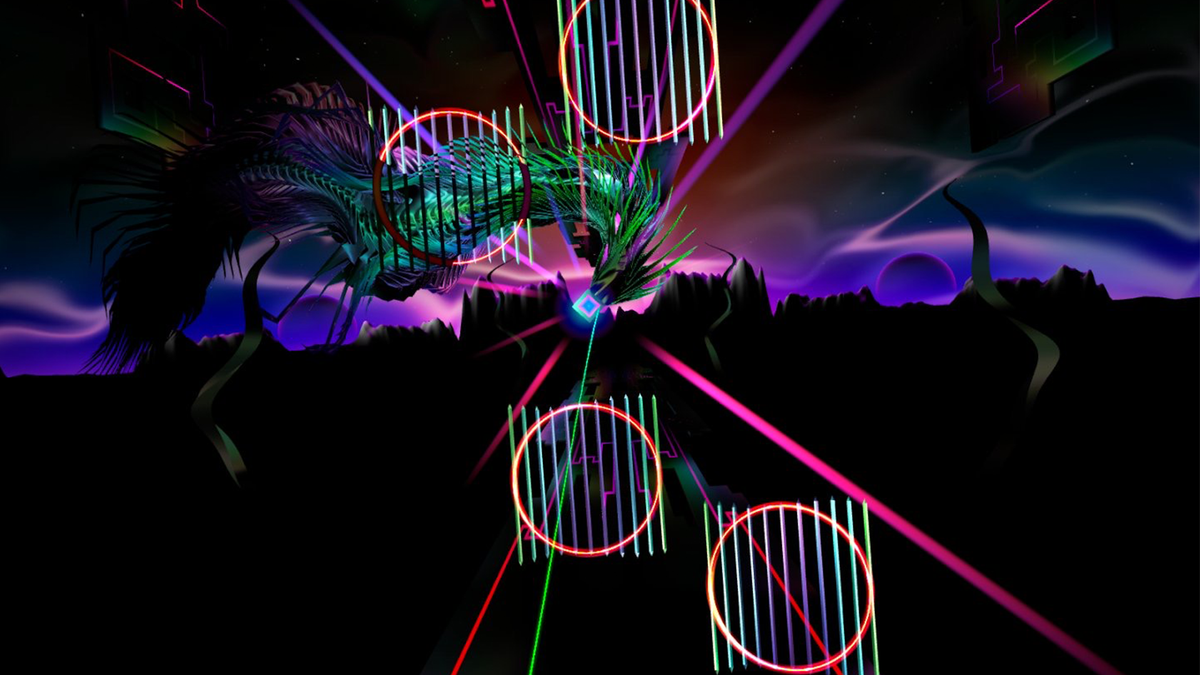
Thrasher is being remastered on PC VR with visual updates, a refreshed UI, and a new game mode, and a Steam demo is now live.
Released on Quest and Vision Pro in 2024, Thrasher is a cosmic action racer where players are tasked with weaving a wiggly ferrofluid eel through a series of dynamic target and obstacle-filled levels. Joining the VR Forever Festival, the challenging experience is making its Steam debut later this year. However, anyone keen to dig in ahead of launch can jump into a new Steam demo, which is available now.
0:00
/1:50
Additional features in the Steam demo include controller and hand tracking support, enhanced graphics for PC VR, UX improvements, and a new game mode dubbed Play+, which promises increased difficulty. Puddle reconfirmed that a 2D port of the game will be launching soon as well, and this demo supports 90fps on Steam Deck, as well as gamepad and mouse controls on PC.
The VR Forever Festival is a collaboration between publishing label Creature (The Light Brigade) and Future Friends Games, touting itself as the “largest ever” celebration of PC VR games on Steam. Featuring over 130 different titles and an awards component, the event starts today and will run until September 23.
The Thrasher demo is available now on Steam, while the full game is available elsewhere on Quest and Apple Vision Pro.