I recently took a trip to Europe, hopping across a few countries that all spoke languages I didn’t understand. As such, in order to interpret menus, signs, and packaging, I needed to translate the text back into English. While you might assume you need to use a specific translator app of choice to get this done, you really only need one thing: your iPhone’s camera.
I, along with all of the people I traveled with, have an iPhone, so I assumed all of us knew about this trick. To my surprise, however, nobody in my party knew about this. So, I’m here to make sure your next international trip is a bit easier.
Translate text with your iPhone’s camera
The next time you need to translate some text in front of you, instead of heading for Google Translate, Microsoft Translator, or even Apple’s own Translate app, just open your Camera app. Frame up the text in the middle of the viewfinder and give your iPhone a moment to “think.” If all goes well, you should see a yellow frame appear around the text, and a new button appear in the bottom right of the viewfinder—or top right, if you’re holding your iPhone in landscape.
Tap this button, and iOS will cut out the selected text, and zoom in to bring it into focus. Now, tap the “Translate” button that appears in the bottom left (or top left in landscape), wait a moment, and presto: The text is replaced by your target language. As you might guess, for me, that’s English, but the feature will translate into whichever system language your iPhone is currently set to.
Credit: Lifehacker
For many applications, this translation is enough. But there’s more you can do with this. If you need to share that translated text somewhere, you can tap the translation to pull up a Translate mini window. Here, you can copy the translation so you can paste it wherever you’d like. You’ll also be able to have iOS read either the translation or original text out loud, add the translation to your favorites, or open the translation in the Translate app.
This hidden perk is part of the iPhone’s larger Live Text feature, which uses OCR (optical character recognition) to identify text in images. Live Text allows you to select text both in images and within the camera’s viewfinder for easy copy and pasting. And, since iOS 16, it allows you to translate that text directly within the camera as well. Since it’s powered by the Translate app, it supports the languages the app does, which includes:
Arabic
Chinese (Mandarin, Simplified)
Chinese (Mandarin, Traditional)
Dutch
English (UK)
French
German
Hindi
Indonesian
Italian
Japanese
Korean
Polish
Portuguese (Brazil)
Russian
Spanish (Spain)
Thai
Turkish
Ukrainian
Vietnamese
If this feature isn’t working for you, it’s likely not turned on. To check, head to Settings > Camera, then ensure “Show Detected Text” is enabled.
Other ways to translate on iPhone
This is far from the only way to translate other languages on your iPhone. As previously mentioned, iOS comes with a built-in Translate app, which has its own Camera function as well. But with iOS 26, there’s a new translation feature that works seamlessly as you use your iPhone: Live Translate.
As the name suggests, Live Translate can translate conversations in real time. This works in Messages with text, but also during FaceTime and phone calls when talking to someone in another language. If you have a compatible pair of AirPods, you can even use this feature when talking to someone in person: You’ll hear their words translated in your ears, and they’ll see your words translated on your iPhone’s display.
Nintendo recently announced that the next mainline Fire Emblem game is coming in 2026, and it looks like the company has another take on the popular strategy series to tide you over while you wait. Fire Emblem Shadows is a new mobile spin-off that combines the series’ tactics gameplay with some of the social dedication mechanics popularized by games like Among Us, and it’s available to download now.
Shadows follows groups of heroes — the typical collection of royals, rogues and anime archetypes — navigating an underground labyrinth. “Players choose to take on the role of either a disciple of light, aiming to find their way through the labyrinth, or a disciple of shadow,” Nintendo writes.”After the initial battle, players vote to determine who they believe is the treacherous disciple of shadow. The outcome of the vote affects whether the next battle is more favorable or more challenging.”
Unlike a typical Fire Emblem match, though, you don’t have direct control over your characters during battles. Instead, you can see the path they’ll take through a map and are tasked with deploying spells that hurt enemies, heal heroes or offer other buffs while they move. The gameplay-style makes the whole thing feel hands-off and even a little boring in early battles, but it’s possible that could change with more difficult foes. You also earn upgrades as you play, and Nintendo is selling a season pass that unlocks premium rewards while you work your way through either of Fire Emblem Shadows’ two plots.
While Nintendo’s push into mobile games has slowed in recent years, the company has fairly consistently updated its original spin-off,Fire Emblem Heroes, since it was released in 2017. That game offered a take on the series’ gameplay that hewed closer to the original, just with a gacha-style lottery system for unlocking new characters. If it proves popular, it seems likely Fire EmblemShadows will see the same level of support.
Fire Emblem Shadows is available to download for free on iOS and Android.
This article originally appeared on Engadget at https://www.engadget.com/gaming/nintendo/fire-emblem-shadows-mixes-in-a-little-social-deduction-with-its-tactics-182907183.html?src=rss
ChatGPT already tries to answer all your questions. Now it’s trying to answer questions before you ask them. OpenAI’s new feature for its AI chatbot is ChatGPT Pulse, a summary of personalized updates. The blog post explaining Pulse positions it as a bulletin to start the day based on asynchronous research done by ChatGPT.
Users can direct Pulse toward or away from particular topics, and the summaries will also draw on chat history and, if connected, your Gmail and Google Calendar. The examples OpenAI gave for what Pulse recommendations might look like were “follow-ups on topics you discuss often, ideas for quick, healthy dinner to make at home that evening, or next steps toward a longer-term goal such as training for a triathlon.”
For now, ChatGPT Pulse is available for Pro tier subscribers to test. However, OpenAI aims to eventually roll the feature out to all users.
This article originally appeared on Engadget at https://www.engadget.com/openai-introduces-personalized-daily-summaries-with-chatgpt-pulse-181532935.html?src=rss
With AI chatbots growing in popular usage, it was only a matter of time before large numbers of people began applying them to the stock market. In fact, at least 1 in 10 retail investors now consult ChatGPT or other AI chatbots for stock-picking advice, according to a Reuters report published Thursday.
Data from a survey by trading platform eToro of 11,000 retail investors worldwide suggests that 13 percent of individual investors already use AI tools like ChatGPT or Google’s Gemini for stock selection, while about half say they would consider using these tools for portfolio decisions.
Unlike algorithmic trading, where computers automatically execute thousands of trades per second, investors are using ChatGPT as an advisory tool in place of human experts. They type questions, read the AI model’s analysis, and then manually decide whether to place trades through their brokers.
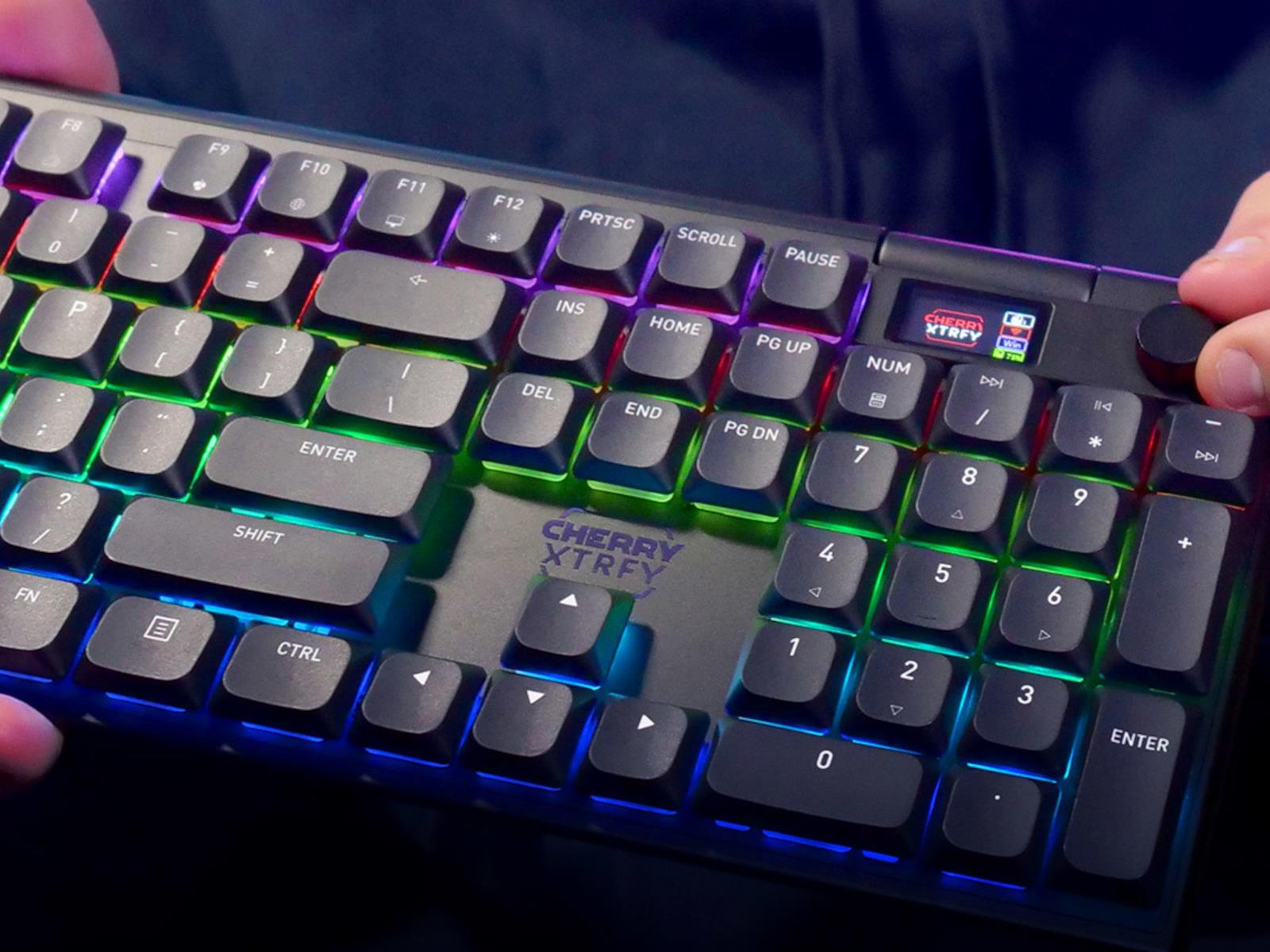
Renowned keyboard and mechanical key switch manufacturer Cherry, which acquired gaming hardware brand XTRFY two years ago, is now selling the Cherry XTRFY MX 10.1 Wireless Mechanical Keyboard that it showed off at CES 2025. The Cherry XTRFY MX 10.1 Wireless Gaming Mechanical Keyboard features an aluminum frame and slim Cherry MX Low Profile
An anonymous reader shares a report: OpenAI released a new benchmark on Thursday that tests how its AI models perform compared to human professionals across a wide range of industries and jobs. The test, GDPval, is an early attempt at understanding how close OpenAI’s systems are to outperforming humans at economically valuable work — a key part of the company’s founding mission to develop artificial general intelligence or AGI.
OpenAI says its found that its GPT-5 model and Anthropic’s Claude Opus 4.1 “are already approaching the quality of work produced by industry experts.” That’s not to say that OpenAI’s models are going to start replacing humans in their jobs immediately. Despite some CEOs’ predictions that AI will take the jobs of humans in just a few years, OpenAI admits that GDPval today covers a very limited number of tasks people do in their real jobs. However, it is one of the latest ways the company is measuring AI’s progress towards this milestone. GDPval is based on nine industries that contribute the most to America’s gross domestic product, including domains such as healthcare, finance, manufacturing, and government. The benchmark tests an AI model’s performance in 44 occupations among those industries, ranging from software engineers to nurses to journalists.
The European Union has summarily rejected calls from Apple to repeal and replace its Digital Markets Act (DMA), the law that governs much about how giant tech companies must operate within the 27-nation bloc. As first reported by France 24, EU digital affairs spokesperson Thomas Regnier responded to Apple’s open letter regarding the DMA’s effect on users in the EU.
“Apple has simply contested every little bit of the DMA since its entry into application,” said Regnier. He added that the Commission had “absolutely no intention” of dismantling the DMA. The landmark legislation was passed in 2022 in an effort to rein in the ever-growing reach and power of big tech and to level the playing field for smaller would-be competitors.
This summer, the Commission opened a period of public consultation for the DMA with a deadline for submission of September 24. Apple submitted an official response, while also taking the time to publicly decry the DMA through a blog post.
In the post, Apple says “it’s become clear that the DMA is leading to a worse experience for Apple users in the EU.” The company says it is “urging regulators to take a closer look at how the law is affecting the EU citizens who use Apple products every day,” alleging that the implementation of these laws is opening users to higher risks of scams, exposure to harmful apps and weakened security surrounding user data.
The back-and-forth over the DMA and the hefty fines being levied against big tech companies has become part of the political discourse amid trade negotiations between the US and the EU. President Donald Trump expressed his ire at American companies facing such heavy fines, and The Wall Street Journal alleged that the EU was using these fines in part as a bargaining chip in trade negotiations.
This article originally appeared on Engadget at https://www.engadget.com/big-tech/eu-tells-apple-it-has-no-intention-of-repealing-the-digital-markets-act-175950691.html?src=rss
Senators are demanding answers from Big Tech companies accused of “filing thousands of H-1B skilled labor visa petitions after conducting mass layoffs of American employees.”
In letters sent to Amazon, Meta, Apple, Google, and Microsoft—among some of the largest sponsors of H-1B visas—Senators Chuck Grassley (R-Iowa) and Dick Durbin (D-Ill.) requested “information and data from each company regarding their recruitment and hiring practices, as well as any variation in salary and benefits between H-1B visa holders and American employees.”
The letters came shortly after Grassley sent a letter to Department of Homeland Security Secretary Kristi Noem requesting that DHS stop “issuing work authorizations to student visa holders.” According to Grassley, “foreign student work authorizations put America at risk of technological and corporate espionage,” in addition to allegedly “contributing to rising unemployment rates among college-educated Americans.”
PostgreSQL 18.0 is out today as the annual major feature release for this widely-used SQL database server. PostgreSQL 18 is a big one with many exciting performance optimizations and other new features…
Dell has a small (but growing) line of audio devices tailored for professionals, which has previously been relegated to speakerphones, headsets, and soundbars. Today, however, Dell added its first ever earbuds to its portfolio, the Dell Pro Plus Earbuds, which sport adaptive ANC, mics with AI-powered noise filtering, and Microsoft Teams Open
Despite AI models outperforming radiologists on benchmark tests since 2017, demand for human radiologists has reached record highs. American diagnostic radiology residency programs offered 1,208 positions this year, up 4% from 2024, while average salaries hit $520,000 — 48% higher than 2015. Over 700 FDA-cleared radiology AI models exist, yet only 48% of radiologists use AI at all. Models trained on standardized datasets lose up to 20% points accuracy when deployed in different hospitals. Radiologists spend just 36% of their time interpreting images, with the majority devoted to patient communication, teaching, and administrative tasks that current AI cannot perform.
Ahead of the Amazon Big Deal Days event (aka Prime Day in October), a tasty deal on a Shark robot vacuum has popped up. You’ll need to be a Prime member to take advantage of the offer on the Shark AV2501S AI Ultra robot vacuum, but if you are, you can get the device for over half off. The discount drops the price from $550 to $230.
That means you can snap up the robot vacuum for $320 below list price. The discount marks a record low for this model.
Shark offers several variations of its AI Ultra robot vacuums. There are small variations between them, and a different model is our pick for the best robot vacuum for most people. In general, you can expect solid cleaning performance from these devices, along with accurate home mapping and an easy-to-use app.
The model that’s on sale here is said to run for up to 120 minutes on a single charge, which should be enough to clean an entire floor in a typical home. The self-emptying, bagless vacuum can store up to 30 days worth of dirt and debris in its base. Shark says it can capture 99.97 percent of dust and allergens with the help of HEPA filtration.
If you’d rather plump for a model that’s able to mop your floors too, you’re in luck: a Shark Matrix Plus 2-in-1 vacuum is on sale as well. At $300 for Prime members, this vacuum is available for $400 (or 57 percent) off the list price. Its mopping function can scrub hard floors 100 times per minute. You can also trigger the Matrix Mop function in the app for a deeper clean. This delivers 50 percent better stain cleaning in targeted zones, according to Shark.
This article originally appeared on Engadget at https://www.engadget.com/deals/prime-day-deals-include-this-shark-ai-ultra-robot-vacuum-for-58-percent-off-171836638.html?src=rss
Microsoft has ended access to its data centers for a unit of the Israeli military that helped power a massive surveillance operation against Palestinian civilians, according to a report by The Guardian. The company says that the country’s spy agency has violated its terms of service.
This surveillance system collected millions of phone calls made by Palestinian civilians every day in Gaza and the West Bank. The massive trove of data has been stored via Microsoft’s Azure cloud platform, but the company just informed Israel’s spy agency that this practice will no longer be acceptable.
Microsoft’s vice-chair and president, Brad Smith, alerted staff of the move in an email, writing that the company had “ceased and disabled a set of services to a unit within the Israel ministry of defense.” He went to suggest that this included cutting off access to cloud storage and some AI services.
“We do not provide technology to facilitate mass surveillance of civilians,” he continued. “We have applied this principle in every country around the world, and we have insisted on it repeatedly for more than two decades.”
Microsoft came to this decision after conducting an external inquiry to review the spy agency’s use of its Azure cloud platform. It also comes amid pressure from both employees and investors for the company to examine its relationship with Israel as it relates to the military offensive in Gaza.
This reportedly started back in 2021, when Microsoft CEO Satya Nadella allegedly okayed the storage effort personally after meeting with a commander from Israel’s elite military surveillance corps, Unit 8200. Nadella reportedly gave the country a customized and segregated area within the Azure platform to store these phone calls, all without knowledge or consent from Palestinians.
While conflict has existed between Israel and Palestinian groups for decades, these platforms were built out a full two years before the the most recent escalation in violence, beginning October 7, 2023. The mantra when building out the project was to record “a million calls an hour.”
Leaked Microsoft files suggested that the lion’s share of this data was being stored in Azure facilities in the Netherlands, but Israel allegedly moved it after Microsoft started its initial investigation. The Guardian has reported that Unit 8200 planned on transferring the data to the Amazon Web Services cloud platform. We have contacted Amazon to ask if it has accepted this gigantic trove of personal data.
This article originally appeared on Engadget at https://www.engadget.com/big-tech/microsoft-blocks-israels-use-of-its-data-centers-for-mass-surveillance-of-palestinians-170107061.html?src=rss
Titan Isles is an absolute blast in both co-op and solo play, offering a strong VR action adventure worth exploring. Here’s our full review.
You can quickly see the shared DNA between Titan Isles and its immediate predecessor, Windlands 2. Nearly seven years since Psytec Games launched its older hit, this action adventure takes us to the ruined world of Toska where you fend off colossal robots. Some intense motion means it’s not especially newcomer-friendly, but I’m greatly enjoying clearing through these ancient robots with friends.
The Facts
What is it?: An action adventure where you take down massive robots in solo play or through four-player co-op with cross-platform multiplayer. Platforms: Quest, PC VR, PS VR2 (Reviewed on Quest 3) Release Date: Out Now (Quest, Steam), 2026 (PS VR2) Developer/Publisher: Psytec Games Price: $29.99
Underpinning your efforts is a narrative-driven campaign, joining a small group of survivors as you uncover why these mysterious giant Titans have suddenly awakened. If you’re after a more cinematic adventure with a strong story, what’s here is functional yet bare. A helpful opening tutorial gives you the key details, but you can mostly ignore the ongoing story afterward and jump straight to the action.
Still, Titan Isles balances what is here well by offering just enough worldbuilding depth to hold my interest across this lighthearted tale, complemented further by decent voice acting. Some repeat voice lines when walking past characters in your hub, Cloud’s Edge, can get a little annoying. Normally though, you won’t be hanging around there for too long.
Screenshots captured by UploadVR on Quest 3
Instead of relying on one specific character type, Titan Isles splits your options between four well-designed Exo Suits selected in Cloud’s Edge before a mission. Each comes with a great range of unique weapons and a secondary traversal method – everyone still moves around primarily by artificial stick-based locomotion – that makes it worth swapping between them regularly.
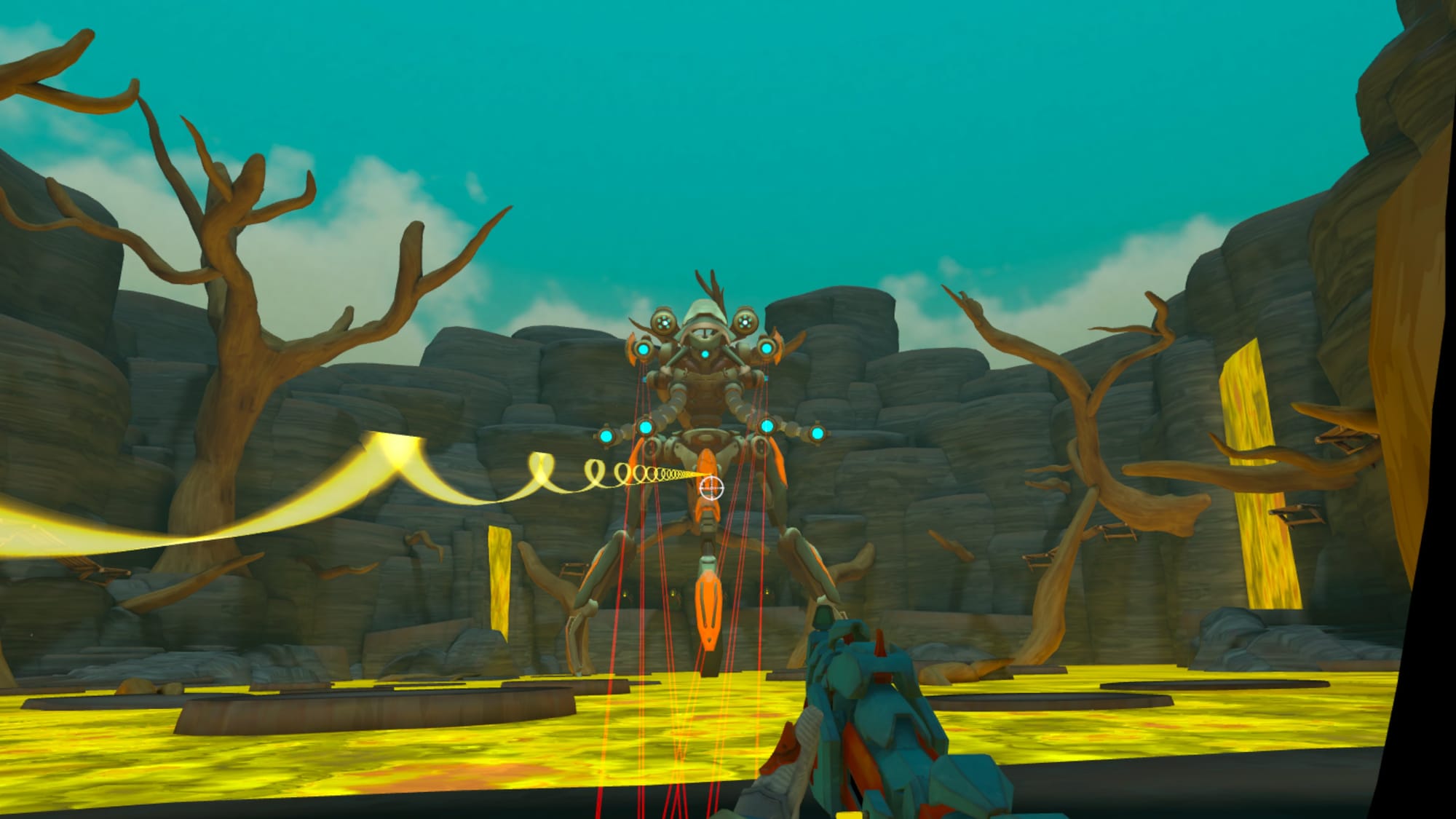
My personal favorite is Storm, which benefits considerably from more agile gameplay and ranged attacks. This Exo Suit gives you wrist thrusters for quick evasive maneuvers, plenty of fuel for your jetpack, and a rifle that conveniently comes together when holding your motion controllers like you’re handling such a weapon. Offering long-range support for teammates while picking off distant robots, something that’s surprisingly easy to do even when moving at high speed, feels highly satisfying.
Other Exo Suits offer strong variety for different playstyles. Any Windlands fans will feel at home with Hunter’s grappling hooks alongside a bow and arrow. Goliath is less mobile but provides heavy-duty support with its cannon and a summonable shield, the latter proving particularly useful against the second boss. Otherwise, Blink gives you a useful triple jump, a viper bolt weapon picked up from your chest, and phase dashing that lets you defensively jump through enemy fire or lasers.
You can’t mix and match abilities between Exo Suits, though I’m pleased Psytec hasn’t limited this to one Exo Suit type per person in co-op parties. Should you wish, everyone can play as a single Exo Suit. Completing missions earns skill points for unlocking upgrades like enhanced weapons, creating a good incentive to try higher difficulties as clearing those awards more points. Though it’s a minor issue, I’d like an option to refund skills and reallocate those points.
Goliath shield blocking incoming enemy fire
Titan Isles offers several procedurally generated mission paths to pick from before starting, which also offer a good example of its VR-focused design. There are no laser pointers for selecting routes; every button pleasingly requires a physical press, while the screen displaying your choices can be grabbed by a handle and moved to better fit your height and angle. I also love the subtle touches, like Storm’s rifle having tiny lights to indicate available ammo instead of using a HUD.
Once you’re on the way, each mission is split into numerous subsections where you must kill every enemy before you can advance. Exploration isn’t your main goal, but thorough exploration is rewarded through collectible items, hidden targets you can shoot, and secret rooms. Which is nice because these levels are utterly huge and accommodate four players well, providing plenty of angles for your attack.
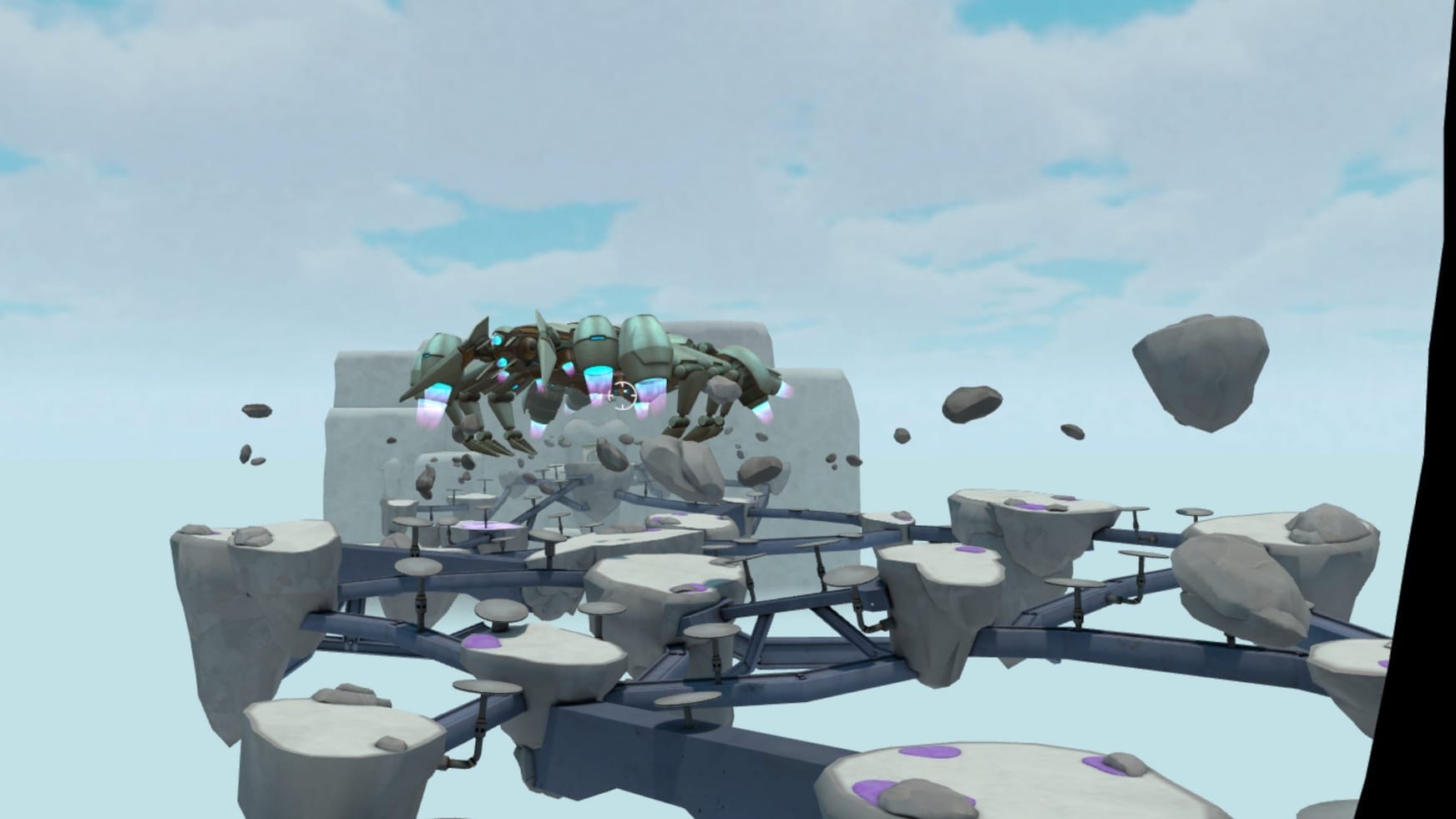
Exploration soon turns into light platforming as you cross these floating platforms, all while avoiding liquid hazards or bottomless pits. This can be tricky since your Exo Suit also builds up acceleration momentum, which feels particularly smooth on Quest 3. This experience remained comfortable for me even at its fastest with minimal comfort settings applied. Just don’t try going too far out, though. Invisible barriers will suddenly make themselves known and damage you.
While you’ve got a few enemy types across these missions, some more variety would be welcome, and that’s particularly true with boss fights. Every boss has some twist on “hit the orange panel, then strike the core,” but there’s enough stage variation to keep these fights engaging. One battle requires attacking a Titan’s giant robotic tentacle – two at once on harder difficulties – on a ship while avoiding incoming storm waves. Another involves zip-lining at speed to different vantage points, and so on.
These fights make you feel powerful for beating them on harder settings. When ‘Normal’ became too easy, I upped this to ‘Heroic’ and got a return ticket to Cloud’s Edge after exhausting my revivals, only to take pride in defeating them once I returned. Crucially for a co-op game, Titan Isles is great to play alone and doesn’t fall into the “it’s good with friends” crutch some multiplayer games fall into, though it’s certainly better with friends. Speaking of which, only the host’s campaign progress is saved in co-op but you’ll keep any earned skill chips.
Comfort
Titan Isles warns you at the start that this is an intense locomotion game, asking you to select comfort options before jumping in for the first time. Artificial stick-based locomotion is your primary movement option beyond smaller, secondary options in each Exo Suit, like wrist boosters for quick dodging.
Smooth and snap turning camera settings are both supported with adjustable speed and degrees respectively. Movement can be based on your head or hand direction. Comfort vignettes are also available with different strengths, you can choose your dominant hand, while weapon and tool crosshairs can be turned off. Sitting and standing modes are supported too.
While your co-op teammates will always display a full-body avatar to others, you can select four body options for your own viewing. You can choose hands only, hands and arms, upper body, or full body. Subtitles are optional and you can change the text size, background, and offset color. Player and NPC labels can also be switched off.
Visually, Titan Isles looks great with its vibrant environments. Level design becomes a little too familiar at points even across different areas, though the art style works well. Performance runs smoothly even with the large environments, additional players, and often frantic encounters. That’s all underscored by a great soundtrack ranging from serene to suitably energetic when the action kicks off. Though I’m reviewing the Quest 3 edition, the Steam version holds up well too.
There isn’t a ton of extra content across Cloud’s Edge, though there’s plenty to do after clearing the campaign. Endgame missions can be selected with a “regenerate” option available if you don’t like the choices provided, or you can choose one of six racing mini-games with online leaderboards specific to each suit. Adding a podium players can jump onto after crossing the finish line is a lovely touch.
Races are a completely optional extra that opens up in Cloud’s Edge after clearing the initial missions. However, this area’s immersion is significantly hampered because Titan Isles displays ads for other VR games. Older Psytec titles like Windlands and Crystal Rift are present alongside games from other studios like Laser Dance, Unseen Diplomacy 2, and Roboquest VR. You can’t interact with them, so you’re not about to get sent to a store page. Tonally though, it’s just very out of place in this world.
As for the actual races, these are split into three different categories. Standard races are my favorite as I try finding new shortcuts across these environments at record pace; they are also playable alone or in co-op. Others involve collecting orbs or shooting targets across the environment before heading to the finish line. I appreciate the additional variety, though I don’t feel compelled to try them again.
Titan Isles – Final Verdict
Titan Isles delivers a compelling action adventure that’s equally enjoyable in co-op and single-player. While the bosses and stage design could use more variety and the racing area’s adverts detract from the immersion, it’s the most fun I’ve personally had with a VR co-op experience since Dungeons of Eternity. With its strong combat, versatile Exo Suit system, and great presentation, it’s a strong return for Psytec Games that gets my recommendation.
UploadVR uses a 5-Star rating system for our game reviews – you can read a breakdown of each star rating in our review guidelines.