MindsEye Studio Reeling As Disastrous Launch Sees Sony Issue Rare Round Of Refunds

MindsEye Studio Reeling As Disastrous Launch Sees Sony Issue Rare Round Of Refunds
MindsEye managed to grab headlines with an impressive looking trailer, as it seemed to be leveraging Unreal Engine 5 to great effect. However, it appears as if there were gremlins hiding beneath the shiny façade, with players reporting a myriad of problems since its Tuesday launch—issues that have left developer Build a Rocket Boy feeling

I Finally Embraced Air Fryer Steaks, and You Should Too

We may earn a commission from links on this page.

Cooking a great steak is an art, but that doesn’t mean it needs to be a challenge. It’s a no-brainer to trust a chef with steak when you go out to a restaurant, but even the unsure cook can make good steak casually at home. Personally, I’ve taken casual steaks to new levels in my trusty Instant Vortex air fryer. It took some troubleshooting, but I finally zeroed in on a simple method to air fry steak that saves me time, mess, and makes a near masterpiece every time.

Cooking steak on the grill, in a pan, or in a cast iron skillet are pretty popular and common techniques. Though fast, all of these methods, even reverse searing, still require a lot of attention—and some days I am just plain tired of paying attention. Air frying steak gives you freedom to leave the room and, my favorite part, there’s way less smoke. This is primarily why the Instant Vortex is my go-to air fryer for daily cooking (read my review here) but these other top picks will do the trick as well. 

In addition to being easy to clean, the air fryer cooks steak quickly and can keep the center juicy due to convection heating. Convection ovens, like air fryers, are both powerful and use ambient heat—the steak isn’t right up against the coil, but the fan forces hot winds around the basket. While you absolutely can overcook something in a matter of minutes, you certainly won’t overcook your steak if you use this trick.

The trick to a juicy air fried steak

The key to cooking any steak is to manage its doneness in the center. Since an air fryer can take any piece of meat from undercooked to dry in a matter of minutes, the key is slowing down the cooking a bit in the center so you have time to catch it. If you’ve checked out my steak bites recipe, you know that these little morsels stay juicy because I freeze them first. 

When you’re air frying your steak, bring the temperature down first—especially if it’s a small cut of meat. The smaller or the thinner the piece of steak, the colder it should be. If you have a flat flank steak, freeze it first and add it to the air fryer frozen—seasoned, but frozen. If you have a New York strip steak that’s 5 inches long and 1.5 inches thick, then fridge-cold or borderline frozen (about 15 minutes in the freezer) is great. The steak will warm up and begin browning on the outside while the center is still coming up to temperature. You’re buying yourself time, and keeping the center juicy.

How to air fry a steak

An Instant Vortex air fryer on a countertop.

Credit: Allie Chanthorn Reinmann

1. Freeze or chill the steak

I like to season my steak when it’s still thawed and then pop it in the freezer for 15 minutes, or up to an hour if I want it solid. Spritz or drizzle a thin layer of cooking oil on the steak. If you didn’t season it beforehand, you can do it now. 

2. Air fry it

Pop your steak in a 400°F air fryer set to the “air fry” setting. The time will vary depending on the size and cut of your steak. Steak bites may take as little as three minutes, and a thick steak might take 20 minutes. For larger steaks, try to aim for flipping it somewhere around the middle of the cooking time.

3. Rest it

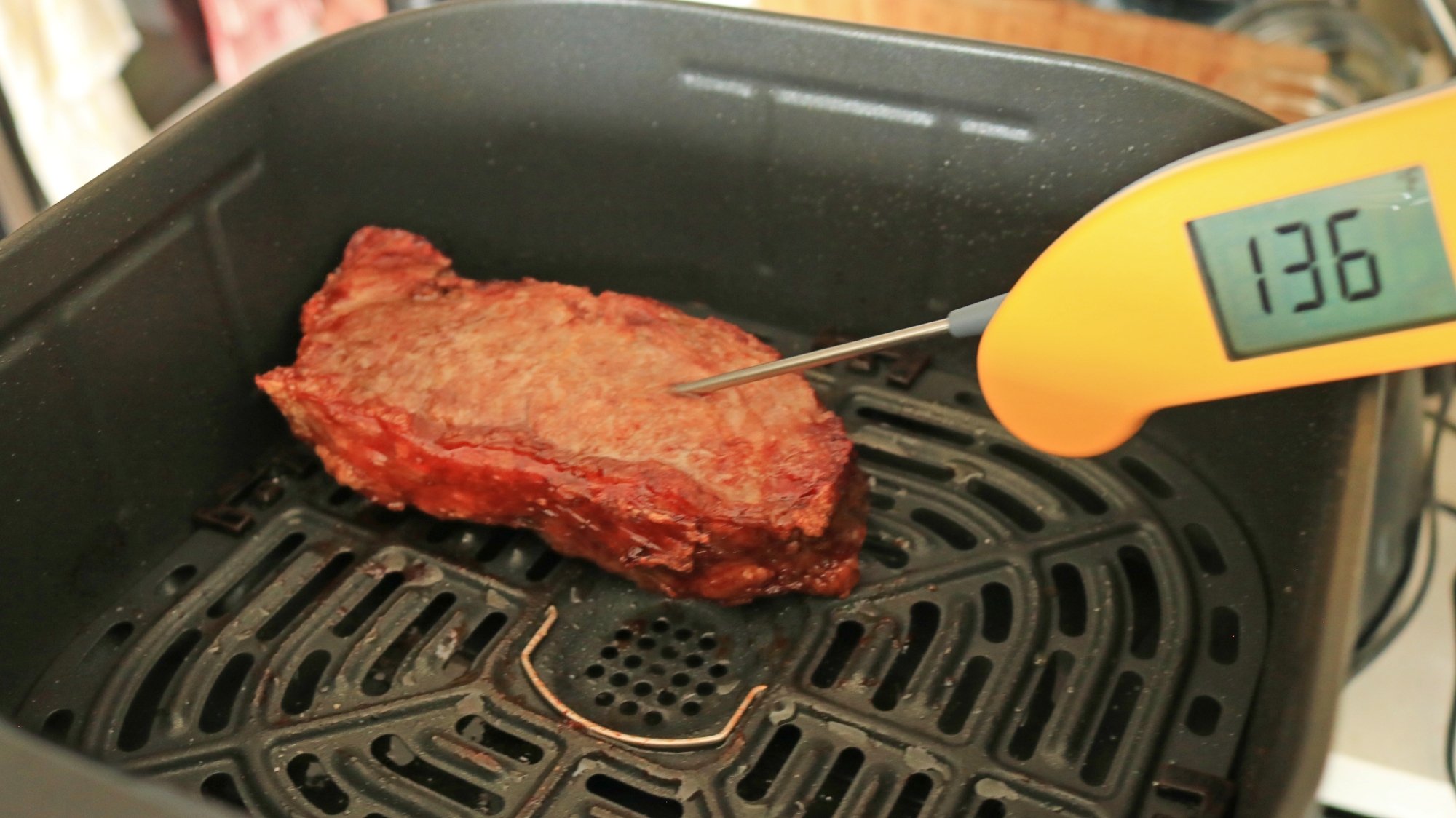
Always test the interior temperature with a meat thermometer to assess doneness according to how you like your steak. (Here’s the one I use.) For reference, a medium steak should be 130°F to 135°F when it comes off the heat, as the temperature will continue to rise a bit while it rests. Let it rest for 5 to 15 minutes before digging in. Today, I am making a steak sandwich, so I like a medium to medium-well steak for this purpose.

A digital thermometer testing the temperature of a steak in an air fryer basket.

Credit: Allie Chanthorn Reinmann

Air fried steaks aren’t perfect for everyone

There are definitely some downsides to the air-fried steak compared to the other popular preparations. You won’t get the same gnarly sear like on a pan or a grill grate, and there’s no good way to collect fond (the crispy, tasty bits that stick to a frying pan) and make a pan sauce. But I do appreciate how the edges of any exterior fat become crispy with cracklin-like qualities. You’ll have to ask yourself what your priorities are. If it’s speed, low smoke, and a quick and easy clean-up, then I suggest you try tossing a steak in the air fryer for sure.

Additionally, if you really miss a crusty brown exterior but you don’t have grill, you can still do a quick sear in a frying pan to give you that extra color and flavor. This is my air fryer reverse searing method and it works like a charm—I dare say, better than the original reverse searing method. When I’m finished cooking, the Instant Vortex’s non-stick basket is easy to wash clean. No need to whip out the Barkeeper’s Friend or scrub down a cast iron skillet. 

The Audacious Reboot of America’s Nuclear Energy Program

The United States is mounting an ambitious effort to reclaim nuclear energy leadership after falling dangerously behind China, which now has 31 reactors under construction and plans 40 more within a decade. America produces less nuclear power than it did a decade ago and abandoned uranium mining and enrichment capabilities, leaving Russia controlling roughly half the world’s enriched uranium market.

This strategic vulnerability has triggered an unprecedented response: venture capitalists invested $2.5 billion in US next-generation nuclear technology since 2021, compared to near-zero in previous years, while the Trump administration issued executive orders to accelerate reactor deployment. The urgency stems from AI’s city-sized power requirements and recognition that America cannot afford to lose what Interior Secretary Doug Burgum calls “the power race” with China.

Companies like Standard Nuclear in Oak Ridge, Tennessee are good examples of this push, developing advanced reactor fuel despite employees working months without pay.


Read more of this story at Slashdot.

There’s another leak on the ISS, but NASA is not saying much about it

There’s another leak on the International Space Station, and NASA has already delayed one crew launch to the orbiting laboratory as a result.

Beyond that the space agency is not offering much information about the unfolding situation in orbit. However, multiple sources have confirmed to Ars that the leak is a serious concern for the space agency as it deals with hardware that is approaching three decades in orbit.

To understand the current situation, it is important to review past leaks on the station, which has an aluminum structure. The station has had a slow but increasing leak since 2019. The air leaks are located in the transfer tunnel of the space station’s Russian Zvezda service module, one of the oldest elements of the complex, the first elements of which were launched in 1998. The transfer tunnel, known by the Russian acronym PrK, connects the Zvezda module with a docking port where Soyuz crew and Progress resupply spacecraft attach to the station.

Read full article

Comments

Inside the firm turning eerie blank streaming ads into useful nonprofit messages

DENVER—Ads shown while you’re streaming shows or movies are disruptive enough. But there’s something uniquely eerie about what you see when a connected TV (CTV) platform fails to sell ad inventory. You may get a black screen accompanied by ethereal music or a confusing thumping beat, alongside a graphic that says something like, “We’ll be right back.”

Not only are streamers being forced to endure more ad time than ever, but that time doesn’t even always benefit streaming platforms or advertisers. For the past six months, AdGood has been working to turn that blank, wasted ad space into messaging for good by helping nonprofits buy ad space for cheap.

During the StreamTV Show in Denver this week, Ars spoke with Kris Johns, CEO and founder of AdGood, a 501(c)(3) nonprofit that sells unused, CTV ad space to other nonprofits. AdGood sells unfilled, sometimes donated, ad space at discounted rates, which it says can be as low as about $5 to $6 CPMs (cost per mille, or the amount an advertiser pays for every 1,000 impressions an ad earns). Johns said that CTV CPMs can vary depending on the scenario, with costs ranging from $12 to $15 and higher. Some CTV ad firms peg the average CTV CPM at $35 to $65.

Read full article

Comments

How to turn off Google’s AI Overviews in web searches

Google’s AI Overviews do not save me time. For one, I work for a tech blog and am therefore professionally curious as to whether or not the generated answers are correct, so I spend a few ticks figuring that out. (Answer: Sometimes, but not always!)

Then things get existential as I contemplate how long a self-cannibalizing system can sustain itself — if the AI gives answers pulled from websites that survive on visits from readers, what happens when no one visits those sites because AI cribbed the answer? Will I still get to write for websites if websites die from traffic starvation? It’s a lot to think about when all I want is TSA’s latest lithium-ion battery regulations.

Curiously (and unhelpfully) the first result when you Google “How to turn off AI Overviews in Chrome” doesn’t actually answer the question. The entry, from Google Support, discusses turning the feature off back when AI Overviews were experimental and handled through Google Labs. Navigate a little further down that page and you’ll see:

Note: Turning off “AI Overviews and more” in Search Labs will not disable all AI Overviews in Search. AI Overviews are part of Google Search like other features, such as knowledge panels, and can’t be turned off.

Thankfully, I work with intelligent people and one of them supplied me with a simple method of ensuring each search performed in a Chrome browser bypasses the AI Overview and uses results from the Web tab only. Here’s how you too can avoid wasted time (and energy) so you can search like it’s 2024.

How to turn off AI Overviews in Chrome on desktop

  1. Click the three dots in the upper right corner of your Chrome browser

  2. Go to Settings > Search engine > Manage search engines and search

  3. Under Site search, click the Add button

  4. Enter Name: Google/Web

  5. Enter Shortcut: https://www.google.com/

  6. Enter URL: {google:baseURL}search?udm=14&q=%s

  7. Click Add

Dialog box for to turning off Google’s AI Overviews in Chrome
Google / Engadget

Then, (hat tip to Tom’s Hardware for helping me figure this bit out) set the search type to default by clicking the three dots next to the shortcut you just created and clicking Make default.

Now, go Google “the best laptop power banks” and click on the Engadget entry (usually one to four results down) and spend a few moments looking at the ads (and the picture of my desk) before you move on so I can still have a job in 2026.

Other methods for turning off AI Overviews in Google Chrome

In that same Tom’s Hardware article, Avram Piltch links to the extension he built, which is a super easy way to hide the AI Overviews from sight. It’ll still generate the response, you just won’t see it. I prefer the Web method above, to avoid any unnecessary machine processing on my behalf, but the extension is easier and keeps you on the familiar “All” search results tab with knowledge panels, video results and the like.

To turn off the AI Overview for Chrome on your phone, I’ll direct you to the fine folks at tenbluelinks. Just open the link in your phone’s browser and follow the steps for Android or iOS.

This article originally appeared on Engadget at https://www.engadget.com/big-tech/how-to-turn-off-googles-ai-overviews-in-web-searches-170009873.html?src=rss

Steam And 3DMark Team Up For Game-Changing Apple Silicon Native Support

Steam And 3DMark Team Up For Game-Changing Apple Silicon Native Support
Some people (including yours truly) may well be wondering if Apple will ever fully commit to gaming on Macs instead of just nibbling at the edges. There’s definitely movement in that particular area, though, as Valve has just released a beta version of Steam that’s native to Apple Silicon chips, as did UL with 3DMark.

Up until now, Steam

Google’s Gemini AI Will Summarize PDFs For You When You Open Them

Google is rolling out new Gemini AI features for Workspace users that make it easier to find information in PDFs and form responses. From a report: The Gemini-powered file summarization capabilities in Google Drive have now expanded to PDFs and Google Forms, allowing key details and insights to be condensed into a more convenient format that saves users from manually digging through the files.

Gemini will proactively create summary cards when users open a PDF in their drive and present clickable actions based on its contents, such as “draft a sample proposal” or “list interview questions based on this resume.” Users can select any of these options to make Gemini perform the desired task in the Drive side panel. The feature is available in more than 20 languages and started rolling out to Google Workspace users on June 12th, though it may take a couple of weeks to appear.


Read more of this story at Slashdot.

Another one for the graveyard: Google to kill Instant Apps in December

Apps used to be the measure of a mobile platform’s worth, with Apple and Google dueling over who could list the most items in their respective stores. Today, the numbers don’t matter as much—there are enough apps, and Google’s attempt to replace parts of the web with apps is going away. Instant Apps, a feature that debuted in 2017, will reportedly be scrapped in December 2025. In its place, you’ll just have to use the Internet.

Developer Leon Omelan spotted this news buried in the latest Canary release of Android Studio (confirmed by Android Authority). The development client includes a warning that Instant Apps is headed for the Google graveyard. Here’s the full notice, which is the only official confirmation from Google at this time.

Instant apps notice
Google’s latest Android Studio build announces the end of Instant Apps.
Credit:
Android Authority

Instant Apps wasn’t a bad idea—it was just too late. Early in the mobile era, browsers and websites were sluggish on phones, making apps a much better option. Installing them for every site that offered them could be a pain, though. Google’s Instant Apps tried to smooth over the experience by delivering an app live without installation. When developers implemented the feature, clicking a link to their websites could instead open the Android app in a similar amount of time as loading a webpage. Google later expanded the feature to games.

Read full article

Comments

How to Estimate the Utility Bills for Your New Home

In an economy where more than a third of Americans are struggling to pay their utility bills, knowing what your future utility bills will be before you commit to buying a home is a crucial part of your decision making process—or it certainly should be.

Here are a few methods to estimate what your future bills will be for electricity, gas, and other utilities before you move in, so you don’t wind up getting a nasty surprise in the mail.

How to get a good estimate of a home’s utility costs

The first step is to figure out what the previous occupants of the home have been paying each month. Here’s how to go about it:

  • Figure out the local rates. Knowing what the local utilities charge for electricity, natural gas, water, sewage, and other utilities is key. Most utility companies post their rates on their websites, so that’s a good place to start. If you can’t find rate information that way, you can use a website like Utility Rates to get an idea of electric and gas rates in that zip code. Online calculators like this one can give you a decent prediction of future utility costs once you have rate information to plug in.

  • Collect the billing history. Your next step is to ask for the home’s billing history going back 12 months. Your real estate agent should be able to help you with this, but you can also ask the current owners directly. Seeing a year’s worth of bills will let you figure out an average monthly cost, adjusted (if necessary) for the number of occupants.

  • Look at average costs in the area. If you aren’t able to get ahold of the billing history, you can make a much rougher estimate by looking at average costs in the area. There are websites to help you figure this out. For example, EnergyBot will calculate your potential utility bill based on zip code and average usage for the home’s size, or you can use this calculator from the Energy Solutions Center to figure your gas bill based on factors like the home’s size and how many dryer loads you run in a week. These calculators will only give you rough estimates, and your results may be higher or lower than actual costs, so tracking down actual bills is always going to be best.

Put past bills into context

Beyond just the monthly numbers, the key to estimating your own potential utility costs will require you to collect some extra information about the house and its occupants, including:

  • Occupants. You need to how many people were living in the house for the period you’re looking at, so you can weigh that against your own potential usage. Sky-high utility bills are alarming if it’s just two people living there, but less so if a family of eight is crowded in there.

  • Usage. You will need to know a little bit about how the previous occupants—whether they all lived there full time, whether they worked from home (which increased energy usage), or had hobbies that consumed extra energy, and whether they had a pool (which increases both their water and electricity bills).

  • Problems. Ask if the house has had any recent plumbing or electrical problems. Leaks and faulty wiring can lead to spikes in usage, which could mean the cost history of the house will be less useful for predicting future bills.

Once you have a solid idea of what utility costs have been, you can make some adjustments based on your own lifestyle—number of people living there, whether you work from home, hobbies, etc.—to hopefully arrive at a number close to what your actual utility costs will be.

Spotify is adding the ability to remotely download playlists to secondary devices

Spotify is rolling out a new feature that lets Premium subscribers remotely download playlists to additional devices. For instance, a user could initiate a download on an iPhone for an iPad or for a backup phone ahead of a trip.

That’s all fine and good, and useful in limited circumstances. The big news here, however, is that this functionality also works with smartwatches, with integration for Wear OS devices and Apple Watch models. Nothing ruins a good walk or run like forgetting to download a playlist, so this lets people square that away whenever they think of it, even when the secondary device is out of reach.

Spotify is also introducing a new “Manage Downloads” button to assist with the aforementioned feature. This button accompanies playlists and provides a list of devices in which a particular batch of songs has been downloaded. That way folks can be sure they aren’t reaching Spotify’s five-device limit the company places on downloads.

This stuff is rolling out right now for users across the globe. It could take a few weeks to reach everyone. A version of this tool has previously been available for Apple Watch users, but this is the first time something like this will be available to those in the Wear OS ecosystem.

Spotify has been busy lately. The platform recently opened up an audiobook shop for iOS users and unveiled a dedicated Following feed for podcasts.

This article originally appeared on Engadget at https://www.engadget.com/apps/spotify-is-adding-the-ability-to-remotely-download-playlists-to-secondary-devices-162154743.html?src=rss

Navy Joins Right To Repair Cause After Broken Ovens Put Sailors In A Pickle

Navy Joins Right To Repair Cause After Broken Ovens Put Sailors In A Pickle
In a major push for operational readiness and efficiency, U.S. Navy Secretary John Phelan advocated forcefully this week for the right for sailors to repair their own equipment, telling senators that current contracting practices create unnecessary delays and hinder the fleet’s ability to maintain its assets. His remarks, delivered during

Google Cloud C4D Performance Benchmarks At The Top-End Show 39% Generational Improvement With EPYC Turin

Back in April at Google Cloud Next was the introduction of the new C4D family of VMs powered by AMD EPYC 9005 “Turin” processors. Back on launch day I looked at the C3D vs. C4D performance at some of the smaller, more common VM sizes. In today’s article is a look at the top-end performance of the C4D family with 384 vCPUs. For those wondering about the compute potential of the c4d-standard-384, here are some benchmarks of this 192-core / 384-thread EPYC Turin configuration compared to the prior C3D AMD EPYC Genoa based instance that topped out at 360 vCPUs.

‘We’re Done With Teams’: German State Hits Uninstall on Microsoft

An anonymous reader shares a report: In less than three months’ time, almost no civil servant, police officer or judge in Schleswig-Holstein will be using any of Microsoft’s ubiquitous programs at work. Instead, the northern state will turn to open-source software to “take back control” over data storage and ensure “digital sovereignty,” its digitalisation minister, Dirk Schroedter, told AFP. “We’re done with Teams!” he said, referring to Microsoft’s messaging and collaboration tool and speaking on a video call — via an open-source German program, of course.

The radical switch-over affects half of Schleswig-Holstein’s 60,000 public servants, with 30,000 or so teachers due to follow suit in coming years. The state’s shift towards open-source software began last year. The current first phase involves ending the use of Word and Excel software, which are being replaced by LibreOffice, while Open-Xchange is taking the place of Outlook for emails and calendars.


Read more of this story at Slashdot.