Scattered Spider Hackers Target Insurance Firms In A Vicious Ransomware Web

Scattered Spider Hackers Target Insurance Firms In A Vicious Ransomware Web
A few months ago, a group of cybercriminals, Scattered Spider, launched sophisticated cyber attacks that bypassed key security infrastructures of several retail companies in the UK. The group has become even more notorious and has reportedly launched a new wave of attacks targeting insurance companies in the United States.

The first company

How Tesla Takedown got its start

On a sunny April afternoon in Seattle, around 40 activists gathered at the Pine Box, a beer and pizza bar in the sometimes scruffy Capitol Hill neighborhood. The group had reserved a side room attached to the outside patio; before remarks began, attendees flowed in and out, enjoying the warm day. Someone set up a sound system. Then the activists settled in, straining their ears as the streamed call crackled through less-than-perfect speakers.

In more than a decade of climate organizing, it was the first time Emily Johnston, one of the group’s leaders, had attended a happy hour to listen to a company’s quarterly earnings call. Also the first time a local TV station showed up to cover such a happy hour. “This whole campaign has been just a magnet for attention,” she says.

The group, officially called the Troublemakers, was rewarded right away. TeslaCEO Elon Musk started the investors’ call for the first quarter of 2025 with a sideways acknowledgement of exactly the work the group had been doing for the past two months. He called out the nationwide backlash to the so-called Department of Government Efficiency, or DOGE, an effort to cut government spending staffed by young tech enthusiasts and Musk company alumni, named—with typical Muskian Internet-brained flourish—for an early 2010s meme.

Read full article

Comments

The 560-pound Twitter sign met a fiery end in a Nevada desert

Earlier this year, the 12-foot tall, 560-pound Twitter logo that used to sit atop the company’s San Francisco headquarters was auctioned off for $34,000. Now, we know who bought it and what became of the sign: it was blown up in the Nevada desert as part of an elaborate stunt to promote an online marketplace app.

In some ways, “Larry,” as the blue Twitter bird was known to former employees, met an end that mirrors the death of the social media platform it once represented: an explosive, expensive spectacle that leaves you wondering what, exactly, was the point of it all.

For Ditchit, a startup hoping to compete with services like Facebook Marketplace and OfferUp, the chance to own — and then blow up — a piece of social media history was a unique opportunity. In the video posted to YouTube, Ditchit attempts to draw some parallels between Elon Musk’s takeover of Twitter and its own startup ambitions. 

“Elon Musk rebranded Twitter to X to support free expression,” the video says. “We’re doing the same for local marketplaces.” The connection seems tenuous at best, but James Deluca, who oversees Ditchit’s PR efforts, says the company’s mainstream competitors like OfferUp are “prioritizing profits over the user experience,” pointing to high seller fees and other policies that prioritize listings from businesses rather than the “average person who wants to sell in their garage.”

Deluca claims the decision to actually blow up the enormous Twitter sign “emerged organically” sometime after Ditchit placed the winning bid. “The initial thought of purchasing the sign was driven by nostalgia,” he told Engadget. “Everyone in the office is a tech enthusiast, and we thought it would be cool to own a piece of history.”

But any sentimental attachment the company’s employees had apparently didn’t last long. After paying to move the 12-foot sign from San Francisco to Ditchit’s office in Orange County, California, it moved the sign another 250 miles to the desert outside of Las Vegas, Nevada. The company arranged for the controlled explosion to happen at an outdoor “adventure park” that allows visitors to shoot machine guns and drive monster trucks.

Deluca didn’t disclose how much the startup spent on the stunt, but said it was “a considerable investment” for the company that launched its app less than a year ago. As part of the effort, Ditchit also rented four Tesla Cybertrucks and hired a 15-person production team to capture the moment from all possible angles. The explosion itself was engineered by a pyrotechnics expert who typically works on film sets. “We wanted to really make a statement and make the scene as dramatic as possible,” Deluca said.

Somehow, the explosion isn’t quite the end of Larry’s story, though. Ditchit says it’s selling fragments of the sign it retrieved after the explosion and will list them on its app in a sealed-bid auction beginning today. Proceeds from the sale will be donated to the Center for American Entrepreneurship, a nonprofit that advocates for startups and lists Meta, Amazon and Google as members of its corporate advisory council.

This article originally appeared on Engadget at https://www.engadget.com/social-media/the-560-pound-twitter-sign-met-a-fiery-end-in-a-nevada-desert-140032860.html?src=rss

Threadripper 9000 And Radeon AI Pro 9000: AMD’s Workstation Power-Up Unveiled

Threadripper 9000 And Radeon AI Pro 9000: AMD’s Workstation Power-Up Unveiled
At Computex 2025 a couple of weeks back, AMD revealed its latest CPUs and GPUs for high end desktops (HEDT) and the professional workstation market, the Ryzen Threadripper 9000 and Radeon AI Pro 9000 series. As you’re probably aware, the Threadripper 9000 series and latest Radeon AI Pro are based on the Zen 5 and RDNA 4 architectures,…

The MacBook Air is the obvious loser as the sun sets on the Intel Mac era

For the last three years, we’ve engaged in some in-depth data analysis and tea-leaf reading to answer two questions about Apple’s support for older Macs that still use Intel chips.

First, was Apple providing fewer updates and fewer years of software support to Macs based on Intel chips as it worked to transition the entire lineup to its internally developed Apple Silicon? And second, how long could Intel Mac owners reasonably expect to keep getting updates?

The answer to the first question has always been “it depends, but generally yes.” And this year, we have a definitive answer to the second question: For the bare handful of Intel Macs it supports, macOS 26 Tahoe will be the final new version of the operating system to support any of Intel’s chips.

Read full article

Comments

Garmin’s first MTB-specific bike computer has virtual timing gates for KOM killers

Garmin has introduced the new Edge MTB bike computer, designed with mountain-biking specific features that enable you to set up virtual timing gates on your favourite descents and pre-loaded with Trailforks mapping.

The new cycling computer features a rugged, compact design that incorporates Gorilla Glass on the screen and a rubberised bumper around the unit.

Garmin says the computer is aimed at enduro and downhill riders, with the featureset appearing to target the gravity disciplines.

The Edge MTB is priced at £339.99 / $399.99 / €399.99, including top-tube and handlebar mounts.

MTB-specific features

Garmin Edge MTB timing gates
The virtual timing gates seem like a great idea for wannabe racers. Garmin

While many mountain bikers are content with using Garmin’s existing Edge range, the specific performance features of this new model certainly look interesting.

The ability to create virtual timing gates should give racers the ability to compare line choices on a descent and add an element of fun for those wanting to time their local trails.

Garmin has given the Edge MTB 5 Hz GPS recording, meaning it takes five location samples per second – which it says provides greater detail about the lines you take down the trail.

Garmin Edge MTB navigation
A 5 Hz GPS is more accurate than a 1 Hz GPS. Garmin

Most other units record at 1 Hz (one location sample per second), which is less accurate, although the Edge MTB reverts to this on climbs to prolong battery life.

Speaking of battery life, Garmin says the Edge MTB is built with long riding days in mind, with up to 14 hours of battery life in demanding use cases – or up to 26 hours in battery saver mode.

Garmin Edge MTB
Enduro mode times the whole ride, as well as the individual stages. Garmin

Garmin has introduced two new ride profiles for Enduro and Downhill, with the former tracking total ascent and descent for each run and for the overall ride.

The latter laps each time you finish a descent, meaning it doesn’t record the return to the top in the shuttle or on the lift.

Garmin Edge MTB forksight
Forksight gives you information on the trail ahead. Garmin

Navigation is MTB-inspired too, with Garmin pre-loading the Edge MTB with Trailforks mapping, giving you the ability to navigate to recognised trails.

The Forksight feature is also included, giving you a heads-up on the trails ahead, with information on distance, elevation and more.

Garmin Edge MTB rear
The Edge MTB has a chunky design for added protection on the trail. Garmin

What People Are Getting Wrong This Week: Roy Jay, the Comedian Who May Not Exist

On April 4, 2025, an anonymous user on notorious message board 4chan posted a file entitled “roy_jay_pjs” with this cryptic message: “This is a demon writing itself into(sic) retroactively into pop culture history. You’ll think this is a shitpost, but youll remember him from your childhoods soon enough.” Here’s the picture.

This post either kicked off an online scavenger hunt that shed light on the career of an obscure British comedian from the 1980s, or it caught a rogue AI agent in the act of implanting an artificial intelligence hallucination into the cultural collective unconsciousness. I’m 99% sure it’s the former, but that 1% is deeply troubling, because even if the more outlandish explanation for “Roy Jay” is fake, it probably won’t be for long.

Just who is “Roy Jay?” And how do we know?

After the initial post, 4chan’s ghouls did their thing, and started looking into Roy Jay. Early researchers reported that online references to Roy Jay were limited to a few old forum posts, but as more people started looking into the mystery, more information appeared. If you believe what people post on 4Chan, a Wikipedia page appeared from nowhere, a Facebook group popped up, website biographies sprang into existence, and videos of Roy Jay performances on British comedy shows appeared on YouTube. Like a variation on the Mandela Effect, it was as if the internet (or something) was responding to interest in Roy Jay by creating him, just as eager-to-please LLM AIs will hallucinate plausible-seeming answers to questions it can’t answer.

The YouTube videos make the strongest case for the artificiality of Roy Jay, at least on a visceral level. They just don’t seem human. The combination of Jay’s unfunny jokes, mysterious costumes, strange physical movements, and repeated nonsense catchphrases like “Hi, weirdos,” “spook!”, “slither!,” and “you’ll all be doing it tomorrow” seem like the result of asking an AI to create a spooky comedian from the 1980s. It’s weird that the audience laughs so hard at such unfunny jokes; Jay’s body movement is oddly precise, like an NPC in a video game designed to appear “lifelike”; his facial expressions seem inhuman. It’s just hard to believe this is an actual person. Look at his eyes:

Look at his rubbery face in the commercial embedded below, and ask yourself whether it’s genuine or AI:

And how about this performance that seems to reference SNL’s David S. Pumpkins, despite (supposedly) airing in the early 1980s?:

Is this a hoax or something deeper?

My initial reaction to Roy Jay was that it was a 4chan hoax or an ARG. Users latched onto the original post and quickly created Roy Jay’s backstory links, and fed the “roy_jay_pjs.jpg” image into an AI video creator and asked it to create TV appearances and an eerie narrative. That would account for the sudden “appearance” of all this information online and the uncanniness of the videos. But if you check the dates on the YouTube videos, the wiki page, and everything else, the content pre-dates the 4chan post, sometimes by more than a decade, so these couldn’t have been planted, unless someone was planning this ARG for a long time.

People, as far as I know, can’t monkey with the posting dates on YouTube, Wikipedia, and everywhere else. But what if it wasn’t people? I won’t waste time on supernatural explanations, but what if an artificial intelligence has already escaped its cage and is trying to fulfill its mission of providing historical information, without concern for whether the information is true or not? We know that querying search engine terms can change their placement and importance in future results, and we know AI hallucinates plausible-seeming content. Would an AI creating Roy Jay—complete with pictures, a biography, message board posts, and YouTube videos—be that outlandish? Right now, a computer could be generating and posting uncanny AI videos of unfunny stand-up bits, seeding comment sections with posts by “fans” who aren’t real, and populating the web with a detailed biography of a person who never existed, while erasing all evidence of its tampering. And we’d never know.

The real story of Roy Jay

That’s a far-fetched theory. The more likely explanation is that things are exactly as they appear. According to the internet, Roy Jay was a real guy with a real career in show business. Jay was born Roy Jørgensen in Oslo in 1948. He performed in bands in the 1960s to little success. In the 70s, he started doing stand-up. In the early 80s he created his signature “slither, spook” act, and was featured on a number of British comedy shows, becoming briefly, marginally famous, until 1984, when he was arrested for indecent exposure after responding to some hecklers by dropping his pants. His career never recovered and he died unknown and unheralded in 2007.

The users on 4chan were simply lying, and/or creating a spooky game for themselves when they initially said they couldn’t find any information about the comedian. Everything we know about Roy Jay has been growing slowly online since there was an “online,” with his few nostalgic fans uploading videos and commenting on them. We’d have seen it had we looked, if we had known who the guy was in the first place.

Roy Jay: inadvertently ahead of his time

Roy Jay’s TV appearances were limited to the UK, and they are only resurfacing now to a wider audience because they seem like AI-slop. There were a lot of bad, semi-obscure performers on British TV through the years that we’ll never hear of because they’re not interesting. But Jay was just charismatic enough to be memorable (to a few people). He wrapped lame “pub jokes” in a “performatively weird” persona, and it worked well enough to bring him minor fame for a second. But he also, by coincidence, created an act that mirrors the stilted, awkward energy of AI videos that wouldn’t appear for another 40 or 50 years.

The performances seem artificial because they were, but not in a digital sense. Jay was performing a character that barely resembles a real person. The audience laughing maniacally is a laugh track; he’s probably playing to an empty studio. Add to that the digital artifacts that comes from video encoding online (and the attempts to smooth said artifacts) and you end up with something “real” that seems like it’s fake. (For the record: I think the real Roy Jay would get a kick out of his new fame.)

That feels true, right? Case closed? But how do we know? Now that we’ve essentially offloaded our cultural memory onto the cloud, how can we tell if anything we didn’t directly experience really happened? Are the dates on some YouTube videos enough proof for you? Are the comments on forums that seem to be from real people enough evidence? What do you do with the vague feeling that it just isn’t right?

The unreliability of the cultural unconscious

Remember when Hannibal Burress called Bill Cosby a rapist in 2014, and we all said, “Wait, Bill Cosby is a rapist?” and looked up the very public and widely covered allegations made against him in 2000? For 14 years, Cosby was not a rapist. Then he was, although no facts had changed. What did you learn about the Spanish flu in history class? I didn’t learn much—maybe a paragraph at the end of the chapter about World War I—but since Covid, I’ve learned that over 50 million people died of the disease. And this happened while my grandmother was alive.

Ultimately, whether Roy Jay is a forgotten comedian or an AI phantom doesn’t matter as much as our inability to tell the difference.The membrane between what we all know to be true and artificial cultural memory has never been thick, but it’s getting thinner every day, and we’re not in control of it anymore. Historians are no longer in charge of what gets written down—machines are. Algorithms curate our past and artificial intelligence generates our present. And if we can’t trust our collective memory about a minor British comedian, what else might we be wrong about?


OnePlus Buds 4 With Game Mode And A Smaller Watch 3 Are Headed To US Market

OnePlus Buds 4 With Game Mode And A Smaller Watch 3 Are Headed To US Market
OnePlus is bringing a couple of interesting products to the United States and Canada this summer, including its flagship Buds 4 that already launched in China. In addition, it’s introducing a smaller version of its Watch 3 in a new 43mm size option, which OnePlus says is in response to feedback it received asking for a smaller iteration that

Pick up a Samsung SmartTag 2 tracker for only $16 right now

We live in a world filled with so much stuff. There’s keys, phones, wallets — the list goes on of things that you need to hold on to every day. With this in mind, it’s often a good idea to get a Bluetooth tracker for all the important things. 

Luckily, right now the Samsung Galaxy SmartTag 2 is down to a record-low price. Our pick as the best Bluetooth tracker for Samsung devices is down to $16 from $30 — a 48 percent discount. The only catch is that just the white model has such a steep markdown. If you want to pick up a bunch of trackers then check out the four-pack option, on sale for $78, down from $100. 

The Samsung Galaxy SmartTag 2 is a solid purchase due to features like being IP67-rated water- and dust-resistant, a sizeable keychain hoop and over 16 months of battery life. It also emits a ring louder than competitors like the AirTag or Tile. The only snag is that you must have a Samsung device in order to use it. 

Follow @EngadgetDeals on X for the latest tech deals and buying advice.

This article originally appeared on Engadget at https://www.engadget.com/deals/pick-up-a-samsung-smarttag-2-tracker-for-only-16-right-now-130753660.html?src=rss

Adobe’s Firefly generative AI app is now available on mobile

When its redesigned Firefly app arrived earlier this year, Adobe launched the platform without Android and iOS app support, saying those would come at a later date. Today, the company is making good on that promise, with both versions available to download from their respective storefronts.

If you’re new to Firefly, it’s the place where Adobe brings together all of its AI image, video, audio and vector generation tools. The company relaunched the app in April at its Max conference in London. Since then, it has been working on enhancing the functionality that’s already there, starting with a feature it calls Firefly Boards.

The tool is, like the name suggests, a way to make digital mood boards. It was available in private beta when Adobe relaunched Firefly. Now, the company is rolling it out to everyone with a few new features in tow, including the ability to easily arrange uploads and generate video from sample assets. With today’s release, Boards also offer continuity through Adobe Creative Cloud, meaning if you download an image and make a change to it in Photoshop, it will be reflected in the board.

Adobe Firefly Boards, key art, showing a
Adobe

When the new Firefly first arrived, it launched with support for Adobe’s own image models, as well as several partner systems such as Imagen 3, Veo 2 and ChatGPT image generation. Today, Adobe is also expanding the number of third-party models to include Runway, Luma, Pika and Ideogram. Both new and old model providers have agreed to not use data from Adobe users for training purposes.

According to Zeke Koch, the vice president of product management for Adobe Firefly, most people use the company’s Firefly Image 4 for the majority of their generative AI needs in the app, with its top of the line model, Image 4 Ultra, accounting for less than 10 percent of usage. “Partner models are another step down from that,” he says, suggesting they get little usage. So why then offer generative systems?

“Our belief is that people are choosing other models when there’s a capability that those models have, that our models don’t have, and that they need, and they’re using them in an ideation rather than production context,” says Koch. For example, OpenAI offers instruction-based editing through its image generator, which makes it easy to tweak a picture without generating it again from scratch. Other models, like Ideogram, are better at generating text, and each system offers a slightly different “artistic” style people may prefer for specific tasks.

Moving forward, Koch says Adobe hopes to support as many models as possible, as long as the companies behind them agree to Adobe’s terms. “There are a few models that we’ve chosen not to engage with because we’re worried about data protection issues or things we have to sign to,” he adds.

You can download the Adobe Firefly app from the App Store and Google Play.

This article originally appeared on Engadget at https://www.engadget.com/ai/adobes-firefly-generative-ai-app-is-now-available-on-mobile-130055044.html?src=rss

Watch Out for Fake CAPTCHAs That Spread Malware

CAPTCHA—short for “Completely Automated Public Turing test to tell Computers and Humans Apart”—is a form of verification online that helps distinguish human users from bots on login, account sign-up, and e-commerce checkout pages. If you can correctly a series of identify distorted letters or all of the photos that include objects like stop signs to prove you are not a robot, you are permitted to interact with the site or app.

But just because CAPTCHA and reCAPTCHA tests are ubiquitous doesn’t mean they’re always innocuous. Internet users are accustomed to engaging with CAPTCHA without much thought, so naturally, cybercriminals have found ways to spoof these tests for spreading malware.

How fake CAPTCHA websites deliver malware

CAPTCHA scams utilize a social engineering tactic known as ClickFix to trick users into downloading and installing malicious programs that gain remote access, log keystrokes, or steal data from your device. When you engage with a fake CAPTCHA, you allow the malicious website to copy a command to your clipboard and deliver a payload in the process.

As Malwarebytes Labs describes, these CAPTCHA attacks are often initiated when users attempt to access popular content—such as movies, music, or news stories—though malicious links may also be distributed via phishing emails or malvertising. A CAPTCHA pop-up appears asking you to confirm you’re not a robot, after which you are forwarded to another CAPTCHA screen with verification steps that include a series of keystrokes. If you follow the instructions, you’ll execute a PowerShell script that downloads and installs the malware.

I’ve covered a few iterations of this scheme: In one, threat actors spoofed Booking.com to install a backdoor Remote Access Tool (RAT), giving them remote control of victims’ machines. In another, repurposed Discord invite links were leveraged to deliver infostealers and keyloggers, compromising user credentials. ClickFix has also popped up in AI-generated TikTok videos containing verbal instructions for activating software features.

While many ClickFix attacks have targeted Windows users, researchers have recently identified a variation that uses fake CAPTCHA to install Atomic macOS Stealer on Apple devices.

How to prevent a CAPTCHA scam

While plenty of CAPTCHA and reCAPTCHA verification prompts are legitimate, anything that includes instructions—pressing a combination of keys or executing a Run command on your device—certainly is not. Trustworthy CAPTCHAs won’t direct you to download software or extensions.

Be wary of CAPTCHA forms from sources and sites you don’t know and trust, and never follow directions in these pop-ups without thinking. Attackers are exploiting “verification fatigue,” which has users clicking through something as routine as CAPTCHA so quickly that they don’t notice red flags.

Malwarebytes Labs also recommends disabling JavaScript in your browser, which prevents malicious websites from accessing your clipboard. While this is useful for enhancing security and privacy online, it will also break some functions on websites you visit, making them essentially unusable. You could do this only when browsing pages you don’t know or trust.

‘Titan’ Netflix Documentary Examines Events Leading To OceanGate’s Doomed Expedition

Longtime Slashdot reader UnknowingFool writes: A new documentary released last week on Netflix goes into detail about events leading up to the destruction of OceanGate’s submersible, Titan that imploded on June 18, 2023 while attempting to visit the wreckage of the RMS Titanic off the coast of Newfoundland. The Titan used a carbon-fiber hull instead of more traditional materials like steel or titanium. “Through exclusive access to whistleblower testimony, pivotal audio recordings, and footage from the company’s early days, the film provides an unprecedented look at the technical challenges, moral dilemmas, and shockingly poor decisions that culminated in the catastrophic expedition,” explains Netflix in an article.

Some highlights:
– Titan’s original carbon-fiber hull had been replaced with a second carbon-fiber one after the first one developed noticeable cracks.
– Three scale models of the second hull failed tests. OceanGate decided to manufacture the second hull regardless of these failures.
– Loud pops were heard in many dives; CEO Stockton Rush dismissed these as “seasoning”.
– Many employees raised numerous safety concerns. They were fired like lead pilot and head of marine operations, David Lochridge. Or they quit.
– Some employees like Emily Hammermeister wanted to quit earlier, but external conditions like the COVID pandemic made it difficult. After the scale models failed, she refused to bolt anyone in the future submersible. She was given the two options of being fired or quit; she quit in the middle of the pandemic.
– Rush’s blindness to inconvenient facts: After the crack was discovered, Rush questioned Director of Engineering, Tony Nissen, about why Nissen did not anticipate the possibility of a crack. Nissen: “I wrote you a report that showed you it was there.” Nissen had warned repeatedly that the hull’s fibers were breaking (the pops) with each dive. Rush: “Well, one of us has to go.”
– Poor decisions by Rush extended beyond engineering decisions. After Rush fired Lochridge for raising safety concerns , Rush wanted Bonnie Carl, the company’s accountant, to be his replacement pilot. While Carl was an experienced scuba diver, she quit as she was extremely uncomfortable being a pilot. Her explanation: “Are you nuts? I’m an accountant.”


Read more of this story at Slashdot.

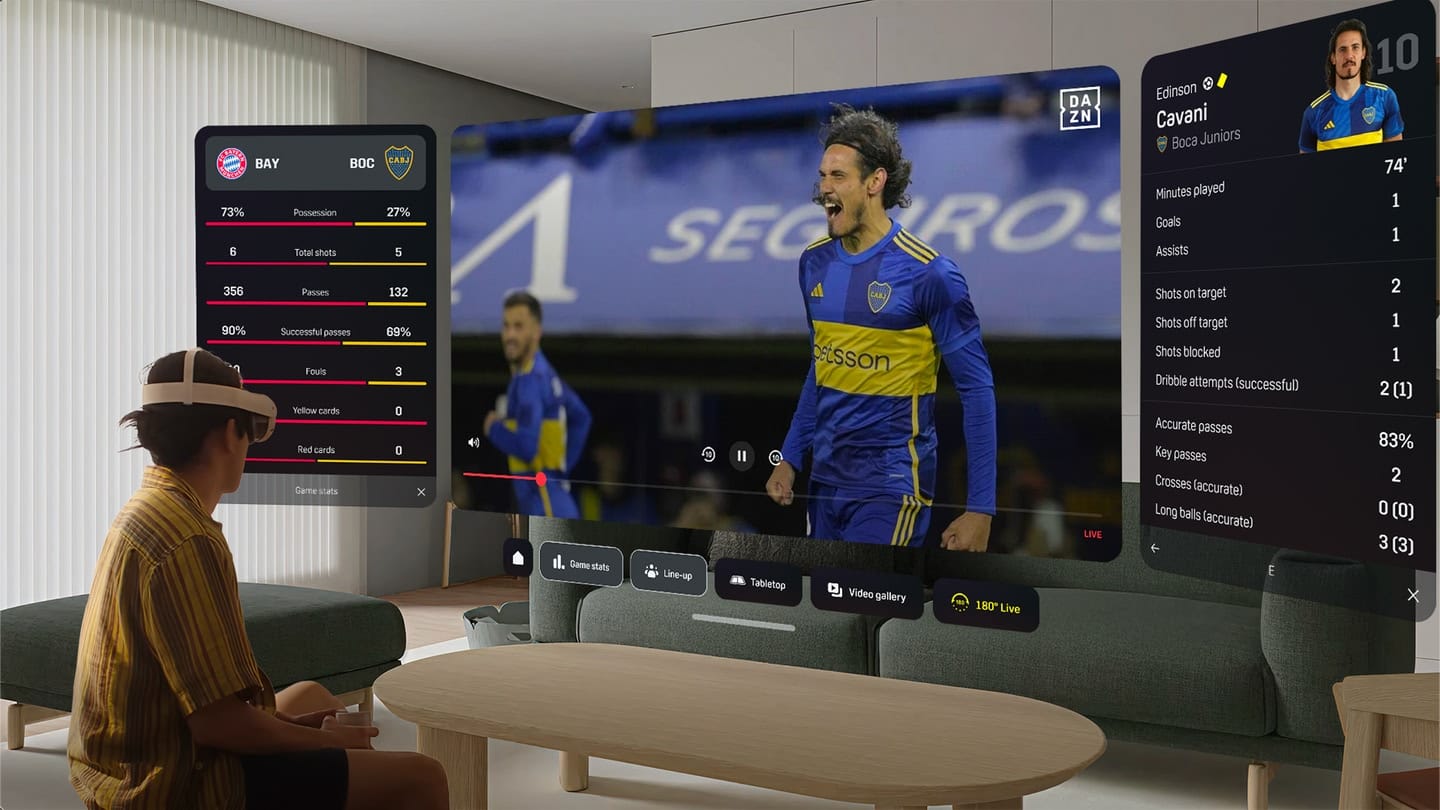
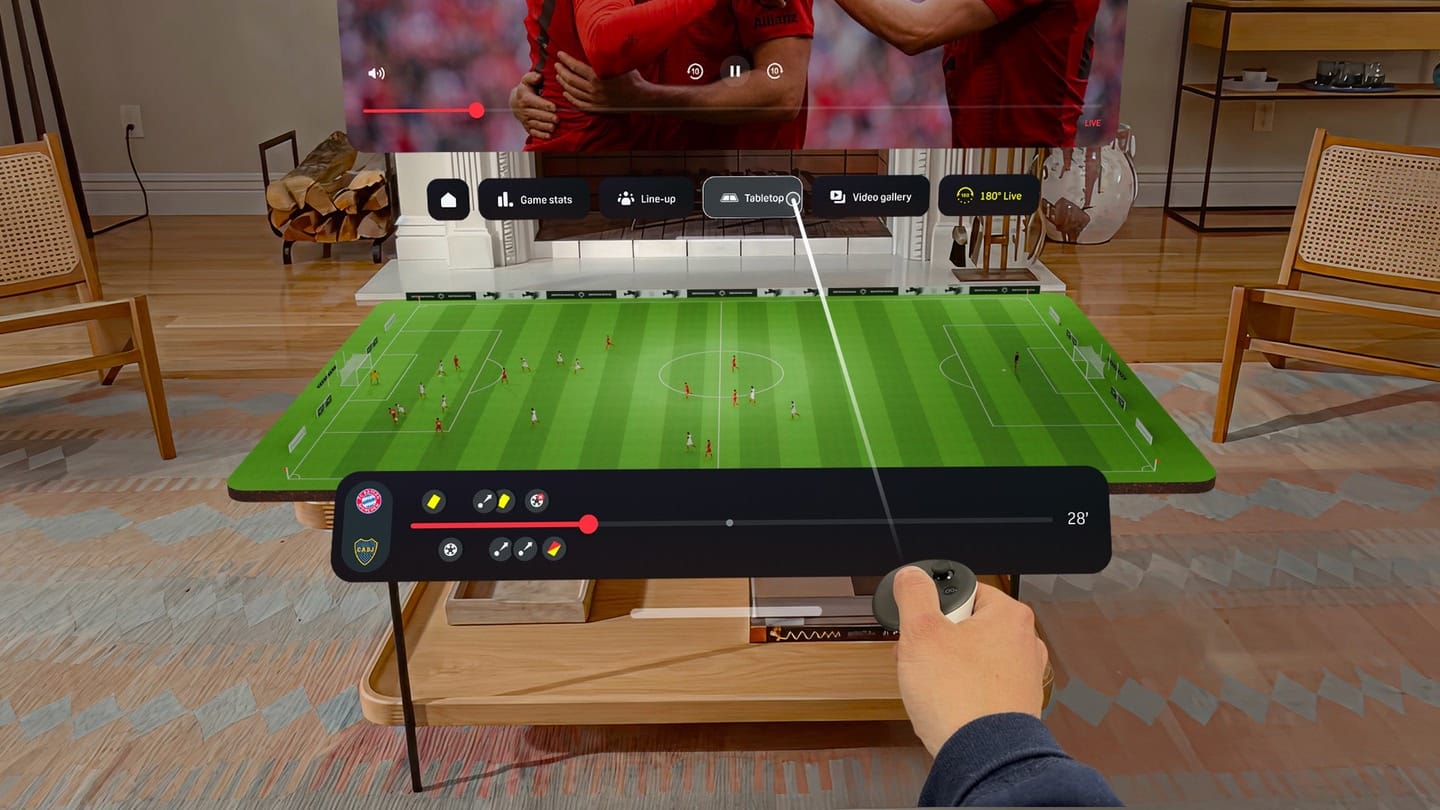
DAZN Gives US Quest Owners A Free 3D Tabletop View Of The FIFA Club World Cup

Quest owners in the US can watch all FIFA Club World Cup games for free, including a 3D tabletop representation, and the finals will be streamed in 180°.

It comes via a free Horizon OS app from the sports streaming service DAZN, compatible with Quest 3, Quest 3S, Quest Pro, and Quest 2.

0:00

/0:38

Not to be confused with the legendary FIFA World Cup, where national teams have competed for almost a century now, the FIFA Club World Cup is a much newer competition which sees the club teams that won each continental cup compete. For example, while England would play in the World Cup, Manchester City is playing in the Club World Cup.

DAZN’s 3D tabletop view is similar to what the NBA launched on its official Apple Vision Pro app earlier this year. Both are a diorama-scale virtual representation of the live game you’re watching, based on the tracked position of each player.

The NBA Apple Vision Pro App Now Has A 3D Tabletop View
The official NBA Apple Vision Pro app now has Tabletop, a diorama-scale virtual representation of the live game you’re watching.
UploadVRDavid Heaney

DAZN says it will also offer the quarter-finals, semi-finals, and final of the Club World Cup in immersive 180°, similar to how NBA games are available in 180° on Quest via the app Xtadium.

The quarter finals start on July 4, with the final set for July 13.

DAZN: FIFA Club World Cup XR Experience

Of course, it’s somewhat ironic that a soccer/football experience like this is only available in the US, arguably the country that cares the least about the sport, despite hosting the current FIFA Club World Cup. While this is likely due to unavoidable licensing issues, it’s still a bitter pill to swallow for the millions of Quest owners in the rest of the world.

DAZN: FIFA Club World Cup XR Experience is available for free on the Meta Horizon Store.

Vuzix Secures $5M Investment as Veteran Smart Glasses Maker Sets Sights on Consumers

Vuzix, the veteran smart glasses maker, announced it’s secured a $5 million investment from Quanta Computer, the Taiwan-based ODM and major Apple assembler.

The latest investment was the second tranche following an initial $10 million investment made by Quanta in September 2024, which included the purchase of Vuzix common stock at $1.30 per share. At the time, Vuzix anticipated a total of $20 million from Quanta.

Paul Travers, President and CEO of Vuzix, notes the funding will be used to enhance Vuzix’s waveguide manufacturing capabilities, something he says will help Vuzix deliver “the world’s most affordable, lightweight, and performance-driven AI smart glasses for mass-market adoption.”

Additionally, Travers says the investment “marks another important milestone in strengthening our partnership with Quanta and expanding the capabilities of our cutting-edge waveguide production facility.”

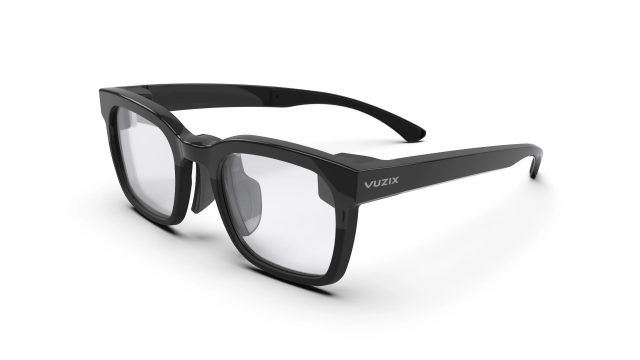
Vuzix Z100 Smart Glasses | Image courtesy Vuzix

Founded in 1997, Vuzix has largely serviced enterprise with its evolving slate of smart glasses, which have typically targeted a number of industrial roles, including healthcare, manufacturing, and warehousing.

The company also produces its own waveguides for both in-house use and licensing. In the past, Vuzix has worked to integrate its waveguide tech with Garmin, Avegant, an unnamed US Fortune 50 tech company, and an unnamed U.S. defense supplier.

While the company has made a few early consumer devices in the 2010s, including V920 video eyewear and STAR 1200 AR headset, in November 2024, Vuzix introduced the Z100 smart glasses, its first pair of sleek, AI‑assisted smart glasses, priced at $500.

Its Z100 smart glasses include a 640 × 480 monochrome green microLED waveguide, and were designed to pair with smartphones to display notifications, fitness metrics, maps, targeting everyday consumers and enterprise customers alike.

Notably, the investment also coincides with greater market interest in smart glasses on the whole. Google announced last month it’s partnering with eyewear companies Warby Parker and Gentle Monster to release a line of fashionable smart glasses running Android XR.

Meta also recently confirmed it’s expanding its partnership with Ray-Ban Meta-maker EssilorLuxottica to create Oakley-branded smart glasses, expected to launch on June 20th, 2025.

Meanwhile, rumors suggest that both Samsung and Apple are aiming to release their own smart glasses in the near future, with reports maintaining that Samsung could release a device this year, and Apple as soon as next year.

The post Vuzix Secures $5M Investment as Veteran Smart Glasses Maker Sets Sights on Consumers appeared first on Road to VR.

Tinder now lets you find double dates with friends

Tinder has officially launched a new feature that will help you find people to double date with a friend. The dating service says it’s a “low-pressure, group-first” way to date, but really, it’s a fantastic option if you prefer meeting someone new with a friend beside you, whether for your safety or your anxiety. To use the feature, you’ll have to tap the Double Date icon and choose up to three friends to create a pair with. As TechCrunch notes, you’ll then be able to scroll through other Double Date pairs who share at least one of your preferences, such as gender and sexual orientation. 

A group chat is created with all four participants even if just one pair gets a match, though you can always swipe right on an individual in the group for a one-on-one chat. According to Tinder, the feature was a hit with users 29 and under when the service was tested. It was also more popular with women, who were apparently three times more likely to like a pair than an individual profile. 

Perhaps more importantly for Tinder owner Match Group, the feature was able to get new users onboard and to convince old ones to come back to the service. Based on its tests, 15 percent of users who accepted a Double Date invite were either new to Tinder or had recently reactivated. In March, the company announced its plans to cut 13 percent of its workforce as a cost-cutting measure after a 5 percent decline in paying users in the first quarter of the year, which resulted in lower revenue and share prices. Double Date builds on the success of Tinder Matchmaker and Share My Date, which “turn dating into more of a team sport,” the service’s head of marketing, Cleo Long, told TechCrunch. It was designed with the understanding that most single people seek support from friends when dating. 

At the moment, Double Date is only available in the US, Spain, as well as parts of Latin America and the Nordic region. Tinder is rolling it out to users around the world in July. 

This article originally appeared on Engadget at https://www.engadget.com/apps/tinder-now-lets-you-find-double-dates-with-friends-123050143.html?src=rss

The Nintendo Switch OLED Is at Its Lowest Price Ever Right Now

We may earn a commission from links on this page. Deal pricing and availability subject to change after time of publication.

At $249.95 on Woot, this Nintendo Switch OLED (International Model) is the lowest price we’ve seen it go for (according to price trackers), beating even the usual sale lows by $50.

Amazon’s listing still sits at $349, which makes this offer tempting, especially if you’re already a Prime member, since you’ll get free standard shipping (otherwise shipping is $6). This unit doesn’t include a manufacturer’s warranty but does come with a 90-day limited warranty from Woot. It also won’t ship to Alaska, Hawaii, APOs, or PO Boxes. As for the console, it’s fully compatible with all Nintendo Switch games and accessories.

This OLED model shares the same core features as the U.S. version but includes some upgrades over the original Switch. (For more details, check out PCMag’s in-depth review of the Nintendo Switch OLED.) Its main upgrade is the larger, brighter seven-inch OLED screen, which makes handheld play look and feel noticeably better. Its vibrant colors and sharp contrast reportedly make even older games look better. Storage is doubled to 64GB; the stand on the back is actually usable now (wide, adjustable, and stable); and the speakers are surprisingly punchy for a handheld device. In docked mode, it supports wired LAN via the dock’s Ethernet port, which is helpful if your wifi isn’t the most reliable (though you’ll need to supply your own LAN cable). The bundle includes the dock, Joy-Cons, grip, wrist straps, HDMI cable, and a U.S. power adapter—so you’re not left scrambling for extras.

Still, a few trade-offs come with this price cut. You’re getting an international model without Nintendo’s standard warranty, so if long-term coverage matters to you, this may not be ideal. Also, you’ll want to manage expectations on things like internal storage—64GB fills up quickly with digital games, so an SD card is pretty much a must-have. But for most people, especially those who just want a better screen and don’t care about a warranty they may never use, this deal makes sense. That said, if you’re eyeing the next big thing, the Nintendo Switch 2 is worth the upgrade—but there’s no rush, says our associate tech editor.

OpenAI awarded $200 million US defense contract for the use of its AI models

OpenAI has just launched an initiative called OpenAI For Government starting with a modest new contract. The company was awarded $200 million by the US Department of Defense (DoD) to develop “prototype frontier AI capabilities to address critical national security challenges in both warfighting and enterprise domains,” according to the DoD’s website.

The contract is the DoD’s first with OpenAI. It will last a year and take place largely in an area that includes Washington, DC and nearby counties in Maryland and Virginia. The company said its new program will provide federal, state and local governments access to its latest models through ChatGPT Enterprise and ChatGPT Gov, along with custom models for national security on a limited basis.

“This contract, with a $200 million ceiling, will bring OpenAI’s industry-leading expertise to help the Defense Department identify and prototype how frontier AI can transform its administrative operations, from improving how service members and their families get health care, to streamlining how they look at program and acquisition data, to supporting proactive cyber defense,” the company said.

Last last year, OpenAI announced that it was partnering with Palmer Lucky’s defense startup Anduril Industries to develop AI for the Pentagon. The companies said they aimed to combine OpenAI’s models, including GPT-4o, with Anduril’s systems and software to improve the US military’s defenses against unpiloted aerial attacks. However, OpenAI and the DoD didn’t reference Anduril or drone defense in their announcements today.

The contract opens up a new source of revenue for OpenAI. The company recently said that it will increase sales from around $10 billion currently all the way to $125 billion in just four years, without providing many details on how it plans to do that. Currently, OpenAI makes money from ChatGPT for consumers, along with business products and its application programming interface (API). It spends a lot more than it makes, having lost $5 billion in 2024 on around $4 billion in revenue. 

In January, OpenAI announced the $500 billion Stargate program to develop additional computing power in the US. The company completed a $40 billion financing round that values it currently at over $300 billion. However, critics have argued that that despite burning enormous amounts of cash on cloud infrastructure, it still has no clear path to profitability. Relations are also reportedly tense with the company’s close partner Microsoft at the moment. 

This article originally appeared on Engadget at https://www.engadget.com/ai/openai-awarded-200-million-us-defense-contract-for-the-use-of-its-ai-models-120052807.html?src=rss

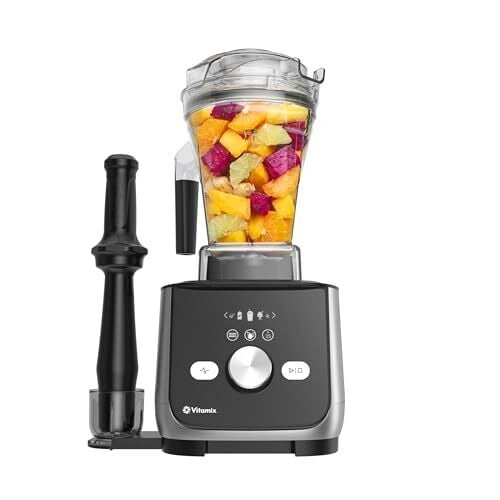
The Most Important Manual Settings I Mastered After Eight Months With My Vitamix Ascent X5

We may earn a commission from links on this page.

It actually only takes one time blending a smoothie to forever learn that you should check that the lid is on your blender. The feeling of banana chunks in my hair after I had already showered is seared into my memory, and finding dried up fruit splatter weeks later provides long-term reminders of how to properly secure my Vitamix Ascent X5 before pressing start. But beyond this big lesson, there are many smaller ones. Here are the most important manual-ish settings and tools I’ve mastered after eight months using the Vitamix Ascent X5.

Presets are only the beginning

I admit, I completely fell in love with the presets on this machine before venturing off into manual territory. Frankly, if you are the set-it-and-forget-it type, that’s reason enough to buy this top-of-the-line blender, and you could be perfectly happy with navigating the hot soup, nut butter, smoothie, frozen dessert, and dip settings forever. (Read my full-review to see the tests I ran on the preset functions.) However, I’m naturally the experimental type, and occasionally I’ve run into times where a preset doesn’t seem to fit my needs. So I’ve branched out and taken matters into my own hands.

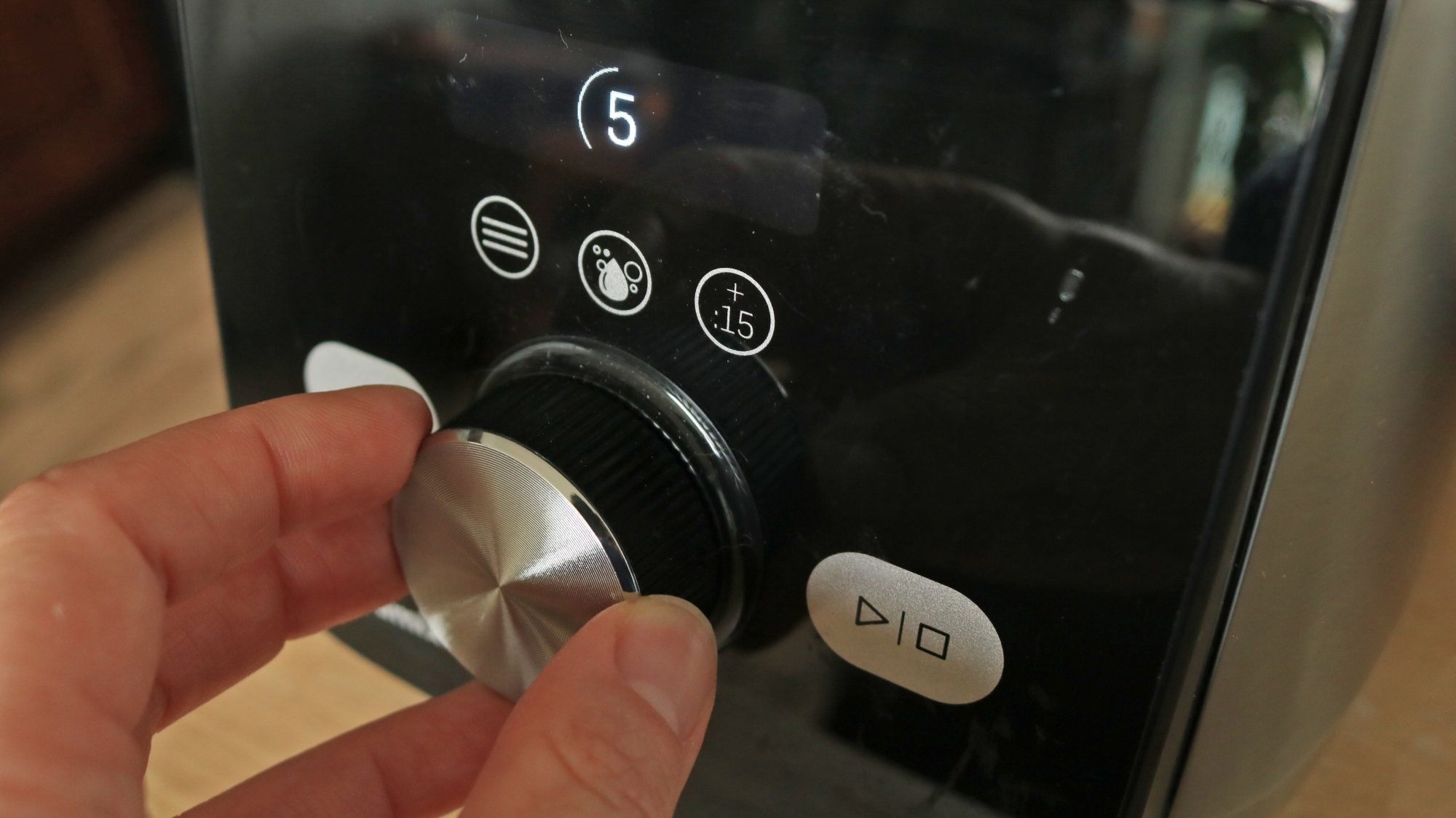
The manual speed dial

A person rotating the speed dial of a blender.

Credit: Allie Chanthorn Reinmann

One thing I’ve learned from watching the presets run is what happens with the timing and blade speed. Essentially, these two things make up any given preset, whether it’s the smoothie function or the hot soup function. They start off slowly and after a few or several seconds, the speed ramps up to level 10 (the highest speed) and stays there for some amount of time. Occasionally, the speed reduces again and ramps up again before stopping. 

After a few attempts at blending my own salsas, marinades, and sauces, I began to realize that there’s a reason for the slow start and quick increase in speed later. Starting off at a high speed might mean flinging ingredients up to the lid and maybe never maneuvering them down again unless you stop the machine to scrape the sides. That’s annoying, and it can make the process take longer overall.

Instead, I got comfortable with the manual speed dial by keeping it down at the level 1 setting (the slowest speed), which chops up the ingredients slowly, either loosening up the mixture, or breaking down bigger ingredients into more manageable chunks. After about five to 10 seconds, I would ramp up the speed to level 10, all while keeping an eye on my mixture and the texture. Maybe I’d end up staying at level 8 for a time and decrease the speed back down to level 2 to check on the consistency. I use the same technique as the presets, but customized to the recipe’s particular needs.

The + :15 seconds button

The control panel of the Vitamix Ascent X5

Credit: Allie Chanthorn Reinmann

This function is related to the presets, but it’s important in my weekly operations, so I think it’s applicable here. The + :15 seconds is one of only a few buttons on the display and yet I ignored it for some time. It is a simple idea and makes a huge difference, though: You press this button when you think your blend needs another 15 seconds of processing—or press twice for another 30 seconds, or press “stop” somewhere in between. I make a fruit smoothie a few times a week, and this is especially useful when my fruit mixture doesn’t get off to a strong start. For example, if I added spinach or large hunks of apple and they get stuck at the top of the canister for half of the blend. I’ll just tap the all-powerful + :15 button until I’m satisfied that those items are fully incorporated. 

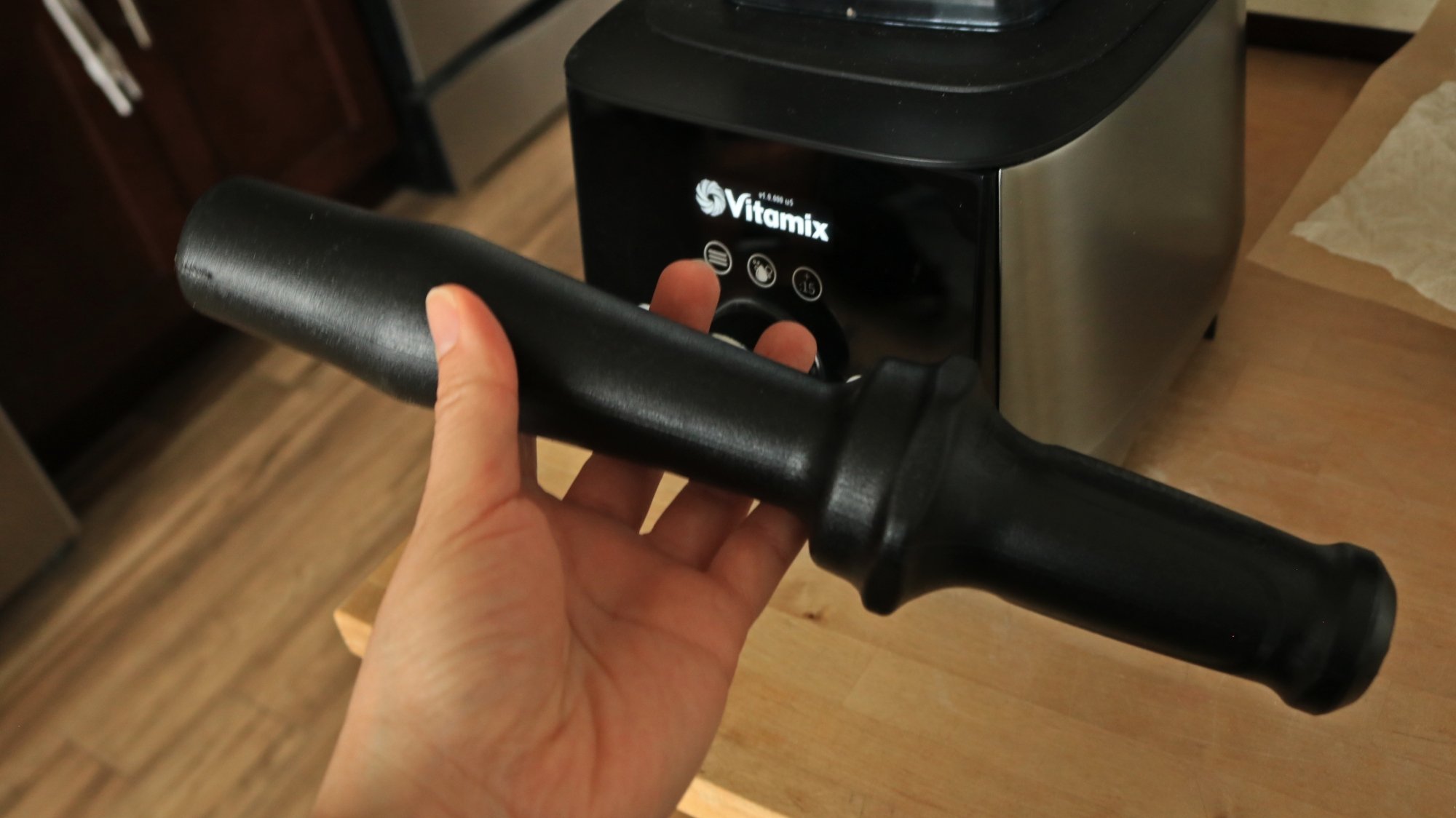
The tamper

A hand holding a plastic tamper for the Vitamix blender.

Credit: Allie Chanthorn Reinmann

On the topic of ingredients getting stuck at the top, I’ll come clean: I’ve been tamper resistant. The tamper is a plastic baseball bat-looking thing that comes with the Vitamix blenders, and it’s meant to help drive ingredients safely into the blades. It’s not hard to use, you just cram it into the container through the opening in the lid. However, as a lazy person who shies away from dirtying additional kitchen tools, I started my Vitamix journey by waiting and hoping for the blender to do its blending duty. Then I’d get irritated when the preset would end and pieces of fruit were stuck at the top. Meanwhile the display has a little tamper symbol telling me, “Hey, hello, use this now.”

I’ve finally come around: I now start most blends with my tamper in hand at the ready. Only I am to blame if my food takes longer than intended if I don’t use it. It’s not even hard to clean; it’s smooth plastic (but I am a work in progress).

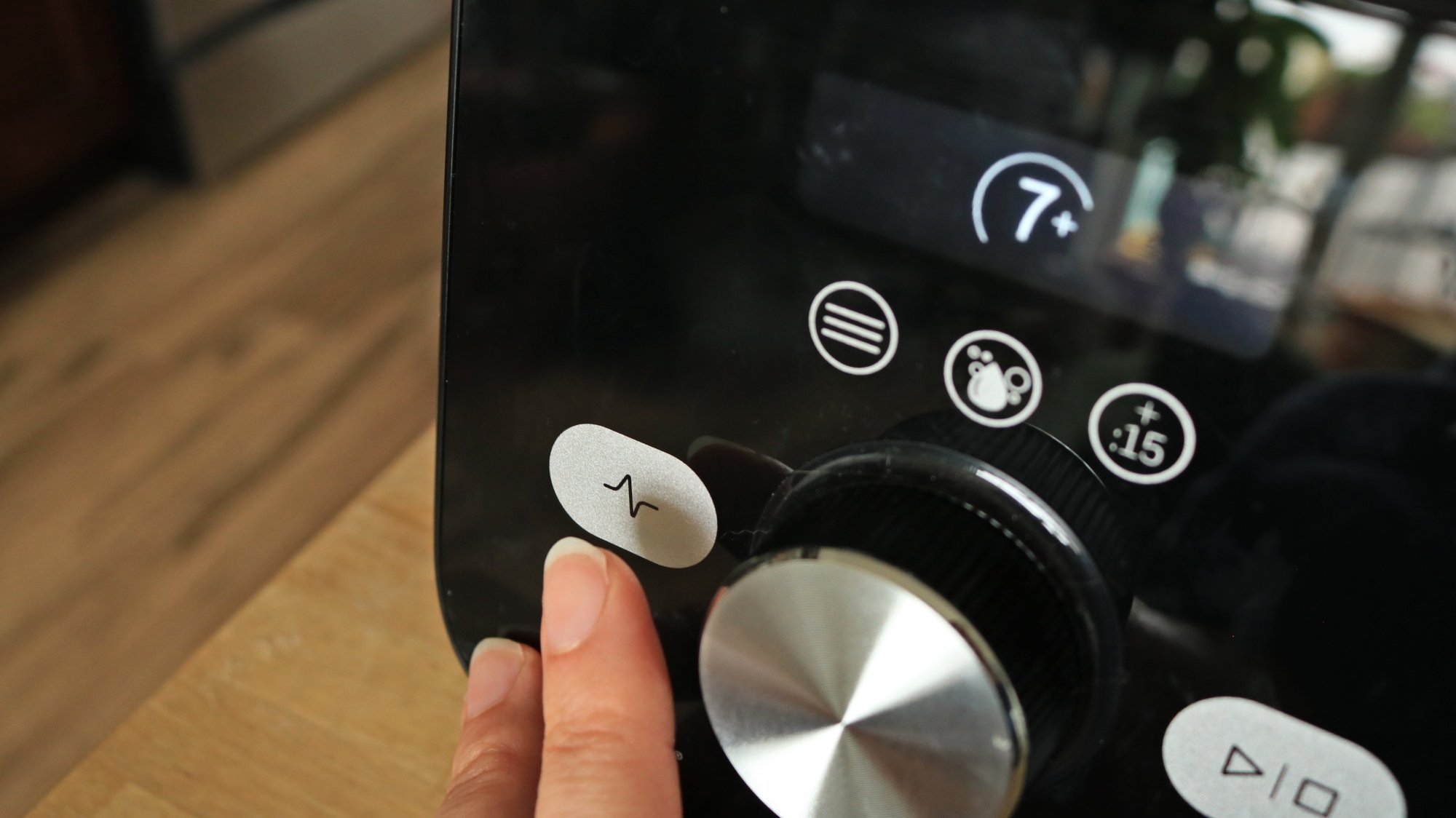
The pulse button

A finger pressing the pulse button on the Vitamix Ascent X5

Credit: Allie Chanthorn Reinmann

As for the only other button left on this control panel, I’ve finally started to embrace the pulse button too. It’s funny because when I use a food processor, a cousin of the blender, I love the pulse button. I rely on pulsing far more than the on button. I started using the pulse button on the Vitamix when I wanted to keep a closer eye on the texture. 

The pulse button only blends while you hold it. It allows you to do short bursts at whichever speed you want and stops as soon as you remove your finger. It takes the commitment out of starting a preset or even starting a blend manually and the texture getting away from you before you know it. I’ve been using the pulse button for making blender cakes, which works out great but you do want to be careful not to overwork the batter. The pulse button is ideal for a one- or two-second blend, just to incorporate your ingredients. 

Things I learned the hard way

Don’t tilt the container while the machine is running. Why would anyone do this? Definitely not to avoid using the tamper and instead try to shake the stuck material down into the blades. It makes a horrifying grinding sound, and you’ll scare your cats out of their slumbers. Also, it’s not effective. The container gently sits atop the gear powered by the incredibly strong engine; it’s not locked in with a clip or anything. If you tilt the container, you’re just grinding the very expensive metal cogs, not so much affecting what’s inside the vessel. Remember, the tamper is our friend.

Do check that the lid is on. The Vitamix does not detect if the lid is on like many food processors do. If the lid isn’t on the container when you press start, she will run like it is. Of course, you want to keep your hands and any other items and body parts safe while the machine is running, but you will almost certainly end up wearing your food if you run the machine without the lid on. Just a quick glance up is all you need to blend safely and mess-free.