Google Will Now Use AI to Summarize Your Search Results As a Podcast

For Google, AI-generated podcasts are turning into quite a key feature. You can now generate a two-person AI podcast from a Deep Research report, or get a Daily Listen podcast that’s generated from your Discover feed. Now, Google is planning to expand this feature to Google Search as well.

Available as an experimental feature from Google Labs, this new option will help generate a short, 5-minute AI podcast based on your Google Search results.

How to turn on Audio Overviews in Google Search
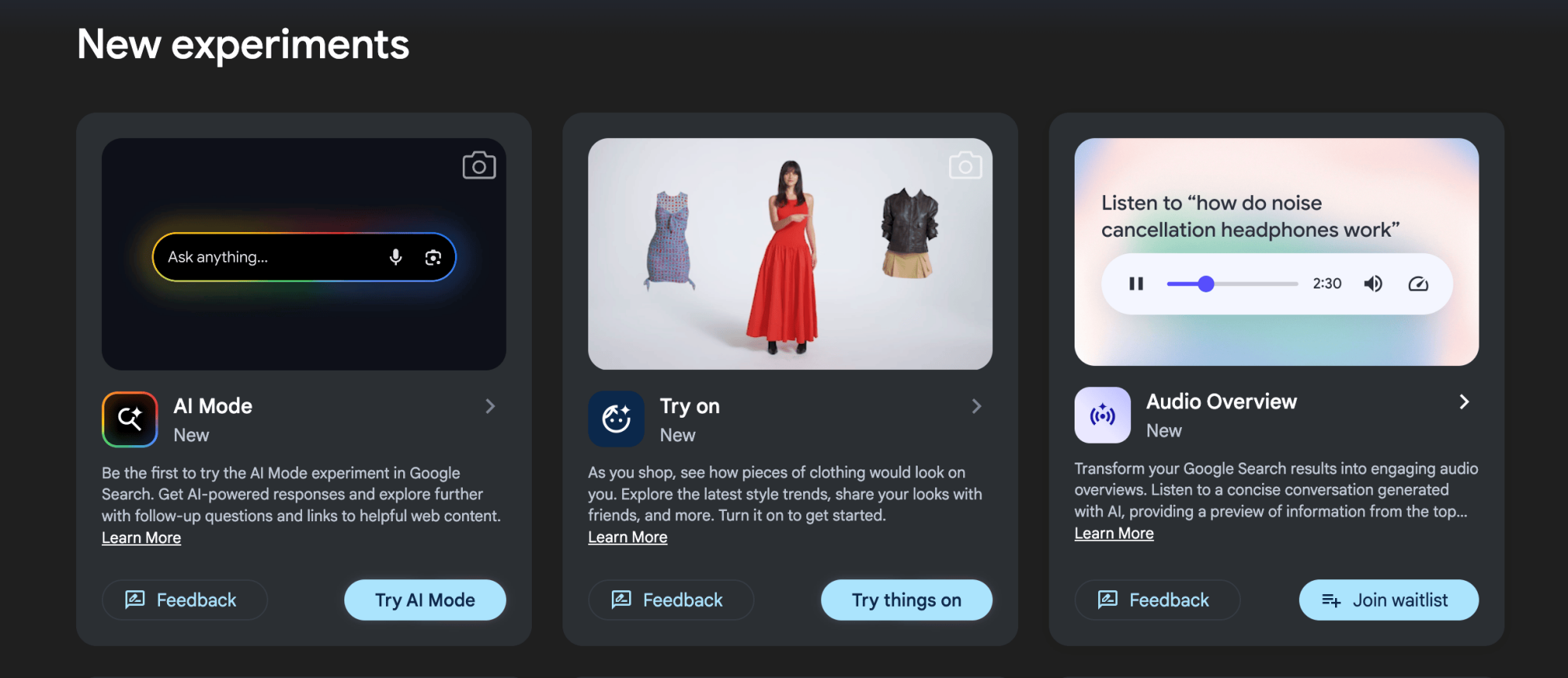
Google Labs new features

Credit: Jake Peterson

To access the new feature, head over to your Google Labs page using this link and find the Audio Overviews section. There, you can either enable this feature or join a waitlist, depending on where you’re located. Unfortunately, while this is a global rollout, it’s not happening all at once, as is the case with many new Google AI features.

How Audio Overviews in Google Search work

This new search feature is lifted almost straight from Gemini, which itself got it from NotebookLM. Called Audio Overviews, the original incarnation of this feature let you generate a 10-minute AI podcast episode on any topic, although the new version has a few additional limitations.

When the feature is enabled in Google Search, you’ll see a little prompt to “Generate Audio Overview” while you scroll through compatible search results. Which results are compatible is a bit vague at this point—that’s one of the limitations. You won’t see it for simple questions like “what are some nearby cafés?” but it also won’t work for overly complex topics, like researching investment trends across Asia (where you might be better off using Deep Research tools).

Instead, Audio Overviews will kick in for queries that are somewhere in the middle. Let’s say you want a quick refresher on a Lord of the Rings character, or to know which Japanese knives to get started with when upgrading your kitchen. Just make an appropriate Google search, click the Generate Audio Overview button, and search will kick into Gemini mode. After a wait of about 30-40 seconds, which is considerably less than Gemini’s 2–5 minute wait time, you’ll see your audio overview. It will be about five minutes, tops, so you’ll get less detail than Gemini would give you, but it might be enough for a bird’s-eye view on whatever you’re searching for.

The audio player for your AI podcast will stay put as you browse the results page, and it will show links to its sources as well. And if it’s gotten something really wrong, you can give it a Thumbs Down. As is the case with any AI tool, it’s important to point out that these are based on Large Language Models, which can sometimes hallucinate. So make sure to check the sources that the Audio Overviews feature provides you before repeating what it says elsewhere.


Nintendo Switch 2 Anti-Piracy War Ensues As Hackers Get The Ban Hammer

Nintendo Switch 2 Anti-Piracy War Ensues As Hackers Get The Ban Hammer
The Nintendo Switch 2 has had an impressive launch, quickly becoming one of the fastest-selling consoles of all time and currently on the path to continuing the success of its predecessor. However, the company is eager to avoid one downside of the original Switch, which is the piracy scene that sprung up around the handheld. Initial attempts

Waymo expands service area around San Francisco and Los Angeles

Waymo is expanding its service area in two major metropolitan parts of California, according to a report by TechCrunch. The company is bringing its robotaxis to several new cities and neighborhoods around Los Angeles and San Francisco.

Beginning today, riders along the San Francisco Peninsula in cities like Brisbane, South San Francisco, San Bruno, Millbrae and Burlingame will be able to try out a Waymo driverless cab. The same goes for Silicon Valley locations like Palo Alto and Menlo Park.

Ride to more places in the Bay and LA. ✨ Starting today in SF, with new areas coming to LA later this week. Download the Waymo One app to see our new service areas. pic.twitter.com/delkMqkO4k

— Waymo (@Waymo) June 17, 2025

The greater Los Angeles area gets an expansion on June 18. Robotaxis will be available in neighborhoods like Echo Park, Silver Lake, Ladera Heights and Playa del Rey. They will also run through the entirety of Sunset Boulevard.

The company says this recent expansion will grow its operational borders in both regions by around 80 square miles. This brings the total coverage area in California to 250 square miles, following other expansions throughout the state.

Waymo recently boasted that it reached a milestone of 10 million paid rides, with 250,000 weekly rides in all four of its US markets. The Waymo One service also operates in Phoenix and Austin. This is a decent metric, considering the company ditched its waitlist and began offering rides to the public just last year.

On the road again: As Waymo prepares for broader scale, we’re embarking on our largest road trip to date, visiting 10+ cities in 2025. First up: Las Vegas and San Diego.

Read more about how our road trips help advance the Waymo Driver’s AI: https://t.co/96XzLSFV8O pic.twitter.com/UDCWOCkVOk

— Waymo (@Waymo) January 29, 2025

The company plans on testing its driverless system in 10 new cities this year, including Las Vegas and San Diego. It has also announced that it’ll begin offering driverless taxi rides in Washington DC in 2026. Waymo hasn’t abandoned the rest of the world. It started testing robotaxis in Tokyo earlier this year.

The company is also planning on more than doubling its fleet of vehicles. Waymo currently operates 1,500 Jaguar I-Pace SUVs. with 2,000 joining the fleet in the next year or so.

This article originally appeared on Engadget at https://www.engadget.com/transportation/waymo-expands-service-area-around-san-francisco-and-los-angeles-180811473.html?src=rss

Google Play Just Killed Its 1-Tap Buy Gesture For A Very Good Reason

Google Play Just Killed Its 1-Tap Buy Gesture For A Very Good Reason
Have you ever noticed that buying a product is always easy, but getting a refund is usually a different story? It’s definitely better to avoid accidentally, or semi-consciously. buying what you don’t need, and it seems Google wants to help you achieve this by changing the purchasing experience on its Play Store.

According to a report, the

[$] A parallel path for GPU restore in CRIU

The fundamental concept of checkpoint/restore is elegant: capture a
process’s state and resurrect it later, perhaps elsewhere. Checkpointing
meticulously records a process’s memory, open files, CPU state, and more into a
snapshot. Restoration then reconstructs the process from this state. This
established technique faces new challenges with GPU-accelerated applications,
where low-latency restoration is crucial for
fault
tolerance
, live migration, and
fast startups. Recently, the restore process for AMD GPUs has been redesigned to
eliminate substantial bottlenecks.

I Have a Pro Max iPhone, and iOS 26 Makes It Way Easier to Use One-Handed

It’s usually the flashiest software features that make headlines, but for my money, it’s the functional ones that deserve the most attention. Case in point: iOS 26, where Liquid Glass is on everyone’s lips, but fewer people are discussing Apple’s decision to move the iPhone’s search bars and other control buttons towards the bottom of the screen. With that one minor tweak, the Settings app, the Phone app, and Messages are now much more comfortable to use, and so are the call controls on FaceTime video calls. It may sound like a small change, but I love that I no longer need to stretch my fingers or hold my phone with both hands for everyday tasks on my iPhone.

This change has been a long time coming

Since my first iPhone, the iPhone 5s, I’ve tried to make it easier for my thumb to reach my most important apps. This used to be difficult in earlier iterations of iOS, because you couldn’t customize the home screen anywhere near as much as you can today. I’d still do my best to arrange my favorite apps in an inverted L shape near the bottom-right corner of the screen, so I could easily tap them with one hand, but my ability to do so was limited. Nowadays, you can place an app icon pretty much anywhere on the home screen, and even the Control Center can be customized, but there was still room for improvement.

For example, all my careful planning always went out the window as soon as I opened any app. Many apps follow what Apple has been doing until now and place their search bars toward the top of the phone screen, where they’re hard to reach. Some third-party apps do put their Create/Compose buttons near the iPhone’s bottom-right corner, but Apple’s own apps weren’t really optimized for ergonomics, and this set a bad precedent. This wasn’t such a big problem on my tiny iPhone 5s, but ever since I upgraded to a Pro Max model, it’s gotten more important to me. Fortunately for me, in iOS 26, Apple has finally started to address this issue.

The revamped back gesture is great

The back gesture in Settings.

Credit: Pranay Parab

As a right-handed person, I’ve never enjoyed the back gesture in iOS, which required me to move my thumb all the way to the left edge of the screen and swipe right. In iOS 26, many of Apple’s apps now let you go back by swiping right from anywhere on the screen. This is a welcome change.

Search bars are easier to reach

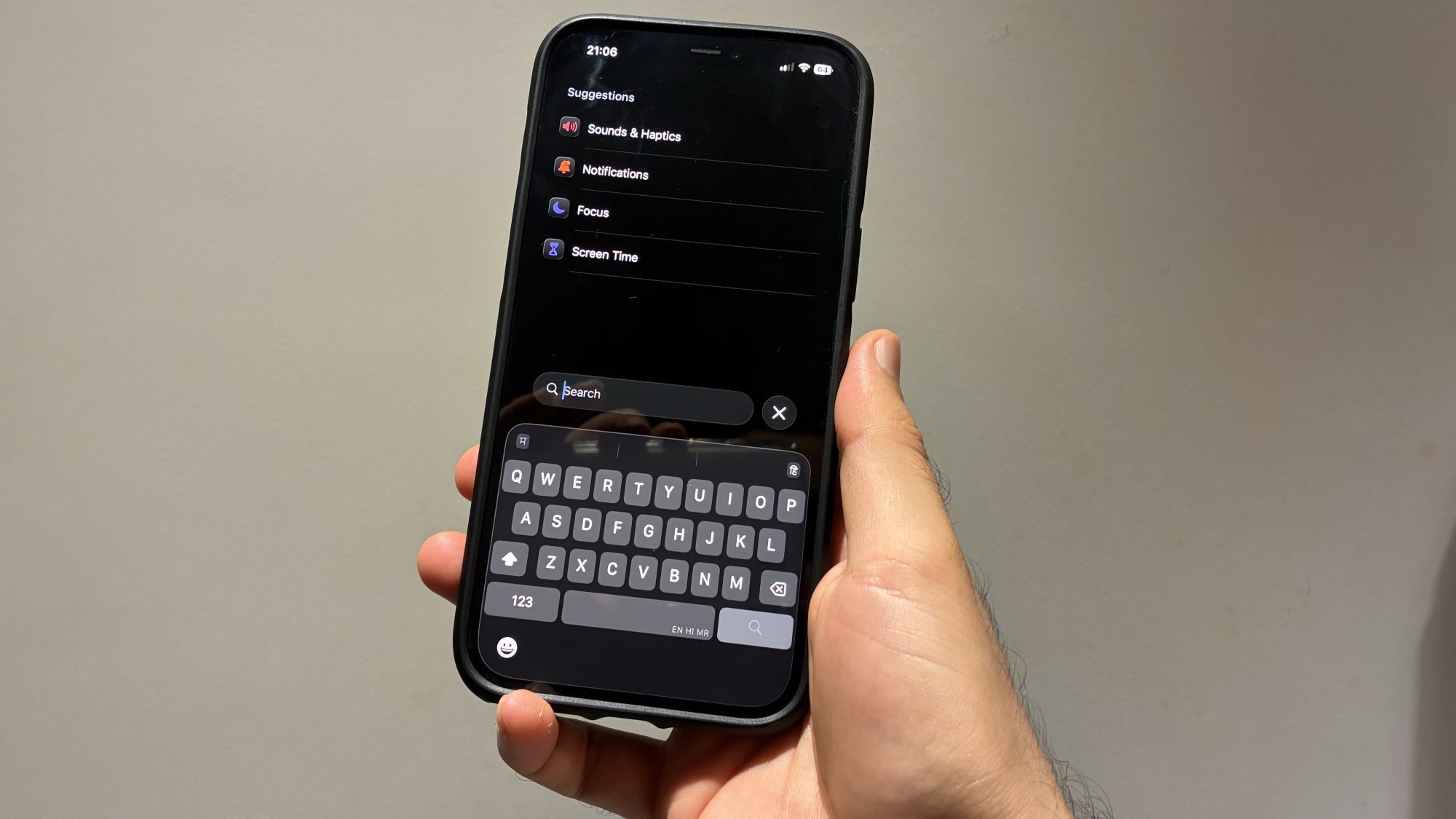
Search in Settings in iOS 26.

Credit: Pranay Parab

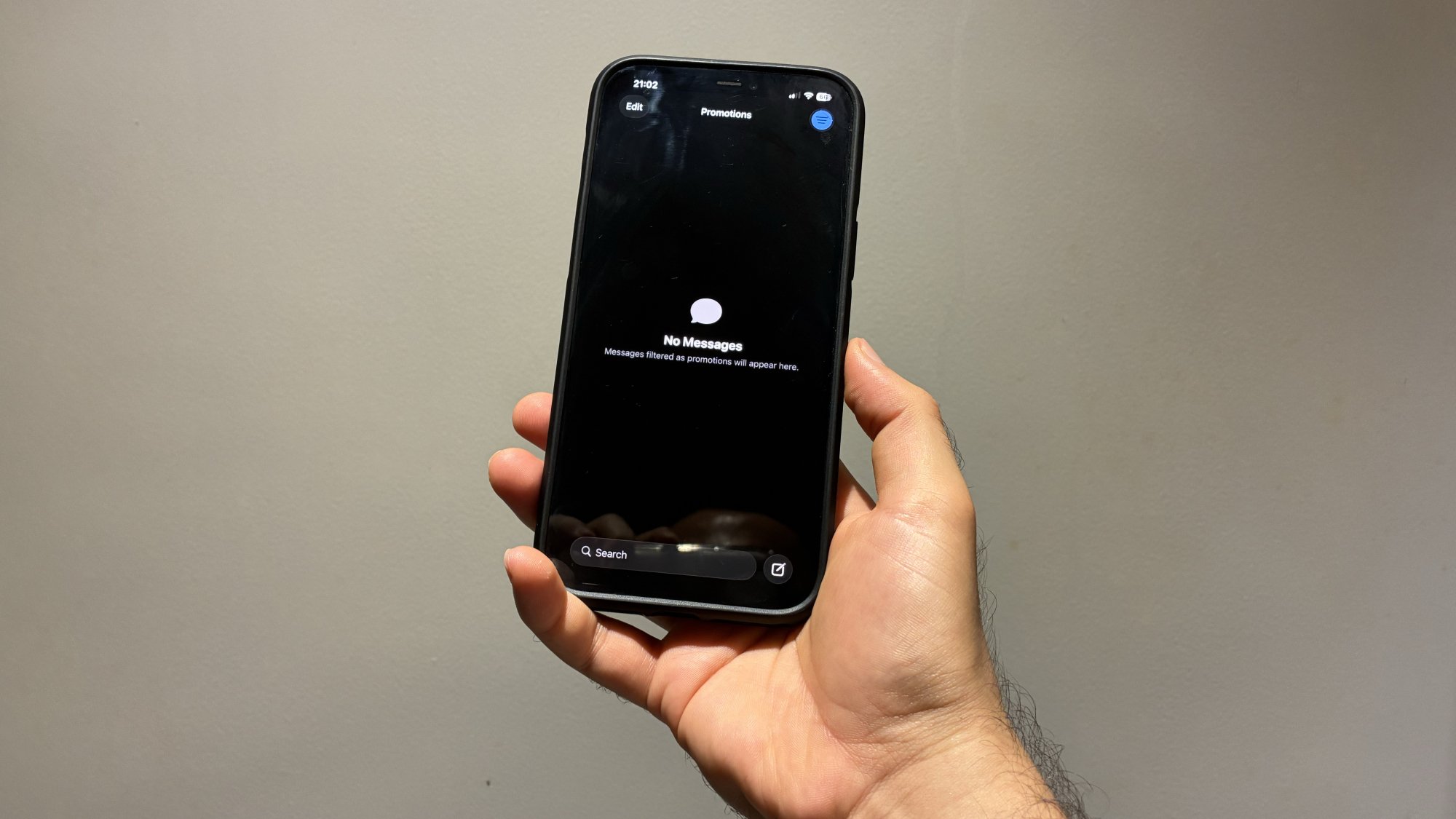
Upon opening the Mail, Messages, Notes, Podcasts, Phone, or Settings apps in iOS 26, you should notice one welcome change. Yep, the search bar/button is now near the bottom of the display. In all of these apps, I use the search feature extensively, and it now requires a lot less effort to reach the button with my thumb. Here’s hoping other developers follow suit.

The compose button is where it should be

Messages in iOS 26.

Credit: Pranay Parab

Some apps include a button that helps you create a new file, compose an email, start a new chat, etc. In iOS 26, many of Apple’s own apps have moved this button to the display’s bottom-right corner, taking cues from those third-party apps I mentioned earlier. Examples include the Create Reminder button in Reminders, Compose Email button in Mail, and New Message button in Messages. Finally, Apple is catching up with the rest of the App Store.

Safari’s new Compact layout is pretty ergonomic

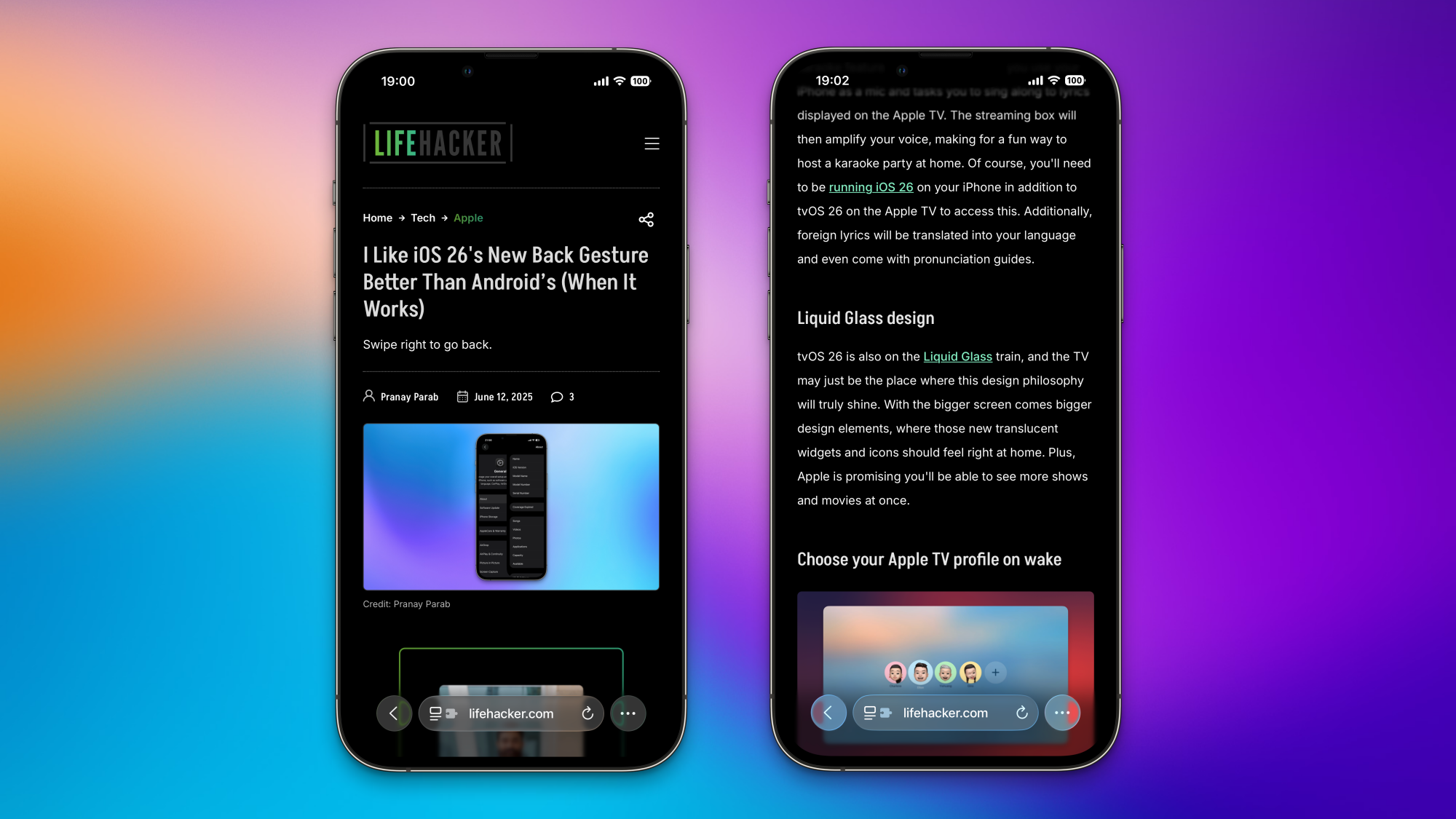
Lifehacker's website open on two iPhones, showing Safari's compact layout.

Credit: Pranay Parab

While Safari moved its address bar to the bottom of the screen in a previous version of iOS, the version of the browser included in iOS 26 has added a new Compact layout that makes it even more ergonomic. You can now hold the address bar and swipe up to use the Copy feature, which is a far easier way to copy URLs than hitting the Share button and pressing Copy. You can also double-tap the three-dots button to bookmark pages quickly. Having said that, I do hope that Apple finds a way to keep the Share and Tabs buttons visible in future iterations of the Compact layout. Those two buttons are now buried under the three-dots button, which isn’t ideal. 

To switch to a layout that’s more familiar, you can go to Settings > Apps > Safari in iOS 26, scroll down to Tabs, and choose Bottom.

FaceTime’s new video call controls are a huge step forward

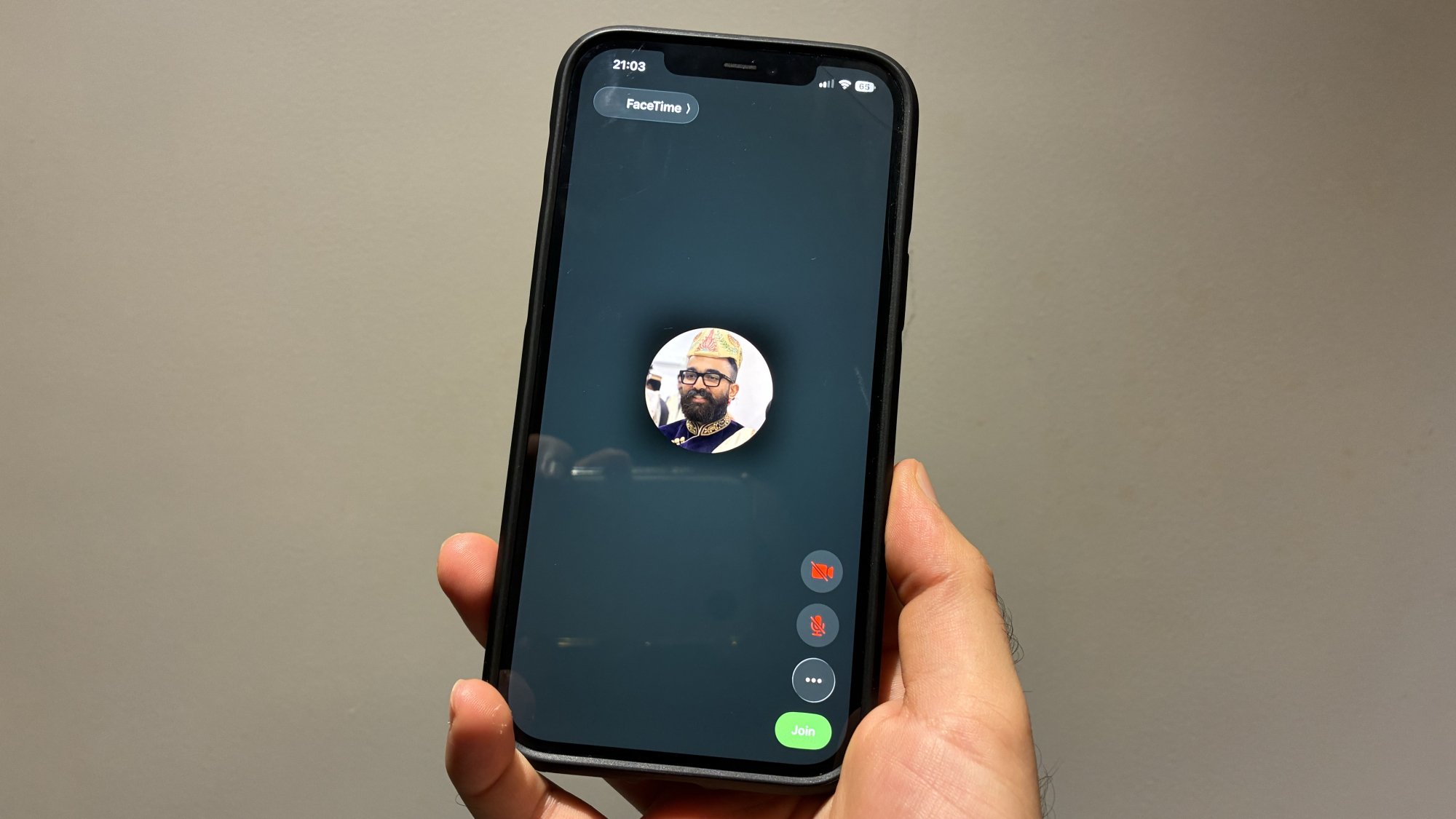
FaceTime's call controls on the right side in iOS 26.

Credit: Pranay Parab

FaceTime video calls used to have call controls at the top of the screen, but that’s changed in iOS 26. You’ll now see those buttons lined up near the bottom-right corner of the screen. This makes it easier to mute yourself, turn off the camera, change your audio device, or just end the call. 

Conquer France with SISU Tour 2025 Beginning July 5

The SISU Tour is SISU’s largest annual race event, and it’s returning in July for its fourth edition. This 7-stage race series runs alongside the three weeks of the Men’s Tour de France, covering 2,375 meters of total elevation across 175km of Zwift France.

Individual and Team Classifications

Three prestigious classifications are up for grabs:

  • Mountain Goat: Conquer the climbs and prove your prowess on all KQOM segments to wear the coveted polka dots. The winner will be determined by the cumulative fastest time (FTS) across all mountain segments.
  • Sprinter Classification: Got a need for speed? Dominate the flat roads and be the first across the line on all sprint segments to claim the green jersey, based on the cumulative FTS.
  • General Classification: The ultimate prize. The rider with the lowest cumulative time across all seven stages will be crowned the overall champion of the SISU Tour.

Race for individual glory or team up to take on the Team GC, where the fastest three riders from each team, in each grade, will have their times combined for each stage. Full results and standings will be available at sisu.racing/tour.

Stage Schedule and Routes

Each stage is available in 15 different timeslots, so you can find a race that works with your schedule.

Sign up at zwift.com/events/tag/sisutour

Other Information

  • Events are categorized using Zwift’s Racing Score with separate results for Men and Women.
  • Riders who upgrade their category during the first six stages will be reclassified in their higher grade.
  • All events are mass start, with all riders visible on the course.
  • For the Team GC, riders must have their team listed on their ZwiftPower profile before Stage 1.
  • Bike upgrades are enabled – choose your fastest machine!
  • TT bikes are mandatory for the iTT (Stage 2), and the draft will be disabled. The three individual sprint segments of the iTT Stage are not in play for the Sprinter Classification.
  • ZPower riders and those without heart rate data will be excluded from the results.
  • A rider’s best time will count if they race the same stage in multiple time zones.
  • A ZwiftPower profile is required to be included in the GC (learn how to sign up).

Questions or Comments?

Join the conversation on the SISU Racing Discord and connect with fellow riders in the SISU Racing Club in the Companion App.

For more information, FAQs, and full results, visit sisu.racing/tour. Any questions can be sent to the Tour Director at hello@sisu.racing.

Post below!

Google’s Gemini AI family updated with stable 2.5 Pro, super-efficient 2.5 Flash-Lite

Google has announced a big expansion of its Gemini AI model family today. After months of tweaking and tuning, the high-power Gemini 2.5 Pro is leaving preview and is ready for developers to build on. Meanwhile, Google is offering a peek at its upcoming high-efficiency model, known as Gemini 2.5 Pro Flash-Lite. Try as it might, Google can’t get away from confusing model names.

Google’s AI aspirations have been looking up in 2025 with the debut of Gemini 2.5. These models showed a marked improvement over past versions, making Google more competitive with OpenAI and its popular GPT models. However, we’ve been inundated with previews and test builds as Google works toward general availability, which means a model is stable enough for long-term development work.

The 2.5 Flash model left preview at I/O, but Gemini 2.5 Pro lagged behind. Today, Flash is hitting general availability with the 04-17 build. Gemini 2.5 Pro is leaving preview and also reaching general availability, and as predicted, the recently revamped 06-05 build is the winner. This version aimed to address some issues that popped up in the Google I/O build of 2.5 Pro, and it appears to have worked.

Read full article

Comments

Watch C8 Corvette Go Airborne For 110 Ft In Wild Dukes Of Hazzard Stunt

Watch C8 Corvette Go Airborne For 110 Ft In Wild Dukes Of Hazzard Stunt
In a spectacle that combined horsepower with audacious ambition, a stock Stars and Stripes-adorned C8 Chevrolet Corvette recently took to the skies, soaring 110 feet through the air at action sports icon Travis Pastrana’s “dirt playground” in Maryland. While Pastrana, renowned for his daredevilry in motocross, rally racing, and more, wouldn’t

This 1-800 number will generate ChatGPT images, if for some reason you need that

The discourse around artificial intelligence has all been about pursuing the bleeding edge, pushing the tech into the future as fast as possible. So maybe it should be refreshing that OpenAI’s latest announcement feels almost quaintly analog. Starting today, users can tap into the company’s image generation by texting 1-800-ChatGPT on WhatsApp.

The post on X announcing this new option for using the ChatGPT AI chatbot specifies that the feature is “now available to everyone.” I’m not sure what percentage of “everyone” wanted to have a 1-800 number to contact in order to obtain their AI-generated pictures. Considering how long it’s been since the concept of a long-distance call was a factor in regular communication, I’d guess that many ChatGPT users don’t even know why 1-800 phone numbers were notable. Perhaps this is OpenAI’s attempt to lure the older generations away from potentially confusing (and embarrassing) competitors.

This article originally appeared on Engadget at https://www.engadget.com/ai/this-1-800-number-will-generate-chatgpt-images-if-for-some-reason-you-need-that-174636780.html?src=rss

Threads adds new dedicated feed for fediverse content

Meta’s Threads is deepening its integration with the fediverse, a collection of decentralized social media platforms that includes Mastodon. Starting today, users who have enabled sharing to the fediverse in Threads will be able to see posts from federated accounts that they follow. These posts will now appear in a dedicated feed.

From this feed, users can now search for federated users from within Threads. These posts will populate in reverse chronological order, ensuring the newest posts from accounts you follow appear first.

Decentralized platforms currently compatible with Threads include Mastodon, Bookwyrm, WriteFreely and more, with Meta hoping more services will sign on in the future. When searching for fediverse accounts, simply input their username and corresponding service into the search bar, such as “@flipboard@flipboard.social,” and if an exact match exists, their profile will appear alongside the fediverse icon.

Meta has spent the last year working on building the fediverse into the Threads experience, and the company says that Threads “has interacted with over 75 percent of all fediverse servers” since sharing to the fediverse was launched a year ago.

The social media conglomerate states that its goal “remains to grow the fediverse responsibly, prioritizing the success of a safe community from multiple platforms and with multiple points of view.” Integrations like the features being launched today, however, make it much easier for the company’s users to see federated posts without ever navigating away from Threads to do so. Furthermore, fediverse engagement on Threads remains an “opt-in” feature, and replies you receive to posts shared in the fediverse are still not integrated into Threads.

This article originally appeared on Engadget at https://www.engadget.com/big-tech/threads-adds-new-dedicated-feed-for-fediverse-content-174105370.html?src=rss

Sally celebrates complicated legacy of first US woman in space

“Sally Ride became the first American woman to blast off into space, but beneath her unflappable composure, she carried a secret.”

On June 18, 1983, NASA astronaut Sally Ride made history as the first American woman in space aboard the Space Shuttle Challenger. National Geographic is marking the occasion with a new documentary on the astronaut’s life: Sally. In addition to revisiting her storied career, the film provides an unprecedented look at the famously private Ride’s personal life—notably her nearly 30-year relationship with another woman.

Director Cristina Costantini’s prior work includes the 2018 Emmy-nominated National Geographic documentary Science Fair, chronicling nine teenagers’ paths to competing in the Intel International Science and Engineering Fair. So perhaps it’s not surprising that Costantini is a longtime fan of Ride since childhood. “It was just, if a girl can go to space and do all these things that women aren’t supposed to do, maybe I can do big things, too,” she told Ars. “I think a lot of women have the exact same reaction. If she can do it, we can do it. As I got older and I learned more about Sally, I realized, wow, she really had a very fine line to walk and she did it so masterfully.”

Ride died of pancreatic cancer in 2012, which is when Costantini and much of the rest of the world discovered that the astronaut’s business partner, Tam O’Shaughnessy, was also Ride’s romantic partner and had been for 27 years. “I thought, oh my God, if NASA was barely ready for women, what was this like?” said Costantini. “What was beneath the story that we had been fed our entire lives of who Sally really was? I wanted to make a film that celebrated the Sally we all knew and also celebrated the Sally we didn’t know and complicate her legacy and make her a real person.”

Read full article

Comments

Iran Bans Officials From Using Internet-Connected Devices

An anonymous reader shares a report: Iran’s cybersecurity authority has banned officials from using devices that connect to the internet, apparently fearing being tracked or hacked by Israel. According to the state-linked Fars news agency, Iranian officials and their bodyguards have been told they are not allowed to use any equipment that connects to public internet or telecommunications networks.


Read more of this story at Slashdot.

Three Whoop Band Competitors Are Coming, but I Doubt They’ll Be Able to Compete With Whoop’s App

We may earn a commission from links on this page.

If you love the idea of tracking your health and fitness with a screenless band but don’t want to pony up for a Whoop subscription, you’ll soon have more options. Maybe. Probably: Three different Whoop-likes have popped up in the past few weeks, but I’m still murky on the details of what they’ll offer, and none of them are (yet) available for sale to the general public. In order from most to least likely to be real products you can buy, they’re coming from Polar, Amazfit, and Garmin.

There’s a lot of buzz around these devices because plenty of folks would love a fitness tracker that isn’t a watch. Maybe you already have a mechanical watch and don’t need another thing on your wrist; or maybe you don’t want anything on your wrist at all and would love a nice comfy armband instead (it really is easy to forget you’re wearing the Whoop band, and it’s my favorite placement when I’m in the gym since a watch can get in the way of some exercises).

So far, the only fitness band on the market is Whoop, which uses a subscription model. You pay for the service and get the device at no charge, sort of—a polite fiction that falls apart whenever the company announces a new hardware version and there turn out to be a cost to upgrade.

If an established fitness watch maker came out with a screenless band, it wouldn’t immediately be a Whoop killer, because it’d be missing out on Whoop’s app, which is honestly the best thing about it and which clearly took a ton of development effort to create. I wouldn’t expect any of these devices to be true competitors to Whoop as a service, but the device alone would give people another option, and that’s pretty cool.

You would think it’s easy to make a fitness band—just design a watch but leave off the screen. For whatever reason, this isn’t a product that other brands have managed to launch, despite the potential demand. Until now, maybe! Here’s what we know about the three bands that may be coming to market this year. 

Polar’s band: officially announced, but without a photo or name

Polar announced today that it’s coming out with a “brand-new product category” and you’ll be able to buy the item, whatever it is, in September 2025. Polar describes it as a “screen-free wrist device” and specifies that it will be “subscription-free.” 

It’s possible that this device will be a consumer version of Polar 360, a screenless band that it has marketed toward businesses. The use cases on the Polar 360 website include corporate wellness, sports teams, and some frankly dystopian-sounding employee monitoring for truck drivers. Device reviewer DC Rainmaker said in a video that he heard from a viewer who had bought some of these devices through a business, and they cost 90 euros each. 

Amazfit’s Helio Strap: exclusive to Hyrox athletes (for now?)

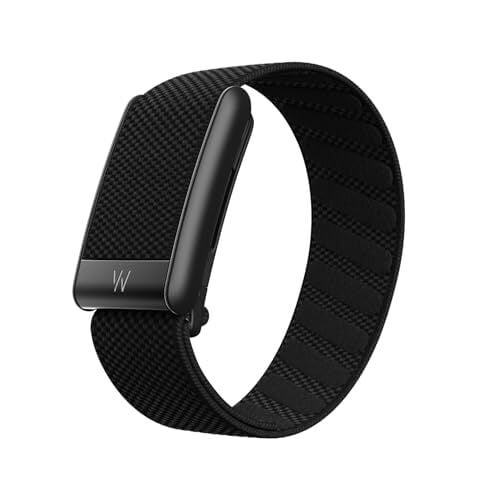
Amazfit, by contrast, has photos and a name for its device. It’s called the Helio Strap, and is currently only available for the 15 top athletes in Hyrox, a Crossfit-like sport. (Note that they don’t call it a “band” because Amazfit already sells several products in a Fitbit-like wristband shape that have names like “Amazfit Band 7.”)

The company is clearly planning to sell these to the general public at some point, since their website boasts about its battery life (11 days), number of sport modes (27), and other things that matter to potential customers and not just Hyrox spectators. Amazfit also specifies that there are no subscription fees.

Even more promising, a product listing for an all-black (not Hyrox branded) version of the Amazfit Helio strap was reportedly live on Walmart’s website for a brief moment, with a price tag of $79.99. So far there is no word on when that product might launch for real.

Garmin’s band: one tiny alleged leak

Garmin users have long been voicing hopes for a ring or band so that they can keep feeding data into the Garmin ecosystem without having to wear a sports watch every time they go out for a formal event. (This is a surprisingly common complaint/request/dilemma on the Garmin user subreddits.) 

The idea of a Garmin band was leaked, maybe, to the website The 5K Runner, which has a history of publishing Garmin leaks that sometimes come true. The post on this potential device was accompanied by an AI image, thus making it look real at first glance—but nope, it was created by an algorithm that can’t even make a sleeping woman’s head look like it’s attached to her body, and certainly doesn’t have any insight into what Garmin may or may not be planning for a sleep band. 

The writer of The 5K Runner is “100%” certain that this is a real product, and predicts the launch date as “soon, with August at the latest, and more likely by the end of July.” But without more information, it’s hard to know whether we should be as certain. I asked a Garmin rep about this rumor, and they declined to comment.

[$] Enhancing screen-reader functionality in modern GNOME

Accessibility features and the work that goes into developing those features
often tend to be overlooked and are poorly understood by all but the people who actually
depend on such features. At Fedora’s annual developer conference, Flock, Lukáš Tyrychtr sought to
improve understanding and raise awareness about accessibility with his session on accessibility
barriers and screen-reader functionality in GNOME
. His talk provided rare insight
into the world of using and developing open-source software for visually-impaired
users—including landing important accessibility improvements in
the latest GNOME release.