Google Maps can’t explain why it falsely labeled German autobahns as closed

On Thursday, a Google Maps glitch accidentally made it appear that the most desirable routes on German autobahns and highways were shut down, The Guardian reported.

It remains unclear what unleashed a flood of stop signs on Google Maps in the area just ahead of a four-day holiday break when many drivers had travel plans. Maps of roadways in Belgium and the Netherlands were also affected.

In ganz Deutschland
Chaos bei Google Maps: Dienst zeigt unzählige falsche Sperrungenhttps://t.co/qEfIRrIHx3

— Peter Berger (@leosgeminix) May 29, 2025

If drivers had stopped to check alternative apps, they would have learned that traffic was flowing normally and may have avoided clogging traffic on alternative routes or wasting time speculating about what could have happened to close so many major roads. Apple Maps and Waze accurately charted traffic patterns, and only Google Maps appeared to be affected.

Read full article

Comments

You Can Get This iPhone 12 on Sale for $230 Right Now

We may earn a commission from links on this page. Deal pricing and availability subject to change after time of publication.

If you’re set on iOS but also don’t want to spend flagship money, this refurbished iPhone 12 is worth considering, on sale for $229.99 at StackSocial. Available in black, it’s a Grade “A” refurbished unit, meaning it shows little to no signs of wear—basically a solid used phone that doesn’t look like it went through a blender. It’s also unlocked, so you can add any SIM and get going, whether you’re on Verizon, AT&T, T-Mobile, or a smaller carrier.

The iPhone 12 runs on Apple’s A14 Bionic chip, which still performs well for day-to-day use. The 6.1-inch OLED display is sharp and bright, and the dual camera system (wide and ultra-wide) performs well in good lighting and doesn’t embarrass itself at night. You’re not getting cinematic mode or high-end zoom like the newer models, but it’s more than enough for social media, quick videos, and everyday use. Read this PCMag review to learn more about the iPhone 12.

That said, it’s not perfect. You’re limited to 64GB of storage, so if you shoot a lot of video or keep your entire photo library on-device, you’ll need to manage space or use cloud backups. Battery life is decent, though heavy users might need to recharge before the day’s over. And while it won’t match newer budget Androids spec-for-spec, it makes up for it with long-term software support, solid build quality, and a clean interface free of bloat. For someone looking to stay in the Apple ecosystem, this deal makes sense.

Almost 40% of World’s Glaciers Already Doomed Due To Climate Crisis

Almost 40% of glaciers in existence today are already doomed to melt due to climate-heating emissions from fossil fuels, a study has found. The Guardian: The loss will soar to 75% if global heating reaches the 2.7C rise for which the world is currently on track. The massive loss of glaciers would push up sea levels, endangering millions of people and driving mass migration, profoundly affecting the billions reliant on glaciers to regulate the water used to grow food, the researchers said.

However, slashing carbon emissions and limiting heating to the internationally agreed 1.5C target would save half of glacier ice. That goal is looking increasingly out of reach as emissions continue to rise, but the scientists said that every tenth-of-a-degree rise that was avoided would save 2.7tn tonnes of ice.


Read more of this story at Slashdot.

RFK Jr.‘s fluoride ban would ruin 25 million kids’ teeth, cost $9.8 billion

Once hailed as a triumph of public health, water fluoridation is now under intense attack in the US.

Despite decades of data proving its efficacy at protecting teeth from decay—particularly children’s teeth—two states have now banned the use of fluoride in public water, and communities around the country have followed suit or are considering doing the same. The current US health secretary, Robert F. Kennedy Jr., who is known for his anti-vaccine advocacy and for peddling conspiracy theories, has pledged to remove fluoride from US water.

Now, a pair of researchers at Harvard—Sung Eun Choi and Lisa Simon—have modeled exactly what will happen in the US if Kennedy follows through on his pledge: The number of cavities and decayed teeth in American children and teens (ages 0–19) will increase by an estimated 7.5 percentage points over the first five years. That means there will be 25.4 million more rotten teeth in the mouths of children and teenagers. The dental bills for the added decay will total at least $9.8 billion in that time. Other costs, such as loss of work among parents, were not included, making the financial estimate conservative. But children will also be more miserable, with an estimated loss of 2.9 million quality-adjusted life years.

Read full article

Comments

Premium Gaming Deals: PS5 Pro Sees First Price Drop And DualSense Edge Hits New Low

Premium Gaming Deals: PS5 Pro Sees First Price Drop And DualSense Edge Hits New Low
Sony and its retail partners are offering some great discounts on various hardware as part of a “Day of Play 2025” promotion, which runs through June 11, 2025. The event also entails other perks, like special gaming tournaments, new game trials, and other odds and ends, but we’re most interested in time-sensitive deals, including the first

WD_BLACK SN8100 2TB PCIe Gen 5.0 NVMe SSD Linux Benchmarks

Sandisk earlier this month announced the WD_BLACK SN8100 as what they claim is the current world’s fastest PCIe Gen 5.0 NVMe SSD for consumers. Given how well the WD_BLACK SN850X performs under Linux as a PCIe Gen 4.0 drive, I decided to buy a WD_BLACK SN8100 for some Linux testing at Phoronix to compare to various other drives in the lab. Here is a preliminary look at the WD_BLACK SN8100 2TB performance under Ubuntu Linux.

Get Ready For The Witcher 3 To Feel Like A New Game Again When Mod Support Comes To Consoles Later This Year

The Witcher 3 turned 10 years old this month, but the seminal fantasy role-playing game keeps finding new ways to reinvent itself. Three years after its “next-gen” upgrade brought the open-world adventure to PlayStation 5 and Xbox Series X/S, CD Projekt Red revealed that Geralt and Ciri’s adventures will continue when…

Read more…

Gmail’s AI Summaries Now Appear Automatically

Google has begun automatically generating AI-powered email summaries for Gmail Workspace users, eliminating the need to manually trigger the feature that has been available since last year. The company’s Gemini AI will now independently determine when longer email threads or messages with multiple replies would benefit from summarization, displaying these summaries above the email content itself. The automatic summaries currently appear only on mobile devices for English-language emails and may take up to two weeks to roll out to individual accounts, with Google providing no timeline for desktop expansion or availability to non-Workspace Gmail users.


Read more of this story at Slashdot.

Solar Breakthrough: New Optics Capture Bizarre Plasma Raindrops In Sun’s Atmosphere

Solar Breakthrough: New Optics Capture Bizarre Plasma Raindrops In Sun's Atmosphere
A rather new adaptive optics system dubbed Cona has just opened a new window into the mysterious world of the Sun’s corona, delivering images of unprecedented clarity. This groundbreaking technology, installed at the Goode Solar Telescope (GST) in California and funded by the National Science Foundation (NSF), was able to capture some of the

Black Ops 6 Season 4 Free Trial Unlocks New Maps, Full Multiplayer, Zombies And More

Black Ops 6 Season 4 Free Trial Unlocks New Maps, Full Multiplayer, Zombies And More
The Call of Duty franchise is one of the crown jewels of Microsoft’s various acquisitions during the last several years. It also serves as a big incentive to lure gamers over to its popular Game Pass subscription service. Upping the ante, there is a new update out, Call of Duty: Black Ops 6 Season 4, that is chock full of new content. And

I Spoke With Some of the Most Private People Online, and Here’s What They Sacrifice

How far would you go to keep yourself private online? There’s little doubt that advances in technology over the past three decades have eroded traditional concepts around privacy and security: It was once unthinkable to voluntarily invite big companies to track your every move and decision—now, we happily let them in exchange for the digital goods and services we rely on (or are hopelessly addicted to). 

Most people these days either tolerate these privacy intrusions or outright don’t care about them. But there’s a growing movement that believes it’s time to claim our privacy back. Some are working piecemeal, blocking trackers and reducing permissions where they can, while not totally ditching modern digital society as a whole. Others, however, are as hardcore as can be—a modern equivalent of “going off the grid.”  

We put out a call looking for the latter—people who are going to great lengths to protect their privacy in today’s mass surveillance world. We received a number of insightful, fascinating, and unique situations, but for this piece, I want to highlight four specific perspectives: “Ed,” “Jane,” “Mark,” and “Jay.”

Ed is “ruthless” with app choices and permissions

The first respondent, I’ll call Ed, since their privacy journey began with the Edward Snowden leaks: “I’d known something was likely up…as early as 2006[.] I remember headlines about AT&T possibly spying, but high school me didn’t take it too seriously at the time. The Snowden leaks, when I was in college, really opened my eyes. Ever since, I’ve taken steps to protect my privacy.”

Ed says the biggest step they’ve taken towards a digitally private life has been their Proton account. If you’re not aware, Proton is a company that offers apps designed for privacy. Their email service, Proton Mail, is the most famous of the company’s products, but Proton makes other apps as well. Ed uses many of them, including Proton VPN, Proton Calendar, and Proton Drive. Ed pays for Proton Ultimate, which costs them nearly $200 every two years (a new account is now billed yearly at $119.88). You don’t have to pay for Proton, but your experience is much more limited. That’s not totally dissimilar to Google’s offers, which gives you more features if you pay, but most people can definitely get by with a free Google Account. I’m not so sure the reverse is true. 

Speaking of Google, Ed does have a Google Account, but rarely logs into it. They don’t keep anything attached to it, however—Ed stores all files, for example, in Proton Drive or Tresoirt (another end-to-end encrypted service).

Ed uses SimpleLogin for throwaway email addresses. That’s not just for the times Ed wants to avoid giving their email address to someone. According to them, they use an alias anytime an organization asks for their email, and frequently delete it when it’s no longer useful. Each online purchase gets its own alias, and that alias is deleted once the purchase is complete. Whenever Ed travels, they use an alias for any flights, hotels, and rental cars they use. Once the trip is up, they delete the alias. If one of those aliases receives a spam message, they delete it as well.

Ed’s smartphone of choice is iPhone, and although Apple arguably has the best reputation for privacy in big tech, Ed is no fan: “Apple is no bastion of privacy of course, but they seem to be the least-worst of the big tech companies.” Ed doesn’t use iCloud for any backups: Any iPhone files are kept in Tresorit. 

That iPhone, of course, contains apps. But each app is there for a reason, and no app gets access to permissions unless it requires it: “I’m ruthless about apps and app permissions. If I’m not going to use the app regularly, I uninstall it. I grant only those permissions I think the app reasonably needs.” Ed protects his mobile internet traffic with Proton VPN, and only accesses the web via Firefox Focus, a special version of Firefox designed for privacy. 

Location services are always off on Ed’s iPhone, unless they’re using Apple Maps for navigation. Once they arrive at their destination, Ed disables location services again. They also have an interesting trick for getting back home without revealing their actual address:  “Additionally, when I’m navigating home, I don’t enter my home address. I enter the address down the street just as an extra layer so I’m not entering my actual home address…I’ll end navigation and turn off location while still driving…if I know the rest of the way home myself.”

Most of us deal regularly (if not daily) with spam calls. Not Ed: They use the “Silence Unknown Callers” setting on iOS to send all numbers not in the Contacts app to voicemail. They then review all voicemails, and if they didn’t leave a message, they block the number. Our initial call out for this piece referenced how using a VPN can sometimes block incoming phone calls, but Ed isn’t bothered by that: “Since most calls these days are scams or telemarketing, and most people I do want to talk to aren’t going to call me anyway, I see this as more of a feature than a bug.” 

For their desktop computing needs, Ed uses Windows. They admit they aren’t privacy experts when it comes to Microsoft’s OS, but they do what they can, including changing all privacy settings and uninstalling all programs they don’t use. (That includes OneDrive and Edge.) They also run a clean version of Windows 11 after following Lifehacker’s guide. Firefox is their go-to PC browser, and they use a variety of extensions, including:

Ed didn’t say how much of an impact this array of extensions and settings has on their browsing, save for YouTube, which they admit does sometimes give them trouble. However, Ed has workarounds: “When YouTube wants me to ‘sign in to confirm you’re not a bot,’ changing VPN servers usually does the trick.” Ed also uses the audible clues for ReCAPTCHA prompts, rather than the pictures, since they don’t want to help train Google’s “braindead AI.”

Ed deleted all their social media accounts, including Facebook, X, Instagram, and LinkedIn. Though they’ve never had TikTok installed on their phone, they will watch it in Firefox when a friend sends them a video. 

Jane uses an open-source smartphone OS designed for privacy

While Edward Snowden may have kicked off Ed’s interest in personal privacy, “Jane” has many strong beliefs motivating their desire for privacy. They are concerned about data brokers and Meta’s practices of tracking internet activity, and how these companies build profiles based on that data to sell to third-parties; they’re concerned about the possibility of telecommunication companies tracking our locations via cellular towers; they worry about US law enforcement and agencies reviewing citizens’ social media accounts accounts and tracking people. Their focus on privacy is fueled by true concern for their own well-being, not only the value of privacy as a concept.      

Jane uses a VPN on all of their devices. Instead of Proton, however, Jane opts for Mullvad. They enable ad and tracker blocking, as well as a kill switch, which blocks your internet if you lose connection with the VPN—thus protecting your connection from being leaked out of the secure network.

I’m a big advocate for strong and unique passwords and proper password management, but Jane definitely beats me when it comes to secure credentials. Jane uses six to eight-word passphrases generated by diceware, a tactic that chooses words based on dice rolls. Something like this diceware generator will roll a die five times, then find a word in a bank based on that five-digit number. You can repeat this as many times as you want to come up with a passphrase built up with random words. Jane saves all of their passphrases to a password manager, except for the ones for important accounts, like their bank. They commit those to memory, just in case someone breaches their password manager.     

Like Ed, Jane uses Mullvad, but instead of just using their VPN, they opt for the web browser, which has those protections built in. Mullvad’s strict privacy settings break persistent logins on websites, so any sites Jane wants to stay logged in on are kept in Brave browser. For both Mullvad and Brave, Jane uses uBlock Origin.

“From time-to-time I do run into sites that will block access due to being on a VPN or blocking ads and trackers. Instead of disabling [my] VPN completely, switching my connection to one of Mullvad’s rented servers instead of ones they own usually helps. Barring that, I occasionally go into [uBlock Origin] and temporarily whitelist a needed [URL] ([ReCAPTCHA] etc). This works for me to get around site blocks most of the time.”  

Jane uses a Mac, and configured macOS based on various privacy guides. But instead of an iPhone, Jane opts for a Google Pixel. That might surprise readers who assumed hardcore privacy enthusiasts would break away from Google entirely. But X doesn’t run Android: Instead, they installed GrapheneOS on their Pixel, an open-source OS designed for privacy. Following a restart, Jane configured the Pixel to only unlock with a seven-word dice passphrase—for general use, they use a fingerprint scan and a six-digit PIN. If the don’t unlock their Pixel for a while, their phone automatically reboots to put it back into this “First Unlock” state. They also keep airplane mode on at all times to disable the phone’s radio communications, but maintain a wifi connection with timed automatic Bluetooth and wireless disabling. 

Jane also deleted all their social media accounts after downloading all data associated with those platforms.

Mark uses phone and credit card masks

“Mark” is perhaps the least hardcore of the respondents in this story, but that makes their experience both interesting and relatable. Unlike most of the people we spoke to, Mark is still on Facebook and Instagram. That’s due to their job, which requires them to be on the platform, but they’ve been “systematically” deleting everything they can over their 19-year Facebook history and saving the data to an external hard drive. Mark doesn’t follow anything that isn’t relevant to their job, and only uses Facebook and Instagram inside the DuckDuckGo browser. They don’t react to posts they see, and following their privacy tactics, Facebook doesn’t show them relevant ads anymore. “If there is an ad I’m actually interested in I’ll search it up in a different browser rather than click it.”

Mark has had four Google Accounts in their time online, and has deleted two so far. Like Facebook, they have to use Google for their job, but they delegate all their work to Chrome. All other browsing runs through Firefox, DuckDuckGo, or Tor. The latter is perhaps best known for being the browser of choice for browsing the dark web, but what makes it great for that is also what makes it a great choice for private browsing.

Unlike others in this story, Mark hasn’t de-Googled themselves completely. In addition to using Chrome for work, Mark has a phone mask through Google, and has their contacts, calendar, and maps tied to the company—though they are moving away from Google as much as they can. They’ve been running through their old emails to find and delete outdated accounts they no longer use. Any accounts they do need now use an email mask that forwards to a Mailfence account, an encrypted email service.   

Mark was the only respondent to talk about entertainment in relation to privacy: “I’ve also been switching to physical media over streaming, so buying CDs and DVDs, locally as much as possible. I’m lucky to have a local music store and a local bookstore…one of the owners of our bookstore wrote a book on how to resist Amazon and why. Any book I want, I can either order through them or on Alibris. For music, I use our local record store and Discogs.”

When shopping online, Mark uses a credit card mask, but still uses the card itself when shopping in person. They want to start using a credit card mask in retail locations like Janet Vertesi, an associate professor of sociology at Princeton University, but they haven’t quite gotten there yet.   

What really piqued my interest most about Mark, however, wasn’t their perspective on their own privacy concerns, but the concerns around the privacy of their kids: “They each have a Gmail, two of them have Snapchat. Their schools use Gaggle and Google to spy on them. I don’t even know how to start disconnecting them from all this…I was a kid during the wild west of the internet and this feels like getting back to my roots. My kids are end users who understand apps and touchscreens, not torrenting their music or coding a basic website. (Is this my version of “I drank out of the garden hose”?) I feel like Big Data has its grip on the kids already and I don’t have a guidebook on navigating that as a parent.”  

Mark’s current focus on their kids’ privacy includes deleting their health data from their local health system. That’s in part due to a data breach impacting the health system, but also the language about autism from Robert F. Kennedy Jr., the current Secretary of Health and Human Services.

Jay de-googled their life and uses a VoIP phone number

“Jay’s” origin story with personal privacy dates back to 2017. That year, Equifax suffered a major hack, where nearly 148 million Americans had sensitive data stolen and weren’t notified about the breach for months. Jay was frustrated: You don’t choose to give your data to Equifax, or any credit bureau, and yet so many people lost their data. They also felt that companies were not properly held responsible for these events, and lawmakers were simply too out of touch to do what was necessary to protect citizens’ privacy, so they took it upon themselves to protect their own data. 

Ever since this incident, Jay freezes their credit: “It was frustratingly difficult back then, but nowadays, it is very easy (it just requires an account, which I use a burner email for)…The freeze will not allow anyone to pull credit for large purchases in your name, even if they have your social security number (and because of the data breach, someone probably does). I decided I wanted to pursue some privacy for the things I do have a choice over.”  

From here, Jay de-googled their life, including both Google Search as well as YouTube. They’ve found no issue with using alternative search engines, and, in fact, sees Google getting worse, as it tries to show you results based on what it thinks it knows about you, not what is most relevant to your actual query: “The internet was supposed to be a place you went to find information, not where you became the information that companies take instead.”

Jay uses tools to prevent fingerprinting, where companies identify you and track you across the internet, but worries that going too far with things like ad blockers puts a target on your back as well. Jay chooses to pick “a couple of effective tools,” and runs with those.

For their smartphone needs, Jay goes with Apple. Like Ed, Jay doesn’t believe Apple is perfect, and even considers their privacy policies a bit of a gimmick, but sees them as the better alternative to Android. Jay likes the security of the App Store, and the array of privacy features in both Safari and Apple Accounts as a whole. They highlight Safari’s “Advanced Tracking and Fingerprinting Protection” feature, which helps block trackers as you browse the web; iCloud’s Private Relay, which hides your IP address; and “Hide My Email,” which generates email aliases you can share with others without giving your true email address away.

Most of us are plagued with spam calls, but following the Robinhood data breach in 2021, Jay started receiving a flood of them. They decided to change their phone number and made a point of never sharing it with businesses. For the times they need to give out their number to parties they don’t trust, they use a number generated by My Sudo, which, for $20 per year, gives them a VoIP (Voice over Internet Protocol) phone number. It works with most services that rely on SMS, but it won’t function for two-factor authentication. (Which is fine, seeing as SMS-based 2FA is the weakest form of secondary authentication.) My Sudo lets you change your number for an additional $1, so if Jay’s number ever was compromised or started receiving too much spam, they could swap it.        

Jay, like many respondents, deleted all social media services: “It has its place in society for a lot of people, and is no doubt a great way to connect. However, I found that the fear of deleting it was a lot worse than actually deleting it. The people you care about won’t forget you exist.” That said, Jay doesn’t mind any of the obstacles this lifestyle does throw their way: “It is a challenging topic, as most people consider you a little bit ‘out there’ if you take steps to make your life a little less convenient, but more private. The modern world sells you convenience, while pretending it is free, and harvesting your data for so much more than you actually get out of your relationship to them.”      

What it takes to be private on the modern internet

There’s no one way to tackle personal privacy. Every one of the respondents to our query had something unique about their approach, and many had different motivations behind why they were so concerned about their privacy.

There are plenty of common through lines, of course. Most privacy people love Proton, which makes sense. Proton seems to be the only company that offers a suite of apps most closely resembling Google’s while also prioritizing privacy. If you want your email, calendar, word processor, and even your VPN all tied up nicely under one privacy-focused umbrella, that’s Proton.

But not everyone wants an ecosystem, either. That’s why you see respondents using other VPNs, like Mullvad, or other private storage options, like Tresorit. These apps and services exist—they might just not be owned by one company, like Apple or Google (or Proton).

Google and Meta are more commonalities, in that most privacy enthusiasts ditch them entirely. Some, like Mark, haven’t been able to fully shake off these data-hungry companies. In Mark’s case, that’s because they need these platforms for work. But while most hardcore privacy people delete their Google and Meta accounts, most of us have trouble de-Googling and de-Metaing our digital lives.

In general, though, the keys to privacy success include the following: Use a VPN to protect your internet traffic; prioritize privacy in your web browser, both through the browser itself, as well as extensions that block ads and protect your traffic; shield your sensitive information whenever possible, by using email aliases, alternate phone numbers, or credit card masks; use strong and unique passwords for all accounts, and store those passwords in a secure password manager; use two-factor authentication whenever possible (perhaps passkeys, when available); and stick to end-to-end encrypted chat apps to communicate with others. While there’s always more you can do, that’s the perfect storm to keep your digital life as private as reasonably possible.

Some might read through the examples here and see steps that are too much effort to be worth it. It might seem out of reach to ditch Gmail and Instagram, break certain websites, and force your friends and family to learn new numbers and email addresses to protect your privacy, especially if you don’t feel your privacy has that much of an impact on your life. But even if you aren’t sold on the concept of privacy itself, there are real-world results from sticking with these methods. Jay no longer receives spam calls and texts; Mark no longer sees ads that are freakishly relevant to their likes. It’s a lifestyle change, to be sure, but it’s not just to serve some concept of privacy. You can see results by changing the way you interact with the internet, all without having to actually disconnect from the internet, and, by extension, the world at large.

Blink’s New Budget Doorbell With Long Battery Life Is Here To Rival Ring

Blink's New Budget Doorbell With Long Battery Life Is Here To Rival Ring
Looking for an affordable smart doorbell with video capabilities and exceptionally long battery life? Amazon may have just answered the call with a new version of its popular Blink Video Doorbell. According to Amazon, users can expect up to two years of continuous security coverage from three AA Energizer lithium batteries, when paired with

Elden Ring Nightreign Explodes On Steam But Is Already Getting Cooked In The Reviews: ‘Very Bold Of Miyazaki To Think I Have Two Friends To Play With’

Elden Ring Nightreign had a huge first night on PC. It’s already FromSoftware’s second-biggest launch ever on Steam. But the multiplayer spin-off of the 2022 hit open-world RPG is also already getting hammered by user reviews as fans complain about the lack of onboarding, poor communication tools, and the need to play…

Read more…

OpenAI and UAE in Talks For Free ChatGPT Plus For All, Report Says

An anonymous reader shares a report: Negotiations are under way between the UAE and OpenAI that may make the company’s ChatGPT Plus artificial intelligence chatbot available to all residents free of charge, though a final deal has not been reached.

An agreement involving ChatGPT Plus would be part of the recently announced Stargate UAE infrastructure plan to create an AI hub in Abu Dhabi, according to a source familiar with the country’s AI strategy. Abu Dhabi’s AI company G42 has partnered with OpenAI, Oracle and Nvidia to set up Stargate UAE, a 1-gigawatt computing cluster that will operate in the newly established 5GW UAE — US AI Campus.


Read more of this story at Slashdot.

Study Claims Electronic Face Tattoos Can Help Manage Stress At Work

Study Claims Electronic Face Tattoos Can Help Manage Stress At Work
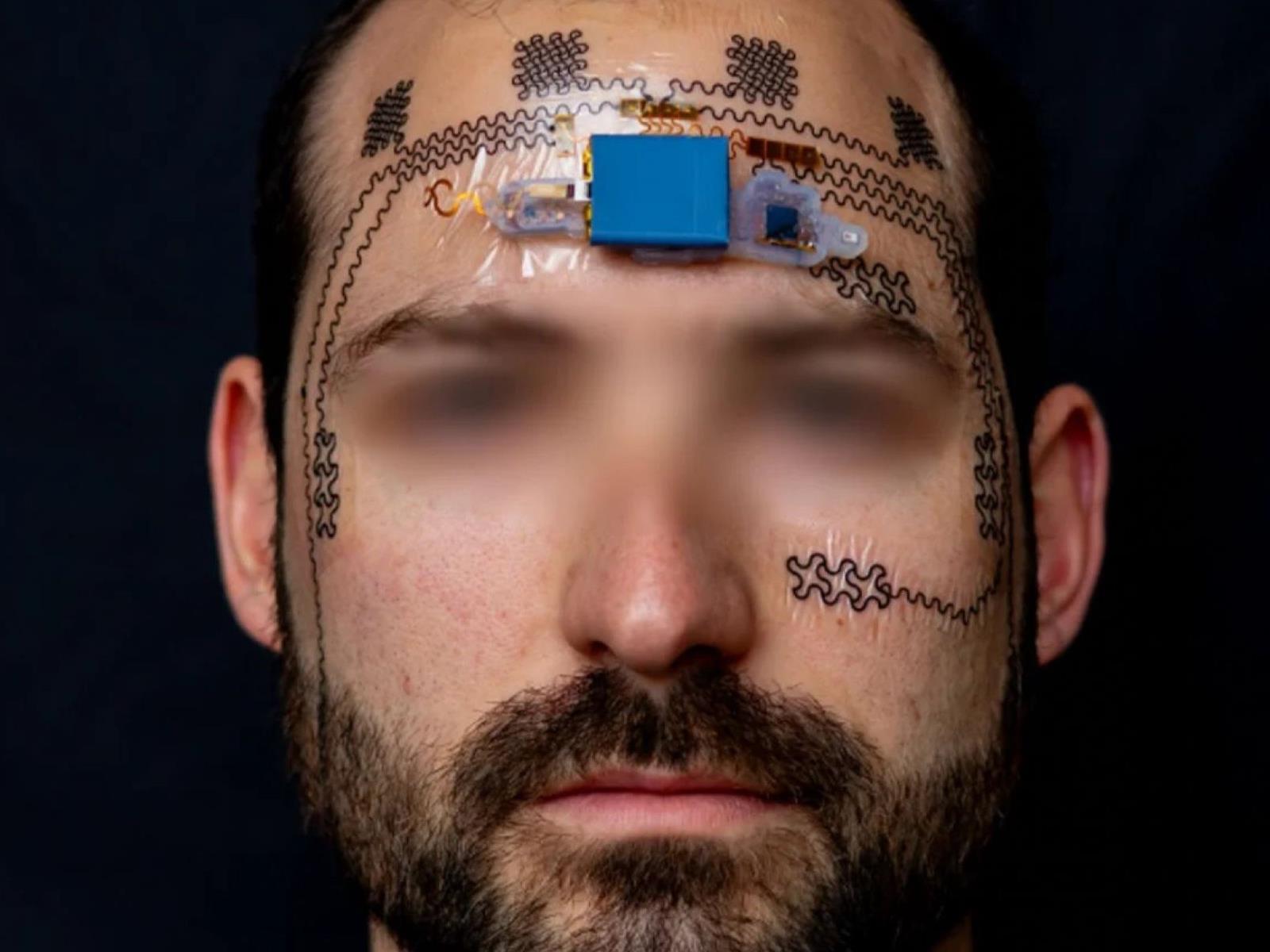
A revolutionary/goofy-looking wireless forehead e-tattoo has been developed that can accurately estimate mental workloads in real-time, offering a significant leap forward for human-in-the-loop systems in high-stakes environments. This groundbreaking device, detailed in an article in the August 15 issue of Device by authors Heeyong Huh, Hyonyoung

2025 Chevrolet Corvette ZR1 first drive: Engineered for insane speed

AUSTIN, Texas—By just my third lap in the top-spec 2025 Chevrolet Corvette ZR1, I glanced down at the speedometer toward the end of the Circuit of the Americas’ long back straight and spied 181 mph (291 km/h) displayed for a split second. Not bad for Chevy’s newest flagship sports car, especially given that the $174,995 ZR1’s twin-turbocharged V8 pumps all 1,064 horsepower to the rear wheels only.

The US’s only purpose-built F1 track made for an excellent setting to taste Corvette’s latest; the ZR1 also commanded your attention while conquering the steep uphill toward the first corner, then winding through a series of challenging corners with plenty of elevation change. Luckily, the car itself is an engineering marvel, and Chevy brought along a team of engineers to explain exactly how the total package comes together to enable such a breathtaking pace, as well as how Chevy can responsibly sell such a powerful car to the general public at all.

The entire point of switching the Corvette’s eighth generation to a mid-engine layout was to improve weight distribution and allow the Corvette to compete against much more exotic competition from European OEMs like Ferrari. The front-engined car’s engine bay also lacked the width to add a pair of turbos, due to the suspension and tire orientation, which dictated the use of a supercharger that kept peak power to “just” 755 hp (563 kW) in the last Corvette to wear the ZR1 badge.

Read full article

Comments

How to Get the Most out of a Peloton Class When You Don’t Own a Peloton

We may earn a commission from links on this page.

Even if you don’t have a Peloton Bike or Bike+, the at-home fitness giant’s app can help you get in an effective, safe cycling workout. The instructor-led classes that are available for Bike and Bike+ users on their devices’ touchscreens are also available on the Peloton app, which works on iPhones, Androids, and streaming devices like Roku. Taking one of the company’s famous spin classes is a little different without the accompanying proprietary equipment, but it’s still a solid workout.

Make sure you can see the class

When you take a Peloton cycling class using the mobile or streaming app, you still see most of the same elements on-screen that you would if you were taking it on a Peloton Bike: recommended cadence and resistance, a leaderboard that you can hide, and, if you have a heart rate monitor connected, your heart rate. It doesn’t exactly look the same as it does on a Peloton device—it’s much plainer, as you can see in the screenshot above—but that doesn’t really matter as long as you can see the cues for how fast you should be going and at what resistance your bike should be set.

There’s the first key: You need to be able to see the screen. Instructors do periodically call out recommended cadences and resistance settings, but you’ll be better off if you can see the ones displayed on-screen. I tried out two different kinds of non-Peloton bikes with Peloton classes at the gym this week and found that a recumbent bike with a little ledge for the phone worked better for enabling me to see. Streaming the class on your TV is smart, if you can, but there are also all kinds of phone holders available on Amazon for under $20 that you can attach to your bike.

Choose the best bike

If you already have a spin bike at home, you’ll have to deal with whatever it is you’ve got, but if you’re looking for an at-home cycle or have a few options in the gym, here’s what you should keep in mind if you want to take Peloton classes.

First, I highly recommend a stationary bike that displays RPM (revolutions per minute). I first tried a Peloton mobile class on a spin bike in a commercial gym cycling studio, then went out on the gym floor to find a recumbent bike I could try for the experiment, too. I’ve taught spin for years in a variety of settings and not all the bikes I’ve taught on have featured a digital component that shares information on RPM or visually displays the resistance level. Over the years, these have become more common, but you may still find yourself in a place where the spin bikes you have access to don’t show any information at all. It’s not the end of the world; you just won’t be able to track your cadence and match it up to what the instructor and screen are telling you it should be.

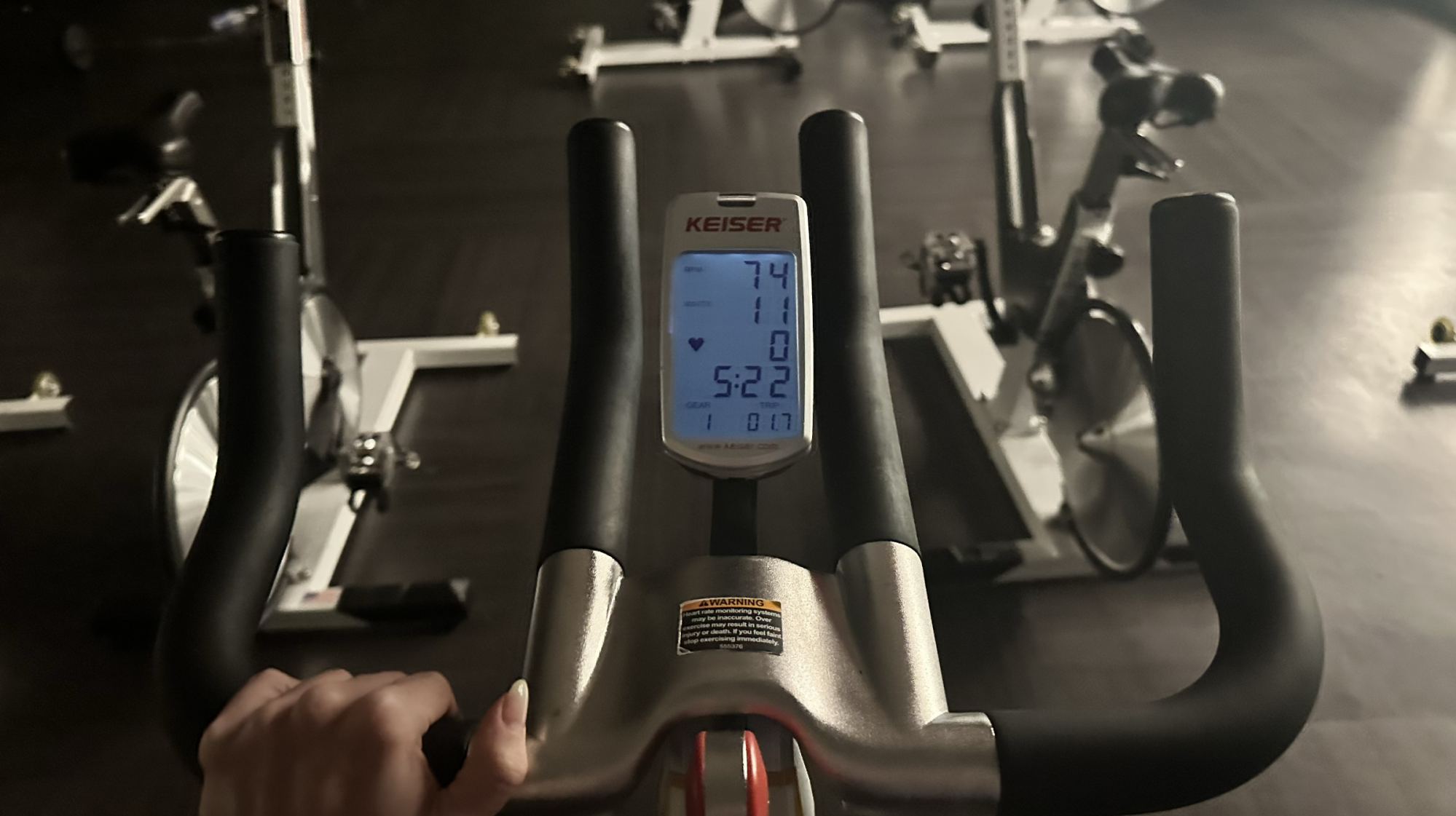
While testing the mobile app classes, I used two pretty rudimentary bikes. They lacked many of the usual bells and whistles but featured basic displays that at least gave me a sense of my cadence.

Riding a stationary bike
The simple display on a bike I tested.
Credit: Lindsey Ellefson

Don’t bother trying to guess your RPM if you don’t have access to a bike that shows it to you; I’ve been teaching for a long time and still couldn’t accurately estimate my RPM if I tried. Spending too much time trying to guess your RPM will take your focus off your form, the music, and your workout. If you can’t see yours displayed as you ride, just do your best to ride to the beat of the music. Watch the instructor closely and try to match their cadence. Most of the time—not all the time, but most of the time—riding on the beat will put you in the middle of the recommended cadence.

I also recommend choosing a bike that displays the resistance level you’re on. It’s much easier to ride knowing your resistance level rather than simply guessing based on how the tension feels. The resistance isn’t quite as important as you think, however. When I teach a class, I make sure participants know that if they’re struggling to ride on, say, a resistance level of 14 out of 25, they can knock off a few resistance points, even if I’m telling the class to aim for 14. Do your best to hit the resistance levels your instructor is telling you to, but understand that—especially if you’re new to spinning—what’s easy or manageable for someone else might not yet be easy or manageable for you.

Be prepared to do math

This is the part that sucks the most about doing a Peloton class on a non-Peloton bike. The instructors will tell you the recommended resistance level on which you should be riding—but they’re going to be giving you numbers between one and 100 because that’s how a Peloton bike’s resistance is set up. If you’re riding a bike that doesn’t display resistance levels, it’s no big deal. If the instructor says your resistance should be around 50, you can feel out what a 50% effort is for you and be done with it. But if you’re riding a bike that does display resistance levels, you could end up having to do a lot of math on the fly.

The bikes I currently teach on most often show a resistance level between one and 25. That 25 is comparable in feeling and effort to Peloton’s 100, while a 12 or so on that bike would be similar to a 50 on the Peloton. To follow a Peloton class on one of those bikes, I’d have to calculate to make sure my resistance was lining up with what the instructors suggest.

But wait, it gets worse. While testing out the mobile app classes, I was at a new gym I’ve never been to, using a bike brand I’m not familiar with. That bike’s resistance, inexplicably, was represented on a scale of one to 35. That calculation was much more bothersome than the comparably simpler one required on a bike that uses a 25-point resistance scale. Some bikes represent tension on a scale of one to 50. Others go from one to 10. Before pressing play on a Peloton mobile class, crank the resistance on your bike all the way up just to see what number is displayed on the screen when it’s at its max. Prepare to calculate accordingly from there.

Why I like the option to take Peloton classes on any bike

The math is annoying and it can be frustrating to take one of these classes if you have no way of measuring your cadence, but overall, I think the ability to take a Peloton class on any bike is great. The All Access Membership costs $44 and grants you access to all kinds of classes, from walking to stretching to meditation, which makes the app valuable even if you don’t have one of Peloton’s Bike, Bike+, Tread, or Row devices. The cycling classes, which are all the same as the ones available on the touchscreens of Peloton’s devices, make it even more valuable. You’re getting guidance and encouragement from a trained, reputable professional. The classes are rigorously reviewed and keep safety top of mind and the playlists are varied and exciting. Even just following them on your phone is better than trying to craft a workout on your own, especially if you’re new to cycling.

I also love that these broaden the population of people who can use Peloton classes. I tried a mobile Peloton class on a recumbent bike, for instance, and it worked great, which is fantastic news for people with joint problems, mobility issues, or a desire for a more low-impact workout.

I recommend linking your Apple Watch or other heart rate monitor to your Peloton app if you’re going to try to take the cycling classes on a non-Peloton bike. Sure, you can depend on the heart-rate monitors that might be in the handlebars of your gym’s bikes, but overall, gym equipment is a lot worse at giving you accurate information about your workout than a wearable is. The Peloton Bike itself tracks your distance, cadence, and all kinds of metrics as you work out, but if you’re taking a class through the app on a different brand of bike, you get absolutely no data unless you have a wearable.

Google Maps falsely told drivers in Germany that roads across the country were closed

Chaos ensued on German roads this week after Google Maps wrongly informed drivers that highways throughout the country were closed during a busy holiday. Many of the apparently closed roads were located near large German cities and metropolitan areas, including Berlin, Düsseldorf and Dortmund.

As reported by a locally based journalist for The Guardian, drivers opening Google’s navigation app would see a swarm of red dots used to indicate no-go areas, which resulted in people looking for alternative routes that caused traffic pile-ups nationwide. The Guardian also reported that police and local authorities were contacted by people confused (and presumably pretty annoyed) about the supposed standstill.

To compound the issue, the Google Maps error coincided with the beginning of Germany’s Ascension Day public holiday on May 29, which meant the roads were even busier than usual.

In ganz Deutschland
Chaos bei Google Maps: Dienst zeigt unzählige falsche Sperrungenhttps://t.co/qEfIRrIHx3

— Peter Berger (@leosgeminix) May 29, 2025

The problem reportedly only lasted for a few hours and by Thursday afternoon only genuine road closures were being displayed. It’s not clear whether Google Maps had just malfunctioned, or if something more nefarious was to blame. “The information in Google Maps comes from a variety of sources. Information such as locations, street names, boundaries, traffic data, and road networks comes from a combination of third-party providers, public sources, and user input,” a spokesperson for Google told German newspaper Berliner Morgenpost, adding that it is internally reviewing the problem. “In general, these sources provide a strong foundation for comprehensive and up-to-date maps.”

Technical issues with Google Maps are not uncommon. Back in March, users were reporting that their Timeline — which keeps track of all the places you’ve visited before for future reference — had been wiped, with Google later confirming that some people had indeed had their data deleted, and in some cases, would not be able to recover it.

This article originally appeared on Engadget at https://www.engadget.com/apps/google-maps-falsely-told-drivers-in-germany-that-roads-across-the-country-were-closed-134026943.html?src=rss