You Can Now Limit How Much RAM Microsoft Edge Eats Up While Gaming

Microsoft Edge continues to position itself as the sensible, performance-centric alternative to Chrome, free of the bloat that Google’s continual feature creep can sometimes result in. Now, it seems, the company is also coming after other browsers like Opera GX, as it’s just copied one of that browser’s most useful features.

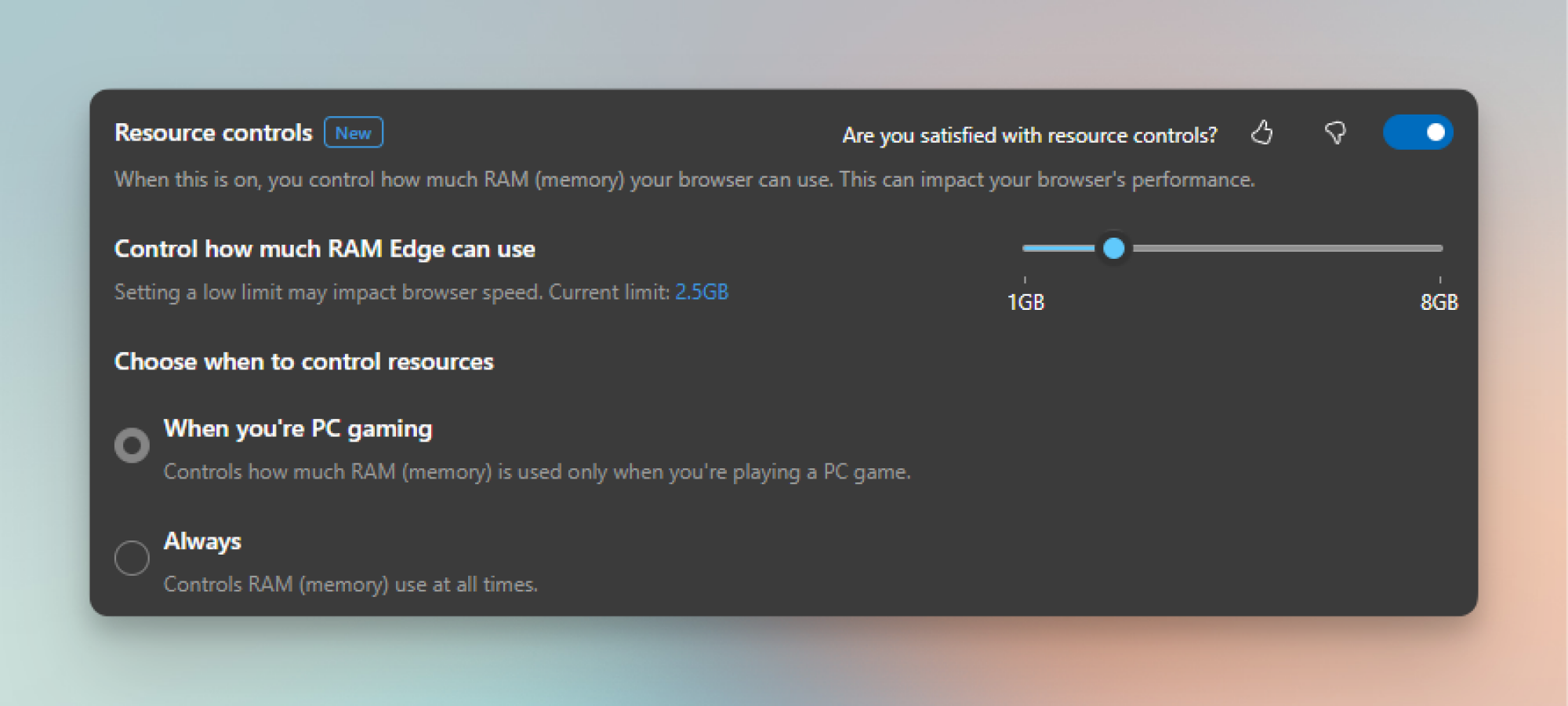
As reported by Windows Latest, Edge has recently added a new Resource Controls feature, which lets you severely limit how much RAM the browser can use. This can be useful while gaming (or performing other demanding tasks), and you can even set it to only limit RAM while you’re in-game. You can give the browser access to as little as 1 GB of memory, too, so you can get especially stingy here, but note that doing so will limit you to about five active tabs while browsing modern websites. Pages might also take longer to load, especially if they have elements like video on them.

Still, that might be worth it if you’re really starved for RAM while running Edge in the background. Let’s say you have 16GB of RAM and you’re in the middle of a game. You could then limit Edge to about 4GB of max RAM usage, which should be enough to allow you to quickly check emails or a walkthrough without hurting your gaming performance.

While Resource Controls has been in beta before, Microsoft is seemingly now rolling it out to the stable build of Edge for Windows, so everyone should have access to it now (or soon). To find it, first first update your browser to the latest version (under Settings > About Microsoft Edge), then click the three-dot menu in the top-right corner and navigate to System and Performance using the sidebar that pops up.

Here, scroll down to Manage Your Performance and toggle on Resource Controls.

Customizing Resource Controls in Microsoft Edge.

Credit: Khamosh Pathak

You’ll see a RAM slider that ranges from 1GB to however much memory your PC has installed. Choose the amount you want— Edge will warn you if your choice will slow down your browser, but it won’t stop you.

Finally, choose if you want to limit RAM only when you’re PC gaming, or always. For convenience, I prefer the former—I don’t really need it limited when I’m outside of a game.

Flashes, an Instagram alternative based on Bluesky, is available for iPhones now

Anyone looking for an alternative to Instagram might have a suitable candidate in Flashes, a recently launched app built on Bluesky that seems to get all the important basics right. Flashes technically launched on the App Store on February 24, but a series of updates released in the days after launch have made the app much easier to recommend.

If you remember an Instagram before Meta turned it into its Facebook replacement, you have the basic gist of what Flashes is. It’s an app for sharing photos and videos, with some Bluesky-flavored wrinkles, like multiple custom feeds to choose from instead of Meta’s algorithm-driven default option.

The feeds, profile and search pages in Flashes.
Ian Carlos Campbell for Engadget

When you first open Flashes you’ll be prompted to login with a Bluesky account or create a new one to use exclusively with Flashes. If you use your existing account, the app essentially repackages image and video posts from whoever you’re currently following into an Instagram-style feed. This setup also works in reverse: Any post you put on Flashes will also show up in your normal text-focused Bluesky feed.

The app itself features multiple tabs, with a home tab for your feeds, a search tab where you can search for posts and view trending topics, a dedicated tab for creating new posts, a notifications tab that features all of your Bluesky notifications and a profile tab. Flashes includes some filters to apply to your photos, along with some custom feeds that you can use if you want, but otherwise customizations are minimal. It’s really an image and video-focused version of Bluesky. That comes with some annoying drawbacks, though. If you get a lot of Bluesky notifications, you’ll now get them twice, once in the Bluesky app and once in Flashes. If you delete your account from one app, it will also be deleted from the other.

Creating a post in Flashes.
Ian Carlos Campbell for Engadget

Building a more customizable, portable version of social media that doesn’t lock you to one platform is a big part of Bluesky’s goal with the AT Protocol and what apps like Mastodon and Threads are trying to do with ActivityPub. It’s not clear if one standard is going to become the default, but Bluesky has been picking up momentum. The app hit 20 million users in November 2024, prompting a dramatic expansion to its moderation efforts, and then passed 30 million users in January 2025. Flashes design means all of those new Bluesky accounts are potential Flashes users, too.

This article originally appeared on Engadget at https://www.engadget.com/apps/flashes-an-instagram-alternative-based-on-bluesky-is-available-for-iphones-now-205946754.html?src=rss

How to Prepare for Your First 5K Race

We may earn a commission from links on this page.

Running is hard. Sticking to a training plan is hard. But knowing that you have a race coming up is a great motivator to get you out on the road when you’d rather be watching TV. If you’ve never run a race before, putting one on your calendar might seem scary: Will I feel out of place? What should I wear? How long is a 5K anyway? (It’s 3.1 miles.) 

I remember being nervous for my own first 5K. Actually, I considered signing up for probably half a dozen before I worked up the nerve to actually do it. I actually signed up for a 10K first, which was probably just a way to put it off even further; I survived the 10K, just barely, and was still nervous for my 5K a few months later. But in the years after that, I came to love the 5K. It’s a race you can do on a Saturday morning and still have the rest of the day ahead of you. Most of them only cost about 25 bucks to enter, and they run the gamut from low-key small races to big ones with practically a whole festival occurring at the start line.

Let’s warm up those cold feet and demystify what will actually happen at your first race, and what you can do to prepare.

How do I know when I’m ready to sign up for a 5K race? 

There’s a real simple answer for this. If you’re starting to wonder whether you’re ready to take on a race, you already are. So go ahead and sign up, already. (I’ll wait.) 

A 5K, or five-kilometer, race is the perfect distance for beginners. It’s about three miles, which means the average person could walk that distance in about an hour. Most 5K races encourage walkers as well as runners to join, so you don’t have to worry about standing out for being “slow.” You could literally walk the whole thing and blend right in. 

Races are more fun and more welcoming than newbies often realize. Even if you aren’t normally the competitive type, the energy and atmosphere of race day can make for a great experience. A race is a great test of your physical and mental strength. Any old training run can be a good one or a bad one, but your first race day will be one to remember, no matter what happens. You’ll have a little extra motivation to push the pace, and you may be pleasantly surprised at what you can do. 

What’s a good 5K time to aim for?

Since this is your first race, your goal should be just to have a good time. Finish the race, take note of your time, and use that as a baseline to improve on next time. There is no such thing as a “bad” time for your first 5K. 

But if you’d like to have a personal time goal, look back at your training runs. Have any of them been 3.1 miles or longer? If so, use your pace from those runs to calculate the 3.1 mile equivalent. (For example, if you ran 3 miles in 32 minutes, that works out to a 10:40 pace, which is 33:08 for a 5K.) You can do that math with a pace calculator like this one. Aim to beat your best training time on race day

That said, you’ll want to check whether your race’s course is similar to the terrain you’ve been training on. If you’ve been running on mostly flat roads, and the race website promises a “fast and flat” course, great. But if the race course is described as “challenging,” or if it’s on trails, you can expect some hills that will slow you down. Adjust your expectations accordingly. 

Can I walk during a 5K race? 

Absolutely! Not only are some people walking the whole thing, the point of a race is just to cover the distance as fast as you can. The faster runners will run the whole time, but plenty of middle-of-the-pack folks will mix in some walking. My first 5K, I couldn’t keep up a steady pace and ended up walking a lot more than I wanted. I still finished, though, and although I don’t recall my time I remember being pleasantly surprised by it. 

Definitely do not think of walking as shameful. We all do what we need to do to cover the distance. Think of walking as a tool that can reduce fatigue while still moving you closer to the finish line. Use it as much as you need.

Will I get a medal?

This depends on the race. Usually, at small races like a local 5K, medals are only for the top finishers—so, no, most 5K runners will not get a medal. If you’re hoping to get a medal just for finishing the race—called a finishers’ medal—those are usually reserved for longer races like marathons and half-marathons, where finishing is considered to be an accomplishment in itself. That said, there are 5K races that promise all participants a cool medal, so keep an eye out for those if that’s your kind of thing. 

In most 5K races, awards are given to the overall winners and the age group winners. Decisions about awarding medals are up to the race organizers, but a typical selection goes like this: Overall winners are usually the first three men and first three women to cross the finish line (there may be a cash or other prize in addition to a medal), and then age group medals are given to the top three men and women in each age group. The age groups will vary: Some races will have 30 to 39 as a single age group, while others will break it into 30 to 34 and 35 to 39. Check out the previous year’s results to see how competitive your age group tends to be. Who knows: If you’re a fast beginner, you might medal at your first race!

How do I train for a 5K? 

For your first 5K, any amount of running you do will get you ready. If you’re looking for a general guideline, here’s a basic structure that will work (it’s pretty much the same as what I recommend for beginning runners regardless of goals):

  • Three runs per week

  • 20 to 30 minutes per run (can be a mix of running and walking)

  • …for about two months before the race

Here’s an example of a training plan along those lines, meant for absolute beginners. Couch-to-5K is another beginner program, which starts with a mix of running and walking and gradually phases out the walking. 

If you’re more experienced, you may like this intermediate 5K program, which includes five days of running per week. The runs are still fairly short, but they include some speedwork (fast intervals) and a weekend long run that ranges from five to seven miles. 

What happens on race day? 

First, you’ll want to sign up for the race ahead of time. At some local races, you may be able to walk up to a table on race morning and hand over cash for your entry fee. I prefer to sign up online to make sure I’ll have my spot. (If they offer a free t-shirt, they may not guarantee shirts to late entries.) 

The day before the race, there may be an option for “packet pickup.” It’s called a packet because you’re often given an envelope or swag bag that includes coupons, flyers about other races, and maybe some free samples of products or other items. But the most important part of the packet is your race bib, which is a piece of tear-proof paper with a number on it. There is usually a timing chip glued to the back. Make sure you have this pinned to your shirt when you’re running the race. 

On race morning, aim to get to the start line at least half an hour before the race; earlier is better. A typical race morning routine goes like this: 

  1. Wake up, have coffee and/or whatever breakfast you can stomach. Maybe bring a snack for the road.

  2. Drive/travel to the race start (aim to arrive 30 to 60 minutes before the official start time).

  3. Pick up your bib if you haven’t already. Pin it to your shirt. Put any other items from the packet in your car or use the bag drop service if they offer one. 

  4. Warm up. Take a walk or go for an easy, short jog. Stretch if you normally stretch before runs. 

  5. Listen carefully for an announcement that you should start lining up for the start. 

  6. Run the race! 

  7. After you finish, rest as needed, grab a snack (snacks are almost always provided), and retrieve your bag if you left it at the bag drop.

  8. Stick around for the award ceremony, if desired. 

  9. Go home and have a nice meal. And maybe a nap.

What should I eat before a 5K? 

First, remember the number one rule: nothing new on race day. This is not the time for a new pre-workout, or for drinking coffee if you normally don’t, or for trying the breakfast your friend swears by. 

Eat whatever you can stomach. Good options will be mainly carbs, and the closer you are to the race start time, the smaller the meal should be. Classic runners’ breakfasts include: 

  • Toast or a bagel, maybe with a thin smear of peanut butter

  • A banana

  • A Clif bar or other energy bar that is mostly carbs (not a low-carb protein bar)

  • A muffin, croissant, or cookie

  • Yogurt, with or without fruit

What should I wear to a 5K race?

Your regular running clothes will be fine, but there are a few extra considerations. First, where will you put your bib? You’re usually asked to pin the bib with your race numbers to the front of your shirt. If you’ll be layering up, decide which layer gets the bib. You can also pin your bib to your pants or shorts, as long as the race rules allow. If you want to be fancy, you can buy a race belt that holds your bib on without safety pins.

Second, about those layers. If it’s a chilly day, you may be waiting around a bit before the start, and then you’ll warm up when you’re running. So you may want to have a long-sleeved layer that you can hand to a friend (if you have a friend staying behind as a spectator) or that you can tie around your waist as needed. Whatever you do, make sure your bib is visible.

How do I calm pre-race jitters? 

If you’re nervous, just remind yourself that it’s normal to be nervous. Nervous and excited are two sides of the same coin. Think of those jitters as your body amping itself up to be able to give the race everything you’ve got. 

That warmup walk or jog will help you to feel more comfortable. Once the race has started, you’ll feel a lot more comfortable, mentally (even if you’re more uncomfortable, physically). 

The best way to deal with pre-race nerves is to plan ahead: Know where you’ll go and what you’ll do. Practice your pre-race breakfast and warmup on a training day. 

And just remember why you’re there. Your real goal is to have fun, to learn what it’s like to run a race, and to find out what kind of 5K time your body is capable of on this particular day. There’s no way to really fail at this. Keep a positive attitude, and if you decide you like racing but you weren’t happy with your time, you can always run another race later.

How fast should I run my 5K?

You may be tempted to run as fast as you can from the start, but take it easy. You don’t want to go out too fast and then tire yourself out. Start at a slightly slower pace than you think you should. After the first mile, you can speed up if you’re still feeling good. I like to think of the first half of the race as a chance to conserve energy that I can spend in the second half. The closer you get to the finish line, the more you can speed up.

What’s a good heart rate for race day? 

This one is for the folks who train by heart rate. You probably have some numbers that you’re used to seeing on your training runs. The most important thing to know here is that your heart rate doesn’t matter on race day. And it probably won’t match the numbers you’re used to seeing.

First, your heart rate increases when you’re nervous. The start-line adrenaline will likely have you in zone 3 or 4 when you’re running zone 2 pace. Do not waste time trying to get your heart rate down into a normal zone. 

Second, a race is supposed to be hard! You’re going to be running faster, for longer, than you ever were in your training. Your heart rate may shoot sky-high. It would not be unusual to see your heart rate in zone 4 for the first two miles and zone 5 in the third. That’s OK! You can do this! If your legs are still moving, you’re doing okay. 

Try to feel for a “redline” where if you went any faster, you wouldn’t be able to sustain it, but at the current level you feel like you can at least finish this mile, or this half-mile, or this minute. Just keep doing one more, and soon you’ll be finishing with a smile on your face. Or a grimace, but it will turn into a smile once the accomplishment sinks in. I promise. 

Tunic and 400 other games can be yours for just $10 thanks to a charity Itch.io bundle

Developer Necrosoft Games has assembled another huge bundle of games on Itch.io to support a good cause. It includes more than 400 games that can be yours if you pony up at least $10 to support wildfire relief efforts in Southern California.

Tunic, one of our favorite games of 2022, is arguably the highest-profile game in the California Fire Relief Bundle. Buying this beautiful, Zelda-esque adventure on Steam right now would cost you $30. That alone makes the bundle great value, though it includes over $3,200 worth of games.

There are a few other particularly notable games on the list. You may have heard of restaurant sim Cook, Serve, Delicious! 2!!, the fairly self-explanatory SkateBird or the utterly ridiculous Octodad: Dadliest Catch. There’s also Hidden Folks, a charming puzzle title that we reckon is a great way to help you destress. Hundreds of other lesser-known games await your curiosity too. For instance, there’s a pretty puzzle-platformer called Hoa that I’ve been meaning to get around to.

Along with video games, there are physical table-top roleplaying games (including a Bugsnax card game you can print and play), asset packs, books, comics and other projects in the bundle. You’ll find a few Playdate games in there as well. Note that there are no Steam keys available through this bundle, but it’s not too complicated to set up an Itch.io launcher on Steam Deck.

Organizers are aiming to raise $100,000 for CORE (Community Organized Relief Effort). The Los Angeles-based organization “offers direct monetary support to survivors of the fires and supports projects for fire resilience in affected areas (and potential disaster zones),” the bundle’s page states. Save for processing fees, all proceeds will go to CORE. The campaign, which will run until just before midnight ET on March 13, is already over three-quarters of the way to its goal.

The wildfires that struck Southern California in early January damaged or destroyed more than 18,000 structures and led to the evacuation of more than 200,000 people. As of February 12, 29 people are known to have died in the fires.

This article originally appeared on Engadget at https://www.engadget.com/gaming/pc/tunic-and-400-other-games-can-be-yours-for-just-10-thanks-to-a-charity-itchio-bundle-202504116.html?src=rss

Mozilla Responds To Backlash Over New Terms, Saying It’s Not Using People’s Data for AI

Mozilla has denied allegations that its new Firefox browser terms of service allow it to harvest user data for artificial intelligence training, following widespread criticism of the recently updated policy language. The controversy erupted after Firefox introduced terms that grant Mozilla “a nonexclusive, royalty-free, worldwide license to use that information” when users upload content through the browser, prompting competitor Brave Software’s CEO Brendan Eich to suggest a business pivot toward data monetization.

“These changes are not driven by a desire by Mozilla to use people’s data for AI or sell it to advertisers,” Mozilla spokesperson Kenya Friend-Daniel told TechCrunch. “Our ability to use data is still limited by what we disclose in the Privacy Notice.” The company clarified that its AI features operate locally on users’ devices and don’t send content data to Mozilla. Any data shared with advertisers is provided only on a “de-identified or aggregated basis,” according to the spokesperson. Mozilla explained it used specific legal terms — “nonexclusive,” “royalty-free,” and “worldwide” — because Firefox is free, available globally, and allows users to maintain control of their own data.

Read more of this story at Slashdot.

What’s New on Prime Video in March 2025

Prime Video has new installments of two familiar series coming in March.

First up is season three of The Wheel of Time (March 13), an adaptation of Robert Jordan’s fantasy books of the same name. Rosamund Pike stars as sorceress Moiraine Damodred, a member of the powerful Aes Sedai. The season opens with a magical battle between members of the order—viewers will get a three-episode premiere with five weekly episodes to follow.

Also in its third season is Bosch: Legacy (March 27)—also an adaptation, this time of Michael Connolly’s crime novels. A sequel to Prime Video hit Bosch, the series was originally canceled after its second season but was revived for a third and final installment. Titus Welliver reprises his role as former LAPD detective Harry Bosch working to solve his final case.

Prime Video is also releasing Holland (March 27), a mystery thriller starring Nicole Kidman as a teacher and homemaker in an idyllic Michigan town, where mysteries and secrets begin to unravel her life. The film also stars Matthew Macfadyen (of Succession) as Kidman’s husband and Gael García Bernal as her close friend.

Here are all the originals coming to Prime Video in March.

What’s coming to Prime Video in March 2025

Available March 6

  • For the Win: NWSL

  • Picture This

Available March 13

  • The Wheel of Time S3

Available March 20

  • Tyler Perry’s Duplicity

Available March 27

  • Bosch: Legacy S3

  • Holland

Linux Fu: USB Everywhere

It is a common problem: I have a USB device on a computer out in the shop, and I want to use it from the comfort of my office. What to do? Well, you could remote desktop into the distant machine. But, honestly, I always find any remote desktop more than ssh clunky and somewhat undesirable.

EA Open Sources Four Classic Command & Conquer Games For Retro Fun

EA Open Sources Four Classic Command & Conquer Games For Retro Fun
While EA is making AI a key pillar of how its studios make future titles, it hasn’t forgotten about its back catalog of popular games. Its latest efforts have seen the company open source code for several games from the Command and Conquer franchise. It’s a massive win for game preservation that should earn the company some goodwill from the

Framework Desktop Teardown Sheds Light On Soldered RAM Strategy

Framework Desktop Teardown Sheds Light On Soldered RAM Strategy
When you hear “Framework”, if you’re familiar with the laptop vendor, you probably immediately think of modular components and repairable PCs. Indeed, the company allowed popular repair guide website iFixit early access to the very exciting Framework Desktop, and the machine is as easy as expected to tear down given that it is, of course,

Square Enix is making Dragon Quest-themed golf merch because OG fans are now grandparents

Square Enix just announced a new sub-brand called Dragon Quest Golf, which is exactly what it sounds like. It’s a team dedicated to making golf merchandise and accessories based on the long-standing JRPG franchise. As expected, one of the brand’s initial offerings is a golf ball based on the iconic blue Slime. This is typically the first enemy players encounter in a DQ game.

The company will showcase more merch at the 59th Japan Golf Fair on March 7, though Square Enix hasn’t yet revealed any other gear besides the aforementioned ball. I could see a golf bag based on a Weartiger or tees designed to resemble an Eggsoskeleton. Maybe a super-powerful driver named after a Golem? The possibilities are endless, though it’ll probably just show off a bunch of golf shirts and khakis with DQ branding.

Why is Square Enix doing this? The company said it’s all about shifting demographics, according to a translation by Siliconera. The franchise has been incredibly popular in Japan since its introduction in 1986, which was almost 40 years ago. Folks who started with the first game could now be grandparents. Also, Japan loves golf.

Incredibly, this isn’t even the weirdest gaming-adjacent merch to pass our eyeballs this week. Honda just announced an absolutely bizarre “near life-size recreation of the Legendary Pokémon Koraidon.” It’s powered by the company’s self-balancing technology, so Honda says it’ll be able to walk on all four legs. Just like Dragon Quest Golf merchandise, this thing goes on exhibit on March 7.

This article originally appeared on Engadget at https://www.engadget.com/gaming/square-enix-is-making-dragon-quest-themed-golf-merch-because-og-fans-are-now-grandparents-194314177.html?src=rss

Start Using This Ultimate Tax Spreadsheet Now so You’re Ready for Next Year

Time is ticking to file your taxes before April 15, 2025. If you’ve already do so, congrats! Now you can kick back and await that refund, right? Sure—but your relief will be short-lived. Once tax season rolls around next year, you’ll again find yourself frantically searching for receipts, statements, and other documentation needed to file an accurate return.

Instead of accepting the annual scramble, you can get ahead of the game by using a spreadsheet to track all your tax-related information throughout the year. And there’s no better time to start than right now—when your tax knowledge is fresh as can be—to make your spreadsheet and start logging things away for next April.

Make your own spreadsheet—or download this template

I’ve created a basic template to get you started here. And I mean basic—this is for people who essentially just want to convert their Form 1040s into a spreadsheet, so all your yearly info is one accessible, editable location. I’ve included different tabs depending on what you want to track and just how thoroughly you want to track it.

For instance, the first tab is a simple table that turns different lines on your Form 1040 into rows of data—making the information easily accessible from year to year. Another tab allows you to clearly list out your income and deductions throughout the year. I’ve even included a tab dedicated to home office expenses, if that applies to you.

There might be some redundancies or glaring omissions based on your personal situation, so I urge you to take what I’ve given you and run wild with it. It’s different strokes for different folks, and different spreadsheets for different…freaks. (It’s a slant rhyme.)

Basics to include on your tax spreadsheet

You can expand on the template above, or start from scratch—whatever allows you to get the most out this system. Give it a clear name like “2025 Tax Records” so you can easily reference it later. Remember, the goal is to have a single file where you can input and update information and keep everything centralized.

To get started with a barebones tax tracking spreadsheet, create separate sections or tabs for different categories of tax information. At minimum, you’ll want sections for:

  • Income. This will track income from jobs, self-employment, investments, retirement distributions, etc.

  • Deductions. List out anything you plan to itemize or claim as a deduction, such as mortgage interest, charitable giving, medical expenses, etc.

  • Tax credits. Track estimated expenses that may qualify for a tax credit, like education costs, childcare, etc.

  • Prior year tax documents. Keep a record of last year’s tax return details and any carryover items.

How to use your tax spreadsheet

Within each section, create rows and columns to track the details you need for tax time. For example, under Income you may want columns for:

  • Date earned

  • Income source/employer

  • Amount earned

  • Tax withholdings

For deductions, you may have columns like:

  • Date paid

  • Expense category (medical, mortgage interest, charity, etc.)

  • Amount

Make updating your information a habit

As you earn income throughout the year, be diligent about entering the details into your income section right away, while it’s all still fresh. Do the same with potential deductions as you incur those expenses. You can update your spreadsheet weekly, monthly, or whenever is convenient, as long as you stick to a routine.

Keep digital copies of all your documents

Any time you receive tax documentation—like W2s, 1099s, donation receipts or mortgage interest statements— save digital copies and attach or link them within your spreadsheet file. This creates a handy archive of all your tax records in one spot.

Using a spreadsheet to meticulously track your tax information throughout the year will save you the inevitable time and stress of having to reconstruct it all at the last minute. While staying organized requires diligence, that small effort goes a long way when tax season arrives. Your future self will appreciate having these detailed records ready to go. From the most thorough travel plans, to excruciatingly detailed journals, to elaborate to-do lists: If you have a goal, that goal needs a spreadsheet.

[$] Fedora discusses Flatpak priorities

Differences of opinion, as well as outright disputes, between
upstream open-source projects and Linux distribution packagers over
packaging practices are nothing new. It is rarer, though, for those
disputes to boil over to threats of legal action—but a
disagreement between the Open
Broadcaster Software (OBS) Studio
project and Fedora packagers
reached that point in mid-February. After escalation to a higher
authority things have been worked out to the satisfaction of the OBS
project, but some lingering questions remain. How Fedora should
prioritize Flatpak repositories,
how to handle conflicts between upstreams and Fedora packagers, and
the mechanics of removing or retiring Flatpaks all remain open
questions.

The Sonos Arc Soundbar Is $250 Off

We may earn a commission from links on this page. Deal pricing and availability subject to change after time of publication.

The Sonos brand is well known in the smart speaker and surround sound space. And very much like Apple, people will pay a premium price for their minimalistic, premium quality, and discounts are often hard to come by. But today, the Sonos Arc, which was Sono’s flagship soundbar prior to the launch of the Sonos Arc Ultra, is $649, $250 off its usual $899 price. It’s also a new low price for this model, according to price-tracking tools.

Sonos speakers are not for everyone, if only because you’ll have to justify paying around two grand for a complete surround sound system when you can get a setup like the Samsung Q990C for about half the price. But audiophiles swear they can hear the difference, so the cost might be worth it to you.

If you pick up this soundbar, you’ll want to consider the Sonos 300 rear speakers and the Gen 4 subwoofer to go with it—they’re the latest Sonos has to offer, though you can choose Eras 100 or an older or smaller subwoofer to lower the price tag.

As for the Arc, it offers Dolby Atmos, providing immersive three-dimensional sound with height channels that simulate audio coming from above you (you can read the details in PCMag’s “excellent” review). It offers enough of a low-end kick that you don’t really need a subwoofer if you have a small space. If you already own other Sonos speakers, you can seamlessly connect them through the Sonos app to create a surround sound setup or a multi-room system.

Intel once again delays its long-awaited Ohio chip fabrication facilities

Intel announced that it’s further delaying plans to open two chip fabrication facilities in Ohio, pushing their completion out to 2030. The company originally announced its plans for Ohio in 2022, with an ambitious opening set for 2025.

Intel says it completed the “basement” level of its Ohio One project last quarter, which allows above-ground construction to get underway now. The $20 billion dollar project is technically split across two different chip fabs, dubbed Mod 1 and Mod 2, which won’t be completed at the same time. Mod 1 is now set to open in 2030, to “align the start of production of our fabs with the needs of our business and broader market demand,” according to Intel. Mod 2 will be completed the following year in 2031.

A photo of the Ohio One construction site from February 2025.
Intel Corporation

The justification is financial: Intel says it’s taking a “prudent approach” that will ensure the chip fabs are completed in a “financially responsible manner.” Intel previously told the state of Ohio that it was delaying the fabs until 2027. It also delayed the groundbreaking of the project seemingly to incentivize the passing of the CHIPS Act in 2022, according to a report from The Washington Post.

More delays add to what’s been a tumultuous period for Intel as a company. In December, former CEO Pat Gelsinger was pushed out, likely because he wasn’t pulling-off Intel’s aggressive plans to expand chip production. Prior to that, the funding the company was set to receive through the CHIPS Act was reduced by $600 million. Add in layoffs and the continued dominance of chip makers like AMD, and Intel remains in a tricky spot.

This article originally appeared on Engadget at https://www.engadget.com/computing/intel-once-again-delays-its-long-awaited-ohio-chip-fabrication-facilities-185516274.html?src=rss