Apple Announces new 8th gen iPad with A12, iPad Air with 5nm A14 Chip

This year’s September Apple event has been relatively unusual, not only because of the pandemic and online-only nature of the show, but also because amongst the new hardware releases there’s been an evident lack of a new iPhone at this point in time.

Apple however didn’t disappoint, and managed to showcase brand-new iPads and Apple Watches. Amongst the new tablet line-up, we find the new 8th generation iPad which sees an upgrade in its computing capabilities with the new A12 chip, and the newest iPad Air which sees a total redesign, adopting the design queues of the iPad Pro siblings, and also for the first time introducing the new Apple A14 chipset – the industry’s first 5nm processor.


Source: AnandTech – Apple Announces new 8th gen iPad with A12, iPad Air with 5nm A14 Chip

The Apple 2020 Fall Event Live Blog – Starts at 10am PT (17:00 UTC)

Today Apple is hosting its 2020 fall launch event. This year due to circumstances, we’ll be going virtual and remote, however we’ll still be live blogging the show for those who prefer non-video formats. Apple’s WWDC online event had been a great success and we expect a similar format for today’s announcements.


What will we be seeing today? Rumours state that the new iPhone won’t make it to the September event this time around, although we’re still expecting a set of different other new Apple devices. Maybe a new iPad? New Apple TV? Stay tuned as the event starts off at 10am PT (17:00 UTC).


Source: AnandTech – The Apple 2020 Fall Event Live Blog – Starts at 10am PT (17:00 UTC)

AMD Teases First Radeon RX 6000 Video Card Picture

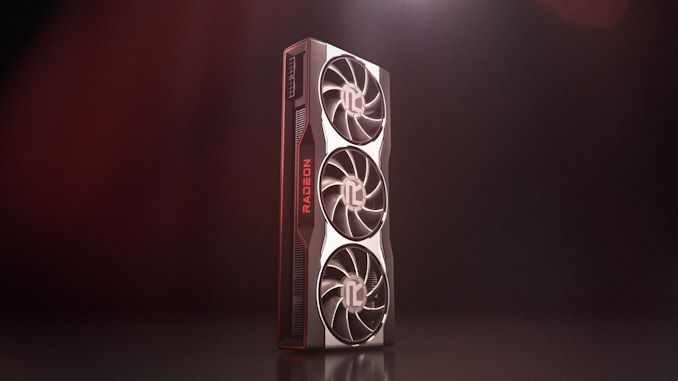
In a very brief teaser, AMD this afternoon has released a picture of their first Radeon RX 6000 video card.


No further details about the card are given, but based on the sizable triple fan design and dual 8-pin PCIe power connectors, it stands to reason that we’re looking at one of AMD’s high-end card designs. Overall the design looks reminicant of the Radeon VII, which is not terribly surprising since that is the last high-end (high-powered) video card released by AMD.


Don’t be surprised if we see more teasers over the coming weeks, as AMD gears up for its October CPU and GPU presentations. AMD will be holding its “Next Generation Radeon Graphics” keynote on October 28th at noon Eastern.


Source: AnandTech – AMD Teases First Radeon RX 6000 Video Card Picture

AMD Preps Second Round of HPC System Donations For COVID-19 Research

When things aren’t blowing up or burning down as of late, there’s still the matter of the ongoing COVID-19 pandemic. While the first generation of vaccines move carefully closer to approval, there’s still a lot of research left to be done, and various technology industry companies and consortiums have been stepping up to provide computing resources for those efforts. One such participant has been AMD, whom in June announced that the company would be donating 7 petaflops of high-performance computing systems, and now this morning is announcing that they are preparing for a second round of awards, which will entail a further 5 petaflops of hardware.


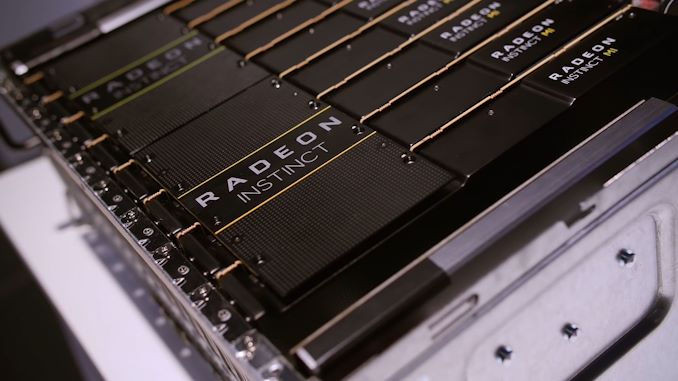
As with AMD’s previous efforts, the second round of donations from the company’s COVID-19 HPC fund will see the company awarding AMD-powered systems to various research institutions. The hardware includes systems based on AMD’s EPYC “Rome” processors, which fittingly are being paired with AMD’s Radeon Instinct MI50 accelerators. According to the company, recipients can either take direct delivery of the hardware, or receive access to datacenter-hosted hardware courtesy of Penguin Computing.


Overall, 21 research institutions have or are now set to receive computing hardware under the program, including Cambridge University and Stanford School of Medicine. The new hardware for these institutions is expected to be operational by the start of Q4, at which point it will be used for “genomics, vaccine development, transmission science and modeling.”


Source: AMD


Source: AnandTech – AMD Preps Second Round of HPC System Donations For COVID-19 Research

Sponsored Post: Tyan Debuts Its 2nd Generation AMD EPYC 7002 Series Server Platform

Whether your business relies on cloud applications, big data, artificial intelligence, or something in-between, you need powerful, reliable hardware to act as a foundation. That’s exactly what Tyan’s new AMD server platform provides. Purpose-built for high-performance computing it’s designed exclusively with the needs of the enterprise in mind.


Source: AnandTech – Sponsored Post: Tyan Debuts Its 2nd Generation AMD EPYC 7002 Series Server Platform

It’s Official: NVIDIA To Acquire Arm For $40 Billion

Following a number of rumors and leaks, NVIDIA this evening announced that it is buying Arm Limited for $40 billion. The cash and stock deal will see NVIDIA buy the semiconductor and IP design firm from SoftBank and its associated SoftBank Vision Fund, with NVIDIA taking an eye towards expanding Arm’s IP licensing business while also using Arm’s technology to further pierce into the datacenter market. The deal is just being formally announced today and will likely note close for some time, as it is expected to be required to clear multiple regulatory hurdles in the UK, US, China, and other governments across the globe.


Source: AnandTech – It’s Official: NVIDIA To Acquire Arm For Billion

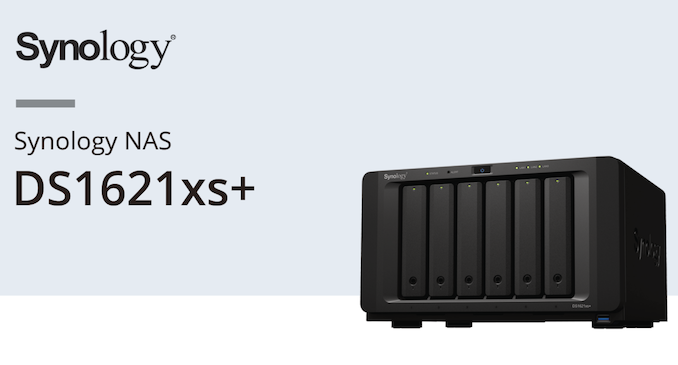
Synology Introduces DS1621xs+ – First Desktop x86 DSM NAS with Native 10GbE

Synology is one of the top-tier vendors in the commercial off-the-shelf (COTS) network-attached storage (NAS) market for SOHOs, SMBs, and SMEs, with QNAP being the other major player. While QNAP has a wide variety of hardware platforms to choose from in each market segment, Synology has been big on segmentation – restricting Xeon CPUs and native 10GbE to their rackmount offerings. Only their Annapurna Labs SoC-based desktop units have had 10G SFP+ support till now. That changed recently with the introduction of the DS1621xs+.


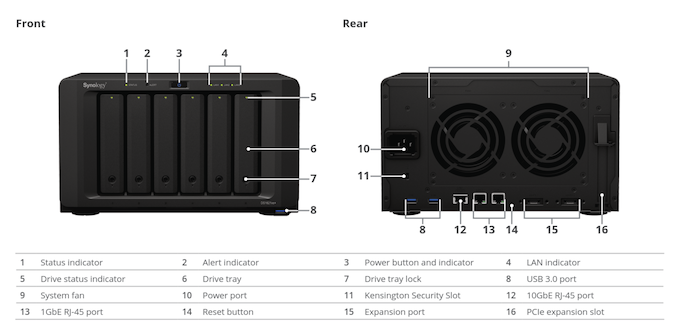
The Synology DS1621xs+ uses a Broadwell-DE Xeon-D processor (D-1527) – These SoCs are a better fit for storage platforms compared to the networking-focused Skylake-D SKUs. The 6 built-in 3.5″ hot-swappable drive bays are complemented by two M.2 2280 NVMe SSD slots. There are two 1 GbE LAN ports and a 10GBASE-T port. Two eSATA ports help the unit support two DX517 expansion chassis, allowing the unit to support a total of 16 bays.


On the software side, similar to all other x86 NAS units from Synology, the DS1621xs+ also comes with support for both ext4 and btrfs internal volumes. Synology claims read speeds of up to 3100 MBps with additional 10G NICs in the expansion slots.


Synology DS1621xs+ Specifications
Processor Intel Xeon D-1527 (4C/8T Broadwell-DE x86 Cores @ 2.20 (2.70) GHz)
RAM 8 GB DDR4-2666 ECC SODIMM (upgradeable to 16GB x 2)
Drive Bays 6x 3.5″/2.5″ SATA 6 Gbps HDD / SSD (Hot-Swappable)

(Expandable with 2x DX517 up to 16 bays in total)
Network Links 2x 1 GbE

1 x 10 GbE
External I/O Peripherals 3x USB 3.0, 2x eSATA
Expansion Slots 1x PCIe 3.0 x8
VGA / Display Out None
Full Specifications Link Synology DS1621xs+ Specifications
Price $1600 (Newegg)

It is heartening to see Synology finally introduce 10GBASE-T NAS units in the desktop form-factor. The DSM software carries some unique applications (like the Synology Office suite) that QNAP doesn’t currently have in their QTS operating system. On the other hand, QNAP’s hardware variety – particularly in terms of NBASE-T and 10GbE support even in their SOHO offerings is also attractive. Overall, it is good for consumers to have more options to choose from in the COTS NAS market.


Source: AnandTech – Synology Introduces DS1621xs+ – First Desktop x86 DSM NAS with Native 10GbE

The 2020 Browser Battle: Surfing With Speed

Accessing the internet is one of the most basic tasks for any computer, but webpages in 2020 are incredibly complex so how the browser interprets the code and renders it as a viewable webpage is no simple task. Modern browsers have both a rendering or layout engine, as well as a scripting engine, and both factor into how well the browser can handle any particular task.


Source: AnandTech – The 2020 Browser Battle: Surfing With Speed

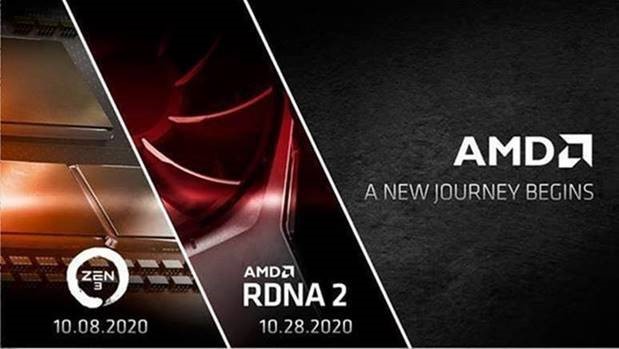
AMD Announces Ryzen "Zen 3" and Radeon "RDNA2" Presentations for October: A New Journey Begins

AMD today has announced that they will be making a pair of consumer product presentations in November. The chipmaker, who has been fairly quiet since the spring, will be holding events for both their consumer Ryzen CPU and Radeon GPU product segments. Dubbing the events “A New Journey Begins”, the company will be announcing the first products based on their eagerly anticipated Zen 3 CPU architecture and RDNA 2 GPU architecture.


Leading the charge will be AMD’s CPU division. On October 8th at noon Eastern, the company will be presenting their Zen 3-based Ryzen desktop processors. AMD’s CEO, Dr. Lisa Su, will be among the presenters.


Following that up just under 3 weeks later will be AMD’s Radeon presentation, which again is at noon Eastern. There the company will be showing off its first products based on the company’s forthcoming RDNA 2 GPU architecture. Meanwhile, tipping their hand a bit early on naming, AMD has confirmed that this will be called the Radeon RX 6000 series.


Next Generation Ryzen Desktop Processors – 10/8, 12 p.m. ET


We are incredibly excited to invite you to learn more about the next wave of Ryzen desktop processors with “Zen 3” architecture, taking our PC gaming and content creation leadership to new heights. Dr. Lisa Su and other AMD senior executives will kick-off this new journey for “Zen 3” and AMD Ryzen at 12 p.m. ET, October 8th.


Next Generation Radeon Graphics – 10/28, 12 p.m. ET


Preparing to delight gamers globally with the next horizon of Radeon Graphics, we invite you to learn more about our RDNA 2 architecture, Radeon RX 6000 series graphics cards, and our deep collaboration with game developers and ecosystem partners who will help us bring the best of Radeon to gamers. Tune in for the reveal of the future of Radeon PC gaming at 12 p.m. ET, October 28th.


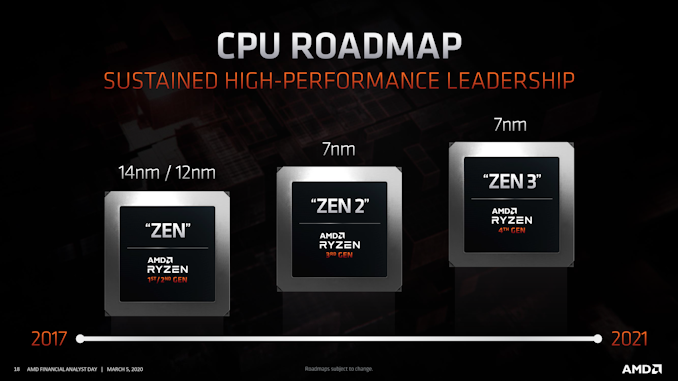
AMD hasn’t disclosed any other details about these events at this time, but over the last several months the manufacturer has shared bits and pieces of information relating to its upcoming chip architectures. Based on AMD’s roadmaps, Ryzen Zen 3 processors will be built on an improved version of TSMC’s 7nm process, most likely TSMC’s N7P process given AMD’s comments clarifying that they aren’t committing to EUV for 7nm. Otherwise, for the moment AMD is remaining tight-lipped on the Zen 3 architecture itself, though given that AMD isn’t going to get the benefits of a full node shrink, we’re expecting Zen 3 to deliver some interesting and meaningful architectural improvements over Zen 2.


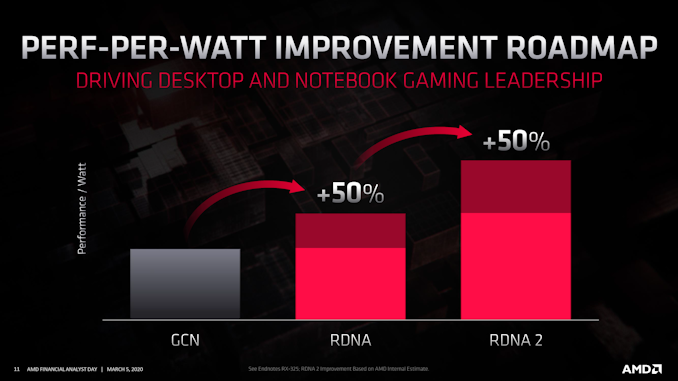
Meanwhile on the graphics front, AMD and partners have previously confirmed that RDNA 2 will be a DirectX 12 Ultimate (feature level 12_2) compliant GPU architecture, meaning that AMD will be making significant changes to the graphics side of their GPU designs. The Navi 2x family of GPUs will gain support for ray tracing, variable rate shading, and other features that will put AMD’s new GPUs at parity with the competition, both for consoles and PCs. Meanwhile from a performance standpoint, AMD is aiming for a hefty 50% jump in performance-per-watt, which could potentially eliminate the efficiency gap with NVIDIA. As well, the company has previously promised a high-end “top-of-stack” GPU for 4K gaming, so we’re expecting some ambitious performance goals from AMD.


Be sure to check in on October 8th and October 28th for more details on AMD’s next generation of consumer parts!


Source: AMD


Source: AnandTech – AMD Announces Ryzen “Zen 3” and Radeon “RDNA2” Presentations for October: A New Journey Begins

The Armari Magnetar X64T Workstation OC Review: 128 Threads at 4.0 GHz, Sustained!

Blitzing around a race track in a fast car only ever convinces you of one thing: I need to go around the track even faster. I need a better car, I need a better engine, better brakes, or better tires. I need that special go faster juice, and I need to nail the perfect run. The world of professional computing works the same, whether it comes down to rendering, rapid prototyping, scientific compute, medical imaging, weather modelling, or something like oil and gas simulation, the more raw horsepower there is, the more can be done. So enter the new Armari Magnetar X64T – an overclocked 64-core Threadripper 3990X that holds the new SPECworkstation3 world record. We got hold of one. It’s really fast.


Source: AnandTech – The Armari Magnetar X64T Workstation OC Review: 128 Threads at 4.0 GHz, Sustained!

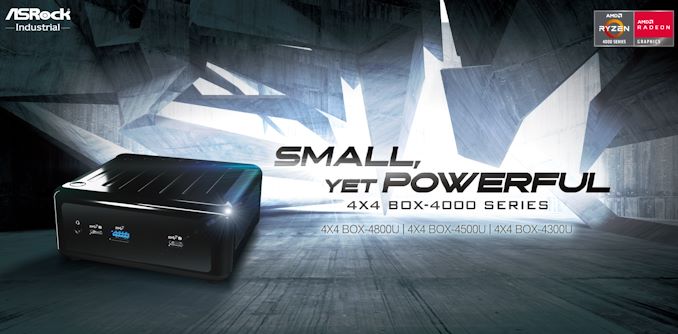
ASRock Industrial's 4×4-BOX UCFF PC Series Goes Premium with Ryzen 4000U Renoir APUs

ASRock Industrial has been at the forefront of AMD-based UCFF PCs, being one of the first to bring out systems based on the Ryzen Embedded APUs in mid-2019. In fact, their boards have been adopted by vendors such as OnLogic in their ML100G-40 systems. These 4×4 BOX systems definitely got the footprint right, matching the Intel NUCs in that department. However, the performance of the Embedded R-Series made them a better fit for embedded systems with single-purpose use-cases. On the general purpose computing front, they could not match up against the large variety of Intel-based NUCs with different performance profiles. Today, this aspect is being rectified with the launch of three new SKUs in the 4×4 BOX-4000 series. These systems use the latest AMD Ryzen 4000U series APUs with TDPs ranging from 10W to 25W. In addition to the markets served by the first-generation 4×4 BOX systems (digital signage, kiosks, thin clients, and other embedded applications), the 4×4 BOX-4000 series will also make its presence felt in the general-purpose small form-factor computing space.


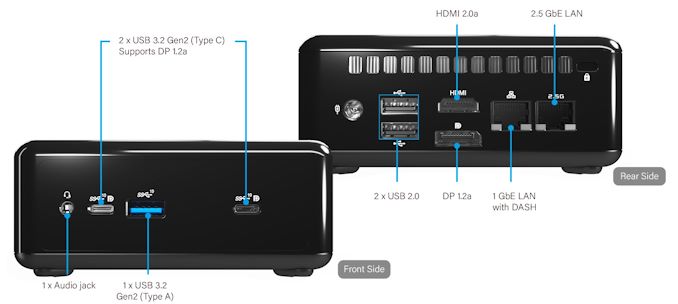
The second-generation systems have a slightly smaller foot-print, coming in at 110mm x 117.5mm x 47.85mm. The system is slightly heavier by around 300g, coming in at 1kg. The specifications of the three SKUs are reproduced in the table below. The move to Ryzen 4000U brings premium features to the UCFF PC space – in fact, surpassing the features offered by Intel NUCs in the same form-factor – these include support for NBASE-T with a 2.5 Gbps LAN port (backed by the Realtek RTL8125BG controller), native support for DDR4-3200 without overclocking, and support for four simultaneous 4Kp60 display (including two via the front-panel USB Type-C ports) outputs. Intel’s AX200 module brings in Wi-Fi 6 support. Another welcome upgrade is the support for M.2 2280 PCIe NVMe SSDs (the first-generation SKUs only supported 2242 and 2260)


In addition to usage as a UCFF desktop PC, the 4×4 BOX-4000 series also targets embedded applications. As a result, it is equipped with a watchdog timer and is rated to run at temperatures of up to 40ºC. It also comes with a TPM module.


ASRock Industrial’s 4X4 BOX-4000 PCs
Model 4X4 BOX-4800U 4X4 BOX-4500U 4X4 BOX-4300U
CPU AMD Ryzen 7 4800U

8C/16T

1.8 – 4.2 GHz

10 – 25 W (15W)
AMD Ryzen 5 4500U

6C/6T

2.3 – 4.0 GHz

10 – 25 W (15W)
AMD Ryzen 3 4300U

4C/4T

2.7 – 3.7 GHz

10 – 25 W (15W)
GPU AMD Radeon RX Vega 8 Graphics @ 1.75 GHz AMD Radeon RX Vega 6 Graphics @ 1.5 GHz AMD Radeon RX Vega 5 Graphics @ 1.4 GHz
DRAM Two DDR4 SO-DIMM slots

Up to 64 GB of DDR4-3200 in dual-channel mode
Motherboard Proprietary
Storage SSD M.2-2280 (PCIe x4 or SATA)
DFF 1 ×  2.5-inch/7.5-mm SATA 6 Gbps
Wireless Intel Wi-Fi 6 AX200

2×2 802.11ax Wi-Fi + Bluetooth module
Ethernet 1 × GbE port (Realtek RTL8111FPV)

1 × 2.5 GbE port (Realtek RTL8125BG)
USB Front 1 × USB 3.2 Gen 2 Type-A

2 × USB 3.2 Gen 2 Type-C
Rear 2 × USB 2.0 Type-A
Display Outputs 1 × DisplayPort 1.2a

1 × HDMI 2.0a

2 × DisplayPort 1.2a (using Type-C)
Audio 1 × 3.5mm audio jack (Realtek ALC233)
PSU External (90W)
Warranty Typical, varies by country
Dimensions Length: 117.5 mm

Width: 110 mm

Height: 47.85 mm
MSRP ? ? ?

The 4×4 BOX-4000 series UCFF PCs are not the first to use the AMD Ryzen 4000U APUs in this form-factor. The Asus PN50 was introduced a few weeks back, though its availability in the North American market has not been confirmed. Given that the first-generation 4×4 BOX series has been available for purchase at many US e-tailers, it does look like the 4×4 BOX-4000 SKUs from ASRock Industrial are going to be the first set of AMD Ryzen 4000U-series based UCFF PCs on this side of the pond. In addition, the premium features of the 4×4 BOX-4000 series is sure to invoke keen interest in the SFF computing community.


Source: AnandTech – ASRock Industrial’s 4×4-BOX UCFF PC Series Goes Premium with Ryzen 4000U Renoir APUs

Samsung's Note20 Ultra Variable Refresh Rate Display Explained

In August 2020, Samsung launched the new Note20 Ultra – an interesting device that we have on our review test bed. It’s safe to say that over the last few generations, there hasn’t been all that much exciting about the Note line of devices – the phones typically use the new silicon and camera technologies that were introduced in the Galaxy S-series of the same year, and the Note lends on its form factor, only improving upon the design and software experience around the S-Pen. This year’s Note20 Ultra, based on our testing, generally also follows the same formula, but with the important exception: the Samsung Note20 Ultra has, according to the company, the first mobile variable refresh rate (VRR) screen in the industry.


What is Variable Refresh Rate, or VRR


The refresh rate, in its broadest definition, is a property given to a display with regards to how frequently a display will update itself with the latest data supplied from the graphics processor. A standard display, either on a smartphone or on a computer monitor, often refreshes at 60 times per second, or at 60 Hz, with the delay between each frame at 16.66 milliseconds. This 60 Hz is a static refresh rate, and fixed for the lifetime of the product. Over the last decade, display manufacturers have built screens with different refresh rates depending on the content:  for content that is static, the display could choose to refresh at 33.33 milliseconds, or 30 times per second, and save power; for content that is active, like a video game, if the game can be rendered quickly enough, the display could refresh at 13.33 milliseconds (75 Hz) or 11.11 milliseconds (90 Hz) or 8.33 milliseconds (120 Hz).


Displays can also be made with multiple different refresh rates. Depending on the product, such as a simple PC monitor, then both 30 Hz or 60 Hz might be supported. Gaming devices might go the other way, and offer modes that run at 30 Hz, 60 Hz, 90 Hz, and 120 Hz, all within the same panel. These modes might be user selectable, or activate when specific applications are running. In the gaming ecosystem, these are known as ‘high refresh rate’ displays.


Where variable refresh rate displays differ is that they can often support a wide range of frame time delays on a very granular basis. On the specification sheets for these displays, the refresh rate might be give as a range, such as ’60 – 90 Hz’, incidicating that the display can support any value between these two numbers. The better displays strive to support larger ranges, however when it comes to the smartphone market, the term ‘variable refresh rate’ has been a bit abused in recent times, as there are two ways to implement a variable refresh rate display.


The two methods are known as:


  • Seamless Variable Refresh Rate
  • Refresh Rate Mode Switching

The difference between the two is important. In a Seamless VRR display, the refresh rate is expected to change on a frame-by-frame basis as required by the system. For a ‘VRR-enabled’ but non-seamless display, it relies on changing the refresh rate mode between different values – the display panel will operate in either a “normal” or “high-refresh-rate” mode, but the switching between the modes is not a continuous process. For these panels, the ‘range’ of the refresh rates supported is fairly discrete, such as fractions of the main refresh rate, whereas a Seamless VRR display is designed to be a continuous support from a standard refresh rate to a high refresh rate with all in-between.


For the most part, smartphone vendors have been playing down which one of these two they have been using, advertising both as ‘variable refresh rate’. If a phone vendor has claimed to support variable refresh rate, it has been misleading, as no device until now has supported a ‘seamless variable refresh rate’ that switches on a per-frame basis, which is typically what we would consider a true VRR solution to be. What these companies are doing instead is that they are using refresh rate mode switching, which is a rather important distinction.


Samsung Note20 Ultra: Seamless VRR


By contrast, Samsung with the new Note20 Ultra claims to have achieved seamless VRR, and I’ve been very curious to get my hands on a device and finally unveiling how this is implemented and if it delivers on its promises.
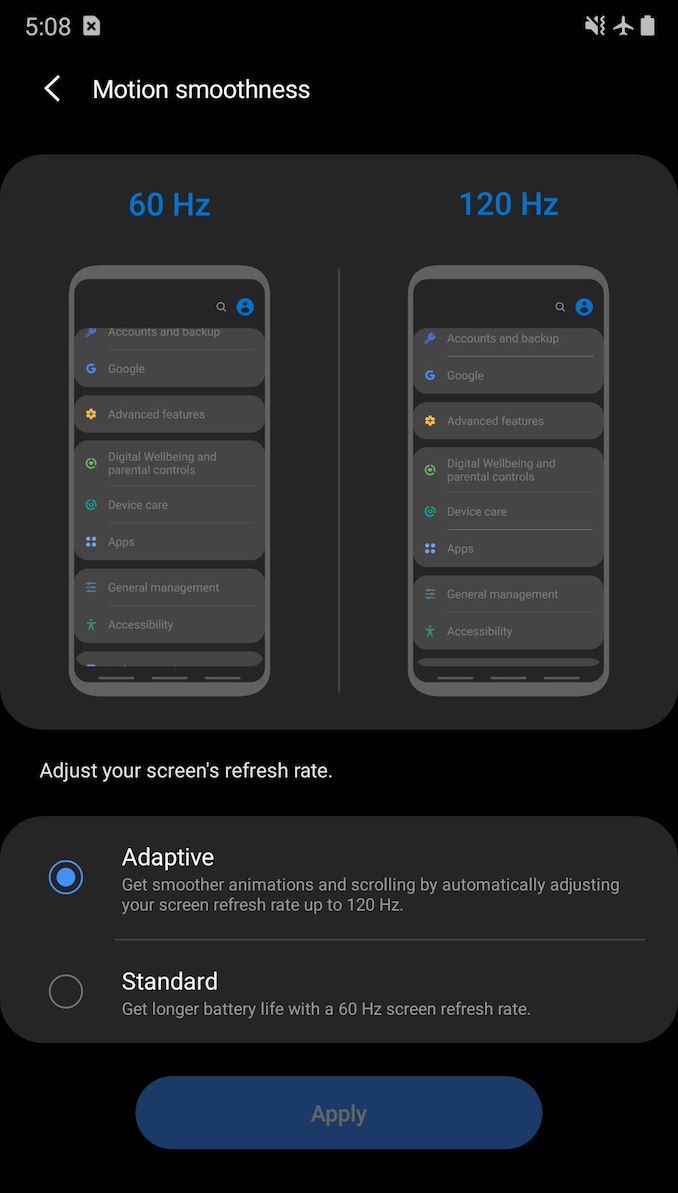


Starting off, the first thing a user might notice on the Note20 Ultra, compared to an S20 device, is that its high-refresh-rate mode is called “Adaptive” rather than “High”. The decription text is specific in that it now states the refresh rate will go “up to” 120Hz instead of outright stating 120Hz on the S20 series devices. So far so good.


Investigating Seamless VRR


Digging into the software, we find some key indications on Samsung’s display mode options.


[[code]]czoxMTA5OlwiPGZvbnQgY29sb3I9XCIjMzQzNDM0XCI+SS9EaXNwbGF5TWFuYWdlclNlcnZpY2U6IERpc3BsYXkgZGV2aWNlIGNoYW5nZXtbJiomXX1kOiAmIzEzOwpEaXNwbGF5RGV2aWNlSW5mb3tcIkJ1aWx0LWluIFNjcmVlblwiOiB1bmlxdWVJZD1cImxvY2FsOjE5MjYxMjEzNzM0MzQxe1smKiZdfTI0OVwiLCAmIzEzOwoxNDQwIHggMzA4OCwgbW9kZUlkIDEsIGRlZmF1bHRNb2RlSWQgMSwgPC9mb250PiYjMTM7Cjxmb250IGNvbG9ye1smKiZdfT1cIiMzNDM0MzRcIj5zdXBwb3J0ZWRNb2RlcyBbPC9mb250PiYjMTM7Cjxmb250IGNvbG9yPVwiIzM0MzQzNFwiPiAge2lkPTEsIHdpZHRoe1smKiZdfT0xNDQwLCBoZWlnaHQ9MzA4OCwgZnBzPTYwLjAwMDAwNH0sPC9mb250PiYjMTM7Cjxmb250IGNvbG9yPVwiIzM0MzQzNFwiPiAge2lkPXtbJiomXX0yLCB3aWR0aD0xNDQwLCBoZWlnaHQ9MzA4OCwgZnBzPTQ4LjB9LDwvZm9udD4mIzEzOwo8Zm9udCBjb2xvcj1cIiMzNDM0MzRcIj4gIHt7WyYqJl19aWQ9Mywgd2lkdGg9MTA4MCwgaGVpZ2h0PTIzMTYsIGZwcz0xMjAuMDAwMDF9LDwvZm9udD4mIzEzOwo8Zm9udCBjb2xvcj1cIiMzNDN7WyYqJl19NDM0XCI+ICB7aWQ9NCwgd2lkdGg9MTA4MCwgaGVpZ2h0PTIzMTYsIGZwcz05Ni4wMDAwMX0sPC9mb250PiYjMTM7Cjxmb250IGNvbG97WyYqJl19cj1cIiMzNDM0MzRcIj4gIHtpZD01LCB3aWR0aD0xMDgwLCBoZWlnaHQ9MjMxNiwgZnBzPTYwLjAwMDAwNH0sPC9mb250PiYjMTM7Cjxme1smKiZdfW9udCBjb2xvcj1cIiMzNDM0MzRcIj4gIHtpZD02LCB3aWR0aD0xMDgwLCBoZWlnaHQ9MjMxNiwgZnBzPTQ4LjB9LDwvZm9udD4mIzEzO3tbJiomXX0KPGZvbnQgY29sb3I9XCIjMzQzNDM0XCI+ICB7aWQ9Nywgd2lkdGg9NzIwLCBoZWlnaHQ9MTU0NCwgZnBzPTEyMC4wMDAwMX0sPC9mb257WyYqJl19dD4mIzEzOwo8Zm9udCBjb2xvcj1cIiMzNDM0MzRcIj4gIHtpZD04LCB3aWR0aD03MjAsIGhlaWdodD0xNTQ0LCBmcHM9OTYuMDAwMDF9e1smKiZdfSw8L2ZvbnQ+JiMxMzsKPGZvbnQgY29sb3I9XCIjMzQzNDM0XCI+ICB7aWQ9OSwgd2lkdGg9NzIwLCBoZWlnaHQ9MTU0NCwgZnBzPTYwLntbJiomXX0wMDAwMDR9LDwvZm9udD4mIzEzOwo8Zm9udCBjb2xvcj1cIiMzNDM0MzRcIj4gIHtpZD0xMCwgd2lkdGg9NzIwLCBoZWlnaHQ9MTU0NCx7WyYqJl19IGZwcz00OC4wfTwvZm9udD4mIzEzOwo8Zm9udCBjb2xvcj1cIiMzNDM0MzRcIj5dPC9mb250PlwiO3tbJiomXX0=[[/code]]


From a software perspective, you’d normally expect Samsung’s advertised refresh rate modes from 1Hz to 120Hz to be exposed to the system, however this is not the case, and the phone features the same resolution and refresh rate modes that were also available on the S20 series. As from the data above, this means 48 Hz, 60 Hz, 96 Hz, and 120 Hz.


However, the key difference between the S20 series and the Note20 Ultra is that its refresh rate mode is described as operating in “REFRESH_RATE_MODE_SEAMLESS”  instead of “REFRESH_RATE_MODE_ALWAYS”. In that regard it does look like things are working correctly.


However one key component of variable refresh rate displays are the lower refresh modes to help save power. As shown on the list above, the ‘lowest’ refresh rate advertised is 48 Hz. So I went searching.


[[code]]czoyNzY6XCI8Zm9udCBjb2xvcj1cIiMzNDM0MzRcIj4yMDIwLTA5LTA3IDE5OjQyOjE2Ljc2NCA5NDgtOTQ4Lz8gSS9TdXJmYWNlRmxpbntbJiomXX1nZXI6ICYjMTM7CiAgc2V0QWN0aXZlQ29uZmlnOjpSZWZyZXNoUmF0ZTogSUQ9MiwgV2lkdGg9MTA4MDwvZm9udD4mIzEzOwo8Zm9ue1smKiZdfXQgY29sb3I9XCIjMzQzNDM0XCI+MjAyMC0wOS0wNyAxOTo0MjoyMS43NTggOTQ4LTk0OC8/IEkvU3VyZmFjZUZsaW5nZXI6ICYjMTM7CntbJiomXX0gIHNldEFjdGl2ZUNvbmZpZzo6UmVmcmVzaFJhdGU6IElEPTQsIFdpZHRoPTEwODA8L2ZvbnQ+XCI7e1smKiZdfQ==[[/code]]


When interacting with the phone, it is possible to catch when the OS switches its refresh rates. For the above log, I was in the Samsung browser on a webpage – a situation I would expect to be in a high refresh rate when scrolling, but a lower fresh rate when idle, and a smooth seemless transition between the two. When I tapped the screen to interact with it and scroll, the system switched over to 120Hz refresh rate (represented with ID=2). Four seconds later, it switched back to a 60Hz mode (shown as ID=4). This is actually quite odd in that this really isn’t what you’d expect from a seamless VRR implementation – these would appear to be preset refresh rate modes baked in into the operating system and integrated with user interactions.


Perhaps more importantly from a battery life perspective, we would expect the switch down to the lower refresh rate to happen almost immediately, within a frame or two. The 4-second delay from the phone being in the 120Hz mode and then being placed into the 60 Hz mode, even though it’s a static screen, isn’t what we expect from a VRR implementation, seamless or otherwise – it should happen essentially immediately on the following frames of any kind of animation, interaction, or screen movement. This needed more investigation.


It All Comes Down To New Panel Technology


Researching things further, and diving into the display panel’s drivers, we find a few further mentions and evidence of Samsung’s newer panel technology found in the Note20 Ultra. First of all, we have confirmation that Samsung calls the new panel technology “HOP” – which we assume stands for the rumoured ‘Hybrid Oxide and Polycrystaline’ technology that Samsung has been teasing. This is similar to LTPO (Low Temperature Polycrystalline Silicon), but uses a new backplane technology that allows for faster switching transistors, also lowering power consumption.


Furthermore, Samsung’s key feature in achieving lower refresh-rate seems to be dubbed “LFD” or low-frequency-drive. At first, it’s a bit confusing as LFD doesn’t really seem to have any kind of interaction with the user-space VRR implementation. From our analysis, LFD seems to be something that solely works at the panel and display driver (DDIC) level.


Based on the output shown below, the LFD operating modes do showcase that it is programmed to work with Samsung’s advertised low operating frequencies, all the way down to 1Hz. The low frequency driver operation also seems to be a sub-mode underneath the higher level VRR operating modes, with these being the actual modes that the phone switches between in a finer manner using the MIPI-DSI interface.


[[code]]czoyNDA3OlwiPGZvbnQgY29sb3I9XCIjMzQzNDM0XCI+LyogOC4gRnJlcS4gKDYwaCk6IGZyZXF1ZW5jeSBpbiBpbWFnZSB1cGRhdGUgY3tbJiomXX1hc2UgKG5vbi1MRkQgbW9kZSksJiMxMzsKIEhTOiAyNGh6fjEyMGh6LCBOUzogMzBoen42MGh6PC9mb250PiYjMTM7CiYjMTM7Cjxme1smKiZdfW9udCBjb2xvcj1cIiMzNDM0MzRcIj4gKiAtIDQ4SFMgVlJSIG1vZGU6PC9mb250PiYjMTM7Cjxmb250IGNvbG9yPVwiIzM0MzQzNFwiPiAqe1smKiZdfSAgICAgNDhoeiAgOiAwMCAwMSA6IGRpdj0yPC9mb250PiYjMTM7Cjxmb250IGNvbG9yPVwiIzM0MzQzNFwiPiAqICAgICAzMmh6ICA6IHtbJiomXX0wMCAwMiA6IGRpdj0zPC9mb250PiYjMTM7Cjxmb250IGNvbG9yPVwiIzM0MzQzNFwiPiAqICAgICAyNGh6ICA6IDAwIDAzIDogZGl2PTR7WyYqJl19PC9mb250PiYjMTM7Cjxmb250IGNvbG9yPVwiIzM0MzQzNFwiPiAqICAgICAxMmh6ICA6IDAwIDA3IDogZGl2PTg8L2ZvbnQ+JiMxMzsKe1smKiZdfTxmb250IGNvbG9yPVwiIzM0MzQzNFwiPiAqICAgICAgMWh6ICA6IDAwIDVGIDogZGl2PTk2PC9mb250PiYjMTM7Cjxmb250IGNvbG9yPXtbJiomXX1cIiMzNDM0MzRcIj4gKjwvZm9udD4mIzEzOwo8Zm9udCBjb2xvcj1cIiMzNDM0MzRcIj4gKiAtIDQ4TlMgVlJSIG1vZGU6IHR1cm4gb2ZmIHtbJiomXX1MRkQ8L2ZvbnQ+JiMxMzsKPGZvbnQgY29sb3I9XCIjMzQzNDM0XCI+ICo8L2ZvbnQ+JiMxMzsKPGZvbnQgY29sb3I9XCIjMzQzNDM0XCI+IHtbJiomXX0qIC0gNjBIUyBWUlIgbW9kZTo8L2ZvbnQ+JiMxMzsKPGZvbnQgY29sb3I9XCIjMzQzNDM0XCI+ICogICAgIDYwaHogIDogMDAgMDEgOiB7WyYqJl19ZGl2PTI8L2ZvbnQ+JiMxMzsKPGZvbnQgY29sb3I9XCIjMzQzNDM0XCI+ICogICAgIDQwaHogIDogMDAgMDIgOiBkaXY9MzwvZm9udD4me1smKiZdfSMxMzsKPGZvbnQgY29sb3I9XCIjMzQzNDM0XCI+ICogICAgIDMwaHogIDogMDAgMDMgOiBkaXY9NDwvZm9udD4mIzEzOwo8Zm9udCBjb3tbJiomXX1sb3I9XCIjMzQzNDM0XCI+ICogICAgIDI0aHogIDogMDAgMDQgOiBkaXY9NTwvZm9udD4mIzEzOwo8Zm9udCBjb2xvcj1cIiMzNDM0MzRcIntbJiomXX0+ICogICAgIDEwaHogIDogMDAgMEIgOiBkaXY9MTI8L2ZvbnQ+JiMxMzsKPGZvbnQgY29sb3I9XCIjMzQzNDM0XCI+ICogICAgICAxaHp7WyYqJl19ICA6IDAwIDc3IDogZGl2PTEyMDwvZm9udD4mIzEzOwo8Zm9udCBjb2xvcj1cIiMzNDM0MzRcIj4gKjwvZm9udD4mIzEzOwo8Zm9udCBje1smKiZdfW9sb3I9XCIjMzQzNDM0XCI+ICogLSA2ME5TIFZSUiBtb2RlOjwvZm9udD4mIzEzOwo8Zm9udCBjb2xvcj1cIiMzNDM0MzRcIj4gKiAgICAge1smKiZdfTYwaHogIDogMDAgMDkgOiBkaXY9MTwvZm9udD4mIzEzOwo8Zm9udCBjb2xvcj1cIiMzNDM0MzRcIj4gKiAgICAgMzBoeiAgOiAwMCAwMXtbJiomXX0gOiBkaXY9MjwvZm9udD4mIzEzOwo8Zm9udCBjb2xvcj1cIiMzNDM0MzRcIj4gKjwvZm9udD4mIzEzOwo8Zm9udCBjb2xvcj1cIiMzNDM0e1smKiZdfTM0XCI+ICogLSA5NkhTIFZSUiBtb2RlOjwvZm9udD4mIzEzOwo8Zm9udCBjb2xvcj1cIiMzNDM0MzRcIj4gKiAgICAgOTZoeiAgOiAwOCB7WyYqJl19MDAgOiBkaXY9MTwvZm9udD4mIzEzOwo8Zm9udCBjb2xvcj1cIiMzNDM0MzRcIj4gKiAgICAgNDhoeiAgOiAwMCAwMSA6IGRpdj0yPC9me1smKiZdfW9udD4mIzEzOwo8Zm9udCBjb2xvcj1cIiMzNDM0MzRcIj4gKiAgICAgMzJoeiAgOiAwMCAwMiA6IGRpdj0zPC9mb250PiYjMTM7Cjxmb3tbJiomXX1udCBjb2xvcj1cIiMzNDM0MzRcIj4gKiAgICAgMjRoeiAgOiAwMCAwMyA6IGRpdj00PC9mb250PiYjMTM7Cjxmb250IGNvbG9yPVwiIzM0e1smKiZdfTM0MzRcIj4gKiAgICAgMTJoeiAgOiAwMCAwNyA6IGRpdj04PC9mb250PiYjMTM7Cjxmb250IGNvbG9yPVwiIzM0MzQzNFwiPiAqICAgICB7WyYqJl19IDFoeiAgOiAwMCA1RiA6IGRpdj05NjwvZm9udD4mIzEzOwo8Zm9udCBjb2xvcj1cIiMzNDM0MzRcIj4gKjwvZm9udD4mIzEzOwo8Zm9ue1smKiZdfXQgY29sb3I9XCIjMzQzNDM0XCI+ICogLSAxMjBIUyBWUlIgbW9kZTo8L2ZvbnQ+JiMxMzsKPGZvbnQgY29sb3I9XCIjMzQzNDM0XCI+ICoge1smKiZdfSAgIDEyMGh6ICA6IDA4IDAwIDogZGl2PTE8L2ZvbnQ+JiMxMzsKPGZvbnQgY29sb3I9XCIjMzQzNDM0XCI+ICogICAgIDYwaHogIDogMHtbJiomXX0wIDAxIDogZGl2PTI8L2ZvbnQ+JiMxMzsKPGZvbnQgY29sb3I9XCIjMzQzNDM0XCI+ICogICAgIDQwaHogIDogMDAgMDIgOiBkaXY9Mzx7WyYqJl19L2ZvbnQ+JiMxMzsKPGZvbnQgY29sb3I9XCIjMzQzNDM0XCI+ICogICAgIDMwaHogIDogMDAgMDMgOiBkaXY9NDwvZm9udD4mIzEzOwo8e1smKiZdfWZvbnQgY29sb3I9XCIjMzQzNDM0XCI+ICogICAgIDI0aHogIDogMDAgMDQgOiBkaXY9NTwvZm9udD4mIzEzOwo8Zm9udCBjb2xvcj1cIiN7WyYqJl19MzQzNDM0XCI+ICogICAgIDExaHogIDogMDAgMEEgOiBkaXY9MTE8L2ZvbnQ+JiMxMzsKPGZvbnQgY29sb3I9XCIjMzQzNDM0XCI+ICogIHtbJiomXX0gICAxMGh6ICA6IDAwIDBCIDogZGl2PTEyPC9mb250PiYjMTM7Cjxmb250IGNvbG9yPVwiIzM0MzQzNFwiPiAqICAgICAgMWh6ICA6IDB7WyYqJl19MCA3NyA6IGRpdj0xMjA8L2ZvbnQ+JiMxMzsKPGZvbnQgY29sb3I9XCIjMzQzNDM0XCI+ICovPC9mb250PlwiO3tbJiomXX0=[[/code]]


The driver comments note that the Note20 Ultra’s panel is capable of “self-scanning”, and that in order to maintain the lower frequency refresh rates it makes use of frame insertions for non-changing content. It looks like this is based on a fixed set of frequency multiples and dividers, so the mechanism isn’t capable of arbitrary refresh rates, but has a fixed set of operating frequencies below the maximum 120Hz. This ultimately puts it somewhere between the ‘mode switching’ and Seamless VRR definitions, however with the granularity it does offer a wider array of refresh rates for the display than almost all (if not all) smartphones on the market today.


One problem (from our perspective) with this LFD mechanism is that it is seemingly completely transparent to user-space, so there’s no good way to verify that it’s active or working – the OS simply states that you’re either in the 120Hz or 60Hz VRR modes, however with LFD on top the actual refresh rate can be different. One way to verify this externally is simply to measure the end-result that the new panel technology is meant to bring to the user: lower power consumption. It’s also here that we encounter some of the quirks in Samsung’s implementation.


Confirming Seamless VRR: Measuring Display Power Consumption


At first when I got my hands on the Note20 Ultra, I was somewhat disappointed when the results I obtained for power wasn’t any different to the S20 series between the 60 and 120Hz modes. Everything looked and measured the same, with a large power penalty kicking when switching over to the 120Hz mode, even on static screen content. This was the one scenario where the new VRR mechanism was supposed to bring great benefits.


I had reached out to Samsung Display about the matter, under the assumption that perhaps Samsung Mobile had not implemented the VRR as advertised. Initially I received back some questions asking me about the test conditions, among which they also asked about the ambient brightness, which I found weird thing to ask.


Sure enough, altering the ambient brightness in my office / the brightness level that the phone’s light sensor picks up, does dramatically change the power behaviour of the phone. Here is a video showing the effect of the ambient brightness adjusting the power used by the display, where I cover the light sensor with a block.


When displaying a pure black static image in the phone’s Gallery app, I saw a drastic change in power consumption between when the phone is in a brighter environment compared to when you cover up the top part of the device and the light sensor.  


Looking into more detail through the phone’s OS logs, the device does look to actively track the light sensor values all the time, even when in manual brightness, and enters a special mode when it senses a darker environment:
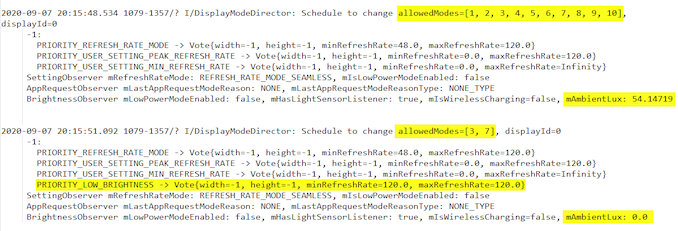


In particular, it looks like whenever the phone senses an ambient brightness level below 40 lux, it will force the phone to only operate in its 120Hz modes, with an additional flag that also sets the minimum refresh rate to 120Hz. By contrast, in a higher brightness setting, the “normal” operating mode has what looks to be a minimum of 48Hz.


The power behaviour measured on the phone now seemingly makes a lot more sense, and in a little “D’oh” moment I also realised that when I first measured the device the phone had this low brightness flag all the time as it was measuring below 40 lux in my office. It turns out that the time of day you work in, and the brightness of whereever you work, will now affect the power consumption of the display on your phone.


Measuring the base power consumption of the phones again, under different lighting conditions, we see the first factual evidence of Samsung’s new VRR/LFD benefits:
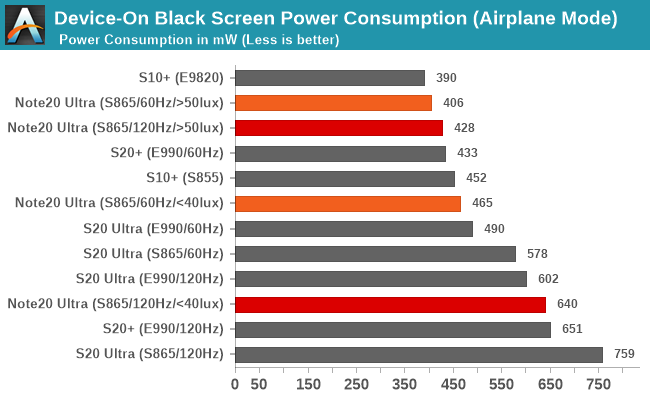

Device-On Black Screen Power Consumption (Airplane Mode)


When in a dark environment, and forced into the 120Hz mode, the Note20 Ultra’s power consumption isn’t all that different from the S20 series (I’m still not sure why the Snapdragon S20U here fares so badly). This means that there is a large ~180mW power penalty that is present at all times, even on a black static screen, because of 120 Hz. That penalty comes from the measured power, with 640 mW and 465 mW in the respective 120 and 60Hz modes.


When under a little brighter ambient conditions, the panel is finally allowed to showcase its technology advantages, and power consumption drops drastically. In the 120Hz mode but with the minimum refresh rate now in the regular ’48 Hz’ setting, the power figure drops from 640mW to 428mW, which is a massive 220mW drop.


The 60Hz mode also seems to see a power benefit as well. In our tests, the power consumption drops from 465 to 406 mW. This would indicate that indeed LFD is working in the background and reducing the panel’s refresh rate to below 60Hz – although we have no way to accurately measure exactly how low it goes.


It Also Depends On The Content


As noted, having the phone operating under dark conditions does look to disable the ‘seamless’ variable refresh rate display, and consequently the operation that allows the phone to go into lower frequency modes.


But that’s not exactly correct in all circumstances.


In the above video snippet, we see that the device still kicks back in into a low refresh rate as long as the on-screen content and brightness exceeds a certain level, even if the light sensor measures 0lux.


The problem is that this isn’t based on the specific screen brightness level that the user might select, or the auto-brightness might choose. It actually relies on the screen content too, which affects the screen brightness, as the phone will also jump between switching back into low-frequency mode or staying at a more power hungry high-frequency mode. In that instance, the the refresh rate mechanism is based on the average picture level (APL) as well.


The Effect on Battery Life


Based on everything we’ve learned so far, it comes to pass that there are now four corners to the battery life on the new S20 Ultra:


  • Set at 120 Hz in user options, low ambient brightness (low lux)
  • Set at 120 Hz in user options, high ambient brightness (high lux)
  • Set at 60 Hz in user options low ambient brightness (low lux)
  • Set at 60 Hz in user options, high ambient brightness (high lux)

Each variant, due to Samsung’s seamless VRR implementation (which is only seamless in high brightness and/or bright content), will give a different level of battery life. Make sure to ask your favorite smartphone reviewer which one they are using.


In terms of our battery life tests, in order to showcase the differences in the results for the Note20 Ultra, I first fell back to PCMark. Here we see some mixed results.


In terms of absolute figures, the phone doesn’t get great results – it comes below the S20 series devices. It is worth nothing that the Note20 Ultra has a 10% smaller battery than the S20 Ultra, as well as a different processor – the new Snapdragon 865+ in the Note20 Ultra is more power hungry and less efficient than the regular Snapdragon 865 in the S20 Ultra, but both of these aspects are something to be covered in the full review.
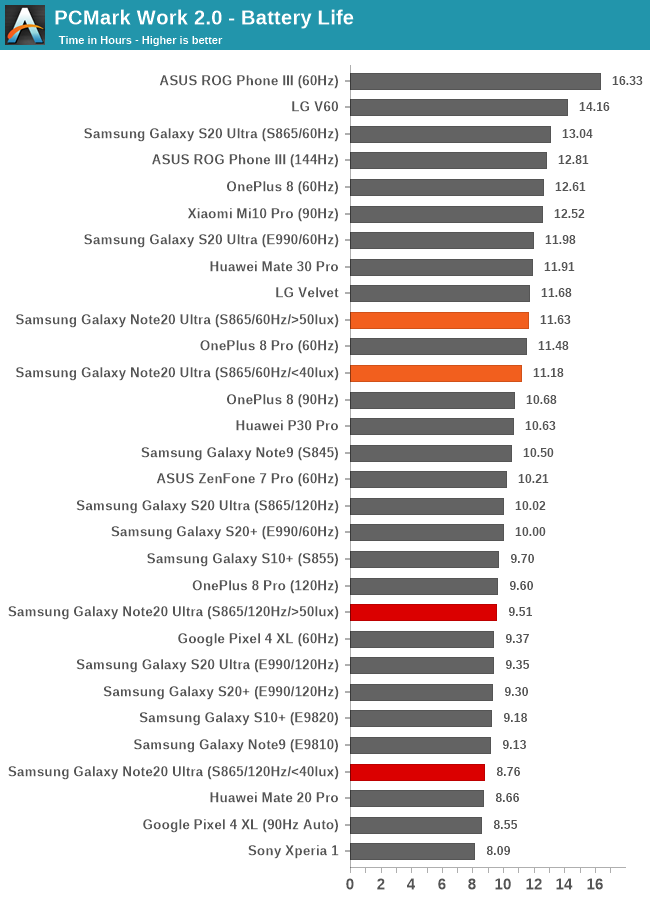

PCMark Work 2.0 - Battery Life


When it comes to the difference in the battery runtimes between running the phone in a dark or a bright environment, we do see differences, albeit they’re somewhat small. In the 60Hz maximum refresh mode, VRR/LFD gains the phone an additional 4% of battery life. In the 120Hz mode, we see a larger 8.5% jump in runtime.
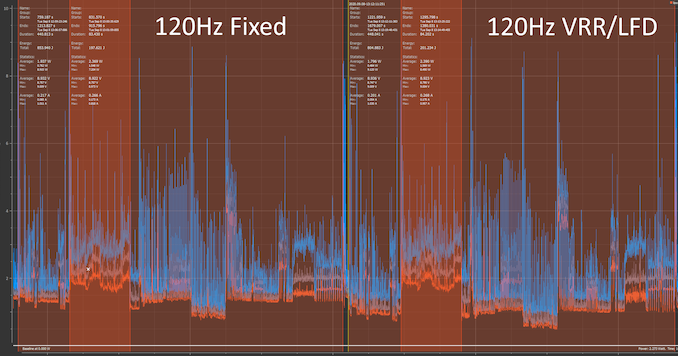


Looking at the power draw graph in PCMark in the 120Hz modes, we do see a drop in power from an average of 1.937W to 1.796W at 200cd/m² screen brightness. The one thing to note here is that there’s no material difference during the video editing section of PCMark, with the power results been the two modes falling within 21mW. What this points out to is that in more regular non-video content the battery life gains could be larger than what’s experienced here in this battery test.


First Impressions


Overall, I think Samsung’s new display technologies, such as the VRR and LFD on the Note20 Ultra, make for a big leap in terms of the capabilities of high-refresh rate smartphones today. However there are quirks, and the biggest negative here is the fact that underneath a certain ambient brightness, Samsung disables its VRR. 


At a 40 lux ambient brightness, which is still relatively bright for indoor use-cases, we can see the VRR disabled. Users can download a lux meter app right now for their current smartphones and test it around the environment to see which scenarios apply and which don’t. Personally this is a bit disappointing, as the biggest advantage of an VRR implementation was to get rid of the fixed large power penalty of the 120Hz mode – a penalty which in absolute terms represented a bigger power draw percentage during lower brightness usage of a device. This is compared to high on-screen brightness conditions, where power draw is dominated by luminance power, where the 120Hz penalty represented a smaller percentage of total power, and thus represents a smaller gain thanks to VRR.


The good news is that Samsung introduced a technology that is, from our perspective, software agnostic. There are some interactions between the higher level VRR on the OS side and the lower-level LFD technology on the panel side that we wish there was more insight to at the user level, however it’s a nice technological leap which manages to narrow the power penalty of higher refresh displays, and in turn should further popularise the feature.


So the final question is as to why Samsung has this VRR limitation in low ambient light conditions? I have reached out to Samsung Display to find out why this limitation exists, but I haven’t heard back yet. I should note that ‘faking’ a bright environment via shining a light onto the light sensor didn’t result in any noticeable picture quality differences at any brightness – but I’m sure there’s some corner case out there which does result in some degradation as otherwise I can’t explain the limitation’s existence.


We will be following up with a full Note20 Ultra (Snapdragon S865+) review soon.


Related Reading:


Source: AnandTech – Samsung’s Note20 Ultra Variable Refresh Rate Display Explained

EVGA Launches Z490 Dark K|NGP|N Edition: Built for Overclockers

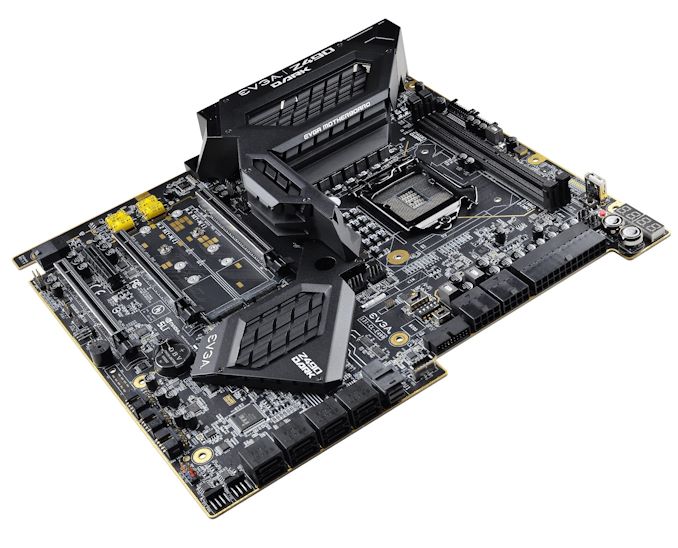
One of the biggest names on the extreme overclocking scene is Vince ‘K|NGP|N’ Lucido, who is highly regarded as one of the best sub-zero overclockers. He is a longtime employee of EVGA, and collaborates exclusively with its hardware team to develop unique overclocking-centric hardware. The latest collaboration is the EVGA Z490 Dark K|NGP|N – a limited edition motherboard with an 18-phase power delivery designed for overclocking. There is also more conventional features such as two PCIe 3.0 x4 M.2 slots, eight SATA ports, U.2 port, with a 2.5 G Ethernet controller and Wi-Fi 6.


One of the most interesting elements on the EVGA Z490 Dark is its unconventional desktop design, with just two memory slots mounted horizontally across the top, just above the transposed LGA1200 socket. The 90-degree angle is usually done for airflow reasons with specific chassis in mind, and only two memory slots assists in memory-latency driven workloads.


The memory slots are qualified up to 64 GB of DDR4-5000, although for this board it wouldn’t be a surprise to see overclockers push speeds further. The socket is also better angled for easier mounting of the large copper pots that sub-zero overclockers use with liquid nitrogen. Overclocking features for this sort of board usually extend to driving extra power, sometimes even external voltage control, as well as monitoring tools for accurate thermal and voltage measurements. 


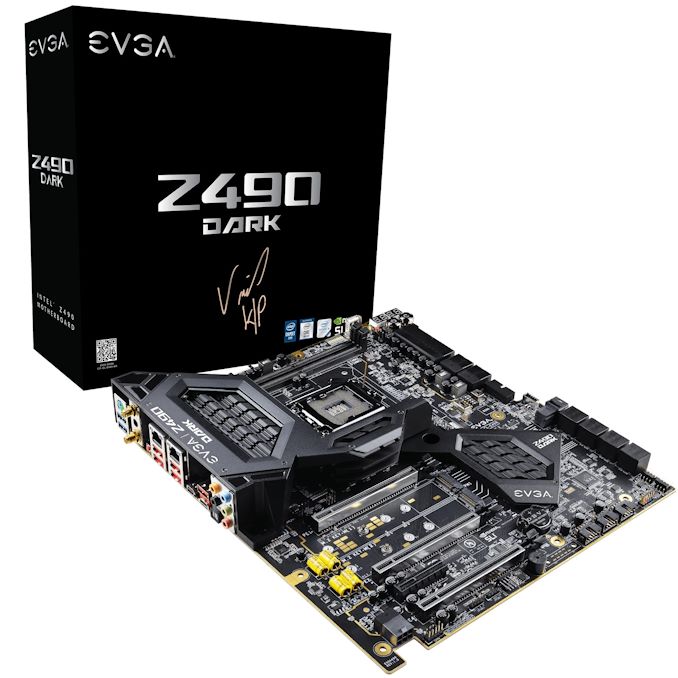
Vince ‘K|NGP|N’ Lucido personally signs the packaging of each limited edition Z490 Dark


For storage there is a pair of PCIe 3.0 x4 M.2 slots, with a single U.2 port and eight SATA ports with six of these supporting RAID 0, 1, 5, and 10 arrays, while an ASMedia SATA controller powers the other two ports. Three full-length PCIe 3.0 slots operate at x16, x8/x8, and x8/x8/+4, with a secondary half-length PCIe 3.0 x4 slot.


The top right-hand corner features two 2-digit LED panels that monitor CPU voltage and temperature, with a power and reset button also added. Focusing on networking, the Z490 Dark is using a pair of Intel-based Ethernet controllers, one I225-V 2.5 GbE and one I219-V Gigabit, with an Intel AX201 providing both Wi-Fi 6 and BT 5.1 device support. The audio codec looks ‘amped’ as well.


The limited-edition EVGA Z490 Dark K|NGP|N model is currently available for $600 direct from EVGA, with a limit of two per household. This is $100 more expensive than the standard EVGA Z490 Dark model ($500), although the K|NGP|N variant is likely to use perhaps better binned components to ensure extreme overclocking consistency. Both models come with a 3-year manufacturer warranty.


Related Reading


Source: AnandTech – EVGA Launches Z490 Dark K|NGP|N Edition: Built for Overclockers

SiPearl Lets Rhea Design Leak: 72x Zeus Cores, 4x HBM2E, 4-6 DDR5

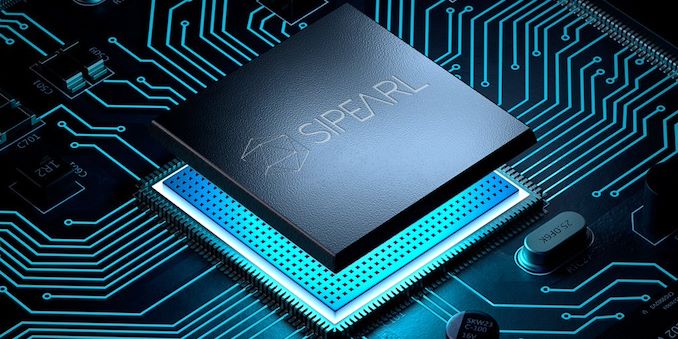
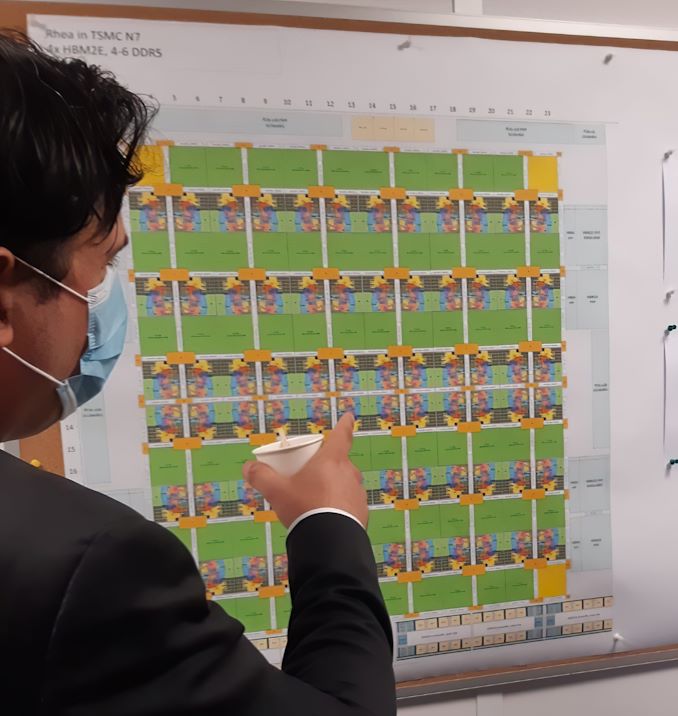
In what seems to be a major blunder by the SiPearl PR team, a recent visit by a local French politician resulted in the public Twitter posting in what looks like the floor plan of the company’s first-generation server chip project “Rhea”.


During a visit of Alexandra Dublanche, a local Île-de-France politician and vice president of economic development and other responsibilities for the region, the PR teams had made some photo-op captures of a tour of the office. Amongst the published pictures includes a shot of the company’s Rhea server chip project with some new, until now unreleased details of the European Processor Initiative-backed project.


In a close-up and up-scaling of the image, we can see that it’s a detailed floor-plan of the server SoC Rhea, labelled for a target TSMC 7nm process.


We can detail 72 CPU cores and 68 mesh network L3 cache slices in the floor plan, surrounded by various IP whose labels are too small to be legible. SiPearl had previously confirmed that the project uses Arm’s upcoming Neoverse “Zeus” cores which succeed the Neoverse N1 Ares cores that are being used in current generation Arm server SoC designs such as Amazon’s Graviton2 or Ampere’s Altra.


Beyond the confirmation of a core-count, we also see that the Rhea design sports a high-end memory subsystem, with the floor plan labelled as having 4x HBM2E controllers and 4-6 DDR5 controllers. Such a hybrid memory system would allow for extremely high bandwidth to be able to feed such a large number of cores, while still falling back to regular DIMMs to be able to scale in memory capacity.


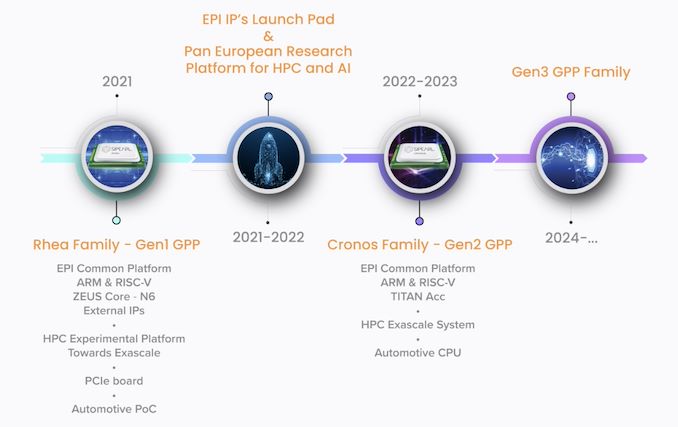
The Rhea family of processors is roadmapped to come to market in 2021. The only curious divergence here is that SiPearl previously stated that this was an N6 project, whilst the recent Twitter picture states it being N7. Given that both processes are design compatible, it might just be a recent shift in the project, or the company still plans to productise it in the N6 node when it comes to market.


The design’s aggressive memory subsystem with the inclusion of HBM2E points out that the company is aiming for quite high performance targets, joining the ranks of Fujitsu in terms of designing a CPU with advanced HBM memory.


Related Reading:


Source: AnandTech – SiPearl Lets Rhea Design Leak: 72x Zeus Cores, 4x HBM2E, 4-6 DDR5

Keeping it Pure, be quiet! Pure Loop Series, Up to 360 mm AIOs

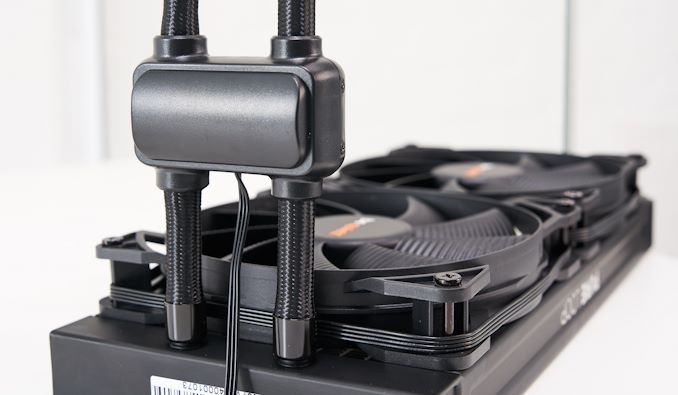
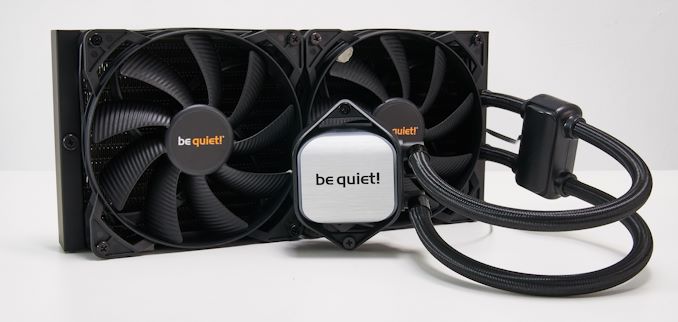
be quiet! is one of the most widely known hardware manufacturers in Germany and across Europe, with ranges including CPU cooling, chassis, and case fans. Adding to its range of CPU coolers, be quiet! has unveiled its latest series of AIO coolers, the Pure Loop. Available with multiple radiator sizes spanning from 120 mm to 360 mm, be quiet! looks to aggressively target enthusiasts and performance to keep things running nice and cool.


Back in 2016, be quiet! unleashed its first-ever series of AIOs, the Silent Loop. Fast forward four years from then, and be quiet! has opted for a different route, dropping Alphacool for its pump OEM, and opted for an undisclosed brand. The new Pure Loop AIO CPU coolers are available in four different sizes, 120, 240, 280, and 360 mm. 


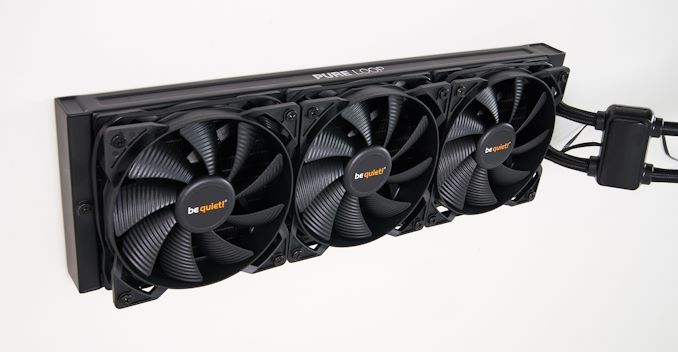
The biggest change in design comes via the pump, with a new double decoupled pump. be quiet! claims this allows the AIO to operate quieter and with fewer vibrations than the previous Silent Loop series. Each of the models share the same 27 mm thick radiator, albeit in different sizes to accommodate the Pure Wings 2 PWM fans. The 120 mm comes with a single 120 mm fan, the 240 mm with two 120 mm fans, the 280 mm with two 140 mm fans, and the largest, the 360 mm with three 120 mm fans. 


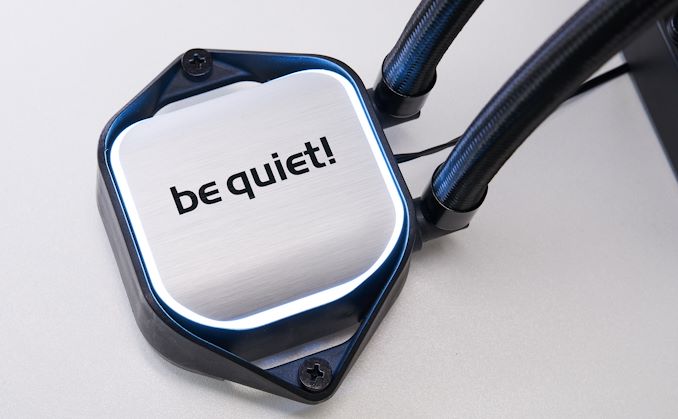
The cold plate on the CPU block is nickel-coated copper which means users can use liquid metal thermal compound for better performance, although be quiet! does supply a small tube of its thermal paste in the accessories bundle. The block itself looks elegant and includes white LEDs surrounding the aluminum styled front cover, something more classical instead of RGB LEDs. Another ‘cool’ feature is the design allows users to top up the fluid with easy to access fill ports, meaning longevity is a big factor, with a supplemental bottle of fluid in the bundle. It does come pre-filled for users to install straight away.


Touching on the compatibility, be quiet! doesn’t list the supported socket types, but it’s likely to support AMD’s AM4 socket, with support for the latest Intel LGA1200 as well as LGA115x sockets. be quiet! themselves recommend the 120 mm for users with AMD Ryzen 3 and Intel Core i3 processors, the 240 mm for Ryzen 5/Core i5, the 280 mm for Ryzen 7/Core i7, and the 360 mm for the high-performance Ryzen 9 and Intel Core i9 processors.


The expected release date for the be quiet! Pure Loop AIO liquid coolers is sometime in early October, with a competitive pricing structure. The 120 mm has an MSRP of $85, the 240 mm will cost $95, the 280 mm $105, with the 360 mm at a slightly higher price of $120. 


Related Reading


Source: AnandTech – Keeping it Pure, be quiet! Pure Loop Series, Up to 360 mm AIOs

be quiet! Announces The Silent Base 802 Chassis, With USB 3.2 Type-C

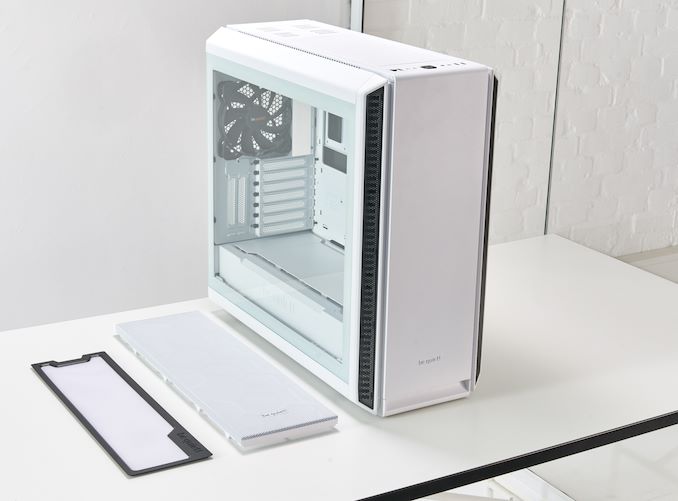
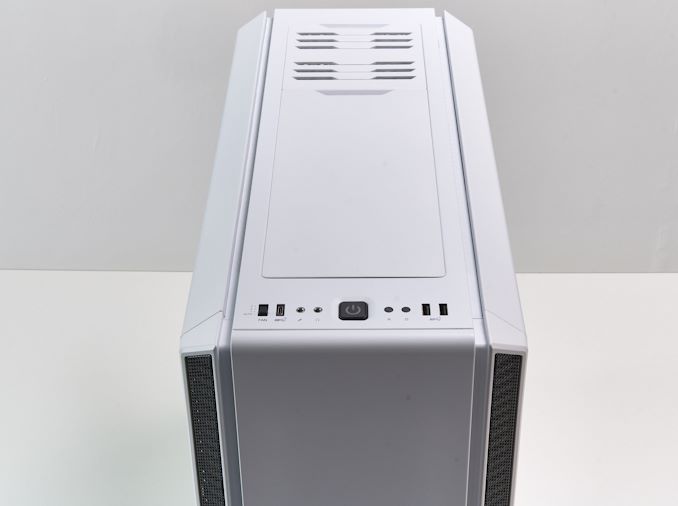
Sometimes companies take a popular product and re-release it to the market with a new aesthetic, or slightly revamped design. Reputable and popular German hardware manufacturer be quiet! has unveiled its latest chassis, the Silent Base 802. Building further on the popularity of its current Silent Base 801, the 802 adds an interchangeable front panel with one for silent and one for focused airflow. be quiet! has also revamped it with a single USB 3.2 G2 Type-C connector on the top panel.


Available in both black and white versions, the be quiet! Silent Base 802 has a similar frame and feature set of its 801 counterpart but comes supplied with an interchangeable front and top panel. This allows users to change the dynamic of the system on the fly, with the ability to opt for better cooling performance or a sleeker look at the expense of airflow. 


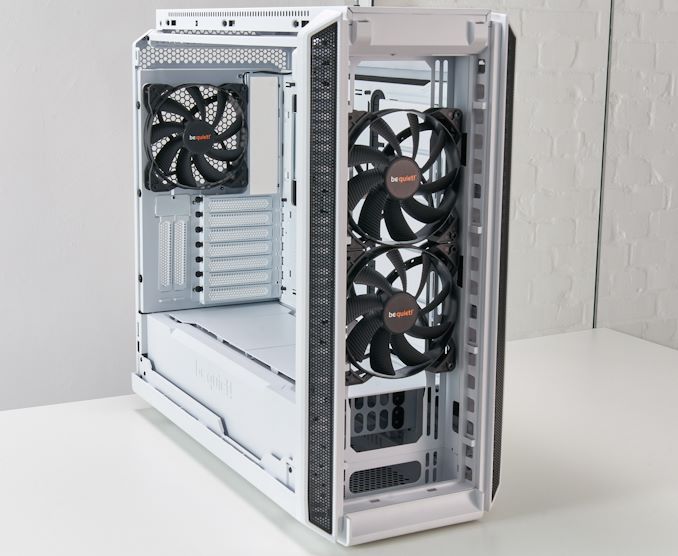
Some of the main features include screwless side panels, with the option to go for tempered glass, or with a tinted glass window. It includes a PSU shroud to help keep the system looking tidy, with the potential to install up to a 420 mm radiator in the front for high-end custom water cooling loops. At the top, users can install up to a 360 mm radiator, with a removable fan bracket for easy installation. Dust filters are included in the front, along with three Pure Wings 2 140 mm fans, two in the front, and one preinstalled into the rear. The dimensions of the case are 539 x 245 x 507 mm (L x W x H), and it can accommodate motherboards up to E-ATX. There are nine expansion slots in total, with seven for the motherboard and two to horizontally mount a graphics card with a PCIe riser cable; available separately at an additional cost. 


One of the new additions to the Silent Base 802 is the inclusion of a USB 3.2 G2 Type-C port, at the expense of a Type-A port on the previous 801 model. It includes two USB 3.2 G1 Type-A ports, with two 3.5 mm audio jacks for front panel audio, with a small reset button, a large power button, and a fan controller.


The be quiet! Silent Base 802 will be available towards the end of November with an MSRP of $160 for the non-window version, and for $170 with a tempered glass side panel. There is no price difference between the black and white version of the case, which should please many users as white hardware generally comes with a price premium. That being said, be quiet! will be phasing out the current Silent Base 801 model when the 802 is released.


Related Reading


Source: AnandTech – be quiet! Announces The Silent Base 802 Chassis, With USB 3.2 Type-C

be quiet! Reveals Shadow Rock 3 White, Same Performance, But White

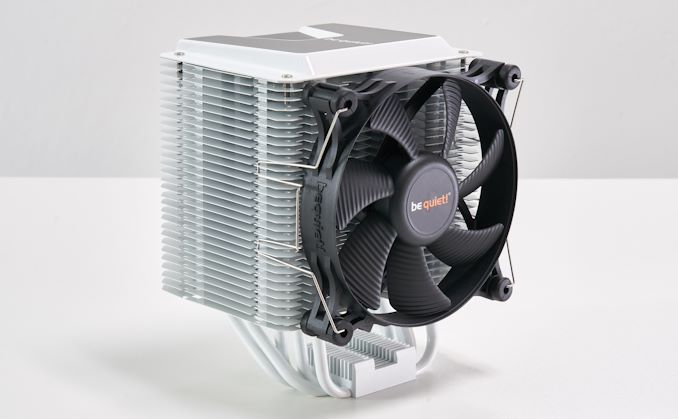
Back in March, be quiet! released its successor to its mid-range Shadow Rock 2 air tower cooler, the Shadow Rock 3. Only available in black at the time, be quiet! has announced a new white variant with the same cooling capabilities of up to 190 W TDP, with an elegant bi-color design.


Identical in the specification to the black version, the Shadow Rock 3 in white has an asymmetric design which has compatibility with most memory types. The main cooling tower is constructed of aluminum with five 6 mm thick nickel-plated copper heat pipes, with direct touch for improved heat dissipation. Cooling capability stretches up to 190 W TDP, which means it is more than capable of cooling most mainstream desktop processors. Included is a single Shadow Wings 2 120 mm PWM cooling fan with a maximum audible nose of 24.4 dBA at maximum speed.


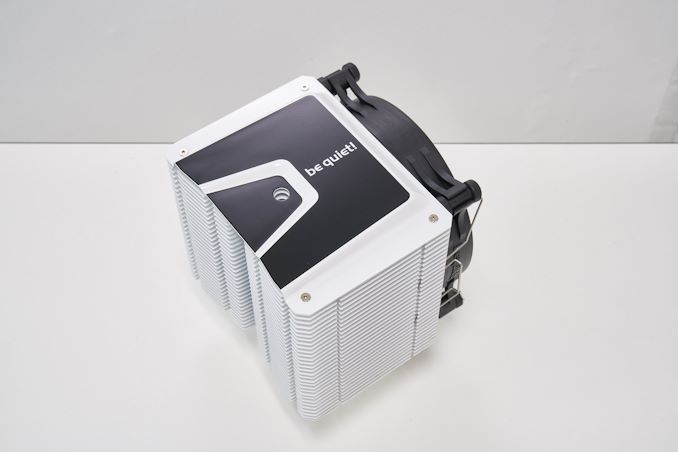
The be quiet! Shadow Rock 3 in white uses a bi-color design with a black top cover for a classic, yet the very accommodating design should fit in with most system builds.  Compatibility is wide and varied with support for AMD’s AM4 and AM3+ platforms, with support for Intel LGA1200, LGA2066, LGA115x, and LGA2011-3 sockets.


Upon speaking to be quiet!, they assured us that the white coating on the aluminum fins wouldn’t hinder the cooling performance, as painting fins with sub-standard paint will have a negative effect on heat dissipation. be quiet! also includes a 3-year manufacturer’s warranty.


The Shadow Rock 3 in white is set for release sometime in early October. The be quiet! Shadow Rock 3 in white will cost slightly higher than the black version $55), with an MSRP of $60 in the US and 60€ in Europe.


Related Reading


Source: AnandTech – be quiet! Reveals Shadow Rock 3 White, Same Performance, But White

Arm Announces Cortex-R82: First 64-bit Real Time Processor

Arm is known for its Cortex range of processors in mobile devices, however the mainstream Cortex-A series of CPUs which are used as the primary processing units of devices aren’t the only CPUs which the company offers. Alongside the microcontroller-grade Cortex-M CPU portfolio, Arm also offers the Cortex-R range of “real-time” processors which are used in high-performance real-time applications. The last time we talked about a Cortex-R product was the R8 release back in 2016. Back then, the company proposed the R8 to be extensively used in 5G connectivity solutions inside of modem subsystems.


Another large market for the R-series is storage solutions, with the Cortex-R processors being used in HDD and SSD controllers as the main processing elements.


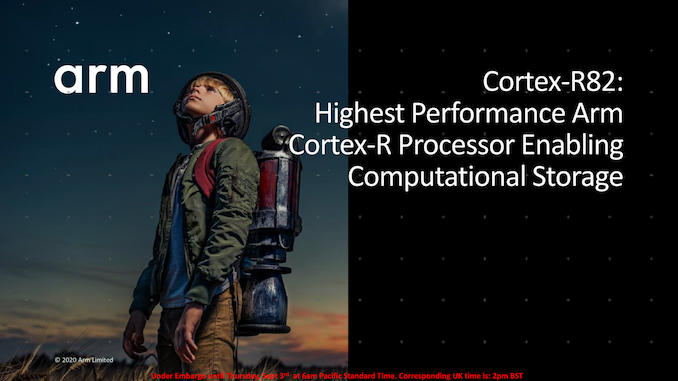
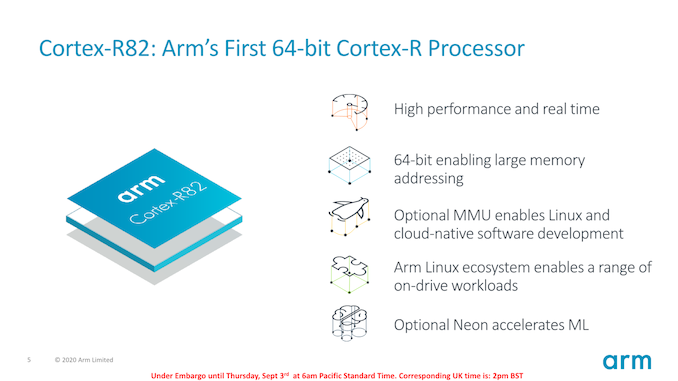
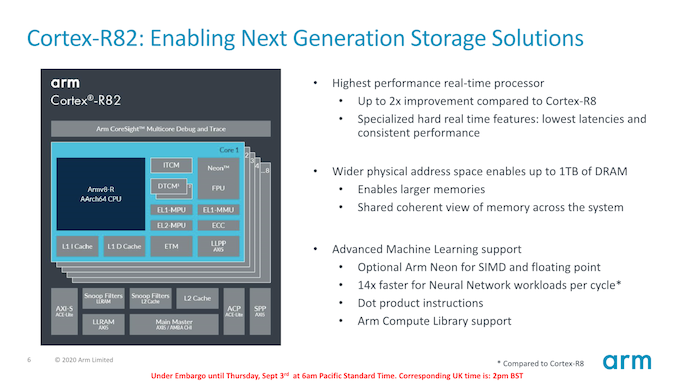
Today, Arm is expanding its R-series portfolio by introducing the new Cortex-R82, representing the company’s first 64-bit Armv8-R architecture processor IP, meaning it’s the first 64-bit real-time processor from the company.


To date, previous generation R processors were based on the predecessor Armv7-R or ArmV8-R 32-bit architecture, such as the Cortex-R52. This was for years still fine and sufficient for the use-cases in which these processors were deployed. In modern products however, we’re seeing designs in which larger memory addressing is becoming necessary. Modern SSDs right now for example routinely use up to 2GB of DRAM memory on their controllers, which comes near to the 32-bit 4GB memory addressing limit of the R8 CPUs.


The new Cortex-R82 enhances the core to enable up to a 2x performance improvement over the R8, uses a wider physical address space up to 1TB which is coherent with the rest of the system.


Arm currently doesn’t divulge much about the microarchitecture of the R82 and how it differs from the R8, but we imagine there to be some significant changes with the shift to the Armv8-R architecture.


An important addition here from the architecture and µarch side is the optional inclusion of NEON units for SIMD processing, including new dot-product instructions. This would enable for higher performance parallel processing compute capacity on the processor itself, allowing customers such as SSD-controller designers more flexibility as to their designs.


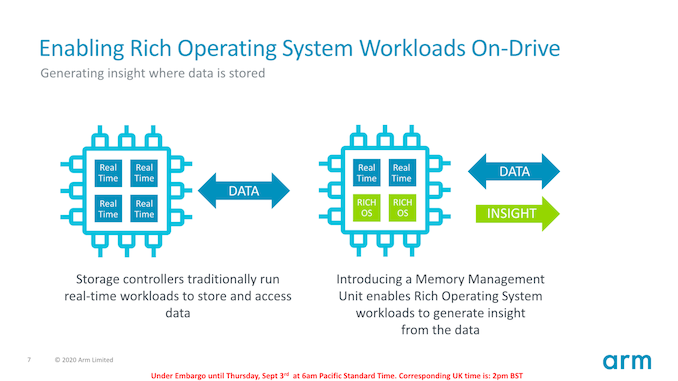
Another big change to the microarchitecture is the inclusion of an MMU, which allows the Cortex-82 to actually serve as a general-purpose CPU for a rich operating system such as Linux. This is actually quite a huge change in regards to the target market possibilities of the -R series going forward if the processor can run its own OS all by itself.


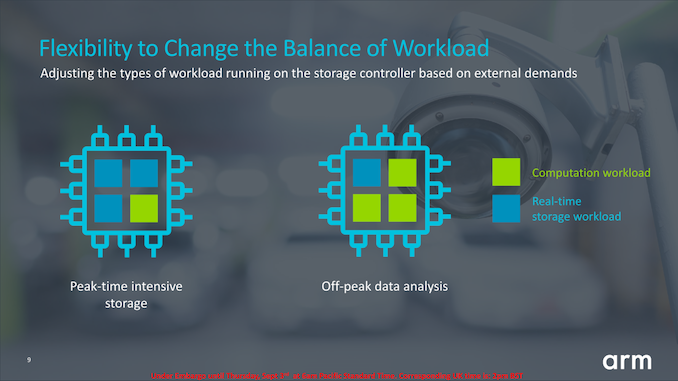
Arm’s product presentations focus on storage controllers, able to run both real-time workloads like they have been until now, but add in a rich OS for more complex algorithms and higher-level applications that aren’t as feasible on a bare-metal and real-time operating system.


A chip designer for example can tape-out a drive controller with multiple R82 cores (the design scales up to a 8-core cluster), and flexibly change the processing resources between the real-time application and the higher-level computation workload.


As the storage market evolves, one of the biggest requirements we’ve seen from our partners is flexibility. The new features of the Cortex-R82 processor give partners the possibility to design multi-core implementations of up to 8 cores, and adjust the types of workload running on the storage controller based on external demands in software. For example, parking lots will regularly use video surveillance to recognize license plate information which is later used for billing. During the day vehicle registration plate data is collected, meaning most cores are being used for intensive storage. At night, these cores will be used to process the data for billing and will adjust to carry out the data analysis and machine learning needed. As storage controllers are becoming more diverse to address different markets and features, Cortex-R82 delivers an architecture to provide this extreme flexibility – reducing costs and time to market.


Arm states that 85% of current storage solutions use Cortex-R processors, so the new R82 likely will represent a big jump in performance and open new possibilities for vendors to design new differentiating features in future designs.


Related Reading:


Source: AnandTech – Arm Announces Cortex-R82: First 64-bit Real Time Processor

Netgear Updates Orbi Pro Lineup with Wi-Fi 6 AX6000 Tri-Band Model

Mesh networking kits / Wi-Fi systems have emerged as key revenue streams for networking equipment vendors in the consumer space. In mid-2017, Netgear brought over this strategy to the SMB / SOHO space with the Orbi Pro 802.11ac (Wi-Fi 5) tri-band Wi-Fi system. Since then, Wi-Fi 6 deployment in the consumer market has achieved critical mass, with almost all modern smartphones and notebooks equipped with support for 802.11ax technology. Most vendors in the enterprise space now have Wi-Fi 6 access points (APs). Netgear’s own foray into the space started with the introduction of the WAX610 series last month. Today, they are launching the second-generation Orbi Pro with Wi-Fi 6 capabilities.


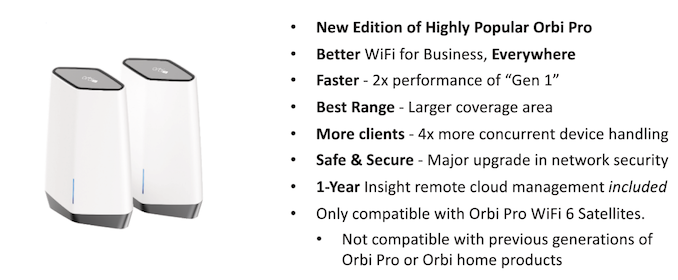
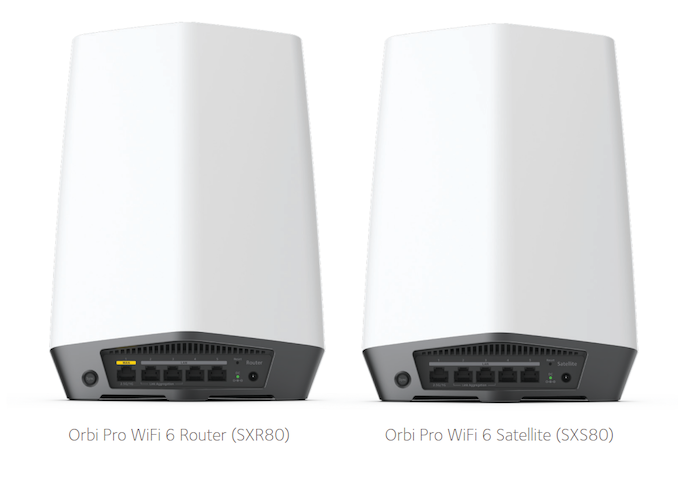
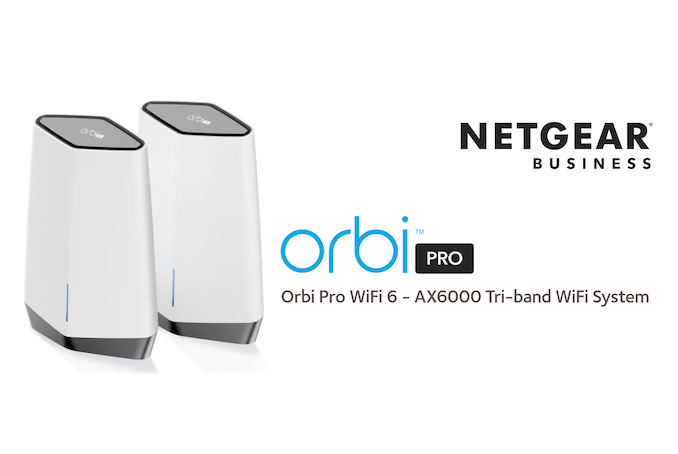
Similar to the last-gen Orbi Pro, the new Wi-Fi 6 model (SXK80 for the kit, with a single SXR80 router and a SXR80 satellite) borrows the internal hardware components of the consumer Orbi Wi-Fi 6 (RBK852), modifies the industrial design and reorients the internal antennae for better stability (rather than the peak performance aspect that is important for the consumer model). The 2.5 Gbps port is configured by default for WAN duties (to go along with Netgear’s recently introduced CM2000 cable modem), but it can be reconfigured for LAN duties also. Two of the 1G LAN ports can also be link-aggregated. The firmware is also tweaked for features required by SOHOs and SMBs. Management is done via the Insight app, rather than the Orbi app used by the consumer version. The product includes a free 1-year subscription to the Insight Cloud Management service. However, it must be noted that Insight app-based management is not a must for the device. It can be configured using a web UI on the local network also.


In terms of improvements over the existing Orbi Pro, the new version supports 1024QAM in 5 GHz, Wi-Fi 6 in both bands, and an increase in the number of radio streams from 8 to 12. Wi-Fi 6 also brings bi-directional MU-MIMO. The new Orbi Pro also supports OFDMA for better channel efficiency and the Target Wait Time feature for improved power efficiency on the client side. On the security side, WPA3 is supported and the unit is Wi-Fi certified Enhanced Open at launch. WPA3-Enterprise is scheduled to become available in a later firmware release.


Firmware features that are specific to the Orbi Pro (and not directly supported in the consumer Orbi) include better network separation and client isolation. The SXK80 supports four distinct SSIDs, each with a dedicated VLAN. Client isolation allows devices within a SSID to have better privacy and security by allowing upstream communication only (not visible to other devices connected to the same SSID).


One of the key differentiators in the Orbi Pro SXK80 is the usage of Wi-Fi 6 in the 2.4 GHz band also. Most of the entry-level APs in the Wi-fi 6 space forsake this (and operate at 802.11n speeds in that band) to hit lower price points. On this aspect, the Orbi Pro happens to be more future-proof, as client support for 2.4 GHz Wi-Fi 6 continues to improve with the resolution of various interoperability issues. Netgear refers to micro-businesses as the target for the Orbi Pro, and prefers full-fledged SMBs to go the separate gateway / switch / access point route. Micro-businesses and SOHO setups are likely to benefit more from systems with a robust dedicated wireless backhaul such as the Orbi Pro, as these setups often have to do without Ethernet cables inside walls and/or ceilings for a wired backhaul.


The Netgear Orbi Pro WiFi 6 Tri-band Mesh System (SXK80) comprising of one router and one satellite is available for purchase today at $770 in the US, with European availability later this quarter. Additional satellites are priced at $420 each, with multi-satellite kits offering a discount at $1100 (router and two satellites) and $1490 (router and three satellites).


Source: AnandTech – Netgear Updates Orbi Pro Lineup with Wi-Fi 6 AX6000 Tri-Band Model

Western Digital Launches Security Platform for Portable Storage with G-Technology's ArmorLock-Encrypted NVMe SSD

Data safety is of paramount importance for many enterprise use-cases, and in certain scenarios, for home consumers too. Portable storage devices have typically offered data protection in the form of hardware encryption activated by one of multiple methods. Commonly used protection mechanisms include hardware keypads on the drive, a software application running on the host system with password protection prior to the mounting of the data volume, and biometric protection with, say, a fingerprint reader integrated in the device. Earlier this year, Samsung had launched the Portable SSD T7 Touch with such an integrated fingerprint sensor.


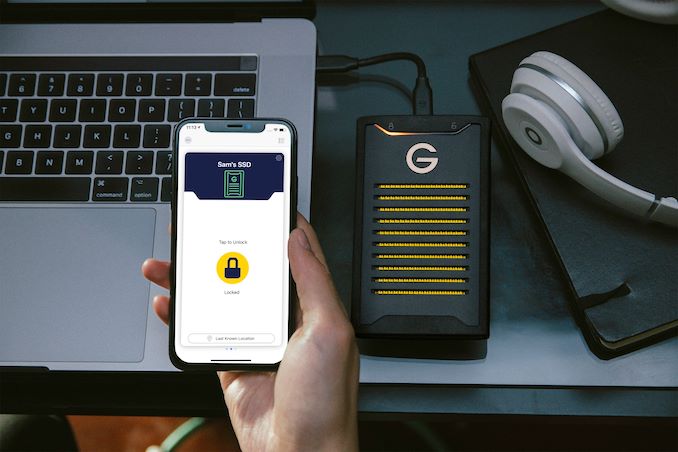
Smartphones have become an indispensable part of everyday life, and serve as a digital identity of sorts for the owner. The biometric authentication that allows access to the phone has been taken advantage of as an added security measure in various other scenarios (two-factor authentication). Applications that authenticate based solely on the ability to unlock the phone exist too. Some portable storage device vendors have adopted this ‘app scheme’ as an alternative to the ‘intrusive’ measures outlined in the previous paragraph for unlocking encrypted drives. Examples include the SecureDrive BT series of hardware-encrypted external portable HDDs and SSDs using the DataLock BT app and iStorage’s upcoming datAshur BT series of USB flash drives. Today, Western Digital is introducing their own version of BLE-based authentication and unlocking of a portable storage device under the ArmorLock moniker. The first product based on this technology is also being launched today – the G-Technology ArmorLock-encrypted NVMe SSD.

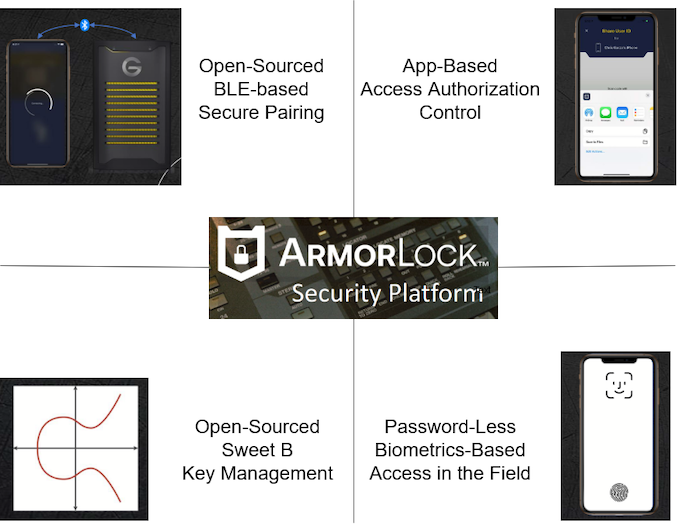
The ArmorLock Security Platform


Traditional protection methods for encrypted portable drives have tended to be intrusive and slows down the process of using the drive on different systems. The ArmorLock security platform is intended to enable simple and seamless usage of encrypted drives using mobile / desktop apps (unfortunately available only for iOS and macOS at launch). An ArmorLock-encrypted drive carries a BLE radio that communicates with the Bluetooth radio on the mobile / desktop system on which the app runs. The app-based unlock scheme enables password-less unlocking using key exchange. WD claims that the secure pairing is seamless (a comparison was made with the Apple AirPods pairing scheme).


Prior to usage, each drive is authorized on a system where the retrieval key is generated first and backed up (for use in the case where all authorized mobile devices become unavailable, but access to the data is still needed). After this, multiple mobile phones can be authorized for the same drive, with only a public key from the mobile app needing to be fed into the administrator console. Multiple drives can also be authorized and managed from this administrator console, enabling remote usage after the authorized drive gets shipped over. The drives can also self-format and be subject to secure erasure through the mobile app. If enabled, the phone’s location information can also be used by the app to show where the drive was used last.


It must be noted that the ArmorLock security platform does NOT need cloud connectivity. In fact, the mobile phone or system used for unlocking can be air-gapped during the unlock process for the portable drive.


ArmorLock-encrypted NVMe SSD


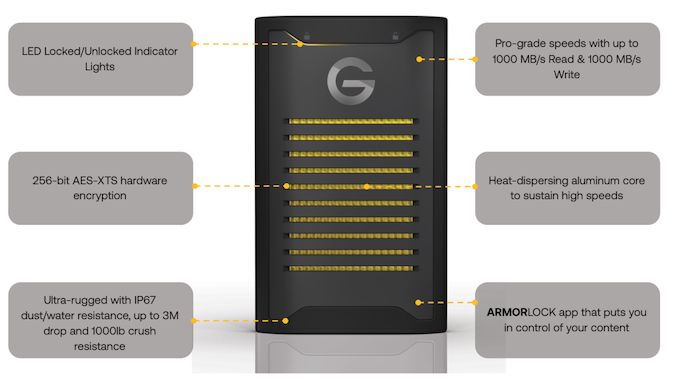
Moving on to the hardware itself, the G-Technology ArmorLock-encrypted NVMe SSD is a rugged drive with a IP67 rating. 2TB is currently the only available capacity point. It also includes what appears to be a robust thermal design allowing the drive to sustain 1000 MBps read and write speeds for long durations (that is typically encountered in studios and other content creation scenarios that form G-Technology’s target market). 256-bit AES-XTS hardware encryption is used to protect the data. The internal drive is a WD Black SN750 NVMe SSD with tweaked firmware.


Concluding Remarks


Western Digital supplied us with a review unit of the ArmorLock-encrypted NVMe SSD and advance access to the apps. However, the ongoing lockdown coupled with the absence of any Apple device in my testing location means that we have to wait for the release of an Android and/or Windows desktop application for a hands-on review.


Western Digital’s vertical integration – right from manufacturing the flash, the SSD, and the in-house development of the protocol, firmware, and associated apps – means that the premium product can be priced very competitively. At $600 for the 2TB NVMe SSD behind a USB 3.2 Gen 2 bridge, it is hundreds of dollars cheaper than the equivalent drive from the competition and offers features that the competition charges a subscription for. The open-sourcing of the protocol and the ability to provide app and firmware updates in the field ensure that the drive is protected against any weaknesses that might arise in the key-exchange process.


Western Digital is targeting the G-Technology ArmorLock-encrypted NVMe SSD towards content creators, studios, and business professionals, as well as IT managers in the finance, legal, healthcare, and government industries. Some of these segments need FIPS certification, which adds significantly to the cost of the device. Western Digital did indicate that they are open to creating a FIPS-certified version if the market demand exists. At the current price ($600), we are sure most of the target market will be quite happy with the offered feature set.


Source: AnandTech – Western Digital Launches Security Platform for Portable Storage with G-Technology’s ArmorLock-Encrypted NVMe SSD