ASRock Z490 Aqua Motherboard Review: The $1100 LC Monoblock Flagship

It is no secret that Intel’s 10th generation processors are power-hungry. Intel has been squeezing every last drop of MHz out of the 14 nm process with its fastest desktop processors yet, but sometimes conventional air cooling just won’t suffice for those wanting to push the limits even further. ASRock understands this, and building on the success of the elegant (yet wallet-emptying) AMD Aqua, the company unveiled an Intel version.


The Z490 Aqua comes equipped as a premium feature motherboard. The large integrated monoblock which cools both the CPU and the board’s power delivery, amd it now features a very cool OLED display. There is also integrated Thunderbolt 3, 10 gigabit Ethernet, as well as its large 16-phase power delivery. 


Source: AnandTech – ASRock Z490 Aqua Motherboard Review: The 00 LC Monoblock Flagship

Microsoft Launches the Surface Laptop Go: Lighter In The Hand And The Wallet

Microsoft’s Surface lineup started with a Surface RT tablet, but is now features a wide range of devices targeting different markets, with different price brackets, and different levels of performance, but Microsoft is more often than not aiming for the higher end of the price range with the Surface lineup. This has kept their products out of reach for a lot of consumers. Today the company is announcing the Surface Laptop Go, broadening the laptop audience considerably with an entry point of just $549 USD.


Microsoft’s Surface Laptop 3 is a competent device, with two device sizes at 13.5 and 15-inches, featuring an all-aluminum chassis, and the 3:2 PixelSense display which is one of the highlights of any Surface device. But with an entry price of $999, there is a large part of the market that has been left vacant by Microsoft, until today.


Microsoft Surface Laptop
Component Laptop Go
CPU Intel Core i5-1035G1

4C / 8T 1.0-3.6 GHz

Gen 10 Graphics with 32 Eus

15W TDP
Memory 4 / 8 GB LPDDR4x

16 GB LPDDR4x Available on Commercial Model
Display 12.45-inch PixelSense

1536 x 1024 Resolution 148 PPI

3:2 Aspect Ratio

10-Point multitouch
Storage 64 GB eMMC

128 GB or 256 GB SSDs
Wireless Wi-Fi 6

Bluetooth 5.0
I/O 1 x USB Type-C

1 x USB Type-A

Headset jack

Surface Connect
Webcam 720p f2.0
Battery Up to 13 hours

39-Watt adapter
Dimensions 278 x 206 x 15.7 mm

10.95 x 8.10 x 0.62 inches
Weight 1110 grams

2.45 lbs
Starting Price (USD) $549
Availability Preorder Now, Available Oct 13

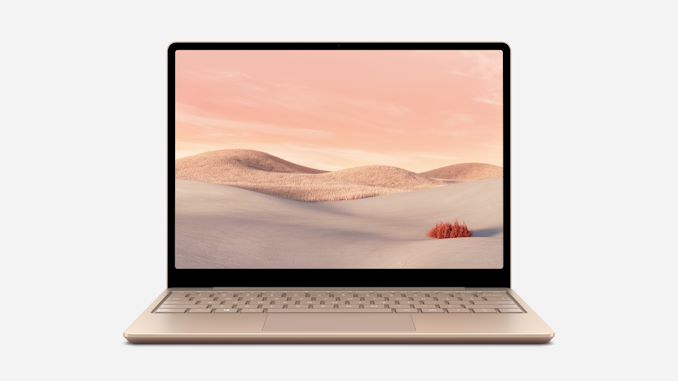
The Surface Laptop Go offers up a 12.4-inch PixelSense touchscreen display, making the device a bit smaller than the Laptop 3, and it weighs a bit less as well, at 2.45 lbs. The display does lose some sharpness compared to the Laptop 3 though, with a 1536 x 1024 3:2 resolution, which is only 148 pixels-per-inch. That is a steep decline compared to the Laptop 3 with its 200 pixels-per-inch display. Microsoft does color-calibrate all of its displays to sRGB, so despite the lesser display than its Surface brethren, it should still be a step ahead of most of the displays in this price range.


Unlike the Surface Go 2, the Surface Laptop Go avoids the Y-Series processors and packs in a proper 15-Watt Intel Core i5-1035G1 processor, meaning four cores and eight threads based on Intel’s Ice Lake platform. If you feel it is a bit odd to see a 10th Generation Intel processor being announced in a new device when all of the 11th gen products are just being announced, you are right. But, Microsoft has had a tendency to release at their own cadence, rather than follow the annual product updates from Intel. Still, the Core i5-1035G1 is a great pick for this class of device. Ice Lake also means the Laptop Go gets Wi-Fi 6, thanks to Intel’s AX201.


What is not so great is the baseline offering in terms of memory and storage, with the $549 entry-level device offering just 4 GB of RAM and 64 GB of eMMC storage. This is unacceptable for a 2020 laptop. Microsoft can be difficult to figure out, as they want to offer premium products, but then offer configurations which are going to make the people who purchase them not enjoy them. It would have been best to see this configuration skipped entirely, as it should not be purchased. The Laptop Go will be offered with 8 GB of LPDDR4x, and even 16 GB on the commercial variant, with 128 GB and 256 GB SSD options.


Microsoft rates the new laptop at up to 13 hours of battery life with typical device usage – no longer do they rate their devices based on local video playback. It also offers a fast-charge with 80% battery life in just an hour of charging.


Although the device is small, Microsoft has managed to include a proper keyboard, and the Surface keyboards are generally some of the best around, so hopefully the Laptop Go continues that trend. It features 1.3 mm of travel, and offers backlighting, which is not always a given at this starting price. The glass trackpad which is 115 mm x 77 mm should be a nice step up from other laptops in this class, which generally feature plastic trackpads of mediocre quality.


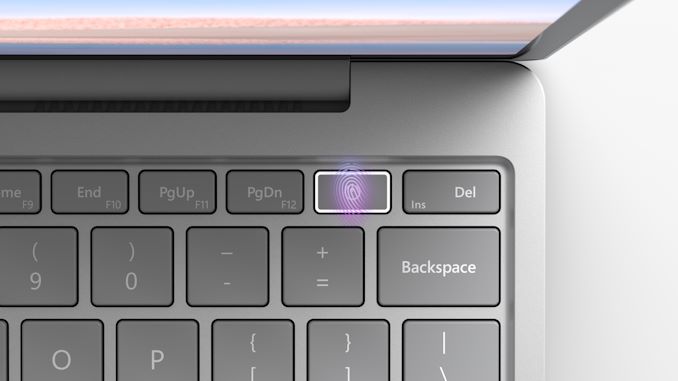
Sadly this will be the first Surface product to not feature an IR camera since the Windows Hello-based facial recognition was first added back on the Surface Pro 4. Instead, Microsoft is including a fingerprint reader on the Power button, except on the base model, which gets no biometric support. The camera is a 720p f2.0.


It will also be the first Surface device to not offer an all-metal design. The Laptop Go will have an aluminum top mated to a polycarbonate and fibre resin base, featuring 30% post-consumer recycled content.


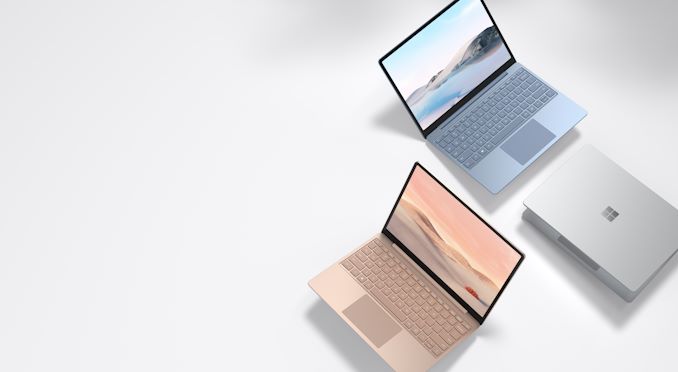
Microsoft clearly made some cuts to bring a premium design to the mid-range, but as long as the base model is avoided, the Surface Laptop Go looks to be a nice new entrant. It will be available in three colors with Ice Blue, Sandstone, and Platinum. The new Surface Laptop Go is available for pre-order today, with a launch date of October 13th.


Source: Microsoft


Source: AnandTech – Microsoft Launches the Surface Laptop Go: Lighter In The Hand And The Wallet

Microsoft Surface Pro X Gets A Refresh: SQ2 Processor And Platinum Finish

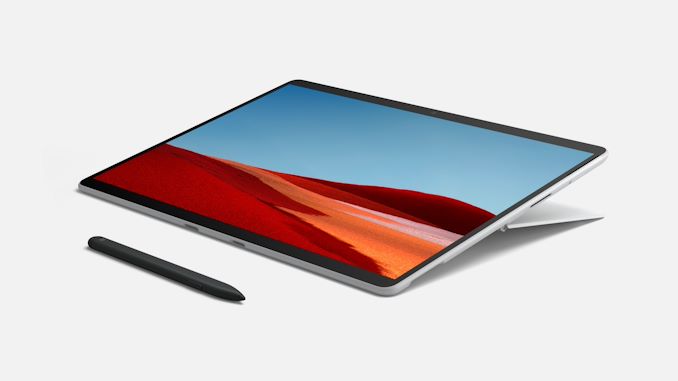
Microsoft’s Surface Pro X seems to be a very divisive device. Being the only current generation Surface product powered by an Arm-based processor, it thrusts its users directly into the world of WoA: Windows on Arm – and all of the caveats that exist there. It is not too often we see Microsoft do a mid-cycle refresh, but the Surface Pro X gets to be the exception here as well. Today Microsoft is announcing some new updates to the Surface Pro X to make it faster, and flashier.


Microsoft Surface Pro X
Component Pro X
CPU Micorosft SQ1

Microsoft SQ2
Memory 8 / 16 GB LPDDR4x
Display 13-inch PixelSense

2800 x 1920 (267 PPI)

3:2 aspect, 10-point multitouch
Storage 128 / 256 / 512 GB removable SSD
Wireless Wi-Fi 5

Qualcomm Snapdragon X24 LTE

Bluetooth 5.0
I/O 2 x USB Type-C Gen 2

Surface Connect

nano SIM
Webcam 5.0 MP front camera 1080p video

10 MP rear camera autofocus 4K Video
Battery Up to 15 hours

60 Watt Adapter
Dimensions 287 x 208 x 7.3 mm

11.3 x 8.2 x 0.28 inches
Weight 774 grams / 1.7 lbs (no keyboard)
Starting Price (USD) $999

$1499 for new SQ2 Processor
Availability Today

The big change is that Microsoft is going to be offering their new Microsoft SQ2 processor as an optional upgrade over the SQ1 found in the Surface Pro X. We’ve reached out to the company to get clarification on the changes, but have only been told so far that the new processor is an enhanced version of the Qualcomm-built SQ1, offering more CPU and GPU performance. At this point our best guess is that the SQ2 is a version of Qualcomm’s 8CX Gen 2 SoC, similar to how the SQ1 was based on the original 8CX.


Under the hood of the SQ2, the GPU upgrade comes courtesy of the Adreno 690, compared to the Adreno 685 in the SQ1. We have not been told frequencies yet but the SQ1 was 3 GHz peak, so expect a number higher than that. More performance is always welcome, so we hope we can review this model to see how it fares.


The performance increases also go hand-in-hand with the news yesterday that x64 emulation coming to the Windows Insider Program in November, which likely means a rollout to full Windows 10 on Arm sometime next year. This, coupled with more programs being natively compiled for Arm, such as Teams, should help get the Surface Pro X over the hump for more people. If more of the apps you use are natively compiled, the emulation performance and battery impact will be less noticeable, so that is always going to be the goal, but Microsoft has never been able to get every developer to get on-board with major changes like this, so the x64 emulation is a big step in making the Surface Pro X more usable for more people.


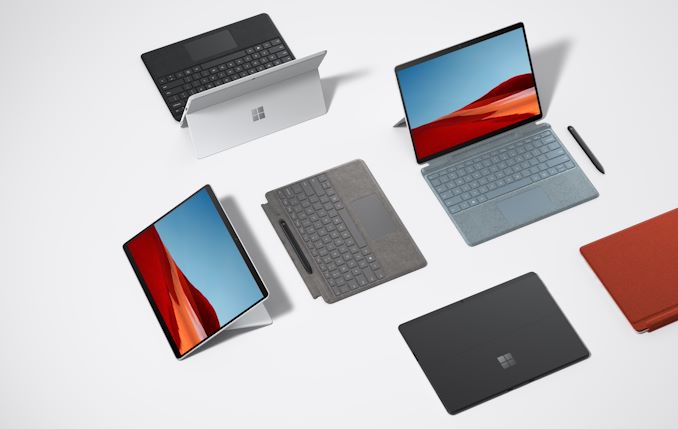
Other than the new, optional CPU, the other big change is that Surface Pro X will now be available in Platinum, rather than just the matte black that it was before.


As this is just a refresh, not much else is changing. Surface Pro X still comes with LTE availability with the Qualcomm X24 LTE modem, a 13-inch PixelSense display with a 2880×1920 resolution for 267 pixels-per-inch, 8 or 16 GB of LPDDR4x RAM, and 128 / 256 / 512 GB SSD drives which are removable.


The Surface Pro X starts at $999.99 USD, with the new SQ2 powered update starting at $1499.99.


Accessories


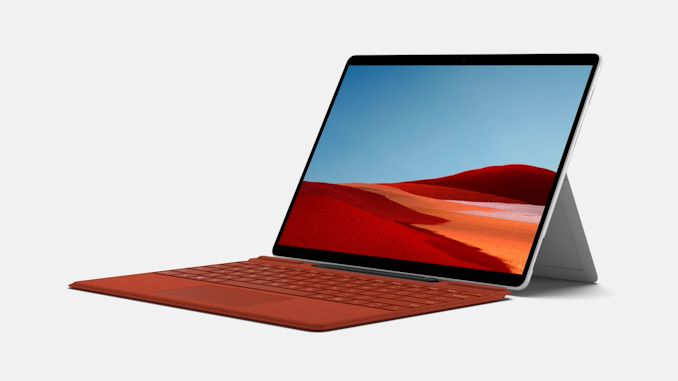
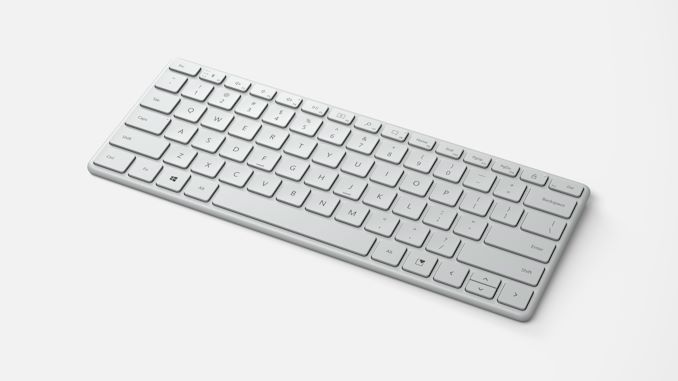
Microsoft is also announcing new accessories today, including new keyboard colors for the Surface Pro X, with Platinum, Ice Blue, and Poppy Red. There are also new Designer Compact Keyboards with Bluetooth, offering two years of battery life, and three-device support, as well as matching number pads.


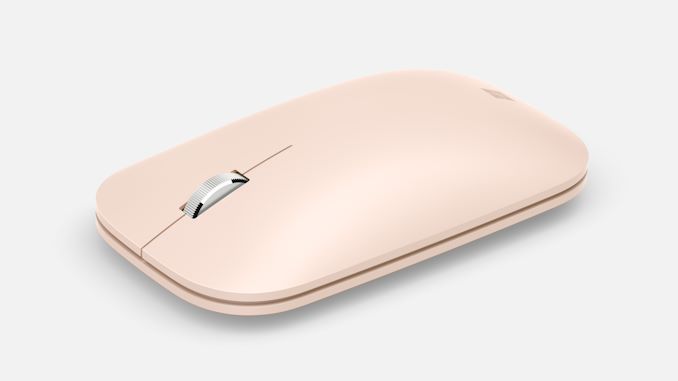
Microsoft is offering a wide-range of colors on the Microsoft Modern Mobile Mouse (Quad M? Impressive) with a new sandstone color joining the mix.


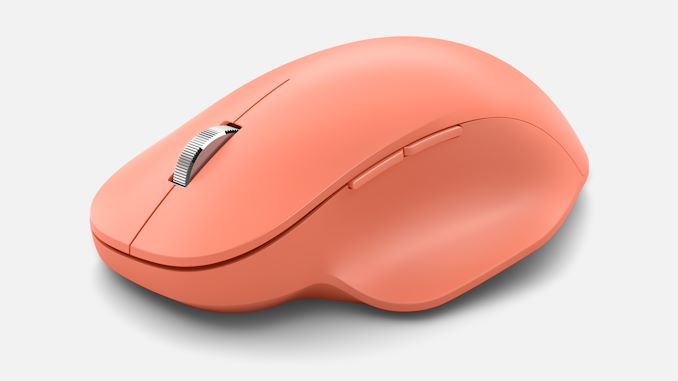
If you prefer something with a bit more shape, Microsoft also is announcing the Bluetooth Ergonomic Mouse, priced at $49.99.


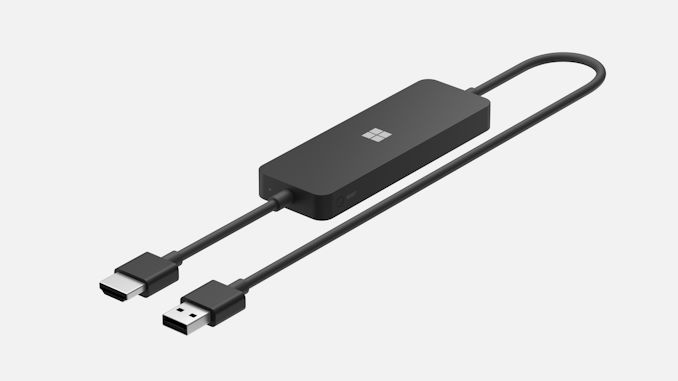
Finally, there is a new 4K Display Adapter from Microsoft, priced at $69.99.


Source: Microsoft


Source: AnandTech – Microsoft Surface Pro X Gets A Refresh: SQ2 Processor And Platinum Finish

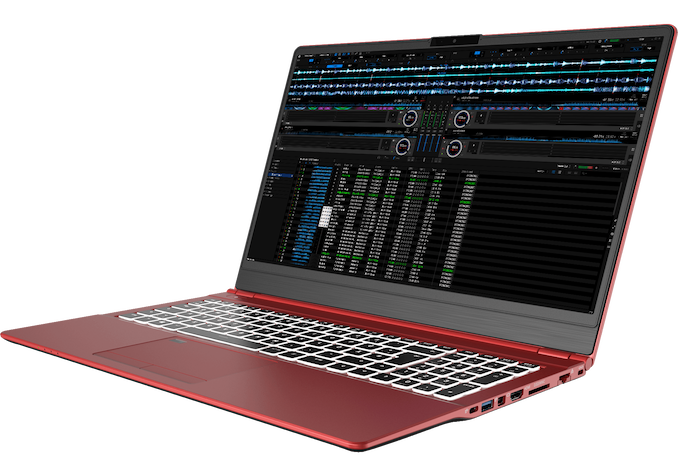
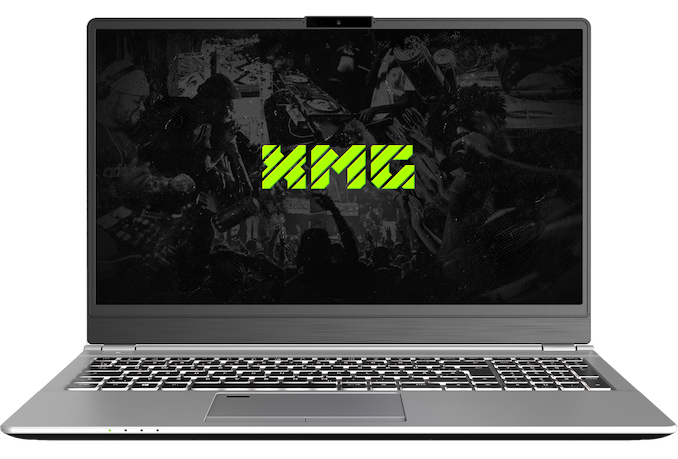
A 15-inch Thin Laptop For The Road: No More Dongles With The XMG DJ 15

As a journalist and an editor that in any given year travels around the world to attend events, having the best device that helps me write news and generate content is always on my mind. Having a device with more battery life, or more performance, or can deal with dodgy Wi-Fi connections, or can process photos and video while having a good display at a nice price are all factors. Weight is also an important one, as it gets lugged around for 12+ hours a day, and I don’t want to be carrying around too many dongles for everything. The new XMG DJ 15 might be a contender for one of the best devices to do this with.


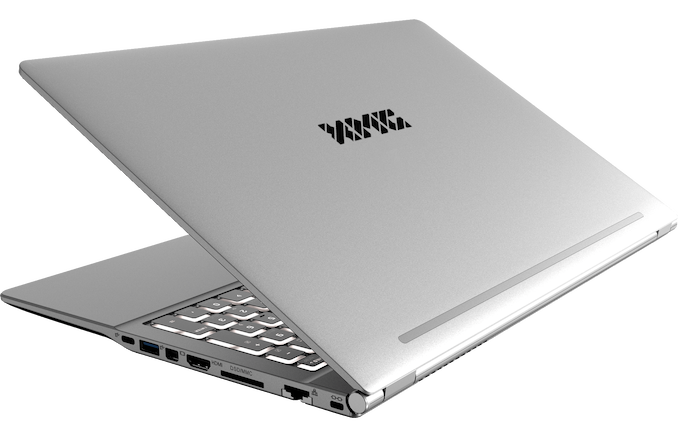
The XMG DJ 15 is a 15-inch notebook that is designed to be light but also has an array of connectivity unlike any other notebooks I’ve seen in this segment. Despite the size, there is no discrete graphics card in this design, saving space and also allowing the cooling system to be reduced from a typical gaming notebook. This keeps it thin, measuring only 19.9mm at its tallest point, but the use of aluminium keeps it light, weighing in at only 1.6 kg.


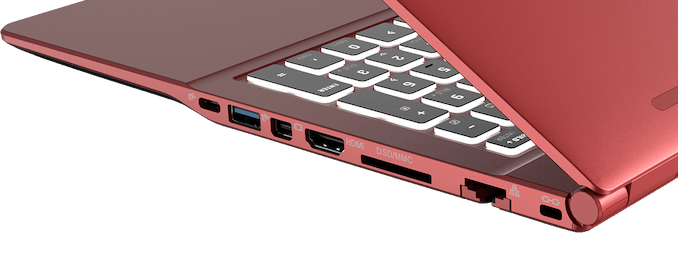
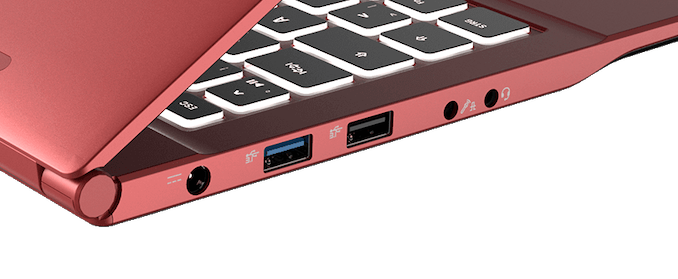
For connectivity, the unit has two USB 3.1 Type-A ports, a Thunderbolt 3/Type-C with 60W fast charging, a full-sized HDMI port, a mini-DisplayPort, an SD card reader, a gigabit Ethernet port (!), two 3.5mm jacks for headphone/microphone, and a USB 2.0 Type-A port for legacy.


Inside is an Intel 10th Gen Comet Lake processor, with the base specification using the Core i5-10210U, 16 GB of DDR4-2666 memory, and a 1 TB Samsung 970 EVO Plus PCIe 3.0 x4 NVMe storage drive, all for a pre-tax price 1052 Euro / $1237. The memory is SO-DIMM and the storage is M.2, making both upgradeable. 


That also gets Wi-Fi 5, the 15.6-inch 1920×1080 IPS thin-bezel display, a HD webcam, a backlit keyboard with number pad, a Microsoft Precision Touchpad with a fingerprint sensor, and a 54.4 Wh battery. Moving up to Wi-Fi 6 is another $5.


This device isn’t so much aimed at workers, but DJs. XMG claims the unit is built with components that minimise DPC latency, even when Wi-Fi and Bluetooth are enabled. It is pre-tested with all the major DJ software, such as Serato, Traktor, Rekordbox and Virtual DJ. This makes it suitable even for simple DAW projects. It will ship with an optimized installation of Windows 10 Pro, and XMG quotes a maximum DPC Latency of a millisecond. XMG will also work with DJs that have custom needs and offers a bespoke service for those that might need additional features.


The XMG DJ 15 will be available in a traditional silver color or a more striking red design. Even in the base configuration, that price seems great for a workhorse machine on the road, and hopefully the display quality is decent. The version I’d be interested in, with the i7-10510U, Wi-Fi 6, and 32 GB of memory, runs at €1,337 (incl. tax). That can’t be a coincidence.


Related Reading


Source: AnandTech – A 15-inch Thin Laptop For The Road: No More Dongles With The XMG DJ 15

Google Announces Pixel 4a (5G) and Pixel 5: Focusing on the Mid-Range?

Today through the company’s rather short virtual launch event, among other novelties, Google has officially announced the new Pixel 4a (5G) and the new Pixel 5. Both phones had been teased for some time now as Google had pre-announced them back in in early August with the announcement of the Pixel 4a.

The new Pixel 4a (5G) is very much what its name implies, a variant of the Pixel 4a with added 5G connectivity through the addition of a Snapdragon 765 SoC. The phone here is very similar to its 4G variant, although Google had to grow the device’s dimensions a bit, and a more apt name for it would have been the 4a XL (5G) but that’s quite a mouthful.

The new Pixel 5 is a quite different phone for Google’s mainstream line-up as here the company has abandoned any attempts at making a flagship device, relegating itself into the mid-range to premium price segment. Also featuring a Snapdragon 765, the phone’s other specs are quite more conservative compared to other devices in 2020 – it’s somewhat of a risky move at a still rather high $699 price point.


Source: AnandTech – Google Announces Pixel 4a (5G) and Pixel 5: Focusing on the Mid-Range?

Xiaomi Announces Mi 10T & Mi 10T Pro: More Budget, But With 144Hz

Today Xiaomi is announcing their late-year flagship devices with the unveiling of the new Mi 10T and Mi 10T Pro devices. The refreshes this year are a bit more unconventional as they aren’t exactly direct successors to the Mi 10 and Mi 10 Pro – but rather lower-cost alternatives. Still, the new devices promise to bring a slew of new software camera features as well as being the first phones on the market to adopt new 144Hz display screens with AdaptiveSync variable refresh rate functionality.

The new Mi 10T’s series biggest selling point is probably their reduced prices, starting at only 499€ for the base model Mi 10T – still delivering you a Snapdragon 865 SoC, a competitive camera as well as the aforementioned 144Hz OLED display, packing a massive 5000mAh battery.


Source: AnandTech – Xiaomi Announces Mi 10T & Mi 10T Pro: More Budget, But With 144Hz

SanDisk Extreme Portable SSD v2 and WD My Passport SSD (2020) Review

External bus-powered storage devices have grown both in storage capacity as well as speeds over the last decade. Thanks to rapid advancements in flash technology (including the advent of 3D NAND and NVMe) as well as faster host interfaces (such as Thunderbolt 3 and USB 3.x), we now have palm-sized flash-based storage devices capable of delivering 2GBps+ speeds. While those speeds can be achieved with Thunderbolt 3, mass-market devices have to rely on USB. This review discusses the performance and characteristics of Western Digital’s latest offerings (2020 catalog) supporting USB 3.1 Gen 2 (10 Gbps) speeds.


Introduction


High-performance external storage devices use either Thunderbolt 3 or USB 3.2 Gen 2 for the host interface. Traditional SATA SSDs (saturating at 560 MBps) can hardly take full advantage of the bandwidth offered by USB 3.2 Gen 2. In 2020, we have seen the market move en-masse to NVMe SSDs behind a USB 3.2 Gen 2 bridge for this market segment.


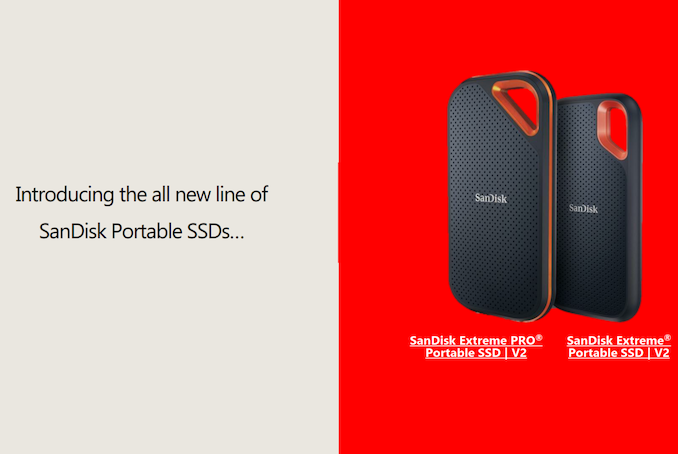
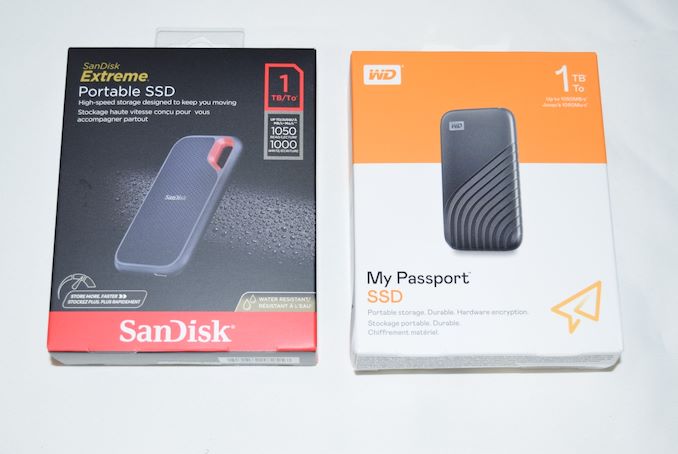
Western Digital brought NVMe support to their My Passport SSD product line last month. Today, the company is launching the SanDisk Extreme Portable SSD v2 (along with the Extreme PRO Portable SSD v2). The Extreme v2 is of particular interest here, as both the feature set and the performance specifications tally with that of the My Passport SSD. The company provided us with review samples of the 1TB versions of the My Passport SSD as well as the SanDisk Extreme Portable SSD v2.
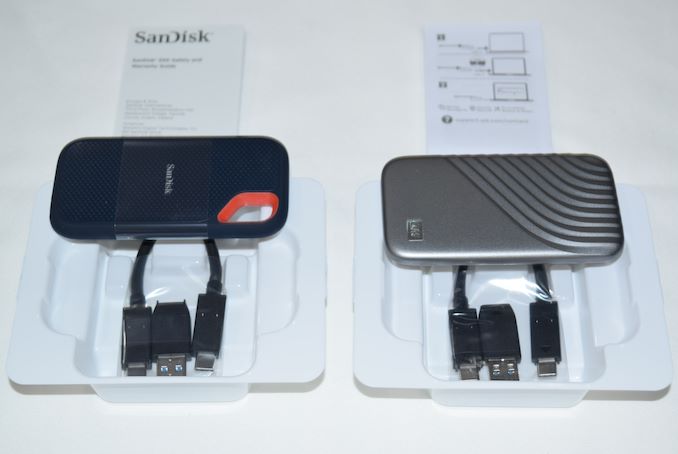


The two products are packaged similarly and both come with short (15cm) USB 3.2 Gen 2 Type-C to Type-C cables. A Type-C to Type-A adaptor is supplied, similar to the ones with the previous generation external SSDs from Western Digital. The industrial design of the units is quite different, each appealing to its own target market. The carabiner loop in the SanDisk Extreme / PRO line has proved to be a useful complement to the gumstick form-factor enforced by the usage of a M.2 NVMe SSD. It has been particularly appreciated by content creators (photographers and videographers) on the go. The My Passport SSD with its rounded edges and grooves / availability in multiple colors may hold appeal to the mainstream style-conscious audience. As we shall see further down in the ‘Device Features & Characteristics’ section, the internal hardware is identical. The rest of the review also tackles another interesting aspect – does the same internal hardware lead to similar performance profiles for the two SSDs?


In this review, we compare the SanDisk Extreme Portable SSD v2 and the WD My Passport SSD (2020) against each other, as well as the following DAS units that we have reviewed before.


  • ADATA SE800 1TB
  • Crucial Portable SSD X8 1TB
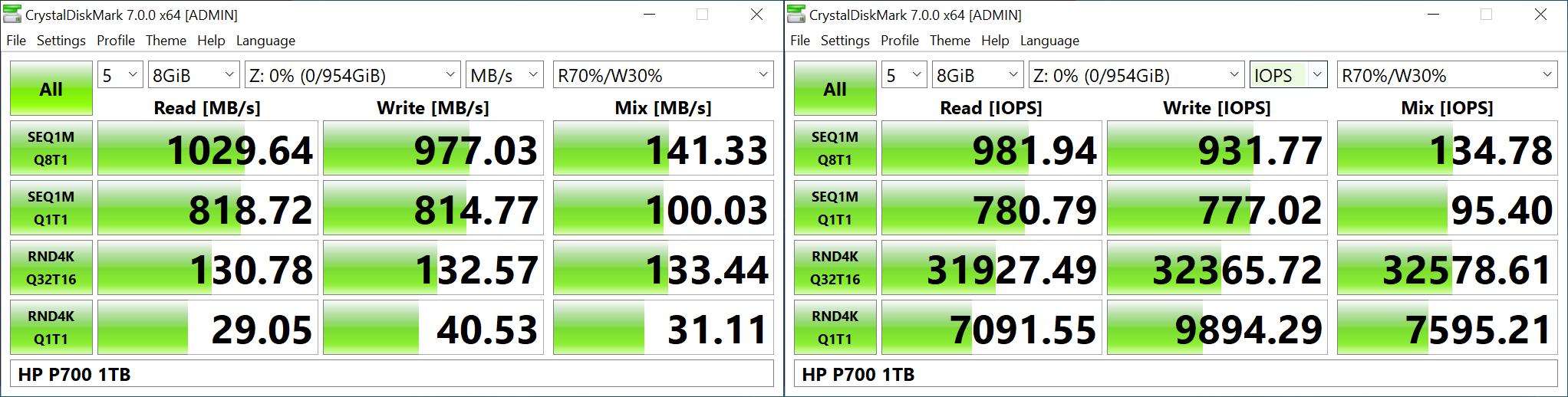
  • HP P700 1TB
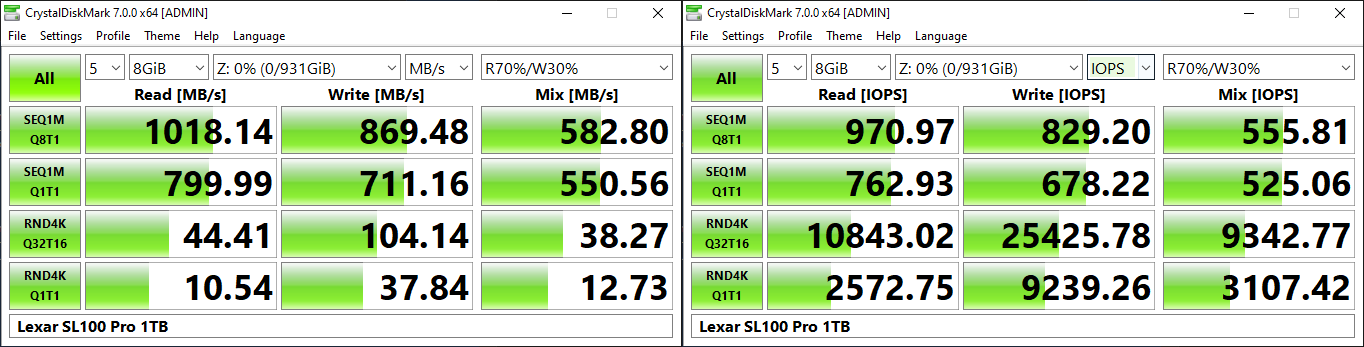
  • Lexar SL100 Pro 1TB
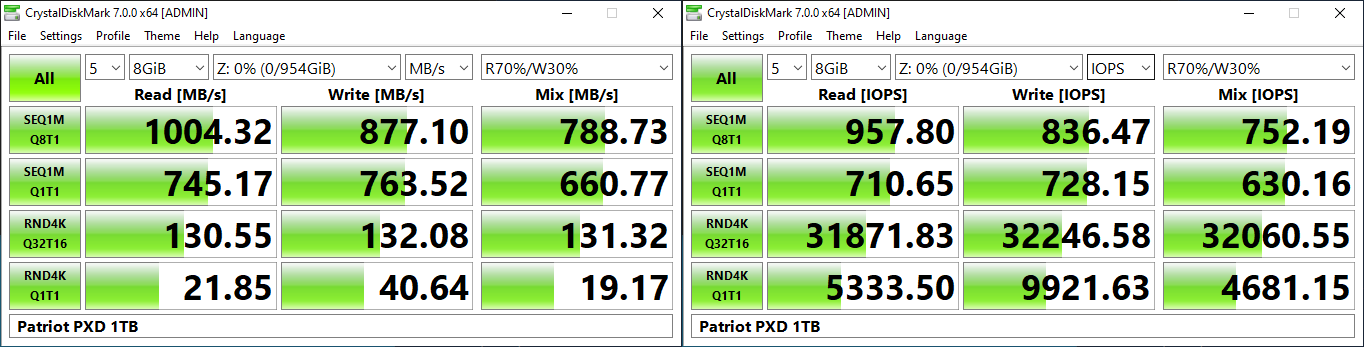
  • Patriot PXD 1TB
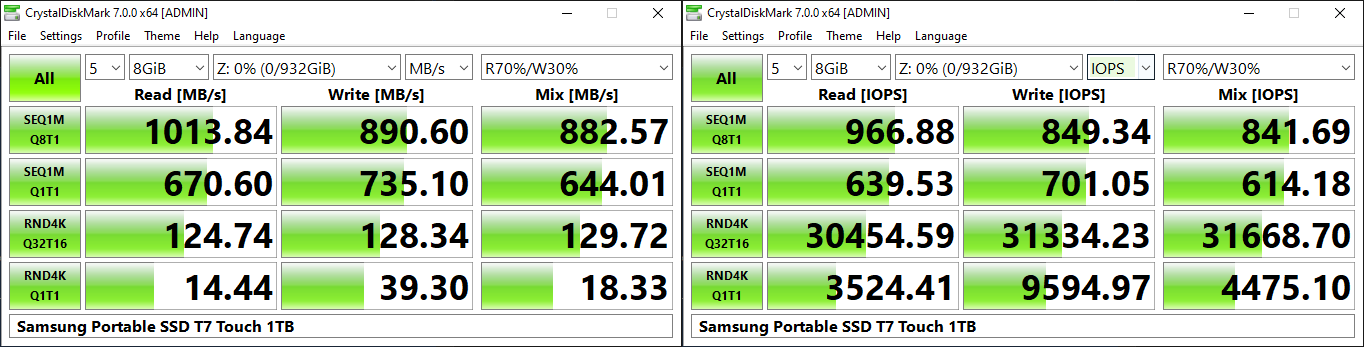
  • Samsung Portable SSD T7 Touch 1TB
  • SanDisk Extreme Pro Portable SSD 1TB

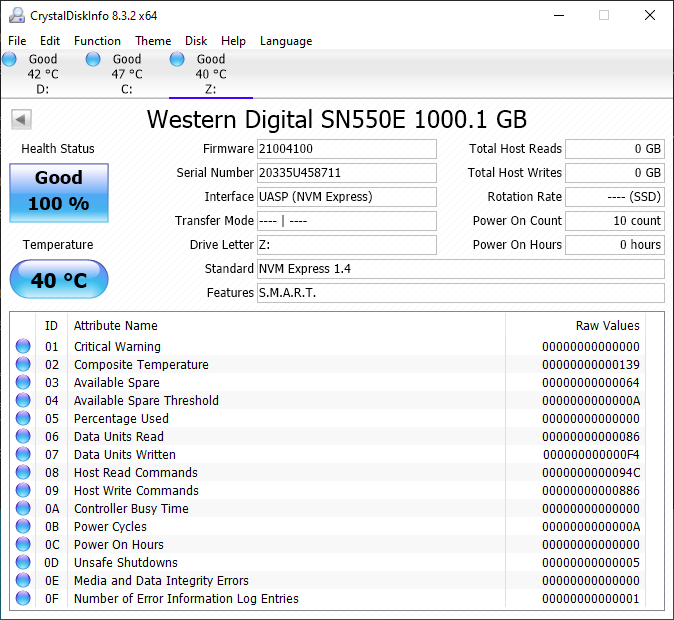
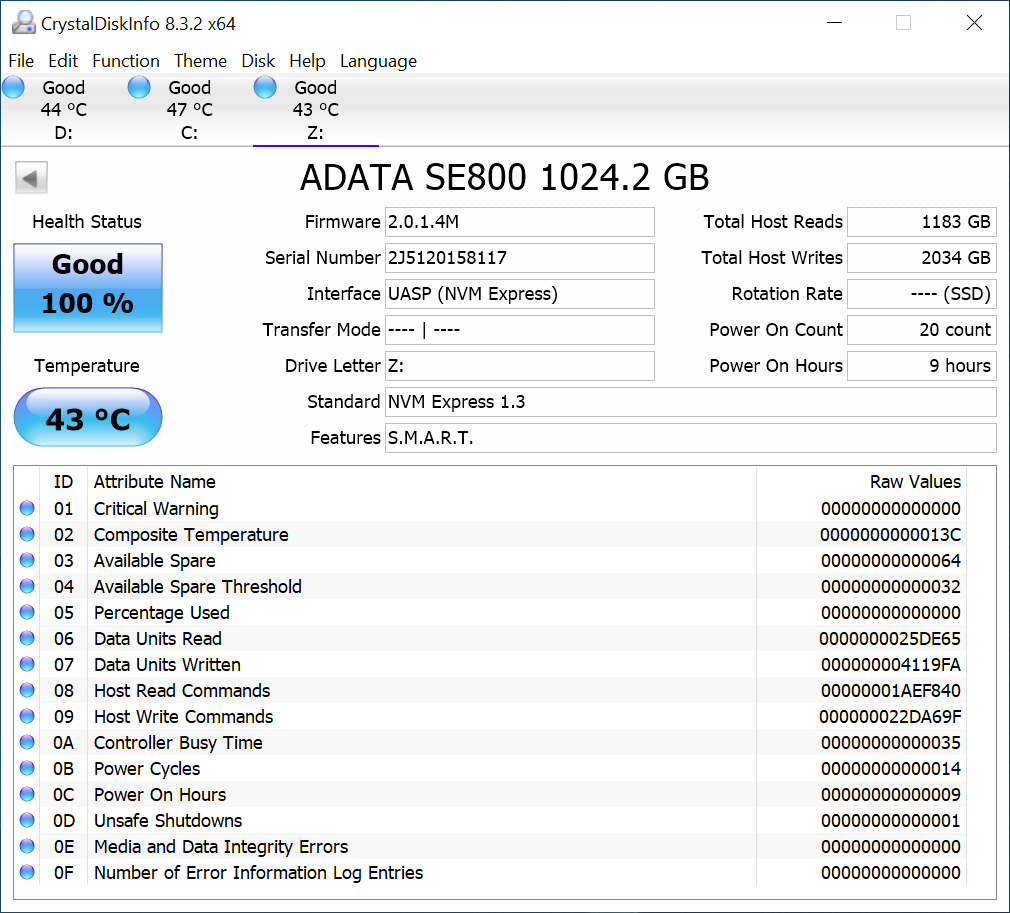
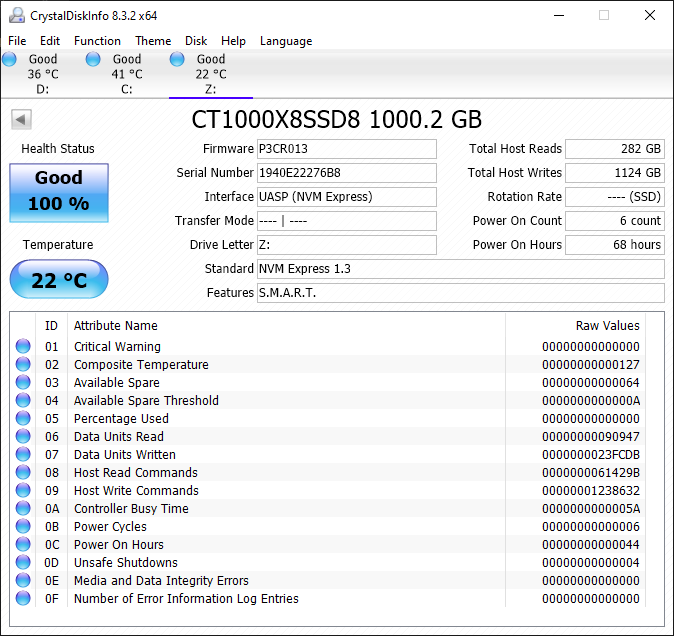
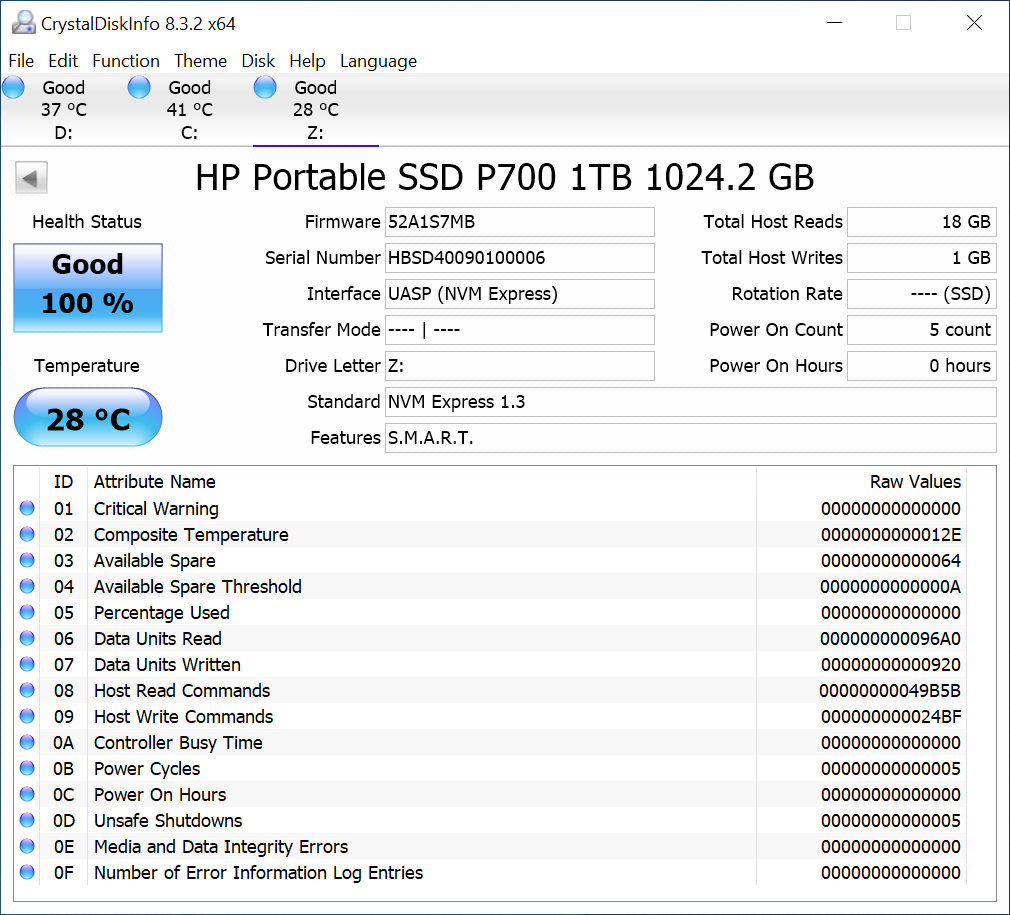
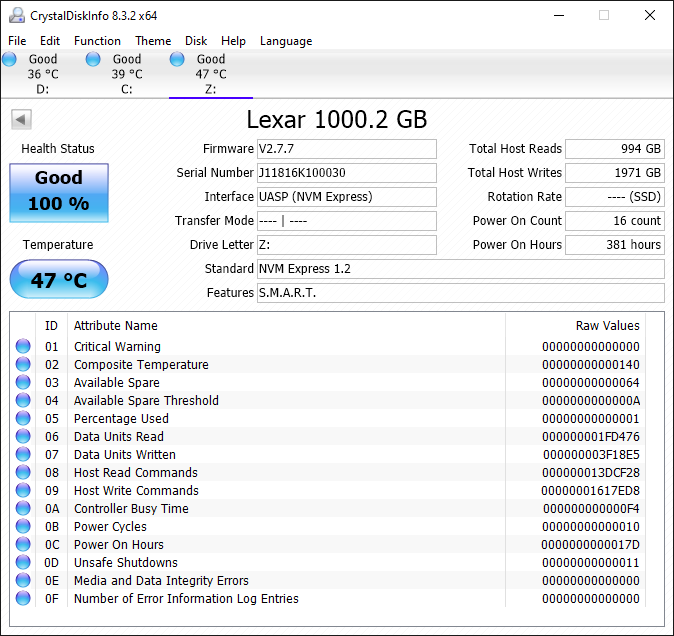
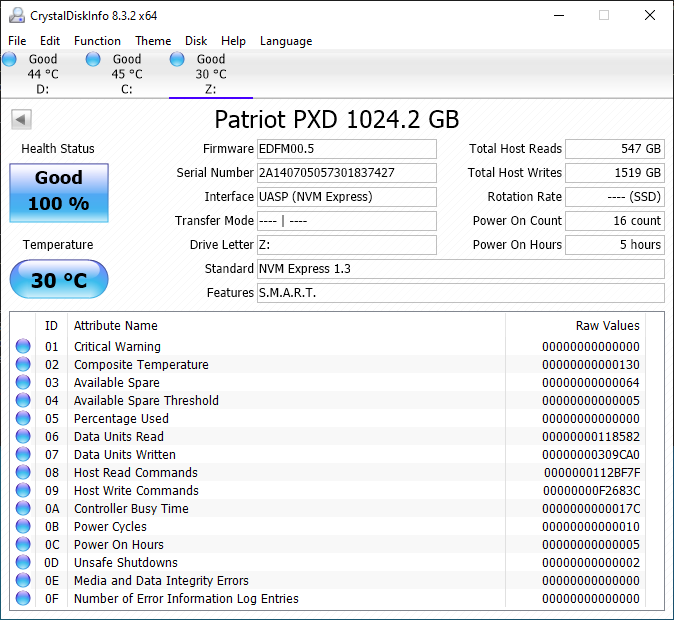
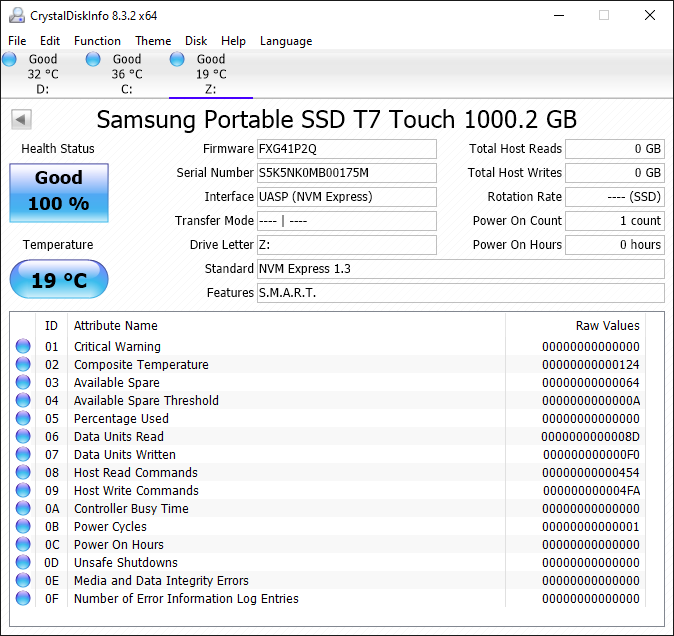
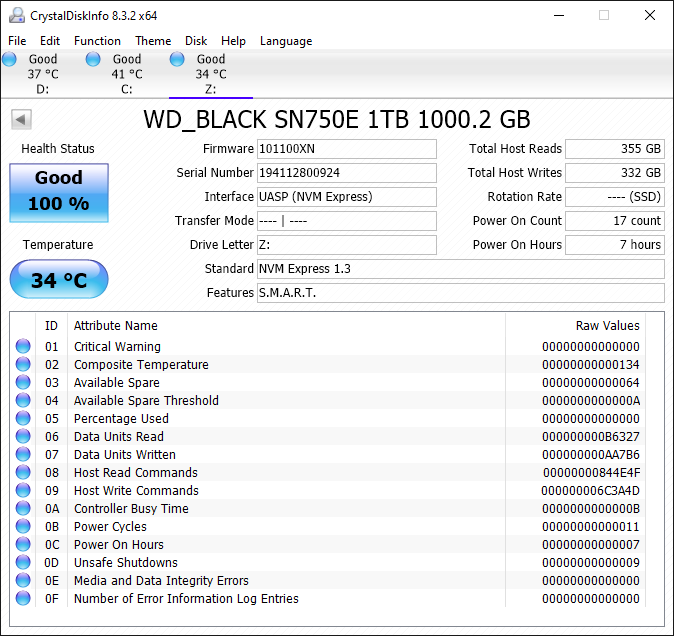
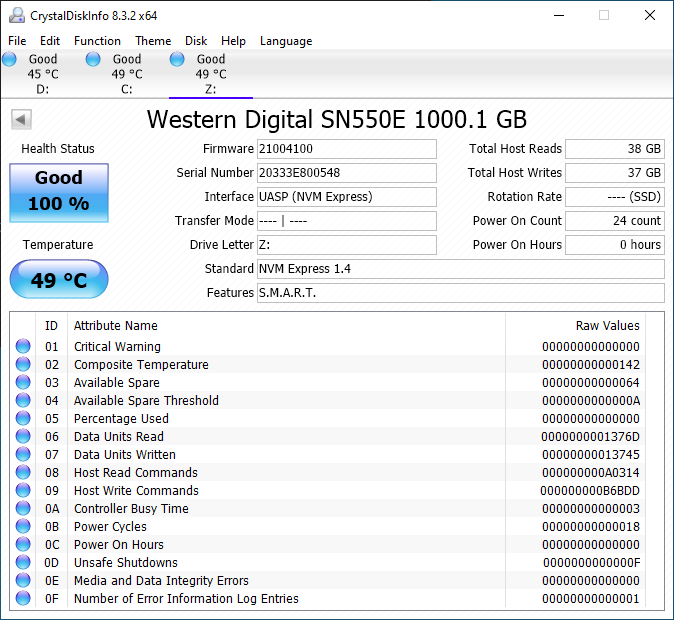
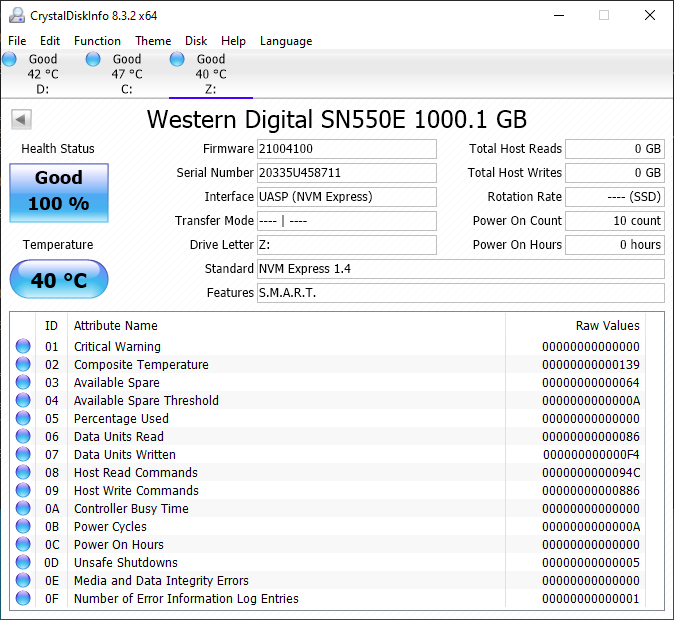
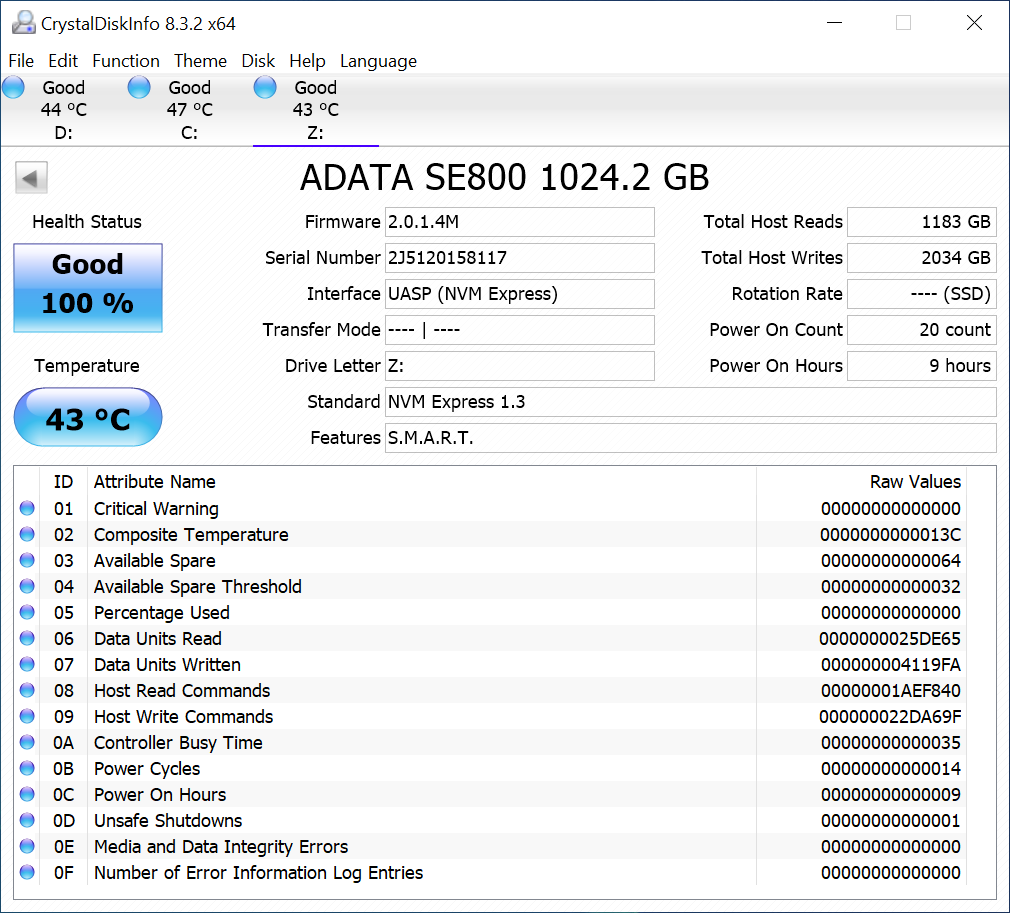
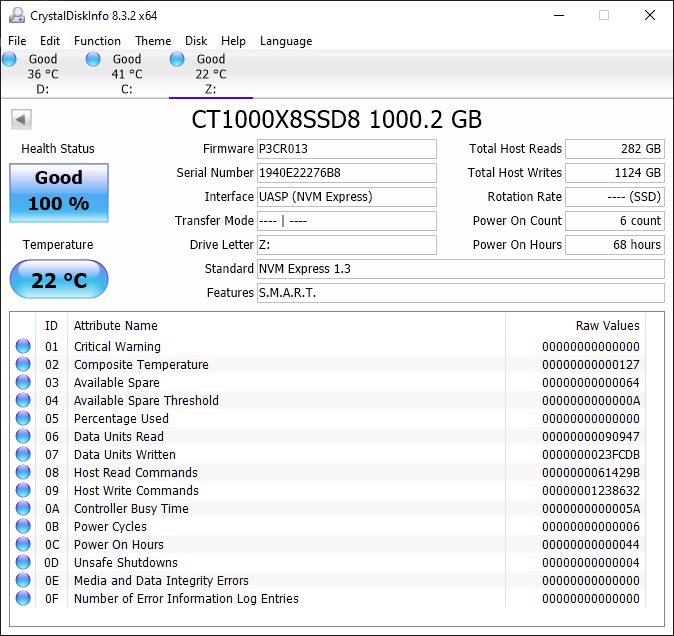
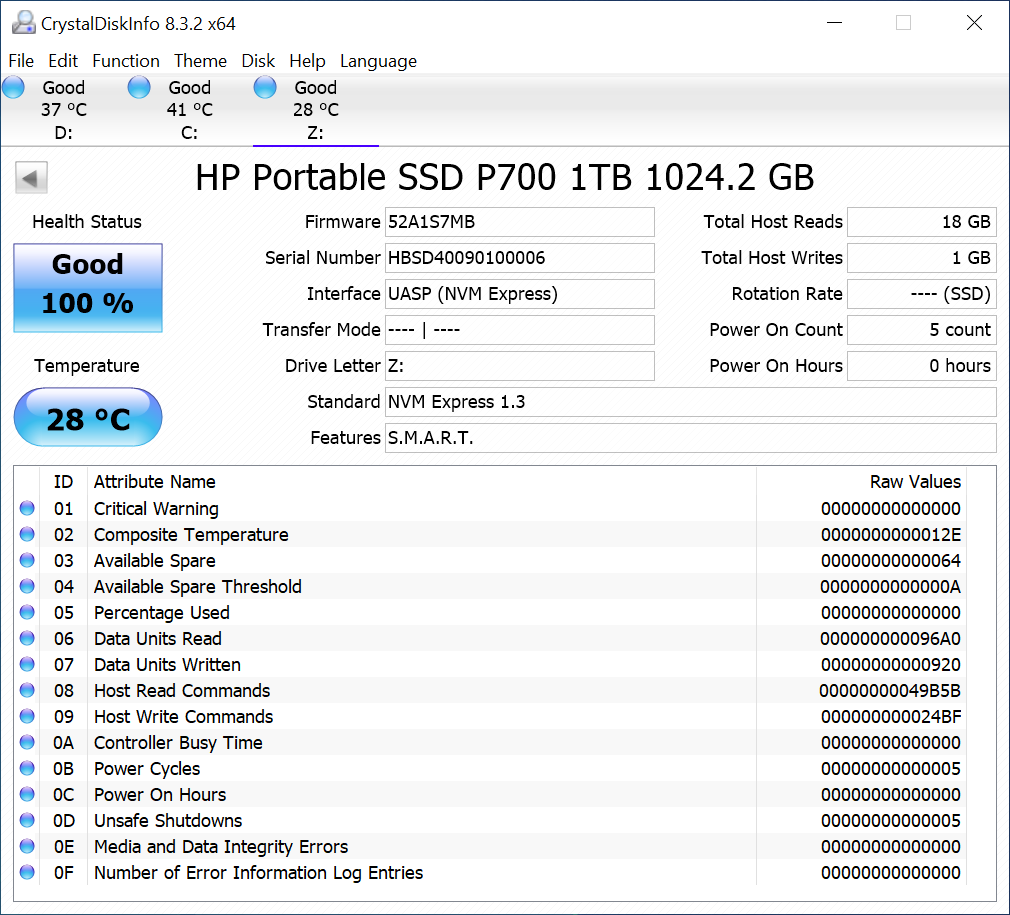
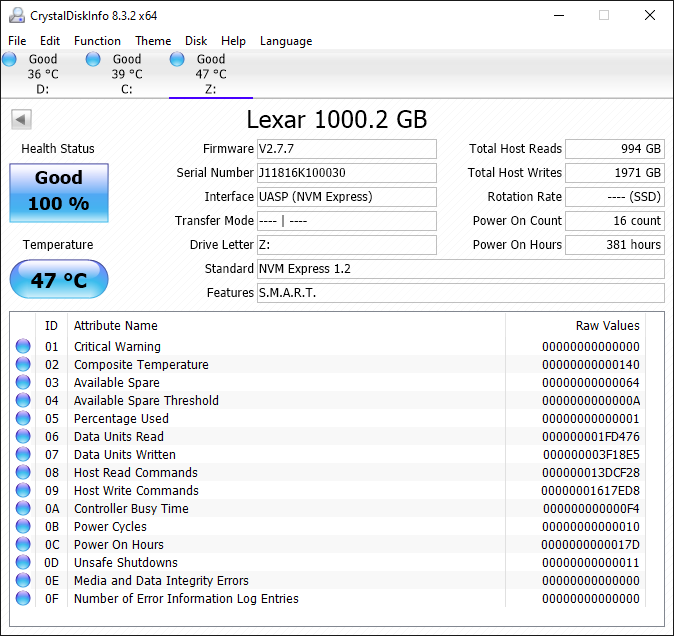
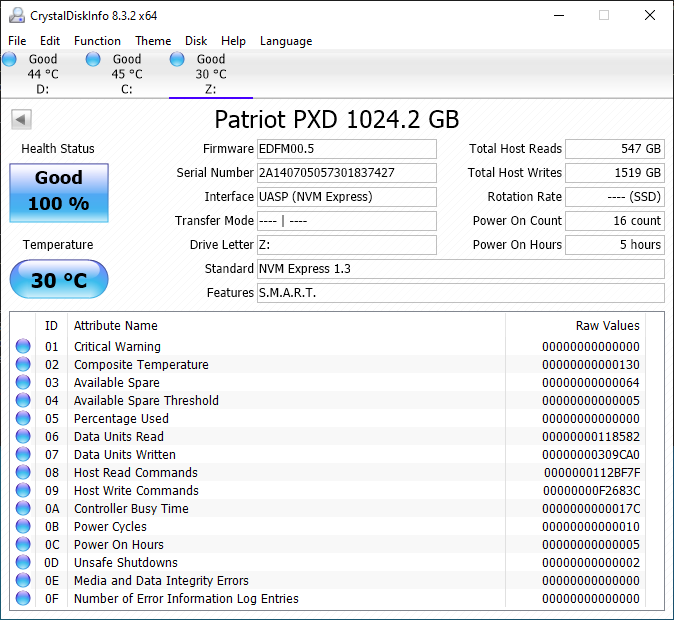
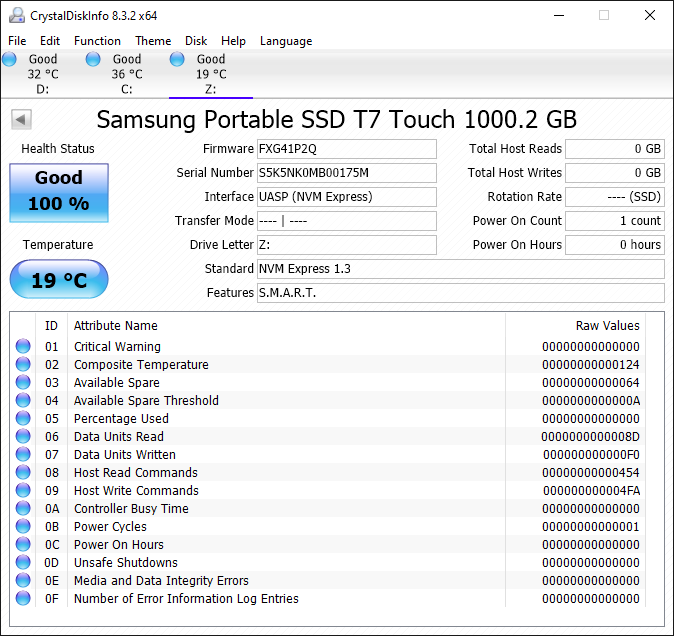
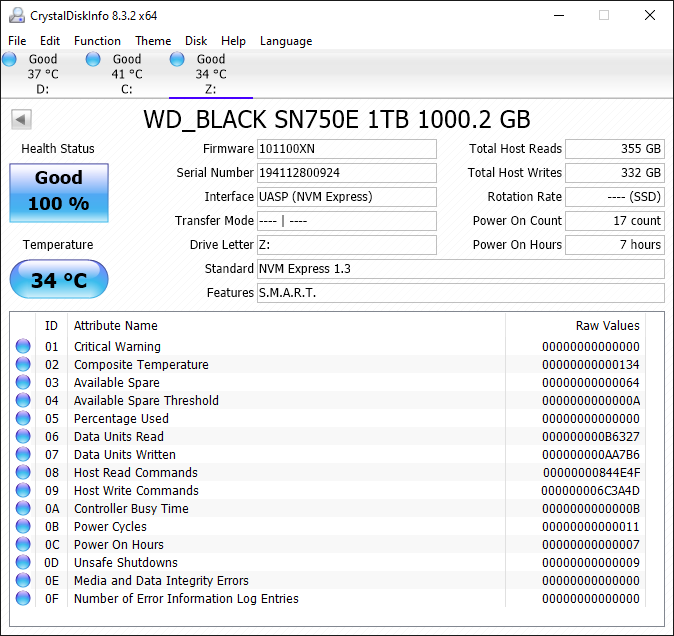
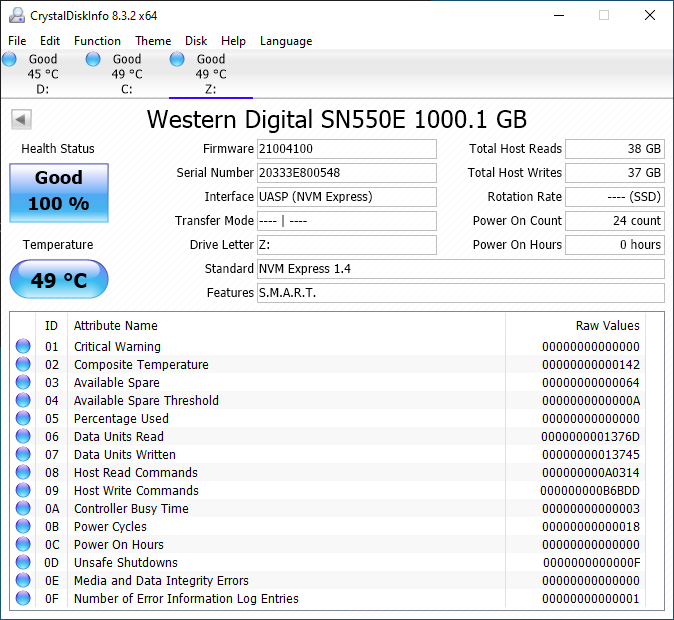
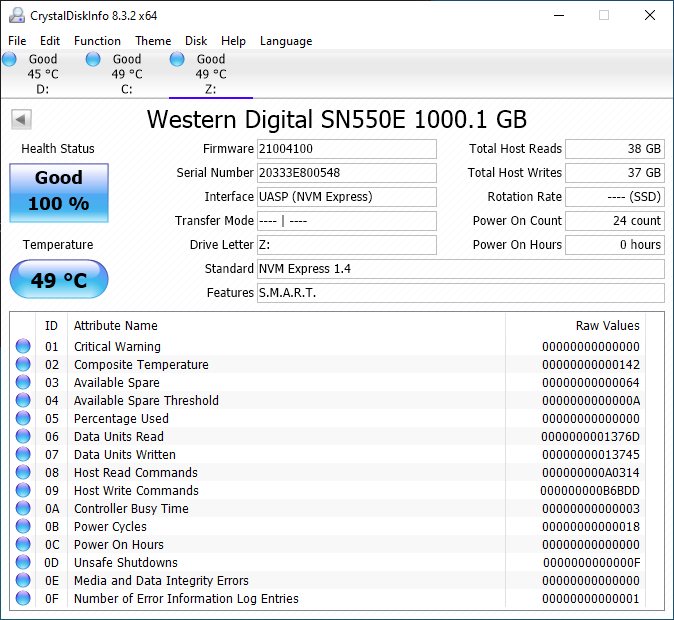
A quick overview of the internal capabilities of the storage devices is given by CrystalDiskInfo.


var CDI_paths_0 = new Array(‘‘,’‘,’‘,’‘,’‘,’‘,’‘,’‘,’‘);
CDI_paths_0.push(‘


‘);


Drive Information
SanDisk Extreme Portable SSD v2 1TBWD My Passport SSD (2020) 1TBADATA SE800 1TBCrucial Portable SSD X8 1TBHP P700 1TBLexar SL100 Pro 1TBPatriot PXD 1TBSamsung Portable SSD T7 Touch 1TBSanDisk Extreme Pro Portable SSD 1TBExpand All

The SanDisk Extreme Portable SSD v2 and the WD My Passport SSD (2020) use the same internal SSD – the Western Digital SN550E. The SN550 is available in retail under the WD Blue branding. We believe that the ‘E’ suffix stands for ‘External’ – WD did confirm that the SSD being used was SN550-class, and it contained specific firmware tweaks for use as an external SSD. Like almost every other M.2 NVMe SSD behind a USB 3.2 Gen 2 bridge, the SanDisk Extreme Portable SSD v2 and the WD My Passport SSD (2020) support S.M.A.R.T. passthrough and TRIM (though it is not explicitly evident in the CrystalDiskInfo screenshot).


The gallery above presents some pictures of the internals of the WD My Passport SSD (2020). We see that the two sides of the My Passport SSD clamshell are held together by industrial-strength double sided tape. Prying apart the two at the seam was relatively painless – in fact, it was the easiest portable SSD to take apart (out of all the ones that I had worked on earlier). The SanDisk Extreme Portable SSD v2’s top segment holds on to the bottom segment using a series of plastic clips in the inside perimeter – this is straightforward to take out using opening picks. Selected pictures are available in the gallery below.


Inside the unit, we see that a thermal pad right across the M.2 SSD (in the Extreme v2 teardown) and another on the reverse side (in the My Passport SSD teardown). In addition to helping remove the heat away, they also ensure that the boards are snug inside the enclosure and can withstand shocks and vibrations. Pictures of the ASMedia ASM2362 bridge chip can be seen in the main board, while the SanDisk 20-82-10023 controller can be seen in the M.2 SSD.


Testbed Setup and Testing Methodology


Evaluation of DAS units on Windows is done with a Hades Canyon NUC configured as outlined below. We use one of the rear USB Type-C ports enabled by the Alpine Ridge controller for both Thunderbolt 3 and USB devices.


AnandTech DAS Testbed Configuration
Motherboard Intel NUC8i7HVB
CPU Intel Core i7-8809G

Kaby Lake, 4C/8T, 3.1GHz (up to 4.2GHz), 14nm+, 8MB L2
Memory Crucial Technology Ballistix DDR4-2400 SODIMM

2 x 16GB @ 16-16-16-39
OS Drive Intel Optane SSD 800p SSDPEK1W120GA

(118 GB; M.2 Type 2280 PCIe 3.0 x2 NVMe; Optane)
SATA Devices Intel SSD 545s SSDSCKKW512G8

(512 GB; M.2 Type 2280 SATA III; Intel 64L 3D TLC)
Chassis Hades Canyon NUC
PSU Lite-On 230W External Power Brick
OS Windows 10 Enterprise x64 (v1909)
Thanks to Intel for the build components

Our evaluation methodology for direct-attached storage devices adopts a judicious mix of synthetic and real-world workloads. While most DAS units targeting a particular market segment advertise similar performance numbers and also meet them for common workloads, the real differentiation is brought out on the technical side by the performance consistency metric and the effectiveness of the thermal solution. Industrial design and value-added features may also be important for certain users. The remaining sections in this review tackle all of these aspects after analyzing the features of the drives in detail.


Device Features and Characteristics


Prior to looking at the usage characteristics of the SanDisk Extreme Portable SSD v2 and the WD My Passport SSD (2020), it is helpful to compare their specifications against other similar SSDs.


var das_up_port_0 = new Array(‘USB 3.2 Gen 2 Type-C’,’USB 3.2 Gen 2 Type-C’,’USB 3.2 Gen 2 Type-C’,’USB 3.2 Gen 2 Type-C’,’USB 3.2 Gen 2 Type-C’,’USB 3.2 Gen 2 Type-C’,’USB 3.2 Gen 2 Type-C’,’USB 3.2 Gen 2 Type-C’,’USB 3.2 Gen 2 Type-C’);
var das_bchip_0 = new Array(‘ASMedia ASM2362 + SanDisk 20-82-10023′,’ASMedia ASM2362 + SanDisk 20-82-10023′,’ASMedia ASM2362 + Innogrit IG5208′,’ASMedia ASM2362 + Silicon Motion SM2263′,’JMicron JMS583 + HP H8098 (Silicon Motion SM2263EN)’,’JMicron JMS583 + Marvell 88NV1160′,’JMicron JMS583 + Phison E13T’,’ASMedia ASM2362 + Samsung Pablo S4LR033′,’ASMedia ASM2362 + SanDisk 20-82-007011′);
var das_flash_0 = new Array(‘SanDisk BiCS 4 96L 3D TLC’,’SanDisk BiCS 4 96L 3D TLC’,’Micron 64L 3D TLC’,’Micron 64L 3D QLC’,’Micron 64L 3D TLC’,’?? ??L 3D TLC’,’Kioxia (Toshiba) BiCS 4 96L 3D TLC’,’Samsung 92L 3D V-NAND TLC’,’SanDisk (BiCS 3) 64L 3D TLC’);
var das_power_0 = new Array(‘Bus Powered’,’Bus Powered’,’Bus Powered’,’Bus Powered’,’Bus Powered’,’Bus Powered’,’Bus Powered’,’Bus Powered’,’Bus Powered’);
var das_pdim_0 = new Array(‘52.42 mm x 100.54 mm x 8.95 mm’,’55 mm x 100 mm x 9 mm’,’72.7 mm x 44 mm x 12.2 mm’,’127.5 mm x 92.5 mm x 24 mm’,’65 mm x 92 mm x 9.2 mm’,’73.5 mm x 55 mm x 11 mm’,’31.5 mm x 103 mm x 9.8 mm’,’85 mm x 57 mm x 8 mm’,’96.2 mm x 49.6 mm x 8.9 mm’);
var das_ip_0 = new Array(‘IP55′,’N/A’,’IP68′,’N/A’,’N/A’,’N/A’,’N/A’,’N/A’,’IP55′);
var das_wt_0 = new Array(’63 grams (without cable)’,’54 grams (without cable)’,’40 grams (without cable)’,’148 grams (without cable)’,’58 grams (without cable)’,’71 grams (without cable)’,’35 grams (without cable)’,’58 grams (without cable)’,’79 grams (without cable)’);
var das_cable_0 = new Array(’15 cm USB 3.2 Gen 2 Type-C to Type-C
Type-C to Type-A Adaptor’,’15 cm USB 3.2 Gen 2 Type-C to Type-C
Type-C to Type-A Adaptor’,’20 cm USB 3.2 Gen 2 Type-C to Type-C
20 cm USB 3.2 Gen 2 Type-C to Type-A’,’25 cm USB 3.2 Gen 2 Type-C to Type-C
Type-C to Type-A Adaptor’,’20 cm USB 3.2 Gen 2 Type-C to Type-A
Type-A to Type-C Adaptor’,’25 cm USB 3.2 Gen 2 Type-C to Type-C
25 cm USB 3.2 Gen 2 Type-C to Type-A’,’30 cm USB 3.2 Gen 2 Type-C to Type-A
30 cm USB 3.2 Gen 2 Type-C to Type-C’,’30 cm USB 3.2 Gen 2 Type-C to Type-C
30 cm USB 3.2 Gen 2 Type-C to Type-A’,’25 cm USB 3.2 Gen 2 Type-C to Type-C
25 cm USB 3.2 Gen 2 Type-C to Type-A’);
var das_smart_0 = new Array(‘Yes’,’Yes’,’Yes’,’Limited’,’Yes’,’Limited’,’Yes’,’Limited’,’Limited’);
var das_uasp_0 = new Array(‘Yes’,’Yes’,’Yes’,’Yes’,’Yes’,’Yes’,’Yes’,’Yes’,’Yes’);
var das_trimp_0 = new Array(‘Yes’,’Yes’,’Yes’,’Yes’,’Yes’,’Yes’,’Yes’,’Yes’,’Yes’);
var das_encsup_0 = new Array(‘Hardware (SanDisk SecureAccess App)’,’Hardware (WD Security App)’,’Software (ADATA HDDtoGO)’,’Software (Windows BitLocker to Go / Apple FileVault)’,’N/A’,’Software (Lexar DataShield App)’,’N/A’,’Hardware (Biometric)’,’Software (SanDisk Secure Access App)’);


Direct-Attached Storage Characteristics
Aspect SanDisk Extreme Portable SSD v2 1TBWD My Passport SSD (2020) 1TBADATA SE800 1TBCrucial Portable SSD X8 1TBHP P700 1TBLexar SL100 Pro 1TBPatriot PXD 1TBSamsung Portable SSD T7 Touch 1TBSanDisk Extreme Pro Portable SSD 1TB WD My Passport SSD (2020) 1TBADATA SE800 1TBCrucial Portable SSD X8 1TBHP P700 1TBLexar SL100 Pro 1TBPatriot PXD 1TBSamsung Portable SSD T7 Touch 1TBSanDisk Extreme Pro Portable SSD 1TBSanDisk Extreme Portable SSD v2 1TB
Upstream Port USB 3.2 Gen 2 Type-C USB 3.2 Gen 2 Type-C
Bridge / Controller ASMedia ASM2362 + SanDisk 20-82-10023 ASMedia ASM2362 + SanDisk 20-82-10023
Flash SanDisk BiCS 4 96L 3D TLC SanDisk BiCS 4 96L 3D TLC
Power Bus Powered Bus Powered
     
Physical Dimensions 52.42 mm x 100.54 mm x 8.95 mm 55 mm x 100 mm x 9 mm
IP Rating IP55 N/A
Weight 63 grams (without cable) 54 grams (without cable)
Cable 15 cm USB 3.2 Gen 2 Type-C to Type-C

Type-C to Type-A Adaptor
15 cm USB 3.2 Gen 2 Type-C to Type-C

Type-C to Type-A Adaptor
     
S.M.A.R.T Passthrough Yes Yes
UASP Support Yes Yes
TRIM Passthrough Yes Yes
Encryption Support Hardware (SanDisk SecureAccess App) Hardware (WD Security App)

The two SSDs have the shortest supplied cable lengths at 15cm. Tower desktop users with USB-C ports in the rear panel may need to keep this in mind. The drives feel solid in hand, thanks to their 50g+ weight. The WD My Passport SSD (2020) is slightly wider than the SanDisk Extreme v2, but both of them fit easily in pockets for carrying around.


Synthetic Benchmarks – ATTO and CrystalDiskMark


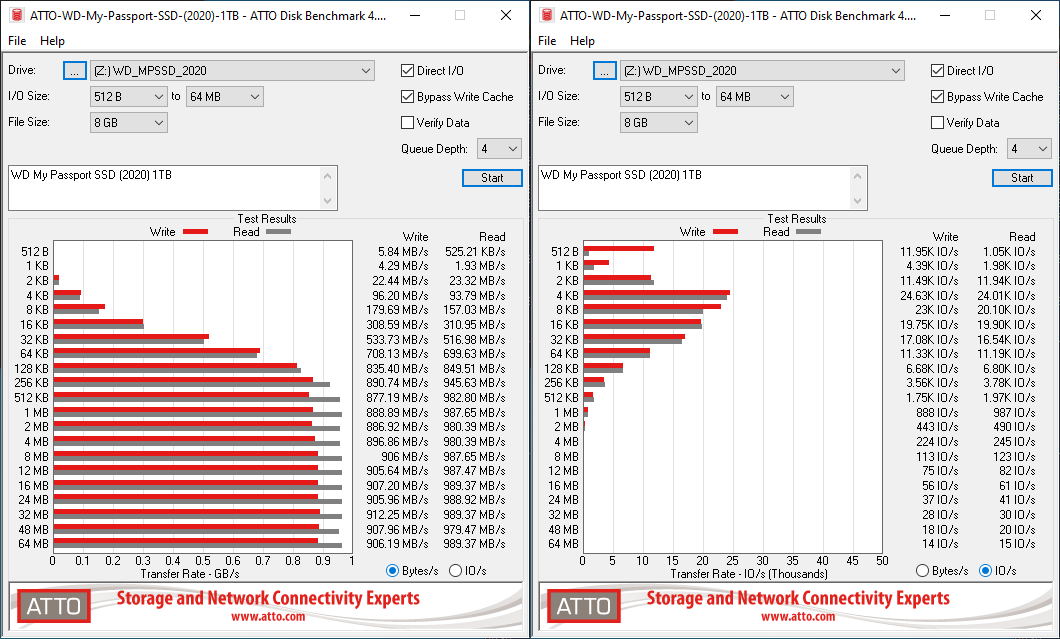
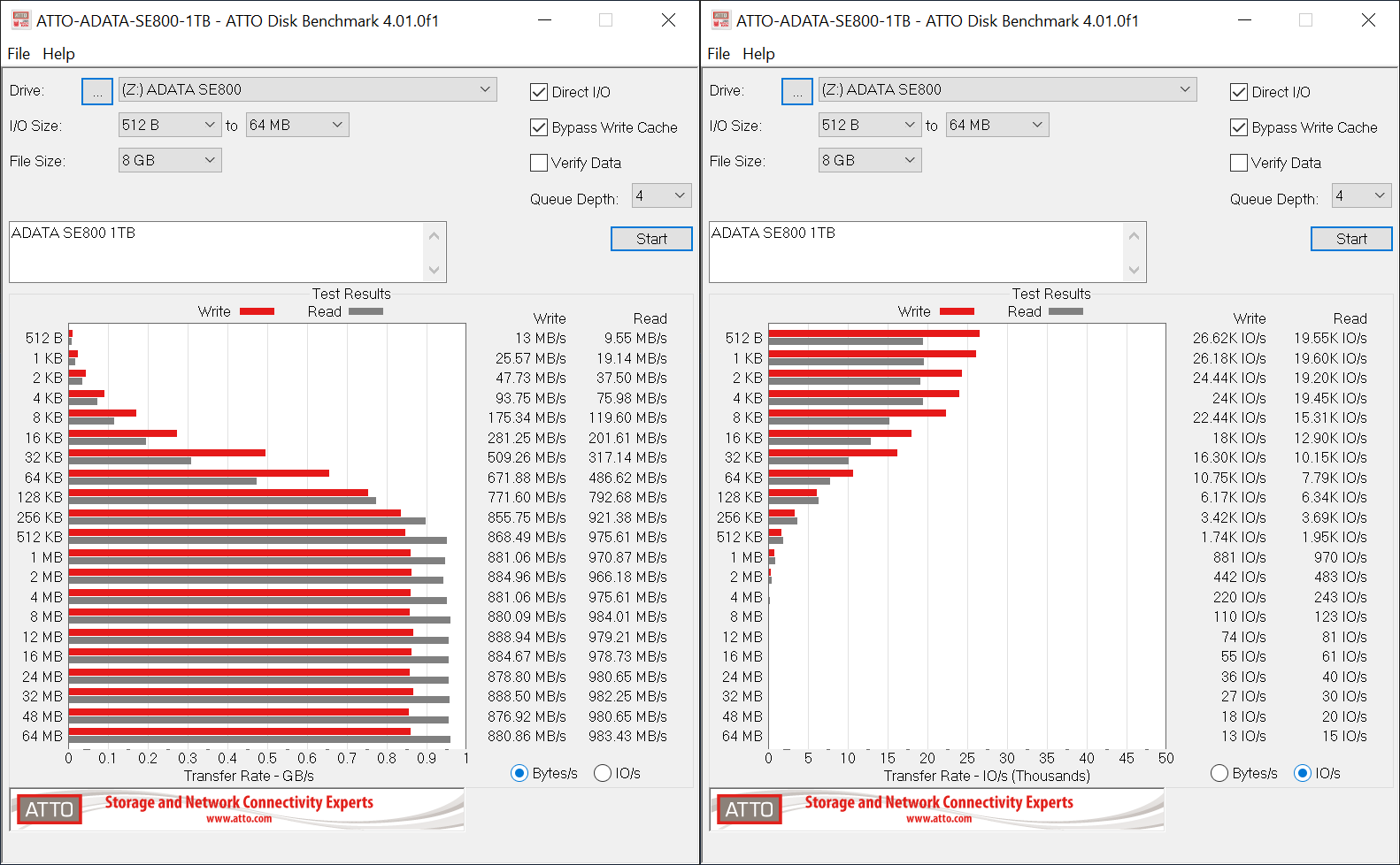
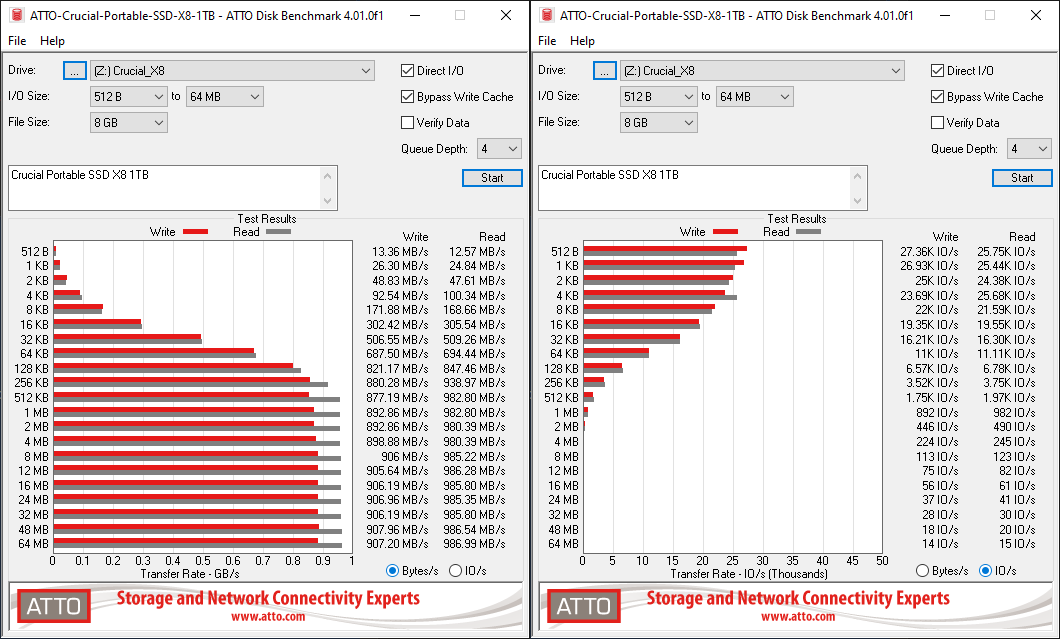
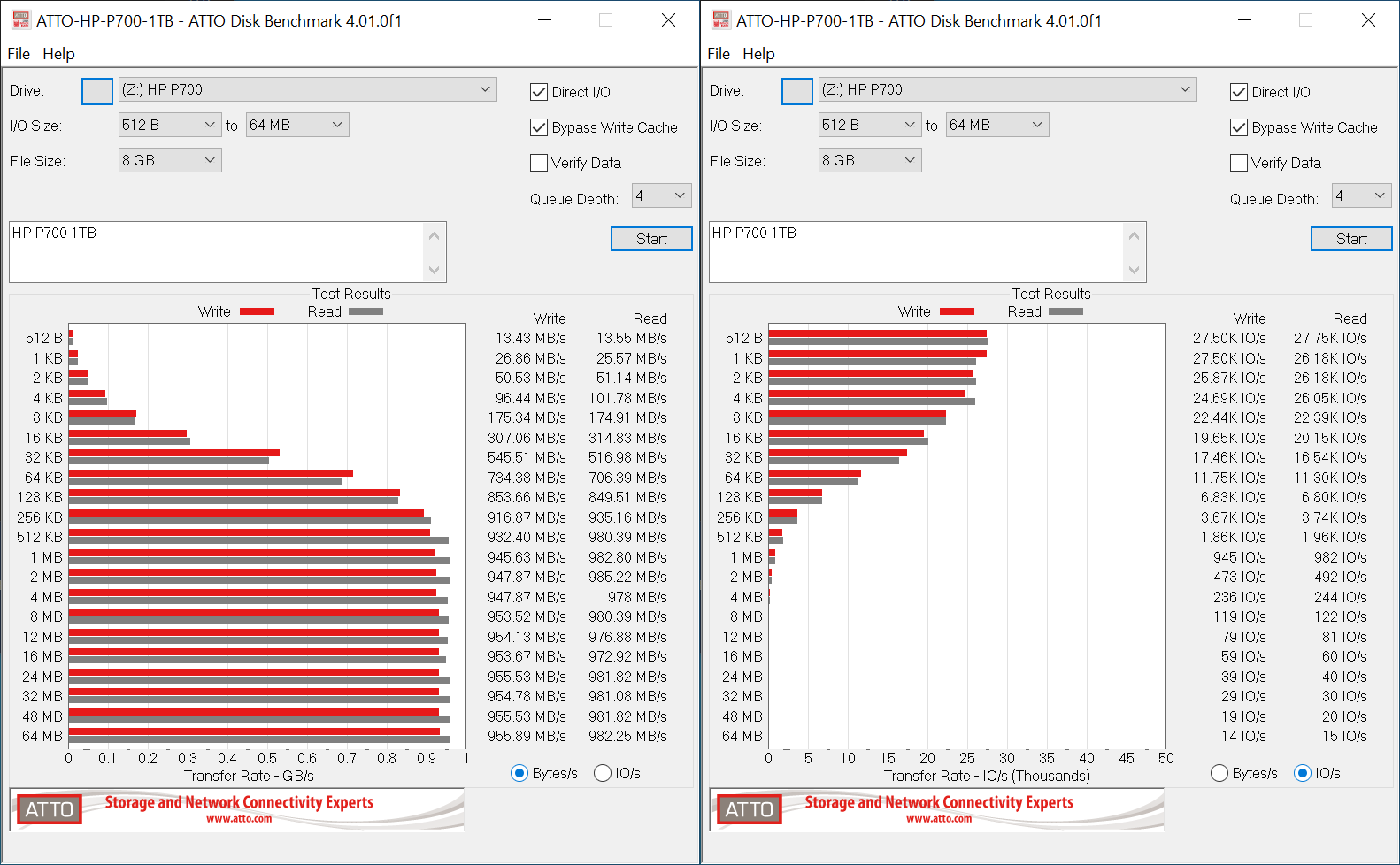
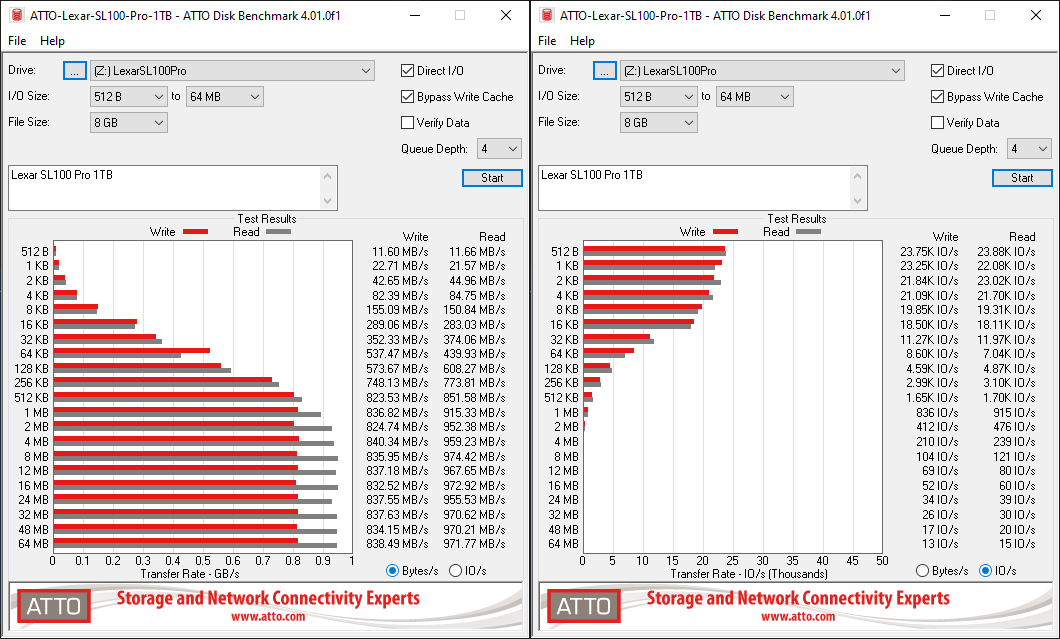
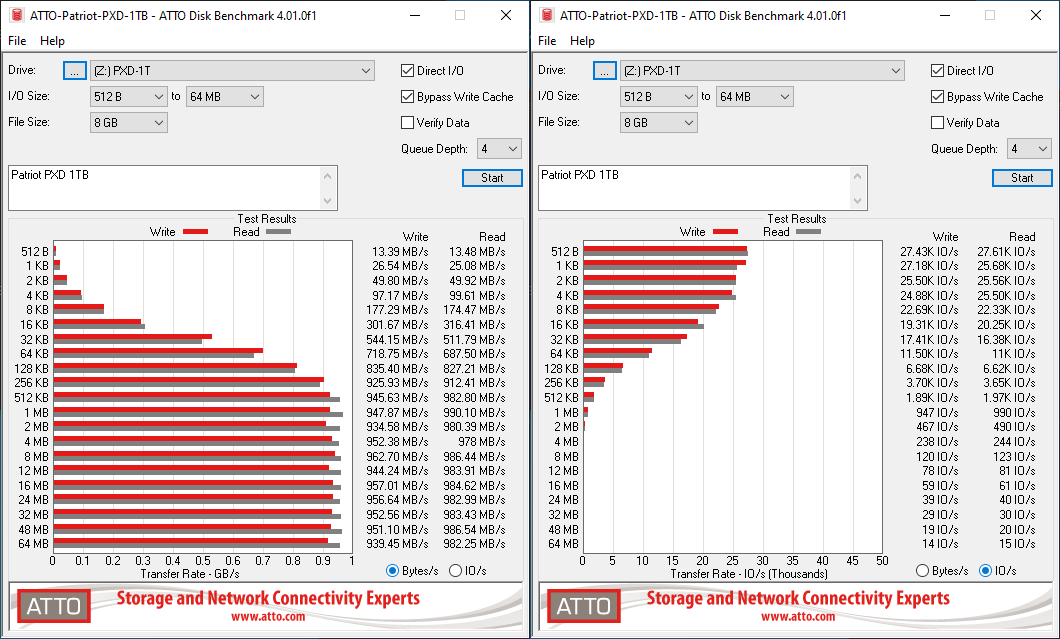
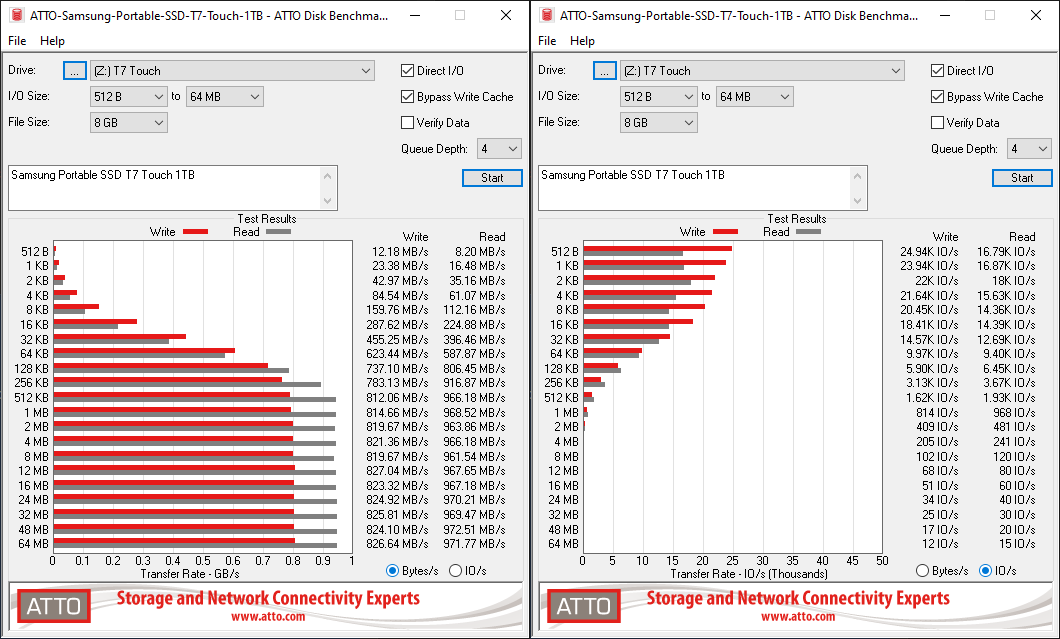
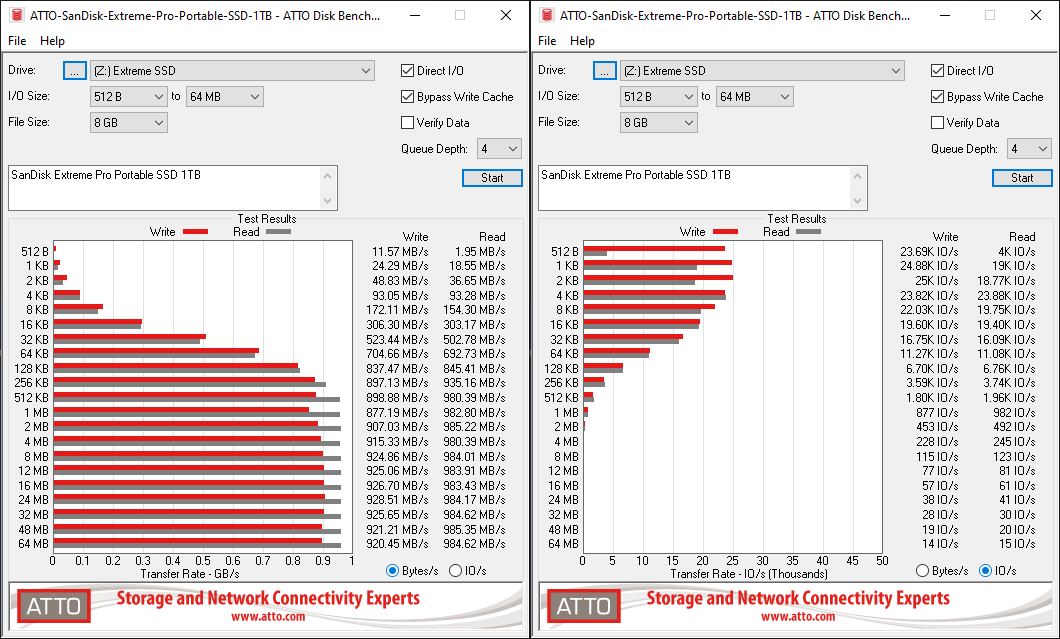
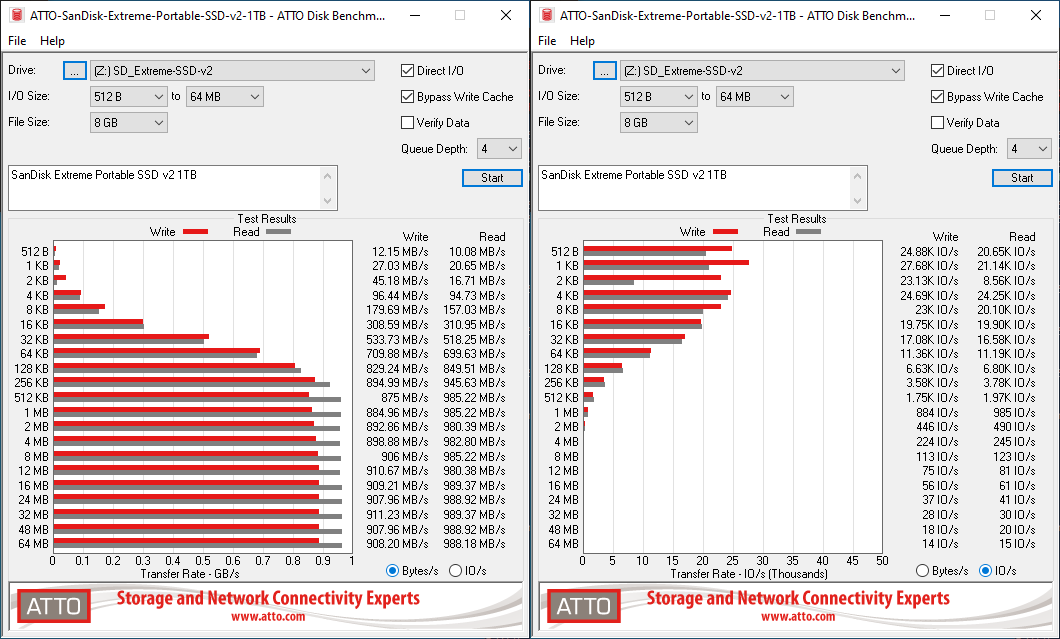
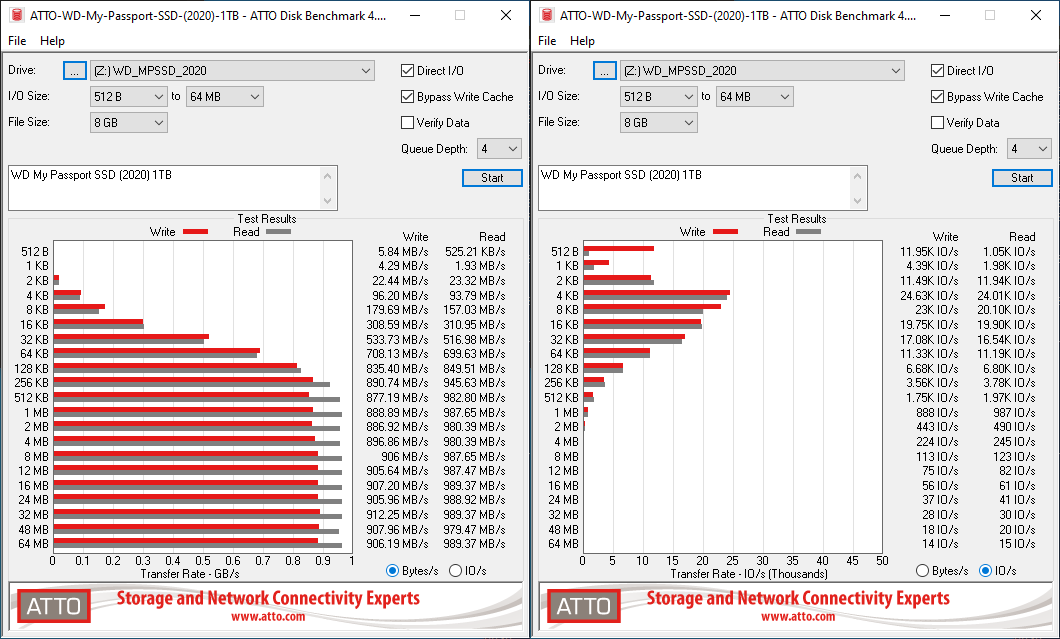
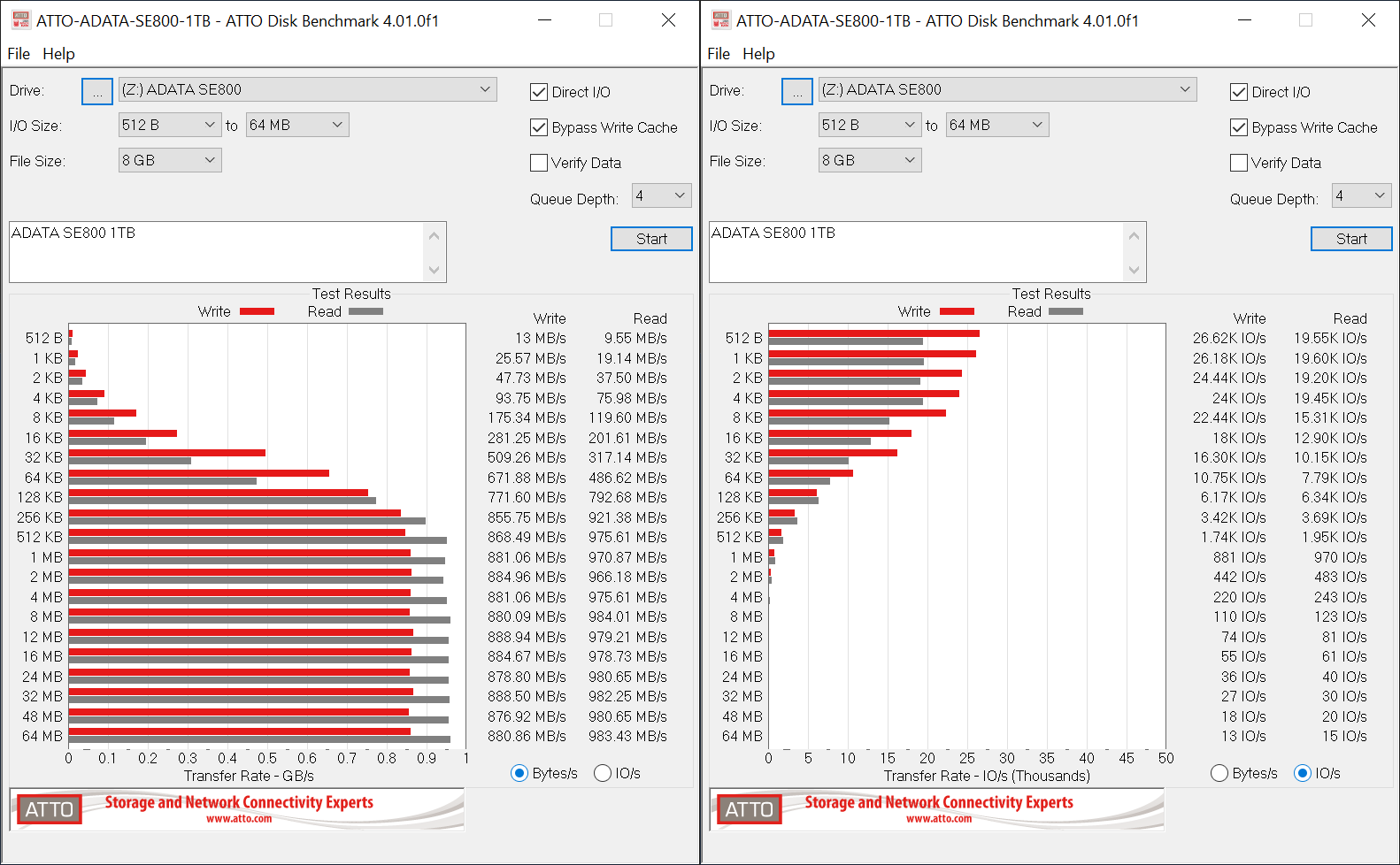
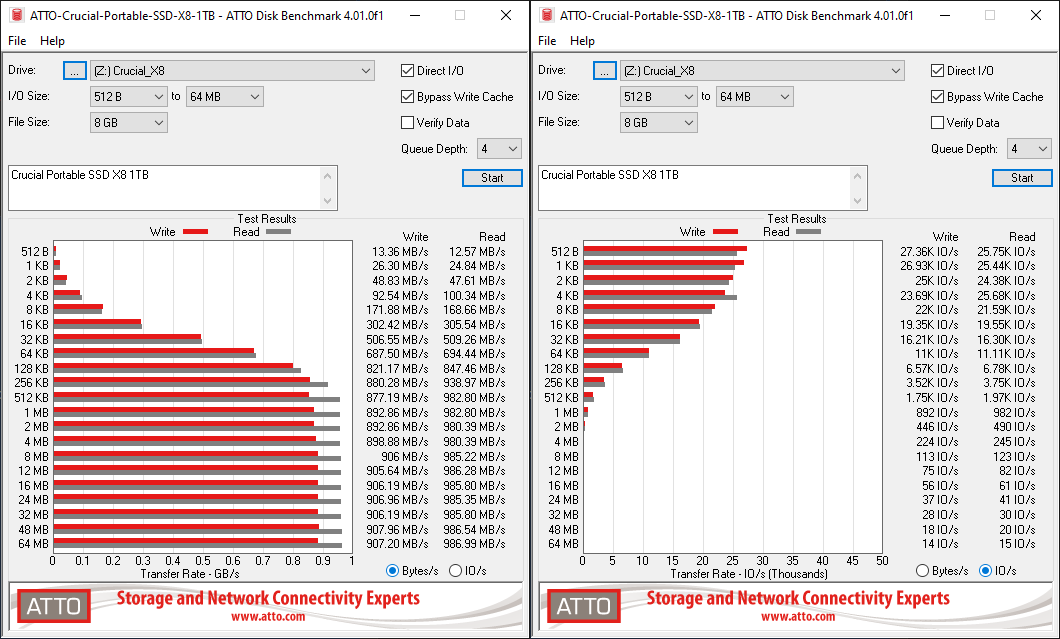
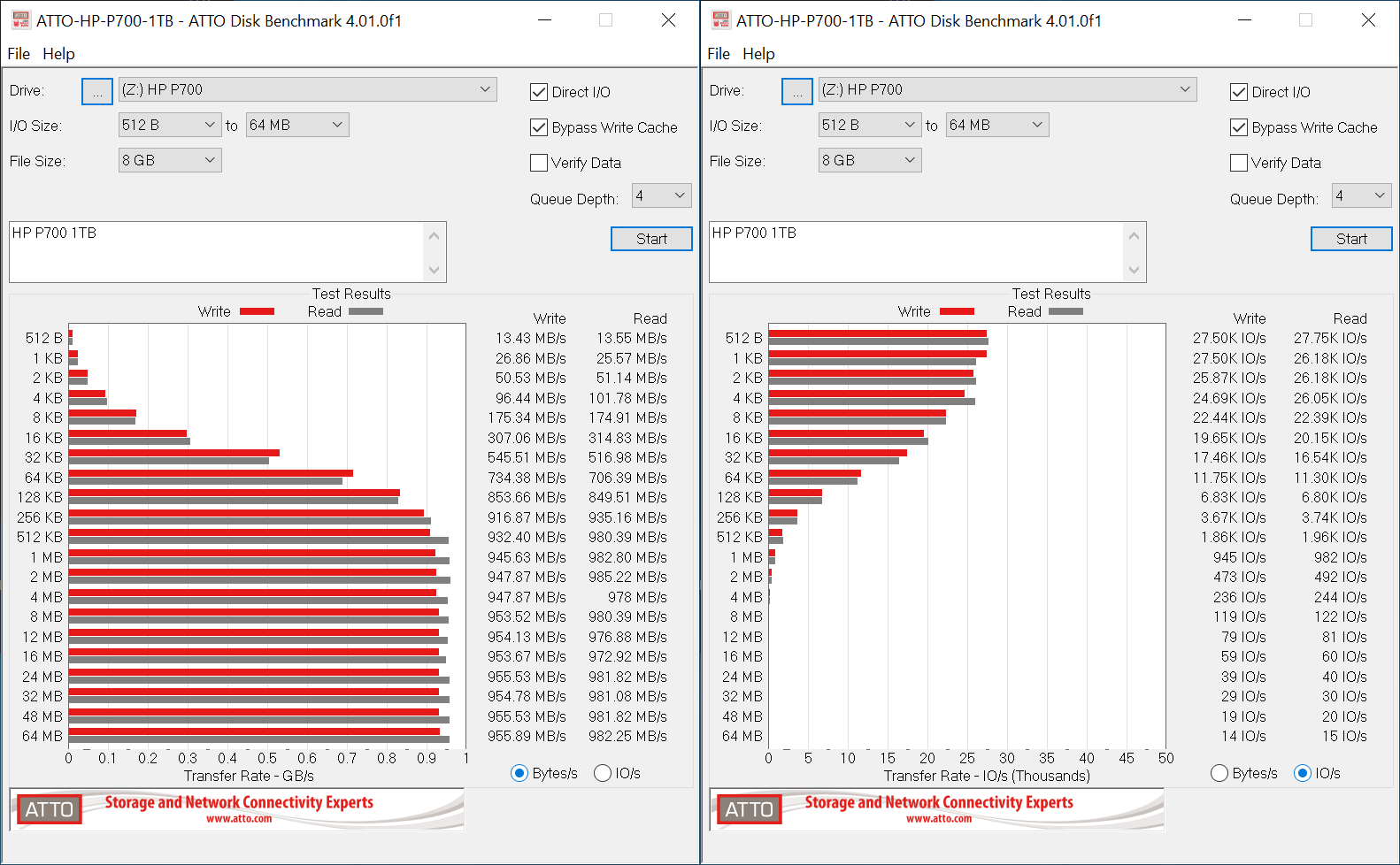
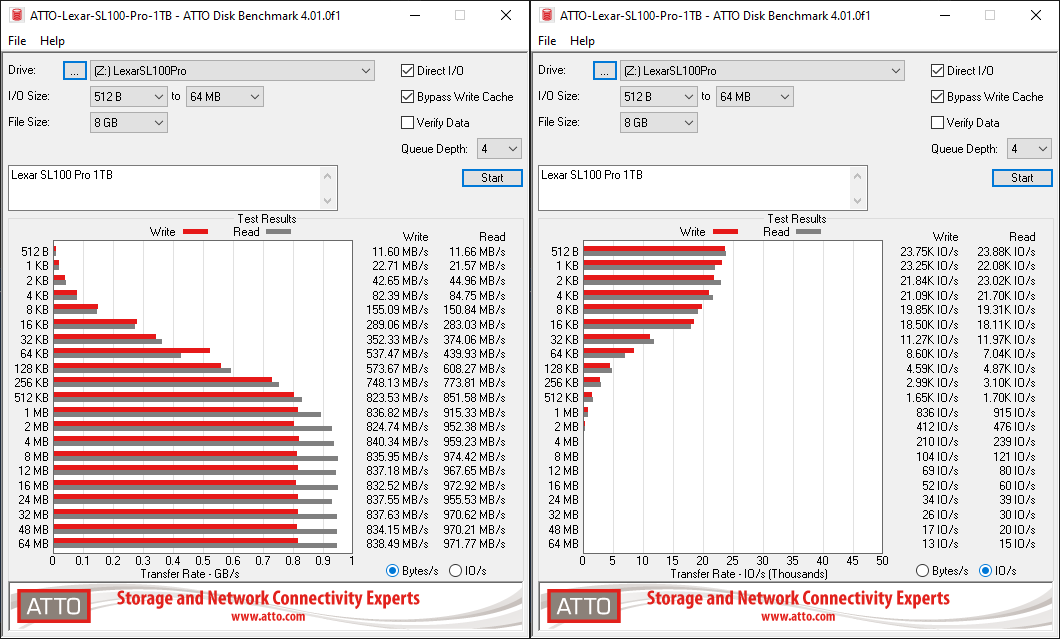
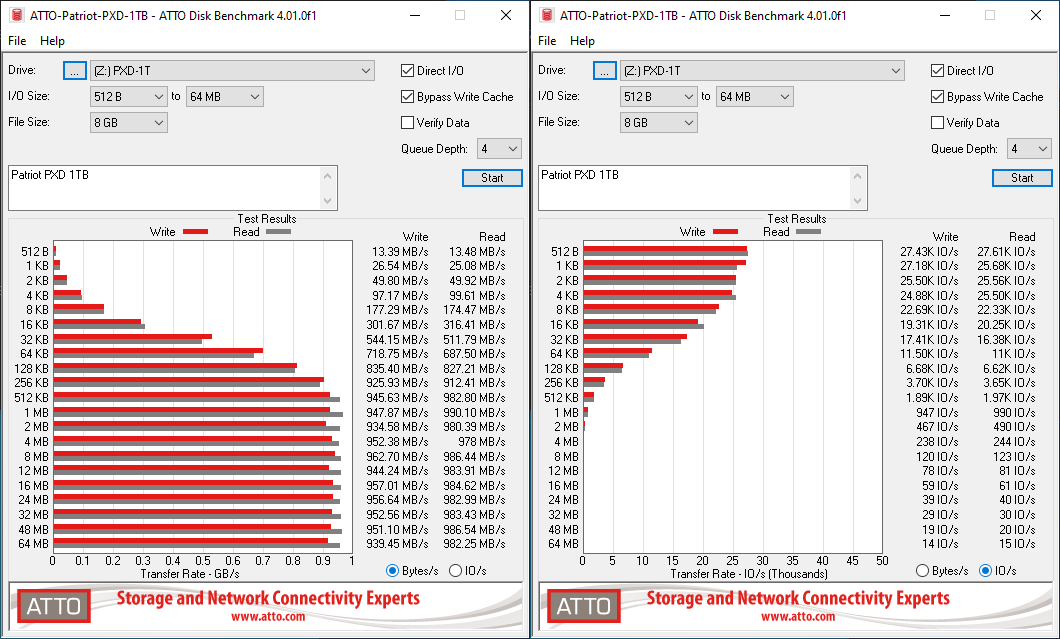
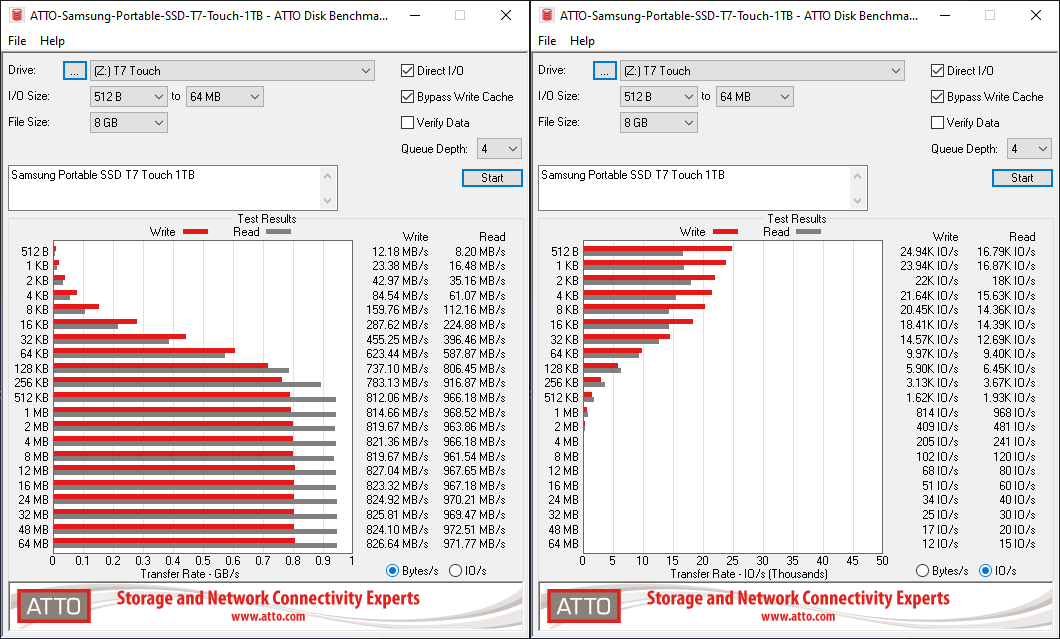
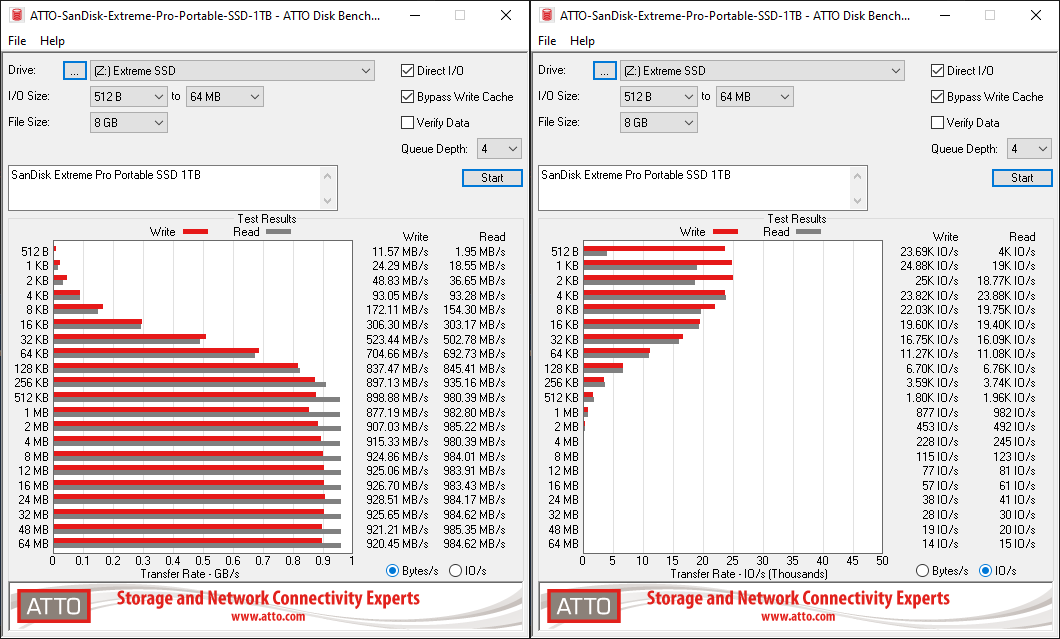
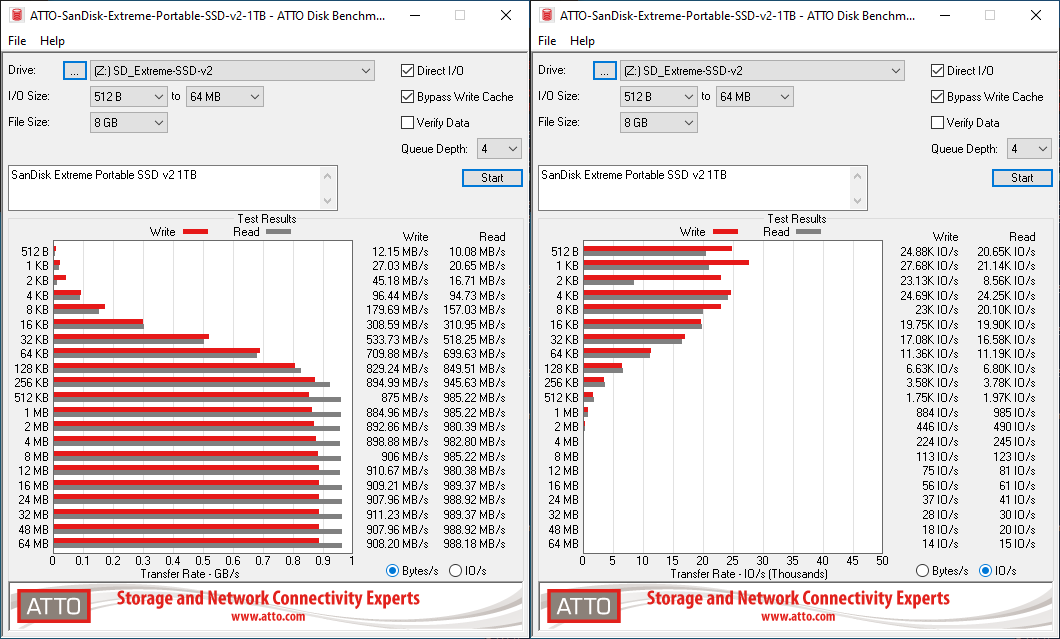
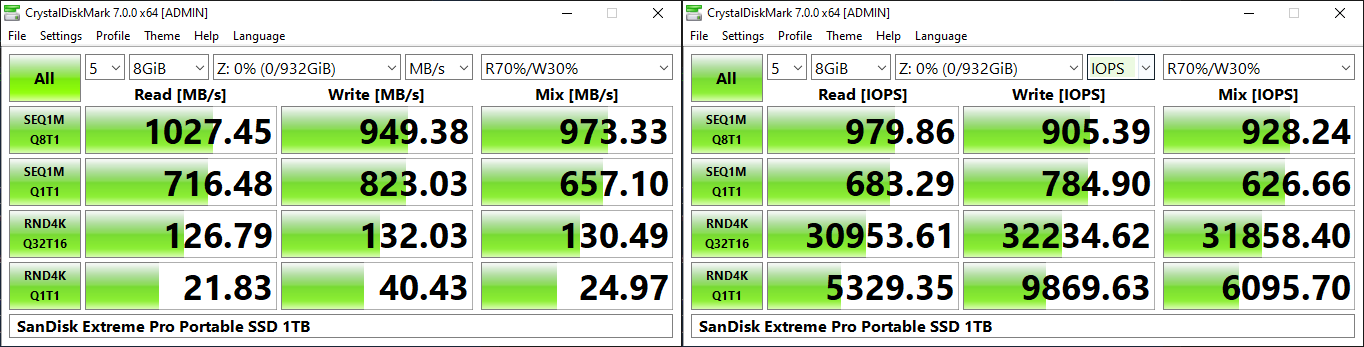
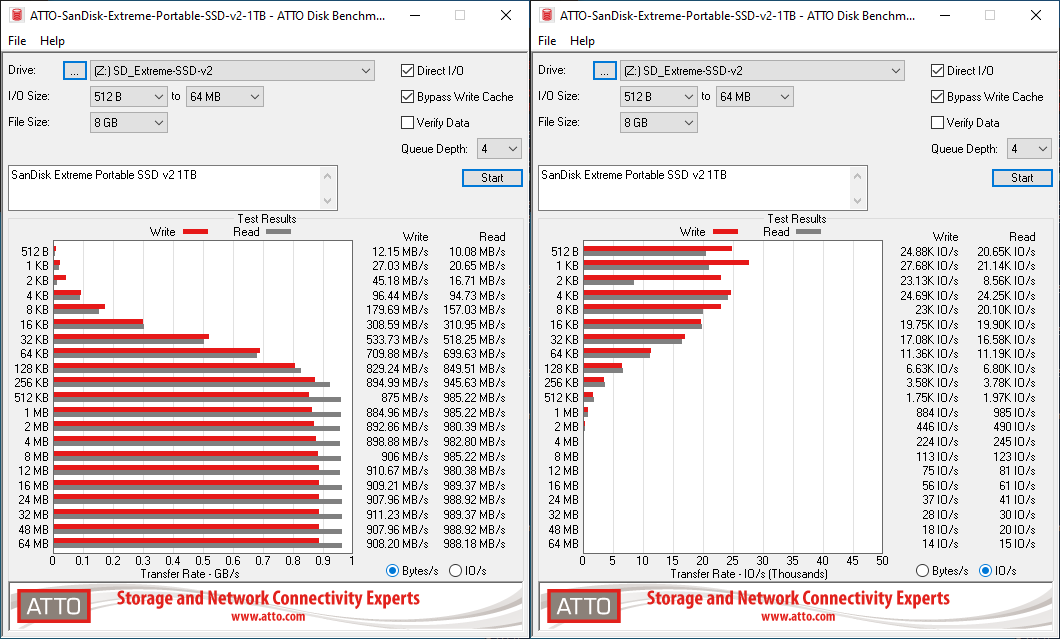
SanDisk claims speeds of up to 1050 MBps for the two SSDs, and these are almost backed up by the ATTO benchmarks provided below. Unfortunately, these access traces are not very common in real-life scenarios.


var ATTO_paths_0 = new Array(‘‘,’‘,’‘,’‘,’‘,’‘,’‘,’‘,’‘);
ATTO_paths_0.push(‘


‘);


Drive Performance Benchmarks – ATTO
SanDisk Extreme Portable SSD v2 1TBWD My Passport SSD (2020) 1TBADATA SE800 1TBCrucial Portable SSD X8 1TBHP P700 1TBLexar SL100 Pro 1TBPatriot PXD 1TBSamsung Portable SSD T7 Touch 1TBSanDisk Extreme Pro Portable SSD 1TBExpand All

Speeds top out at 989 MBps reads and around 912 MBps writes for the two SSDs. An interesting point to note here is that the SanDisk Extreme Pro Portable SSD from last year had similar read numbers, but the writes went up to 929 MBps.


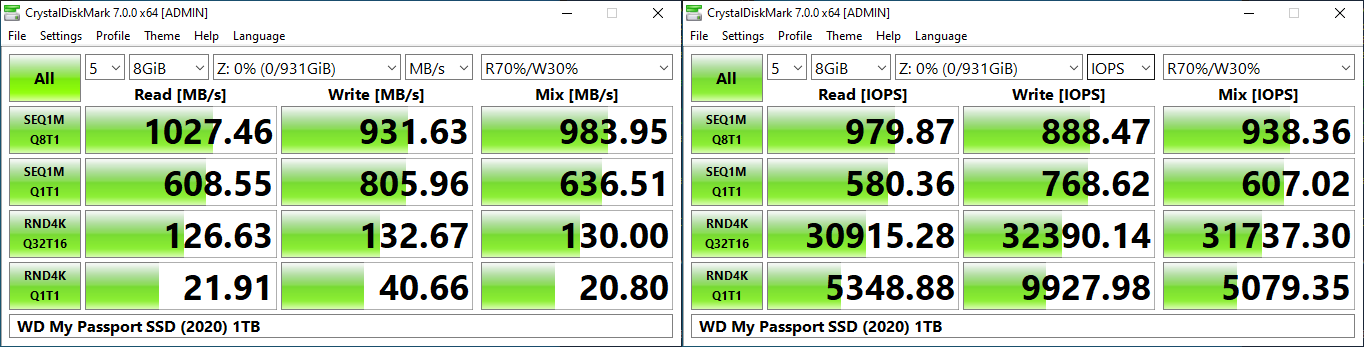
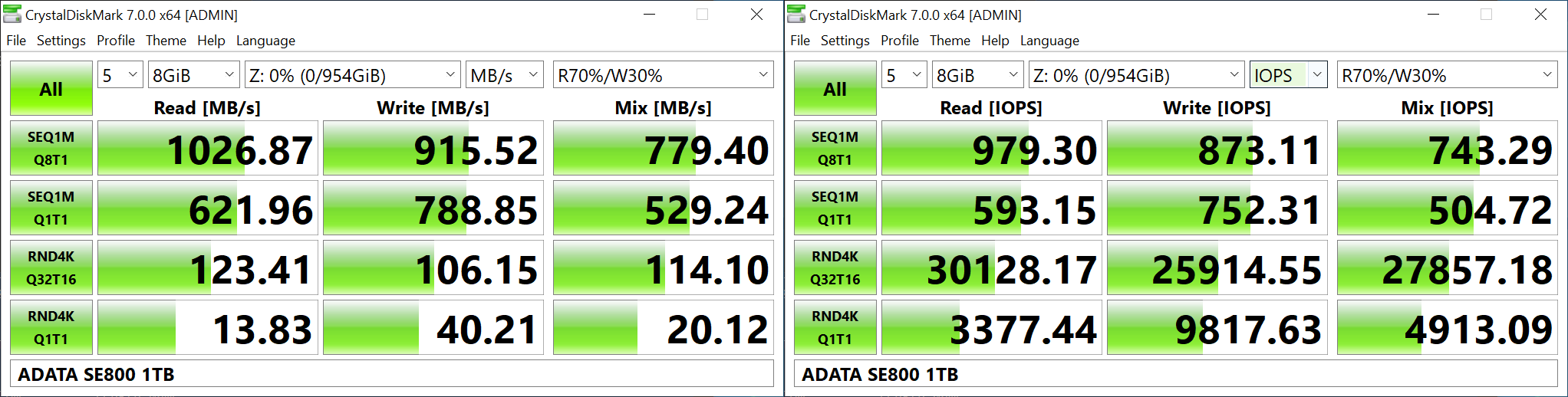
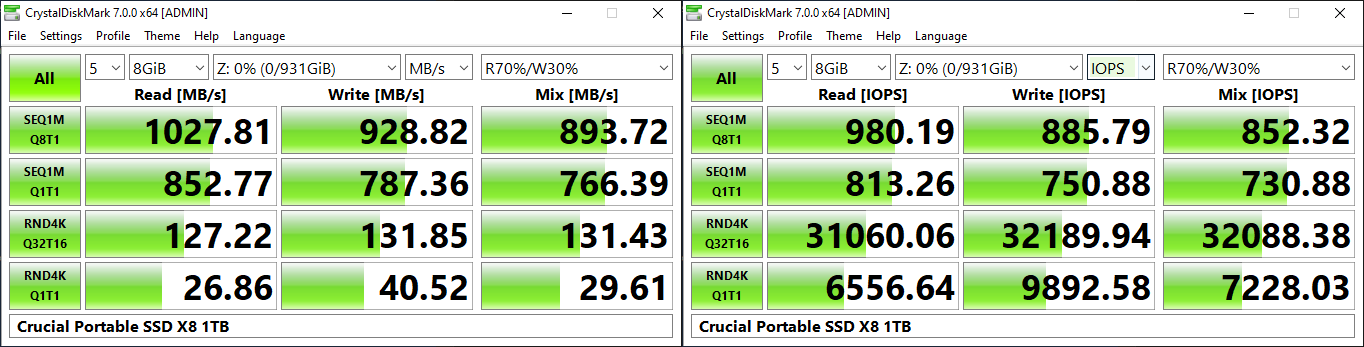
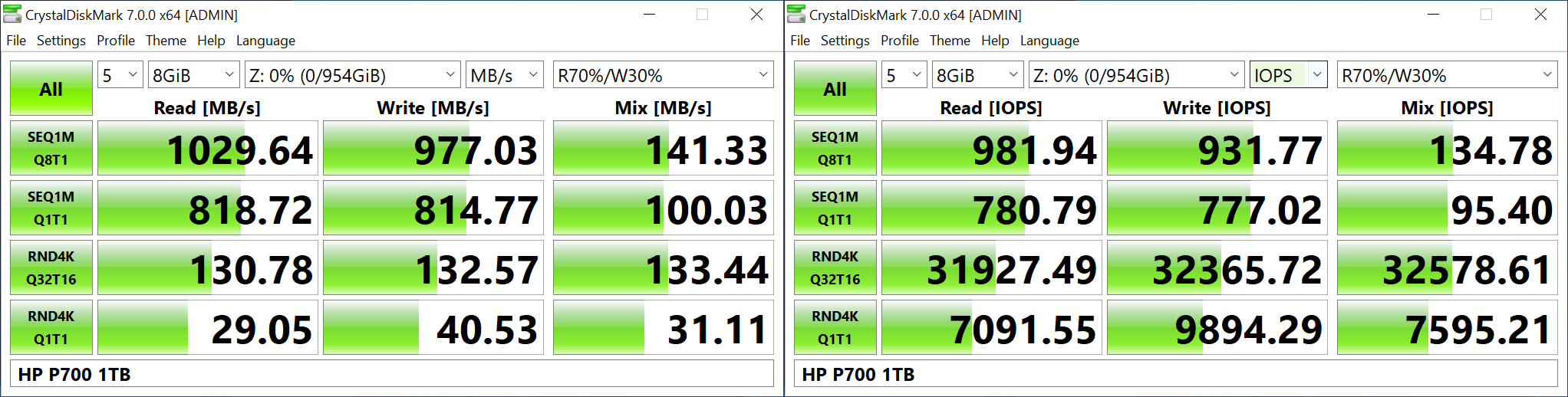
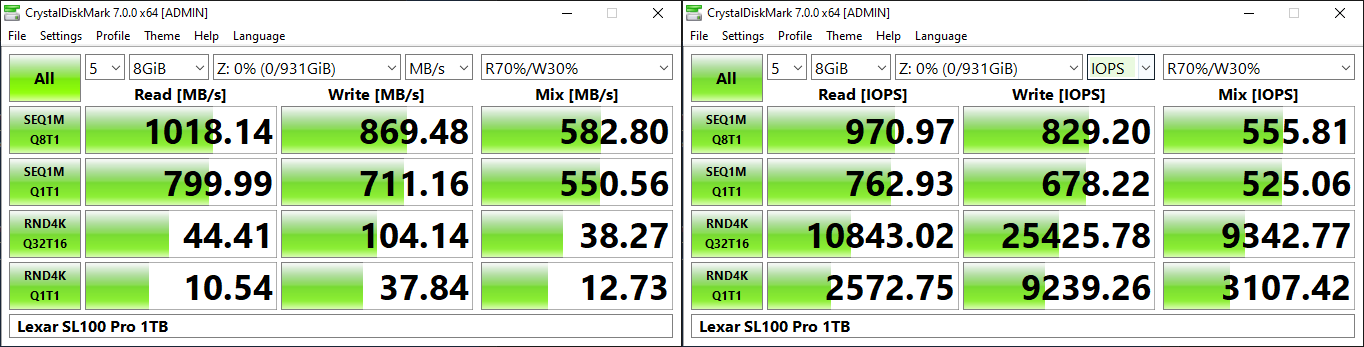
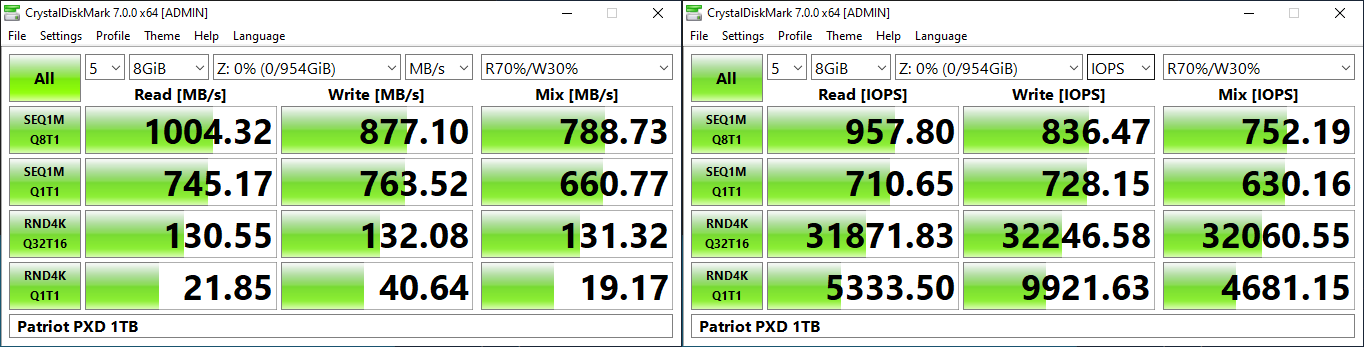
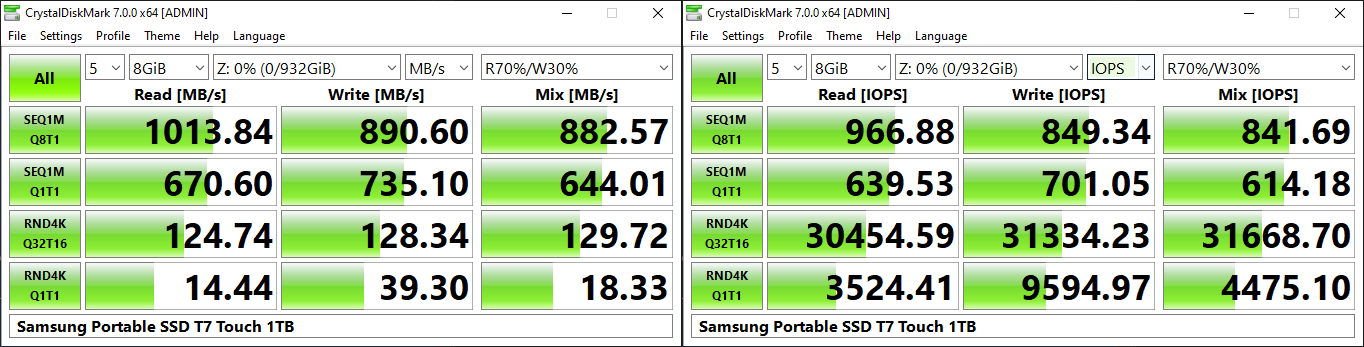
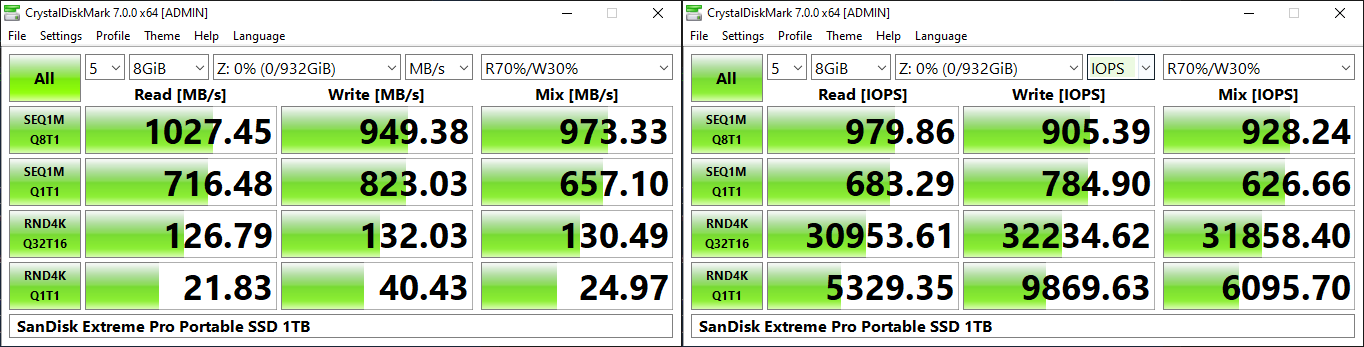
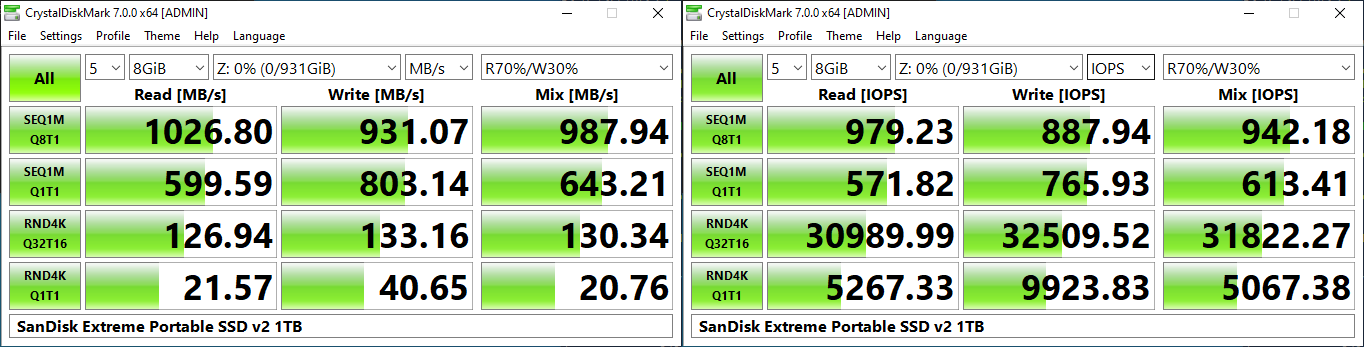
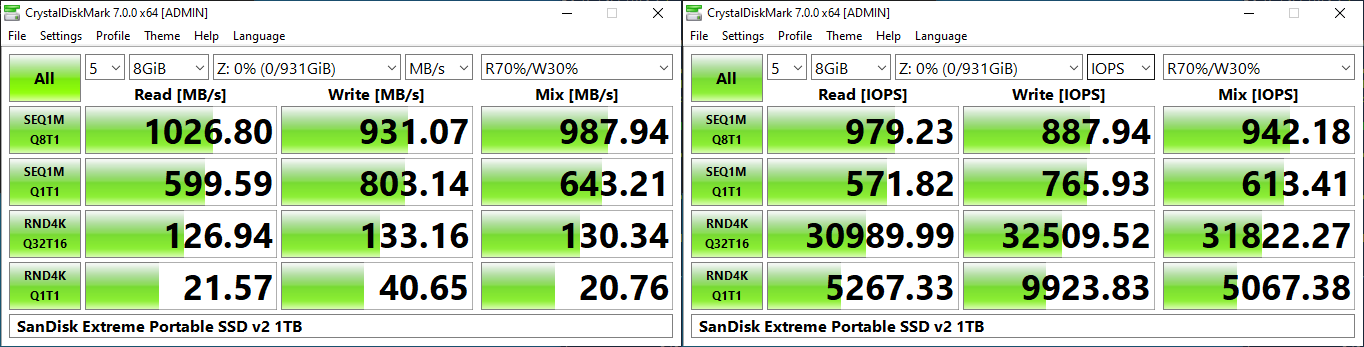
CrystalDiskMark, despite being a canned benchmark, provides a better estimate of the performance range with a selected set of numbers.


var CDM_paths_0 = new Array(‘‘,’‘,’‘,’‘,’‘,’‘,’‘,’‘,’‘);
CDM_paths_0.push(‘


‘);


Drive Performance Benchmarks – CrystalDiskMark
SanDisk Extreme Portable SSD v2 1TBWD My Passport SSD (2020) 1TBADATA SE800 1TBCrucial Portable SSD X8 1TBHP P700 1TBLexar SL100 Pro 1TBPatriot PXD 1TBSamsung Portable SSD T7 Touch 1TBSanDisk Extreme Pro Portable SSD 1TBExpand All

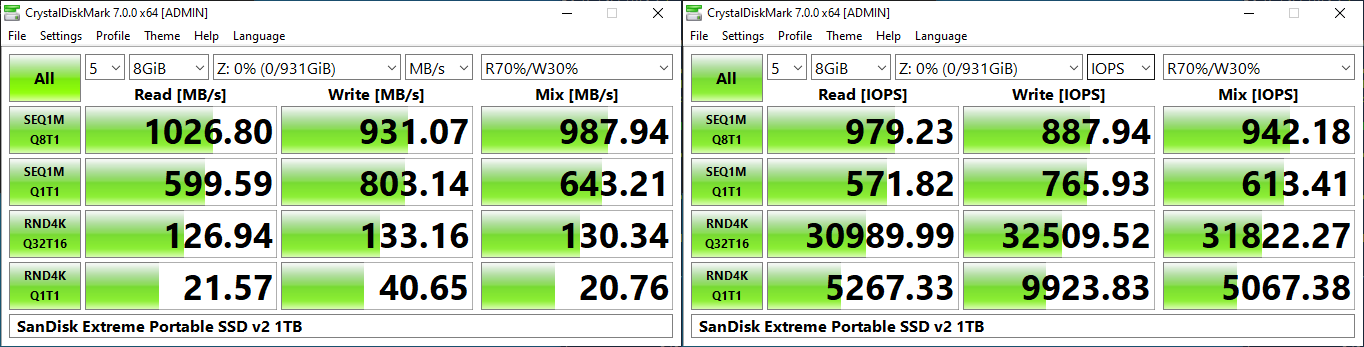
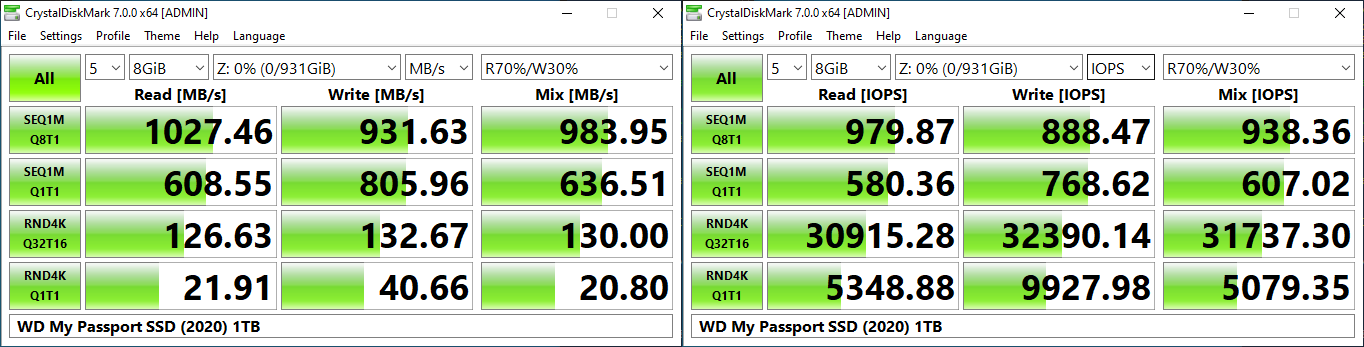
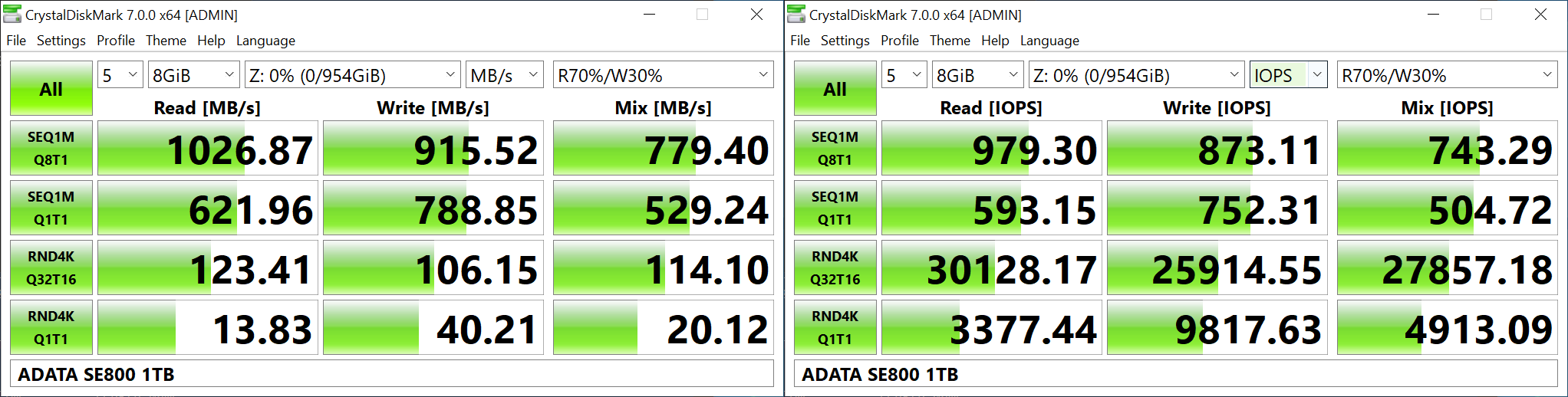
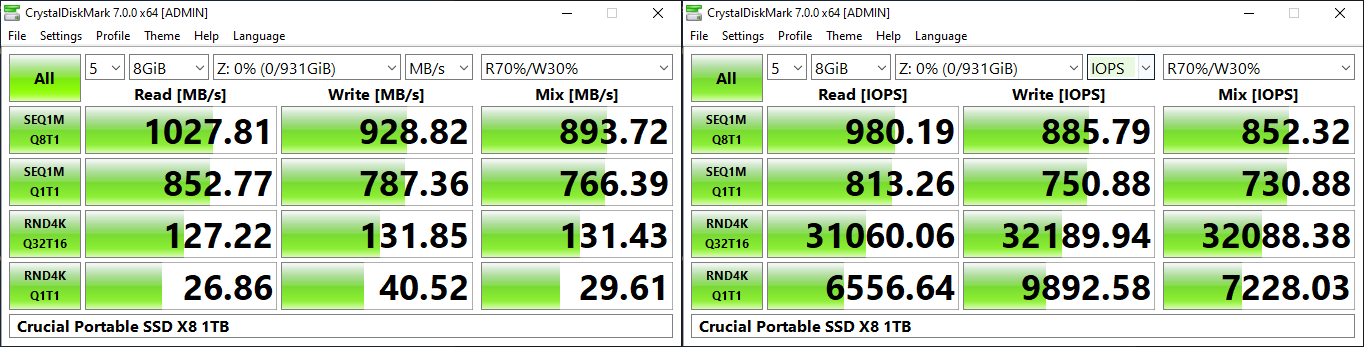
As evident from the screenshot above, the performance can dip to as low as 21 MBps for 4K random reads.


AnandTech DAS Suite – Benchmarking for Performance Consistency


Our testing methodology for DAS units takes into consideration the usual use-case for such devices. The most common usage scenario is transfer of large amounts of photos and videos to and from the unit. Other usage scenarios include the use of the DAS as a download or install location for games and importing files directly off the DAS into a multimedia editing program such as Adobe Photoshop. Some users may even opt to boot an OS off an external storage device.


The AnandTech DAS Suite tackles the first use-case. The evaluation involves processing three different workloads:


  • Photos: 15.6 GB collection of 4320 photos (RAW as well as JPEGs) in 61 sub-folders
  • Videos: 16.1 GB collection of 244 videos (MP4 as well as MOVs) in 6 sub-folders
  • BR: 10.7 GB Blu-ray folder structure of the IDT Benchmark Blu-ray

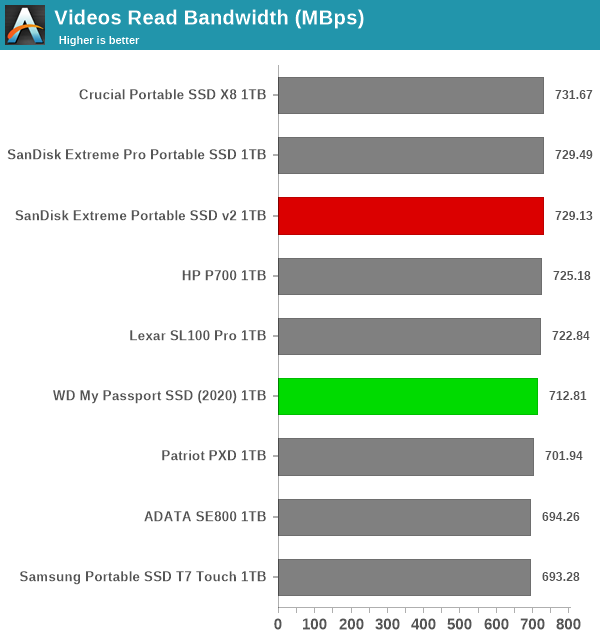
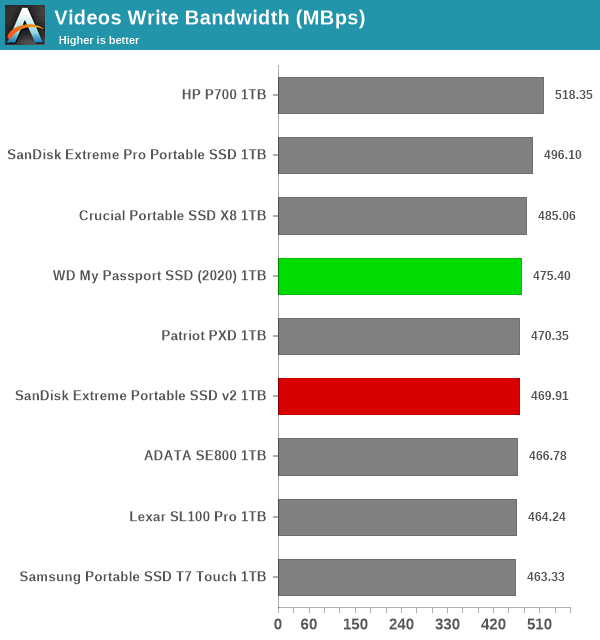
Each workload’s data set is first placed in a 25GB RAM drive, and a robocopy command is issued to transfer it to the DAS under test (formatted in NTFS). Upon completion of the transfer (write test), the contents from the DAS are read back into the RAM drive (read test). This process is repeated three times for each workload. Read and write speeds, as well as the time taken to complete each pass are recorded. Bandwidth for each data set is computed as the average of all three passes.


var robocopy_0_img_src = new Array(


Blu-ray Folder Read‘,


Blu-ray Folder Write‘,


Photos Read‘,


Photos Write‘,


Videos Read‘,


Videos Write


);
robocopy_0_img_src.push(‘Blu-ray Folder Read
Blu-ray Folder Write
Photos Read
Photos Write
Videos Read
Videos Write
‘) ;


Blu-ray Folder ReadBlu-ray Folder WritePhotos ReadPhotos WriteVideos ReadVideos WriteExpand All

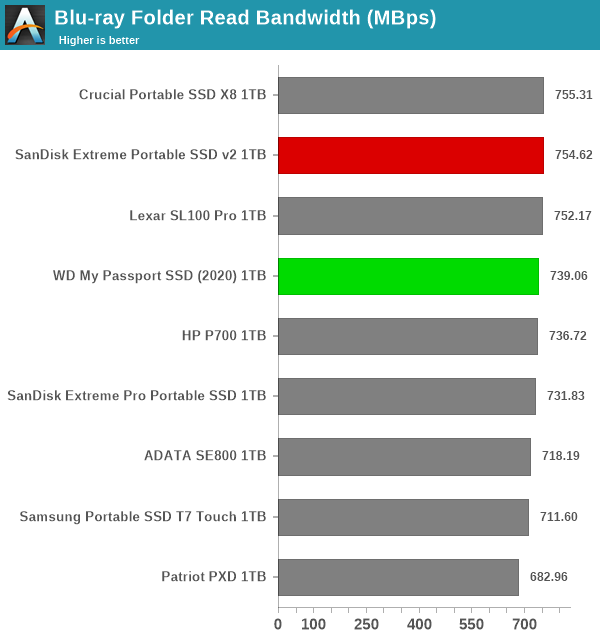
Blu-ray Folder Read


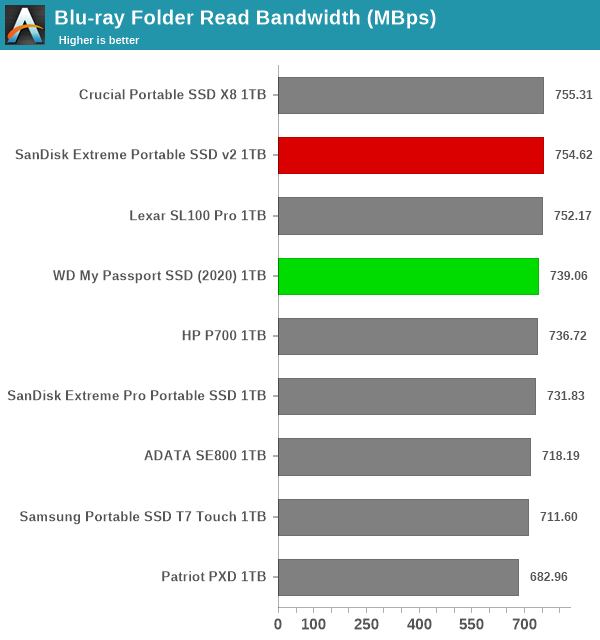
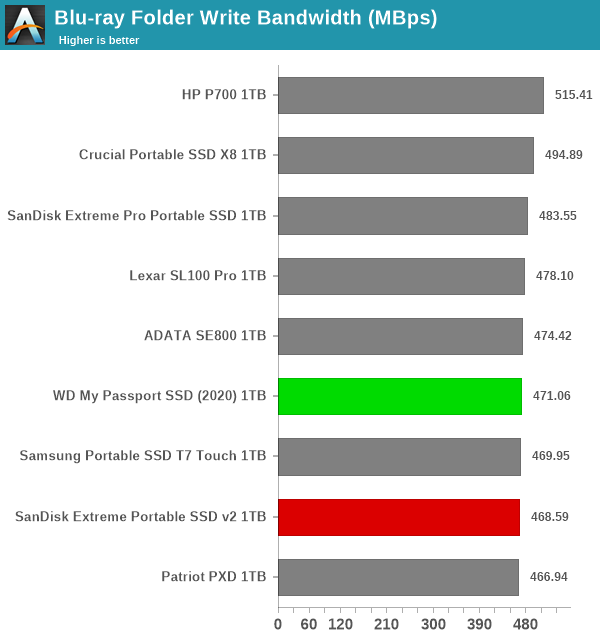
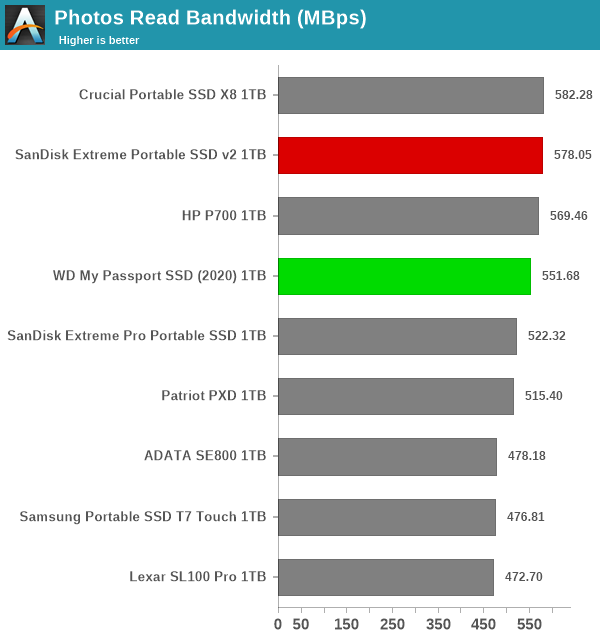
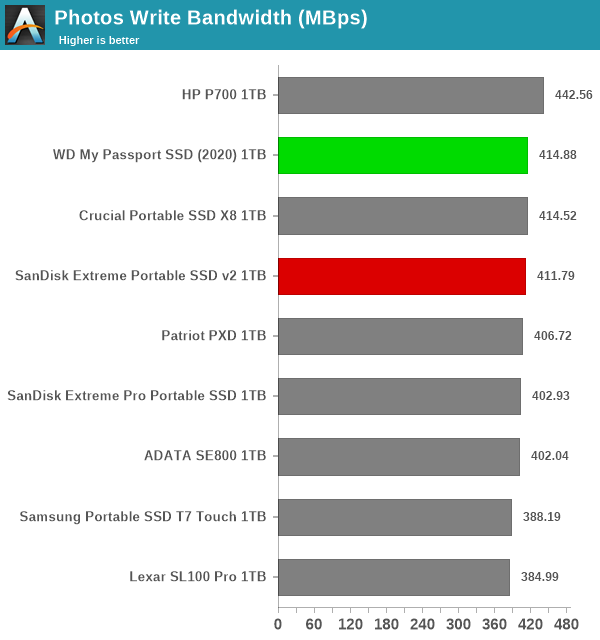
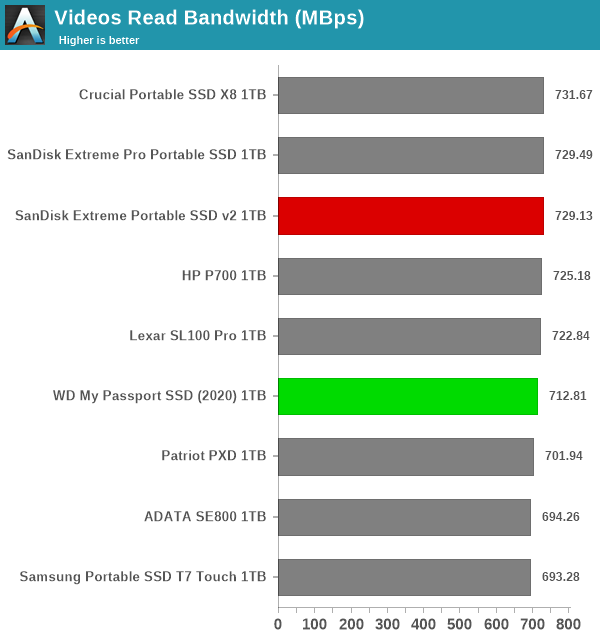
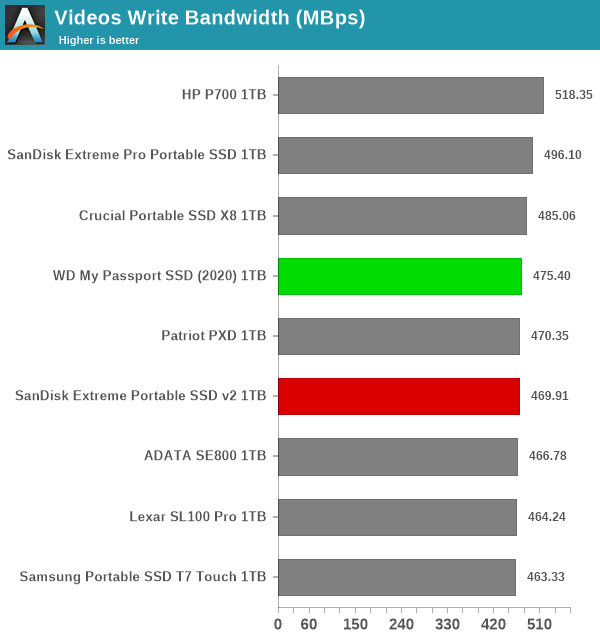
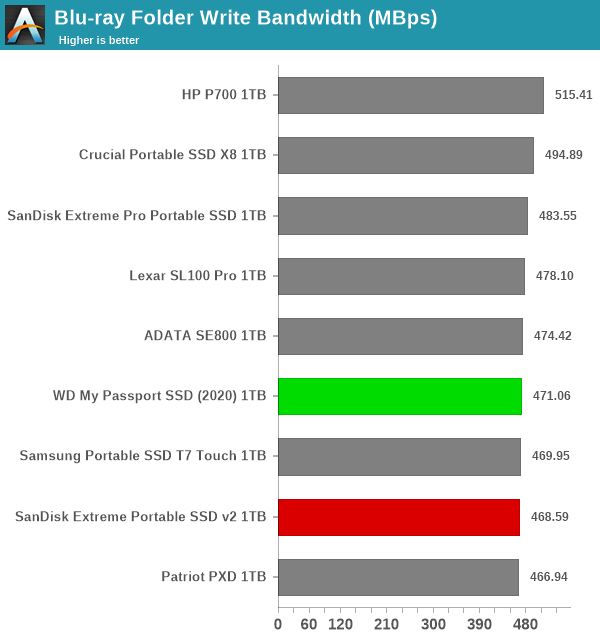
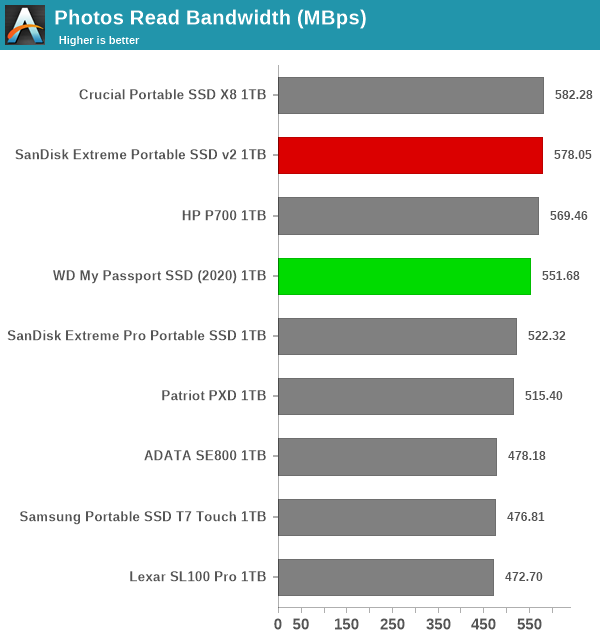
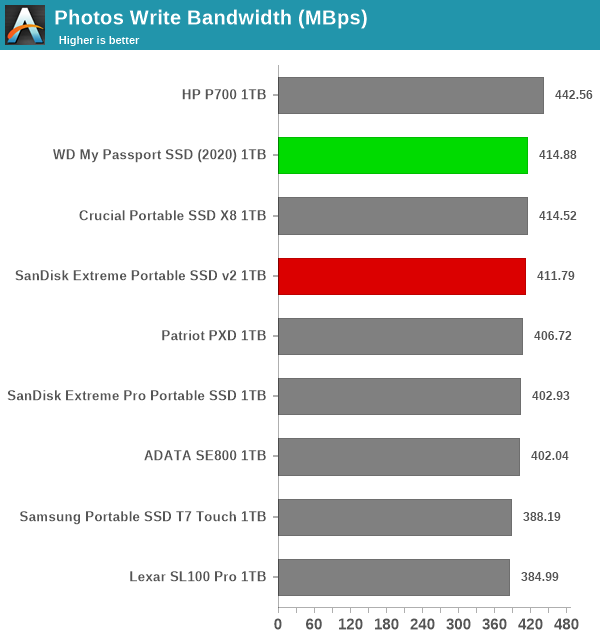
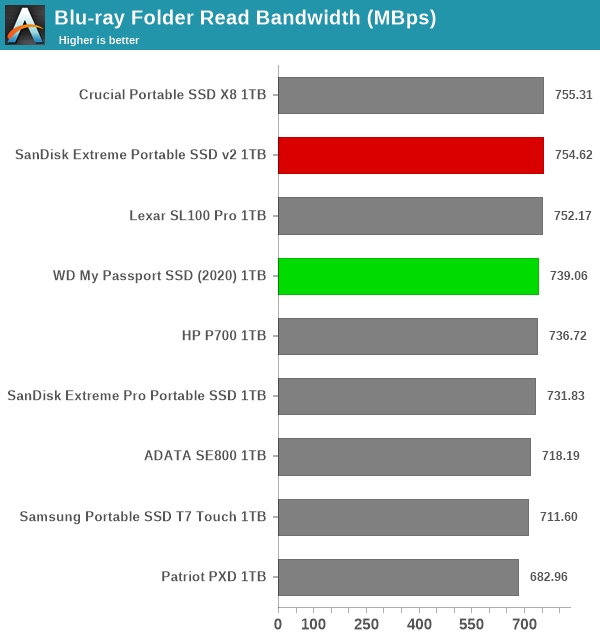
It can be seen that there is no significant gulf in the numbers between the different units. For all practical purposes, the casual user will notice no difference between them in the course of normal usage.However, power users may want to dig deeper to understand the limits of each device. To address this concern, we also instrumented our evaluation scheme for determining performance consistency.


Performance Consistency


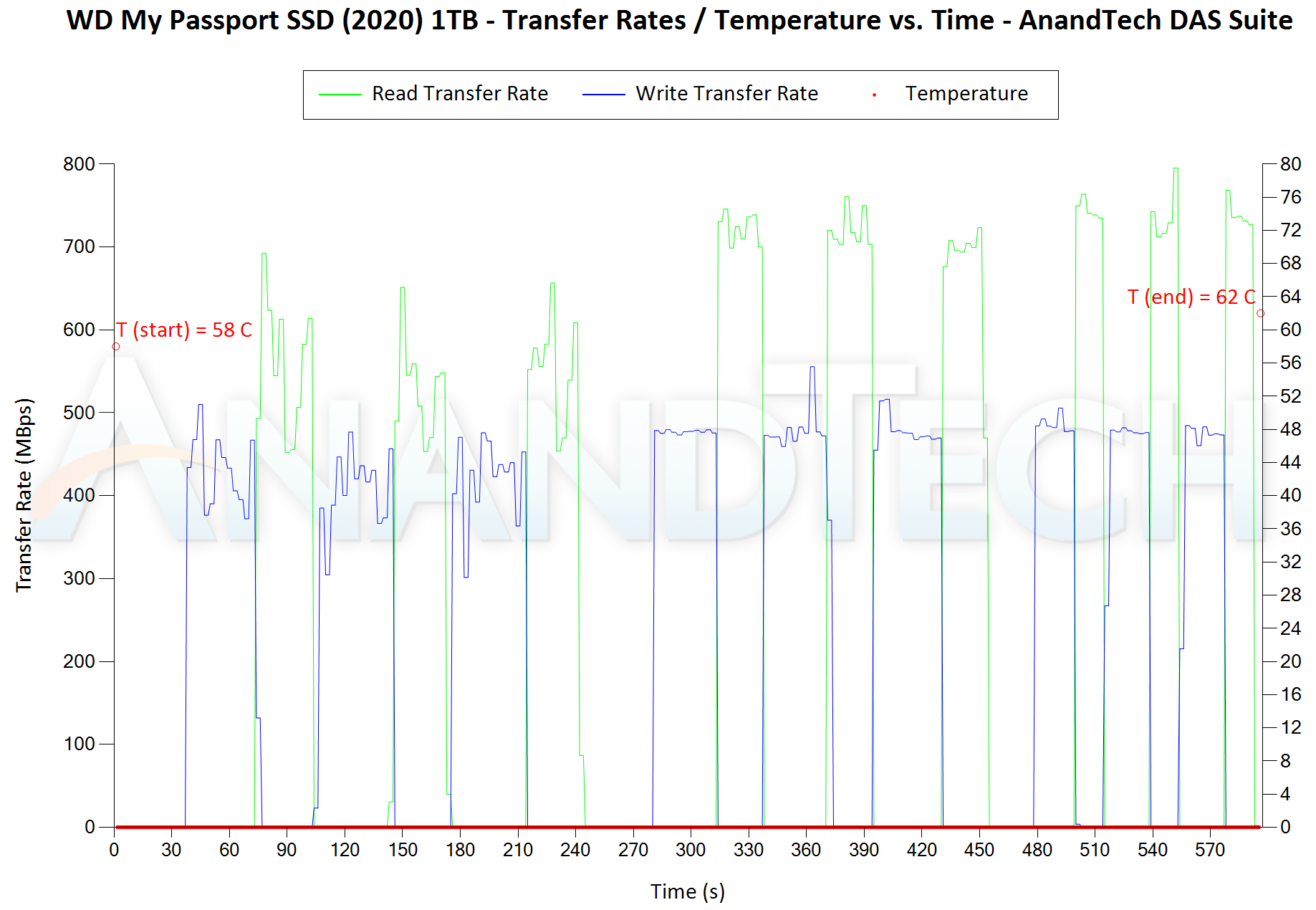
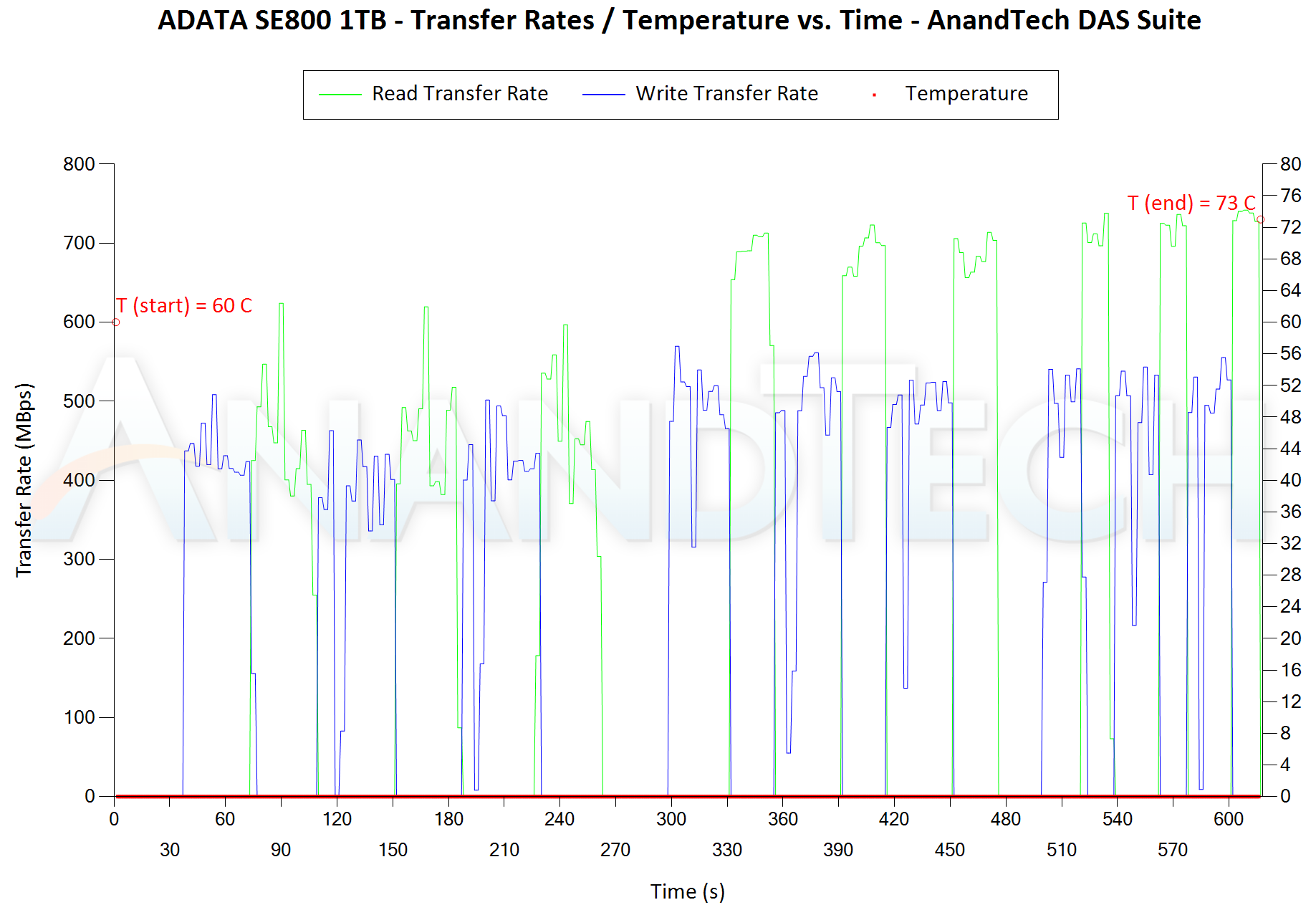
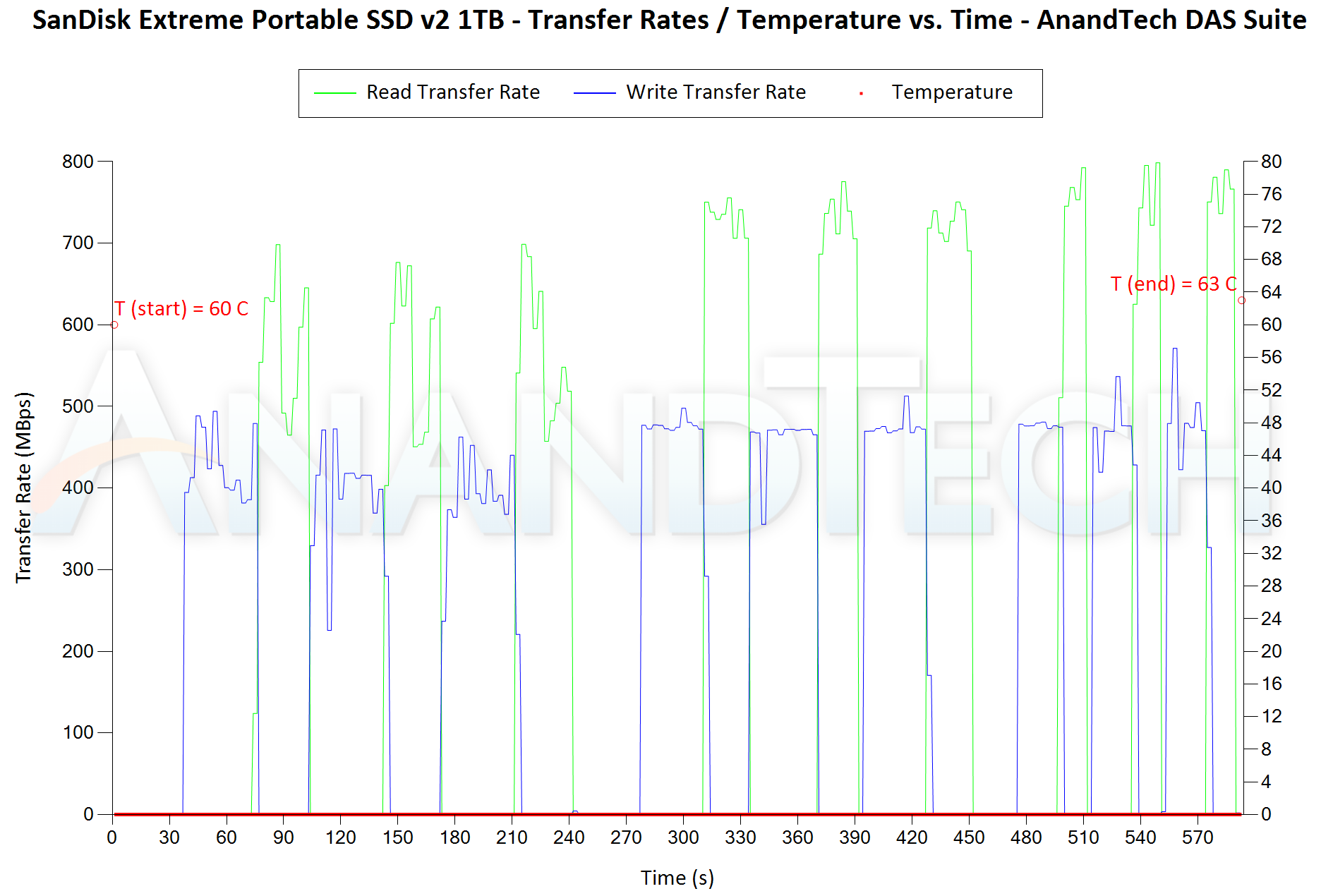
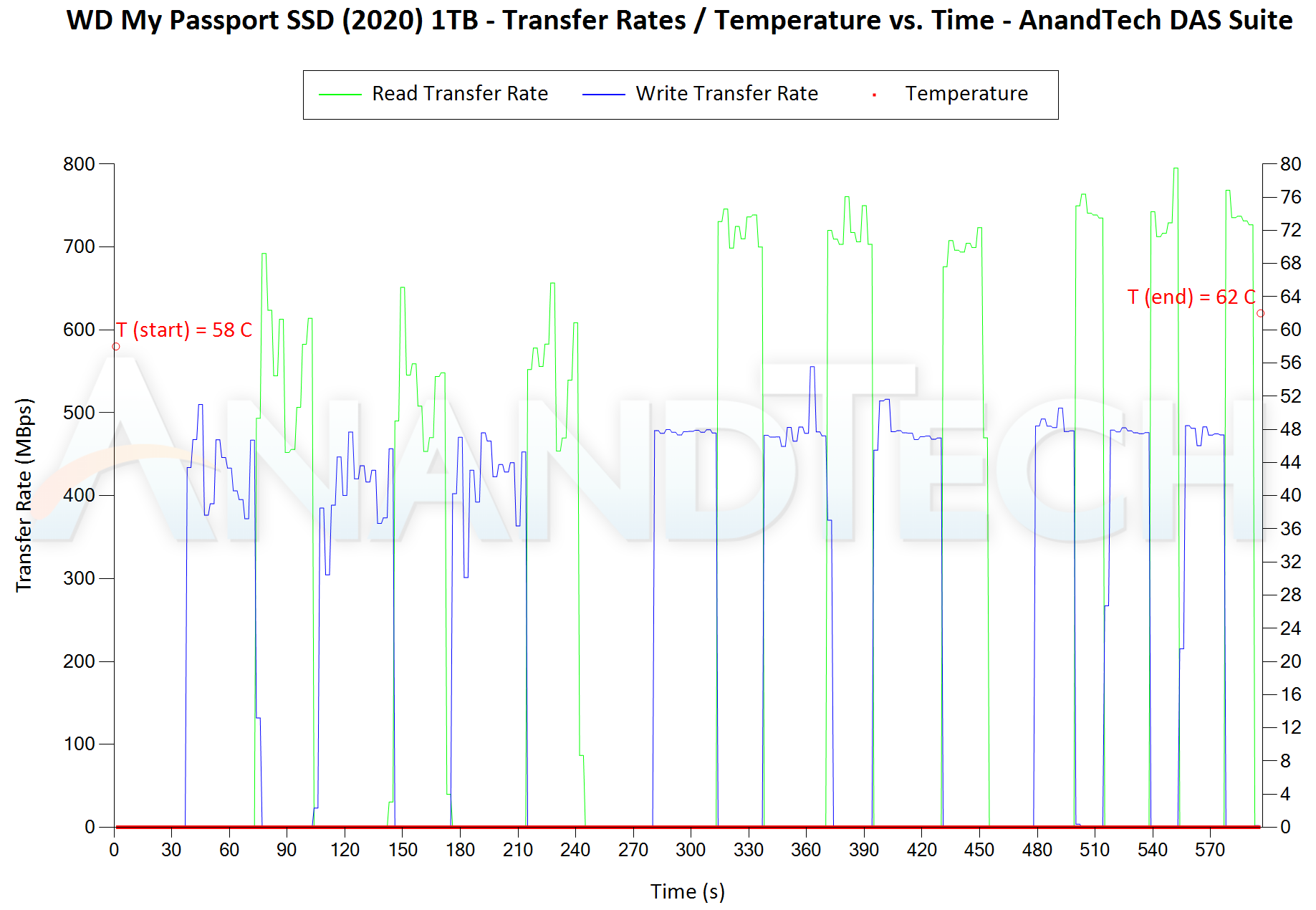
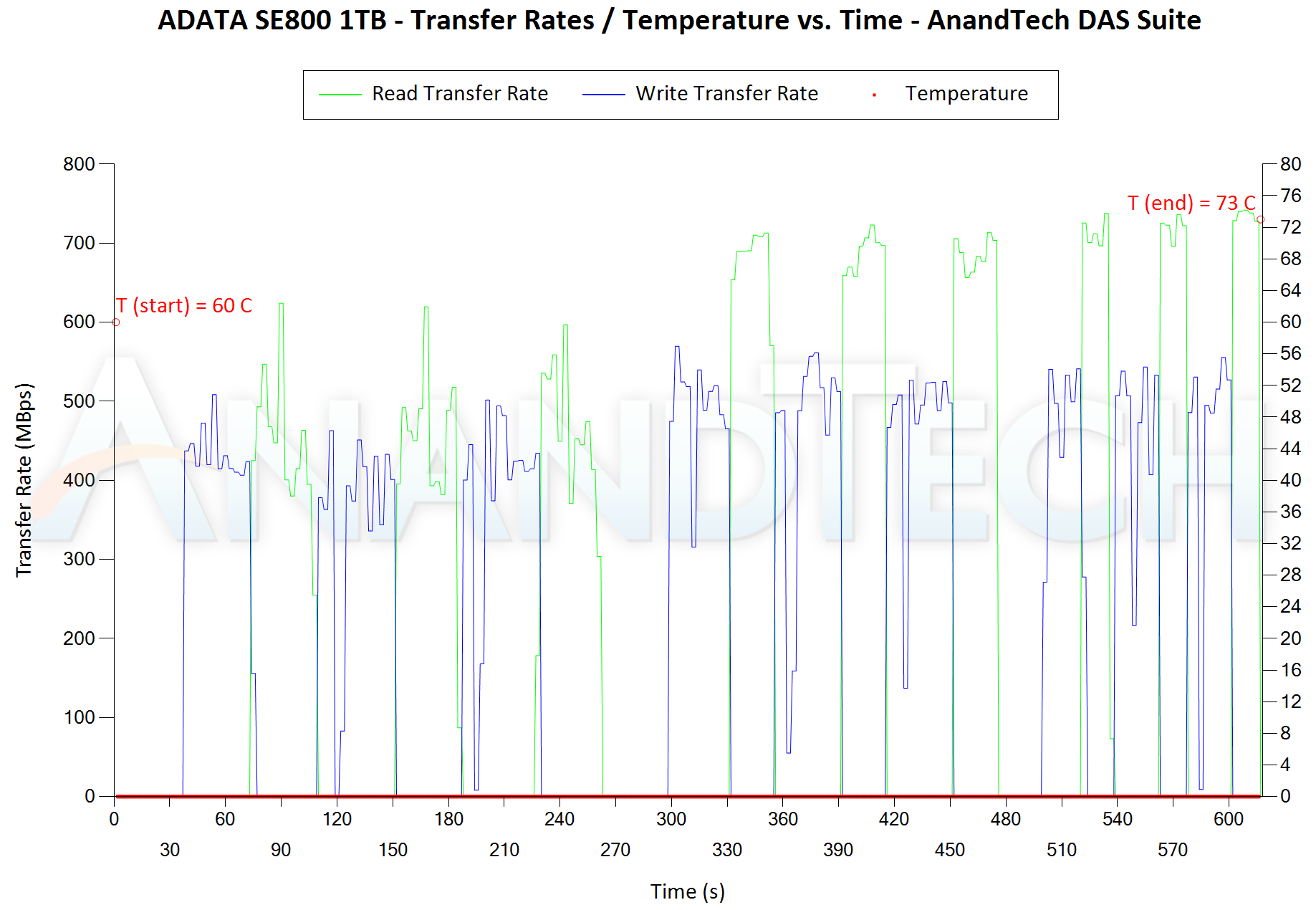
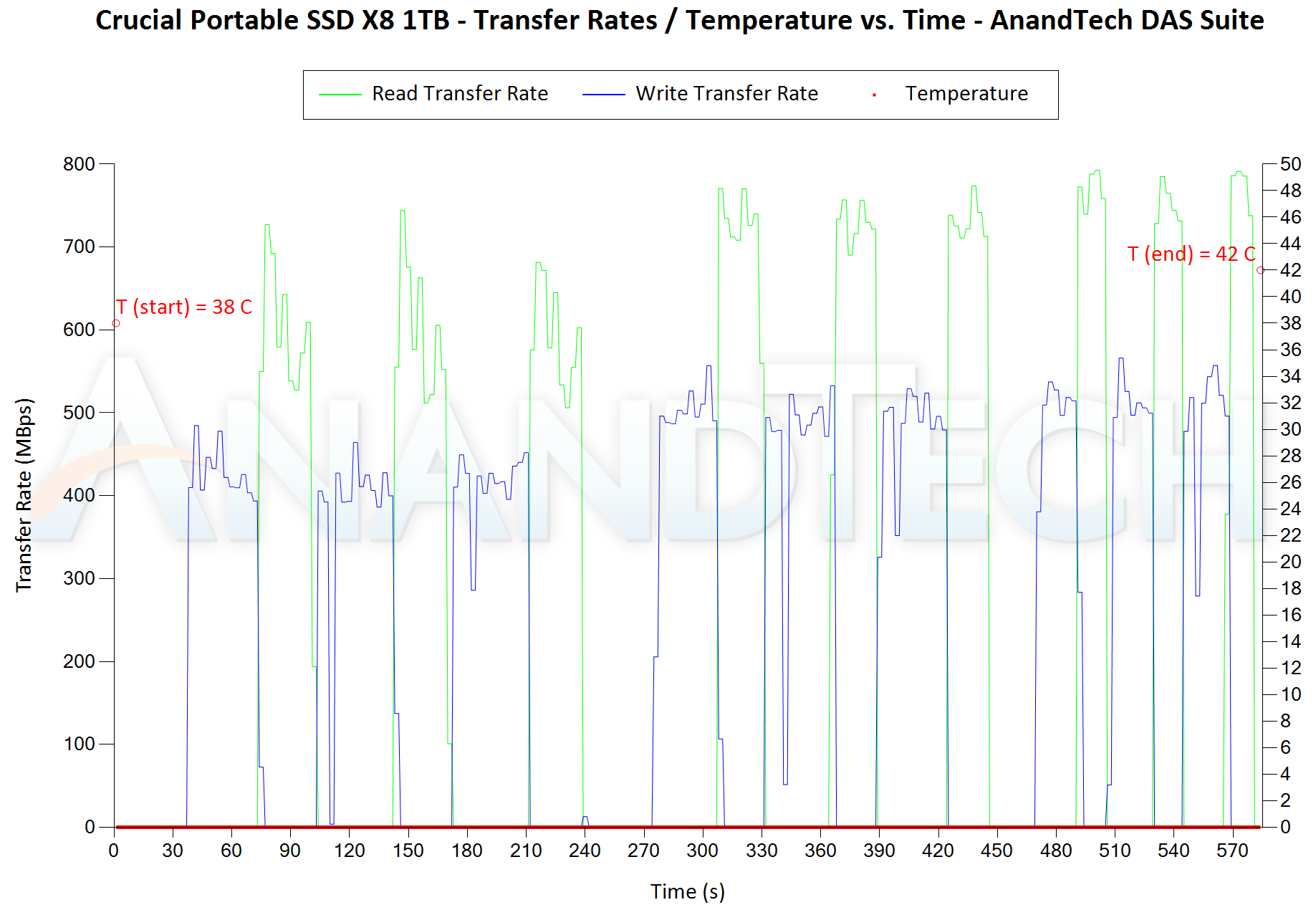
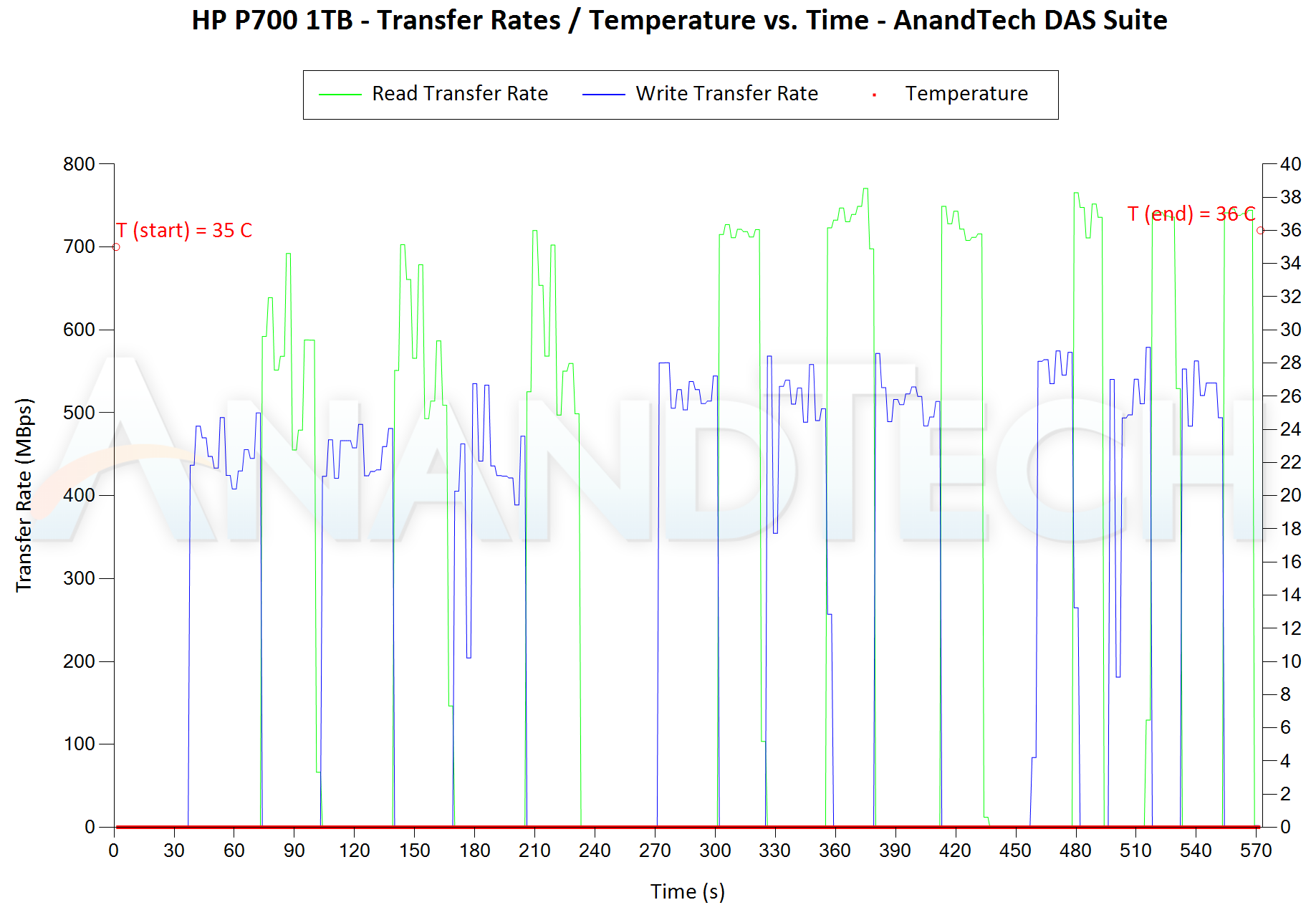
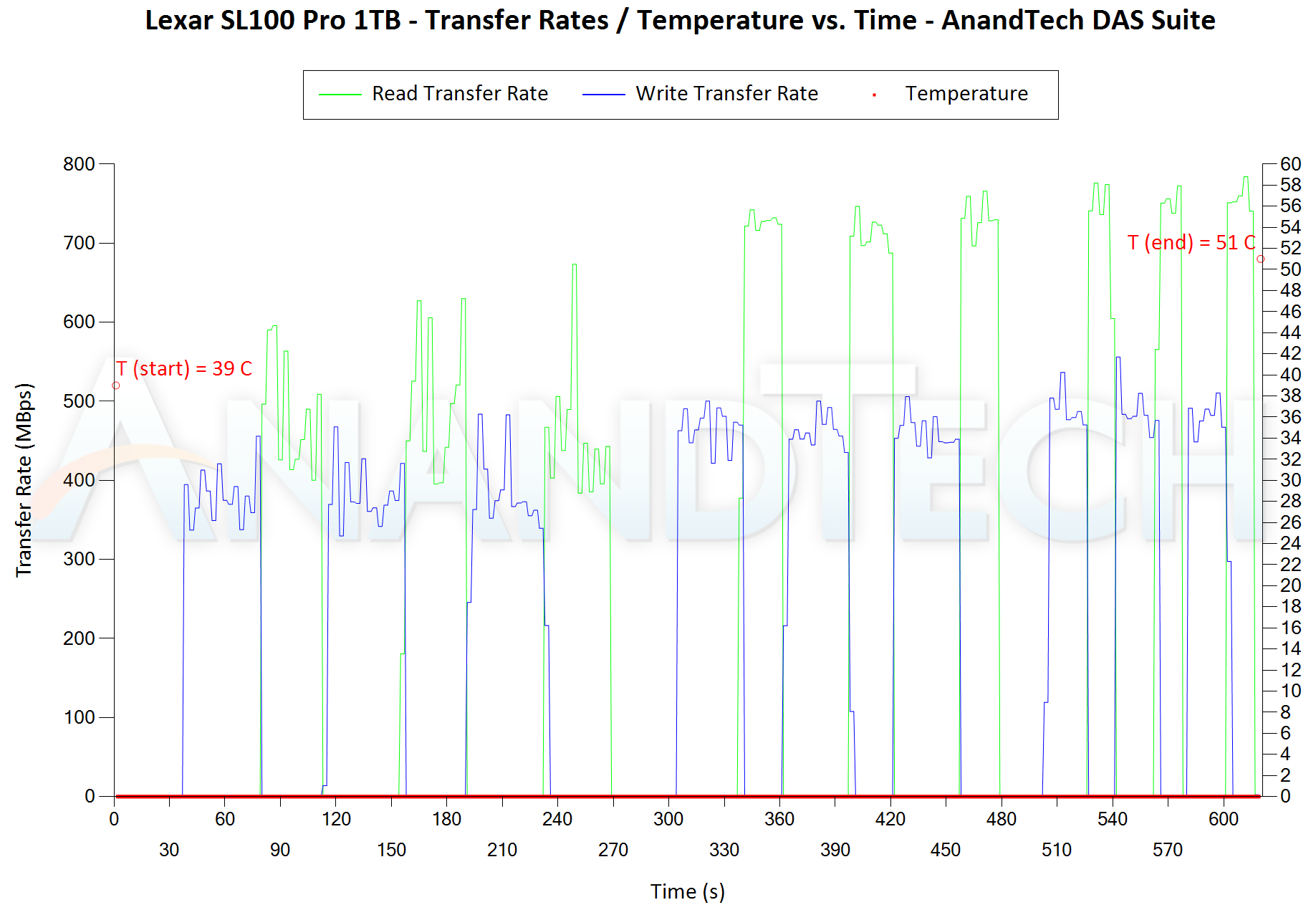
Aspects influencing the performance consistency include SLC caching and thermal throttling / firmware caps on access rates to avoid overheating. This is important for power users, as the last thing that they want to see when copying over 100s of GB of data is the transfer rate going down to USB 2.0 speeds.


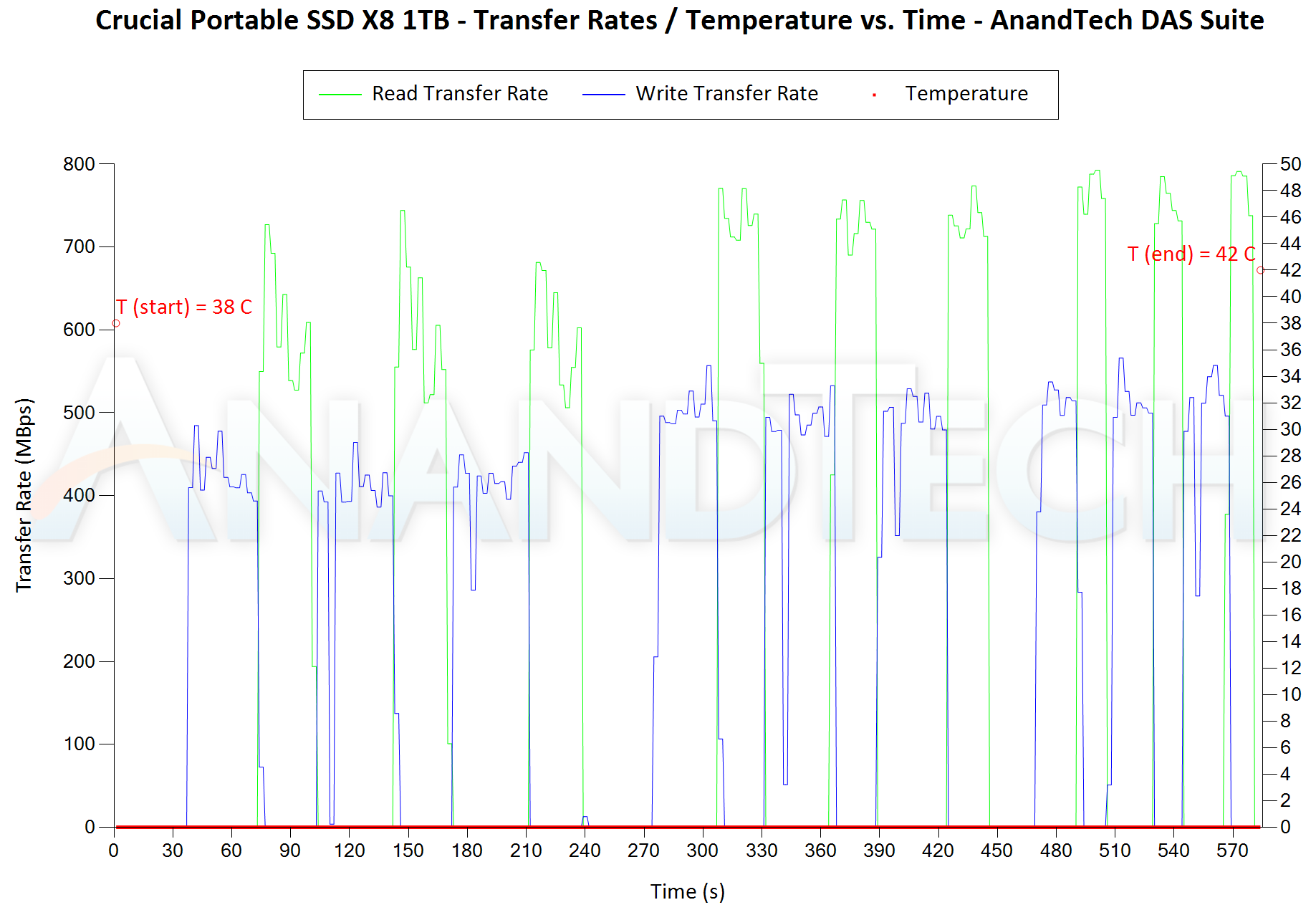
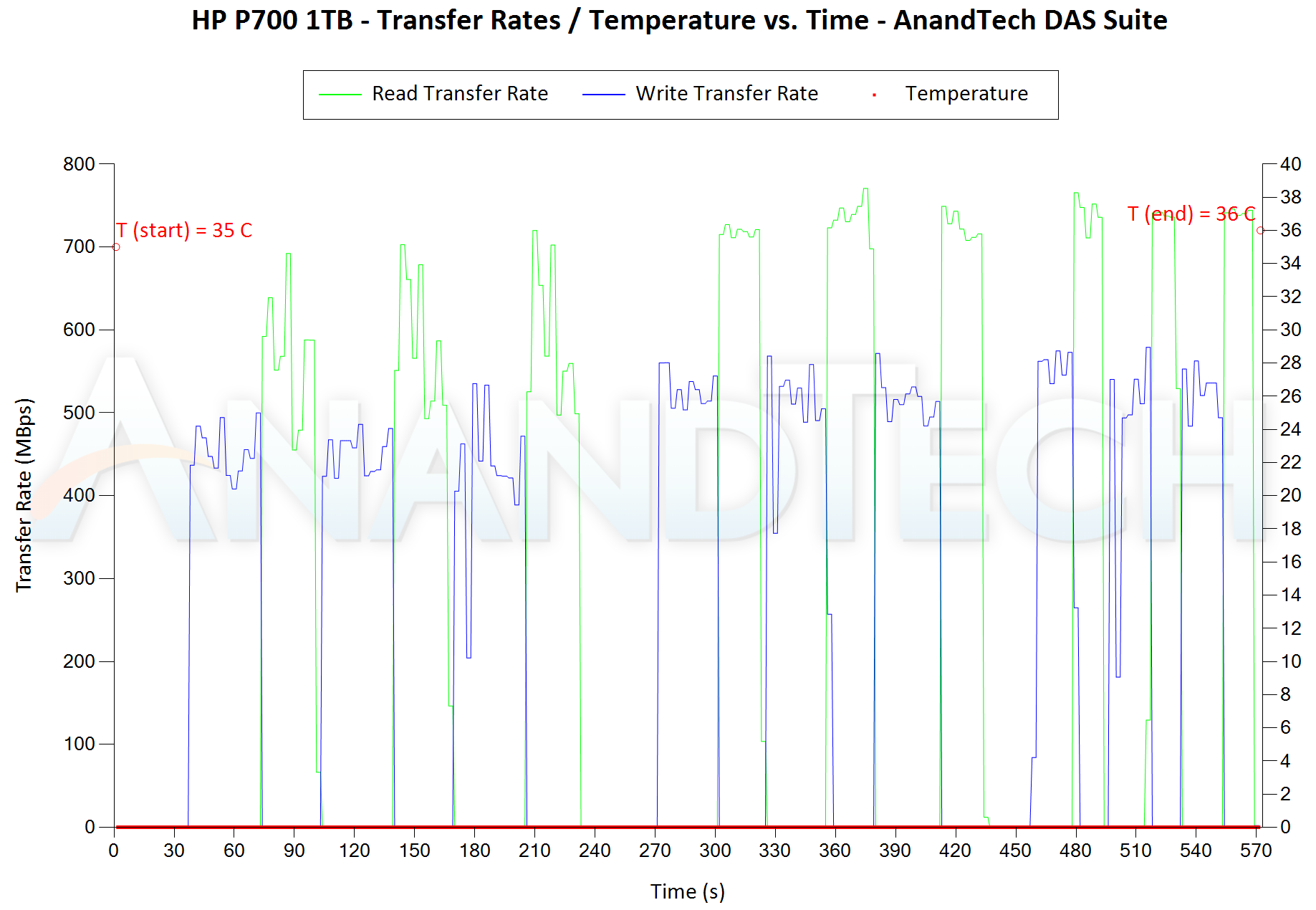
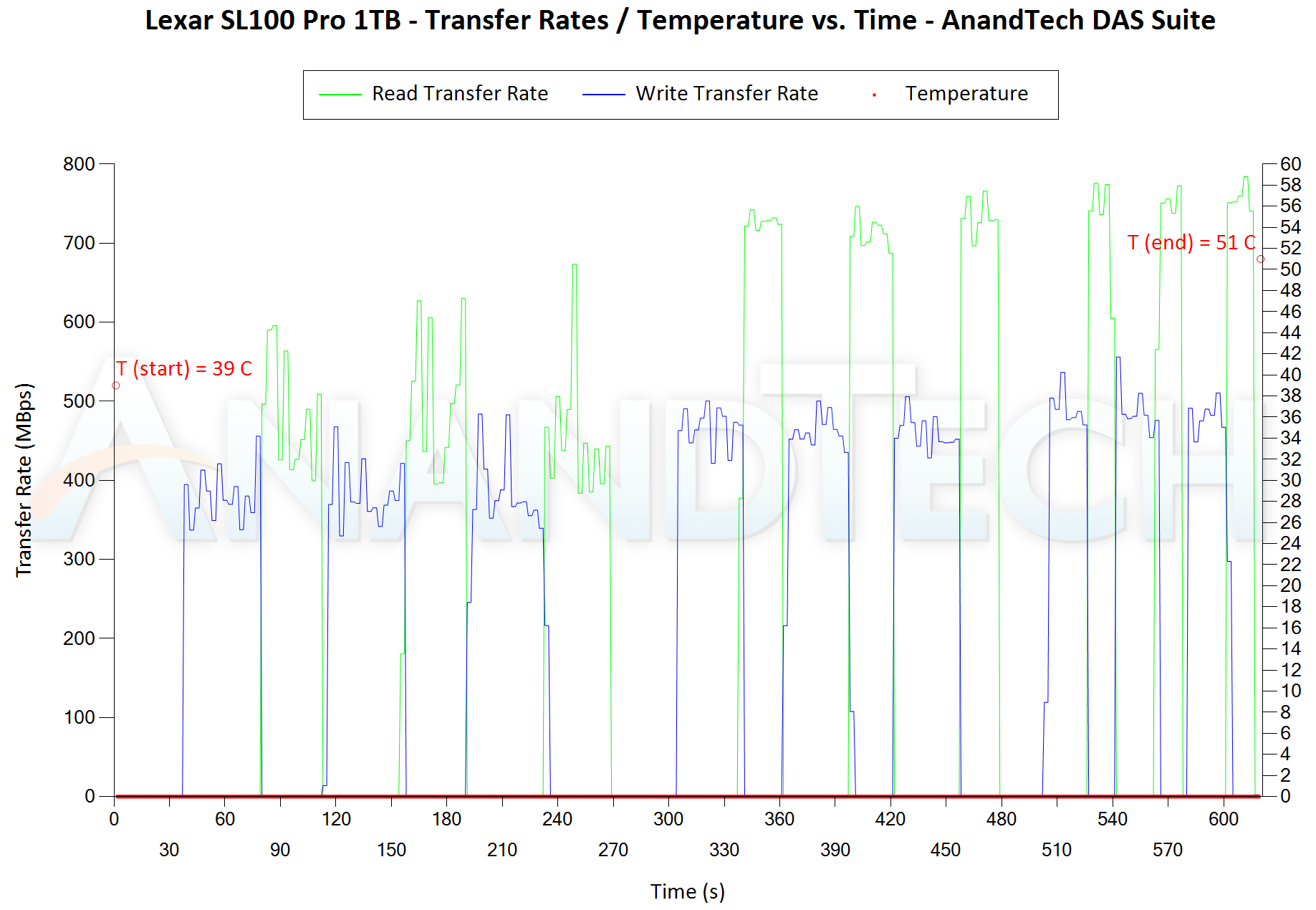
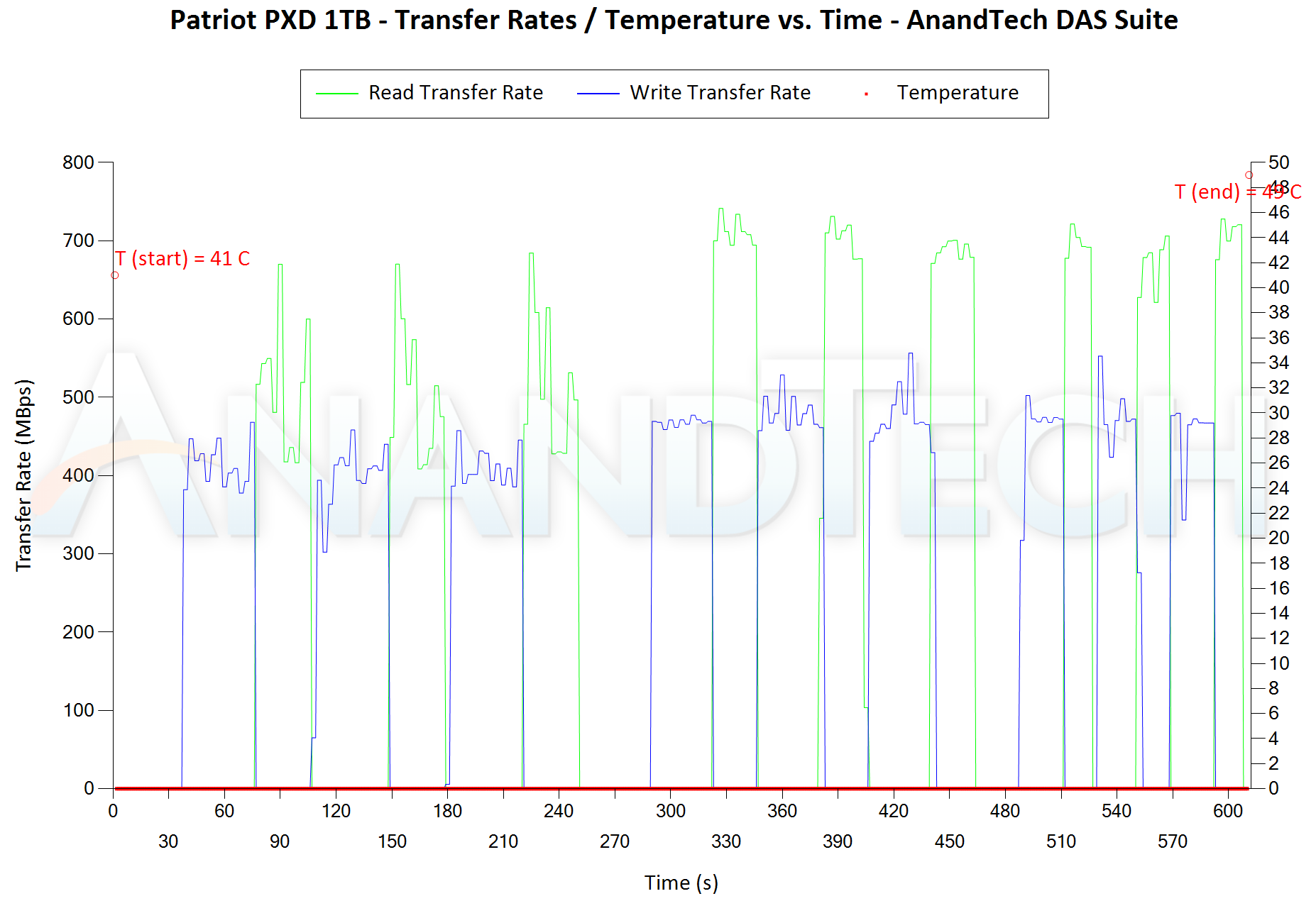
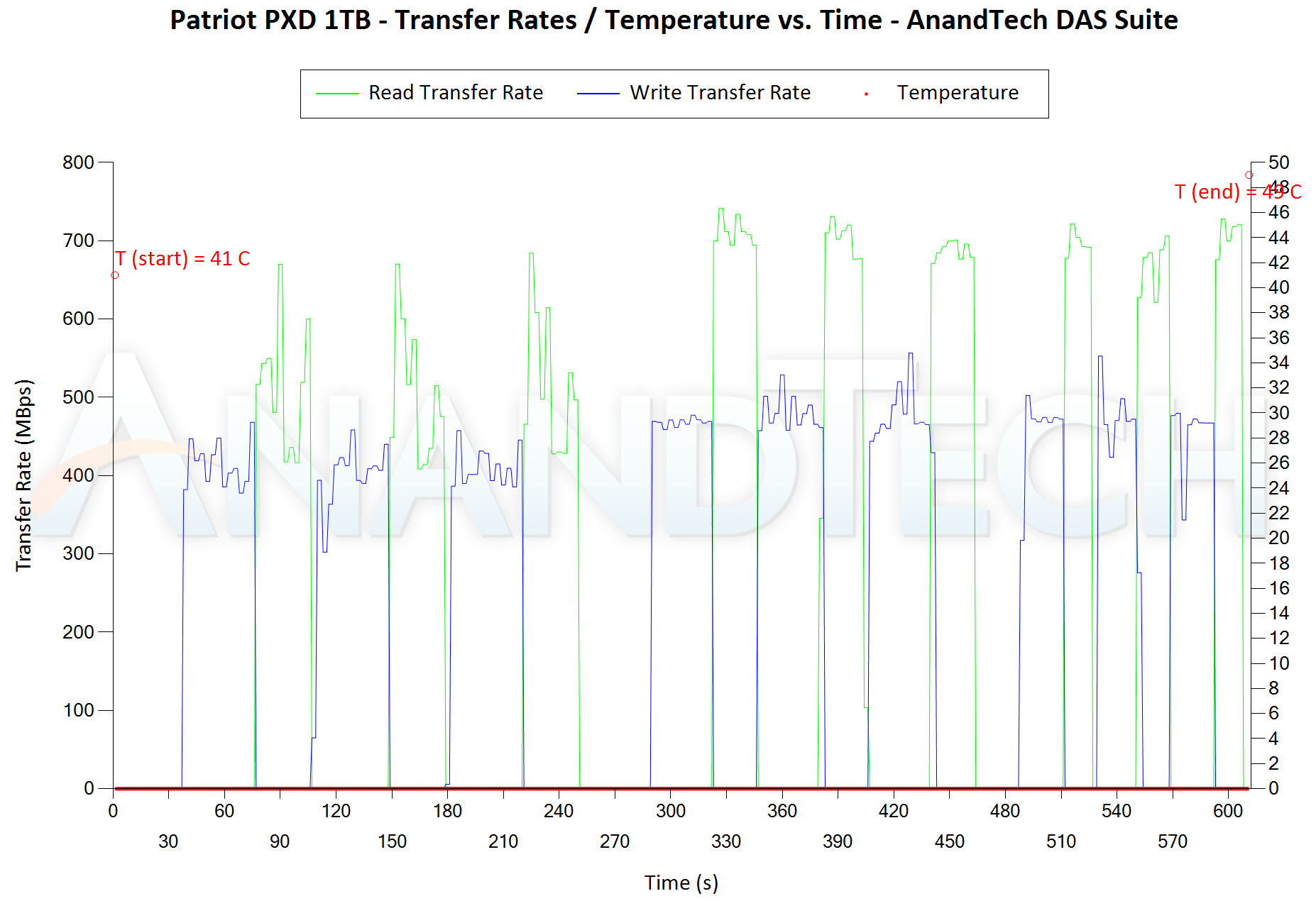
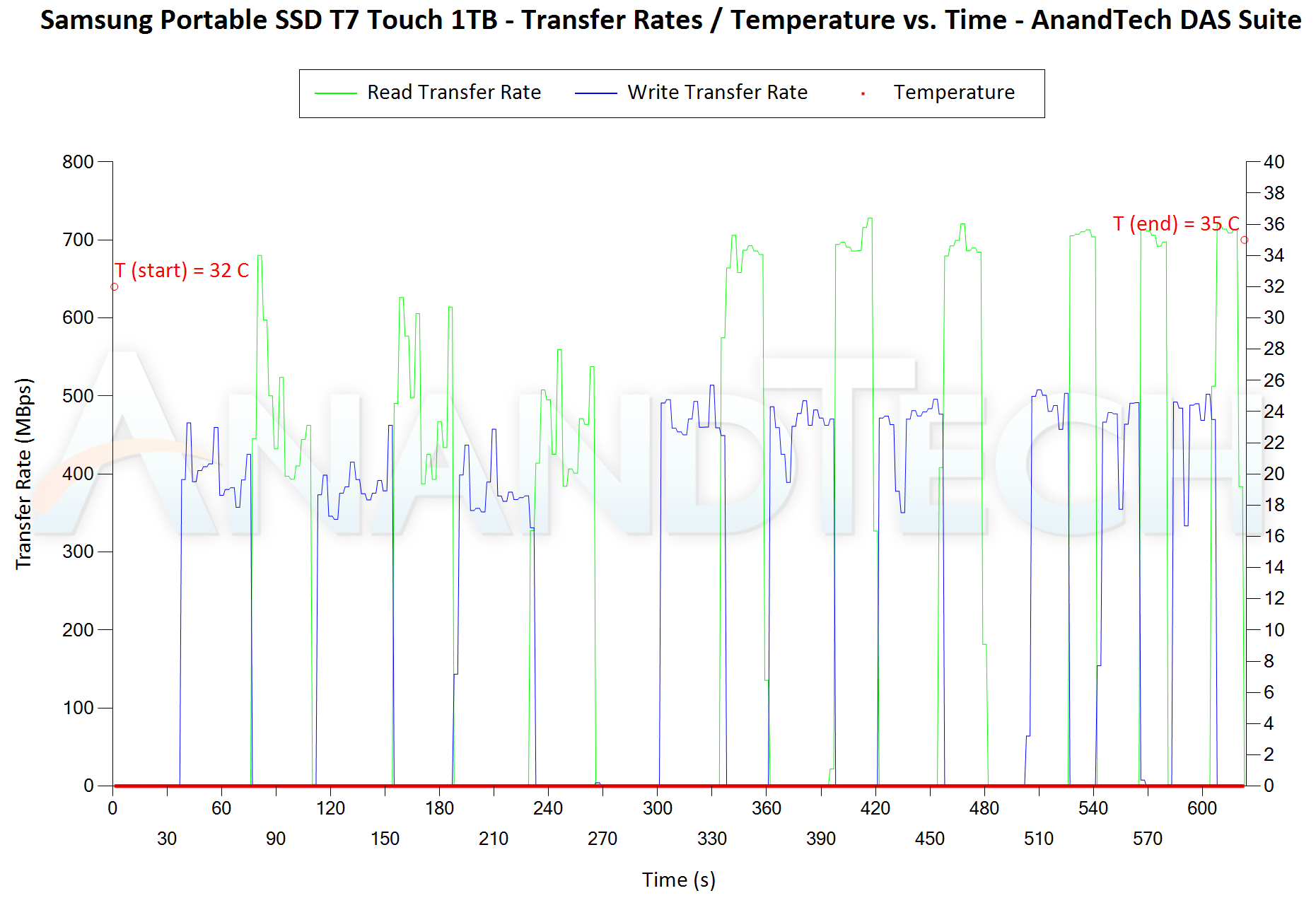
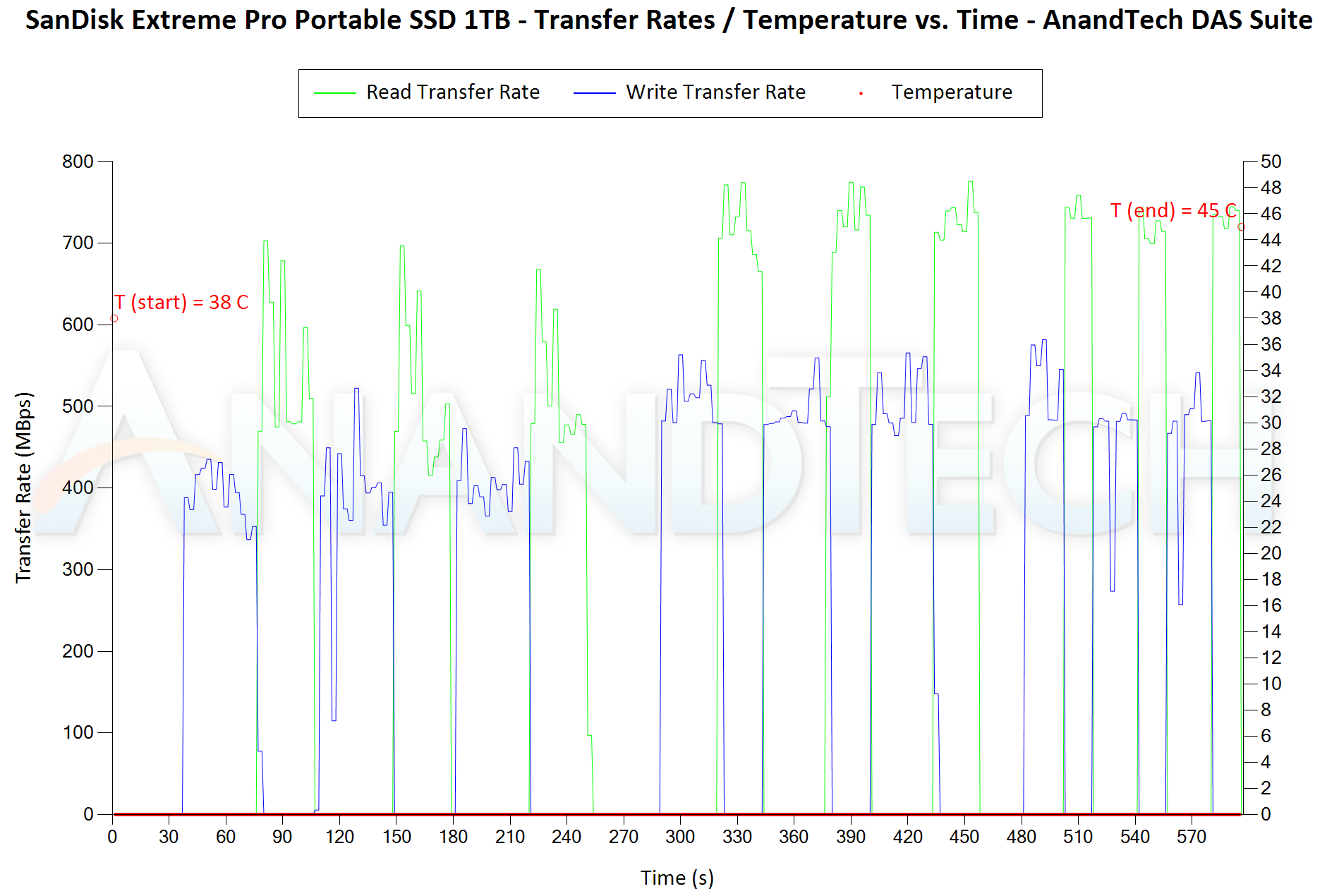
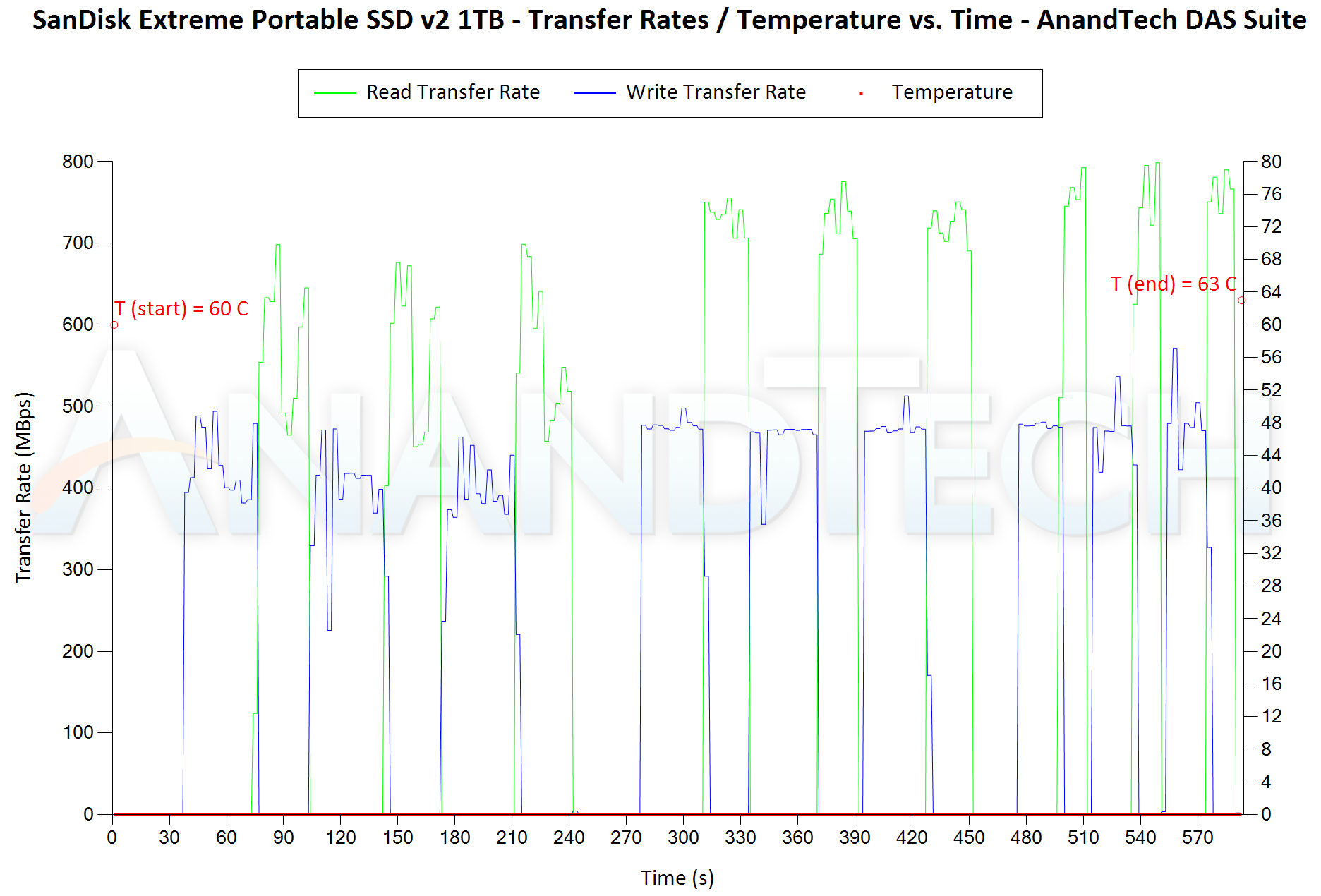
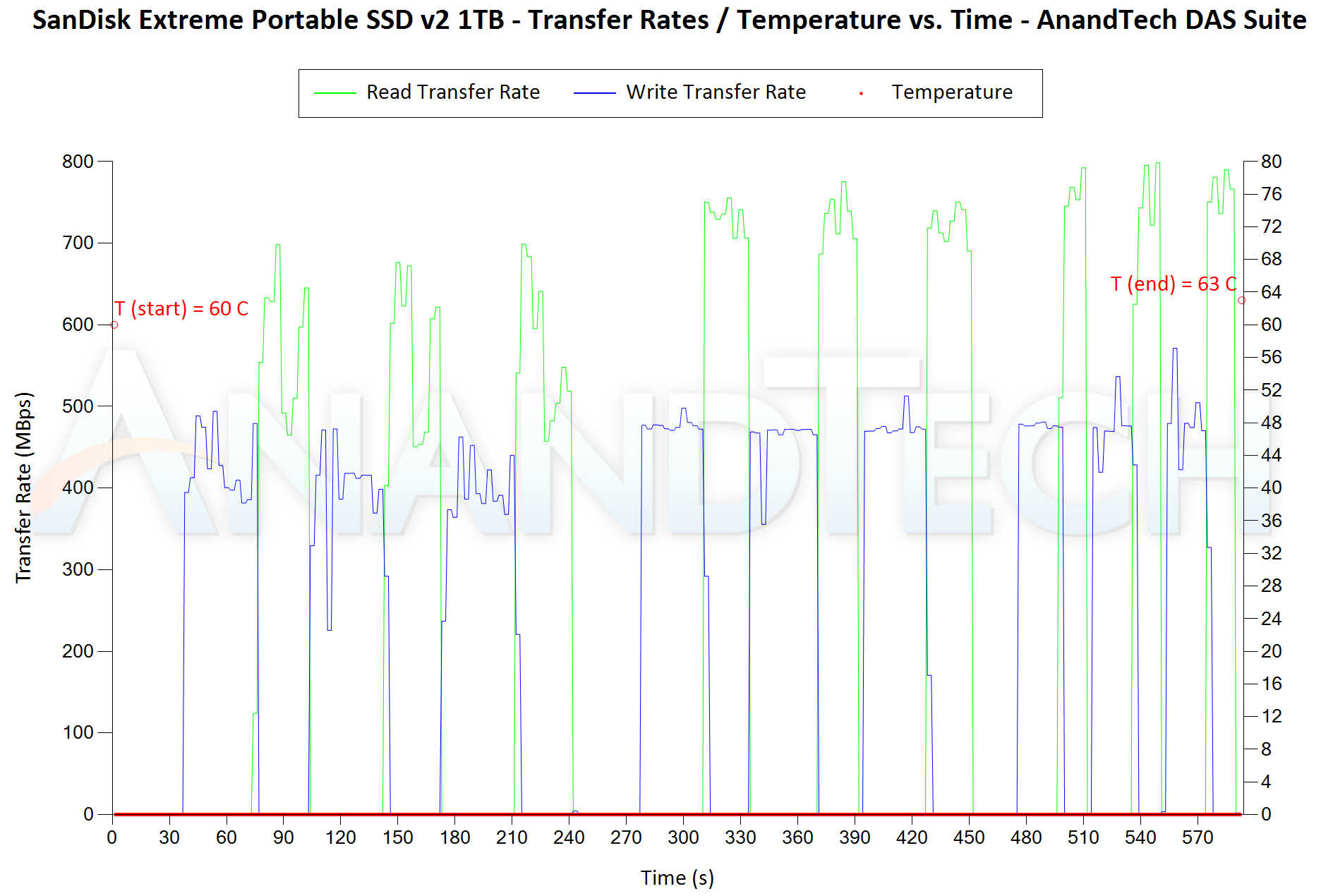
In addition to tracking the instantaneous read and write speeds of the DAS when processing the AnandTech DAS Suite, the temperature of the drive was also recorded at the beginning and end of the processing. In earlier reviews, we used to track the temperature all through. However, we have observed that SMART read-outs for the temperature in NVMe SSDs using USB 3.2 Gen 2 bridge chips end up negatively affecting the actual transfer rates. To avoid this problem, we have restricted ourselves to recording the temperature at either end of the actual workloads set. The graphs below present the recorded data.


var PCON_paths_0 = new Array(‘‘,’‘,’‘,’‘,’‘,’‘,’‘,’‘,’‘);
PCON_paths_0.push(‘


‘);


Performance Consistency and Thermal Characteristics
SanDisk Extreme Portable SSD v2 1TBWD My Passport SSD (2020) 1TBADATA SE800 1TBCrucial Portable SSD X8 1TBHP P700 1TBLexar SL100 Pro 1TBPatriot PXD 1TBSamsung Portable SSD T7 Touch 1TBSanDisk Extreme Pro Portable SSD 1TBExpand All

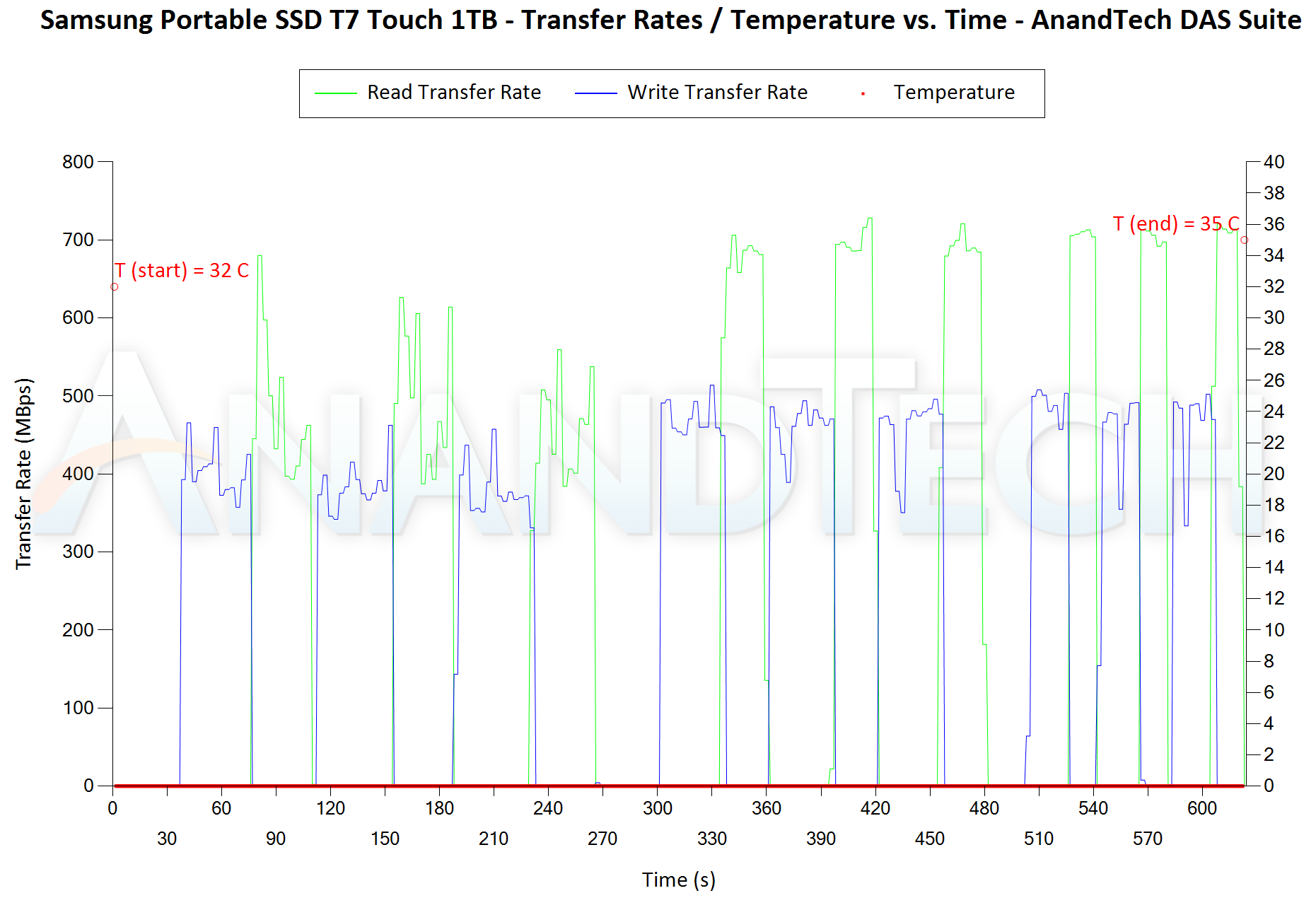
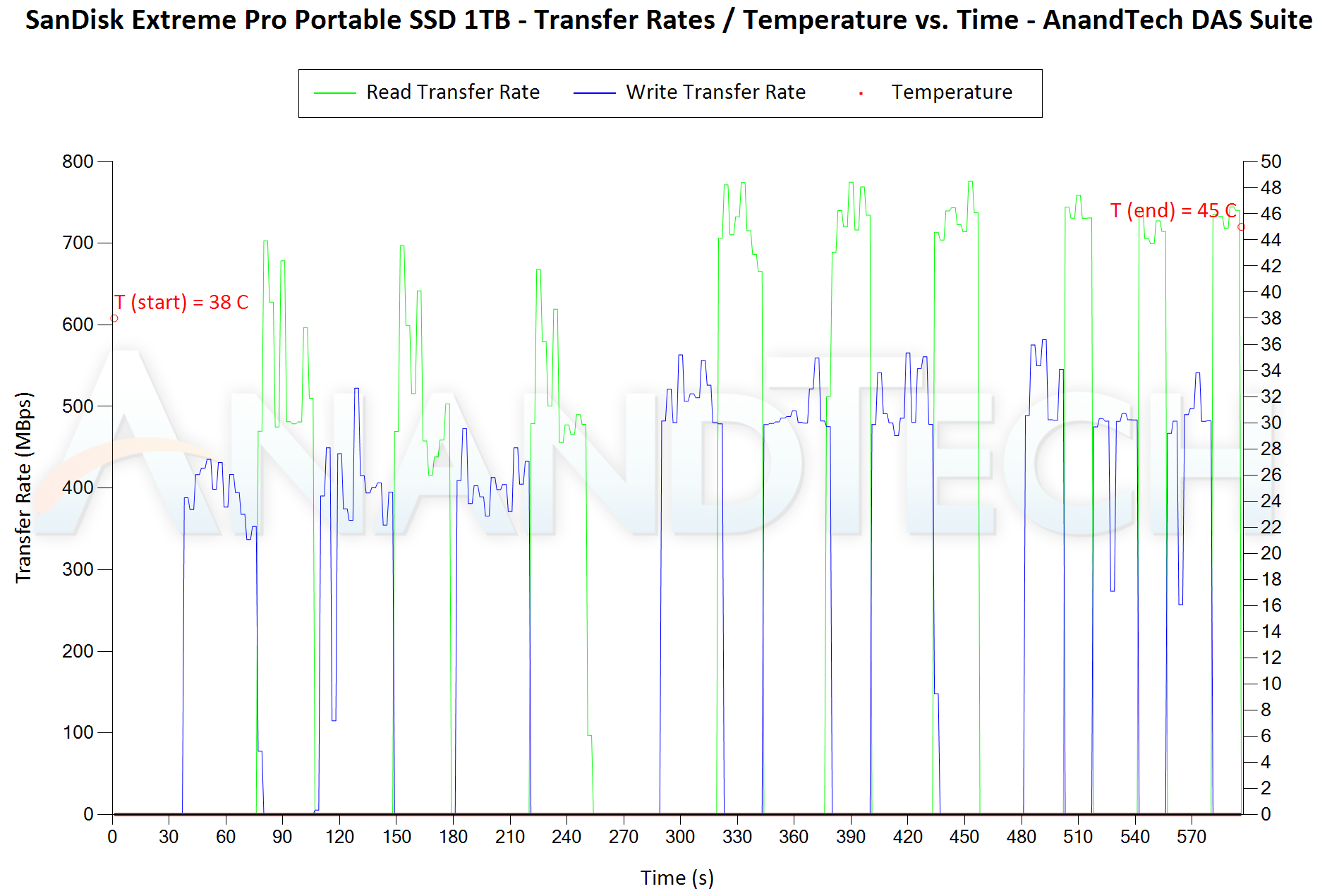
The first three sets of writes and reads correspond to the photos suite. A small gap (for the transfer of the video suite from the internal SSD to the RAM drive) is followed by three sets for the video suite. Another small RAM-drive transfer gap is followed by three sets for the Blu-ray folder. An important point to note here is that each of the first three blue and green areas correspond to 15.6 GB of writes and reads respectively. The consistency shown across different passes of the same workload show that no thermal throttling is at play for either SSD. The thermal solution in both perform very similarly for normal workloads – around 3C-4C rise in temperature after around 250GB of reads and writes.


PCMark 10 Storage Bench – Real-World Access Traces


There are a number of storage benchmarks that can subject a device to artificial access traces by varying the mix of reads and writes, the access block sizes, and the queue depth / number of outstanding data requests. We saw results from two popular ones – ATTO, and CrystalDiskMark – in a previous section. More serious benchmarks, however, actually replicate access traces from real-world workloads to determine the suitability of a particular device for a particular workload. Real-world access traces may be used for simulating the behavior of computing activities that are limited by storage performance. Examples include booting an operating system or loading a particular game from the disk.


PCMark 10’s storage bench (introduced in v2.1.2153) includes four storage benchmarks that use relevant real-world traces from popular applications and common tasks to fully test the performance of the latest modern drives:


  • The Full System Drive Benchmark uses a wide-ranging set of real-world traces from popular applications and common tasks to fully test the performance of the fastest modern drives. It involves a total of 204 GB of write traffic.
  • The Quick System Drive Benchmark is a shorter test with a smaller set of less demanding real-world traces. It subjects the device to 23 GB of writes.
  •  
  • The Data Drive Benchmark is designed to test drives that are used for storing files rather than applications. These typically include NAS drives, USB sticks, memory cards, and other external storage devices. The device is subjected to 15 GB of writes.
  • The Drive Performance Consistency Test is a long-running and extremely demanding test with a heavy, continuous load for expert users. In-depth reporting shows how the performance of the drive varies under different conditions. This writes more than 23 TB of data to the drive.

Despite the data drive benchmark appearing most suitable for testing direct-attached storage, we opted to run the full system drive benchmark as part of our evaluation flow. Many of us use portable flash drives as boot drives and storage for Steam games. These types of use-cases are addressed only in the full system drive benchmark.


The Full System Drive Benchmark comprises of 23 different traces. For the purpose of presenting results, we classify them under five different categories:


  • Boot: Replay of storage access trace recorded while booting Windows 10
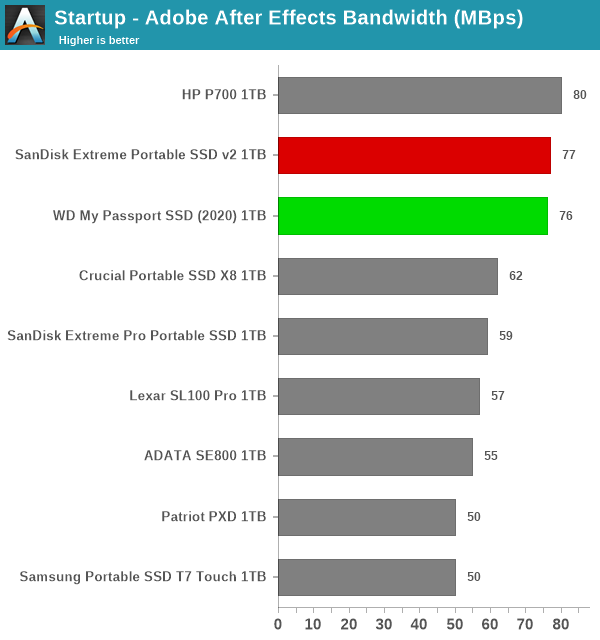
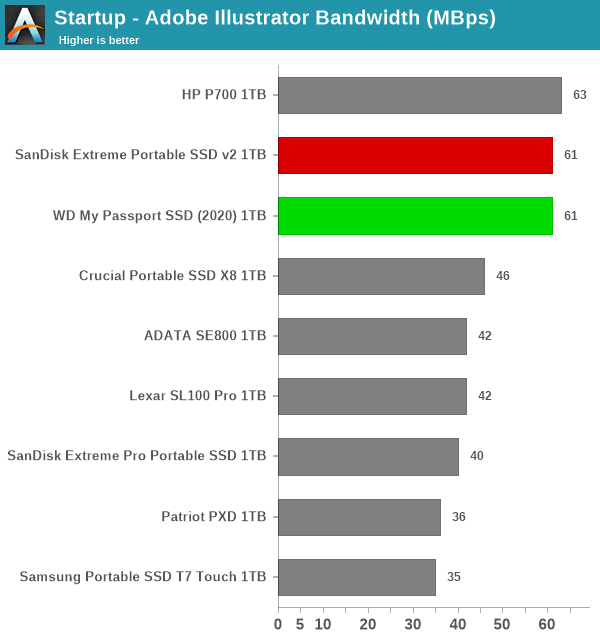
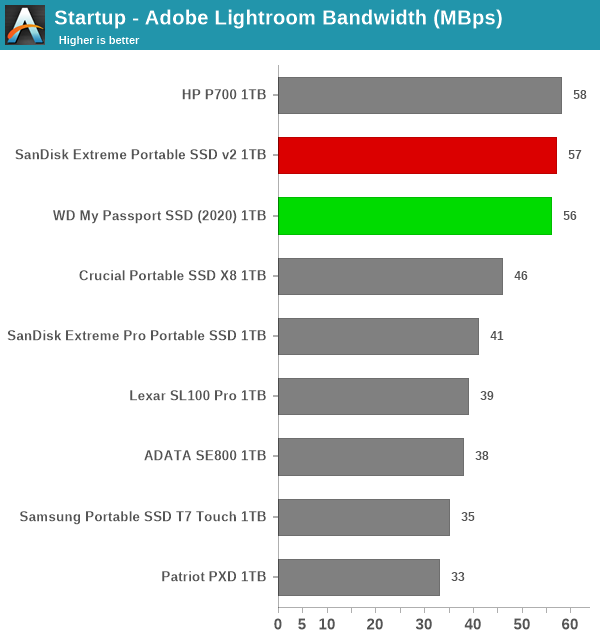
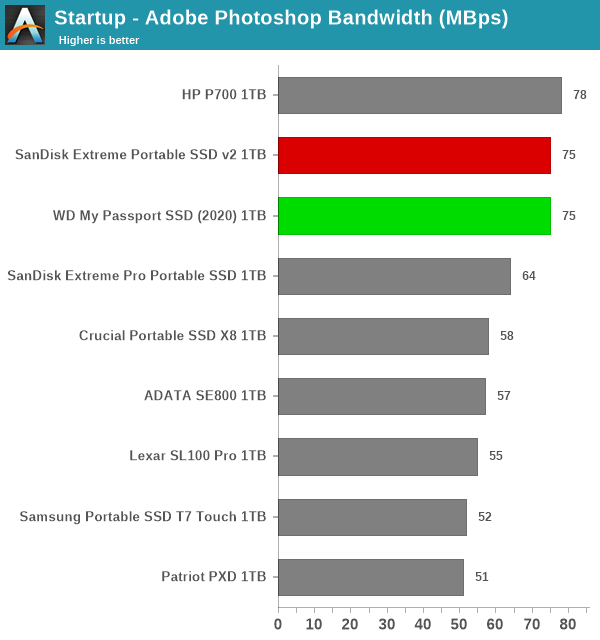
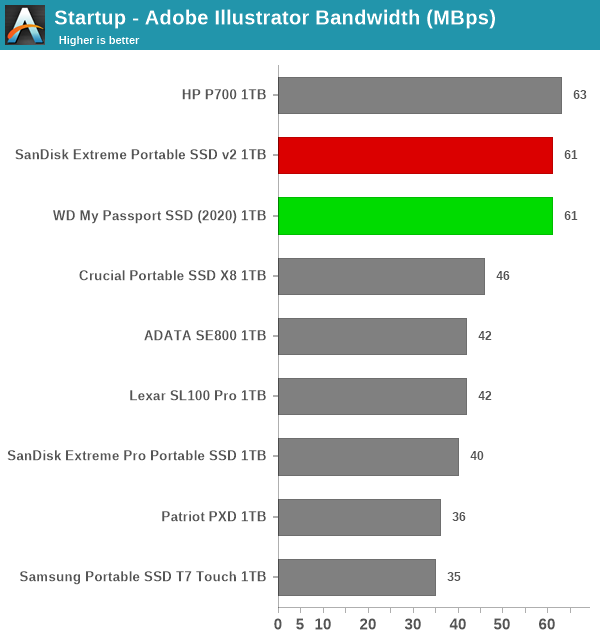
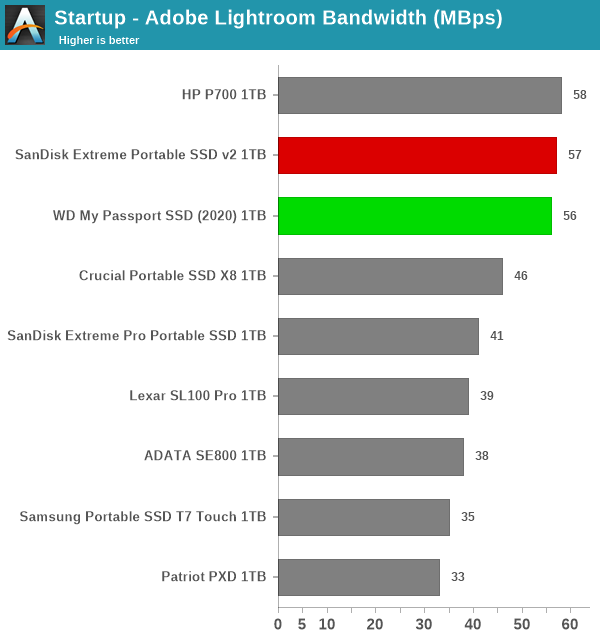
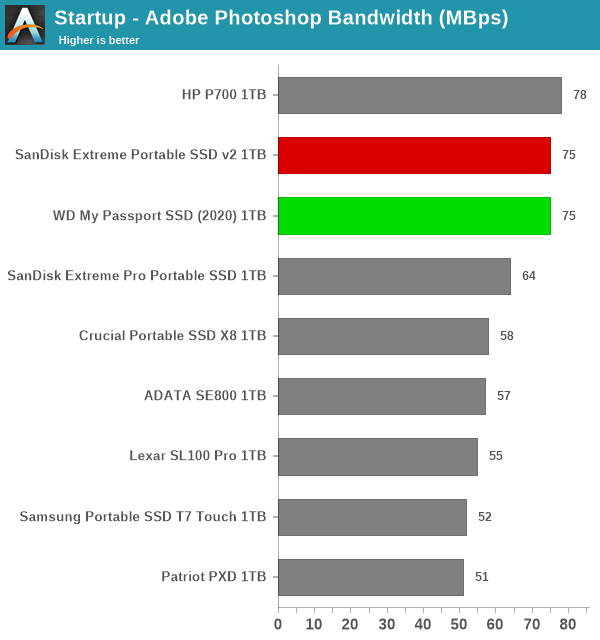
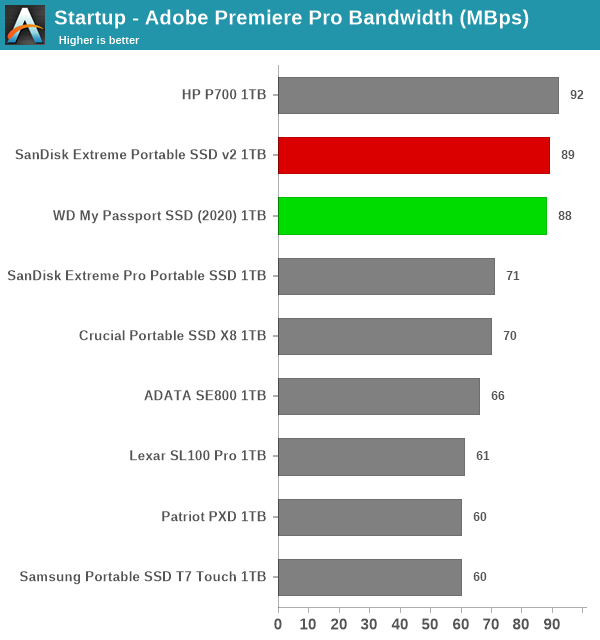
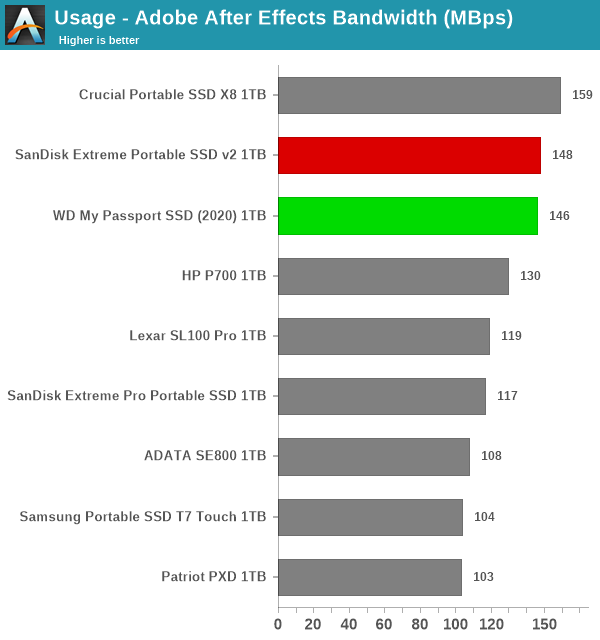
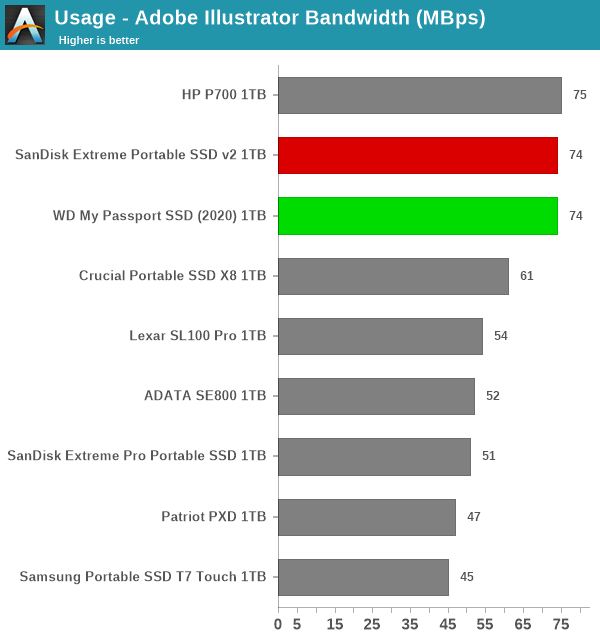
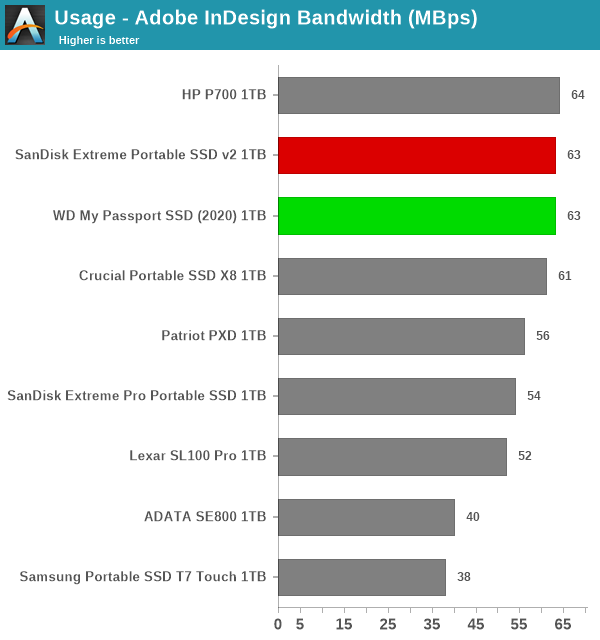
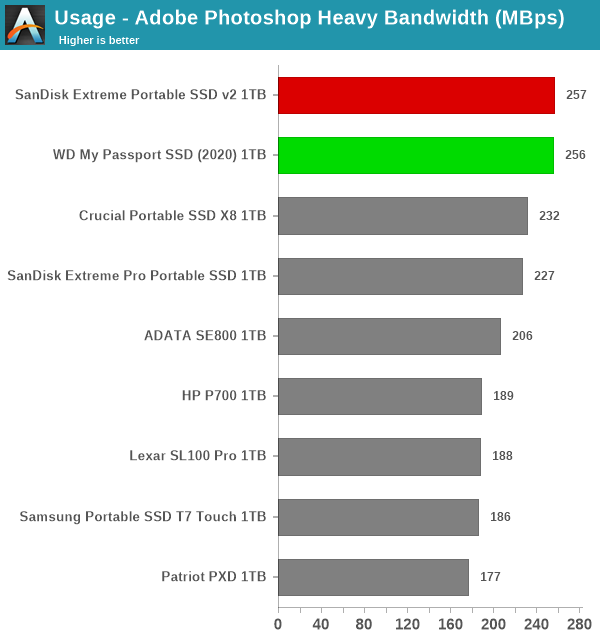
  • Creative: Replay of storage access traces recorded during the start up and usage of Adobe applications such as Acrobat, After Effects, Illustrator, Premiere Pro, Lightroom, and Photoshop.
  • Office: Replay of storage access traces recorded during the usage of Microsoft Office applications such as Excel and Powerpoint.
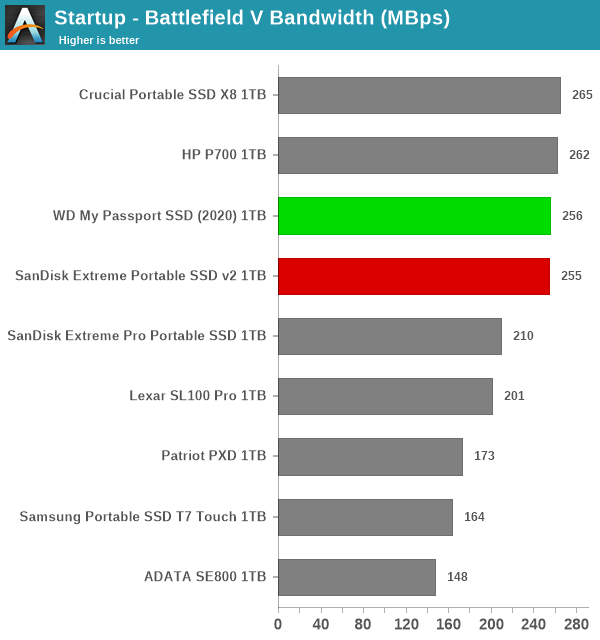
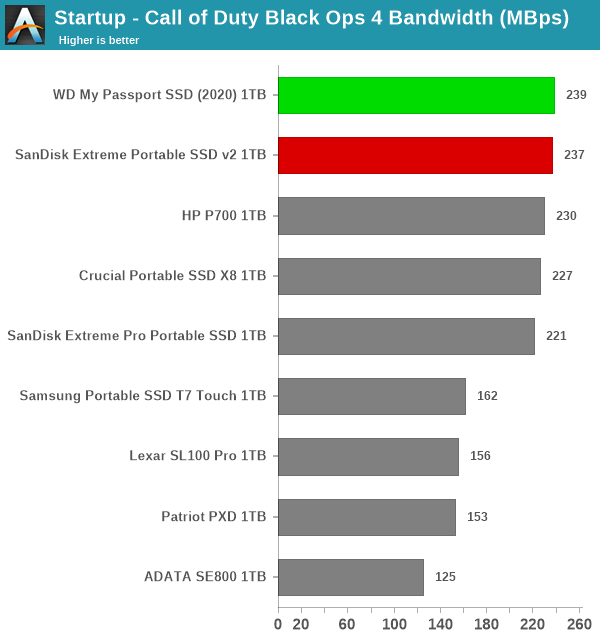
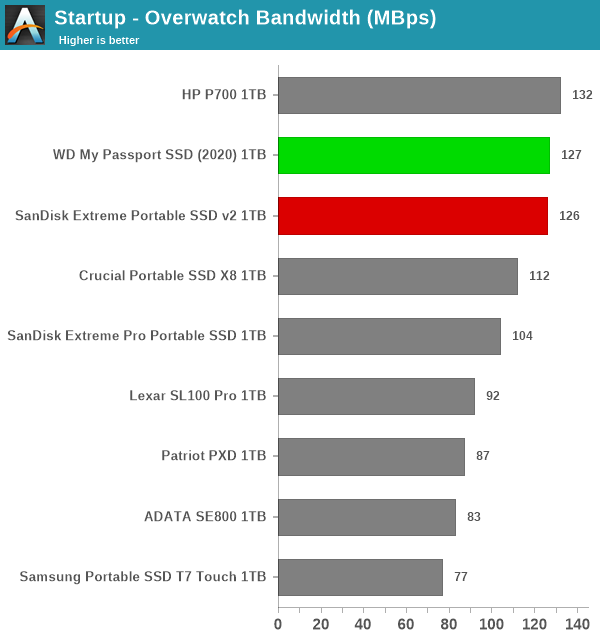
  • Gaming: Replay of storage access traces recorded during the start up of games such as Battlefield V, Call of Duty Black Ops 4, and Overwatch.
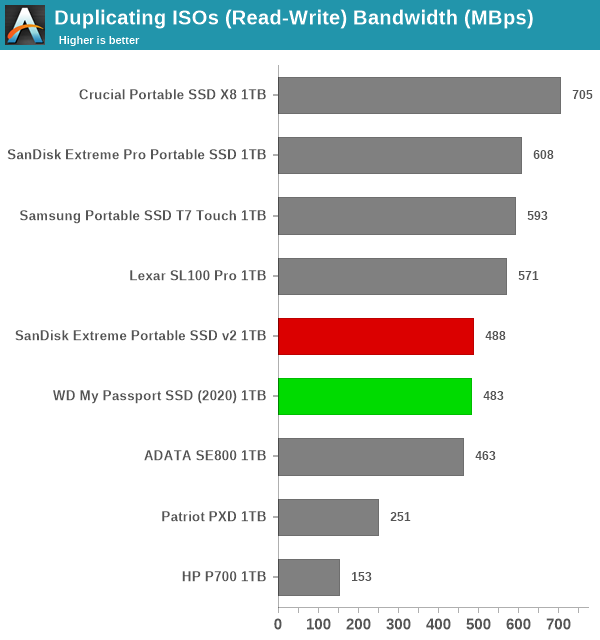
  • File Transfers: Replay of storage access traces (Write-Only, Read-Write, and Read-Only) recorded during the transfer of data such as ISOs and photographs.

PCMark 10 also generates an overall score, bandwidth, and average latency number for quick comparison of different drives. The sub-sections in the rest of the page reference the access traces specified in the PCMark 10 Technical Guide.


Booting Windows 10


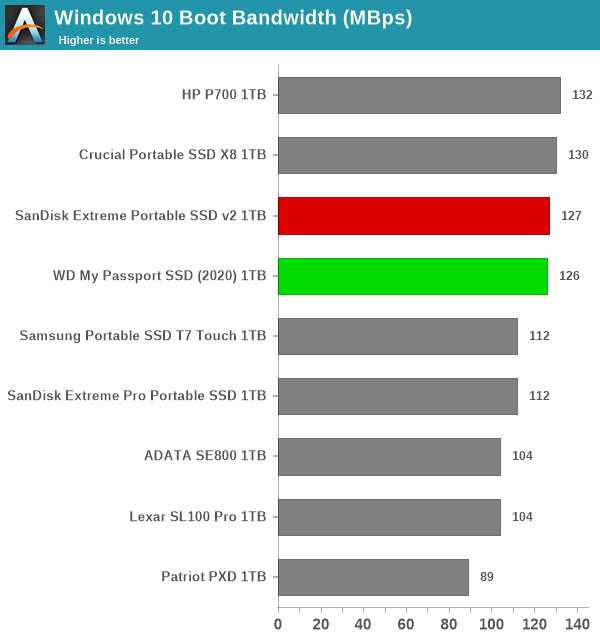
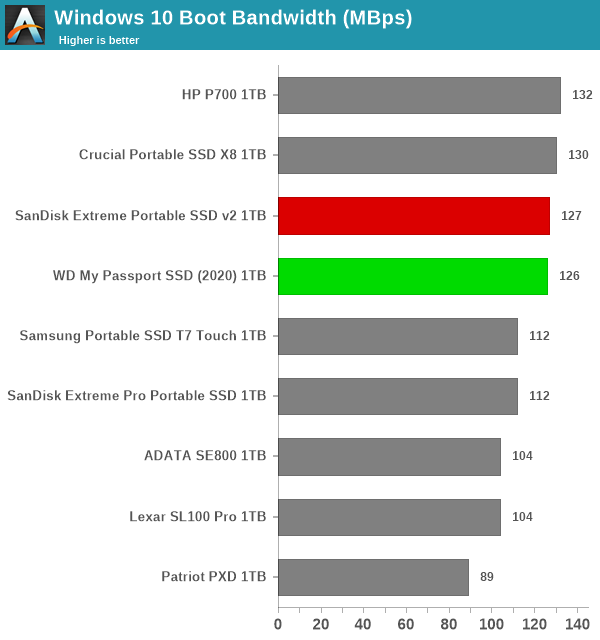
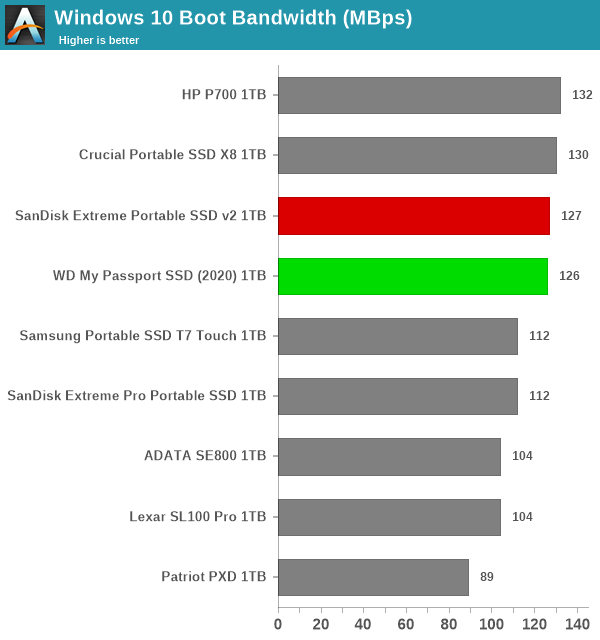
The read-write bandwidth recorded for each drive in the boo access trace is presented below.


var pcm10_bt_0_img_src = new Array(


Windows 10 Boot


);
pcm10_bt_0_img_src.push(‘Windows 10 Boot
‘) ;


Windows 10 BootExpand All


Windows 10 Boot


Both SSDs appear in the top half of the chart, and are off from the leader by a small margin.


Creative Workloads


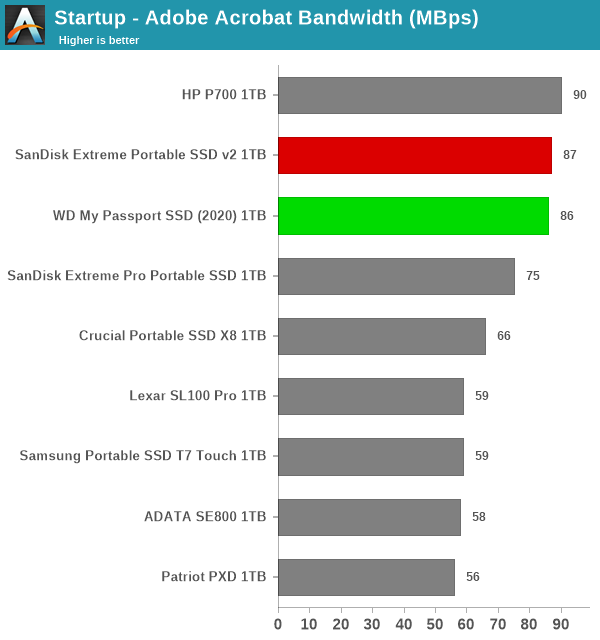
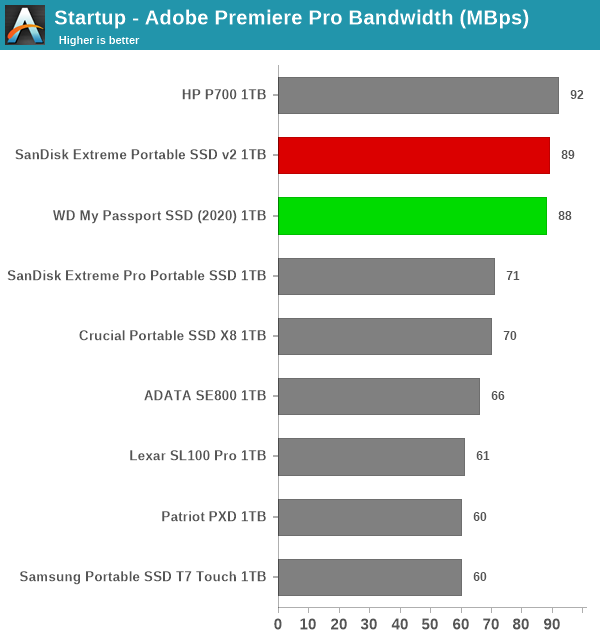
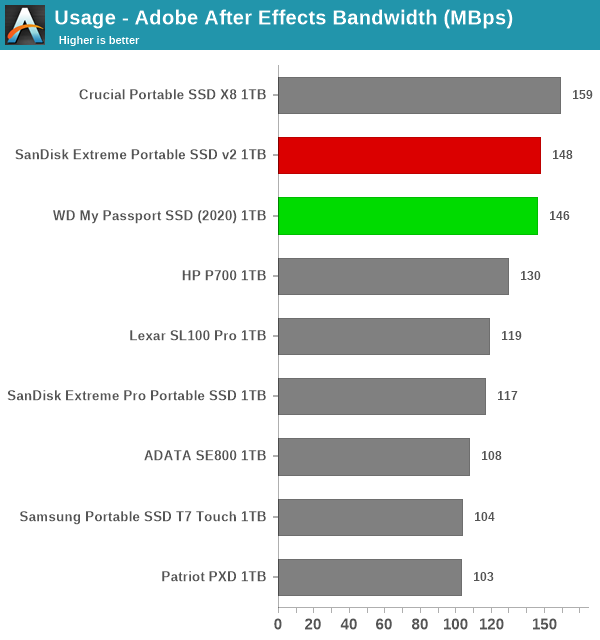
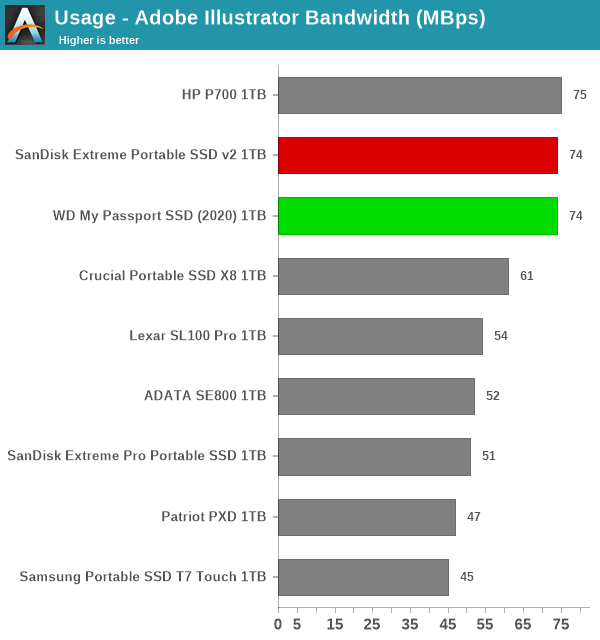
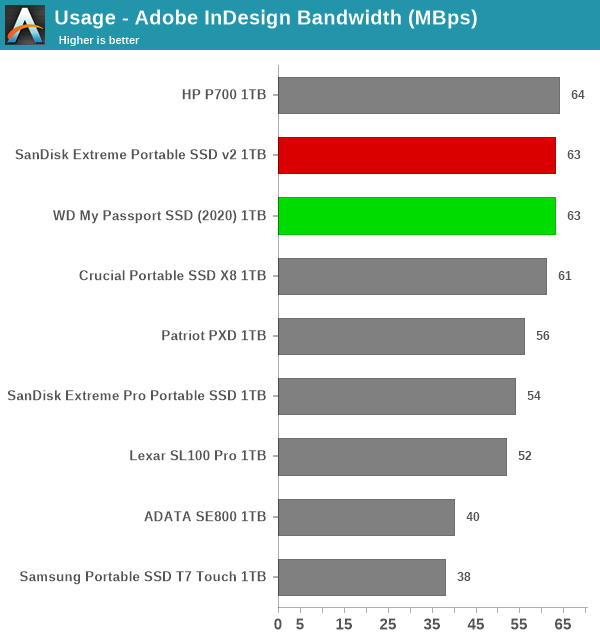
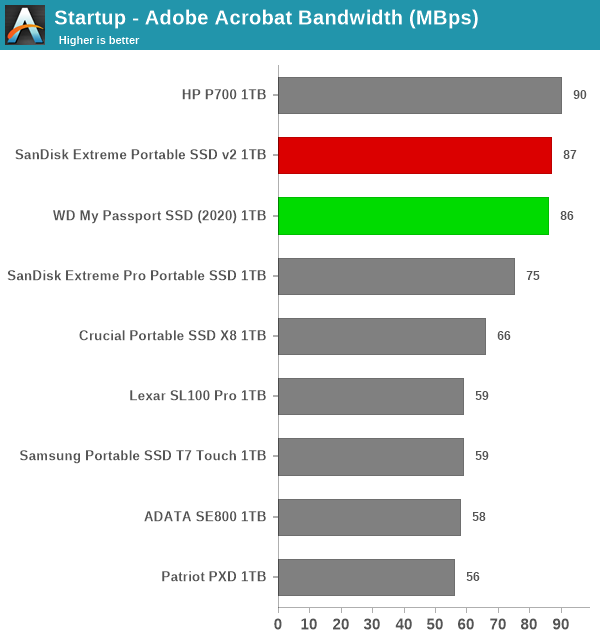
The read-write bandwidth recorded for each drive in the sacr, saft, sill, spre, slig, sps, aft, exc, ill, ind, psh, and psl access traces are presented below.


var pcm10_crtv_0_img_src = new Array(


Startup - Adobe Acrobat‘,


Startup - Adobe After Effects‘,


Startup - Adobe Illustrator‘,


Startup - Adobe Lightroom‘,


Startup - Adobe Photoshop‘,


Startup - Adobe Premiere Pro‘,


Usage - Adobe After Effects‘,


Usage - Adobe Illustrator‘,


Usage - Adobe InDesign‘,


Usage - Adobe Photoshop Heavy‘,


Usage - Adobe Photoshop Light


);
pcm10_crtv_0_img_src.push(‘Startup - Adobe Acrobat
Startup - Adobe After Effects
Startup - Adobe Illustrator
Startup - Adobe Lightroom
Startup - Adobe Photoshop
Startup - Adobe Premiere Pro
Usage - Adobe After Effects
Usage - Adobe Illustrator
Usage - Adobe InDesign
Usage - Adobe Photoshop Heavy
Usage - Adobe Photoshop Light
‘) ;


Startup – Adobe AcrobatStartup – Adobe After EffectsStartup – Adobe IllustratorStartup – Adobe LightroomStartup – Adobe PhotoshopStartup – Adobe Premiere ProUsage – Adobe After EffectsUsage – Adobe IllustratorUsage – Adobe InDesignUsage – Adobe Photoshop HeavyUsage – Adobe Photoshop LightExpand All

Startup - Adobe Acrobat


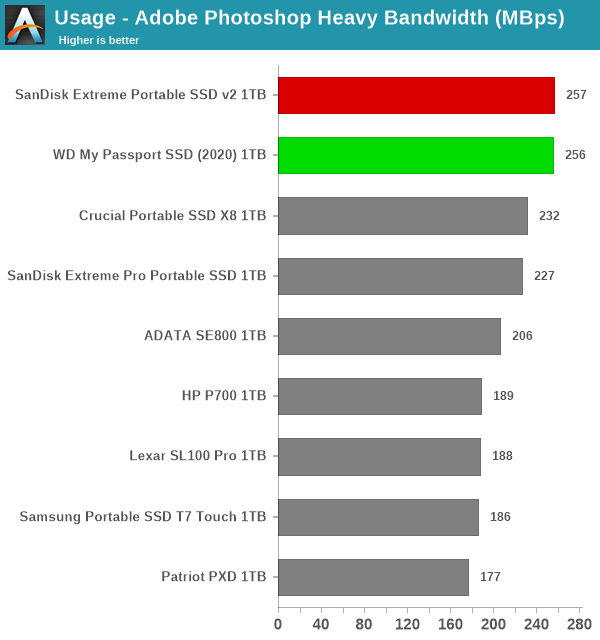
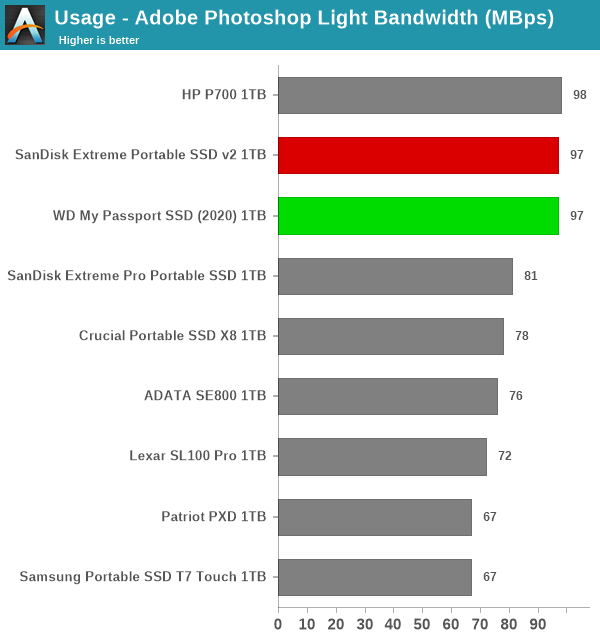
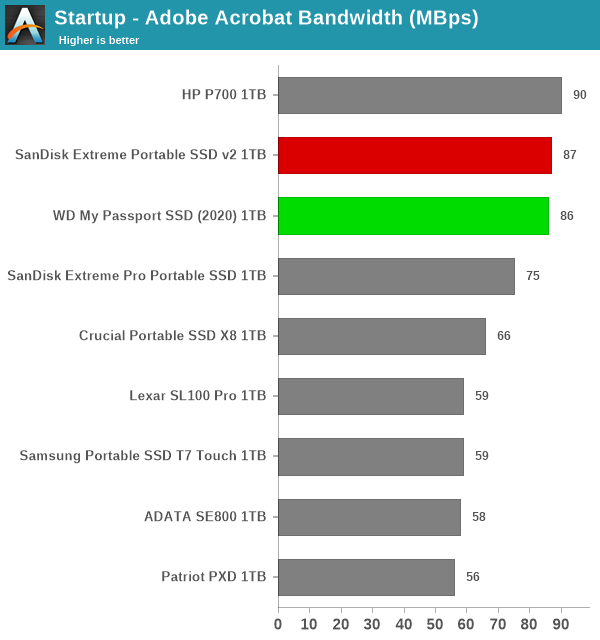
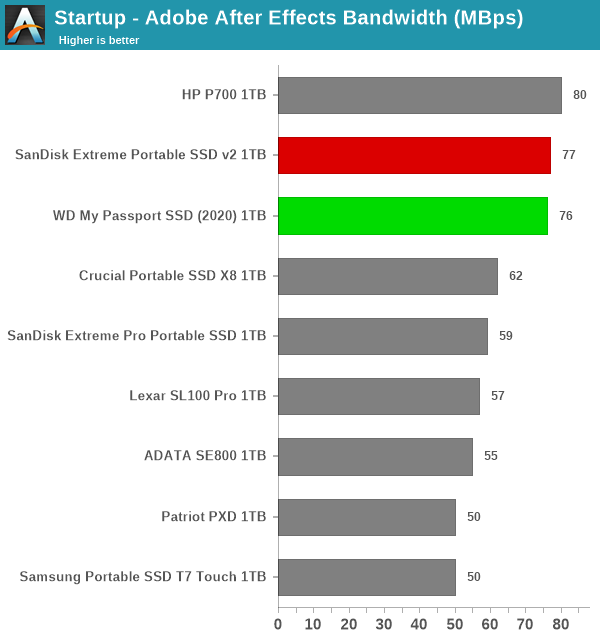
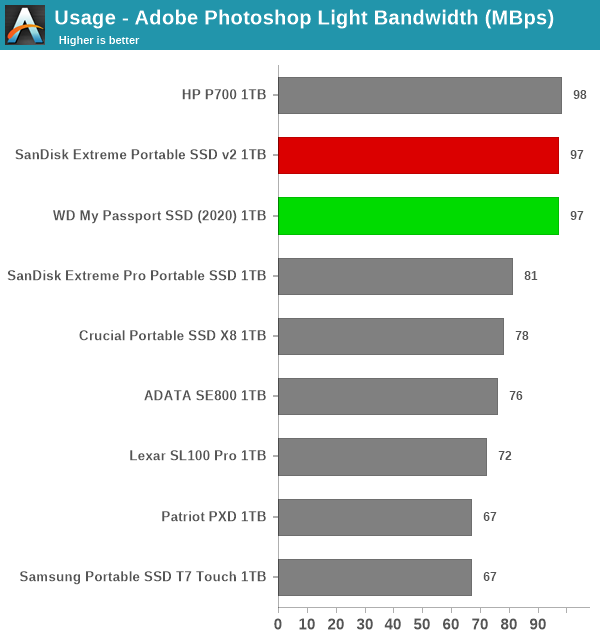
In almost all of the creative workloads, the two SSDs miss out on the top spot by a whisker to the HP Portable SSD P700.


Office Workloads


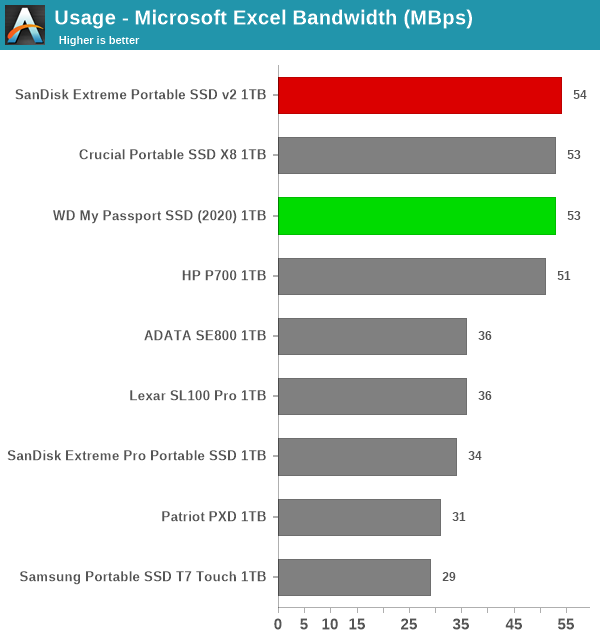
The read-write bandwidth recorded for each drive in the exc and pow access traces are presented below.


var pcm10_prod_0_img_src = new Array(


Usage - Microsoft Excel‘,


Usage - Microsoft Powerpoint


);
pcm10_prod_0_img_src.push(‘Usage - Microsoft Excel
Usage - Microsoft Powerpoint
‘) ;


Usage – Microsoft ExcelUsage – Microsoft PowerpointExpand All

Usage - Microsoft Excel


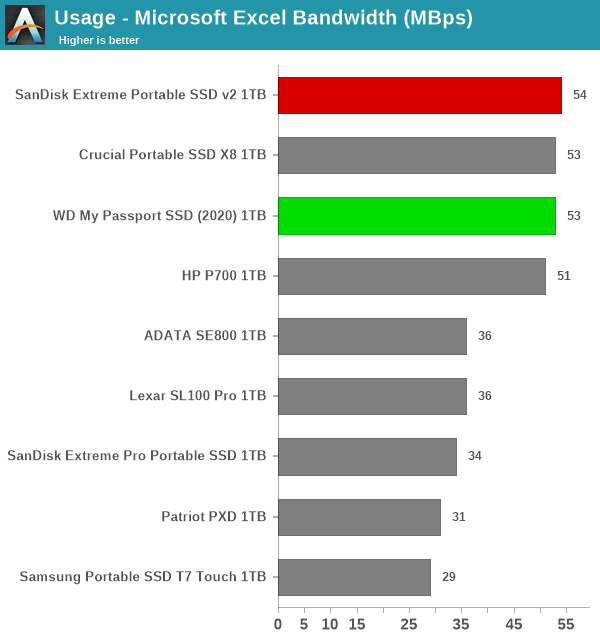
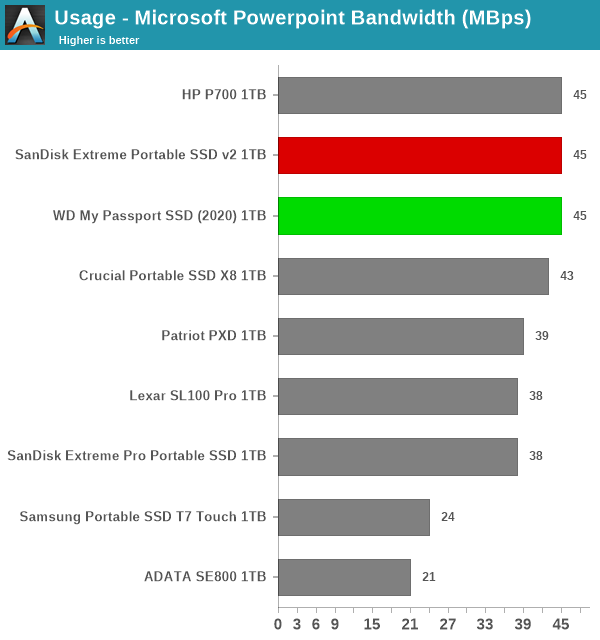
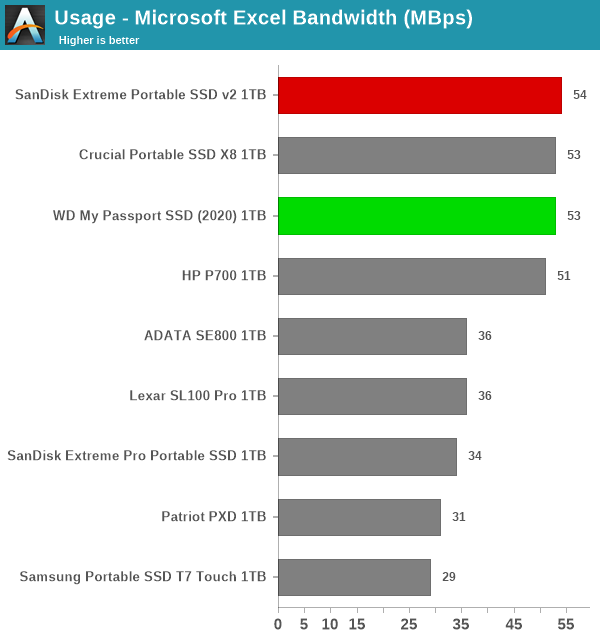
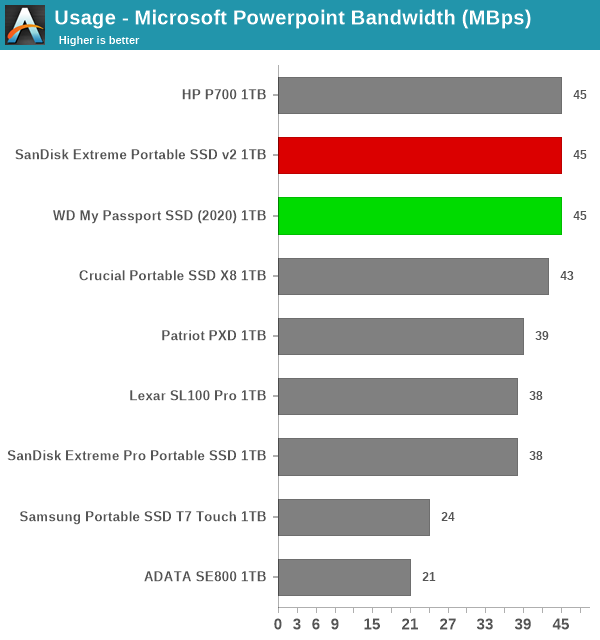
The SSDs come out in the top half again with at least one pole position – however, the HP P700 performs almost as well for the office workloads.


Gaming Workloads


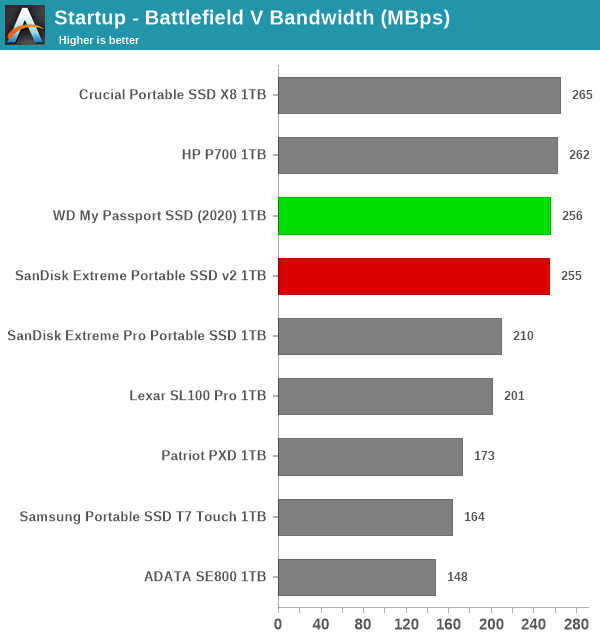
The read-write bandwidth recorded for each drive in the bf, cod, and ow access traces are presented below.


var pcm10_game_0_img_src = new Array(


Startup - Battlefield V‘,


Startup - Call of Duty Black Ops 4‘,


Startup - Overwatch


);
pcm10_game_0_img_src.push(‘Startup - Battlefield V
Startup - Call of Duty Black Ops 4
Startup - Overwatch
‘) ;


Startup – Battlefield VStartup – Call of Duty Black Ops 4Startup – OverwatchExpand All

Startup - Battlefield V


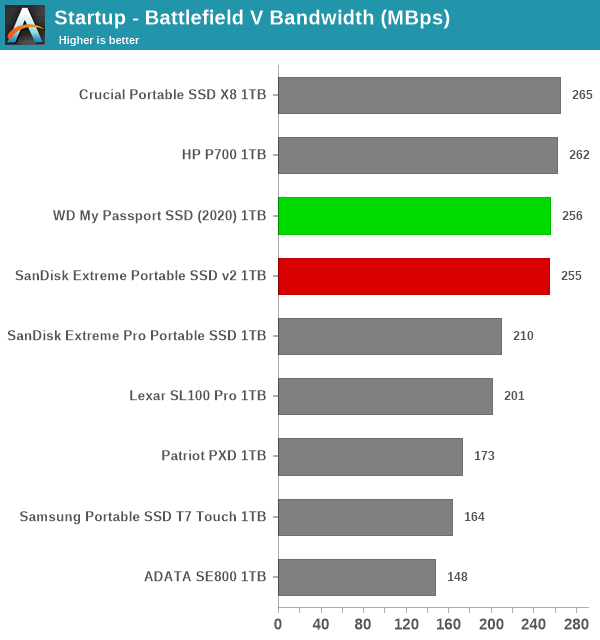
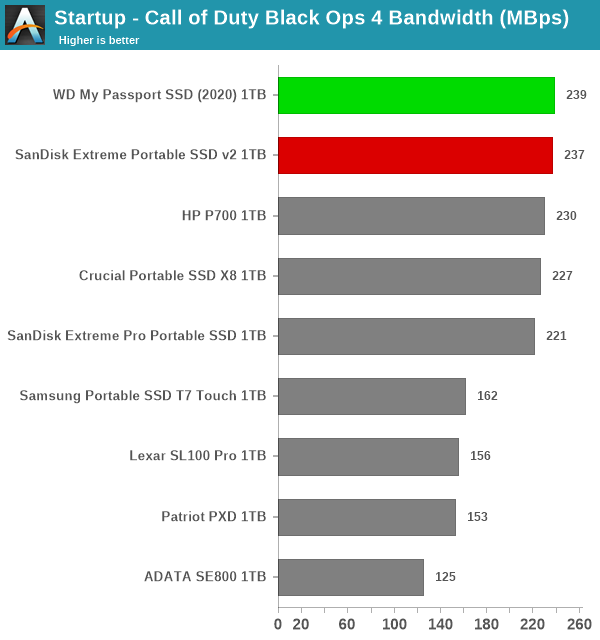
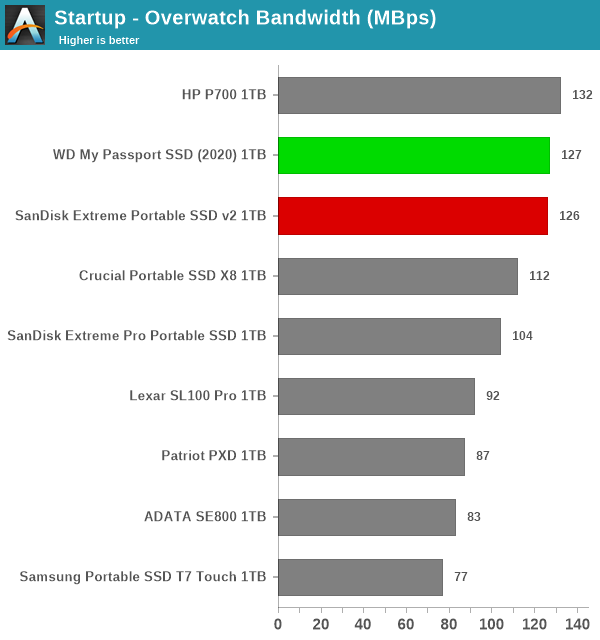
The observations repeat for the gaming workloads – the two SSDs are neck-to-neck with the HP P700 (for write-heavy workloads) and the Crucial Portable SSD X8 (for the read-heavy ones).


Files Transfer Workloads


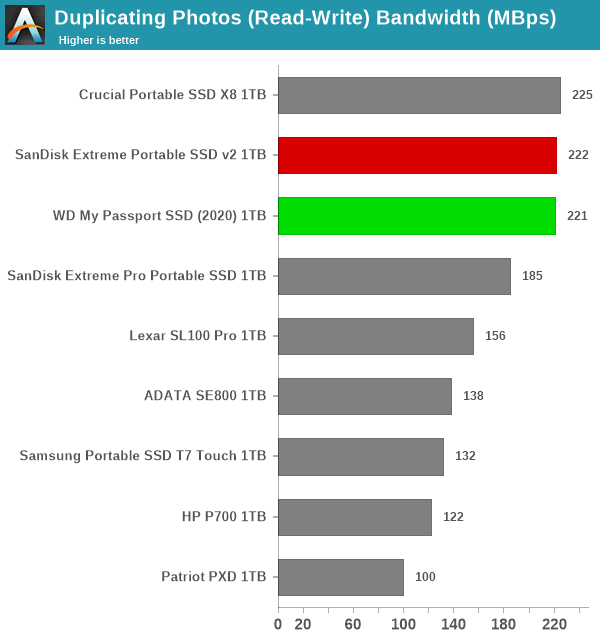
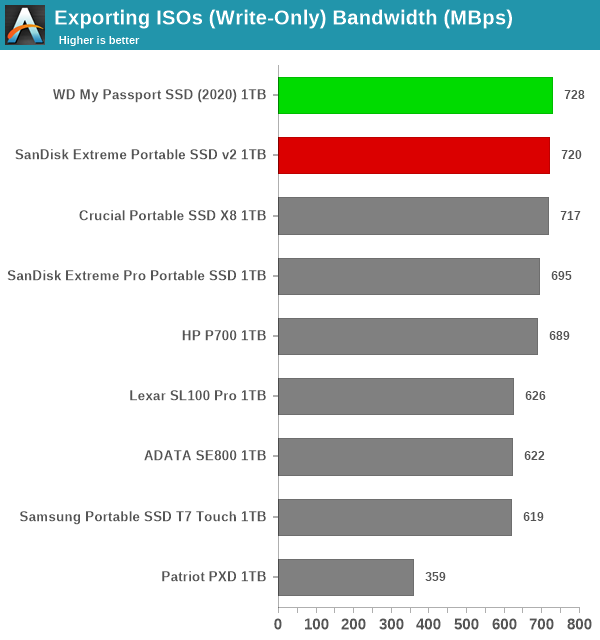
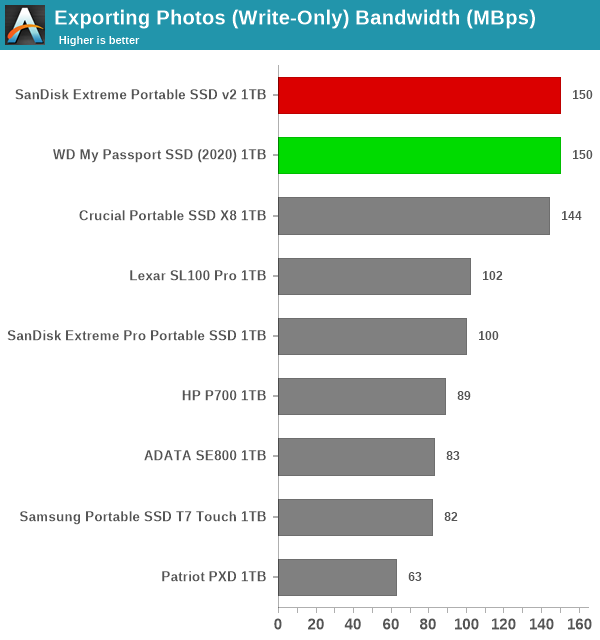
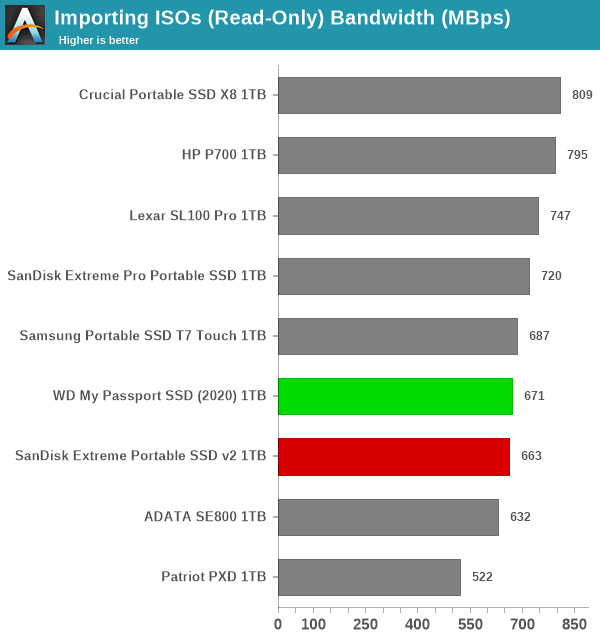
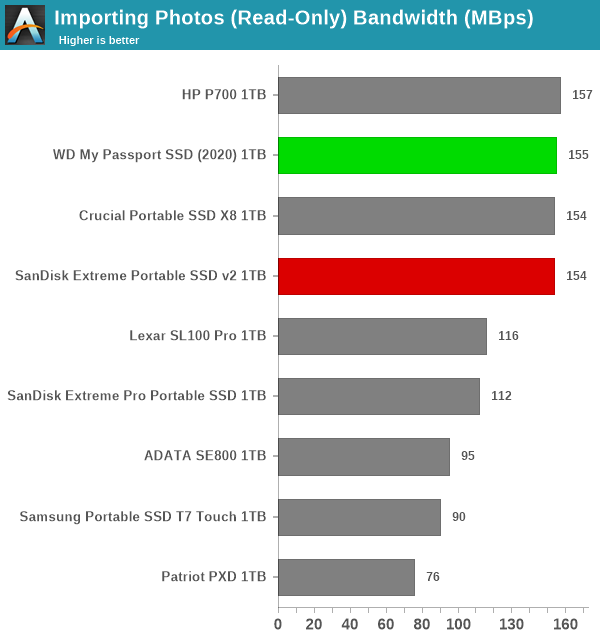
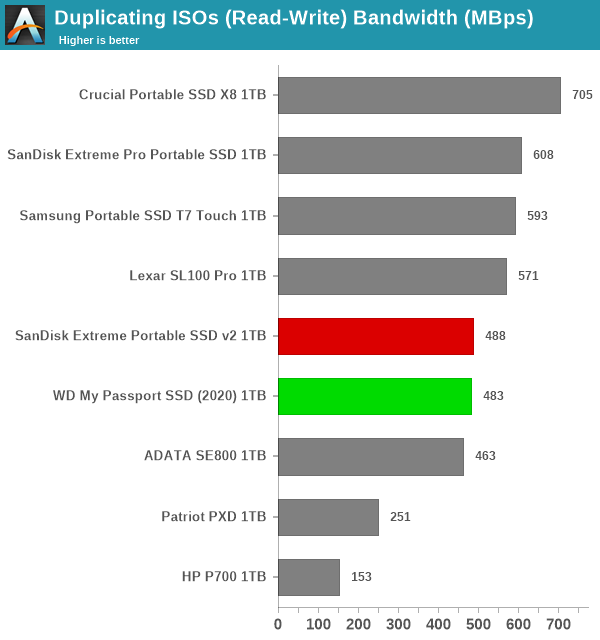
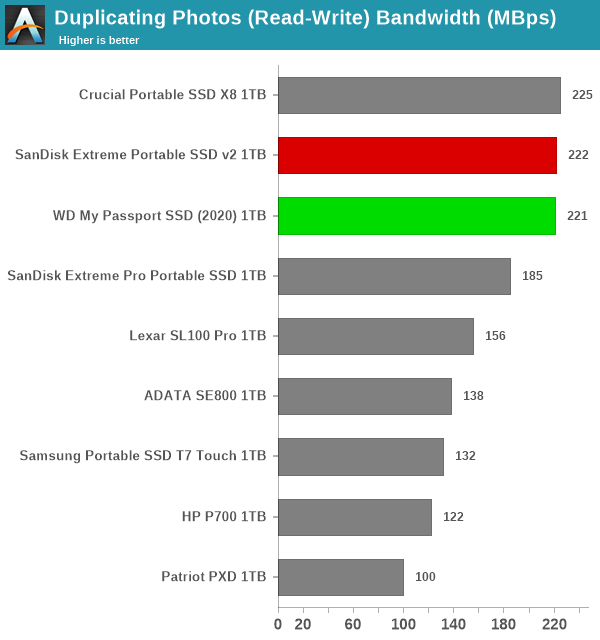
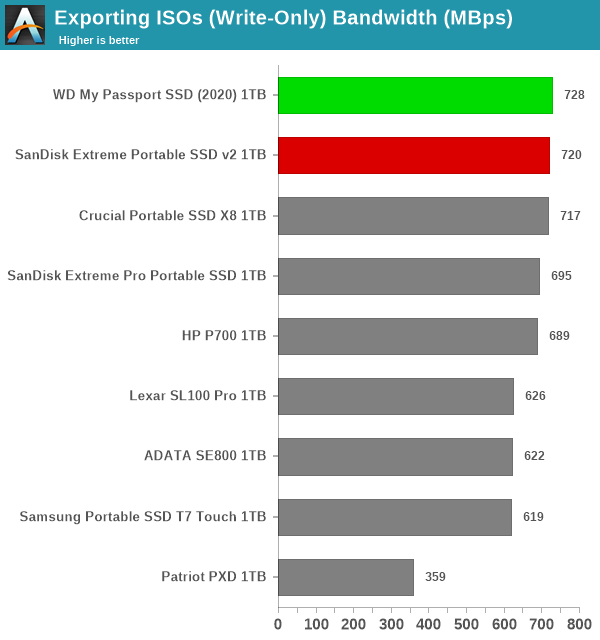
The read-write bandwidth recorded for each drive in the cp1, cp2, cp3, cps1, cps2, and cps3 access traces are presented below.


var pcm10_das_0_img_src = new Array(


Duplicating ISOs (Read-Write)‘,


Duplicating Photos (Read-Write)‘,


Exporting ISOs (Write-Only)‘,


Exporting Photos (Write-Only)‘,


Importing ISOs (Read-Only)‘,


Importing Photos (Read-Only)


);
pcm10_das_0_img_src.push(‘Duplicating ISOs (Read-Write)
Duplicating Photos (Read-Write)
Exporting ISOs (Write-Only)
Exporting Photos (Write-Only)
Importing ISOs (Read-Only)
Importing Photos (Read-Only)
‘) ;


Duplicating ISOs (Read-Write)Duplicating Photos (Read-Write)Exporting ISOs (Write-Only)Exporting Photos (Write-Only)Importing ISOs (Read-Only)Importing Photos (Read-Only)Expand All
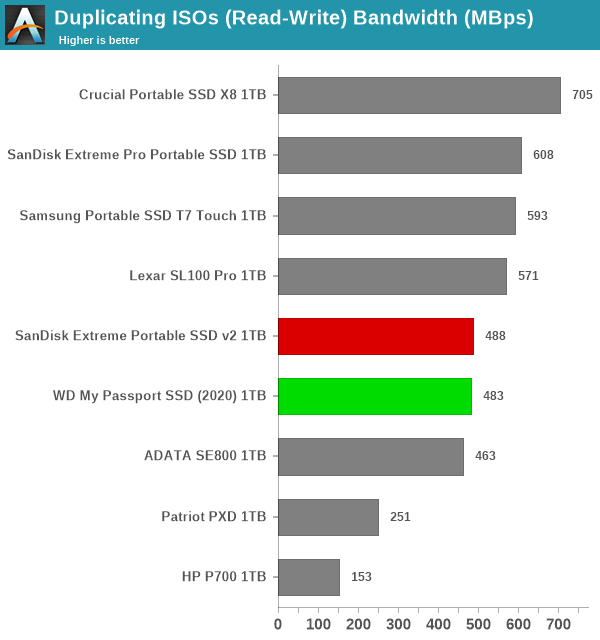

Duplicating ISOs (Read-Write)


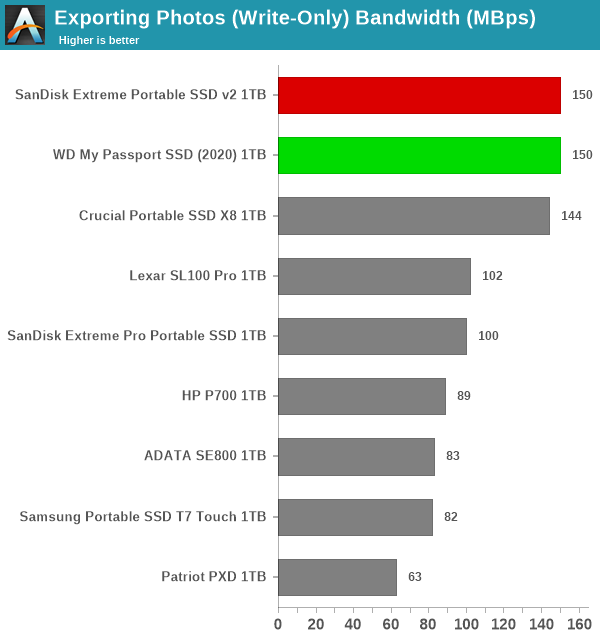
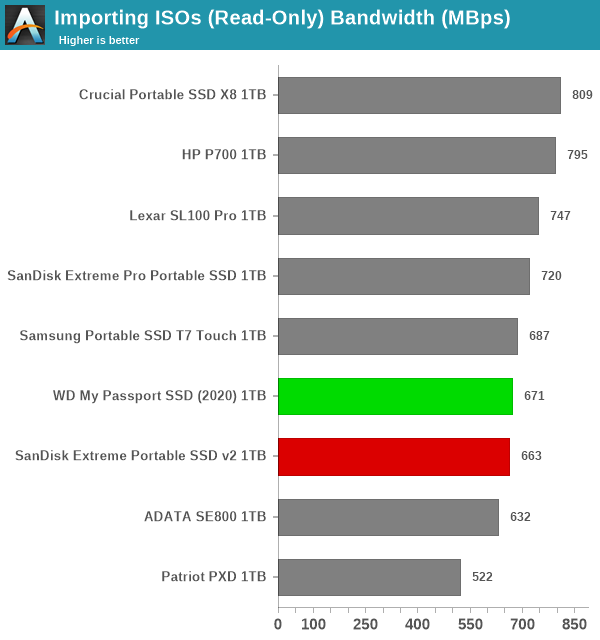
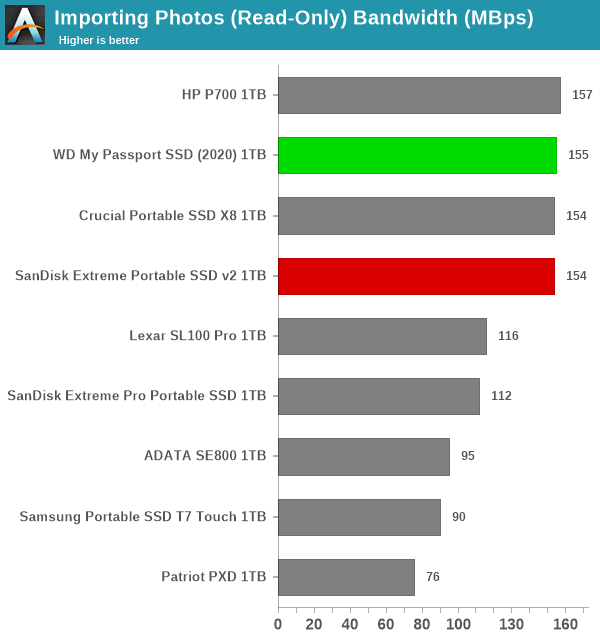
Mixed workloads involving large file sizes seem to trip up the two SSDs, but the drives emerge in pole position in the other file transfer workloads.


Overall Scores


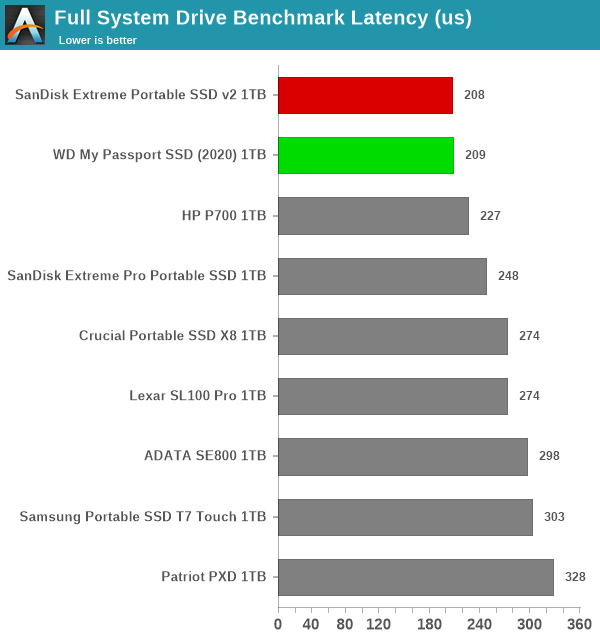
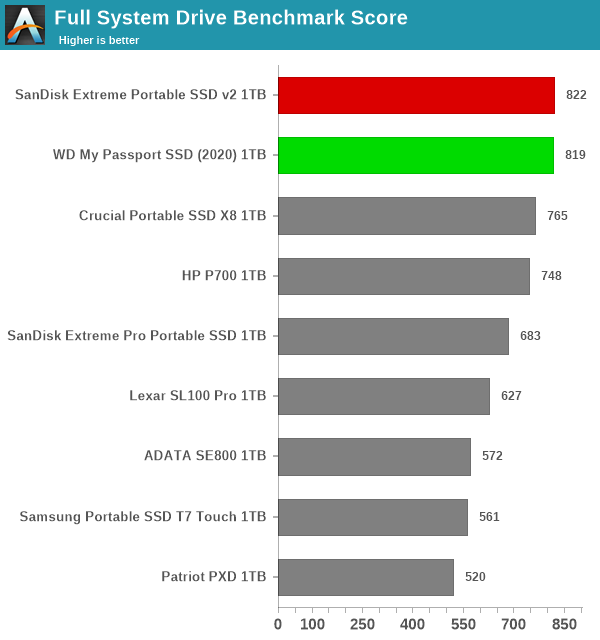
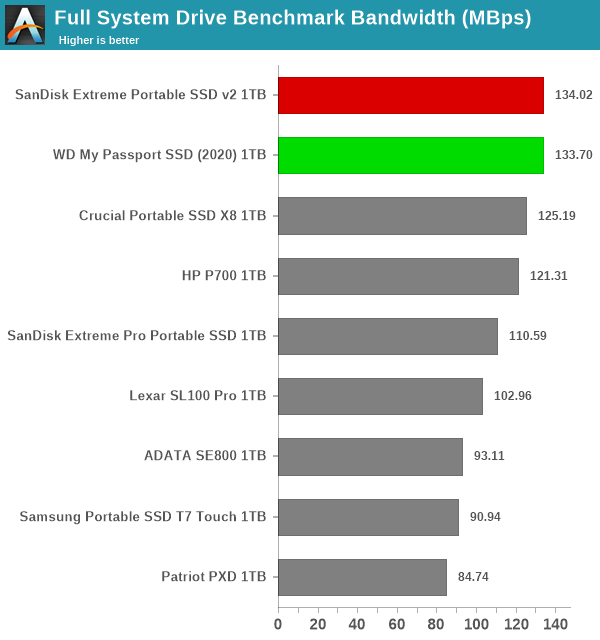
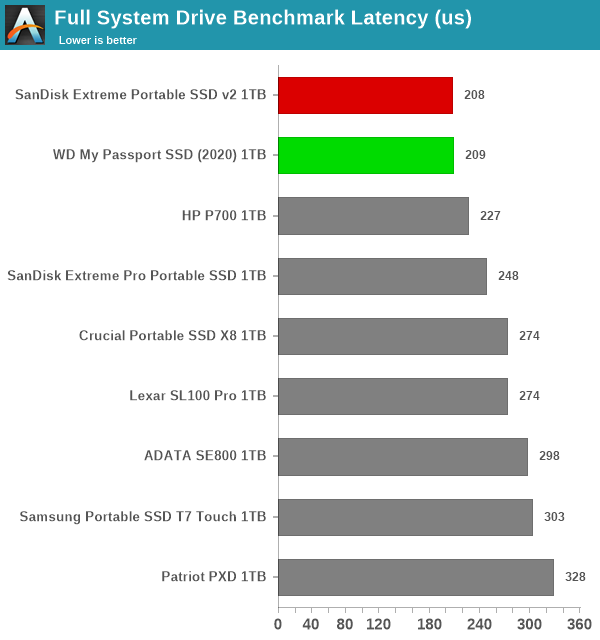
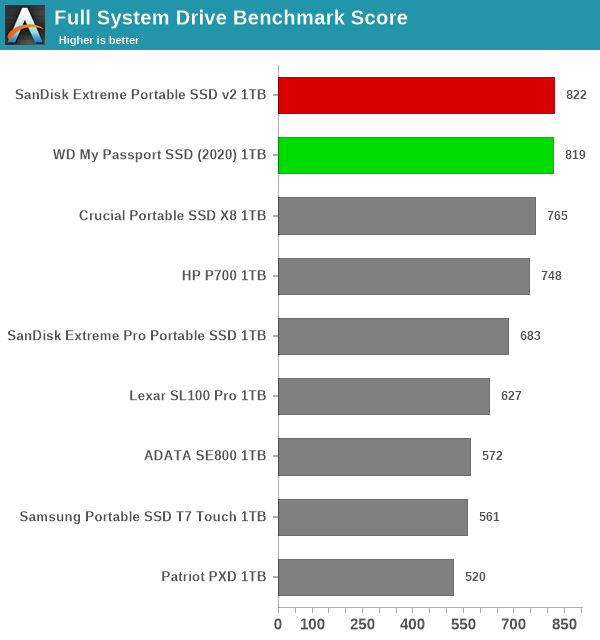
PCMark 10 reports an overall score based on the observed bandwidth and access times for the full workload set. The score, bandwidth, and average access latency for each of the drives are presented below.


var pcm10_ov_0_img_src = new Array(


Full System Drive Benchmark Bandwidth (MBps)‘,


Full System Drive Benchmark Latency (us)‘,


Full System Drive Benchmark Score


);
pcm10_ov_0_img_src.push(‘Full System Drive Benchmark Bandwidth (MBps)
Full System Drive Benchmark Latency (us)
Full System Drive Benchmark Score
‘) ;


Full System Drive Benchmark Bandwidth (MBps)Full System Drive Benchmark Latency (us)Full System Drive Benchmark ScoreExpand All
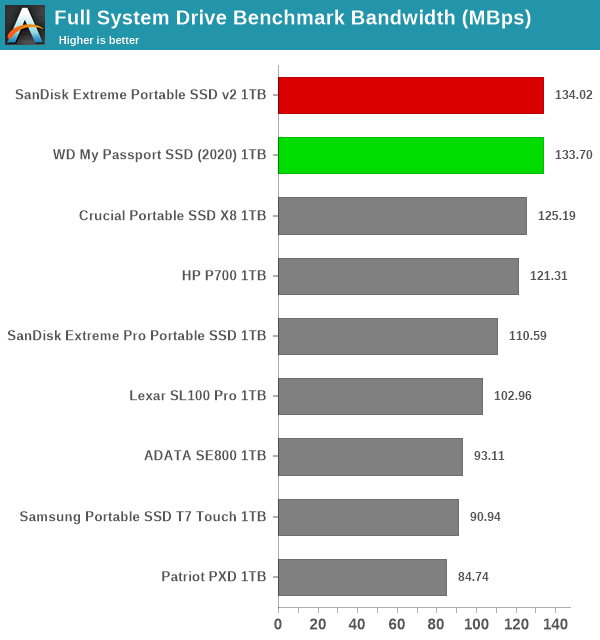

Full System Drive Benchmark Bandwidth (MBps)


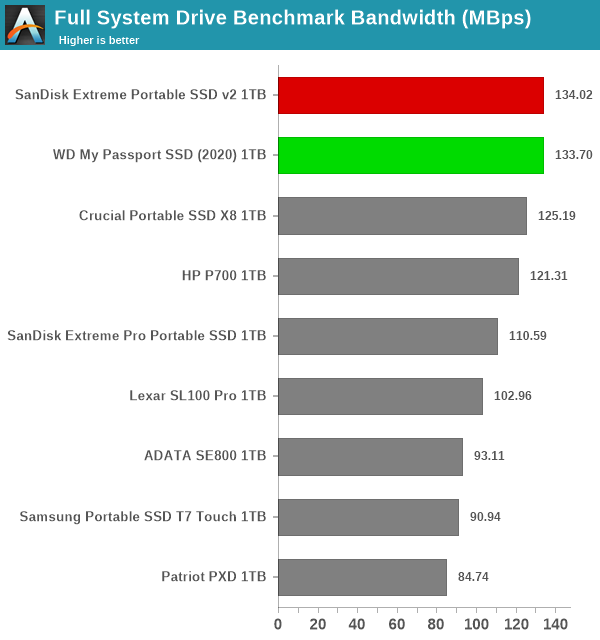
From an overall perspective, the SanDisk Extreme Portable SSD v2 and the WD My Passport SSD (2020) come out on top by a significant margin. This points to an all-round performance, while other competing SSDs are optimized for one type of workload only.


Miscellaneous Aspects and Concluding Remarks


The performance of the drives in various real-world access traces as well as synthetic workloads was brought out in the preceding sections. We also looked at the performance consistency for these cases. Power users may also be interested in performance consistency under worst-case conditions, as well as drive power consumption. The latter is also important when used with battery powered devices such as notebooks and smartphones. Pricing is also an important aspect. We analyze each of these in detail below.


Worst-Case Performance Consistency


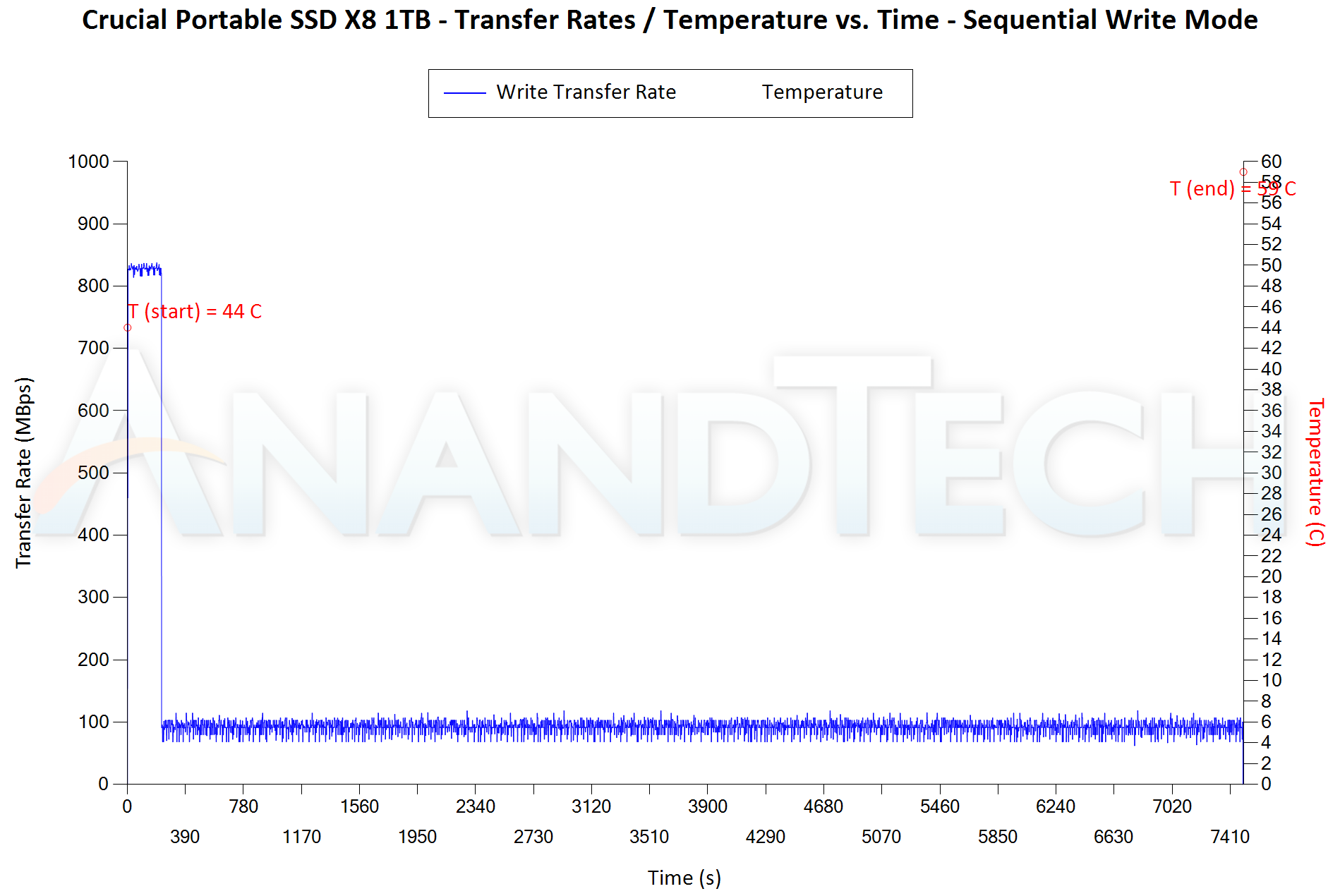
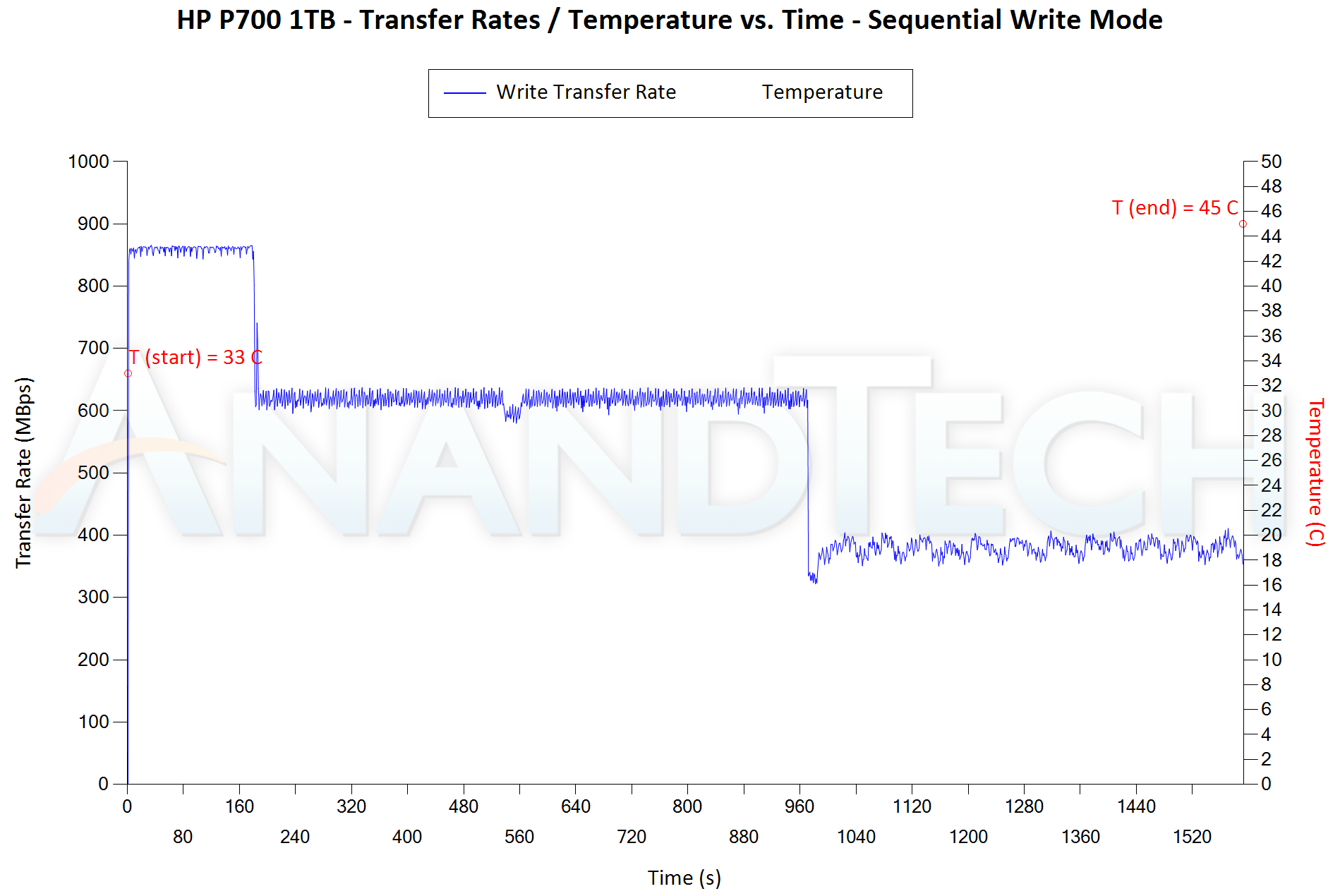
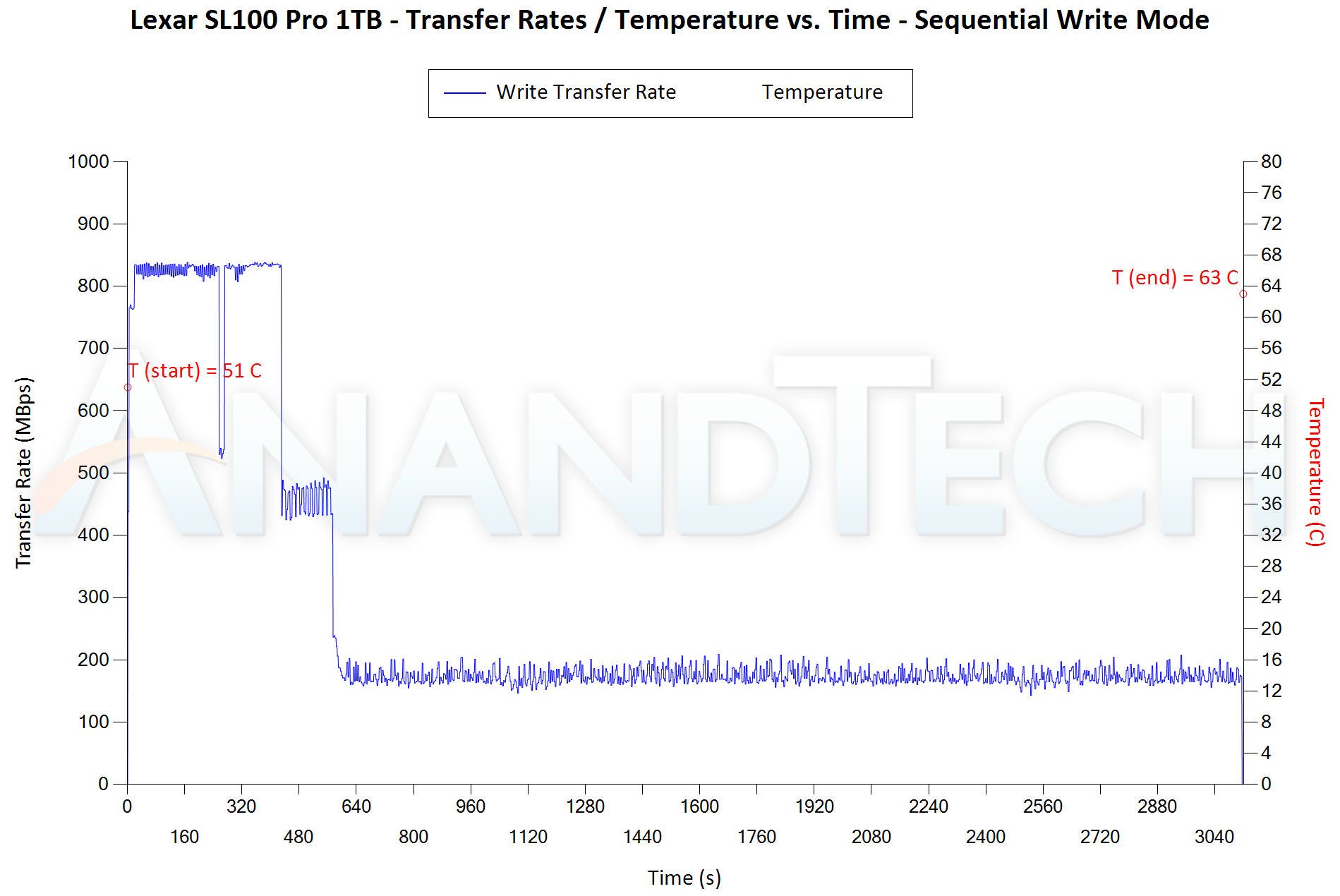
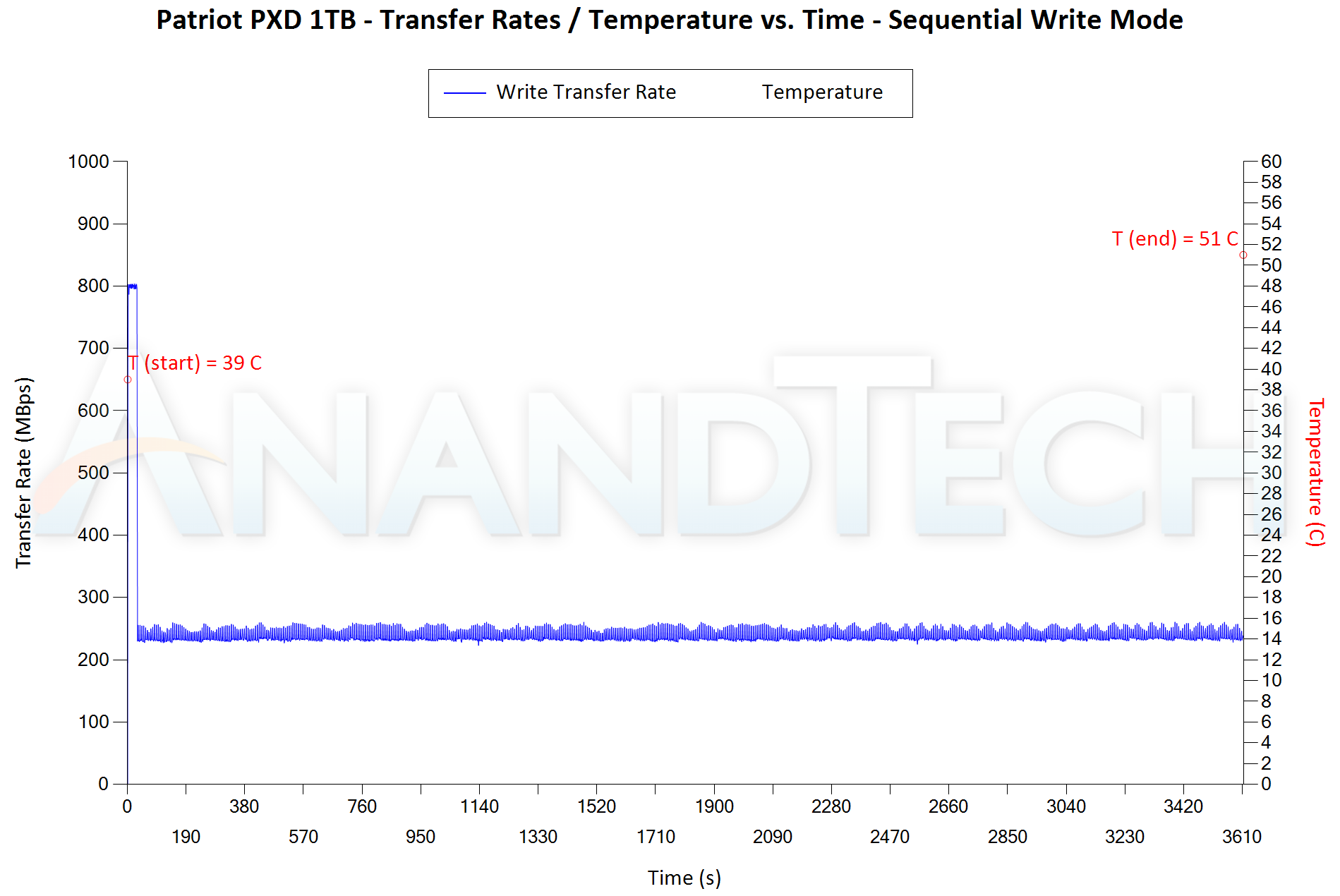
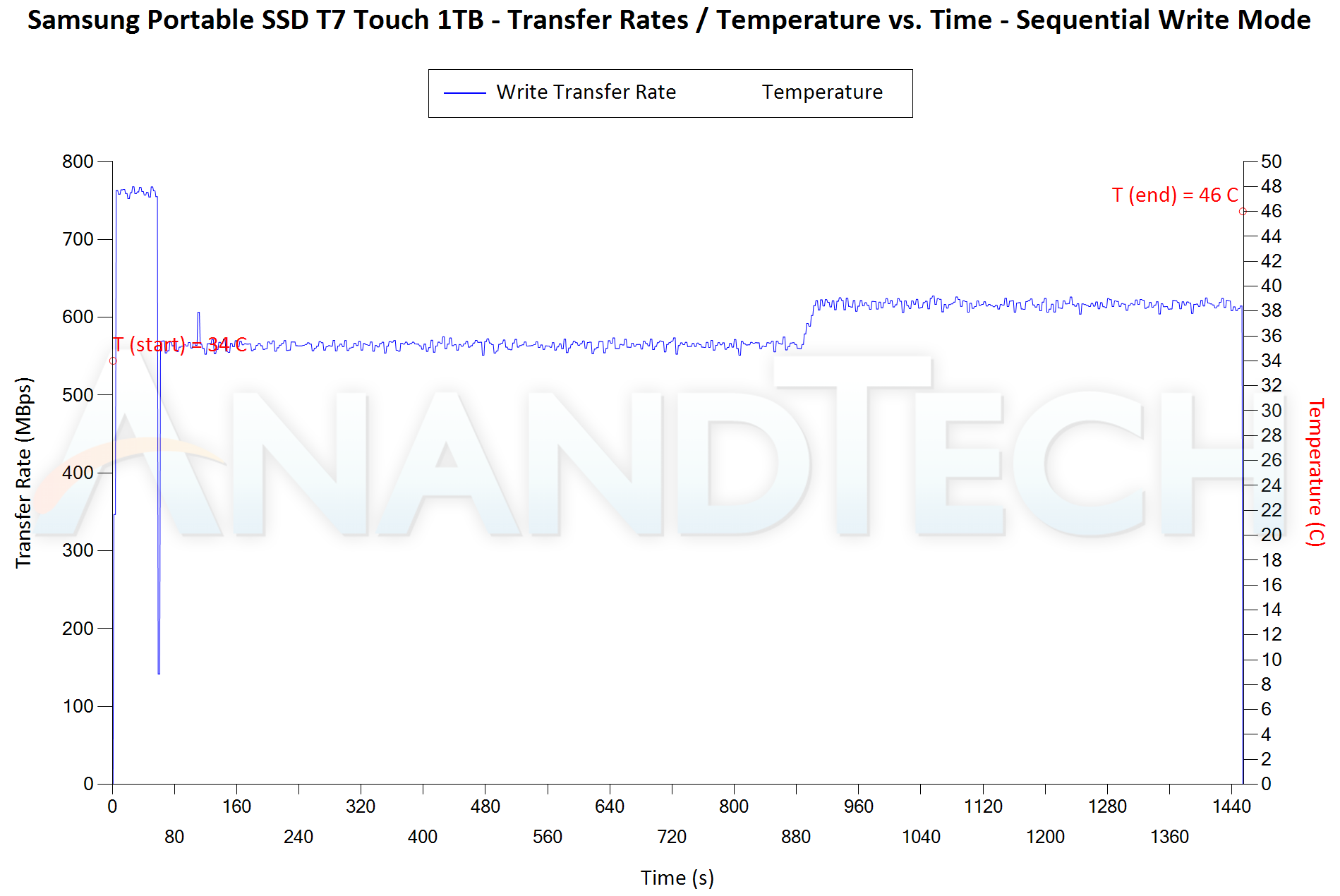
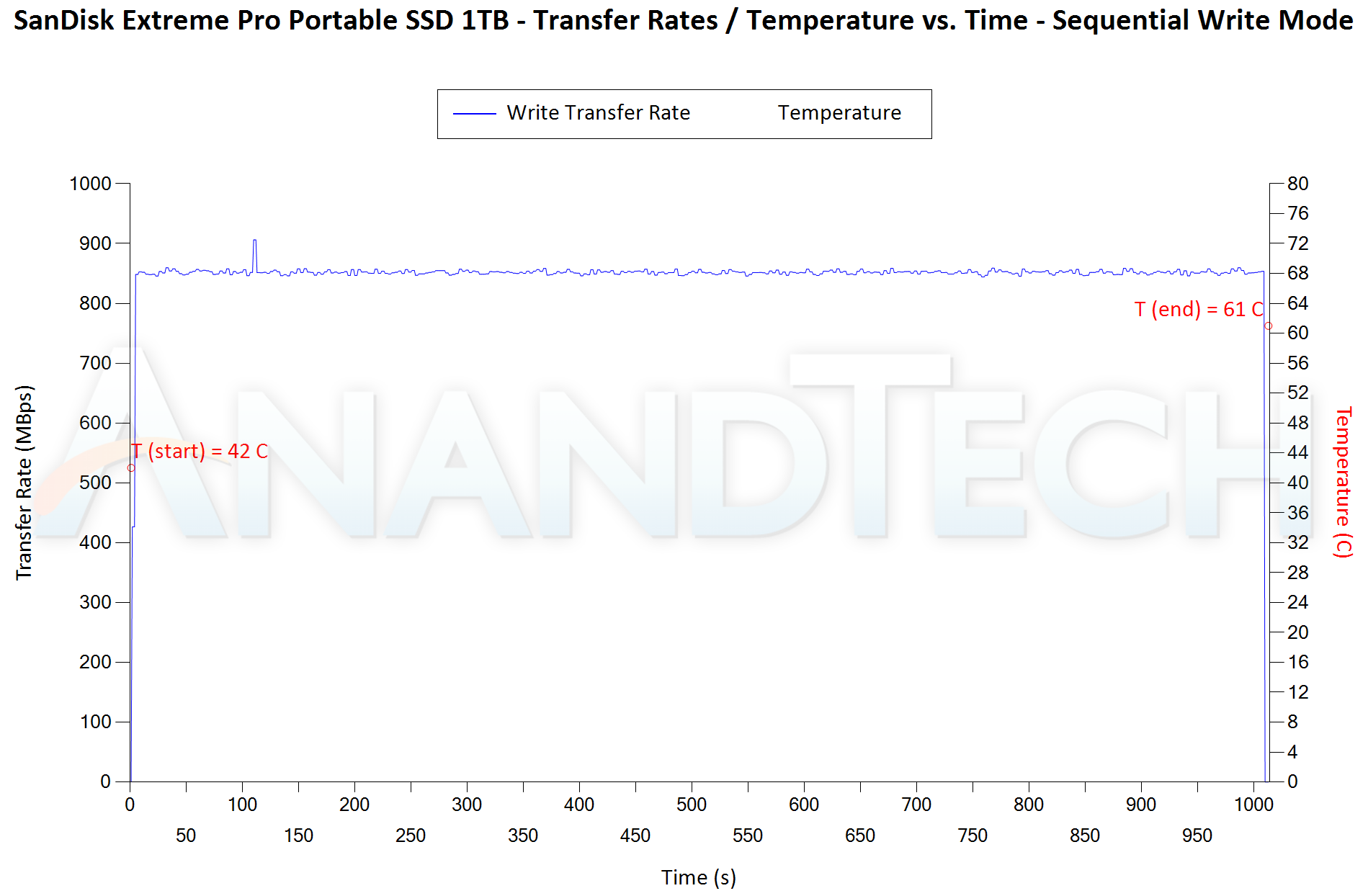
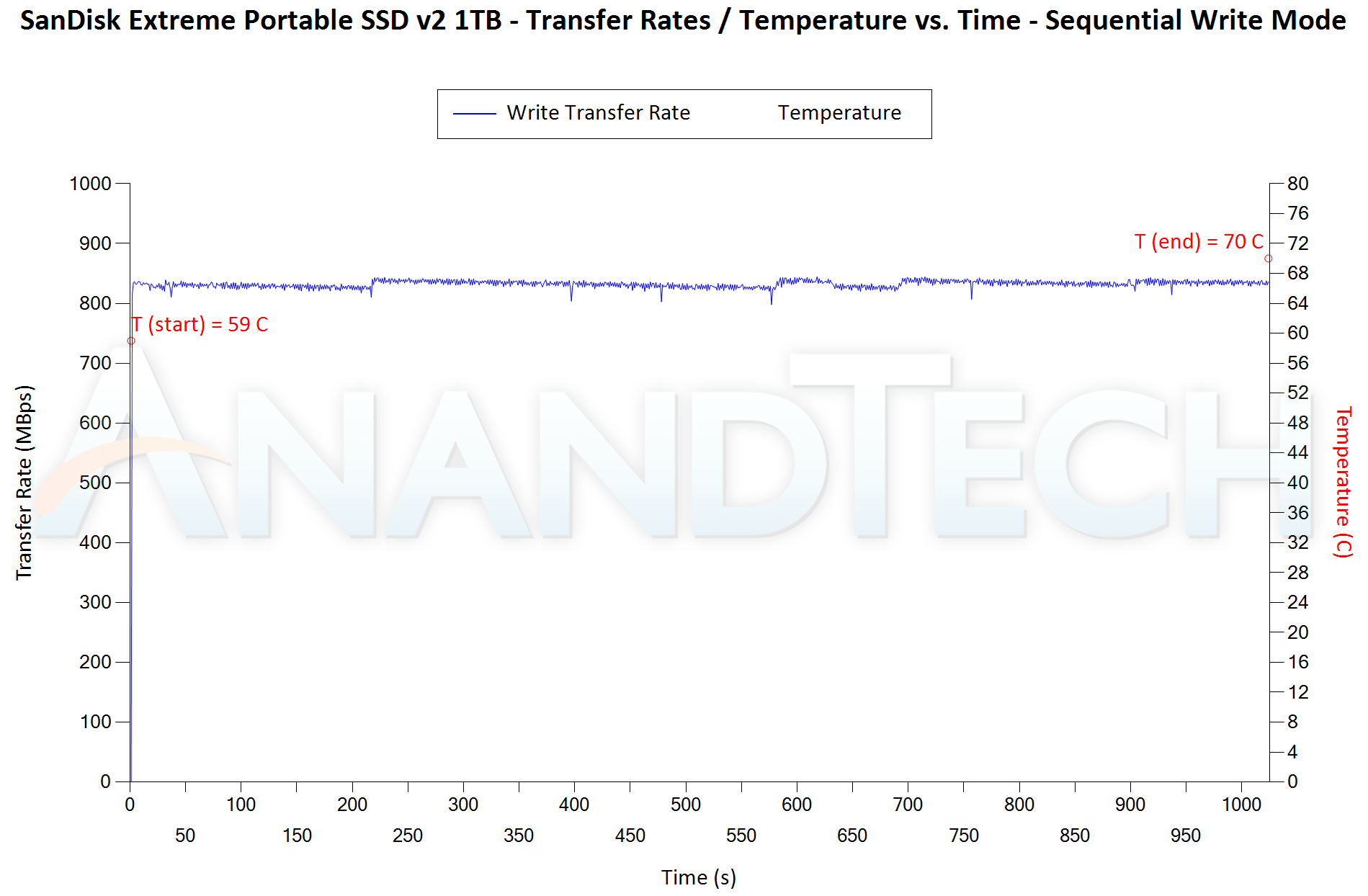
Flash-based storage devices tend to slow down in unpredictable ways when subject to a large number of small-sized random writes. Many benchmarks use that scheme to pre-condition devices prior to the actual testing in order to get a worst-case representative number. Fortunately, such workloads are uncommon for direct-attached storage devices, where workloads are largely sequential in nature. Use of SLC caching as well as firmware caps to prevent overheating may cause drop in write speeds when a flash-based DAS device is subject to sustained sequential writes.


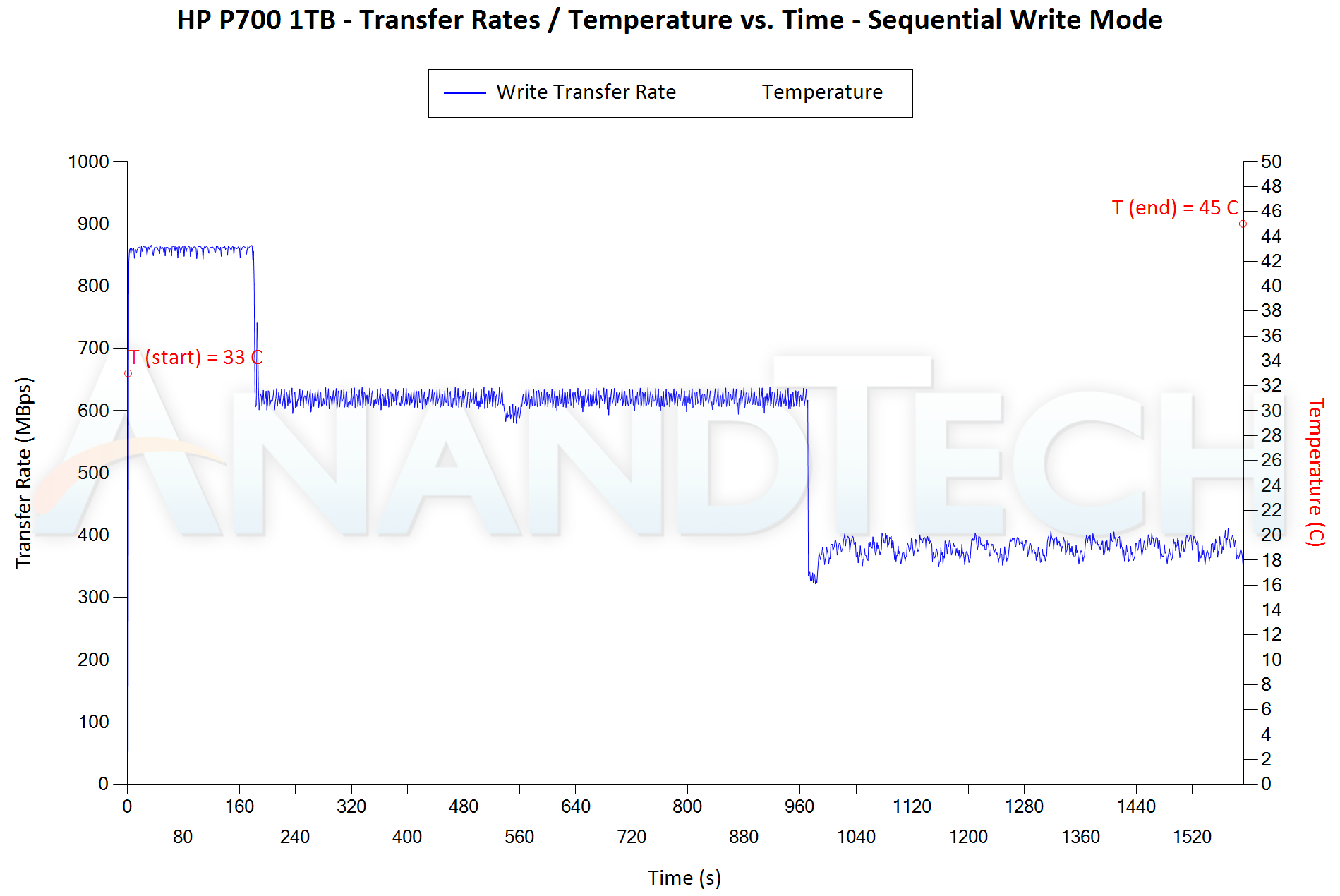
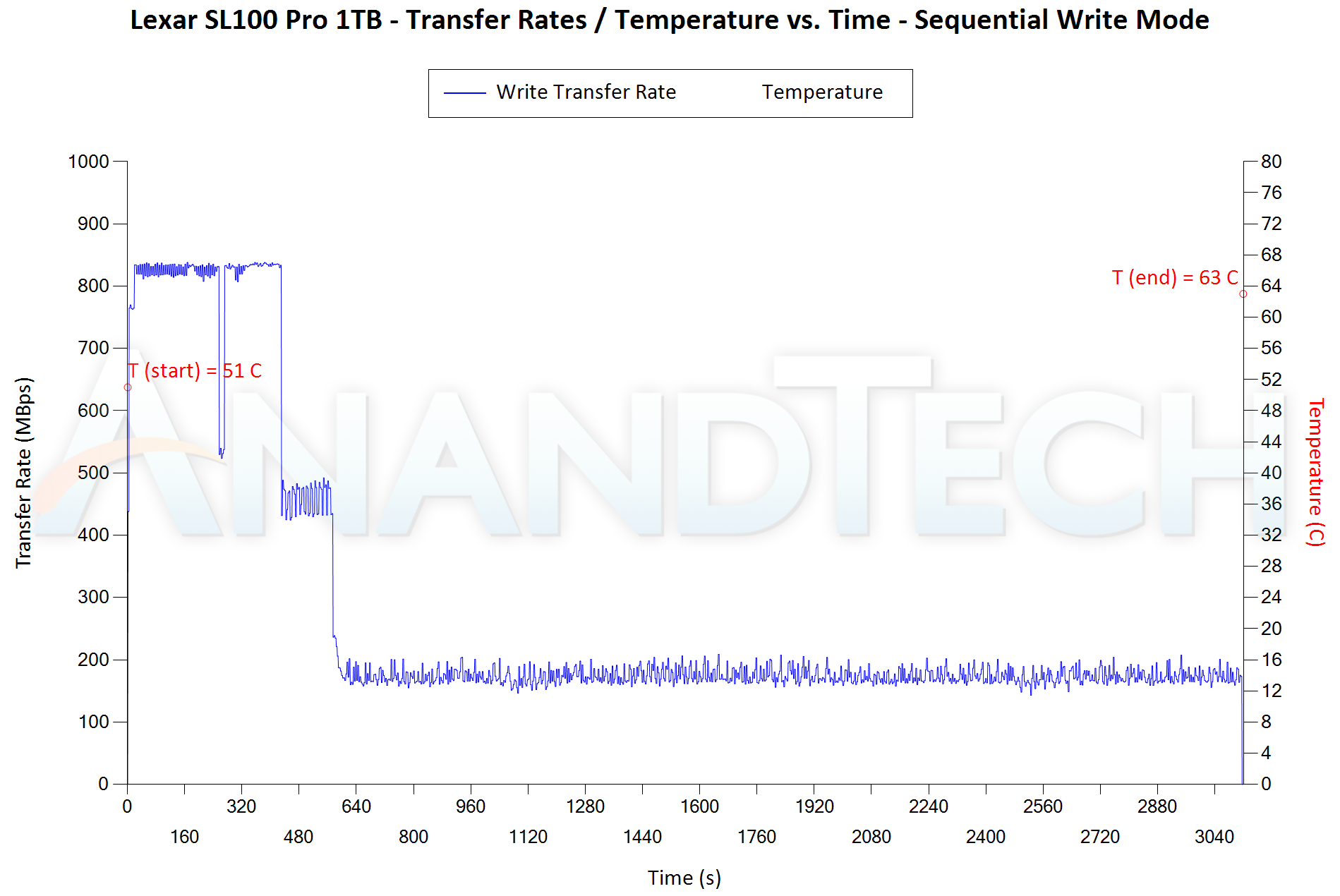
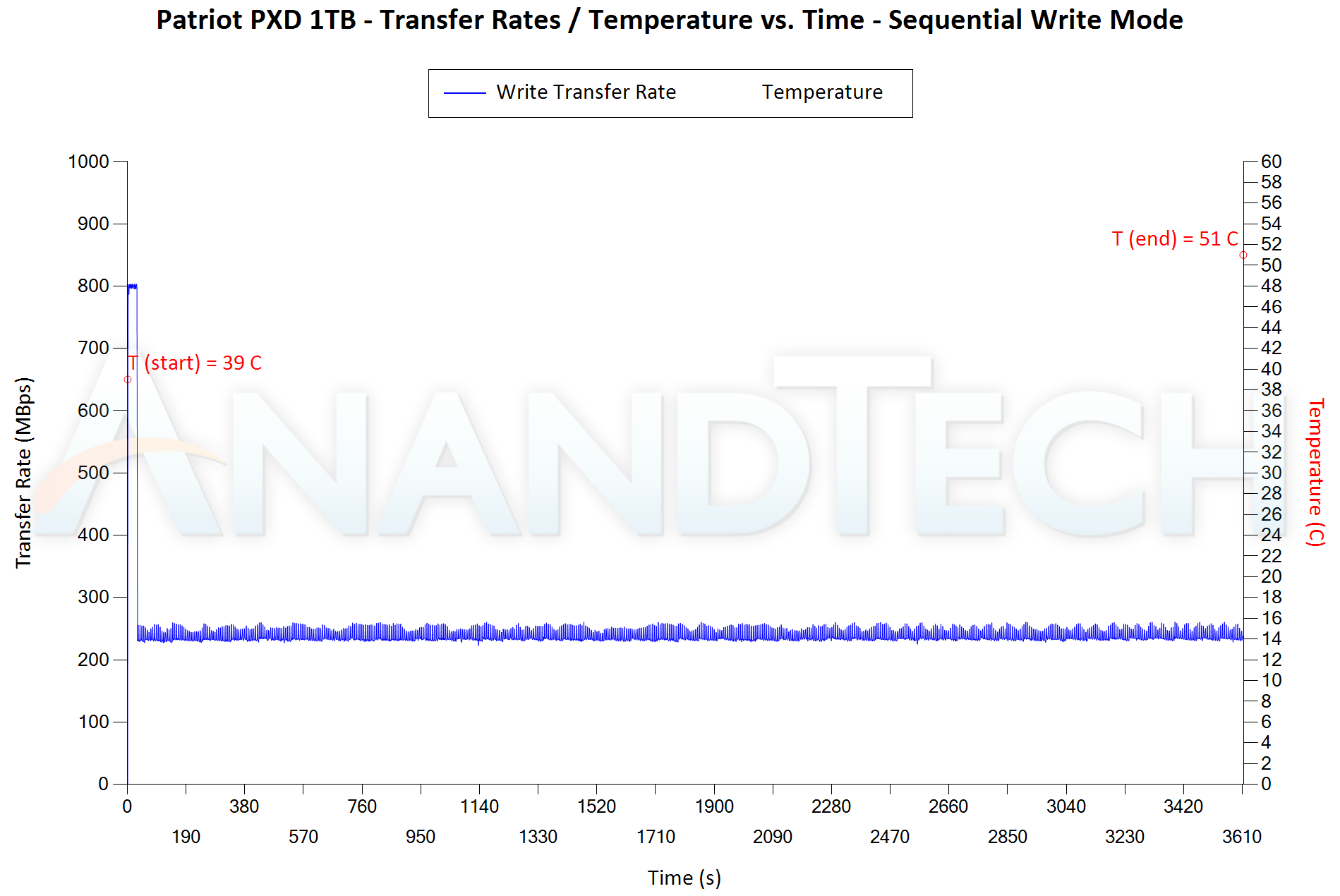
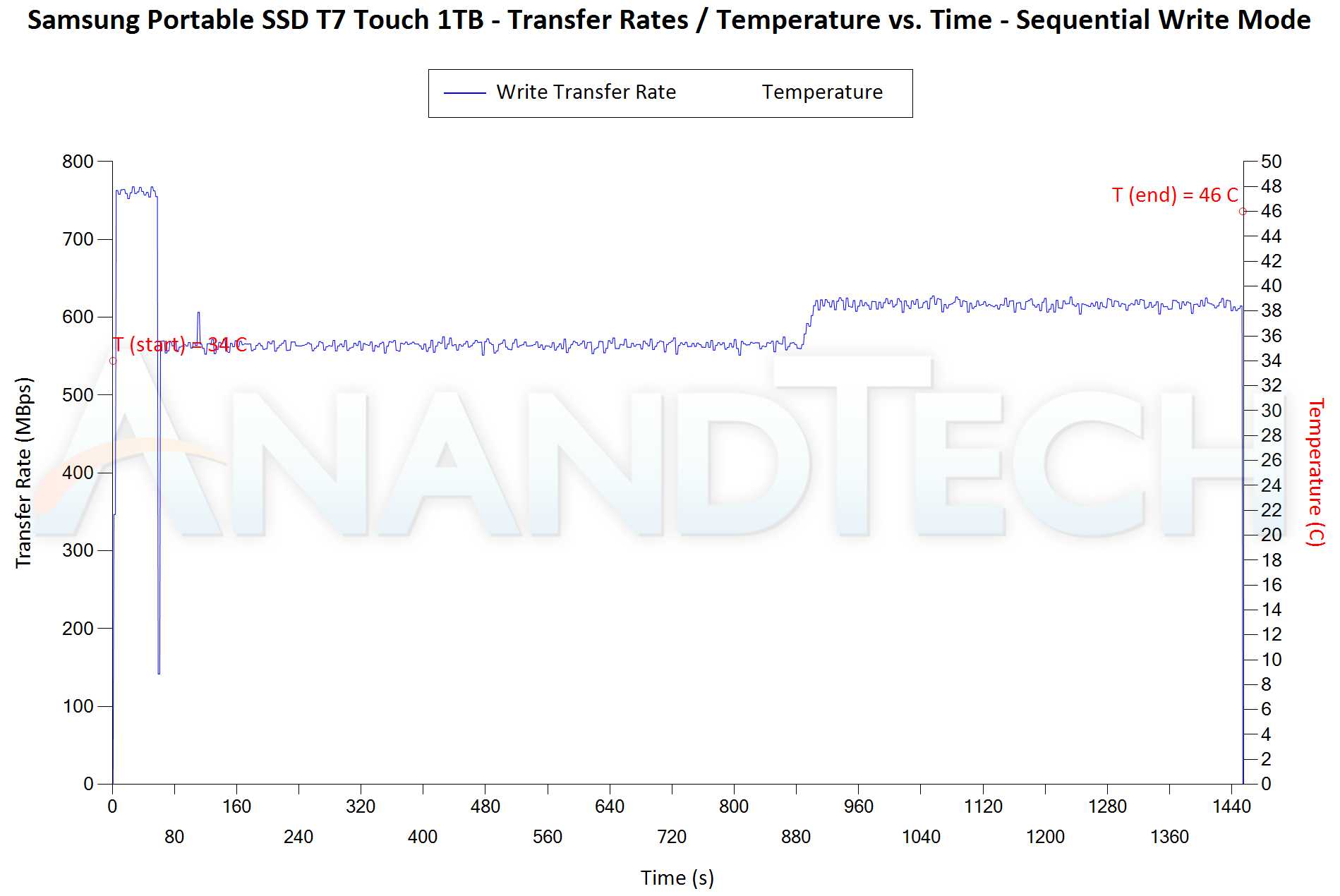
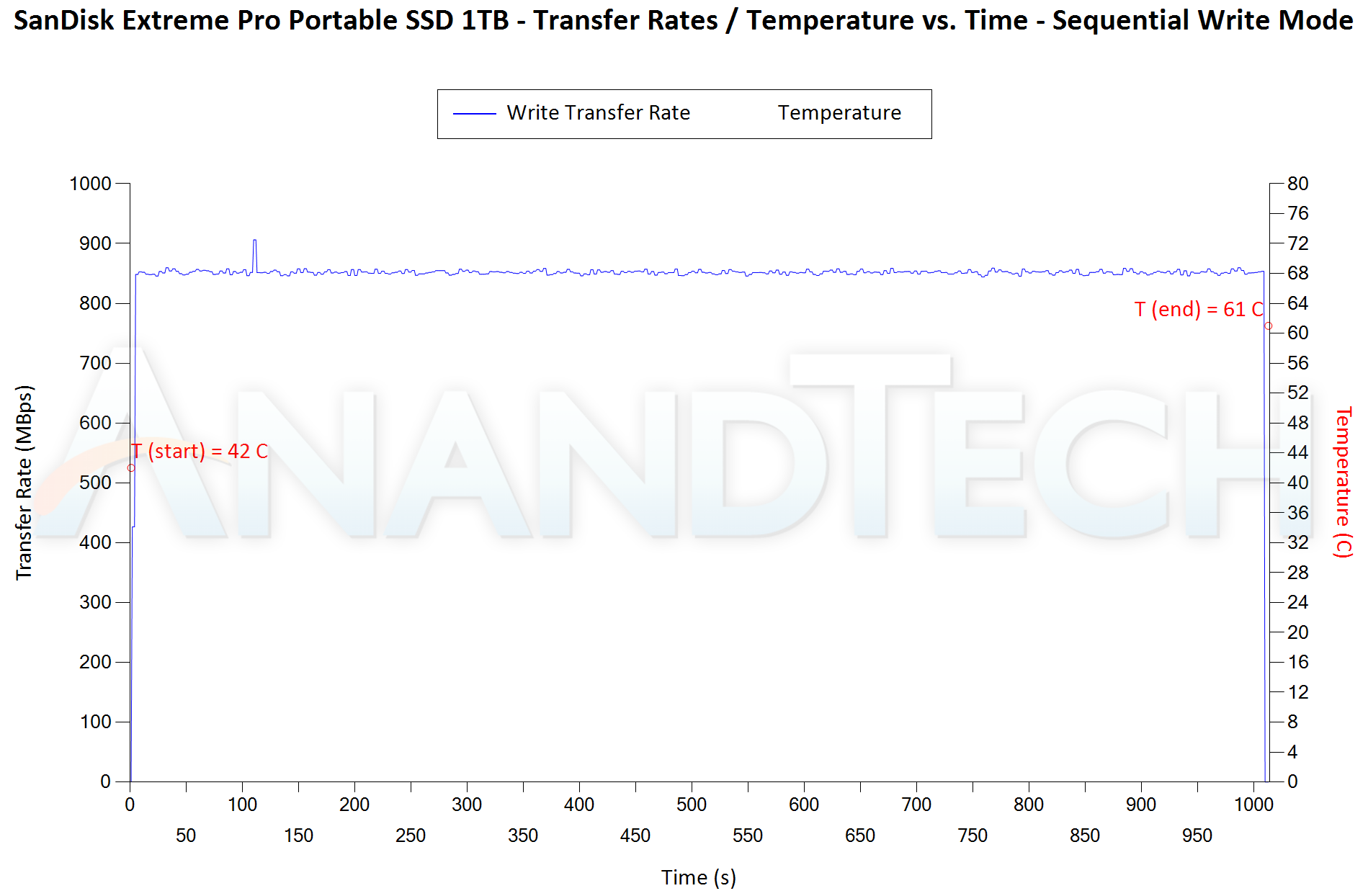
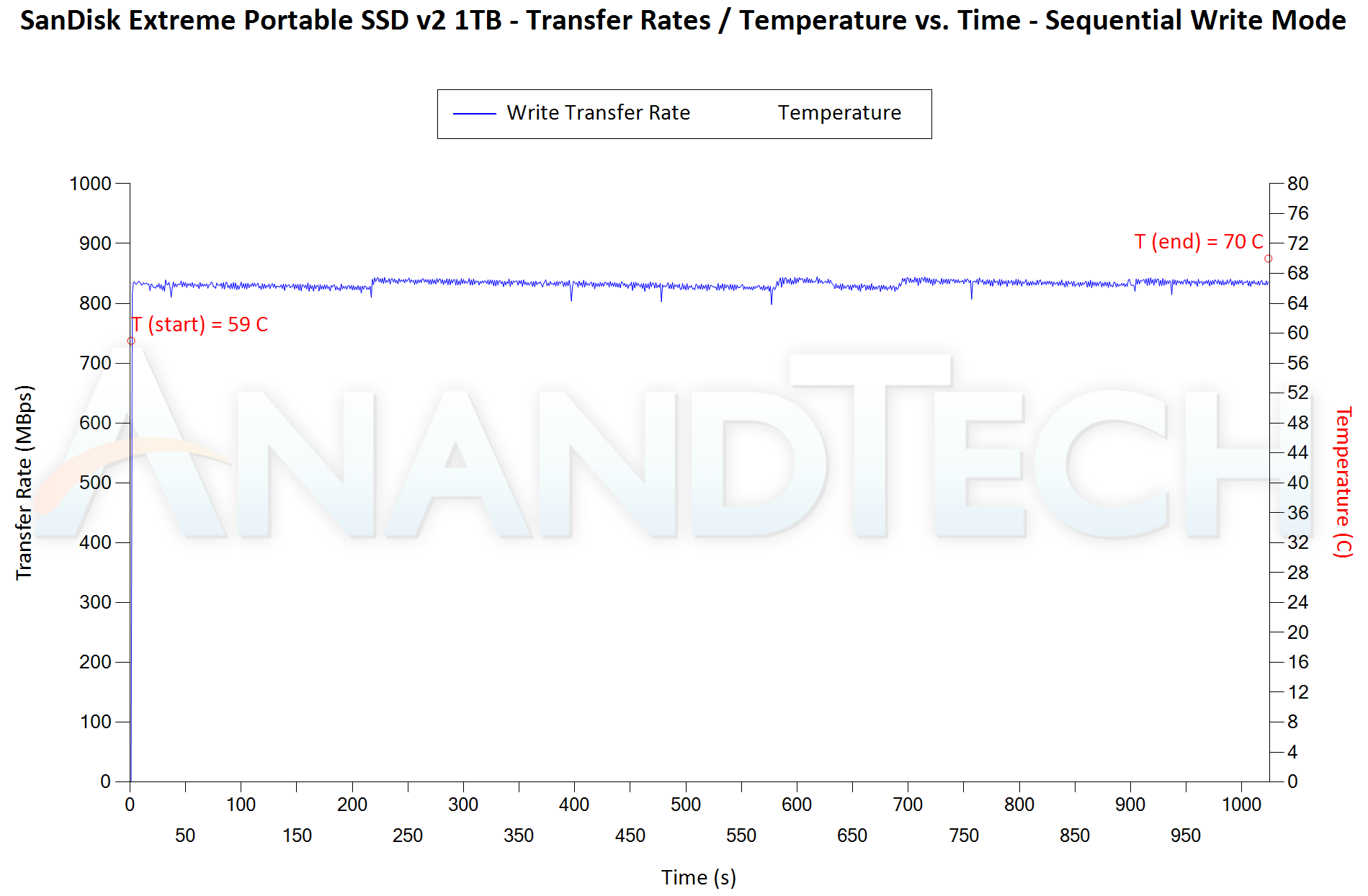
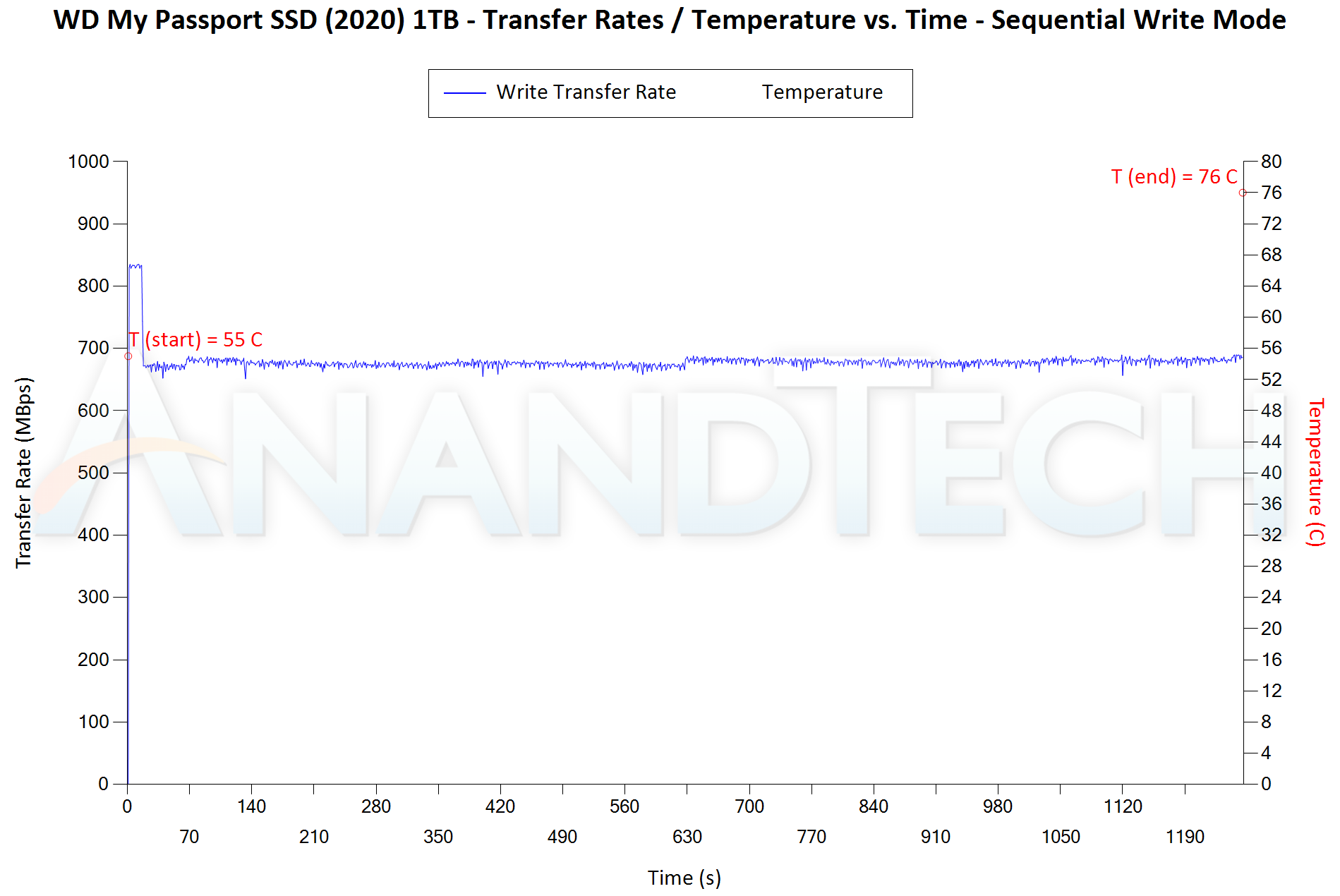
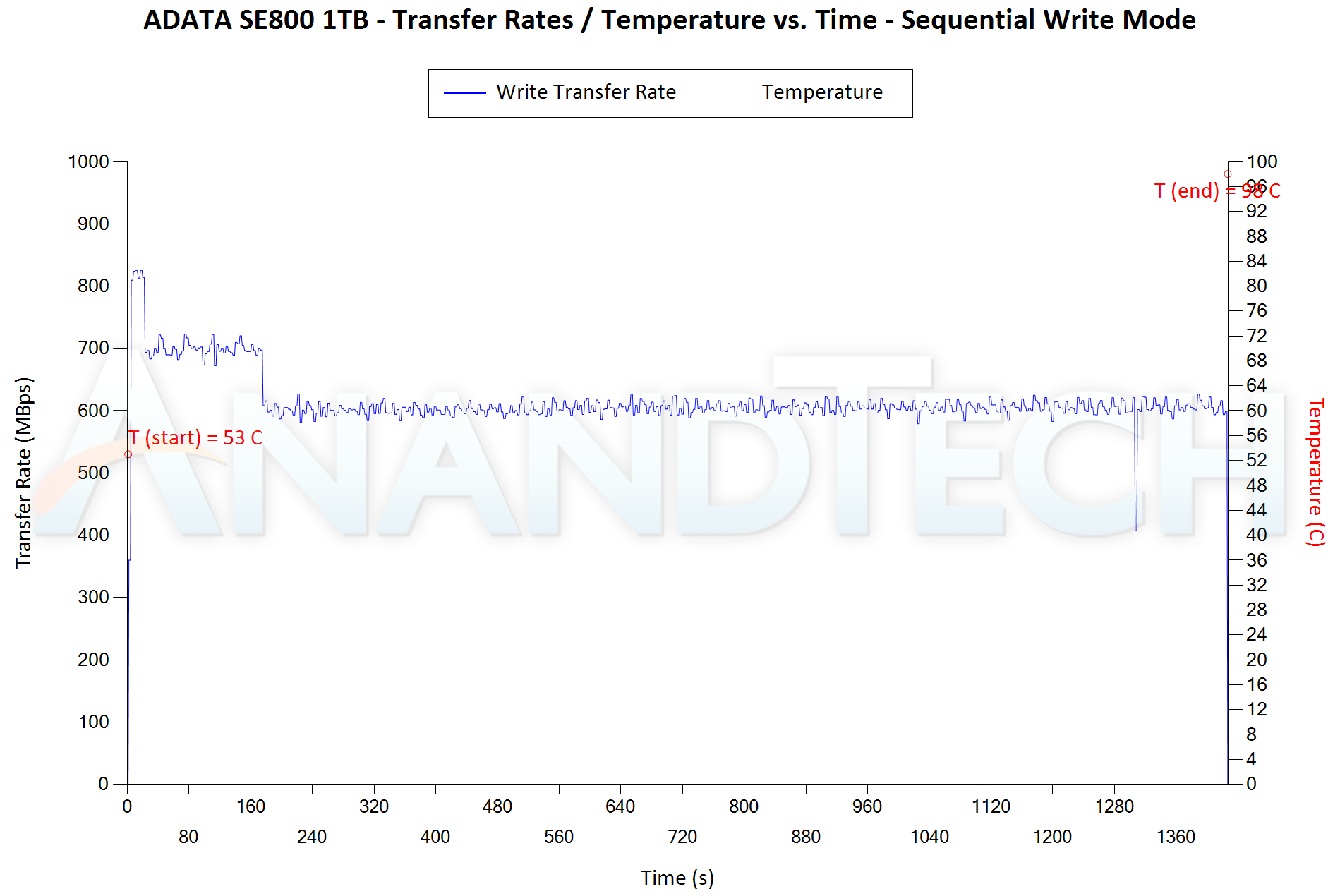
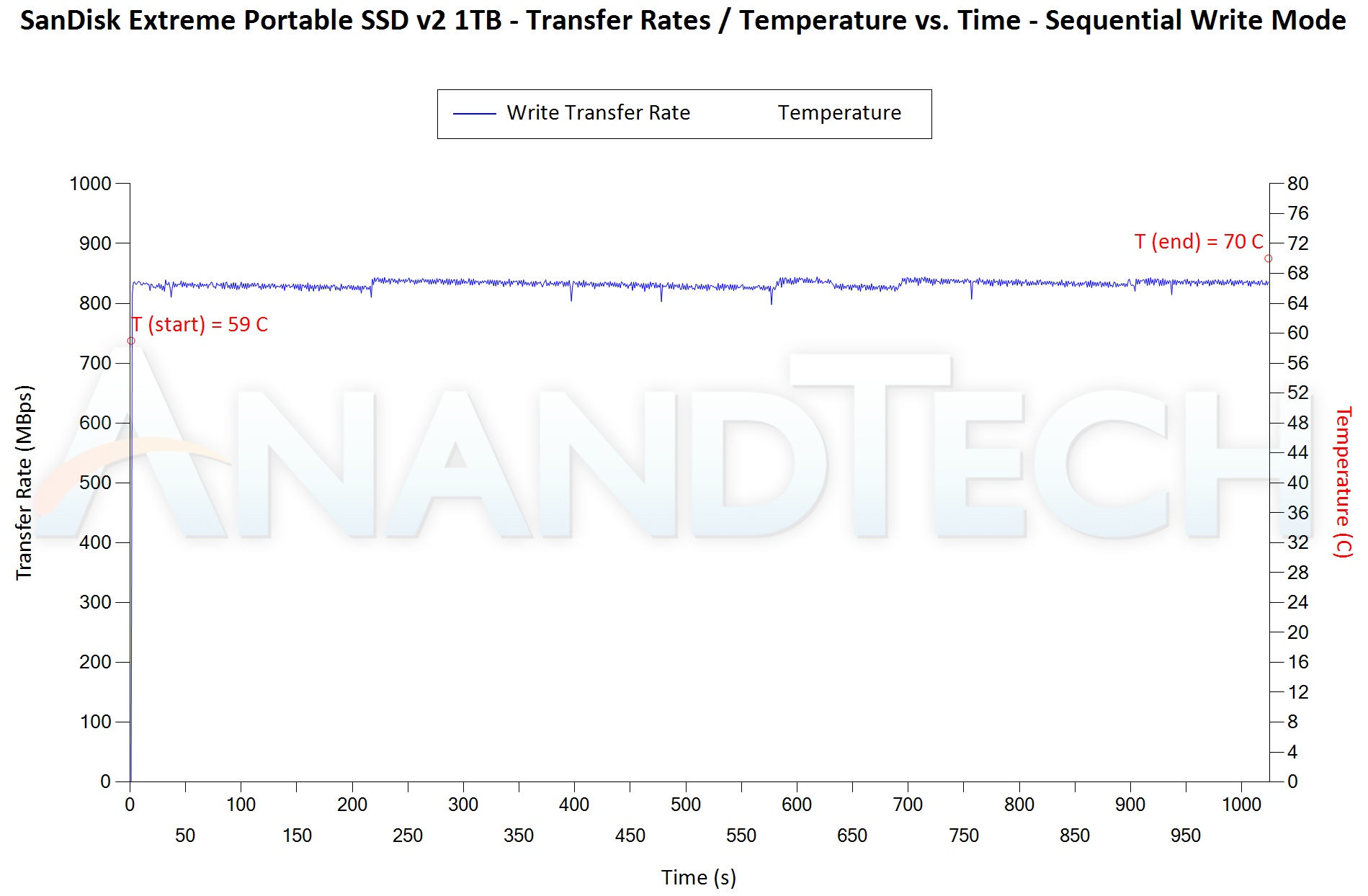
Our Sequential Writes Performance Consistency Test configures the device as a raw physical disk (after deleting configured volumes). A fio workload is set up to write sequential data to the raw drive with a block size of 128K and iodepth of 32 to cover 90% of the drive capacity. The internal temperature is recorded at either end of the workload, while the instantaneous write data rate and cumulative total write data amount are recorded at 1-second intervals.


var SWPCON_paths_0 = new Array(‘‘,’‘,’‘,’‘,’‘,’‘,’‘,’‘,’‘);
SWPCON_paths_0.push(‘


‘);


Sequential Write to 90% of Disk Capacity – Performance Consistency
SanDisk Extreme Portable SSD v2 1TBWD My Passport SSD (2020) 1TBADATA SE800 1TBCrucial Portable SSD X8 1TBHP P700 1TBLexar SL100 Pro 1TBPatriot PXD 1TBSamsung Portable SSD T7 Touch 1TBSanDisk Extreme Pro Portable SSD 1TBExpand All

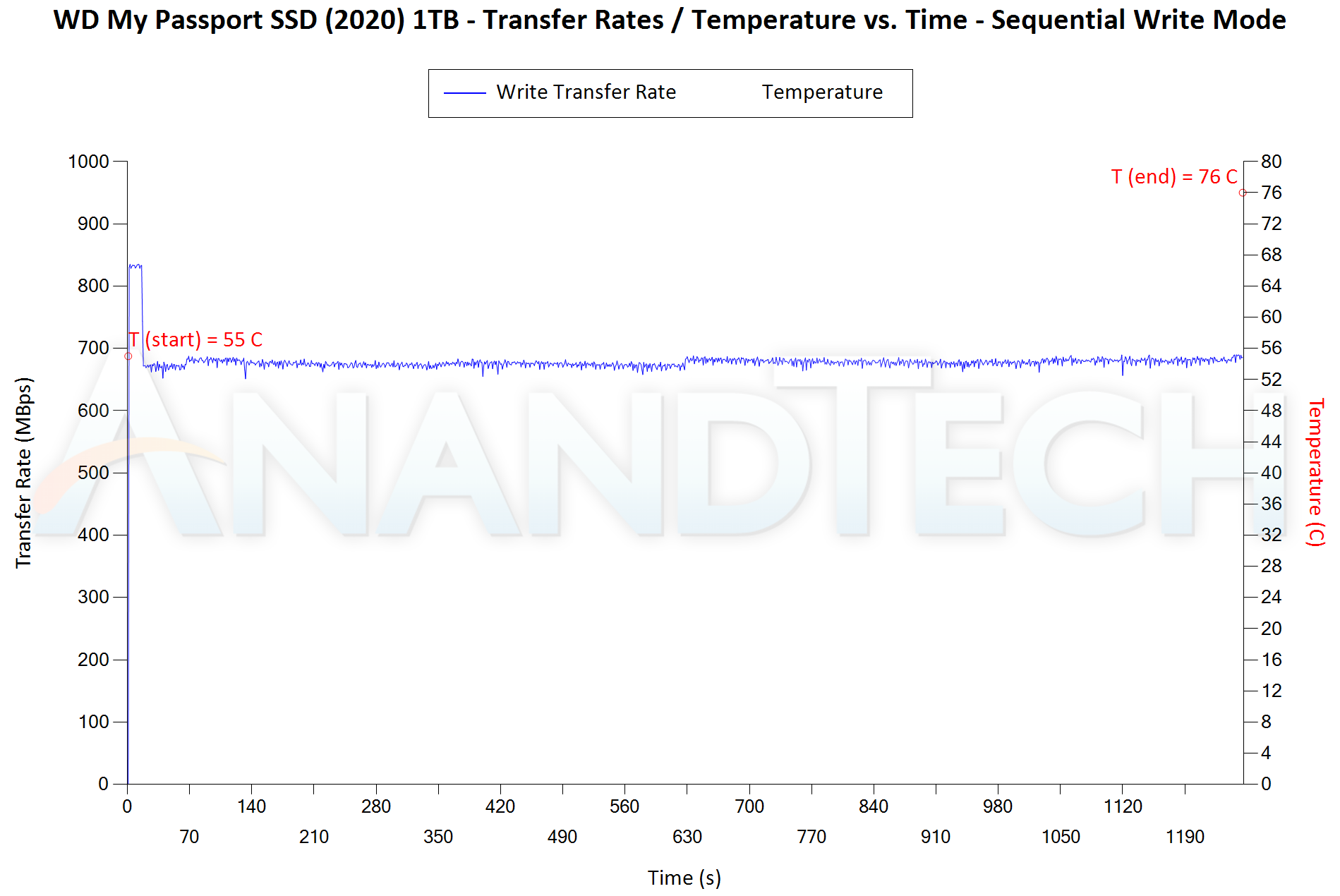
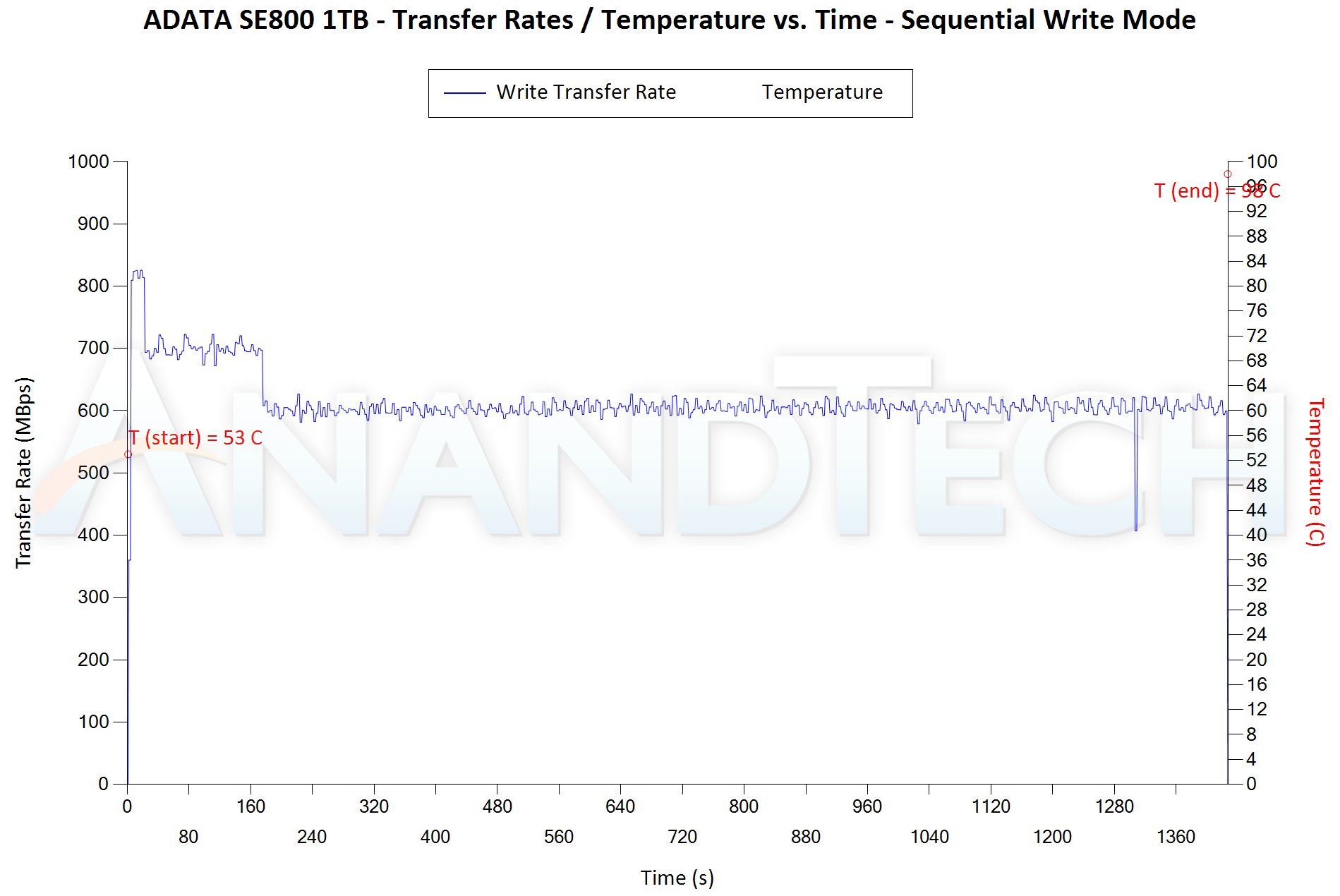
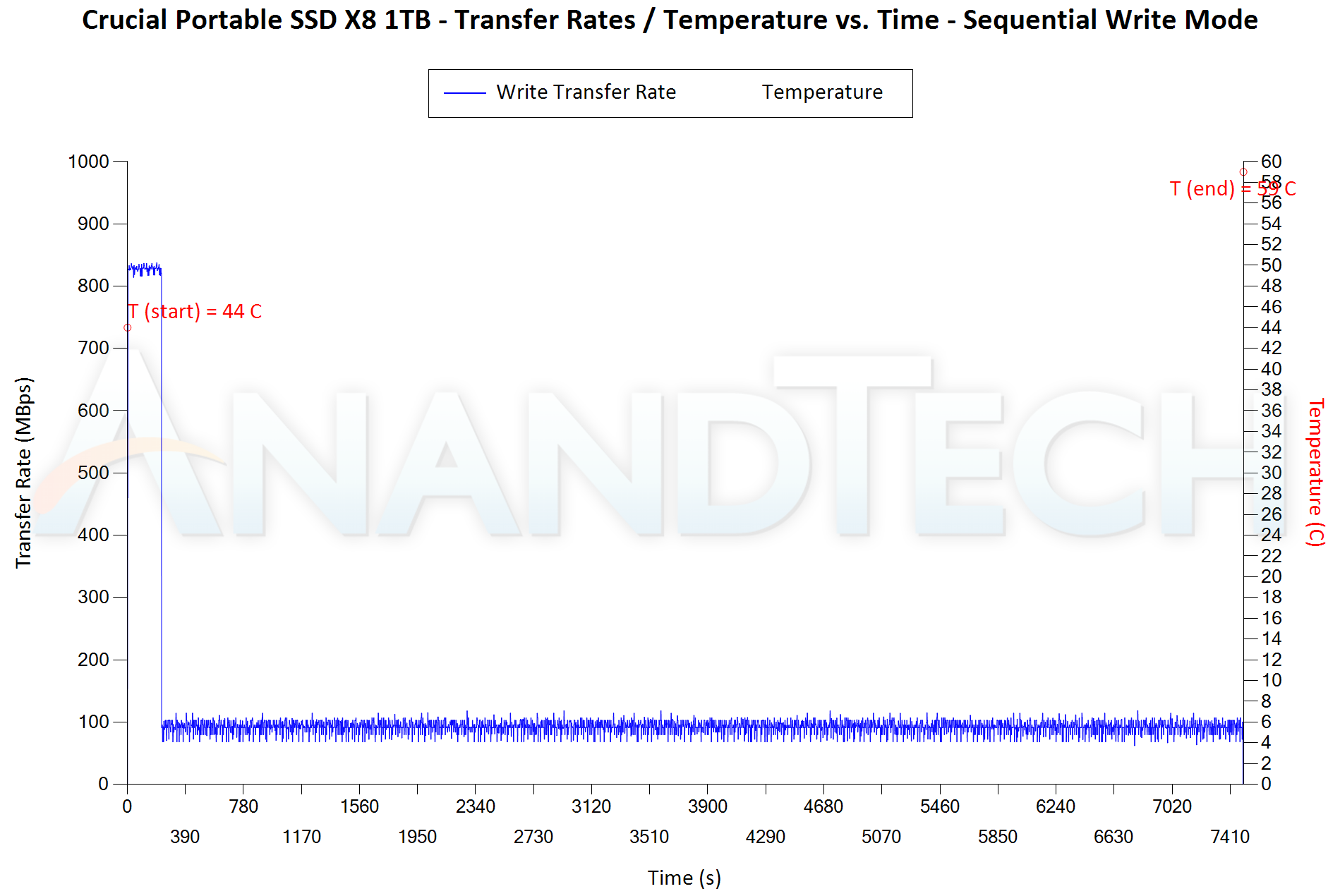
The Extreme v2 maintains speeds between 815 – 850 MBps throughout the write workload (up to 90% of drive capacity), with the temperature ending up at 70C. (11C delta). In terms of performance numbers, it is almost as good as the Extreme PRO from 2019 which stayed at 850 MBps throughout. The My Passport SSD (2020) starts off with similar speeds as the Extreme v2, and stays there for around 15 seconds (~13GB of write data), before dropping down to around 670 MBps (which is sustained throughout the workload). The temperature does end up at 76C (21C delta). Normally, one would assume that the 13GB change-over is the effect of SLC caching, but the absence of the cliff in the Extreme v2 points to something else –  the SanDisk Extreme v2 has a little higher thermal capacity compared to the My Passport SSD (2020). This allows a slightly higher bump up in performance for the former. In other words, Western Digital is more proactive in throttling the My Passport when there is a possibility of rapid temperature rise.


Power Consumption


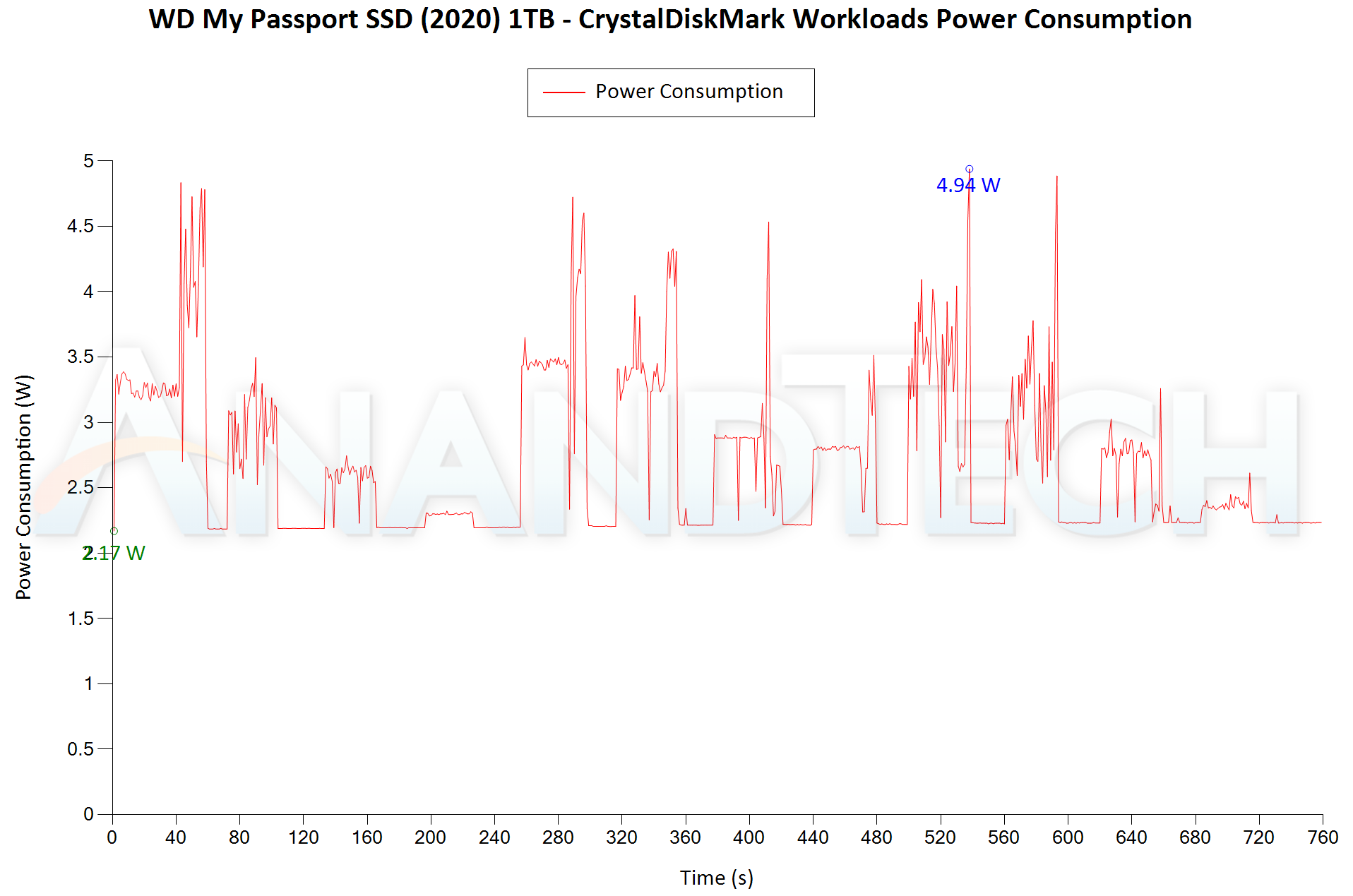
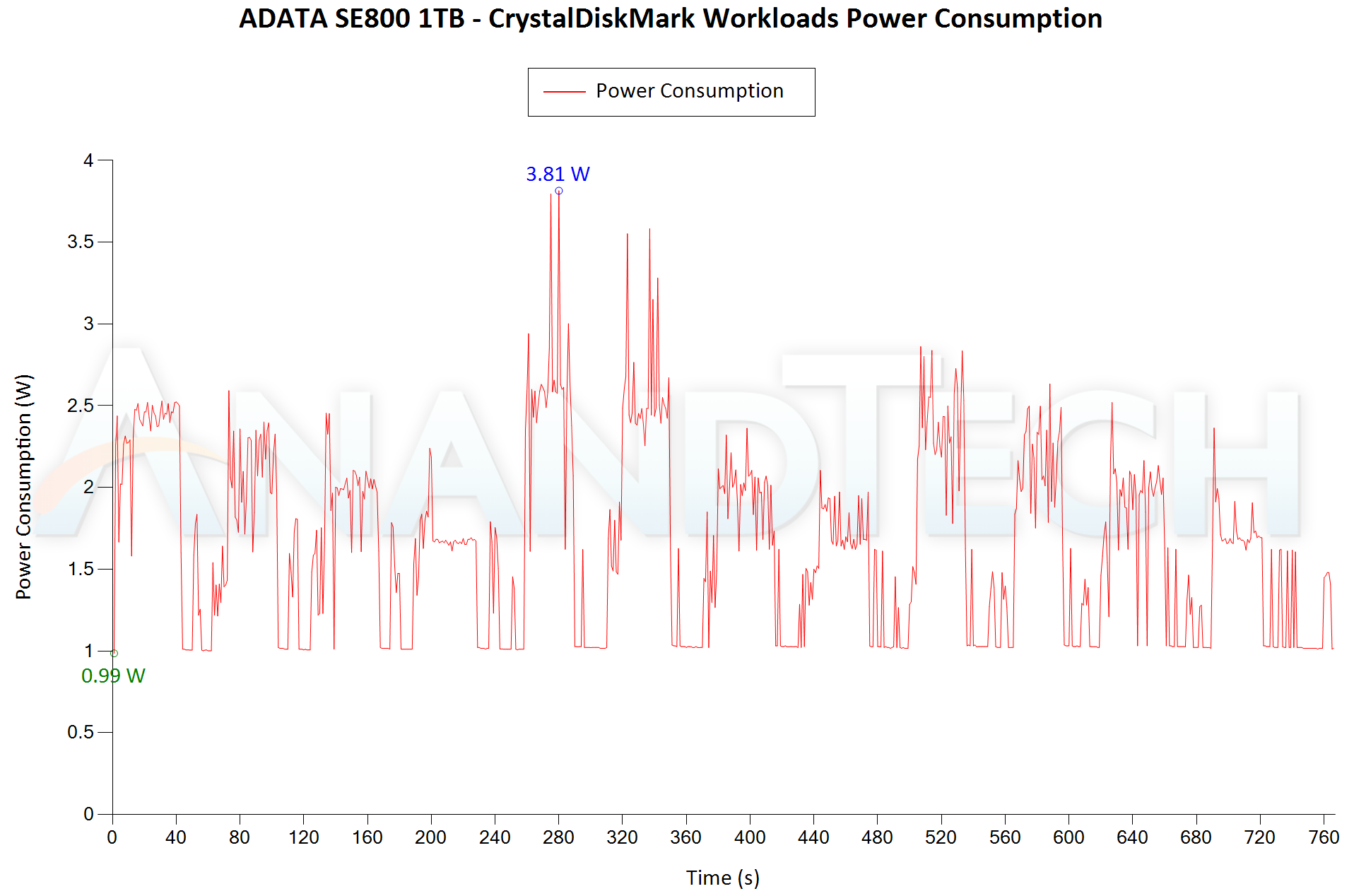
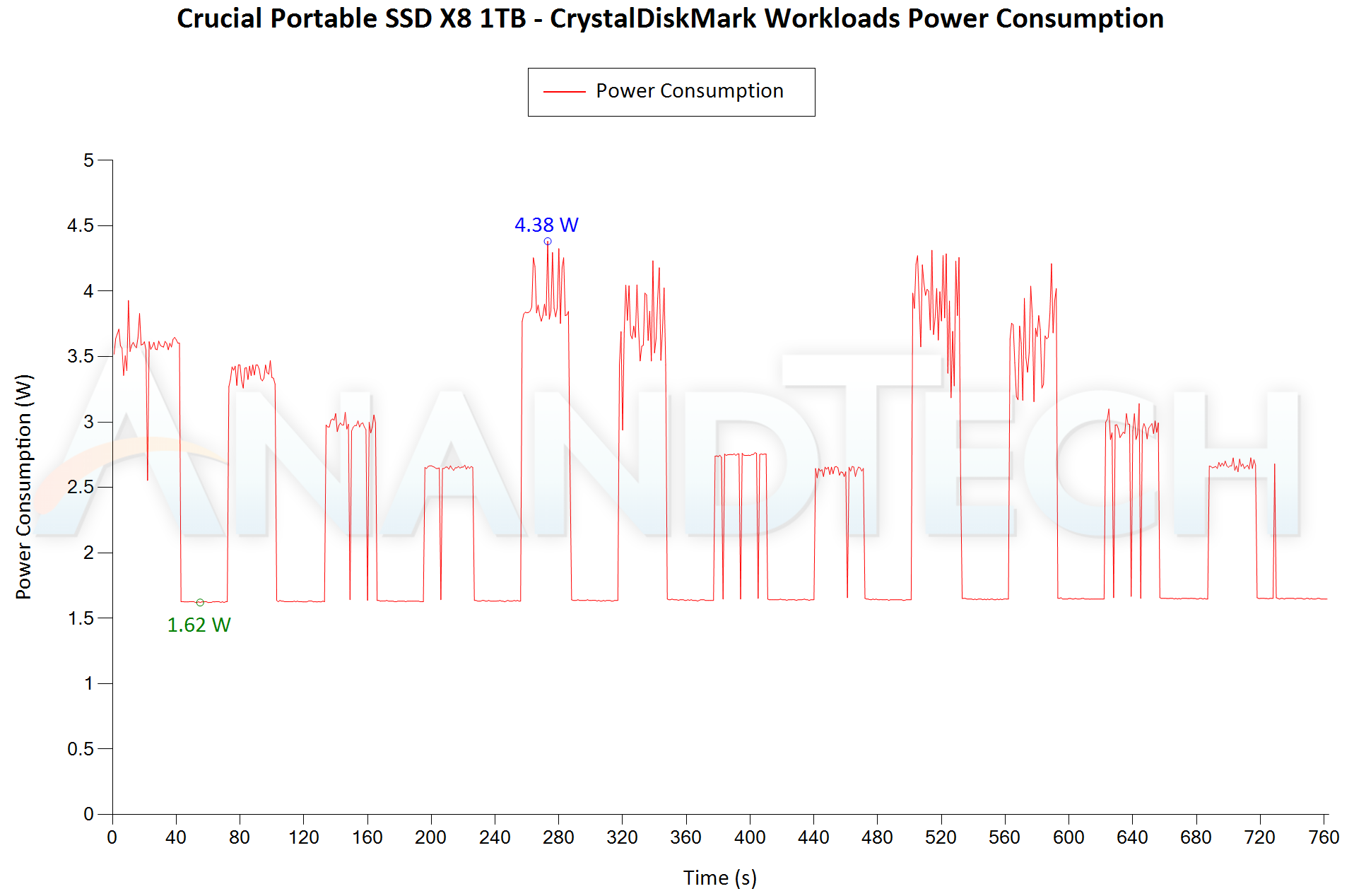
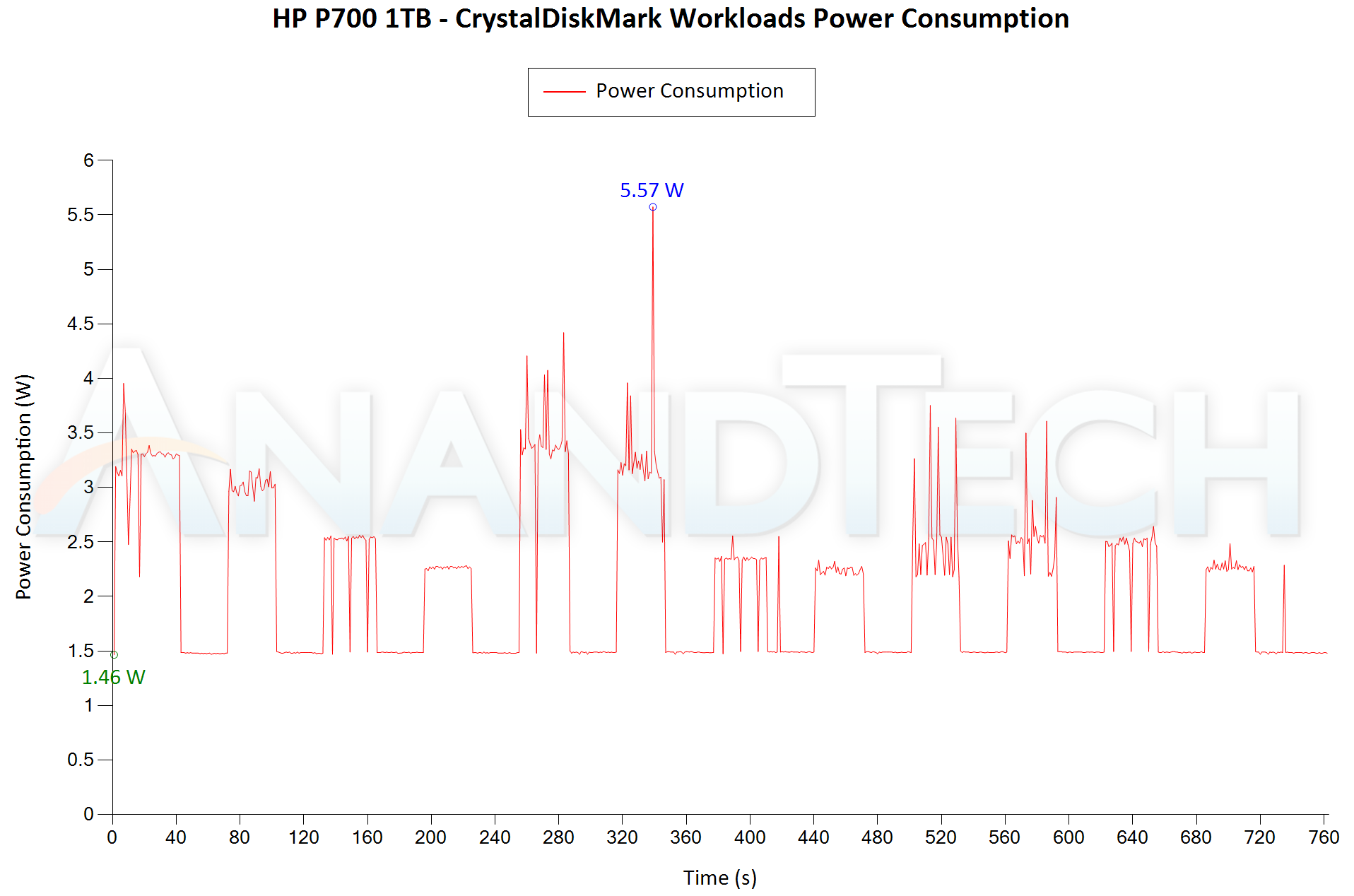
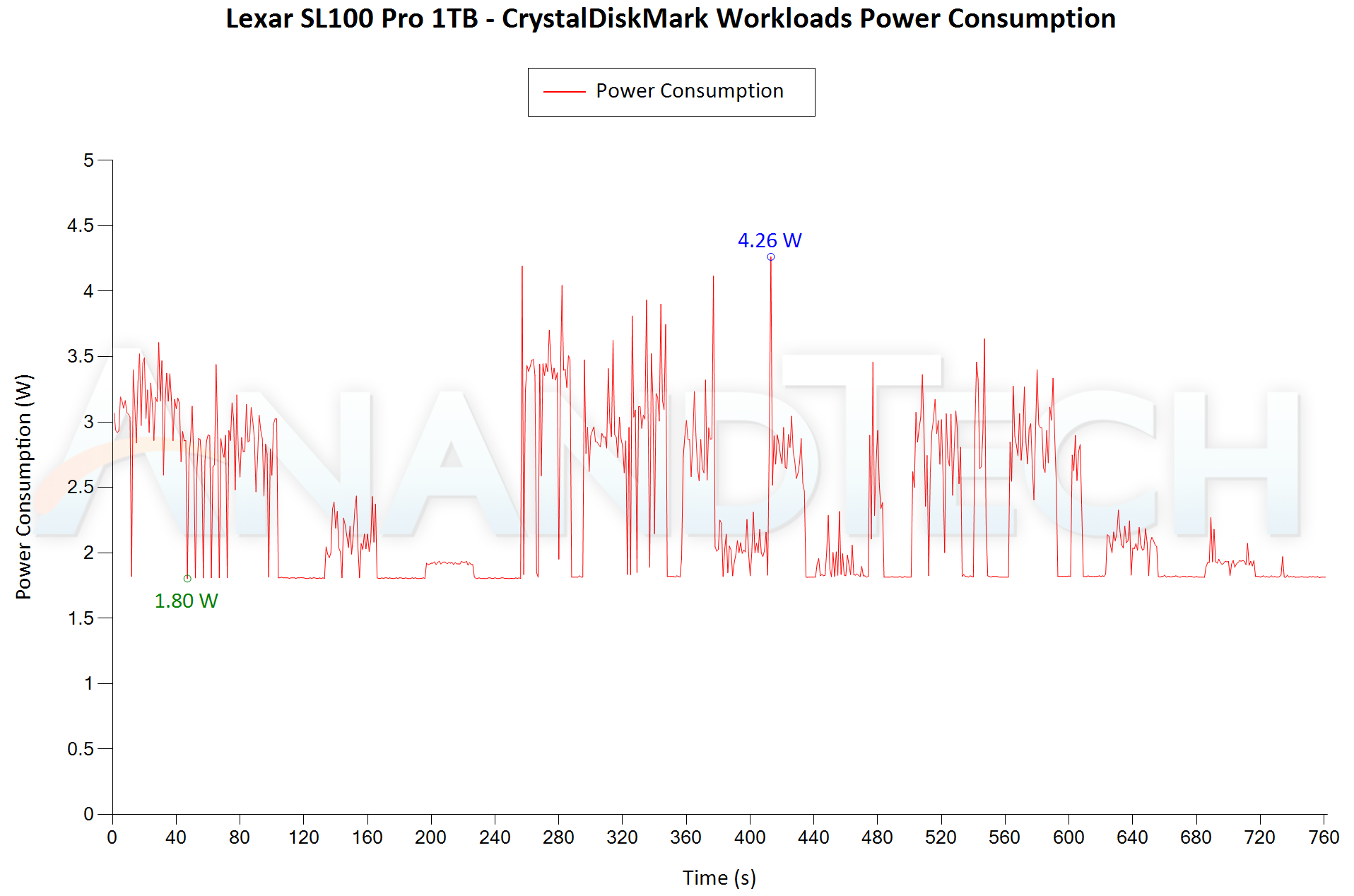
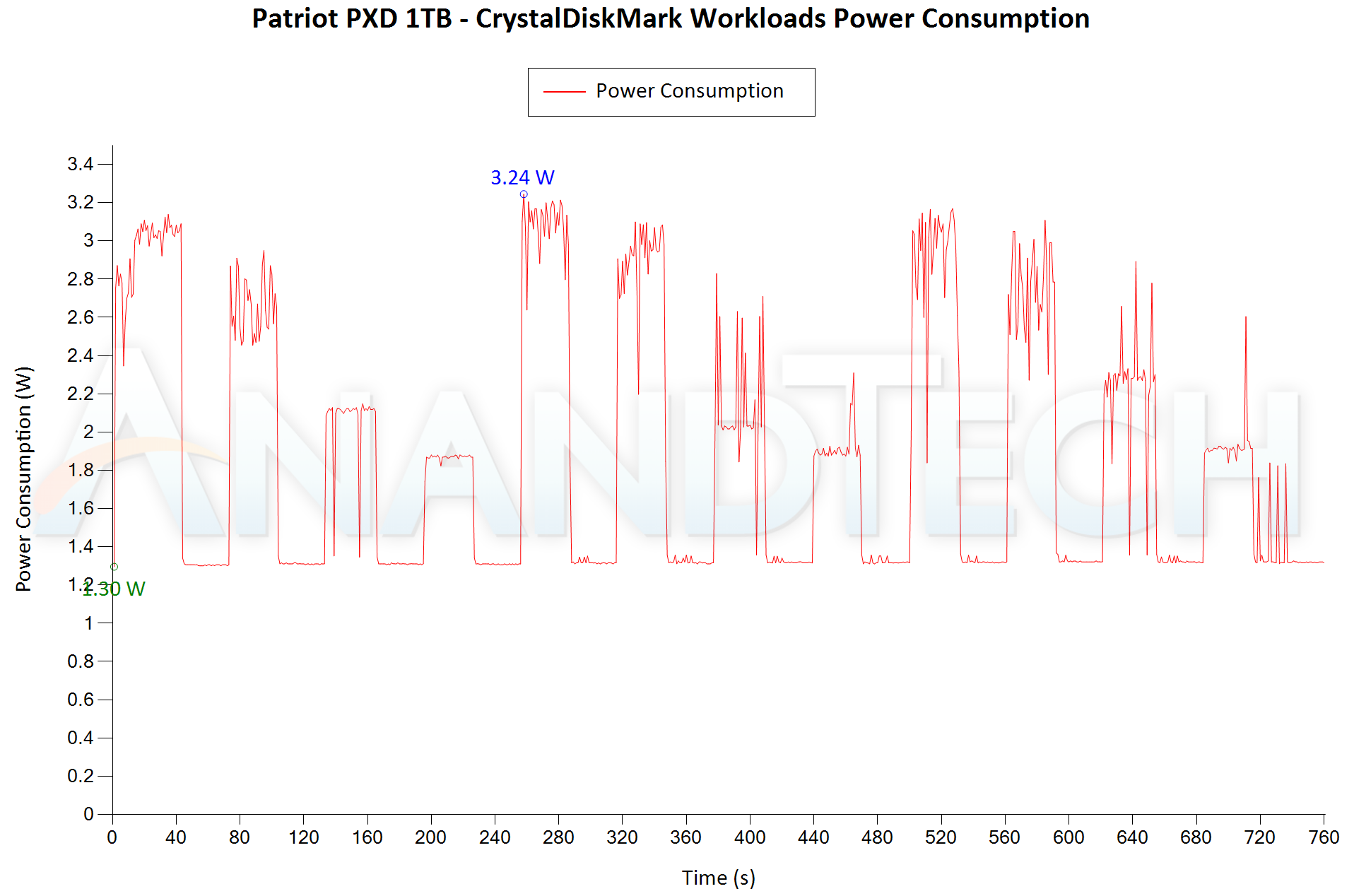
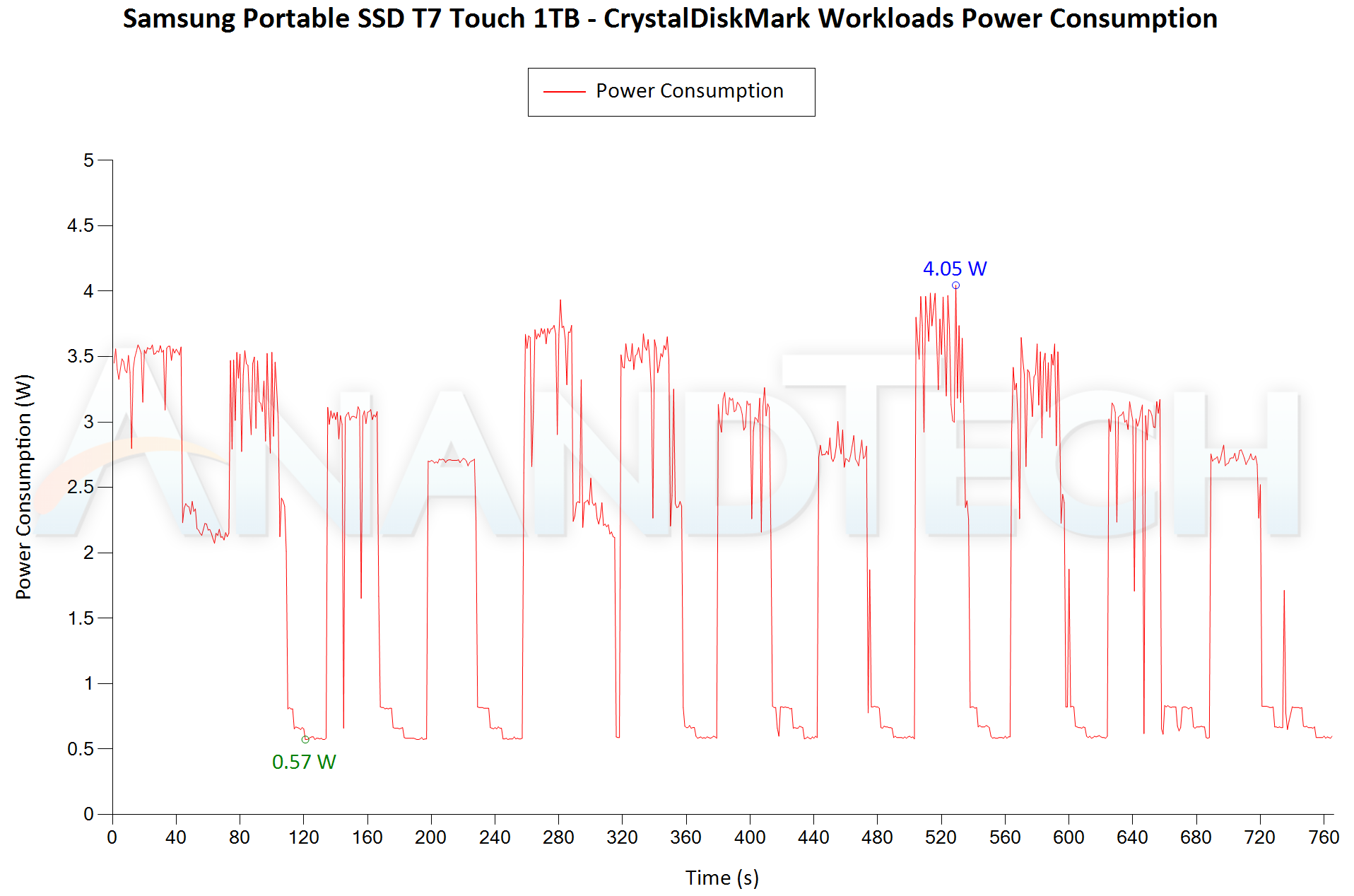
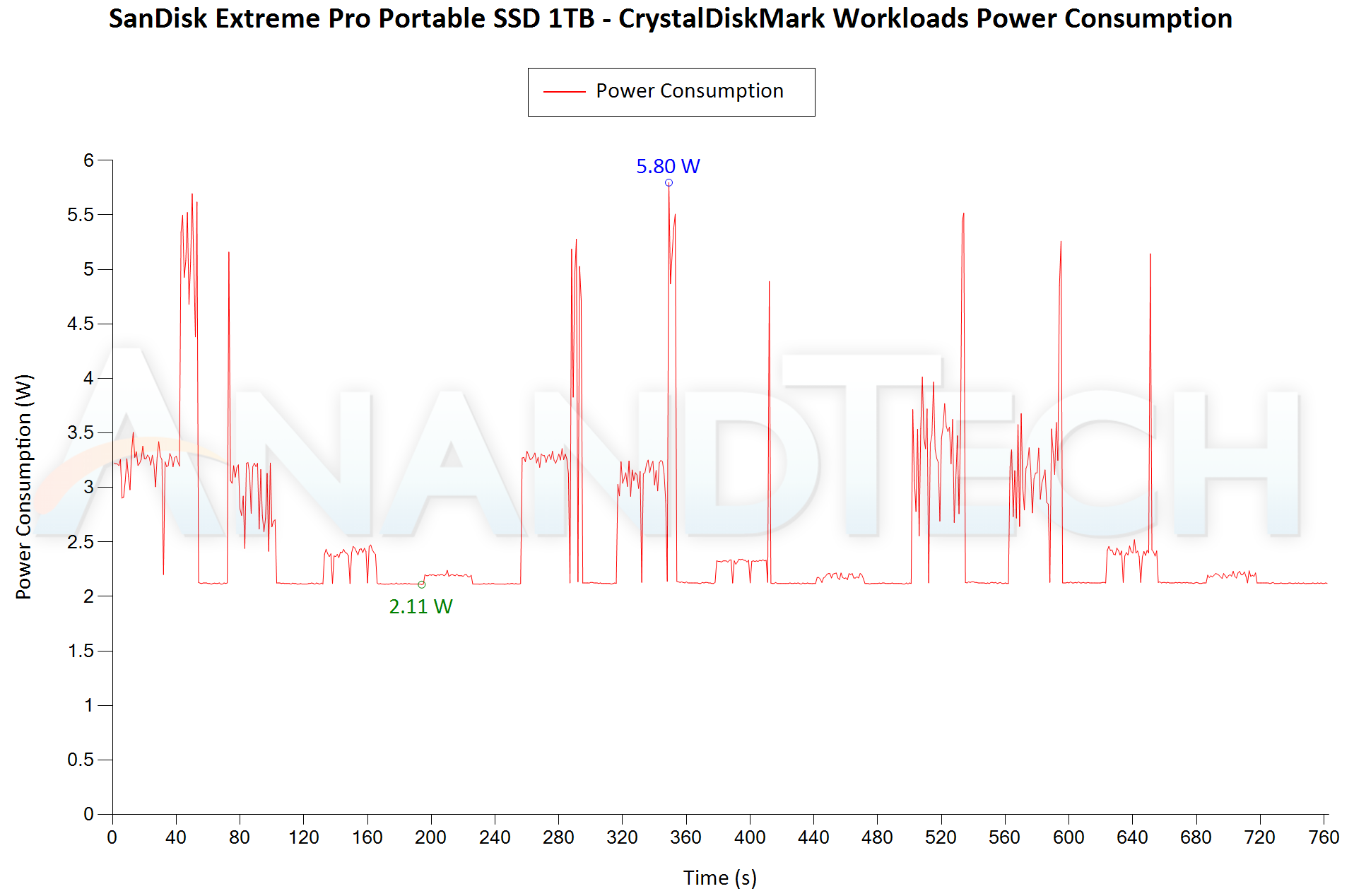
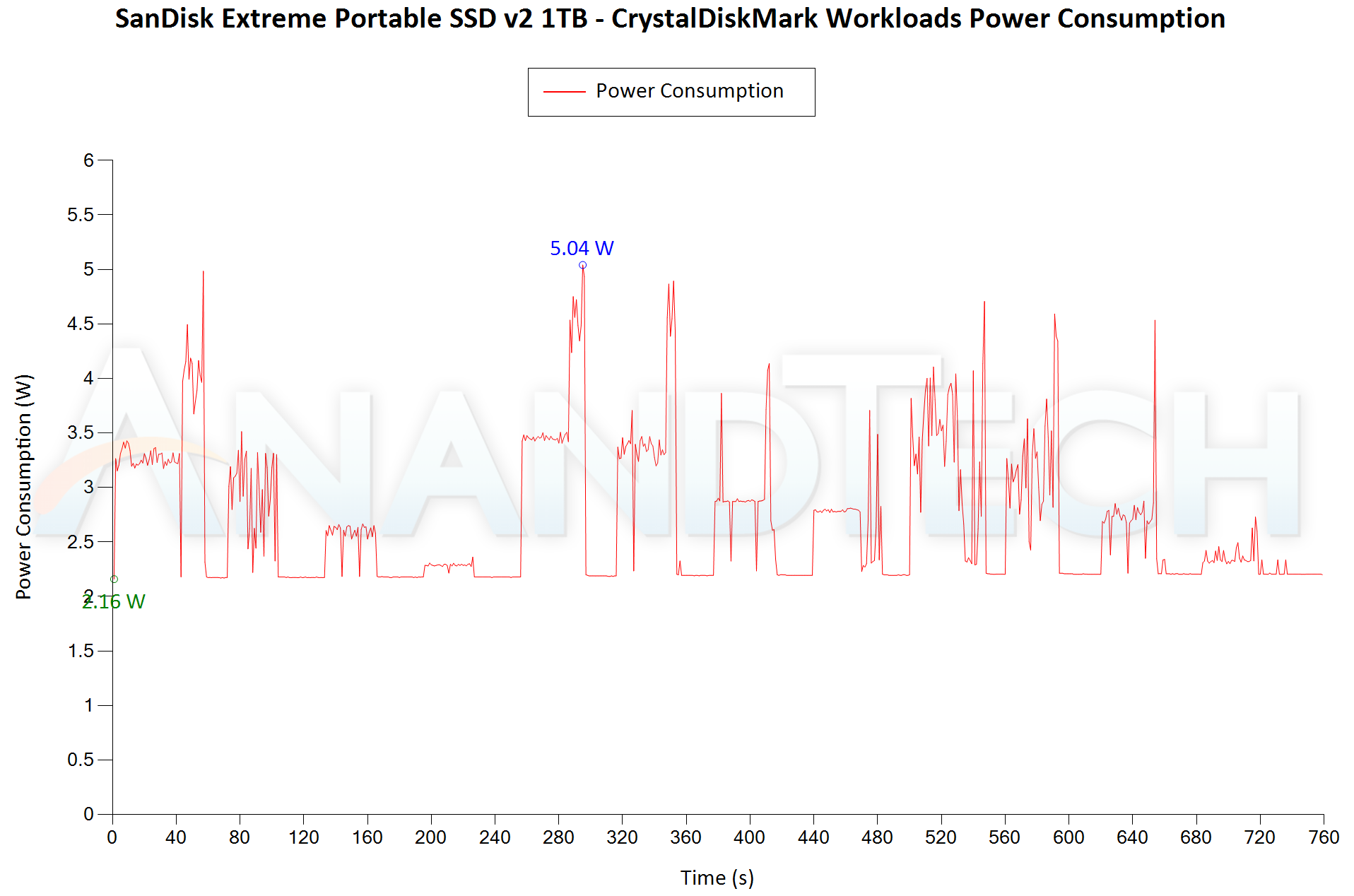
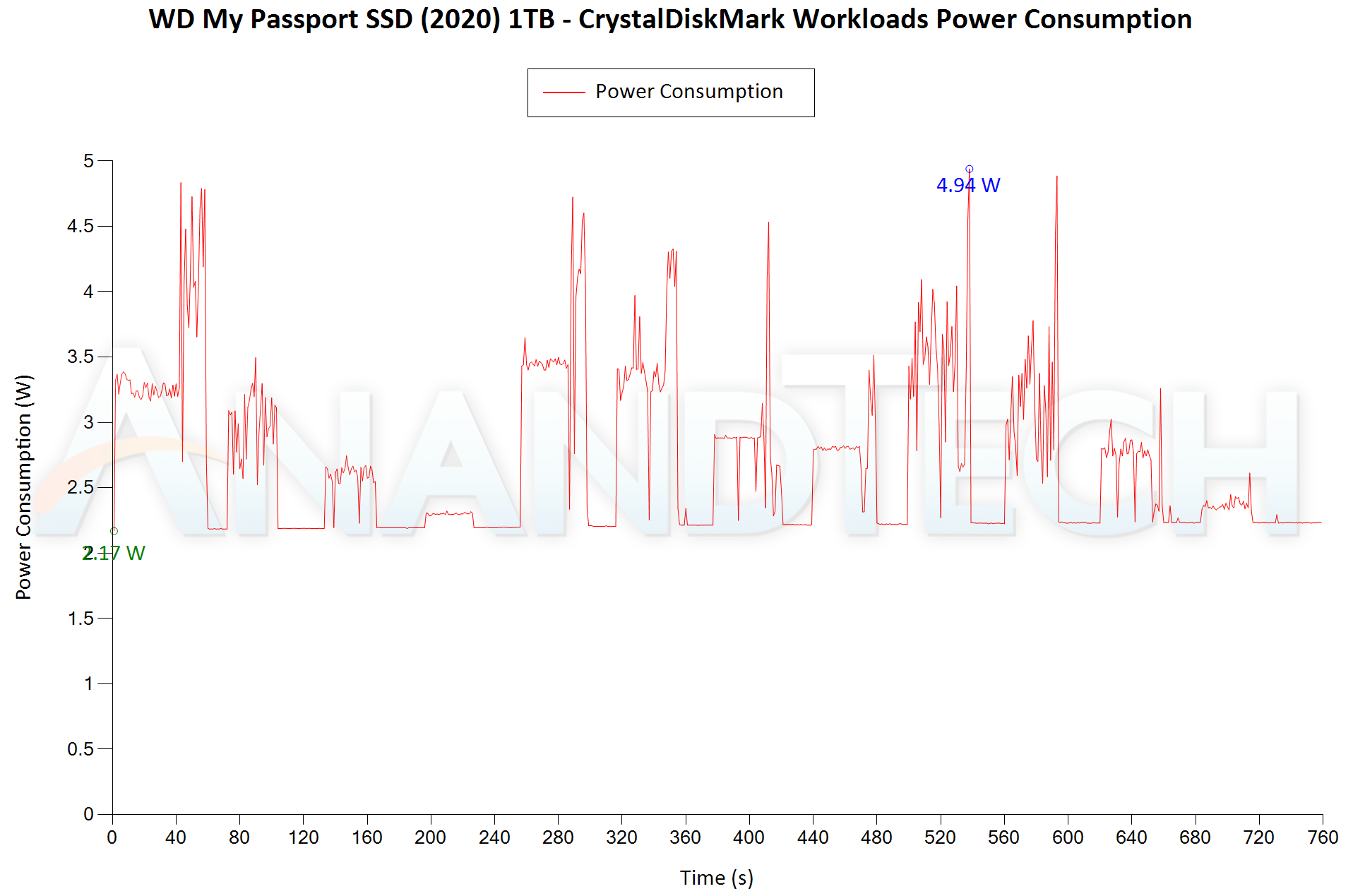
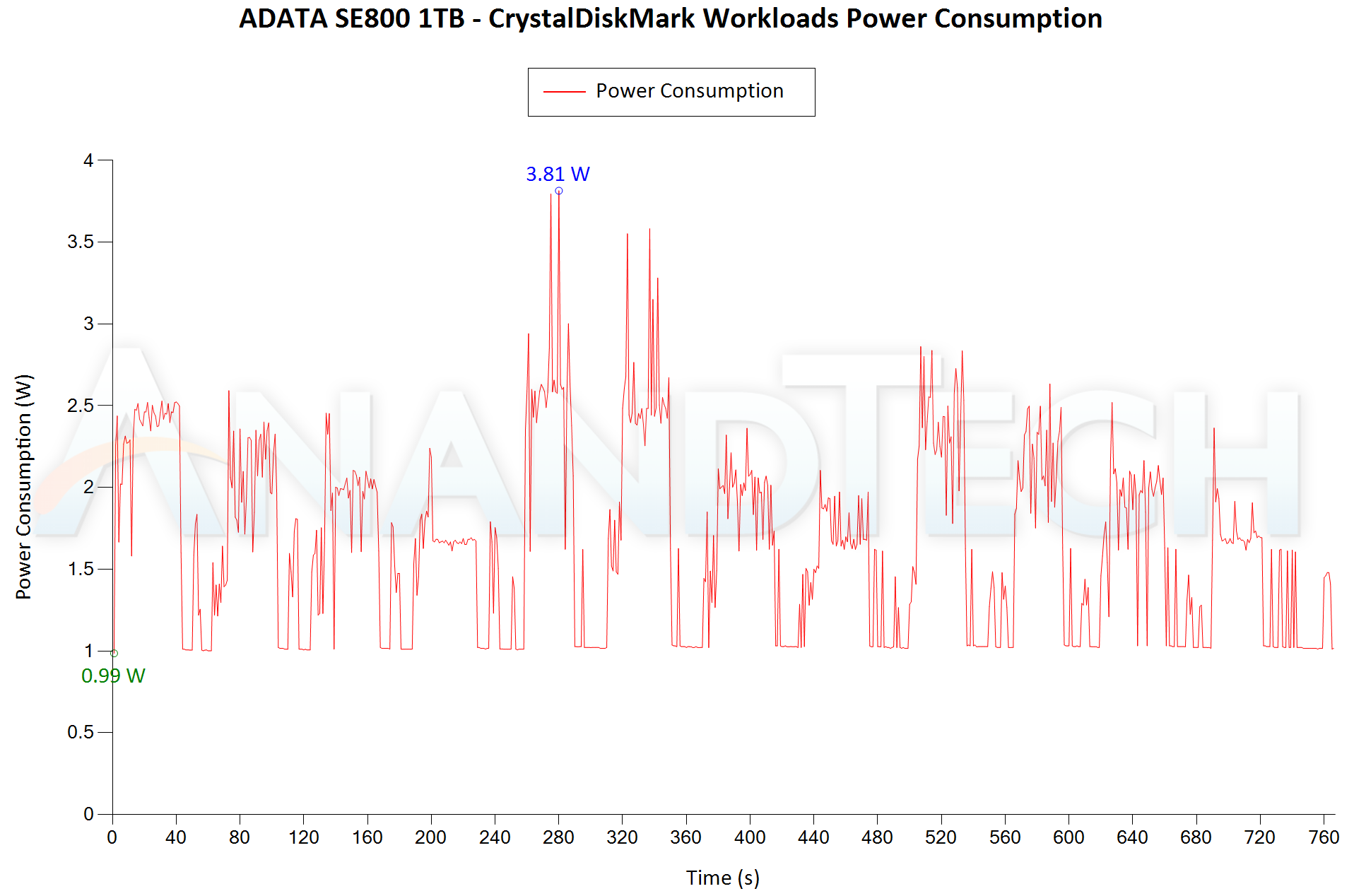
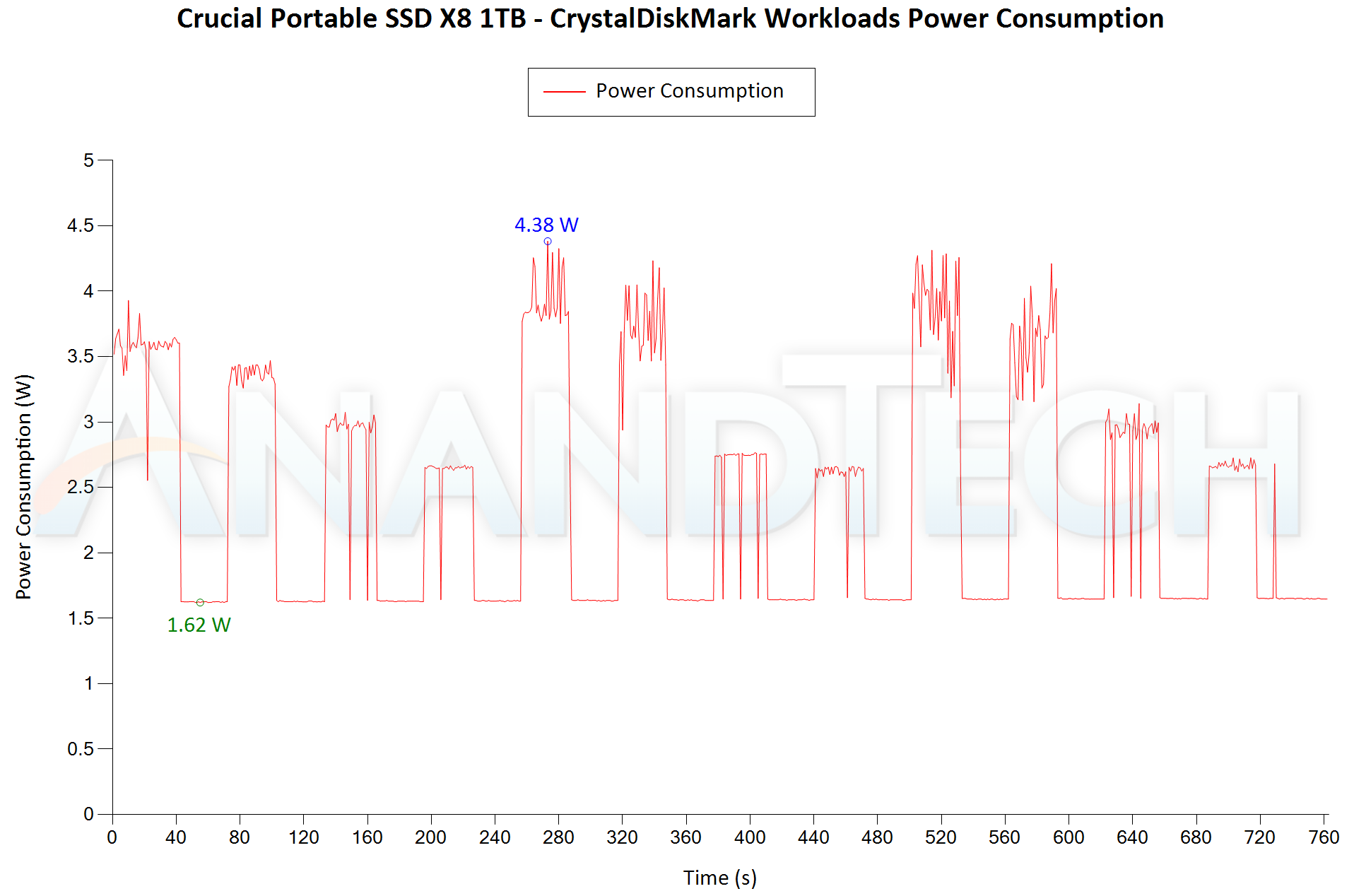
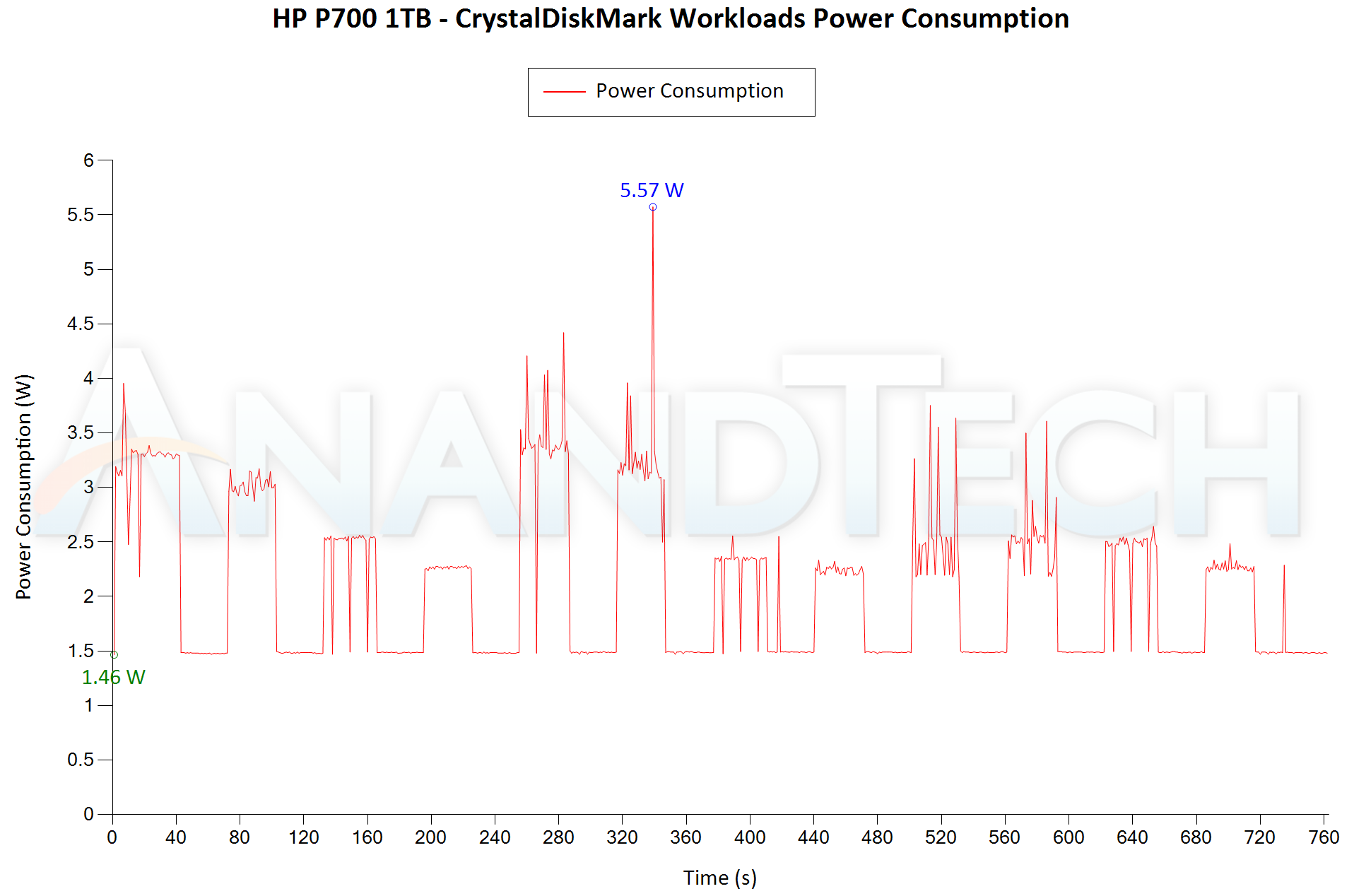
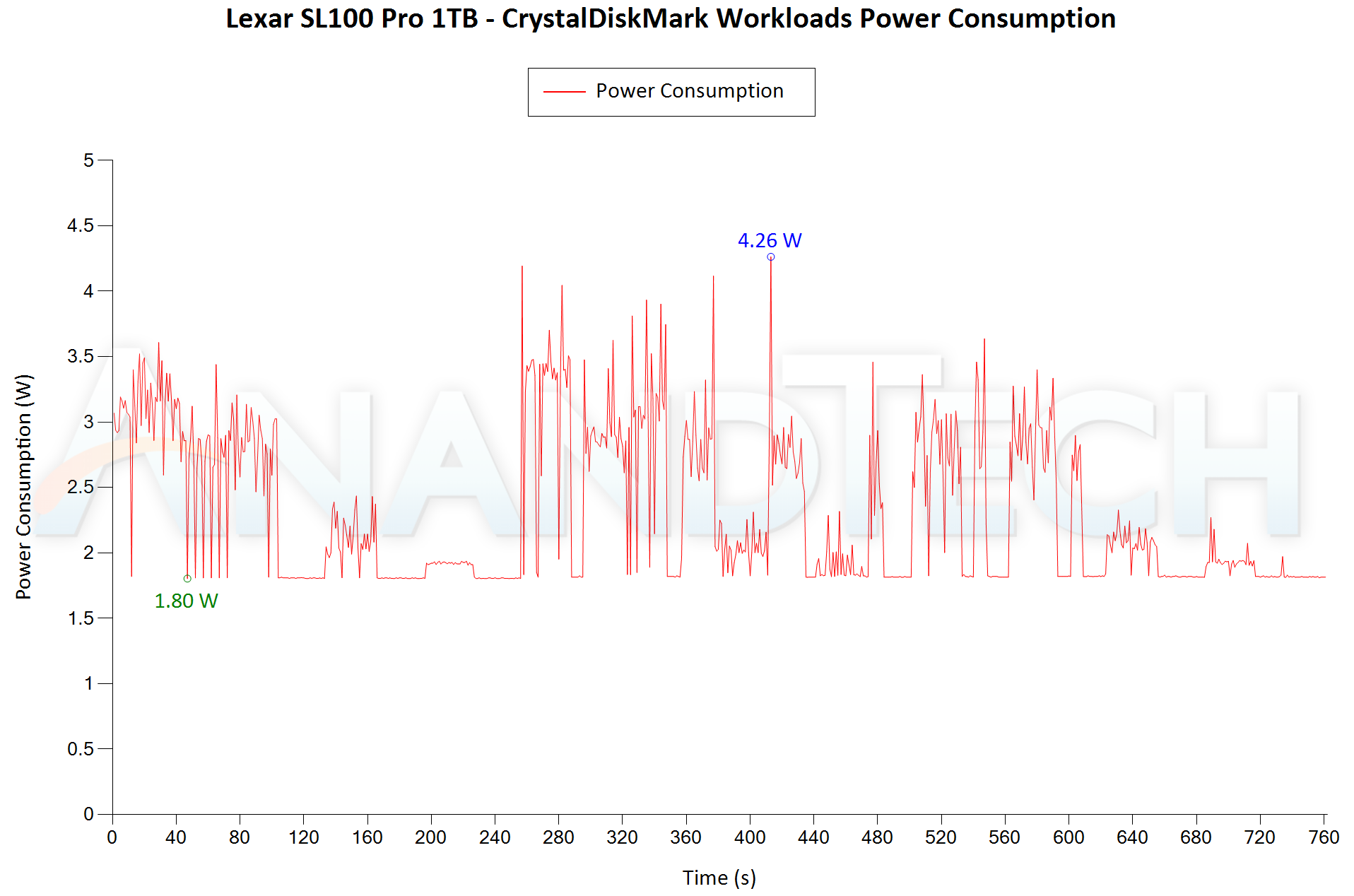
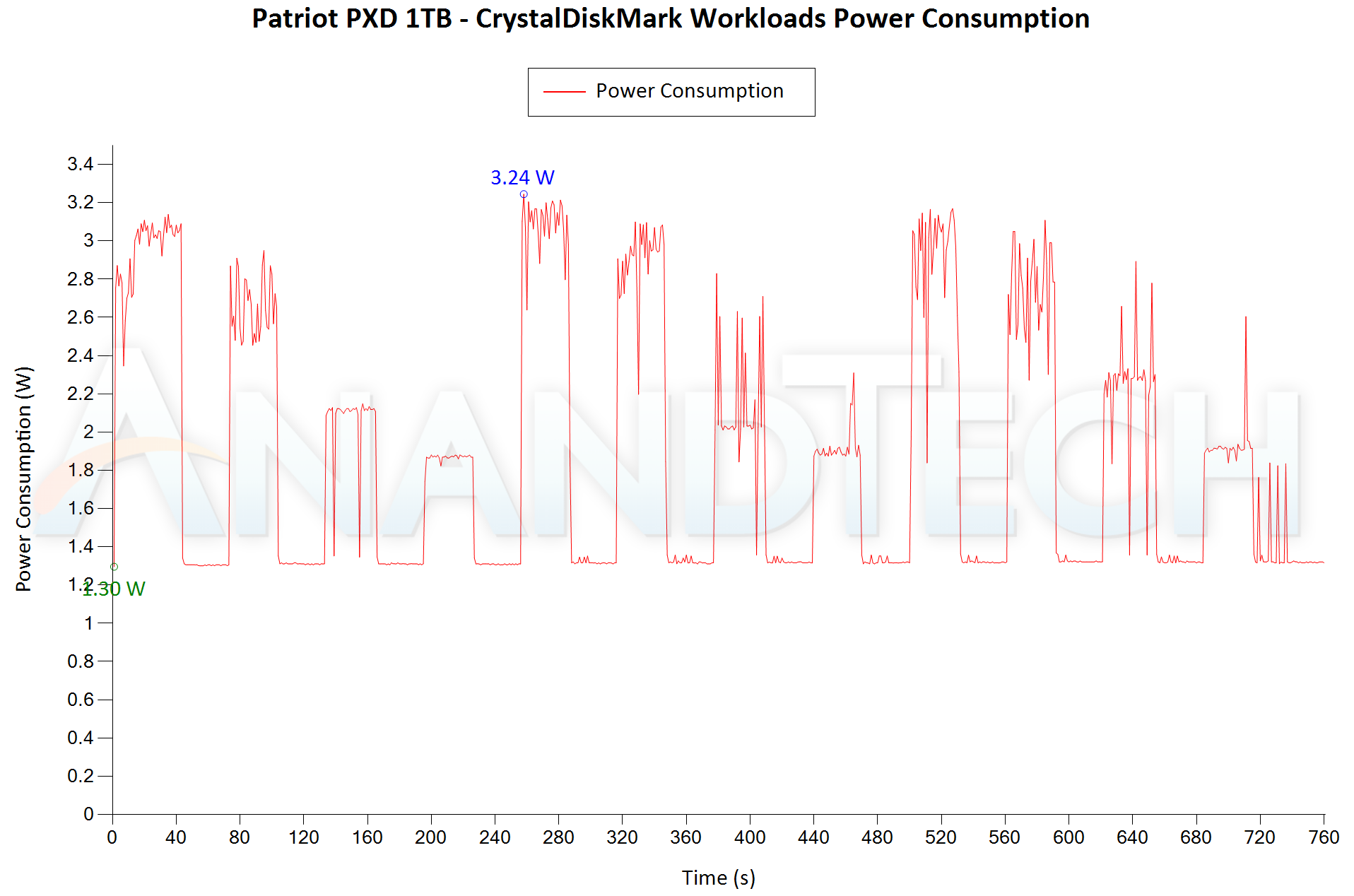
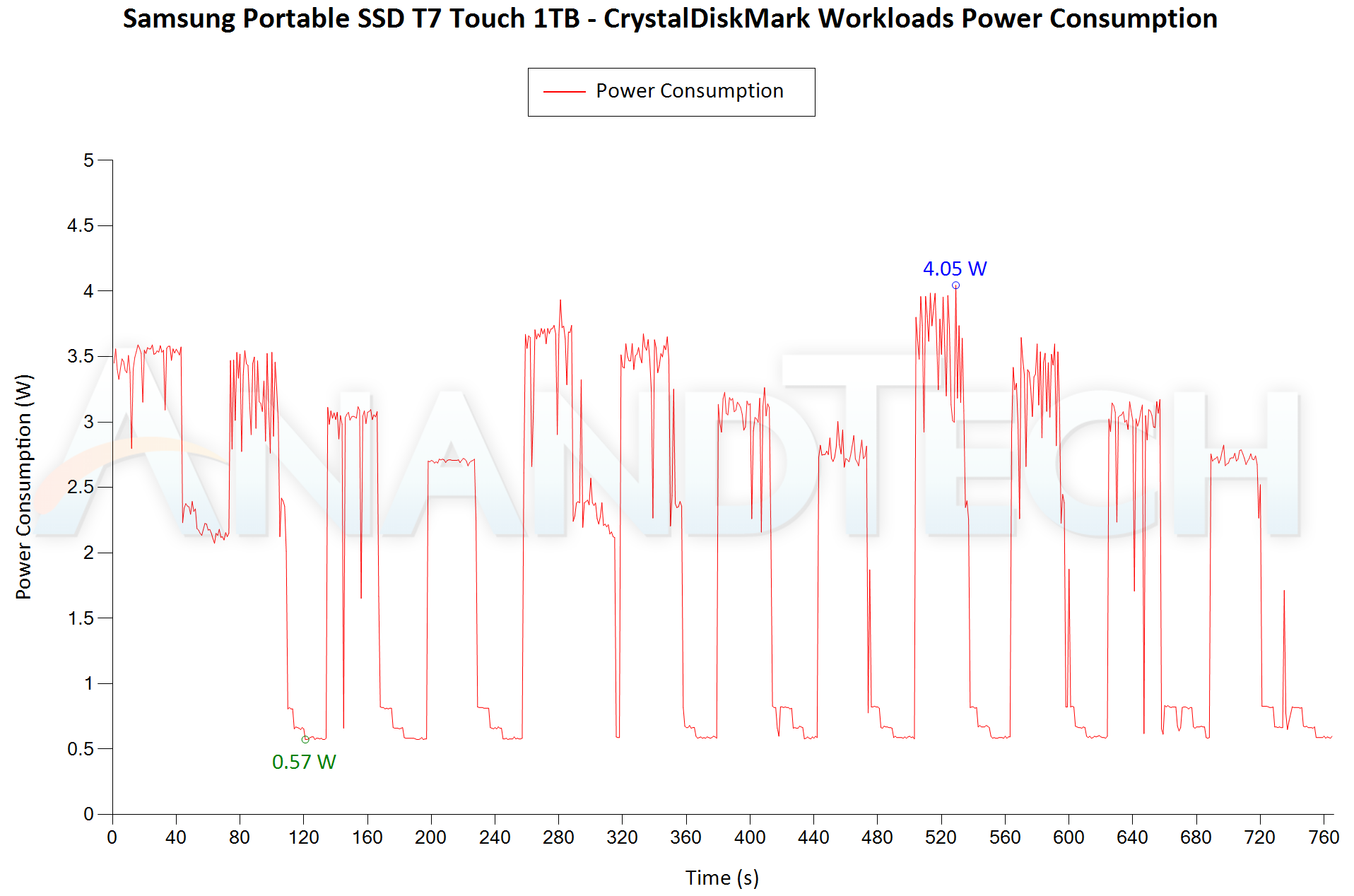
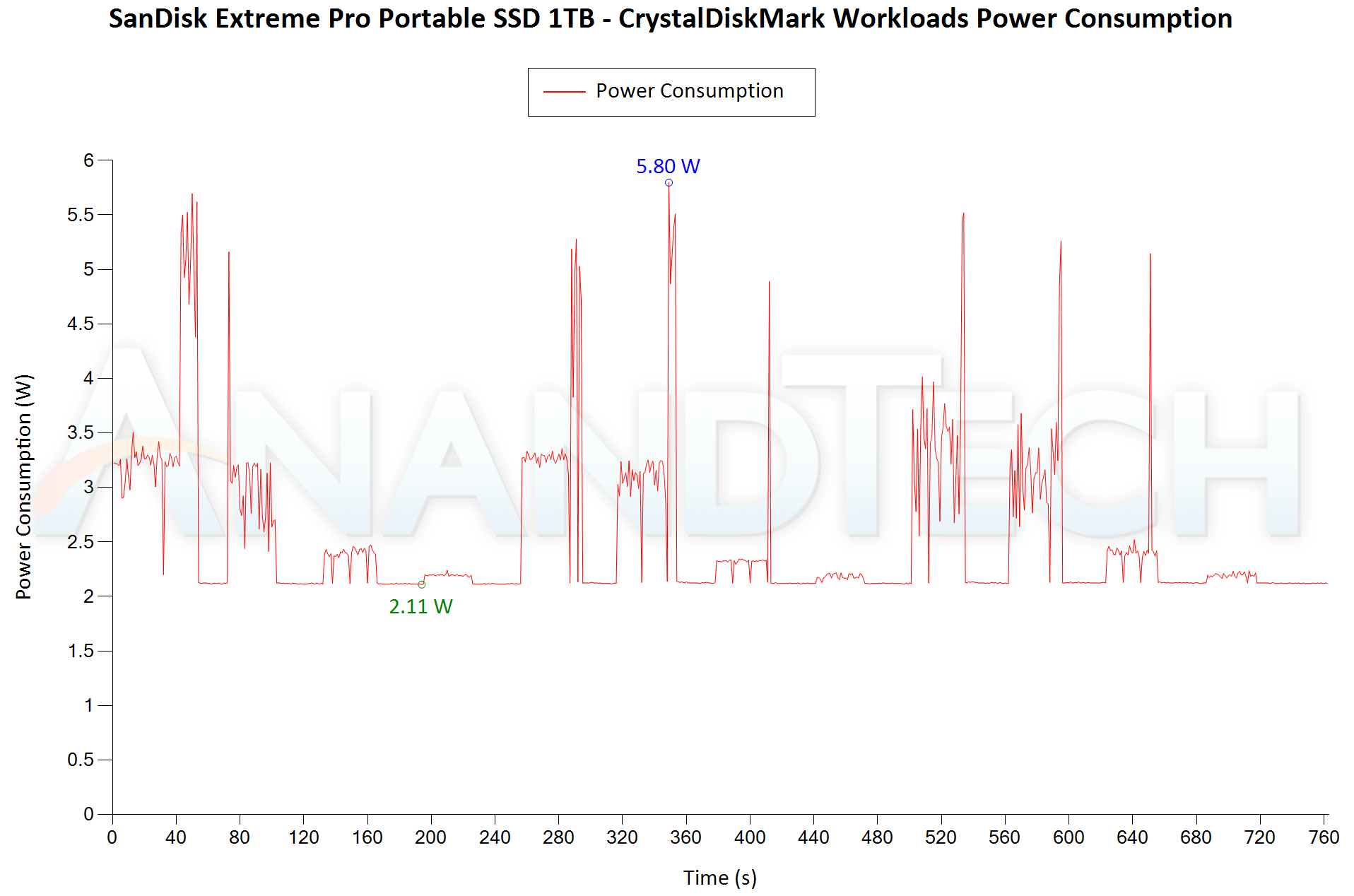
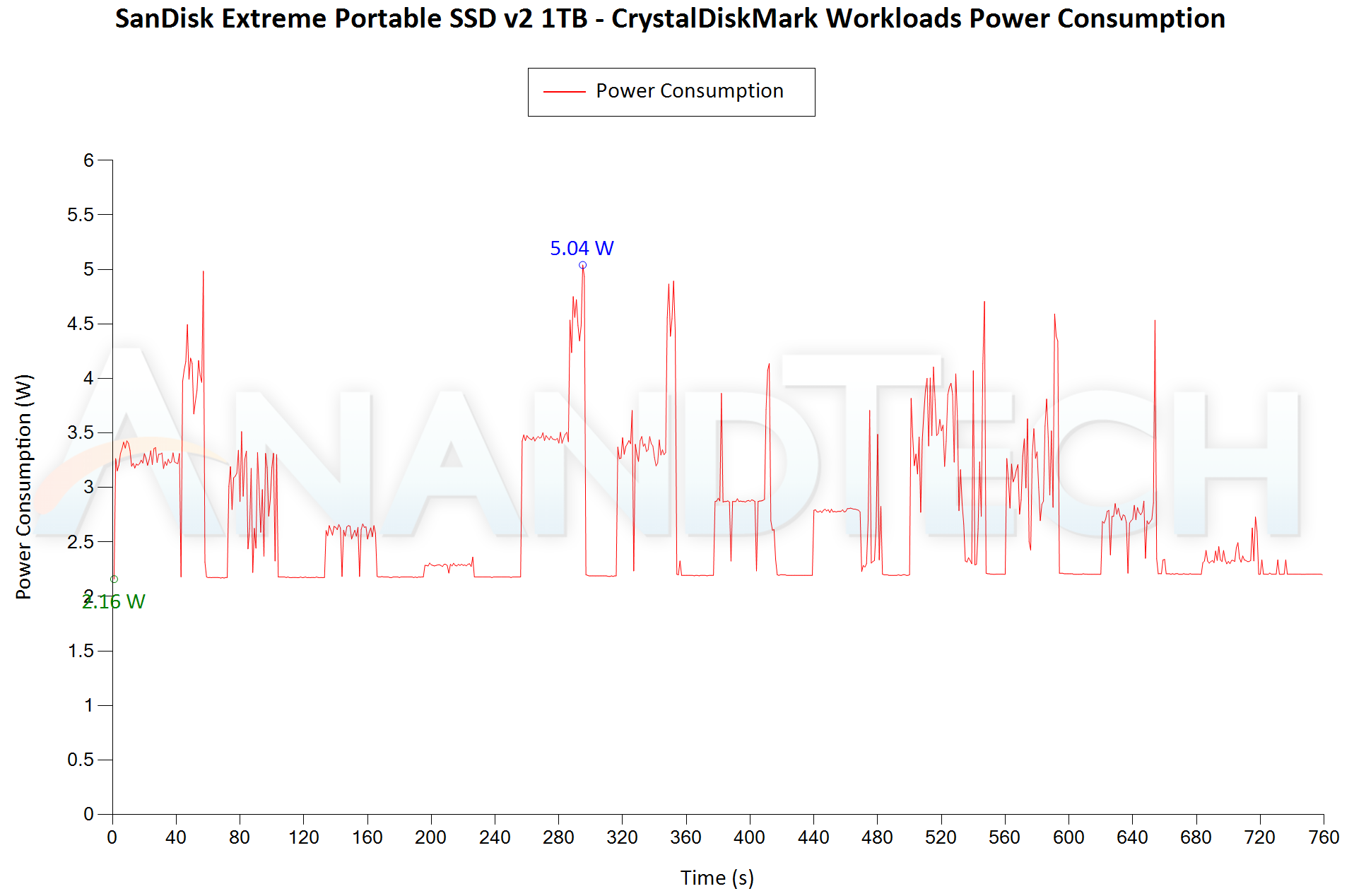
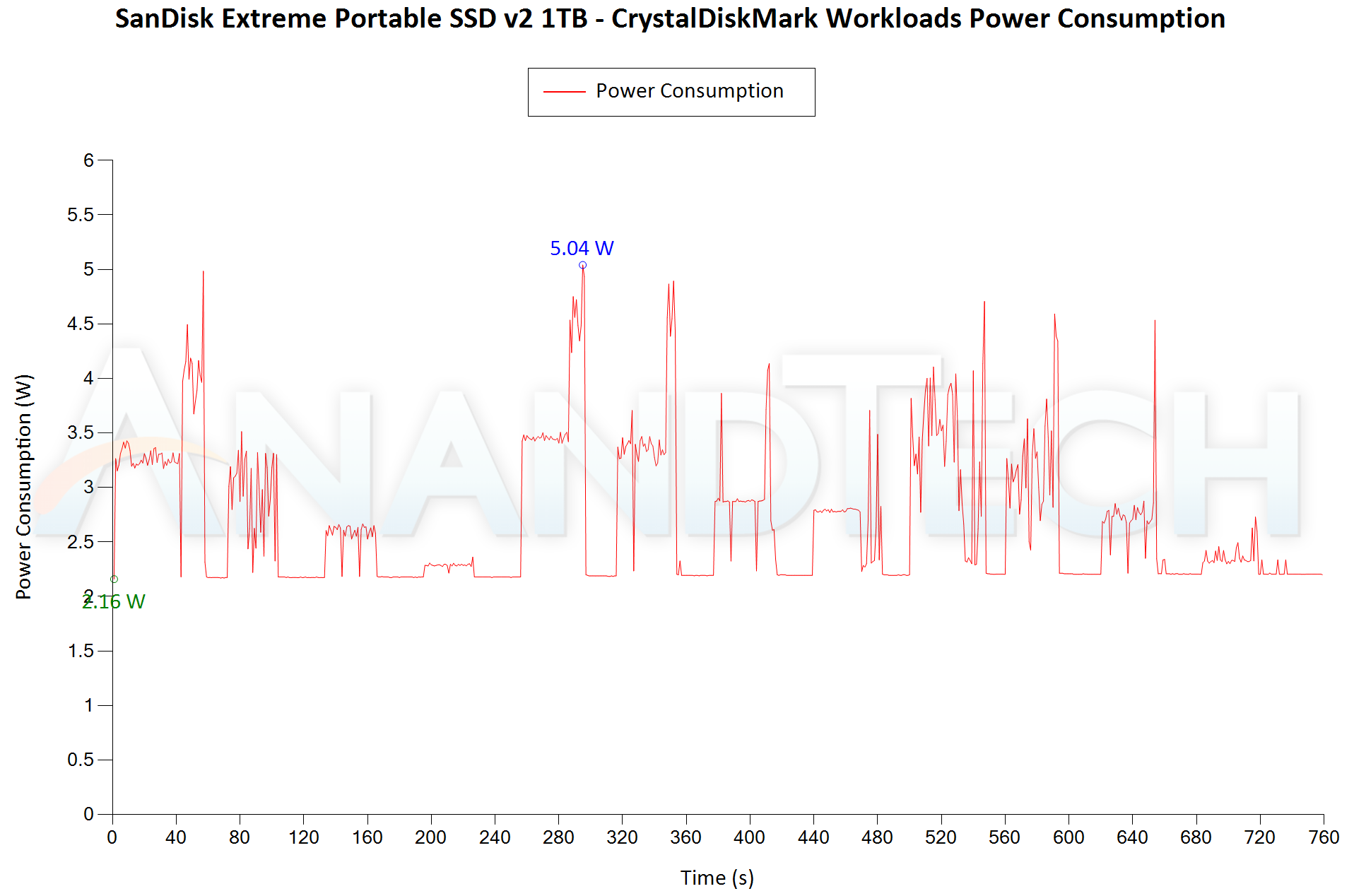
Bus-powered devices can configure themselves to operate within the power delivery constraints of the host port. While Thunderbolt 3 ports are guaranteed to supply up to 15W for client devices, USB 2.0 ports are guaranteed to deliver only 4.5W (900mA @ 5V). In this context, it is interesting to have a fine-grained look at the power consumption profile of the various drives. Using the Plugable USBC-TKEY, the bus power consumption of the drives was tracked while processing the CrystalDiskMark workloads (separated by 30s intervals). The graphs below plot the instantaneous bus power consumption against time, while singling out the maximum and minimum power consumption numbers.


var CDMP_paths_0 = new Array(‘‘,’‘,’‘,’‘,’‘,’‘,’‘,’‘,’‘);
CDMP_paths_0.push(‘


‘);


Drive Power Consumption – CrystalDiskMark Workloads
SanDisk Extreme Portable SSD v2 1TBWD My Passport SSD (2020) 1TBADATA SE800 1TBCrucial Portable SSD X8 1TBHP P700 1TBLexar SL100 Pro 1TBPatriot PXD 1TBSamsung Portable SSD T7 Touch 1TBSanDisk Extreme Pro Portable SSD 1TBExpand All

The two SSDs clock in between 2.1W and 5W for the workloads. These are not the most power efficient external SSDs, as the Samsung T7 Touch operates between 0.6W and 4W for the same workloads. These numbers are fine for usage with desktops and high-performance notebooks, but the aspect needs to be kept in mind when using them with mobile phones and tablets.


Pricing


The price of flash-based storage devices tend to fluctuate quite a bit over time. However, the relative difference between different models usually doesn’t change. The table below summarizes the product links and pricing for the various units discussed in the review.


External Flash Storage Devices – Pricing
Product Model Number Capacity (GB) Street Price (USD) Price per GB (USD/GB)
ADATA SE800 1TB ASE800-1TU32G2-CBK 1000 $130 0.13
Crucial Portable SSD X8 1TB CT1000X8SSD9 1000 $150 0.15
WD My Passport SSD (2020) 1TB WDBAGF0010BGY-WESN 1000 $150 0.15
Patriot PXD 1TB PXD1TBPEC 1000 $170 0.17
HP P700 1TB 5MS30AA#ABC 1000 $175 0.175
Lexar SL100 Pro 1TB LSL100P-1TBRBNA 1000 $190 0.19
Samsung Portable SSD T7 Touch 1TB MU-PC1T0S/WW 1000 $190 0.19
SanDisk Extreme Pro Portable SSD 1TB SDSSDE80-1T00-A25 1000 $190 0.19
SanDisk Extreme Portable SSD v2 1TB SDSSDE61-1T00 1000 $200 0.2

The WD My Passport SSD (2020) offers excellent value for money. The verdict on the SanDisk Extreme Portable SSD v2 can be given only after the street pricing is known. That said, even if it were to be $200, we can say that the performance and consistency are worth it.


Final Words


After careful analysis of various aspects (including benchmark numbers, temperatures, power consumption, and pricing), it is clear that the WD My Passport SSD (2020) and the SanDisk Extreme Portable SSD v2 are both excellent choices for a wide variety of applications. However, as the adage goes – one can’t have the cake and eat it too. Both SSDs deliver the performance and consistency at the cost of increased power consumption and slightly high temperatures. Optimizing for those metrics would mean losing out on the aspects that deliver instant gratification – getting transfers done quickly without any throttling. However, those very metrics might turn out to be of key concern in certain scenarios. Therefore, the right choice depends on the use-case. Based on our tests, the SanDisk Extreme Portable SSD v2 effectively serves the needs of content creators who need to use it in the field (thanks to its carabiner loop, IP55 rating, and 2m drop protection). The WD My Passport SSD (2020) is a better fit for the casual home / business user.


The SanDisk Extreme PRO Portable SSD (2019) model continues to be our favorite / recommended portable SSD as long as it is not EOL-ed. The use of a high-end SSD (non-DRAM-less) and a better thermal solution in the unit ensures that it surpasses the SanDisk Extreme v2 and the My Passport SSD across all metrics except for power consumption. Our second and third choices would be the SanDisk Extreme Portable SSD v2, followed by the WD My Passport SSD (2020).


Source: AnandTech – SanDisk Extreme Portable SSD v2 and WD My Passport SSD (2020) Review

Western Digital Unveils USB 3.2 Gen 2×2 SanDisk Extreme PRO Portable SSD v2

The SanDisk Extreme PRO Portable SSD released in 2019 has been one of the top performers in the external flash storage market segment. Putting a high-end WD Black SN750-class M.2 PCIe 3.0 x4 NVMe SSD behind an ASMedia ASM2362 bridge helped it deliver speeds of up to 1050 MBps when used with USB 3.2 Gen 2 ports. One of the key differentiators was its performance consistency under heavy sequential writes, with no SLC caching effects (write speed cliff) or thermal throttling. Coupled with its handy industrial design (in particular, the carabiner loop integrated into an easy-to-carry casing), it has been on top of our list of recommended USB 3.2 Gen 2 external SSDs since the beginning of this year. Along with the 2019 PRO, SanDisk also offered the lower-priced 2018 SanDisk Extreme – a SATA SSD behind a USB 3.2 Gen 1 bridge. Despite thermal throttling under stress, the performance and price made the 2018 Extreme Portable SSD an attractive option for casual users.


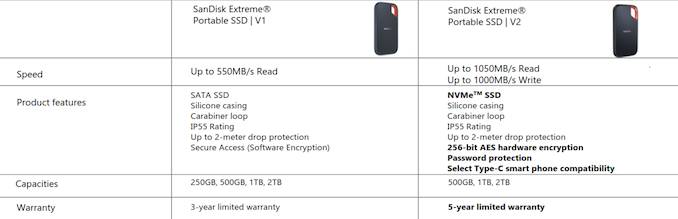
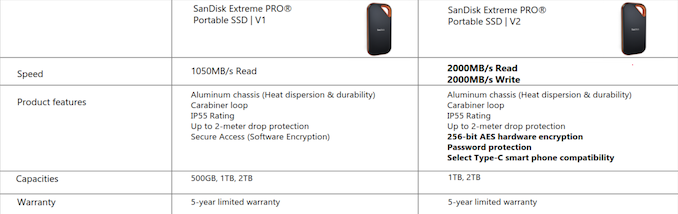
Today, Western Digital is upgrading both the SanDisk Extreme and the Extreme PRO Portable SSDs models with a v2 suffix – Accompanying that is an approximate doubling of the peak bandwidth numbers for both models. In short, the SanDisk Extreme Portable SSD v2 is now a USB 3.2 Gen 2 device with speeds of up to 1050 MBps. The SanDisk Extreme PRO Portable SSD v2 is a USB 3.2 Gen 2×2 device with speeds of up to 2000 MBps.


A detailed review of the 1TB model of the SanDisk Extreme Portable SSD v2 (along with the recently introduced WD My Passport SSD (2020) 1TB version) is available here. A DRAM-less SN550-class NVMe SSD is used behind an ASMedia bridge, allowing for lower power consumption and a relaxed thermal design compared to the 2019 Extreme PRO Portable SSD (which also claimed read/write speeds of up to 1050 MBps).


The Extreme PRO Portable SSD v2 uses the WD Black SN730E SSD, which is essentially the OEM version of the SN750, but upgraded to 96L BiCS 4 3D NAND flash, and has firmware tweaked for use with external drives. The PCIe 3.0 x4 NVMe interface allows the Extreme PRO Portable SSD v2 to support read/write speeds of up to 2000 MBps. The forged aluminum heat sink used in the 2019 SanDisk Extreme PRO is carried over to prevent thermal throttling. The SSD also has a 2m drop protection. New to the v2 SSDs is official compatibility with a range of USB Type-C smartphones.


The USB 3.2 Gen 2×2 port in the PRO v2 is enabled by the ASMedia ASM2364 bridge chip. The SanDisk Extreme PRO Portable SSD v2 is not the first USB 3.2 Gen 2×2 drive from the Western Digital stable. Late last year, WD had started selling the WD_BLACK P50 with similar advertised speeds. Targeting the gaming market, the WD_BLACK P50 had a unique industrial design and utilized a SN750E internal SSD (64L BiCS 3 3D NAND flash) – a version of the SN750 with tweaked firmware.


Despite the appearance of USB 3.2 Gen 2×2 ports in certain high-end motherboards, and the announcement of several USB 3.2 Gen 2×2 PCIe cards, the uptake of this high-speed interface in the computing world has been limited. Announced cards (such as the GIGABYTE GC-USB 3.2 GEN2X2) are yet to become available in the retail market. In fact, only the WD_BLACK P50 and the Seagate Firecuda Gaming SSD appear to be USB 3.2 Gen 2×2 client devices from well-known manufacturers available for purchase today. They are now joined by the SanDisk Extreme PRO Portable SSD v2. Western Digital indicated that they expect increased adoption of USB 3.2 Gen 2×2 next year on the host side. Given that the Tiger Lake platform doesn’t support USB 3.2 Gen 2×2, it is going to be interesting to watch how this plays out in the near future. We will have some additional comments on the state of this market segment and hands-on reviews of some USB 3.2 Gen 2×2 gear in the coming days.


Both of the drives being introduced today have an operating temperature range of 0 to 45C, and come with an IP55 ingress protection rating. The drives are also getting hardware encryption support, which brings them on par with the WD My Passport SSD as far as security is concerned. Western Digital also indicated that their confidence in BiCS 4 flash is allowing them to upgrade the warranty on the SanDisk Extreme model from the usual 3 years to 5 years. On the pricing front, the USB 3.2 Gen 2×2 Extreme PRO Portable SSD v2 is priced at $300 and $500 for the 1TB and 2TB versions. The Extreme Portable SSD v2 has a suggested retail price of $120, $200, and $355 for the 500GB, 1TB, and 2TB versions respectively.


Source: AnandTech – Western Digital Unveils USB 3.2 Gen 2×2 SanDisk Extreme PRO Portable SSD v2

GIGABYTE Unveils BRIX PRO Mini-PCs with Tiger Lake-U

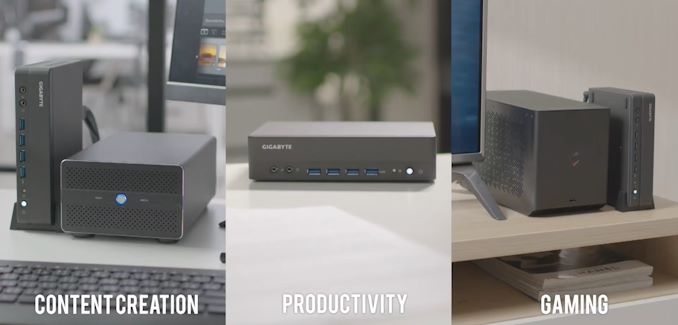
Intel’s Tiger Lake launch was focused on ultrabooks and notebooks, as various SKUs with TDP ranging from 7 to 28W were launched. The performance of Intel’s low-power parts (U- and Y-series) have been good enough to land them inside small and ultra-compact form-factor systems. These systems have become an big hit in the market (not least, Intel’s own NUC systems) since they gained prominence in the early 2010s. Vendors such as ASRock, ASUS, ECS, and GIGABYTE also jumped on this bandwagon to market ‘NUCs’ under their own branding. GIGABYTE was one of the early ones to do so with their BRIX series of mini-PCs. These SFF and UCFF systems find applications in multiple areas including content creation, productivity, and gaming, as well as embedded systems applications such as digital signage.


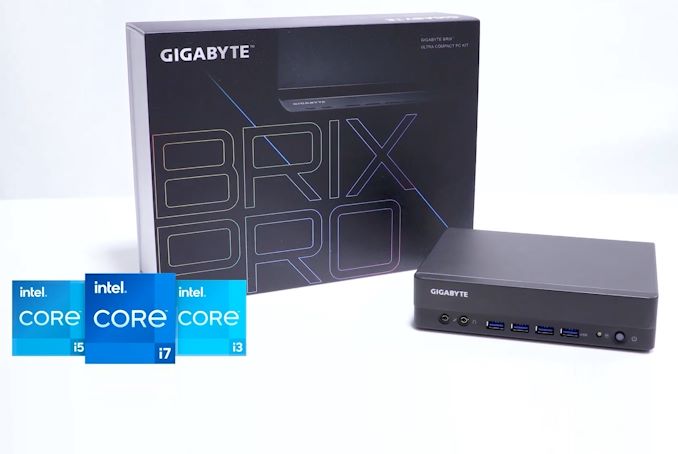
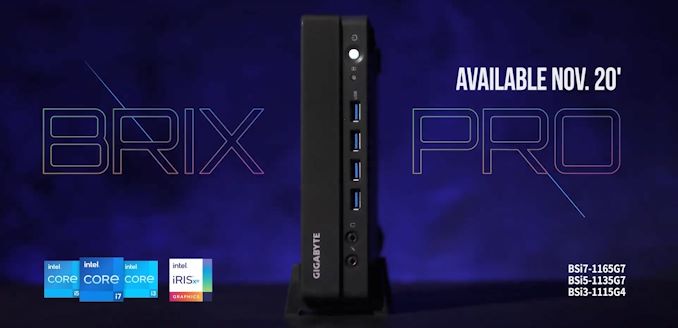
Intel’s Tiger Lake-based NUCs (Panther Canyon and Phantom Canyon) are an open secret in tech circles. ASRock Industrial’s Tiger Lake NUCs such as the NUC BOX-1165G7 have also been hinted at in Intel’s marketplace – a retail follow-up to the embedded market-focused iBOX 1100 and NUC 1100 solutions. GIGABYTE, however, became the first vendor to officially announce Tiger Lake-based mini-PCs targeting the retail market with the launch of the GIGABYTE BRIX PRO. Three models (BSi3-1115G4, BSi5-1135G7, and the BSi7-1165G7) are being introduced. Their specifications are summarized in the table below.


GIGABYTE BRIX PRO (Tiger Lake-U) Lineup
Model BSi3-1115G4 BSi5-1135G7 BSi7-1165G7
CPU Intel Core i3-1115G4

2C/4T

1.7 – 4.1 GHz (3.0 GHz)

12 – 28 W (28W)
Intel Core i5-1135G7

4C/8T

0.9 – 4.2 GHz (2.4 GHz)

12 – 28 W (28W)
AMD Ryzen 3 4300U

4C/4T

1.2 – 4.7 GHz (2.8 GHz)

12 – 28 W (28W)
GPU Intel® UHD Graphics for 11th Gen Intel® Processors (48EU) @ 1.25 GHz Intel® Iris® Xe Graphics (80EU) @ 1.3 GHz Intel® Iris® Xe Graphics (96EU) @ 1.3 GHz
DRAM Two DDR4 SO-DIMM slots

Up to 64 GB of DDR4-3200 in dual-channel mode
Motherboard 3.5″ SBC
Storage SSD 1x M.2-2280 (PCIe 4.0 x4 (CPU-direct))

1x M.2-2280 (PCIe 3.0 x4 or SATA)
DFF 1 ×  SATA III Port (for SATA DOM? No space for 2.5-inch drive?)
Wireless Intel Wi-Fi 6 AX201

2×2 802.11ax Wi-Fi + Bluetooth 5.1 module
Ethernet 1 × GbE port (Intel I219-V)

1 × 2.5 GbE port (Intel I225-V)
USB Front 4 × USB 3.2 Gen 2 Type-A
Rear 2 × USB 3.2 Gen 2 Type-A
Thunderbolt 1 x Thunderbolt 4 (Type-C Rear Panel)
Display Outputs 4 × HDMI 2.0a

1 × DisplayPort 1.4 (using Thunderbolt 4 Type-C)

(Only four simultaneous display outputs are supported)
Audio 1 × 3.5mm audio jack (Realtek ALC255)
PSU External (135W)
Warranty Typical, varies by country
Dimensions Length: 196.2 mm

Width: 140 mm

Height: 44.4 mm
MSRP ? ? ?

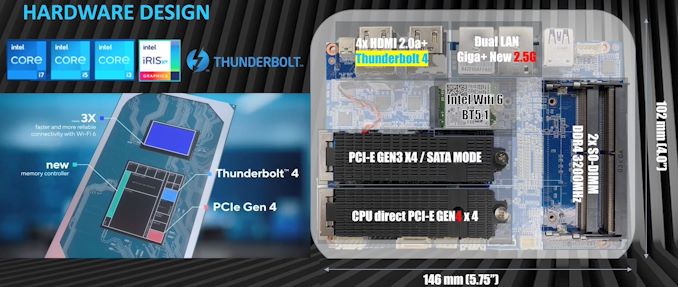
THe Tiger Lake-based BRIX PRO eschews the NUC form-factor (approx. 4″x4″ / 100mm x 100mm) for a 3.5″ single-board computer one that is popular in embedded markets. The motherboard’s actual dimensions are 5.75″ x 4″ (146mm x 102mm), and the system’s dimensions come in at 196.2mm x 44.4mm x 140mm. At 1.16L in volume, it is still a compact machine. The Tiger Lake-U processors in the BRIX PRO units are configured to run at their maximum cTDPup of 28W.


One of the unique aspects of the units is the availability of 4x HDMI 2.0 ports – each capable of driving a 4Kp60 display. In addition, a Thunderbolt 4 port (with a display output capability of 8Kp60) is also available. The system can drive four of those five display outputs simultaneously. Segments of the chassis are metallic, allowing for the Wi-Fi antenna to magnetically clasp to it.


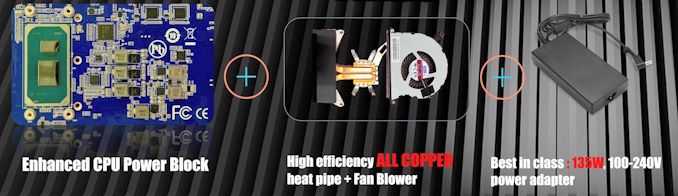
The Tiger Lake-U processor can be configured with different PL2 values depending on the power delivery circuitry. GIGABYTE believes that the robustness of its board design, coupled with the 135W external power adapter can sustain upwards of 70W for the PL2 setting.


Retail availability of the new BRIX PRO units is expected in November 2020. Pricing hasn’t been announced yet. GIGABYTE also hinted at the possibility of UCFF BRIX systems sporting Tiger Lake-U processors reaching the market soon.


Source: AnandTech – GIGABYTE Unveils BRIX PRO Mini-PCs with Tiger Lake-U

Arm Announces Cortex-A78AE, Mali-G78AE and Mali-C71AE Autonomous System IPs

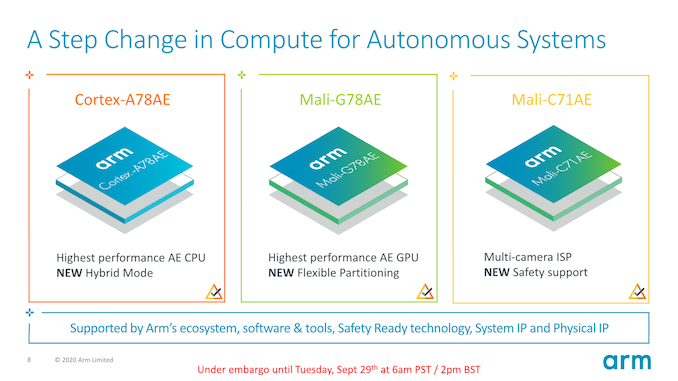
Functional safety is an area of computing that is becoming ever more important as we see more and more embedded technologies integrated into our daily lives. Arm’s Automotive Enhanced (AE) line of IP had been launched back in 2018 with the release of the Cortex-A76AE.


Fast-forward a few years, it’s time for a new set of AE IP, with Arm now introducing the new Cortex-A78AE, bringing a higher performance CPU core, and also for the first time introducing an AE class GPU and ISP in the form of the Mali-G78AE and Mali-C71AE. With the move, Arm also says that it is diversifying beyond just the automotive sector and widening the scope to industrial and other autonomous systems.


Source: AnandTech – Arm Announces Cortex-A78AE, Mali-G78AE and Mali-C71AE Autonomous System IPs

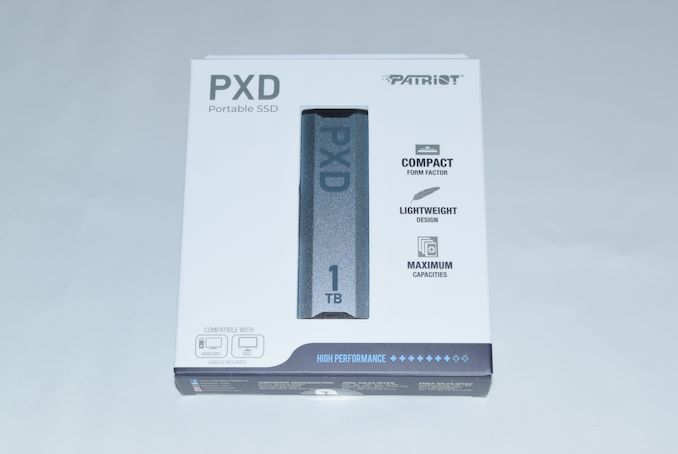
Patriot PXD 1TB M.2 PCIe Type-C External SSD Capsule Review

High-performance bus-powered direct-attached storage units have become very popular, thanks to the advent of high-speed interfaces and technologies such as USB 3.2 Gen 2, NVMe, and 3D NAND flash. Flash manufacturers such as Western Digital / SanDisk, Crucial (Micron), and Samsung produce and market external solid-state drives (SSDs) under their own brand. In addition, manufacturers such as Patriot Memory also buy flash in the open market and bring their own value additions to the external SSD market. Today, we are taking a look at Patriot’s PXD external SSD.


Source: AnandTech – Patriot PXD 1TB M.2 PCIe Type-C External SSD Capsule Review

MinisForum Unveils EliteMini H31G: 65W CPU & 75W GPU in a Compact Mini-PC

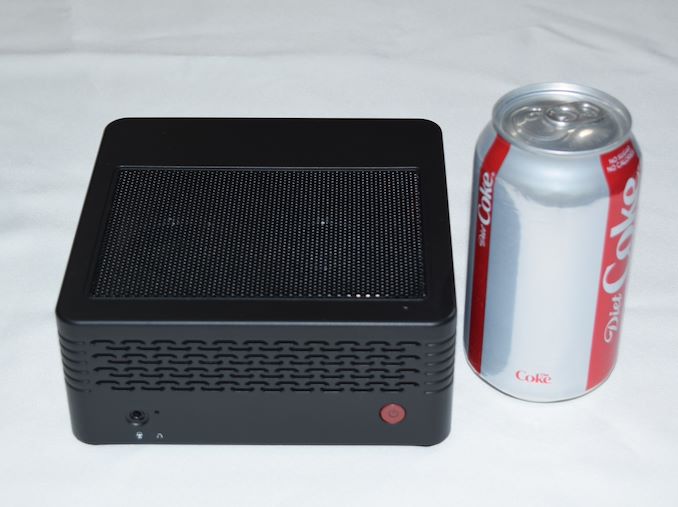
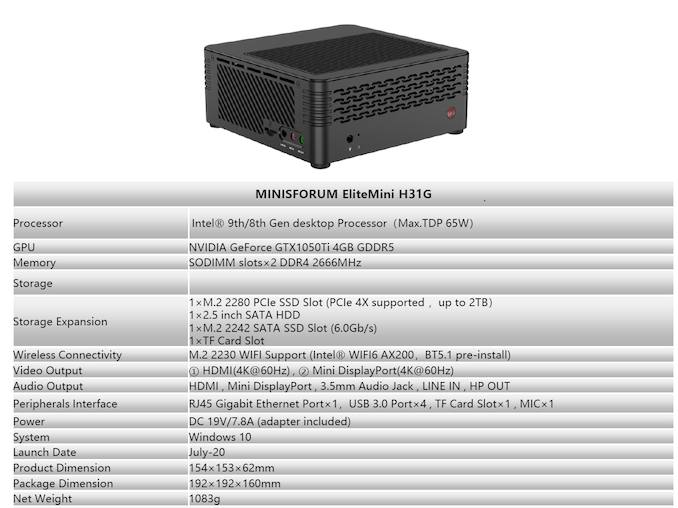
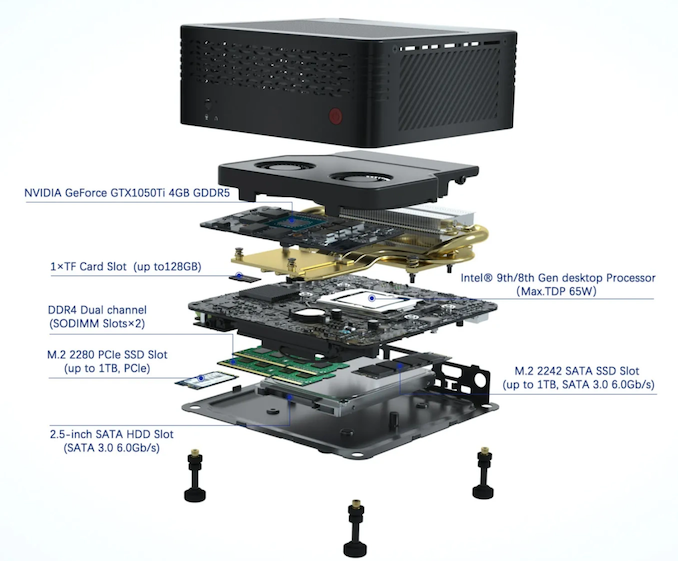
MinisForum has been making some interesting moves in the last few months with their computing platforms, ranging from the DMAF5 based on the Ryzen 3000H-series SoCs to the Ice Lake-based DeskMini X35G. In early August, they reached out to us to pitch their first mini-PC sporting a discrete GPU – the EliteMini H31G. Intrigued by their claims of being able to cram a 65W CPU and a 75W GPU in a chassis measuring approximately 15cm x 15cm x 6cm, we accepted their offer of a review unit to put through our standard mini-PC benchmarking process. The sample arrived last week, but we have a few thoughts to share.


The EliteMini H31G is a compact mini-PC smaller than other dGPU-equipped mini-PCs we have reviewed before like the ASRock DeskMini Z370 GTX 1060 and the Ghost Canyon NUC. A look at the unit reminded me of the GIGABYTE BRIX Gaming BXi5G-760 we had reviewed back in 2014. Our review sample came with a Core i5-9500F 65W CPU pre-installed, along with a GTX 1050 Ti MXM card with a TDP of 75W. As the naming of the kit indicates, the board uses a H310 PCH.


The system uses a unique integrated dual-fan cooling system – the first time we have seen this type of design in a mini-PC. The dual-fan configuration in the BRIX Gaming kit was just two fans crammed into one end of the case, while the cooling kit in the H31G appears to be much better thought out. Obviously, these are early days and I am not passing any judgement on the effectiveness without putting it through our thermal stress test. The BRIX Gaming kit was cooling a 47W CPU and a 100W GPU, while the H31G is handling a 65W CPU and a 75W GPU. There was a reason for GIGABYTE to redesign their Gaming BRIX units from scratch for the newer iterations – so I am really looking forward to seeing how the H31G handles thermal stress from both the CPU and GPU simultaneously. Readers interested in a full breakdown of the cooling system should view the official launch video of the EliteMini H31G.


Our review sample shipped with a single 8GB DDR4 SODIMM, and a 256GB Kingston M.2 2280 NVMe drive. The system’s performance is bound to be better with both SODIMM slots occupied, but we are proceeding with the review of the supplied configuration as-is (it happens to be one of the pre-built configurations available for purchase). The gallery below shows some of the internals of the system, and a size comparison against other mini-PCs with dGPUs.


Based on our experience with setting up the system and our first round of benchmarking, we found some minor annoyances and a few interesting aspects:


  • All the USB ports are in a corner of the system rear panel. Usually, mini-PC manufacturers spread out the USB ports – some in the front panel and some in the back.
  • The microSD (TF card) slot, and the line in / mic in / headphones out port on the side panel are enabled by a ‘daughterboard’ inside the system. The daughterboard also includes a M.2 2242 SATA slot. Given the support for a 2.5″ SATA drive, we would have gladly given up the M.2 2242 SATA slot for a couple of additional USB 3.0 ports in the daughterboard.
  • Another curious feature is the support for two sets of audio outputs – one in the front panel without the LINE IN (headphone jack), and another with the TF daughterboard. Having never seen two sets of built-in analog audio ports in any mini-PC before, I would like to hear from readers if there are any specific scenarios or use-cases that MinisForum might be targeting here.

The barebones version (without a CPU, but with the MXM GTX 1050 Ti module) is priced at $399. Our review configuration (Core i5-9500F, 8GB RAM, 256GB SSD) is priced at $629. The main challenge for MinisForum is that the system design, though unique, carries technology that is almost 3 years old at this point – a Kaby Lake or Coffee Lake desktop CPU, along with a Pascal GPU. Fortunately, the system is priced accordingly. The ASRock Deskmini Z370 GTX 1060 was launched at $800 – the MinisForum EliteMini H31G is being marketed for half of that. It would have been preferable for MinisForum to use a more modern CPU and GPU for this project. That said, having an effective working system based on older components might just give them the impetus to use the design with newer CPUs and GPUs.


Source: AnandTech – MinisForum Unveils EliteMini H31G: 65W CPU & 75W GPU in a Compact Mini-PC

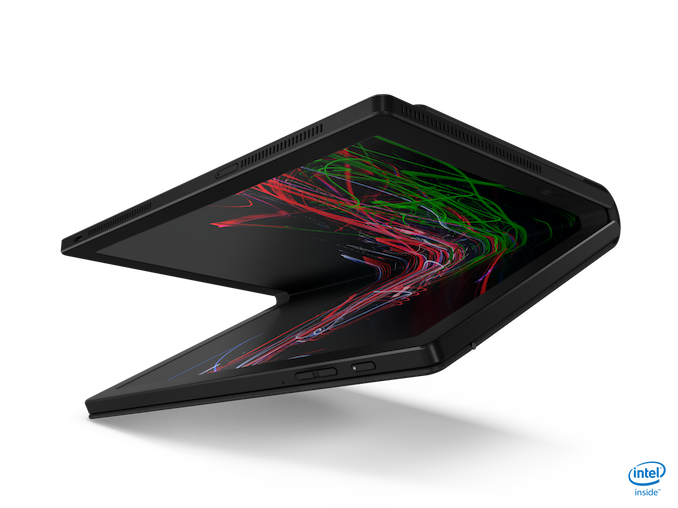
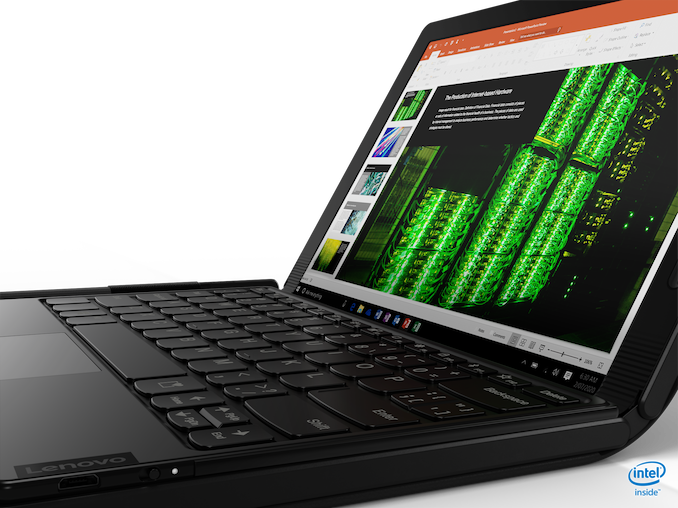
Lenovo Thinkpad X1 Fold Available For Preorder: Hold Onto Your Wallet

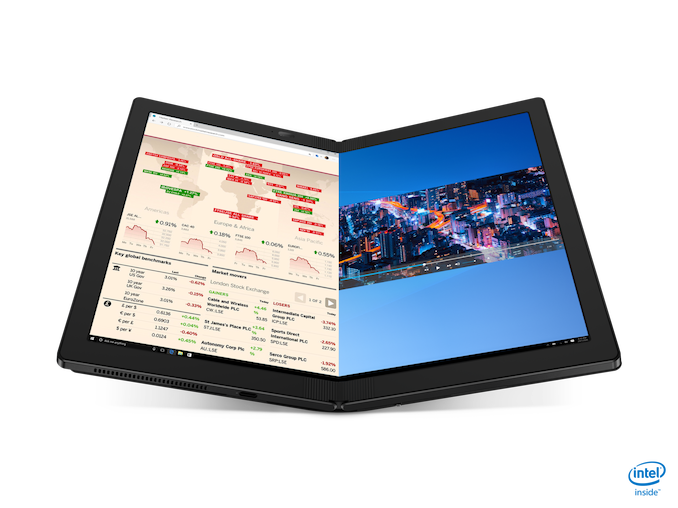
Announced back at CES, Lenovo’s ThinkPad X1 Fold is now available for preorder. Combining a foldable 13.3-inch OLED display with Intel’s Lakefield Hybrid CPU, this Always Connected PC ushers in a new form factor for the PC, mirroring some of the development on the smartphone side of the fence.


Lenovo ThinkPad X1 Fold
Component X1 Fold
CPU Intel Core Processor with Intel Hybrid Technology
Memory 8 GB LPDDR4X-4267
Display 13.3-inch Flexible OLED

4:3 aspect ratio

2048×1536

95% P3 Gamut

300-nit
Storage Up to 1 TB NVIe M.2 2242
Wireless Intel AX201 Wi-Fi 6

5G sub 6GHz with 4G LTE CAT20 coverage

Bluetooth 5.1
I/O 1 x USB Type-C Gen 1

1 x USB Type-C Gen 2

1 x SIM
Webcam 5MP HD RGB + IR Camera
Battery 50 Wh

65-Watt Type-C Adapter
Dimensions 299.4 x 236.0 x 11.5 mm open

158.2 x 236.0 x 27.8 mm folded
Weight 999 grams / 2.2 lbs
Starting Price (USD) $2,499
Availability Preorder Now

The 13.3-inch flexible OLED display features a 2048 x 1536 resolution, 300 nit brightness, and can display 95% of the P3 color gamut. You can use it as a 13.3-inch tablet with it open, or use each 9.6-inch half of the display separately.


The ACPC features 5G connectivity, as well as Wi-Fi 6, and offers two USB Type-C ports, one at Gen 1 speeds and the other at Gen 2. The foldable PC offers USB-C docking, and of course supports an active pen.


The final dimensions are 299.4 x 236 x 11.5 mm open, and 158.2 x 236 x 27.8 mm when closed.


If you want to be one of the first to own a foldable PC, it is perhaps unsurprising that the X1 Fold is going to cost. A lot. The new X1 Fold starts at $2499 USD with preorders starting today at Lenovo.com.


Source: Lenovo


Source: AnandTech – Lenovo Thinkpad X1 Fold Available For Preorder: Hold Onto Your Wallet

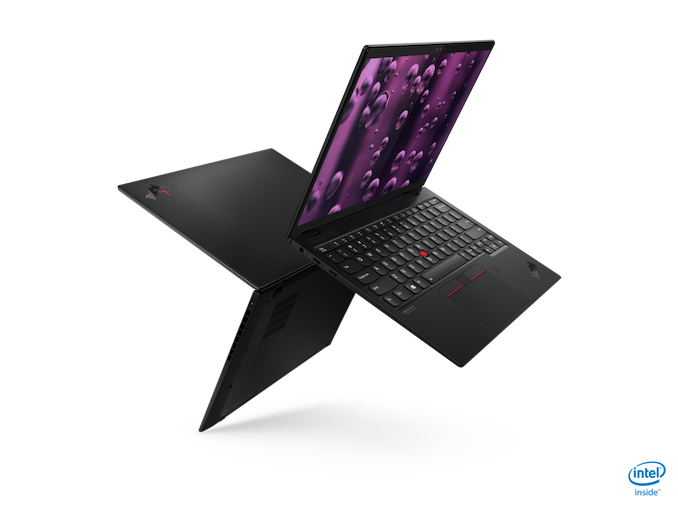
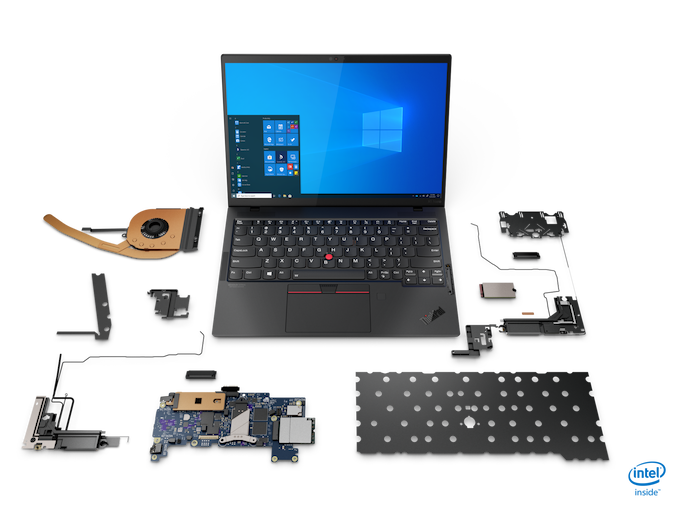
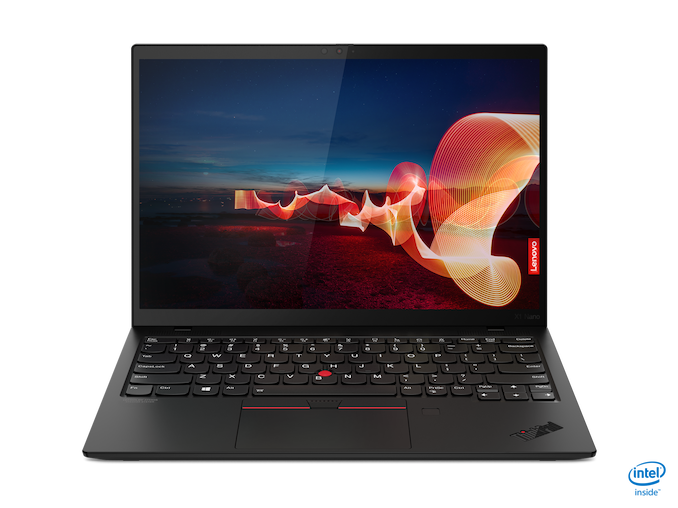
Lenovo Announces The ThinkPad X1 Nano: Intel Evo And 2K Display

The fall rush of laptop announcements is upon us, thanks to Intel announcing their latest 11th generation Core processor, codenamed Tiger Lake, and packaged as part of the Intel Evo program. Today Lenovo is announcing the new ThinkPad X1 Nano, featuring Intel’s Evo platform, as well as a few tweaks to the traditional ThinkPad design.


Lenovo ThinkPad X1 Nano
Component X1 Nano
CPU Up to 11th Gen Intel Core i7
Memory Up to 16 GB LPDDR4x
Display 13-inch 2160×1350 Dolby Vision

100% sRGB 450-nit

With or without Touch
Storage Up to 1 TB PCIe NVMe
Wireless Intel AX201 Wi-Fi 6

LTE 5G CAT20

LTE 4G CAT9

Bluetooth 5.0
I/O Thunderbolt 4 x 2

Headset 3.5mm
Webcam IR with Human Presence
Battery 48 Wh

Up to 65-Watt Type-C Adapter
Dimensions 292.8 x 207.7 x 13.87 mm

11.5 x 8.15 x 0.55 inches
Weight Starting at 962 grams / 2.12 lbs
Starting Price (USD) $1,399
Availability Q4 2020

Powering the new ThinkPad X1 Nano will be Intel’s newest 10 nm design, Tiger Lake, with up to a Core i7 processor. That also means it will feature the full 96 Execution Unit Intel Iris Xe graphics, and up to 16 GB of LPDDR4x memory. The X1 Nano will offer up to 1 TB of PCIe storage, and the 48 Wh battery is rated up to 17.3 hours.


Lenovo has finally made the jump back to 16:10 displays, with the X1 Nano featuring a 13-inch panel with a somewhat odd, but effective, 2160×1350 display. This “2K” display is a nice step up over a more traditional 1920×1200, coming in at 195 pixels-per-inch. It may seem like a small jump over the 170 pixels-per-inch of the 1920×1200, but will allow 200% scaling to work perfectly. It also won’t impact the battery life as dramatically as a “4K” panel would, so it seems like a nice balance. As seems to be the norm with Lenovo displays of late, this 100% sRGB panel features Dolby Vision, and can be had with or without touch.


The new laptop is also light. The ThinkPad X1 Nano weighs in at just 2.12 lbs. The device measures in at 11.5 x 8.15 x 0.55 inches, so it is not the thinnest, nor the lightest, but it is close.


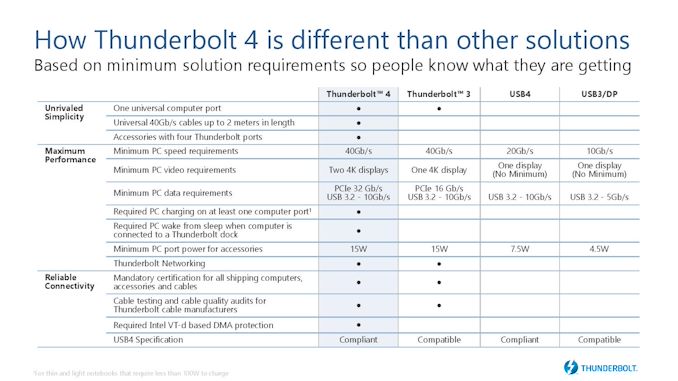
There is plenty of connectivity as well, with Lenovo outfitting the X1 Nano with two Thunderbolt 4 ports. Not only does Thunderbolt 4 offer more performance, security, and features compared to Thunderbolt 3, it also provides full access to data, power, and video guaranteed in every port, unlike USB which has a long list of optional features.


Lenovo is implementing Intel’s Wi-Fi 6 solution, which is of course part of the Intel Evo platform, but they are enhancing that with LTE 5G CAT20 for those that need network on the go.


As a proper ThinkPad, the X1 Nano also takes security seriously, with a dTPM 2.0 chip, IR camera and Match on Chip fingerprint reader for Windows Hello logins, and a ThinkShutter camera cover.


The new X1 Nano will be available in Q4 2020, starting at $1399.


Source: Lenovo


Source: AnandTech – Lenovo Announces The ThinkPad X1 Nano: Intel Evo And 2K Display

Yet Another Gaming Accessory with RGB: Uninterruptible Power Supply!

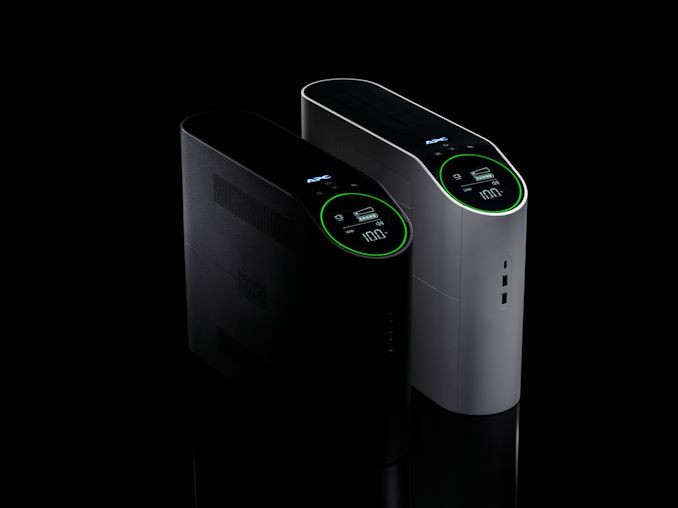
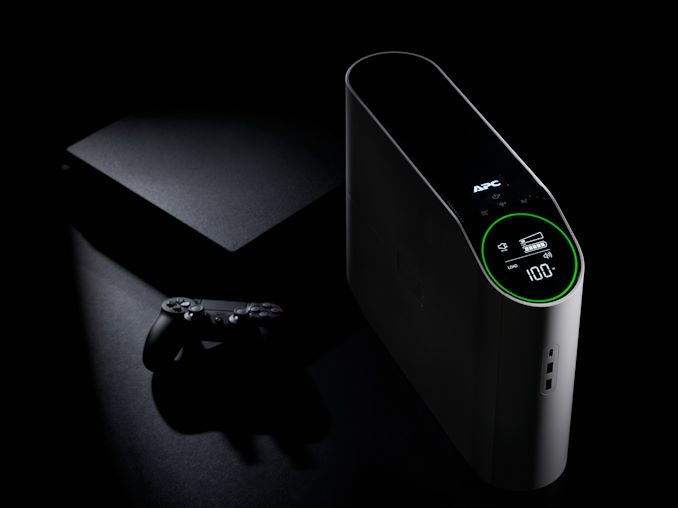
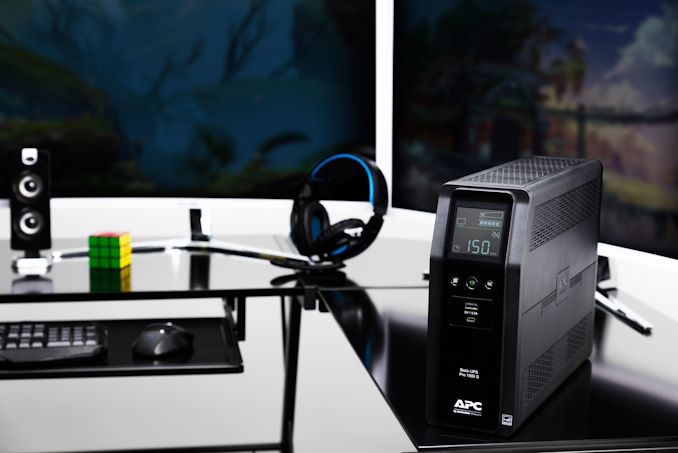
Just when you thought there was a gaming version of everything, with shiny flashing LEDs – we’ve seen storage SSDs, M.2 drives, fans, speakers, chairs, keyboards, headsets, mice, even backpacks, there’s still one that you are missing. Enter the Schneider Electric APC Back-UPS Pro Gaming UPS.


A UPS, or Uninterruptable Power Supply, enables whatever is plugged into it to keep functioning during a power outage, as well as help smooth out power delivery in areas that might suffer from fluctuating brown-outs. At the heart of any UPS is a big battery, capable of sustaining a power load for a specified amount of time. Normal UPS devices for PCs deal with basic office machines, however it is the workstation and gaming market that need to survive on systems pulling 500W to 1000W continuously, and as a result the batteries have to be bigger, but also have to supply enough juice.


Normally the goal of the UPS, when it takes over from a power outage, is to give the user enough time to save their work and close down the system. For gaming, this means finishing the match. This Pro Gaming UPS also provides additional connections for routers and hotspots, keeping the external internet connection going (assuming the gaming machine and the router are in the same location).


So what makes a UPS a gaming-related UPS? LEDs, preferably RGB LEDs. This unit has 12 of them, all seemingly in that ring around a mini display. The chassis itself comes in either an Arctic or Midnight color, and the unit’s display shows how much of the battery is charged and the expected lifetime when running on battery only mode.


The unit has six battery back-up outlets for devices to keep powered during a power outage, and supports a true sine wave output. A further four outlets are provided as surge protected outlets, similar to a standard 4-way socket extension. Two USB Type-A and a Type-C port are on the front in order to charge smartphones and tablets.


This is the BR1500MS version


The press release provided unfortunately doesn’t go into any detail about the capacity of the UPS. Typically with a UPS one would expect some technical details regarding time and peak power – running a 50W HTPC will clearly last longer than a 1600W gaming machine. Based on the design, it looks like a repackaged BR1500MS, a unit with a total of 10 outlets capable of a peak 900W or 1500VA. The BR1500MS runtime graph shows that:


  • At 100W, 77.7 minutes of power
  • At 500W, 12.0 minutes of power
  • At 900W, 4.1 minutes of power

The unit takes 16 hours to charge. The BR1500MS retails for $220. The Gaming UPS has an extra USB port, and we wonder how much the RGBs might cost too.


As we don’t know any details about this specific gaming UPS (BGM1500 for Arctic, BGM1500B for Midnight), it would be hard to draw conclusions. The device is set for launch in October, but also there is no indication of which markets it will launch in. If we find out more we will update this news piece.


It’s worth noting that a UPS doesn’t save you from a BSOD. But the PR agency involved are probing to see who wants review samples. It would be an interesting unit to test. The question would be how to test.


Related Reading


Source: AnandTech – Yet Another Gaming Accessory with RGB: Uninterruptible Power Supply!

Dell Catches A Tiger Lake For The XPS 13 And XPS 13 2-in-1

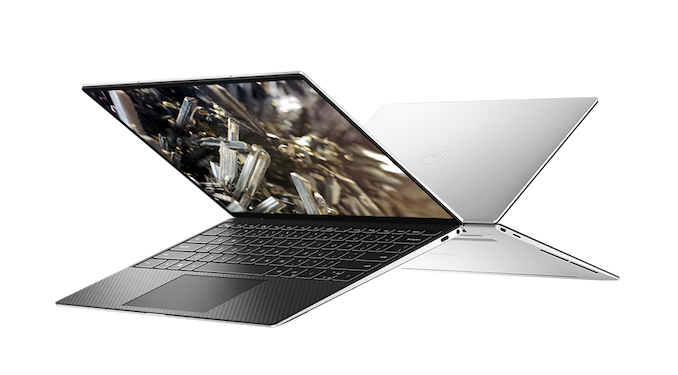
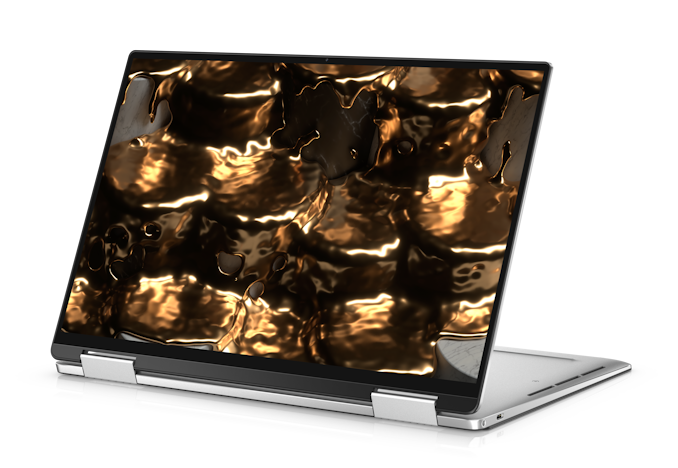
With Intel’s launch of their latest 11th generation Core products, code-named Tiger Lake, it is time for the fall refresh from Intel’s customers, and one of the first out of the gate is Dell who is refreshing the XPS 13 and XPS 13 2-in-1 to utilize the newest processor. Last year, the XPS 13 7390 2-in-1 was one of the first on the market with Intel’s first properly launched 10 nm laptop parts, with the XPS 13 9300 showing up a bit later on. For Tiger Lake, both models are getting refreshed with availability on September 30th for both of the new models, which are now both branded the same 9310 series from Dell.


XPS 13 9310


The big changes for the XPS lineup happened with the previous generation, with Dell moving to a 16:10 display, and including the latest iteration of their Infinity Edge display. Both the clamshell XPS 13 and convertible XPS 13 2-in-1 with the new refreshed design move Dell at or near the top of the pack for the 13-inch range, and if you have not checked out the reviews for the clamshell XPS 13 and 2-in-1 yet, please do, as the majority of the design is moving forward to this new model year with the exception of some processor updates.


Dell XPS 9310 Lineup
  XPS 13 XPS 13 2-in-1
CPU Intel Core i3-1115G4

2C / 4T 1.7 GHz – 4.1 GHz

Intel UHD Graphics 48 EUs 1250 MHz

Intel Core i5-1135G7

4C / 8T 900 MHz – 4.2 GHz

Intel Iris Xe 80 EUs 1300 MHz

Intel Core i7-1165G7

4C / 8T 1.2 GHz – 4.7 GHz

Intel Iris Xe 96 EUs 1300 MHz

Intel Core i7-1185G7

4C / 8T 1.2 GHz – 4.8 GHz

Intel Iris Xe 96 EUs 1350 MHz

Intel Core i3-1115G4

2C / 4T 1.7 GHz – 4.1 GHz

Intel UHD Graphics 48 EUs 1250 MHz

Intel Core i5-1135G7

4C / 8T 900 MHz – 4.2 GHz

Intel Iris Xe 80 EUs 1300 MHz

Intel Core i7-1165G7

4C / 8T 1.2 GHz – 4.7 GHz

Intel Iris Xe 96 EUs 1300 MHz

Memory 8 / 16 / 32 GB LPDDR4x-4267

i3 limits memory to 3733
Display 13.4-inch Display
Base:

1920×1200 InfinityEdge

100% sRGB

With or without Touch
Optional:

3840×2400 Infinity Edge HDR 400

90% P3

Touch
13.4-inch Display
Base:

1920×1200 InfinityEdge

100% sRGB

Touch
Optional:

3840×2400 Infinity Edge HDR 400

90% P3

Touch
Storage 256 GB to 2 TB PCIe 3 x4 NVMe 256 to 1 TB PCIe 3 x4 NVMe
Wireless Killer AX1650 Wi-Fi 6

2×2:2

Bluetooth 5.1
I/O Thunderbolt 4 x 2

Micro SD

Headset 3.5mm
Webcam 720p with IR 720p
Battery 52 Wh

45-Watt Type-C Adapter
51 Wh

45-Watt Type-C Adapter
Dimensions 296 x 199 x 14.8 mm

11.64 x 7.82 x 0.58 inches
297 x 207 x 14.35mm

11.69 x 5.15 x 0.56 inches
Weight 1.2 kg / 2.64 lbs Non-Touch

1.27 kg / 2.8 lbs Touch
1.32 kg / 2.9 lbs
Starting Price (USD) $999 $1,249
Availability September 30, 2020

For the Tiger Lake refresh, Dell is offering the Core i3-1115G4 as the base, the Core i5-1135G7 as the mid-tier, and the Core i7-1165G7 as the top model on the 2-in-1, and the XPS 13 clamshell keeps the same lineup, but adds the Core i7-1185G7 at the high-end. Along with the new processor options comes the introduction of faster memory as well, with 8-32 GB of LPDDR4x-4267, up from LPDDR4x-3733 last gen.


With Tiger Lake also comes Thunderbolt 4, and Dell offers this on both models, still utilizing the USB Type-C connector, but offering additional features and performance. Thunderbolt 4 is the only true one-stop-shop for connectivity, with every Thunderbolt 4 port supporting the entire array of connectivity, video, and power requirements, whereas USB 4 over Type-C is a bit of a mess, as any one port could support an array of options. Thunderbolt 3 had fairly wide support, so hopefully Thunderbolt 4 continues building on those design wins.


For those looking for native Linux support, Dell is continuing with its XPS 13 Developer Edition and comes with Ubuntu 20.04 LTS pre-installed. New for this year though is that any XPS 13 owner can download the Ubuntu install which Dell uses, and run it side-by-side with Windows, or as a clean-install.


Also new to the XPS 13 clamshell model this year is that Dell has managed to squeeze an IR camera in the top bezel, and the laptop will therefore support Windows Hello facial recognition login, in addition to the fingerprint-based biometrics it previously supported.


XPS 13 2-in-1 9310


With the XPS 13 and 2-in-1 being two of the best notebooks around, if you are after a Tiger Lake launch devices, these would be a great place to start looking. The XPS 13 will be available September 30 starting at $999 USD, and the 2-in-1 will be available on the same day, starting at $1249 USD.


Source: Dell


Source: AnandTech – Dell Catches A Tiger Lake For The XPS 13 And XPS 13 2-in-1

ASRock Industrial 4X4 BOX-V1000M Ryzen Mini-PC Review: Finding Zen In The Small Things

The miniaturization trend triggered by the ultra-compact form factor NUCs from Intel has emerged as a key driver in the growth of the PC market. Processor power efficiency is of paramount importance in this space, and AMD had been caught napping when the NUCs began to take flight. The introduction of the Zen microarchitecture in the Ryzen processors has scripted a remarkable turnaround for AMD. With leading core counts, the Ryzen processors have taken the HEDT market by storm. UCFF PC manufacturers, however, opted to play the wait and watch game, and it took a while before the embedded SoC versions of the first-generation Ryzens started appearing in the PC market. Last year, ASRock Industrial introduced one of the first Ryzen UCFF systems in the form of the 4X4 BOX-V1000M. Read on to find out how the unit fares against the entrenched incumbents.


Source: AnandTech – ASRock Industrial 4X4 BOX-V1000M Ryzen Mini-PC Review: Finding Zen In The Small Things

What Products Use Intel 10nm? SuperFin and 10++ Demystified

For our audience that regularly keeps track of Intel’s product portfolio, it would be hard to miss that the naming strategy of Intel’s process node technologies is a bit of a mess. To some, those words are themselves an understatement, as Intel has shifted its naming strategy 2-3 times since the launch of Intel’s first 10nm products. Not only that, even Intel’s various departments internally have a hard time keeping track of ‘what is this manufacturing process being called today’ when the press like AnandTech ask for details on the latest upcoming products.

Knowing this, and knowing what issues Intel has been having, I wanted to demystify Intel’s manufacturing process naming scheme such that users and engineers alike, even if they are inside Intel, can understand what is what but also importantly why. The why is the crucial factor.


Source: AnandTech – What Products Use Intel 10nm? SuperFin and 10++ Demystified

Seagate Unveils CORTX Object Storage Software with Lyve Drive Rack Hardware Reference Design

Seagate has unveiled CORTX, an open-source S3-compatible object storage software, today at their Datasphere virtual event. The source for this software-defined-storage (SDS) platform is hosted on Github. Seagate has also organized a group of open source researchers and developers in this space under the ‘CORTX Community’ moniker. As part of the Github repository, Seagate is providing a pre-built virtual machine image that enables users to get a quick start with testing.


Seagate is a hardware vendor at its core, and as part of the CORTX initiative, it is also introducing the Lyve Drive Rack – a reference architecture supported by Seagate and available later this year with 20TB HAMR drives.


The Lyve Drive Rack is expected to serve a variety of use-cases including backup/restore, big data and analytics, AI & ML, file sharing and synchronization, as well as video surveillance. Each rack node can support up to 106 drives, and a cluster can scale up as necessary.


It makes sense for Seagate to open source CORTX, as it helps them push support for emerging hardware upstream to drive up adoption rates. It is better for the community as a whole, as there is no vendor lock-in with proprietary architectures. It essentially eliminates object softwre licensing costs from the datacenter stack. Private cloud infrastructure also receives a fillip, with the capabilities and capacities available with the hyperscalers becoming more accessible.


Source: AnandTech – Seagate Unveils CORTX Object Storage Software with Lyve Drive Rack Hardware Reference Design

NUVIA Completes Series B Funding Round: $240M

One of the more interesting startups of late is NUVIA, with promises of a new Arm-based processor for the datacenter to rival the x86 dominance of AMD and Intel. The team at NUVIA is strong, comprised of top SoC architects from Apple and Google, with a long history of success within the ranks of the company. Building a leading-edge SoC takes a long time, and so we’re still not expecting NUVIA to offer a product for a while yet, but in that time the company is going through rounds of investment in order to both build the company as well as accelerate R&D before the first set of products are launched. Today NUVIA is announcing that the second round of funding, originally scheduled at for the beginning of the year, has been completed.


Series A funding was announced on November 15th, 2019, and raised $53M. Lead investors include WRVI Capital, the Mayfield Fund, Dell, Capricorn Investment Group, and participation from Nepenthe LLC, two the final two acting as investor partners. NUVIA currently resides on a floor in one of Dell’s unused corporate buildings in the Bay Area, for example.


Series B funding is being announced today, and has raised $240M. The funding round was led by Mithril Capital in partnership with former founders of Marvell, as well as Blackrock, Fidelity Management & Research LLC, and Temasek, with additional participation from Atlantic Bridge, Redline Capital and the previous members from Series A.


This brings the total raised to $293M. No further information was detailed in NUVIA’s press release.


Key figures at NUVIA include the three founders: Gerard Williams III, CEO and ex-Chief CPU Architect at Apple for a decade with another 10 years as an Arm fellow; Manu Gulati, SVP of Silicon Engineering and former lead SoC architect at Google with an 8-year stint at Apple; and John Bruno, SVP of System Engineering and ex-System Architect at Google as well as the founder of Apple’s silicon competitive analysis team. NUVIA has also hired key people known to AnandTech, such as Anthony Scarpino (Senior Director Software, former AMD/ATI), Jon Carvill (VP Marketing, former Intel and Qualcomm), Jon Masters (VP Software, former Red Hat), and Heather Lennon (Digital Marketing, former AMD and Intel). Jon Masters has since returned to Red Hat after 11 months at NUVIA.


We do know some about NUVIA’s first generation of products, known as the Orion SoC using the Phoenix core with ‘an overhaul of the traditional CPU pipeline’. NUVIA has stated that this new design will deliver industry-leading performance with the highest levels of efficiency, with their own numbers targeting +40-50% IPC increases over Zen2 for only a third of the power. On top of this, NUVIA will have to create an ecosystem and distribution platform for its products, which is likely where the Dell involvement will kick in.


With the recent announcement of the acquisition of Arm by NVIDIA, it would be interesting to hear how this might change the relationship between Arm and its partners, particularly architecture licensees, such as NUVIA. There’s no doubt that the future of that relationship is going to be a strong part of how future roadmaps are formed, or in NUVIA’s case, future rounds of funding.


Related Reading


Source: AnandTech – NUVIA Completes Series B Funding Round: 0M