CES 2020: LG’s New 8K TVs Use α9 Gen 3 SoC with AV1 Decoding & AI Support

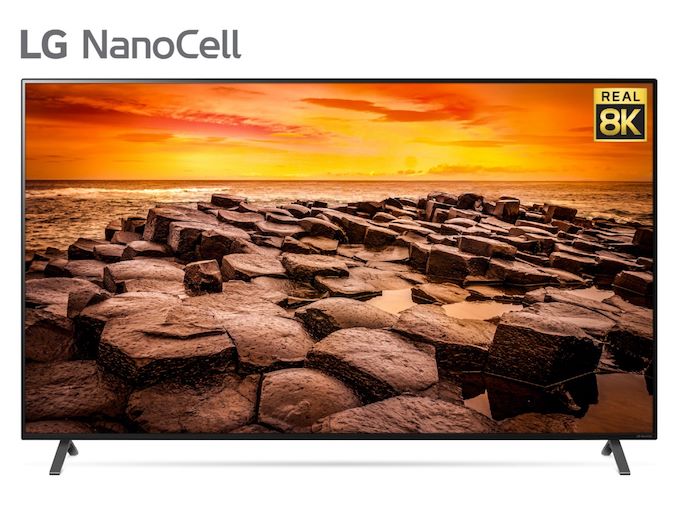
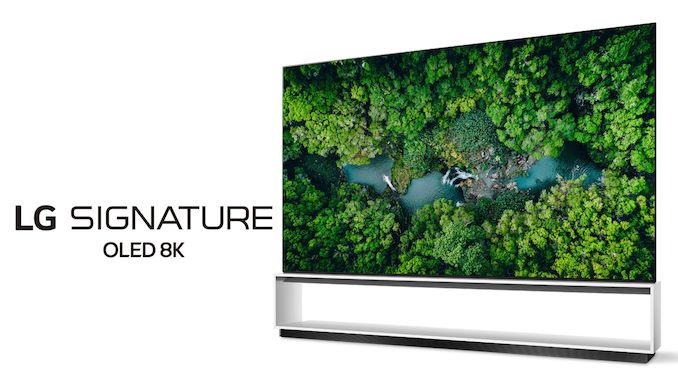
Modern smart televisions do much more than just display broadcasted programs, so these days TV makers need to equip them with powerful applications processors to decode HD and Ultra-HD content, as well as handle other complex tasks. To that end, LG has revealed that it plans to use its new α9 Gen 3 SoC for its latest Signature OLED and NanoCell 8K televisions set to be available this year.


LG’s latest α9 Gen 3 processor supports playback of 8Kp60 content encoded using HEVC, VP9, and particularly important going forward, the recently released AV1 codec. But since 8K videos are not common just yet, the SoC supports LG’s AI 8K Upscaling algorithm that relies on its machine learning capabilities to analyze videos it upscales and properly apply Quad Step Noise Reduction and frequency-based Sharpness Enhancer.


In addition to intelligent upscaling, LG’s new 8K TVs also support AI Picture Pro technology to correctly enhance sharpening and skin tones as well as Auto Genre Selection to apply general picture settings common for a particular type of content. Also, the televisions monitor background noises and adjust their 5.1 audio subsystems accordingly.


High-end televisions from LG are based on the webOS operating system and therefore the company can add support for new features just by installing appropriate applications. The 2020 Signature OLED and NanoCell 8K TV’s support LG’s Home Dashboard to control IoT using Hands-Free Voice Control (enabled by ThinQ voice recognition). Also the webOS supports a host of third-party voice-based services, including Apple’s AirPlay 2 and HomeKit, Amazon’s Alexa, and Google’s Assistant. In addition, it can access a variety of content streaming services, such as Apple TV/Apple TV+, Disney+, and Netflix.


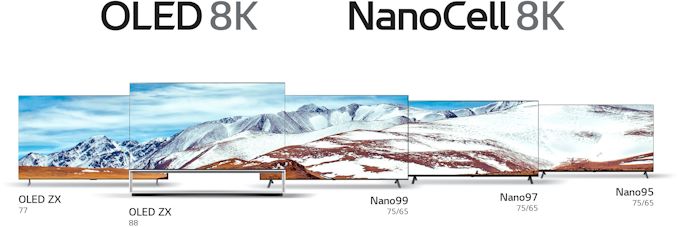
LG’s 2020 8K television lineup includes 88 and 77-inch class Signature OLED TVs (models 88/77 OLED ZX) and NanoCell IPS TVs (models 75/65 Nano99, 75/65 Nano97, 75/65 Nano95). The OLED models will variable refresh rate support (including NVIDIA G-Sync Compatible certification) right out-of-box. The Ultra-HD TVs will be available in the coming months.


Related Reading:


Source: LG


Source: AnandTech – CES 2020: LG’s New 8K TVs Use α9 Gen 3 SoC with AV1 Decoding & AI Support

Phison At CES 2020: Preparing For QLC To Go Mainstream

NAND flash memory prices are projected to climb in 2020. The manufacturing transitions to 96-layer 3D NAND and beyond are not going to increase bit output as quickly as demand will be growing. This will be a major change from the NAND oversupply that caused price crashes in 2018 and into 2019.


SSD controller vendor Phison is betting that increasing prices will finally push the consumer SSD market to embrace 4 bit per cell QLC NAND flash memory, which thus far has seen only limited success in the retail SSD market and virtually no adoption from PC OEMs. The price premium for SSDs with 3 bit per cell TLC NAND has been small or non-existent across all market segments, so the performance and endurance advantages of sticking with TLC NAND have been worthwhile. Those days may be coming to an end. Phison expects—quite reasonably—that when NAND flash memory supplies are constrained the bulk of the TLC NAND manufactured will be snatched up by the higher-paying enterprise SSD customers, more or less forcing the consumer SSD market to start shifting toward using QLC as the mainstream option.


In preparation for this shift, Phison is making sure that their full controller lineup is ready to work with QLC NAND. That means tuning the controller firmware to make the best of the lower performance of TLC NAND. For the OEM market in particular, they also have to update any of the older controllers whose error-correction capabilities aren’t up to the task of supporting a 5-year warranty with the lower endurance of QLC.


Phison’s hardware roadmap hasn’t changed significantly from what we reported on after Flash Memory Summit. What is changing is how these controllers are being marketed. Phison has taken the unusual step of publishing performance specifications for most of their SSD controllers when paired with QLC NAND, rather than sticking with the TLC-based numbers that cast their controllers in a better light. Unfortunately, we’re still getting numbers that are mostly based on testing at high queue depths and with durations short enough that the SLC cache is primarily what’s being measured.


When paired with QLC NAND, Phison’s high-end NVMe controllers will now be using a full-range dynamic SLC cache size, similar to what we’ve seen with recent Silicon Motion controllers but quite different from how existing TLC-based Phison NVMe drives have behaved with small fixed-size SLC caches. Maximizing the SLC cache size reduces the odds of ever running out of cache during ordinary consumer use, but at the cost of a more drastic performance penalty when the cache does fill up: there’s more SLC data that needs to be compacted into TLC/QLC, and less free TLC/QLC to work with when doing that compaction in the background while continuing to handle host IO commands. This tradeoff makes the most sense when using QLC NAND, because no matter how big or small the SLC cache is, things will be painfully slow should it ever run out.


Phison NVMe SSD Controller

QLC NAND Projected Performance
  E12 E16
Host Interface PCIe 3.0 x4 PCIe 4.0 x4
NAND Channels, Interface Speed 8 ch,

667 MT/s
8 ch,

800 MT/s
Capacity 1 TB 2 TB 4 TB 8 TB 1 TB 2 TB 4 TB
SLC Cache Size Dynamic Dynamic
Sequential Read 3.4 GB/s 4.7 GB/s 4.9 GB/s
Sequential Write 2.0 GB/s 3.0 GB/s 1.9 GB/s 3.8 GB/s
4KB Random Read IOPS 130k 255k 490k 170k 330k
4KB Random Write IOPS 500k 680k 480k 800k

The performance of Phison’s current high-end NVMe controllers with QLC NAND will be quite a bit slower than the best achievable performance with TLC NAND. The reduction in random read performance will probably have the greatest impact. This is also where we see a requirement for much higher drive capacities in order to attain the best performance. Over the past two years, 1TB TLC-based SSDs have become quite affordable and are almost always large enough to offer the maximum performance a SSD controller can handle. If those price points have to switch over to QLC NAND this year, we’ll see 1TB drives at a significant disadvantage compared to 2TB and 4TB models. Since NAND price increases will make it harder for consumers to jump up to higher capacities, we may see a real performance regression for the average mainstream consumer SSD, without any monetary savings as a consolation prize.


Phison SATA SSD Controller

QLC NAND Projected Performance
  S13T S12
DRAM No Yes
Capacity 480 GB 960 GB 1920 GB 1 TB, 2 TB, 4 TB, 8 TB, 12 TB, 16 TB
SLC Cache Size 9 GB 18 GB 36 GB Dynamic
Sequential Read 550 MB/s 550 MB/s
Sequential Write 430 MB/s 490 MB/s 500 MB/s 530 MB/s
4KB Random Read IOPS 35k 65k 90k 95k
4KB Random Write IOPS 75k 85k 90k 90k

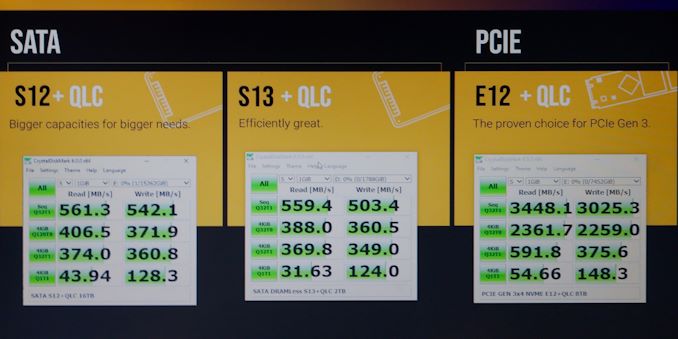
Over on the SATA side, things don’t look so bad. With the current S12 mainstream SATA controller and the full-range dynamic SLC caching strategy, even 1TB of QLC is still sufficient to hit the highest top-line performance numbers possible behind a 6Gbps bottleneck. Phison is listing those same peak performance numbers for capacities from 1TB all the way up to 16TB, including the non-power of two intermediate capacity of 12TB. In the past, those higher capacities have been supported only for the sake of enterprise SSDs, but Phison says they have at least one partner planning to bring out a 16TB drive for the consumer/prosumer retail market.


Phison’s latest DRAMless SATA controller (S13T) will still be using fixed-size SLC caches when paired with QLC NAND, and low-cost drives that have to offer lower capacities will be stuck with subpar performance—again with random reads suffering the most.


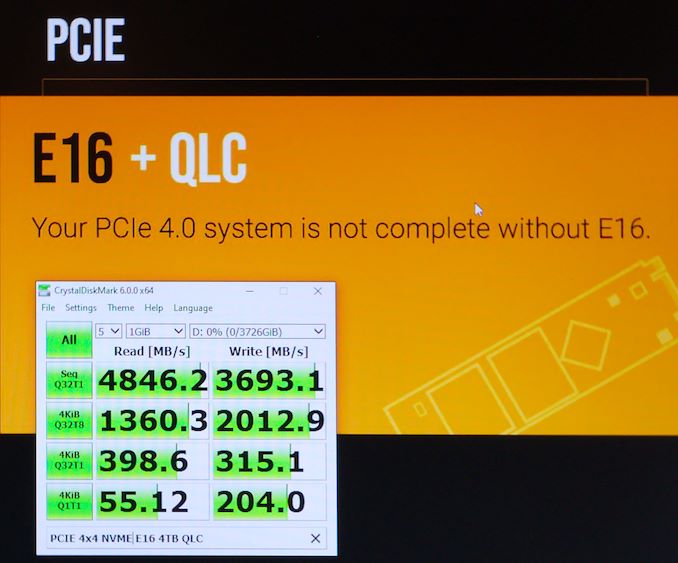
Phison did not provide QLC-based performance projections for their current E13T DRAMless NVMe controller or its upcoming replacement E19T that brings PCIe 4.0 support and other performance increases. They also didn’t provide QLC performance for the E18 (their 12nm second-generation high-end PCIe 4.0 controller), but that controller is due much later in the year and it should still be used mostly with TLC for enthusiast-class drives, unless the NAND price situation gets really bad.


As usual for performance projections from SSD controller vendors, the numbers are subject to change between now and retail availability of drives. The choice of which particular QLC NAND is used in a given product will affect performance, and there’s still time for further firmware optimizations.


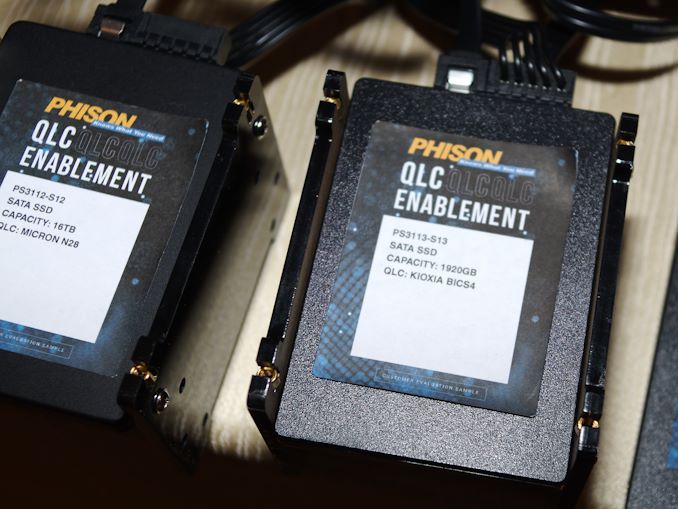
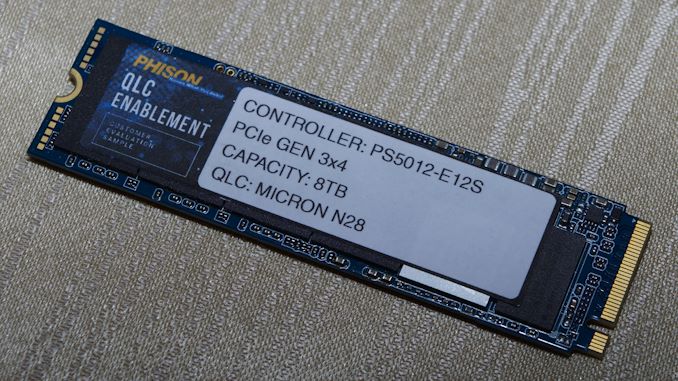
At CES 2020, Phison demonstrated various combinations of QLC NAND with their controllers in a range of capacities. Most of the SSDs shown were using Micron 96L QLC, but a few were also using Toshiba/Kioxia BiCS4 (96L) QLC. The QLC preparations also carried over to Phison’s portable storage products, where they showed a 1TB MicroSD card, an 8TB Thunderbolt 3 SSD, and several USB attached solutions. All of these reference designs are likely to come to market this year, and in the portable storage market the QLC transition will probably be more thorough and unavoidable.


Source: AnandTech – Phison At CES 2020: Preparing For QLC To Go Mainstream

Oculus Go Price Slashed by 25% to $149

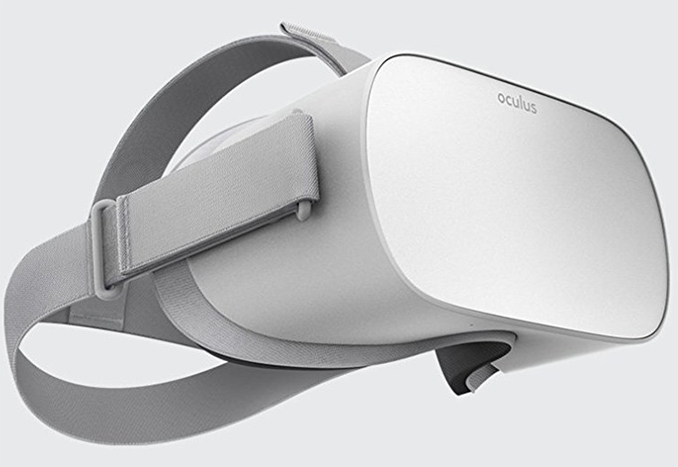
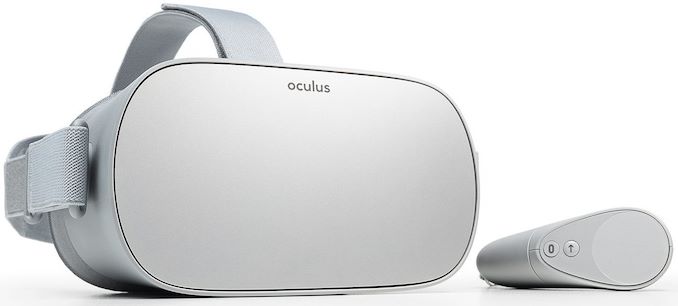
Facebook has announced that it has permanently slashed the pricing of its entry-level Oculus Go 32 GB VR headset to an ‘impulse buy’ level of $149. The move will make virtual reality more accessible for those who want to try basic VR gaming and video playback, but are after something more robust and with better support than various flavors of Google’s Cardboard VR.


Starting today, the Oculus Go 32 GB is priced at $149, whereas the 64 GB version costs $199. In other countries where the VR headset is available, prices have been slashed ‘comparably’ as well, according Oculus VR parent company Facebook.


The Oculus Go is the most basic standalone virtual reality headset available today (at least when it comes to three major VR HMD makers). The device has a 5.5-inch display panel with a 2560×1440 (538 ppi) resolution as well as a 60 – 72 Hz refresh rate (application dependent). The HMD is powered by Qualcomm’s Snapdragon 821 SoC (four Kryo cores running at 2.15 – 2.3 GHz, Adreno 530 GPU with ~500 GFLOPS performance, 64-bit LPDDR4 memory, 14LPP) paired with 3 GB of RAM, 802.11ac Wi-Fi, and 32 or 64 GB of NAND flash storage that cannot be expanded using an SD card.


As far as battery life is concerned, the the Oculus Go is equipped with a 2600 mAh battery that provides up to two hours of gaming, or 2.5 hours of video playback.


Since the Oculus Go is a standalone VR HMD, it has built-in speakers as well as the 3-degree-of-freedom tracking (3DoF) for the headset and the controller, but does not support positional tracking at all. To that end, the Oculus Go cannot offer the same level of immersion as the Oculus Rift, Oculus Quest, or even the Vive Focus which feature positional tracking.


It is evident that the Oculus Go was developed to be as cheap as possible and all of its tradeoffs are consequences of such design approach. From Oculus VR perspective, the low price and availability of proper content might popularize virtual reality in general among consumers not ready to invest hundreds of dollars in a more advanced gear. To that end, it will be interesting to see how a $50 price slash affects market performance of the Oculus Go.


Related Reading:


Sources: Oculus VR, TechRadar, Engadget


Source: AnandTech – Oculus Go Price Slashed by 25% to 9

CES 2020: ZOTAC Reveals VR Go 3.0: NVIDIA GeForce RTX Inside

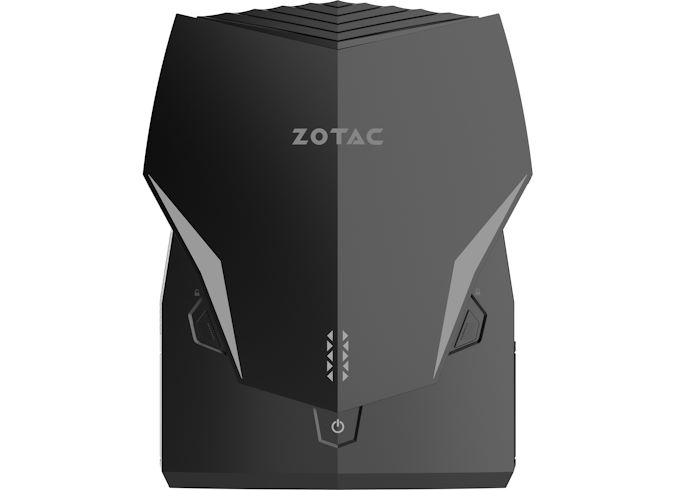
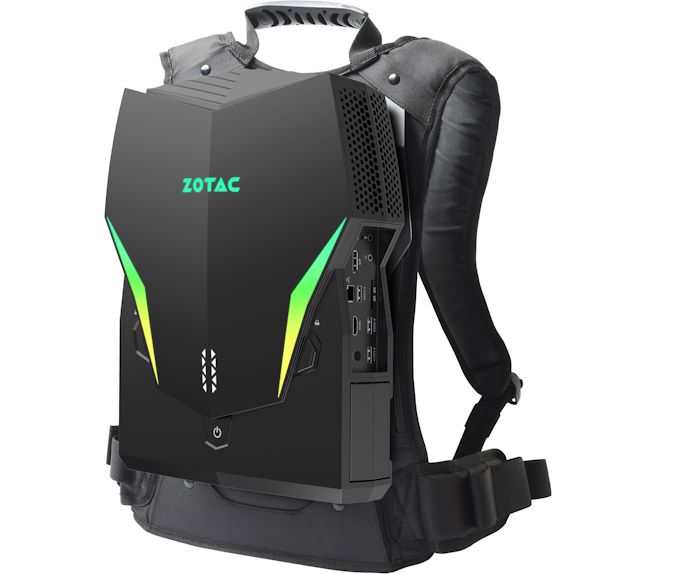
ZOTAC this month announced plans to release its 3rd generation VR Go wearable PC for virtual reality gaming. The new system will feature higher performance for a better VR experience, as well as an updated backpack.


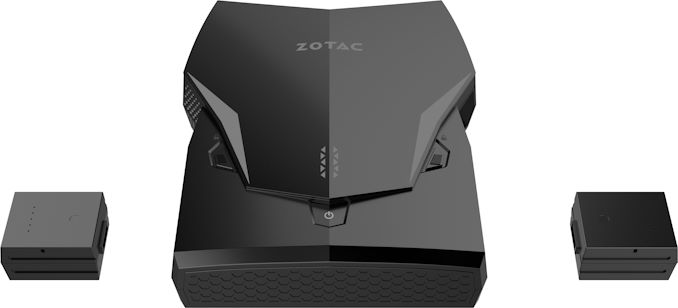
ZOTAC’s VR Go 3.0 will inherit the chassis and (presumably) batteries from the VR Go 2.0 that has been on the market for over a year. The key improvement of the new model over the VR Go 2.0 will be updating the GPU to NVIDIA’s GeForce RTX 2070. The CPU side is also getting an upgrade with Intel’s latest Core i7 processor, though the manufacturer does not disclose which one (Comet Lake-H perhaps?).


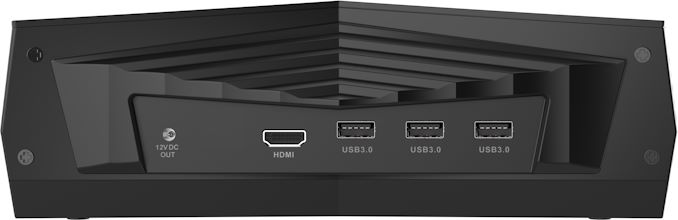
The new VR Go 3.0 will come with a new backpack that utilizes a sweatproof material for easier maintenance. And, just like its predecessors, the upcoming VR Go wil be able to work both as a desktop and as a wearable PC. Though surprisingly enough, even with the switch to a current-generation GeForce RTX GPU, Zotac isn’t integrated a USB-C-based VR Link port (or USB-C port of any kind, for that matter), so any kind of display will still need to be hooked up via HDMI or DisplayPort.


VR gaming is an interesting market in general. There are only three makers of popular VR headsets and there are equally few PC makers that that offer wearable PCs for VR gaming. Which has meant that the market for VR PCs has operated on a relatively slow cadence, especially as it’s generally years between PC VR headset releases.


Related Reading:


Source: ZOTAC


Source: AnandTech – CES 2020: ZOTAC Reveals VR Go 3.0: NVIDIA GeForce RTX Inside

CES 2020: Analogix Announces ANX2187 TCON With Gamut Rotation

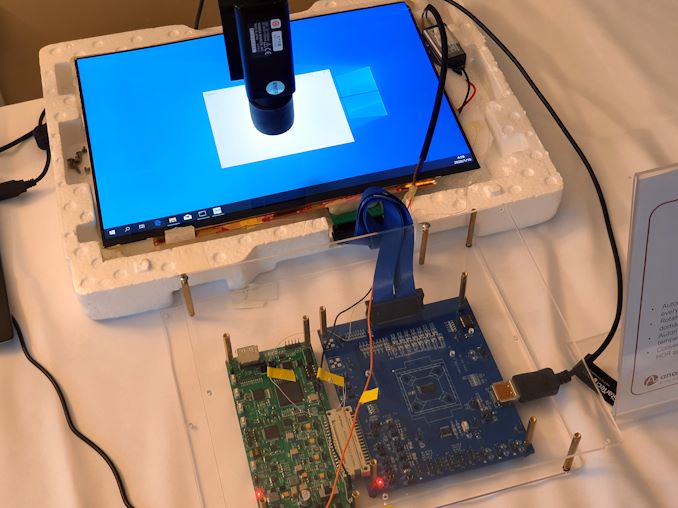
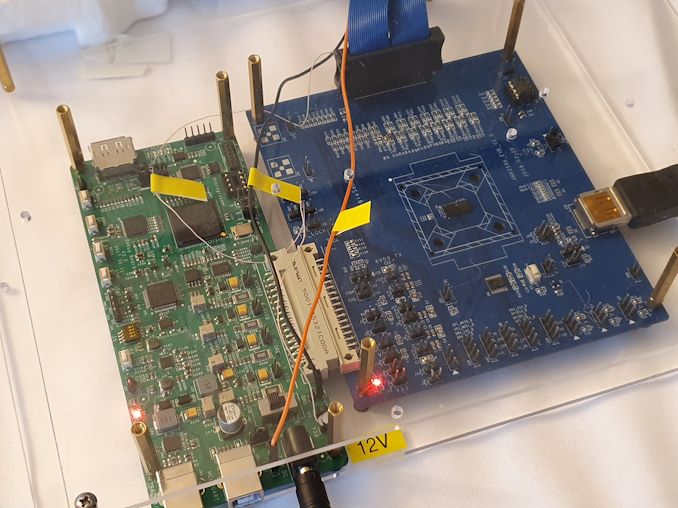
We haven’t talked about Analogix in a few years, and we certainly haven’t talked about TCON announcements much at all. At CES 2020 Analogix announced the new ANX2187 TCON chip with little fanfare, but it could drastically change the way PC displays are manufactured and how end products end up in terms of their colour accuracy.


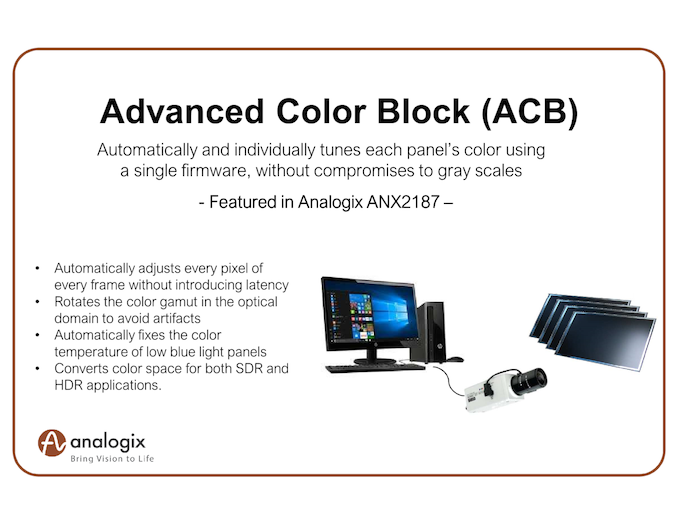
Analogix has been a leader in delivering TCON solutions to the PC and laptop market for many years, and the market has been relatively speaking quite boring when it comes to new developments. Analogix wants to modernise the display panel experience for monitors and laptops with the introduction of the new ANX2186 which promises to bring 3D Colour Gamut rotation to the PC market.


Display makers usually have a quite hard time in terms of producing accurate display panels using the “traditional” manufacturing methods. In the old way of doing things, a panel’s colour accuracy is largely dependent upon its manufacturing and if it comes out matching the target specifications, with it being very hard for display vendors to individually adjust the display controller firmware on each panel in order to achieve better calibrations and accuracy.


The ANX2186 is a TCON that features gamut manipulation in the optical domain – in essence it’s a calibration engine that sits at the TCON level between the display input and the DDIC and is able to transparently manipulate the gamut in its 3D space. This technology isn’t inherently new, one area it’s been present for years has been in the mobile space (Samsung’s mDNIe was first as far as I know) as well as in TVs by various TV SoC vendors.


What this allows is for calibration and manipulation of the colours fully independent of the DDIC firmware of a display panel. Display manufacturers can now very quickly with help of automatic tooling calibrate each individual panel in a product line, write the compensation/calibration factors as ROM data to the TCON, and not have to worry about fiddling with the much more complex firmware data on the side of the DDIC.


It’s quite a large departure and enabler for more accurate display panels in monitors as well as laptops, reducing cost and adding flexibility for display and device manufacturers. The chip also can seamlessly handle multiple colour spaces with different calibrations, essentially bringing to the PC what we’ve had on mobile devices for several years now, alongside new use-cases such as SDR and HDR conversions.


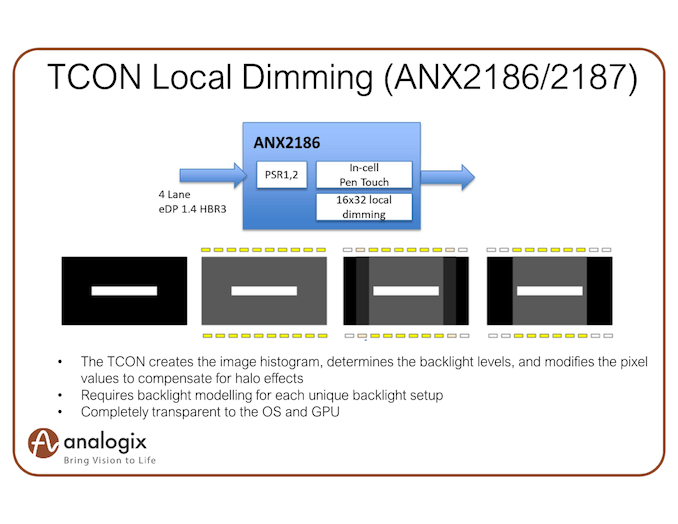
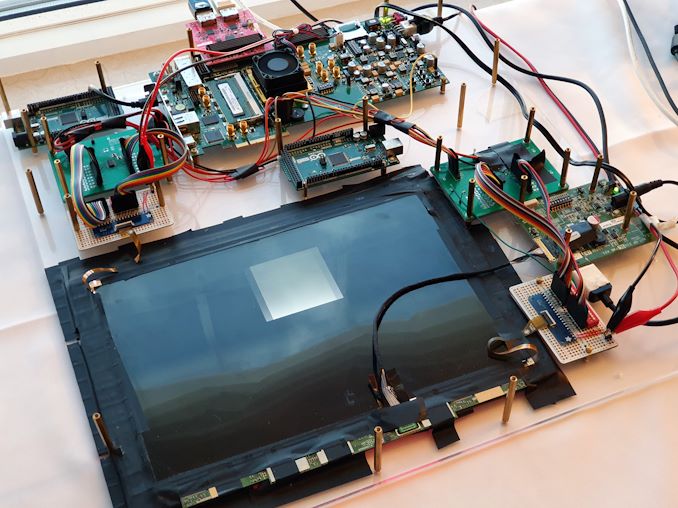
The TCON has other features such as local dimming capability. Here the TCON is able to be programmed with the backlight setup characteristics and transparently enable local dimming functionality in a less complex manner than traditional implementations.


The ANX2187 is capable of resolutions of up to 4K60 and is manufactured in a newer 28nm process node, enabling low power consumption of 216-286mW.


Analogix says they’re the first to market in the PC space with such technology, and it certainly seems that it would be able to enable vendors to bring a new generation of devices with much better display characteristics than previously possible.


Source: AnandTech – CES 2020: Analogix Announces ANX2187 TCON With Gamut Rotation

CES 2020: Innogrit SSD Controllers Score Multiple Design Wins

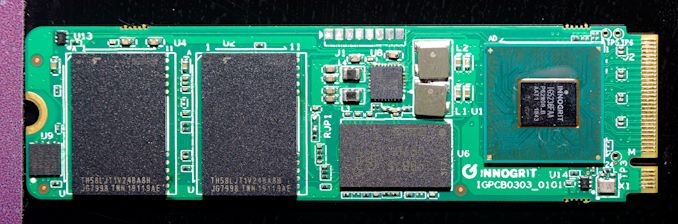
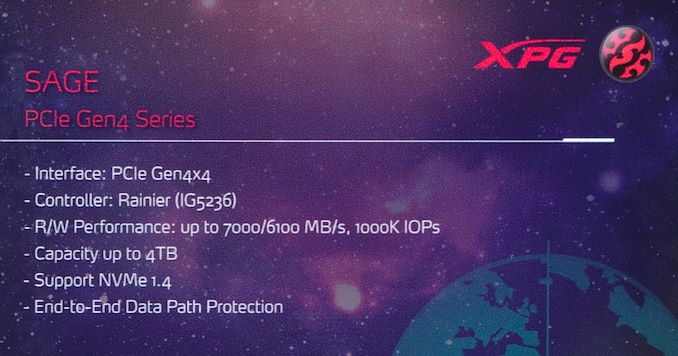
Innogrit is one of the latest SSD controller designers to enter the market, having come out of stealth mode and announced their roadmap last August at Flash Memory Summit. Last week at CES 2020, at least two SSD vendors were showcasing upcoming products based around Innogrit’s IG5236 Rainier controller. This isn’t Innogrit’s first SSD controller: they started small with the Shasta and Shasta+ designs, 4-channel DRAMless controllers that are comparable to entry-level NVMe controllers that Phison, Silicon Motion and Marvell have had on the market for quite a while. Rainier is where Innogrit really starts to compete. It’s an 8-channel controller with a PCIe 4.0 x4 host interface, and it should be capable of very nearly saturating that link with sequential transfers.


Innogrit NVMe SSD Controller Roadmap
Controller Shasta Shasta+ Rainier Tacoma
Model Number IG5208 IG5216 IG5236 IG5668
Host Interface PCIe 3 x2 PCIe 3 x4 PCIe 4 x4 PCIe 4 x4
Protocol NVMe 1.3 NVMe 1.4
NAND Channels 4 4 8 16
Max Capacity 2 TB 2 TB 16 TB 32 TB
DRAM Support No (HMB Supported) DDR3/4, LPDDR3/4

32/16-bit bus
DDR3/4, LPDDR3/4,

72-bit bus
Manufacturing Process 28nm “16/12nm”
BGA Package Size 10x9mm,

7x10mm
7x11mm,

10x10mm
15x15mm 17x17mm
Sequential Read 1750 MB/s 3.2 GB/s 7 GB/s 7 GB/s
Sequential Write 1500 MB/s 2.5 GB/s 6.1 GB/s 6.1 GB/s
4KB Random Read 250k IOPS 500k IOPS 1M IOPS 1.5M IOPS
4KB Random Write 200k IOPS 350k IOPS 800k IOPS 1M IOPS
Market Segment Client Client High-end Client,

Datacenter
Datacenter, Enterprise


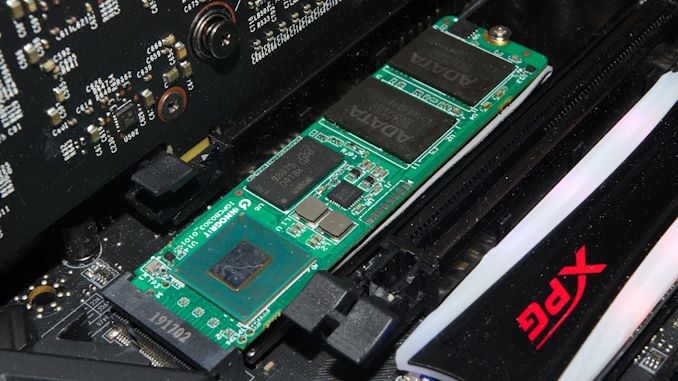
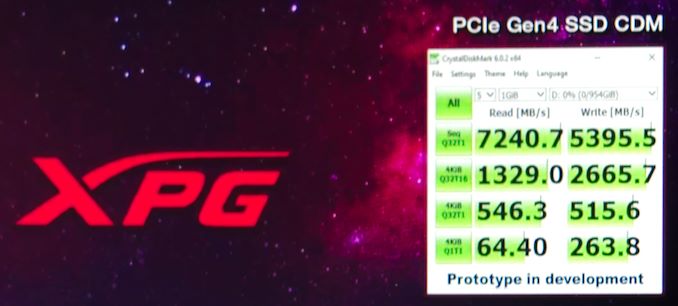
ADATA was showing off three different upcoming PCIe 4.0 M.2 SSDs at CES, and unsurprisingly one of them was using the Innogrit Rainier controller—ADATA’s always game to try out new SSD controllers. The ADATA XPG SAGE SSD will use 96L TLC NAND, but they have not made a final determination of whether to use Micron or Toshiba NAND. The drive on their display board was clearly equipped with Toshiba NAND, but the one installed in a system for live demos used ADATA packaged NAND that may have been Micron TLC.


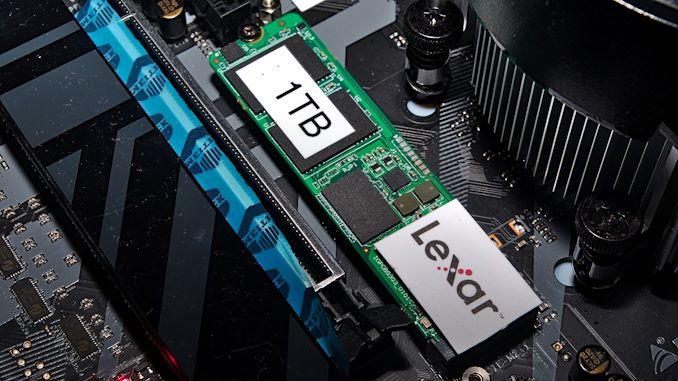
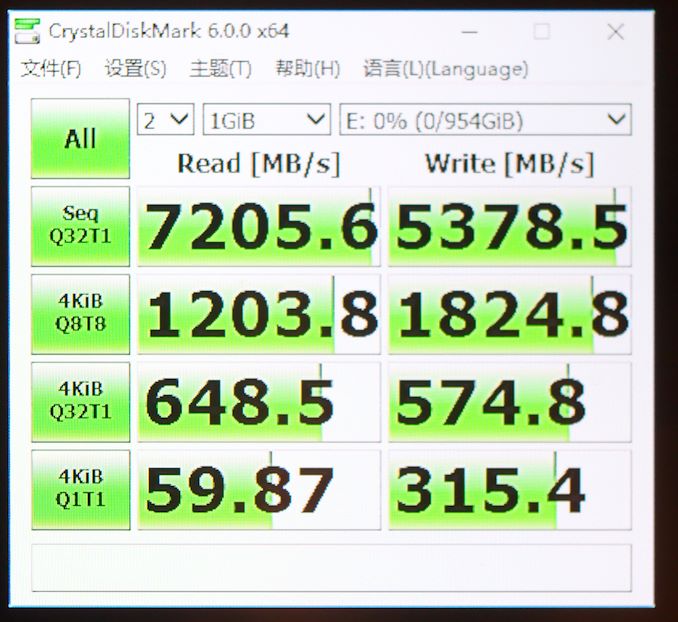
A few years ago, Micron sold their Lexar brand to Longsys, who started using the brand for both internal and external storage products. Longsys and Lexar SSDs have continued to use Micron NAND almost exclusively, but lately their preference for Marvell controllers has not been working out so well. Marvell’s plan for PCIe 4.0 SSDs in the client/consumer market doesn’t include anything to compete at the high end. Officially, Lexar isn’t saying what controller their upcoming high-end PCIe 4.0 SSD will use, but the drive they had a live demo of was obviously using the same Innogrit Rainier reference PCB. However, their images of what the product will look like with its heatspreader were based on an entirely different PCB, so the selection of Innogrit’s controller is probably not finalized. This drive is planned for Q3 of 2020.


BiWin is also reportedly working with the Innogrit Rainier controller for their NW200 SSD, after previously declaring intentions to use the Tacoma controller in an enterprise drive. BiWin is the ODM behind HP branded retail SSDs, so a Rainier-based SSD may be the successor to the Silicon Motion-based EX920 and EX950 SSDs. Unfortunately, we were unable to meet with BiWin at CES 2020.


Since Innogrit as a company is so new to the SSD controller market, it’s reasonable to be skeptical of their promises. (Though it’s worth keeping in mind that the company was founded and led by a team of veterans from Marvell and other major players in the storage industry.) The working demos at CES 2020 of Innogrit controllers surpassing 7 GB/s show that they’re clearly on the right track. Depending on when these drives hit the market and how performance changes in the meantime, they may soon be able to claim to be powering the fastest consumer SSDs. Innogrit is definitely worth keeping an eye on, and we look forward to trying out their SSDs on our benchmark testbeds.


Source: AnandTech – CES 2020: Innogrit SSD Controllers Score Multiple Design Wins

The Corsair K95 RGB Platinum XT Mechanical Keyboard, For Gamers and Streamers

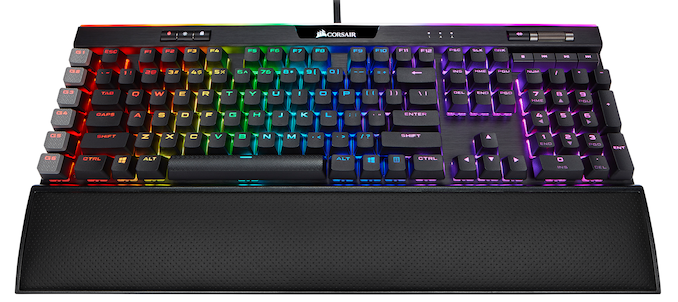
With Corsair acquiring new brands at a steady pace, including Origin PC, Elgato, and more recently, Scuf, the future looks bright for Corsair’s gaming division. A major part of the acquisition process is taking advantage of Corsair’s collection of technologies to develop products they couldn’t before, and the company’s latest mechanical keyboard, the K95 RGB Platinum XT, is a prime example of that. The high-end keyboard integrates Elgato’s Stream Deck software, which makes it ideal for gamers and streamers alike.


The Corsair K95 RGB Platinum XT builds upon the popularity and success of the 2017 K95, offering individual per-key RGB backlighting with a choice of three Cherry MX switch types. These include Cherry MX Speed silver, brown, and blues, with each key certified to withstand up to 10 million key presses. This is a significant upgrade in Cherry’s quality assurance, and the K95 RGB Platinum XT is the first mechanical keyboard to feature these newly tested switches. Each keycap is made from double-shot PBT, which is the premium keycap on the market at present, with a total of 111 keys, including a Numpad making this a full-size keyboard.


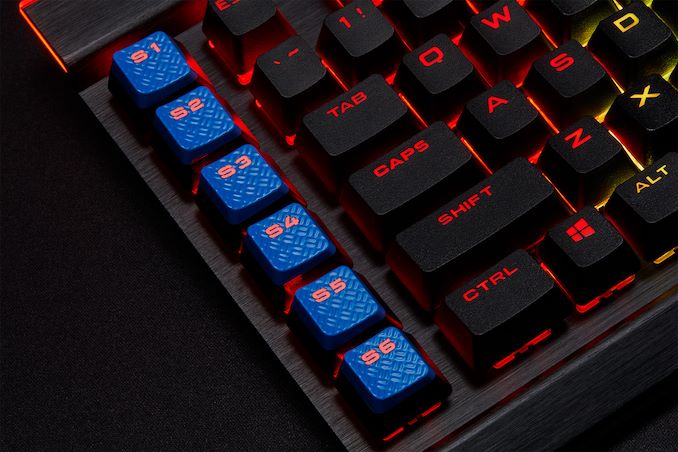
Integrated into the quality aluminium frame is a detachable PU leather wrist rest which Corsair says is to offer better ergonomics. Down the right-hand side is six macro keys which are designed to work with the bundled Elgato Stream Deck software. These work in a similar way to the buttons on the Elgato Stream Deck and can be customized to provide many different functions for streamers. Shipped in the accessories bundle is a set of blue keycaps for the macro keys, should users wish to alter the overall look of the keyboard.


The Corsair K95 RGB Platinum XT has an MSRP of $200, and is available at all major retailers, including Corsair’s own website. 


Source: AnandTech – The Corsair K95 RGB Platinum XT Mechanical Keyboard, For Gamers and Streamers

CES 2020: HP Unveils Advanced Docking Monitors w/ Webcam, GbE, USB-C PD

HP has introduced a new series of displays with docking capabilities that have been developed with corporate and business customers in mind. The HP E24D G4 and HP E27D G4 support high-end docking capabilities that we’ve come to expect from a modern LCD, along with multiple network manageability features that are required by the target audience.


HP’s E24D G4 and E27D G4 advanced docking monitors use IPS panels with diagonals of 23.8-inches and 27-inches, offering Full-HD (1920×1080) and Quad-HD (2560×1440) resolutions respectively. The displays offer 250 or 300 nits brightness, a 1000:1 contrast ratio, a 5 ms GtG response time, and a 60 Hz or 75 Hz refresh rate. Both monitors have very thin bezels to simplify usage of multi-display configurations. Exact specifications of the LCDs are in the table below.


As their names suggest, the key selling points of the E24D G4 and E27D G4 monitors are their advanced docking capabilities that include a GbE port, a pop-up webcam, DisplayPort input and output to daisy chain another LCD, a quad-port USB 3.0 hub, and 100 W USB-C Power Delivery. In a bid to comply with requirements of corporate and business customers, HP enabled numerous network manageability features, including OCI, eTag, MAC address passthrough, PXE boot, WoL, and LAN/WLAN switching.


Since the monitors are designed for offices where space is limited, they naturally come with an adjustable stand that can regulate height, tilt, and swivel. Also, the displays can work in portrait modes.


HP’s E24D G4 and E27D G4 displays will be available directly from the company later this month for $349 and $479, respectively.


Specifications of HP’s Advanced Docking Displays
  HP E24D G4 HP E27D G4
Panel 23.8″ IPS 27″ IPS
Native Resolution 1920 × 1080 2560 × 1440
Maximum Refresh Rate 60 Hz 75 Hz
Response Time 5 ms GtG
Brightness 250 cd/m² 300 cd/m²
Contrast 1000:1  
Viewing Angles 178°/178° horizontal/vertical
Pixel Pitch 0.2744 mm² 0.2335 mm²
Pixel Density 92.56 ppi 108.79 ppi
Display Colors ? ?
Color Gamut Support ?
Stand Height: ? mm

Tilt: -5° to 20°

Swivel: -?° to ?°

Pivot: -90° to 90°
Inputs 1 × DisplayPort 1.2 (+ DP 1.2 MST out)

1 × HDMI 1.4

1 × USB-C (DP 1.4 Alt Mode + 100 W Power Delivery)

1 × USB-C (DP 1.2 Alt Mode + 100 W Power Delivery)
USB Hub 4-port USB 3.0 (Type-A)
Audio audio out port
Power Idle 0.5 W 0.5 W
Typical 70 W 80 W
Peak 175 W 175 W
Delivery 100 W 100 W
Launch Price $349 $479

Related Reading:


Source: HP


Source: AnandTech – CES 2020: HP Unveils Advanced Docking Monitors w/ Webcam, GbE, USB-C PD

CES 2020: Ambarella Showcases CV2, CV22 and CV25 Demos

Amongst the many showcases at CES 2020 was Ambarella’s newest demo line-up showcasing various solutions using the CV2, CV22 and also demonstrating new platforms based on the newly announced CV2FS and CV22FS automotive camera SoCs.


For readers unfamiliar with Ambarella, the company came to be known through its success in providing the silicon inside solid state handheld camcorders as well as sports cameras such as the GoPro Hero line. Over the years the company has shifted its product towards more specialized use-cases, now claiming to be a top vendor in vision solutions and also leading the charge in terms of delivering solutions for automotive platforms.


Continued Success with CV2 and CV22


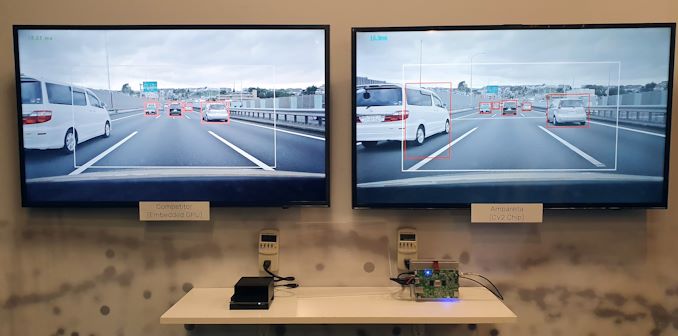
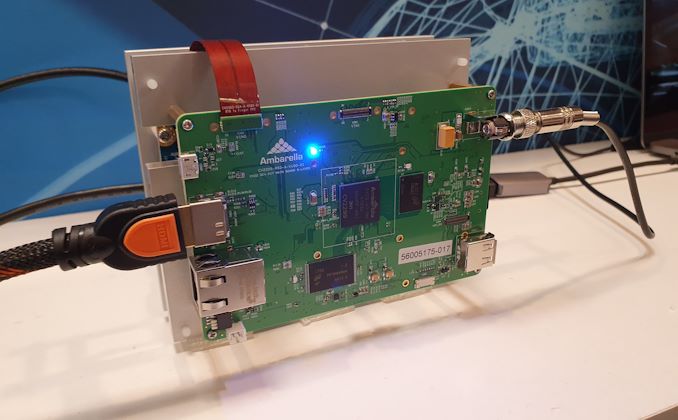
The CV2 and CV22 solutions were announced at last year’s CES and continue to represent key solutions and offerings for the company for 2020. Amongst the more interesting demos they showcased this year was a direct comparison against a competitor solution demonstrating performance and power efficiency advantages of the CV2 platform:


The CV2 development board here was put up against a Nvidia AGX running an object detection workload. Both platforms showcased similar performance in holding 60fps (~13.2ms for the AGX vs 16.9ms for the CV2 in terms of inference time), although with the Nvidia platform using 32W of power versus only 6.9W for the CV2 demo. We had a look at the AGX last year and found for similar inferencing workloads using Nvidia’s demonstration software to be around 13-16W in power consumption, so it’s possible Ambarella’s demo implementation wasn’t using the AGX to its most efficient potential.


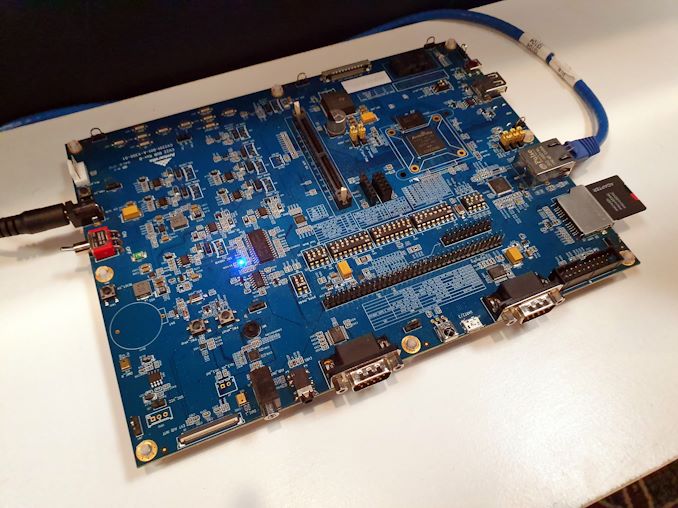
CV22 Dev Board


The company showcased more partnerships with various companies bringing using the CV2 and CV22 platforms, including a collaboration with AWS’s SageMaker Neo platform to help train ML models in the cloud and to deploy them into edge devices using the Ambarella CV SoCs.


CV22 Dev Board


Alongside a partnership with AnyVision to bring retail analytics (heat maps, traffic analysis, person detection, recognition & counting in commercial and retail shops), one very interesting demo was a showcased enabled with Mercedes-Benz in what they call a “Cargo Recognition and Organisation System” (CoROS), in which there’s a CV2 device and camera at the top of the back door of a delivery van able to scan loaded and unloaded packages. When scanning a specific package when loading, it’s able to highlight the most optimal shelf location within the delivery van with help of LED strips on the shelves, optimising the package arrangement for the best loading and unloading experience depending on the delivery routes. The system was extremely straightforward in its implementation and only required a single higher resolution camera installation to be able to read out package barcodes effectively, it definitely felt like a killer use-case for computer vision solutions.


Automotive: Continued Development and New ASIL B CV2FS and CV22FS SoCs


In terms of the automotive showcases, we’ve seen continued refinements on the software side of the automotive products with partnership with companies such as HELLA-Aglaia.


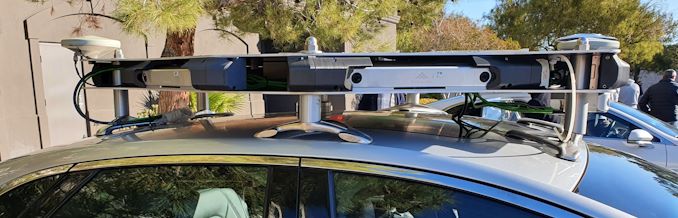
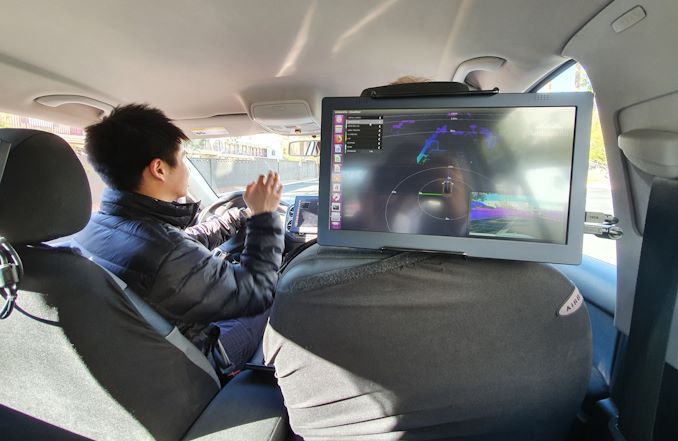
Front-Facing ADAS System Demo (newer 360° system was in another car)


Although we couldn’t test it during daytime in our CES schedule, the most interesting demonstration the company had showcased was a fully autonomous vehicle demo using only CV2 chipsets and various camera systems. Ambarella prided itself in the ability to have the system working in both day and night – the latter being a lot more complex to implement in a pure CV system without LIDAR.


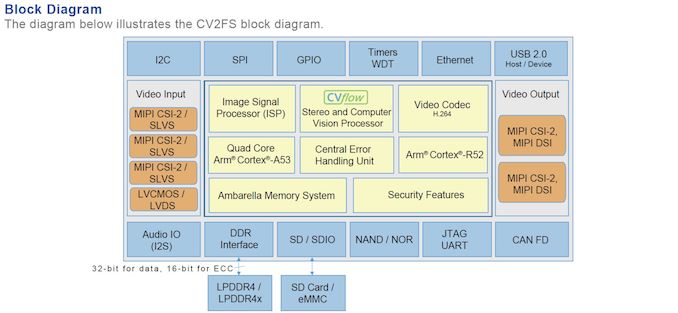
The new product announcements this year were in the form of the CV2FS and CV22FS – essentially these are brand-new designs based on the CV2 and CV22 capabilities, now offering full ASIL B functional safety compliance as well as automotive grade qualification such as AEC-Q100 grade 2 compliance (-40 to +125°C operating temperatures).


CV25 For Mainstream Cameras And Consumer Devices


On the consumer camera front we didn’t see any newer announcements, and as such the CV25 continues to be Ambarella’s main product for consumer and security camera applications.


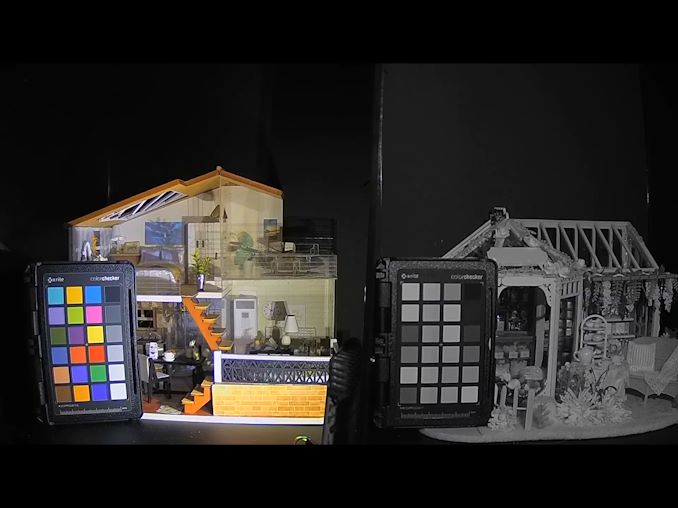
RGB-IR combo camera sensor vs regular IR camera system in low-light


One more interesting development was the announcement of a partnership with ON Semiconductor in bringing to market a new RGB-IR camera sensor that has the ability to capture information both in regular colour RGB spectrum as well as in the IR spectrum. Ambarella’s ISP is able to support the format and merge the data together, achieving some very interesting new capabilities in terms of low-light capture. The feature seemingly seems like another killer use-case to be implemented in security cameras in the future.


Source: AnandTech – CES 2020: Ambarella Showcases CV2, CV22 and CV25 Demos

HTC Cuts Price of Vive Pro VR Headset to $599

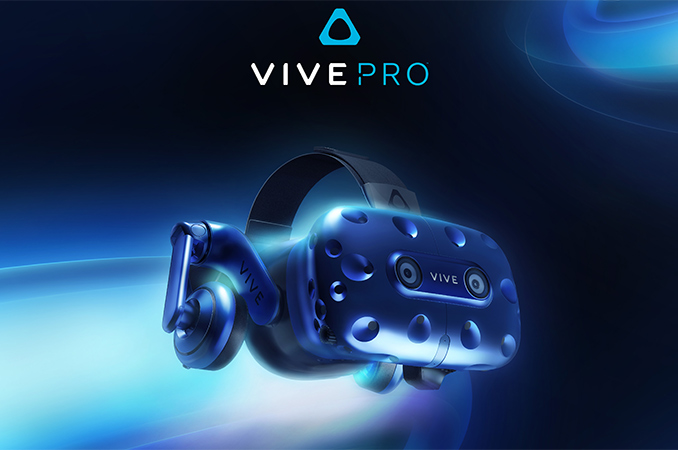
HTC this month has reduced the price of its Vive Pro VR headset by $200, bringing the pricetag of the HMD down to $599. The VR headset is now slightly more expensive than the original Vive and is cheaper than the Vive Cosmos, which started sales last October.


HTC’s Vive Pro released roughly two years after the original Vive and while it was not a full generational update, it featured a considerably higher combined resolution of 2880×1600 at 90 Hz refresh rate, as well as a revamped design for increased comfort. Originally priced at $799, HTC’s Vive Pro VR headset was aimed at a mix of professional VR developers and users who needed a more robust headset with more support options, as well as virtual reality enthusiasts who demanded the best experience possible.


After the release of the Vive Cosmos headset last October, Vive Pro’s appeal naturally decreased. The newer model offers similar image quality, a built-in inside-out 6-degree-of-freedom (6DoF) positional tracking system, and numerous other innovations, but at a $100 lower price point (when compared to the Vive Pro). With its price cut, HTC seems to be addressing this inconsistency.


For those who already have Vive controllers and SteamVR Base Station 1.0/2.0 tracking devices, the Vive Pro still makes a lot of sense, so HTC will keep selling it for $599 for a while. Meanwhile, the top-end kit with two Base Station 2.0s and two controllers is priced at $1,199.


Related Reading:


Source: HTC


Source: AnandTech – HTC Cuts Price of Vive Pro VR Headset to 9

Samsung’s Odyssey Continues: Ultra-Curved QLED 49-Inch 240 Hz HDR1000 Monitor w/ Adaptive Sync

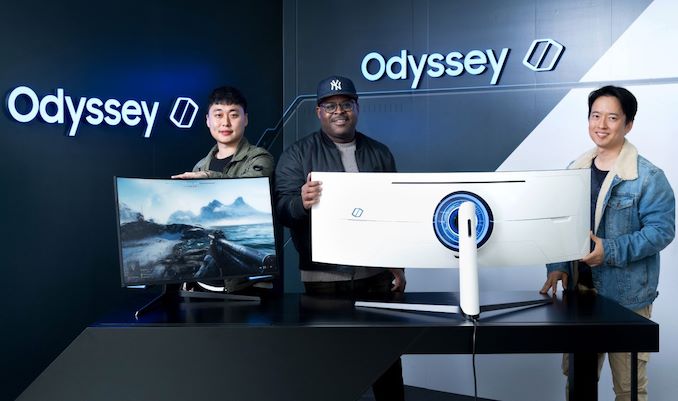
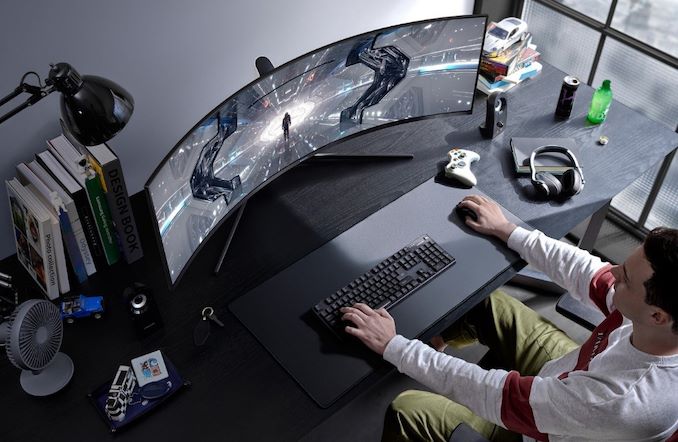
Nowadays, you can barely impress a gamer with just a curved display. So when Samsung started development of its new Odyssey G9 and Odyssey G7 gaming monitors, it decided to make them ultra-curved, ultra-fast, ultra-bright, and ultra-futuristic. As a result, the new Odyssey LCDs for gamers feature a unique combination of a 1000R curvature, a quantum dot enhanced backlighting, and variable refresh rate support up to 240 Hz.


Samsung’s Odyssey gaming displays lineup includes three models: the 49-inch G9 featuring a 32:9 aspect ratio and a 5120×1440 resolution, as well as the 32-inch and 27-inch G7s featuring a 16:9 aspect ratio and a 2560×1440 resolution. All three monitors use a VA panel with a QLED (quantum dot-enhanced LED) backlighting that enables 600 nits or 1000 nits peak brightness, along with a wide color gamut (see general specifications of the displays in the table below).


From a gamer’s perspective, the key features of the Samsung Odyssey displays are their 240 Hz refresh rate, complete with variable refresh rate support. Samsung’s specifications don’t make this entirely clear, but it looks like the display uses VESA Adaptive Sync, meaning that it’s supported with both AMD and NVIDIA GPUs.


Meanwhile, the monitor also sports a 1000R curvature that promises to enable better immersion when compared to regular curved LCDs.


Since the Odyssey monitors are designed for gamers, they feature an ultra-futuristic design along with LED-based lighting on the back to emphasize features of the design and just follow the general industrial trend.


General Specs of Samsung’s Odyssey Displays with Variable Refresh
  Odyssey G9

49-Inch
Odyssey G7

32-Inch
Odyssey G7

27-Inch
Panel 49″ VA 32″ VA 27″ VA
Native Resolution 5120 × 1440 2560 × 1440
Maximum Refresh Rate 240 Hz
Response Time 1 ms 1 ms 1 ms
Brightness 1000 cd/m² 600 cd/m²
Contrast high high high
Backlighting LED w/Quantum Dots
Viewing Angles 178°/178° horizontal/vertical
Curvature 1000R
Aspect Ratio 32:9 (3.56:1) 16:9
Color Gamut DCI-P3

sRGB
Dynamic Refresh Rate Tech VESA Adaptive-Sync

(NVIDIA G-Sync Compatible)
Pixel Pitch 0.234 mm² 0.2767mm² 0.2335 mm²
Pixel Density 108.54 PPI 91.79 PPI 108.79 PPI
Inputs DisplayPort

 HDMI
DisplayPort

HDMI
DisplayPort

HDMI
Audio ? ? ?
USB Hub ? ? ?
MSRP ? ? ?

Samsung will make its Odyssey G9 and Odyssey G7 displays available sometimes in early second quarter, which is why the company does not publish all specifications and characteristics of the products just now. Prices of the monitors will be revealed at launch.


Sources: Samsung Canada, Samsung India, Samsung U.S., TFT Central


Source: AnandTech – Samsung’s Odyssey Continues: Ultra-Curved QLED 49-Inch 240 Hz HDR1000 Monitor w/ Adaptive Sync

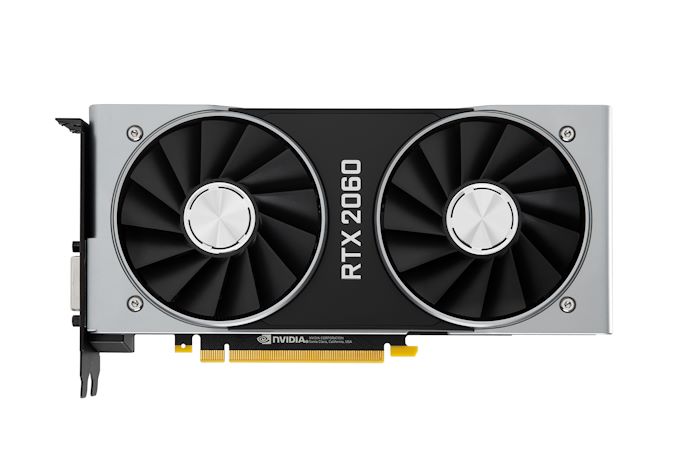
NVIDIA Cuts Price of GeForce RTX 2060 To $299

With AMD set to launch their new 1080p-focused Radeon RX 5600 XT next Tuesday, NVIDIA isn’t wasting any time in shifting their own position to prepare for AMD’s latest video card. Just in time for next week’s launch, the company and its partners have begun cutting the prices of their GeForce RTX 2060 cards. This includes NVIDIA’s own Founders Edition card as well, with the company cutting the price of that benchmark card to $299.


The timing, of course, is anything but coincidental. AMD’s Radeon RX 5600 XT announcement back at CES already revealed a significant portion of AMD’s hand, particularly that the card would launch at $279, and that the company is expecting the card to outperform NVIDIA’s GeForce GTX 1660 Ti, their own $279 card. Assuming AMD’s performance claims hold true, then NVIDIA would need to act; either the GTX 1660 Ti or RTX 2060 would need to come down in price for NVIDIA to maintain a competitive edge, and the latter is the direction NVIDIA has decided to take.


Even at $299, the RTX 2060 is not going to be a precise counter to the $279 RX 5600 XT. But the junior TU106 card packs more performance than the GTX 1660 Ti, as well as the complete Turing architecture feature set, making it the strongest hand NVIDIA can play. As always, we’ll see where things land on Tuesday for both AMD and NVIDIA, but it should make for an interesting fight.


On the whole, price adjustments for NVIDIA are quite rare. While prices of NVIDIA cards do tend to fall over time, the company seldom adjusts official pricing in any capacity. Even this week’s cuts aren’t wholly official; NVIDIA hasn’t announced a price cut so much as sent out a reminder that RTX 2060 cards can be found for $299. But regardless, where NVIDIA leads on pricing their board partners will follow, and EVGA, Gigabyte, and others have already begun releasing new cards and shifting the pricing of other cards to reach the new $299 level.


Q1 2020 GPU Pricing Comparison
AMD Price NVIDIA
Radeon RX 5700 $329  
  $299 GeForce RTX 2060
Radeon RX 5600 XT $279 GeForce GTX 1660 Ti
  $229 GeForce GTX 1660 Super
Radeon RX 5500 XT 8GB $199/$209 GeForce GTX 1660
Radeon RX 5500 XT 4GB $169/$159 GeForce GTX 1650 Super
  $149 GeForce GTX 1650


Source: AnandTech – NVIDIA Cuts Price of GeForce RTX 2060 To 9

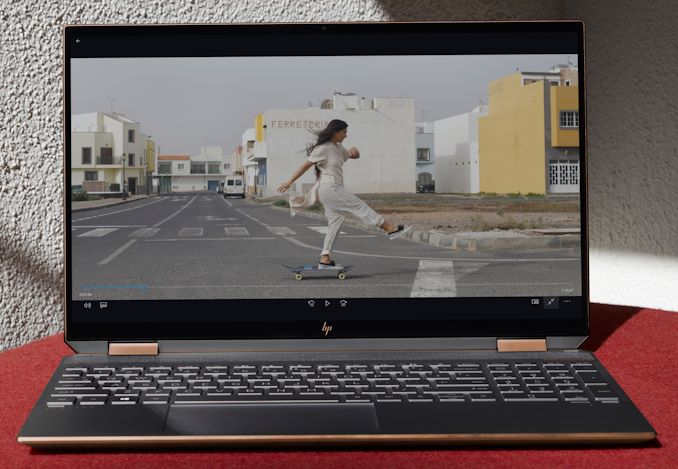
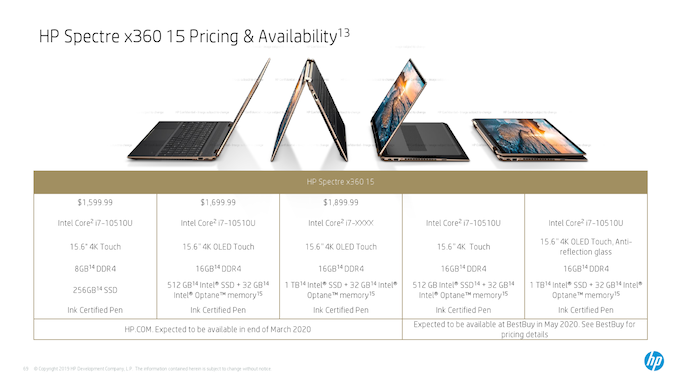
CES 2020: HP’s Spectre x360 15 Gets Comet Lake, Goes on Diet, Gains 17 Hrs Battery Life

Notebook makers put a lot of efforts into making their 13.3 and 14-inch notebooks as sleek and light as possible, which is why road warriors can enjoy more compact systems every year. Meanwhile, technologies designed for the aforementioned PC are eventually used on other types of laptops too. This is the case with HP’s 2020 Spectre x360 15, which inherits many design elements of its 13.3-inch convertible sibling to make the 15.6-inch machine more compact.


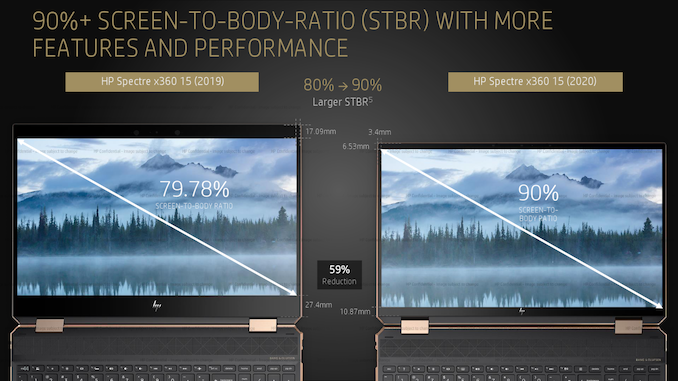
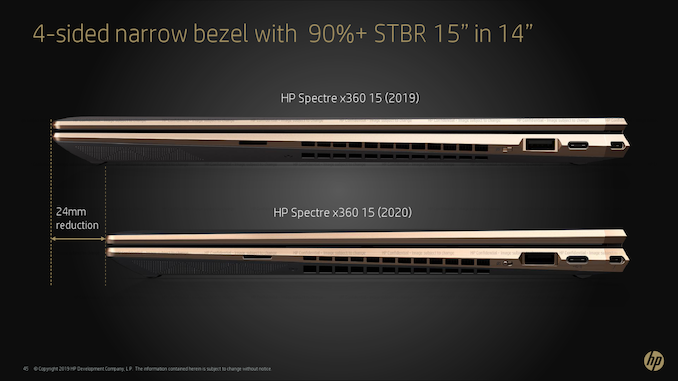
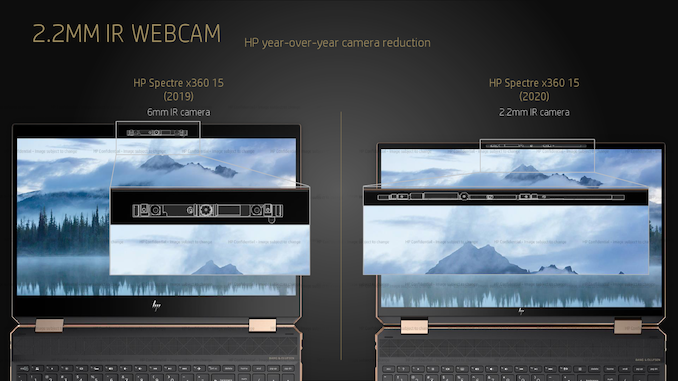
The key improvement of the 2020 HP Spectre x360 15 over its predecessor are narrow display bezels that enabled the company to install a 15.6-inch Full-HD or Ultra-HD display panel into a chassis that resemble those of a 14-inch laptop. The notebook now boasts a 90% screen-to-body ratio (STBR), up from a 79.78% STBR in case of the 2019 model, and is 24 mm shorter than the predecessor. Meanwhile, the PC did not become any thinner, yet it is now clearly more compact than before.


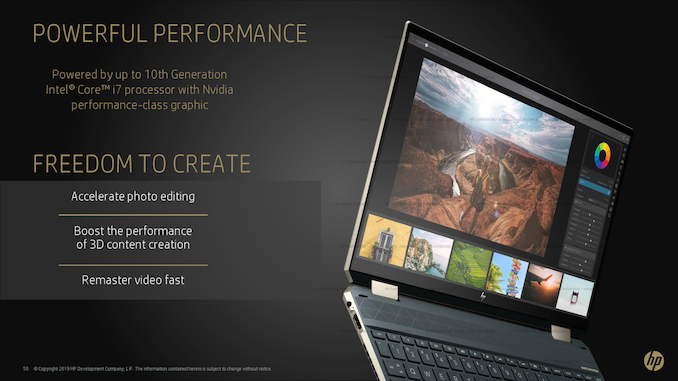
Obviously, to make the Spectre x360 15 more compact in general, HP had to redesign its internals. The system is powered by Intel’s 10th Generation Core processor (Comet Lake) that is accompanied by an optional NVIDIA GeForce GPU, solid-state storage as well as everything else that you come to expect from a premium 2020 laptop, including Wi-Fi 6, Bluetooth, Thunderbolt 3, USB Type-A, HDMI, a microSD slot, Windows Hello-compliant webcam with IR sensors (which can be switched off), a microphone array, a Bang & Olufsen speaker array, and a 3.5-mm combo audio jack for headsets.


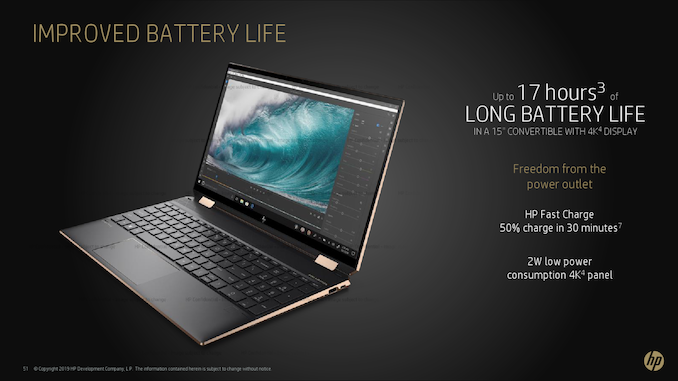
Just like last year, the flagship Spectre x360 15 will come with a 15.6-inch AMOLED display with TrueBlack HDR 400 certification that covers the DCI-P3 color gamut. Meanwhile, HP will also offer an optional 4K LCD panel that consumes 2 W for those who want a very long battery life of around 17 hours. Select machines will also come with an anti-reflection glass.


As usual with Spectre-branded notebooks, HP put a special emphasis on style of its new 15.6-inch mobile PC. The system will come in Nightfall Black with Copper Luxe Accents or Poseidon Blue with Pale Brass Accents chassis with gem-cut edges.


HP’s Spectre x360 15 will be available this March directly from HP starting at $1.599.99


Related Reading:


Source: HP


Source: AnandTech – CES 2020: HP’s Spectre x360 15 Gets Comet Lake, Goes on Diet, Gains 17 Hrs Battery Life

Intel’s Confusing Messaging: Is Comet Lake Better Than Ice Lake?

This year at CES 2020, Intel held its usual pre-keynote workshop for select members of the press. Around 75 of us across a couple of sessions were there to hear Intel’s latest messaging and announcements from the show: a mixture of messaging and preview of the announcements to be made at the keynote. This isn’t unusual – it gives the company a chance to lay down a marker of where it thinks its strengths are, where it thinks the market is heading, and perhaps gives us a highlight into what might be coming from the product hardware perspective. The key messages on Intel’s agenda this year were Project Athena, accelerated workloads, and Tiger Lake.

We’ve covered Tiger Lake in a previous article, as it shapes up to be the successor to Ice Lake later in the year. Intel’s Project Athena is also a known quantity, being a set of specifications that Intel wants laptop device manufacturers to follow in order to create what it sees as the vision of the future of computing. The new element to the discussion is actually something I’ve been pushing for a while: accelerated computing. With Intel now putting AVX-512 in its consumer processors, along with a stronger GPU and things like the Gaussian Neural Accelerator, actually identifying what uses these accelerators is quite hard, as there is no official list. Intel took the time to give us a number of examples.


Source: AnandTech – Intel’s Confusing Messaging: Is Comet Lake Better Than Ice Lake?

Intel Cuts 2nd Gen 'Extended Memory' Xeon Scalable Prices

Today Intel will be officially starting product discontinuation of ‘M’ medium sized memory Xeon Scalable CPUs. Due to customer feedback and sales figures, Intel has deemed it in the best interests of the product stack to simplify: only two memory configurations (1.5TB and 4.5TB) will remain. Alongside this change comes a very rare price cut: the high memory configuration versions, the L CPUs, will be re-priced to match the old medium memory configuration pricing.


Source: AnandTech – Intel Cuts 2nd Gen ‘Extended Memory’ Xeon Scalable Prices

The Lian Li Strimer Plus, For When You Need an RGB 24-pin ATX Cable

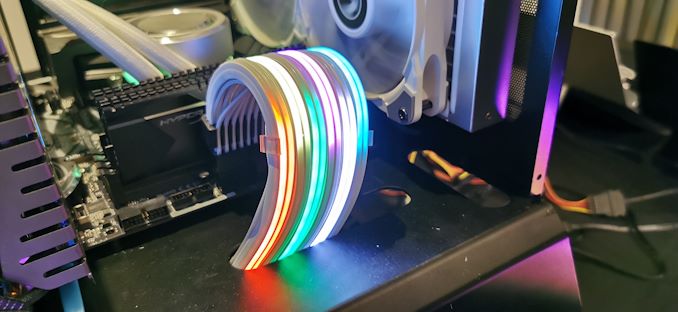
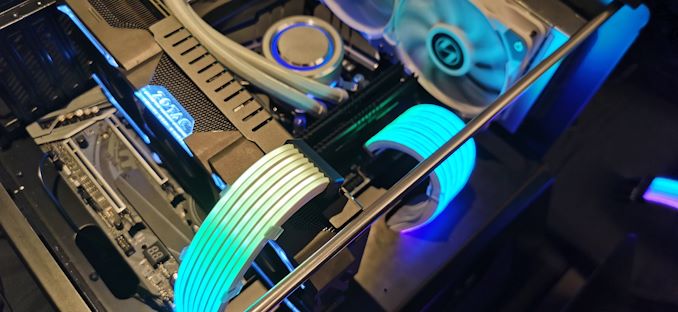
During our tour of the Lian Li suite at CES 2020, we saw a variety of updated case designs, some impressive and others with minor tweaks. One of the more standout products at the suite was the new and improved Lian Li Strimer Plus RGB PSU cable. Updated for 2020, the Strimer Plus now has visual effects, better build quality, but with a slightly higher retail price.


Back at Computex 2018, our senior editor Dr Ian Cutress took a look at the first iteration of the Strimer, and he was dismayed at the name. Pronounced Streamer, but written as Strimer  the Western and Eastern divide on PR is far between the intended result. Fast forward to CES 2019 and what was originally a limited product, has now transitioned into its second generation, the Strimer Plus. Whether users love or hate RGB, the Strimer Plus now supports RGB visual effects due to an included RGB controller box. This box includes four buttons and doesn’t intrude when compared to controllers from companies such as Thermaltake; a smaller box means less overall space used.


In addition to the 24-pin ATX RGB Strimer Plus, Lian Li also intends to sell an 8-pin PCIe version so users can not only enhance the overall RGB experience but match it up with other devices. The Lian Li Strimer Plus is certified to work with other RGB ecosystems including ASUS ROG Aura Sync, MSI’s Mystic Light, ASRock’s Polychrome RGB, and GIGABYTE’s RGB Fusion. It can be hooked up directly into a motherboard RGB header which gives each companies software the ability to control it, or users can run it independently from the included control box.


Ignoring the Strimer (pronounced Streamer) name which is simply lost in translation between the West and East, the Strimer Plus has a recommended retail price of $60 for the 24-pin cable and $40 for the PCIe kit. The expected time frame of when the Lian Li Strimer Plus will hit retail shelves is February.


Source: AnandTech – The Lian Li Strimer Plus, For When You Need an RGB 24-pin ATX Cable

MSI Shows Off New White Creator Peripherals Range

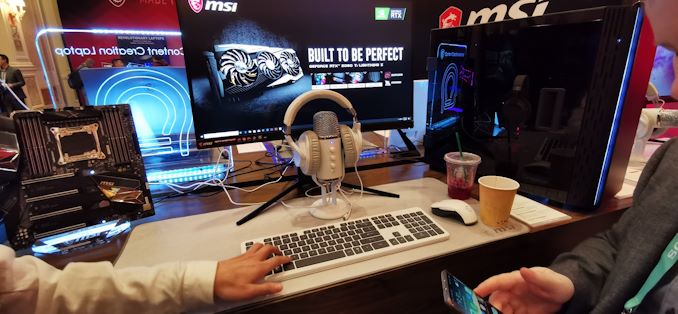
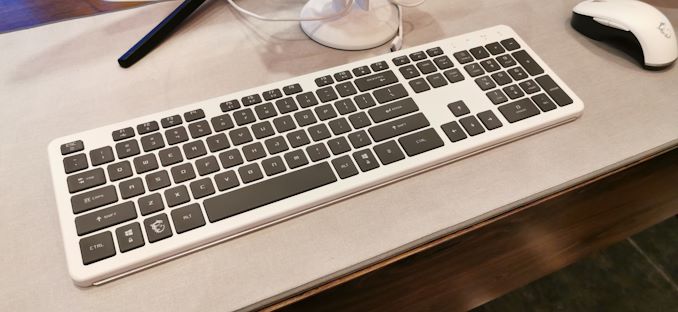
During CES 2020 at the MSI booth, the company unveiled its latest range of peripherals for professionals. The MSI CK40 keyboard, the CM30 mouse, and CH40 wireless earbuds are designed with content creators and professionals in mind, with subtle white aesthetics and use Bluetooth to connect to desktop and notebooks wirelessly. At least, that’s what it says in the description.


The MSI CK40 keyboard comes with a white aluminium frame, and allows users to connect wirelessly with through 2.4 G, via Bluetooth, or with the included cable. The CK40 uses quiet and low profile scissor switches which MSI says are designed with comfort in mind and should have the added benefit of a stain repellant coating. 


The MSI CK40 wireless keyboard at CES 2020


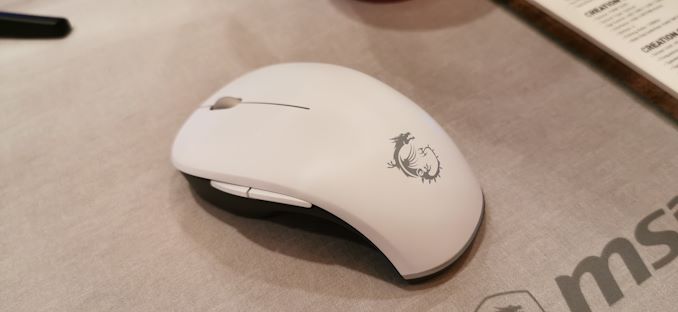
The MSI CM30 mouse is similar in that it features an all-white design with MSI’s Creator silver dragon in the center. The CM30 uses the popular Kailh silent switches which are rated at 5 million clicks and can connect to a system via 2.4 G, or Bluetooth. It features what MSI calls an ergonomic design which is described as being designed for constant use. The sensor of choice for the CM30 is the Pixart PMW3325 optical sensor.


The most interesting feature of the new MSI CH40 wireless earbuds is that it uses Bluetooth 5.0 to mirror the audio across two sets of CH40 earbuds simultaneously.


The MSI CM30 wireless mouse at CES 2020


The MSI CK40 keyboard is set to release with an MSRP of $80, with the CM30 mouse expected to launch at $70. MSI’s CH40 wireless earbuds are expected to retail for $80, with the full-range expected to launch sometime in Q1. One notable point across the CK40, CM30, and CH40 are that they all work with Windows 10, 8, 7, as well as Apples macOS and iOS.


Source: AnandTech – MSI Shows Off New White Creator Peripherals Range

Vulkan 1.2 Specification Released: Refining For Efficiency & Development Simplicity

While the initial fervor over low-level graphics APIs has died down quite a bit since they first hit the scene in the middle of the last decade, API development is still alive and well. In fact in many ways it’s better than ever – now that these APIs are accepted and stable, developers on both sides of the aisle can sink their teeth into the new options provided, and plot where to go in the coming years. All the while OSes like Windows 7 are gone (but not forgotten), and a new generation of consoles is on the horizon. So in many ways, the next couple of years are when everything that has been put into motion over the last decade will finally come to fruition, and the baseline for graphics programming increasingly shifts to these low-level APIs.


The work to do so is never done, of course. Even ignoring developments in graphics hardware itself, there is still plenty going on just in terms of programming. How to better extract the benefits of low-level programming, supporting new developer paradigms, ensuring cross-platform compatibility, etc, are all active topics, especially within the Khronos consortium. The institution of all APIs Open launched its own low-level graphics API back in 2016 with Vulkan, and since then has been continuing to iterate upon Vulkan to improve it. 2018 saw Vulkan 1.1, and now, today, is the formal launch of Vulkan 1.2
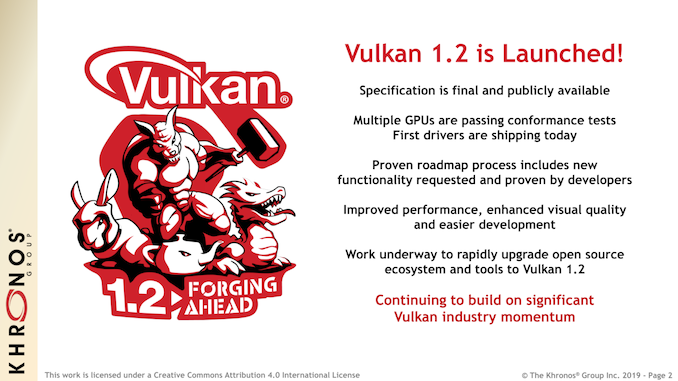


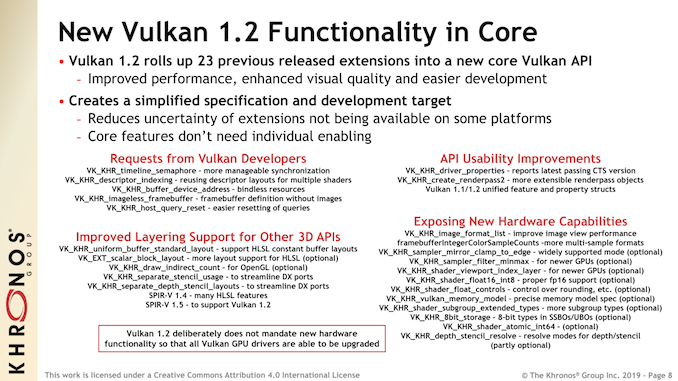
Like most Khronos projects, Vulkan is based on a constant progression of new ideas being suggested, implemented, tested, and finally rolled into the specification proper. As a result, Vulkan is never “done” – there’s always a new extension around the corner – but the sync points that are major releases represent a very important step in the development process. It’s here where extensions finally get their wings, in a sense, and get promoted into the core specification, ensuring their functionality and availability to programmers across all platforms with Vulkan support. So for Vulkan 1.2, today’s update sees the promotion of 23 extensions released in the last couple of years into the core API specification, with widespread availability set to quickly follow.


For better or worse, Vulkan 1.2 is very much a programmer-focused release. The new functionality is significant, as any programmer who has the (mis)fortune of playing with semaphores can tell you, but today’s release isn’t about new hardware features. In fact, Vulkan 1.2 doesn’t mandate any new hardware functionality whatsoever, so it’s purely an in-place API upgrade that can be deployed on any hardware that supports Vulkan 1.1. To be sure, Khronos achieves this in part by making several new API calls optional – things like FP16 shaders – but there isn’t any big, new feature anchoring Vulkan 1.2.
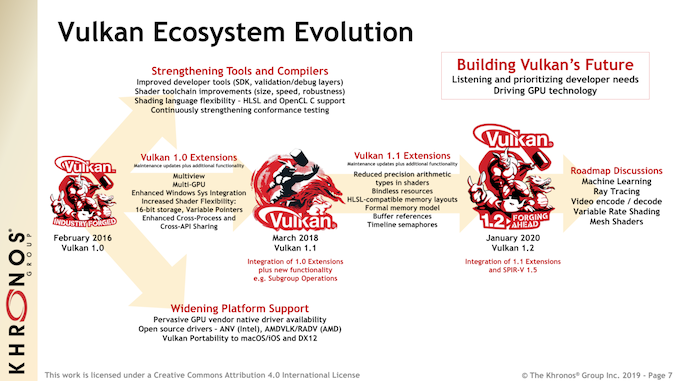


This makes it very geared towards being a quality of life improvement for programmers (and platform owners), all of whom are getting better ways of doing things faster – they just aren’t necessarily getting ways to do new things. For the gaming crowds out there, marquee feature additions such as ray tracing, variable rate shading, and mesh shaders will eventually come, but Vulkan 1.2 is not that kind of release.


Of Semaphores and Shading Languages


As I mentioned earlier, Vulkan 1.2 is largely a quality of life release for programmers. Low level graphics programming is hard, and best practices have continued to evolve over the last 4 years on how to better use Vulkan and similar APIs without being a John Carmack-caliber programmer.


What’s the biggest feature addition for Vulkan 1.2 then? Timeline Semaphores.


In truth, I’ve re-written this section three times over trying to explain at a high-level what semaphores are, and why they’re so important to Vulkan. But semaphores are a distinctly computer science topic, and thus are a distinctly programmer (as opposed to user) topic when talking about Vulkan 1.2.


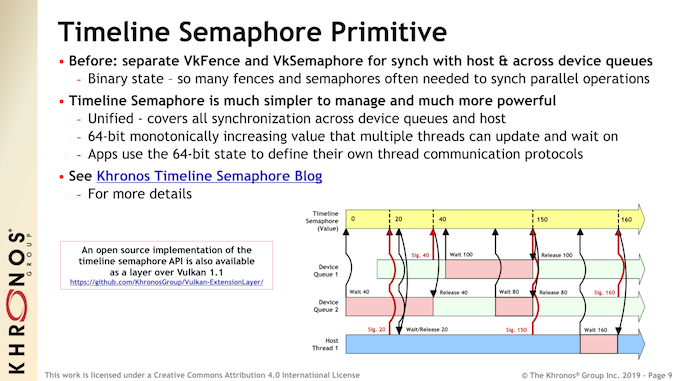
None the less, timeline semaphores are a major development for the API. In a nutshell, semaphores are a way to control access to shared resources and synchronize data across devices and queues; a piece of data to indicate when and how it’s safe to make operations on flagged resources. Vulkan has supported semaphores since its release (VkSemaphore), but as Khronos readily admits, Vulkan’s previous semaphore mechanism kind of sucked. Binary semaphores aren’t very flexible – and in some ways are closer to the good ole’ mutex – and while they certainly work, they can be inefficient.


The solution then is a more robust semaphore mechanism, and that is the timeline semaphore. I won’t attempt to outdo Khronos’s own blog post on the matter, but the advancement here is offering a much larger value for semaphores – 64 bits instead of 1 bit – and then making these new semaphores visible from hosts and devices alike. The end result is that the amount of work programmers have to do to synchronize parallel operations should go down, and similarly the amount of execution time wasted on multiple levels of simple semaphores will be reduced.


Again, the significance of this isn’t in new features, but rather in efficiency for the hardware and the programmer alike. One of the central goals of Vulkan is to enable multithreaded work submission – a limitation that could never be properly solved in OpenGL – so improved semaphores are one such means to make that task even easier. It’s not a feature that will ever be on a game box or in an interview, but if you happen to work around a graphics programmer, perhaps you’ll hear a bit less cursing when it comes to multithreaded programming.


Moving on, the other big focus area for Vulkan 1.2 is on cross portability, both coming in and going out of Vulkan. The API’s development body has been working on the matter of expanded shader language support for a few years now, and with Vulkan 1.2 we’re finally seeing the fruits of their labor with High-Level Shader Language (HLSL) support.
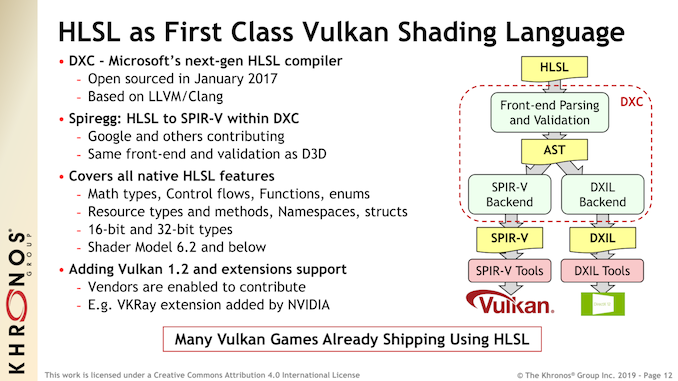


HLSL, as a refresher, is Microsoft’s shader language, which is used for DirectX. Like so many things Khronos versus Microsoft, it sits juxtaposed to Khronos’s own open shader language, GLSL. For obvious reasons, Khronos favors GLSL since they have control over it, but the group is also a pragmatic one: most of the PC space (and even a good chunk of the console space) is ruled by HLSL, and while GLSL isn’t going anywhere, it’s in everyone’s best interests to maximize compatibility with HLSL as well.


The net result is that for Vulkan 1.2, Khronos has achieved full HLSL support, making it a “first class” shading language within Vulkan, right up there with GLSL. Thanks in big part to Microsoft open sourcing their own HLSL compiler (DXC) a few years back, Vulkan 1.2 can support HLSL shader model 6.2 and below, essentially covering all modern hardware outside of ray tracing features. Under the hood, this is all being powered by Vulkan’s native intermediate representation format, SPIR-V, with HLSL being compiled down to SPIR-V code for further use.


The significance of adding HLSL support is two-fold. The first is that it allows for easier porting or the cross-platform development of games between Microsoft platforms – DirectX 12 and the Xbox console family – and everything else Vulkan supports. So whether this means porting a DX12 game to Vulkan or writing your shaders once in HLSL and being able to hit Vulkan PCs and the Xbox all in one go, Vulkan can now handle this situation without having to rewrite (or even heavily re-optimize) a bunch of shaders. And even if portability isn’t the desired goal, if a developer just likes HLSL for their own reasons, they can now use it as a native, full featured shader language within Vulkan.
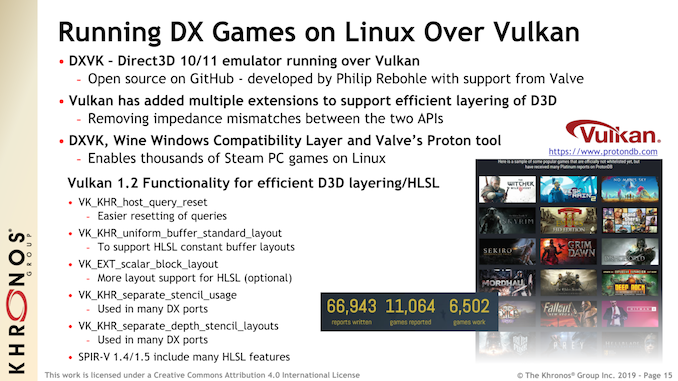


Maximum Portability


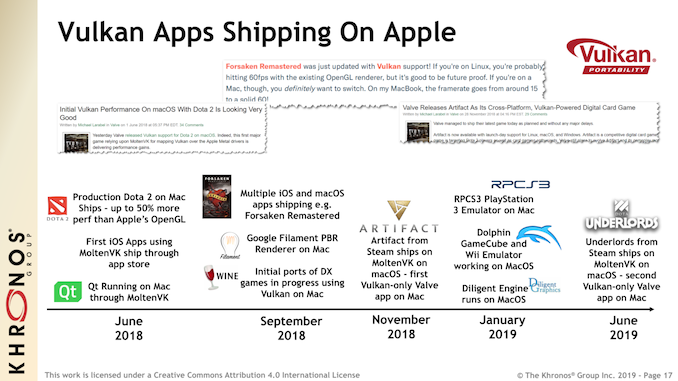
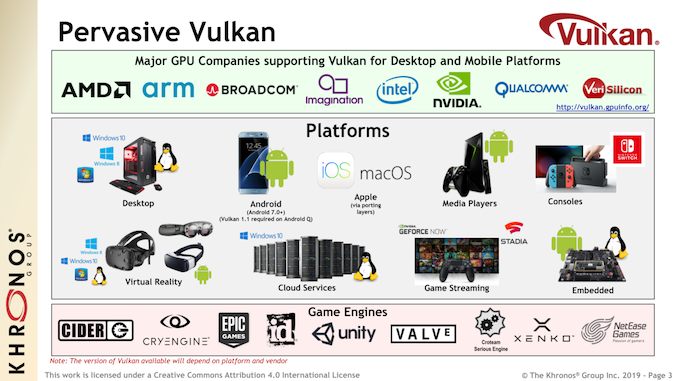
In fact portability as a whole remains one of the big, driving goals for Khronos and the Vulkan board. While the dream of a truly universal API has taken an unfortunate hit, thanks in large part to Apple going entirely proprietary with Metal, Vulkan’s big backers have opted to put their energy into various portability efforts to bridge these gaps, at least where it makes sense. The net result is projects such as DXVK, which is a DirectX emulator running on top of Vulkan and the key enabler of Valve’s Proton compatibility tool. Or to use the Apple example, the MoltenVK runtime library, which allows Vulkan to be used on top of Metal. In both cases Vulkan is being used to provide portability, either as a common target to run proprietary code, or as a common API to run common code on a proprietary platform.


Finally, in a quick note on Vulkan progression in general, Khronos is also using the Vulkan 1.2 launch to make note of where Vulkan use stands with professional application developers. A relationship that can be tenuous at times, professional applications were one of the first uses for OpenGL, and while gaming gets more attention, they are arguably still among the more important uses for the API. For that reason, the developers behind these applications were always going to be slow to make the transition away from tried & true OpenGL to Vulkan, but that time has finally come.


Driving this are a few different factors. The biggest one, perhaps, is Vulkan adding support for more legacy OpenGL features such as hardware line acceleration. Which may sound trivial in an age where GPUs are pushing billions of pixels, but for highly refined CAD programs and the like, this is what these programs are built on top of. And of course, this doesn’t include actual next-generation Vulkan features such as multi-threading, compute, and future hardware features. OpenGL itself is at a dead end – it’s unlikely to see any further feature development – so as new hardware features like ray tracing become available, Vulkan will be the path forward for legacy OpenGL users.


Vulkan 1.2: Shipping Today, Conformance Today, Drivers Today


Wrapping things up, as with previous Vulkan releases, Khronos has played things very conservatively with respect to their development process and when the new specification is being launched. Rather than announcing the new specification and letting hardware vendors catch up, Khronos has worked in tandem with the hardware developers to try to launch Vulkan 1.2 in as useable a state as possible.
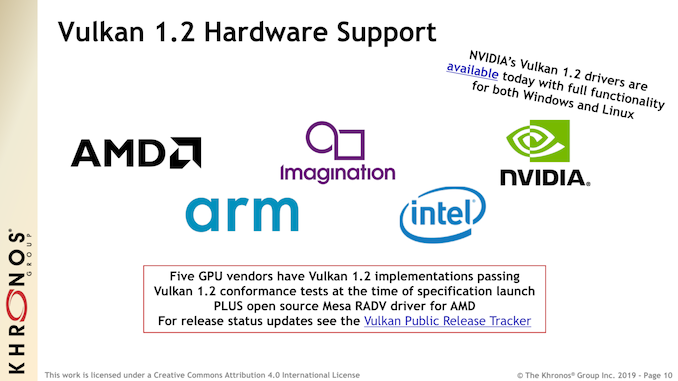


To that end, the Vulkan 1.2 conformance tests are already done, and five vendors – the three PC vendors plus Imagination and Arm – all already have 1.2 implementations that pass the conformance tests. In fact NVIDIA will be doing one better than that, and will have Vulkan 1.2 drivers ready today as a developer beta. So while it will still take some time for Vulkan 1.2 to start showing up in commercial (or at least production-ready) software, the consortium and its members are hitting the ground running.


Source: AnandTech – Vulkan 1.2 Specification Released: Refining For Efficiency & Development Simplicity

The Velocifire VM02WS Wireless Mechanical Keyboard Review: Scratching the Itch For the Office Niche

Following our earlier look at the premium Corsair’s K63 Wireless keyboard, it is only reasonable to check what’s available at the other end of the spectrum – especially since there is very little competition at all. So for today’s review we are taking a look at Velocifire’s VM02WS wireless mechanical keyboard, which is an entry-level keyboard with a competitive price tag.


The keyboard is designed to fit a specific niche of a professional typist who needs a wireless mechanical keyboard. But can the VM02WS exceed its niche and succeed in other popular roles such as couch gaming? Let’s find out.


Source: AnandTech – The Velocifire VM02WS Wireless Mechanical Keyboard Review: Scratching the Itch For the Office Niche

Want a $50k Mac Pro Cheese Grater? Get a $60 PC Cheese Grater!

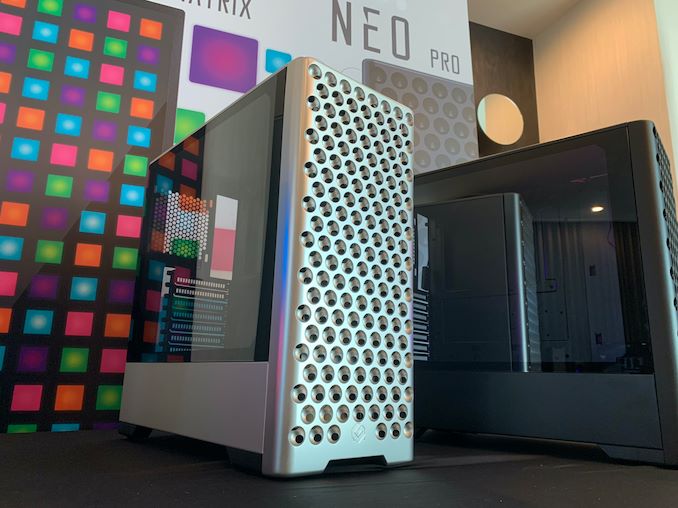
One of the more bemusing aspects of 2019 was the launch of the new Mac Pro. Powered by Intel’s Xeon W CPUs, it offered a range of options such that the most buoyant of budgets could splash out on a fully equipped $50k+ system from the fruit company. The chassis was a doozy: nicknamed the cheese grater, because it had a holey and angled design such that you could grate cheese on it. Some reviewers even did that in there reviews – no joke. The only problem with this case is that it is only available for Macs. Phanteks’ gaming brand, Metallicgear, has the solution if you want it for PC, and it’s much cheaper.


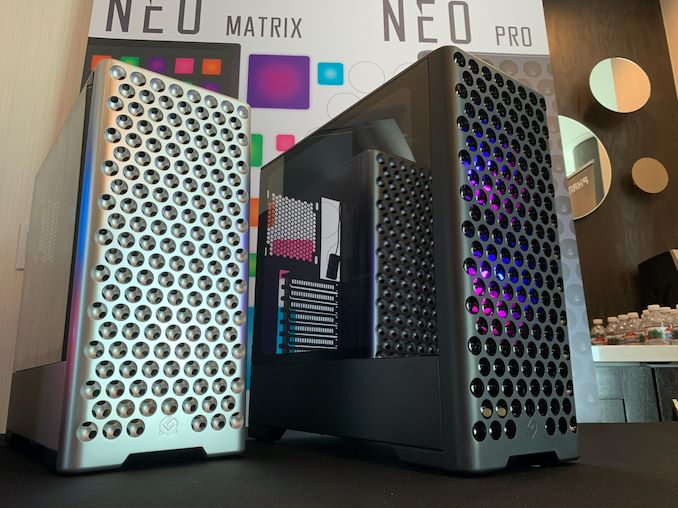
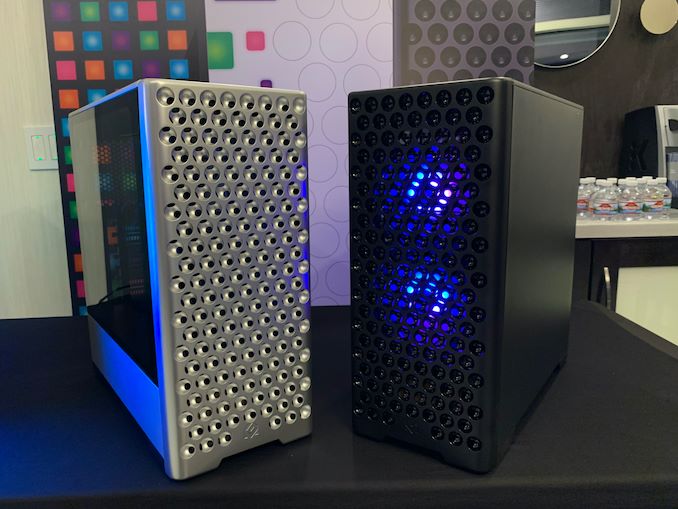
This cheese grater is called the Metallicgear Neo Pro, and currently in the last stage of design before retailing later this year in March/April. The concept from Phanteks has, for lack of a better phrase, turned into a cheap knockoff, intentionally. Apple’s case is machined aluminum for that premium feel – this Neo Pro is by contrast a plastic design, hence its ability to be only $60.


The circular vents are different to the Apple design, and the feel of the material is definitely different. Not only this, but Phanteks is thinking on making a set of wheels for it – a steal at $395 (they’re not actually making wheels, that’s a joke). However at a distance, you would be none the wiser, for at least the first few seconds.


The chassis design fits an ATX motherboard, and the idea is to ship the black model first with two black fans. The side panel is tempered glass, and the power supply bay is covered compared to the rest of the design. The front IO panel is on the top of the case, with two USB ports and audio outputs. More details to come when Phanteks is ready to ship.


Part of me wants this case, just to build a more powerful system in it than the top-end Mac Pro. Either that, or fill it with more than $50k of hardware, just to see if it is possible.


Images provided by Phanteks – ours weren’t that great.


Source: AnandTech – Want a k Mac Pro Cheese Grater? Get a PC Cheese Grater!