Today’s Wordle Hints (and Answer) for Tuesday, December 5, 2023
If you’re looking for the Wordle answer for December 5, 2023 read on. We’ll share some clues, tips, and strategies, and finally the solution. Today’s puzzle is of medium difficulty; I got it in 4. Beware, there are spoilers below for December 5, Wordle #899! Keep scrolling if you want some hints (and then the answer) to today’s Wordle game.

How to play Wordle

Wordle lives here on the New York Times website. A new puzzle goes live every day at midnight, your local time.

Start by guessing a five-letter word. The letters of the word will turn green if they’re correct, yellow if you have the right letter in the wrong place, or gray if the letter isn’t in the day’s secret word at all. For more, check out our guide to playing Wordle here, and my strategy guide here for more advanced tips. (We also have more information at the bottom of this post, after the hints and answers.)

Ready for the hints? Let’s go!


Does today’s Wordle have any unusual letters?

We’ll define common letters as those that appear in the old typesetters’ phrase ETAOIN SHRDLU. (Memorize this! Pronounce it “Edwin Shirdloo,” like a name, and pretend he’s a friend of yours.)

Three of the letters are common; the other two are sort of medium-commonness (no Q or X or anything). 

Can you give me a hint for today’s Wordle?

Think spry and youthful.

Does today’s Wordle have any double or repeated letters?

No doubles or repeated letters today.

How many vowels are in today’s Wordle?

Technically there are only two vowels today (i.e., from A-E-I-O-U). There’s one other “sometimes” vowel.

What letter does today’s Wordle start with?

Today’s word starts with Y.

What letter does today’s Wordle end with?

Today’s word ends with G.

What is the solution to today’s Wordle?

Ready? Today’s word is YOUNG.

How I solved today’s Wordle

No hits on ARISE; got the OU on touch. For a minute here I thought we were into the infamous POUND/BOUND/ROUND territory, but BANDY registered hits on both Y and N. If the Y isn’t at the end, it’s probably at the beginning, so I correctly guessed YOUNG.

Wordle 899 4/6

⬜⬜⬜⬜⬜
⬜🟩🟩⬜⬜
⬜⬜🟨⬜🟨
🟩🟩🟩🟩🟩

A primer on Wordle basics

The idea of Wordle is to guess the day’s secret word. When you first open the Wordle game, you’ll see an empty grid of letters. It’s up to you to make the first move: type in any five-letter word. 

Now, you can use the colors that are revealed to get clues about the word: 

  • Green means you correctly guessed a letter, and it’s in the correct position. (For example, if you guess PARTY, and the word is actually PURSE, the P and R will be green.)

  • Yellow means the letter is somewhere in the word, but not in the position you guessed it. (For example, if you guessed PARTY, but the word is actually ROAST, the R, A and T will all be yellow.)

  • Gray means the letter is not in the solution word at all. (If you guessed PARTY and everything is gray, then the solution cannot be PURSE or ROAST.)

With all that in mind, guess another word, and then another, trying to land on the correct word before you run out of chances. You get six guesses, and then it’s game over.

The best starter words for Wordle

What should you play for that first guess? The best starters tend to contain common letters, to increase the chances of getting yellow and green squares to guide your guessing. (And if you get all grays when guessing common letters, that’s still excellent information to help you rule out possibilities.) There isn’t a single “best” starting word, but the New York Times’s Wordle analysis bot has suggested starting with one of these:

  • CRANE

  • TRACE

  • SLANT

  • CRATE

  • CARTE

Meanwhile, an MIT analysis found that you’ll eliminate the most possibilities in the first round by starting with one of these:

  • SALET

  • REAST

  • TRACE

  • CRATE

  • SLATE

Other good picks might be ARISE or ROUND. Words like ADIEU and AUDIO get more vowels in play, but you could argue that it’s better to start with an emphasis on consonants, using a starter like RENTS or CLAMP. Choose your strategy, and see how it plays out.

How to win at Wordle

We have a few guides to Wordle strategy, which you might like to read over if you’re a serious student of the game. This one covers how to use consonants to your advantage, while this one focuses on a strategy that uses the most common letters. In this advanced guide, we detail a three-pronged approach for fishing for hints while maximizing your chances of winning quickly.

The biggest thing that separates Wordle winners from Wordle losers is that winners use their guesses to gather information about what letters are in the word. If you know that the word must end in -OUND, don’t waste four guesses on MOUND, ROUND, SOUND, and HOUND; combine those consonants and guess MARSH. If the H lights up in yellow, you know the solution.

One more note on strategy: the original Wordle used a list of about 2,300 solution words, but after the game was bought by the NYT, the game now has an editor who hand-picks the solutions. Sometimes they are slightly tricky words that wouldn’t have made the original list, and sometimes they are topical. For example, FEAST was the solution one Thanksgiving. So keep in mind that there may be a theme.

Wordle alternatives

If you can’t get enough of five-letter guessing games and their kin, the best Wordle alternatives, ranked by difficulty, include:


Source: LifeHacker – Today’s Wordle Hints (and Answer) for Tuesday, December 5, 2023
Today's NYT Connections Hints (and Answer) for Tuesday, December 5, 2023
Today’s puzzle is only a little bit tricky. If you’re looking for the Connections answer for Tuesday, December 5, 2023, read on—I’ll share some clues, tips, and strategies, and finally the solutions to all four categories. Along the way, I’ll explain the meanings of the trickier words and we’ll learn how everything fits together. Beware, there are spoilers below for December 5, NYT Connections #177! Read on if you want some hints (and then the answer) to today’s Connections game. 

If you want an easy way to come back to our Connections hints every day, bookmark this page. You can also find our past hints there as well, in case you want to know what you missed in a previous puzzle.

Below, I’ll give you some oblique hints at today’s Connections answers. And farther down the page, I’ll reveal the themes and the answers. Scroll slowly and take just the hints you need!

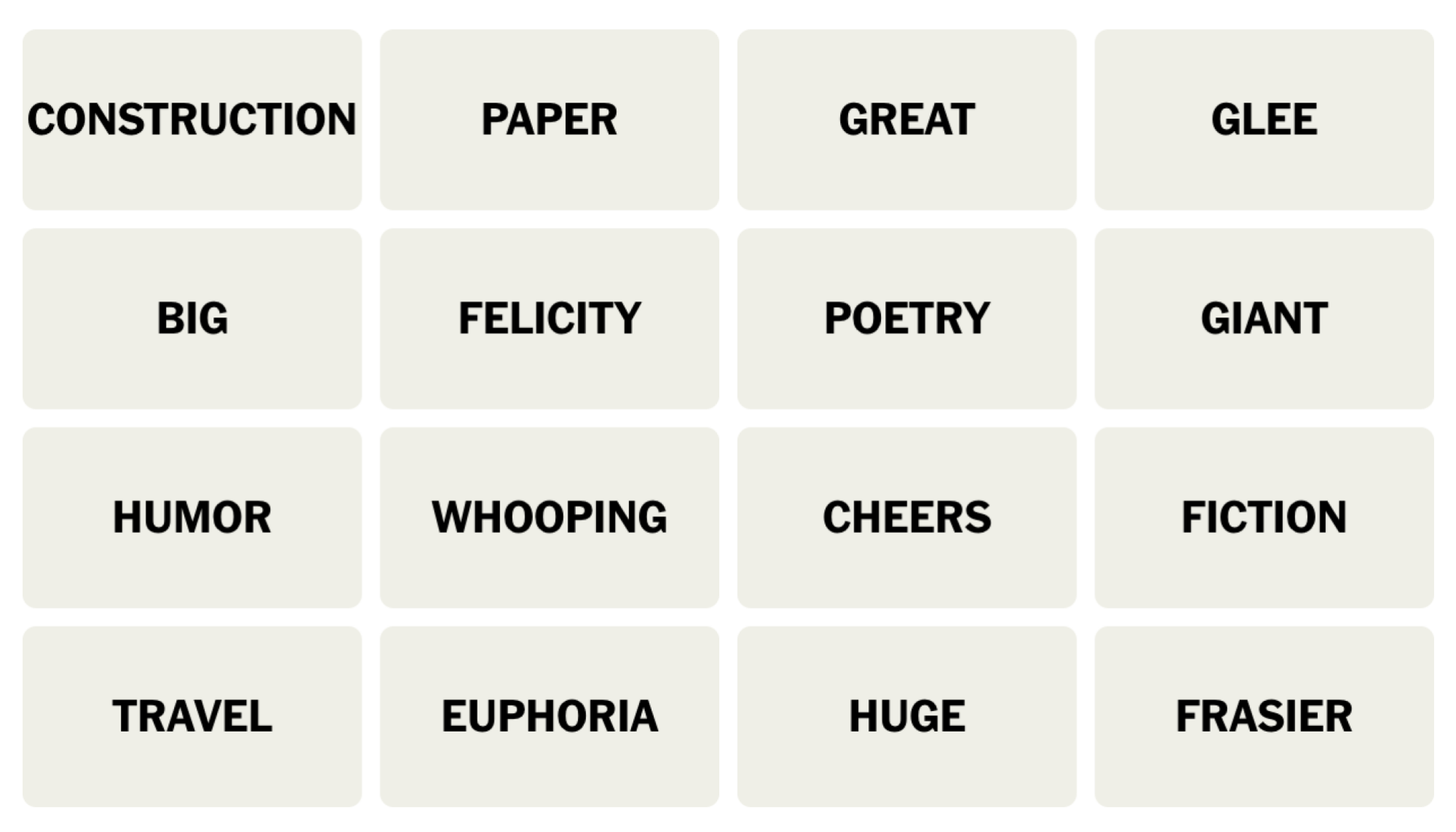
NYT Connections board for December 5, 2023: CONSTRUCTION, PAPER, GREAT, GLEE, BIG, FELICITY, POETRY, GIANT, HUMOR, WHOOPING, CHEERS, FICTION, TRAVEL, EUPHORIA, HUGE, FRASIER.

Credit: Connections/NYT


Does today’s Connections game require any special knowledge?

Recognizing a few TV shows and characters will help you. 

Hints for the themes in today’s Connections puzzle

Here are some spoiler-free hints for the groupings in today’s Connections:

  • Yellow category – Massive.

  • Green category – Literature.

  • Blue category – Happy.

  • Purple category – Something tall. 

Does today’s Connections game involve any wordplay?

There’s a fill-in-the-blank again, connecting disparate items with the same word in their name. 

Ready to hear the answers? Keep scrolling if you want a little more help.


BEWARE: Spoilers follow for today’s Connections puzzle!

We’re about to give away some of the answers. Scroll slowly if you don’t want the whole thing spoiled. (The full solution is a bit further down.)

What are the ambiguous words in today’s Connections?

  • FRASIER, FELICITY, CHEERS, and GLEE are all TV series, but one of these things is meant to represent a TV character and belongs in a different category than the rest.

  • Good HUMOR might seem to go with EUPHORIA, but today you’ll want to think about HUMOR as a category of writing, much like POETRY. 

  • CONSTRUCTION and PAPER do not go together.

  • GREAT and GIANT do.

What are the categories in today’s Connections?

  • Yellow: ENORMOUS

  • Green: BOOKSTORE SECTIONS

  • Blue: TV SHOWS WITH HAPPY-SOUNDING NAMES

  • Purple: ____ CRANE

DOUBLE BEWARE: THE SOLUTION IS BELOW

Ready to learn the answers to today’s Connections puzzle? I give them all away below.

What are the yellow words in today’s Connections?

The yellow grouping is considered to be the most straightforward. The theme for today’s yellow group is ENORMOUS and the words are: BIG, GIANT, GREAT, HUGE.

What are the green words in today’s Connections?

The green grouping is supposed to be the second-easiest. The theme for today’s green category is BOOKSTORE SECTIONS and the words are: FICTION, HUMOR, POETRY, TRAVEL.

What are the blue words in today’s Connections?

The blue grouping is the second-hardest. The theme for today’s blue category is TV SHOWS WITH HAPPY-SOUNDING NAMES and the words are: CHEERS, EUPHORIA, FELICITY, GLEE

What are the purple words in today’s Connections?

The purple grouping is considered to be the hardest. The theme for today’s purple category is ____ CRANE and the words are: CONSTRUCTION, FRASIER, PAPER, WHOOPING.

How I solved today’s Connections

WHOOPING is either the cough or the crane, and the crane makes a lot more sense. There’s FRASIER Crane, a CONSTRUCTION crane, origami PAPER cranes. 🟪 GIANT, GREAT, HUGE, and BIG must go together, and they do. 🟨

Next I group HUMOR, GLEE, CHEERS, and EUPHORIA without looking closely at the remaining words. I am one away! And that’s when I realize HUMOR belongs with POETRY, TRAVEL, and FICTION as types of writing 🟩 and my happiness group has FELICITY instead. 🟦

Connections 
Puzzle #177
🟪🟪🟪🟪
🟨🟨🟨🟨
🟩🟦🟦🟦
🟩🟩🟩🟩
🟦🟦🟦🟦

How to play Connections

I have a full guide to playing Connections, but here’s a refresher on the rules:

First, find the Connections game either on the New York Times website or in their Crossword app. You’ll see a game board with 16 tiles, each with one word or phrase. Your job is to select a group of four tiles that have something in common. Often they are all the same type of thing (for example: RAIN, SLEET, HAIL, and SNOW are all types of wet weather) but sometimes there is wordplay involved (for example, BUCKET, GUEST, TOP TEN, and WISH are all types of lists: bucket list, guest list, and so on).

Select four items and hit the Submit button. If you guessed correctly, the category and color will be revealed. (Yellow is easiest, followed by green, then blue, then purple.) If your guess was incorrect, you’ll get a chance to try again.

You win when you’ve correctly identified all four groups. But if you make four mistakes before you finish, the game ends and the answers are revealed.

How to win Connections

The most important thing to know to win Connections is that the groupings are designed to be tricky. Expect to see overlapping groups. For example, one puzzle seemed to include six breakfast foods: BACON, EGG, PANCAKE, OMELET, WAFFLE, and CEREAL. But BACON turned out to be part of a group of painters along with CLOSE, MUNCH, and WHISTLER, and EGG was in a group of things that come by the dozen (along with JUROR, ROSE, and MONTH). So don’t hit “submit” until you’ve confirmed that your group of four contains only those four things.

If you’re stuck, another strategy is to look at the words that seem to have no connection to the others. If all that comes to mind when you see WHISTLER is the painting nicknamed “Whistler’s Mother,” you might be on to something. When I solved that one, I ended up googling whether there was a painter named Close, because Close didn’t fit any of the obvious themes, either.

Another way to win when you’re stuck is, obviously, to read a few helpful hints–which is why we share these pointers every day. Check back tomorrow for the next puzzle!


Source: LifeHacker – Today’s NYT Connections Hints (and Answer) for Tuesday, December 5, 2023
These Beats Headphones Are up to 50% Off Right Now

Amazon has been having a great sale on Beats headphones since Black Friday, and some of them are still active despite Cyber Monday already being over. Right now, you can still nab Beats headphones for up to 50% off. That’s not quite as low in price as they were for Black Friday, but it’s still a great deal.

Beats Solo3 headphones are 50% off

If you’re still trying to take advantage of the holiday deals, consider the Beats Solo3, which are 50% off at $99.99 (originally $199.95). This is the cheapest they’ve ever been and matches the deals offered on Black Friday, according to Camelcamelcamel’s price history. These headphones give you up to 40 hours of listening time with fast charging (3 hours of playtime with just a 5-minute charge) and have a microphone so you can take calls with them. Remember that Apple bought Beats, so there are Apple features like seamless Bluetooth connections to Apple Watch, iPad, and Macs, as well as easy Siri activation with the on-ear controls. You can read the full Beats Solo3 PCMag review here.

The Beats Studio Buds are $50 off

For those who want noise-cancelling earbuds, the Beats Studio Buds for $99.95 (originally $149.95) are a good pick. The earbuds are just $10 more than they were on Black Friday, according to Camelcamelcamel’s price history, and still a great deal. These earbuds are very well-priced for active noise cancellation (ANC). According to PCMag’s review, they also have a strong bass with crisp and balanced highs. You’ll also like the easy-to-use on-ear controls and one-touch pairing with Android and iOS. You can expect about 5 hours with ANC on and 8 hours with ANC off, plus an additional 10 hours with the charging case.

Beats Powerbeats Pro are $70 off

If you’re looking for more outdoor and sweat-resistant earbuds that you can take to the gym with you, consider the Powerbeats Pro for $179.95 (originally $249.95). These earbuds hit $150 during Black Friday, according to Camelcamelcamel’s price history, but are still a good deal at the current price. These earbuds give you 1 more hour of listening time than the Studio Buds, for a total of 9 hours. Keep in mind that these earbuds have no ANC, but they have spatial audio, which creates a neat surround-sound effect. Some other features, like audio sharing, allow you to pair the earbuds with other Beats or AirPods to an iPhone and listen to the same media. You can also use the “locate my device” feature to find your earbuds if you are prone to misplacing them. You can read the full PCMag review here.


Source: LifeHacker – These Beats Headphones Are up to 50% Off Right Now

The Google Pixel 7 Pro Is on Sale for Its Lowest Price Ever

The Google Pixel 7 Pro was recently eclipsed by the Google Pixel 8 in October, meaning, this holiday season, you’ll see the Pixel 7 Pro at its lowest price yet. The first retailer to do just that is none other than Woot, Amazon’s subsidiary online retailer. Until Dec. 9, or while Pixels last, Woot is selling new, 256GB unlocked Google Pixel 7 Pros for $599 (originally $999).

Keep in mind that Woot only ships to the 48 contiguous states in the U.S. If you have Amazon Prime, you get free shipping; otherwise, it’ll be $6 to ship.


Get these Pixel 7 Pro essentials:

It would be a shame if you dropped your new Pixel 7 Pro right out of the box :


Get the Pixel 7 Pro $100 cheaper than Black Friday

For those who didn’t buy a new cell phone during the Black Friday and Cyber Monday deals, I have good news for you: Woot’s current deal for the Pixel 7 Pro is the best one yet. During Black Friday and Cyber Monday, you could only get the 256GB version for $699 from Best Buy or Amazon, which was, at the time, the lowest price it had ever been. But Woot’s current deal is even better, according to Honey’s price history.

At its current price, you can get the 7 Pro for the same price that Amazon is selling the Pixel 7, making this a no-brainer deal. You should not consider the Pixel 7 when you can get the Pro version for the same price. You can see some of their main differences in our breakdown here. If you are considering switching to the Pixel 7 Pro, make sure to transfer your Google Authenticator codes before factory resetting your old phone. Also, keep in mind that if your phone breaks, you can now fix it yourself to save yourself a good chunk of money. You can read the full Pixel 7 Pro review from PCMag here.


Source: LifeHacker – The Google Pixel 7 Pro Is on Sale for Its Lowest Price Ever

How That Viral Wedding Dress Photo Showed a Bride In 3 Different Poses Simultaneously

Over the weekend, some parts of the internet were fixated on figuring out why an otherwise normal photo of a bride trying on wedding dresses turned out so bizarre.

At first glance, there’s nothing strange about the image—simply a bride standing in front of two mirrors in a wedding dress. However, if you look closely at the bride and both mirrors, you’ll see she’s striking in a different pose in all three locations, all within the same photo.

The bride in question, Tessa Coates, took to her socials to ask the internet for an explanation. Coates swore the photo was just a normal snapshot taken on an iPhone 12, with no added effects or features like Live Photo or panoramic. She even shared a screenshot of the metadata of the photo as proof:

With all this in mind, the situation was a bit of a stumper. How could a standard photo capture three different poses at once? Coates shared on her story that she visited an Apple Store, where a Genius told her that it was the result of the iPhone taking multiple frames at once, then intelligently stitching them together. That is, for simplicity’s sake, how an iPhone takes HDR photos, however, it doesn’t seem to be the cause here. MKBHD writer and researcher David Imel didn’t even think the photo was real, poking holes in HDR theory, as the process happens way too fast to allow for photographing multiple poses.

Spoiler alert: It was panoramic mode all along

However, the case seems to have been solved. Faruk from the YouTube channel iPhonedo highlighted that the resolution of the photo (3028 x 3928) isn’t the standard resolution of an iPhone 12 image. When Faruk took a photo on his iPhone 12, the resolution comes back as 3024 x 4032. A small difference, but the clue Faruk needed to figure out what was going on. He correctly identified this resolution as being a panoramic photo after all, even though the photo wasn’t labeled as “Pano” as they usually are. As it turns out, if you don’t move the iPhone enough when taking a panoramic shot, it won’t label the photo as Pano. Go figure.

Panoramic shots work by taking a lot of photos in succession as you move the camera from left to right. It then stitches those photos together, to create the illusion of one long image. So, based on Faruk’s theory, what most likely happened here was Coates’ photographer actually took the photo in Pano mode, but didn’t move the camera enough to register as as panoramic photo. However, they moved it just enough to take multiple photos of the scene, including Coates in three different poses. The left mirror was captured first, then Coates herself, then, finally, the mirror on the right.

You should be able to replicate the situation yourself, at least with one mirror. If you place your subject in the frame with at least one mirror to their side, switch to Pano mode in the camera app, then take a photo slightly moving the phone left to right, the subject in the mirror should look different than they do themselves.

On to the next internet mystery.


Source: LifeHacker – How That Viral Wedding Dress Photo Showed a Bride In 3 Different Poses Simultaneously

The Best Apps for Improving Memory

Whether you want to improve your memory for everyday life, school, or work, it’s kind of hard to know where to start. After all, memory is kind of mushy and not a traditional “hard skill” like coding. In general, I recommend outsourcing everything possible to your phone. Why not use your smart device to enhance your original smart device, your brain?

There are many apps out there that purport to beef up your memory skills, though research on whether they work has been spotty and conclusions about efficacy are pretty limited. One thing we do know is that they’re not going to magically cure major cognitive decline. Still, if a few puzzles a day help you feel better and get your gears going, it could be worth a download just to get that rush. Apps are just one of many ways to get a little brain boost, but below are some of the better ones out there.

Old reliable: Lumosity

Lumosity is the app that crops up most often when you’re looking for a tech tool to improve your memory and overall thinking power. Basic functionality is free, but to unlock all the features—and there are a lot of features—you’re looking at $15 per month. You can pick a track to focus on, from memory to attention to processing speed, among others, and play games once a day to improve your skills. The app even allows you to track not only your own progress, but your progress against others, in case you’re into a more competitive element. 

For customizable content: Elevate

Elevate advertises itself as “your personal brain trainer” and makes good on that by making its content pretty customizable. You take a pre-test to determine your skill levels in reading, writing, speaking, and math, then get an “Elevate Proficiency Quotient” to represent your proficiency. You can play three games per day for free, but there are over 40 games you can access if you pay $4.99 per month. Some games can even be downloaded for offline use, so if you spend a lot of time on planes or subways, you can use your commutes to your (brain’s) advantage. 

To compete with friends: CogniFit Brain Fitness

CogniFit makes a big deal of its games being designed by neuroscientists and its product being “trusted by doctors.” That’s great. But you know what’s also great? Beating your friends at stuff. CogniFit allows you to compete against other people (and has nearly 5 million users already), plus get detailed insights into your own cognitive strengths and weaknesses, from contextual memory to hand-eye coordination. You can play four games for free, but beyond that you’ll have to pony up $13 per month. 

To spend no money: Brain Games

If you want to improve your cognitive skills without taking a toll on your wallet, consider Brain Games, which is ad-supported and doesn’t even ask you to create an account when you download it. It’s only available on Android, but it features enough games and features that you can complete three tasks a day for a month. The levels get harder as you go and you can even compete against other users. 

To remember specific things: Eidetic

The other apps on this list are for enhancing your memory overall, but why not practice that with things you actually need to remember? Enter Eidetic, which uses spaced repetition to help you remember anything from account numbers to long quotes. The app takes care of the “spaced” part of the repetition for you, sending you push alerts whenever it’s time to review. It’s also free!


Source: LifeHacker – The Best Apps for Improving Memory

How to Reset Your Windows PC for a Fresh Start

Resetting your Windows PC can be a good way to clear out old junk files and help troubleshoot technical issues your computer is experiencing. In the past, you used to have to rely on physical disk media and ISO files to reinstall Windows. Now, though, Microsoft has made it much easier—you can reset your PC to get a fresh start, directly from the operating system and without completely reinstalling Windows. Here’s how to do it.

How to reset a Windows 11 PC

Reseting a Windows 11 PC only requires a few steps. Microsoft offers two options for resetting your PC—you can keep your files, which makes the process easier, or you can delete everything. If you want to delete everything and start completely fresh, make sure to back up any important files to an external drive and/or to your preferred cloud service before getting started.

Once you have everything backed up, go to Start > Settings > System > Recovery and then select Reset this PC.

At this point, you’ll be faced with the two options I mentioned before. If you want to keep your files and just reinstall Windows, choose Keep my files, select your preferred storage option (cloud or local), and change any other settings you see that you want to change. (If you aren’t sure about a setting, leave it set to default.) When you’re ready to continue, set Restore preinstalled apps to no and then continue through the process. If you don’t see Restore preinstalled apps in the settings, it means your PC didn’t come with any preinstalled apps that you can configure.

The process for wiping everything is pretty much the same, though you’ll have to confirm that you do indeed want to wipe all your files before continuing. Now all you need to do is let Windows complete the process, and then run through the setup to get everything back to where you want it.

How to reset a Windows 10 PC

Depending on which version of Windows 10 you are running, you will have to go about this process a little differently.

If you’re running a version of Windows 10 that is older than version 2004, you’ll need to utilize the Fresh Start option. Start > Settings > Update & security > Windows Defender > Device performance & health > Fresh Start. Next, select Additional info, then hit Get Started and follow the settings here.

If you’re running a version of Windows 10 that is newer than version 2004, follow these steps:

Start > Settings > Update & Security > Recovery > Reset this PC > Get Started. Select Keep my files if you want to start over with all your files still saved, or backup all your important files beforehand and choose to delete everything. Make sure to change Restore preinstalled apps to No and then click continue to finish the process and reset your PC.


Source: LifeHacker – How to Reset Your Windows PC for a Fresh Start

A Raclette Party Is Exactly What You Need This Winter

I haven’t met a winter food tradition I didn’t like—gingerbread cookies, plum pudding, roasting chestnuts on the not-so-open fire of my oven—but it’s possible that I’ve finally met my favorite: the raclette dinner. The winter tradition of griddling Raclette cheese is interactive, satisfying, communal, and a treat for cheese fans. Make a night of it with family and friends this holiday season and settle in for some quality time, which is always better with melty cheese.

Over the weekend, I went to my first raclette dinner. It was the coziest and cheesiest way to spend an evening with friends. You may have seen raclette on your Instagram or TikTok feed in the form of a half-wheel of cheese bubbling and browning under a close heating element. An anonymous hand tilts the wheel and scrapes the charred surface, and an impossible gooey glob of cheese slides off the wheel and piles onto a plate, sandwich, or French fries. Like much of social media, it comes off as excessive, like it was created purely for a food shock factor, but raclette is a tradition that has been enjoyed for far longer than the internet box in your hand.

What is raclette?

Raclette is a cow’s milk cheese that has the wonderful ability to melt into a saucy puddle, but it’s also the name of an entire dish. The meal, originating in the Alpine regions of France, Switzerland, and Italy, exhibits the extraordinary melting power of the eponymous cheese. You melt the cheese with direct heat from a nearby flame, or nowadays maybe an electric heating element. Scrape it onto boiled potatoes, cured meats, cornichons, or break away from tradition and scrape the liquified cheese mound onto veggies, pasta, or the closest sandwich. 


Products to consider:


You could enjoy raclette at a restaurant, but it’s much more fun to do it at home with a group of friends or family. Don’t worry, you don’t need a fireplace, and you don’t need to hold a wedge of cheese over your electric stove. There are fantastic raclette grills you can buy that include a flat cooking surface and small, non-stick, angled scoops for you to melt slabs of raclette (like the ones above). There’s a heating element that runs underneath the griddle top and above the raclette scoops, so you can heat up meats or veggies and melt the cheese simultaneously. There are also models that only heat up the cheese scoops from the bottom but you won’t get a browned and bubbled surface with this kind. You can buy an eight-person set for entertaining, or a smaller two-scoop griddle for a constant flow of melted raclette on solo-cheese nights. 

Raclette like you mean it

You can buy wedges of Raclette at specialty cheese stores, but you can also find it at Trader Joes during the winter months. To enjoy raclette at home, add quarter-inch thick slices of the cheese to the metal scoops of your electric griddle set. Place the scoop under the heating element and let it cook while you gather slices of salami, cornichons, onions, and boiled potato hunks onto your plate. In the time that it takes you to do this, about two minutes, the cheese will be a puddle in the bottom of the scoop. Leave it for a minute longer and you’ll notice a crusty, browned surface bubbling up on the cheese. I love the crisp and chewy texture that develops on the cheese after extra time under the heat, so I leave it for extra time. Remove the non-stick scoop from the heater and slide the melted Raclette over your dish of hearty nibbles. There’s no need for a scraper really, the cheese surfs out of the scoop with no more than a tilt and shake.

You could certainly enjoy it year round, but raclette is usually a cold-weather treat. In many regions, this particular cheese is only widely available during the winter, and since melting it requires consistent intense heat, the immediate space tends to heat up. Raclette makes me think of chunky sweaters, mulled wine, and any edible vehicle for cheese. I can see this being the perfect centerpiece activity for Christmas Eve or New Year’s Eve, or any time you want to while away until the wee hours of the morning snacking and chatting with the people you love.


Source: LifeHacker – A Raclette Party Is Exactly What You Need This Winter

You Need Leak Detectors in Your Home, and More Than You Think

Water is humanity’s frenemy. Sure, the stuff is necessary for life and it’s fun to go swimming in, but water is also tirelessly seeking to destroy your property. When you think of the threat that water poses to your existence you might think of drowning and hurricanes, but in many cases the real threat is coming from inside the house; water damage makes up almost a quarter of all insurance claims in the U.S., causing an average of $12,514 in damage.

And that’s if your insurance covers it—most policies only cover water damage caused by sudden emergencies, like a burst pipe. They won’t cover storm-driven water damage, and they won’t cover damage done by a slow, methodical leak.

Those slow leaks can do just as much damage as a flood, eating away at the hidden areas of your home; by the time the leak becomes obvious it’s too late to do anything except rip everything out and replace it. The best way to defend your home from this kind of sneaky (and hella expensive) water damage is leak detectors. And when it comes to leak detectors, the rule of thumb is “the more the merrier.”

Leak detectors

Leak detectors are simple but effective—detecting moisture and triggering an alarm. You can buy dumb ones that simply make a lot of noise when they touch water, or you can buy smart ones that sound an alarm and alert you via text, email, or a connected app. You can also pair many smart leak detectors with automatic shutoff valves that will turn off the water supply when a leak is detected.

These devices can save you a lot of money and trouble because they alert you the moment water appears where it shouldn’t so you can turn off the water and immediately take steps to reduce the damage. That’s incredibly important—but just as important is where to place those leak detectors, because they can’t help you if they’re not in the right places. And you need them in more locations than you think.

Where to place leak detectors

Water leaks can happen in a lot more areas of your home than you might initially think:

  • Water heater. One of the most common sources of water leaks in the home is a traditional tank-type water heater. These appliances typically last about a decade, and when they fail they often leak. Since they continuously refill, that leak can do damage for weeks or even months before it’s noticed.

  • Crawlspace/basement. The spaces under your house are often ignored for long periods (especially if they’re unfinished), so water infiltration from appliances or groundwater can go on for a long time before it’s noticed. Leak detectors placed strategically around crawlspaces or basements—near drains and sump pits especially—can alert you immediately if water is building up under your home.

  • Garage. Failing weather stripping and incorrect grading can lead to regular floods in your garage, which can erode your floor and damage your stuff.

  • Toilets. Slow leaks from faulty water lines or imperfect seals at the flange can sip water into your floors, rotting wood and destroying tile or other flooring materials. This can go on for a long time in guest or basement bathrooms that don’t get used much.

  • Under sinks. Every sink in your home is a potential water damage hotspot. A leaking drain or trap under the sink can rot out cabinets and potentially damage floors and walls as well.

  • Dishwasher. A sensor under the dishwasher will alert you the moment your dishwasher starts to leak, as opposed to months later when the damage starts to spread throughout your kitchen floor.

  • Refrigerator. If your refrigerator has a water line and/or an ice maker, it could start leaking water at any time. Aging refrigerators can also cause water damage if the defrost drain becomes clogged, and if your fridge stops working, the melt-off from the freezer can result in a small-scale flood that can do major damage to your floors.

  • Laundry. There are a lot of ways your washing machine can silently betray you. If it’s an older model, it can rust and leak every time it runs. The hose connection to the water supply can fail and start to leak, or the drain pipe can become clogged and overflow. Since laundry facilities are often installed in tight spaces, the problem may not be visually obvious for some time.

  • Roof. All roofs eventually fail, and many roof leaks start off as subtle, gradual problems that rot the decking. Placing leak detectors in attics or inside the ceilings of rooms directly under the roof can give you a little early warning that your roof has stopped roofing.

  • Boiler/Radiators. If you have a hot water heating system that employs a boiler and radiators, you have water moving through the walls of your home all the time—and leaks can occur at any point along the system. A leak detector under your boiler and near each radiator can help warn you the moment a problem begins.

  • Fish tanks. An enormous container of standing water in your home? Better to know that a tank has cracked or that your cat has gone fishing and knocked it over immediately instead of several hours later.

  • HVAC. Air conditioning systems can leak for a variety of reasons. Clogged drain tubes can back up water into the house, so having a detector under the drip pan to detect overflows can save you a lot of headaches—and alert you that your AC system needs maintenance.

Water can get into your house in a lot of ways, and liberal use of leak detectors can provide just enough warning for you to avoid costly repairs. But they can only help if you deploy them—and enough of them.


Source: LifeHacker – You Need Leak Detectors in Your Home, and More Than You Think

You Don't Own the Digital Shows and Movies That You 'Bought'

The way we purchase movies and TV shows has changed a lot since the invention of home video. In fact, these days, many of us don’t buy anything at all, and stream all our content instead. Still, there are plenty who prefer to buy their entertainment, with a subsection happy to do so digitally. After all, with disc-less devices like Apple TVs and Fire Sticks all the rage, it’s the most convenient way to buy your media.

However, there’s a major catch that many don’t realize when they put their digital card down: You don’t actually own any of the digital movies and TV shows you buy.

PlayStation is the latest to remove titles from buyers’ libraries

Sony recently posted a “legal update notice” on the PlayStation site. That might not normally move headlines, but this time is different: In the notice, Sony outlines hundreds of Discovery-branded shows you will no longer be able to access starting Dec. 31:

As of 31 December 2023, due to our content licensing arrangements with content providers, you will no longer be able to watch any of your previously purchased Discovery content and the content will be removed from your video library.

We sincerely thank you for your continued support.

Thank you,

PlayStation Store

Hey, at least they thanked us for our support.

Is there a refund involved, at least? Nope. If you purchased any of this content on the PlayStation Store in the past, you simply lose both the content and your money at the end of the year. Whether it’s Breaking Amish, Cake Boss, or Mythbusters, you better rewatch your favorite shows now, because you’ll lose access to them before 2024.

If you’re pissed off, I don’t blame you. If you’re scared for the rest of your PlayStation Store content, I don’t blame you. Sony certainly didn’t make it clear when you make a TV or movie purchase that, hey, if we lose the licensing rights to this thing you’re buying, not only will it disappear from the store, we’ll remove it from your PlayStation. Of course, you can’t actually buy shows and movies on your PlayStation anymore, as Sony shuttered the service back in 2021, so you might think you need to look elsewhere for buying shows and movies anyway.

The problem is, you’re not better off buying your digital shows and movies from other platforms, like Amazon, Apple, or Google. Sadly, this issue affects all platforms who sell digital media: Nowhere is safe.

You don’t own digital shows and movies

Here’s the unfortunate truth: Whether you buy The Dark Knight from Amazon, or Community: Season 1 on Google, the digital media you “purchase” isn’t really yours. You don’t own it, and neither does the platform you bought it from. What you’re paying for is the right to watch that content for as long as the provider has the right to host it. As soon as their licensing agreement with the company that actually owns the content expires, and the platform doesn’t renew it, the platform loses the right to “sell” it, and, subsequently, you lose the right to watch it. No refunds, no discounts on future purchases, just a lighter wallet.

As frustrating as it is, we all technically agree to this arrangement when we make a purchase. You find some language outlining these conditions in the terms of service for any platform that doesn’t actually own the content they’re selling. Take Amazon Prime Video, for example. Scroll through their TOS, and you’ll this:

i. Availability of Purchased Digital Content. Purchased Digital Content will generally continue to be available to you for download or streaming from the Service, as applicable, but may become unavailable due to potential content provider licensing restrictions or for other reasons, and Amazon will not be liable to you if Purchased Digital Content becomes unavailable for further download or streaming.

Google’s TOS says something similar:

In certain cases (for example if Google loses the relevant rights, a service or Content is discontinued, there are critical security issues, or there are breaches of applicable terms or the law), Google may remove from your Device or cease providing you with access to certain Content that you have purchased.

Now, it’s not like this happens all the time. If it did, there would probably be more of an uproar about this sort of thing. I have movies and shows in my “Apple TV” library that I bought a decade or more ago that are still happily waiting for the next time I want to watch them, and will likely be there for years to come. But, if for some reason, AMC Networks revokes Breaking Bad from Apple’s platform, or if Amazon MGM Studios decides that Casino Royal doesn’t need to be available on non-Amazon platforms, I could see my library shrink. (Also, this is how I find out Amazon owns MGM now?)

While this situation sucks, it wouldn’t be as bad if they just made it clear. No one—I repeat—no one reads the terms of service for these things, and companies know that. Instead of a “Buy” button, there should be a “Lease” button, with a big pop-up warning you that you’re just renting the movie or show for the indefinite future. At least then, people won’t be as pissed when the $30 they spent on a TV season disappears from their Fire Stick.

If you want to own your content, buy physical

Betamax, laserdisc, and VHS were all beat out by advancing technology, but that doesn’t mean digital media killed physical content. In fact, DVD and Blu-ray sell quite well these days, and you can find them in abundance for just about any title you’re looking for. If you’re going to spend your money to “own” something, you might as well pick something that studios can’t take away from you in the future.

Even if you did own digital copies, there are plenty of benefits to physical media, from video quality to media preservation. Now, if the studios figure out how to block you from watching your discs, that’s another story. But even in 2023, as long as you have a disc and something to play it on, you’re set.


Source: LifeHacker – You Don’t Own the Digital Shows and Movies That You ‘Bought’

These Are the Best Ways to Study for Your Finals

Finals season is here and if you’re anything like me, you’re feeling overwhelmed and suddenly unsure that you retained a single piece of information from any of your classes. You did retain it, of course—that’s just the stress talking. You can combat the stress by studying effectively, but to do that, you need a plan. I’ve spent months compiling great study and memorization techniques and the ones below are the best for finals. 

The best study methods for reading comprehension

The first step to studying is taking in new information. You can’t interrogate or grasp something you’ve never even read or heard before. Even on your first read-through (or your first time reviewing the material outside of class), you should be strategic. Try these methods. 

The SQ3R method

Use the SQ3R method when you’re taking in unfamiliar information or reviewing information you didn’t quite get enough context for in class. “SQ3R” stands for survey, question, read, recite, and review. You first survey your text (ideally a single chapter in your book) and come up with questions based on the headings, captions, titles, or other notable elements. These questions should be about what you’d like to know and what the titles appear to promise you’ll learn. Then, you read closely, looking for the answers to your questions, and recite by rewriting what you’ve learned in your own words, taking care to answer your own questions. Finally, review your own notes and the material itself. 

The KWL method

KWL is similar to SQ3R, but a little simpler: You make a chart with three columns: Know, Want to Know, and Learn. It’s better to make a separate chart for each chapter or chunk of information you’re tackling. In the “Know” column, write what you already know about the topic. In the “Want to Know” column, write down what you’d like to learn (based on a survey of the material, including titles, heading, captions, charts, and summary paragraphs). As you take a second, more thorough read, write down what you’re learning in the “Learn” column, taking care to mark down any answers to questions you posed in “Want to Know.” 

The THIEVES method

The THIEVES method helps you figure out what a chapter is about before you even start reading it. “THIEVES” stands for title, headings, introduction, every first sentence in a paragraph, visuals/vocabulary, end-of-chapter questions, and summary. Create a chart or write down each of those categories on a piece of paper, then look at each one in order, starting with the title. What can you guess the chapter is about, based on the title? Write that down, along with anything else you glean from the title. What do the headings suggest the subsections are about and why might the author have separated them that way? Make your way through the list before and while you read, taking note of the elements outlined by the acronym. 

The best ways to memorize what you study

Memorization is pretty key to doing well on a test. You’d like to really grasp material and understand it inside and out, but that noble goal isn’t always possible when you’re staring down five major tests in one week. Sometimes, straight memorization just has to be good enough. 

The Method of Loci

The Method of Loci is a solid option if you’re going to be taking your test in the same location where you learned what’s on it, whether that’s in a specific classroom or in your own bedroom for an online class. You can think of the location you’ll be in for the test or just a place you know really well, but there have to be some defining features present, like a room with a lot of items or a street you visit frequently. When studying a bunch of things you have to remember, imagine yourself placing them, one by one, in one of those little loci. One topic can go in the tray that holds whiteboard markers, another on the professor’s desk, and another in the windowsill, for instance. When you want to retrieve or recall the information, imagine yourself walking through the area again, picking up what you need to remember from its proper place.

Association

Use association to help you remember big chunks of information, too. Whether you prefer mnemonic devices like acronyms or painting a “mental picture” of something silly to represent the information you need to know, these associations can stick a fact or idea in your brain well enough for you to recall it at test time. 

The Leitner system

The Leitner system is the best way to incorporate active recall into your studying, but it does take some time. You create flashcards, then drill them on a schedule, sorting them into one of five categories every time you get them right or wrong. Every time you get a card from Stack 1 right, move it to Stack 2, which you won’t study as often as your Stack 1 cards. Click through to the link above for a full explanation, but know that this is the best way to really, really memorize anything you need to know. 

The best study methods for grasping concepts

If you have the time, it’s always worth really understanding your material rather than just memorizing it. That’s where these techniques come in: They enable you to really dig in on subjects, making real-world connections and cementing the information in your brain. 

The Feynman method

Use the Feynman method when you’ve finished reading, reviewing, and memorizing. It calls on you to explain the topic at hand to someone who knows nothing about it, like your mom or your roommate. Explain it as simply as possible and give them the opportunity to ask follow-up questions when you’re done. If you can explain it simply and answer their questions, you really know your stuff. If you can’t, it’s back to studying until you get it down.

Blurting

Blurting is similar to the Feynman method, except you can do it on your own. After reading and reviewing, hide your notes and texts, then write down everything you can remember on a blank piece of paper. Explain the topic as best as you can, then use your materials to check for anything you missed. This helps with memory retrieval, but also gives you an easy way to see exactly what you’re missing, so you can double down on studying the specific elements that are tripping you up. 


Source: LifeHacker – These Are the Best Ways to Study for Your Finals

The Meta Quest 2 Is $75 Off at GameStop Right Now

Black Friday and Cyber Monday might be in the rearview mirror, but some deals are sticking around. You can get the Meta Quest 2 for $75 off, matching the lowest price it’s ever been since its release, according to Honey’s price history. The Meta Quest 2 is the most popular VR headset on the market and the cheapest as well, making it the best option for those who want to try a virtual-reality headset but aren’t ready to shell out big bucks for the new Meta Quest 3 (let alone the forthcoming Apple Vision Pro).

The 128GB Meta Quest 2 is currently $224.99 (before tax) on GameStop after a $25 discount that applies when you pick it up in person. The $249.99 base price is the lowest price it’s ever been, matching Black Friday and Cyber Monday deals. (For an extra $50, you can double the memory to 256GB.)


VR products to consider:

There are many VR headsets to choose from. You can buy the Meta Quest 2, 3, or Pro on Amazon. If you’re not sure which one is the best for you, we break it down for you here:


The Meta Quest 2 is an affordable entry into the VR space

Though the Meta Quest 2 has been eclipsed by the Quest 3, most Meta Quest games are still compatible with it—there’s a large library of older games to choose from, and most recently, even Steam Link PC VR games are now available. But you can do more than just play games; you can lounge around watching your favorite streaming movies and shows in a virtual screening room, hang out with your family or friends, or even use it to watch porn. Whatever your plans, the Meta Quest 2 is by far the cheapest and most user-friendly way to dip your toes in the world of VR.

The Quest 2 is currently half the price of its successor headset, but that’s not to say it’s half as good. At its current sale price, the Quest 2 is a great way for families or VR-curious people to jump in without a big initial investment. The Meta Quest 2 got an “outstanding” score in its PCMag review, which praised its minimalistic design, great display, powerful processor, accurate motion tracking, and optional compatibility with PCs.


Source: LifeHacker – The Meta Quest 2 Is Off at GameStop Right Now

How to Right-Click on Your Mac

No matter what Mac you have, whether you use a Magic Mouse or trackpad, you don’t have a dedicated right-click button. This can be confusing to people new to the Mac—honestly, it’s confusing to some of us who have used Macs for years. As it happens, there are quite a few ways to right-click on Mac, so you can pick the one that works best for your workflow:

Click with two fingers (trackpad)

This is the simplest way to right-click on your Mac. Just click or tap the trackpad with two fingers (if you have Tap to click enabled) and the right-click context menu will pop up. 

Click right side (Magic Mouse)

If you have a Magic Mouse, by default, you can click the right side of the top portion of the mouse to right-click. It’s a bit confusing since the mouse appears to be all one button, but if you imagine the right side having its own button, you should have no problem getting this to work.

If you’d prefer to make the left side the right-click option, you can go to System Settings > Mouse, then, next to Secondary click, choose Click Left Side.

A quick keyboard shortcut to right-click

If you find it hard to press the trackpad with two fingers at the same time, then you can hold down the Control key on your Mac’s keyboard and then click with the trackpad or a mouse. This was Apple’s go-to method for right-clicking back in the day.

Click a corner of your trackpad

If you prefer, you can set up one of the trackpad’s bottom corners as a dedicated right-click zone. You can enable this by going to System Settings > Trackpad and selecting the drop-down menu next to Secondary click. Select Click in the bottom-right corner or Click in the bottom-left corner. You can now click either of these corners of the trackpad to right-click on your Mac.

The three-finger right-click method

Many of us are used to using the two-finger scroll gesture on the Mac, and this right-click method is a natural extension of that. With two fingers on the trackpad, use your thumb to click the trackpad. It’s a similar gesture to the two-finger click, but you might find using your thumb is more convenient in certain situations.

Use a mouse

Of course, for a true right-click experience, you can use a mouse that has two or more buttons with your Mac. You don’t need to make any changes or configure the mouse: In almost all cases, the right button on the mouse will work as a right-click on the Mac.


Source: LifeHacker – How to Right-Click on Your Mac

The Best R-Rated Movies You Can Actually Watch With Your Kid

My American history teacher was every high schooler’s dream. When we were learning about Prohibition, she showed us The Untouchables. As we discussed the American experience during World War II, she used the film Come See the Paradise to teach us about the horrors in Japanese internment camps.

Both films are R-rated, so I never told my parents we were watching them. Growing up, I was never allowed to see movies with this rating (with some unusual exceptions, like Backdraft and JFK). I never understood why. Watching these films didn’t warp my brain like my mom and dad said they would. They made learning about history a lot more fun and entertaining.

Now that I have kids, I wonder when I can be like my history teacher and stop worrying about a movie’s content and more about the critical or historical message they share. In that spirit, here is a list of R-rated flicks that are significant for their positive and/or important messages. Many contain objectionable content (obviously), so do your research and view them with your child at an age you find appropriate. 

Schindler’s List (1993)

If history teachers aren’t showing this powerful drama in school, they should probably start. Taking place during World War II, it follows a German industrialist (Liam Neeson) in his attempts to save over a thousand Jews from a concentration camp and likely certain death. It’s a harrowing but essential watch and a potent reminder of why it’s essential to never forget the past. 

Where to stream: Digital rental

The Last of the Mohicans (1992)

Is your kid preparing for a book report at the last minute? Unless you want to get stuck writing it yourself, share this masterpiece about love and conflict during the French and Indian War. Director Michael Mann’s epic, starring Daniel Day-Lewis (and his bare chest), is the most entertaining of the multiple film adaptations of James Fenimore Cooper’s novel. Just remind your kid when the movie is over that they’re writing a book report, not a movie review.

Where to stream: Tubi, Digital rental

Rumble Fish (1983)

S.E. Hinton is the scribe behind many young adult fiction staples, including The Outsiders, which Francis Ford Coppola adapted for the screen. The critically acclaimed director followed it up with another Hinton adaptation that aesthetically went in a completely different direction. Instead of using a lush color palette and soaring orchestral score like Coppola did in his previous film, he shot in gritty black and white and asked The Police’s Stewart Copeland to provide an experimental soundtrack. It’s a teen drama disguised as French New Wave, showing viewers how film can be an artistic medium.

Where to stream: Digital rental

The Breakfast Club (1985)

This classic ’80s teen dramedy, one of many by the late great John Hughes, became the blueprint for depicting the social hierarchy of high school. The plot is simple: A princess, athlete, delinquent, nerd, and basket case spend Saturday detention together, only to realize (after smoking weed, mind you) that they have more in common than they thought.

Where to stream: Freevee, Tubi, Digital rental

The Matrix (1999)

Within this groundbreaking (and extremely violent) science-fiction masterpiece are philosophical messages about the mind and the body and themes regarding conformity and class, all the things a young mind needs to take on the status quo. 

Where to stream: Hulu, Max, Digital rental

Ghost World (2001)

Speaking of comic book movies, Ghost World, based on the works of artist Daniel Clowes, is the textbook definition of what critics consider “quirky.” It also perfectly captures how adrift a teen can feel after graduating high school and trying to find their tribe. 

Where to stream: Freevee, Tubi, Pluto TV, Digital rental

Girl, Interrupted (1999)

Winona Ryder and Angelina Jolie give powerful performances in this period piece based on the true story of a young woman institutionalized for a year and a half after a suicide attempt. She bonds with her fellow patients by butting heads with the staff, but she struggles to get the help she needs. The film explores themes like dissent and gender bias, which have continued to be prevalent for over two decades since the movie was released. 

Where to stream: Hulu, Digital rental

Fame (1980)

Follow the trials and tribulations of students discovering their extraordinary abilities. No, it’s not X-Men; it’s Fame, the hit musical about the actors, singers, and dancers attending the New York City High School for the Performing Arts. Sure, it’s a little dated, but who can’t relate to the desire to see their name “light up the sky like a flame,” as the movie’s theme declares? 

Where to stream: Digital rental

Dangerous Minds (1995)

Here’s another tale of high-school life, coming straight from the ’90s. Perhaps known nowadays for spawning the Coolio hit “Gangsta’s Paradise,” this drama revolves around an ex-Marine who becomes a teacher in the inner city, using everything from martial arts to Bob Dylan lyrics to get through to her gifted but underachieving students. 

Where to stream: Digital rental

Stand By Me (1986)

When I was putting this together, several people asked me to include The Shawshank Redemption, an undeniably great movie. However, it can be challenging to watch (unless it’s on cable again; commercials offer some relief). I offer this excellent Stephen King adaptation about the loss of innocence and the bonds of friendship as an alternative, which follows four pre-teens on the hunt for the dead body of a missing classmate, directed with a remarkably deft touch by the great Rob Reiner. 

Where to stream: Netflix, AMC+, Digital rental

Speed (1994)

I included this for personal reasons. While I grew up not seeing many R-rated movies, it seemed like my classmates saw many. For some reason, my parents granted an exception with this fast-paced action flick, which remains one of my favorites 30 years later.

There’s no lesson in this movie. It’s perfectly okay to enjoy the undeniable thrills of seeing a city bus go full speed through the streets of Los Angeles and watching things blow up in its wake. Speed is why we go to the theater to have fun with a few hundred strangers for a few hours.

Where to stream: Starz, Digital rental


Source: LifeHacker – The Best R-Rated Movies You Can Actually Watch With Your Kid

The Gardening Tasks You Should Do Now to Get Ready for Spring

Welcome to December, garden friends. For some lucky folks in the deep Southeast or Southwest, there’s still some sunshine and tomatoes to be had. For the rest of us, it’s sleet city. While it’s a decent time to take a finally take a breath from the summer and fall push, there’s still plenty you could be doing, if you’d like.

If the ground is workable, it’s still a great time for bulbs

Yes, it’s cold, but so long as you can work the ground, you’re safe. Bulbs love this weather. Once you have consistent freezes, that should get much harder, so take advantage of the breathtaking sales that my favorite bulb houses are having now. Eden Brothers, whom I adore for their colorways, is offering up to 50% off for their fall bulbs. Holland Bulb Farm has a slew of different discounts and is great for buying in bulk. Breck’s end of season sale has all those new pink and pale daffodils and some great deals on alliums.  

This also means it’s not too late to plant garlic and shallots and onions. If your garden center doesn’t have garlic anymore, lots of people have success with store-bought garlic, and although it’s usually said you should buy organic for this purpose, my non-organic garlic is constantly sprouting in my kitchen. Same for shallots. If you can get ahold of onion starts, get them in. Since they’re often sold in sets, check your garden groups—someone always has too many. 

Let the rain do the work

You know how germinating carrots is miserable most of the summer? It’s not in the fall, because the rain handles your light work. Throw carrot seeds into your beds just before it starts raining for a few days, and then stand back and watch germination take off. Same for radishes, including daikon and onion seeds. Since onion seeds (all alliums) have such a short seed viability time, usually only a year, you might as well. If they germinate, great, and if they don’t, no loss. 

You should also be thinking about cold stratification right now. All those flower seeds that need cold stratification, they could go outside now to be planted, and after winter is over, they may take. You can also just stick them in the fridge now and take them out in six to eight weeks. 

It’s tool time

Now is when I finally put my tools away for the winter, out of the elements. It’s also the perfect time to take a good look at each of them, and see what might need tending to. Sharpen the edges that need it, including chainsaws and the rest of your saws. Check your hose ends, and examine shovels for rust. Make sure tools are clean when they go into storage. This is when I take out my snow shovel and ice scraper from storage and relocate them to my front door. 

Sleepy trees and shrubs

Not all plants hibernate in winter, they tend to do so just after their fruiting season. But an awful lot of your trees and shrubs are now settled in for winter, so it is time to do that pruning you’ve put off. Shrub trimmings will make some nice kindling for this year, and larger tree limbs can be cut down and seasoned for next winter. Pay attention to limbs that are going to be problematic in snow and rain, anything overhanging your home or the street, or over your car. You can now google how to prune absolutely any plant or tree, and I advise you do so on plants that matter to you. How you prune a lilac can affect next year’s fruiting. 

You might also have more fragile shrubs and young trees that would benefit from being shrouded for winter, which just means tucking them in with some burlap and leaves and insulation. Your nursery will know what might need this shrouding in your yard, but young fruit trees might benefit, or fig trees, if you have extreme temperatures in winter. You can get burlap at your garden center for this purpose. 

Seeds, seeds, glorious seeds

In about six weeks, it’ll be time to start seeds for next year. Seed houses are producing catalogs right now and most places have put next year’s new varieties online. Get your orders in before New Year’s to get the best selection—they go fast these days. If you kept empty seed packets from this past year, you should have a blueprint of what you need to order.


Source: LifeHacker – The Gardening Tasks You Should Do Now to Get Ready for Spring

Today’s Wordle Hints (and Answer) for Monday, December 4, 2023

If you’re looking for the Wordle answer for December 4, 2023 read on. We’ll share some clues, tips, and strategies, and finally the solution. Today’s puzzle is medium-easy; I got it in 3, but had a little luck. Beware, there are spoilers below for December 4, Wordle #898! Keep scrolling if you want some hints (and then the answer) to today’s Wordle game.

How to play Wordle

Wordle lives here on the New York Times website. A new puzzle goes live every day at midnight, your local time.

Start by guessing a five-letter word. The letters of the word will turn green if they’re correct, yellow if you have the right letter in the wrong place, or gray if the letter isn’t in the day’s secret word at all. For more, check out our guide to playing Wordle here, and my strategy guide here for more advanced tips. (We also have more information at the bottom of this post, after the hints and answers.)

Ready for the hints? Let’s go!


Does today’s Wordle have any unusual letters?

We’ll define common letters as those that appear in the old typesetters’ phrase ETAOIN SHRDLU. (Memorize this! Pronounce it “Edwin Shirdloo,” like a name, and pretend he’s a friend of yours.)

Four of today’s letters are in our list of common letters. The remaining one isn’t too unusual.

Can you give me a hint for today’s Wordle?

It’s bad. It’s not fun. It’s not good. (It’s also not a sausage.)

Does today’s Wordle have any double or repeated letters?

Nope, five different letters today.

How many vowels are in today’s Wordle?

Just one.

What letter does today’s Wordle start with?

Today’s word starts with a W.

What letter does today’s Wordle end with?

Today’s word ends with a T.

What is the solution to today’s Wordle?

Ready? Today’s word is WORST.

How I solved today’s Wordle

First I played ARISE, my usual starter. I noticed the green S and the yellow R. What words would have an S as the second-to-last letter but not end in an E? I figured the word probably ended in a T. (K would have been another good guess.) I tried BURST, and got greens on the R-S-T. That means the only vowel left was O, and what word could be spelled  _ORST? It had to be WORST.

Wordle 898 3/6

⬜🟨⬜🟩⬜
⬜⬜🟩🟩🟩
🟩🟩🟩🟩🟩

A primer on Wordle basics

The idea of Wordle is to guess the day’s secret word. When you first open the Wordle game, you’ll see an empty grid of letters. It’s up to you to make the first move: type in any five-letter word. 

Now, you can use the colors that are revealed to get clues about the word: 

  • Green means you correctly guessed a letter, and it’s in the correct position. (For example, if you guess PARTY, and the word is actually PURSE, the P and R will be green.)

  • Yellow means the letter is somewhere in the word, but not in the position you guessed it. (For example, if you guessed PARTY, but the word is actually ROAST, the R, A and T will all be yellow.)

  • Gray means the letter is not in the solution word at all. (If you guessed PARTY and everything is gray, then the solution cannot be PURSE or ROAST.)

With all that in mind, guess another word, and then another, trying to land on the correct word before you run out of chances. You get six guesses, and then it’s game over.

The best starter words for Wordle

What should you play for that first guess? The best starters tend to contain common letters, to increase the chances of getting yellow and green squares to guide your guessing. (And if you get all grays when guessing common letters, that’s still excellent information to help you rule out possibilities.) There isn’t a single “best” starting word, but the New York Times’s Wordle analysis bot has suggested starting with one of these:

  • CRANE

  • TRACE

  • SLANT

  • CRATE

  • CARTE

Meanwhile, an MIT analysis found that you’ll eliminate the most possibilities in the first round by starting with one of these:

  • SALET

  • REAST

  • TRACE

  • CRATE

  • SLATE

Other good picks might be ARISE or ROUND. Words like ADIEU and AUDIO get more vowels in play, but you could argue that it’s better to start with an emphasis on consonants, using a starter like RENTS or CLAMP. Choose your strategy, and see how it plays out.

How to win at Wordle

We have a few guides to Wordle strategy, which you might like to read over if you’re a serious student of the game. This one covers how to use consonants to your advantage, while this one focuses on a strategy that uses the most common letters. In this advanced guide, we detail a three-pronged approach for fishing for hints while maximizing your chances of winning quickly.

The biggest thing that separates Wordle winners from Wordle losers is that winners use their guesses to gather information about what letters are in the word. If you know that the word must end in -OUND, don’t waste four guesses on MOUND, ROUND, SOUND, and HOUND; combine those consonants and guess MARSH. If the H lights up in yellow, you know the solution.

One more note on strategy: the original Wordle used a list of about 2,300 solution words, but after the game was bought by the NYT, the game now has an editor who hand-picks the solutions. Sometimes they are slightly tricky words that wouldn’t have made the original list, and sometimes they are topical. For example, FEAST was the solution one Thanksgiving. So keep in mind that there may be a theme.

Wordle alternatives

If you can’t get enough of five-letter guessing games and their kin, the best Wordle alternatives, ranked by difficulty, include:


Source: LifeHacker – Today’s Wordle Hints (and Answer) for Monday, December 4, 2023

Today's NYT Connections Hints (and Answer) for Monday, December 4, 2023

I was SCRATCHing my head for a while on this one. If you’re looking for the Connections answer for Monday, December 4, 2023, read on—I’ll share some clues, tips, and strategies, and finally the solutions to all four categories. Along the way, I’ll explain the meanings of the trickier words and we’ll learn how everything fits together. Beware, there are spoilers below for December 4, NYT Connections #176! Read on if you want some hints (and then the answer) to today’s Connections game. 

If you want an easy way to come back to our Connections hints every day, bookmark this page. You can also find our past hints there as well, in case you want to know what you missed in a previous puzzle.

Below, I’ll give you some oblique hints at today’s Connections answers. And farther down the page, I’ll reveal the themes and the answers. Scroll slowly and take just the hints you need!

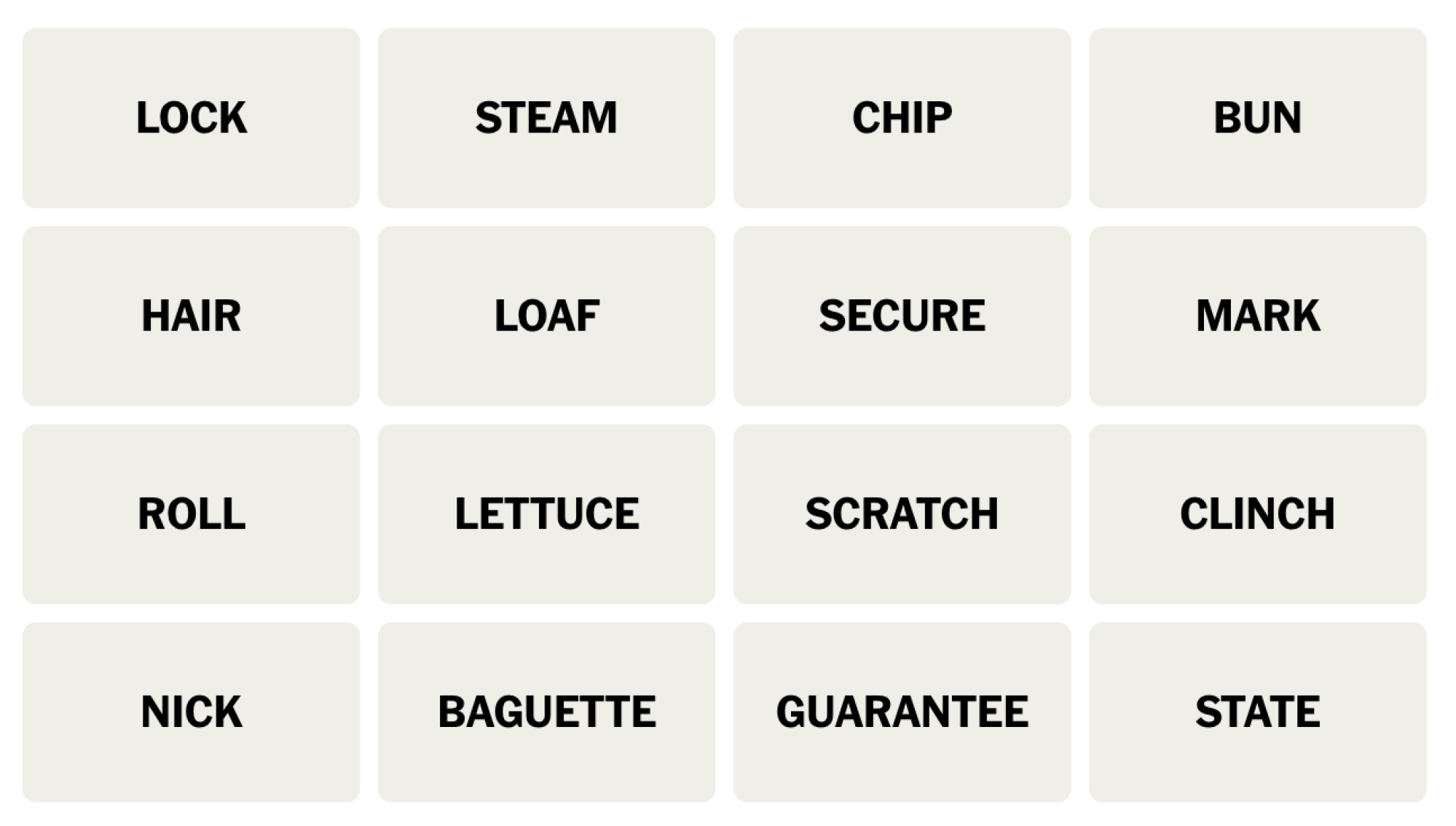
NYT Connections board for December 4, 2023: LOCK, STEAM, CHIP, BUN, HAIR, LOAF, SECURE, MARK, ROLL, LETTUCE, SCRATCH, CLINCH, NICK, BAGUETTE, GUARANTEE, STATE.

Credit: Connections/NYT


Does today’s Connections game require any special knowledge?

Nope, not today.

Hints for the themes in today’s Connections puzzle

Here are some spoiler-free hints for the groupings in today’s Connections:

  • Yellow category – Get that bread!

  • Green category – You can bet on it.

  • Blue category – We’ll just patch that up. 

  • Purple category – What did one wig say to the other? “You stay here, I’ll go on ahead.” 

Does today’s Connections game involve any wordplay?

There’s a fairly creative fill-in-the-blank for purple.

Ready to hear the answers? Keep scrolling if you want a little more help.


BEWARE: Spoilers follow for today’s Connections puzzle!

We’re about to give away some of the answers. Scroll slowly if you don’t want the whole thing spoiled. (The full solution is a bit further down.)

What are the ambiguous words in today’s Connections?

  • You can do your HAIR in ROLLs or in a BUN, but you can also make those two things out of dough in a bakery. Think of the food on this one. 

  • LETTUCE also means the food (it’s not a euphemism for money) but we won’t be putting it on a BUN. 

  • A CHIP can be a computer chip or a potato chip; it can also be a NICK on, say, a piece of furniture. 

  • A CLINCH can be a type of knot or a type of wrestling, but it can also be a synonym for GUARANTEE.

What are the categories in today’s Connections?

  • Yellow: UNIT OF BREAD

  • Green: ASSURE, AS A WIN

  • Blue: SMALL IMPERFECTION

  • Purple: HEAD OF ____

DOUBLE BEWARE: THE SOLUTION IS BELOW

Ready to learn the answers to today’s Connections puzzle? I give them all away below.

What are the yellow words in today’s Connections?

The yellow grouping is considered to be the most straightforward. The theme for today’s yellow group is UNIT OF BREAD and the words are: BAGUETTE, BUN, LOAF, ROLL. 

What are the green words in today’s Connections?

The green grouping is supposed to be the second-easiest. The theme for today’s green category is ASSURE, AS A WIN and the words are: CLINCH, GUARANTEE, LOCK, SECURE.

What are the blue words in today’s Connections?

The blue grouping is the second-hardest. The theme for today’s blue category is SMALL IMPERFECTION and the words are: CHIP, MARK, NICK, SCRATCH.

What are the purple words in today’s Connections?

The purple grouping is considered to be the hardest. The theme for today’s purple category is HEAD OF ____ and the words are: HAIR, LETTUCE, STATE, STEAM.

How I solved today’s Connections

CLINCH means GUARANTEE, and synonyms could include SECURE and LOCK. That’s my first hit. 🟩 LOAF, BUN, ROLL, and BAGUETTE are all forms of bread; that’s another. 🟨

What the heck do these other words have to do with each other? I stared at LETTUCE for a while before realizing that it comes in a head. You can also have a head of HAIR, a head of STATE, or a head (a cloud) of STEAM. 🟪 That left me with MARK, NICK, SCRATCH, and CHIP, all reasons something might be discounted in a scratch-and-dent sale. 🟦

Connections 
Puzzle #176
🟩🟩🟩🟩
🟨🟨🟨🟨
🟪🟪🟪🟪
🟦🟦🟦🟦

How to play Connections

I have a full guide to playing Connections, but here’s a refresher on the rules:

First, find the Connections game either on the New York Times website or in their Crossword app. You’ll see a game board with 16 tiles, each with one word or phrase. Your job is to select a group of four tiles that have something in common. Often they are all the same type of thing (for example: RAIN, SLEET, HAIL, and SNOW are all types of wet weather) but sometimes there is wordplay involved (for example, BUCKET, GUEST, TOP TEN, and WISH are all types of lists: bucket list, guest list, and so on).

Select four items and hit the Submit button. If you guessed correctly, the category and color will be revealed. (Yellow is easiest, followed by green, then blue, then purple.) If your guess was incorrect, you’ll get a chance to try again.

You win when you’ve correctly identified all four groups. But if you make four mistakes before you finish, the game ends and the answers are revealed.

How to win Connections

The most important thing to know to win Connections is that the groupings are designed to be tricky. Expect to see overlapping groups. For example, one puzzle seemed to include six breakfast foods: BACON, EGG, PANCAKE, OMELET, WAFFLE, and CEREAL. But BACON turned out to be part of a group of painters along with CLOSE, MUNCH, and WHISTLER, and EGG was in a group of things that come by the dozen (along with JUROR, ROSE, and MONTH). So don’t hit “submit” until you’ve confirmed that your group of four contains only those four things.

If you’re stuck, another strategy is to look at the words that seem to have no connection to the others. If all that comes to mind when you see WHISTLER is the painting nicknamed “Whistler’s Mother,” you might be on to something. When I solved that one, I ended up googling whether there was a painter named Close, because Close didn’t fit any of the obvious themes, either.

Another way to win when you’re stuck is, obviously, to read a few helpful hints–which is why we share these pointers every day. Check back tomorrow for the next puzzle!


Source: LifeHacker – Today’s NYT Connections Hints (and Answer) for Monday, December 4, 2023

Today's NYT Connections Hints (and Answer) for Sunday, December 3, 2023

Connections is the game where we LINK things together, and you’ll want to remember that today. If you’re looking for the Connections answer for Sunday, December 3, 2023, read on—I’ll share some clues, tips, and strategies, and finally the solutions to all four categories. Along the way, I’ll explain the meanings of the trickier words and we’ll learn how everything fits together. Beware, there are spoilers below for December 3, NYT Connections #175! Read on if you want some hints (and then the answer) to today’s Connections game. 

If you want an easy way to come back to our Connections hints every day, bookmark this page. You can also find our past hints there as well, in case you want to know what you missed in a previous puzzle.

Below, I’ll give you some oblique hints at today’s Connections answers. And farther down the page, I’ll reveal the themes and the answers. Scroll slowly and take just the hints you need!

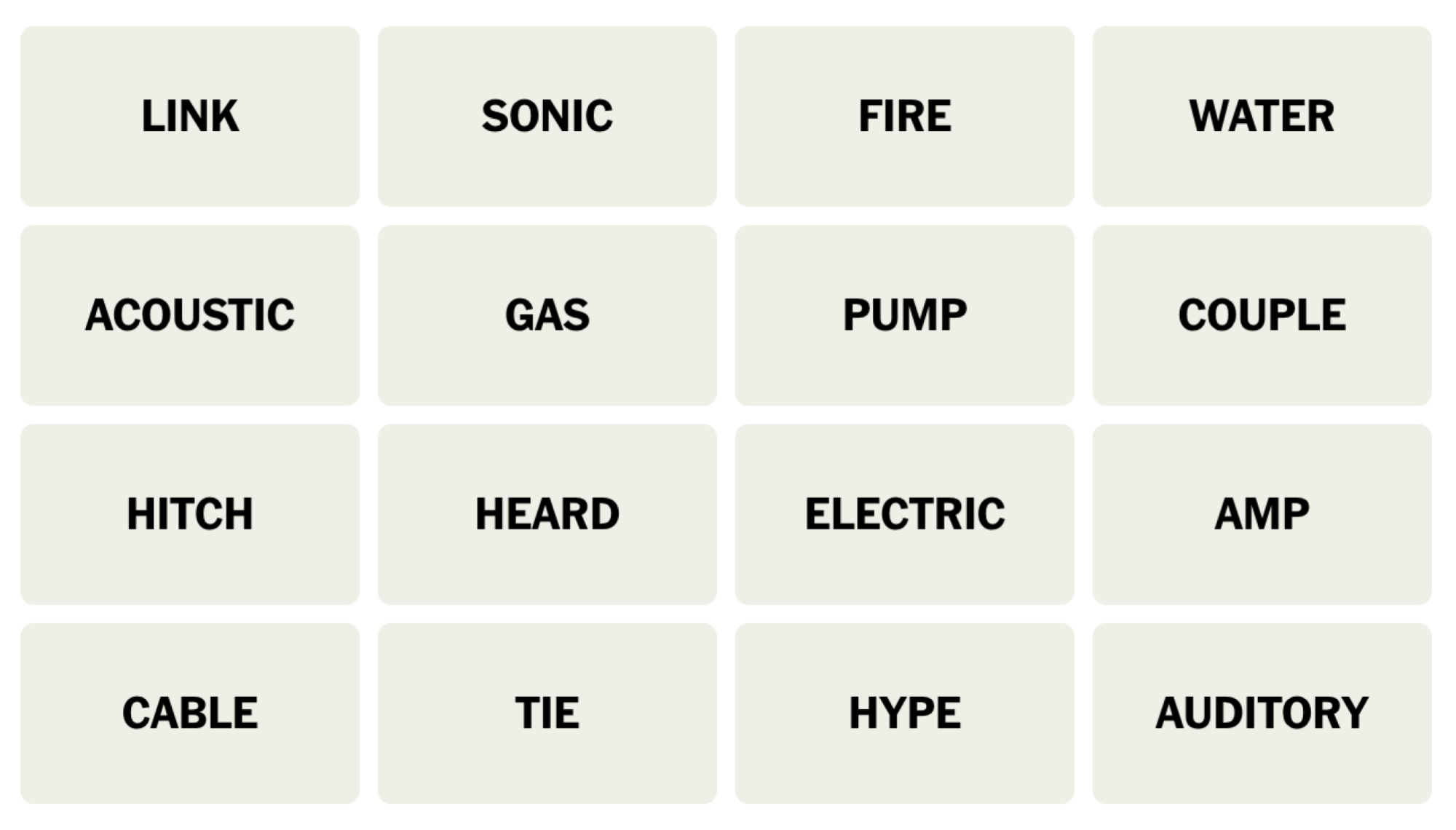
NYT Connections board for December 3, 2023: LINK, SONIC, FIRE, WATER, ACOUSTIC, GAS, PUMP, COUPLE, HITCH, HEARD, ELECTRIC, AMP, CABLE, TIE, HYPE, AUDITORY.

Credit: Connections/NYT


Does today’s Connections game require any special knowledge?

Nope, nothing too obscure today.

Hints for the themes in today’s Connections puzzle

Here are some spoiler-free hints for the groupings in today’s Connections:

  • Yellow category – Utilities.

  • Green category – Things for your ears.

  • Blue category – The whole point of this game!

  • Purple category – Get excited.

Does today’s Connections game involve any wordplay?

Nope, all the groupings are based on the words’ meanings. 

Ready to hear the answers? Keep scrolling if you want a little more help.


BEWARE: Spoilers follow for today’s Connections puzzle!

We’re about to give away some of the answers. Scroll slowly if you don’t want the whole thing spoiled. (The full solution is a bit further down.)

What are the ambiguous words in today’s Connections?

  • An ACOUSTIC guitar is the opposite of an ELECTRIC guitar, but those words are in different categories today. Nor will you be pairing either of those with an AMP.

  • The puzzle is also not asking you to contrast a GAS car with an ELECTRIC car.

  • FIRE and WATER are separate as well. 

  • SONIC can be a video game hedgehog, or a word that means relating to sound. You might want to put this word next to AUDITORY, a word that means relating to hearing.

  • A HITCH can be the part of your car or truck that lets you COUPLE it to a trailer. LINK them together, you know? 

What are the categories in today’s Connections?

  • Yellow: MONTHLY BILLS

  • Green: RELATED TO SOUND/HEARING

  • Blue: CONNECT

  • Purple: EXCITE, WITH “UP”

DOUBLE BEWARE: THE SOLUTION IS BELOW

Ready to learn the answers to today’s Connections puzzle? I give them all away below.

What are the yellow words in today’s Connections?

The yellow grouping is considered to be the most straightforward. The theme for today’s yellow group is MONTHLY BILLS and the words are: CABLE, ELECTRIC, GAS, WATER.

What are the green words in today’s Connections?

The green grouping is supposed to be the second-easiest. The theme for today’s green category is RELATED TO SOUND/HEARING and the words are: ACOUSTIC, AUDITORY, HEARD, SONIC.

What are the blue words in today’s Connections?

The blue grouping is the second-hardest. The theme for today’s blue category is CONNECT and the words are: COUPLE, HITCH, LINK, TIE.

What are the purple words in today’s Connections?

The purple grouping is considered to be the hardest. The theme for today’s purple category is EXCITE, WITH “UP” and the words are: AMP, FIRE, HYPE, PUMP.

How I solved today’s Connections

I see a few potential groupings, but nothing I feel confident about until I settle on COUPLE, HITCH, TIE, and LINK. That’s a hit. 🟦 Next I try WATER, GAS, ELECTRIC, and CABLE as lines that may be coming in to your house. 🟨 (The description is about utility bills, which still fits.) 

Next we can FIRE you up, PUMP you up, AMP you up, or HYPE you up for something. 🟪 And finally, SONIC, AUDITORY, and ACOUSTIC all relate to things you can hear. HEARD fills out that category if you use it as an adjective. 🟩

Connections 
Puzzle #175
🟦🟦🟦🟦
🟨🟨🟨🟨
🟪🟪🟪🟪
🟩🟩🟩🟩

How to play Connections

I have a full guide to playing Connections, but here’s a refresher on the rules:

First, find the Connections game either on the New York Times website or in their Crossword app. You’ll see a game board with 16 tiles, each with one word or phrase. Your job is to select a group of four tiles that have something in common. Often they are all the same type of thing (for example: RAIN, SLEET, HAIL, and SNOW are all types of wet weather) but sometimes there is wordplay involved (for example, BUCKET, GUEST, TOP TEN, and WISH are all types of lists: bucket list, guest list, and so on).

Select four items and hit the Submit button. If you guessed correctly, the category and color will be revealed. (Yellow is easiest, followed by green, then blue, then purple.) If your guess was incorrect, you’ll get a chance to try again.

You win when you’ve correctly identified all four groups. But if you make four mistakes before you finish, the game ends and the answers are revealed.

How to win Connections

The most important thing to know to win Connections is that the groupings are designed to be tricky. Expect to see overlapping groups. For example, one puzzle seemed to include six breakfast foods: BACON, EGG, PANCAKE, OMELET, WAFFLE, and CEREAL. But BACON turned out to be part of a group of painters along with CLOSE, MUNCH, and WHISTLER, and EGG was in a group of things that come by the dozen (along with JUROR, ROSE, and MONTH). So don’t hit “submit” until you’ve confirmed that your group of four contains only those four things.

If you’re stuck, another strategy is to look at the words that seem to have no connection to the others. If all that comes to mind when you see WHISTLER is the painting nicknamed “Whistler’s Mother,” you might be on to something. When I solved that one, I ended up googling whether there was a painter named Close, because Close didn’t fit any of the obvious themes, either.

Another way to win when you’re stuck is, obviously, to read a few helpful hints–which is why we share these pointers every day. Check back tomorrow for the next puzzle!


Source: LifeHacker – Today’s NYT Connections Hints (and Answer) for Sunday, December 3, 2023

Allie's Christmas Pudding Chronicles: Brandy Soaking

Every week is a big week when you’re preparing a pud for Christmas. Welcome back to my Christmas Pudding Chronicles. It’s week three of documenting my endeavor to make one of the United Kingdom’s most ubiquitous holiday cakes. While this wouldn’t be particularly compelling if I lived under the King’s roof, as an American, it is a new Christmas experience indeed. 

If you’re joining me for the first time in this fruit cake fantasy, you can catch up on what a Christmas pudding is and how to soak the fruit here in week one, and read about how I steamed the cake here. Normally a Christmas pudding is made five Sundays before Christmas and “fed” once a week on Sundays. Each edition of this chronicle comes out on Saturday, so you can gather the ingredients you need and tend to your pudding the next day. That being said, feel free to jump in at any time. You don’t have to follow the rules quite like I’m doing, and your pudding doesn’t have to age quite as long.

I’m finally in the “curing the cake” stage, which involves a (completely optional) soak with brandy or another high-proof spirit like rum or whiskey. While you can skip this practice, wrap the pudding, and store it in a dark place until Christmas, doing this step will add flavor and moisture. I confess, “feeding” the pudding is one of the steps I’ve been most looking forward to. I’m not a fiend for alcohol, but I do love a good culinary process to keep up with. Plus, I want to check in on my prune-baby once a week to see how it’s advancing in age. If that happens to be when I dose my cake with alcohol, so be it. 

As I’ve mentioned in my previous posts, I used Nigella Lawson’s recipe as my guide, and reworked a thing or two here and there. Her website also gives a bit of advice on how to “feed” it. I cross-checked this with other blogs and it looks like general practice is to poke some holes into the pudding with a toothpick or skewer, and dab one to two tablespoons of liquor onto the cake, once a week. Easy enough.

Choosing a brandy

However, before I could get to soaking, I needed a proper brandy. This week, I made it a point to patronize a very pretty liquor store in Manhattan. Sorry, wine and spirits store. I hadn’t prepared well in the first week when I needed to steep my dried fruit in sherry and I ended up using a $6 bottle from the corner liquor store down on my block in Brooklyn. No shade on them, they just don’t specialize in sherry. Or options.

A bottle of brandy sits next to a cake in a bowl.

Credit: Allie Chanthorn Reinmann

I figured a poor-quality sherry would be passable to plump the sugary fruits, but soaking the cake should be done with a good-quality brandy. The brandy should be a high enough caliber to sip out of a glass alongside the Christmas pudding. I asked the staff at Flatiron Wines and Spirits for a brandy that would pair well with a spice cake or dark, dried fruit. They led me to a gorgeous bottle of Neversink Spirits, Orchard Brandy which is a blend of pear and apple brandies. It’s an American Christmas pudding, so this New York-made brandy seemed just right.

How to feed your pudding

Hand using wood skewer to poke a hole into a cake.

Credit: Allie Chanthorn Reinmann

To feed your cake, grab a toothpick or a skewer, or even the sharp end of a probe meat thermometer. Uncover the Christmas pudding and poke holes into it. I spaced them about an inch away from each other and went around in a circle about an inch and a half inside of the edge of the cake. Then I made another concentric ring of holes an inch and a half inside from the first ring. You don’t have to be precise, this is more of a guideline depending on the bowl you ended up steaming your pudding in. 

Hand with pastry brush brushing the top of a cake.

Credit: Allie Chanthorn Reinmann

Generally, it looks like two tablespoons of brandy, or other high-proof alcohol, is the maximum. The only warning is, while you can’t under soak the pudding, you can definitely over soak it. Too much alcohol will make the pudding gummy or even muddy. There’s plenty of opportunity for alcohol in this dessert’s lifetime, so I used one tablespoon. Measure out the brandy into a small bowl, and using a pastry brush, daub the brandy across the surface and around the edge. Recover the bowl with the lid or plastic wrap and put it back in its storage space. 

What to look out for

Now that the pudding is in its curing stage, I’m going to keep an eye out for any changes in its color, smell, and hydration. When I fed it today, the cake still had an enticing spicy smell, albeit much more subdued than when it was freshly steamed. The pudding seems well hydrated, if not slightly drier than on steaming day. I suspect weekly brandy anointments and keeping it tightly covered will help maintain a moist cake. Other sources say it’s normal for the cake to become slightly darker in color as it sits, and I will certainly report back what I notice next week. Until then, happy brandy soaking, pudding fam.


Source: LifeHacker – Allie’s Christmas Pudding Chronicles: Brandy Soaking

Two Easy Ways to Fix a Leaky Refrigerator Door

When you close your refrigerator door, does an almost suction-cup-like seal form, or does it barely stay shut? If the rubber seal around the perimeter of the refrigerator or freezer door—also known as the gasket—doesn’t come in contact and connect with the inside of the fridge, it means that cold air is likely escaping. It may not seem like a big deal, but your refrigerator or freezer will have to work harder to keep the food inside cool, which means higher energy bills for you. 

But this doesn’t necessarily mean you need to buy a new gasket. If there aren’t any visible cracks, tears, or holes, you may be able to repair your refrigerator seal instead of replacing it. Here are two simple methods to try.

How to fix your refrigerator seal

Once you’ve figured out that your refrigerator or freezer isn’t sealing closed properly—perhaps after taking this one-minute test—there are two simple steps to take that could end up restoring your gasket back to working condition: Cleaning it, and applying silicone grease.

Clean your refrigerator seal

One of the most common reasons a refrigerator or freezer is leaking air is because it’s dirty. When assorted grime, crumbs, and mystery liquids form a film on the gasket, it can prevent a firm seal with suction.  It doesn’t seem like somewhere that should be covered in food spills and stains, but you’d be surprised what ends up and around that strip of rubber.

Here’s my refrigerator seal, for example:

dirty white refrigerator seal gasket

Credit: Elizabeth Yuko

And from the top:

dirty white refrigerator seal gasket

Credit: Elizabeth Yuko

There was a gap at this corner of the seal:

finger pushing white refrigerator seal out of groove

Credit: Elizabeth Yuko

It looked much worse before I cleaned it a few months ago, but it has gotten a little grimy since then.

You don’t need any special supplies to clean your refrigerator gasket. Start by filling up a bucket with warm water, and add a few squirts of liquid dishwashing detergent. Then, dip a rag or sponge into the solution and wipe off any stains, spills, or other gunk from the rubber gasket, its folds, and the areas inside the fridge that it comes in contact with when the door is closed. Use a toothbrush or other small scrub brush to tackle tougher stains. Dry any areas that you washed, and try closing, then opening the refrigerator door.

Here’s mine post-cleaning:

clean white refrigerator seal gasket

Credit: Elizabeth Yuko

Even though my refrigerator seal wasn’t very dirty to begin with, after wiping it down, the seal got noticeably stronger. 

Rehydrate the seal

Refrigerator and freezer gaskets are typically made of rubber or a synthetic alternative. Over time, they can start to dry out, preventing a tight seal from forming. So, if you’ve already cleaned your gasket and it’s still not sealing as much as you’d like it to, rub some silicone grease—also known as plumbers grease—into the rubber, then buff it off with a clean cloth. I used Harvey Plumber’s Faucet and Valve Grease ($5.68 for one ounce tube).

silicone plumbers grease on white refrigerator seal gasket

Credit: Elizabeth Yuko

If any corners or edges of the gasket have come loose, use a cotton swab to apply some silicone grease under rubber, then push it back into place inside the groove.

cotton swab applying silicone plumbers grease on white refrigerator seal gasket

Credit: Elizabeth Yuko

One more time, from the top:

clean white refrigerator seal gasket

Credit: Elizabeth Yuko

Some people suggest using petroleum jelly instead of silicone grease to rehydrate a refrigerator gasket, but avoid doing that if you can. Petroleum jelly cause rubber to break down, and unlike silicone grease, it’s not waterproof.


Source: LifeHacker – Two Easy Ways to Fix a Leaky Refrigerator Door