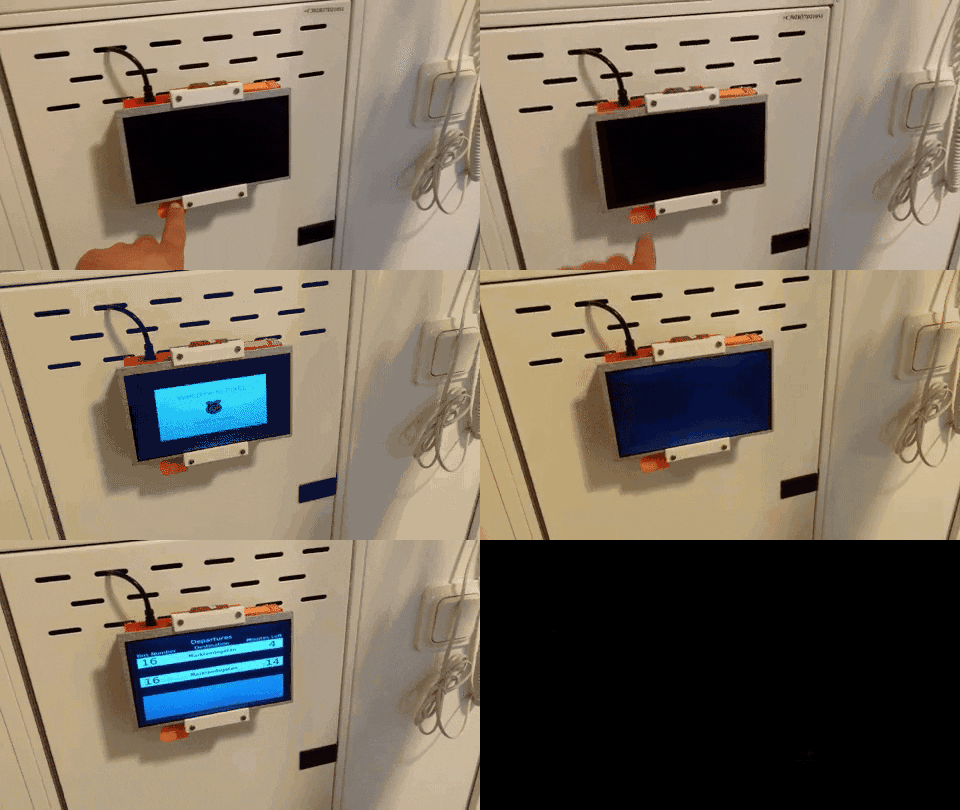
VästtraPi: your personal bus stop schedule monitor

I get impatient quickly when I’m looking up information on my phone. There’s just something about it that makes me jittery – especially when the information is time-sensitive, like timetables for public transport. If you’re like me, then Dimitris Platis‘s newest build is for you. He has created the VästtraPi, a Pi-powered departure time screen for your home!

No Title

No Description

Never miss the bus again with VästtraPi

Let me set the scene: it’s a weekday morning, and you’ve finally woken up enough to think about taking the bus to work. How much time do you have to catch it, though? You pick up your phone, unlock it, choose the right app, wait for it to update – and realise this took so much time that you’ll probably miss the next bus! Grrrrrr!

Running after a streetcar

Never again!

Now picture this: instead of using your phone, you can glance at  a personalized real-time bus schedule monitor while sipping your tea at breakfast.

Paul Rudd is fairly impressed

That would be pretty neat, wouldn’t it?

Such a device is exactly what Dimitris has created with the VästtraPi, and he has provided instructions so you can make your own. One less stress factor for your morning commute!

Stephen Colbert and Jon Stewart are very impressed.

I agree with Stephen and Jon.

Setting up the VästtraPi

The main pieces of hardware making up the VästtraPi are a Raspberry Pi Zero W, an LCD screen, and a power control board designed by Dimitris which switches the device on and off. He explains where to buy the board’s components, as well as all the other parts of the build, and how to put them together. He’s also 3D-printed a simple case.

On the software side, a Python script accesses the API provided by Dimitris’s local public transportation company, Västtrafik, and repeatedly fetches information about his favourite bus stop. It displays the information using neat graphics, generated with the help of Tkinter, the standard GUI package for Python. The device is set up so that pressing the ‘on’ button starts up the Pi. The script then runs automatically for ten minutes before safely shutting everything down. Very economical!

Dimitris has even foreseen what you’re likely to be thinking right now:

So, is this faster than the mobile app solution? Yes and no. The Raspberry Pi Zero W needs around 30 seconds to boot up and display the GUI. Without any optimizations it is naturally slower than my phone. VästtraPi’s biggest advantage is that it allows me to multitask while it is loading.

Build your own live bus schedule monitor

All the schematics and code are available via Dimitris’s write-up. He says that, for the moment, “the bus station, selected platform and bus line destinations that are displayed are hard-coded” in his script, but that it would be easy to amend for your own purposes. Of course, when recreating this build, you’ll want to use your own local public transport provider’s API, so some tweaking of his code will be required anyway.

What do you think – will this improve your morning routine? Are you up to the challenge of adapting it? Or do you envision modifying the build to display other live information? Let us know how you get on in the comments.

The post VästtraPi: your personal bus stop schedule monitor appeared first on Raspberry Pi.


Source: Raspberry Pi – VästtraPi: your personal bus stop schedule monitor

Bicrophonic Research Institute and the Sonic Bike

The Bicrophonic Sonic Bike, created by British sound artist Kaffe Matthews, utilises a Raspberry Pi and GPS signals to map location data and plays music and sound in response to the places you take it on your cycling adventures.

What is Bicrophonics?

Bicrophonics is about the mobility of sound, experienced and shared within a moving space, free of headphones and free of the internet. Music made by the journey you take, played with the space that you move through. The Bicrophonic Research Institute (BRI) http://sonicbikes.net

Cycling and music

I’m sure I wasn’t the only teen to go for bike rides with a group of friends and a radio. Spurred on by our favourite movie, the mid-nineties classic Now and Then, we’d hook up a pair of cheap portable speakers to our handlebars, crank up the volume, and sing our hearts out as we cycled aimlessly down country lanes in the cool light evenings of the British summer.

While Sonic Bikes don’t belt out the same classics that my precariously attached speakers provided, they do give you the same sense of connection to your travelling companions via sound. Linked to GPS locations on the same preset map of zones, each bike can produce the same music, creating a cloud of sound as you cycle.

Sonic Bikes

The Sonic Bike uses five physical components: a Raspberry Pi, power source, USB GPS receiver, rechargeable speakers, and subwoofer. Within the Raspberry Pi, the build utilises mapping software to divide a map into zones and connect each zone with a specific music track.

Sonic Bikes Raspberry Pi

Custom software enables the Raspberry Pi to locate itself among the zones using the USB GPS receiver. Then it plays back the appropriate track until it registers a new zone.

Bicrophonic Research Institute

The Bicrophonic Research Institute is a collective of artists and coders with the shared goal of creating sound directed by people and places via Sonic Bikes. In their own words:

Bicrophonics is about the mobility of sound, experienced and shared within a moving space, free of headphones and free of the internet. Music made by the journey you take, played with the space that you move through.

Their technology has potential beyond the aims of the BRI. The Sonic Bike software could be useful for navigation, logging data and playing beats to indicate when to alter speed or direction. You could even use it to create a guided cycle tour, including automatically reproduced information about specific places on the route.

For the creators of Sonic Bike, the project is ever-evolving, and “continues to be researched and developed to expand the compositional potentials and unique listening experiences it creates.”

Sensory Bike

A good example of this evolution is the Sensory Bike. This offshoot of the Sonic Bike idea plays sounds guided by the cyclist’s own movements – it acts like a two-wheeled musical instrument!

lean to go up, slow to go loud,

a work for Sensory Bikes, the Berlin wall and audience to ride it. ‘ lean to go up, slow to go loud ‘ explores freedom and celebrates escape. Celebrating human energy to find solutions, hot air balloons take off, train lines sing, people cheer and nature continues to grow.

Sensors on the wheels, handlebars, and brakes, together with a Sense HAT at the rear, register the unique way in which the rider navigates their location. The bike produces output based on these variables. Its creators at BRI say:

The Sensory Bike becomes a performative instrument – with riders choosing to go slow, go fast, to hop, zigzag, or circle, creating their own unique sound piece that speeds, reverses, and changes pitch while they dance on their bicycle.

Build your own Sonic Bike

As for many wonderful Raspberry Pi-based builds, the project’s code is available on GitHub, enabling makers to recreate it. All the BRI team ask is that you contact them so they can learn more of your plans and help in any way possible. They even provide code to create your own Sonic Kayak using GPS zones, temperature sensors, and an underwater microphone!

Sonic Kayaks explained

Sonic Kayaks are musical instruments for expanding our senses and scientific instruments for gathering marine micro-climate data. Made by foAm_Kernow with the Bicrophonic Research Institute (BRI), two were first launched at the British Science Festival in Swansea Bay September 6th 2016 and used by the public for 2 days.

The post Bicrophonic Research Institute and the Sonic Bike appeared first on Raspberry Pi.


Source: Raspberry Pi – Bicrophonic Research Institute and the Sonic Bike

Get social: connecting with Raspberry Pi

Fancy connecting with Raspberry Pi beyond the four imaginary walls of this blog post? Want to find ways into the conversation among our community of makers, learners, and educators? Here’s how:

Twitter

Connecting with us on Twitter is your sure-fire way of receiving the latest news and articles from and about the Raspberry Pi Foundation, Code Club, and CoderDojo. Here you’ll experience the fun, often GIF-fuelled banter of the busy Raspberry Pi community, along with tips, project support, and event updates. This is the best place to follow hashtags such as #Picademy, #MakeYourIdeas, and #RJam in real time.

Raspberry Pi on Twitter

News! Raspberry Pi and @CoderDojo join forces in a merger that will help more young people get creative with tech: https://t.co/37y45ht7li

YouTube

We create a variety of video content, from Pi Towers fun, to resource videos, to interviews and program updates. We’re constantly adding content to our channel to bring you more interesting, enjoyable videos to watch and share within the community. Want to see what happens when you drill a hole through a Raspberry Pi Zero to make a fidget spinner? Or what Code Club International volunteers got up to when we brought them together in London for a catch-up? Maybe you’d like to try a new skill and need guidance? Our YouTube channel is the place to go!

Getting started with soldering

Learn the basics of how to solder components together, and the safety precautions you need to take. Find a transcript of this video in our accompanying learning resource: raspberrypi.org/learning/getting-started-with-soldering/

Instagram

Instagram is known as the home of gorgeous projects and even better-looking project photographs. Our Instagram, however, is mainly a collection of random office shenanigans, short video clips, and the occasional behind-the-scenes snap of projects, events, or the mess on my desk. Come join the party!

When one #AstroPi unit is simply not enough… . Would you like to #3DPrint your own Astro Pi unit? Head to rpf.io/astroprint for the free files and assembly guide . . . . . . #RaspberryPi #Space #ESA @astro_timpeake @thom_astro

1,379 Likes, 9 Comments – Raspberry Pi (@raspberrypifoundation) on Instagram: “When one #AstroPi unit is simply not enough… . Would you like to #3DPrint your own Astro Pi unit?…”

Facebook

Looking to share information on Raspberry Pi with your social community? Maybe catch a live stream or read back through comments on some of our community projects? Then you’ll want to check out Raspberry Pi Facebook page. It brings the world together via a vast collection of interesting articles, images, videos, and discussions. Here you’ll find information on upcoming events we’re visiting, links to our other social media accounts, and projects our community shares via visitor posts. If you have a moment to spare, you may even find you can answer a community question.

Raspberry Pi at the Scottish Learning Festival

No Description

Raspberry Pi forum

The Raspberry Pi forum is the go-to site for posting questions, getting support, and just having a good old chin wag. Whether you have problems setting up your Pi, need advice on how to build a media centre, or can’t figure out how to utilise Scratch for the classroom, the forum has you covered. Head there for absolutely anything Pi-related, and you’re sure to find help with your query – or better yet, the answer may already be waiting for you!

G+

Our G+ community is an ever-growing mix of makers, educators, industry professionals, and those completely new to Pi and eager to learn more about the Foundation and the product. Here you’ll find project shares, tech questions, and conversation. It’s worth stopping by if you use the platform.

Code Club and CoderDojo

You should also check out the social media accounts of our BFFs Code Club and CoderDojo!


On the CoderDojo website, along with their active forum, you’ll find links to all their accounts at the bottom of the page. For UK-focused Code Club information, head to the Code Club UK Twitter account, and for links to accounts of Code Clubs based in your country, use the search option on the Code Club International website.

Connect with us

However you want to connect with us, make sure to say hi. We love how active and welcoming our online community is and we always enjoy engaging in conversation, seeing your builds and events, and sharing Pi Towers mischief as well as useful Pi-related information and links with you!

If you use any other social platform and miss our presence there, let us know in the comments. And if you run your own Raspberry Pi-related forum, online group, or discussion board, share that as well!

The post Get social: connecting with Raspberry Pi appeared first on Raspberry Pi.


Source: Raspberry Pi – Get social: connecting with Raspberry Pi

PiCorder, the miniature camcorder

The modest dimensions of our Raspberry Pi Zero and its wirelessly connectable sibling, the Pi Zero W, enable makers in our community to build devices that are very small indeed. The PiCorder built by Wayne Keenan is probably the slimmest Pi-powered video-recording device we’ve ever seen.

PiCorder – Pimoroni HyperPixel

A simple Pi-camcorder using @pimoroni #HyperPixel, ZeroLipo, lipo bat, camera and #PiZeroW. All parts from the Pirates, total of ~£85. Project build instructions: https://www.hackster.io/TheBubbleworks/picorder-0eb94d

PiCorder hardware

Wayne’s PiCorder is a very straightforward make. On the hardware side, it features a Pimoroni HyperPixel screen, Pi Zero camera module, and Zero LiPo plus LiPo battery pack. To put it together, he simply soldered header pins onto a Zero W, and connected all the components to it – easy as Pi! (Yes, I went there.)

PiCorder

So sleek as to be almost aerodynamic

Recording with the PiCorder (rePiCording?)

Then it was just a matter of installing the HyperPixel driver on the Pi, and the PiCorder was good to go. In this basic setup, recording is controlled via SSH. However, there’s a discussion about better ways to control the device in the comments on Wayne’s write-up. As the HyperPixel is a touchscreen, adding a GUI would make full use of its capabilities.

Picorder screen

Think about how many screens you’re looking at right now

The PiCorder is a great project to recreate if you’re looking to build a small portable camera. If you’re new to soldering, this build is perfect for you: just follow our ‘How to solder’ video and tutorial, and you’re on your way. This could be the start of your journey into the magical world of physical computing!

You could also check our blog on Alex Ellis‘s implementation of YouTube live-streaming for the Pi, and learn how to share your videos in real time.

Cool camera projects

Our educational resources include plenty of cool projects that could use the PiCorder, or for which the device could be adapted.

Get your head around using the official Raspberry Pi Camera Module with this picamera tutorial. Learn how to set up a stationary or wearable time-lapse camera, and turn your images into animated GIFs. You could also kickstart your career as a director by making an amazing stop-motion film!

No matter which camera project you choose to work on, we’d love to see the results. So be sure to share a link in the comments.

The post PiCorder, the miniature camcorder appeared first on Raspberry Pi.


Source: Raspberry Pi – PiCorder, the miniature camcorder

Pi-powered hands-on statistical model at the Royal Society

Physics! Particles! Statistical modelling! Quantum theory! How can non-scientists understand any of it? Well, students from Durham University are here to help you wrap your head around it all – and to our delight, they’re using the power of the Raspberry Pi to do it!

At the Royal Society’s Summer Science Exhibition, taking place in London from 4-9 July, the students are presenting a Pi-based experiment demonstrating the importance of statistics in their field of research.

Modelling the invisible – Summer Science Exhibition 2017

The Royal Society Summer Science Exhibition 2017 features 22 exhibits of cutting-edge, hands-on UK science , along with special events and talks. You can meet the scientists behind the research. Find out more about the exhibition at our website: https://royalsociety.org/science-events-and-lectures/2017/summer-science-exhibition/

Ramona, Matthew, and their colleagues are particle physicists keen to bring their science to those of us whose heads start to hurt as soon as we hear the word ‘subatomic’. In their work, they create computer models of subatomic particles to make predictions about real-world particles. Their models help scientists to design better experiments and to improve sensor calibrations. If this doesn’t sound straightforward to you, never fear – this group of scientists has set out to show exactly how statistical models are useful.

The Galton board model

They’ve built a Pi-powered Galton board, also called a bean machine (much less intimidating, I think). This is an upright board, shaped like an upside-down funnel, with nails hammered into it. Drop a ball in at the top, and it will randomly bounce off the nails on its way down. How the nails are spread out determines where a ball is most likely to land at the bottom of the board.

If you’re having trouble picturing this, you can try out an online Galton board. Go ahead, I’ll wait.

You’re back? All clear? Great!

Now, if you drop 100 balls down the board and collect them at the bottom, the result might look something like this:

Galton board

By Antoine Taveneaux CC BY-SA 3.0

The distribution of the balls is determined by the locations of the nails in the board. This means that, if you don’t know where the nails are, you can look at the distribution of balls to figure out where they are most likely to be located. And you’ll be able to do all this using … statistics!!!

Statistical models

Similarly, how particles behave is determined by the laws of physics – think of the particles as balls, and laws of physics as nails. Physicists can observe the behaviour of particles to learn about laws of physics, and create statistical models simulating the laws of physics to predict the behaviour of particles.

I can hear you say, “Alright, thanks for the info, but how does the Raspberry Pi come into this?” Don’t worry – I’m getting to that.

Modelling the invisible – the interactive exhibit

As I said, Ramona and the other physicists have not created a regular old Galton board. Instead, this one records where the balls land using a Raspberry Pi, and other portable Pis around the exhibition space can access the records of the experimental results. These Pis in turn run Galton board simulators, and visitors can use them to recreate a virtual Galton board that produces the same results as the physical one. Then, they can check whether their model board does, in fact, look like the one the physicists built. In this way, people directly experience the relationship between statistical models and experimental results.

Hurrah for science!

The other exhibit the Durham students will be showing is a demo dark matter detector! So if you decide to visit the Summer Science Exhibition, you will also have the chance to learn about the very boundaries of human understanding of the cosmos.

The Pi in museums

At the Raspberry Pi Foundation, education is our mission, and of course we love museums. It is always a pleasure to see our computers incorporated into exhibits: the Pi-powered visual theremin teaches visitors about music; the Museum in a Box uses Pis to engage people in hands-on encounters with exhibits; and this Pi is itself a museum piece! If you want to learn more about Raspberry Pis and museums, you can listen to this interview with Pi Towers’ social media maestro Alex Bate.

It’s amazing that our tech is used to educate people in areas beyond computer science. If you’ve created a pi-powered educational project, please share it with us in the comments.

The post Pi-powered hands-on statistical model at the Royal Society appeared first on Raspberry Pi.


Source: Raspberry Pi – Pi-powered hands-on statistical model at the Royal Society

MagPi 59: the Raspberry Pi PC Challenge

Hey everyone, Lucy here! I’m standing in for Rob this month to introduce The MagPi 59, the latest edition of the official Raspberry Pi magazine.

The MagPi 59

Ever wondered whether a Pi could truly replace your home computer? Looking for inspiration for a Pi-powered project you can make and use in the sunshine? Interested in winning a Raspberry Pi that’s a true collector’s item?

Then we’ve got you covered in Issue 59, out in stores today!

The MagPi 59

Shiny and new

The Raspberry Pi PC challenge

This month’s feature is fascinating! We set the legendary Rob Zwetsloot a challenge: use no other computer but a Raspberry Pi for a week, and let us know how it goes – for science!

Is there anything you can’t do with a $35 computer? To find out, you just have to read the magazine.

12 summer projects

We’re bringing together some of the greatest outdoor projects for the Raspberry Pi in this MagPi issue. From a high-altitude balloon, to aerial photography, to bike computers and motorised skateboards, there’s plenty of bright ideas in The MagPi 59.

12 Summer Projects in The MagPi 59

Maybe your Pi will ripen in the sun?

The best of the rest in The MagPi 59

We’ve got a fantastic collection of community projects this month. Ingmar Stapel shows off Big Rob, his SatNav-guided robot, while Eric Page demonstrates his Dog Treat Dispenser. There are also interesting tutorials on building a GPS tracker, controlling a Raspberry Pi with an Android app and Bluetooth, and building an electronic wind chime with magnetometers.

You can even enter our give-away of 10 ultra-rare ‘Raspberry Pi 3 plus official case’ kits signed by none other than Eben Upton, co-creator of the Raspberry Pi. Win one and be the envy of the entire Raspberry Pi community!

Electronic Wind Chimes - MagPi 59

MAGNETS!

You can find The MagPi 59 in the UK right now, at WHSmith, Sainsbury’s, Asda, and Tesco. Copies will be arriving in US stores including Barnes & Noble and Micro Center very soon. You can also get a copy online from our store or via our Android or iOS app. And don’t forget: there’s always the free PDF as well.

Get reading, get making, and enjoy the new issue!

Rob isn’t here to add his signature Picard GIF, but we’ve sorted it for him. He loves a good pun, so he does! – Janina & Alex

The post MagPi 59: the Raspberry Pi PC Challenge appeared first on Raspberry Pi.


Source: Raspberry Pi – MagPi 59: the Raspberry Pi PC Challenge

The Code Club International movement

Over the past few years, Code Club has made strides toward world domination! There are now more than 10,000 Code Clubs running in 125 countries. More than 140,000 kids have taken part in our clubs in places as diverse as the northernmost tip of Canada and the favelas of Rio de Janeiro.

In the first video from our Code Club International network, we find out about Code Clubs around the world from the people supporting these communities.

Global communities

Code Club currently has official local partners in twelve countries. Our passionate and motivated partner organisations are responsible for championing their countries’ Code Clubs. In March we brought the partners together for the first time, and they shared what it means to be part of the Code Club community:

You can help Code Club make a difference around the world

We invited our international Code Club partners to join us in London and discuss why we think Code Club is so special. Whether you’re a seasoned pro, a budding educator, or simply want to give back to your local community, there’s a place for you among our incredible Code Club volunteers.

Of course, Code Clubs aren’t restricted to countries with official partner communities – they can be started anywhere in the world! Code Clubs are up and running in a number of unexpected places, from Kosovo to Kazakhstan.

Code Club International

Code Club partners gathered together at the International Meetup

The geographical spread of Code Clubs means we hear of clubs overcoming a range of different challenges. One club in Zambia, run by volunteer Mwiza Simbeye, started as a way to get kids off the streets of Lusaka and teach them useful skills. Many children attending had hardly used a computer before writing their first line of code at the club. And it’s making a difference! As Mwiza told us, ‘you only need to see the light shine in the eyes of [Code Club] participants to see how much they enjoy these sessions.’

Code Club International

Student Joyce codes in Scratch at her Code Club in Nunavut, Canada

In the Nunavut region of Canada, Talia Metuq was first introduced to coding at a Code Club. In an area comprised of 25 Inuit communities that are inaccessible via roads and currently combating severe social and economic deprivation, computer science was not on the school timetable. Code Club, along with club volunteer Ryan Oliver, is starting to change that. After graduating from Code Club, Talia went on to study 3D modelling in Vancouver. She has now returned to Nunavut and is helping inspire more children to pursue digital making.

Start a Code Club

Code Clubs are volunteer-led extra-curricular coding clubs for children age 9 to 13. Children that attend learn to code games, animations, and websites using the projects we provide. Working with volunteers and with other children in their club, they grow their digital skillset.

You can run a Code Club anywhere if you have a venue, volunteers, and kids ready to learn coding. Help us achieve our goal of having a Code Club in every community in the world!

To find out how to start a Code Club outside of the UK, you can visit the Code Club International website. If you are in the UK, head to the Code Club UK website for more information.

Code Club International

Help the Code Club International community grow

On the Code Club site, we currently have projects in 28 languages, allowing more young people than ever to learn programming in their native language. But that’s not enough! We are always on the lookout for volunteers to translate projects and resources. If you are proficient in translating from English and would like to help, please visit the website to find out more.

We are also looking for official local partners in Italy and Germany to join our international network – if you know of, or are a part of an enthusiastic non-profit organisation who might be interested to join us, you can learn more here.

The post The Code Club International movement appeared first on Raspberry Pi.


Source: Raspberry Pi – The Code Club International movement

Scratch 2.0: all-new features for your Raspberry Pi

We’re very excited to announce that Scratch 2.0 is now available as an offline app for the Raspberry Pi! This new version of Scratch allows you to control the Pi’s GPIO (General Purpose Input and Output) pins, and offers a host of other exciting new features.

Offline accessibility

The most recent update to Raspbian includes the app, which makes Scratch 2.0 available offline on the Raspberry Pi. This is great news for clubs and classrooms, where children can now use Raspberry Pis instead of connected laptops or desktops to explore block-based programming and physical computing.

Controlling GPIO with Scratch 2.0

As with Scratch 1.4, Scratch 2.0 on the Raspberry Pi allows you to create code to control and respond to components connected to the Pi’s GPIO pins. This means that your Scratch projects can light LEDs, sound buzzers and use input from buttons and a range of sensors to control the behaviour of sprites. Interacting with GPIO pins in Scratch 2.0 is easier than ever before, as text-based broadcast instructions have been replaced with custom blocks for setting pin output and getting current pin state.

Scratch 2.0 GPIO blocks

To add GPIO functionality, first click ‘More Blocks’ and then ‘Add an Extension’. You should then select the ‘Pi GPIO’ extension option and click OK.

Scratch 2.0 GPIO extension

In the ‘More Blocks’ section you should now see the additional blocks for controlling and responding to your Pi GPIO pins. To give an example, the entire code for repeatedly flashing an LED connected to GPIO pin 2.0 is now:

Flashing an LED with Scratch 2.0

To react to a button connected to GPIO pin 2.0, simply set the pin as input, and use the ‘gpio (x) is high?’ block to check the button’s state. In the example below, the Scratch cat will say “Pressed” only when the button is being held down.

Responding to a button press on Scractch 2.0

Cloning sprites

Scratch 2.0 also offers some additional features and improvements over Scratch 1.4. One of the main new features of Scratch 2.0 is the ability to create clones of sprites. Clones are instances of a particular sprite that inherit all of the scripts of the main sprite.

The scripts below show how cloned sprites are used — in this case to allow the Scratch cat to throw a clone of an apple sprite whenever the space key is pressed. Each apple sprite clone then follows its ‘when i start as clone’ script.

Cloning sprites with Scratch 2.0

The cloning functionality avoids the need to create multiple copies of a sprite, for example multiple enemies in a game or multiple snowflakes in an animation.

Custom blocks

Scratch 2.0 also allows the creation of custom blocks, allowing code to be encapsulated and used (possibly multiple times) in a project. The code below shows a simple custom block called ‘jump’, which is used to make a sprite jump whenever it is clicked.

Custom 'jump' block on Scratch 2.0

These custom blocks can also optionally include parameters, allowing further generalisation and reuse of code blocks. Here’s another example of a custom block that draws a shape. This time, however, the custom block includes parameters for specifying the number of sides of the shape, as well as the length of each side.

Custom shape-drawing block with Scratch 2.0

The custom block can now be used with different numbers provided, allowing lots of different shapes to be drawn.

Drawing shapes with Scratch 2.0

Peripheral interaction

Another feature of Scratch 2.0 is the addition of code blocks to allow easy interaction with a webcam or a microphone. This opens up a whole new world of possibilities, and for some examples of projects that make use of this new functionality see Clap-O-Meter which uses the microphone to control a noise level meter, and a Keepie Uppies game that uses video motion to control a football. You can use the Raspberry Pi or USB cameras to detect motion in your Scratch 2.0 projects.

Other new features include a vector image editor and a sound editor, as well as lots of new sprites, costumes and backdrops.

Update your Raspberry Pi for Scratch 2.0

Scratch 2.0 is available in the latest Raspbian release, under the ‘Programming’ menu. We’ve put together a guide for getting started with Scratch 2.0 on the Raspberry Pi online (note that GPIO functionality is only available via the desktop version). You can also try out Scratch 2.0 on the Pi by having a go at a project from the Code Club projects site.

As always, we love to see the projects you create using the Raspberry Pi. Once you’ve upgraded to Scratch 2.0, tell us about your projects via Twitter, Instagram and Facebook, or by leaving us a comment below.

The post Scratch 2.0: all-new features for your Raspberry Pi appeared first on Raspberry Pi.


Source: Raspberry Pi – Scratch 2.0: all-new features for your Raspberry Pi

Introducing the Raspberry Pi Integrator Programme

An ever-growing number of companies take advantage of Raspberry Pi technology and use our boards as part of their end products. Raspberry Pis are now essential components of everything from washing machines to underwater exploration vehicles. We love seeing these commercial applications, and are committed to helping bring Raspberry Pi-powered products to market. With this in mind, we are excited to announce our new Raspberry Pi Integrator Programme!

Raspberry Pi Integrator Programme

Product compliance testing

Whenever a company wants to sell a product on a market, it first has to prove that selling it is safe and legal. Compliance requirements vary between different products; rules that would apply to a complicated machine like a car will, naturally, not be the same as those that apply to a pair of trainers (although there is some overlap in the Venn diagram of rules).

Raspberry Pi Integrator Programme

Regions of the world within each of which products have to be separately tested

Different countries usually have slightly different sets of regulations, and testing has to be conducted at an accredited facility for the region the company intends to sell the product in. Companies have to put a vast amount of work into getting their product through compliance testing and certification to meet country-specific requirements. This is especially taxing for smaller enterprises.

Making testing easier

Raspberry Pi has assisted various companies that use Pi technology in their end products through this testing and certification process, and over time it has become clear that we can do even more to help. This realisation led us to work with our compliance testing and certification partner UL to create a system that simplifies and speeds up compliance processes. Thus we have started the Raspberry Pi Integrator Programme, designed to help anyone get their Raspberry Pi-based product tested and on the market quickly and efficiently.

The Raspberry Pi Integrator Programme

The programme provides access to the same test engineers who worked on our Raspberry Pis during their compliance testing. It connects the user to a dedicated team at UL who assess and test the user’s product, facilitated by their in-depth knowledge of Raspberry Pi. The team at UL work closely with the Raspberry Pi engineering team, so any unexpected issues that may arise during testing can be resolved quickly. Through the programme, UL will streamline the testing and certification process, which will in turn decrease the amount of time necessary to launch the product. Our Integrator Programme is openly available, it comes with no added cost beyond the usual testing fees at UL, and there are companies already taking advantage of it.

Get your product on the market more quickly

We have put the Integrator Programme in place in the hope of eliminating the burden of navigating complicated compliance issues and making it easier for companies to bring new, exciting products to consumers. With simplified testing, companies and individuals can get products to market in less time and with lower overhead costs.

The programme is now up and running, and ready to accept new clients. UL and Raspberry Pi hope that it will be an incredibly useful tool for creators of Raspberry Pi-powered commercial products. For more information, please email compliance@raspberrypi.org.

Powered by Raspberry Pi

As a producer of a Pi-based device, you can also apply to use our ‘Powered by Raspberry Pi’ logo on your product and its packaging. Doing so indicates to customers that a portion of their payment supports the educational work of the Raspberry Pi Foundation.

Powered by Pi Logo

You’ll find more information about the ‘Powered by Raspberry Pi’ logo and our simple approval process for using it here.

The post Introducing the Raspberry Pi Integrator Programme appeared first on Raspberry Pi.


Source: Raspberry Pi – Introducing the Raspberry Pi Integrator Programme

A Raspbian desktop update with some new programming tools

Today we’ve released another update to the Raspbian desktop. In addition to the usual small tweaks and bug fixes, the big new changes are the inclusion of an offline version of Scratch 2.0, and of Thonny (a user-friendly IDE for Python which is excellent for beginners). We’ll look at all the changes in this post, but let’s start with the biggest…

Scratch 2.0 for Raspbian

Scratch is one of the most popular pieces of software on Raspberry Pi. This is largely due to the way it makes programming accessible – while it is simple to learn, it covers many of the concepts that are used in more advanced languages. Scratch really does provide a great introduction to programming for all ages.

Raspbian ships with the original version of Scratch, which is now at version 1.4. A few years ago, though, the Scratch team at the MIT Media Lab introduced the new and improved Scratch version 2.0, and ever since we’ve had numerous requests to offer it on the Pi.

There was, however, a problem with this. The original version of Scratch was written in a language called Squeak, which could run on the Pi in a Squeak interpreter. Scratch 2.0, however, was written in Flash, and was designed to run from a remote site in a web browser. While this made Scratch 2.0 a cross-platform application, which you could run without installing any Scratch software, it also meant that you had to be able to run Flash on your computer, and that you needed to be connected to the internet to program in Scratch.

We worked with Adobe to include the Pepper Flash plugin in Raspbian, which enables Flash sites to run in the Chromium browser. This addressed the first of these problems, so the Scratch 2.0 website has been available on Pi for a while. However, it still needed an internet connection to run, which wasn’t ideal in many circumstances. We’ve been working with the Scratch team to get an offline version of Scratch 2.0 running on Pi.

Screenshot of Scratch on Raspbian

The Scratch team had created a website to enable developers to create hardware and software extensions for Scratch 2.0; this provided a version of the Flash code for the Scratch editor which could be modified to run locally rather than over the internet. We combined this with a program called Electron, which effectively wraps up a local web page into a standalone application. We ended up with the Scratch 2.0 application that you can find in the Programming section of the main menu.

Physical computing with Scratch 2.0

We didn’t stop there though. We know that people want to use Scratch for physical computing, and it has always been a bit awkward to access GPIO pins from Scratch. In our Scratch 2.0 application, therefore, there is a custom extension which allows the user to control the Pi’s GPIO pins without difficulty. Simply click on ‘More Blocks’, choose ‘Add an Extension’, and select ‘Pi GPIO’. This loads two new blocks, one to read and one to write the state of a GPIO pin.

Screenshot of new Raspbian iteration of Scratch 2, featuring GPIO pin control blocks.

The Scratch team kindly allowed us to include all the sprites, backdrops, and sounds from the online version of Scratch 2.0. You can also use the Raspberry Pi Camera Module to create new sprites and backgrounds.

This first release works well, although it can be slow for some operations; this is largely unavoidable for Flash code running under Electron. Bear in mind that you will need to have the Pepper Flash plugin installed (which it is by default on standard Raspbian images). As Pepper Flash is only compatible with the processor in the Pi 2.0 and Pi 3, it is unfortunately not possible to run Scratch 2.0 on the Pi Zero or the original models of the Pi.

We hope that this makes Scratch 2.0 a more practical proposition for many users than it has been to date. Do let us know if you hit any problems, though!

Thonny: a more user-friendly IDE for Python

One of the paths from Scratch to ‘real’ programming is through Python. We know that the transition can be awkward, and this isn’t helped by the tools available for learning Python. It’s fair to say that IDLE, the Python IDE, isn’t the most popular piece of software ever written…

Earlier this year, we reviewed every Python IDE that we could find that would run on a Raspberry Pi, in an attempt to see if there was something better out there than IDLE. We wanted to find something that was easier for beginners to use but still useful for experienced Python programmers. We found one program, Thonny, which stood head and shoulders above all the rest. It’s a really user-friendly IDE, which still offers useful professional features like single-stepping of code and inspection of variables.

Screenshot of Thonny IDE in Raspbian

Thonny was created at the University of Tartu in Estonia; we’ve been working with Aivar Annamaa, the lead developer, on getting it into Raspbian. The original version of Thonny works well on the Pi, but because the GUI is written using Python’s default GUI toolkit, Tkinter, the appearance clashes with the rest of the Raspbian desktop, most of which is written using the GTK toolkit. We made some changes to bring things like fonts and graphics into line with the appearance of our other apps, and Aivar very kindly took that work and converted it into a theme package that could be applied to Thonny.

Due to the limitations of working within Tkinter, the result isn’t exactly like a native GTK application, but it’s pretty close. It’s probably good enough for anyone who isn’t a picky UI obsessive like me, anyway! Have a look at the Thonny webpage to see some more details of all the cool features it offers. We hope that having a more usable environment will help to ease the transition from graphical languages like Scratch into ‘proper’ languages like Python.

New icons

Other than these two new packages, this release is mostly bug fixes and small version bumps. One thing you might notice, though, is that we’ve made some tweaks to our custom icon set. We wondered if the icons might look better with slightly thinner outlines. We tried it, and they did: we hope you prefer them too.

Downloading the new image

You can either download a new image from the Downloads page, or you can use apt to update:

sudo apt-get update
sudo apt-get dist-upgrade

To install Scratch 2.0:

sudo apt-get install scratch2

To install Thonny:

sudo apt-get install python3-thonny

One more thing…

Before Christmas, we released an experimental version of the desktop running on Debian for x86-based computers. We were slightly taken aback by how popular it turned out to be! This made us realise that this was something we were going to need to support going forward. We’ve decided we’re going to try to make all new desktop releases for both Pi and x86 from now on.

The version of this we released last year was a live image that could run from a USB stick. Many people asked if we could make it permanently installable, so this version includes an installer. This uses the standard Debian install process, so it ought to work on most machines. I should stress, though, that we haven’t been able to test on every type of hardware, so there may be issues on some computers. Please be sure to back up your hard drive before installing it. Unlike the live image, this will erase and reformat your hard drive, and you will lose anything that is already on it!

You can still boot the image as a live image if you don’t want to install it, and it will create a persistence partition on the USB stick so you can save data. Just select ‘Run with persistence’ from the boot menu. To install, choose either ‘Install’ or ‘Graphical install’ from the same menu. The Debian installer will then walk you through the install process.

You can download the latest x86 image (which includes both Scratch 2.0 and Thonny) from here or here for a torrent file.

One final thing

This version of the desktop is based on Debian Jessie. Some of you will be aware that a new stable version of Debian (called Stretch) was released last week. Rest assured – we have been working on porting everything across to Stretch for some time now, and we will have a Stretch release ready some time over the summer.

The post A Raspbian desktop update with some new programming tools appeared first on Raspberry Pi.


Source: Raspberry Pi – A Raspbian desktop update with some new programming tools

CoderDojo Coolest Projects 2017

When I heard we were merging with CoderDojo, I was delighted. CoderDojo is a wonderful organisation with a spectacular community, and it’s going to be great to join forces with the team and work towards our common goal: making a difference to the lives of young people by making technology accessible to them.

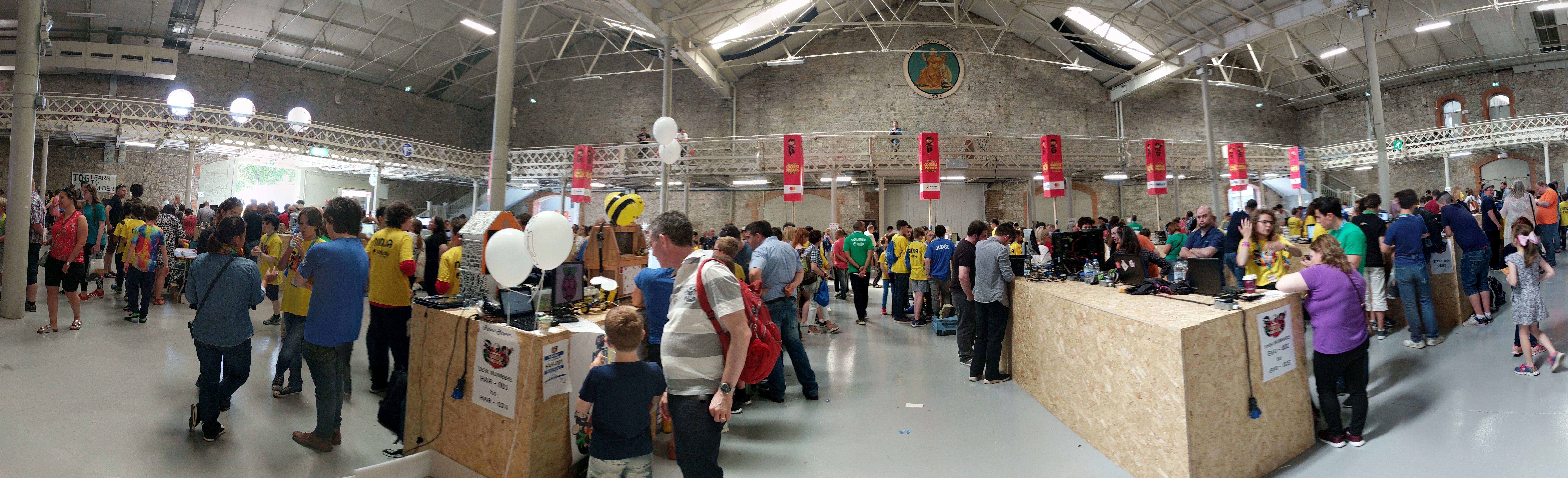
You may remember that last year Philip and I went along to Coolest Projects, CoderDojo’s annual event at which their global community showcase their best makes. It was awesome! This year a whole bunch of us from the Raspberry Pi Foundation attended Coolest Projects with our new Irish colleagues, and as expected, the projects on show were as cool as can be.

Coolest Projects 2017 attendee

Crowd at Coolest Projects 2017

This year’s coolest projects!

Young maker Benjamin demoed his brilliant RGB LED table tennis ball display for us, and showed off his brilliant project tutorial website codemakerbuddy.com, which he built with Python and Flask. [Click on any of the images to enlarge them.]

Coolest Projects 2017 LED ping-pong ball display
Coolest Projects 2017 Benjamin and Oly

Next up, Aimee showed us a recipes app she’d made with the MIT App Inventor. It was a really impressive and well thought-out project.

Coolest Projects 2017 Aimee's cook book
Coolest Projects 2017 Aimee's setup

This very successful OpenCV face detection program with hardware installed in a teddy bear was great as well:

Coolest Projects 2017 face detection bear
Coolest Projects 2017 face detection interface
Coolest Projects 2017 face detection database

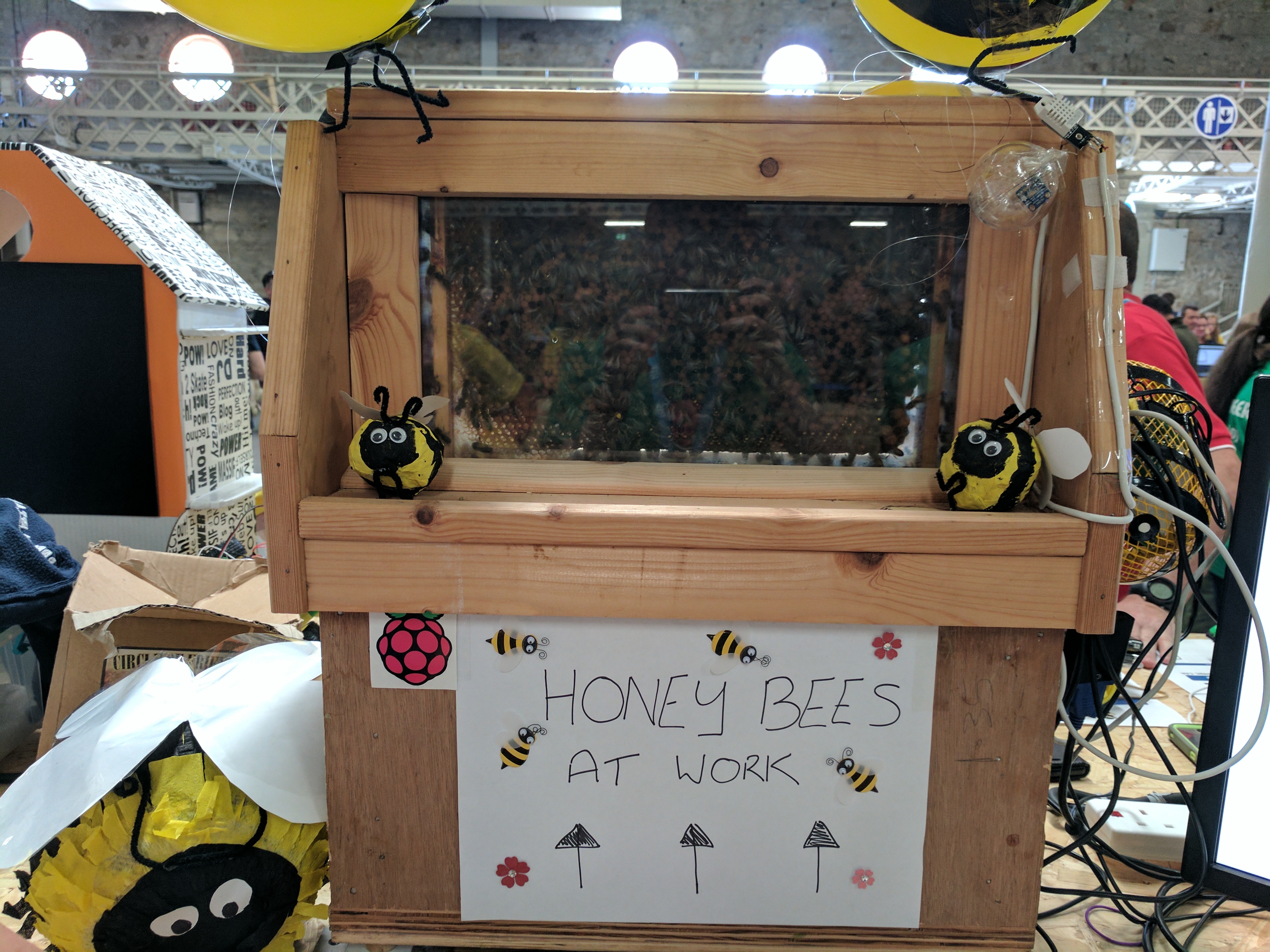
Helen’s and Oly’s favourite project involved…live bees!

Coolest Projects 2017 live bees

BEEEEEEEEEEES!

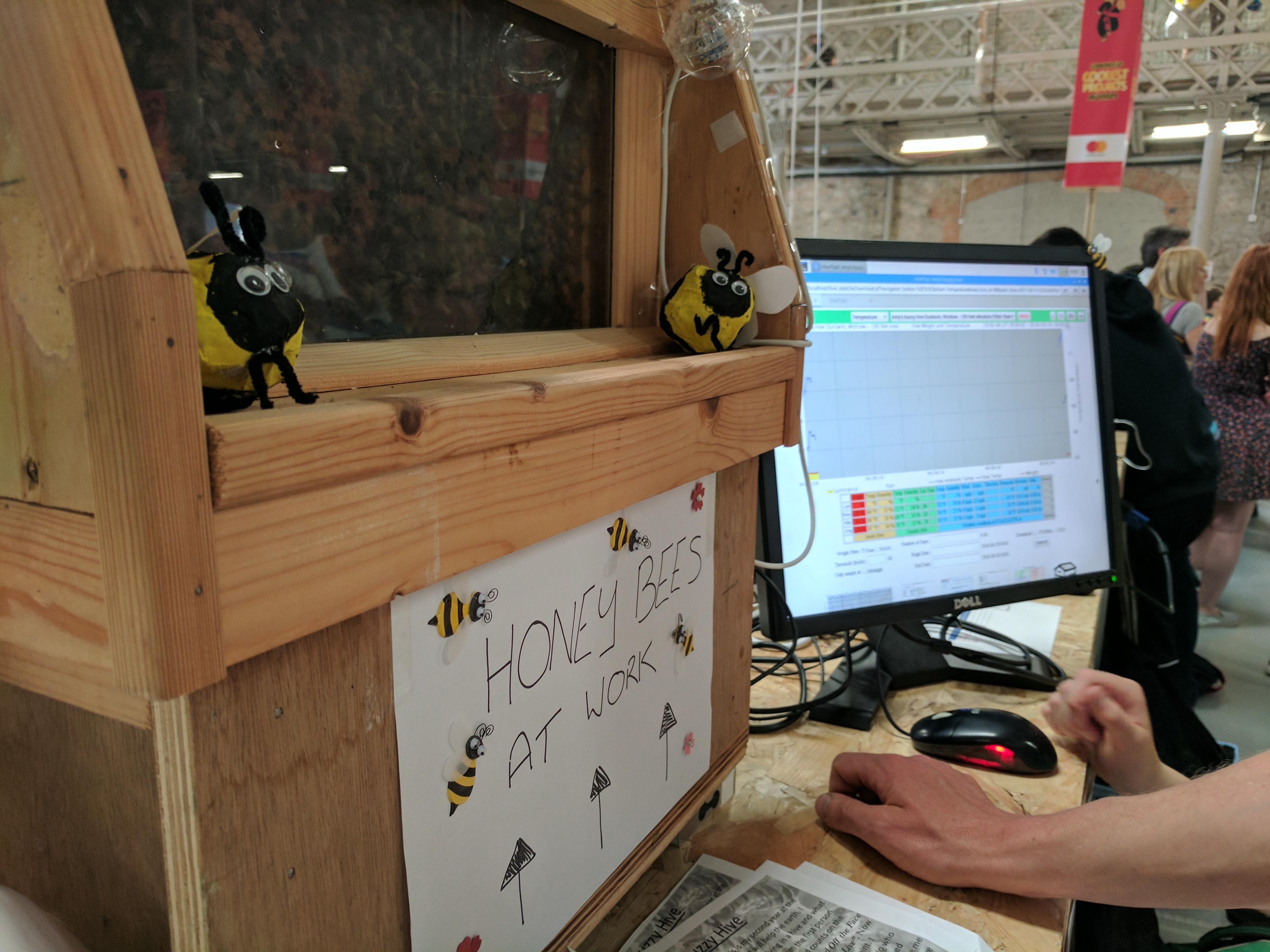
Its creator, 12-year-old Amy, said she wanted to do something to help the Earth. Her project uses various sensors to record data on the bee population in the hive. An adjacent monitor displays the data in a web interface:

Coolest Projects 2017 Aimee's bees

Coolest robots

I enjoyed seeing lots of GPIO Zero projects out in the wild, including this robotic lawnmower made by Kevin and Zach:

Raspberry Pi Lawnmower

Kevin and Zach’s Raspberry Pi lawnmower project with Python and GPIO Zero, showed at CoderDojo Coolest Projects 2017

Philip’s favourite make was a Pi-powered robot you can control with your mind! According to the maker, Laura, it worked really well with Philip because he has no hair.

Philip Colligan on Twitter

This is extraordinary. Laura from @CoderDojo Romania has programmed a mind controlled robot using @Raspberry_Pi @coolestprojects

And here are some pictures of even more cool robots we saw:

Coolest Projects 2017 coolest robot no.1
Coolest Projects 2017 coolest robot no.2
Coolest Projects 2017 coolest robot no.3

Games, toys, activities

Oly and I were massively impressed with the work of Mogamad, Daniel, and Basheerah, who programmed a (borrowed) Amazon Echo to make a voice-controlled text-adventure game using Java and the Alexa API. They’ve inspired me to try something similar using the AIY projects kit and adventurelib!

Coolest Projects 2017 Mogamad, Daniel, Basheerah, Oly
Coolest Projects 2017 Alexa text-based game

Christopher Hill did a brilliant job with his Home Alone LEGO house. He used sensors to trigger lights and sounds to make it look like someone’s at home, like in the film. I should have taken a video – seeing it in action was great!

Coolest Projects 2017 Lego home alone house
Coolest Projects 2017 Lego home alone innards
Coolest Projects 2017 Lego home alone innards closeup

Meanwhile, the Northern Ireland Raspberry Jam group ran a DOTS board activity, which turned their area into a conductive paint hazard zone.

Coolest Projects 2017 NI Jam DOTS activity 1
Coolest Projects 2017 NI Jam DOTS activity 2
Coolest Projects 2017 NI Jam DOTS activity 3
Coolest Projects 2017 NI Jam DOTS activity 4
Coolest Projects 2017 NI Jam DOTS activity 5
Coolest Projects 2017 NI Jam DOTS activity 6

Creativity and ingenuity

We really enjoyed seeing so many young people collaborating, experimenting, and taking full advantage of the opportunity to make real projects. And we loved how huge the range of technologies in use was: people employed all manner of hardware and software to bring their ideas to life.

Philip Colligan on Twitter

Wow! Look at that room full of awesome young people. @coolestprojects #coolestprojects @CoderDojo

Congratulations to the Coolest Projects 2017 prize winners, and to all participants. Here are some of the teams that won in the different categories:

Coolest Projects 2017 winning team 1
Coolest Projects 2017 winning team 2
Coolest Projects 2017 winning team 3

Take a look at the gallery of all winners over on Flickr.

The wow factor

Raspberry Pi co-founder and Foundation trustee Pete Lomas came along to the event as well. Here’s what he had to say:

It’s hard to describe the scale of the event, and photos just don’t do it justice. The first thing that hit me was the sheer excitement of the CoderDojo ninjas [the children attending Dojos]. Everyone was setting up for their time with the project judges, and their pure delight at being able to show off their creations was evident in both halls. Time and time again I saw the ninjas apply their creativity to help save the planet or make someone’s life better, and it’s truly exciting that we are going to help that continue and expand.

Even after 8 hours, enthusiasm wasn’t flagging – the awards ceremony was just brilliant, with ninjas high-fiving the winners on the way to the stage. This speaks volumes about the ethos and vision of the CoderDojo founders, where everyone is a winner just by being part of a community of worldwide friends. It was a brilliant introduction, and if this weekend was anything to go by, our merger certainly is a marriage made in Heaven.

Join this awesome community!

If all this inspires you as much as it did us, consider looking for a CoderDojo near you – and sign up as a volunteer! There’s plenty of time for young people to build up skills and start working on a project for next year’s event. Check out coolestprojects.com for more information.

The post CoderDojo Coolest Projects 2017 appeared first on Raspberry Pi.


Source: Raspberry Pi – CoderDojo Coolest Projects 2017

Is your product “Powered by Raspberry Pi”?

One of the most exciting things for us about the growth of the Raspberry Pi community has been the number of companies that have grown up around the platform, and who have chosen to embed our products into their own. While many of these design-ins have been “silent”, a number of people have asked us for a standardised way to indicate that a product contains a Raspberry Pi or a Raspberry Pi Compute Module.

Powered by Raspberry Pi Logo

At the end of last year, we introduced a “Powered by Raspberry Pi” logo to meet this need. It is now included in our trademark rules and brand guidelines, which you can find on our website. Below we’re showing an early example of a “Powered by Raspberry Pi”-branded device, the KUNBUS Revolution Pi industrial PC. It has already made it onto the market, and we think it will inspire you to include our logo on the packaging of your own product.

KUNBUS RevPi
Powered by Raspberry Pi logo on RevPi

Using the “Powered by Raspberry Pi” brand

Adding the “Powered by Raspberry Pi” logo to your packaging design is a great way to remind your customers that a portion of the sale price of your product goes to the Raspberry Pi Foundation and supports our educational work.

As with all things Raspberry Pi, our rules for using this brand are fairly straightforward: the only thing you need to do is to fill out this simple application form. Once you have submitted it, we will review your details and get back to you as soon as possible.

When we approve your application, we will require that you use one of the official “Powered by Raspberry Pi” logos and that you ensure it is at least 30 mm wide. We are more than happy to help you if you have any design queries related to this – just contact us at info@raspberrypi.org

The post Is your product “Powered by Raspberry Pi”? appeared first on Raspberry Pi.


Source: Raspberry Pi – Is your product “Powered by Raspberry Pi”?

Shelfchecker Smart Shelf: build a home library system

Are you tired of friends borrowing your books and never returning them? Maybe you’re sure you own 1984 but can’t seem to locate it? Do you find a strange satisfaction in using the supermarket self-checkout simply because of the barcode beep? With the ShelfChecker smart shelf from maker Annelynn described on Instructables, you can be your own librarian and never misplace your books again! Beep!

Shelfchecker smart shelf annelynn Raspberry Pi

Harry Potter and the Aesthetically Pleasing Smart Shelf

The ShelfChecker smart shelf

Annelynn built her smart shelf utilising a barcode scanner, LDR light sensors, a Raspberry Pi, plus a few other peripherals and some Python scripts. She has created a fully integrated library checkout system with accompanying NeoPixel location notification for your favourite books.

This build allows you to issue your book-borrowing friends their own IDs and catalogue their usage of your treasured library. On top of that, you’ll be able to use LED NeoPixels to highlight your favourite books, registering their removal and return via light sensor tracking.

Using light sensors for book cataloguing

Once Annelynn had built the shelf, she drilled holes to fit the eight LDRs that would guard her favourite books, and separated them with corner brackets to prevent confusion.

Shelfchecker smart shelf annelynn Raspberry Pi

Corner brackets keep the books in place without confusion between their respective light sensors

Due to the limitations of the MCP3008 Adafruit microchip, the smart shelf can only keep track of eight of your favourite books. But this limitation won’t stop you from cataloguing your entire home library; it simply means you get to pick your ultimate favourites that will occupy the prime real estate on your wall.

Obviously, the light sensors sense light. So when you remove or insert a book, light floods or is blocked from that book’s sensor. The sensor sends this information to the Raspberry Pi. In response, an Arduino controls the NeoPixel strip along the ‘favourites’ shelf to indicate the book’s status.

Shelfchecker smart shelf annelynn Raspberry Pi

The book you are looking for is temporarily unavailable

Code your own library

While keeping a close eye on your favourite books, the system also allows creation of a complete library catalogue system with the help of a MySQL database. Users of the library can log into the system with a barcode scanner, and take out or return books recorded in the database guided by an LCD screen attached to the Pi.

Shelfchecker smart shelf annelynn Raspberry Pi

Beep!

I won’t go into an extensive how-to on creating MySQL databases here on the blog, because my glamourous assistant Janina has pulled up these MySQL tutorials to help you get started. Annelynn’s Github scripts are also packed with useful comments to keep you on track.

Raspberry Pi and books

We love books and libraries. And considering the growing number of Code Clubs and makespaces into libraries across the world, and the host of book-based Pi builds we’ve come across, the love seems to be mutual.

We’ve seen the Raspberry Pi introduced into the Wordery bookseller warehouse, a Pi-powered page-by-page book scanner by Jonathon Duerig, and these brilliant text-to-speech and page turner projects that use our Pis!

Did I say we love books? In fact we love them so much that members of our team have even written a few.*

If you’ve set up any sort of digital making event in a library, have in some way incorporated Raspberry Pi into your own personal book collection, or even managed to recreate the events of your favourite story using digital making, make sure to let us know in the comments below.

* Shameless plug**

Fancy adding some Pi to your home library? Check out these publications from the Raspberry Pi staff:

A Beginner’s Guide to Coding by Marc Scott

Adventures in Raspberry Pi by Carrie Anne Philbin

Getting Started with Raspberry Pi by Matt Richardson

Raspberry Pi User Guide by Eben Upton

The MagPi Magazine, Essentials Guides and Project Books

Make Your Own Game and Build Your Own Website by CoderDojo

** Shameless Pug


The post Shelfchecker Smart Shelf: build a home library system appeared first on Raspberry Pi.


Source: Raspberry Pi – Shelfchecker Smart Shelf: build a home library system

The Android Things Candy Dispenser

Alvaro Viebrantz‘s Android Things Candy Dispenser combines image recognition and sugar highs in one delicious Raspberry Pi project.

Android Things A.I. Candy Dispenser

A Candy Dispenser running Android Things, that exchange photos for candies. It uses computer vision to classify the image. https://github.com/alvarowolfx/ai-candy-dispenser https://www.hackster.io/alvarowolfx/android-things-a-i-candy-dispenser-a47e74

Android Things

Released late last year, Android Things is Google’s Android-based operating system for low-cost Internet of Things (IoT) devices such as the Raspberry Pi.

Candy

Invented in ancient India, candy is a scrumptious treat often made of sugar and/or chocolate.

The Android Things Candy Dispenser

Android Things Candy Dispenser Raspberry Pi

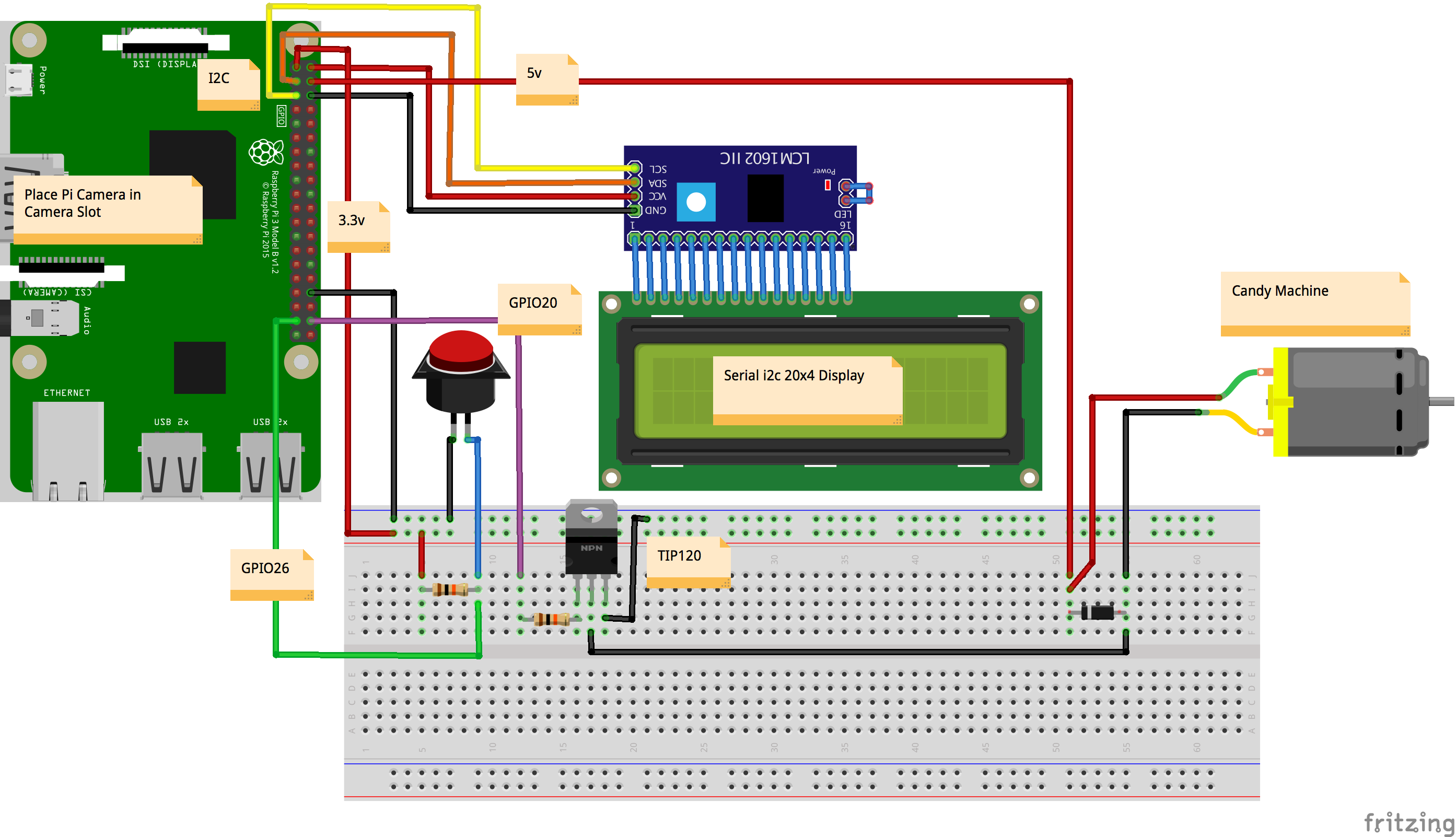
Via its 20×4 display, Alvaro’s candy dispenser asks for an image, for example of a cat or a dog. Produce the requested image in front of the onboard Camera Module and the dispenser releases a delicious reward for you.

Inside the dispenser

Android Things Candy Dispenser Raspberry Pi

Alvaro’s schematic provides all the information you need to build your own Android Things candy dispenser (click for a larger version)

The dispenser uses a Raspberry Pi to control both the image detection and the candy release. Press the button, and the Raspberry Pi displays one of several image subjects on the screen. Via the camera, the Pi records the image you present and sends for processing via Google’s Cloud Vision API. Cloud Vision supplies image annotations and metadata, and if these match the image request, boom, free candy!

To discover more about Google Cloud Vision, check out this video from the Cloud Vision team.

Alvaro provides full instructions for the build, including all necessary code and peripherals, on both Instructables and GitHub.

Building with Android Things

Given that Android Things has not been available for very long, we have yet to see many complete builds using it with the Raspberry Pi. If you’d like to try out this OS, Alvaro’s project is a great entry point. You should also check out the Pimoroni Rainbow HAT Android Things Starter Kit that provides everything you need to begin making. And if you have a Pi and are raring to go, follow the official ‘Android Things on Raspberry Pi’ setup guide here.

If you’ve already built a project using the Android Things platform, we’d love to see it! Make sure to share your project link in the comments below.

The post The Android Things Candy Dispenser appeared first on Raspberry Pi.


Source: Raspberry Pi – The Android Things Candy Dispenser

Mira, tiny robot of joyful delight

The staff of Pi Towers are currently melting into puddles while making ‘Aaaawwwwwww’ noises as Mira, the adorable little Pi-controlled robot made by Pixar 3D artist Alonso Martinez, steals their hearts.

Mira the robot playing peek-a-boo

If you want to get updates on Mira’s progress, sign up for the mailing list! http://eepurl.com/bteigD Mira is a desk companion that makes your life better one smile at a time. This project explores human robot interactivity and emotional intelligence. Currently Mira uses face tracking to interact with the users and loves playing the game “peek-a-boo”.

Introducing Mira

Honestly, I can’t type words – I am but a puddle! If I could type at all, I would only produce a stream of affectionate fragments. Imagine walking into a room full of kittens. What you would sound like is what I’d type.

No! I can do this. I’m a professional. I write for a living! I can…

SHE BLINKS OHMYAAAARGH!!!

Mira Alonso Martinez Raspberry Pi

Weebl & Bob meets South Park’s Ike Broflovski in an adorable 3D-printed bundle of ‘Aaawwwww’

Introducing Mira (I promise I can do this)

Right. I’ve had a nap and a drink. I’ve composed myself. I am up for this challenge. As long as I don’t look directly at her, I’ll be fine!

Here I go.

As one of the many über-talented 3D artists at Pixar, Alonso Martinez knows a thing or two about bringing adorable-looking characters to life on screen. However, his work left him wondering:

In movies you see really amazing things happening but you actually can’t interact with them – what would it be like if you could interact with characters?

So with the help of his friends Aaron Nathan and Vijay Sundaram, Alonso set out to bring the concept of animation to the physical world by building a “character” that reacts to her environment. His experiments with robotics started with Gertie, a ball-like robot reminiscent of his time spent animating bouncing balls when he was learning his trade. From there, he moved on to Mira.

Mira Alonso Martinez

Many, many of the views of this Tested YouTube video have come from me. So many.

Mira swivels to follow a person’s face, plays games such as peekaboo, shows surprise when you finger-shoot her, and giggles when you give her a kiss.

Mira’s inner workings

To get Mira to turn her head in three dimensions, Alonso took inspiration from the Microsoft Sidewinder Pro joystick he had as a kid. He purchased one on eBay, took it apart to understand how it works, and replicated its mechanism for Mira’s Raspberry Pi-powered innards.

Mira Alonso Martinez

Alonso used the smallest components he could find so that they would fit inside Mira’s tiny body.

Mira’s axis of 3D-printed parts moves via tiny Power HD DSM44 servos, while a camera and OpenCV handle face-tracking, and a single NeoPixel provides a range of colours to indicate her emotions. As for the blinking eyes? Two OLED screens boasting acrylic domes fit within the few millimeters between all the other moving parts.

More on Mira, including her history and how she works, can be found in this wonderful video released by Tested this week.

Pixar Artist’s 3D-Printed Animated Robots!

We’re gushing with grins and delight at the sight of these adorable animated robots created by artist Alonso Martinez. Sean chats with Alonso to learn how he designed and engineered his family of robots, using processes like 3D printing, mold-making, and silicone casting. They’re amazing!

You can also sign up for Alonso’s newsletter here to stay up-to-date about this little robot. Hopefully one of these newsletters will explain how to buy or build your own Mira, as I for one am desperate to see her adorable little face on my desk every day for the rest of my life.

The post Mira, tiny robot of joyful delight appeared first on Raspberry Pi.


Source: Raspberry Pi – Mira, tiny robot of joyful delight

BackMap, the haptic navigation system

At this year’s TechCrunch Disrupt NY hackathon, one team presented BackMap, a haptic feedback system which helps visually impaired people to navigate cities and venues. It is assisted by a Raspberry Pi and integrated into a backpack.

Good vibrations with BackMap

The team, including Shashank Sharma, wrote an iOS phone app in Swift, Apple’s open-source programming language. To convert between addresses and geolocations, they used the Esri APIs offered by PubNub. So far, so standard. However, they then configured their BackMap setup so that the user can input their destination via the app, and then follow the route without having to look at a screen or listen to directions. Instead, vibrating motors have been integrated into the straps of a backpack and hooked up to a Raspberry Pi. Whenever the user needs to turn left or right, the Pi makes the respective motor vibrate.

Disrupt NY 2017 Hackathon | Part 1

Disrupt NY 2017 Hackathon presentations filmed live on May 15th, 2017. Preceding the Disrupt Conference is Hackathon weekend on May 13-14, where developers and engineers descend from all over the world to take part in a 24-hour hacking endurance test.

BackMap can also be adapted for indoor navigation by receiving signals from beacons. This could be used to direct users to toilet facilities or exhibition booths at conferences. The team hopes to upgrade the BackMap device to use a wristband format in the future.

Accessible Pi

Here at Pi Towers, we are always glad to see Pi builds for people with disabilities: we’ve seen Sanskriti and Aman’s Braille teacher Mudra, the audio e-reader Valdema by Finnish non-profit Kolibre, and Myrijam and Paul’s award-winning, eye-movement-controlled wheelchair, to name but a few.

Our mission is to bring the power of coding and digital making to everyone, and we are lucky to be part of a diverse community of makers and educators who have often worked proactively to make events and resources accessible to as many people as possible. There is, for example, the autism- and Tourette’s syndrome-friendly South London Raspberry Jam, organised by Femi Owolade-Coombes and his mum Grace. The Raspberry VI website is a portal to all things Pi for visually impaired and blind people. Deaf digital makers may find Jim Roberts’ video tutorials, which are signed in ASL, useful. And anyone can contribute subtitles in any language to our YouTube channel.

If you create or use accessible tutorials, or run a Jam, Code Club, or CoderDojo that is designed to be friendly to people who are neuroatypical or have a disability, let us know how to find your resource or event in the comments!

The post BackMap, the haptic navigation system appeared first on Raspberry Pi.


Source: Raspberry Pi – BackMap, the haptic navigation system

Making Waves: print out sound waves with the Raspberry Pi

For fun, Eunice Lee, Matthew Zhang, and Bomani McClendon have worked together to create Waves, an audiovisual project that records people’s spoken responses to personal questions and prints them in the form of a sound wave as a gift for being truthful.

Waves

Waves is a Raspberry Pi project centered around transforming the transience of the spoken word into something concrete and physical. In our setup, a user presses a button corresponding to an intimate question (ex: what’s your motto?) and answers it into a microphone while pressing down on the button.

What are you grateful for?

“I’m grateful for finishing this project,” admits maker Eunice Lee as she presses a button and speaks into the microphone that is part of the Waves project build. After a brief moment, her confession appears on receipt paper as a waveform, and she grins toward the camera, happy with the final piece.

Eunice testing Waves

Waves is a Raspberry Pi project centered around transforming the transience of the spoken word into something concrete and physical. In our setup, a user presses a button corresponding to an intimate question (ex: what’s your motto?) and answers it into a microphone while pressing down on the button.

Sound wave machine

Alongside a Raspberry Pi 3, the Waves device is comprised of four tactile buttons, a standard USB microphone, and a thermal receipt printer. This type of printer has become easily available for the maker movement from suppliers such as Adafruit and Pimoroni.

Eunice Lee, Matthew Zhang, Bomani McClendon - Sound Wave Raspberry Pi

Definitely more fun than a polygraph test

The trio designed four colour-coded cards that represent four questions, each of which has a matching button on the breadboard. Press the button that belongs to the question to be answered, and Python code directs the Pi to record audio via the microphone. Releasing the button stops the audio recording. “Once the recording has been saved, the script viz.py is launched,” explains Lee. “This script takes the audio file and, using Python matplotlib magic, turns it into a nice little waveform image.”

From there, the Raspberry Pi instructs the thermal printer to produce a printout of the sound wave image along with the question.

Making for fun

Eunice, Bomani, and Matt, students of design and computer science at Northwestern University in Illinois, built Waves as a side project. They wanted to make something at the intersection of art and technology and were motivated by the pure joy of creating.

Eunice Lee, Matthew Zhang, Bomani McClendon - Sound Wave Raspberry Pi

Making makes people happy

They have noted improvements that can be made to increase the scope of their sound wave project. We hope to see many more interesting builds from these three, and in the meantime we invite you all to look up their code on Eunice’s GitHub to create your own Waves at home.

The post Making Waves: print out sound waves with the Raspberry Pi appeared first on Raspberry Pi.


Source: Raspberry Pi – Making Waves: print out sound waves with the Raspberry Pi

Estefannie’s GPS-Controlled GoPro Photo Taker

Are you tired of having to take selfies physically? Do you only use your GoPro for the occasional beach vacation? Are you maybe even wondering what to do with the load of velcro you bought on a whim? Then we have good news for you: Estefannie‘s back to help you out with her Personal Automated GPS-Controlled Portable Photo Taker…PAGCPPT for short…or pagsssspt, if you like.

RASPBERRY PI + GPS CONTROLLED PHOTO TAKER

Hey World! Do you like vacation pictures but don’t like taking them? Make your own Personal Automated GPS Controlled Portable Photo Taker! The code, components, and instructions are in my Hackster.io account: https://www.hackster.io/estefanniegg/automated-gps-controlled-photo-taker-3fc84c For this build, I decided to put together a backpack to take pictures of me when I am close to places that like.

The Personal Automated GPS-Controlled Portable Photo Taker

Try saying that five times in a row.

Go on. I’ll wait.

Using a Raspberry Pi 3, a GPS module, a power pack, and a GoPro plus GoPro Stick, Estefannie created the PAGCPPT as a means of automatically taking selfies at pre-specified tourist attractions across London.

Estefannie Explains it All Raspberry Pi GPS GoPro Camera

There’s pie in my backpack too…but it’s a bit messy

With velcro and hot glue, she secured the tech in place on (and inside) a backpack. Then it was simply a case of programming her set up to take pictures while she walked around the city.

Estefannie Explains it All Raspberry Pi GPS GoPro Camera

Making the GoPro…go

Estefannie made use of a GoPro API library to connect her GoPro to the Raspberry Pi via WiFi. With the help of this library, she wrote a Python script that made the GoPro take a photograph whenever her GPS module placed her within a ten-metre radius of a pre-selected landmark such as Tower Bridge, Abbey Road, or Platform 9 3/4.

Estefannie Explains it All Raspberry Pi GPS GoPro Camera

“Accio selfie.”

The full script, as well as details regarding the components she used for the project, can be found on her hackster.io page here.

Estefannie Explains it All

You’ll have noticed that we’ve covered Estefannie once or twice before on the Raspberry Pi blog. We love project videos that convey a sense of ‘Oh hey, I can totally build one of those!’, and hers always tick that box. They are imaginative, interesting, quirky, and to be totally honest with you, I’ve been waiting for this particular video since she hinted at it on her visit to Pi Towers in May. I got the inside scoop, yo!

What’s better than taking pictures? Not taking pictures. But STILL having pictures. I made a personal automated GPS controlled Portable Photo Taker ⚡ NEW VIDEO ALERT⚡ Link in bio.

1,351 Likes, 70 Comments – Estefannie Explains It All (@estefanniegg) on Instagram: “What’s better than taking pictures? Not taking pictures. But STILL having pictures. I made a…”

Make sure to follow her on YouTube and Instagram for more maker content and random shenanigans. And if you have your own maker social media channel, YouTube account, blog, etc, this is your chance to share it for the world to see in the comments below!

The post Estefannie’s GPS-Controlled GoPro Photo Taker appeared first on Raspberry Pi.


Source: Raspberry Pi – Estefannie’s GPS-Controlled GoPro Photo Taker

A rather dandy Pi-assisted Draisine

It’s time to swap pedal power for relaxed strides with the Raspberry Pi-assisted Draisine from bicyle-modding pro Prof. Holger Hermanns.

Raspberry PI-powered Dandy Horse Draisine

So dandy…

A Draisine…

If you have children yourself or have seen them in the wild on occasion, you may be aware of how much they like balance bikes – bicycle frames without pedals, propelled by striding while sitting on the seat. It’s a nice way for children to take the first steps (bah-dum tss) towards learning to ride a bicycle. However, between 1817, when the balance bike (also known as a draisine or Dandy Horse) was invented by Karl von Drais, and the introduction of the pedal bike around 1860, this vehicle was the new, fun, and exciting way to travel for everyone.

Raspberry PI-powered Dandy Horse Draisine

We can’t wait for the inevitable IKEA flatpack release

Having previously worked on wireless braking systems for bicycles, Prof. Hermanns is experienced in adding tech to two wheels. Now, he and his team of computer scientists at Germany’s Saarland University have updated the balance bike for the 21st century: they built the Draisine 200.0 to explore pedal-free, power-assisted movement as part of the European Research Council-funded POWVER project.

With this draisine, his team have created a beautiful, fully functional final build that would look rather fetching here on the bicycle-flooded streets of Cambridge.

The frame of the bike, except for the wheel bearings and the various screws, is made of Okoumé wood, which looks somewhat rose, has fine nerves (which means that it is easy to mill) and seems to have excellent weather resistance.

Draisine 200.0

Uploaded by ecomento.tv on 2017-06-08.

…with added Pi!

Within the wooden body of the draisine lies a array of electrical components, including a 200-watt rear hub motor, a battery, an accelerometer, a magnetic sensor, and a Raspberry Pi. Checking the accelerometer and reading wheel-embedded sensors 150 times per second (wow!), the Pi activates the hub motor to assist the draisine, which allows it to reach speeds of up to 16mph (25km/h – wow again!).

Raspberry PI-powered Dandy Horse Draisine

The inner workings of the Draisine 200.0

More detailed information on the Draisine 200.0 build can be found here. Hermanns’s team also plan to release the code for the project once confirmation of no licence infringement has been given.

Take to the road

We’ve seen a variety of bicycle-oriented Pi builds that improve safety and help with navigation. But as for electricity-assisted Pi bikes, this one may be the first, and it’s such a snazzy one at that!

If you’d like to see more cycle-based projects using the Raspberry Pi, check out Matt’s Smart Bike Light, David’s bike computer, and, for the fun of it, the Pi-powered bicycle beer dispenser we covered last month.

The Pi Towers hive mind is constantly discussing fun new ways for its active cycling community to use the Raspberry Pi, and we’d love to hear your ideas as well! So please do share them in the comments below.

The post A rather dandy Pi-assisted Draisine appeared first on Raspberry Pi.


Source: Raspberry Pi – A rather dandy Pi-assisted Draisine

Encased in amber: meet the epoxy-embedded Pi

The maker of one of our favourite projects from this year’s Maker Faire Bay Area took the idea of an ’embedded device’ and ran with it: Ronald McCollam has created a wireless, completely epoxy-encased Pi build – screen included!

Resin.io in resin epoxy-encased Raspberry Pi

*cue epic music theme* “Welcome…to resin in resin.”

Just encase…

Of course, this build is not meant to be a museum piece: Ronald embedded a Raspberry Pi 3 with built-in wireless LAN and Bluetooth to create a hands-on demonstration of the resin.io platform, for which he is a Solution Architect. Resin.io is useful for remotely controlling groups of Linux-based IoT devices. In this case, Ronald used it to connect to the encased Pi. And yes, he named his make Resin-in-resin – we salute you, sir!

resin.io in resin epoxy-encased Raspberry Pi

“Life uh…finds a way.”

Before he started the practical part of his project, he did his research to find a suitable resin. He found that epoxy types specifically designed for encasing electronics are very expensive. In the end, Ronald tried out a cheap type, usually employed to coat furniture, by encasing an LED. It worked perfectly, and he went ahead to use this resin for embedding the Pi.

Bubbleshooting epoxy

This was the first time Ronald had worked with resin, so he learned some essential things about casting. He advises other makers to mix the epoxy very, very slowly to minimize the formation of bubbles; to try their hands on some small-scale casting attempts first; and to make sure they’re using a large enough mold for casting. Another thing to keep in mind is that some components of the make will heat up and expand while the device is running.

His first version of an encased Pi was still connected to the outside world by its USB cable:

Ronald McCollam on Twitter

Updates don’t get more “hands off” than a Raspberry Pi encased in epoxy — @resin_io inside resin! Come ask me about it at @DockerCon!

Not satisfied with this, he went on to incorporate an inductive charging coil as a power source, so that the Pi could be totally insulated in epoxy. The Raspberry Pi Foundation’s Matt Richardson got a look the finished project at Maker Faire Bay Area:

MattRichardson🏳️‍🌈 on Twitter

If you’re at @makerfaire, you must check out what @resin_io is showing. A @Raspberry_Pi completely enclosed in resin. Completely wireless. https://t.co/djVjoLz3hI

MAGNETS!

The charging coil delivers enough power to keep the Pi running for several hours, but it doesn’t allow secure booting. After some head-scratching, Ronald came up with a cool solution to this problem: he added a battery and a magnetic reed switch. He explains:

[The] boot process is to use the magnetic switch to turn off the Pi, put it on the charger for a few minutes to allow the battery to charge up, then remove the magnet so the Pi boots.

Pi in resin controlled by resin.io

“God help us, we’re in the hands of engineers.”

He talks about his build on the resin.io blog, and has provided a detailed project log on Hackaday. For those of you who want to recreate this project at home, Ronald has even put together an Adafruit wishlist of the necessary components.

Does this resin-ate with you?

What’s especially great about Ronald’s posts is that they’re full of helpful tips about getting started with using epoxy resin in your digital making projects. So whether you’re keen to build your own wireless Pi, or just generally interested in embedding electronic components in resin, you’ll find his write-ups useful.

If you have experience in working with epoxy and electronic devices and want to share what you’ve learned, please do so in the comments!

The post Encased in amber: meet the epoxy-embedded Pi appeared first on Raspberry Pi.


Source: Raspberry Pi – Encased in amber: meet the epoxy-embedded Pi