MagPi 74: Build a Raspberry Pi laptop!

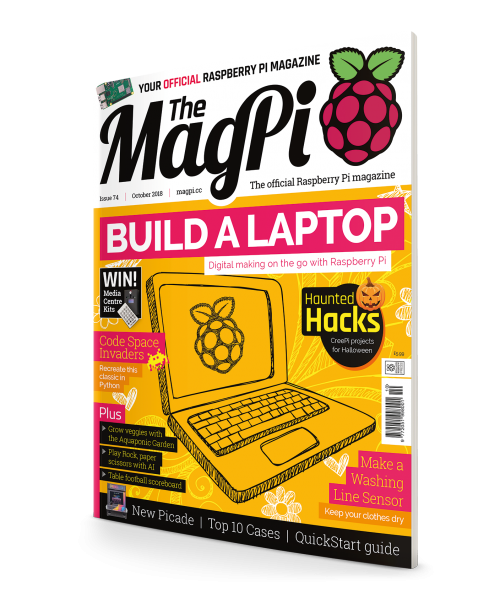
Hey folks! Rob from The MagPi here with the good news that a brand new issue is out today, with a slightly new look. The MagPi 74 shows you how to build a Pi‑powered laptop, and gives tips on how to recycle an old laptop to use with Pi.

magpi 74

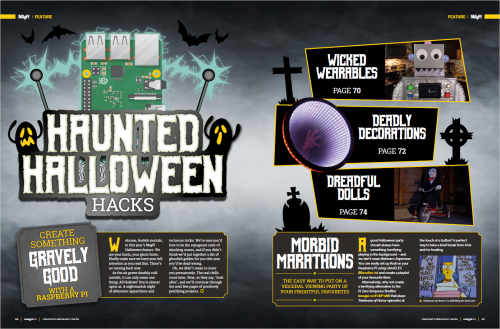
The laptop is not spooky, but the Halloween projects definitely are

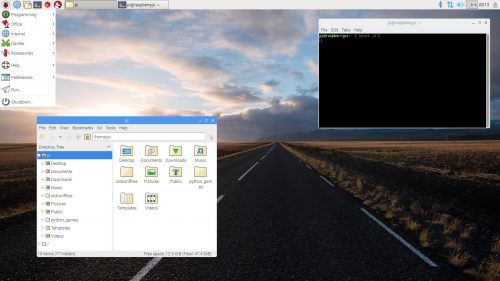
We’ve got a pretty simple, tiny laptop build that you can follow along with, which will easily slip into your pocket once it’s completed. We also cover the basic Raspberry Pi Desktop experience, in case you fancy installing the x86 version to bring new life to an old laptop.

Welcome, foolish mortals…

I’m also very happy to announce that The MagPi Halloween projects feature is back this year! Put together by yours truly, Haunted Halloween Hacks should get you in the mood for the spookiest time of the year. October is the only month of the year that I’m allowed to make puns, so prepare yourself for some ghastly groaners.

magpi 74

Rob has unleashed his awful alliteration skills this issue, with some putrid puns

Still want more?

On top of all that, you can find more fantastic guides on making games in Python and in C/C++, along with our brand new Quickstart guide, a review of the latest Picade, and more inspiring projects than you can shake a Pi Zero at.

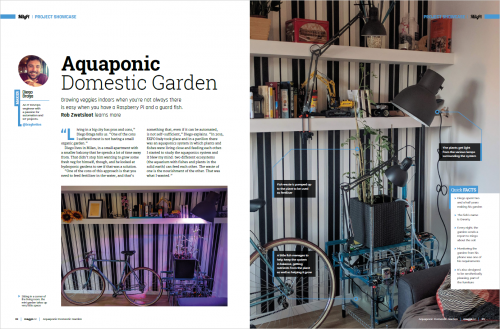
Qwerty the fish keeps this garden growing

magpi 74

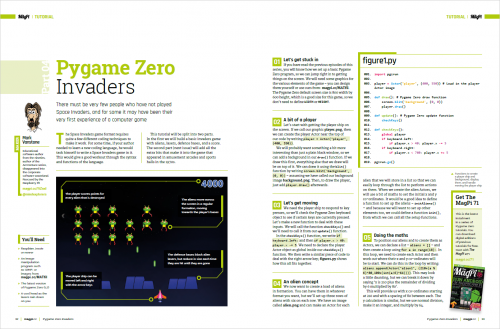
Start making a Space Invaders clone with Pygame!

Get The MagPi 74

You can get The MagPi 74 today from WHSmith, Tesco, Sainsbury’s, and Asda. If you live in the US, head over to your local Barnes & Noble or Micro Center in the next few days for a print copy. You can also get the new issue online from our store, or digitally via our Android or iOS apps. And don’t forget, there’s always the free PDF as well.

Rolling subscription offer!

Want to support the Raspberry Pi Foundation and the magazine? You can now take out a monthly £5 subscription to the magazine, effectively creating a rolling pre‑order system that saves you money on each issue.

The MagPi subscription offer — The MagPi 74

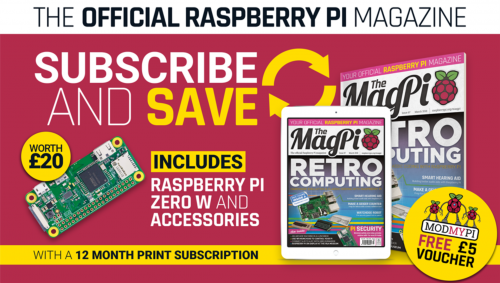
You can also take out a twelve-month print subscription and get a Pi Zero W plus case and adapter cables absolutely free! This offer does not currently have an end date.

We need you!

Issue 75 is next month, and we’re planning to showcase 75 amazing Raspberry Pi projects! We need your help to vote for the top 50, so please head to the voting page and choose your favourite project. Click on a project name to cast your vote for that project.

That’s it for now! Oh, and if you make any Raspberry Pi Halloween projects this year, send them to us on Twitter or via email.

The post MagPi 74: Build a Raspberry Pi laptop! appeared first on Raspberry Pi.


Source: Raspberry Pi – MagPi 74: Build a Raspberry Pi laptop!

Raspberry Jam Big Birthday Weekend 2019

For our birthday this year, we coordinated over 100 community-led Raspberry Jam events around the globe. In a few months’ time, Raspberry Pi will be seven years old – and to celebrate we’re hosting another Big Birthday Weekend, which takes place all over the world on 2-3 March 2019.

Raspberry Pi: aged six and a half

Last year’s event was a lot of fun! We sent out starter kits and extra birthday goodies to participating Jams, and even put together a tweeting Raspberry Pi photobooth for people to set up to share their events.


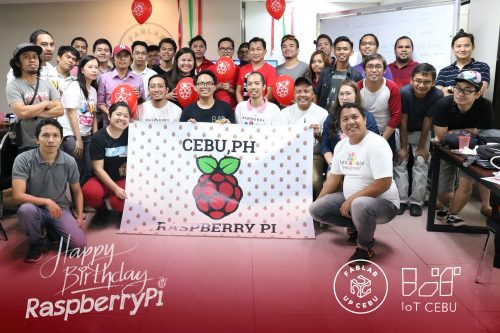
With the incredible support of the Raspberry Pi community, we were able to celebrate our sixth birthday in 40 countries, covering six continents – that is, every continent except Antarctica! Members of the Raspberry Pi Foundation team joined in with events in the UK, in California, across Europe, and elsewhere, despite unexpected UK snow storms.

Raspberry Jam Big Birthday Weekend 2018

To celebrate the Raspberry Pi’s sixth birthday, we coordinated Raspberry Jams all over the world to take place over the Raspberry Jam Big Birthday Weekend, 3-4 March 2018. A massive thank you to everyone who ran an event and attended.

For 2019, we’re hoping to go even bigger, and this is where you come in.

Get involved

If you’d like to run an event for our Big Birthday Weekend, please head over to the Big Birthday Weekend 2019 page and join our newsletter. That’s where we’ll provide updates on what’s going on and what you need to do to join in.

If this sounds like it might be your kind of thing, but you’ve never done it before, there’s plenty of time to get off to a gentle start and run a Jam before 2018 is out. When you join the newsletter, we’ll invite you to our Jam maker Slack community, where you can get support from us and from wonderful Jam makers all around the world. They have lots of help and advice to offer people who are just starting out with their first Jam, and you’ll be well rehearsed by the time the birthday weekend comes around.

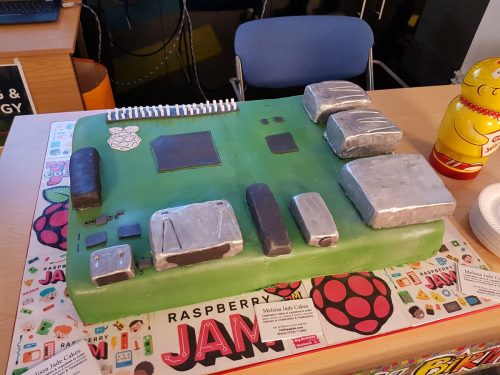
As always, there will be cake. And if you can beat this edible Raspberry Pi from earlier this year, you have our utmost respect.

Start by downloading the Raspberry Jam Guidebook and checking out the Jam activity resources, branding pack, and more on our Jam page. And as ever, you can support the Raspberry Pi community online by following #RJam on Twitter.

The post Raspberry Jam Big Birthday Weekend 2019 appeared first on Raspberry Pi.


Source: Raspberry Pi – Raspberry Jam Big Birthday Weekend 2019

Networked knitting machine: not your average knit one, purl one

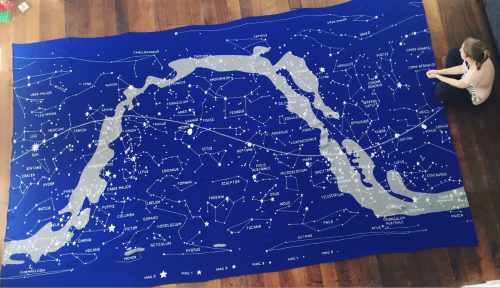
The moment we saw Sarah Spencer‘s knitted Stargazing tapestry, we knew we needed to know more. A couple of emails later, and here’s Sarah with a guest blog post telling you all you need to know about her hacking adventure with a 1980s knitting machine and a Raspberry Pi.

Knitting Printer! (slowest speed)

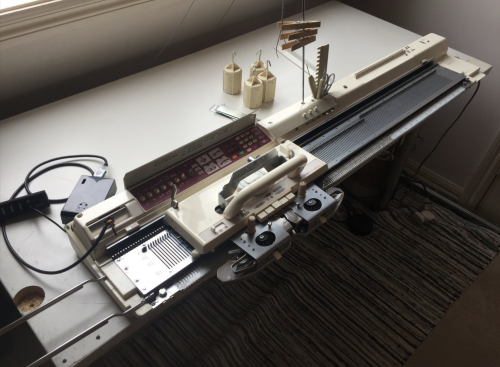
Printing a scarf on a Brother KM950i knitting machine from the 1980’s. To do this I have a Brother Motor arm to push the carriage back and forth and a homemade colour changer that automatically selects the colour on the left (the white and purple device with the LED).

Here’s Sarah…

Raspberry Pi: what’s there not to like? It’s powerful, compact, and oh so affordable! I used one as a portable media box attached to a pico projector for years. Setting one up as a media box is one of the most popular uses for them, but there’s so much more you can do.

Cue a 1980s Brother domestic knitting machine. Yep, you read that right. A knitting machine – to knit jumpers, hats, scarves, you name it. They don’t make domestic knitting machines any more, so a machine from the 1980s is about as modern as you can get. It comes with an onboard scanner to scan knitting patterns and a floppy drive port to back up your scans to an old floppy disk. Aah, the eighties – what a time to be alive!

Building a networked knitting machine

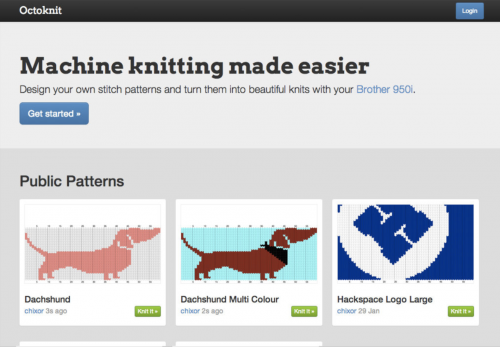
But this is an article about Raspberry Pi, right? So what does a 30-year-old knitting machine have to do with that? Well, I hacked my domestic knitting machine and turned it into a network printer with the help of a Raspberry Pi. By using a floppy drive emulator written in Python and a web interface, I can send an image to the Raspberry Pi over the network, preview it in a knitting grid, and tell it to send the knitting pattern to the knitting machine via the floppy drive port.

Sarah Spencer Networked knitting machine

OctoKnit

I call this set-up OctoKnit in honour of a more famous and widely used tool, OctoPrint for 3D printers, another popular application for Raspberry Pi.

Sarah Spencer Knitting Network Printer

I’ve made the OctoKnit web interface open source. You can find it on GitHub.

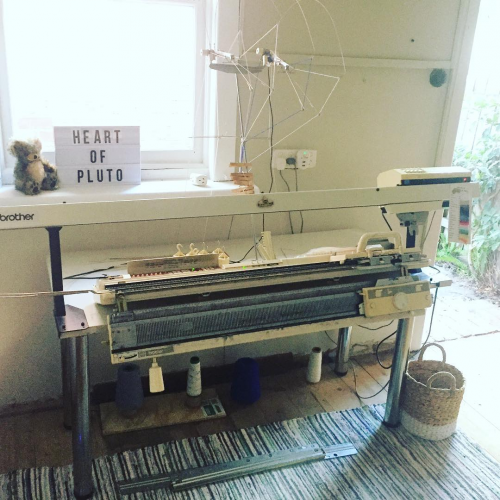
This project has been in the works for several years, and there’s been a few modifications to the knitting machine over that time. With the addition of a motor arm and an automatic colour changer, my knitting is getting very close to being hands-free. Here’s a photo of the knitting machine today, although the Raspberry Pi is hiding behind the machine in this shot:

Sarah Spencer Networked knitting machine

I’ve specialised in knitting multicolour work using a double-layered technique called double Jacquard, which requires two beds of needles. Hence the reason the machine has doubled in size from when I first started.

Knitting for Etsy

I made a thing that can make things, so I need to make something with it, right? Here are a few custom orders I’ve completed through my Etsy store:

Sarah Spencer Networked knitting machine

Stargazing

However, none of my previous works quite compares to my latest piece, Stargazing: a knitted tapestry. Knitted in seven panels stitched together by hand, the pattern on the Raspberry Pi is 21 times bigger than the memory available on the vintage knitting machine, so it’s knitted in 21 separate but seamless file transfers. It took over 100 hours of work and weighs 15kg.

Sarah Spencer Networked knitting machine

Stargazing is a celestial map of the night sky, featuring all 88 constellations across both Northern and Southern hemispheres. The line through the center is the Earth’s equator, projected out into space, with the sun, moon and planets of our solar system featured along it. The grey cloud is a representation of our galaxy, the Milky Way.

Heart of Pluto on Twitter

Happy 6pm, Fri 31st Aug 2018 😊 The tapestry is installed and the planets in the sky have now aligned with those in the knitting

When I first picked up a Raspberry Pi and turned it over in my hand, marvelling at the computing power in such a small, affordable unit, I never imagined in my wildest dreams what I’d end up doing with it.

What will you do with your Raspberry Pi?

The post Networked knitting machine: not your average knit one, purl one appeared first on Raspberry Pi.


Source: Raspberry Pi – Networked knitting machine: not your average knit one, purl one

Celebrating our translators!

As the world gets ready to celebrate International Translation Day on 30 September, we want to say thank you to our amazing community of volunteer translators. This talented bunch work very hard so that people around the world can learn digital making and computing in their native languages.

Can you help us translate our content?

If you speak an additional language to English, volunteering as a translator is an easy way to make a big difference.

Our translators

The #RPiTranslate community is growing every day, and at the moment we have around 370 volunteers. They are translating our learning projects into 50 languages – everything from Afrikaans, to Tamil, to Scots Gaelic! Projects in 26 of those languages are already available on the Raspberry Pi learning projects website, and we continually add more.

Our translators are all volunteers, and they come from various walks of life. They are students and professionals, translators and coders, young and retired, already passionate about our mission or completely new to it.

Abdulaziz is a language coordinator for the Arabic language team. He is finishing his doctoral research at the University of Toledo in the US, and will soon start working as an assistant professor in the Department of Curriculum and Instruction at King Saud University in Saudi Arabia. He translates for us because he believes our educational resources are great and he’d love to see them used by Arabic speakers of all ages.

Wojtek volunteers at a Code Club in Poland, and helps us translate our projects into Polish because he thinks translations are crucial for learning. When children can access lessons in their native language, they truly understand programming concepts, and that empowers them to experiment and create more.

getting started with raspberry pi

Cor is the main force behind all of our Dutch projects. He is a retired simulator designer and developer for the Royal Netherlands Air Force, and volunteers at a hackerspace in the Netherlands. While teaching young people coding and robotics, he realised how difficult it is for them to learn all of this in English. He decided to translate for us to change that.

Silvia started volunteering for us when she was studying for a degree in translation. She joined us to gain some real-life experience in translation and localisation, but quickly found herself immersed in our amazing community and became passionate about Raspberry Pi’s mission. She is still supporting us now, even though she has finished her degree and is working full-time.

Sanneke is a digital literacy consultant and librarian at Bibliotheek Kennemerwaard in the Netherlands. She runs five Dojos in the area where her library is based. Sanneke translates because it helps children who want to learn to code. English is taught from quite an early age at primary schools in the Netherlands, but having learning resources in Dutch is particularly helpful for young children.

All of these volunteers bring with them a unique set of skills and experiences. They make the #RPiTranslate community an amazing, diverse, successful team.

Raspberry Pi translators: we salute every single one of you. We couldn’t do what we do without you!

A GIF showing lots of Raspberry Pi colleagues smiling, saluting and clapping enthusiastically

Join us

Anyone can join this amazing group of people in their translation efforts. It’s really easy to get involved: you don’t need any experience of translation or coding, and you can choose how much time you want to commit.

Visit our translation page to find out more, or join one of our live Q&A sessions this week to ask our translation manager and language coordinators anything you’d like:

  • Wednesday 26 September at 18:00 BST – join here
  • Friday 28 September at 13:00 BST – join here

Happy translation week!

Special thanks to the Atlassian Foundation and MIT Solve for their continued support in developing our translation community.

The post Celebrating our translators! appeared first on Raspberry Pi.


Source: Raspberry Pi – Celebrating our translators!

Developer Q&A: brand-new online training courses

There is always a flurry of activity at the start of the new academic year, and we are getting in on the action: this autumn and winter, we’ll be launching four new online courses! They are completely free and aim to give educators a solid grounding in the concepts and practical applications of computing.

I caught up with course developers Marc, Caitlyn, James, and Martin to find out what they have in store for you.




Dan Fisher: Hi everyone! First off, can you give me a rundown of what your courses are called and what your motivation was for creating them?

Martin O’Hanlon: Sure! So my course is called Programming 101: An Introduction to Python for Educators. We wanted to create an ‘introduction to programming’ course that anyone could follow, ensuring that learners get to understand concepts as well as practice coding. They will leave with a really good understanding of why programming is so useful, and of how it works.

James Robinson: Then, as a follow-up to this and many other beginner online programming courses, we will be releasing Programming 102: Think Like A Computer Scientist. A lot of courses spend time on the syntax and core elements of a language, without much focus on how to plan and construct a program. We feel the skills involved in understanding and breaking down a problem, before representing it in code, are fundamental to computer science. My course is therefore designed to give you the opportunity to explore these problem-solving skills while extending your knowledge of programming.

Marc Scott: My How Computers Work: Demystifying Computation course fills in the gaps in people’s knowledge about these amazing lumps of silicon and plastic. Computers are very abstract machines. Most people understand that computers can run large, complicated programs, but few people understand how computers are able to perform even the simplest of operations like counting or adding two numbers together. How Computers Work shows people how computers use simple components such as transistors to do incredible things.

Caitlyn Merry: My course is called Bringing Data to Life: Data Representation with Digital Media. Data representation is a huge part of the GCSE Computer Science curriculum, and we wanted to present some of the more theoretical parts of the subject in a fun, practical, and engaging way. And data is everywhere — it is such an important topic nowadays, with real-world impact, so we’re making sure the course is also useful for anyone else who wants to learn about data through the lens of creative media.
an animation of a dancing computer screen displaying the words 'hello world'

DF: Awesome! So who are the courses for?

MOH: Programming 101 is for anyone who wants to learn how to program in Python and gain an understanding for the concepts of computer programming.

JR: Programming 102 is for beginners who have already tackled some programming basics and have some experience in writing text-based programs.

CM: Bringing Data to Life is great if you want to understand how computers turn data into digital media: text, sound, video, and images — for example, photos on your smartphone.

MS: And How Computers Work is for anyone who is interested in learning how computers work. [laughter from the group]

DF: Short and to the point as ever, Marc.

MS: Okay, if you want a sensible answer, it would most help Computer Science teachers at secondary or high school level get to grips with the fundamentals and architecture.

DF: And what will they be doing in your courses, in practical terms?

MOH: Programming 101 will show you how to set up your computer for Python programming and then how to create Python programs! You’ll learn about the basic programming concepts of sequencing, selection, and repetition, and about how to use variables, input, output, ifs, lists, loops, functions, and more.
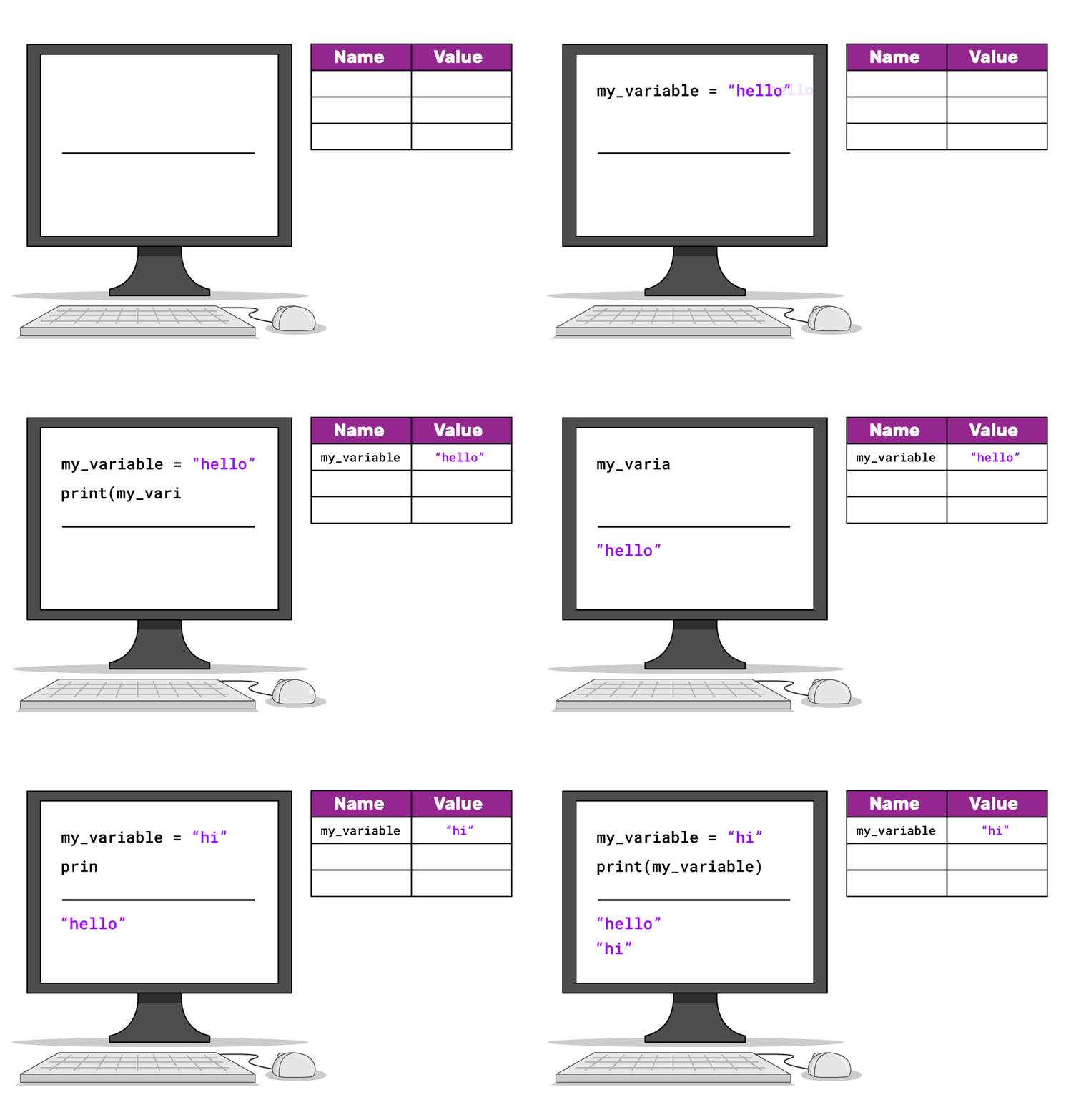
an animation showing how programming variables works

JR: Programming 102 discusses the importance of algorithms and their applications, and shows you how to plan and implement your own algorithms and reflect on their efficiency. Throughout the course, you’ll be using functions to structure your code and make your algorithms more versatile.

MS: In How Computers Work, learners will find out some of the historical origins of computers and programming, how computers work with ones and zeros, how logic gates can be used to perform calculations, and about the basic internals of the CPU, the central processing unit.

CM: In my Bringing Data to Life course, you’ll learn how text, images, and sound data is represented and stored by computers, but you’ll also be doing your own media computation: creating your own code and programs to manipulate existing text, images, and data!

DF: Cool! So what will learners end up taking away from your courses?

MOH: When you have completed the Programming 101 course, you’ll be able to create your own computer programs using Python, educate others in the fundamental concepts of computer programming, and take your learning further to understand more advanced concepts.

JR: After Programming 102, you’ll be able to plan and create structured and versatile programs and make use of more programming concepts including functions and dictionaries.

MS: From my course, you’ll get a solid grounding in how computers actually function, and an appreciation for the underlying simplicity behind complex computing architectures and programs.
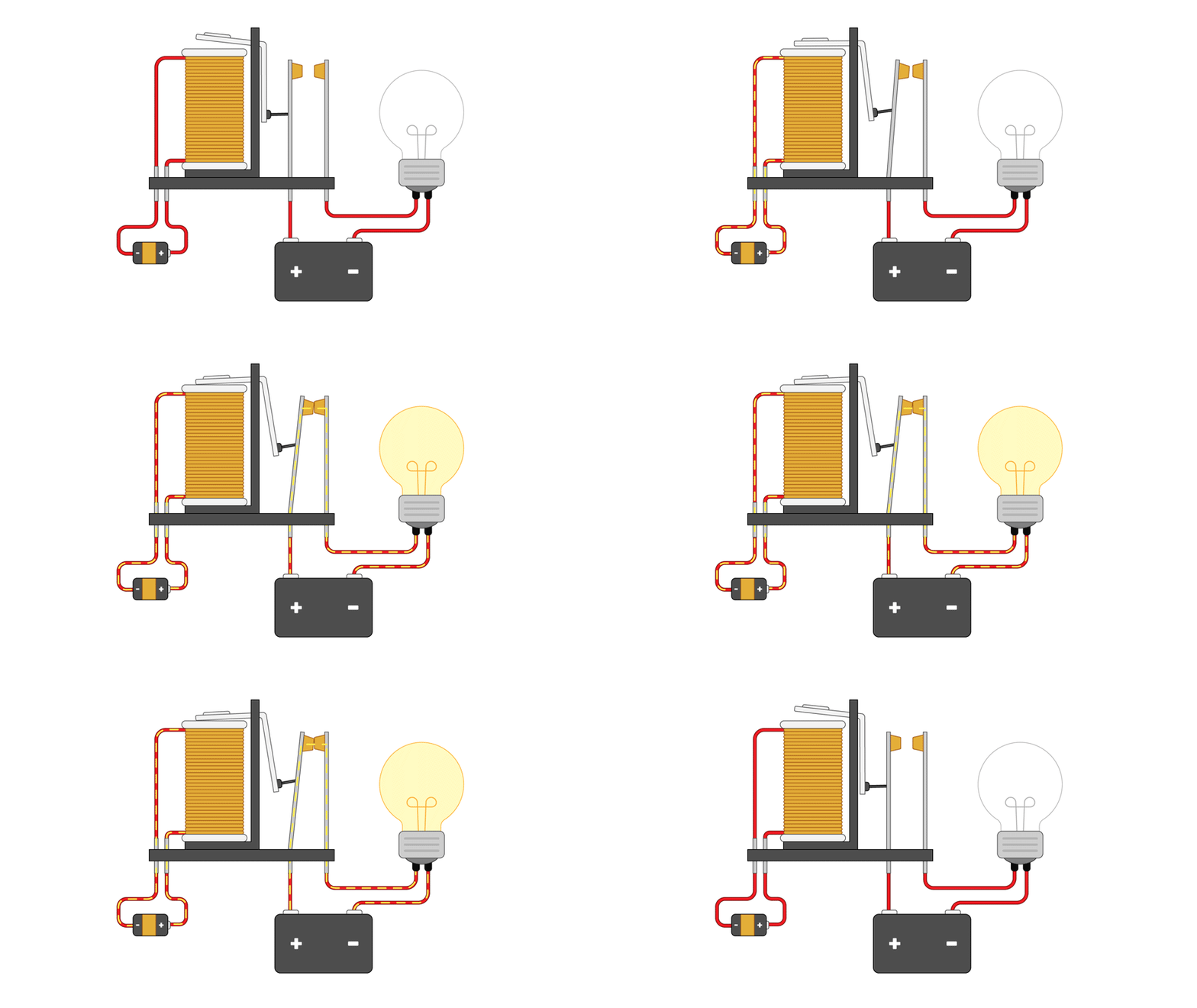
an animation of how a relay works

At their core, computers works with simple components, e.g. relays like this.

CM: The take-away from mine will be an understanding of how computers present to you all the media you view on your phone, screens, etc., and you’ll gain some new skills to manipulate and change what you see and hear through computers.

DF: And how much would learners need to know before they start?

MOH: Programming 101 is suitable for complete beginners with no prior knowledge.

MS: The same goes for How Computers Work.

JR: For Programming 102, you’ll need to have already tackled some programming basics and have a little experience of writing text-based programs, but generally speaking, the courses are for beginner-level learners who are looking for a place to start.

CM: You’d just need a basic understanding of Python for Bringing Data to Life. Taking Programming 101 would be enough!

DF: That’s great, folks! Thanks for talking to me.


Programming 101 and How Computers Work will both begin running in October. Sign up for them today by visiting the Raspberry Pi Foundation page on FutureLearn.An animation of a castaway learning to codeProgramming 101 and How Computers Work will both begin running in October. Sign up for them today by visiting the Raspberry Pi Foundation page on FutureLearn.
Programming 102 and Bringing Data to Life will launch this winter. Sign up for our education newsletter Raspberry Pi LEARN to hear from us when they’re out!

Got a question you’d like to ask our online course developers? Post your comment below.

The post Developer Q&A: brand-new online training courses appeared first on Raspberry Pi.


Source: Raspberry Pi – Developer Q&A: brand-new online training courses

HackSpace magazine issue 11: best maker hardware

Today is that glorious day of the month when a new issue of HackSpace magazine comes out!

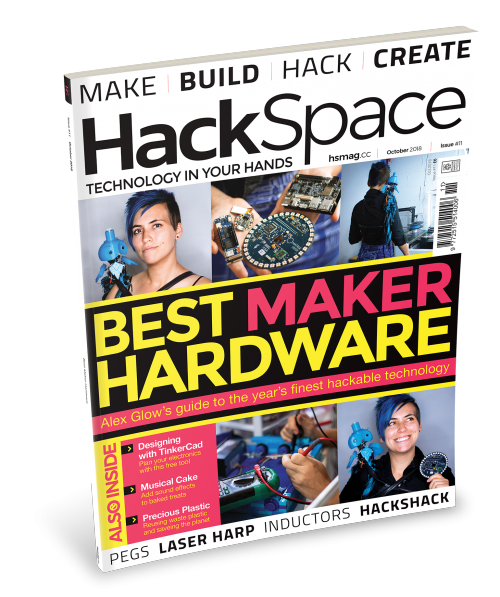
Hackspace magazine issue 11 cover

HackSpace magazine #11: All you can hardware

The cream of this year’s hardware crop

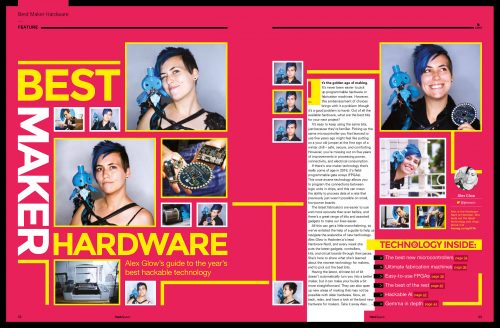
You’re on safe and solid ground with an Arduino, or one of Adafruit’s boards — so much so that many makers get comfortable and never again look at the other options that are out there. With the help of Hackster’s chief hardware nerd Alex Glow, we’re here to open your eyes to the new devices and boards that could really kick your making into gear. We know it’s easy to stick with what you know, but trust us — hacker tech is getting better all the time. So try something new!
Hackspace magazine hardware feature spread

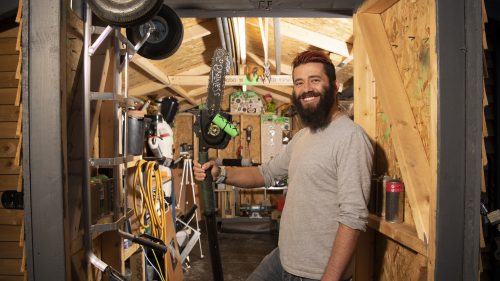
One man and his shed shack

If you want to learn stuff like how to build a workbench that includes a voice-activated beer dispenser, then check out Al’s Hack Shack on Youtube.

Al's Hack Shack

We went to see the man inside the shack to learn about the maker community’s love of sharing, why being grown-up means you get more time to play, and why making is good for your mental health.

Hacky Racers

Maker culture shows itself in all sorts of quirky forms. The one we’re portraying in issue 11 is the Hacky Racers: motorsport meets Robot Wars meets mud. Lots of mud. If you feel the need, the need for speed (or mud), then get involved!

Hacky Racers

Laser harp

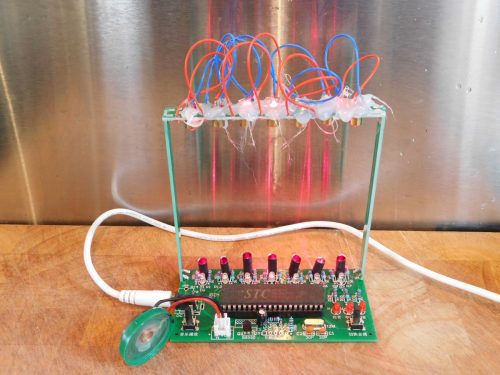
Yes, you read that right! At HackSpace magazine, we get a lot of gear coming in for us to test, but few items have given us more joy than this laser harp.

It’s easy to build, it’s affordable, and it poses only a very small risk of burning out your retinas. It’s the most fun you can have for £8.59 including postage. Promise. Read our full review in this month’s issue!

And there’s more!

We demystify PAT testing, help you make sense of circuit design with a beginners’ guide to Tinkercad, tell you why you need an angle grinder, and show you the easiest way we’ve ever seen of keeping knives sharp. All this and more, in your latest issue of HackSpace magazine!

Get your copy of HackSpace magazine

If you like the sound of this month’s content, you can find HackSpace magazine in WHSmith, Tesco, Sainsbury’s, and independent newsagents in the UK. If you live in the US, check out your local Barnes & Noble, Fry’s, or Micro Center next week. We’re also shipping to stores in Australia, Hong Kong, Canada, Singapore, Belgium, and Brazil, so be sure to ask your local newsagent whether they’ll be getting HackSpace magazine. And if you’d rather try before you buy, you can always download the free PDF.

Subscribe now

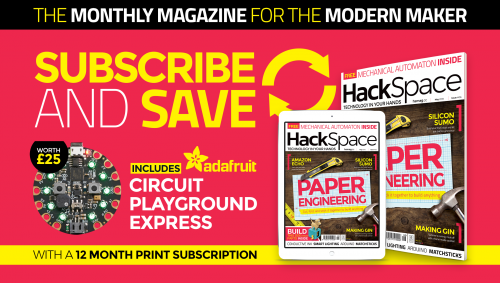
Subscribe now” may not be subtle as a marketing message, but we really think you should. You’ll get the magazine early, plus a lovely physical paper copy, which has really good battery life.
Oh, and twelve-month print subscribers get an Adafruit Circuit Playground Express loaded with inputs and sensors and ready for your next project. Tempted?

The post HackSpace magazine issue 11: best maker hardware appeared first on Raspberry Pi.


Source: Raspberry Pi – HackSpace magazine issue 11: best maker hardware

Watching VinylVideo with a Raspberry Pi A+
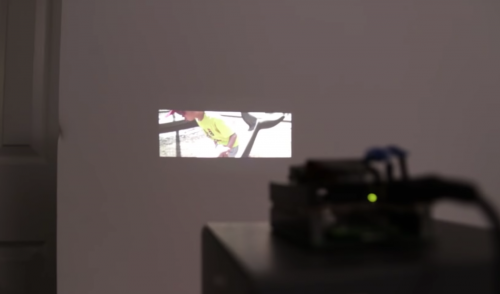
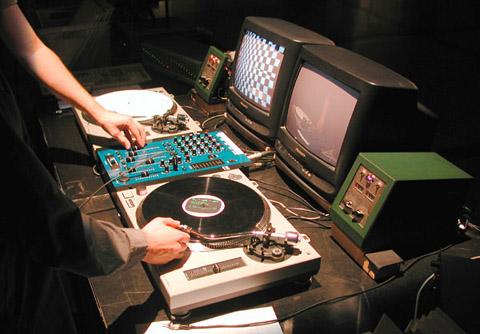
Play back video and sound on your television using your turntable and the VinylVideo converter, as demonstrated by YouTuber TechMoan.
VinylVideo – Playing video from a 45rpm record

With a VinylVideo convertor you can play video from a vinyl record played on a standard record player. Curiosity, tech-demo or art?

A brief history of VinylVideo

When demand for vinyl dipped in the early nineties, Austrian artist Gebhard Sengmüller introduced the world to his latest creation: VinylVideo. With VinylVideo you can play audio and visuals from an LP vinyl record using a standard turntable and a converter box plugged into a television set.

Gebhard Sengmüller original VinylVideo

While the project saw some interest throughout the nineties and early noughties, in the end only 20 conversion sets were ever produced.

However, when fellow YouTuber Randy Riddle (great name) got in touch with UK-based tech enthusiast TechMoan to tell him about a VinylVideo revival device becoming available, TechMoan had no choice but to invest.

Where the Pi comes in

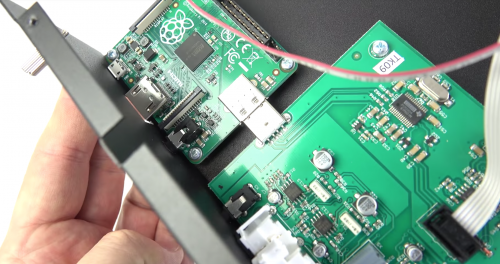
After getting the VinylVideo converter box to work with an old Sony CRT unit, TechMoan decided to take apart the box to better understand how it works

You’ll notice a familiar logo at the top right there. Yes, it’s using a Raspberry Pi, a model A+ to be precise, to do the video decoding and output. It makes sense in a low-volume operation — use something that’s ready-made rather than getting a custom-made board done that you probably have to buy in batches of a thousand from China.

There’s very little else inside the sturdy steel casing, but what TechMoan’s investigation shows is that the Pi is connected to a custom-made phono preamp via USB and runs software written specifically for the VinylVideo conversion and playback.

Using Raspberry Pi for VinylVideo playback

For more information on the original project, visit the extremely dated VinylVideo website. And for more on the new product, you can visit the revival converter’s website.

Be sure to subscribe to TechMoan’s YouTube channel for more videos, and see how you can support him on Patreon.

And a huge thank you to David Ferguson for the heads-up! You can watch David talk about his own Raspberry Pi project, PiBakery, on our YouTube channel.

The post Watching VinylVideo with a Raspberry Pi A+ appeared first on Raspberry Pi.


Source: Raspberry Pi – Watching VinylVideo with a Raspberry Pi A+

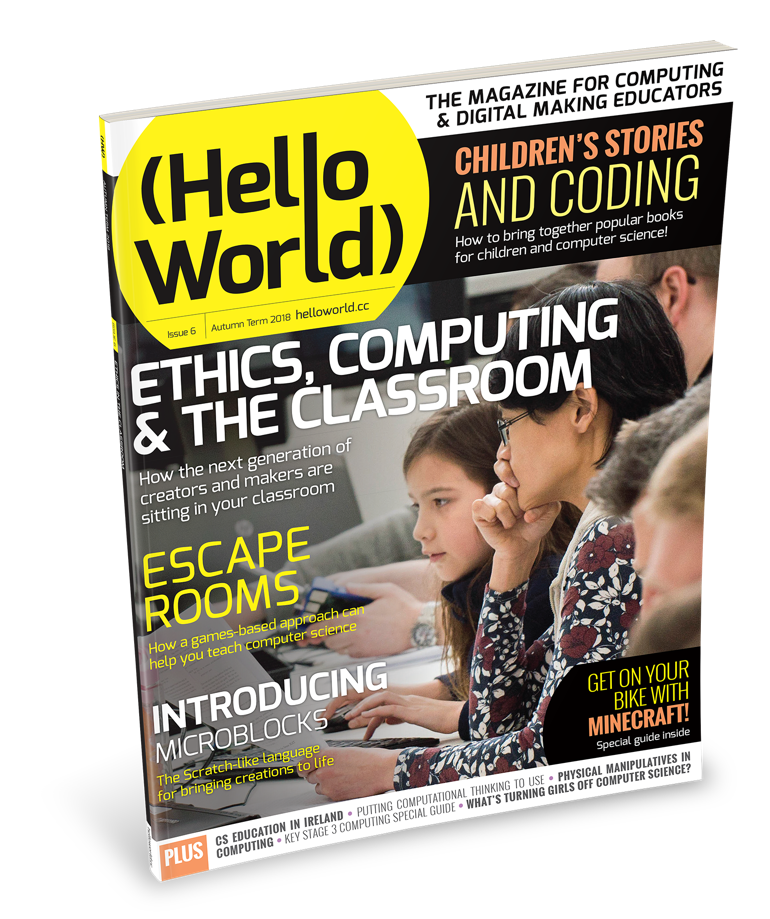
Hello World Issue 6: Ethical Computing

Join us for an in-depth exploration of ethical computing in the newest issue of Hello World, our magazine for computing and digital making educators. It’s out today!


We need to talk about ethics

Whatever area of computing you hail from, how to take an ethical approach to the projects we build with code is an important question. As educators, we also need to think about the attitudes we are passing on to our students as we guide them along their computing journey.

Ensuring that future generations use technology for good and consider the ethical implications of their creations is vital, particularly as self-learning AI systems are becoming prevalent. Let’s be honest: none of us want to live in a future resembling The Terminator’s nightmarish vision, however unlikely that is to come true.

With that in mind, we’ve brought together a wide range of experts to share their ideas on the moral questions that teaching computing raises, and on the social implications of computing in the wider context of society.


More in this issue

We’ve also got the latest news about exciting online courses from Raspberry Pi and articles on Minecraft, Scratch, and the micro:bit. As usual, we also answer your latest questions and bring you an excellent collection of helpful features, guides, and lesson plans!

Highlights of issue 6 include:

  • Doing the right thing: can computing help create ‘good citizens’?
  • Ethics in the curriculum: how to introduce them to students
  • Microblocks: live programming for microcontrollers
  • The 100-word challenge: a free resource to unlock creative writing

You can download your PDF of Hello World #6 from our website right now! It’s freely available under a Creative Commons licence.

Subscribe to Hello World

We offer free print copies of the magazine to all computing educators in the UK. This includes teachers, Code Club and CoderDojo volunteers, teaching assistants, teacher trainers, and others who help children and young people learn about computing and digital making.

Subscribe to have your free print magazine posted directly to your home, or subscribe digitally — 24000 educators have already signed up to receive theirs!

If you live outside the UK and are interested in computer science and digital making education (and since you’ve read this far, I think you are!), subscribe to always get the latest issue as a PDF file straight to your inbox.

Get in touch!

You could write for us about your experiences as an educator to share your advice with the community. Wherever you are in the world, get in touch by emailing our editorial team about your article idea — we would love to hear from you!

Hello World magazine is a collaboration between the Raspberry Pi Foundation and Computing At School, which is part of the British Computing Society.

The post Hello World Issue 6: Ethical Computing appeared first on Raspberry Pi.


Source: Raspberry Pi – Hello World Issue 6: Ethical Computing

How to mod your Etch A Sketch, or Toy Story in real life

We’d like to file this under ‘things we wish we’d had when we were younger’. Who else is envious of the kids of today and all the cool things they can make with our old classic toys?

Etch A Sketch Robot – Elephant

Read about how this works on my blog! http://sunnybala.com/2018/09/10/python-etch-a-sketch.html

To a wave of upvotes and comments, Sunny Balasubramanian shared their Etch A Sketch project on Reddit, including all the information and code you need to build your own. Thanks, Sunny!

Dismantling the toys of our childhoods

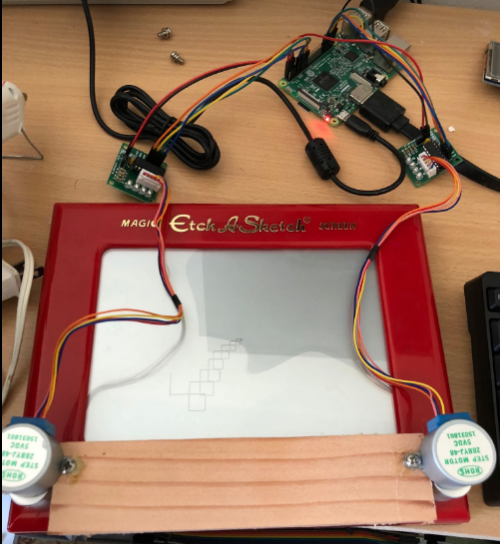
The physical set up of the automated Etch A Sketch is pretty simple: motors attached to couplers replace the original plastic nobs, and a connected Raspberry Pi 3 controls the motors as directed by the code.

Etch a Sketch modded with a Raspberry Pi

For stability, Sunny attached a wooden block to the plastic housing that keeps the motors in place.

Coding new life into an Etch A Sketch

Sunny explains:

There’s a few different ways to go about this portion of the project. When I started out, I googled to see if anyone had done things like this before. A few projects popped up. They seemed to approach the drawing in one of two ways. I wanted to do it in a fully automated way where the only input is a picture and the output is a cleanly drawn image.

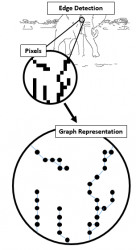
The code Sunny ended up using first takes an image and simplifies it into a line drawing using Canny edge detection. It then turns each pixel to a node and draws a path between the nodes, connecting them one by one. So that the Etch A Sketch draws the picture, the Raspberry Pi then directs the motors to follow the connections and create uncannily precise sketches.

Raspberry Pi Etch-a-sketch

Head to Sunny’s website for more information about their project, and download the full code from GitHub.

Two down, more to go…

With this automated Etch A Sketch, and this talking Fisher Price Chatter Telephone, the Raspberry Pi community is well on the way to recreating the entire Toy Story cast, and we are fully on board with that!

A GIF of Toy Story characters

So what’s next? A remote-controlled Slinky? A falling with style flying Buzz Lightyear? What would you build?

The post How to mod your Etch A Sketch, or Toy Story in real life appeared first on Raspberry Pi.


Source: Raspberry Pi – How to mod your Etch A Sketch, or Toy Story in real life

Vote for your 50 favourite projects!

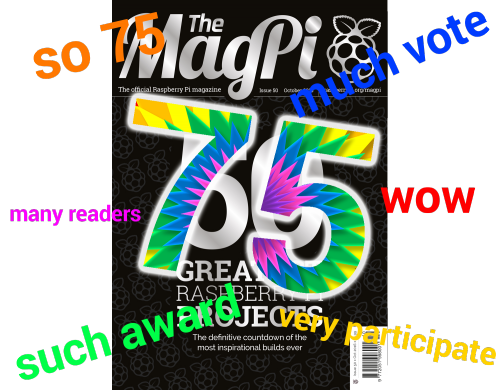
Hi folks, Rob from The MagPi here. While we’re working on the next issue of The MagPi, we’re very aware that we’re almost at issue 75!

Rob didn’t give Alex an image to put here so she made one

To celebrate this milestone, we’re doing another countdown of projects. We ranked 50 projects for issue 50 of The MagPi, and this time we’re ranking 75 of the greatest Raspberry Pi projects — and we need your help to do that!

Vote for your favourite

You folks in the community never stop amazing us with the things you make, so our list will be full of the outstanding projects you’ve made since we released issue 50 for October 2016! Like last time, you can vote for your favourites, but we’re upping the ante: we want you to choose the top 50 projects from the list of 75 we’ve compiled.

Want to know more about the projects before you vote? Visit our blog post detailing all the options.

Make sure to choose your favourites before Tuesday 2 October!

Note: There is a poll embedded within this post, please visit the site to participate in this post’s poll.

The post Vote for your 50 favourite projects! appeared first on Raspberry Pi.


Source: Raspberry Pi – Vote for your 50 favourite projects!

You wouldn’t download a car…

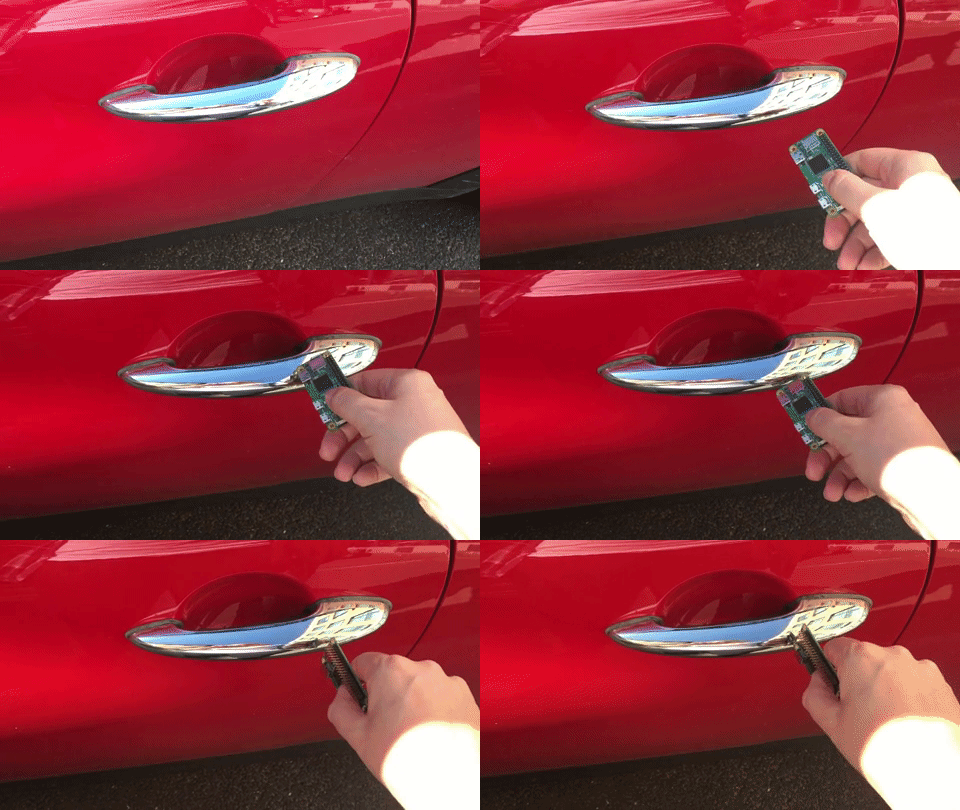
You wouldn’t download a car…but is that just because none of us know how to? And OF COURSE none of us know how to: it’s a really hard thing to do!

Raspberry Pi Tesla

Dramatic reenactment using a Mini because, c’mon, as if I can afford a Tesla!

Nikola Tesla was in love with a pigeon 😍🐦

True story. He was also the true father of the electrical age (sorry, not sorry, Edison) and looked so much like David Bowie that here’s David Bowie playing Nikola Tesla:

David Bowie as Nicola Tesla — Raspberry Pi Tesla

Not even pigeon love

Which is the perfect segue, as here’s a Tesla playing David Bowie, and here’s also where our story truly begins…

Some people dislike Tesla (the car manufacturer, not the scientist) but we love them

But some people also dislike going to the dentist, so ¯_(ツ)_/¯. (I also love going to the dentist.)

I’m pretty sure the reason some people have issues with Tesla is that electric cars still seem like a form of magic we’re not quite comfortable with.

Whatever people’s reason for holding a grudge against Tesla, recent findings at a university in Belgium this week have left the tech community aflutter: the academics announced that, with the aid of a “$35 computer”, they can clone your Tesla car key and steal. Your. Car.

If you haven’t guessed yet, we’re the ones behind the $35 computer. (Hi!)

Says WIRED: A team of researchers at the KU Leuven University in Belgium on Monday plan to present a paper at the Cryptographic Hardware and Embedded Systems conference in Amsterdam, revealing a technique for defeating the encryption used in the wireless key fobs of Tesla’s Model S luxury sedans. With about $600 in radio and computing equipment, they can wirelessly read signals from a nearby Tesla owner’s fob. Less than two seconds of computation yields the fob’s cryptographic key, allowing them to steal the associated car without a trace.

When I said that the tech community was all aflutter, what I meant was, on the whole, we find this hack somewhat entertaining but aren’t all that shocked by it. Not because we hate Tesla, but because these things happen. Technology is ever evolving, and that $600 worth of kit can do a thing to another thing isn’t all that unbelievable.

Sweet Cyber Jones on Twitter

The keys to my new Tesla https://t.co/jNViEZBxrB

The academics showed an example of the hack using “just” a couple of radios, a Raspberry Pi, some batteries, and your basic, off-the-shelf “pre-computed table of keys on a portable hard drive”. And through the magic of electric car IoT technology, Tesla instantly released a series of fixes to allow existing Tesla users to protect their cars against the attack, which is all kinds of cool.

Alex, why are you making such light of this?!

Because The Fast and the Furious isn’t real. And I highly doubt there’s a criminal enterprise out there that’s capable of building the same technology as well-funded university researchers.

Yes, this study from KU Leuven University is interesting. And yes, we all had a good laugh at the expense of Tesla and Elon Musk, but we don’t need academics to provide material for that. And I genuinely love Tesla and the work Elon is doing. True love.

Instead, we should be seeing this as a reminder that data encryption and online security are things we all need to take seriously in this digital world. So stop connecting your phone to whatever free WiFi network you can find, stop using PASSWORD123 for all your online accounts, and spend a little more time learning how you can better protect yourself and your family from nasty people on the internet.

And leave Britney Tesla alone!

The post You wouldn’t download a car… appeared first on Raspberry Pi.


Source: Raspberry Pi – You wouldn’t download a car…

The European Astro Pi Challenge is back for 2018/2019

Ever wanted to run your own experiment in space? Then you’re in luck! ESA Education, in collaboration with the Raspberry Pi Foundation, is pleased to announce the launch of the 2018/2019 European Astro Pi Challenge!

Astro Pi returns for a new 2018/19 challenge!

Ever wanted to run your own experiment in space? Then you’re in luck! ESA Education, in collaboration with the Raspberry Pi Foundation, is pleased to announce the launch of the 2018/2019 European Astro Pi Challenge!

In this challenge, we offer students and young people the amazing opportunity to conduct scientific investigations in space by writing computer programs that run on Astro Pis — special Raspberry Pi computers aboard the International Space Station (ISS).

ESA astronaut Alexander Gerst and CSA astronaut David Saint-Jacques are the Challenge’s ambassadors. They will accompany our Astro Pi’s on the ISS and oversee your programs while these run and collect scientific data.

Two missions are part of the Astro Pi Challenge: Mission Zero and Mission Space Lab.

Mission Space Lab opens today!

If you are 19 or younger and live in an ESA Member or Associate Member State*, we invite you to form a team with at least one friend of yours and apply to the Astro Pi Challenge’s Mission Space Lab by sending us your experiment idea by the end of October. We can’t wait to see your ideas!

Astro Pi Mission Space Lab logo

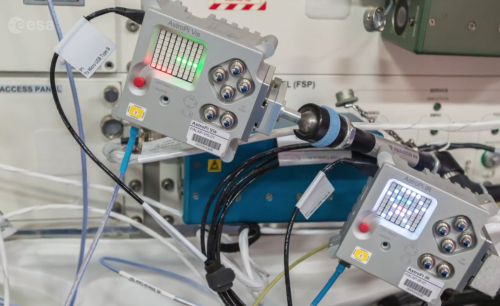
Mission Space Lab gives you the chance to have your scientific experiment run on the ISS. Your challenge is to design and code an experiment using the environmental sensors and cameras of the Astro Pi computers, called Ed and Izzy, aboard the ISS.

You can choose between two themes for your experiment: Life in space and Life on Earth. If you pick the ‘Life on Earth’ theme, you’ll use the Astro Pi computer Izzy, fitted with a near-infrared camera facing out of an ISS window, to study the Earth. For ‘Life in space’, you’ll use the Astro Pi computer Ed, which is equipped with a camera for light sensing, and investigate life inside the Columbus module of the ISS. The best experiments will be deployed on the ISS, and you’ll have the opportunity to analyse your experimental data to write a report with your results. The ten teams who send us the best reports will become the Astro Pi Mission Space Lab 2018/2019 winners!

There are four phases to Mission Space Lab:

  • Phase 1 – Design (until end of October 2018)
    • Come up with an idea for your experiment
  • Phase 2 – Create (November 2018 to March 2019)
    • Code your program and test your experiment on Earth
  • Phase 3 – Deploy (April 2019)
    • Your program is deployed on the ISS
  • Phase 4 – Analyse (May 2019)
    • Use the data from your experiment to write your report

In the first phase, Design, you just need an idea for an experiment. You won’t need to do any coding yet, but you should think about how you might write the program for your experiment to make sure your goal is achievable. Have a look at our Astro Pi Mission Space Lab guidelines for everything you need to know to take part the challenge. Your deadline to register and submit your idea via the Astro Pi website is 29 October 2018.

We will select teams and notify them of their acceptance to Phase 2 of Mission Space Lab by mid-November 2018.

Mission Zero — open soon

Mission Zero, the simpler level of the Astro Pi Challenge, also offers you the chance to have something you’ve coded run on the ISS, in the form of a simple program that displays a message to the astronauts on-board. For this mission, you don’t need special equipment and you can be a complete beginner at coding; if your entry follows a few simple rules, it’s guaranteed to run in space!

Astro Pi Mission Zero logo

If you are 14 or younger and live in an ESA Member or Associate Member State*, we would like you to take part in Mission Zero. You can submit your program from 29 October 2018 onward. For more details, head to the Mission Zero page.

Find out more about the Astro Pi Challenge

What is Astro Pi?!

Announcing the 2018-19 European Astro Pi challenge in partnership with the European Space Agency (ESA). It’s open to students from all 22 ESA member countries, including associate members Canada and Slovenia. In Mission Zero, students aged up to 14 write a simple Python program that will display a message on the International Space Station for 30 seconds.

*ESA Member States in 2018:

Austria, Belgium, Czech Republic, Denmark, Estonia, Finland, France, Germany, Greece, Hungary, Ireland, Italy, Luxembourg, the Netherlands, Norway, Poland, Portugal, Romania, Spain, Sweden, Switzerland, United Kingdom.

ESA Associate States in 2018: Canada, Slovenia

In the framework of the current collaboration agreement between ESA and the Republic of Malta, teams from Malta can also participate in the European Astro Pi Challenge. ESA will also accept entries from primary or secondary schools located outside an ESA Member or Associate State only if such schools are officially authorised and/or certified by the official Education authorities of an ESA Member or Associate State (for instance, French school outside Europe officially recognised by the French Ministry of Education or delegated authority).

The post The European Astro Pi Challenge is back for 2018/2019 appeared first on Raspberry Pi.


Source: Raspberry Pi – The European Astro Pi Challenge is back for 2018/2019

Cabin Cloud: bump-free travel on the night bus

Planes, trains, and automobiles — we all have our preference. And at one company in California, the team is trying to smooth bus travel to broaden commuters’ options for a blissful night’s sleep.

Cabin bus Raspberry Pi Wired

Leaving on a jet plane

Not everyone wants to fly. While many enjoy the feel of take-off and landing and the high speed at which they can travel from A to B, others see planes as worrisome tin cans of doom, suspended in the air by unreliable magic. I consider myself mostly the former, with a hint of the latter for balance.

In truth, I’d rather catch a train, where the smooth ride sends me into blissful sleep, only occasionally interrupted by a snap of “Damn, did I miss my stop?!”.

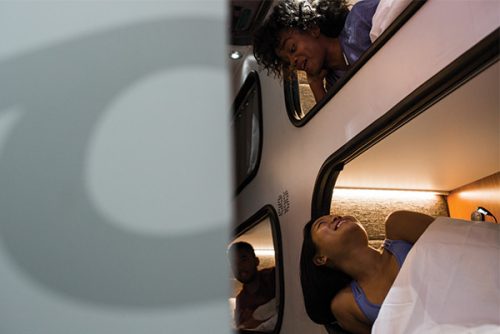
But trains are limited to where their tracks lead, which is why so many people still opt to travel by bus. But who can sleep on a bus when the roads are dotted with potholes and cracks? I can’t, and neither can many of the 10000 passengers of the Cabin bus, an overnight service running between Los Angeles and San Francisco.

Cabin bus travel

To address complaints about the road conditions affecting costumers’ sleep, the Cabin team decided to challenge gravity using a Raspberry Pi and the electric motor from a hoverboard in their new venture Cabin Cloud.

Introducing the first active suspension system designed specifically with passenger sleep in mind. Combining patent-pending software and hardware, our technology mutes ‘road turbulence’ and dramatically reduces vibration, so you can get a good night’s sleep while on a moving vehicle.

“We can isolate a passenger’s body, and input frequencies that help people relax and fall asleep,” explains Cabin CTO Tom Currier. “We have a set of sensors that are measuring the acceleration of the vehicle, and also the bed, to compute in real time what we should be cancelling out.”

Cabin bus Raspberry Pi Wired

The sensors are accelerometers, two per bed, that measure the bumps from the road and adjust the bed accordingly — up to 1000 times a second. The Cabin Cloud beds only adjust for motion up and down: the team isn’t too concerned about back-and-forth movements due to braking too hard or turning corners, since Cabin busses predominantly travel on wide, open highways.

Delve a little deeper

Check out this article from Wired for more about the project, and about how similar tech is implemented in trucks for long-haul drivers, and in aeroplanes for turbulence-free travel. You can also sign up for the Cabin Cloud newsletter here.

But the big question about Cabin Cloud is…

Does it have Bluetooth?

The post Cabin Cloud: bump-free travel on the night bus appeared first on Raspberry Pi.


Source: Raspberry Pi – Cabin Cloud: bump-free travel on the night bus

Guess the weight, win a thing!

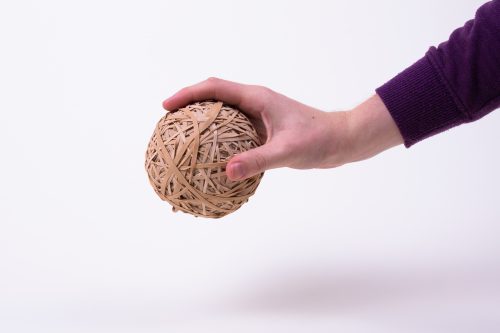
Today marks the four-year anniversary of Nicola Early joining the Raspberry Pi team. Nicola works as Administrator at Pi Towers and is responsible for so many things that I dare not try to list them all. But among all her tasks, the most important one is the care and maintenance of the office rubber band ball.

Pi Towers Raspberry Pi Rubber Band Ball

The rubber band ball chronicles

Every working day for the last four years, whenever the postman delivers the packs of letters, Nicola has had at least one new rubber band to collect. And so over time, the ball has grown and grown and grown.

Nicola is very protective of the ball, so if you come to her desk in search for a rubber band, you’ll have to withstand her glare as she reluctantly removes one from her expanding collection.

Pi Towers Raspberry Pi Rubber Band Ball

If we are to consider that, in the UK, there are about 261 working days in a year, and Nicola has been working at Pi Towers for four years, it’s fair to estimate the ball consists of at least 1044 bands.

So our question for you is this:

How much does the ball weigh?

Submit your guess in the comments below*, or in the tweet, Facebook post, or Instagram post for this blog, and the closest guess will win a Raspberry Pi T-shirt and, if we can manage it without her noticing, a band from the very ball in question.

Pi Towers Raspberry Pi Rubber Band Ball

To take part, you need to submit your guess in grams by midnight next Monday 17 September. Multiple guesses on the same platform from the same account will be ignored — so behave.

*Members of the Raspberry Pi team may not take part, as there are scales on Nicola’s desk, and I don’t trust any of you.

The post Guess the weight, win a thing! appeared first on Raspberry Pi.


Source: Raspberry Pi – Guess the weight, win a thing!

Build a Raspberry Pi pocket projector…how awesome is that?!

YouTuber MickMake has been working hard on producing a Raspberry Pi pocket projector with the Raspberry Pi Zero W. We’re excited. We know you’re excited. So enough of us talking, here’s Mick with more!

#210 Build a Pi Zero W pocket projector! // Project

2 for 10 PCBs (48 hour quick turn around): https://jlcpcb.com/?ref=mickmake Make a pocket projector based on the DLP2000EVM and Raspberry Pi Zero W! Nice!

Sharing is caring

YouTuber Novaspirit Tech released a new video yesterday, reviewing MickMake’s Raspberry Pi Zero W pocket projector, and the longer the video ran on, the more we found ourselves wanting our own!

Thank you, Novaspirit Tech, for reminding us to subscribe to MickMake. And thank you, MickMake, for this awesome project!

The Pi Zero W pocket projector of your dreams

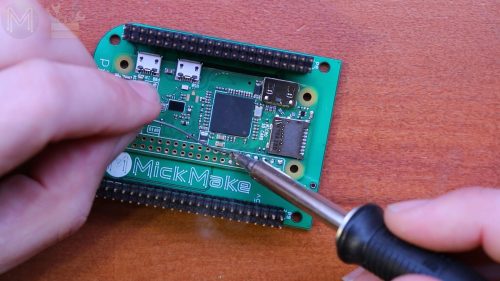
In his project video, Mick goes into great detail about the tech required for the project, along with information on the PCB he’s created to make it simpler and easier for other makers to build their own version.

raspberry pi pocket pi projector mickmakes

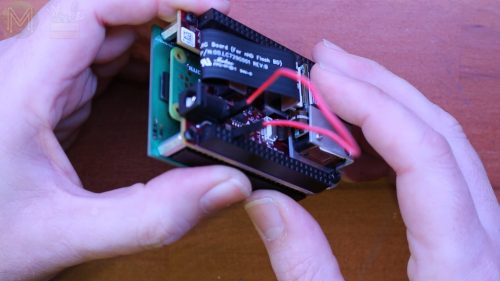
The overall build consists of the $10 Raspberry Pi Zero W, a DLP2000 board, and MickMake’s homemade $4 PCB, which allows you to press-fit the projector together into a very tidy unit with the same footprint as a Raspberry Pi 3B+ — perfectly pocket-sized.

Specs and things

While the projected images obviously aren’t as clear as those of high-end projectors, MickMake’s projector is definitely good enough to replace a cheap desktop display, or to help you show off your projects on the go at events such as Raspberry JamsCoolest Projects, and Maker Faire. And due to its low power consumption, the entire unit can run off the kind of rechargeable battery pack you may already be carrying around for your mobile phone. Nice!

In his review video, NovaSpirit Tech goes through more of the projector’s playback and spec details, and also does a series of clarity tests in various lights. So why read about it when you can watch it? Here you go:

Pi Projector by MickMake | The Raspberry Pi Zero Pocket Projector

this is a small footprint low power consumption raspberry pi zero powered projector using DLP2000 by mickmake ○○○ LINKS ○○○ MickMake PiProjector Video ► https://www.youtube.com/watch?v=XFciR-U7yhc MickMake Channel ► https://youtube.com/mickmake DLP2000 digikey ► https://www.digikey.com/product-detail/en/texas-instruments/DLPDLCR2000EVM/296-47119-ND/7598640 raspberry pi zero ► https://amzn.to/2Q8h1Hz ○○○ SHOP ○○○ Novaspirit Shop ► https://goo.gl/gptPNf Amazon Store ► http://amzn.to/2AYs3dI ○○○ SUPPORT ○○○ patreon ► https://goo.gl/xpgbzB ○○○ SOCIAL ○○○ novaspirit tv ► https://goo.gl/uokXYr twitter ► https://twitter.com/novaspirittech discord chat ► https://discord.gg/v8dAnFV FB Group Novaspirit ► https://www.facebook.com/groups/novas…

Custom PCBs

We see more and more makers designing their own custom PCBs to make everyone’s life that little bit easier.

Raspberry Pi pocket pi projector mickmakes

If you’ve created a custom PCB for your Raspberry Pi project, feel free to use the comments section as free advertising space for one day only! You’re welcome.

The post Build a Raspberry Pi pocket projector…how awesome is that?! appeared first on Raspberry Pi.


Source: Raspberry Pi – Build a Raspberry Pi pocket projector…how awesome is that?!

Hang out with Raspberry Pi this month in California, New York, and Boston

This month sees two wonderful events where you can meet the Raspberry Pi team, both taking place on the weekend of September 22 and 23 in the USA.

And for more impromptu fun, you can also hang out with our Social Media Editor and fellow Pi enthusiasts on the East Coast on September 24–28.

Coolest Projects North America

In the Discovery Cube Orange County in Santa Ana, California, team members of the Raspberry Pi Foundation North America, CoderDojo, and Code Club will be celebrating the next generation of young makers at Coolest Projects North America.

Coolest Projects is a world-leading showcase that empowers and inspires the next generation of digital creators, innovators, changemakers, and entrepreneurs. This year, for the first time, we are bringing Coolest Projects to North America for a spectacular event!

While project submissions for the event are now closed, you can still get the last FREE tickets to attend this showcase on Sunday, September 23.

To get your free tickets, click here. And for more information on the event, visit the Coolest Projects North America homepage.

World Maker Faire New York

For those on the east side of the continent at World Maker Faire New York, we’ll have representation in the form of Alex, our Social Media Editor.

The East Coast’s largest celebration of invention, creativity, and curiosity showcases the very best of the global Maker Movement. Get immersed in hundreds of projects and multiple stages focused on making for social good, health, technology, electronics, 3D printing & fabrication, food, robotics, art and more!

Alex will be adorned in Raspberry Pi stickers while exploring the cornucopia of incredible projects on show. She’ll be joined by Raspberry Pi’s videographer Brian, and they’ll gather footage of Raspberry Pis being used across the event for videos like this one from last year’s World Maker Faire:

Raspberry Pi Coffee Robot || Mugsy || Maker Faire NY ’17

Labelled ‘the world’s first hackable, customisable, dead simple, robotic coffee maker’, and powered by a Raspberry Pi, Mugsy allows you to take control of every aspect of the coffee-making process: from grind size and water temperature, to brew and bloom time.

So if you’re planning to attend World Maker Faire, either as a registered exhibitor or an attendee showing off your most recent project, we want to know! Share your project in the comments so we can find you at the event.

A week of New York and Boston meetups

Lastly, since she’ll be in New York, Alex will be out and about after MFNY, meeting up with members of the Raspberry Pi community. If you’d be game for a Raspberry Pi-cnic in Central Park, Coffee and Pi in a cafe, or any other semi-impromptu meetup in the city, let us know the best days for you between Monday, September 24 to Thursday, September 27! Alex will organise some fun gatherings in the Big Apple.

You can also join her in Boston, Massachusetts, on Friday, September 28, where Alex will again be looking to meet up with makers and Pi enthusiasts — let us know if you’re game!

This is weird

Does anyone else think it’s weird that I’ve been referring to myself in the third person throughout this post?

The post Hang out with Raspberry Pi this month in California, New York, and Boston appeared first on Raspberry Pi.


Source: Raspberry Pi – Hang out with Raspberry Pi this month in California, New York, and Boston

The last 10%: revamping the Raspberry Pi desktop

Simon Long is a Senior Principal Software Engineer here at Raspberry Pi. He’s responsible for the Raspberry Pi Desktop on both Raspbian and Debian, and his article from The MagPi issue 73 explores the experience of revamping our desktop. Get your copy of The MagPi in stores now, or download it as a free PDF here.

The PIXEL desktop on Raspberry Pi

It was almost exactly four years ago when I was offered the chance to work at Raspberry Pi. I knew all the team very well, but I’d had hardly any involvement with the Pi itself, and wasn’t all that sure what they would want me to do; at that time, I was working as the manager of a software team, with no experience of hardware design. Fortunately, this was when software had started to move up the list of priorities at Raspberry Pi.

The 2014 updated desktop

Eben and I sat down on my first day and played with the vanilla LXDE desktop environment in Raspbian for 15 minutes or so, and he then asked me the fateful question: “So — do you think you can make it better?” With rather more confidence than I felt, I replied: “Of course!” I then spent the next week wondering just how long it was going to take before I was found out to be an impostor and shown the door.

Simon Long Raspberry Pi

Simon Long, Senior Principal Software Impostor

UI experience

To be fair, user interface design was something of which I had a lot of experience — I spent the first ten years of my career designing and implementing the user interfaces for a wide range of products, from mobile phones to medical equipment, so I knew what a good user interface was like. I could even see what changes needed to be made to transform the LXDE environment into one. But I didn’t have a clue how to do it — I’d barely used Linux, never mind programmed for it…

Raspberry Pi desktop circa 2015

As I said above, that was four years ago, and I’ve been hacking the Pi desktop from that day on. Not all the changes I’ve made have been popular with everyone, but I think most people who use the desktop feel it has improved over that time. My one overriding aim has been to try to make the Pi desktop into a product that I actually want to use myself; one that takes the good user interface design principles that we are used to in environments like macOS and Windows — ideas like consistency, attractive fonts and icons, intuitive operation, everything behaving the way you expect without having to read the instructions — and sculpting the interface around them.

Final polish

In my experience, the main difference between the Linux desktop environment and those of its commercial competitors is the last 10%: the polishing you do once everything works. It’s not easy making something that works, and a lot of people, once they have created something and got it working, leave it and move onto creating something else. I’m really not great at creating things from scratch — and have nothing but admiration for those who are — but what I do enjoy doing is adding that last 10%: going from something that works to something that works well and is a pleasure to use. Being at Raspberry Pi means I get to do that every day when I come to work.

Stu Ayres on Twitter

A whole new #computersciences suite of @Raspberry_Pi computers at @MyddeltonCol ! So excited to start teaching some physical computing!

Every time I see a photo of a Pi running at a Jam, or in a classroom, anywhere in the world, and it’s using my desktop — the thrill from that never goes away.

If you’d like to read more about the evolution of the Raspberry Pi desktop, and Simon’s adventures at Raspberry Pi, you can access the entire back catalogue of his blog posts here.

The post The last 10%: revamping the Raspberry Pi desktop appeared first on Raspberry Pi.


Source: Raspberry Pi – The last 10%: revamping the Raspberry Pi desktop

The Goodbye Machine. NSFW…ish? See what you think

Tired of saying goodbye? Show people how you really feel with 8 Bits and a Byte‘s Goodbye Machine.

Spoiler alert: no one wants to be at the receiving end of the red button.

The Goodbye Machine: automate your goodbyes

The Goodbye Machine, a machine to automate goodbyes using a Raspberry Pi, two servo’s, two massive buttons and a speaker. Shoe box not included. All our projects in one place: http://8bitsandabyte.com/ Keep posted on Instagram: https://www.instagram.com/8bitsandabyte/ Follow us on Twitter! @NicoleHorward Music: Allen, L. & Kurstin, G. (2009). Fuck You.

Not all amazing projects require line upon line of code, hour upon hour of build time, or sheer masses of components. Sometimes even the simplest of buttons will do, as Carrie Anne explains in issue 1 of Hello World.

Goodbye to you

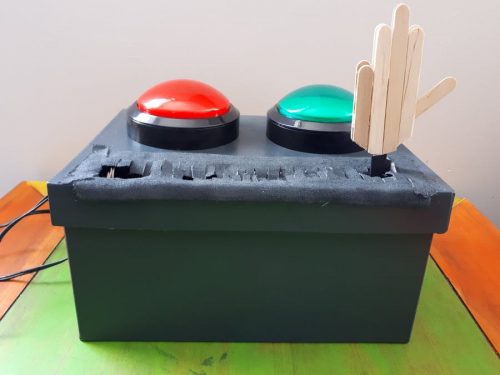
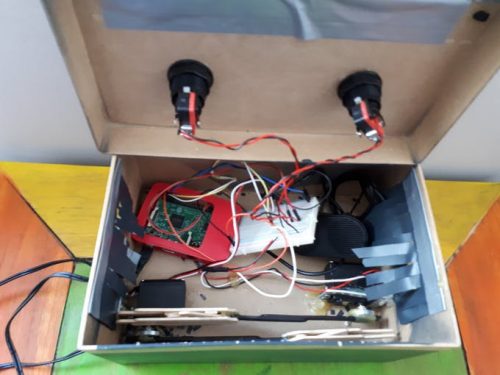
With their Goodbye Machine, Brussels-based YouTube makers 8 Bits and a Byte found a simple, entertaining solution to their “inability to say goodbye” using two servos, two buttons, a Raspberry Pi 3, and some lollipop sticks. Oh, and British musical royalty, James Blunt and Lily Allen.

Raspberry Pi Goodbye machine

When the positive green button is pressed, a hand appears, waving goodbye to the dulcet tones of James Blunt singing Goodbye My Lover. So darling.

However, press the negative red button and your departing acquaintance will be flipped the bird, as Lily Allen sings F*ck You.

Goodbye machine Raspberry Pi

It’s a very simple network of wires and code. Each button is given a task and when pressed, the task is completed. Anyone can learn this easy set of code, and create incredible projects as a result. And no, not all projects have to be so insulting… but we’re a little sadistic here at Pi Towers, and this sort of humour fits us perfectly.

For more information on building your own Goodbye Machine, visit the hackster.io project page.

Button it!

If you’d like to learn more about using buttons in digital making projects, these free resources from our projects site should get you started:

GPIO music box – wire up buttons to your Raspberry Pi’s GPIO pins and then use them to play sounds with a simple Python application.

Whoopi cushion – make a whoopee cushion powered by a Raspberry Pi.

Push button stop motion – make a stop-motion animation using a Raspberry Pi and a Camera Module to take pictures, controlled by a push-button.

Goodbye, so long, farewell

Since watching the video above for the first time, I’ve been unable to get Goodbye My Lover out of my head. If, like me, you’re suffering from a James Blunt earworm, here are some other goodbye-themed songs to listen to:

Spice Girls – Goodbye

Vote for your favourite girl group here: https://www.udiscovermusic.com/stories/best-girl-groups/ Listen to more from the Spice Girls: http://spicegirls.lnk.to/Essentials Listen to some of the Spice Girls’ biggest hits here: http://playlists.udiscovermusic.com/playlist/spice-girls-best-of Follow the Spice Girls https://twitter.com/OfficialMelB/ https://twitter.com/MelanieCmusic https://twitter.com/EmmaBunton https://twitter.com/victoriabeckham https://twitter.com/gerihalliwell https://www.thespicegirls.com/ Music video by Spice Girls performing Goodbye.

The Beatles – Hello, Goodbye

The Beatles 1 Video Collection is Out Now. Get your copy here: http://thebeatles1.lnk.to/DeluxeBluRay When The Beatles began recording what would become their third single to be released in 1967, its working title was ‘Hello, Hello’. The single sat at No.1 in both the UK and America for the first three weeks of 1968.

Michelle Branch – Goodbye To You (Video)

© 2006 WMG Goodbye To You (Video)

Good Riddance (Time Of Your Life) [Official Music Video]

“Good Riddance” by Green Day from ‘Nimrod,’ available now. Directed by Mark Kohr. Watch the best Green Day official videos here: http://www.youtube.com/playlist?list=PL5150F38E402FACE8 http://www.greenday.com/ http://www.facebook.com/GreenDay http://twitter.com/greenday http://www.youtube.com/user/greenday (subscribe) http://itunes.apple.com/us/artist/green-day/id954266

Goodbye Yellow Brick Road (Remastered 2014)

Provided to YouTube by Universal Music Group International Goodbye Yellow Brick Road (Remastered 2014) · Elton John Goodbye Yellow Brick Road ℗ ℗ 2014 This Record Company Ltd.

The Hoosiers – Goodbye Mr A (Official Video)

The Hoosiers – Goodbye Mr A (Official Video) Listen on Spotify – http://smarturl.it/HoosiersBestOf_sp Get on iTunes – http://smarturl.it/Trickto_iTunes Amazon – http://smarturl.it/Trickto_Amazon Follow The Hoosiers Website – https://www.thehoosiers.com/ Facebook – https://www.facebook.com/thehoosiers Twitter – https://twitter.com/thehoosiersuk Instagram – https://instagram.com/thehoosiersuk Spotify – https://open.spotify.com/artist/4LlDtNr8qFwhrT8eL2wzH4 Soundcloud – https://soundcloud.com/thehoosiers Lyrics Goodbye Mr. A There’s a hole in

Ferris Bueller’s Day Off Soundtrack – Danke Schoen – Wayne Newton

No Description


The post The Goodbye Machine. NSFW…ish? See what you think appeared first on Raspberry Pi.


Source: Raspberry Pi – The Goodbye Machine. NSFW…ish? See what you think

Autonomous drones (only slightly flammable)

I had an email a little while ago, which opened: “I don’t know if you remember me, but…”

As it happens, I remembered Andy Baker very well, in large part because an indoor autonomous drone demo he ran at a Raspberry Pi birthday party a couple of years ago ACTUALLY CAUGHT FIRE. Here’s a refresher.

Raspberry Pi Party Autonomous drone demo + fire

At the Raspberry Pi IV party and there is a great demo of an Autonomous drone which is very impressive with only using a Pi. However it caught on fire. But i believe it does actually work.

We’ve been very careful since then to make sure that speakers are always accompanied by a fire extinguisher.

I love stories like Andy’s. He started working with the Raspberry Pi shortly after our first release in 2012, and had absolutely no experience with drones or programming them; there’s nothing more interesting than watching someone go from a standing start to something really impressive. It’s been a couple of years since we were last in touch, but Andy mailed me last week to let me know he’s just completed his piDrone project, after years of development. I thought you’d like to hear about it too. Over to Andy!

Building an autonomous drone from scratch

I suffer from “terminal boredom syndrome”; I always need a challenging hobby to keep me sane. In 2012, the Raspberry Pi was launched just as my previous hobby had come to an end. After six months of playing (including a Raspberry Pi version of a BBC Micro Turtle robot I did at school 30+ years ago), I was looking for something really challenging. DIY drones were emerging, so I set out making one with a Raspberry Pi and Python, from absolute ignorance but loads of motivation.  Six years later, with only one fire (at the Raspberry Pi 4th Birthday Party, no less!), the job is done.

Here’s smaller Zoë, larger Hermione and their remote-controller, Ivy:

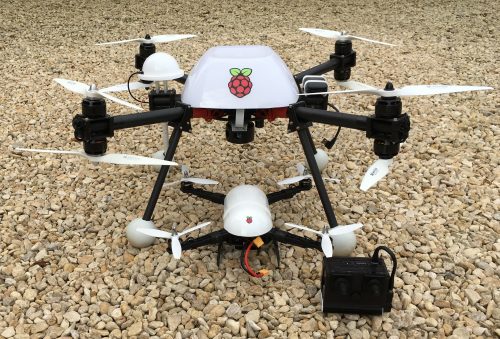
Zoë (as in “Ball”), the smallest drone, is based on a Pi ZeroW, supporting preset- and manual-flight controls. Hermione (as in “Granger”) is a Pi3 drone, supporting the above along with GPS and obstacle-avoidance.

Penelope (as in “Pitstop”), not shown above, is a B3+ with mix of the two above.

Development history

It probably took four years(!) to get the drone to simply hover stably for more than a few seconds. For example, the accelerometer (IMU) tells gravity and acceleration in 3D; and from sum math(s), angles, speed and distance. But IMU output is very noisy. It drifts with temperature, and because gravity is huge compared to the propeller changes, it doesn’t take long before the calculated speed and distance values drift significantly. It took a lot of time, experimentation and guesswork to get accelerometer, gyrometer, ground-facing LiDAR and a Raspberry Pi camera to work together to get a stable hover for minutes rather than seconds. And during that experimentation, there were plenty of crashes: replacement parts were needed many many times! However, with a sixty-second stable hover finally working, adding cool features like GPS tracking, object avoidance and human control were trivial in comparison.

GNSS waypoint tracked successfully!

See http://blog.pistuffing.co.uk/whoohoo/

Obstruction avoidance test 2 – PASSED!!!!!

Details at http://pidrone.io/posts/obstruction-avoidance-test-2-passed/

Human control (iPhone)

See http://pidrone.io/posts/human-i-am-human/

In passing, I’m a co-founder and assistant at the Cotswold Raspberry Jam (cotswoldjam.org). I’m hoping to take Zoë to the next event on September 15th – tickets are free – and there’s so much more learn, interact and play with beyond the piDrone.

Finally, a few years ago, my goal became getting the piDrone exploring a maze: all but minor tweaks are now in places. Sadly, piDrone battery power for exploring a large maze currently doesn’t exist. Perhaps my next project will be designing a nuclear-fusion battery pack?  Deuterium oxide (heavy water) is surprisingly cheap, it seems…

More resources

If you want to learn more, there’s years of development on Andy’s blog at http://pidrone.io, and he’s made considerable documentation available at GitHub if you want to explore things further after this blog post. Thanks Andy!

The post Autonomous drones (only slightly flammable) appeared first on Raspberry Pi.


Source: Raspberry Pi – Autonomous drones (only slightly flammable)

Celebrating our teachers

The end of the academic year is here, and we are marking the occasion by celebrating teachers from all over the world.

Raspberry Pi Teachers Computing highlight 2018

For those about to teach, we salute you.

Since last September, we’ve run a whole host of programmes that teachers have been involved in. From training with us at Picademy to building apocalyptic projects for Pioneers, from running Code Clubs, Dojos, and Raspberry Jams to learning tea-making algorithms on our free online training courses, these brilliant people do amazing things on a daily basis. And even more amazingly, they somehow also have the energy to take their knowledge into schools and share it with their learners to get them excited about computing too.

Dr Sue Sentance, the Raspberry Pi Foundation’s new Chief Learning Officer, has trained teachers for many years and understands better than most the impact a good teacher can have:

“When thinking about teaching Computing, we often get so caught up in the technology — what software, what kit, what environment, etc. — that we forget that it’s the teachers who actually facilitate students’ learning and inspire and motivate the students. A passionate and enthusiastic teacher is more important than which device or tool the students are using, because they understand what will help their students. “

In celebration of our education community, we asked teachers around the world to answer one big question:

“What has been your computing highlight of the year?”

Caroline Keep

Raspberry Pi Teachers Computing highlight 2018

Caroline (top right) and her group of students at Spark Penketh

Caroline Keep won the TES New Teacher of the Year award and runs Spark Penketh, a school makerspace in Warrington. She will also be training with us in August to become a Raspberry Pi Certified Educator. Her highlight of the year was achieving success at the forefront of the UK’s makerspace movement:

“All the physical computing projects we’ve done since February when Raspberry Pi co-founder Pete Lomas opened our school makerspace (the first one in a UK state school) have been amazing! We’ve built and coded talking robots, and gesture-controlled ones on micro:bits with primary schools. We’ve built drones, coded Arduinos for European Maker Week, opened a RoboDojo, used Python and Node-RED on Raspberry Pi to control weather stations, Pi Camera Modules, and robots, and we’ve designed a Digital Creative pathway for Industry 4.0 skills for September. Next up are Google AIY Projects kits, Redfern Electronic’s Crumble, and Bare Conductive’s Touch Board. We can’t wait!”

Heidi Baynes

Raspberry Pi Teachers Computing highlight 2018

Heidi (left) and two other amazing US-based educators pose under a very apt sign. It’s like they planned it.

Heidi Baynes is an Education Coordinator for the County Office of Education in Riverside, California. Her highlight is a birthday party with a difference:

“The Riverside Raspberry Jam was held on 3 March 2018 as part of Raspberry Pi’s Big Birthday celebration. Fellow Picademy graduate Ari Flewelling and I planned the event in conjunction with Vocademy, and we were thrilled by the overwhelming support from the local community. The event featured a project showcase, workshops, and an introduction to all things Raspberry Pi. We can’t wait to start planning the 2019 Riverside Raspberry Jam! I was also particularly proud of the students from Mountain Heights Academy who shared their Raspberry Pi and micro:bit projects at the Consortium’s #CSforAll event in Riverside. Our student Hailey was able to share her experiences as part of a student panel and even had the opportunity to meet the CEO of code.org, Hadi Partovi!”

Amy Bloodworth

Raspberry Pi Teachers Computing highlight 2018

Amy Bloodworth and her Astro Pi–winning students

Amy Bloodworth is a teacher at The American School In Switzerland (TASIS) in Lugano, Switzerland. Her highlight is literally out of this world:

“It has been a busy year for us here in Switzerland. Highlights for me and my students include meeting a computer game designer, competing in the World Robot Olympiad, and participating in the Astro Pi Challenge. With Astro Pi, my students loved that they could send their coded message to the ISS astronauts in any of the languages of ESA. As we are an international school, so this helped the students feel more connected to the task. The Astro Pi Challenge hooked the students in and acted as a springboard for other activities, such as coding an ISS tracker that alerted them when the ISS was overhead, and other science experiments using the Sense HAT. Next year, I plan to start a new after-school club dedicated to competitive robotics.”

Janice Paterson

Raspberry Pi Teacher Computing highlight 2018

Janice Paterson’s lovely class of brain-eating zombies

Janice Paterson is the Principal Teacher at Wormit Primary in Fife, Scotland. Her highlight wouldn’t seem out of place in The Walking Dead:

“We loved the amazing open-ended challenge of a zombie apocalypse, courtesy of Raspberry Pi’s Pioneers programme. It was truly cross-curricular and completely immersive for all the young learners. The books were devoured for information/ideas, and the makeup kits inspired our imaginations and creative side. We had Pi-powered, zombie-detecting robots coded to offer assorted challenges, and micro:bits set up as zombie teacher detectors (their thermometers were used because, of course, teachers have hot bodies!). We all learned loads! The best bit was sharing it all with the rest of our Code Club and the whole school.”

Wojtek Zielinski

Wojtek Zielinski works in Poland as a teacher. His highlight was a breakthrough he had when working with the translated versions of our resources with his students:

“When children work with resources in English, they often end up following what’s in the pictures. They don’t understand why the game or the program they created works. Translated materials enable them to truly learn and understand programming concepts, and that empowers them to experiment and create more. Translations are therefore essential for learning.”

Our thanks

We are so grateful for everything our teachers do to help us make our programmes a success. Together we’ll be able to achieve our goal of making high-quality computing resources that are accessible to everyone!

As a quick aside, you might also be interested to read a recent article written by Raspberry Pi creator and co-founder Eben Upton about the positive impact his teachers had on him.

Whether you’re a teacher wanting to share your success, or you simply want to share your appreciation for the teachers who inspired you, tell us about it in the comments below.

And from everyone at the Raspberry Pi Foundation, there’s only one thing left to say…

Teachers, we salute you!

The post Celebrating our teachers appeared first on Raspberry Pi.


Source: Raspberry Pi – Celebrating our teachers