Wireframe: a new games magazine with a difference

We’re pleased to announce Wireframe: a new, £3, twice-monthly magazine that lifts the lid on video games.

Raspberry Pi is all about making computing accessible to everyone, and in Wireframe, we’ll show you how programming, art, music, and design come together to make the video games you love to play — and how you can use these elements to create games yourself.

Read on to find out how you can get a FREE physical copy of the first issue!

Wireframe magazine

Wireframe magazine — launching on 8 November

Cutting through the hype, Wireframe will have a more indie-focused, left-field angle than traditional games magazines. As well as news, reviews, and previews, we’ll have in-depth features that uncover the stories behind your favourite games, showing you how video games are made, and who makes them.

On top of all that, we’ll also help you discover how you can make games of your own. Our dedicated Toolbox section will be packed with detailed guides and tips to help you with your own game development projects.

Early-access offer: get a free copy of issue 1

Because we’re so excited about our new magazine, we’re offering you a free copy of Wireframe’s first issue! Simply sign up on our website before the 8 November (or while stocks last) to get yours.

Wireframe magazine

Click here to order your free copy of issue 1!

Each early-access edition of Wireframe will contain a rather tempting discount subscription offer, and will arrive around the time of launch (overseas deliveries may take longer, and may incur a small postage charge). Don’t hang around! Stocks are limited and once they’re gone, they’re gone.

Free digital edition

We want everyone to enjoy Wireframe and learn more about their favourite hobby, so you’ll be able to download a digital version of all issues of Wireframe for free. Get all the features, guides, and lively opinions of our first-ever paper-and-ink edition as a handy PDF from our website from 8 November.

Wireframe in the wild

You’ll find the print edition of Wireframe in select UK newsagents from 8 November, priced at just £3. Subscribers will save money on the cover price, with an introductory offer of 12 issues for just £12 launching at the same time as the magazine. For more information, and terms and conditions, transport yourself to the Wireframe website at wfmag.cc!

The post Wireframe: a new games magazine with a difference appeared first on Raspberry Pi.


Source: Raspberry Pi – Wireframe: a new games magazine with a difference

Build your own robotic cat: Petoi returns

Who wouldn’t want a robot kitten? Exactly — we knew you’d understand! And so does the Petoi team, hence their new crowdfunding campaign for Petoi Nybble.

Petoi Nybble

Main campaign video. Back our Indiegogo campaign to adopt Nybble the robo kitten! Share with your friends who may love it! Indiegogo: https://igg.me/at/nybble A more technical post: https://www.hackster.io/RzLi/petoi-nybble-944867 Don’t forget to follow Twitter @PetoiCamp and subscribe to Petoi.com for our newsletters! Most importantly, enjoy our new kitten!

Petoi mark 2

Earlier this year, we shared the robotic cat project Petoi by Rongzhong Li. You all loved it as much as we did, and eagerly requested more information on making one.

Petoi Raspberry Pi Robot Cat

Rongzhong’s goal always was for Petoi to be open-source, so that it can be a teaching aid as much as it is a pet. And with his team’s crowdfunding campaign, he has made building your own robot cat even easier.

Petoi the laser-cut robotic cat

Laser kitty

In the new Nybble version of Petoi, the team replaced 3D-printed parts with laser-cut wood, and cut down the parts list to be more manageable: a Raspberry Pi 3B+, a Sparkfun Arduino Pro Mini, and the Nybble kit, available in the Nybble IndieGoGo campaign.

Petoi the laser-cut robotic cat

The Nybble kit! “The wooden frame is a retro design in honor of its popstick-framed ancestor. I also borrowed the wisdom from traditional Chinese woodwork (in honor of my ancestors), to make the major frame screw-free.”

But Nybble is more than just wooden parts and servo motors! The robotic cat’s artificial intelligence lets users teach it as well as control it,  so every kitty will be unique.

Nybble’s motion is driven by an Arduino-compatible micro-controller. It stores instinctive “muscle memory” to move around. An optional AI chip, such as a Raspberry Pi, can be mounted on top of Nybble’s back, to help Nybble with perception and decision. You can program in your favorite language, and direct Nybble to walk around simply by sending short commands, such as “walk” or “turn left”!

The NyBoard

For this version, the Petoi team has created he NyBoard, an all-in-one controller board for the Raspberry Pi. It’s available to back for $45 if you don’t want to pledge $200 for the entire cat kit.

Petoi the laser-cut robotic cat

Learn more

If you’d like to learn more about Nybble, visit its IndieGoGo campaign page, find more technical details on its Hackster.io project page, or check out the OpenCat GitHub repo.

Petoi the laser-cut robotic cat

And if you’ve built your own robotic pet, such as a K-9–inspired dog, or Raspberry Pi–connected android sheep, let us know!

The post Build your own robotic cat: Petoi returns appeared first on Raspberry Pi.


Source: Raspberry Pi – Build your own robotic cat: Petoi returns

MagPi 75: 75 greatest projects, chosen by you

Hi folks, Rob from The MagPi here! A few weeks ago, we asked you to vote on your top 50 favourite Raspberry Pi projects from the last two-or-so years. We had thousands of responses, but there was one clear winner…and you can find out who that was in issue 75 of The MagPi, out tomorrow in stores, and available today online!

MagPi 75 Raspberry Pi magazine front cover

See who you folks voted for…

You heard right, the magazine is available a day early to download and buy online! Don’t say we never spoil you.

The community has voted

As well as counting down your 50 favourites, we’ve also got 25 other amazing projects selected by Eben Upton, Philip Colligan, Carrie Anne Philbin, and others!* Is your favourite project on the list?

MagPi 75 Raspberry Pi magazine

We don’t want to spoil the surprise — you’ll have to get the magazine to read the whole thing!

And there’s so much more!

On top of community favourites, we bring you a lot more in issue 75. This month we have a big feature on using the Raspberry Pi Camera Module, we show you ten of our favourite starter kits, and we also have a guide on building a secret radio chat device.

MagPi 75 Raspberry Pi magazine

Want to use the new Raspberry Pi TV HAT? We show you how.

All this along with news, reviews, community features, and competitions!

MagPi 75 Raspberry Pi magazine

See what we saw at Maker Faire New York!

Get The MagPi 75

You can get The MagPi 75 tomorrow from WHSmith, Tesco, Sainsbury’s, and Asda. If you live in the US, head over to your local Barnes & Noble or Micro Center in the next few days for a print copy. However, you can get the new issue online today! Check it out on our store, or digitally via our Android or iOS apps. And don’t forget, there’s always the free PDF.

Rolling subscription offer!

Want to support the Raspberry Pi Foundation and the magazine? You can now take out a monthly £5 subscription to the magazine, effectively creating a rolling pre‑order system that saves you money on each issue.

The MagPi subscription offer — The MagPi 75

You can also take out a twelve-month print subscription and get a Pi Zero W plus case and adapter cables absolutely free! This offer does not currently have an end date.

Thanks for sticking with The MagPi for 75 issues! Here’s to hundreds more.

*Oi, Zwetsloot, why wasn’t I asked?! – Alex

The post MagPi 75: 75 greatest projects, chosen by you appeared first on Raspberry Pi.


Source: Raspberry Pi – MagPi 75: 75 greatest projects, chosen by you

Rescuing old cine film with Raspberry Pi Zero

When Electrical Engineer Alan Platt was given the task of converting old cine film to digital footage for his father-in-law’s 70th birthday, his first instinct was to look online.

converting cine film to digital footage with a Raspberry Pi Zero

“There are plenty of companies happy to convert old films”, he explains, “but they are all extremely expensive. In addition, you have to send your original films away by post, and there’s no way to guarantee that they’ll be safe in transit.”

Alan was given a box of Super 8 films covering 15 years of family holidays and memories. A huge responsibility, and an enormous challenge. Not content to let someone else do the hard work, Alan decided to convert the films himself — and learn how to program a Raspberry Pi at the same time.

converting cine film to digital footage with a Raspberry Pi Zero

Alan’s cine film digitising machine

The best-laid plans

Alan’s initial plan involved using his father-in-law’s cine projector as the base for the conversion process, but this soon proved impossible. There was no space in the projector to house both the film-playing mechanism, and the camera for the digitisation process. Further attempts to use the projector came to an end when, on powering it up for the first time, the 50-year-old machine produced a loud bang and a large cloud of smoke.

Undeterred, Alan examined the bust projector’s mechanism and decided to build his own. This began with a large eBay order: 3-D printed components from Germany, custom-shaped PTFE sheets from the UK, and optical lenses from China. For the skeleton of the machine, Alan’s box of Technic LEGO was dusted off and unpacked; an old TV was dug out of storage to interface with the Raspberry Pi Zero.

converting cine film to digital footage with a Raspberry Pi Zero

Experimentation: Technic LEGO, clamps, and Blu Tack hold the equipment together

The build commenced with several weeks of trial and error using scraps of cine film, a Camera Module, and a motor. With the Raspberry Pi Zero, Alan controlled the motion of the film through the machine, and took photos of each frame.

“At one point, setting the tension on the film required a helper to stand next to me, holding a sledgehammer connected to the pick-up reel. Moving the sledgehammer up or down varied the tension, and allowed me to work out what power of motor I would need to make the film run smoothly.”

He refined the hardware and software until the machine could produce reliable, focused, and stable images.

A slow process

Over a period of two months, the finished machine was used to convert all the cine films. The process involves loading a reel onto a Technic LEGO arm, feeding the film through the mechanism with tweezers, and winding the first section on to the pick-up reel. The Raspberry Pi controls a stepper motor and the Camera Module, advancing the film frame by frame and taking individual photos of each film cell. The film is backlit through a sheet of translucent PTFE serving as a diffuser; the Camera Module is focused by moving it up and down on its aluminium mounting.

converting cine film to digital footage with a Raspberry Pi Zero

Alan taught himself to program in Python while working on this project

Finally, Alan used Avidemux, a free video-editing program, to stitch all the images together into an MP4 digital film.

The verdict

“I’m incredibly proud of this machine”, Alan says. “It has taken more than a quarter of a million photos, digitised hundreds of meters of film — and taught me to program in Python. It demonstrates you don’t need to be an expert software engineer to make something really cool!”

And Alan’s father-in-law?

“He was thrilled! Being able to watch the films on his TV without having to set up the projector was fantastic. It was a great present!”

Here, exclusively for the Raspberry Pi blog, we present the first moments of footage to be digitised using Alan’s machine.

converting cine film to digital footage with a Raspberry Pi Zero

Gripping footage, filmed at Windsor Safari Park in 1983

Digital footage

Have you used a Raspberry Pi to digitise family memories? Do you have a box of Super 8 films in the attic, waiting for a machine like Alan’s?

Tell us about it in the comments!

Thanks again, Rachel

The post Rescuing old cine film with Raspberry Pi Zero appeared first on Raspberry Pi.


Source: Raspberry Pi – Rescuing old cine film with Raspberry Pi Zero

Celebrating European Code Week with our annual EUDojo

On Wednesday 17 October, CoderDojo held the sixth annual EUDojo in the European Parliament in Brussels.

EUDojo 2018

EUDojo 2018

Since last year’s event, CoderDojo has grown significantly: we have almost 500 new Dojos, and our network now spreads to over 100 countries! We organised this year’s EUDojo to coincided with the annual Europe Code Week — also in its sixth year.

Our event was co-hosted by MEP Seán Kelly and the EPP party, and it was attended by MEPs from over ten European countries. The other attendees were Dojo volunteers and parents from across Europe, along with more than 40 young coders!

EUDojo 2018

These young people travelled to the EU Parliament from Italy, the United Kingdom, Bulgaria, the Czech Republic, Moldova, Romania, Belgium, Spain, Portugal, and Ireland to showcase their coding and technology skills. The kids presented technology projects they had created to the MEPs and sponsors, and they also taught MEPs to write their first lines of code!

Irish MEP Seán Kelly opened EUDojo and spoke of the pride he felt working with CoderDojo on such a special event. During the coding session, the young coders taught MEPs how to create a basic game using Scratch, and showed them how to build a website using HTML and CSS. Participants also learned how to program micro:bits, which created a fantastic buzz amongst the MEPs and their young tutors.

Coding projects to impress the MEPs

The CoderDojo youths made great use of this opportunity to showcase projects that they have made in their local Dojos for the politicians and sponsors.

Nadezhda from the Sofia Dojo in Bulgaria showed off a Scratch game she had built to test players’ agility skills, taking inspiration from river crossing puzzles.

EUDojo 2018 - Nadezhda from the Sofia Dojo in Bulgaria

Nadezhda from the Sofia Dojo in Bulgaria

Lucy Brennan and Caragh Bolger from the Waterford Dojo in Ireland presented two very different projects. Lucy demonstrated Piano Pal, a project she created to help people learn and practice to play the piano. Caragh Bolger presented her project How to make the world a better place, which is about the little things that make the world better.

EUDojo 2018

Lucy Brennan and Caragh Bolger from the Waterford Dojo in Ireland

Edward from Harrogate Dojo, UK, presented his project for encrypting and decrypting files in C++ .

EUDojo 2018 - Edward from the Harrogate Dojo

Edward from the Harrogate Dojo

Innovators of the future

Cabinet member Manuel Mateo Goyet discussed the importance of digital skills, highlighting the importance of encouraging girls to get involved. He noted that he was delighted to see just as many girls coding at EUDojo as boys, and that he was looking forward to sharing photos from the day with his daughter to encourage her too.

EUDojo 2018 - Cabinet member Manuel Mateo Goyet

Cabinet member Manuel Mateo Goyet

Karolina Telejko, SAP’s EU Government Relations Director, discussed their approach to training, lifelong learning, and building partnerships, and explained why EUDojo sponsor SAP decided to help spread coding skills around the world.

EUDojo 2018 - Karolina Telejko, SAP’s EU Government Relations Director

Karolina Telejko, SAP’s EU Government Relations Director

Derk Oldenburg of Liberty Global spoke about social innovation and how it is promoted by CoderDojo’s Future Makers Bento Box resources for young coders. He challenged young people around the world to find a social issue they care about and design a solution to it using technology.

EUDojo 2018 - Derk Oldenburg of Liberty Global

Derk Oldenburg of Liberty Global

Giving young people the space to become inventors

Giustina Mizzoni, Executive Director of the CoderDojo Foundation, hopes that this event will drive more organisations and public services to invest in young people’s technology skills.

“We are delighted to be co-hosting EU Dojo, the flagship CoderDojo Europe Code Week event, for the sixth year running. This event was made possible thanks to our partners Liberty Global and SAP, and the team at MEP Sean Kelly’s office. At this year’s event, we are marking the work of libraries and the significant contribution they make to the CoderDojo movement.”

EUDojo 2018 - Giustina Mizzoni, Executive Director of the CoderDojo Foundation

Giustina Mizzoni, Executive Director of the CoderDojo Foundation

“Today, as always, I was incredibly impressed by the young people’s projects. All of these projects had one thing in common: they were made using creativity! Learning how to code gives young people the opportunity to express themselves and develop their skills. I hope that, as a result of today, more library groups will be inspired to join the CoderDojo movement, and use their space to give more young people the opportunity to code, create, and learn about technology!”

Learn more about CoderDojo

If you’d like to find out more about CoderDojo, from their to starting a Dojo in your local area, visit the CoderDojo website. You can also sign up for our free three-week online training course, and learn everything you need to start a Dojo and help enable young people worldwide to create and explore technology together:

Start a CoderDojo || free online learning || Raspberry Pi Foundation

Get support and advice on how to grow your confidence in coding and start a CoderDojo for young people in your area.

The post Celebrating European Code Week with our annual EUDojo appeared first on Raspberry Pi.


Source: Raspberry Pi – Celebrating European Code Week with our annual EUDojo

Beer Cooler or: a Raspberry Pi Zero W walks into a bar…

You know how it is. You move into a house that used to be a pub, and you can’t bring yourself to do away with the bar. In fact, after several years of planning, you find yourself buying a hand pump on eBay, and a polypin of craft ale from the local microbrewery. Suddenly, you’re the landlord. The barkeep. Everyone’s best friend.

A GIF from the movie Shaun of the Dead - Raspberry Pi Beer Cooler

And yet …

There’s something not quite right about this setup. Something not quite perfect. You’re pulling pints and drinking your craft ale one day when you realise — the beer isn’t cold enough!

You need a beer cooler.

Cool customer

Electrical engineer Alan Platt found himself in this enviable position, and he decided to design his own draft ale fridge.

‘The original pub cellar had been filled in, so I couldn’t keep my beer underground and pipe it up to the handpump — it had to sit under the bar. I needed to build my own beer cooler, because there is only so much space under the bar, and a commercial fridge wouldn’t fit.”

Alan set about constructing a box for the beer using sheets of insulation board and elastic bands. He then installed two Peltier cooling pumps in the lid of the box, and routed a pipe up to the handpump for the beer. One trip to the microbrewery later, and the craft ale was chilling nicely.

The outside of Alan's beer cooler showing the cooling apparatus and insulation boards

Alan’s beer cooler

But there was a problem.

‘The Peltiers ran happily for an hour or two, but after that, they proved to be too effective. A layer of ice built up on the heat sink connected to the cold side of the Peltiers, jamming the fans, and allowing the beer to grow warm. They also made a horrible rattling sound, and disturbed everyone in the house.”

It seemed that the perfect pint was still out of reach.

Complex circuitry

Not to be defeated, Alan realised he would need a way to control the power to the Peltier units. Switching the power using a simple thermostat would cause damaging thermal shock in the Peltiers, so Alan turned to Raspberry Pi Zero W as his solution.

A photo of the inside of Alan’s beer cooler complete with Raspberry Pi and a heap of wiring (as described in the paragraph below)

Testing the completed control circuit

In order to fine-tune the cooling process, Alan decided to control the current running through the Peltier units. He used a hardware PWM output on a Raspberry Pi Zero W alongside a power MOSFET, an inductor, a capacitor, and a current measurement circuit to create a switched-mode variable current power supply. By measuring the temperature on the cold side of the Peltier units, and using a PID control loop to adjust the PWM output, Alan was able to maintain the cold side at just above freezing. He used a second PID control loop to keep the beer inside the fridge at a perfect cellar temperature of 8°C.

Aware that this cooling system was both overcomplicated and built from very high-power components, Alan designed multiple failsafes using hardware and software to ensure that the control unit would not spontaneously combust while attempting to cool the beer.

The perfect pint was within reach.

Consultation

And then Alan tried to explain the failure modes to his wife, in case he wasn’t in the house when the electronics overheated, or the failsafes kicked in.

“I wanted her to know what to do if the cooler failed”, Alan explains. “But this required her to check the beer fridge regularly. It’s on the floor, under the bar, and she didn’t seem keen.”

The project was about to get significantly more complicated.

What about an audible alarm?

It was an innocent suggestion, but the idea grew from a simple beeping alarm to a series of spoken alerts. What could be used to produce these alerts?

“I found myself programming a second Raspberry Pi Zero with a DAC HAT, audio amp, and speaker, just to communicate the status of the beer cooler. Originally, the spoken alert was to indicate a fault in the control circuits, but it seemed a waste to stop at a single message.”

A breadboard covered in wires - Raspberry Pi Beer Cooler

Prototype for the audio amplifier

After days of planning, programming, and searching for MP3 files online, the fridge can now inform Alan (and his wife) when it is switched on, when the Peltiers power up, when it reaches maximum power, when it is switched off, and when there is a fault.

The alert messages are all quotes from sci-fi shows and films: Han Solo claiming he has a bad feeling about this; Scotty telling Captain Kirk that the Enterprise is giving it all she’s got; and Kaylee telling Captain Reynolds that everything is shiny.

And the fault alert?

“If there’s a problem with the beer cooler, the Raspberry Pi declares ‘Danger, Will Robinson, danger.’ on a loop, until someone checks it and resets the controls. It’s annoying and effective!”

The perfect pint

The Raspberry Pi also acts as a web server, using the REMI library to display and change the temperatures, currents, and control parameters, so the beer temperature can be monitored and regulated from anywhere on the home WiFi network.

The final build next to a laptop displaying the beer cooler web interface for maintenance on the go

Control box and web interface

Alan’s beer cooler has been successfully tested, and several polypins of local craft ale have been drunk and enjoyed — and it’s only taken two Raspberry Pis; some high-current circuitry; two Peltier units; a pile of household insulation board; and Han Solo, Scotty, Kaylee, and the robot from Lost In Space to achieve the perfect pint.

Over-engineering

Use the comments to tell us about your own over-engineered projects and any excuses you’ve found for including an extra Raspberry Pi in your build!

And thank you to Rachel, aka ‘the wife’, for this wonderful blog post!

The post Beer Cooler or: a Raspberry Pi Zero W walks into a bar… appeared first on Raspberry Pi.


Source: Raspberry Pi – Beer Cooler or: a Raspberry Pi Zero W walks into a bar…

Introducing the Raspberry Pi TV HAT

Today we are excited to launch a new add-on board for your Raspberry Pi: the Raspberry Pi TV HAT.

A photograph of a Raspberry Pi a TV HAT with aerial lead connected Oct 2018

The TV HAT connects to the 40-pin GPIO header and to a suitable antenna, allowing your Raspberry Pi to receive DVB-T2 television broadcasts.

A photograph of a Raspberry Pi Zero W with TV HAT connected Oct 2018

Watch TV with your Raspberry Pi

With the board, you can receive and view television on a Raspberry Pi, or you can use your Pi as a server to stream television over a network to other devices. The TV HAT works with all 40-pin GPIO Raspberry Pi boards when running as a server. If you want to watch TV on the Pi itself, we recommend using a Pi 2, 3, or 3B+, as you may need more processing power for this.

A photograph of a Raspberry Pi 3 Model B+ with TV HAT connected Oct 2018

Stream television over your network

Viewing television is not restricted to Raspberry Pi computers: with a TV HAT connected to your network, you can view streams on any network-connected device. That includes other computers, mobile phones, and tablets. You can find instructions for setting up your TV HAT in our step-by-step guide.

A photograph of a Raspberry Pi 3 Model B+ with TV HAT connected Oct 2018
A photograph of a Raspberry Pi a TV HAT with aerial lead connected Oct 2018
A photograph of a Raspberry Pi Zero W with TV HAT connected Oct 2018

New HAT form factor

The Raspberry Pi TV HAT follows a new form factor of HAT (Hardware Attached on Top), which we are also announcing today. The TV HAT is a half-size HAT that matches the outline of Raspberry Pi Zero boards. A new HAT spec is available now. No features have changed electrically – this is a purely mechanical change.

Raspberry Pi TV HAT mechanical drawing Oct 2018

A mechanical drawing of a Raspberry Pi TV HAT, exemplifying the spec of the new HAT form factor. Click to embiggen.

The TV HAT has three bolt holes; we omitted the fourth so that the HAT can be placed on a large-size Pi without obstructing the display connector.

The board comes with a set of mechanical spacers, a 40-way header, and an aerial adaptor.

A photograph of a Raspberry Pi TV HAT Oct 2018

Licences

Digital Video Broadcast (DVB) is a widely adopted standard for transmitting broadcast television; see countries that have adopted the DVB standard here.

Initially, we will be offering the TV HAT in Europe only. Compliance work is already underway to open other DVB-T2 regions. If you purchase a TV HAT, you must have the appropriate license or approval to receive broadcast television. You can find a list of licenses for Europe here. If in doubt, please contact your local licensing body.

The Raspberry Pi TV HAT opens up some fantastic opportunities for people looking to embed a TV receiver into their networks. Head over to the TV HAT product page to find out where to get hold of yours. We can’t wait to see what you use it for!

The post Introducing the Raspberry Pi TV HAT appeared first on Raspberry Pi.


Source: Raspberry Pi – Introducing the Raspberry Pi TV HAT

HackSpace magazine 12: build your first rocket!

Move over, Elon Musk — there’s a new rocket maverick in town: YOU!

Rockets!

Step inside the UK rocketry scene, build and launch a rocket, design your own one, and discover the open-source rocket programmes around the world! In issue 12, we go behind the scenes at a top-secret launch site in the English Midlands to have a go at our own rocket launch, find the most welcoming bunch of people we’ve ever met, and learn about centre of gravity, centre of pressure, acceleration, thrust, and a load of other terms that make us feel like NASA scientists.

Meet the Maker: Josef Prusa

In makerception news, we meet the maker who makes makers, Josef Prusa, aka Mr 3D Printing, and we find out what’s next for his open-source hardware empire.

Open Science Hardware

There are more than seven billion people on the planet, and 90-odd percent of them are locked out of the pursuit of science. Fishing, climate change, agriculture: it all needs data, and we’re just not collecting as much as we should. Global Open Science Hardware is working to change that by using open, shared tech — read all about it in issue 12!


And there’s more…

As always, the new issue is packed with projects: make a way-home machine to let your family know exactly when you’ll walk through the front door; build an Alexa-powered wheel of fortune to remove the burden of making your own decisions; and pay homage to Indiana Jones and the chilled monkey brains in Temple of Doom with a capacitive touch haunted monkey skull (no monkeys were harmed in the making of this issue). All that, plus steampunk lighting, LEDs, drills, the world’s biggest selfie machine, and more, just for you. So go forth and make something!

Get your copy of HackSpace magazine

If you like the sound of this month’s content, you can find HackSpace magazine in WHSmith, Tesco, Sainsbury’s, and independent newsagents in the UK from tomorrow. If you live in the US, check out your local Barnes & Noble, Fry’s, or Micro Center next week. We’re also shipping to stores in Australia, Hong Kong, Canada, Singapore, Belgium, and Brazil, so be sure to ask your local newsagent whether they’ll be getting HackSpace magazine. And if you’d rather try before you buy, you can always download the free PDF now.

Subscribe now

Subscribe now” may not be subtle as a marketing message, but we really think you should. You’ll get the magazine early, plus a lovely physical paper copy, which has a really good battery life.

Oh, and twelve-month print subscribers get an Adafruit Circuit Playground Express loaded with inputs and sensors and ready for your next project. Tempted?

The post HackSpace magazine 12: build your first rocket! appeared first on Raspberry Pi.


Source: Raspberry Pi – HackSpace magazine 12: build your first rocket!

Electronics 101.1: Electricity basics

In HackSpace issue 9, Dave Astels helps us get familiar with what electricity is, with some key terms and rules, and with a few basic components. Get your copy of HackSpace magazine in stores now, or download it as a free PDF here.

An animated GIF of Pickachu the Pokemon

tl;dr There’s more to electricity than Pikachu.

Electricity basics

Electricity is fascinating. Most of our technology relies on it: computers, lights, appliances, and even cars, as more and more are hybrid or electric. It follows some well-defined rules, which is what makes it so very useful.

According to Wikipedia, electricity is ‘the set of physical phenomena associated with the presence and motion of electric charge’. And what’s electric charge? That’s the shortage or excess of electrons.

Let’s go back (or forward, depending on where you are in life) to high school science and the atom. An atom is, at a very simplified level, a nucleus surrounded by a number of electrons. The nucleus is (again, viewing it simply) made up of neutrons and protons. Neutrons have no charge, but protons have a positive charge. Electrons have a negative charge. The negative charge on a single electron is the exact opposite of the positive charge on a single proton. The simplest atom, hydrogen, is made from a single proton and a single electron. The net charge of the atom is zero: the positive charge of the proton and the negative charge of the electron cancel – or balance – each other. An atom’s electrons aren’t just in an amorphous cloud around the nucleus: you can think of them as being arranged in layers around the nucleus…rather like an onion. Or perhaps an ogre. This is a very simplified visualisation of it, but it suffices for our purposes.

A diagram of a copper atom and the text '29 Electrons'

Figure 1: A very stylised representation of a copper atom with its electron shell

In a more complex atom, say copper, there are more protons, neutrons, and electrons, and the electrons are in more layers. By default, a copper atom has 29 protons and 35 neutrons in its nucleus, which is surrounded by 29 electrons. The way the electrons are distributed in their layers leaves the copper atom with a single electron in the outermost layer. This is represented in Figure 1 (above). Without getting further into subatomic physics, let’s just say that having that single electron in the outermost layer makes it easier to manipulate. When we put a bunch of copper atoms together to make copper metal (e.g. a wire), it’s easy to move those outermost electrons around inside the metal. Those electrons moving around is electricity. The amount of electrons moving over a period of time is called ‘current’.

A multimeter showing the figure 9.99 with a resistor connected via crocodile clips

A single 10 kΩ resistor reads almost 10 000 ohms (no electrical component is perfect).

We started by talking about electrons and charge. Look back at the Wikipedia definition: ‘presence and motion of electric charge’. Charge is measured in coulombs: 1 coulomb is approximately 6.242 × 10¹⁸ electrons. That’s 6 242 000 000 000 000 000 electrons. They’re very small. Actually, this would be -1 coulomb. +1 coulomb would be that many protons (or really, the net lack of that many electrons).

That’s charge. Now let’s consider moving charge, which is far more useful in general (unless your goal is to stick balloons to the wall). Consider some amount of charge moving through a wire. The amount of charge that moves past a specific point (and thus through the wire) over a period of time is called ‘current’ (just like the current in a river) and is measured in amperes, generally just called amps. Specifically, 1 amp is equal to 1 coulomb flowing past a point in 1 second.

Another common term is voltage. You can think of voltage like water pressure; it’s the pressure pushing the electrons (i.e. charge) through a material. The higher the voltage (measured in volts), the faster charge is pushed through, i.e. the higher the current.

The final term is resistance, measured in ohms. Resistance is just what it sounds like. It’s a measure of how much a material resists the movement of electrons. We said that copper allows electrons to move freely. That’s what makes it so common for wires, PCB traces, etc. We say that it is a good conductor. Glass, on the other hand, locks its electrons in place, not letting them move. It’s an example of a good insulator. There are materials that are in between: they let electrons move, but not too freely. These are crucial to making electronics work.

There’s an interesting (and useful) relationship between voltage, current, and resistance called Ohm’s Law (Georg Ohm was the fellow who explored and documented this relationship): the current (denoted I, in amps) flowing through a material is equal to the voltage across the material (denoted V, in volts) divided by the material’s resistance (denoted R, in ohms): I = V/R. This equation is foundational and, as such, very handy.

Lighting up

There aren’t many electronic devices that don’t have at least one LED on them somewhere, especially not gadgety ones. If you look at a simple Arduino Uno, it has LEDs for power, Tx, Rx, and pin 13. The first program using electronic components that most people try is one to blink an LED.

A colour spectrum from red to purple

Figure 2: The colour spectrum

LED stands for light-emitting diode. We’ll come back to diodes in a later instalment; all we need to know right now is that a diode has to go the right way around. So that leaves ‘light-emitting’. That simply means that it gives off light: it lights up. Specifically, it lights up when enough current flows through it. Be careful, though. Put too much current through it and it’ll likely crack in two. Seriously, we’ve done it. Best case scenario, you’ll get a bright pulse of light as it burns out. How much current do they like? 20 milliamps (20mA) is typical. Because an LED is a diode, i.e. a semiconductor (we’ll look at these in more detail in a future instalment too), it defies Ohm’s Law. How? It always has the same voltage across it, regardless of the current flowing through it.

An LED will have a specific Vf (f is for forward, as in ‘forward voltage’), which will be defined in its data sheet.

The voltage varies with the colour of light that the LED emits, but usually between 1.8V and 3.3V. Vf for red LEDs will typically be 1.8V, and for blue LEDs 3V–3.3V. As a rule, LEDs with a higher frequency colour will have a larger Vf. Figure 2 (above) shows the colour spectrum. Colours on the right end are lower in frequency and LEDs emitting those colours will have a lower Vf, while those on the left end have a higher frequency and a higher Vf.

A screenshot of resistor-calculator website

Resistor colour bands show the resistance. Online calculators can help you learn the values.

So an LED will have a fixed Vf, and a typical LED that we’ll use likes about 20mA of current. An LED won’t do anything to limit how much current is flowing through it. That’s what we meant when we said it defies Ohm’s Law.

If we take a blue LED and hooked it to a 3.3V power supply, it will shine happily. Do the same thing with a red LED, and it will blink and burn out. So how do we deal with that? How do we use 3.3V or 5V to make an LED light up without burning out? We simply limit the current flowing through it. And for that, we need a resistor and Ohm’s Law.

Getting protection

Figure 3: An LED with a current-limiting resistor

If we want to power a red LED from a 5V source, we know the following information: current has to be 20mA, Vcc will be 5V, and the voltage across the LED will be 1.8V. Consider the circuit in Figure 3. The voltage across the resistor will be Vcc – Vf, i.e. 5 – 1.8 = 3.2V. We said the current through the LED should be 20mA. Since there is only one path through the circuit that goes through the resistor as well as the LED, all current has to flow through both: whatever amount of current flows through the resistor has to flow through the LED, no more, no less. This is the crucial thing to realise. We can calculate the value of the resistance needed using Ohm’s Law: R = V/I = 3.2V/20mA = 3.2V/0.020A = 160 ohms.

The resistor should have a value of 160 ohms to allow 20mA of current to flow through the LED. Knowing that the 20mA and 1.8V values are approximate and that resistors are not exact (+/- 5 or 10 percent are the most common), we chose a slightly higher-value resistor. Considering common resistor values, go with 180 ohm or 220ohm. A higher-value resistor will allow slightly less current through, which might result in a slightly dimmer light. Try it and see. For practical purposes, simply using a 220 ohm resistor usually works fine.

Parallel lines

In the previous section we connected a resistor and an LED end to end. That’s called a series circuit. If we connected them side by side, it would be a parallel circuit. Consider the circuits in Figure 4.

Figure 4: A – series circuit; B – parallel circuit

We’ll use 5V for Vcc. What is the total resistance between Vcc and GND in each circuit? How much current is flowing through each circuit? What is the voltage across each resistor?

When resistors are connected in series, as in circuit A, the resistances are added. So the two 100 ohm resistors in series have a total resistance of 200 ohms.

When resistors are connected in parallel, as in circuit B, it’s more complex. Each resistor provides a path for current to flow through. So we could use an indirect method to calculate the total resistance. Each resistor is 100 ohms, and has one end connected to 5V and the other to 0V (GND), so the voltage across each one is 5V. The current flowing through each one is 5V/100 ohms = 0.05A, or 50mA. That flows through each resistor, so the total current is 100mA, or 0.1A. The total resistance is then R = V/I = 5V/0.1A = 50 ohms. A more direct way is to use the equation 1/Rt = 1/R1 + 1/R2 + … + 1/Rn, where Rt is the total resistance, and R1, R2, etc. are the values of the individual resistors that are in parallel. Using this, 1/Rt = 1/100 + 1/100 = 2/100 = 1/50. So Rt = 50. This is a quicker way to do it, and only involves the resistor values.

An image of a multimeter

A multimeter can read voltage, ampage, and resistance

Now for current. We know that the series circuit has a total resistance of 200 ohms, so the current will be I = V/R = 5V/200 ohm = 0.025A = 25mA. For one 100 ohm resistor the current is 5V/100 ohm = 0.05A = 50mA. This is expected: if the resistance is lower, there is less ‘resistance’ to current flowing, so with the same voltage, more current will flow. We already computed the current for the parallel circuit: 100mA. This is higher because we know that each resistor has 50mA flowing through it. In a parallel circuit, the currents are added.

A multimeter showing the figure 19.88 with a resistor connected via crocodile clips

Two 10kΩ (kiloohm) resistors in series read (almost) 20kΩ

The final question is what voltage is across each resistor. Let’s look at the parallel circuit first. One end of each resistor is connected to 5V, and the other end of each is connected to 0V (GND). So clearly, the voltage across each one is 5V. In a series circuit it’s different. We can use Ohm’s Law because we’ve calculated the current flowing through each one (0.025A), and that current flows through both resistors. Each resistor is 100 ohm, so the voltage across each one will be V = I×R = 0.025A × 100 ohm = 2.5 V. This makes sense intuitively, since the resistors have the same value and the same current is flowing through both. It makes sense that the voltage across each would be equal, and half of the total. Remember that it’s unlikely to be exactly half, due to the slop in the resistor values.

Let’s do this one more time with unequal resistors. See Figure 5.

Figure 5: A – series circuit; B – parallel circuit

For the series circuit, we simply add the resistances: 100ohm + 82ohm = 182ohm. The current is 5V / 182ohm = 0.0274725A = 27.4725 mA. Because resistors are inexact, it’s safe to call this 27.5mA. The voltages are 100ohm × 0.0275A = 2.75V across the 100 ohm resistor, and 82ohm × 0.275 = 2.25V across the 82 ohm one. The voltages always have to add up, accepting rounding errors. Relative to ground, the voltage at the point between the resistors is 2.75V. What will happen if we make the top resistor smaller (i.e. have a lower resistance)? The total resistance goes down, the current goes up, so the voltage across the 100ohm resistor goes up. This is what’s generally called a voltage divider.

For the parallel circuit we can use 1/Rt = 1/100 + 1/82 = 82/8200 + 100/8200 = 182/8200 = 1/45, so Rt = 45ohm. The total current is 5V / 45ohm = 0.111A = 111mA. For the individual resistors, the currents are 5V / 100ohm = 50mA and 5V / 82ohm = 61mA. Add these up and we have the total current of 111mA. Parallel resistors act as a current divider.

A multimeter showing the figure 4.96 with a resistor connected via crocodile clips

Two 10kΩ resistors in parallel read (almost) 5kΩ.

I encourage you to create these little circuits on a breadboard and measure the resistances, voltages, and currents for yourself.

Resistors in series for a voltage divider, resisters in parallel for a current divider

Consider what happens if we replace the resistor connected to Vcc in a series circuit with a variable resistor. The voltage between the resistors will vary as the value of the resistor does. As the resistance goes down, the voltage goes up. The reverse is true as well: as the resistance goes up, the voltage goes down. One use of this is to replace the variable resistor with a photoresistor. A photoresistor’s value depends on how much light is shining on it (i.e. how many photons are hitting it, to be precise). More light = lower resistance. Now the voltage divider can be used to measure the strength of light. All you need to do is connect the point between the resistors to an analogue input and read it.

Figure 6 Combined parallel and series circuits

We’ve had a brief look at the basic concepts of electricity: charge, current, voltage, and resistance. We’ve also had a closer look at resistors and ways of combining them. We finished with a practical example of a series resistor circuit being used to measure light.

The post Electronics 101.1: Electricity basics appeared first on Raspberry Pi.


Source: Raspberry Pi – Electronics 101.1: Electricity basics

Halloween voice-changer using Raspberry Pi Zero

Olivier Ros has put together a short and sweet tutorial for creating your own voice-changing mask for Halloween.

Voice changer with Raspberry Pi Zero for Halloween

How to make a voice changer with Raspberry Pi Zero for Halloween Buy MIC+ sound card on Amazon : goo.gl/VDFzu7 tutorial here: https://www.instructables.com/id/Halloween-Voice-Changer-With-Raspberry-Pi/ https://www.raspiaudio.com/halloween

Halloween: we love it!

Grab your ghostly fairy lights, hollow out your pumpkins, and hunt down your box of spooky knick-knacks — it’s Halloween season! And with every year that passes, we see more and more uses of the Raspberry Pi in haunting costumes and decorations.

Voice-changers

At the top of the list is an increase in the number of voice changers. And Olivier Ros’s recent project is a great example of an easy-to-build piece costumimg that’s possible thanks to the small footprint of the Raspberry Pi Zero.

An image of the Raspberry Pi Zero voice changer inside a scary mask

Playdough: so many uses, yet all we wanted to do as kids was eat it.

Oliver used a Pi Zero, though if you have the mask fit it into, you could use any 40-pin Pi and an audio DAC HAT such as this one. He also used Playdough to isolate the Zero and keep it in place, but some foam should do the trick too. Just see what you have lying around.

When I said this is an easy project, I meant it: Olivier has provided the complete code for you to install on a newly setup SD card, or to download via the terminal on your existing Raspbian configuration.

You can read through the entire build on his website, and see more of his projects over on his Instructables page.

More Halloween inspiration

If you’re looking to beef up your Halloween game this October, you should really include a Raspberry Pi in the mix. For example, our Halloween Pumpkin Light tutorial allows you to control the light show inside your carved fruit without the risk of fire. Yes, you read that correctly: a pumpkin is a fruit.

Halloween Pumpkin Light Effect

Use a Raspberry Pi and Pimoroni Blinkt! to create an realistic lighting effect for your Halloween Pumpkin.

For more inspiration and instructions, check out John Park’s Haunted Portrait, some of our favourite tweeted spooky projects from last year, and our list of some of the best Halloween projects online.

The post Halloween voice-changer using Raspberry Pi Zero appeared first on Raspberry Pi.


Source: Raspberry Pi – Halloween voice-changer using Raspberry Pi Zero

SelfieBot: taking and printing photos with a smile

Does your camera giggle and smile as it takes your photo? Does your camera spit out your image from a thermal printer? No? Well, Sophy Wong’s SelfieBot does!

Raspberry Pi SelfieBot: Selfie Camera with a Personality

SelfieBot is a project Kim and I originally made for our booth at Seattle Mini Maker Faire 2017. Now, you can build your own! A full tutorial for SelfieBot is up on the Adafruit Learning System at https://learn.adafruit.com/raspberry-pi-selfie-bot/ This was our first Raspberry Pi project, and is an experiment in DIY AI.

Pasties, projects, and plans

Last year, I built a Raspberry Pi photobooth for a friend’s wedding, complete with a thermal printer for instant printouts, and a Twitter feed to keep those unable to attend the event in the loop. I called the project PastyCam, because I built it into the paper mache body of a Cornish pasty, and I planned on creating a tutorial blog post for the build. But I obviously haven’t. And I think it’s time, a year later, to admit defeat.

A photo of the Cornish Pasty photo booth Alex created for a wedding in Cornwall - SelfieBot Raspberry Pi Camera

The wedding was in Cornwall, so the Cornish pasty totally makes sense, alright?

But lucky for us, Sophy Wong has gifted us all with SelfieBot.

Sophy Wong

If you subscribe to HackSpace magazine, you’ll recognise Sophy from issue 4, where she adorned the cover, complete with glowing fingernails. And if you’re like me, you instantly wanted to be her as soon as you saw that image.

SelfieBot Raspberry Pi Camera

Makers should also know Sophy from her impressive contributions to the maker community, including her tutorials for Adafruit, her YouTube channel, and most recently her work with Mythbusters Jr.

sophy wong on Twitter

Filming for #MythbustersJr is wrapped, and I’m heading home to Seattle. What an incredible summer filled with amazing people. I’m so inspired by every single person, crew and cast, on this show, and I’ll miss you all until our paths cross again someday 😊

SelfieBot at MakerFaire

I saw SelfieBot in passing at Maker Faire Bay Area earlier this year. Yet somehow I managed to not introduce myself to Sophy and have a play with her Pi-powered creation. So a few weeks back at World Maker Faire New York, I accosted Sophy as soon as I could, and we bonded by swapping business cards and Pimoroni pins.

Creating SelfieBot

SelfieBot is more than just a printing photo booth. It giggles, it talks, it reacts to movement. It’s the robot version of that friend of yours who’s always taking photos. Always. All the time, Amy. It’s all the time! *ahem*

SelfieBot Raspberry Pi Camera

SelfieBot consists of a Raspberry Pi 2, a Pi Camera Module, a 5″ screen, an accelerometer, a mini thermal printer, and more, including 3D-printed and laser-cut parts.

sophy wong on Twitter

Getting SelfieBot ready for Maker Faire Bay Area next weekend! Super excited to be talking on Sunday with @kpimmel – come see us and meet SelfieBot!

If you want to build your own SelfieBot — and obviously you do — then you can find a complete breakdown of the build process, including info on all parts you’ll need, files for 3D printing, and so, so many wonderfully informative photographs, on the Adafruit Learning System!

The post SelfieBot: taking and printing photos with a smile appeared first on Raspberry Pi.


Source: Raspberry Pi – SelfieBot: taking and printing photos with a smile

Google Tasks to-do list, or anti-baby-distraction device

Organise your life with the help of a Raspberry Pi, a 3.5″ touchscreen, Google Tasks, and hackster.io user Michal Sporna.

Distracting baby optional, though advised.

Google Tasks Raspberry Pi to-do list Michael Sporna

Baby – in the workplace – thought you ought to know

There’s a baby in the office today. And, as babies tend to do in places of work, he’s stolen all of our attention away from what we’re meant to be doing (our jobs), and has redirected it for the greater good (keeping him entertained). Oh, baby!

If only I had a to-do list to keep all my day’s tasks in plain sight and constantly remind myself of what I should be doing (writing this blog post) instead of what I’m actually doing (naming all the kittens on my T-shirt with the help of a nine-month-old)!

Hold on…

Sorry, the baby just came over to my desk and stole my attention again. Where was I?

Oh yes…

…to-do lists!

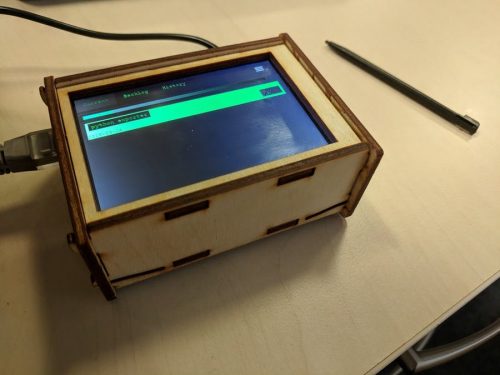
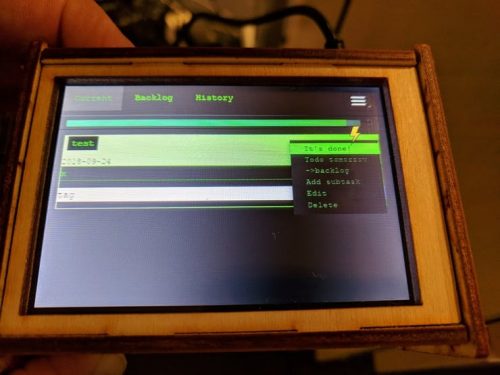
Michal Sporna‘s interactive to-do list that syncs with Google Tasks consists of a Raspberry Pi 3 Model B and a 3.5″ touchscreen encased in a laser-cut wooden housing, though this last element is optional.

Google Tasks Raspberry Pi to-do list Michael Sporna

“This is yet another web to-do app, but designed for a 3.5″ screen and Raspberry Pi,” says Michal in the introduction to his hackster.io tutorial. “The idea is for this device to serve as task tracking device, replacing a regular notebook and having to write stuff with pen.”

Michal explains that, while he enjoys writing down tasks on paper, editing items on paper isn’t that user-friendly. By replacing pen and paper with stylus and touchscreen, and making use Google Tasks, he improved the process for himself.

Google Tasks

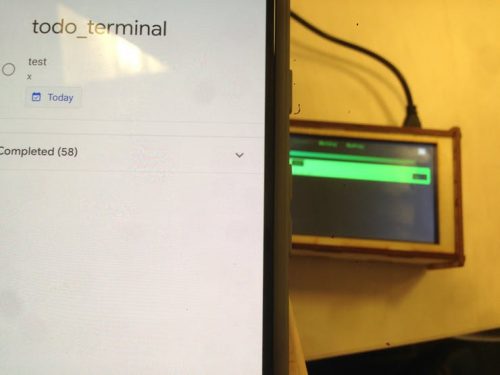
The Google Tasks platform allows you to record and edit tasks, and to share them across multiple devices. The app integrates nicely with Gmail and Google Calendar, and its browser functionality allowed Michal to auto-run it on Chromium in Raspbian, so his tasks automatically display on the touchscreen. #NotSponsored

Google Tasks Raspberry Pi to-do list Michael Sporna

Build your own

Find full build details for the to-do list device on hackster.io! This is the first project Michal has shared on the website, and we’re looking forward to more makes from him in the future.

Now, where did that baby go?

The post Google Tasks to-do list, or anti-baby-distraction device appeared first on Raspberry Pi.


Source: Raspberry Pi – Google Tasks to-do list, or anti-baby-distraction device

A waterproof Raspberry Pi?! Five 3D-printable projects to try

Summer is coming to a close. The evenings grow darker. So pack away your flip flops, hang up your beach towel, and settle in for the colder months with these fun 3D-printable projects to make at home or in your local makerspace.

Fallout 4 desktop terminal

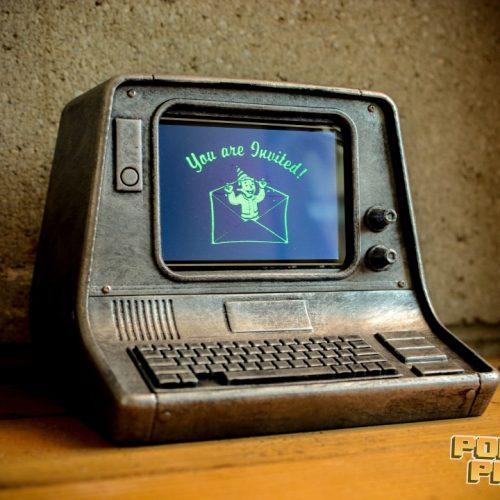
Power Up Props’ replica of the Fallout desktop terminals fits a 3.5″ screen and a Raspberry Pi 3B. Any Fallout fans out there will be pleased to know that you don’t need to raise your Science level to hack into this terminal — you’ll just need access to a 3D printer and these free files from My Mini Factory.

Fallout 4 terminal 3d-printable raspberry pi case

And while you’re waiting for this to print, check out Power Up Props’ wall-mounted terminal!

Fallout 4 – Working Terminal (Raspberry Pi Version) – Power Up Props

Howdy neighbors, grab some fusion cores and put on your power armor because today we’re making a working replica of the wall mounted computer “terminals” from the Fallout series, powered by a Raspberry Pi! Want one of your very own terminals?

Falcon Heavy night light

Remixing DAKINGINDANORF‘s low-poly Arduino-based design, this 3D-printable night light is a replica of the SpaceX Falcon Heavy rocket. The replica uses a Raspberry Pi Zero and a Pimoroni Unicorn pHAT to create a rather lovely rocket launch effect. Perfect for the budding space explorer in your home!

Falcon Heavy night light

I 3D printed a SpaceX Falcon Heavy night light, with some nice effects like it’s actually launching. Useful? Hell no. Cool? Hell yes! Blogpost with files and code: https://www.dennisjanssen.be/tutorials/falcon-heavy-night-light/

You can download the files directly from Dennis Janssen’s website.

Swimming IoT satellite

We’re really excited about this design and already thinking about how we’ll use it for our own projects:

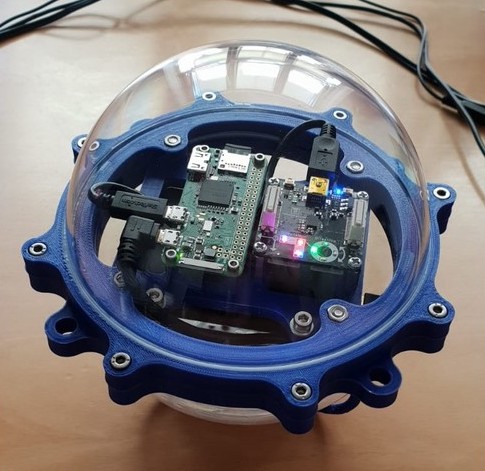
Floating Raspberry Pi case

Using an acrylic Christmas bauble and 3D-printed parts, you can set your Raspberry Pi Zero W free in local bodies of water — ideal for nature watching and citizen science experiments.

Art Deco clock and weather display

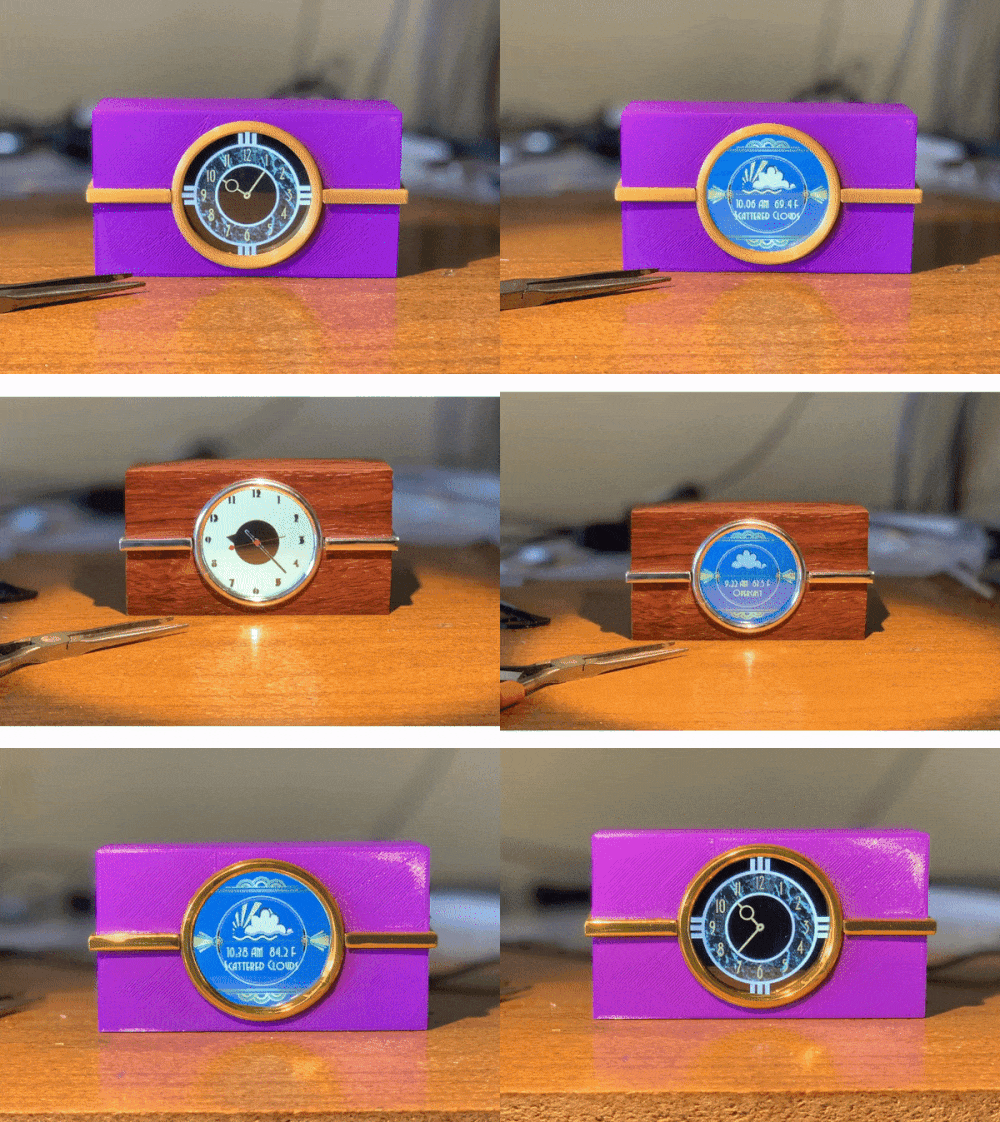
Channel your inner Jay Gatsby with this Art Deco-effect clock and weather display.

Art Deco Raspberry Pi Clock

Fitted with a Raspberry Pi Zero W and an Adafruit piTFT display, this build is ideally suited for any late-night cocktail parties you may have planned.

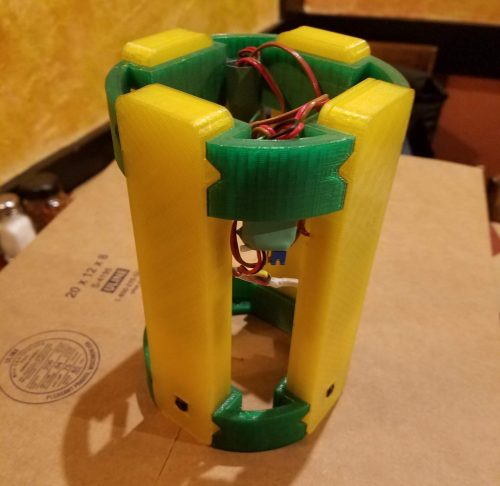
High-altitude rocket holder

Send four Raspberry Pi Zeros and Camera Modules into the skies with this holder design from Thingiverse user randysteck.

Raspberry Pi Zero rocket holder

The 3D-printable holder will keep your boards safe and sound while they simultaneously record photos or video of their airborne adventure.

More more more

What projects did we miss? Share your favourite 3D-printable designs for Raspberry Pis in the comments so we can see more builds from the internet’s very best community!

The post A waterproof Raspberry Pi?! Five 3D-printable projects to try appeared first on Raspberry Pi.


Source: Raspberry Pi – A waterproof Raspberry Pi?! Five 3D-printable projects to try

Working model of the Trinity Buoy Wharf Lighthouse

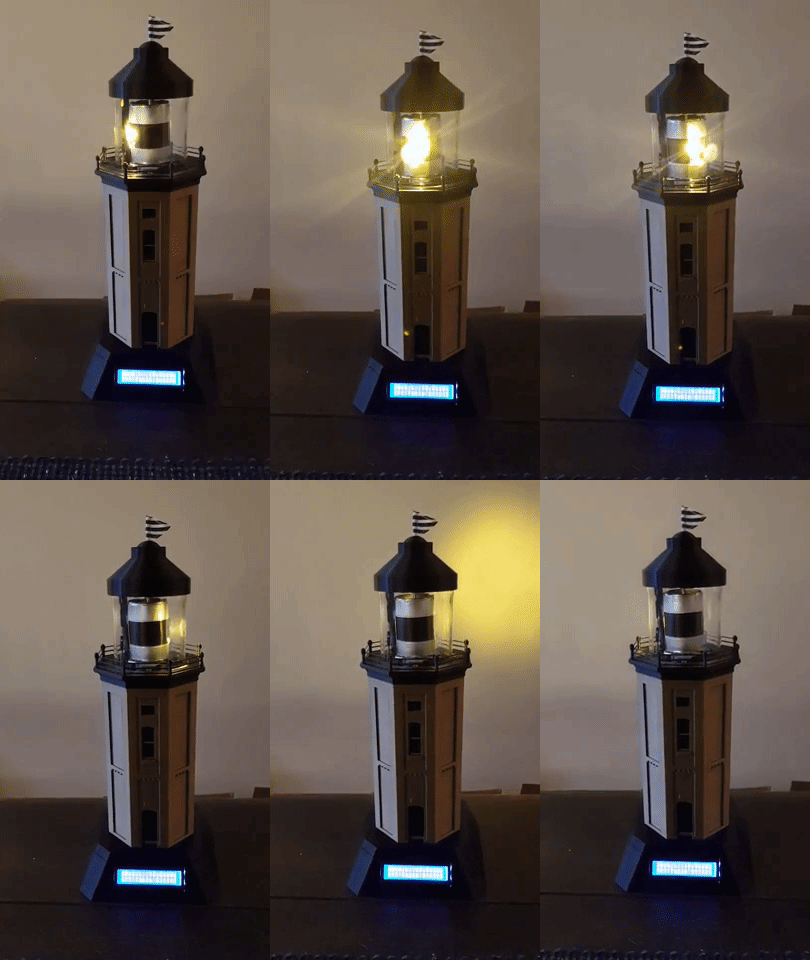
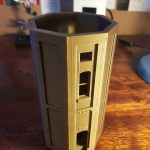
When Dave shared his Raspberry Pi Zero–powered model of the Trinity Buoy Wharf Lighthouse on Reddit, we fell a little bit in love.

Lame_Dave's Raspberry Pi Trinity Buoy Wharf Lighthouse

Hello from the Trinity Buoy Wharf Lighthouse

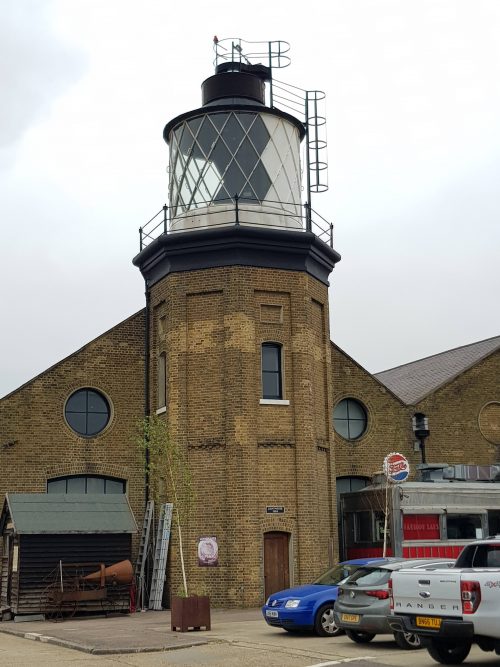
Dave was getting married inside London’s only lighthouse, situated at Trinity Buoy Wharf across the water from the O2 Arena.

Lame_Dave's Raspberry Pi Trinity Buoy Wharf Lighthouse

The Trinity Buoy Wharf Lighthouse

The Trinity Buoy Wharf lighthouse sits at the confluence of the River Thames (the big ol’ river running through London) and Bow Creek, a tidal estuary of the River Lea (the river Adele sings about in her song River Lea*!). When the wharf was closed in 1988, the lighthouse was put out of commission.

Dave is wonderful, and so are his lighthouses

On Reddit, Dave goes by the username Lame_Dave, but considering how wonderful and thoughtful his project for his lighthouse wedding is, we hereby rename him Wonderful_Thoughtful_Dave. Don’t put yourself down, Dave. You’re brilliant!

“I knew I wanted to make something involving electronics and 3D printing,” explains Wonderful_Thoughtful_Dave in an imgur post. “So I decided to make working model lighthouses as the table centrepieces.”

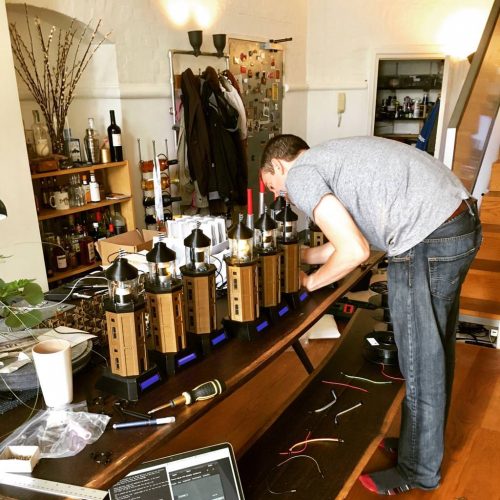
Designing and building ten tabletop lighthouses

Dave designed the 3D model in Autodesk 123D, with a plethora of photographs of the lighthouse as reference points. And many hours later, he began 3D printing ten lighthouse shells using his Prusa MK2.5.


With Samsung 18650 batteries and a 18650 shield for power, Dave hooked up Raspberry Pi Zeros to 6×2 LCD displays, LEDs, and stepper motors. With these components, each lighthouse to gives off a rather lovely light while also showing table number and meal status to guests. Neat!

Lame_Dave's Raspberry Pi Trinity Buoy Wharf Lighthouse

“Each lighthouse has a JSON file on the Pi that tells it what messages to display when, so each table is personalised.”

The final result is beautiful and would look at home anywhere from a model town to a toy shop, or indeed the entrance of the Trinity Buoy Wharf Lighthouse itself.

We love how Dave put different maker skills to use here, from 3D design and printing, to constructing and coding. Hopefully, we’ll see more projects from him in the future!

Remaking classic landmarks

Here in the UK, people have a thing for iconic buildings. And at Pi Towers, we adore it when you recreate historic landmarks like this with the help of our humble board.

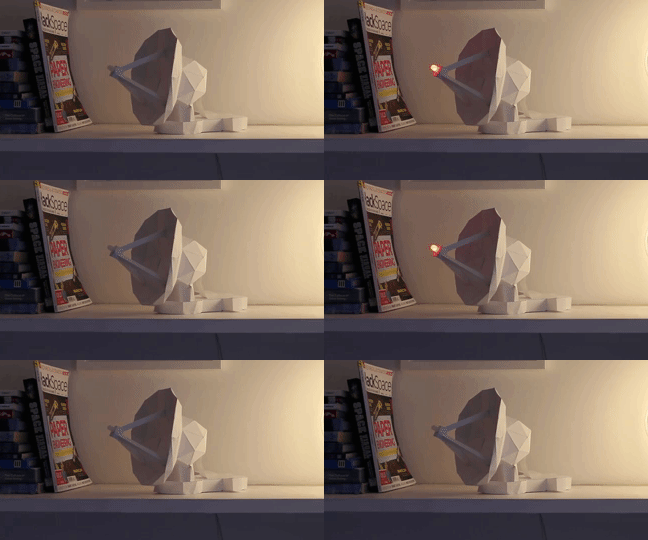
Why not try creating your own reimagining, such as the Project Arthur ISS tracker, a papercraft and Pi build that pays homage to Arthur, the first satellite dish at the Cornish Goonhilly Earth Satellite Station?

Arthur satellite dish Trinity Buoy Wharf Lighthouse

Or come up with something completely new! We’d love to see, say, a working model of London’s Tower Bridge, or a light-up King’s College Chapel. Whatever landmark makes your day, why not build a scale model using your maker skills and electronics?


*Sadly, we are unable to share the song for copyright issues, so here is the Adele edition of Carpool Karaoke instead.

The post Working model of the Trinity Buoy Wharf Lighthouse appeared first on Raspberry Pi.


Source: Raspberry Pi – Working model of the Trinity Buoy Wharf Lighthouse

Today’s blog post is about Junie Genius

It’s Monday. It’s morning. It’s England. The members of the Raspberry Pi Comms team begin to filter into Pi Towers, drowsy and semi-conscious. We’re tired from our weekends of debauchery.

One by one, we file into the kitchen. Fingers are clutching the handles of favourite mugs as we line up for the coffee machine. Select, click, wait. Select, click, wait. Double Americanos and Flat Whites pour, steaming hot and promising the glorious punch of caffeine to finally start our week.

Back in the office space, we turn on laptops, sign into Slack, and half-heartedly skim through pending messages while the coffee buzz begins to make its way through our systems, bringing us back to life.

“Ooooh”, comes a voice from the end desk, and heads turn towards Alex, who has opened the subscriptions page of the Raspberry Pi YouTube channel.

“Ooooh?” replies Helen, lifting herself from her chair to peer over the dividing wall between their desks.

“New Junie!”

Figures gather behind the Social Media Editor as she connects her laptop to her second display and enlarges the video to fullscreen.

It’s Monday. It’s morning. It’s England. And mornings like this are made for Junie Genius.

ROBOTS RUINED MY LIFE (and my sleep schedule)

This week, it gets personal. In the past, I’ve fought robots, and robots have fought me, BUT NOW, together, we’re fighting crime. SUPPORT ME ON PATREON: https://www.patreon.com/JunieGenius HANG W/ ME ONLINE: INSTAGRAM – https://www.instagram.com/juniegenius/ TWITTER – https://twitter.com/Junie_Genius I HAVE TEE SHIRTS: https://teespring.com/stores/junie-genius?page=1 #23942939_ON_TRENDING If you see this, comment if you would join my team of robotic Avengers.

The post Today’s blog post is about Junie Genius appeared first on Raspberry Pi.


Source: Raspberry Pi – Today’s blog post is about Junie Genius

Argon ONE: a super case for your Raspberry Pi

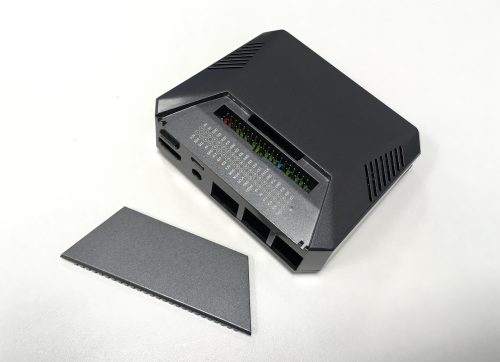
The friendly people at Argon40, one of our Approved Resellers in Hong Kong, have an already-successful Kickstarter on the go for their Argon ONE Raspberry Pi case. I’ve got one of them on my desk at the moment. It’s a very pleasing object. “That’s quite nice,” enthuses Gordon, who isn’t very good at enthusing.

The Argon ONE: look at the shiny!

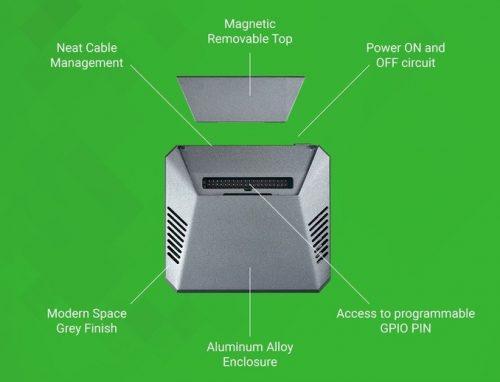
The Argon ONE is a nifty little aluminium-alloy case that offers well thought-through cable, power, and temperature management. We chatted to Joseph from Argon40 about the team’s development process, and he explained:

When we started the project, we initially designed the product to suit our needs based on our experiences of playing around with the Raspberry Pi. We wanted a case that is nice to look and at the same time has all the basic features that we loved about the Raspberry Pi: small footprint, access to GPIO, low power consumption. Then we looked into the nice-to-have stuff like good heat dissipation for better performance, a proper shut-down, and a form factor that is elegant but not extravagant.

Clicky magnets

What I find particularly satisfying about the Argon ONE is its GPIO access. It has a neat recess with clear pin labels and access to an inbuilt, colour-coded header that connects to your Pi’s GPIO pins. When you’re not using the pins, you probably want to keep them away from dust, spilled coffee, and the gross candy-corn M&Ms that Alex sometimes throws at you for literally no reason. The Argon ONE helps you out here: a cover fits perfectly over the GPIO recess, held in place by magnets that are just exactly strong enough for the job. Being a fidgeter, I find that this lends itself to compulsive clicking.

*click* *click* *click*

Injection moulding

We like the build quality here, especially at this price point (it’s HK$157, US$20, or GB£15, and early-bird pledges are cheaper). The Argon40 team was keen to use alumnium for the upper part of the case, for robustness and durability along with good looks; that proved a challenge, given that they wanted to keep the case affordable. “Fortunately, we found a factory that allowed us to do aluminum-alloy injection instead of going for the CNC option,” says Joseph.

“Have you tried turning if off and on again?”

The Raspberry Pi doesn’t have a power button, and we hear a lot from people who’d like it to. Happily, our community has come up with lots of ways to add one: this case, for example. Once you install Argon40’s shutdown script in Raspbian, pressing the case’s power button will run the script to shut the Pi down cleanly, then cut the power.

Find out more on Kickstarter — this campaign is well worth a look if you’re after a decent case. Back to Joseph for the last word, with which we heartily agree:

At the end of the day, our goal is for people to have their Raspberry Pis on top of their work desks, study tables, and workstations and in their living rooms, instead of keeping their barebones Pi tucked inside a drawer. Because as the saying goes, “Out of sight, out of mind,” which means that if they don’t see their Raspberry Pi, they won’t be able to tinker around with it or play with it to create projects.

The post Argon ONE: a super case for your Raspberry Pi appeared first on Raspberry Pi.


Source: Raspberry Pi – Argon ONE: a super case for your Raspberry Pi

Announcing Coolest Projects 2019

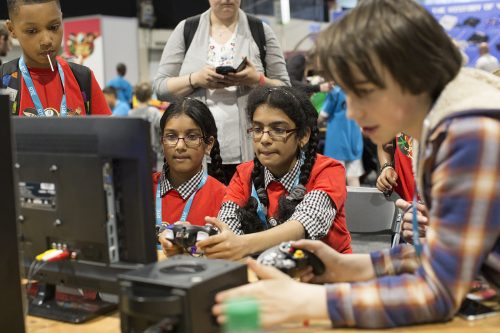
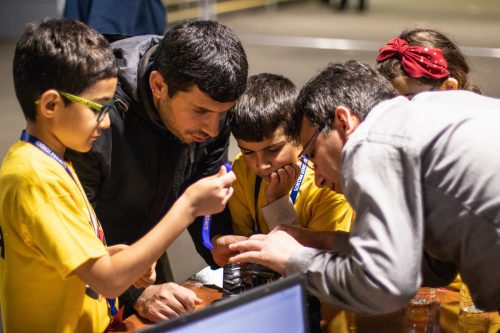
Coolest Projects is the world’s leading technology fair for young people. It’s the science fair for the digital age, where thousands of young people showcase amazing projects that they’ve built using digital technologies. If you want to meet the innovators of the future, this is the place to be, so today we’re really excited to announce three Coolest Projects events in 2019.

Will you be attending Coolest Projects 2019?

Dates are now live for Coolest Projects 2019. Will you be joining us in the UK, Republic of Ireland, or North America?

I’ll never forget my first Coolest Projects

My first experience was in Dublin in 2016. I had been told Coolest Projects was impressive, but I was blown away by the creativity, innovation, and sheer effort that everyone had put in. Every bit as impressive as the technology was the sense of community, particularly among the young people. Girls and boys, with different backgrounds and levels of skill, travelled from all over the world to show off what they’d made and to be inspired by each other.

Igniting imaginations

Coolest Projects began in 2012, the work of CoderDojo volunteers Noel King and Ben Chapman. The first event was held in Dublin, and this city remains the location of the annual Coolest Projects International event. Since then, it has sparked off events all over the world, organised by the community and engaging thousands more young people.

This year, the baton passed to the Raspberry Pi Foundation. We’ve just completed our first season managing the Coolest Projects events and brand, including the first-ever UK event, which took place in April, and a US event that we held at Discovery Cube in Orange County on 23 September. We’ve had a lot of fun!

We’ve seen revolutionary ideas, including a robot guide dog for blind people and a bot detector that could disrupt the games industry. We’ve seen kids’ grit and determination in overcoming heinous obstacles such as their projects breaking in transit and having to rebuild everything from scratch on the morning of the event.

We’ve also seen hundreds of young people who are levelling up, being inspired to learn more, and bringing more ambitious and challenging projects to every new event.

Coolest Projects 2019

We want to expand Coolest Projects and provide a space for even more young people to showcase their digital makes. Today we’re announcing the dates for three Coolest Projects events that are taking place in 2019:

  • Coolest Projects UK, Saturday 2 March, The Sharp Project, Manchester
  • Coolest Projects USA, Saturday 23 March, Discovery Cube Orange County, California
  • Coolest Projects International, Sunday 5 May, RDS, Dublin, Ireland

These are the events that we’ll be running directly, and there will also be community-led events happening in Milan, the Netherlands, Belgium, and Bulgaria.

Project registration for all three events we’re leading opens in January 2019, so you’ve got plenty of time to plan for your next big idea.

If you need some inspiration, there are plenty of places to start. You could check out our How to make a project worksheets worksheets, or get try out one of our online projects before you plan your own.


Head to coolestprojects.org to find out about the 2019 events and how you can get involved!

The post Announcing Coolest Projects 2019 appeared first on Raspberry Pi.


Source: Raspberry Pi – Announcing Coolest Projects 2019

Your face, 14 ft tall: image mapping with As We Are

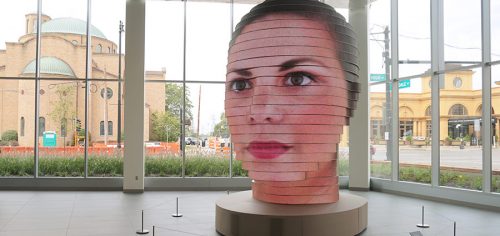
While at World Maker Faire New York last weekend, I found myself chatting to a rather lovely gentleman by the name of Mac Pierce. During our conversation, Mac mentioned a project he’d worked on called As We Are, an interactive art installation located in the Greater Columbus Convention Center in Columbus, Ohio.

as we are

“So it’s this 14-foot head covered in LEDs…”, Mac began, and after his brief explanation, I found myself grabbing nearby makers to have him tell them about the project too. I was hooked! I hadn’t even seen photos of the sculpture, yet I was hooked. And true to his word, Mac had the press release for As We Are sitting in my inbox when I returned to Pi Towers.

So here is it:

The Greater Columbus Convention Center: “As We Are” – Creating the Ultimate Selfie Machine

DCL, an award-winning fabricator of architectural specialties and custom experiential design elements, worked with artist Matthew Mohr to develop, engineer and fabricate this 14ft, 7,000lb, interactive digital sculpture. Featuring custom LED modules, an integrated 3D photobooth, 32 cameras, and a touch-screen display – this unique project combines technologies to present a seamless experience for visitors to display their own portrait on the sculpture.

As We Are

The brainchild of artist Matthew Mohr, As We Are was engineered and produced by DCL, an award-winning Boston-based fabricator whose greatest achievement to date, in my opinion at least, is hiring Mac Pierce.

as we are

YAY!

DCL built the 14-foot structure using 24 layers of aluminium ‘ribs’ covered in custom Sansi LED modules. These modules add up to an astounding 850000 individual LEDs, allowing for crisp detail of images displayed by the build.

as we are

When a visitor to the Convention Center steps inside the interactive sculpture, they’re met with a wall of 32 Raspberry Pis plus Camera Modules. The Pis use facial recognition software to 3D scan the visitor’s face and flattened the image, and then map the face across the outer surface of the structure.

Matthew Mohr was inspired to show off the diversity of Columbus, OH, while also creating a sense of oneness with As We Are. Combining technology and interaction, the sculpture has been called “the ultimate selfie machine”.

If you’re in or near Columbus and able to visit the installation, we’d love to see your photos, so please share them with us on our social media platforms.

Raspberry Pi facial mapping as we are

You see now why I was dumbstruck when Mac told me about this project, yes?

Always tell us

Had it not been for a chance encounter with Mac at Maker Faire, we may never have heard of As We Are. While Matthew Mohr and DCL installed the sculpture in 2017, very little fuss was made about the use of Raspberry Pis within it, and it completely slipped under our radar. So if you are working on a project for your business, as a maker, or for any other reason, and you’re using a Raspberry Pi, please make sure to let us know by emailing comms@raspberrypi.org.

The post Your face, 14 ft tall: image mapping with As We Are appeared first on Raspberry Pi.


Source: Raspberry Pi – Your face, 14 ft tall: image mapping with As We Are

Explore the depths with the PiCam Marine

This article from The MagPi issue 74 highlights the use of the Raspberry Pi Zero to build a marine camera for coral exploration. Get your copy of The MagPi in stores now, or download it as a free PDF here.

Raspberry Pi Picam Marine

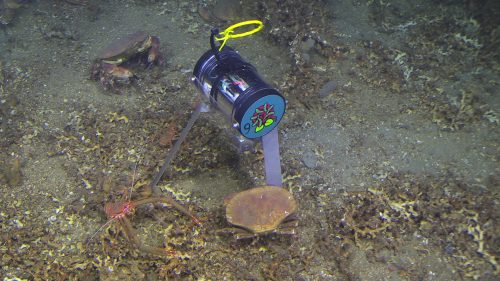
The crew took 20 000 photos in total during the cruise.

Ecologists in Germany are deploying camera-equipped Pi Zero Ws off the coast of Norway to discover more about coral activity. Dr Autun Purser works in the Deep Sea Ecology and Technology group of the Alfred Wegener Institute. The group has a keen interest in cold-water corals, which are found in most European seas.

Raspberry Pi Picam Marine

Besides coral, they identified dozens of crabs.

“In the last three decades, we’ve started to understand these can form reefs whenever conditions are suitable for growth,” explains Autun. “During our cruise in the Skagerrak, we intended to map corals and see when, and under what conditions, they did most feeding.”

Feeding time

Their aim was to continue the development of “cheap camera systems which can be used for a range of applications in the deep sea, down to depths of at least 6000 metres. We investigated the use of Pi Zero W computers and [Raspberry Pi Camera Modules] to record video snippets of both the seafloor and any scientific devices that we place underwater, and we found the small size of the computers to be of great benefit to us.”

Raspberry Pi Picam Marine

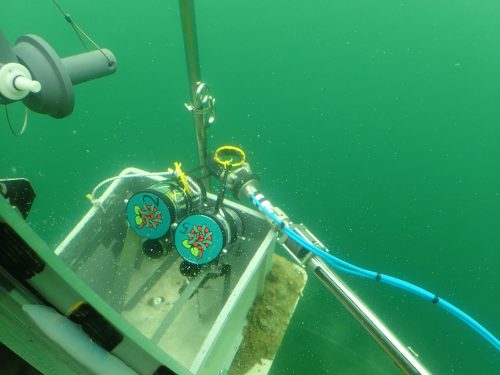
The PiCam Marines are sent underwater in the deployment basket of a submarine. The captain, crew, and scientists aboard RV Poseidon cruise POS526 were also essential for the initial deployments.

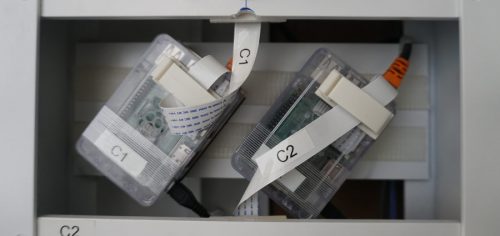
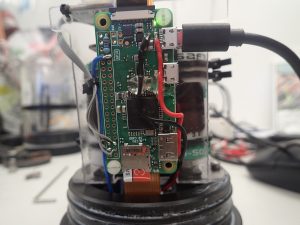
The Pi Zero Ws and cameras are placed in strong, waterproof pressure containers, and powered by Li-ion batteries that can withstand the cold deep ocean conditions. “The WiFi connectivity allowed us to set up a router on deck to both initiate our cameras and, on retrieval from the sea-floor, download our collected images without having to reopen the pressure housings,” reveals Autun.


He and two colleagues programmed the camera system using Python 3 to turn on an LED light and take a maximum resolution image, at set times. It has proven “capable of imaging individual corals from 2 m distance, allowing us to tell if the tentacles were actively extended or not.”

The post Explore the depths with the PiCam Marine appeared first on Raspberry Pi.


Source: Raspberry Pi – Explore the depths with the PiCam Marine

Picademy North America 2018: That’s a Wrap!

Hooray! We’re celebrating our third season leading educator training in North America. That’s 20 Picademy workshops in 11 cities with 791 happy teachers graduating as Raspberry Pi Certified Educators. This summer was particularly rich with successes, challenges, and lessons learned let’s take a closer look:

Andrew Collins on Twitter

That’s a wrap on #Picademy North America 2018! We welcomed over 300 educators in Denver, Jersey City, Atlanta and Seattle to the @Raspberry_Pi community. Congrats and go forth on your digital making journey! 😀🙌 https://t.co/aMyHr2KkuL

Picademy North America

Picademy is a free, two-day training program that helps educators jump start their digital making journey. On day one, educators explore digital making with the Raspberry Pi computer: blinking LEDs, taking pictures, making motors spin, sensing their environment, and composing music. On day two, they take what they’ve learned from these experiences and collaborate with a team to design and build their own real world project.

Picademy at Liberty Science Center (June 18, 2018 – June 22, 2018)

A total of 80 educators from all over the globe visited Liberty Science Center the week of June 18 – 22 to learn coding and technology skills as part of the Raspberry Pi Foundation’s Picademy program. The week of learning culminated in a programming design challenge where the participants created projects using their new skills via the Raspberry Pi computer.

Big interest

We received over 1400 applications for this year’s program, a 40% increase from last year. This enormous interest came from educators in North America and across the globe; we received applications from 49 different U.S. States and 20 countries. And it’s not just classroom teachers either. More than half of our applicants worked outside of a traditional classroom environment, as librarians, after-school providers, teacher trainers, museum educators, and technology coordinators. Out of this pool, we accepted 313 educators to our Picademy 2018 workshops in Denver, Jersey City, Atlanta, and Seattle.

Big impact

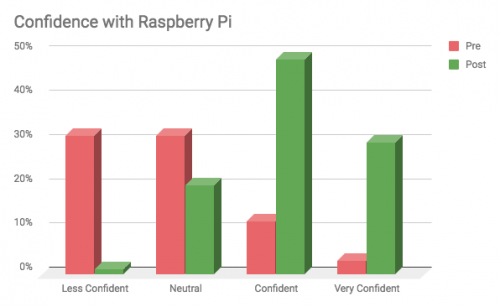
We want to make sure that the work we do is having the impact we we intend, so we ask educators who come to Picademy about their skills, experience, and confidence before they participate in the program and afterwards. Before Picademy, only 13% said they felt confident using using a Raspberry Pi computer. After attending, this number rose significantly, with 78% now confident using Raspberry Pi. This increase in confidence matched their sense of professional growth: the majority of educators said that learning new content and gaining new skills were the most memorable parts of their Picademy experience.

Raspberry Pi Picademy North America 2018

We also had 100% of attendees indicate that they would recommend Picademy to a colleague, and 70% report that they are very likely to share their learnings with fellow educators. This means an even greater number of educators, those who work alongside Raspberry Pi Certified Educators, will hopefully be impacted by Picademy workshop offerings.

“Picademy was such an engaging and hands-on experience. Every workshop and project was practical, tangible and most importantly, fun” — Amanda Valledor, Boston, MA

Next steps

What do educators go on to accomplish after Picademy? We’re actively gathering this data as we follow up with our certified educators, but based on feedback surveys we know that 58% of this season’s attendees are interested in starting a Code Club or CoderDojo in their community. We also saw that over 70% of educators are interested in leading a Raspberry Pi event or training; this could mean a Raspberry Jam, an educator workshop, or a Raspberry Pi-themed summer camp. Our team will continue to support each and every Raspberry Pi Certified Educator as they continue on their digital making journey.

Carrie Northcott on Twitter

Thank you @Raspberry_Pi for allowing each of us to come and get “debugged”, rewrite our “code”, and “program” our future moves as educators! #picademy #raspberrypi #picademyseattle #edtech @iluvteaching72 @MrsNatto https://t.co/37jMYDZThF

Special thanks to Dana and everyone else who helped to lead an awesome Picademy program this season. If you’d like to take a deeper dive, feel free to explore all of our data and findings in the Picademy North America 2018 Report.

The post Picademy North America 2018: That’s a Wrap! appeared first on Raspberry Pi.


Source: Raspberry Pi – Picademy North America 2018: That’s a Wrap!