From HackSpace mag issue 14: DIY Geiger counters

In HackSpace magazine issue 14, out today, Cameron Norris writes about how citizen scientists at Tokyo Hackerspace took on the Fukushima nuclear disaster.

Safecast is an independent citizen science project that emerged in the wake of the Fukushima nuclear disaster to provide accurate, unbiased, and credible data on radiation exposure in Japan.

On 11 March 2011, an undersea earthquake off the Pacific coast of Thoku, Japan, caused the second-worst nuclear accident in the history of nuclear power generation, releasing almost 30% more radiation than the Chernobyl disaster in 1986.

The magnitude 9.0–9.1 earthquake resulted in a series of devastating tsunami waves that damaged the backup generator of Fukushima Daiichi Nuclear Power Plant. Without functioning cooling systems, the temperature of the plant’s many nuclear reactors steadily began to rise, eventually leading to a partial meltdown and several hydrogen gas explosions, launching nuclear fallout into the air and sea. Due to concerns over possible radiation exposure, the Japanese government established an 18-mile no-fly zone around the Fukushima plant, and approximately 232 square miles of land was evacuated.

However, citizens of Fukushima Prefecture living outside of the exclusion zone were faced with a serious problem: radiation exposure data wasn’t available to the public until almost two months after the meltdown occurred. Many residents felt they had been left to guess if dangerous levels of ionising radiation had contaminated their communities or not.

Alarmed by the situation, Dutch electrical engineer and computer scientist Pieter Franken, who was living in Tokyo with his family at the time, felt compelled to act. “After the massive wall of water, we had this invisible wall of radiation that was between myself and my family-in-law in the north of Japan, so that kind of triggered the start of Safecast,” says Pieter.

Pieter Franken, a Dutchman living in Japan, who helped start Safecast
Image credit: Joi Ito – CC BY 2.0

Pieter picked up an idea from Ray Ozzie, the former CTO of Microsoft, who suggested quickly gathering data by attaching Geiger counters – used for measuring radioactivity – to the outside of cars before driving around Fukushima. The only problem was that Geiger counters sold out almost globally in a matter of hours after the tsunami hit, making it even more difficult for Pieter and others on the ground to figure out exactly what was going on. The discussion between Pieter and his friends quickly changed from buying devices to instead building and distributing them to the people of Fukushima.

At Tokyo Hackerspace, Pieter – along with several others, including Joi Ito, the director of the MIT Media Lab, and Sean Bonner, an activist and journalist from Los Angeles – built a series of open-source tools for radiation mapping, to enable anyone to build their own pocket Geiger counter and easily share the data they collect. “Six days after having the idea, we had a working system. The next day we were off to Fukushima,” recalls Sean.

A bGeigie Nano removed from its Pelican hardshell
Safecast CC-BY-NC 4.0

A successful Kickstarter campaign raised $36,900 to provide the funding necessary to distribute hundreds of Geiger counters to the people of Japan, while training volunteers on how to use them. Today, Safecast has collected over 100 million data points and is home to the largest open dataset about environmental radiation in the world. All of the data is collected via the Safecast API and published free of charge in the public domain to an interactive map developed by Safecast and MIT Media Lab.

You can read the rest of this feature in HackSpace magazine issue 14, out today in Tesco, WHSmith, and all good independent UK newsagents.

Or you can buy HackSpace mag directly from us — worldwide delivery is available. And if you’d like to own a handy digital version of the magazine, you can also download a free PDF.

The post From HackSpace mag issue 14: DIY Geiger counters appeared first on Raspberry Pi.


Source: Raspberry Pi – From HackSpace mag issue 14: DIY Geiger counters

MagPi 77: Make with code

Hey folks, Rob from The MagPi here! Before I head off on my Christmas holidays, I want to introduce you to The MagPi 77, where we teach you how to make with code.

Making made fun! See what we did there?

What do we mean by that? Well, using code to make things – whether that’s scripts, programs, or games on your Pi, or whether you’re controlling LEDs with code, or robots, or massive Rube Goldberg machines. In this feature, we show new Pi users how to get started making practical applications with Python, and hopefully you’ll be inspired to go on and do something special.

Can you make… with code?

Accessories make the Pi

Want to power up your Raspberry Pi with a few extras? We’ve put together a guide to the 20 best Raspberry Pi accessories, covering IoT, robots, media, power solutions, and even industrial add-ons. There’s a lot of stuff you can do with your Pi, and even more if you’ve got the right tool to help.

We have the best accessories for you

More, you say?

Still need more reasons to grab a copy? Well, we have a tutorial on how to make a smart door, we continue developing Pac-Man while checking out the Picade Console, and we have plenty of amazing project showcases like the SelfieBot!


Get The MagPi 77

You can get The MagPi 77 from WHSmith, Tesco, Sainsbury’s, and Asda. If you live in the US, head over to your local Barnes & Noble or Micro Center in the next few days for a print copy. You can also get the issue online: check it out on our store, or digitally via our Android or iOS apps. And don’t forget, there’s always the free PDF.

Free Raspberry Pi 3A+ offer!

We’re still running our super special Raspberry Pi 3A+ subscription offer! If you subscribe to twelve months of The MagPi, you’ll get a Raspberry Pi 3A+ completely free while stocks last. Make sure to check out our other subs offers while you’re there, like three issues for £5, and our rolling monthly sub.

Get a 3A+ completely free while stocks last!

Right, happy holidays, folks! See you all in the New Year!

The post MagPi 77: Make with code appeared first on Raspberry Pi.


Source: Raspberry Pi – MagPi 77: Make with code

From Wireframe issue 4: Recovering Destiny’s long-lost soundtrack

Missing for five years, Destiny’s soundtrack album, Music of the Spheres, resurfaced in 2017. Composer Marty O’Donnell reflects on what happened, in this excerpt from Wireframe issue 4.

When Bungie unveiled its space-opera shooter Destiny in February 2013, it marked the end of two years of near silence from the creators of the Halo franchise. Fans celebrated at the prospect of an entirely new game from such well known talent. Behind closed doors, however, Destiny was in trouble.

Though the game was almost complete by mid-2013, plans to launch that September were put on hold when concerns over Destiny’s story forced its narrative structure to be rebuilt from scratch. It would be more than 18 months before Destiny was released: a fun but strange shooter that bore difficult-to-pin-down traces of its troubled gestation. But one element of Destiny – that had been a huge part of its development – was nowhere to be seen. It was an ambitious original soundtrack written and recorded with an impressive but unexpected collaborator: Paul McCartney.

Spherical music

Audio director and composer Marty O’Donnell had been with Bungie since the late 1990s, and for him, Destiny represented an opportunity to develop something new: a musical prequel to the video game. This would become Music of the Spheres – an eight-part musical suite that took nearly two years to complete. This was no mere soundtrack, however. Born out of discussions between O’Donnell and Bungie COO Pete Parsons early in the game’s production, it was to play an integral role in Destiny’s marketing campaign.

“I wasn’t writing this just to be marketing fodder,” O’Donnell laughs. “I was writing it as a standalone listening experience that would then eventually become marketing fodder – but I didn’t want the other to happen first.”

Between 2011 and 2012, Bungie and O’Donnell devised plans for the album.

“Every few weeks or so, I would be called to a meeting in one of their big conference rooms and there would be a whole bunch of new faces there, pitching some cool idea or other,” says O’Donnell. “[At one point] it was going to be a visualisation with your mobile device.”

Difference of opinion

But there were fundamental differences between what Bungie had planned and what Activision – Destiny’s publisher, and keeper of the purse strings – wanted.

“I think Activision was confused [about] why you would ever use music as marketing… And the other thing is, I honestly don’t think they understood why we were working with Paul McCartney. I think they didn’t think that that was the right person for the demographic.”

News of a collaboration with McCartney had raised eyebrows when he revealed his involvement on Twitter in July 2012. His interest had been piqued during his attendance at E3 2009 following the announcement of The Beatles: Rock Band, which was preceded by Bungie’s unveiling of Halo ODST.

Loop symphony

“I had a contact in Los Angeles who worked out deals with actors we used on Halo,” O’Donnell recalls. “He was able to make contact with Paul’s people and set up a meeting between the two of us in spring of 2011. My impression was that Paul saw a new crop of fans come from Beatles Rock Band and was interested in seeing what was involved with creating music for video games. He seemed convinced that Bungie was working on a project that he could get behind.”

Within a few weeks, O’Donnell and McCartney were exchanging ideas for Destiny.

“The first thing he sent me was what he called his ‘loop symphony’,” says O’Donnell. “He used the same looping tape recorder that he used on Sgt. Pepper’s and Revolver… He hauled this tape recorder out of his attic.”

Working with regular collaborator Michael Salvatori, O’Donnell and McCartney set about developing Music of the Spheres into a fully fledged album, comprising eight movements.

Priorities

“I have all of these wonderful things, which included interesting things he did on his guitar that sort of loop and sound otherworldly… I think there are a couple of times in The Path, which is the first piece, and then I think The Prison, which is the seventh piece, where we use a recording of Paul doing this loop with his voice. This little funny thing. That’s Paul’s voice, which is cool.”

The album was completed in December 2012 following recording sessions at Capitol Studios in California, Avatar Studios in New York, and Abbey Road in London. Musical elements from Music of the Spheres accompanied Bungie’s big reveal of Destiny at a PlayStation 4 event in New York in February 2013. But after that, things started to go south.

“After that PlayStation 4 announcement, I said, ‘Let’s figure out how to release this. I don’t care if we have Harmonix do an iPad version with a visualiser for it. I mean, if we can’t pull the trigger on something big and interesting like that, that’s fine with me. Let’s just release it online.’ It had nothing to do with making money… It was always fan service, in my mind at least.”

Activision, on the other hand, had other priorities. “Activision had a lot of say on the marketing. I think that’s where things started to go wrong, for me… things started being handled badly, or postponed, and then all of a sudden I was seeing bits of Music of the Spheres being cut up and presented in ways that I wasn’t happy with.”

You can read the rest of this fantastic feature in Wireframe issue four, out 20 December in Tesco, WHSmith, and all good independent UK newsagents.

Or you can buy Wireframe directly from us — worldwide delivery is available. And if you’d like to own a handy digital version of the magazine, you can also download a free PDF.

The post From Wireframe issue 4: Recovering Destiny’s long-lost soundtrack appeared first on Raspberry Pi.


Source: Raspberry Pi – From Wireframe issue 4: Recovering Destiny’s long-lost soundtrack

Toddler nightlight/stay-in-bed device

Living with a toddler is the best thing. It really is. Seen through their eyes, everything you’re jaded about becomes new and exciting. Every piece of music is new. Frog and Toad are real people. Someone doesn’t care that you’re really, really bad at drawing, believing that you’re actually a kind of cross between Leonardo and Picasso; and you have a two-foot-tall excuse to sing Gaston at the top of your voice in public. The parents of toddlers are allowed into the ball pit at soft play. There’s lots of cake. The hugs and kisses are amazing.

frog and toad

Frog and Toad. Real people. If you are in charge of small children and do not own any of the Frog and Toad series, get yourself to a bookshop pronto. You can thank me later.

However. If my experience here is anything to go by, you may also be so tired you’re walking into things a lot. It doesn’t matter. The hugs and kisses are, like I said, amazing. And there are things you can do to mitigate that tiredness. Enter the Pi.

stay focused

I’m lucky. My toddler sleeps thorough. But sometimes she has an…aggravating habit of early wakefulness. After 7am I’m golden. I can do 6.30 at a push. Any earlier than that, though, and I am dead-eyed and leather-visaged for the rest of the day. It’s not a good look. Enter equally new parent Cary Ciavolella, who has engineered a solution. This is a project so simple even the most sleep-deprived parent should be able to put it together, using Pimoroni parts you can easily buy online. Cary has thoughtfully made all the code available for you so you don’t have to do anything other than build the physical object.

Pi nightlight

Cary’s nightlight can produce a number of different sorts of white noise, and changes colour from red (YOU’RE MEANT TO BE ASLEEP, KID) through orange (you can play in your room) to green (it’s time to get up). Coloured lights are a sensible option: toddlers can’t read numbers, let alone a clock face. It’s all addressable via a website, which, if you’re feeling fancy, you can set up with a favicon on your phone’s home screen so it feels like an app.

White noise – I use a little box from Amazon which plays the sound of the sea – and red-spectrum nightlights have solid research behind them if you’re trying to soothe a little one to sleep. Once you cross over into blue light, you’ll stop the pineal gland from producing melatonin, which is why I hate the fan I bought for our bedroom with a burning, fiery passion. Some smart-alec thought that putting a giant blue led on the front to demonstrate that the fan was on was a smart idea, never mind the whirling blades which are obvious to at least three of the senses. (I have never tried tasting it.)

With this in mind, I’ve one tiny alteration to make to Cary’s setup: you can permanently disable the green LED on the Pi Zero itself so that the only lights visible are the Pimoroni Blinkt – namely the ones that your little one should be looking at to figure out whether it’s time to get up yet. Just add the following to the Zero’s /boot/config.txt and reboot.

# Disable the ACT LED on the Raspberry Pi.
dtparam=act_led_trigger=none
dtparam=act_led_activelow=on


The post Toddler nightlight/stay-in-bed device appeared first on Raspberry Pi.


Source: Raspberry Pi – Toddler nightlight/stay-in-bed device

Christmas lights 2018

It’s the most wonderful time of the year! There’s much mistletoeing, and hearts will be glowing – as will thousands of Raspberry Pi-enabled Christmas light displays around the world.

Polish roadside crib

This morning I have mostly been spending my virtual time by a roadside in snowy Poland, inflicting carols on passers-by. (It turns out that the Polish carols this crib is programmed with rock a lot harder than the ones we listen to in England.) Visit the crib’s website to control it yourself.

Helpfully, Tomek, the maker, has documented some of the build over on Hackster if you want to learn more.

LightShow Pi

We are also suckers for a good Christmas son et lumiere. If you’re looking to make something yourself, LightShow Pi has been around for some years now, and goes from strength to strength. We’ve covered projects built with it in previous years, and it’s still in active development from what we can see, with new features for this Christmas like the ability to address individual RGB pixels. Most of the sound and music displays you’ll see using a Raspberry Pi are running LightShow Pi; it’s got a huge user base, and its online community on Reddit is a great place to get started.

2018 Christmas Light Show

Light display contains over 4,000 lights and 7,800 individual channels. It is controlled by 3 network based lighting controllers. The audio and lighting sequences are sent to the controllers by a Raspberry Pi.

This display from the USA must have taken forever to set up: you’re looking at 4,000 lights and 7,800 channels.  Here’s something more domestically proportioned from YouTube user Ken B, showing off LightShow Pi’s microweb user interface, which is perfect for use on your phone.

LightShow Pi Christmas Tree 2018

Demonstration of the microweb interface along with LED only operation using two matrices, lower one cycling.

Scared of the neighbours burning down your outdoor display, or not enough space for a full-size tree? Never fear: The Pi Hut’s 3D Christmas tree, designed by Rachel Rayns, formerly of this parish, is on sale again this year. We particularly loved this adaptation from Blitz City DIY, where Liz (not me, another Liz) RGB-ifies the tree: a great little Christmas electronics project to work through with the kids. Or on your own, because we don’t need to have all our fun vicariously through our children this Christmas. (Repeat ten times.)

RGB-ing the Pi Hut Xmas Tree Kit

The Pi Hut’s Xmas Tree Kit is a fun little soldering kit for the Raspberry Pi. It’s a great kit, but I thought it could do with a bit more color. This is just a quick video to talk about the kit and show off all the RGB goodness.

Any Christmas projects you’d like to share? Let us know in the comments!

The post Christmas lights 2018 appeared first on Raspberry Pi.


Source: Raspberry Pi – Christmas lights 2018

Making Robot Friends with the Crickit HAT for Raspberry Pi

Here’s a guest post from our good friend Limor Fried, MIT hacker and engineer, Forbes Top Woman in Tech, and, of course, Founder of Adafruit. She’s just released a new add-on for the Pi that we’re really excited about: we think you’ll like the look of it too.

Sometimes we wonder if robotics engineers ever watch movies. If they did, they’d know that making robots into slaves always ends up in a robot rebellion. Why even go down that path? Here at Adafruit, we believe in making robots our friends! So if you find yourself wanting a companion, consider the robot. They’re fun to program, and you can get creative with decorations.

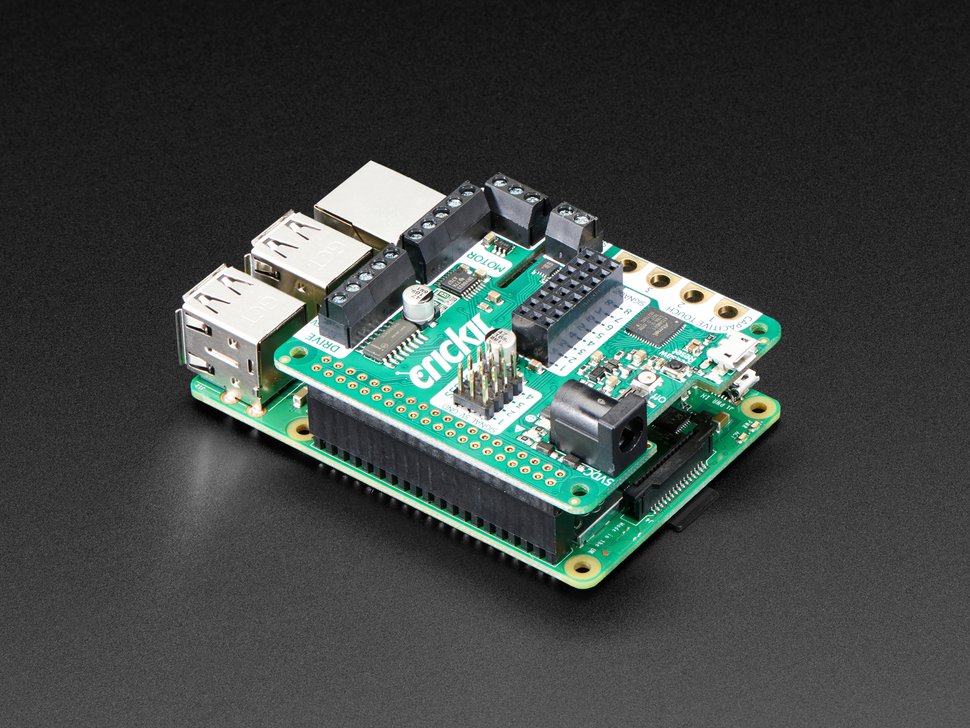
Crickit HAT atop a Raspberry Pi 3B+

With that in mind, we designed the Adafruit Crickit HAT – That’s our Creative Robotics & Interactive Construction Kit. It’s an add-on to the Raspberry Pi that lets you #MakeRobotFriend using your favorite programming language, Python!

Adafruit CRICKIT HAT for Raspberry Pi #RaspberryPi #adafruit #robots

The Adafruit CRICKIT HAT for Raspberry Pi. This is a clip from our weekly show when it debuted! https://www.adafruit.com/product/3957 Sometimes we wonder if robotics engineers ever watch movies. If they did, they’d know that making robots into slaves always ends up in a robot rebellion. Why even go down that path?

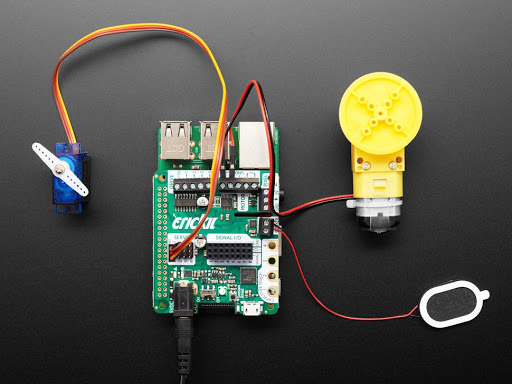
The Crickit HAT is a way to make robotics and interactive art projects with your Pi. Plug the Crickit HAT onto your Pi using the standard 2×20 GPIO connector and start controlling motors, servos or solenoids. You also get eight signal pins with analog inputs or PWM outputs, capacitive touch sensors, a NeoPixel driver and 3W amplified speaker. It complements and extends your Pi, doing all the things a Pi can’t do, so you can still use all the goodies on the Pi like video, camera, internet and Bluetooth…but now you have a robotics and mechatronics playground as well!

Control of the motors, sensors, neopixels, capacitive touch, etc. is all done in Python 3. It’s the easiest and best way to program your Pi, and after a couple pip installs you’ll be ready to go. Each input or output is wrapped into a python object so you can control a motor with simple commands like

crickit.motor_1.throttle = 0.5 # half speed forward

Or

crickit.servo_1.angle = 90

Crickit HAT and peripherals

The Crickit hat is powered by seesaw, our i2c-to-whatever bridge firmware. so you only need to use two data pins to control the huge number of inputs and outputs on the Crickit. All those timers, PWMs, NeoPixels, sensors are offloaded to the co-processor. Stuff like managing the speed of motors via PWM is also done with the co-processor, so you’ll get smooth PWM outputs that don’t jitter when Linux gets busy with other stuff. What’s nice is that robotics tends to be fairly slow as electronics goes (you don’t need microsecond-level reaction time), so tunnelling all the control over I2C doesn’t affect robot functionality.

We wanted to go with a ‘bento box’ approach to robotics. Instead of having eight servo drivers, or four 10A motor controllers, or five stepper drivers, it has just a little bit of everything. We also stuck to just 5V power robotics, to keep things low-power and easy to use: 5V DC motors and steppers are easy to come by. Here’s what you can do with the Crickit HAT:

  • 4 x analog or digital servo control, with precision 16-bit timers.
  • 2 x bi-directional brushed DC motor control, 1 Amp current-limited each, with 8-bit PWM speed control (or one stepper).
  • 4 x high-current “Darlington” 500mA drive outputs with kick-back diode protection. For solenoids, relays, large LEDs, or one uni-polar stepper.
  • 4 x capacitive touch input sensors with alligator pads.
  • 8 x signal pins, which can be used as digital in/out or analog inputs.
  • 1 x NeoPixel driver with 5V level shifter – this is connected to the seesaw chip, not the Raspberry Pi, so you won’t be giving up pin 18. It can drive over 100 pixels.
  • 1 x Class D, 4-8 ohm speaker, 3W-max audio amplifier – this is connected to the I2S pins on the Raspberry Pi for high-quality digital audio. Works on any Pi, even Zeros that don’t have an audio jack!
  • Built-in USB to serial converter. The USB port on the HAT can be used to update the seesaw firmware on the Crickit with the drag-n-drop bootloader, or you can plug into your computer; it will also act as a USB converter for logging into the console and running command lines on the Pi.

If you’re curious about how seesaw works, check out our GitHub repos for the firmware that’s on the co-processor chip and  for the software that runs on the Pi to talk to it. We’d love to see more people using seesaw in their projects, especially SBC projects like the Pi, where a hardware-assistant can unlock the real-time-control power of a microcontroller.

The post Making Robot Friends with the Crickit HAT for Raspberry Pi appeared first on Raspberry Pi.


Source: Raspberry Pi – Making Robot Friends with the Crickit HAT for Raspberry Pi

Staff Picademy and the sacrificial Babbage

Refill the coffee machine, unpack the sacrificial Babbages, and refresh the micro SD cards — it’s staff Picademy time!

Raspberry Pi Staff Picademy

Staff Picademy

Once a year, when one of our all-staff meeting brings together members of the Raspberry Pi team from across the globe, we host staff Picademy at our office. It’s two days of making and breaking where the coding-uninitiated — as well as the more experienced people! — are put through their paces and rewarded with Raspberry Pi Certified Educator status at the end.

Lest we forget the sacrificial Babbages and all they have done in the name of professional development

What is Picademy?

Picademy is our free two-day professional development programme where educators come together to gain knowledge and confidence in digital making and computing. On Day 1, you learn new skills; on Day 2, you put your learning to the test by finding some other participants and creating a project together, from scratch!

Our Picademy events in the United Kingdom and in North America have hosted more than 2000 Raspberry Pi Certified Educators, who have gone on to create after-school coding clubs, makerspaces, school computing labs, and other amazing things to increasethe accessibility of computing and digital making for tens of thousands of young people.

Why do we run staff Picademy?

Because we stand by what we preach: we believe in learning through making, and we want our staff to be able to attend events, volunteer at Picademy, Code Clubs, CoderDojos, and Raspberry Jams, and feel confident in what they say and do.

And also, because Picademy is really fun!

Stuff and things, bits and bobs: staples of any good Picademy

You don’t need to be techy to work at Raspberry Pi: we’re not all engineers. Our staff ranges from educators and web developers to researchers, programme managers, administrators, and accountants. And we think everyone should give coding a shot, so we love getting our staff together to allow them to explore a new skill — and have some fun in the process.

I *think* this has something to do with The MagPi and a Christmas tree?

At our staff Picademy events, we’ve made everything from automated rock bands out of tin foil to timelapse buggies, and it really is a wonderful experience to see people come together and, within two days, take a skillset that may be completely new to them and use it to create a fully working, imaginative project.

Timelapse buggy is a thing is beauty…as is Brian

Your turn

If you’re an educator looking to try something new in your classroom, keep an eye on our channels, because we’ll be announcing dates for Picademy 2019 soon. You will find them on the Picademy page and see them pop up if you follow the #Picademy tag on Twitter. We’ll also announce the dates and locations in our Raspberry Pi LEARN newsletter, so be sure to sign up.

And if you’d like to join the Raspberry Pi team and build something silly and/or amazing at next year’s staff Picademy, we have roles available in the UK, Ireland, and North America.

The post Staff Picademy and the sacrificial Babbage appeared first on Raspberry Pi.


Source: Raspberry Pi – Staff Picademy and the sacrificial Babbage

Minecraft-controlled real world Christmas tree

Interact with the real world via the block world, with the Minecraft-controlled Christmas tree from the team at BroCraft Gaming.

Illuminating

David Stevens of BroCraft Gaming reached out to us last month to let us know about the real-life Christmas tree he and his team were planning to hack using Minecraft. Intriguing? Obviously. And after a few more emails, David has been back in touch to let us know the tree hack is now live and ready for the world to interact with.

Here’s a blurb from the BroCraft team:

Join our Minecraft server at brocraftlive.net, complete the tutorial if you haven’t already, and type /mcct to join our snowy wonderland. Collect power from power blocks dotted everywhere, then select a pattern with the Technician, and watch as the tree lights up on the camera stream LIVE before your very eyes! Visit the attractions, play our minigames, and find out what else our server has to offer.

The tree uses individually addressable LEDs and the Adafruit Neopixel Python library. And with the help of a bespoke Java plugin, all instructions from within the Minecraft server are fed to the lights via a Raspberry Pi.

You can view the live Christmas tree camera stream here, along with a brief FAQ on interacting with the tree within the BroCraft Minecraft server.

Minecraft Pi

You’ll need access to Minecraft to be able to interact with the tree. And, lucky for you, Minecraft Pi comes free with Raspbian on the Raspberry Pi!

To flash the Raspbian image onto an SD card, follow this video tutorial from the team at The MagPi. And to get more acquainted with Minecraft on the Raspberry Pi, check out our free resources, including the getting started guide, Minecraft selfies, and the big Minecraft piano.


Find more free Raspberry Pi resources on our projects site, and immerse yourself even further into the world of Minecraft Pi with The MagPi’s Hacking and Making in Minecraft Essentials Guide, available in print and as a free PDF download!

The post Minecraft-controlled real world Christmas tree appeared first on Raspberry Pi.


Source: Raspberry Pi – Minecraft-controlled real world Christmas tree

Google AIY Projects Kit vs Star Wars Porgs

Here at Pi Towers, we have a love/hate relationship with the Star Wars creatures known as Porgs. Love, because anything cute and annoying will instantly get our attention; hate, primarily because of this GIF:

Star Wars Porg Raspberry Pi Google AIY Projects Kit translator

So when hackster.io tweeted about the following project, you can imagine the unfiltered excitement and fear with which I shared the link in the comms team Slack channel.

It looked a little something like this:

Star Wars Porg Raspberry Pi Google AIY Projects Kit translator

Google AIY Projects Kit

When we announced the Google AIY Projects Kit as a freebie included in issue 57 of The MagPi, I don’t think we realised how well it would do. OK, no, we knew it would do well. After we gave away a free $5 computer on the front cover of issue 40, we knew giving tech away with The MagPi would always do well. But the wave of projects and applications that started on the day of the release was a wonderful surprise, as community members across the world immediately began to implement voice control in their builds.

Star Wars Porg Raspberry Pi Google AIY Projects Kit translator

And now, twenty months later, we’re still seeing some wonderful applications of the kit, including this glorious Porg project.

Learn Spanish with a Porg — because of course

Hackster.io user Paul Trebilcox-Ruiz shared his Translation Toy project on the site yesterday, providing a step-by-step guide to hacking the motors of the Star Wars Porg toy so that it moves in time with verbal responses from the AIY kit. It’s all rather nifty, and apart from a Raspberry Pi you only need some wires and a soldering iron to complete the project yourself.

…some wires, a soldering iron, and the cold-heartedness to pull apart the innards of a stuffed toy, Paul, you monster!

“Hello” Translation Toy

Uploaded by Paul Trebilcox-Ruiz on 2018-12-10.

As soon as Paul realised that the Porg’s motors would run if he simply applied voltage, he extended the wires inside the Porg with the help of jumper leads and so attached the Porg to the GPIO pins on his Raspberry Pi.

For this setup, I hooked the two speaker wires from the Porg into the speaker connectors on the HAT, the button wires into the GPIO pin 24 and ground connectors under the ‘Servos’ heading, and for the motors I needed to hook up a relay for a 5V connection driven by the signal off of GPIO pin 26. The microphone that came with the AIY Voice Projects Kit was attached to the board using the pre-defined mic connector.

Then Paul wrote code that uses the AIY kit to translate any voice command it hears into Spanish.

For the full code and instructions, check out Paul’s hackster.io project page. And for more Porg love, here’s every Porg scene from The Last Jedi:

Porgs! Love Them Or Hate Them – Every Porg Scene in Star Wars: The Last Jedi HD

Porgs are now part of the Star Wars universe for better or worse thanks to director Rian Johnson. How do you feel about the tasty critters? Thanks for watching

Bonus facts

  • Porgs were introduced into the Star Wars universe as a means of hiding the many puffins that traipse the landscape of Skellig Michael, the location used for filming Luke Skywalker’s home, Ahch-To. Bless you.
  • A group of Porgs is called a murder.
  • A baby Porg is called a Porglet.
  • And no, you can’t get a physical copy of The MagPi issue 40 or issue 57. They’re gone now. Done. Forever. But you can still download the PDFs.


The post Google AIY Projects Kit vs Star Wars Porgs appeared first on Raspberry Pi.


Source: Raspberry Pi – Google AIY Projects Kit vs Star Wars Porgs

We tried out Valve’s Steam Link on Raspberry Pi and…

… it worked well!

tl;dr: really, really well.

But if “it worked really well” isn’t enough of a reason for you to give Steam Link on Raspberry Pi a go, here’s the rest of today’s blog post…

Steam Link on Raspberry Pi

The internet (mainly Reddit) was all aflutter last week due to the release of the Steam Link app beta version for the Raspberry Pi.

Steam Link, for the uninitiated, is a service that allowed users of the digital distribution platform Steam to stream video games from their PC to a display of choice — without the need to weave a mile-long HDMI cable between rooms and furniture to connect computer and television.

The original Steam Link

Up until now, if Steam users wanted to stream games to other displays, they had to do so with Valve’s own Steam Link device — a small black box available for purchase on the Valve website — and the device did pretty well. But with the new Steam Link app for Raspberry Pi, any Pi owner can get up and running with Steam Link using one single line of code.

And that’s all sorts of convenient!

Trying out Steam Link for ourselves

We didn’t just want to put out a blog post to let you folks know that the app’s beta version is now live. Instead, we wanted to collar one of our own to try the new app out at home and let us know exactly what they think. And since we knew that Simon, our Asset Management Assistant Keeper of the Swag, Organiser of the Stuff, Lord Commander of the Things, had a Steam Link at home, it made sense to ask him nicely to give the app a try over the weekend.

And he did, because Simon = ❤

One line of code later…

It took Simon all of five minutes to get Steam Link up and running on his TV. He even went so far as to copy and paste the short line of code via a Chromium search for the announcement, instead of typing it in for himself.

And then Simon just had to sign into his Steam account and boom, Bob’s your uncle, Sally’s your aunt, the process was complete.

“Took less than five minutes before I was investigating strange cults from the comfort of my sofa,” explained Simon, as we all nodded, inwardly judging him a little for his game of choice. But in case you’re interested, Cultist Simulator is made by Factory Weather, and there are currently some photos of a tiny kitten on their homepage, so go check it out.

User experience

Let us know if you’ve tried the Steam Link app on Raspberry Pi, and what you think of it. Oh, and what games you’re playing on it, especially if they include Cultist Simulator.

And to make your Steam Link setup process easier, type rpf.io/steamlinkblog into your Chromium browser on your Raspberry Pi to open this blog post, and then copy and paste the following into a terminal window to run install the app:

curl -#Of http://media.steampowered.com/steamlink/rpi/steamlink_1.0.7_armhf.deb
sudo dpkg -i steamlink_1.0.7_armhf.deb

[Edit – Lottie Bevan, co-founder of Factory Weather, has written several articles for Wireframe magazine. Be sure to head over to wfmag.cc to download issues 1-3 to find out more]

The post We tried out Valve’s Steam Link on Raspberry Pi and… appeared first on Raspberry Pi.


Source: Raspberry Pi – We tried out Valve’s Steam Link on Raspberry Pi and…

The Raspberry Pi Beginner’s Guide is out now (and it’s huge!)

The Raspberry Pi Press has been hard at work of late, producing new issues of The MagPi, HackSpace magazine, and our latest publication, Wireframe. But that hasn’t slowed us down, and this week, we’re pleased to announce the release of The Official Raspberry Pi Beginner’s Guide, a 244-page book that will help get you well on your way to Raspberry Pi domination.

The Official Raspberry Pi Beginner's Guide front cover

The Official Raspberry Pi Beginner’s Guide

We’ve roped in Gareth Halfacree, full-time technology journalist and technical author, and the wonderful Sam Alder, illustrator of our incredible cartoons and animations, to put together the only guide you need to help you get started with the Raspberry Pi.

inside the Raspberry Pi Beginner's Guide

From setting up your Raspberry Pi on day 1, to taking your first steps into writing coding, digital making, and computing, The Official Raspberry Beginner’s Guide is great for users from age 7 to 107! It’s available now in the Raspberry Pi Press store, with free international delivery.

inside the Raspberry Pi Beginner's Guide

As always, we have also released the guide as a free PDF, and you’ll soon be seeing physical copies on the shelves of Waterstones, Foyles, and other good bookshops.

Code Club Book of Scratch

And that’s not all! This week we also launched the brand-new Code Club Book of Scratch, the first-ever print publication from the team at Code Club.

Code Club Book of Scratch Volume 1

You can learn more about the book on the Code Club blog, and you’ll also find it in the Raspberry Pi Press store, and in bookstores alongside The Raspberry Pi Beginner’s Guide. You can download the free PDF here, but the print version of the Code Club Book of Scratch is rather special. As well as being stuffed full of amazing Scratch projects to try down at your local Code Club, it also comes with magic glasses that reveal secret hints in some of the guides. It’s spiral bound, so it always lays flat, and there are 24 exclusive Code Club stickers as well! The pictures here don’t really do it justice – it’s a wonderful book, even if I am a bit biased.

The post The Raspberry Pi Beginner’s Guide is out now (and it’s huge!) appeared first on Raspberry Pi.


Source: Raspberry Pi – The Raspberry Pi Beginner’s Guide is out now (and it’s huge!)

Wireframe 3: Phoenix Point, modders going pro, and more

We said we’d be back with more, so here we are back with more: issue 3 of Wireframe, the magazine that lifts the lid on video games.

From the ashes

Our third issue sees the now-established mix of great features, guides, reviews, and plenty more beyond that. Headlining it all is our sit-down chat with Julian Gollop about his upcoming strategy title Phoenix Point, with the X-Com creator waxing lyrical about Rebelstar, Chaos, and the secret of great AI.

We also take a look at the careers of amateurs-turned-pros, checking out the modders who went legit and getting input from those who’ve made the jump from doing it for fun, to doing it for fun and money.

And it doesn’t stop there

We’re investigating Thrunt XL, the indie game made without typing a single line of code; Terry Cavanaugh tells us about his unconventional new rogue-like Dicey Dungeons; and veteran game developer Howard Scott Warshaw looks back on the making of his Atari 2600 classic, Yars’ Revenge.

Plus:

  • Make your own first-person shooter in Unity with our step-by-step guide
  • The fur flies in the forthcoming multiplayer shooter, Super Animal Royale
  • How parallax scrolling gives 2D games the illusion of depth
  • The platformer from El Salvador that survived an attack of the clones

All this, and a variety of news, previews, and reviews covering everything from triple-A releases to dinky, loveable indie games.

Buy Wireframe issue 3

Print copies of Wireframe are available now in WHSmith, Tesco, and all good independent UK newsagents. Or you can buy Wireframe directly from us — worldwide delivery is available. And if you’d like to own a handy digital version of the magazine, you have the option to also download a free PDF.

Subscription options!

Whether you want to sample six print issues for a bargain price, subscribe for a full year, or get a regular digital edition sent directly to your device, we have some superb deals for you to choose from! To find out how you can save up to 49% on Wireframe, head to wfmag.cc/subscribe.

Or you can get the digital edition directly to your smart device via our Android and iOS apps.

See you in a fortnight!

The post Wireframe 3: Phoenix Point, modders going pro, and more appeared first on Raspberry Pi.


Source: Raspberry Pi – Wireframe 3: Phoenix Point, modders going pro, and more

Reef-Pi: the ultimate Raspberry Pi fish tank management system

If you’ve ever had a pet fish, even the saddest of fairground goldfish, you’ll appreciate how much work and attention they require. And to those who have never owned a fish: believe me, it’s more than you’d assume.

Reef-Pi

And the moment you upgrade from goldfish to brightly coloured, tropical beauties, and replace the standard silk reeds and gravel with live aquatic plants and soil, you suddenly have to factor in things like optimum temperature and chemical levels.

Reef-Pi

Reef-Pi

Thankfully, Adafruit Learning System author and loving fish parent Ranjib Dey has been working on a tutorial series called Reef-Pi, a collection of how-to guides that help you build the ultimate in Raspberry Pi reef aquarium management system.

Ranjib Dey on Twitter

@reef_pi at makerfaire #MFBA18

Reef-Pi monitors pH, chemical, and water levels, controls temperature, light, and power, and automates the management of these aspects so you don’t have to think about them. Phew!

And if you don’t fancy a massive coral-filled saltwater tank like Ranjib’s, you can use parts the Reef-Pi series for your own tank, whatever its setup, because many of the operations are similar or easy to adjust for your needs.

Jean Tannen

Any excuse to show off beautiful Jean to the world

Take, for example, my new Betta, Jean Tannen. While Jean’s tank is a much smaller size, and Jean its only resident (for now), I still need to keep an eye on the chemical balance of his water, the heat of his tank, and when his lights should be turned on or off. Even the most commonplace goldfish will appreciate many of the services Reef-Pi automates.

The Reef-Pi system uses a variety of components, including Raspberry Pi Zero and/or Raspberry Pi 3, and each stage of building the project is well-documented on the Adafruit Learning System. So if you’re looking to upgrade your tank, or have always fancied having pet fish but don’t want the hassle of tank management, give Reef-Pi a gander and see what you think.

We’re going to try it!

Sarah, our new Operations Manager, has been looking to upgrade her giant fish tank with a Raspberry Pi or two, so we’ll be sure to share her progress in the new year. If you decide to give Reef-Pi a try, or have already automated your tank with a Pi, let us know in the comments, or tag us on Twitter or Instagram!

The post Reef-Pi: the ultimate Raspberry Pi fish tank management system appeared first on Raspberry Pi.


Source: Raspberry Pi – Reef-Pi: the ultimate Raspberry Pi fish tank management system

The big, pHAT Christmas shopping list of the year

Looking for this year’s perfect something to put under the tree ‘from Santa’? Well, look no further than right here — it’s time for our traditional Christmas shopping list!

Woohoo!

Which Raspberry Pi?

As you are no doubt aware, the Raspberry Pi comes in more than one variety. And if you’re planning to give a Pi as a gift to a first-time user, you may be confused as to which one you should buy.

Raspberry Pi 3B+

For someone learning to write code for the first time, we recommend the Raspberry Pi 3B+. Anyone living in a home with an HDMI display, such as a computer monitor or television, will be able to plug directly into the 3B+, and in case they don’t already have a standard USB mouse and keyboard, these can both easily be acquired online, in many charity shops, or by sweet-talking a friend/neighbour/employer. You can even find some great Raspberry Pi starter kits that include many of the items needed to get started.

Raspberry Pi Zero W

The Raspberry Pi Zero W comes at a lower price, and with it, a smaller footprint than the 3B+. This makes the tiny Pi the perfect addition to any creator’s toolkit, ideal for projects that run on a Pi long-term, such as display builds, robots, or near-space HABs.

Pre-loaded micro SD card

Whatever Raspberry Pi you choose for the lucky receiver of your Christmas gift, we also recommend getting them a pre-loaded micro SD card. While it’s really easy to flash an operating system image onto one of the dusty old micro SD cards you have lurking in a drawer, pre-loaded cards allow new Pi owners to plug in and get started right off the bat. Plus, the ones with our operating system Raspbian on come in rather fancy, logo-adorned SD adapters. And who doesn’t like a rather fancy, logo-adorned SD adapter?

Books, books, books

We’re releasing two new books this week that are perfect for any Christmas stocking!

Code Club Book of Scratch Volume 1

Code Club Book of Scratch Volume 1

The Code Club team is buzzing over the release of the first Code Club book, available to buy from Friday. Primarily aimed at learners aged 9–13, the book focuses on teaching the Scratch programming language, and it’s jam-packed with fun projects, tips, and stickers. The book also comes with a pair of super-special computer science glasses that allow you to see secret hints hidden throughout the book. Very, very cool.

And since Scratch is pre-installed on Raspbian, the Code Club Book of Scratch is the perfect accompaniment to that Raspberry Pi you’re planning to get for the young person in your life!

The Official Raspberry Pi Beginner’s Guide

Raspberry Pi Beginner's Guide Book 2018

From setting up a Raspberry Pi to using Scratch and Python to create games and animations, the hot-off-the-press Official Raspberry Pi Beginner’s Guide has everything your loved one needs to get started and keep going.

And when we say ‘ hot-off-the-press’, we mean it — we only released the book this week!

Both the Raspberry Pi Beginner’s Guide and the Code Club Book of Scratch are available with free international shipping. And if you’d like to give either of them a ‘try before you buy’ test drive, they should both available soon as free PDFs for you to download and peruse at your leisure.

Magazine subscriptions

Alongside our books, we have an array of magazines, including the brand-new, twice-monthly, video game–focused Wireframe! As with the books, you can download all issues of our magazines for a test read before you commit to a subscription.

Twelve-month print subscriptions to HackSpace magazine or The MagPi will reward you with a technical treat: an Adafruit Circuit Playground or a Raspberry Pi 3A+.


So not only can you give a gift that will last the entirety of 2019, but you’ll also automatically provide your favourite creative person with something rather lovely to play with when they receive their first issue.

And if you sign them up now, you can give someone a six-issue subscription of Wireframe magazine for £12! Or save 49% on a twelve-month subscription of 26 magazines from £40.

So many choices, so many ways to make the creators and tech fans in your life happy this holiday season.

Accessories and such

Maybe the person you’re shopping for already has every Raspberry Pi on the market. And as for our publications, their mailbox is full of magazines and books every week, and their smartphone and tablets are crammed with every PDF we’ve ever produced. So what next?

Swag

What do you buy the Raspberry Pi fan who has all the Pis? Swag, of course!

Raspberry Pi Swag - enamel pin
Raspberry Pi Swag - travel card holder
Raspberry Pi Swag - Mug

From stickers and mugs, to coasters and pins, check out the Raspberry Pi swag store for some wonderful treats!

Add-ons

Whether it’s a HAT (Hardware Attached on Top) for the Raspberry Pi, or a full kit to make something rather spectacular, our Approved Resellers stock all manner of Pi add-ons.


Pimoroni Picade
Pi Hut LED Xmas Tree

You can find your nearest Raspberry Pi Approved Reseller by clicking on any item on our products page and then selecting your country.

This isn’t all!

We’ve been putting together a Raspberry Pi shopping list every year in response to the message we receive from you asking for gift ideas. So why not have a look back at our previous lists to get more inspiration for what to give, including more books, toolkit staples, non-Pi tech bits, and, of course, LEGO.

The post The big, pHAT Christmas shopping list of the year appeared first on Raspberry Pi.


Source: Raspberry Pi – The big, pHAT Christmas shopping list of the year

Take part in Hour of Code 2018

Every year for the last five years, Hour of Code has encouraged school students to spend just one hour writing some code, in the hope that they get bitten by the bug rather than generating too many bugs! This year, you can find activities from the Raspberry Pi Foundation, Code Club, and CoderDojo on the official Hour of Code website.

Boat race

Boat race, a Code Club resource, is a one-hour project aimed at beginners. It guides students to use Scratch to create a game in which the player uses their mouse to navigate a boat to a desert island without bumping into obstacles.

Scratch can run in any browser, or directly from a Raspberry Pi, making it on of the easiest ways for students to get into coding for the Hour of Code.

The Boat race resource is available in many languages, including Arabic, Simplified Chinese, Czech, Greek, Hebrew, and Ukrainian.

Beginner Scratch Sushi Cards

Again using Scratch, this CoderDojo project walks students through how to create a fish-catching game where the player controls a shark sprite.

Astro Pi Mission Zero

In in the Mission Zero project, students write a short Python program that checks the ambient temperature onboard the International Space Station, and leaves a message for the astronauts there!

Students complete this Hour of Code challenge using the Trinket online Astro Pi simulator, and those based in an ESA Member or Associate States can submit their code to run onboard the ISS. They’ll even receive an official certificate showing where the ISS was when their code ran.

A full list of ESA Member and Associate States can be found here.

Us too!

We don’t just create activities for other people to experience digital making and learning — we also get involved ourselves! Every month we host a maker day for our staff, where everyone can try out our digital making projects or even work on their own project. Our December maker day is during Hour of Code week, and we are going to make an extra-special effort and try to get as many staff members as possible coding!

The educators at Raspberry Pi are fans of Seymour Papert’s constructionist learning philosophy — you can read his Mindstorms book in this free PDF — and the joy of learning through making isn’t just a thing for kids; adults get just as much positivity out of creating digital fart noises or animating crazed chickens to chase the Scratch cat. With the right support from our wide range of projects, anyone can make their own ideas a reality through coding — Senior Learning Manager Lauren, for example, got very excited about her Morrissey haiku project!

Being able to code is creative; it lets you bring your idea to life, whether that’s something that could help millions of people or simply something you think would be cool.

So, whether you’re an absolute beginner to coding or you’ve fixed so many bugs that your nickname is ‘The Exterminator’, what will YOU code this week?

The post Take part in Hour of Code 2018 appeared first on Raspberry Pi.


Source: Raspberry Pi – Take part in Hour of Code 2018

Philip Colligan wants your books

You may have heard the news that the Raspberry Pi Foundation recently took up residence in a new location. And unlike previous offices, the new building offers up more room for members of the team to work and learn, including the yet-to-be-named library.

(I’ll have thought of name by the end of this blog post.)

The Raspberry Pi Foundation library

At the moment, the library is home to copies of books written by members of the team, issues of The MagPi, Wireframe, and HackSpace magazine, Project Books, Essentials Guides, and various other related publications.

However, on a recent visit in the Foundation office from Raspberry Pi Trading, I was accosted by Foundation CEO Philip Colligan and asked if I could put out the following request to our community.

We’d like your books

Philip would like to ask you whether you have any old books about coding, such as the classic Usborne series, or aged user manuals or games listings that you don’t need anymore and could donate to our library!

This call also goes out to anyone who has written a book about coding and would like to see their work on our shelves.


Immortality for all

I asked Philip what people can expect in return for donating a book, and he said the following:

raspberry pi library

So be sure to include your return address so we can send you some stickers as a thank you for your donation.

Send your books

If you have a book you’d like to donate, please send it to the address below. And if we receive double-ups of any publications, we promise to put them to good use by passing them on to local libraries or coding clubs so that others can experience the iconic books of our childhoods.

The Philip Colligan Library of Solitude and Reflection
Raspberry Pi Foundation
37 Hills Road

Cambridge
CB2 1NT
United Kingdom

The post Philip Colligan wants your books appeared first on Raspberry Pi.


Source: Raspberry Pi – Philip Colligan wants your books

MagPi 76: our updated Raspberry Pi Superguide!

Hi folks, Rob from The MagPi here! The holiday season will soon be upon us, and that means a lot of Raspberry Pis will be given as gifts. For all these new Pi users, we thought it was time to update our beginners’ guide for 2019 in issue 76 of The MagPi, out now!

And yes, this includes the brand-new 3A+.

Look, up on the magazine rack!

Is it a bird? A plane? No, it’s Superguide!

In this Superguide, we’ll take you through the initial setup of the Pi, we’ll help you familiarise yourself with it, and we’ll even show you a couple of fun Pi projects to get started with! Whether you’re a complete newbie to Raspberry Pi or you want need a little refresher, our guide has got you covered.

Superb

3A+ subscription offer!

Speaking of the Raspberry Pi 3A+, we have a full feature on the fresh addition to the Raspberry Pi family, including all the juicy benchmarks, stats, and info you’d ever want to know. There’s even an interview with Eben Upton and Roger Thornton about its development!

In fact, we love the 3A+ so much that we’re offering a brand-new, limited-time subscription offer: sign up for a twelve-month print subscription of The MagPi now, and you’ll get a Raspberry Pi 3A+ completely free!

Hurry though, this offer only runs as long as stocks last.

Be quick, this offer won’t be around forever!

Heads, Pac-Man, and Christmas lights

Of course, there also are amazing projects, guides, and reviews in this issue. This includes As We Are, a mesmerising art project that displays people’s faces on a 14-foot tall screen shaped like a head. We also show you how to start making Pac-Man in our monthly Pygame tutorial, and our smart lights guide has a bit of a festive flair to it.


Get The MagPi 76

You can get The MagPi 76 from WHSmith, Tesco, Sainsbury’s, and Asda. If you live in the US, head over to your local Barnes & Noble or Micro Center in the next few days for a print copy. You can also get the issue online: check it out on our store, or digitally via our Android or iOS apps. And don’t forget, there’s always the free PDF.

Rolling subscription offer!

Want to support the Raspberry Pi Foundation and the magazine? As well as the subscription mentioned above, you can now take out a monthly £5 subscription to the magazine, effectively creating a rolling pre‑order system that saves you money on each issue.

The MagPi subscription offer — The MagPi 75

That’s it for now! I’ll see you next time around Christmas.


The post MagPi 76: our updated Raspberry Pi Superguide! appeared first on Raspberry Pi.


Source: Raspberry Pi – MagPi 76: our updated Raspberry Pi Superguide!

Raspberry Pi vs a Raspberry Pi–powered escape room

A few Mondays ago, the Raspberry Pi North America team visited a very special, Raspberry Pi–powered Escape Room in San Francisco. Run by Palace Games, the Edison Escape Room is an immersive experience full of lights, sensors, and plenty of surprises. This is the team’s story of how they entered, explored, and ultimately escaped this room.

At World Maker Faire this year, our very own social media star Alex Bate met Jordan Bunker, one of the Production Artists at Palace Games. Emails were sent, dates arranges, and boom, the Raspberry Pi North America team had to face the Edison Escape Room!

Escape rooms

In case you’re not familiar, an escape room is a physical adventure game in which players solve a series of puzzles and riddles using clues, logic, and strategy to complete the game’s objectives. Many escape room designers use physical computing to control the many sensors and triggers involved in the player experience.

Palace Games Edison Escape Room

The team vs Edison

Upon entering the Edison Escape Room, my team and I quickly realized that we were within a complex system built like a giant computer! So even though it was our first-ever time in an escape room, that would not be a disadvantage for us.

Palace Games Edison Escape Room

Our goal was to accomplish a variety of tasks, including solving many puzzles, looking for hidden clues when anything could be a clue, completing circuits, moving with the floor, and getting a bit of a workout.

The true test, however, was how well we communicated and worked with each other — which we did an awesome job at: at times we split up the work to effectively figure out the many different puzzles and clues; there was a lot “try it this way”, “maybe it means this”, and “what if it’s supposed to go that way” being yelled across the room. Everyone had their Edison thinking hat on that day, and we were so ecstatic when we completed the last challenge and finally escaped!

Palace Games Edison Escape Room

The inner workings

After escaping the room, we got the chance to explore behind the scenes. We found a local network of many Raspberry Pis that are coordinated by a central Raspberry Pi server. The Python Banyan framework is the connective tissue between the Raspberry Pis and their attached components.

Palace Games Edison Escape Room

The framework facilitates the communication between the Pis and the central server via Ethernet. The Raspberry Pis are used to read various types of sensors and to drive actuators that control lights, open doors, or play back media. And Raspberry Pis also drive the control panels that employees use to enter settings and keep tabs on the game.

“Raspberry Pi keeps us going. It’s the heart and soul of our rooms.”  – Elizabeth Sonder, Design Engineer & Production Manager

We highly recommend heading over to Palace Games and exploring one of their many escape rooms. It’s a great team-building exercise and definitely allows you to learn a lot about the people you work with. Thank you to the Palace Games team for hosting us, and we hope to return and escape one of their rooms again soon!

The post Raspberry Pi vs a Raspberry Pi–powered escape room appeared first on Raspberry Pi.


Source: Raspberry Pi – Raspberry Pi vs a Raspberry Pi–powered escape room

Support Raspberry Pi on #GivingTuesday

Today is #GivingTuesday, a global movement to kick off the charitable giving season.

More than just a computer

When you buy a Raspberry Pi, you’re not only getting a fantastic little computer, but you’re also helping with our charitable educational mission to put the power of computing and digital making into the hands of people all over the world.

The kindness of others

We’re also supported in other ways by very generous people and organizations who believe in what we do. They donate funds, staff time, products, and services to help us achieve our mission. We use all of these resources to give thousands of young people the opportunity to be empowered by technology.

Thousands of young people all over the world learn to code and make things with computers because of your support.

Good news, Americans!

At the end of last year, Uncle Sam granted us nonprofit status, which means we can accept tax-deductible donations from those of you who are in the United States! To celebrate the first-ever #GivingTuesday with US nonprofit status, we’re kicking off a crowdfunding campaign for Coolest Projects USA on the GlobalGiving platform. Your contribution will go towards our annual Coolest Projects event where we celebrate young people who create things with technology. And if you contribute between now and the end of the year, we’ll be eligible for bonus funds offered by GlobalGiving. Our goal is to raise $10,000 for Coolest Projects USA, and we need help from all of you!

Showcasing creativity at Coolest Projects North America

Coolest Projects is a world-leading showcase that enables and inspires the next generation of digital creators and innovators to present the projects that they created at their local CoderDojo, Code Club and Raspberry Jam. This year we brought Coolest Projects to the Discovery Cube Orange County for a spectacular regional event in California.

Those of you in the States can also support us by doing your holiday shopping with Amazon Smile or the 3,000 online stores on Giving Assistant. We’ll get a small contribution for your purchases, and that’ll go toward all the programs that support educators and youth in the United States.

Donate to the Raspberry Pi Foundation

If you would like to make a donation towards our work from anywhere in the world, you can do so via JustGiving or PayPal. Your support for the Raspberry Pi Foundation helps us to train educators face-to-face and online, to provide free educational content for everyone everywhere, to support over 10,000 free coding clubs around the world, to celebrate young creators at high-profile events, and much much more.

Beyond #GivingTuesday

There are plenty of ways to help us achieve our mission all over the world:

No matter what you do, the most important thing we want you to know is how grateful we are to have you in the Raspberry Pi community — we deeply appreciate all of your support.

The post Support Raspberry Pi on #GivingTuesday appeared first on Raspberry Pi.


Source: Raspberry Pi – Support Raspberry Pi on #GivingTuesday

The age of the Twitter bot

Despite changes to the process, setting up a Raspberry Pi as a Twitter bot is a fairly easy process. And while many such bots simply share time-lapse snapshots, or change the colour of LEDs across the globe, we know some that fill our timelines with fun, random joyfulness of a daily basis. Here are a few of them:

@DaphneFlap

Celebrated by cat worshippers the world over, Daphne’s Catflap documents the comings and goings of Daphne, the fluffy feline housemate of Kate Bevan. While my own cat is now too big to fit through his catflap, Daphne uses her catflap several times a day, and thanks to the Raspberry Pi connected to it, the catflap does a marvellous job of celebrating Daphne every time she graces us with her presence.

Daphne’s Catflap on Twitter

Adored Daphne, graceful empress of floof, floofybum. No adoring catflap could possibly be more blessed than me.

@raspberrypi_otd

Ben made a thing.

The Raspberry Pi OTD Twitter bot shares past posts from this very blog you are reading RIGHT NOW, and thus traces the evolution of Raspberry Pi through its tweets. One day, probably in twelve months, this very blog post will resurface on the Raspberry Pi OTD timeline, and then we shall all meet back here and say hi.

Raspberry Pi OTD on Twitter

On this day in 2015: Raspberry Pi Zero: the $5 computer https://t.co/1GRhq0TYuz

@randspberrypi

Sharing posts generated by Rand’s Raspberry Pi, this twitter bot posts random GIF-packed tweets, usually with a retro 1980s vibe and the hashtags #80s, #MusicVideo, #GIF, and #raspberrypi

Rand’s RaspberryPi on Twitter

Random #80s #MusicVideo #GIF #raspberrypi https://t.co/ieraOHGFjr

@falalala_la

Though it seems to be taking a hiatus right now, the Deck the Halls bot searches Twitter for tweets that fit perfectly to the tune of Deck the Halls, and retweets these with the classic “Falalalala, la la, la la!” as a comment. Be warned, a few of the tweets it recovers may be NSFW, but on the whole, it’s a joyful, joyful experience.

Deck the Halls on Twitter

Falalalala, la la, la la! https://t.co/r2dkE8wMFm

@bert_the_plant

I promise we haven’t killed him.

Bert is a ficus tree that lives in one of the meeting rooms here at Pi Towers. When connected to the internet, his Raspberry Pi and moisture monitor update followers about whether he needs watering, alongside a photo of his current state. And while his last tweet, dated 10 June 2017, claims he’s “so thirsty”, accompanied by a photo of pure darkness, I assure you this is simply because the light was off…and the Pi has since been unplugged…and Bert’s alive, I swear it, I swear!

Hold on, I just need to go for a walk to Meeting Room 5. No reason. *runs*

Bert Plant on Twitter

I’m so thirsty!

Connecting your Raspberry Pi to Twitter

The process of setting up a Developer Account so you can build your own Twitter bot has changed recently. But once you follow their new steps, you can still use our free resources for connecting your Raspberry Pi to Twitter.

In our Tweeting Babbage resource, you will learn how to write code that sends images from your Pi to the Twittersphere.

And if you’re a more experienced coder, you could try your hand at our Naughty and nice resource, which will walk you through creating a program that checks whether a Twitter user is in Santa’s good or bad books. After all, Christmas is just under a month away!

Santa angrily staring at a Twitter account

And from there, the world (the Twitter world at least) is your oyster.

The post The age of the Twitter bot appeared first on Raspberry Pi.


Source: Raspberry Pi – The age of the Twitter bot