Macguyver-esque narrative VR puzzler hits Quest on February 26, with PlayStation VR2 and PC VR to come later.
Fixer Undercover was first revealed as a demo on the now defunct Meta Quest App Lab in 2024 and officially announced at the UploadVR Summer Showcase last year, promising a return to the VR escape room style puzzles popularized by games like the I Expect You To Die series and The Room VR: A Dark Matter.
As a special agent codenamed ‘The Fixer’, players will infiltrate a prison under the guise of a maintenance worker. Alongside a witty drone named Winston, a set of basic handyman tools like a hammer, grinder, pliers, and pipe wrench are used to solve a series of environmental puzzles.
Per a post on developer Creativity AR’s Discord, it expects a full playthrough to take roughly six to eight hours.
0:00
/2:02
Fixer Undercover Gameplay Trailer
Fixer Undercover was originally planned as an Early Access release in late January, but Creativity changed course in a social media post, saying “To be completely honest: we looked at the project and realized it wasn’t ready to open its doors yet… We want to release a complete game, not a broken one. We apologize for the delay.”
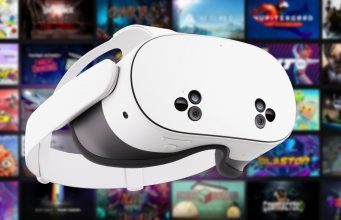
Fixer Undercover releases this Thursday on Meta Quest 3, 3S, and Pro for $14.99. The game’s official website states that versions for Steam and PlayStation VR2 are planned for “a later date.” The game can be wishlisted on Steam now.
Apple Immersive documentary Top Dogs brings you up close with spectacular champion breeds, but traditional filmmaking choices keep the immersion from taking Best in Show.
Apple Immersive Video is particularly well suited for narrative documentary content. It can give visitors virtual access to real, visually stunning moments in behind-the-scenes experiences and destinations that most of us will not be able to physically visit in our lifetime. The forced perspective of the 180-degree format also offers a familiar entry point for acclaimed directors accustomed to crafting video content for traditional flat screens.
What Is Apple Immersive Video?
The Apple Immersive Video format is 180° stereoscopic 3D video with 4K×4K per-eye resolution, 90FPS, high dynamic range (HDR), and spatial audio. It’s typically served with higher bitrate than many other immersive video platforms.
We highly praised Apple Immersive Video in our Vision Pro review. It’s not possible to cast or record Apple Immersive Video though, so you’ll have to take our word for it unless you have access to a Vision Pro.
Paired with Apple TV’s reputation for visually polished and compelling storytelling, I went into the two Top Dogs Apple Immersive episodes with high expectations. But narrative and compelling visuals were not enough to create quality immersion. My role in the world of Top Dogs remained undefined, and certain creative choices gave me reason to…paws. It did not fully consider how experiencing the benefits of immersion inside a headset should feel different from simply watching a story unfold on a screen.
0:00
/0:35
Spectacular dogs and clear storytelling.
The behind-the-scenes access that gets you up close to some incredible dogs makes this worth stepping into. I found myself face to face with breeds I have only ever seen on screens or in photos, and others I had never encountered before, each impeccably groomed and styled for the spotlight. The sheer range of dogs and their personalities is striking. They are the undeniable stars, and the stereoscopic depth brought me closer to these dogs than a traditional screen ever could.
The narrative also worked well. In just a combined thirty three minutes, I walked away with a clear understanding of how this renowned competition works. I learned what judges evaluate and gained insight into different aspects of the events. Participants are introduced cleanly. Stakes are easy to follow. Despite the short runtime, nothing feels rushed.
In many ways, I felt closer to this world than I would through a traditional screen. But getting close is not the same as feeling fully present within it.
Proximity is not the same as presence
Across both episodes, I kept returning to one question: who am I supposed to be here? Given Apple TV’s storytelling pedigree and the immersive potential of Apple Vision Pro, I expected Top Dogs to place me unmistakably inside its world rather than remind me at times that I was still watching from constantly shifting camera positions that were often stationary and sometimes moving speedily. My sense of embodiment wavered as scale and perspective changed without explanation or logic. Quick cuts shifted me from floating down an aisle of Dalmatians at eye level with their handlers, to sitting close-up at eye level with dogs, to looking up at handlers.
As a visitor to the documentary, I also did not feel like my presence was intended to be acknowledged. Those being interviewed spoke to an off-camera interviewer and avoided glancing into the lens, a choice typical of traditional flat-screen content. The only characters that seemed to recognize my presence on occasion were some of the dogs who took momentary interest in the camera. Locking eyes with Australian Shepherd Viking, 2024 Best in Show winner, was memorable. I impulsively shifted back when another dog jumped to the camera for a kiss. More moments like this would have helped with the sense of presence.
Traditional film language can limit immersion.
Directed and narrated by BAFTA and Peabody winner John Dower in his first immersive documentary, Top Dogs reflects a filmmaker clearly comfortable with traditional documentary language. But immersive storytelling demands intention around experience, not just storytelling.
The flyball competition segment showed what worked. The camera remained steady and well positioned as if I was watching from the sidelines. It gave me enough time to take in the space and choose where to look. The more time I had to notice details within the scene, the more immersed I felt. As the dogs sprinted back and forth, I turned my head naturally to follow them. The action defined my movement in the world. In contrast to many other moments in Top Dogs, this moment allowed me to feel confident in my spectator perspective, and present.
Framing and editing choices, however, often reflected traditional documentary grammar in ways that weakened immersion. Action and even faces were occasionally partially cropped within the 180 degree frame. Extreme close ups that might feel intimate on a flat screen felt odd and uncomfortable in headset. Photos appeared floating in black backgrounds rather than integrated into the environment. On screen text reinforced the sense of watching a framed production rather than being there. The quick cuts also shifted me between locations and perspectives without spatial grounding or transition of any sort. I would have liked to see more movement from the dogs and less movement from the camera.
When traditional documentary grammar dominates, the headset begins to feel optional. At several points, I found myself toggling from full Immersive Video to the windowed view to avoid some creative choices that felt jarring when fully immersed. I also found myself wondering why this was not simultaneously released as Apple TV content for more people to see it outside headset, given how closely its film language already aligns with traditional screens.
Google Glimmer is the company’s design language for the interfaces in coming Gemini smart glasses with transparent heads-up displays, and eventually true AR glasses too.
Small Screens Without The Struggle
On a traditional screen, designers fill a rectangle, and a VR headset stretches the canvas to a full sphere. On display glasses, the usable area is much smaller and always competes with real life. That alone calls for apps with glanceable layouts and a simple menu system. We saw a demo of Google’s prototype smart glasses at last year’s I/O.
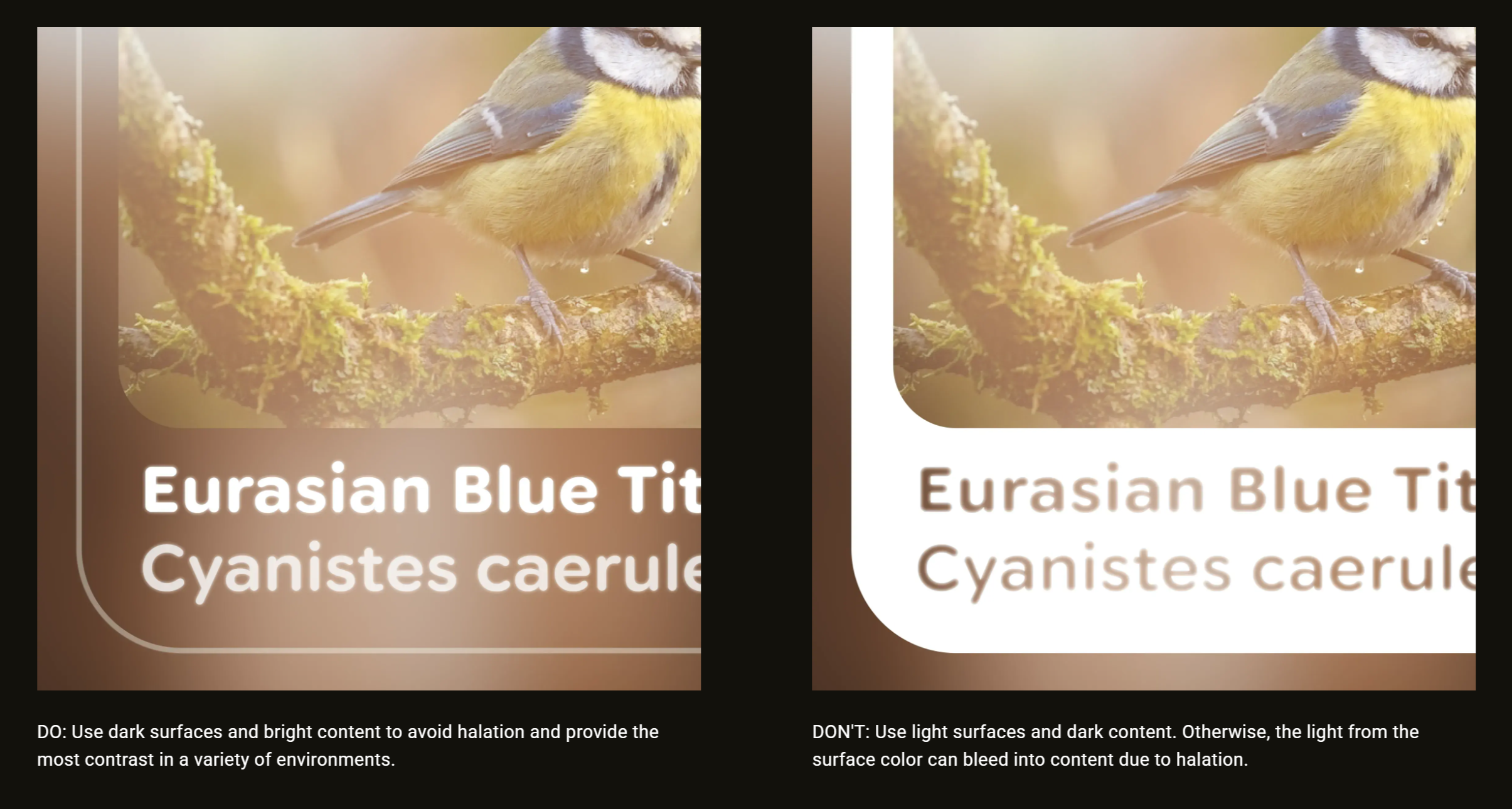
Google Glimmer suggest light content on dark backgrounds.
Google describes the display as a space you opt into with focus, not something you passively absorb. These glasses are essentially heads-up displays (HUDs), not screens you stare at for hours. For daily use, display smart glasses should use a small area that allows you to shift attention briefly, then return to the real world at a moment’s notice.
The same suggestions will help for any HUD. Meta’s Gen 2 Ray-Ban Display glasses are expected later this year, for example.
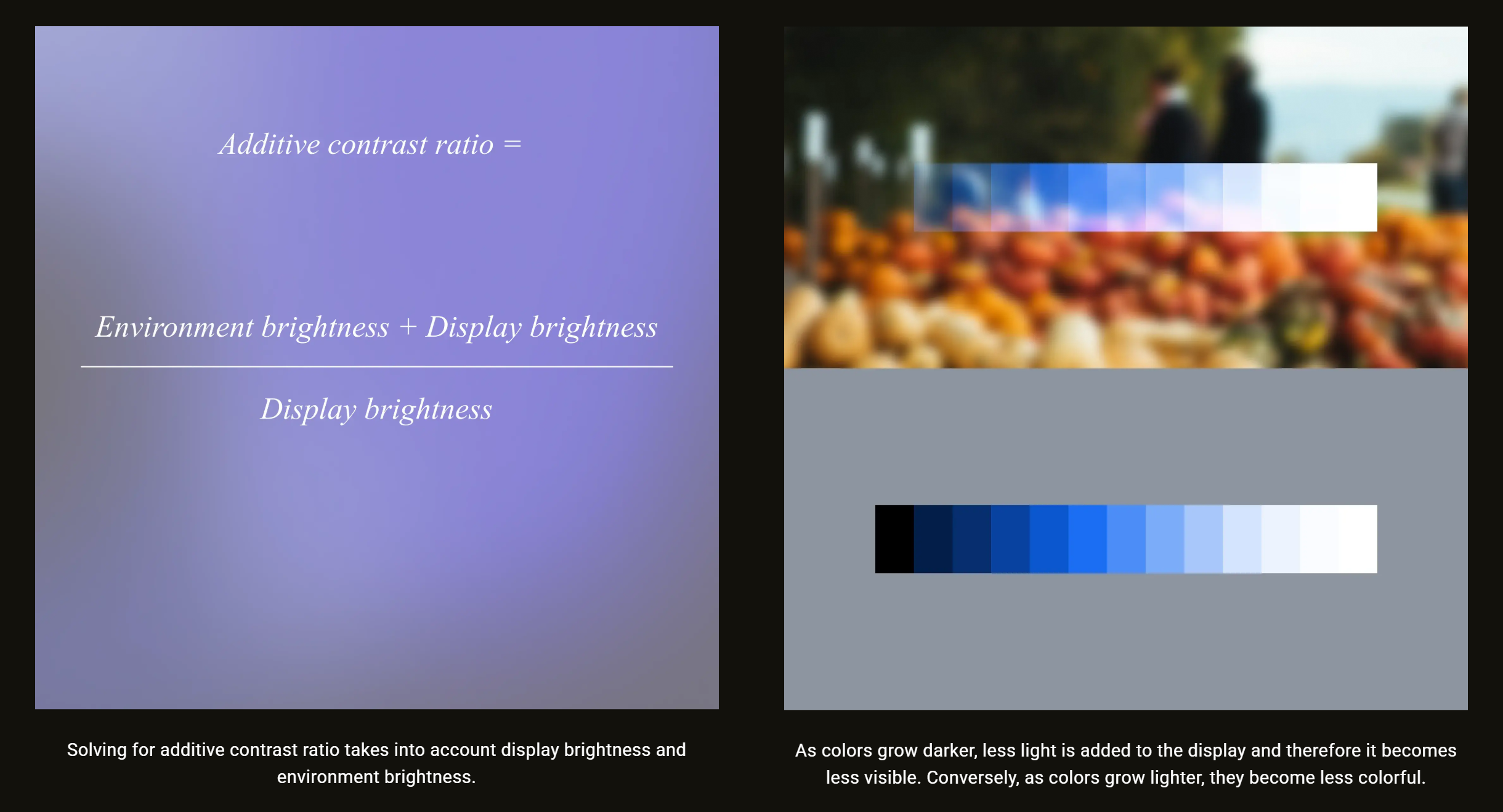
Since screen colors blend with the background, Google recommends maintaining intensity instead of maximizing saturation since darker colors fade away on transparent screens.
Resolution, Aspect Ratio, And Font Limits
Google also covered legibility, noting designers should base font size on what the eye can see clearly at arm’s length. Smart glasses displays often have tighter resolution limits and less forgiving optics, especially near edges. The predictable aspect ratios of mobile design no longer apply.
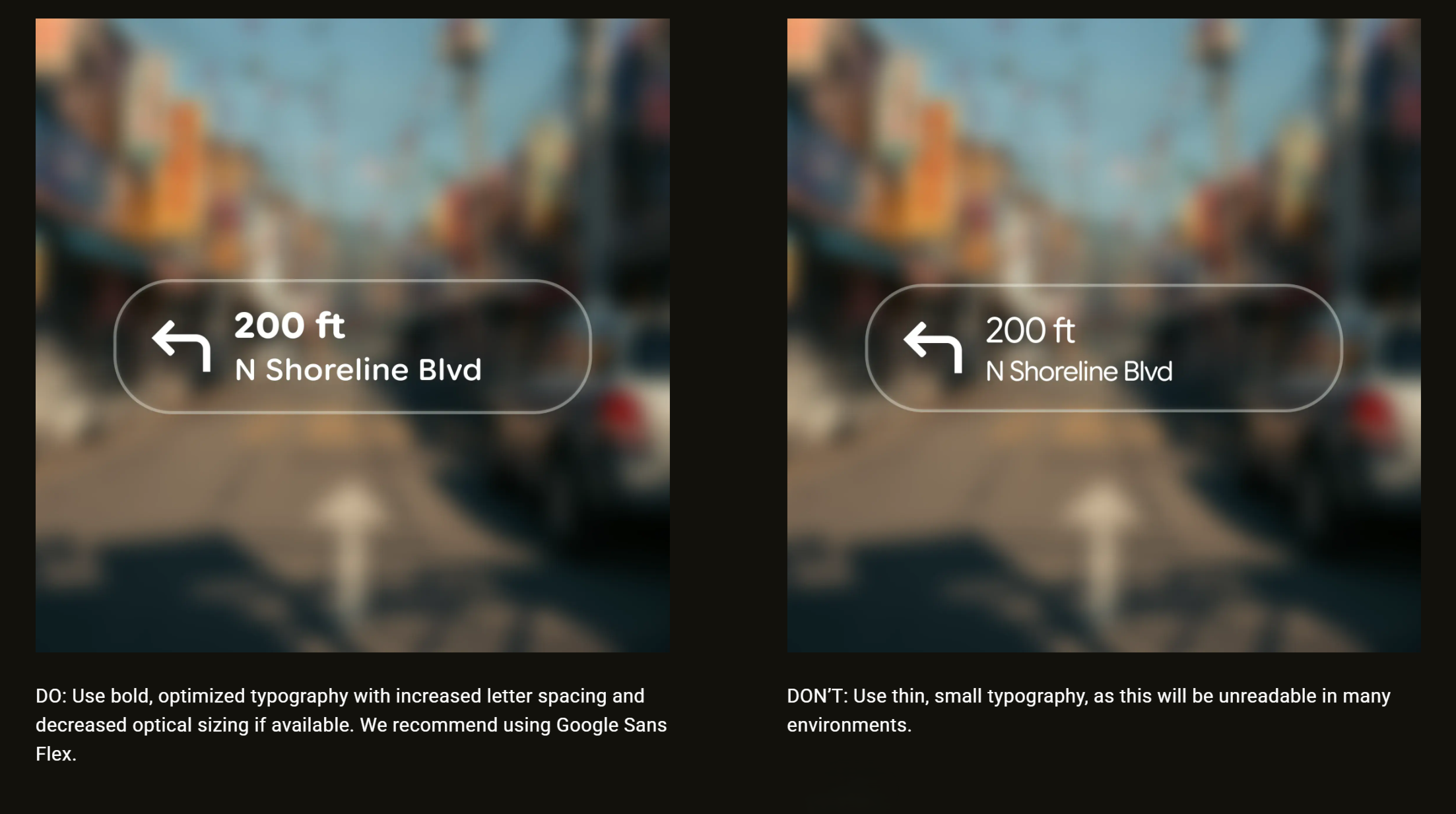
Bold type is easier to read on transparent screens.
Apps shouldn’t display dense lists in tiny type, and even content should shift toward fewer words. Readability requires stronger contrast, heavier fonts, and clearer spacing. Google suggests its Sans Flex typeface as a good choice.
Power Is Part Of The Design
Battery life is another hard constraint for smart glasses, since weight is held to a minimum. Google calls for outlines instead of filled blocks to avoid halation (light bleed) and reduce power drain. Fewer lit pixels, transient messages, and optimizing motion are less taxing on the tiny thermal and battery envelope of smart glasses.
Transparent displays benefit from brighter graphics with less saturated colors.
Google’s Glimmer is more than a style preference. It’s a plan to make the most of the limited display area, real-world backgrounds, legibility limits, and the challenges of daily use. To learn more, check Google’s guide on Jetpack Compose Glimmer.
Meta announced that its Horizon+ game subscription service topped over one million active subscribers.
Reality Labs VP of Content Samantha Ryan revealed the figure in a developer blog post, noting the service now boasts a games catalog of over 100 titles in addition to its rotating dip of monthly games.
Popular titles include Ghosts of Tabor, Job Simulator, Red Matter, Red Matter 2, Cubism, Pistol Whip, Moss, Maestro, Into Black, Racket Club, Demeo Battles, and Asgard’s Wrath 2. You can see the full list here.
Notably, this is the first time Meta has revealed active subscriber numbers for Horizon+, which was previously known as ‘Quest+’ when it first launched in 2023.
Meta’s Q4 2025 earnings didn’t offer much granularity when it comes to Reality Labs revenue, however since Horizon+ costs $8 per month, or $60 per year, this could put its revenue somewhere between $60 – $96 million.
Granted, that’s provided the company isn’t actually counting users of its three-month trial period as ‘active’ members, an offer that automatically comes with purchase of any new Quest 3 and Quest 3S. It also assumes the one million subscriber figure was relatively stable throughout 2025, and didn’t see any dramatic spikes that would otherwise skew that estimation lower.
Additionally, Ryan notes Meta had “a tremendous holiday season that was on par with our 2024 results — all despite the fact that we didn’t launch any new devices for the year.”
Furthermore, Ryan says that total payment volume on the Quest platform remained similar year-over-year in 2025, with in-app purchases making a +13% increase.
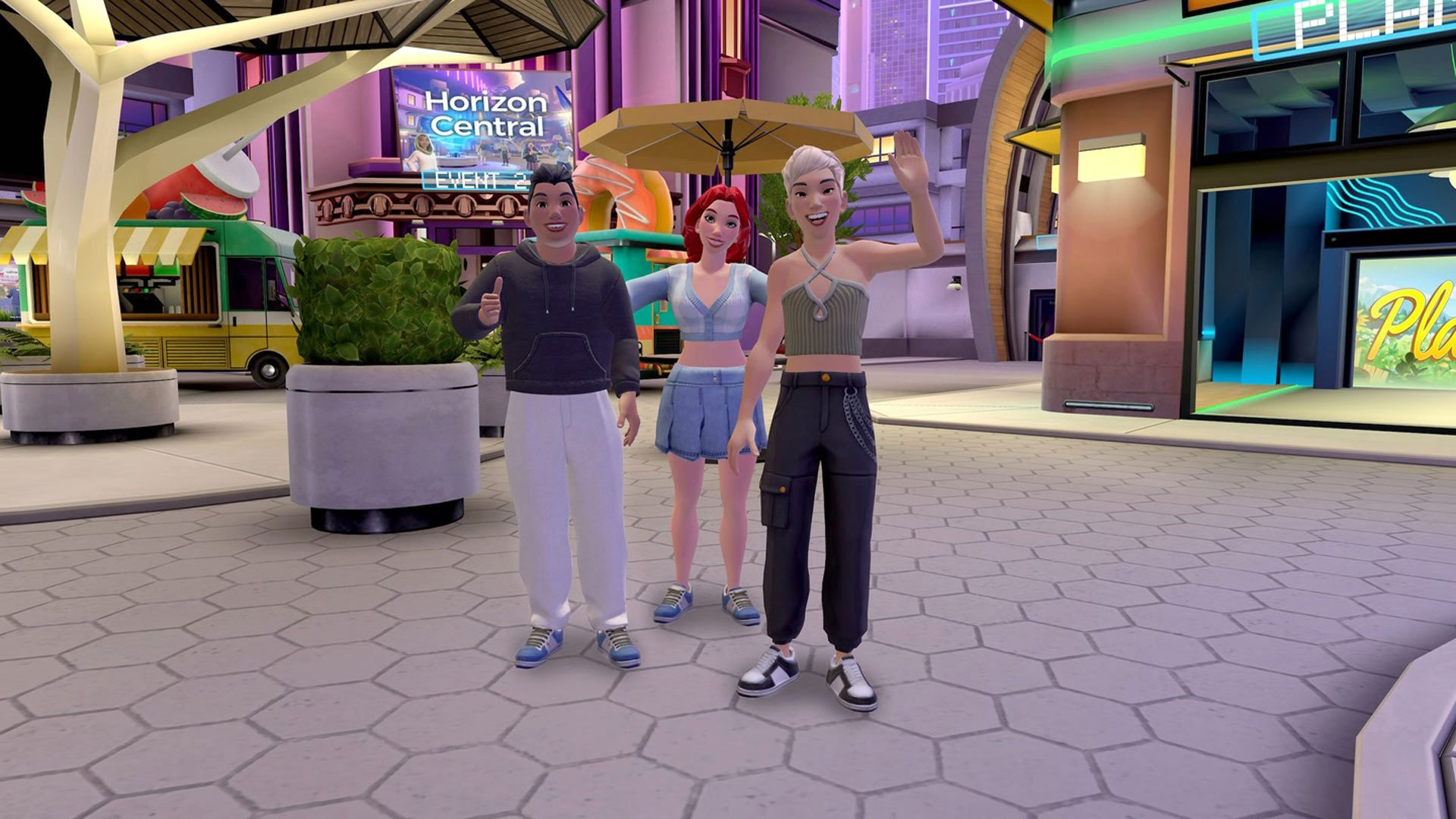
Meta announced it’s separating Horizon Worlds from the Quest platform, as the one-time social VR app is going “almost exclusively mobile” moving forward.
The News
“Our goal remains constant: to empower developers and creators as they build long-term, sustainable businesses,” said Samantha Ryan, VP of Content at Reality Labs. “We used to have a pretty well-defined audience for VR, but as we’ve grown, we’ve attracted new audiences—who want different things—and the onus is on us to make sure that each of these distinct groups can find the apps and games that appeal to them.”
Here, Ryan is referring to evolution of it userbase. In February 2025, the company announced that younger users were helping to push a new emphasis on free-to-play content.
Image courtesy Meta
“That’s why we’re changing our roadmaps to increase your chances for success. We’re explicitly separating our Quest VR platform from our Worlds platform in order to create more space for both products to grow,” Ryan said. “We’re doubling down on the VR developer ecosystem while shifting the focus of Worlds to be almost exclusively mobile. By breaking things down into two distinct platforms, we’ll be better able to clearly focus on each.”
This largely echoes statements made by Meta CTO Andrew Bosworth last month defending layoffs affecting 10 percent of its Reality Labs, wherein he explained that higher costs and a fractured development process led to the decision.
“Having to build everything twice—once for mobile and once for VR—is a tremendous tax on the team. You’d rather grow a giant audience and then work from a position of strength,” Bosworth said.
While Worlds promotion is being removed from Quest’s suggested content feed, at the time of this writing Horizon Worlds is still downloadable from the Horizon Store for Quest. It remains to be seen when Worlds will be decoupled entirely.
My Take
While Meta has never shared concurrent user numbers for Horizon Worlds, one of the key limiters in the beginning was undoubtedly the need for a Quest headset to play. It wasn’t available on anything else, which is fine when you have a addressable concurrent userbase in the multimillions—something even the most popular VR platform can’t claim at this point.
Notably, before Meta released on Android and iOS in late 2023, other social VR platforms had already made strides in the direction of bringing support to mobile, including class leaders VRChat and Rec Room. So, Meta followed suit, and quickly found out that kids with cellphones were spending more time and money in Horizon Worlds than Quest users.
And ultimately, some of this came down to control. Ostensibly hoping to avoid publicly-damaging controversy from the get-go, Meta initially kept a fairly tight leash on user-generated content, including complexity and visual richness of worlds. Even now, user avatars are fairly basic, with the pipeline of customization funneled to purchasable accessories rather than user-generated avatars, like you might see in VRChat.
That said, Horizon Worlds experienced a much slower and rockier start than Meta likely thought it would following its initial release on Quest in 2021. In retrospect, Meta’s more recent decision to mix user-generated Worlds with actual VR apps in the Store feed was probably a last ditch effort to get Quest users finally interested in Worlds—even if by accident.
Pirates VR arrived to standalone VR a full year after its original PC VR release. As expected, there have been some graphical compromises to bring the game to Quest, but the overall experience remains intact.
UploadVR originally reviewed Jolly Roger on PC VR in 2025, so if you are curious about the actual game itself, you should read our review. Note, however, that the game has received significant updates since then that address some things pointed out in the review. For this article, I replayed the entire game on PC VR, followed by the Quest port, so I experienced the improvements firsthand.
The sardonic, oftentimes annoying parrot companion’s dialogue can be toggled on or off. Frankly, this option alone is worth half a star back on the rating (I’m only half kidding). A new intro and notes scattered throughout the campaign flesh out the story a bit more by filling in the backstory of Davy Jones and a reason why the player character embarks on the quest to begin with. Motion controls have been implemented to the swimming sections, a welcome addition for immersion. Lastly, the enemy AI is stated to be improved.
Equipment Used
My PC uses a Ryzen 5 5600X processor with 64 gigs of DDR4 RAM and an RTX 5070 Ti GPU.
I replayed the PCVR version on Steam using a Quest 3 via Virtual Desktop on the Ultra preset in VD. In game, I left the graphics on the default medium setting. The highest caused some stutters on my PC when I started recording.
For standalone, I played and recorded natively on Quest 3 with a metrics meter running to monitor framerate. This game is NOT available for Quest 2 or Quest Pro, so those were not tested.
You can find the minimum and recommended specs on the Steam page to learn more.
The Quest version uses two common standalone VR optimization methods. The first is Application Spacewarp (ASW), an optimization technique where the game renders at 36 frames per second, then the system synthesizes the missing frames to output 72 frames per second to the display. This is most noticeable in the form of micro stutters when grabbing objects. The second is fixed foveated rendering, where pixels on the periphery of the field of view are rendered at a lower resolution than the center of the view. This is noticeable if you keep your head still and move your eyes in any direction.
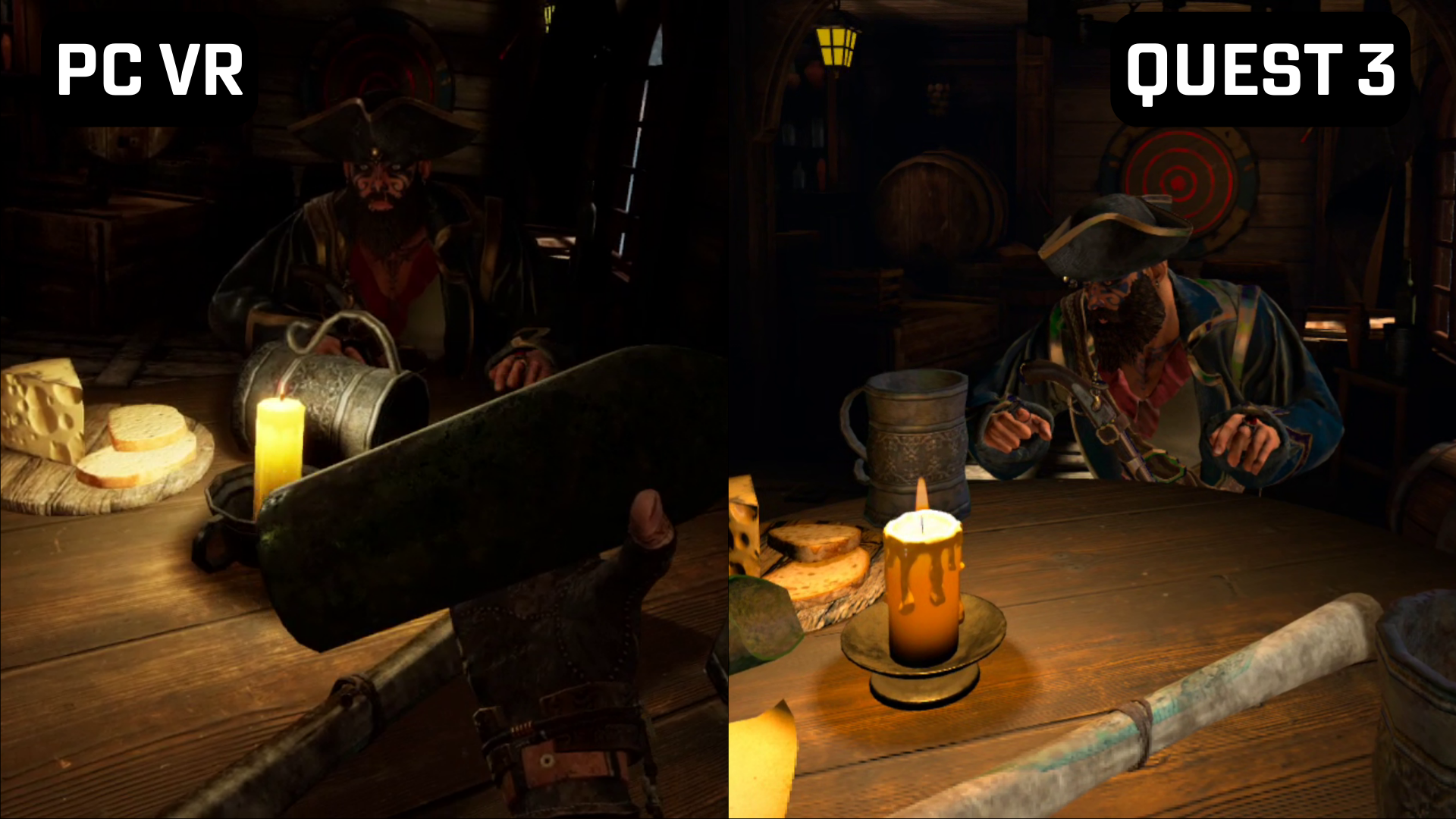
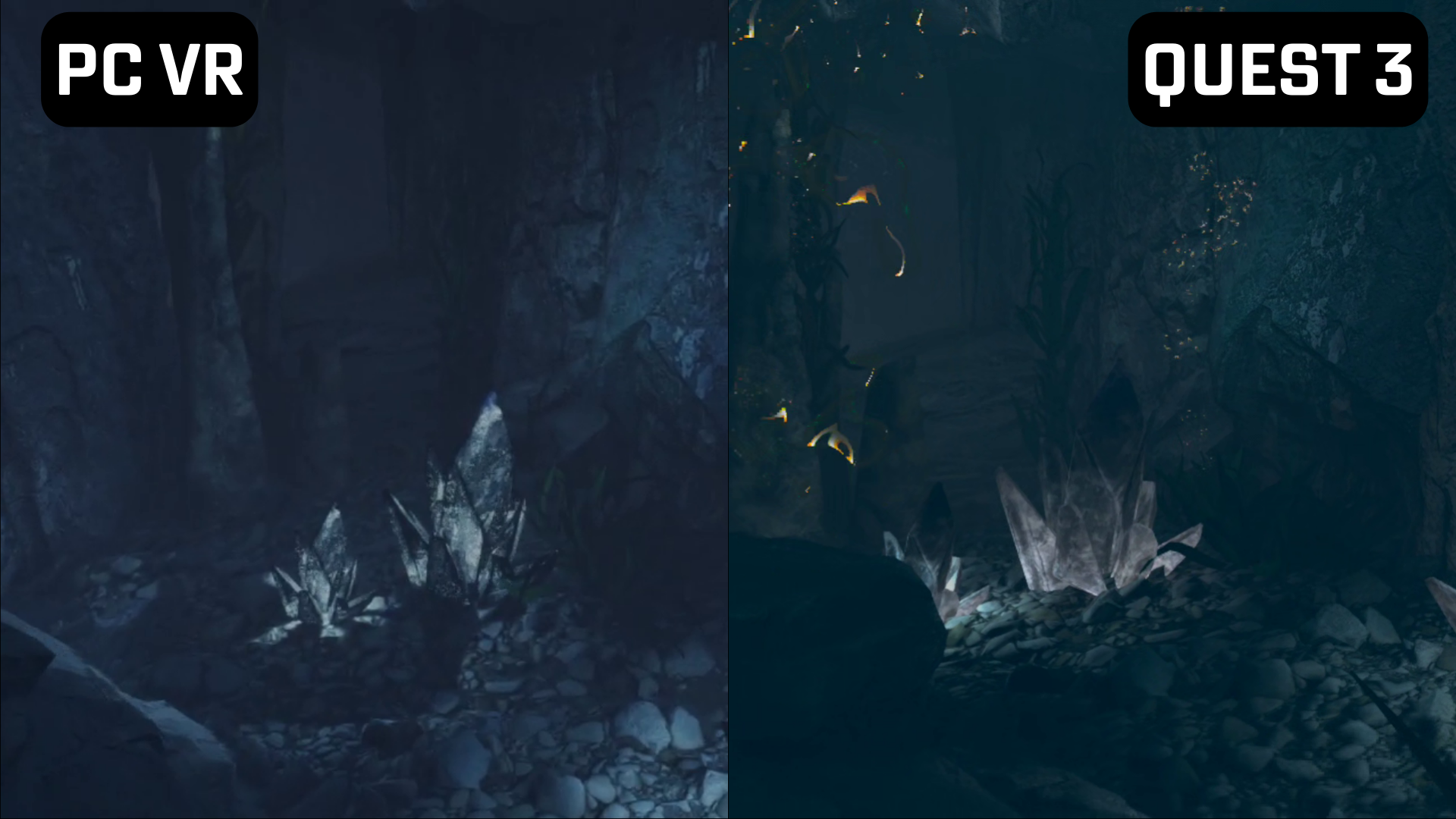
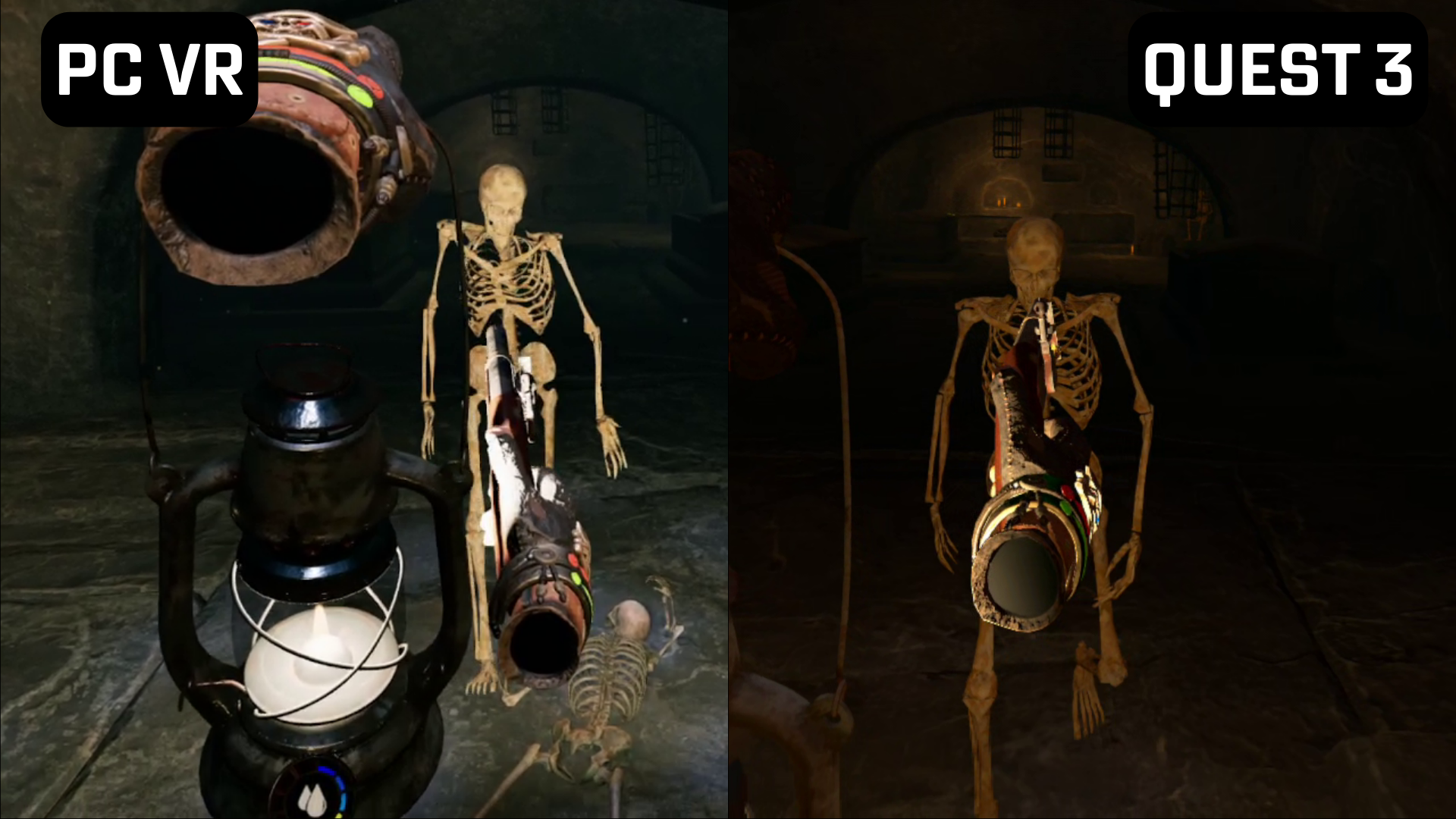
The aforementioned new intro is a good place to start when comparing the graphics. This scene has a pirate, the brother of Davy Jones, sending you on a quest to find the infamous pirate and his treasure. On both versions, the lone candle on the table provides some dynamic lighting. Doing something as simple as picking up a wine bottle and watching the light of the candle dance around it would’ve been unheard of for standalone a few years ago. The lamp you acquire early in the game also behaves the same way. Most of this game takes place in dark caves and dungeons and the lamp lets the developers keep dark corners dark, instead of that sort-of-dark-but-really-just-gray darkness seen in previous standalone efforts. Having said that, there is a significant difference in the lighting. The lamp on PC illuminates and casts shadows against everything while the Quest lamp is more selective.
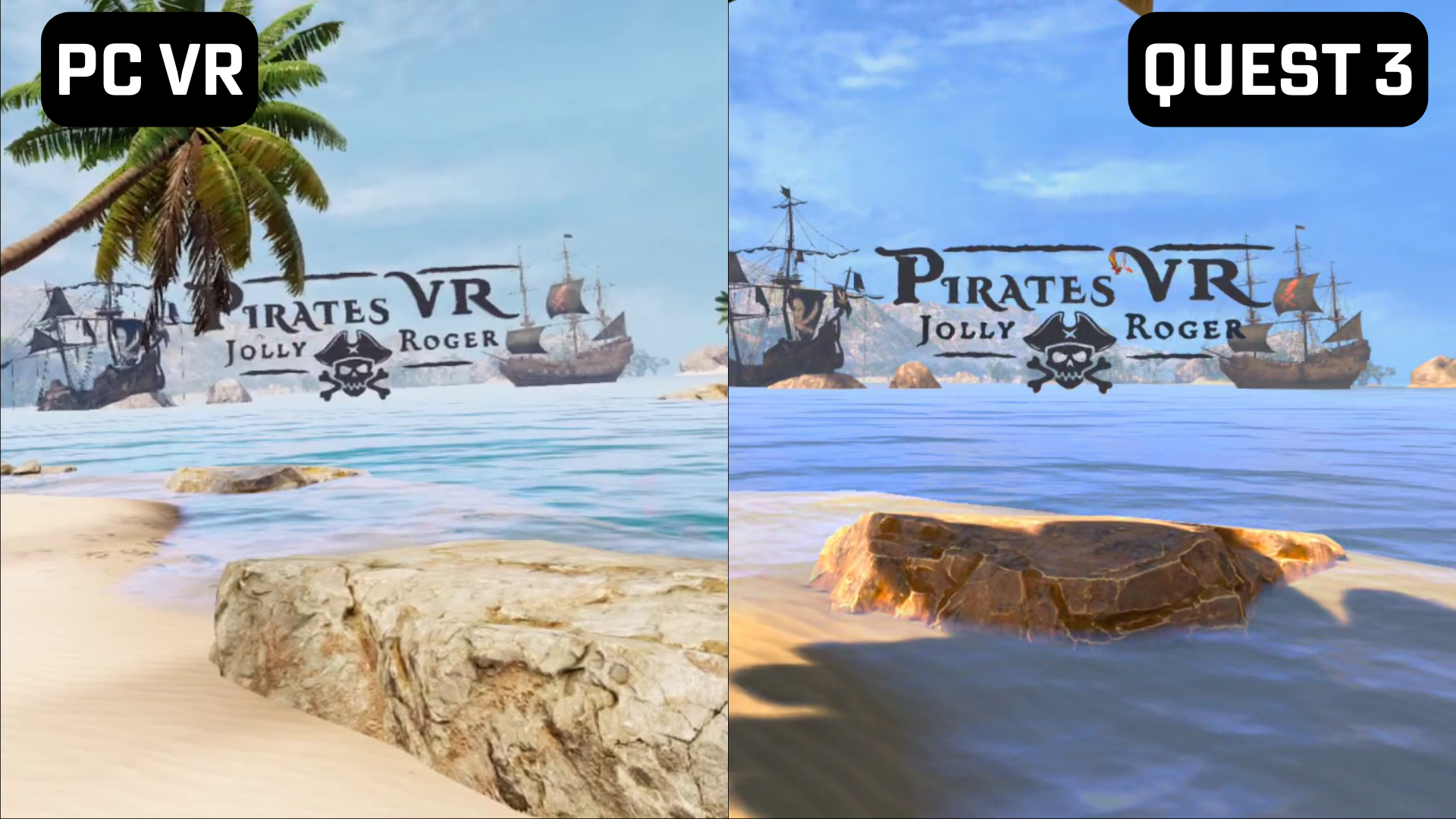
Pirates VR: Jolly Roger PCVR vs Quest comparison
I expected the draw distance looking out to the ocean to be reduced by a heavy use of fog, but that’s not the case. The entire area is intact with a surprising amount of detail preserved. Little things, like the dust particles when grabbing a vine add to the overall experience. However, looking out to the horizon caused a major frame drop I experienced in the game, going from 72 to the low 50s. There is quite a bit of texture pop-in, but that was there with the PC version as well (especially underwater) unless the PC graphics were highest setting and even then, the odd rock or bush would still pop into view as you approached it. The level of detail and texture quality on the environment items (rocks, ground, walls, plants) have clearly been reduced, but not to the point of breaking immersion. The skeletons you spend the entire game fighting are more detailed on PC than Quest, but this didn’t really stand out until encountering the enemies wearing clothes later in the game.
0:00
/1:01
Even the water (mostly) holds up. Water in general is a struggle for standalone headsets and Jolly Roger doesn’t buck that trend, but it holds up better than most Quest games. There’s an extensive stretch spent underwater about a third of the way through the game and Split Light Studio (in partnership with Incuvo) translate that well to standalone, albeit with an odd blue sheen in the distance I did not notice on PC.
Overall, this is a strong PC to standalone port. It feels more like playing a PC game on the lowest settings with reduced texture quality as opposed to past Quest ports where entire assets, like grass, benches, and trees are removed and draw distance is drastically reduced.