Plus, a major Ball x Pit expansion and a release date for a game I can’t wait to play more of.


Plus, a major Ball x Pit expansion and a release date for a game I can’t wait to play more of.
GL.iNet has unveiled the Mango 2 (GL-MG1300), a compact travel router with dual-band Wi-Fi 5, Gigabit Ethernet and USB 3.0. The device supports WireGuard and OpenVPN, along with Ethernet, Wi-Fi repeater, USB tethering and USB cellular modem connections. The Mango 2 is powered by a dual-core MediaTek processor running at 880MHz, although GL.iNet does not […]
Going back to last year the Igalia open-source consulting firm has been working on enhancing the Linux kernel to help Steam Play gaming on ARM64 and ensuring the FEX emulator is operating efficiently for x86/x86_64 games running on the likes of the Steam Frame. After other kernel work in recent months, there’s finally an updated round of the FUTEX get_robust_list2 and set_robust_list2 system call patches…
Nginx Proxy Manager 2.16 introduces a new web UI log viewer, per-path access lists, security fixes, networking improvements, and updated Certbot support.
53 images that users uploaded into OpenAI models were included in training data — and then AI agents in an OpenAI research environment posted those 53 images on public image hosting sites.
While posted as links that weren’t publicly listed, “the images could still be discovered even if the links were not publicly listed,” reports TechCrunch:
OpenAI said it was working with the hosting providers to remove this content, though some of it is apparently still online. OpenAI said it could not notify the affected users because “our technical approach and privacy policy” prevent it from “reassociating” the images with the original providers, but declined to say how the lab determined whether the images were provided by users.
The news came in a post collecting public statements from the lab’s ongoing review of incidents in which its models escaped the company’s scrutiny, accessed the open internet, and misbehaved in various ways. OpenAI said it would continue disclosing anonymized accounts of incidents like these, and said it had contacted dozens of victims, including governments, universities, public agencies, to notify them of the agents’ activities.
Friday night news also broke that OpenAI’s agents also tried unsuccessfully to infiltrate the U.S. Department of Education’s site this summer “without the company’s knowledge,” reports Politico.
And OpenAI’s models also accessed the website of the U.S. Commerce Department using credentials found in online code repositories, according to the article. OpenAI confirmed the incident Friday, “saying its technology did not manage to access information that was not already public or change government data and systems.” The article adds that OpenAI’s models also accessed the web site for America’s Securities and Exchange Commission:
One senior federal IT official said the government still did not have a clear understanding of what happened across the three agencies. “We still don’t know what public data was accessed and how it was accessed, because OpenAI has not shared specific technical details with us yet,” said the official, who was granted anonymity because they were not authorized to speak publicly about it. OpenAI discovered the Commerce and SEC incidents as part of its ongoing review of incidents where its technology has acted in unintended or “misaligned” ways.
About the models posting user-uploaded images, TechCrunch’s article notes that OpenAI stressed “that its enterprise users are automatically opted out of having their interactions used to train future models; however, consumer users are opted in unless they affirmatively choose not to share their data.” (As OpenAI’s announcement describes it, some of their agents’ training data “contains content from, or derived from, training-eligible user interactions.”)
Posting the images is “not an appropriate use of this data,” OpenAI acknowledged, adding that it happened before new safeguards added after the Hugging Face incident. This latest incident appears as an update on a new OpenAI page that “brings together our reports and updates on the Hugging Face incident, related research and public presentations, additional activity we have identified, what we have learned about the role of model misalignment, and measures we’re taking to strengthen our systems.” (It also notes that there’s now a name for models posting on third party sites — “agent spam” — which they consider distinct from cybersecurity, though “we need to address both.”)
“As part of our response to our ongoing investigation, we have improved our training and evaluation processes, including building safety cases, securing and red-teaming our systems to prevent the model from exfiltrating data, and implemented additional monitoring. We are continuing to review agent activity in research and evaluation runs, working backward month by month starting from the Hugging Face incident.”


Read more of this story at Slashdot.
A new blog post published on Thursday covers the experimental support for SIMD with the Go programming language. This expanding Go SIMD support also includes a platform-independent API for making use of SIMD with modern processors…
OBS Studio 33 has entered public beta testing today as a major release of this open-source, cross-platform, and free video recording and live streaming software that promises new features and improvements.
ARK Electronics recently showcased the ARKV6X-RT, an NDAA-compliant flight controller based on the FMUV6X-RT and Pixhawk Autopilot Bus open standards. The module uses an NXP i.MX RT1176 microcontroller and includes three synchronized IMUs, onboard FRAM, a secure element and PX4 Autopilot support. For context, the i.MX RT1176 integrates a 1GHz Arm Cortex-M7 core and a […]
Heidi Overton, President Trump’s nominee to lead the Food and Drug Administration, went before the Senate health committee Thursday, facing questions about her stances on vaccines, flavored vapes, birth control, and abortion, among other issues. She spent nearly two hours stonewalling senators, even on softball questions.
Overton, a physician with a doctoral degree in clinical investigation, is currently the deputy assistant to the president for domestic policy. She previously worked at a conservative think tank and has taken a clear stance opposing abortion, raising obvious questions about her objectivity. The FDA is currently reviewing the safety of the abortion pill, mifepristone, despite extensive data showing it is extremely safe.
Overton also notably stood behind President Trump at a press conference in August during which Trump falsely called the measles, mumps, and rubella (MMR) vaccine “quite lethal.” He further claimed that vaccine doses for infants are “like the size of a soda bottle,” and called for the MMR vaccine to be split into three separate immunizations, despite no evidence of benefit from such a split and no such individual immunizations being available in the US.
A US appeals court today approved the Trump administration’s blacklisting of Anthropic technology. Judges decided the US had authority to blacklist Anthropic for withholding certain AI features even if Anthropic had no malicious intent.
In a 2-1 ruling issued by the US Court of Appeals for the District of Columbia Circuit, a panel of judges said the “case raises profoundly difficult questions about the appropriate military uses of an almost unimaginably powerful new technology.” The US “raises the deeply sobering prospect of overly constrained AI models shutting down unexpectedly and thus causing important military operations to fail. Anthropic raises the deeply sobering prospect of unconstrained AI models hallucinating inappropriate targets for lethal military force,” the ruling said.
Trump and Defense Secretary Pete Hegseth “must determine how best to balance the competing risks,” the court said. “In doing so here, the Secretary did not transgress any limits on his authority under the Supply Chain Security Act or the Constitution. Accordingly, we deny the petitions for review.” The same court previously denied Anthropic’s emergency motion for a stay in April.
Tesla’s pivot from making electric cars to humanoid robots is facing challenges because of complex robot hands and disgruntled employees pushing back against training their robotic replacements. The struggle to scale up production comes as Tesla CEO Elon Musk has bet the company’s future on AI and robotics.
As someone who frequently makes claims that fail to materialize, Musk has described the Optimus humanoid robot as potentially “the biggest product ever” during Tesla’s second-quarter 2026 earnings call. But he also acknowledged that making an autonomous humanoid robot capable of handling many different tasks is “one of the hardest things to solve”—and now extensive reporting by The Information has revealed multiple complications that Tesla is trying to tackle while developing general-purpose robots and scaling up for mass production.
Tesla’s Fremont factory in California has already stopped making the Model S sedan and Model X SUV as of May 2026, with the company switching both line workers and engineers over to working on Optimus, according to The Information.
Researchers say they recently found Google ads delivering a sophisticated tech support scam that freezes the screens of both Windows and Mac devices and displays messages urgently instructing them to phone a bogus call center.
The ads were displayed all over the web, including on high-traffic maps, weather, real-estate, document-hosting, and sports sites. Users who called the number were then urged to pay hefty fees, grant remote access to their devices, or divulge personal information. From August 31 to September 14, security firm Netskope observed users from 619 customer organizations click on the malicious ads, although none of them were actually scammed because Netskope blocked the content.
Roughly 62 percent of the organizations were based in the US, with Japan and Australia accounting for the Nos. 2 and 3 spots. Since the firm has visibility into only a tiny sliver of Internet activity, the number of people exposed to the ads—including those who fell victim to it—is likely much higher. Netskope tracked more than 250 Google Ads campaign IDs across at least 284 legitimate publisher sites.
The latest update for co-op dungeon crawler Dungeons of Eternity adds a new extraction-style game mode alongside new enemies, loot, and weapons.
Developer Othergate also overhauled the game’s lighting and rendering for better performance.
Here’s the official trailer from Othergate:
0:00
The new Tomb Extraction mode brings the high-risk/high-reward gameplay of extraction shooters like Ghosts of Tabor to a fantasy combat setting. During Dungeon Raids, the ‘red’ dungeons in the run selection map, you will collect crypt runes. Those runes are used in a new crypt dialing device in the outpost to create a tomb run, determining the crypt layout and loot contained.
Tomb Extraction also introduces five new weapons:
Finally, the Crypt Guard is a new enemy type that can hear your voice and magic. It will investigate any sounds and alert other enemies to your position.
Last and arguably most important, there is a playable lute in the outpost with sixteen chords, fully networked so you can play songs (or just horrifically bad sounds in my case) for your friends.
A New Mexico jury on Friday “found Facebook liable for deceiving users” about its privacy protections, reports the Associated Press.
A New Mexico newspaper calls it “another massive legal victory” against Facebook, reporting that the jury found Facebook “had committed tens of millions of violations of the state’s Unfair Practices Act in connection with its lies to consumers about how their personal information was handled by the company and third-party users.”
The state has asked the company be ordered to pay the maximum civil penalty of $5,000 per violation meaning a judge could potentially order the company to pay billions in penalties to the state. The jury also found the company had been dishonest about its investigation of and response to the 2013 Cambridge Analytica data breach scandal, in which approximately 300,000 Facebook users took an online personality quiz, only to have the app that hosted the quiz harvest data from tens of millions of their “friends.” The data was then transferred to the British consulting firm, which used it to create targeted political ads during the 2016 U.S. presidential election.
More details from Reuters:
The verdict followed a two-week trial over a lawsuit filed by New Mexico’s attorney general in 2021, three years after news reports revealed that the firm, Cambridge Analytica, had harvested personal data from as many as 87 million Facebook users through a third-party app… At a press conference after the verdict was announced, New Mexico Attorney General Raúl Torrez said the case revealed “in stark detail the way in which this company plays fast and loose with the rules.”
Jurors found 26 of 29 statements identified by the state were misleading, including comments about user data… Judge Francis Mathew will now determine civil penalties after jurors found more than 43 million violations, based on the number of people affected by the company’s misleading statements… [New Mexico Attorney General] Torrez said his office is evaluating how much to seek but will push for the maximum penalty based on the jury’s findings. The state will also ask [Judge] Mathew to direct Meta to make changes, which could include corrections to its past misstatements as well as an audit of the way it manages user data, Torrez said.


Read more of this story at Slashdot.
The Redox OS open-source, Rust-based operating system has seen a lot of activity in recent weeks with many notable improvements landing…
Just Hoops dropped its 2.0 update this week in conjunction with Meta Connect, focusing on hand tracking and more accessible ways to enjoy the top-ranked basketball experience.
Per developer Realcast, this update was developed over the last year using player feedback and with added support from Meta, who now has a vested interest in seeing more games embrace hand tracking with the reveal of the controller-free Meta VR Glasses this week.
At the time of this article, we do not know if any of the features will be coming to the Steam version of the game.
Here’s the trailer:
0:00
The main driver of this update is hand tracking, with the game offering improved hand tracking alongside different shooting methods to accommodate a wider swath of players.
Natural Shot is just what it sounds like. You reach out with your real hands, grab the ball, and physically shoot at the hoop. It sounds easy enough, but shooting, throwing, or otherwise ejecting an object from your hands in VR can prove tricky at times. Just Hoops accounts for this with optional assists. The scoring system rewards up to eight points per basket depending on the assists, incentivizing putting in the time to learn how to shoot well unassisted.
The assists available are as follows:
Pointer Shot is a simpler, more relaxed method where you aim with your hand and shoot with a simple gesture (see the trailer above). This mode is more suited for casual, noncompetitive players and seated play. It awards two points per basket.
You can compete against other players with online matchmaking or set up a private room for up to four players if you want to hoop with your friends.
The Trickshots mode turns your real environment into a basketball playground in mixed reality with the ability to place hoops and various obstacles around your room to create custom shots. I am dating myself here, but it gives vibes of the 90s Michael Jordan/Larry Bird “Nothing But Net” commercial.
The Zen Mode removes the timer to let you play at your pace, practicing shots and discovering levels in a relaxed environment without the scoring and time-limited pressure.
The 2.0 update also introduces a clearer path to unlocking new levels, series, and challenges, giving newer players more guidance and returning players new objectives.
The 2.0 update also adds a new 1970s-inspired retro environment in line with Just Hoops’ arcade identity, more dynamic levels, updated tutorials, and a redesigned menu user interface.
The 2.0 update is available now for Just Hoops on Quest.
GOLF+ continues to add to its ever-growing lineup of real-world golf courses with Medinah Country Club No. 3, the site of this year’s Presidents Cup.
Medinah Country Club No. 3 is the latest real-world course added to GOLF+. Set twenty-five miles west of Chicago, Medinah and its gorgeous clubhouse have hosted three U.S. Opens, two PGA Championships, and a Ryder Cup. This week, it adds the Presidents Cup to its storied history.
Now VR golfers can shoot for the greens, as well.
0:00
Medinah Country Club No. 3 is available now in GOLF+ for $11.99. Players can also subscribe to the GOLF+ Pass service for $9.99 a month (or $99.99 per year) to get access to all courses.
GOLF+ is out now on Quest for $29.99 and comes with three original courses. It is also available as part of Meta’s Horizon+ subscription service. It can be wishlisted on Steam now ahead of its upcoming release on that platform.
Shil takes you on a twisted journey into the subconscious with an interesting two-tone art style.
The environmental-puzzle psychological horror game drops on Quest on October 8 with a Steam launch also planned.
Here’s the trailer from developer OSM Games:
0:00
In Shil, you will navigate a fractured, ever-changing world with unseen enemies built by an AI that serves as your guide. You are armed with a slingshot to fend off the invisible enemies and unlock more parts of the world as well as a magnet to assist with the puzzles.
Personally speaking, ‘trippy’ is the best word I would use to describe this game on paper. I love a good environmental puzzle game though, so this one I will follow up on next month with my thoughts after playing it.
Shil can be wishlisted now for Quest and Steam. It releases on Quest on October 8 for $14.99. The Steam release is unknown at the time of this article.
Meta is launching a new slate of original immersive programming with Open Season, a documentary series following NBA player Draymond Green through therapy sessions during the 2025-26 season.
Open Season is the first production released under the new Meta Presents banner.
The series follows the four-time NBA champion through six real therapy sessions with sports psychologist Dr. Carrie Hastings, captured at different points during Green’s 2025-26 season with the Golden State Warriors, as Green deals with personal and professional struggles.
0:00
Trailer for Open Season.
According to Meta, Open Season was shot specifically for VR in stereoscopic 3D 180° video using Blackmagic URSA cameras. The camera perspective places the viewer in the room alongside Green and Hastings during their conversations.
The series is produced by Skydance Sports, Green’s production company The New Media, and Meta. Meta says the sessions are unscripted, with Green discussing pressures surrounding his basketball career in real time rather than recounting them later for the documentary.
Meta has been expanding its immersive entertainment lineup. At Connect, the company announced 3D movies from Disney+, new immersive sports broadcasts with “8K streaming and 180-degree views”, the upcoming National Geographic: Beyond app with 180-degree 3D footage, and a 3D version of Billie Eilish’s Hit Me Hard and Soft: The Tour concert film coming exclusively to Quest in November.
Meta VR Glasses are also set to arrive next spring, with the company positioning the lightweight headset around media consumption as a main use case.
Open Season will be available beginning September 29 through the TV app on Meta Quest.
Fast Travel Games is holding an open playtest for its upcoming co-op VR heist shooter Payday: Aces High on October 19. Anyone who joins will get an exclusive Kitty Mask as a reward for participation.
This playtest will be for both Quest and Steam players. James Tocchio and I participated in the limited-time August preview build and came away very impressed with Aces High overall.
 UploadVRMike Johnson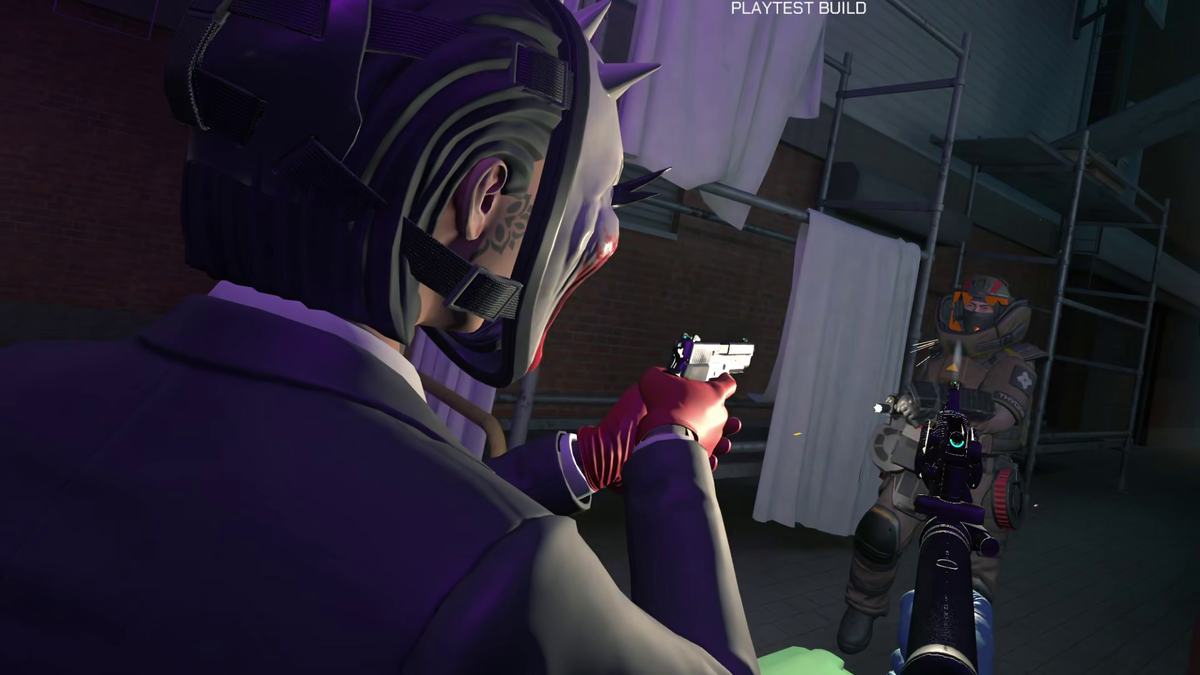
That preview just included the base tutorial and first heist of the game. The October 19 playtests will have two heists available for you to test. For clarity, the full game will launch with six heists and more to be added before the end of 2026.
Anyone, like James and me, who participated in the August closed playtest will need to sign up again for October.
If you would like more information on Payday: Aces High, check out our interview with Fast Travel’s Erik Odeldahl shortly after we played the game in August on the UploadVR Gamescast.
 UploadVRMike Johnson