If you love the convenience of a Kindle but miss the feel of having a physical book in your hands, we have some tips for you.

I recently switched music streamers from Apple Music to Tidal. I like Tidal’s strict anti-AI features, the fact that it pays higher royalties to artists than other major streamers, and its focus on high quality audio. I wrote a post featuring eight hacks for Tidal users, but I wanted to highlight one in particular: How to transfer playlists without paying anything.
Tidal points new users toward third-party transfer tools like TuneMyMusic and Soundizz, which are both easy to use, but they’re subscription services, and they only transfer a few hundred tracks for free. I have thousands of tracks, saved in a ton of playlists. The easy solution was to grumble and sign up for a month, then cancel when the tracks were transferred, but it just didn’t sit well with me. A playlist is just a collection of song names, so why should I have to pay anything to transfer it? To solve the problem, I came up with a simple script that transfers playlists from Apple Music, Spotify, and any other service that lets you download your tracks as a text file to Tidal. I will not be charging a fee.
Download your playlist as a .txt file. You can do this directly from Apple Music under File>Library>Export Playlist. You can’t from Spotify, but the free site Exportify will download any of your playlists as a spreadsheet file you can save.
Install Python on your system. Double click “install certificates” in the folder that opens after installation.
Download this script. Save it in the same file as your playlist.
Run the script: (For Mac, open Terminal. For Windows, go to the Command prompt. Type python3 on a Mac or py on Windows.) Drag the script into the terminal window and press enter. It should ask you to drag your downloaded playlist into the window next.
Sign in to Tidal. Hit “Approve” to give permission for Tidal to run the script.
Have a banana. The script is going to search for all the songs on your playlist and match them to Tidal’s library, so it can take a little while. I tested it with a playlist from Apple Music with 2,397 songs. It took about 20 minutes and found 2,362 of my tracks, a 99% success rate.
Fix the leftovers: The program creates two separate text files for “orphans.” One is songs it couldn’t find and one is songs it might be worth double-checking manually.
If everything goes well, your large playlist should be available on Tidal.
Note: The script uses a community-created library to talk to Tidal, so it could stop working if Tidal changes things up.
Other recognizable companies include the owners of discount department stores TJ Maxx and Marshalls and the golf equipment brand Titleist. Dozens of other firms have said little about how they plan to use the money other than to characterize the windfall as the kind of earnings they use to determine executive bonuses. The Trump administration has not publicly detailed which companies are getting the roughly $170 billion in refunds or how much they’ve asked for, and it has denied ProPublica’s requests for this information. But reporters found some of these details while reviewing the disclosures of thousands of publicly traded companies.
Some have described vague plans to pay the money forward by, for example, “returning tariff refunds to our members through pricing,” though they generally don’t say whether that involves price cuts or limiting future increases. Others are paying back businesses they sold products to because they had itemized receipts that detailed the tariff markups. But consumers hoping for refunds appear to be largely out of luck. With the help of artificial intelligence, ProPublica identified companies that said they planned to refund customers with their tariff windfalls. Almost all of them deal with other businesses, not consumers. “Executive bonuses are probably the least just way to use this money because it wasn’t anything the executives did that they should be rewarded for. It was a government mistake that resulted in a refund,” said Gregory Germain, a corporate law professor at Syracuse University. “It really explains why it’s so important for the government, when they’re doing something like this, to think it through to make sure consumers don’t pay extra money and not get it back.”


Read more of this story at Slashdot.
The stunning return of Starship from the skies to a launch tower in South Texas answered some questions about the future of SpaceX’s ambitious rocket program. Namely, it is now rapidly moving toward rapidly reusable launch.
However, it raises other questions. For example, as Starship becomes fully reusable, when might humans fly on the vehicle?
The short answer is pretty simple: If SpaceX prioritizes human spaceflight on Starship, it could happen reasonably quickly. The longer answer becomes more complicated and depends on what one means by human spaceflight. The first people to fly on Starship probably won’t launch from Earth, or land here. Rather, they will probably be NASA’s lunar astronauts. So there are different timelines for humans flying aboard Starship and landing on Earth.

The Internet has been abuzz for months about which actor would replace Daniel Craig as British agent 007 James Bond in the franchise. We finally have the answer: Robert Pattinson, who built on his 2005 role as the doomed Cedric Diggory in Harry Potter and the Goblet of Fire into an illustrious career mixing roles in franchises and Hollywood blockbusters with daring arthouse fare.
“James Bond is one of the most legendary characters in cinema, and to be entrusted with 007 is the honor of a lifetime,” Pattinson said in a statement. “To say this role is a dream come true is an understatement. I couldn’t be more excited about this partnership and the work ahead with this fantastic team.”
The choice will reunite Pattinson with Denis Villeneuve, who recently worked with him on the forthcoming Dune: Part III and will direct the next (as yet untitled) Bond installment. “I want to express my deep gratitude to the remarkable actors who joined us on this journey,” Villeneuve said in a statement. We were surrounded by extraordinary talent, but there can only be one 007. I am overjoyed to welcome Robert Pattinson as our new James Bond. He has the timeless soul of 007 and brings a spirit that is completely new. I cannot wait to begin.”
On the heels of the Nvidia scandal, the Trump administration is preparing to crack down on foreign data centers that are fueling China’s advancements in artificial intelligence by allowing remote access to otherwise restricted high-end chips necessary for AI training.
In a summary of the rule change, the Commerce Department said it was closing a loophole that previously allowed foreign rivals like China, Russia, and Iran to bypass export curbs on certain advanced computer chips by instead renting access to those chips from data centers in Indonesia, Malaysia, Singapore, Thailand, and Brazil.
US rivals could possibly use that access to train and run advanced AI models “capable of supporting military- and intelligence-related activities that could threaten US national security or foreign policy interests,” the Commerce Department said. Among threats, the US fears rivals could use advanced AI to develop “more effective weapons of mass destruction and advanced conventional weapons, coordinated cyber-espionage and targeted cyber-disruption, algorithmic theft, and weaponized disinformation.”
We know it can be difficult for human beings to spot AI-generated content, but can detection software fare any better? Pangram is one of the leaders in the field, promising a “near-zero false positive rate” by looking at “subtle cues” in the writing, based on a training and feedback model comparing human-made content with the AI equivalent.
You’ll find arguments on both sides of the debate as to whether or not Pangram’s claims stand up. After a short story was flagged by Pangram and then judged to be free from AI, the detection engine has been accused of bias against text from minority writers.
Proponents of Pangram would point to an ongoing reward offer—currently at $3,950—available to anyone who can find a pre-2019 (and pre-LLM) piece of writing that Pangram falsely flags as being AI-written. So far, the reward is unclaimed.
As the AI detector has recently added AI image and video detection to its capabilities, it seemed a good time to put Pangram’s analysis skills to the test for myself. Here’s how it performed in the three different content types.
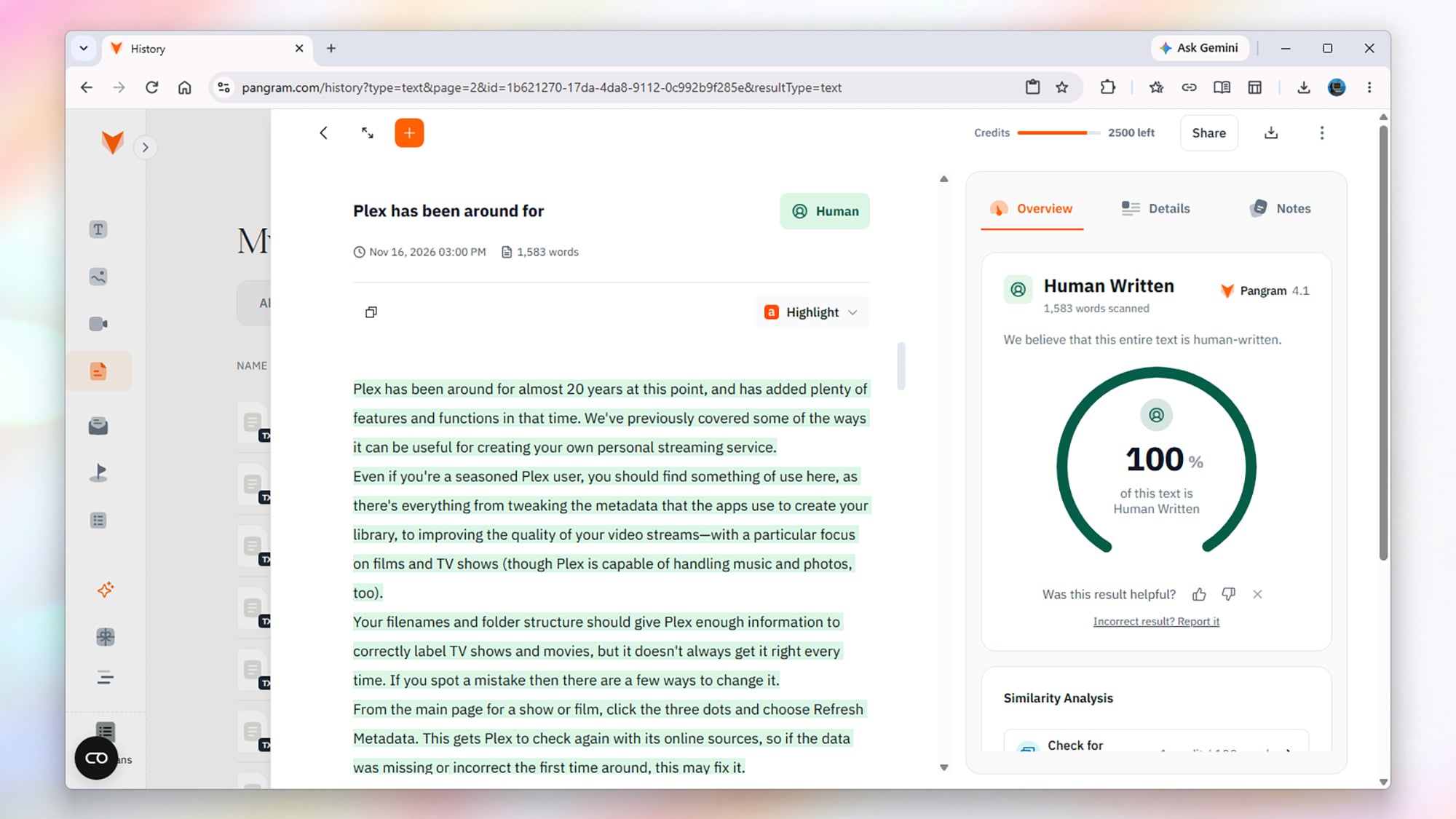
On the human side, I picked out 10 of my most recent articles for Lifehacker, known to be written by a person because I personally wrote them—in the traditional way, I fretted over word choices, went back and changed sentences, and accidentally left in a variety of typos that editors thankfully fixed.
For the AI content, I rotated between ChatGPT, Gemini, and Claude, and got the LLMs to write 10 articles with the same headlines and the same approximate number of words, for a tech-savvy audience. I even asked the AI apps to vary their language use, so that the output would “read less like an LLM has written it.”
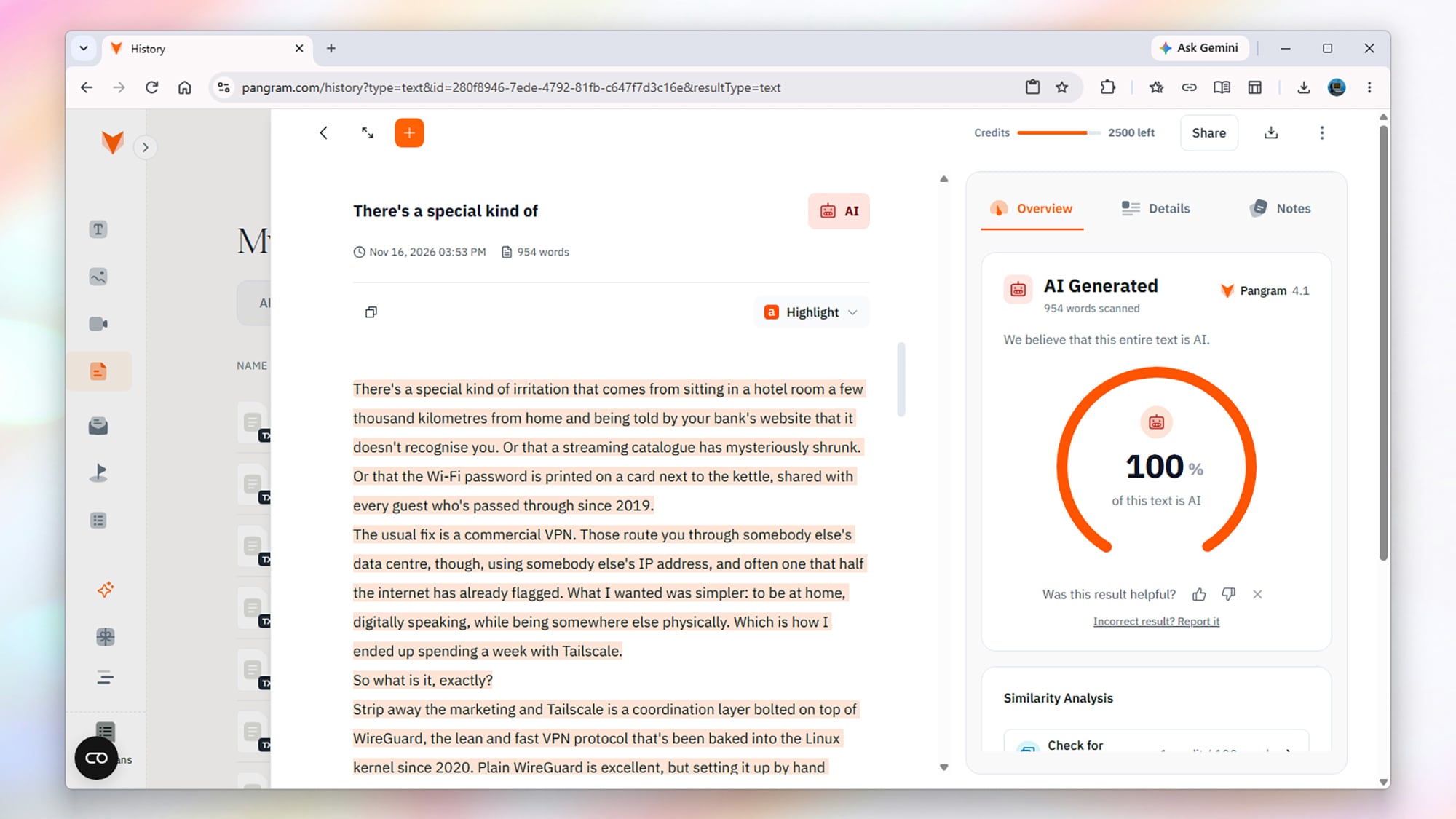
Pangram’s AI text detector lets you upload files, but to make the task a little harder, I copied and pasted all of the text into the online article, so it wouldn’t be able to rely on any metadata included in the file. The scans got the correct result each and every time: Human-written text came back as 100% human, and AI-written text came back as 100% AI.
What’s more, Pangram was certain about its results. All of the human writing was marked as highly likely to be human, and the vast majority of the AI writing was marked as highly likely to have come from an LLM. There were only a handful of phrases or sentences across thousands of AI words that got a “medium” rather than a “high” ranking for AI.
Now, there have been some edge cases where Pangram has got it wrong—like a poem repeating the same six words thousands of times—but as far as this sample goes, it can’t be faulted. Clearly, my writing is too idiosyncratic and too clunky to be confused for the smooth sheen of AI-produced prose.
To be fair, I do have another advantage over AI: I can actually test out devices and apps in a way that LLM bots can’t. ChatGPT can’t experiment with One UI 9 (at least not yet), though it can scrape the web for various experiments and tests that real people have done.
However, I was able to fool Pangram to some extent by alternating AI paragraphs with human-written paragraphs. The text was flagged as AI, but the percentage estimate was typically lower (20-25%) than what it actually was (around 50%). If you’re offloading some but not all of your writing to AI, some of it might slip though as real.
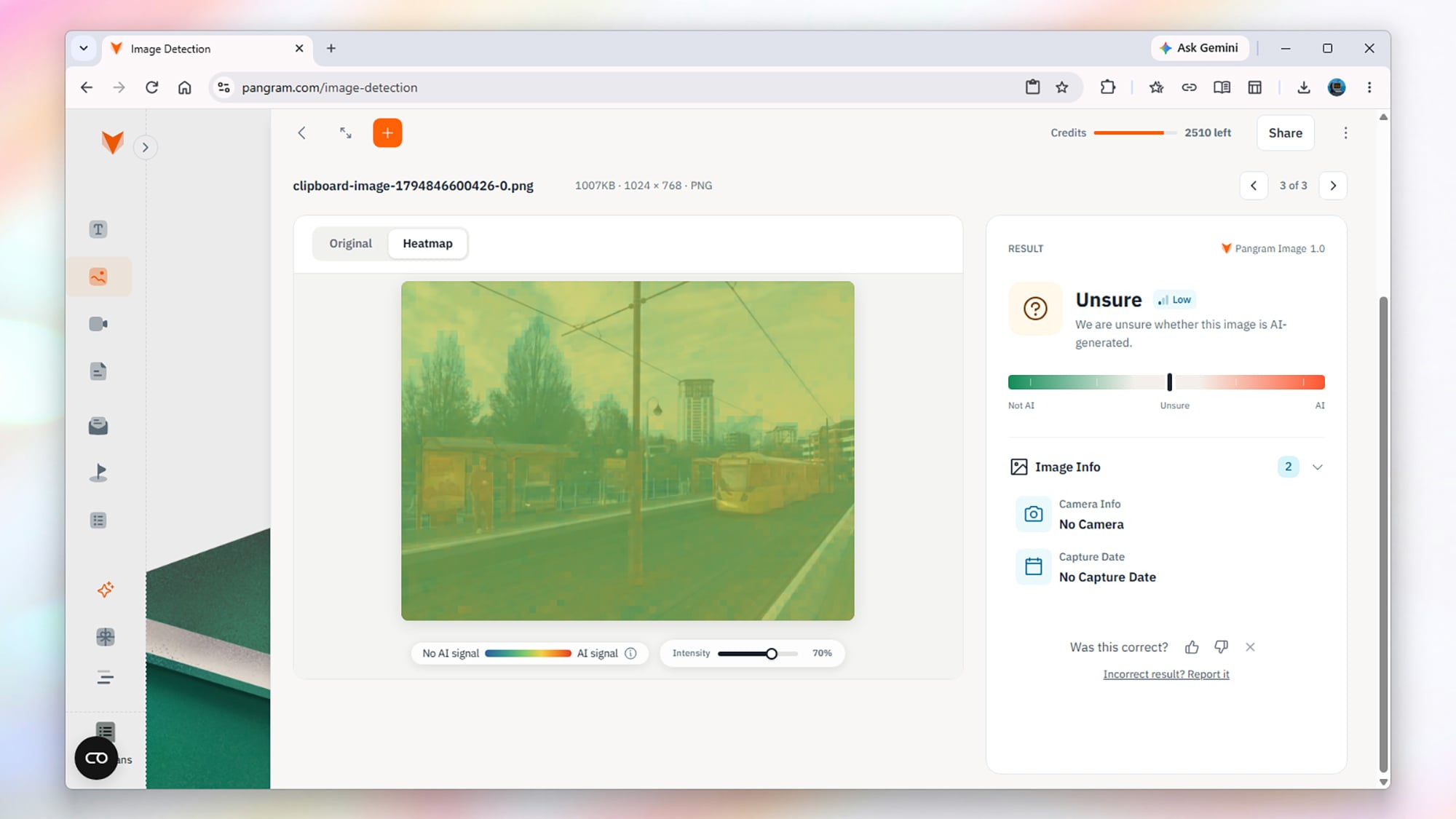
Image and video detection is the new string to Pangram’s bow, so I sifted through my phone’s photo and video library for some pieces of content to test the AI on. Again, I used copy and paste to get the files into Pangram rather than uploading them, to limit how much information the AI detector could get from metadata.
Again, all the human-made content was recognized as such, with a very high level of certainty—whether it was complicated crowd shots or simpler images of natural scenes. Presumably, there are even more signals to go off than there are with writing, including camera movements, colors, style, consistency, and composition.
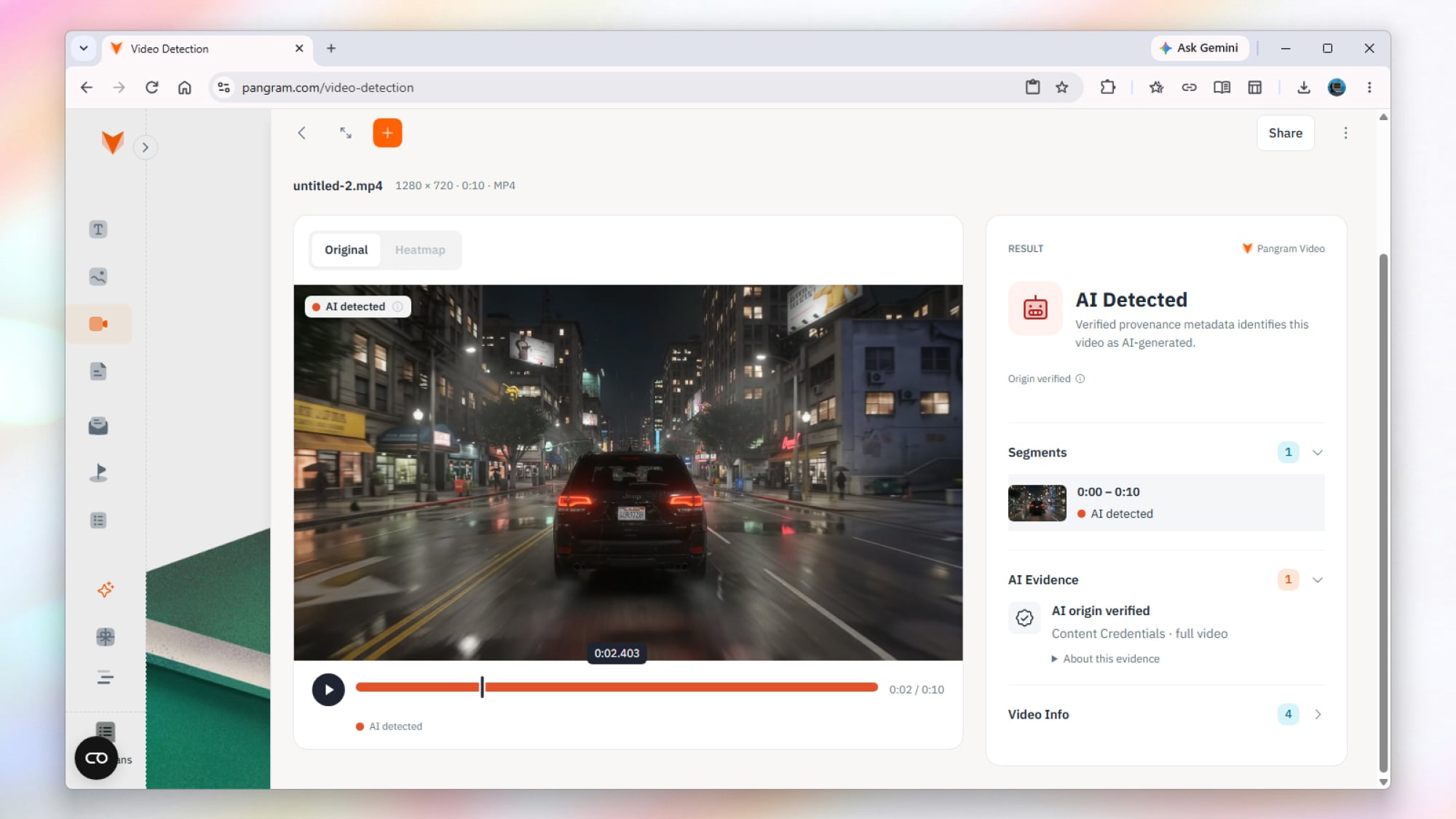
Next up, I generated a few images and videos in Google Gemini and ChatGPT, requesting results that would look as photorealistic and “non-AI” as possible—the resulting files covered people, animals, and buildings. As before, I used copy, paste, and a few screengrabs to try and limit the metadata Pangram had access to.
Here, too, the AI identification was spot on, with all of the artificial content recognized as such, to a high level of confidence. This is perhaps not surprising: I think AI images and especially AI video still have more “tells” than AI writing, especially if you’ve seen a lot of it, so I wasn’t expecting Pangram to fail here.
I did try experimenting with real photos that had a little bit of AI in them, what with tools like Gemini and ChatGPT now so good at image editing, as well as creating pictures from scratch. These were marked as “unsure” by Pangram, though to cut it some slack, only a small amount of the images were altered.
As with the text, the best way to beat Pangram’s detection systems seems to be to include some AI embedded in human-made content. It will most likely still fail the “100% human” test, but the tests I ran showed that Pangram is less certain in these cases, or underestimates the amount of AI there actually is.
Increase the level of AI, and the detection gets more reliable—but if you’re only using AI for a small part of whatever it is you’re making, it’s less worthwhile using AI tools anyway. As far as these tests go, Pangram’s claims about accuracy check out, making it a useful tool if you need to ensure something is AI-free.
The booster automatically aborted its return to the tower and diverted offshore. It completed a landing burn, briefly hovering above the Gulf before its engines shut down and the flight termination system delivered an explosive finale. Starship reached orbit under the power of its six Raptor engines and deployed 26 Starlink V3 satellites. Unlike the previous flight’s brief orbital stint, this mission lasted almost a day. Following a deorbit burn, Starship returned to the launch site 22 and a half hours after it left.


Read more of this story at Slashdot.
We may earn a commission from links on this page.
I recently switched from Apple Music to Tidal, and I’m happy I made the change. The main reason is AI-made music: Tidal has stricter AI filtering than any other major streamer. The second reason is audio quality. While all major music streaming services do basically the same thing, Tidal’s focus has always been on streaming music at the highest possible quality. While other streaming services have more or less “caught up” in terms of pure sonic fidelity, Tidal still is better at getting that quality to your speakers, if you know a few tricks.
If you’re switching from Apple Music or Spotify to Tidal, you probably want to bring your playlists with you. Tidal points new users toward third-party transfer tools like TuneMyMusic and Soundizz. They both have a free tier, but they only transfers a few hundred songs gratis. My playlists are way bigger than that. The easy solution is to grumble and sign up for a month, then cancel when your tracks are transferred, but that didn’t sit well with me. A playlist is just a collection of song names, so why should I have to pay anything to transfer it? To solve the problem, I came up with a simple script that transfers playlists from Apple Music and Spotify to Tidal. I will not be charging a fee. Here’s how it works:
Download your playlist as a .txt file. You can do this directly from Apple Music under File>Library>Export Playlist. You can’t from Spotify, but the free site Exportify will download any of your playlists as a spreadsheet file you can save.
Install Python on your system. Double click “install certificates” in the folder that opens after installation.
Download this script. Save it in the same file as your playlist.
Run the script: (For Mac, open Terminal. For Windows, go to the Command prompt. Type python3 on a Mac or py on Windows.) Drag the script into the terminal window and press enter. It should ask you to drag your downloaded playlist into the window next.
Sign in to Tidal. Hit “Approve” to give permission for Tidal to run the script.
Have a banana. The script is going to search for all the songs on your playlist and match them to Tidal’s library, so it can take a little while. I tested it with a playlist from Apple Music with 2,397 songs. It took about 20 minutes and found 2,362 of my tracks, a 99% success rate.
Fix the leftovers: The program creates two separate text files for “orphans.” One is songs it couldn’t find and one is songs it might be worth double-checking manually.
If everything goes well, your large playlist should be available on Tidal.
Note: The script uses a community-created library to talk to Tidal, so it could stop working if Tidal changes things up.
Like most streaming services, Tidal has a “heart” button called “add to my collection.” You can click on any track, album, or playlist to “like” and saved it. But Tidal also has a separate, somewhat mysterious “Save for Later” option that puts songs, albums, and playlists into a separate collection. There are a couple reasons for this. First, it keeps a running list of new-to-you music waiting for you on a rainy day, and secondly, it (presumably) affects your recommendation algorithm differently. While Tidal isn’t open about every detail of its recommendation algorithm, I assume “save for later” has less weight (if any) on your future recommendations than “add to my collection.”
On Tidal, tracks that are 100% AI-generated get an “AI” badge, earn no royalties, and are never placed on a Tidal-curated playlist. Users can flip a switch in Settings to either allow or disallow AI content, too. Simple, but there’s a bit of nuance that goes beyond the on/off switch. You have to set the AI-toggle separately on each device you use Tidal on, even if it’s the same account. I guess this is so I can listen to AI music in my car but not at my desk? Sadly, AI detection is not a science, so some AI-made, and partly AI-made, tracks may still get through.
If you’re streaming music from a music app through Bluetooth, the output is automatically compressed to a lower quality, and your phone stays in charge, so a phone call or a notification can interrupt your music. But Tidal’s Tidal Connect feature skips the middleman. Music streams directly from your wifi to your speaker and your phone becomes a remote control, so you can take a call, go for a walk, and even run out of phone battery and the music will keep playing.
How to do it:
Have an external device with Tidal Connect compatibility.
Make sure your speaker or other output device and phone or computer are on the same wifi network.
Play a track in the Tidal app.
Open the Now Playing screen.
Hit the device output icon.
Pick your speaker on your wifi network.
Click the icon again to switch back to your phone.
Plenty of wifi speakers don’t support Tidal Connect, so check before you buy. Tidal keeps the full list of supported devices on its site. There’s everything there from WiiM Mini—a $99 small box that adds Tidal Connect to speakers you already own—to dCS components that cost more than a car.
Tidal Connect isn’t the only way to get the highest quality audio from Tidal. You can go for an old school, wired path like I have. I play audio from my desktop and route it directly to a mixer via USB. Here’s the set-up:
In Tidal’s desktop app:
Settings > Streaming > Audio Quality: Max.
Sound Output: choose your mixer as the output device instead of your computer’s speakers.
Exclusive Mode: On. It’s under Sound Output > More Settings. Tidal sends audio straight to the mixer at each track’s native sample rate, without your computer resampling it or mixing in system sounds.
Force Volume. It’s in the desktop app next to Exclusive Mode, under Settings > Streaming > Sound Output > More Settings. Force Volume means Tidal will always output at the highest volume. You’ll be controlling the actual volume from your mixer.
Set your levels with the mixer’s faders.
To check what your mixer can handle, look at its maximum sample rate:
Mac: Open Audio MIDI Setup (in Applications > Utilities), click your mixer, and open the Format menu. The highest number listed is your ceiling.
Windows: Go to Settings > System > Sound, click your mixer, and look under Output settings > Format.
My cheap-ass mixer tops out a 16-bit/48kHz which is CD quality, but not Tidal’s top of 24-bit/192kHz, but at least I can control the EQ. Speaking of…
It’s much cooler to turn dials than mess with computer settings. Tidal doesn’t have an equalizer, so if you’re using Tidal Connect or a wired connection, you’ll need something to shape the sound. Here are some options:
Your computer: System-wide EQ apps, like Equalizer APO on Windows or SoundSource on Mac, can adjust Tidal’s output. They don’t work with Tidal Connect though, which bypasses your computer’s audio processing.
Your speaker’s app: If you use a Tidal Connect speaker or streamer, it probably has a companion app for EQ.
A mixer or audio interface: Channel EQ knobs let you adjust bass, mids, and treble by hand, in real time.
Your speakers: Many powered speakers and studio monitors have low and high controls on the back.
A stereo receiver or amp: Old-school bass and treble knobs still work in 2026.
Most of Tidal’s catalog streams as “better-than-CD quality” FLAC files at every subscription tier, so you might be inclined to click “play music at highest quality on everything.” but settings are only as good as the gear you’re using, and there are times when lower quality is the right choice. Here’s when to turn down the settings:
When you’re in your car: CarPlay and Bluetooth cut audio down to CD quality or less before it reaches your speaker, and with road noises, it usually doesn’t matter anyway, so turn the streaming down to “High” instead of “Max.” Or download your playlist before you leave, if you must have “as good as possible” audio.
You have a data cap and are off wifi. Top quality audio requires huge file transfer, so set your mobile data to High or Low and save Max for wifi.
Your connection is spotty: To avoid buffering, a lower setting keeps the music playing.
This isn’t a universal hack, but some Android phones have microSD card slots, which can save you a lot of hassle if you’re downloading a lot of audio files—an album at high quality might top 1GB, so having an external source will save you a ton of hassle. If your phone has a microSD card slot, go to Tidal’s settings, find “download destination” and choose the memory card.


We may earn a commission from links on this page.
Sharon Horgan had a string of British hits (including a couple we’ll talk about here), before scoring stated successes with Divorce, Shining Vale, and Bad Sisters. She’s quickly rising in the ranks of TV super-producers, the acerbically funny HBO Max rom-com Youth (in which she also stars) being just the latest.
This earlier series created by and starring Sharon Horgan is a family sitcom that feels far more believable than most, seeing Irish primary school teacher Sharon (Horgan) hooking up with American ad exec Rob (Rob Delaney) over the course of a week, only to discover that she’s pregnant once he returns home. They don’t really have feelings for each other, but decide to give it a go at being a couple, eventually falling into marriage just before the birth of their child. There are lots of jokes and plenty of acerbic dialogue, but this isn’t Married… with Children. Sharon and Rob can be a bit nasty to each other and to their sloppy friend group, but there’s also something rather sweet in the show’s conviction that having someone to be a mess with can be one of life’s great joys. Stream Catastrophe on Prime Video.
A little more of a high-concept here, but nevertheless an effective show about reimagining yourself in middle age. Younger follows Liza Miller (Sutton Foster), a recently divorced woman in her 40s who finds that age is a barrier to reentering the publishing industry she left years earlier. After a compliment convinces her that she could pass for a younger woman (poor thing), she manages to convince the right people that she’s just 26 in order to land an entry-level job. Seven seasons of misadventures ensue, but much of the show revolves around the twisty-turny relationship between Liza and Josh (Nico Tortorella), a tattoo artist in his twenties. Stream Younger on Netflix.
Bridget Everett stars as Sam Miller, who struggles to find her new direction after moving back to her hometown to care for her dying sister. (Don’t worry: There’s plenty of comedy in the drama, and it’s not as heavy as it sounds.) She’s solidly middle-aged and starting over, kinda—making new friends in a familiar environment where she has to confront the past and the future alike. Luckily, her love of singing—and a community of goofy oddballs—are there to help. It’s another story of a person of a certain age, trying to rebuild their life following an upheaval. Stream Somebody Somewhere on HBO Max.
When all else fails: Start a punk band. This drama from Sally Wainwright (Gentleman Jack) sees five women start a punk band as a lark, just a fun way to kill some time by entering a local talent context. The women realize very quickly, though, that they’re very, very pissed off—about the workplace for women, menopause, a diminished dating pool, caring for aging parents and grown children—all of it tied up in the ways in which we treat women, and particularly middle-aged women. The band is a way to reclaim their voices, which doesn’t erase or negate any of their problems nor drama (and there’s plenty here), but gives them a platform with which to make some noise about it. Stream Riot Women on Britbox.
More of a traditional sitcom, not that there’s anything wrong with that, this one builds a lot of goodwill with the performance of Leanne Morgan, its lead and co-creator (alongside Susan McMartin and Chuck Lorre). She plays the show’s lead: a Knoxville, Tennessee wife and mom, who finds herself suddenly single in her 50s after her husband of 33 years leaves her. It’s a genial, old-school hang-out show with a phenomenal veteran supporting cast that includes Kristen Johnston, Ryan Stiles, and Tim Daly. Stream Leanne on Netflix.
Michele Buteau, who also co-created the series) stars here as a fashion-forward stylist who’d devoted herself to the wrong guy for way too long. As the series opens, Mavis Beaumont is ready for a fresh start, putting herself and her career first—which does not preclude falling into a number of romantic entanglements. As she says more than once, she’s going to take on the fashion world with a “body-positive attitude, cute v-neck, and some lip-gloss.” Stream Survival of the Thickest on Netflix.
Certainly the goofiest take here on the idea of starting over in mid-life, this is very much a traditional three-camera sitcom, albeit one with a stacked cast of TV legends. Writer Melanie (Valerie Bertinelli), beautician Joy (Jane Leeves), and soap diva Victoria (Wendie Malick) wind up spending a wild night in Cleveland after a plane to Paris is diverted, discovering in the process that, while they’re seen as over-the-hill back in Los Angeles, they’re all Ohio 10s—though the sassy caretaker of their house, Elka (Betty White), might not agree. Stream Hot in Cleveland on Paramount+.
She’a s hair younger than Alex, but Fleabag (she’s only ever referred to as “Fleabag”) is trying to rebuild her life after a bad breakup, with extremely mixed results. This very dark comedy-drama follows a free-spirited, deeply angry single young woman living in London and sharing her romantic ups and downs via confessional asides to us, the audience. She falls, rather reluctantly, for “The Priest” (Andrew Scott)—while she’s a confirmed atheist, and he’s obviously not, the show doesn’t turn aside from the general messiness of the situation. Phoebe Waller-Bridge won separate Emmys as the star, creator, and writer of the series. Stream Fleabag on Prime Video.
Maisel was one of Prime’s first truly buzzy original series, a comedy-drama from Amy Sherman-Palladino (Gilmore Girls) about the title’s Midge Maisel (Rachel Brosnahan), a long-time New York housewife of the late 1950s who discovers a talent for stand-up comedy. Inspired by the real-life careers of comedians like Totie Fields and Joan Rivers, the show is warm and welcoming, with great performances and dialogue; it also achieves something rare in being a show about comedy that’s actually funny. Stream The Marvelous Mrs. Maisel on Prime Video.
The big life change in this earlier Sharon Horgan hit is a little different: Julia Johnstone’s mother had been a big help in taking care of Julia’s children, but she’s not going to do it anymore, leaving this working mom (Anna Maxwell Martin) to take the full brunt of childcare for the first time (her husband in the picture, but not much use). She joins up with other working moms involved with a local support group, including shallow Amanda (Lucy Punch), star of her own ongoing spin-off. Stream Motherland on Prime Video and Britbox.
Google has given its AI-powered “Ask Maps” feature a major upgrade, adding tools for trip planning, real-time route guidance, appointment finding, and saved-list search. The updates begin rolling out today on Android and iOS.
Google launched Ask Maps last March as an AI assistant designed to handle questions and requests more complicated than simply searching the word “bar” or “groceries.” Instead of performing simple keyword searches, the idea behind Ask Maps is that you can describe several specific requirements at once, and Maps will find places that match them all. For example, you could ask for a restaurant with outdoor seating for a certain number of people, and “Ask Maps” will factor in your past searches and give you results. Of course, AI assistants have a habit of making things up, so even with today’s roll-out, you’ll want to double-check your sources before you drive an hour to the wrong restaurant.
To me, this is the most useful new feature launching today. Whether you’re planning a day trip for holiday shopping or something more ambitious, like a three-day road trip with coastal hikes and oceanfront dining, Ask Maps will put together a day-by-day schedule. Each plan includes insider tips and numbered map pins for every stop, so you can see the whole route at a glance. Once you’re happy with the plan, you can share it with friends and family or export it to Google Docs on desktop.
When it’s time to head out, you can ask Maps to pull up your itinerary, or look for the “itinerary” badge in your chat history. You’ll see real-time details such as live traffic conditions, whether a place is currently open, and even the vibe at your next stop.
Plans can change on the fly, too. Ask Maps to add a scenic viewpoint or a lunch spot along the way, then tap to get directions to your next stop straight from the itinerary.
Here’s what else you can use Ask Maps to do, starting today.
Pulling up directions now surfaces “Know Before You Go” tips for your route. These include where to park or charge your car, along with real-time conditions like weather, potential delays, and tolls.
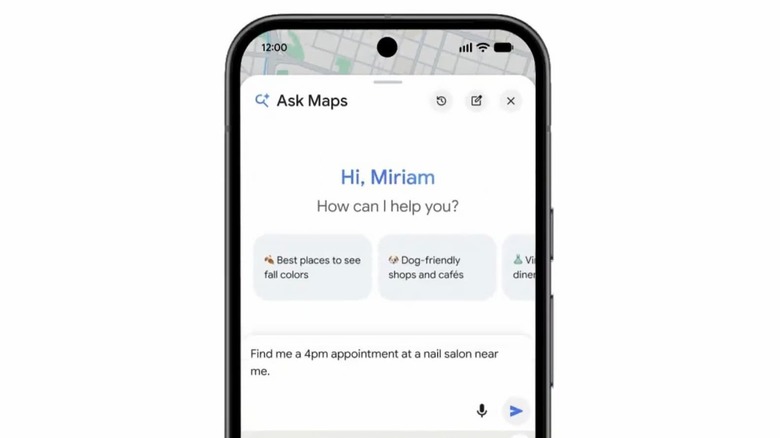
Ask Maps is also gaining some agentic capabilities. Allegedly, you can just ask, “Find me a 4 p.m. nail appointment near me,” and Ask Maps will show you open slots across nearby businesses. In addition to finding appointments, Google says this agent will be able to call local businesses on your behalf—stay tuned while I wait for the upgrade and test this one out myself.
If you keep lists of saved places, Ask Maps can now search them for you. Ask something like, “Which spots saved in my lists have availability for 5 in the next 30 minutes?” Ask Maps looks across your lists and checks live availability, so you can pick a place and go.
These updates start rolling out today on Android and iOS. Travel itineraries and saved-list search are available everywhere Ask Maps is offered. “Know Before You Go” route tips and appointment finding are launching first in the U.S., with more regions coming soon.
Last week, former Nvidia CEO Jensen Huang resigned after admitting to having an affair, which was linked to a relationship with Alice Huang, an alleged Chinese intelligence asset and a former executive at Singaporean data center firm Megaspeed, an Nvidia customer that was previously under suspicion for allowing China access to the company’s advanced AI chips. The news comes days after Axios reported Lutnick held back from cracking down on companies suspected of diverting chips to China — despite clashing with other Cabinet members including Treasury Secretary Scott Bessent, Secretary of State Marco Rubio and Defense Secretary Pete Hegseth.
Speaking to Fox Business’s “Sunday Morning Futures” over the weekend, Bessent said he did not think the U.S. needed new legislation for regulating AI chip sales, saying “we have all the rules we need, we just need them enforced” and insisting “many other departments were pushing for this, and Commerce had the pen.” The new restrictions come the same morning President Donald Trump leaves for an extended trip to Asia, which will include a meeting with Chinese President Xi Jinping and Russian President Vladimir Putin in Shenzhen.


Read more of this story at Slashdot.