Samsung's Galaxy S24 leaked before the next Unpacked event has even been confirmed

It’s hardly a secret that Samsung reveals its latest slate of Galaxy smartphones at the beginning of each year. With only a few weeks to go until the first Unpacked of 2024 is expected to take place, the rumor mill is ramping up and credible leaks are starting to shed some light on what the Korean manufacturer most likely has up its sleeve.

Along with a countdown indicating that the next Unpacked will take place on January 17, leaker Evan Blass shared a spec sheet that purports to break down the components of the Galaxy S24 lineup. There are no prizes for guessing that Samsung likely has three Galaxy devices in store: the regular model, an S24+ and an S24 Ultra. All three are slated to run on Qualcomm’s Snapdragon 8 Gen 3, at least in the US, Canada and China (folks elsewhere might have to make do with the company’s own Exynos 2400, as The Verge notes).

The standard Galaxy S24 is slated to have a 6.2-inch AMOLED 2x FHD display along with a 50MP main camera that can shoot video at up to 8K. The leak suggests Samsung will offer Space Zoom of up to 30x and dual telephoto zoom of up to 3x in the Galaxy S24. The device is likely to have 8GB of RAM and internal storage options of 128GB and 256GB. You may be able to charge the 4,000mAh battery to 50 percent capacity in 30 minutes.

Per this leaked spec sheet, the S24+ is likely to have the same camera system as the base model. The key upgrade will come in the form of the display, which seems to be a 6.7-inch AMOLED 2x QHD+ panel. There will probably be a larger 4,900mAh battery as well, with the spec sheet indicating you’ll be able to charge this to 65 percent of its capacity in half an hour. The S24+ will likely have more RAM as well at 12GB, with internal storage options of 256GB and 512GB.

Unlike the other two models, which are slated to have an Armor Aluminum 2.0 casing, the S24 Ultra may have a titanium body. Although it’s likely to have the same RAM and storage options as the S24+, the Ultra will probably have a vastly superior camera system. It will have a 200MP main lens, per the spec sheet, with up to 10x quad telephoto and 100x Space Zoom. The AMOLED 2x QHD+ display is likely to measure 6.8 inches, while the battery should be slightly larger than one in the S24+ at 5,000mAh.

The displays on all three models are expected to have up to a whopping 2,600 nits of brightness, so you shouldn’t have to struggle to make out what’s on your screen while the sun’s out. Expect IP68 water resistance on all three models, while the S24 Ultra is likely the only one of the three that will boast a built-in S Pen.

As for the designs, what we can see of them in the spec sheet indicates they’ll largely be the same as the S23 lineup. However, previous reports suggested that the S24 Ultra has a fully flat screen.

Based on the leaks so far, the Samsung S24 lineup isn’t likely to have any terribly exciting upgrades in terms of the designs and pure specs. However, Samsung is widely expected to integrate its Gauss generative AI system into the S24 lineup. It may be the case that GAI processes will be handled entirely on-device rather than requiring access to the cloud (the new Snapdragon chipset will help on that front).

This article originally appeared on Engadget at https://www.engadget.com/samsung-galaxy-s24-leak-breaks-down-what-the-lineup-likely-has-to-offer-141214873.html?src=rss

Source: Engadget – Samsung’s Galaxy S24 leaked before the next Unpacked event has even been confirmed

Not Being Able to Burp Actually Sounds Pretty Horrific

A life without burps might sound like a blessing, but a new study shows it’s anything but. Researchers interviewed patients with the rare condition retrograde cricopharyngeus dysfunction (R-CPD), which makes them unable to burp or belch, about how it affected their daily life. Not only did patients report unpleasant…

Read more…


Source: Gizmodo – Not Being Able to Burp Actually Sounds Pretty Horrific

An Influential AI Dataset Contains Thousands of Suspected Child Sexual Abuse Images

An influential machine learning dataset—the likes of which has been used to train numerous popular image-generation applications—includes thousands of suspected images of child sexual abuse, a new academic report reveals.

Read more…


Source: Gizmodo – An Influential AI Dataset Contains Thousands of Suspected Child Sexual Abuse Images

What People Are Getting Wrong This Week: Disney Conspiracy Theories

Disney—the corporation, the man, and the way of life—has long been a flashpoint for misinformation and conspiracy theories. The corporation’s “have fun or we’ll break your arm” philosophy, the life of its enigmatic founder, and Disney’s ownership of our collective imagination in the form of Marvel, Star Wars, and more, make it seem like anything you hear about Disney could be true. When you factor in the unbelievable-but-verifiable facts about the company and the man, no one could be faulted for mistaking Disney fiction for Disney fact. Maybe Disneyland really was used for CIA mind control experimentation! You don’t know!

Disney is currently the boogeyman of cranks on the right side of the political spectrum, with extremists calling for boycotts of its parks and cruises over their “wokeness” and allegations that the corporation’s real purpose is not making money, but “grooming” children. But Disney used to be every bit as deeply distrusted by cranks on the left—not for grooming kids, but for its corporate malfeasance and cynical profiteering. The result: There are many flavors of misinformation to enjoy in the expanded Disney Conspiracy Universe. Below, I’ve compiled a collection of lies about Disney, along with an equal number of truths that are nearly as unbelievable. 

Lie: Disney’s head was cryogenically frozen

The granddaddy of all Disney conspiracy theories is the one about Walt Disney attempting to cheat death by freezing his head (or his whole body) so he could be thawed out and reanimated at some future date. This story originated as far back as 1967, when a reporter for a tabloid called The National Spotlite claimed he’d snuck into the hospital where Walt Disney died and saw his body had been frozen in liquid nitrogen. From there, it caught on and grew for no real reason beyond the fact that it seemed like something Walt Disney might do. Sadly, the rumors are not true: Disney was cremated and his ashes are interred in Glendale.

Truth: Disneyland still maintains an apartment for Walt Disney

Walt Disney spent so much time at Disneyland during its construction that he had an apartment built for himself above the firehouse on Main Street so he could avoid commuting to work. Sensible maybe, but why did Disneyland keep the rooms as he left them after he died? Why is there a light on in the window to this day? The park occasionally offers tours of the room (for a price, of course), but is it really a stretch to think the real reason they keep Walt’s apartment is because they’re hoping he’ll will return one day, with his thawed head attached to a new body, ready to start production on Song of the South 2? (Yes.)

Lie: Walt Disney was a Nazi

As far as we know, Walt Disney was not a Nazi—but it’s complicated. When Nazi propagandist Leni Riefenstahl visited Hollywood in 1938, the industry gave her a cold shoulder—but not Walt Disney. Walt gave Riefenstahl a tour of his studios, but he refused to watch or endorse Olympia, Riefenstahl’s documentary about the 1936 Olympics. He also hired a lot of Jewish people who never reported any incidents of antisemitism. But the best evidence for Disney’s non-Nazism is an anti-Nazi cartoon Disney produced. “Der Fuehrer’s Face” stars Donald Duck and features music by Spike Jones, and it is such an effective takedown of Nazi Germany that it’s doubtful a Nazi would have approved it.

Truth: Walt Disney was a racist

Disney’s live action/animation feature Song of the South is racist, and not just when viewed through modern eyes. During its production, both the NAACP and the American Council on Race Relations basically told Disney, “Hey, your movie is really racist.” The Hays Office reviewed the script and demanded the removal of objectionable racial terms. Crew members quit the production over the film’s depiction of African Americans, and it was met with protests on its release. So Walt knew full well that his movie was racist, but he didn’t care, and made no move to make it less racist.

Lie: Disneyland is removing Donald Trump from its “Hall of President” display

This piece of outrage bait comes from the “satirical” website Mouse Trap News, an outlet that propagates many fake news stories designed to appeal to modern conservatives’ hatred of Disney. Donald Trump will remain in the Hall of Presidents, so bored visitors seeking an air conditioned place to sit can check out his animatronic likeness. (Also, for the record: Disneyland is not planning to serve human flesh in any of its restaurants or snack bars, Moana is not “the First Transgender Disney Princess,” and Mickey Mouse is not going to play a leading in The Mandalorian season 4.)

Truth: Richard Nixon loved Disneyland

Until recently, our most corrupt president (as far as we know) Richard Nixon was also a huge Disney fan. He visited Disneyland multiple times, oversaw the dedication of the Monorail when he was vice-president, and, when president, invited Disneyland’s Golden Horseshoe Revue to perform at the annual White House Correspondents’ dinner. (I’m sure they delighted D.C.’s cynical political reporters.) But the best Disney/Nixon crossover of all is the fact that Nixon’s famous “I am not a crook” speech was delivered on the grounds of Disney’s Contemporary Resort in Florida.

Lie: Lemmings commit mass suicide

This isn’t a myth about Disney, but one that Disney helped spread. The mistaken belief that lemmings intentionally kill themselves when their population reaches a certain point existed before Disney’s 1958 “documentary” White Wilderness, but the film cemented the untruth in the popular imagination by showing footage of hundreds of lemmings leaping off a cliff to their deaths. Except the lemmings were actually pushed off the cliff to get the footage. To be fair: The Walt Disney Family Museum says that photographer and filmmaker James R. Simon Simon faked the footage without the approval of Walt Disney.

Half truth: Walt Disney’s last words were “Kurt Russell”

While he didn’t mutter “Kurt Russell” on his death bed (again, as far we know), the actor’s name was the last thing Walt Disney wrote before he was brought to the hospital, where he died due to complications of lung cancer. At the time of Disney’s death, Russell was a 15-year-old actor on the Disney lot shooting Now You See Him, Now You Don’t. Russell’s name appears in Walt’s hand on sheet of paper with the printed title “TV Projects In Production: Ready for Production or Possible for Escalation and Story.” No one knows exactly why. “I assume, as [does] everybody else, that he was talking about some movie that he was thinking about having me in…I don’t know what to make of it other than that,” Russell once told Barbara Walters.

Lie: No one is allowed to die at a Disney park

There is a widely believed rumor is that Disney is so protective of its parks’ image that they will transport dead or dying people off the property to ensure that no one will ever be declared dead at a Disney park. While Disney has never publicly disclosed its internal policy regarding guest deaths, people have indeed been declared dead at Disney parks at various times over the years.

Truth: The Beatles broke up at Disney World

While the end of The Beatles didn’t involve an ill-fated ride on the Matterhorn, it is true that the Beatles broke up while at a Disney resort. John Lennon signed the legal papers finalizing his exit from the band while he was on vacation at the Disney World Polynesian Resort. You can even stay in the “death of the Beatles” room if you want.

Lie: Walt Disney’s will contains a clause promising $10 million to the first man who gets pregnant

This is really strange rumor that spread through chain emails in the 2000s. There doesn’t seem to be a discernible reason to believe that this could be so—Disney never said or did anything in his life that suggests he had any interest in seeing this scenario play out—but there is something weirdly plausible about the theory. It just feels like something that’s true. But it’s not. From what we know about Disney’s will, he actually left 45% of his estate to his immediate family, 45% to the Disney Foundation, and 10% his sister, nieces, and nephews. 

Truth: Harlan Ellison was fired from Disney for imitating Disney characters having sex

Irascible science fiction writer Harlan Ellison once worked for Disney, and according to an autobiographical essay in his 1982 book Stalking the Nightmare, Ellison’s tenure ended after one day at lunch with his co-workers when he jokingly suggested Disney should make a porn movie starring his well-known creations. He then acted out the noises various Disney characters might make in said porn movie. What Ellison didn’t realize was that Roy Disney was at the next table and overheard the whole routine. Roy apparently didn’t find it amusing, and Ellison was terminated. 


Source: LifeHacker – What People Are Getting Wrong This Week: Disney Conspiracy Theories

Daily Telescope: A simple shot of the Milky Way high above France and Spain

The Milky Way Galaxy above the Pyrenees, right on the French and Spanish border.

Enlarge / The Milky Way Galaxy above the Pyrenees, right on the French and Spanish border. (credit: bulbs_01_frizzle)

Welcome to the Daily Telescope. There is a little too much darkness in this world and not enough light, a little too much pseudoscience and not enough science. We’ll let other publications offer you a daily horoscope. At Ars Technica, we’re going to take a different route, finding inspiration from very real images of a universe that is filled with stars and wonder.

Good morning. It’s December 21, and today’s image showcases our very own Milky Way Galaxy above the Pyrenees mountain range, which separates Spain from the rest of Europe.

It was sent in by a reader who captured it while hiking through the mountains and in their words bivvying—a new word for “minimalist camping” that I learned about five minutes ago. I’m jealous. Hiking through the Pyrenees and gazing at the stars at night sounds like a wonderful dream. The photographer told me they are no great astrophotographer, but that the skies were so dark and brilliant that even this single exposure photo taken with a Fuji X100 APS camera looks stunning.

Read 4 remaining paragraphs | Comments


Source: Ars Technica – Daily Telescope: A simple shot of the Milky Way high above France and Spain

The Coolest Dinosaur-Age Discoveries of 2023

Dinosaurs’ reign on Earth ended explosively (and then dustily, as we’ll mention in this story) when an asteroid slammed into Earth some 66 million years ago. But the dinosaurs—and the diverse ancient creatures they shared the planet with—have kept many secrets locked away in their fossilized remains, secrets which…

Read more…


Source: Gizmodo – The Coolest Dinosaur-Age Discoveries of 2023

How to Set up Your First Google Home Automation

In the smart home world, an automation is a routine (or series of commands) a smart hub app will execute on the user’s behalf. For instance, you could tell the app: At sunset, turn on the porch light; when the temperature sensor is over 80 degrees, turn on the fan. One of the most flexible hubs is Google Home, and you can set up these routines from the automations tab in the Google Home app. Here’s how. 

Google Home has a few automations already set up for you

Google assumes you’d enjoy some routines around getting up and going to sleep, so in the automations, you’ll see options for “Good morning” and “Good night.”  If you tap on them, the actions will be pre-populated, allowing you to tweak them, such as what sleep sounds to play (Google has an impressive array of sounds from white noise to ocean or forest sounds), which lights to switch off, or whether to list the day’s appointments. Using these premade automations is a helpful way to better understand how automations work. 

Figure out what you want to have happen, and why

Before you start, determine what action should take place and what should trigger it.  We’ve talked about IFTTT (“if this, then that”) on Lifehacker before, which is another automation platform. But the broader premise of IFTTT is really helpful in understanding automation. The name is literally “If this, then that”, as in “if _____ happens, do ______.” So start by filling in the blanks—a time, a condition, or a specific day. For the first automation, we’re going to focus on just specifying a time to trigger the automation, so consider something you want to happen every day. For instance: At sunrise, turn on the living room lights. The important thing is that whatever devices you want to affect must be connected to Google Home, either by a smart plug or the device itself.  

Start a new automation

Under the automation tab, click the blue button with the plus sign to start a new routine. Since we’re just setting something up to run at a specific time, let’s choose “personal” as opposed to “household.” The screen will refresh, showing a title you can edit and two panels, one for “starters” and one for “actions.” You may also see a panel that asks if you’d like to set up a daylong routine. For now, tap “no.” 

First, let’s call this routine something like “Lights on at sunrise.” Click on the gray pencil next to “Untitled” and enter what you’d like to call this routine. Call it something that concisely describes the routine so you can refer back to it easily. Click the checkmark in the upper right to save the name. 

Choose a starter

Now, click on “Add starter.” You’ll see all the options available to you: 

  • When you say a specific phrase to Google, like, “Top of the morning, Google!” or “Living room lights on!” I use an exclamation mark because it’s almost impossible to not speak that way to Google, since you’re basically talking into the air. 

  • A specific time of day.

  • Sunrise or sunset, which you can offset. For instance, an hour before or after sunset. 

  • When you arrive or leave a location, which uses your phone to determine your location. This is helpful with automations such as: Turn on the lights when I get home. 

For now, choose “At sunrise or sunset,” then choose “Sunrise.” Google will ask some questions, like, “Where the heck are you located?” Next, decide if you want to offset sunrise and which days of the weeks you want this routine to run. You can decide if you want to be notified each time the routine runs. I usually set it to notify me, just so I know it works, and then turn it off after a few days. Now save this trigger by clicking the blue button “Set trigger.”

Set your action

There are a ton of things that Google can execute for you. Here’s a list of what’s possible:

  • “Get info and reminders,” like the weather, the time, reminders of what’s on your schedule for the day, what happened on this day in history, or the news from any source you’d like. 

  • “Communicate and announce,” which means Google can send an SMS or an email, or make announcements across your devices. 

  • “Adjust assistant volume,” which could be useful depending on what time of day it is. Set the volume for 10% overnight, perhaps. 

  • “Adjust home devices” is the most likely and important feature here. This will allow you to control every single device connected to Google Home, and that’s what we’ll use for this sample routine. 

  • “Adjust phone settings” means you can set your phone to “Do not disturb,” change the volume, or my favorite, turning off wifi when I leave the house and turning it back on when I get home. 

  • “Get wellness info” works if you’ve attached a health device to Google like a watch. 

  • “Play and control media” allows you to play videos, songs, or any other media on your phone to any device you want. Be aware that Google has favorite devices. It also prefers music from Spotify and videos from YouTube, and makes it hard to play any other services. 

  • “Try adding your own” allows you to try spinning your own actions, which may or may not work. 

In this case, choose “Adjust home devices.” Find the lights you want to turn on, which should be arranged by room, and click on each. You’ll have options based on that device, which should include “Turn on and off,” but might also include dimming capabilities. Select the light you want, and set it to “On,” then save. You can add more than one action for each starter, so if you have a few lights, go back and add each in turn. 

Save and test your action

All that’s left is to save your new automation. Use the blue “Save” button to do so. Tomorrow at the set time, the action should run. To test the automation, go to the routine we just set up under automations, and press the play button next to the title. It will execute the automation. 

Expand on your basic automations

The same way you can have more than one action, you can have more than one way to trigger an automation. In particular, setting up vocal triggers is not only a fun way to access actions, but also the most accessible way. Go back into an automation, add another starter to your automation, and select “When I say to Google Assistant.” Now, imagine what you’ll say to trigger the automation, like, “Hey Google, turn on the living room lights.” Or maybe, “Hey Google, light up the room.” This is one you can have a lot of fun with. 

Because you can have many actions, try out a few complicated ones, like Good Morning or Good Night, where multiple different things happen at once. It’s a good way to explore what Google Assistant can do for you. 

Daylong routines allow you to turn things on and off throughout the day

Let’s say you have a humidifier and you want to kick it on for 30 minutes a few times a day. Instead of setting up an automation to turn it on and then another to turn it off, you can set one daylong routine. To do so, when you start a new automation, say yes to “Do you want to set up a daylong routine?” Now choose different start times and actions for each. It works just like the basic automation you set up, except you can set up many start times and actions. 

Set up a household routine for even more triggers

In Google Home, you can set up even more complicated triggers by using a household routine instead of a personal routine. Household routines can use devices as the trigger, for instance, when a smart thermostat goes over a certain temperature, turn on a window A/C, or send an SMS. 


Source: LifeHacker – How to Set up Your First Google Home Automation

Anker charging accessories are up to half off right now

If you’re racking your brain trying to find a last-minute gift or a stocking stuffer for a loved one, bear in mind that you can rarely go wrong with charging accessories. As it happens, many of Anker’s products are on sale on Amazon right now, with discounts of up to 50 percent. Some of the discounts are available via a coupon and for others you’ll need to be a Prime member. First up, the Anker 735 Charger will run you $30.39, which is 40 percent off the usual price of $56.

This is a 65W charger with two USB-C ports and one USB-A slot. When you have multiple devices connected, the charger can direct power to where it’s most needed. It’ll charge several devices at the same time, such as your laptop, Steam Deck and earphones. While Anker says this model is capable of giving a 13-inch 2020 MacBook Pro a 65W charge, other MacBook models have different wattage needs.

That’s where Anker’s MacBook Pro Charger could come in handy. It’s capable of 100W USB-C charging. That’d be overkill for many devices, but not so for a power-hungry MBP. Of course, it’s capable of charging other devices via USB-C. It comes with a five-foot cable. The charger is on sale for $24, which is $14 off the usual price of $38.

In some cases, USB chargers might not cut it. Many devices need the full power of an outlet and if you’re running out of space, a power strip might be what you need. Not only does Anker’s Surge Protector Power Strip have 12 outlets, you can plug in one USB-C and two USB-A cables too. There’s surge protection as well. The power strip, which has a five-foot extension cord, is 17 percent off at $30.

If you’re an iPhone user who hasn’t upgraded to the latest generation yet, there’s no harm in having a spare Lightning cable or two kicking around. As it happens, Anker sells Lightning cables, and one that’s six feet long will currently cost you $10, $2 less than usual. The cable is MFi certified, meaning that it meets Apple’s standards. It has a nylon exterior, which might make it more durable than Apple’s own cables.

Of course, this being Anker, there are power banks on sale too. The Anker Nano Power Bank is 20 percent off the usual price of $30 (i.e. $6 off) when you apply a coupon. This is a small power bank with a built-in USB-C connector, so you can plug it straight into your phone or tablet to charge it up without having to carry a separate cable. There’s a separate USB-C port too. Anker notes that the device won’t fully charge an iPhone 15, but it will top up the battery by around 80 percent.

Last but not least, the Anker 737 Power Bank is for those who need plenty of extra juice with them when they’re on the go. This model has a capacity of 24,000mAh, which Anker says is good for nearly five full charges of an iPhone 13 or 1.3 charges of a 12.9-inch 2021 iPad Pro. A smart display will show you the remaining battery percentage as well as how much wattage the charger is delivering to the connected devices (it has one USB-A port and dual USB-C ports). The 737 Power Bank, which is capable of delivering a 140W charge, is currently $58 off at $92.

Follow @EngadgetDeals on Twitter and subscribe to the Engadget Deals newsletter for the latest tech deals and buying advice.

This article originally appeared on Engadget at https://www.engadget.com/anker-charging-accessories-are-up-to-half-off-right-now-123523752.html?src=rss

Source: Engadget – Anker charging accessories are up to half off right now

The Morning After: Pornhub faces the same strict EU rules as social media platforms

The European Union says three porn sites are now subject to stricter rules under the Digital Services Act (DSA). It has designated Pornhub, Stripchat and XVideos as “very large online platforms” (VLOPs) after determining they each have an average of more than 45 million monthly users in the EU. This means they will face the same rules as Facebook, X, and TikTok. (Is the discourse in comments really worse than parts of X? Yes. Probably.)

The three porn sites have four months to comply with additional obligations. That includes measures to prevent the spread of illegal content, which includes “child sexual abuse material and content affecting fundamental rights, such as the right to human dignity and private life in case of non-consensual sharing of intimate material online or deepfake pornography.”

The penalties for failing to comply with the DSA’s requirements are severe. Platform holders can be fined up to six percent of their annual global revenue.

— Mat Smith

​​You can get these reports delivered daily direct to your inbox. Subscribe right here!​​

The biggest stories you might have missed

What we bought: How YNAB gives me financial peace of mind

Tesla knew some of its parts had high failure rates but reportedly blamed drivers anyway

How to create stickers on the iPhone using your photos in iOS 17

E-scooter rental company Bird files for bankruptcy

It will continue to operate as usual, for now.

TMA
REUTERS/Mike Blake

After laying off nearly a quarter of its staff last year, e-scooter rental company Bird has filed for Chapter 11 bankruptcy. Bird launched in multiple cities in 2017, amid a lot of hype framing e-scooters as a sustainable urban mobility solution. The company continued to expand despite a lack of profitability (following the Uber model), but the COVID pandemic forced the company to halt operations in multiple locations around the world. Since then, cities have also become more hostile to e-scooter rentals. This filing doesn’t affect Bird Canada or Bird Europe, which are separate organizations. Unfortunately. So, I can expect to keep tripping over the e-scooters dotted around London in 2024.

Continue reading.

Watch an AI robot learn to demolish humans at a marble maze game

CyberRunner beat Labyrinth faster than any previously recorded time.

TMA
ETH Zurich

ResearSo I can expect to keep tripping over e-scooters dotted around London in 2024.chers have developed an AI-powered robot they claim can beat Labyrinth, the physical marble game, faster than humans. The aim of these games is to guide a marble through a maze without falling into any holes, using two dials to angle the board. Thomas Bi and Raffaello D’Andrea of ETH Zurich created CyberRunner, which combines model-based reinforcement with the dexterity needed to beat the game. The joke is on AI, though — marble mazes are boring.

Continue reading.

Sony has sold 50 million PS5 consoles so far

It’s estimated to have outsold the Xbox Series X and S by three to one this year.

The PlayStation 5 has officially hit the 50 million sales milestone, despite all the supply chain issues that kept PS5s in limited supply. Oh, and a pandemic. Fun fact: It took the PS5 a week longer than PlayStation 4 to reach 50 million sales. According to the Financial Times, Sony has also outsold the Xbox Series X and S by almost three to one this year, based on data from Ampere Analysis. While Microsoft doesn’t release official Xbox sales numbers (I wonder why…), Ampere estimated Microsoft sold 7.6 million next-gen systems this year, while Sony’s sales reached 22.5 million units.

Continue reading.

This article originally appeared on Engadget at https://www.engadget.com/the-morning-after-pornhub-faces-the-same-strict-eu-rules-as-social-media-platforms-121520156.html?src=rss

Source: Engadget – The Morning After: Pornhub faces the same strict EU rules as social media platforms

Silicon Power MS70 SSD-in-a-Stick Review: Thumb Drive Meets Massive Capacity

NAND flash technology has seen rapid advancement in recent years. This has resulted in the capacity limits of SSDs and thumb drives getting pushed up regularly. Companies like Kingston had innovated in the late 2010s to deliver 1TB and 2TB thumb drives. They were overpriced and over-sized for their product class at that time. However, interest in this category has been sparked again by the introduction of high-performance native UFD controllers and the appearance of cost-effective high capacity NAND dies. Silicon Power and Transcend recently released 2TB thumb drives based on the Phison U17 and Silicon Motion SM2320 native UFD controllers respectively. Read on for a comprehensive analysis of the performance profile and value proposition of the Silicon Power MS70 in its 2TB avatar.


Source: AnandTech – Silicon Power MS70 SSD-in-a-Stick Review: Thumb Drive Meets Massive Capacity

Intel Revises Work On Timed I/O PPS Functionality For Linux

Back in January I wrote about Intel working on a Timed I/O driver for Linux with PPS (Pulse Per Second) to help with time synchronization between multiple devices. There hasn’t been much external talk about this Timed I/O / PPS functionality while today as we approach the end of the year a new set of Linux kernel patches were posted for wiring up this Intel PPS Generator functionality…

Source: Phoronix – Intel Revises Work On Timed I/O PPS Functionality For Linux

Apple's 15-inch MacBook Air M2 falls to a new low of $999

If you’ve been holding out on buying a new MacBook, congrats, your delay has been rewarded. Apple’s 15-inch MacBook Air has dropped to a new all-time low price of $999, down from $1,299. That’s right, the 23 percent discount saves you $300, far from chump change. The deal is available for the 256GB 15-inch MacBook Air with an M2 chipset in either Midnight or Starlight. Keep in mind, though, that Amazon estimates these will ship in early to mid-January, so don’t plan on picking one up as a last-minute Christmas gift. 

Apple’s 15-inch MacBook Air with an M2 chip came on the scene in June of this year. It garnered a 96 in our review thanks to its ability to offer a large size and great performance without mirroring the Pro’s exorbitant $2,000+ price tag. Despite being over a year old, the M2 chip functions great — in line with the 13-inch model. The battery life is also impressive, lasting over 18 hours on video playback alone and 12 hours during everyday use for work.

Its screen is also high-quality, with the extra two inches making a surprisingly significant difference. The 15.3-inch Liquid Retina display has a 2,880 x 1,864 resolution, 500 nits of brightness, a 60Hz refresh rate and support for the P3 wide color gamut. No, it doesn’t measure up to the 14-inch or 16-inch MacBook Pro with an M3 chip in terms of display or performance quality, but it’s hard to care that much for half the price. 

Follow @EngadgetDeals on Twitter and subscribe to the Engadget Deals newsletter for the latest tech deals and buying advice.

This article originally appeared on Engadget at https://www.engadget.com/apples-15-inch-macbook-air-m2-falls-to-a-new-low-of-999-104522693.html?src=rss

Source: Engadget – Apple’s 15-inch MacBook Air M2 falls to a new low of 9

LG unveils new 480Hz HD gaming monitor ahead of CES that can switch to 4K 240Hz with a click

Just ahead of CES (as usual), LG has unveiled one of the most interesting gaming monitors we’ve seen yet as part of its 2024 UltraGear OLED lineup. The 32-inch 32GS95UE UltraGear OLED not only offers a stellar 240Hz 4K option, but also lets you crank the refresh up 480Hz at 1080p with a “simple click.” The company also unveiled new and updated 27-, 34- and 39- and 45-inch UltraGear OLED widescreen curved models, expanding its OLED gaming monitor family considerably. 

The 32-inch UltraGear OLED is the first model in that family to use LG’s new “Dual-Hz” feature that lets you quickly switch between 4K (3,840 x 2,160) at 240HZ, to Full-HD 1,920 x 1,080 at a stellar 480Hz. Very few monitors have the refresh rates that high, let alone the ability to choose between the two highest refresh rates available at their respective resolutions. 

LG's first 'Dual-Hz' OLED monitor lets you switch between 4K 240Hz and 1080p 480Hz
LG

LG says you can switch between these modes “via a hotkey or joystick’s directional switch” to best suit the genre of game you’re playing. “For fast-paced action titles and shooting games, users can select FHD 480Hz, while visually rich story-driven games can be enjoyed in 4K 240Hz,” the company said. 

Along with that trick, the 32-inch UltraGear OLED offers a .03-millisecond GtG response time — something that’s important for a high refresh rate monitor to avoid motion blur and other artifacts. Other features include high-end HDR picture quality (DCI-P3 98.5 percent at 400 nits), a “virtually borderless design,” built-in speakers with DTS Virtual:X tech, G-Sync compatibility and more. 

LG's first 'Dual-Hz' OLED monitor lets you switch between 4K 240Hz and 1080p 480Hz
LG

Aside from that Model, LG introduce the 34-inch 34GS95QE and the 39GS95QE, it’s first 39-inch OLED monitor. Both are ultra-wide models with a 21:9 ultrawide aspect ratio, aggressive 800R curve, 3,440 x 1,440 resolution and 240Hz refresh rate. These are significant because they’re LG’s first ultrawide OLED monitors, and the first such ultrawide curved OLED models with a 240Hz refresh rate. Both support G-Sync, FreeSync Premium Pro and DisplayHDR True Black 400 (the OLED standard). 

LG has also refreshed its UltraGear OLED 27 and the UltraGear OLED 45. Both versions of the 45-inch model offer 3,440 x 1,440 resolution and 240Hz refresh rates, but the 45GS96QB version includes speakers and a USB-C PD (power deliver) connection rated up to 65 watts.

This article originally appeared on Engadget at https://www.engadget.com/lgs-new-480hz-hd-gaming-monitor-can-switch-to-4k-240hz-with-a-click-101738300.html?src=rss

Source: Engadget – LG unveils new 480Hz HD gaming monitor ahead of CES that can switch to 4K 240Hz with a click

Intel Posts SVM Patches For Xe Kernel Graphics Driver

Intel’s new Xe kernel graphics driver is set for merging into Linux 6.8 as an experimental option. While it’s being added to the next kernel cycle, it’s not yet used by default for any existing Intel GPUs and its features have yet to be fully implemented and the performance has yet to be fully optimized. Among the features currently missing is Shared Virtual Memory (SVM) support but a patch series posted today aims to address that functionality…

Source: Phoronix – Intel Posts SVM Patches For Xe Kernel Graphics Driver

Celebrating young Coolest Projects creators at a London museum

Each year, young people all over the world share and celebrate their amazing tech creations by taking part in Coolest Projects, our digital technology showcase. Our global online showcase and local in-person events give kids a wonderful opportunity to celebrate their creativity with their communities, explore other young creators’ tech projects, and gain inspiration and encouragement for their future projects.

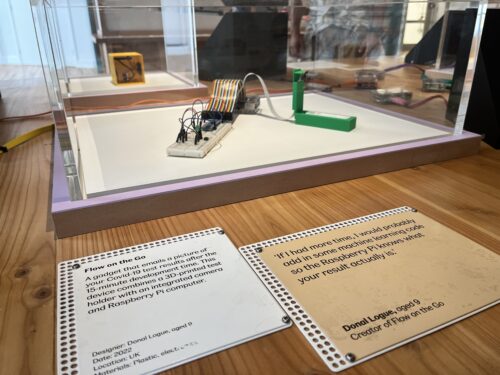
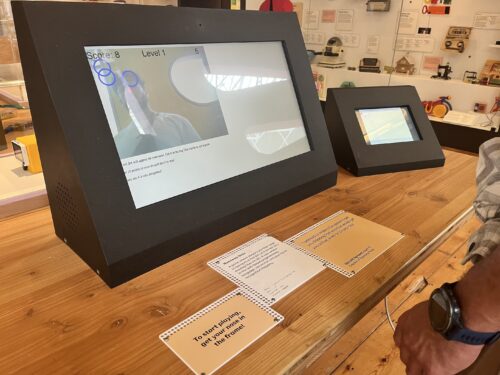
Coolest Projects exhibit at the Young V&A in London.
The Coolest Projects exhibit at the Young V&A in London.

Now, visitors to the Young V&A museum in London can also be inspired by some of the incredible creations showcased at Coolest Projects. The museum has recently reopened after a large reimagining, and some of the inspiring projects by Coolest Projects 2022 participants are now on display in the Design Gallery, ready to spark digital creativity among more young people.

Projects to solve problems

Many Coolest Projects participants showcase projects that they created to make an impact and solve a real-world problem that’s important to them, for example to help members of their local community, or to protect the environment.

A Coolest Projects entry at the Young V&A in London.
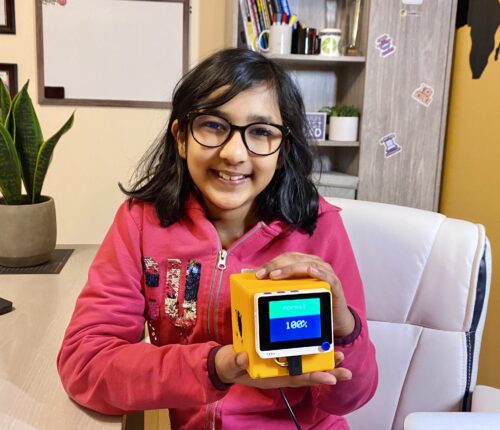
At Coolest Projects, Donal (age 9) showcased his creation to send notifications about coronavirus test results via email.

One example on display in the Young V&A gallery is EleVoc, by 15-year-old Chinmayi from India. Chinmayi was inspired to create her project after she and her family faced a frightening encounter:

“My family and I are involved in wildlife conservation. One time we were charged by elephants even though we were only passing by in a Jeep. This was my first introduction to human–animal conflict, and I wanted to find a way to solve it!” – Chinmayi

The experience prompted Chinmayi to create EleVoc, an early-warning device designed to reduce human–elephant conflict by detecting and classifying different elephant sounds and alerting nearby villages to the elephants’ proximity and behaviour.

Also exhibited at the Young V&A is the hardware project Gas Leak Detector by Sashrika, aged 11, from the USA. Gas Leak Detector is a device that detects if a fuel tank for a diesel-powered heating system is leaking and notifies householders through an app in a matter of second.

Intel Improves FFmpeg's DNN Detect Filter For AI Object Detection

With AI being all the rage these days and each vendor working on getting their wares to market with AI acceleration, besides Intel now having out their Meteor Lake CPUs that feature their Intel AI Boost (NPU), Intel is rather positioned well with their prolific open-source software contributions. One of the AI-related software contributions over the past week has been improvements to the FFmpeg multimedia library’s “DNN detect” filter for object detection within videos…

Source: Phoronix – Intel Improves FFmpeg’s DNN Detect Filter For AI Object Detection