Scarlet And Violet DLC Breaks A Key Part of Pokémon Lore (Again)

Remember when finding and capturing a Legendary Pokémon felt special? You would stumble upon these powerful creatures whose stories were woven into the world’s history. The Mewtwo encounter in the original Pokémon Red and Blue is an incredible endgame payoff for a story that’s unfolding in the background the whole…

Read more…


Source: Kotaku – Scarlet And Violet DLC Breaks A Key Part of Pokémon Lore (Again)

OPEC members keep climate accords from acknowledging reality

Image of a person standing in front of a doorway with

Enlarge / Saudi Arabia’s presence at COP28 has reportedly been used to limit progress on fossil fuel cutbacks. (credit: Sean Gallup / Getty Images)

Oil-producing countries are apparently succeeding in their attempts to eliminate language from an international climate agreement that calls for countries to phase out the use of fossil fuels. Draft forms of the agreement had included text that called upon the countries that are part of the Paris Agreement to work toward “an orderly and just phase out of fossil fuels.” Reports now indicate that this text has gone missing from the latest versions of the draft.

The agreement is being negotiated at the United Nations’ COP28 climate change conference, taking place in the United Arab Emirates. The COP, or Conference of the Parties, meetings are annual events that attempt to bring together UN members to discuss ways to deal with climate change. They were central to the negotiations that brought about the Paris Agreement, which calls for participants to develop plans that should bring the world to net-zero emissions by the middle of the century.

Initial plans submitted by countries would lower the world’s greenhouse gas emissions, but not by nearly enough to reach net zero. However, the agreement included mechanisms by which countries would continue to evaluate their progress and submit more stringent goals. So, additional COP meetings have included what’s termed a “stocktake” to evaluate where countries stand, and statements are issued to encourage and direct future actions.

Read 8 remaining paragraphs | Comments


Source: Ars Technica – OPEC members keep climate accords from acknowledging reality

17 Bloody Good Christmas Horror Movies You Can Stream Right Now

Though your knee-jerk reactions may suggest otherwise, there’s nothing incongruous about pairing Christmas with scary stories.

For centuries in Britain, families would gather around a fire and ward off the winter cold by sharing chilling tales of the supernatural—a tradition forgotten, only to be revived by Charles Dickens and M.R. James during the Victorian era. Similar, non-Christian traditions go back even further; across cultures and faith traditions, dark midwinter nights seem to have provided to provide a particularly good excuse for us to creep out our loved ones. A Christmas Carol isn’t an outlier, then, but a particularly good example of the form.

So grab a warm drink, lock the doors, and fire up the Roku. And speaking of fire, please check the chimney before you stoke a blaze. It’s a reasonable safety measure, especially if you’re not sure where dad’s got to…


Rare Exports (2010)

Clearly, I’m not the first to recommend Rare Exports: A Christmas Tale, the Finnish film having become a nouveau holiday classic shortly after its release a decade ago—though It’s a Wonderful Life this ain’t. (But give it time.)

In the film, the research team of a greedy government drills into land best left undisturbed: an ancient burial mound that, legends suggest, is the resting place of Joulupukki, a forerunner to our modern Santa Claus. Old Joulupukki is not dissimilar from Krampus, in that he’s much more interested in punishing the wicked than in rewarding the good. It’s a spectacular, darkly comic, cynical winter’s tale (rather the perfect one for our times) and builds to a wild climax.

Where to stream: Hulu, Shudder, Fubo TV, Tubi, Vudu, Crackle, Pluto TV, Hoopla


Black Christmas (1974)

One of the O.G. slasher films, this Bob Clark-directed groundbreaker is also one of the best, with a simple, well-executed premise and a killer cast (Margot Kidder, Olivia Hussey, Andrea Martin, John Saxon, Keir Dullea). The director has legit holiday cred: after this story of a killer stalking a sorority house during winter break, he’d go on to helm holiday cable staple A Christmas Story nearly a decade later. There’s not much here that we haven’t seen, but only because so many later movies cribbed from its style, with less chilling results. Neither of the two remakes (from 2006 and 2019) is bad, exactly, but neither reaches nearly the heights of the original.

Where to stream: Shudder, Fubo TV, Peacock, The Roku Channel, Hoopla, Vudu, The Criterion Channel, Tubi, Pluto TV, Plex


Christmas Evil (1980)

John Waters called Christmas Evil “the greatest Christmas movie ever made,” and, as recommendations go, you could do a lot worse (he even did a commentary track that you can still find on the DVD and Blu-ray release). Considering the source, that recommendation also gives you a sense of what you’re in for. In the prologue, a boy sees mommy kissing Santa Claus (and then some), and the experience engenders a lifelong obsession with Santa…and with keeping track of who’s been naughty, and who’s been nice. There’s a bit of social commentary at play amid truly over-the-top death sequences that lead to a genuinely batshit ending.

Where to stream: Shudder, Fubo TV, The Roku Channel, Hoopla, Vudu, Tubi


Gremlins (1984)

In the mid ‘80s, you could buy dolls, action figures, and storybooks with Gremlins on them, which, given how violent and nightmare-inducing the film is, is both impressively twisted and a deep indictment of a consumer culture in which we’ll sell anything to anyone. Hey kids, gather ‘round the TV for a movie in which murderous creatures get chopped in blenders and blown up in microwaves and one main character vividly describes finding her missing dad stuck in the chimney on Christmas day. Regardless, there’s plenty of, uh, holiday cheer to be found…including a truly rousing band of carolers. Delightful!

Where to stream: HBO Max


Recommended products

Looking for a new streaming device? Consider one of these products.


Silent Night, Deadly Night (1984)

There’s nothing particularly groundbreaking about Silent Night, Deadly Night, a film about a kid who watches his parents get murdered by a man in a Santa suit and then grows up to become a Santa-themed killer himself, as one does. Though not by any means the first Christmas-related horror movie, the Reagan era was not the time for this one. Or was maybe the perfect time? Anyway, it was boycotted and censored, which of course only generated publicity that worked to its advantage. On its own, it’s a perfectly competent slasher movie, maybe even a cut above the average, with a tiny hint of a message about consumerism. As an enjoyable cultural artifact, though, it’s more than worth watching. You can probably skip the sequels, though the second is enjoyably, howlingly bad (and incorporates a full 40 minutes of footage from its predecessor), while the fifth stars Mickey Rooney (!), who publicly attacked this first one.

Where to stream: Tubi


The Lodge (2019)

The story of a stepmom gradually losing her grip on reality, The Lodge is a particularly heavy bit of Christmas horror. Some of us enjoy frothy holiday entertainment, while others like to lean into the dark, oppressive atmosphere of the bleak midwinter. Given my own vacillation there, I acknowledge all choices as valid! Riley Keough gives a great performance here as a woman newly married to a father of two children. Their mom died tragically, and the step-kids are in no mood to accept a new family member. Discovering some disturbing truths about her past, they’re perfectly happy to manipulate her emotions after the trio becomes stranded without dad in a remote cabin full of over-the-top religious iconography. No merry Christmases here, no siree.

Where to stream: Hulu, Kanopy


Anna and the Apocalypse (2017)

On a lighter note…zombies! In this mash-up of High School Musical and Shaun of the Dead you never knew you needed, the titular Anna just wants to get through the Christmas show at her high school in Little Haven, Scotland. She’s so preoccupied with her own problems that she fails to notice the undead infection spreading around her. It’s a weird blend of styles, no question, but one packed with gory fun and some surprising, seasonally appropriate heart.

Where to stream: Hoopla, Kanopy, Pluto TV


The Advent Calendar (2021)

A woman receives a beautiful, but creepy Christmas gift: A cool advent calendar her friend picked up at a Munich market. That’s nice and all, except that it comes with several very explicit instructions that all end with a variation of “…or you’ll die.” (Germans, amirite?) It’s a unique and nightmarish movie, full of wild ideas and phantasmagoric imagery. If it doesn’t all hold together perfectly, it’s still an impressive ride, and that centerpiece calendar is as neat as cursed film props get.

Just a note: though the film gets points for having a disabled protagonist (which is not to say hero), it stars a non-disabled actor, and the character’s central motivation is to walk (and dance) unaided—which is fairly retrograde in terms of representation.

Where to stream: Shudder


Alien Raiders (2008)

Ignore the genuinely horrible title, which makes the movie sound like something you’d find on the bottom row at your local Redbox. On Christmas Eve, a group of masked assailants storm a grocery store. They take hostages, but it’s clear there’s something more going on (hint: it involves alien raiders). It’s all pretty enjoyable, with better acting and effects than you’d expect. Though significantly lower budget, this could serve as your next Christmas-themed, Die Hard-esque action fix.

Where to stream: Digital rental


Game Over (1989)

Also known as Deadly Games. And Dial Code Santa Claus. And, originally, 3615 code Père Noël. The French film represents an impressive blend of genuine horror with sweet holiday themes. It’s the story of a whiz kid who tries to use technology to connect with Santa, but instead makes contact with a murderer intent on getting access to the kid’s (rather posh) home. You’re absolutely invited to think of this as a horror-styled Home Alone, a comparison that this film’s director (René Manzor) made when he threatened a plagiarism lawsuit against Chris Columbus and co. back in the day.

Where to stream: Shudder


The Children (2008)

When a mysterious infection sends a bunch of kids into full murder mode just before New Year’s, their parents are forced to decide exactly how far parental love extends. The “killer kids” horror sub-genre always deals with such questions, but rarely (if ever) as effectively as here. The film makes clear just how horrific it would be to have to fight back against your own kids, and offers up a potent metaphor relating the more common real-world situations in which parents and kids find themselves at odds. All that aside, it’s a well-orchestrated slasher movie, with memorable murders that feel uncomfortably real without leaning into excessive gore.

Where to stream: The Roku Channel, Vudu, Tubi, Plex, IMDb TV


I Trapped the Devil (2019)

With similarities to Charles Beaumont’s short story “The Howling Man” (adapted as a Twilight Zone episode), I Trapped the Devil tells the story of a Matt and Karen, a couple who set off for a visit with Matt’s troubled brother, Steve, over the holidays. Increasingly alarmed by his troubling behavior, they soon discover there’s a padlock on the basement door and, behind it, a man who Steve claims is the literal devil. Which sounds entirely fine and reasonable. If the story can’t quite sustain its runtime, it’s still a suspenseful and stylish Christmas mystery.

Where to stream: Hulu


Pooka! (2018)

There’s a hot new toy out just in time for Christmas…Pooka, the deeply weird, incredibly temperamental doll that mostly does what it wants. The kids love it! An unemployed actor (Nyasha Hatendi) isn’t thrilled when he’s offered the job of hawking the dolls inside a giant Pooka suit, but the money’s good. Naturally, that’s when things start to go from weird to downright surreal. Director Nacho Vigalondo (Colossal, Timecrimes) has a ton of fun veering off in unexpected directions with the concept, which ultimately morphs into a twisted, upside down riff on A Christmas Carol.

Where to stream: Hulu


Blood Beat (1983)

I have no idea what Blood Beat is about. I’m not sure that anyone does. There’s a young couple home for a family gathering when a samurai ghost (or something) starts murdering people, all set against a sweet-ass synth score. And some people are psychic? The movie’s cult status doesn’t stem from the hidden depths of its plotting, but from its often impressive visuals and hypnotic tone. To that end, I might suggest it as a reasonable pairing with some peppermint edibles…but only if you’re not too easily freaked out. Or afraid of samurai, I guess.

Where to stream: Shudder, Tubi


Krampus (2015)

Among the best of a decade’s worth of films reviving ancient, scary European traditions involving far less jolly versions of Santa, Krampus is a Gremlins-esque horror comedy with imaginative creature effects from the folx over at Weta Workshop. It might not be the darkest, nor the goriest, of holiday-themed horror sendups, but it is an awful lot of fun, with effects that evoke a twisted winter wonderland as we follow a family being hunted by the title demon.

Where to stream: Fubo TV, FX Now


Santa’s Slay (2005)

Have you ever really thought about how terrible Santa’s job actually is? He has to deliver toys to billions of kids, and he has one night to do it. The ill-advised 1985 would-be blockbuster Santa Claus: The Movie reveals that this is only possible because for Santa, the night stretches on endlessly until the job is done, which is pretty horrific if you stop to think through the ramifications. Clever 2005 cheapie Santa’s Slay makes the undesirableness of the position explicit, revealing that Santa (wrestler Bill Goldberg) was actually an unfavored son of Satan who was burdened with the annual task after losing a bet—but only for 1,000 years, and his time is up.

Where to stream: Digital rental


Violent Night (2022)

This one is probably more action-comedy than outright horror, but if it’s Christmas bloodletting you’re looking for, it’s still a safe bet. Stranger Things’ David Harbour plays good ol’ Saint Nick, who elects to defend the lives of a wealthy family from murderous intruders (all with holiday-themed aliases like “Mr. Scrooge”) on Christmas Eve. The climax is a Home Alone-esque booby trap sequence that takes a far bloodier and more realistic take on the mayhem little Kevin McCallister unleashes in that weirdly brutal holiday classic, and Harbour has good fun with the obvious (but still amusing) Santa-as-depressed-sad-sack shtick.

Where to stream: Prime Video


Source: LifeHacker – 17 Bloody Good Christmas Horror Movies You Can Stream Right Now

Doom Megawad Eviternity II Celebrates 30 Years Of Doom With A Glorious 36-Map Sequel

Doom Megawad Eviternity II Celebrates 30 Years Of Doom With A Glorious 36-Map Sequel
The original Doom and Doom II games have a rich and thriving mod community that continues to this day. The title just celebrated its 30th anniversary yesterday, and to commemorate the occasion, one of the very best “megawads” of all time—that’s community parlance for a level set with a full game’s worth of maps—has just gotten a surprise sequel

Source: Hot Hardware – Doom Megawad Eviternity II Celebrates 30 Years Of Doom With A Glorious 36-Map Sequel

iOS 17.2 and Apple's new Journal app are now available

After several weeks of testing the latest version of its iPhone operating system in public, Apple is now rolling out iOS 17.2 to all compatible devices. In addition, iPadOS 17.2 and macOS 14.2 Sonoma, which boast many of the same features, are here as well. Finally, watchOS 10.2 is also available for download. The biggest change this time around is the introduction of a new core app called Journal.

Apple’s hope with the app is to help “iPhone users reflect and practice gratitude through journaling.” It differs from third-party offerings like Day One, as Apple is able to offer suggestions for journal entries based on activity in other apps. Your iPhone might suggest logging a trip populated by photos from your camera roll, accompanied by a writing prompt such as “what will you remember most about your day out?” Your device might also suggest creating a journal entry after a workout or even to note a podcast episode you listened to.

Third-party developers can tap into a Suggestions API to nudge users to create journal entries based on activity in their apps. Apple says the Journal app is end-to-end encrypted and all information is stored locally (though you can sync everything to iCloud if you wish). Users will have control over which apps can offer Journal suggestions too.

The Journal app isn’t all that’s new in iOS 17.2. You’ll be able to set up the Action button on iPhone 15 Pro and iPhone 15 Pro Max to act as a quick translation tool for spoken phrases. You could even use it to have a conversation with someone who doesn’t speak the same language as you.

Apple is rolling out support for Qi2 charging on all iPhone 13 models and iPhone 14 models (it’s already present on iPhone 15 models). Qi2-certified chargers are said to match the 15W wireless charging speeds of MagSafe. As Qi2 chargers become more widespread, it should be easier for both iPhone and Android users to top up their phones’ batteries quickly.

Elsewhere, iPhone 15 Pro users can capture spatial video that can be viewed in 3D in Apple Vision Pro’s Photos app (once you’re eventually able to try out the headset, that is). You’ll now be able to access and log Health data with your voice thanks to a Siri update. The Apple Music, Messages and Weather apps are getting a few new features too, while an AutoFill upgrade for PDFs and other forms could prove very useful.

In addition, Apple is rolling out watchOS 10.2. Apple Watch Series 9 and Apple Watch Ultra 2 can now log and access Health app data through Siri (both devices process Siri requests on-device for greater privacy). You can ask Siri for information on things like how much you slept the night before, your step count and whether you’ve closed your exercise ring for the day. You can also instruct Siri to log data such as your weight, medications that you’ve taken and your body temperature. These requests are available in English (US) and Mandarin Chinese for now, with support for more languages to follow.

Other new Apple Watch features include the ability to automatically view what’s Now Playing from a nearby 2nd-gen HomePod or HomePod mini that’s playing something from Music or Podcasts. You can enable a setting that’ll let you swipe to change watch faces. You’ll also be able to choose whether to prioritize the volume of the music or a trainer’s voice in most Fitness+ workouts.

This article originally appeared on Engadget at https://www.engadget.com/ios-172-and-apples-new-journal-app-are-now-available-181348877.html?src=rss

Source: Engadget – iOS 17.2 and Apple’s new Journal app are now available

Kotaku Asks: What Do You Want From A Potential ‘PS5 Pro’?

Rumors about a supercharged PS5 (or “PS5 Pro,” if you will) are floating around the internet once more. Whether there’s merit to these rumors, of course, remains to be seen. There’s little use speculating about specs for a rumored, potentially nonexistent console. So, instead, let’s ask if we would even want such a…

Read more…


Source: Kotaku – Kotaku Asks: What Do You Want From A Potential ‘PS5 Pro’?

You Can Make Your Artificial Christmas Tree Look More Real

Artificial Christmas trees are one of modern man’s greatest achievements. Stored in a box somewhere for most of the year, they emerge as green and fresh as ever (with a little cleaning) without sticky sap, unwelcome pests, or the need for regular watering. But an artificial tree can often look a little, well, fake. If you want your totally not-real tree to give the illusion that you walked out on a snowy night and chopped it down (or bought it in the parking lot of your local church), you’ll need to follow a few steps.

Fluff your fake tree

The most impactful thing you can do with your fake tree is to fluff those branches. After spending nearly a year crushed into a box stored in your basement or attic, it’s going to look pretty flat and mangled. Spend some time shaping the wire branches, either by bending them gently upward (to mimic a real tree seeking the sun) or by following the “two out, one up” method that alternates between branches to eliminate gaps. It’s best to work in sections from the bottom up, and go for a subtle, gentle look—no 90-degree angles.

Fill in the gaps

If, after a good fluffing, your tree still looks sparse and Charlie Brown-ish, fill in the gaps to hide the metal core. You can use a variety of materials to give it a more realistic fullness:

  • Pine garland. Look for a garland that matches your artificial tree’s needle style. It doesn’t have to be a perfect match, because you’ll be stuffing it into the empty spaces on your tree.

  • Matte green tinsel. Any tinsel that matches your tree’s look will work, especially if it’s a flat, matte-like finish that looks more realistic than the plasticky, shiny kind.

  • Real branches and/or pine cones. If you have access to some real scraps of real trees (folks selling Christmas trees will sometimes give their scraps away if you ask nicely), stuffing them strategically into your fake tree can really transform its look.

Hide the tree stand

One simple way to make your fake tree look more real is to sell the illusion by making it look “planted.” Instead of an industrial metal tree stand, place your tree in a planter or basket, fill with something light and bulky like bubble wrap or blankets, and then top it with some branches, pine cones, and other plant-like debris to create the illusion of soil. If that’s a bit too much trouble, hiding the stand inside a planter or large bucket will still give the general vibe.

Bury your tree lights

One key trick to make your tree look a bit more real and magical is to push your lights very deep into the branches. This will enhance the illusion of fullness and depth and create interesting shadows that will obscure the fact that your needles are plastic and the branches are metal.

Add scent to your tree

Finally, make your fake-ass tree smell real. Scent is a powerful emotional trigger, and the smell of a real Christmas tree is embedded in our collective memory of the holidays. Your fake tree probably smells like plastic, if it smells like anything, so giving it that subtle pine-y smell will go a long way toward selling your illusion.

You can buy scented ornaments that you unobtrusively hang on the tree, giving off that real tree vibe on a steady basis, or you can spritz your tree with a pine-scented spray that will make it smell just like a real tree, filling your home with invisible holiday cheer. Just don’t overdo it—start with a few quick sprays and give it a few moments to “settle” in the home before you add a second round.


Source: LifeHacker – You Can Make Your Artificial Christmas Tree Look More Real

Google Play Movies gets a new shutdown date: January 17

Google Play Movies gets a new shutdown date: January 17

Enlarge (credit: Google)

Google Play Movies & TV is getting a shutdown date, again. Google previously sent out an email to users saying “Google Play Movies & TV is going away on 05 October 2023,” but 9to5Google spotted a new support page that now says January 17, 2024, is the new shutdown date. It’s not entirely clear why we got two different shutdown dates, but the October 5 shutdown definitely happened in the US; perhaps this message is for international users.

Google’s page says that in January, “Google Play Movies & TV will no longer be available on Android TV devices or the Google Play website.” This should be the last of the Google Play Movies brand. Phones and tablets have already switched over to a “Google TV” app (not to be confused with the Google TV OS), and the Play Store abandoned media sales in 2022.

With the one-stop-shop Play Store dead, Google says your purchased content will now be in different apps, depending on what Google platform you’re on. The support page says: “On TVs and streaming devices powered by Android TV,” purchased content is in the “Shop” tab but on “cable boxes or set-top boxes powered by Android TV” the content will be in the YouTube app. On the web, purchased content is on YouTube.com.

Read 2 remaining paragraphs | Comments


Source: Ars Technica – Google Play Movies gets a new shutdown date: January 17

Study: Drinking cola might not dislodge that food stuck in your throat after all

glass of cola on ice

Enlarge / An ice-cold glass of cola is undoubtedly refreshing, but it probably won’t help with food stuck in the throat. (credit: Cocktailmarler/CC BY-SA 4.0)

There’s always a marked increase in ER visits during the holiday season involving people getting bites of partially chewed turkey or similar foodstuffs stuck in their throat. Googling home remedies might encourage you to just sip on some cola instead, letting the carbonation help dislodge the food and sparing you an emergency endoscopy. Sure, cola is cheap and widely available, with few (if any) side effects. But you might want to think twice about skipping the ER, according to a new study published in the British Medical Journal that concluded this popular folk remedy probably doesn’t help clear a blocked esophagus.

“Emergency physician Elise Tiebie, the driving force behind this project, saw online that this was really a rumor, from tip websites to Wikipedia as well as an anecdote in a British newspaper about paramedics saving a life by using cola. I’ve even heard doctors recommending it,” said co-author Arjan Bredenoord, a gastroenterologist at Amsterdam University Medical Centers. Getting food stuck in one’s esophagus “can be really dangerous, so it’s important that people get the correct treatment,” he added. “That’s why we wanted to check if this works.”

The technical term is “esophageal food bolus obstruction,” more commonly known as “steakhouse syndrome” or “backyard barbecue syndrome.” It’s usually pieces of poorly masticated meat (steak, poultry, pork) that get stuck, and when that happens, the unfortunate soul will have trouble swallowing to the point of drooling (since they can’t even swallow their saliva). They may also have chest or neck pain, and there’s always the chance that the esophagus will be perforated, leading to aspiration into the lungs. Hence, a trip to the ER is necessary.

Read 6 remaining paragraphs | Comments


Source: Ars Technica – Study: Drinking cola might not dislodge that food stuck in your throat after all

Ampere Altra Max Continues To Deliver Competitive Power Efficiency To AMD EPYC & Intel Xeon

While it’s been three years now since Ampere Altra Q80 was first introduced and two years since first testing the 128-core Ampere Altra Max, this ARM server platform has aged rather well with more robust hardware platforms coming to market with better firmware, the AArch64 Linux/open-source software ecosystem as a whole improving a lot during this time and more open-source projects receiving ARM optimizations, and other improvements made. While we’re eagerly awaiting to see AmpereOne hardware, here is a look at how Ampere Altra Max M128-30 is standing up against current AMD EPYC Genoa(X) and Bergamo server CPUs along with Intel Xeon Scalable Sapphire Rapids processors in raw performance and power efficiency.

Source: Phoronix – Ampere Altra Max Continues To Deliver Competitive Power Efficiency To AMD EPYC & Intel Xeon

Sony PlayStation 5 Pro Specs Leak Reveals Faster Clocks And A Massive GPU Upgrade

Sony PlayStation 5 Pro Specs Leak Reveals Faster Clocks And A Massive GPU Upgrade
Sony just released a slim variant of the PlayStation 5, but the rumor mill says a Pro update is still coming. This supposed Sony console won’t reinvent the wheel, but reportedly will offer a substantial speed boost. The latest round of leaks claim higher clock speeds and a big GPU upgrade. For gamers who want to play at the highest frame rates

Source: Hot Hardware – Sony PlayStation 5 Pro Specs Leak Reveals Faster Clocks And A Massive GPU Upgrade

Elon Musk reverses Twitter ban of Sandy Hook shooting-denier Alex Jones

Alex Jones speaking outside a court house while standing in front of several TV news microphones.

Enlarge / Infowars-founder Alex Jones speaks to the media outside Waterbury Superior Court on September 21, 2022 during one of his Sandy Hook defamation trials. (credit: Getty Images | Joe Buglewicz)

Elon Musk has allowed conspiracy theorist Alex Jones back on the social network formerly named Twitter, despite saying that he “vehemently” disagrees with Jones’ claims that the Sandy Hook Elementary School shooting was a hoax.

Musk restored the @RealAlexJones account after polling X users. With almost 2 million votes, about 70 percent of users supported reinstating Jones, who was banned by Twitter in 2018.

“I vehemently disagree with what he said about Sandy Hook, but are we a platform that believes in freedom of speech or are we not? That is what it comes down to in the end. If the people vote him back on, this will be bad for X financially, but principles matter more than money,” Musk wrote on Saturday. Musk also spoke with Jones about his Sandy Hook comments in a live interview on X.

Read 15 remaining paragraphs | Comments


Source: Ars Technica – Elon Musk reverses Twitter ban of Sandy Hook shooting-denier Alex Jones

All the Jobs AI Is Coming for, According to a UK Study

If you’re like me, your first experience with generative AI bots like ChatGPT probably went something like this: You asked it to do something, it did the thing you asked it to, and you were impressed with how well it did it. Then, an existential thought crossed your mind: “Shit…can this thing do my job?”

The question of whether AI will eventually take jobs away from us meatbags is nothing new. However, following ChatGPT’s launch late last year, the speed at which AI has caught on has surprised almost everybody, even those working in the space. And far from a question to consider in the far-off (or even near-term) future, jobs are already being affected: Some layoffs this year came due to companies believing AI could replace certain roles, while other companies froze hiring for similar reasons.

So, how do you know if your job is one of the ones at risk? A recent study could give you the answer (and you might not like it).

This UK study reveals the jobs “most exposed” to AI—and what that means

Assessing the random actions of various companies and getting lost in speculation do us no good. For a substantive and thoughtful discussion on the topic, there is already traditional research ongoing into how AI will affect the job market, including this recent study out of the U.K. The study, developed by the UK’s Department for Education, estimates that 10–30% of jobs are automatable with AI—which, depending on your general outlook on AI, may sound like a lot, or less than you’d expect.

The study investigated the job functions and qualifications for various sectors of the workforce, looking for whether the following ten AI applications could aid in those jobs:

  • Abstract strategy games

  • Real-time video games

  • Image recognition

  • Visual question answering

  • Image generation

  • Reading comprehension

  • Language modeling

  • Translation

  • Speech recognition

  • Instrumental track recognition

Depending on how relevant each of these 10 functions were to a particular role, the study generated an AI Occupational Exposure (AIOE) score for the role. The higher the score, the more “exposure” that role may have to artificial intelligence.

In the initial findings, the study determined that “professional occupations,” including sectors like finance, law, and business management, tended to be more exposed to AI. In fact, they specifically found that the finance and insurance sectors were the most exposed. Building off this discovery, it seems the more advanced the qualifications necessary for the role, the more AI exposure that role tends to have. In general, if your job requires more education and more advanced training, chances are it pairs with well AI.

The reverse is true, of course—except for security guards, interestingly enough. The study says there is such an emergence of security technology that although the role requires low education and work experience, it is more exposed to AI than other jobs of its kind.

None of this is necessarily a bad thing. As the study points out, the International Labor Organization has found most jobs are only partially exposed to AI, so the odds are decent employees in these roles will benefit from AI exposure, rather than have their jobs fully replaced by the technology.

Which jobs are most exposed to AI

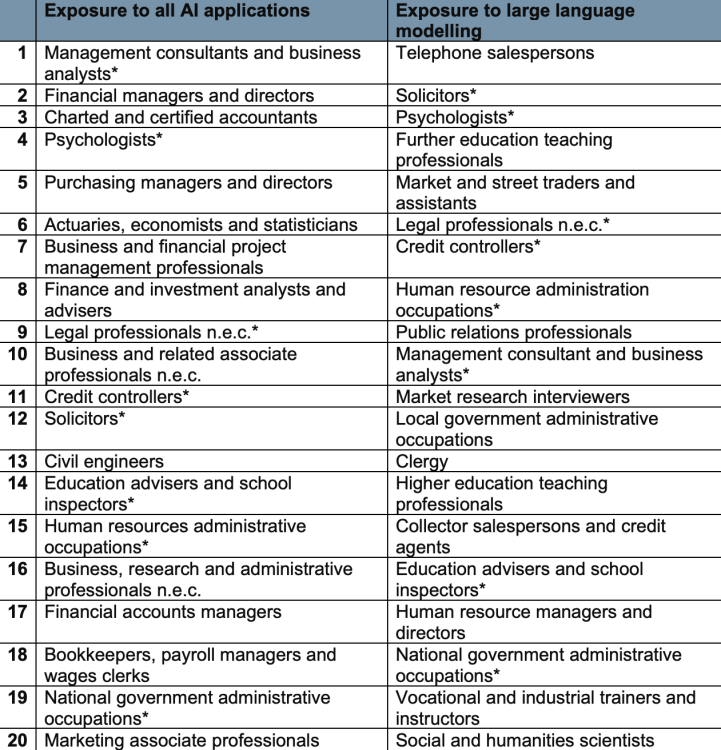
Taking all this into consideration, the study breaks down the top 20 occupation types most exposed to AI, as well as most exposed to large language modeling (LLMs). It’s a long list, including sectors like consulting, telephone sales, psychologists, legal professionals, teachers, and payroll managers.

chart showing the 20 job categories most exposed to AI and LLMs

Credit: UK Department for Education

As stated above, the study finds that finance and insurance are the most exposed to AI of any job sector. The other most exposed sectors include information and communication; professional, scientific and technical, property; public administration and defense; and education.

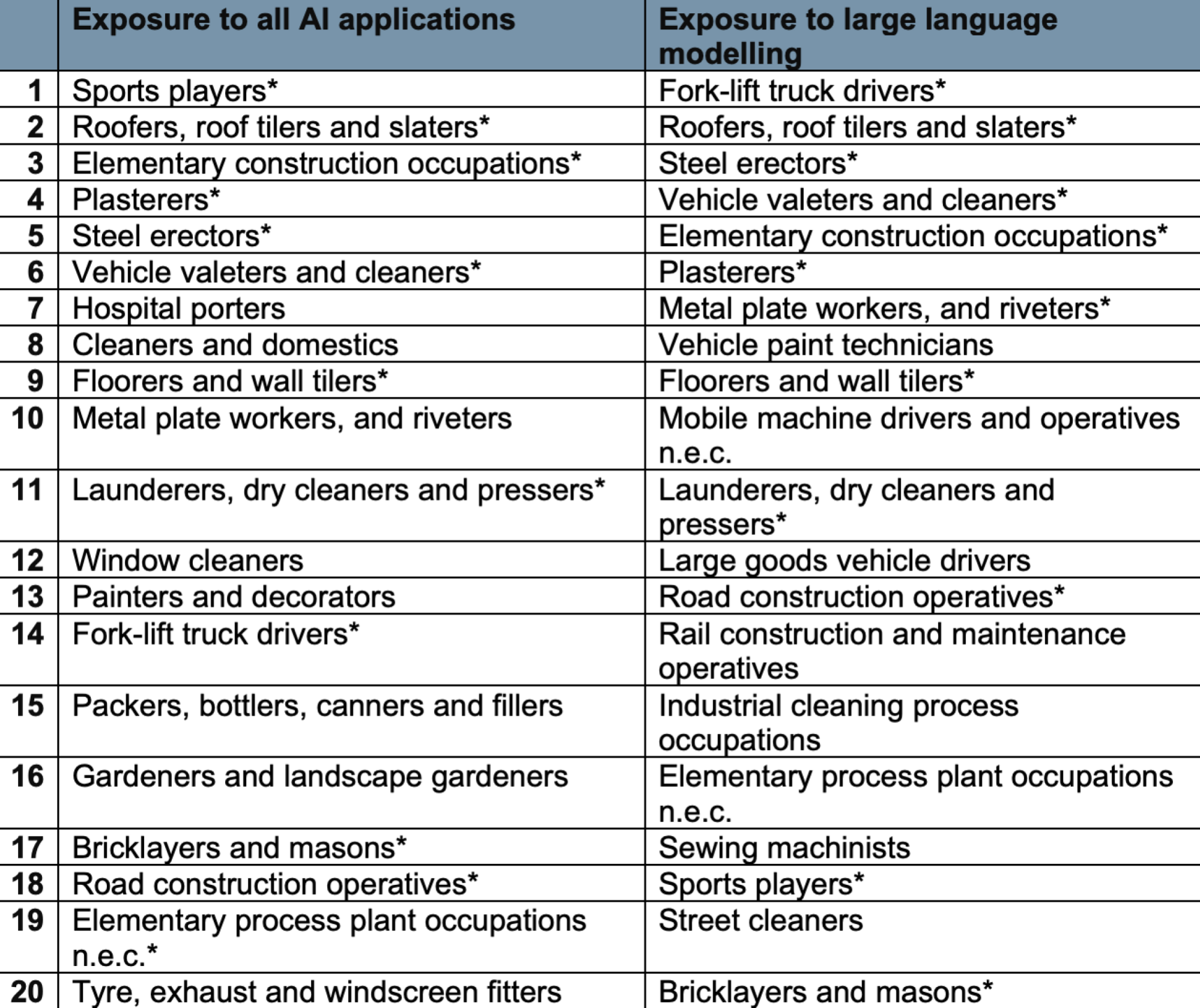
Just as interesting as the list of occupation types most exposed is the list of those least exposed. Many of these roles require manual labor that cannot be replicated by AI or technology in general, such as sports players, roofers, fork-lift truck drivers, painters, window cleaners, and bricklayers:

UK study results for jobs least exposed to AI/LLMs

Credit: UK Department for Education

Of the “professional” occupations, the following are deemed the least exposed to AI: veterinarians, medical radiographers, dental practitioners, physiotherapists, and senior
police officers. The industries least exposed include food services; motor trades, agriculture, forestry, and fishing; transport and storage; and construction.

Will AI truly replace any jobs, according to the study?

Interestingly enough, the study is almost exclusively focused on AI exposure, rather than on jobs threatened by the technology. That said, they do have a list of 16 job types that are considered “high automation occupations,” which a pessimist could infer to mean jobs that could be one day replaced by automation.

  • Authors, writers and translators

  • Bank and post office clerks

  • Bookkeepers, payroll managers and wages clerks

  • Brokers Call and contact centre occupations

  • Customer service occupations n.e.c.

  • Finance officers

  • Financial administrative occupations n.e.c

  • Human resources administrative occupations

  • Librarians

  • Market research interviewers

  • Other administrative occupations n.e.c.

  • Pensions and insurance clerks and assistants

  • Telephone salespersons

  • Travel agents

  • Typists and related keyboard occupations

You might notice some overlap between this list and the list of jobs most exposed to AI. That’s because the study notes that these jobs all have high AIOE scores, both for exposure to AI and LLMs.

I can’t predict the future, and neither can this study. In fact, it cautions that the results generated here are based on assumptions that may or may not prove to be true as time goes on. That said, this is a good look at the situation as it stands from a data-driven perspective. And for the record, I’m not happy to see “writers” at the top of that automation list.


Source: LifeHacker – All the Jobs AI Is Coming for, According to a UK Study

Researchers Develop Tiny Cute VR Goggles For Mice With Big Implications

Researchers Develop Tiny Cute VR Goggles For Mice With Big Implications
Virtual reality can be an immersive way to play games, experience new environments, or consume and learn new content for anyone of any age. With that philosophy in mind, scientists have expanded the use cases of VR to rodents to enable new pathways and possibilities in neuroscience with tiny mouse-sized VR goggles that simulate environments

Source: Hot Hardware – Researchers Develop Tiny Cute VR Goggles For Mice With Big Implications

How to Record Phone Calls on Your iPhone

Being able to record a phone call for future reference can be useful for both work and personal reasons. Unfortunately, Apple hasn’t made it easy, as the iPhone doesn’t actually let you record phone calls natively. Instead, you’ll need to rely on recording the call using a second phone, or software designed to get around Apple’s limitations. Here are two suggestions for how to do it.

First, make sure call recording is legal where you are

Before you jump in and start recording calls left and right, I’d recommend slowing doing some research first. Depending on what state or country you live in, recording phone calls may require you to get the other party’s permission, or it may be completely illegal. Always make sure you’re following the laws of your state or territory before recording phone calls to avoid any kind of legal issues. (Not sure of your area’s call recording laws? You can find them online.)

How to record phone calls on iPhone using Google Voice

Perhaps one of the easiest ways to record phone calls on iPhone is to use Google Voice. The service is completely free, with the major caveat that you can only record inbound calls. Any calls you make yourself cannot be recorded.

To use it, you’ll need a Google Account, which you will use to both sign up for Google Voice and get a phone number from the service. The app walks you through how to do this. Once done, you can head into Settings > Calls > Incoming Call Options and then enable a toggle switch that lets you turn recording on.

From there, it’s as simple as answering the phone call on Google Voice, and then pressing 4 on the keypad to start the recording. You’ll automatically be sent a recording of the call to your email after it’s finished.

How to record phone calls on iPhone using a dedicated app

The other useful way to record phone calls on an iPhone is to make use of an app dedicated to the purpose. Unfortunately, most of these third-party apps require some kind of subscription, as they rely on additional services to make recording your phone calls possible. However, you can often try them for free, and many of the subscription options help make managing those recordings much easier, including transcriptions.

There are several options out there, including Recordator, which charges a flat rate per minutes recorded, but I’m personally a fan of TapeACall. It’s the app I use myself any time I need to record a phone call, and it’s really easy to set up. It does come with a cost, however—$9.99 a month, or $59.99 a year. If you don’t record calls often, that price could be prohibitive (though if you only want to record a single call, there is a 7-day free trial). If you don’t want to pay for a service, Rev Call Recorder is a handy free option, though you’ll have to pay for extra services (like transcription).

Whatever option you choose, the process works similarly. For example, let’s say you try TapeACall. After making an account and choosing your subscription options, all you need to do is open the app, hit the record button, then dial the call that you want to record. When you’re ready to start recording, tap the Merge Call button, and it will connect to TapeACall’s servers and start recording.


Source: LifeHacker – How to Record Phone Calls on Your iPhone

Mazda not ready to bet on EVs but says more plug-ins for the US market

The nose of a Mazda CX-90

Enlarge (credit: Mazda)

Electrification is a big challenge if you’re a small automaker. And Mazda is a small automaker, one that’s in danger of being caught out by a range of inefficient gasoline- and diesel-powered vehicles. But the Japanese company hasn’t given up on electric vehicles, it says. In an interview with Auto News, Mazda CEO Masahiro Moro says the company will be an “intentional follower” in this space and that questionable demand for EVs justifies this strategy.

“One of the big issues for us is demand is uncertain,” Moro said. “In the current market, the reality for electrification, in particular for battery EVs, is the pace is not that high. So we may start a little slower in terms of the ramp-up. Not necessarily in terms of timing, but the ramp-up.”

In time, we should see a family of new Mazda-designed EVs built on a new platform. But the division that has to design them, called e-Mazda, was only created in November. Moro told Auto News that the division will focus on making EVs lighter and more affordable but won’t develop compact or smaller EVs as the cost of batteries makes them unprofitable.

Read 5 remaining paragraphs | Comments


Source: Ars Technica – Mazda not ready to bet on EVs but says more plug-ins for the US market

One Line Patch Doubles Mesa NVK Performance For Talos Principle… To 18 FPS

A patch merged this weekend for Mesa 24.0-devel is helping the performance of the open-source NVK Vulkan driver for NVIDIA GPUs but the performance remains well short still of the proprietary NVIDIA Linux graphics driver stack…

Source: Phoronix – One Line Patch Doubles Mesa NVK Performance For Talos Principle… To 18 FPS

[$] Some recent and notable changes to Rust

The Rust project makes incremental releases every six
weeks, a fact that makes it easy to overlook some of the
interesting changes coming to the language, such as new
ABIs, better debugger support, asynchronous traits, and
support for C strings.
The end of the year provides an opportunity to look back
over the past several months of updates, and to look
forward to what to expect in 2024.

Source: LWN.net – [$] Some recent and notable changes to Rust

This Is the Fastest Way to Rearrange Tabs in Your Browser

When you have many open tabs, it can be really annoying to keep moving the cursor from one end of the screen to the other to switch. To make this easier, it’s a good idea to move related tabs next to each other. Most of us tend to move one tab at a time, which is annoyingly slow. Fortunately, there’s a better way to get the job done.

How to easily rearrange tabs

The next time you have to rearrange tabs in your Firefox, Safari, or Chrome (and its many variants such as Edge, Vivaldi, and Brave), try this hack: Press and hold the Command key on your Mac or Ctrl on Windows, and click each tab you want to move. This will select all those tabs. (You can also hold down Shift and click any two tabs in your browser. This will select all the tabs in between the two, along with the two you clicked.)

You can then click and drag these tabs to rearrange them. Drag them outside the app to open a new browser window that contains only the selected tabs.

Another neat trick involves selecting multiple tabs and then right-clicking to reveal more options that vary based on your browser. (Here’s how to right-click on a Mac.) Some options will allow you to send tabs to other devices, and others will let you pin, bookmark, move, reload, or close these tabs. 

It may take a bit of time to understand how best to fit this trick into your workflow, but once you do, there’s no going back. 


Source: LifeHacker – This Is the Fastest Way to Rearrange Tabs in Your Browser