Baby Yoda Comes to Life in Exclusive Clip From The Mandalorian's Home Release

Cast your memory back to season one of The Mandalorian, to the first moment you glimpsed Baby Yoda—even before Star Wars marketing nudged fans into calling the character “the Child,” and before we learned his name was “Grogu.” This clip from Disney Home Entertainment’s The Mandalorian Season 1 and Season 2, out today,…

Read more…


Source: Gizmodo – Baby Yoda Comes to Life in Exclusive Clip From The Mandalorian’s Home Release

Sony is investigating possible ransomware attack at Insomniac Games

Sony’s investigating a possible ransomware attack at PlayStation subsidiary Insomniac Games, the makers of the beloved Spider-Man series. A hacking group called Rhysida has claimed credit for the alleged incident and announced that it’ll be selling any acquired data for $2 million within seven days if Insomniac and Sony don’t pay up, according to Cyber Daily.

This data potentially includes the usual stuff, like internal emails, confidential documents and personal information, but Rhysida says it goes even further. The organization claims it not only stole personal documents related to Spider-Man voice actor Yuri Lowenthal, but images and details regarding that forthcoming Wolverine game.

To that end, the group released proof-of-hack documents that suggest it grabbed screenshots from the game, in addition to character art relating to other superheroes that may be featured in the title. Rhysida put up a temporary website to advertise the sale of the documents, urging purchasers to “seize the opportunity to bid on exclusive, unique and impressive data.” It also promises that it only “sells to one hand, no reselling.” Honor among thieves, I guess.

Sony has issued a statement on the matter to Video Games Chronicle, writing “we are aware of reports that Insomniac Games has been the victim of a cyber security attack.” The company says it’s “currently investigating this situation” but notes that the alleged attack didn’t spread beyond Insomniac, so other Sony divisions remain unscathed.

Insomniac is recently known for Spider-Man, Spider-Man 2 and Spider-Man: Miles Morales, but the company cut its teeth in the 1990s making well-regarded PlayStation platformers like Spyro the Dragon and Ratchet & Clank. The developer’s Wolverine game was revealed back in 2021 and there’s no announced release date.

As for Sony, it’s one of the largest companies in the world, so it tends to attract this kind of thing. The company fell victim to a similar ransomware attack back in October, which exposed the personal information of more than 7,000 employees. In September, a hacking group called Ransomed.vc alleged that it compromised “all” of Sony’s connected systems, but other hackers claimed this was a scam. Sony investigated the alleged attack but hasn’t released any findings.

This article originally appeared on Engadget at https://www.engadget.com/sony-is-investigating-possible-ransomware-attack-at-insomniac-games-173435808.html?src=rss

Source: Engadget – Sony is investigating possible ransomware attack at Insomniac Games

Tubi and Warner Bros. Agree to Bring the DC Universe to Streaming for Free

In the streaming world, the most important superpower is luring eyeballs to your platform—though adding actual superheroes to your line-up certainly can’t hurt. Thanks to a new deal with Warner Bros. Discovery, Tubi is now offering (or will soon offer) a wide range of DC Universe movies and TV series.

Read more…


Source: Gizmodo – Tubi and Warner Bros. Agree to Bring the DC Universe to Streaming for Free

These Are the Most Popular iPhone Apps of 2023

There are a lot of apps on Apple’s App Store. By some reports, there are over 1.8 million options to choose from. So if your app is among the most popular programs of any given year, you should definitely pat yourself on the back.

As it happens, Apple just announced which iPhone and iPad apps were among the most downloaded in 2023. The company broke these metrics into four categories per device: The top free apps, top paid apps, top free games, and top paid games. Plus, there’s a list of the top Apple Arcade games of the year.

What are the top iPhone apps of 2023?

Topping the most downloaded free iPhone apps of the year is Temu, the discounted marketplace that has blown up in the past year. Whether you believe that’s due to its low prices on cheap goods, or its aggressive advertising campaigns, Temu remains an insanely popular app in 2023. Most of the other apps on this list aren’t surprising: You have options like Max, Instagram, Google, YouTube, WhatsApp, and Gmail, but I think it’s interesting that Threads was more popular than TikTok this year. That’s almost certainly because Threads is a brand new app, and TikTok’s massive user base already has the app, but it’s still a testament to the Threads hype, at least back at launch. (Hey, there’s no X on here.)

The top paid iPhone app of the year was Shadowrocket, a rules-based proxy utility that lets you configure your iPhone or iPad’s internet traffic through proxy servers. It’s like a VPN, but with a lot more control, and can help secure your internet connection. Also topping this list is HotSchedules, an employee scheduling app; Procreate Pocket, which brings Procreate tools to your iPhone; and The Wonder Weeks, an app that helps you track why your baby might be crying. I’ve heard about fewer of these apps, likely because free apps just steal the show these days, but it’s interesting to dive into which apps have convinced people to spend money.

MONOPOLY GO! was the top free iPhone game of the year, with many other familiar titles on the list, such as Roblox, Subway Surfers, and Call of Duty: Mobile. Perhaps unsurprisingly, people were willing to spend the most money on Minecraft this year, with Heads Up! in second place.

You can check out the full list below for both iPhone and iPad:

Top free iPhone apps

  1. Temu: Shop Like a Billionaire

  2. CapCut – Video Editor

  3. Max: Stream HBO, TV, & Movies

  4. Threads, an Instagram app

  5. TikTok

  6. Instagram

  7. Google

  8. YouTube: Watch, Listen, Stream

  9. WhatsApp Messenger

  10. Gmail – Email by Google

Top paid iPhone apps

  1. Shadowrocket

  2. HotSchedules

  3. Procreate Pocket

  4. The Wonder Weeks

  5. 75 Hard

  6. AutoSleep Track Sleep on Watch

  7. Goblin Tools

  8. TonalEnergy Tuner & Metronome

  9. SkyView

  10. AnkiMobile Flashcards

Top free iPhone games 

  1. MONOPOLY GO!

  2. Roblox

  3. Royal Match

  4. Subway Surfers

  5. Gardenscapes

  6. Call of Duty: Mobile

  7. Block Blast!

  8. Makeover Studio: Makeup Games

  9. Parking Jam 3D

  10. Survivor!.io

Top paid iPhone games

  1. Minecraft

  2. Heads Up!

  3. Geometry Dash

  4. Bloons TD 6

  5. MONOPOLY

  6. Papa’s Freezeria To Go!

  7. Plague Inc.

  8. Red’s First Flight

  9. Five Nights at Freddy’s

  10. Grand Theft Auto: San Andreas

Top free iPad apps

  1. Max: Stream HBO, TV, & Movies

  2. YouTube: Watch, Listen, Stream

  3. Netflix

  4. Google Chrome

  5. Disney+

  6. Goodnotes 6

  7. TikTok

  8. Amazon Prime Video

  9. Temu: Shop Like a Billionaire

  10. Peacock TV: Stream TV & Movies

Top paid iPad apps

  1. Procreate

  2. Shadowrocket

  3. Nomad Sculpt

  4. forScore

  5. Toca Life: Hospital

  6. Bluebeam Revu for iPad

  7. Teach Your Monster to Read

  8. AnkiMobile Flashcards

  9. Endless Paper

  10. ToonSquid

Top free iPad games

  1. Roblox

  2. Magic Tiles 3: Piano Game

  3. Subway Surfers

  4. Royal Match

  5. Among Us!

  6. Duet Cats: Cute Cat Games

  7. Stumble Guys

  8. MONOPOLY GO!

  9. Bridge Race

  10. Gardenscapes

Top paid iPad games

  1. Minecraft

  2. Geometry Dash

  3. Bloons TD 6

  4. Stardew Valley

  5. MONOPOLY

  6. Five Nights at Freddy’s

  7. Red’s First Flight

  8. Poppy Playtime Chapter 1

  9. Plague Inc.

  10. Garten of Banban 2

Top Apple arcade games

  1. NBA 2K23 Arcade Edition

  2. Cooking Mama: Cuisine!

  3. Bloons TD 6+

  4. Angry Birds Reloaded

  5. Sneaky Sasquatch

  6. Warped Kart Racers

  7. Hello Kitty Island Adventure

  8. Snake.io+

  9. Fruit Ninja Classic+

  10. Solitaire by MobilityWare+


Source: LifeHacker – These Are the Most Popular iPhone Apps of 2023

Dune Part 2's Epic New Trailer Teases a War Across Generations

It’s certainly disappointing that Dune: Part Two isn’t in theaters right now but sometimes waiting is the best part. Case in point, today we’ve been graced with a brand new trailer, and it’ll make you somehow even more excited for the sequel than you already are. Which is really saying something.

Read more…


Source: Gizmodo – Dune Part 2’s Epic New Trailer Teases a War Across Generations

Google Fiber’s 20-gig service is coming to these cities for $250 a month

Google Fiber’s 20-gig service is coming to these cities for $250 a month

Enlarge (credit: Google)

In October, Google Fiber announced a ridiculously fast new tier of its Internet service: 20Gbps symmetrical. While that’s 1,000 times faster than what some Internet providers offer (especially going by upload speeds), what we didn’t know was the cost. A new blog post reveals who can get this new service, and they’ll be paying $250 a month for it.

Google says, “We’re starting in Kansas City, North Carolina’s Triangle Region, Arizona, and Iowa.” (Google tells me the “Triangle Region” means Raleigh, Durham, and Chapel Hill). Google Fiber is built on Nokia’s upgradable “Quillion” Fiber platform, and upgrading to the new 25G PON (passive optical network) technology allows it to push more data over existing fiber lines. Once it does more upgrades, Google says it can bring 20-gig service to more cities. Back in October, Google Fiber’s head of product, Nick Saporito, told Fierce Telecom that the plan is to bring 20-gig service to “in most, if not all, of our markets.”

20-gig will slot in as a new pricing tier at $250 a month, and other fiber pricing will stay the same. That means $70 for 1 gig, $100 for 2 gig, $125 for 5 gig, and $150 for 8 gig; 20-gig installations will start in Q1 of 2024.

Read on Ars Technica | Comments


Source: Ars Technica – Google Fiber’s 20-gig service is coming to these cities for 0 a month

Google Maps will let you store your location on your phone instead of the cloud

In today’s day and age, it can feel almost impossible to keep anything private, such as your whereabouts, and we’re often at the mercy of companies to take actionable steps to do so. To that end, Google has announced new location controls for Maps designed to give you more well, control, over what and where data is recorded. 

One of the most notable changes rolling out is the option to save your Timeline right to your device instead of the cloud. If you’re unfamiliar, the Timeline is an encrypted record of all the areas and attractions you’ve visited. You need to turn on your Location History — it’s off by default — in order to activate Timeline. As part of Google Maps’ updates, Location History will automatically delete your data after three months versus the previous 18 months. However, you can delete any information as soon as you want or turn off auto-delete. Plus, you can turn Location History back off at any point. 

Speaking of Location History, Google Maps will also allow you to click on your blue dot on the map and see settings such as Location History and Timeline. The shortcut lets you edit how much of your information is shared with and stored on Google Maps without having to dive into your settings. 

Similarly, Google Maps is adding the option to delete location-specific data. Say you were looking up a restaurant to take your partner for their birthday and want to keep it secret, you can delete directions, searches, shares and more. This feature and the blue dot shortcut will roll out in the coming weeks on Android and iOS, but the ability to save your Timeline straight to your device will become available sometime over the next year. 

This article originally appeared on Engadget at https://www.engadget.com/google-maps-will-let-you-store-your-location-on-your-phone-instead-the-cloud-170041432.html?src=rss

Source: Engadget – Google Maps will let you store your location on your phone instead of the cloud

How to Enable Immersive Spatial Audio on Windows 11

There’s an audio feature buried quite deep in Windows 11 you might not have come across before: spatial audio. It relies to some extent on the hardware you have hooked up to your PC, but it’s designed to create a more immersive, three-dimensional soundscape for any audio playing on your system—whether you’re watching movies or playing games.

You can try out spatial sound with any pair of headphones, though it can also function with soundbars and multi-speaker setups. There are a few different types of spatial sound to be aware of, and a quick web search for the speakers or headphones you have (or want to buy) alongside “spatial sound” should give you some more pointers. Here’s more about how it works, and how to enable it on your system.

How spatial sound works

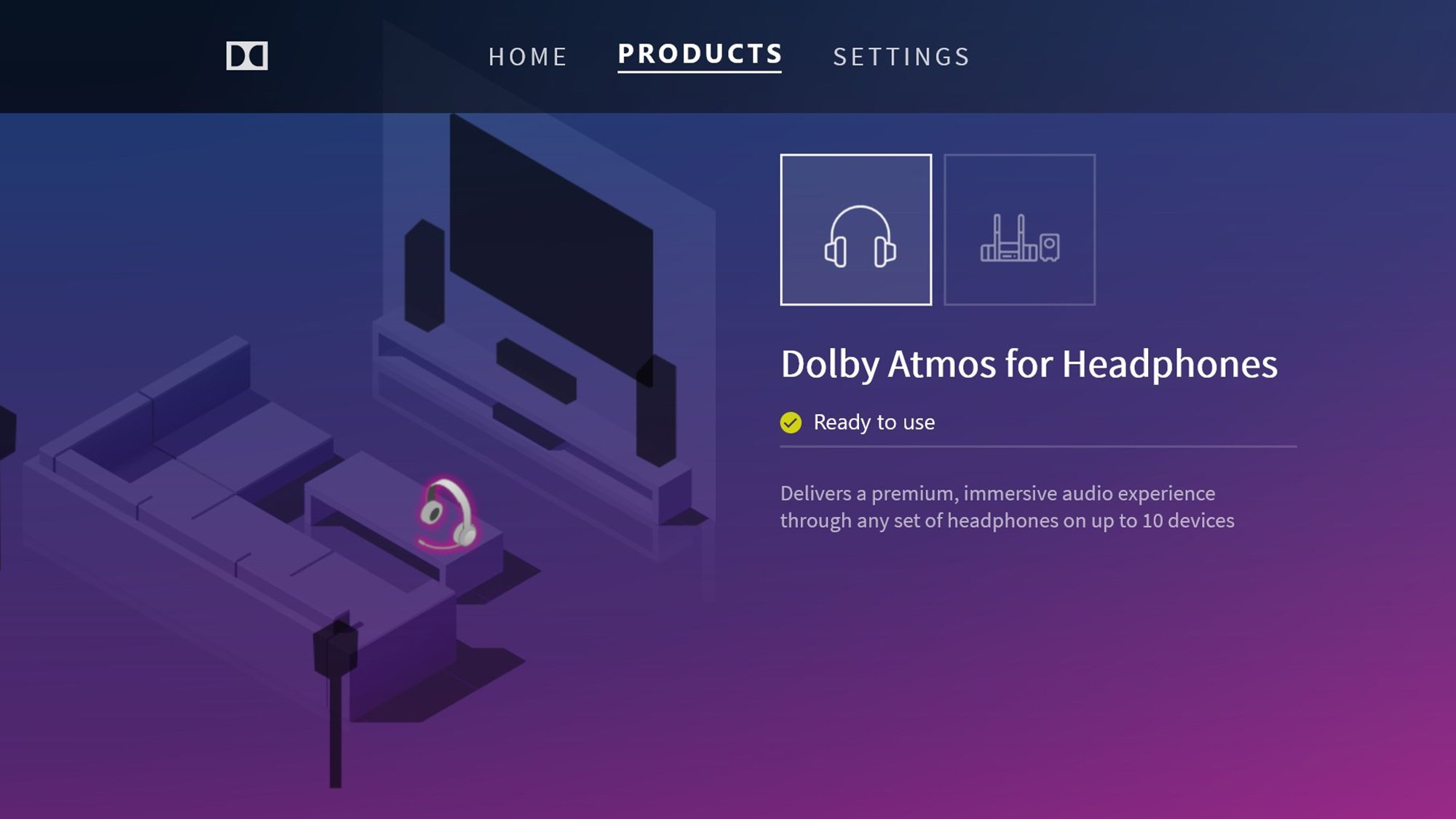
Dolby Access app

Credit: Dolby

Spatial sound aims to make your audio more immersive. Even if you’re only using stereo speakers or stereo headphones, it will attempt to mimic surround sound effects with a variety of audio tricks—so you might be able to hear sounds in a game coming from behind you, for example.

Changing the pitch is one of the tricks spatial sound uses, for instance, as it helps to indicate distance. The technology can support up to 33 different channels at once, which gives programs and games a lot of scope when it comes to isolating and positioning different bits of audio.

The spatial sound option all Windows users have is called Windows Sonic. This built-in option only works with headphones, but it should work with any pair of them, to a greater or lesser extent. The quality and capabilities of your headphones will most likely make a difference, so your results with spatial sound may vary.

You can also use Dolby Atmos spatial sound for headphones and speakers that support the standard. The catch is, this isn’t free: You need to download and install Dolby Access, which will cost you a one-time fee of $15. There is a free trial at least, so you can at least test it out with your system before parting with your money. You can find out more about Dolby’s implementation here.

The results you get from spatial sound are also going to vary depending on the sound card in your computer and the applications you’re using to play the audio. Movies, games, and music mixed for 7.1 audio channels will sound best with spatial audio enabled, and you may need to do some trial and error to make the most of the feature.

How to enable spatial sound

Selecting spatial sound in Windows 11

Credit: Lifehacker

I’ll cover the process of enabling Windows Sonic spatial sound here—as that’s the version available to everyone—but the steps are largely the same if you’ve got Dolby Atmos set up on your system. Open up Settings from the Start menu in Windows, then head to System and Sound.

You’ll see the audio devices set up on your computer, and you’ll want to click the small arrow to the right of your headphones (or the audio device that your headphones are plugged into). Windows Sonic only works with headphones, but any kind of wired or wireless connection should do.

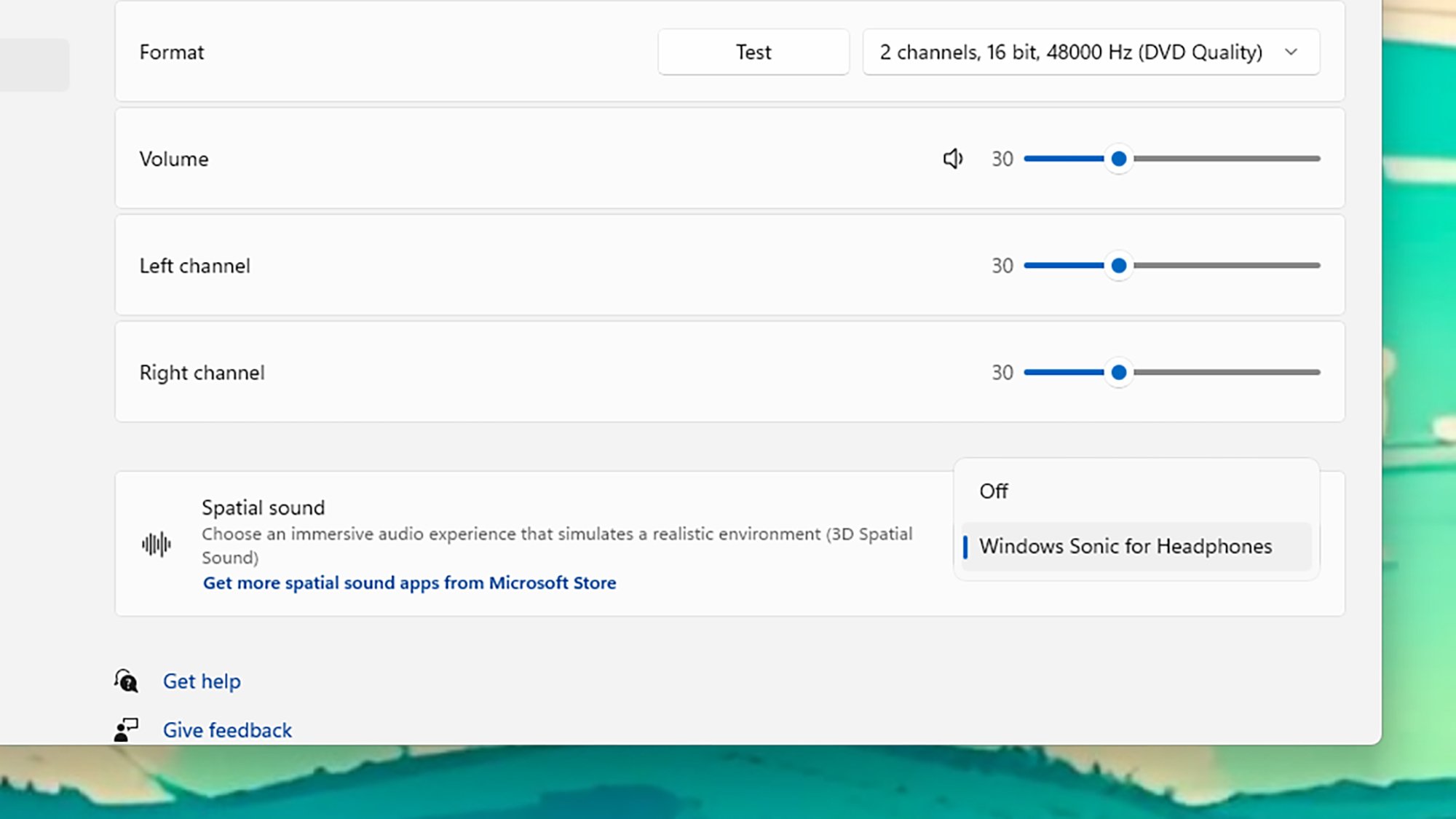
On the next screen, open up the drop-down menu next to Spatial sound, then choose Windows Sonic for Headphones from the list. The change should be noticeable immediately, so you can assess how well it works for your own particular hardware setup and the audio source you’re listening to.

We’d recommend trying spatial sound out with a few different types of content—loading up a Blu-ray or streaming a movie is a good option to try, for example. You can continue to toggle spatial sound on and off through the Windows Settings panel to check the difference it’s making inside your headphones.

There’s another way to turn on spatial sound that you might find more convenient: Click the speaker icon in the bottom right corner of the taskbar, then the arrow next to the volume slider, and you’ll see the spatial sound options again, alongside various other Windows sound settings.


Source: LifeHacker – How to Enable Immersive Spatial Audio on Windows 11

How to use Apple's new Journal app with the iOS 17.2 update

Apple’s AI-powered Journal app is finally here. The new diary entry writing tool was first teased for iOS 17 back in June, but it only became available on Monday with the new iPhone update — nearly three months after iOS 17 itself came out. After Apple released iOS 17.2, iPhone users can now access to the Journal app, which allows users to jot down their thoughts in a digital diary. Journaling is a practice that can improve mental wellbeing and it can also be used to fuel creative projects.

You can create traditional text entries, add voice recordings to your notes, or include recent videos or pictures. If you need inspiration, AI-derived text prompts can offer suggestions for what to write or create an entry for next. The app also predicts and proposes times for you to create a new entry based on your recent iPhone activity, which can include newer photos and videos, location history, recently listened-to playlists, and workout habits. This guide will walk you through how to get started with the Journal app and personalize your experience.

How to create a new entry in the Journal app on iPhone

Apple Journal App screengrab
Malak Saleh

When you open the Journal app, tap the + button at the bottom of the page to create a new entry. If you want to start with a blank slate, when you tap ‘New Entry’ an empty page will appear and from there you can start typing text. You can add in recent photos from your library when you tap the photos icon below the text space, take a photo in the moment and add it to your entry or include a recorded voice memo when you tap the voice icon. You can also add locations to your entry when you tap the arrow icon at the bottom right of an entry page. This feature might be helpful for travel bloggers looking back at their trips abroad. You can edit the date of an entry at the top of the page.

Alternatively, you can create a post based on recent or recommended activities that your phone compiled — say, pictures, locations from events you attended, or contacts you recently interacted with. The recent tab will show you, in chronological order, people, photos and addresses that can inspire entries based on recent activities. The recommended tab pulls from highlighted images automatically selected from your photo memories. For example, a selection of portraits from 2022 can appear as a recommendation to inspire your next written entry. Some suggestions underneath the recommendation tab may appear within the app with ‘Writing prompts.’ For example, a block of text may appear with a question like, “What was the highlight of your trip?”

Apple Journal App
Malak Saleh

Scheduling, bookmarking and filtering

If you’re not free to write when a suggestion is made, you can also save specific moments you want to journal about and write at a later time. Using the journaling schedule feature, you can set a specific time to be notified to create an entry, which will help a user make journaling a consistent practice. Go to the Settings app on your iPhone and search for the Journal app. Turn on the ‘Journaling schedule’ feature and personalize the days and times you would like to be reminded to write entries. As a side note, in Settings, you can also opt to lock your journal using your device passcode or Face ID.

Settings to schedule journal sessions
Malak Saleh

You can also organize your entries within the app using the bookmarking feature, so you can filter and find them at your own convenience. After creating an entry, tap the three dots at the bottom of your page and scroll down to tap the bookmark tab. This is the same place where you can delete or edit a journal entry.

Later on, if you want to revisit a bookmarked entry, tap the three-line icon at the corner of the main journal page to select the filter you would like applied to your entries. You can select to only view bookmarked entries, entries with photos, entries with recorded audio and see entries with places or locations. This might be helpful when your journal starts to fill up with recordings.

Adding music, workouts and other off-platform entries into your journal app

Using your streaming app of choice, (Apple Music, Spotify or Amazon Music), you can integrate specific tracks or podcast episodes into your entries by tapping three buttons at the bottom of your screen that opens up the option to ‘share your music.’ The option to share a track to the Journal app should appear and it will sit at the top of a blank entry when you open the app.

You can use the same method with other applications, like Apple’s Fitness app. You can share and export a logged workout into your journal and start writing about that experience.

Amazon Music
Malak Saleh

This article originally appeared on Engadget at https://www.engadget.com/how-to-use-apples-new-journal-app-with-the-ios-172-update-164518403.html?src=rss

Source: Engadget – How to use Apple’s new Journal app with the iOS 17.2 update

Red Hat Looks For Feedback On Its New Initoverlayfs File-System Proposal

Red Hat engineers have been developing Initoverlayfs as a scalable initial file-system. The code is currently in early form and the developers are still looking for feedback from the community as well as figuring out whether it properly belongs in kernel or user-space…

Source: Phoronix – Red Hat Looks For Feedback On Its New Initoverlayfs File-System Proposal

All the Days You Can Visit National Parks for Free in 2024

There are over 400 national park sites—including historic sites, monuments, and recreation areas—in the United States, most of which are free to visit. But many of the most popular 60-plus national parks, such as Grand Canyon National Park, Yosemite National Park, and Yellowstone National Park, charge an entrance fee. Visiting one of these will generally set you back $10–$20 per person or $35 per vehicle (and allow you to come and go for seven days from purchase). Depending on how many people are in your family and how many parks you visit, this can add up.

In 2024, take a strategic approach: Head to one of the sites participating in the National Park Service’s six fee-free days.

What days are national parks free in 2024?

Entry to all national park sites will be free on the following days:

  • Jan. 15 (Monday): Martin Luther King, Jr. Day

  • April 20 (Saturday): First day of National Park Week

  • June 19 (Wednesday): Juneteenth

  • Aug. 4 (Sunday): Great American Outdoors Day

  • Sep. 28 (Saturday): National Public Lands Day

  • Nov. 11 (Monday): Veterans Day

Note that fee-free days may still require timed entry or vehicle reservations as well as payment for services like camping, special tours, transportation, and boat rides. If you’re planning your trip on or around one of these days, be sure to check ticket requirements and make necessary reservations well in advance, as some parks could also be more crowded.

If you can’t get to a national park on one of these six holidays, you may still qualify for free or reduced-fee entry. Veterans, active-duty military (and their dependents), people with disabilities, and fourth-grade students get free America the Beautiful annual passes, which allow access to every national park. Adults 62 and older can purchase an annual America the Beautiful pass for $20 or a lifetime pass for $80.


Source: LifeHacker – All the Days You Can Visit National Parks for Free in 2024

Metaphor ReFantazio Borrows Persona's Most Compelling Mechanic

Metaphor: ReFantazio is an upcoming fantasy RPG from the team behind the Persona series, and it looks like it’s taking all the best parts from the wildly popular series. A new 14-minute-long breakdown trailer shows how it’s adapting different Persona games’ social and time management systems to tell a political story…

Read more…


Source: Kotaku – Metaphor ReFantazio Borrows Persona’s Most Compelling Mechanic

The Best Space Images of 2023

Space is an inky black yonder… but for the countless light sources that pepper the billions of light-years that human instruments can see. Thanks to ground-based telescopes and observatories parked millions of miles from Earth, 2023 has been a terrific year for space imagery. Astronomers captured fascinating new…

Read more…


Source: Gizmodo – The Best Space Images of 2023

Capture One is axing the free tier of its photo-editing software on January 30

Capture One’s eponymous photo-editing software suite is ending the free Express tier, effective on January 30. The popular Adobe Lightroom alternative will be fully pay-to-play, with a number of Pro tiers to choose from. The company says ending the free tier was necessary to “focus on our main products.”

Once January 30 hits, you won’t be able to download or use Express from the website and license keys will expire. Additionally, any saved images and edits will go the way of the dodo, so get in there and finish up before next month. You can, however, quickly transfer images and edits from Express to Pro, which is something Capture One would very much like you to do.

To that end, Pro subscriptions range from $24 to $34 each month, depending on if you choose a desktop client or a combo pack that adds a smartphone app. You can also buy the desktop client outright for $300, but you won’t get any updates or access to the smartphone app. There’s a 30-day free trial for those on the fence.

Capture One has become a crucial tool for digital photographers, as it allows you to connect an external camera and shoot images directly to the desktop software or app. The algorithm automatically applies edits as the photos come in. Capture One works with more than 500 cameras, including models by Canon, Sony, Nikon, Fujifilm, Leicia and Sigma, among others.

The software also handles RAW conversion, color processing and general editing tasks, just like Lightroom. You can even share a live link of a shoot with colleagues, to allow for speedy and efficient collaborations. This is serious photo-editing software made primarily for professionals or those serious about the craft. Still, it’s sad to see the free version sail away into that color-corrected sunset. If the Pro version’s cost has you wavering, the iPhone app by itself costs $5 each month.

This article originally appeared on Engadget at https://www.engadget.com/capture-one-is-axing-the-free-tier-of-its-photo-editing-software-on-january-30-162035781.html?src=rss

Source: Engadget – Capture One is axing the free tier of its photo-editing software on January 30

GTA 6 Is Likely To Snub PC At Launch And A Former Rockstar Games Dev Explains Why

GTA 6 Is Likely To Snub PC At Launch And A Former Rockstar Games Dev Explains Why
Regular readers of this site who are gamers are very likely to be primarily PC gamers. That may have muted your enthusiasm for Rockstar’s next Grand Theft Auto game, GTA VI, as it has been widely reported to skip the PC, at least at launch. Rockstar hasn’t said anything of the sort, but the trailer only mentions the PlayStation 5 and Xbox

Source: Hot Hardware – GTA 6 Is Likely To Snub PC At Launch And A Former Rockstar Games Dev Explains Why

Taylor Swift Is So Popular Google Booted Her From Its 2023 Trending Search List

Taylor Swift Is So Popular Google Booted Her From Its 2023 Trending Search List
Taylor Swift is pretty much everywhere these days, from selling out venues for musical performances to overtaking sports coverage whenever the Kansas City Chiefs play (courtesy of her relatively newfound relationship with Chiefs tight-end Travis Kelce). The sum of her popularity is Time Magazine’s designation of Taylor Swift as Person of the

Source: Hot Hardware – Taylor Swift Is So Popular Google Booted Her From Its 2023 Trending Search List