How to Choose (and Install) the Right Ring Doorbell for You

One of the most established names in video doorbells is Ring. While there’s now tons of competition in the video-doorbell space, Ring has expanded their functionality and product line and continues to be the go-to name for front door security. Before you get one, however, there are a few things to consider, like what type of model you’ll need and how you’ll mount it.

Choose the right Ring model

First, you need to know whether you’ll be able to support a wired camera, or if you need a wireless version. A wired doorbell camera will connect to the wiring that your existing doorbell uses and means you’ll never need to recharge your camera. Just be aware that even though it’s using the same wiring, a ring camera doesn’t sound your existing door chime—it alerts you via phone, and you can purchase a chime accessory to hear an alert in your home. If this wiring doesn’t exist, Ring has plenty of doorbells that are rechargeable. You’ll take them down overnight once in a while, connect them to a USB cable, and once they’re recharged, put them back up. This sounds labor-intensive, but it’s really not. Whether wired or wireless, Ring offers a few models to choose from. 

The most important requirement, regardless of which model you choose, is the ability for your internet signal to be relatively strong near the doorbell. This is how the doorbell will communicate with your phone, and send video back and forth. The faster the connection, the quicker you’ll receive notifications and be able to communicate with people at your front door via video.  

Consider your mount

Now you need to consider how and where you’ll mount your doorbell, and if it will require any accessories. For instance, if you live in an apartment building, you may not be “mounting” the doorbell on the wall, but may use a clamp just for this purpose, so the doorbell remains outside the door, but secure. If you are mounting the doorbell on siding, at a slant, you’ll need a “wedge” mount that compensates for the slant. If you need to aim your doorbell at an angle, rather than straight out from the house, you’ll want a swiveling mount. Some mounts allow for a vertical and a horizontal angle. If you’re able to mount the doorbell to a flat wall, aiming straight out, everything you need is in the box, and you won’t have to buy an additional mount. 

Assemble your tools

If you’re connecting a wired doorbell, you’ll need a screwdriver, a pair of wire strippers and your phone, as well as a voltage tester. For either wireless or wired, you’ll want a drill with your drill bit set, and a screwdriver or Phillips bit for your drill. You’ll also want a level, and some silicone caulk. 

Turn off the electricity to the doorbell to existing wiring (for a wired doorbell)

First, you’re going to want to make sure the electricity is off to your doorbell. If you have your voltage tester, an inexpensive tool to check if a wire is safe or hot, you can try to shut off just the circuit that controls your doorbell. Shut off the circuit you believe to a match, and then once you’ve removed the existing doorbell, carefully use the detector to double-check the electricity by touching the plastic tip of the tester to each wire to see if the tester sounds an alarm. If you don’t have a detector or you aren’t sure which circuit goes to the doorbell, turn off the main power instead. This should kill electric to your whole house.  Once you know the electricity is off to those wires, you can proceed.

Install the mounting plate

Using the mount you chose, trace where the mount should go by holding it against the wall, using a level to ensure it’s straight, and note where the screws will go. Now match a drill bit to the size of the screws included with the doorbell, and drill ½ inch deep where you noted the screw holes on the wall. Switch to the Phillips bit, and install the mount. In some cases, you’ll need to install the flat wall mount that came in the box to a wedge, angle or clamp mount you’ve bought. If so, do so now. 

Connect the wires (for a wired doorbell)

The wires that are coming out of the wall connect to the mount, not the doorbell. Follow the directions to ensure the right wires go to the right receptacle on the mount. Use the wire strippers as needed to create a nice clean wire connection by cutting off frayed or burned-out wire and stripping the end. Once the connections are made, you can proceed to installing the doorbell itself. 

Install the Ring app on your phone

If you haven’t yet, now is the time to install the Ring app for iPhone or Android. This is needed to proceed to the next step. Set up an account, and then add a new device. Select the doorbell you’ve purchased, and follow the directions. Make sure you have the box the doorbell came in, and the doorbell itself. There may be a QR code you’ll need for setup on the back of the doorbell or the box. Follow the prompts on the app—it may ask you turn on location services, and doing so will allow your doorbell to work properly.  The app will guide you through connecting the doorbell to your wifi, and how to test the doorbell. 

Mount the doorbell

Finally, it’s time to put the doorbell on the mount. The mount that came in the box has two hooks that secure the doorbell when you slide the doorbell down onto the mount. Then you simply secure it with the included screws, using the included screwdriver. If you are using another mount, directions may differ; follow the directions on the mount. An incredibly important tip: Do not lose the included screwdriver. You will need it to recharge your doorbell or to ever remove it. It is a unique screw head you cannot purchase except from Ring. 

Choose settings to personalize your Ring doorbell

With the doorbell mounted, powered and connected, it’s time to personalize it to your home and preferences. The Ring app guides you through what the camera can see, and how much of it the doorbell should focus on, in a setting called “motion zones.” If you have people walking up and down a sidewalk in front of your home all the time, you may want to adjust the motion zone so that the camera only focuses on foot traffic closer to the house. This setting is highly adjustable. 

You can also use schedules to decide how the doorbell should act and what it should act on. For instance, overnight you might want it to behave differently—perhaps you want it on “do not disturb” or it should focus on a different motion zone.  You’ll likely adjust it a number of times over the first few weeks to find what is comfortable for you. Once you find what works for you, you won’t need to readjust it. 

Get acquainted with the app

Now, you just need to get used to having a video doorbell! This means getting used to the different notifications (someone is at the door, someone rang the doorbell, someone left a package) and how you want to react. When someone rings the doorbell, do you want to respond by interacting with them? 

You can change the sound the phone makes when someone rings the bell, you can even set some auto responses for the doorbell. Going through the app will show you all the latest features you can play with. 

Enjoy your doorbell

A video doorbell can be a powerful tool to feel safe in your home, to ensure you catch packages while away from the house, or can aid the police with video if a break in does happen. Setting them up is just a few steps, and once you’ve done it, it’s very easy to do it again if needed.


Source: LifeHacker – How to Choose (and Install) the Right Ring Doorbell for You

Naughty Dog Axes The Last Of Us Multiplayer For PS5, Can You Guess Why?

Naughty Dog Axes The Last Of Us Multiplayer For PS5, Can You Guess Why?
Naughty Dog has officially put a nail in the coffin of the highly-anticipated The Last of Us Online video game. In a press release, the studio commented, “There’s no easy way to say this: We’ve made the incredibly difficult decision to stop development on that game.”

The studio, established in 1994 and exclusive to PlayStation, added that

Source: Hot Hardware – Naughty Dog Axes The Last Of Us Multiplayer For PS5, Can You Guess Why?

Intel 5th Gen Xeon Performance Benchmarks With DDR5-4800 vs. DDR5-5600

With Intel’s just-launched 5th Gen Xeon “Emerald Rapids” processors headlined by the 64-core Xeon Platinum 8592+, one of the key upgrades with these new server processors is now supporting DDR5-5600 memory compared to DDR5-4800 with Sapphire Rapids and also the memory frequency limit with AMD’s EPYC Zen 4 processors. Here are some benchmarks of the flagship Xeon Platinum 8592+ when being tested with DDR5-4800 versus DDR5-5600 memory modules.

Source: Phoronix – Intel 5th Gen Xeon Performance Benchmarks With DDR5-4800 vs. DDR5-5600

Elon Musk told bankers they wouldn’t lose any money on Twitter purchase

Read 16 remaining paragraphs | Comments


Source: Ars Technica – Elon Musk told bankers they wouldn’t lose any money on Twitter purchase

[$] Progress toward a GCC-based Rust compiler

The gccrs project is an ambitious
effort started in 2014 to implement a Rust compiler within The GNU Compiler
Collection (GCC). Even though the task is far from complete, progress has
been made since LWN’s previous coverage,
according to reports from the project. Meanwhile, another hybrid and more
mature approach to GCC Rust code generation is available in rustc_codegen_gcc.

Source: LWN.net – [$] Progress toward a GCC-based Rust compiler

Instagram rolls out new customizable Story templates

Instagram is rolling out a feature that could help users have more fun with Stories. Starting today, you’ll have the ability to create Add Yours templates. “People will be able to develop and share their own custom, meme-able Add Yours templates by pinning GIFs, text and gallery images to a Story template,” Instagram says. 

To create an Add Yours template, add GIFs, text and images that you want to include to your story. Then, go to your Sticker Tray and select Add Yours templates. After that, pick the elements (text, images and GIFs) that you want to include in the template. Here’s the kicker: once you share an Add Yours template in a Story, anyone else can use it and add their own touches.

If you want to riff on someone else’s template, tap on the Add Yours prompt when you see one in their Story. This will take you to the Camera, where you can see all the elements that are part of the template and play around with them, add your own and so on. If you tap the faces that appear on the left side of the sticker, you can see who else has put their own spin on a template.

As for what you can do with the Add Yours templates, it’s really your call. You might create an either/or quiz, start a trend of showing followers around your workspace or encourage folks to share the most ridiculous photos they have of their pets. Livening such prompts up with images and GIFs could help them stand out and get your template seen and riffed on by thousands of other users. Instagram rolled out templates for Reels last year.

This article originally appeared on Engadget at https://www.engadget.com/instagram-rolls-out-new-customizable-story-templates-150246935.html?src=rss

Source: Engadget – Instagram rolls out new customizable Story templates

Forget Roasting: Air Fry Your Chestnuts

Roasting chestnuts leisurely in a little cast iron pot over a roaring fireplace would be romantic, wouldn’t it? My winter evenings usually include tripping over a problematic Roomba and wrangling my two cats out of the garbage can, so my romantic winter evenings give more air fryer than open-fire anyway. Air fryer roasting is just the type of easy and fast I’m looking for during the holidays; it takes the waiting out of the equation so you can get right to cracking chestnut shells and watching Die Hard in your PJs.

When I was younger, we would make oven-roasted chestnuts. It’s a classic method, but even that can take 20 to 30 minutes. The air fryer’s circulating fan and significantly smaller space heats up faster and gets the chestnuts cooked through in a fraction of the time. Some recipes will tell you to soak the nuts before roasting them because it makes them easier to peel, but that’s unnecessary. I did both soaked and unsoaked, and they roasted with the same peeling ease. What really matters is how you score them.


Products to consider:


How to roast chestnuts in the air fryer

1. Score the chestnuts

I buy chestnuts from my local Shoprite, and they’re in great condition right now. Later in the season the offerings can become a little dry. Using a small paring knife, or ideally a small serrated paring knife, carefully cut a large slit across the entire rounded belly of each chestnut. Some chestnuts have two flat sides. They’re probably trolling us because they know what we’re up to. Just pick a side. 

My reasoning for the round side is because it has more surface area and the shape makes the shell open up during roasting. You can score a second slit across the first one; it’s not completely necessary but it can help. I tried slicing across the chestnut equatorially and top-to-tail. Both work but if you’re only making one slice then I suggest equatorially. The most important thing is to make large slices the entire length of the chestnut. None of this tiny “x” nonsense.

The scoring will allow the steam to escape the chestnut while roasting so none of them pop, but the edges of the large slices will peel back and make it easier to remove the meat.

2. Load the air fryer

Preheat the air fryer to 400°F. Put the chestnuts in the air fryer basket with the scored side facing up. This will allow the shell to peel back without being hindered by the tray underneath.

3. Cook the chestnuts

Roasted chestnuts in an air fryer basket.

Credit: Allie Chanthorn Reinmann

Roast the chestnuts on the “air fry” setting for 8 to 10 minutes, or until the shells are noticeably peeling back and the edges are toasted.

Let the chestnuts cool completely. You’ll hear them crackle as they’re cooling. That’s a good sign. Pile the chestnuts into a bowl and bring an empty with you to the coffee table as a “shell bowl.” Pinch the ends of the chestnut to wiggle the shell loose and crack it open using the peeled back shell. They’ll mostly come out in one piece, thanks to the large scoring method. Click play, and tell McClane I said “hello.”


Source: LifeHacker – Forget Roasting: Air Fry Your Chestnuts

Here's How to Connect Your AirPods to a MacBook

Since their introduction back in 2016, AirPods have become a staple in Apple’s ecosystem, in no small part because of how well they work with all of Apple’s devices. While most AirPods users tend to use their earbuds with their iPhone while on the go, you can easily pair your AirPods to your Mac as well. There’s a reason it’s called the Apple ecosystem, after all. Here’s what to do.

How to pair AirPods to a MacBook

To connect your AirPods to your MacBook, first open up your Mac and go to System Settings, then click Bluetooth. (You can also access Bluetooth settings via Control Center in the top right of the menu bar, near the date and time. If Bluetooth isn’t already turned on your Mac, enable it.)

Next, pick up your AirPods case and open the lid. On the back of the case, you should see a button. Hold that button for a few seconds until it flashes white. (For AirPods Max, hold down the noise button until the light flashes white.) Go back to your Mac, and you should see your AirPods appear under Nearby Devices. Click on the Connect button next to your AirPods name.

Your MacBook might ask you to enable Siri and select your voice assistant settings. Once you do that, you’re done, and your AirPods are paired to your MacBook.

How to switch AirPods between Apple devices automatically

One cool benefit of the Apple ecosystem is the ability to easily switch which device your AirPods are connected to automatically, provided you have a compatible pair. First generation AirPods can’t handle auto-switching, but all other models—including second- and third-generation AirPods, first- and second-generation AirPods Pro, and AirPods Max—can do it.

If you’ve already paired your AirPods with your iPhone and are signed into your Apple account on both your iPhone and Mac, your AirPods should switch between all devices as you play media between them. So, when you’re using your AirPods with your iPhone but start up a video on your MacBook, your AirPods should automatically switch to your Mac seamlessly. However, if they don’t, you can always connect to them manually from Bluetooth settings on the device you want to listen to.

If you run into any additional technical difficulties with your AirPods, you can always try a reset.


Source: LifeHacker – Here’s How to Connect Your AirPods to a MacBook

Pop!_OS COSMIC Desktop Improving Multi-Monitor & Multi-Window Support

While the holidays are quickly approaching, the System76 developers working on their Ubuntu-based Pop!_OS Linux distribution and new Rust-written COSMIC desktop environment haven’t been losing focus. December has been another busy month so far as they continue crafting this new modern desktop environment…

Source: Phoronix – Pop!_OS COSMIC Desktop Improving Multi-Monitor & Multi-Window Support

To Become Adventurous Learners, Kids Need Routine

Learning often requires taking different risks, whether it’s the willingness to try something new or trying after a failed attempt. For children, it’s this process of learning how to take risks and becoming comfortable with failure that can help them grow and develop. But encouraging them to take these risks, even when it’s scary and uncomfortable, can be a difficult task for parents. As research is showing, the willingness of a child to take risks in learning can depend on what their relationship with their parents look like.

Taking risks while learning  

In a recent study, conducted by researchers at the University of Wisconsin-Madison, children who viewed their parents as being reliable were more willing to take risks while learning. In this study, which included more than 150 children, participants were asked questions about their home environment, which included their relationship with their parents, after which they were asked to play a series of games.  

Children who viewed their parents as being more reliable, which included answering yes to questions such as whether they could count on them to pick them at specific times, follow through on their promises, or predict their reaction to different situations, were more likely to take risks during the games.  

“The children from more stable backgrounds, they play around and experiment in our games. They use that to get a sense of how things work, maybe earning them more money or more points,” said Seth Pollak, a psychologist at University of Wisconsin-Madison and the lead researcher on the study, in a press release.  

Having parents who are seen as reliable can be thought of as a buffer for children, one that gives them the security to take risks and explore. “If you trust your parent is there, you trust the reliability and the stability, it allows you to venture off and come back,” says Sarah Greenberg, executive director of behavior change and expertise for Understood.org, which is a nonprofit dedicated to supporting people with learning differences. “It’s almost like this internalized feeling of a safety net.” 

It’s this sense of reliability and predictability that gives kids the sense that it’s okay to take risks and to fail, as they have a parent at home that they can count on, who will be there to support them.  

Look for patterns of behavior

Creating a supportive learning environment for your child often includes identifying what they struggle with and what they need. One way to do that is to track certain behaviors over time, looking for patterns. “Your child can’t necessarily tell you what they need, but they are often showing you,” Greenberg says.  

For example, if your child is consistently having a meltdown after school, that could be a sign that they are overwhelmed or overstimulated from the school day, and need some extra time to decompress before starting their homework. Other behaviors could include refusals to do something, such as writing with a pencil or doing their math homework, which may be a sign they are struggling in specific areas.  

Small, consistent routines make a difference

Oen way to create consistency and reliability, even when swamped with all of the day-to-day demands of raising a family, is to develop small, but consistent routines with your child. “One positive routine can be a really good starting point,” Greenberg says.  

In terms of these routines, it’s less about how big or time-consuming they are, and more about their predictability. For example, it could be making the effort to give them 10 minutes of undivided attention when they come home from school, making it a habit to play LEGOs with them every Friday evening, or a predictable bedtime routine. “Ten or 20 minutes of consistent, positive attention can make such a world of difference,” Greenberg says.  

The key is to make it consistent and enjoyable, to give your child a sense that their parents are there for them. “It’s not about the rigidity, it’s really about the solidity, that the child feels the ground beneath them,” Greenberg says.  


Source: LifeHacker – To Become Adventurous Learners, Kids Need Routine

Framework 13 AMD Workaround Prepared For Linux To Deal With A Suspend Issue

A quirk has been discovered with the AMD-powered Framework 13 inch laptop where if a user closes the laptop’s lid on an already-suspended system, the system will wake up. A set of Linux kernel patches are on the way to workaround this issue…

Source: Phoronix – Framework 13 AMD Workaround Prepared For Linux To Deal With A Suspend Issue

Engadget Podcast: RIP E3 and diving into The Game Awards

So long E3, we knew you weren’t long for this world. This week, Cherlynn and Devindra are joined by Engadget Senior Editor Jessica Conditt to talk about the death of E3 and what it means for the gaming industry. We also explore some of the highlights (and low points) of last week’s Game Awards, which couldn’t quite balance celebrating video games and functioning as a marketing tool. We’re particularly excited for Light No Fire, the next ambitious game from the folks behind No Man’s Sky, as well as Arkane Lyon’s Blade.


Listen below or subscribe on your podcast app of choice. If you’ve got suggestions or topics you’d like covered on the show, be sure to email us or drop a note in the comments! And be sure to check out our other podcast, Engadget News!

Topics

  • We mourn E3 and break down everything announced at the Game Awards with Jess Conditt – 00:40

  • Beeper Mini, Sunbird, and the endless quest to spoof iMessage – 37:57

  • Apple ads theft protection in iOS 17.2 beta – 54:12

  • EU set to hand Apple a huge loss in its legal fight with Spotify – 58:04

  • Google loses antitrust trial against Epic games – 59:30

  • Executives fired after Sports Illustrated tries to publish generative AI articles (with fake writers behind them) – 1:06:32

  • Netflix engagement report reveals its most popular shows and movies of the first half of 2023 – 1:07:23

  • Working on – 1:09:25

  • Pop culture picks – 1:10:24

Subscribe!

Credits
Hosts: Cherlynn Low and Devindra Hardawar
Guest: Jessica Conditt
Producer: Ben Ellman
Music: Dale North and Terrence O’Brien

This article originally appeared on Engadget at https://www.engadget.com/engadget-podcast-rip-e3-133046611.html?src=rss

Source: Engadget – Engadget Podcast: RIP E3 and diving into The Game Awards

Amazon boosts its satellite internet network with the help of space lasers

Space lasers, once a mere futuristic joke, have become a real tool in building technology up there and making improvements for all of us down here. There’s been NASA’s use of space lasers to study plankton, plans to blast space junk and, now, a satellite network courtesy of Amazon. The company has announced that its Project Kuiper has built up its optical inter-satellite links (OISLs) capabilities to create a substantial mesh network of high-speed laser cross-links. This technology could result in faster data transmission to even the most remote places back on earth. 

In October, Amazon launched two prototype satellites and reported successful tests one month later, with the pair dispatching and retrieving data at speeds of up to 100 gigabits per second. “These tests demonstrated our ability to establish a single bi-directional link between two satellites, and initial data indicates that our design will be able to maintain cross-links between multiple satellites at once—the critical feature of a next-generation mesh network in space,” the company stated. 

To successfully use OISLs, laser links had to maintain contact at a distance up to 1,616 miles while also contending with spacecrafts moving at a speed of 15,534 miles per hour. Plus, Amazon had to minimize light spreading in order to maintain the signal and account for any additional dynamics of all these moving pieces — something it says has been successfully done.

Amazon also claims the mesh network moves data about 30 percent faster than terrestrial fiber optic cables can. “Amazon’s optical mesh network will provide multiple paths to route data through space, creating resiliency and redundancy for customers who need to securely transport information around the world,” Ricky Freeman, vice president of Kuiper Government Solutions, explained in a statement. “This is especially important for those looking to avoid communications architectures that can be intercepted or jammed, and we look to forward to making these capabilities available to public sector customers looking to move and land data from remote locations to their desired destination.” Basically, anyone from a cruise ship passenger to a multi-day hiker should be able to get a connection if this is successful. 

Project Kuiper started in 2019 but has seen a real boost in the last few months. With these successful tests completed, Amazon states that Project Kuiper is starting satellite production, with “full-scale deployment” beginning in the first half of 2024. It also predicts that early customer pilots will begin in the second half of the year. Notably, Amazon signed a deal with SpaceX to launch more Project Kuiper satellites at a faster rate. 

This article originally appeared on Engadget at https://www.engadget.com/amazon-boosts-its-satellite-internet-network-with-the-help-of-space-lasers-123535946.html?src=rss

Source: Engadget – Amazon boosts its satellite internet network with the help of space lasers

HP Wolf Security and Why HP Enterprise PCs Are Uniquely Secure

This week I’m in New York attending an HP Wolf Security event. I’ve been following HP Wolf Security division since its creation, and it remains unique in the market. What makes this unit different is that it functions as a company within a company and was created to mitigate the fall of more traditional security firms like Symantec and McAfee who were created at a time when Microsoft and the rest of the core PC industry were willing to outsource security to third parties. That changed dramatically in the early 2000s when Microsoft realized that the sales practices of these firms required that they disparage Microsoft’s offerings to sell their own. As you’d expect, Microsoft wasn’t good with that.

So, Microsoft, AMD and Intel stepped up and most of the PC market concluded that this was good enough. It wasn’t. Breaches continued to happen. HP uniquely concluded that it needed to up its game and created Wolf Security. 

Let’s talk about what makes Wolf Security unique in the market this week. 

Security as a Concept

My background in security is unusual. My family owned one of the then largest electronic security firms in the U.S. One of my first jobs was in undercover security for Pinkerton. I ran a security unit in retail for a few years and spent some time as a Deputy Sheriff. I was an internal auditor specializing in security, and I owned security for my unit at IBM. As a researcher, I covered security, and the firm’s security unit reported to me for a while. As a result, I tend to take security very seriously, but I’ve found that most, even those in security, often think about it as just a job. They underfund it and don’t take it seriously because, most of the time, nothing happens. It is often described as extended periods of boredom interspersed with rare instances of absolute terror because if there is a breach, your career is on the line. If you aren’t ready, you’re done. 

People who don’t live and breathe security don’t get this. They think security is something you do. It isn’t. It’s something you live. If you want to create a security defense, you start by building a unit of people who live and breathe the job, who take it seriously, who know that you’ll rarely get credit for the work you’ve done and that if things get exciting, something has gone terribly wrong. It takes people who believe in what they’re doing because they are what stands in the way of folks getting hurt and aren’t motivated by credit or status but by doing a job well. 

This is why Wolf Security was built. The unit consists of people like this who can think out of the box. The result is a unique solution that has been targeted at HP’s largest and most important customers. It involves unique hardware elements, the aggressive use of hypervisors and the rapid development of AI defenses to anticipate the coming wave of threats. They even have a unique hardware component that uses 4G and 5G to remain connected and allow any lost machine to be wiped and even tracked if needed. 

Wrapping Up:

Wolf Security is unique in the market, but it shouldn’t be. HP takes security seriously and has created a set of solutions for PCs that ensure its largest customers are safe. We will be facing an accelerated level of threat in 2024, particularly from AI, and it is heartening to know that Wolf Security stands between that threat and HP customers. Wolf Security fully understands that security should be taken seriously. I’ve had a lot of security experience, and my only regret is that I never worked for a unit as comprehensively focused on doing a quality job as HP Wolf Security is.


Source: TG Daily – HP Wolf Security and Why HP Enterprise PCs Are Uniquely Secure

The Morning After: Intel unveils its first chips built for AI work

Just a week after AMD revealed its own Ryzen 8040 hardware, Intel has entered its own AI PC era. The company’s new Core Ultra notebook chips, codenamed Meteor Lake, are Intel’s first processors to include an NPU, or neural processing unit, for accelerating AI tasks.

Intel claims the Core Ultra chips use up to 79 percent less power than AMD’s last-gen Ryzen 7840U while idling in Windows, and they’re also up to 11 percent faster than AMD’s hardware for multithreaded tasks. Intel, however, didn’t have the upcoming Ryzen 8040 chips to test against. They use the company’s new Intel 4 (7nm) process and should be “the most efficient x86 processor for ultrathin systems.”

As for AI workloads, Intel says Core Ultra chips can reach up to 34 TeraOPS when combining performance across the NPU, GPU and CPU. The big difference is the NPU: It’ll enable features like Windows 11’s Studio Effects, which can blur backgrounds and improve video lighting without hurting your battery life much. With more creative AI workloads, Intel says the Ultra 7 165H is 70 percent faster than the rival Ryzen 7 7840U in Adobe Premiere Pro.

Check out the rest of the specs and benchmark tests from Intel over here, and expect to hear more “AI PC” bluster in 2024.

Oh, and nothing to do with Intel’s chips, but be ready for everyone to be playing with AI-generated backgrounds on Instagram this week.

— Mat Smith

The biggest stories you might have missed

Twitch clears up its confusing sexual content guidelines

Instagram now offers AI-generated backgrounds on Stories

Time to get miserable about the COP28 declaration

​​You can get these reports delivered daily direct to your inbox. Subscribe right here!

Threads’ new hashless tags are good for pranks

Meta probably should have seen this coming.

TMA
Engadget

Meta finally rolled out searchable tags for all users on Threads, its microblogging Instagram offshoot, and users are taking advantage of a design quirk for a bit of dumb fun. Threads’ “topic tags” are a lot like hashtags, but not entirely the same. For one, there’s no hash (#). It’s pretty basic stuff… which makes the effectiveness of a new prank feel all the more absurd.

Someone can create a Threads post, ideally with a lot of text, then slap a “Show more” tag at the end, seemingly in the middle of a word or sentence. You, the unwitting victim, will then click “Show more” expecting to see the rest of the post, but — surprise! — it’ll direct you to the page for that tag instead.

Ah, pranks. Just in time for Thread’s awaited Europe launch…

Continue reading.

Spider-Man 2’s New Game+ mode pushed back to 2024

Other features, such as audio descriptions, are also delayed.

When Insomniac Games launched Spider-Man 2, it didn’t yet have features like New Game+ and audio descriptions. Community and marketing director, James Stevenson, shared that New Game+ “should” arrive before the end of 2023. But Insomniac has now released a statement explaining it’s targeting the next Spider-Man 2 update for early 2024. Insomniac went on to explain it’s adding more “highly requested features” to the game, such as replaying missions and changing the time of day.

Continue reading.

Engadget’s best gaming laptops

These are our favorites.

TMA
Engadget

Gaming laptops have been some of the most intriguing portable PCs for the past few years. They’ve gotten thinner and lighter, but also vastly more powerful and efficient, thanks to advanced CPUs and GPUs. Gaming laptops are where PC makers can get adventurous, with things like rotating hinges and near desktop-like customizability. We lay out the specs that matter, the price you can expect to pay and some of our standout favorites.

Continue reading.

This article originally appeared on Engadget at https://www.engadget.com/the-morning-after-intel-unveils-its-first-chips-built-for-ai-work-121504827.html?src=rss

Source: Engadget – The Morning After: Intel unveils its first chips built for AI work

Rocket Report: Signs of life from Blue Origin; SpaceX preps next Starship

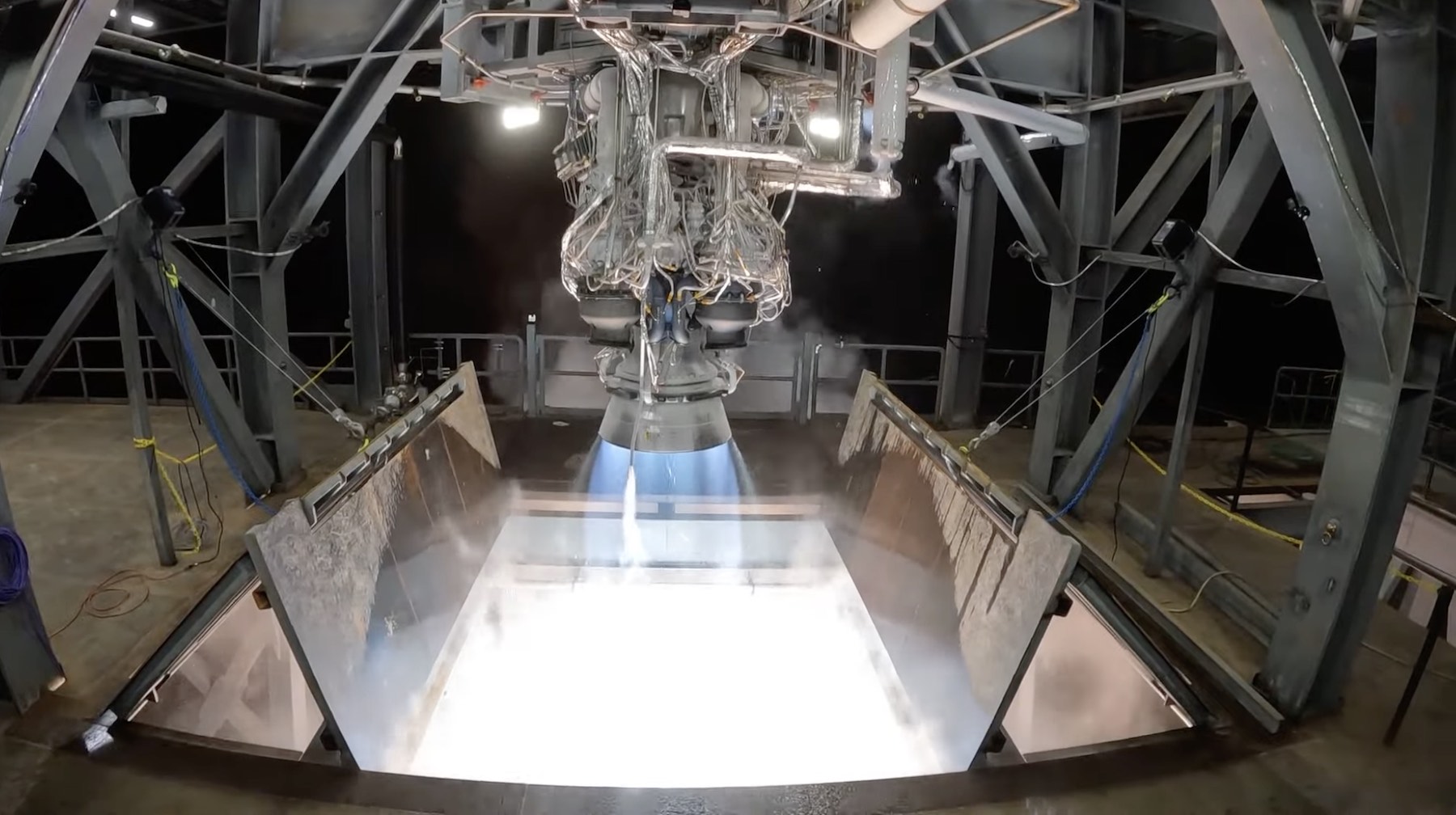
Relativity Space's Aeon R engine fires up on a test stand in Mississippi.

Enlarge / Relativity Space’s Aeon R engine fires up on a test stand in Mississippi. (credit: Relativity Space)

Welcome to Edition 6.23 of the Rocket Report! In last week’s report, my colleague Eric Berger mentioned what a year 2023 has been for rocket debuts. Several new launch vehicles flew for the first time this year, including SpaceX’s Starship and Japan’s H3. In this week’s report, we have some news on some major rocket debuts planned for 2024, namely United Launch Alliance’s Vulcan (now set for January) and Blue Origin’s long-awaited New Glenn.

As always, we welcome reader submissions, and if you don’t want to miss an issue, please subscribe using the box below (the form will not appear on AMP-enabled versions of the site). Each report will include information on small-, medium-, and heavy-lift rockets, as well as a quick look ahead at the next three launches on the calendar.

Lost tanks will delay final Vega launch. Remember last week’s report that Avio, the Italian rocket-maker, lost track of propellant tanks needed for the final launch of Europe’s Vega rocket? Well, it looks like Avio and the European Space Agency have a plan to remedy the situation, but it’s risky and will delay the Vega launch by several months, Space News reports. “Avio has confirmed to ESA that there is an issue with tanks for the last Vega flight,” said Toni Tolker-Nielsen, ESA director of space transportation, without addressing the earlier report that the tanks for Vega’s upper stage were found in a landfill, crushed and unusable.

Read 24 remaining paragraphs | Comments


Source: Ars Technica – Rocket Report: Signs of life from Blue Origin; SpaceX preps next Starship

Apple is adapting the Hugo Award-winning sci-fi book series Murderbot

The Hugo Award-winning The Murderbot Diaries books from Martha Wells are becoming a 10-episode Apple TV+ series starring Alexander Skarsgård, Apple announced. It will follow a self-aware “SecUnit” robot that must hide its free will in order to complete a dangerous assignment and comes from About a Boy creators Chris and Paul Weitz. 

“Murderbot is an action-packed sci-fi series, based on the award-winning books by Wells, about a self-hacking security android who is horrified by human emotion yet drawn to its vulnerable ‘clients,'” Apple wrote. “Murderbot must hide its free will and complete a dangerous assignment when all it really wants is to be left alone to watch futuristic soap operas and figure out its place in the universe.”

The Weitz brothers will write, direct and produce the series, while Skarsgård will also serve as executive producer. Apple TV+ currently offers other sci-fi series including Silo, For All Mankind, Invasion and others. The streaming service needs to keep the content flowing as it has doubled Apple TV+ prices in just over a year. At the same time, Apple is looking for the right kind of content as it aims to avoid hot-button topics following the cancellation of The Problem with Jon Stewart. 

Several Murderbot chapters have made Engadget’s gift guides and recommended reading lists. We called the Fugitive Telemetry novella a “banger” with “space intrigue and robotic mysteries” and recommended the earlier novella series in our 2019 holiday guide. 

This article originally appeared on Engadget at https://www.engadget.com/apple-is-adapting-the-hugo-award-winning-sci-fi-book-series-murderbot-115559433.html?src=rss

Source: Engadget – Apple is adapting the Hugo Award-winning sci-fi book series Murderbot