Dark matter might be keeping an even darker secret

A diffuse cloud of light extending from lower left to upper right, sitting in a field of stars.

Enlarge / A compact dwarf galaxy, which may have features that are difficult to explain with standard models of dark matter. (credit: ESA/Hubble & NASA)

It is impossible for a telescope to image and far from being completely understood, yet dark matter is everywhere.

The deepest mysteries about dark matter relate to its nature and behavior. The prevailing idea regarding dark matter is the cold dark matter theory (CDM), which posits that dark matter is made up of low-velocity particles that do not interact with each other. This thinking has been debated—and it is up for debate again. Led by astrophysicist Hai-Bo Yu, a team of researchers from the University of California Riverside have come up with an alternative idea that explains two extremes where cold dark matter doesn’t work well.

Galaxies and galaxy clusters are thought to be surrounded by halos of dark matter. At one end of the controversy are galactic dark matter halos that are too dense to be consistent with CDM, and at the other are galactic dark matter halos too diffuse for CDM to make sense of. Yu and his colleagues instead suggest that some dark force (sorry Star Wars fans—not the Force) causes dark matter particles to smash into each other. This is Self-Interacting Dark Matter, or SIDM.

Read 11 remaining paragraphs | Comments


Source: Ars Technica – Dark matter might be keeping an even darker secret

Ransomware Gang Leaks 1.67 Terabytes Of Files After Hacking Spider-Man 2 Dev Insomniac Games

Ransomware Gang Leaks 1.67 Terabytes Of Files After Hacking Spider-Man 2 Dev Insomniac Games
Earlier this month, ransomware group Rhysida announced that it had breached Sony’s Insomniac Games, taken files, and was purportedly demanding a ransom of $2 million. It has been a week since then, and thus the deadline has passed to pay the ransom, so Rhysida has elected to publish the 1.67 terabytes of data it stole.

The trove of data

Source: Hot Hardware – Ransomware Gang Leaks 1.67 Terabytes Of Files After Hacking Spider-Man 2 Dev Insomniac Games

Google Settles 50-State Antitrust Lawsuit With Key App Store Changes And $700M Payment

Google Settles 50-State Antitrust Lawsuit With Key App Store Changes And $700M Payment
A reckoning has come for mobile app stores. Apple is, by all accounts, going to be forced to open up app distribution on the iPhone thanks to Europe’s Digital Markets Act, and Epic has bested Google in court to show that the Play Store is an illegal monopoly. In a separate case, Google was sued by numerous state Attorneys General and settled

Source: Hot Hardware – Google Settles 50-State Antitrust Lawsuit With Key App Store Changes And 0M Payment

Every App and Game You Need for the Meta Quest 3

If you’ve been given a Meta Quest 3 for the holidays, there’s a huge world out/in there, and it can be daunting to get started. So I put together a collection of must-haves for the device, with an eye on apps, games, and utilities that take advantage of the Quest 3’s improved hardware and mixed-reality capabilities.

(If no one bought you a Quest 3 this year, buy yourself one. You deserve it. Check out my review for more details on the pros and cons of the new standalone VR platform.)

Must-have games for the Meta Quest 3

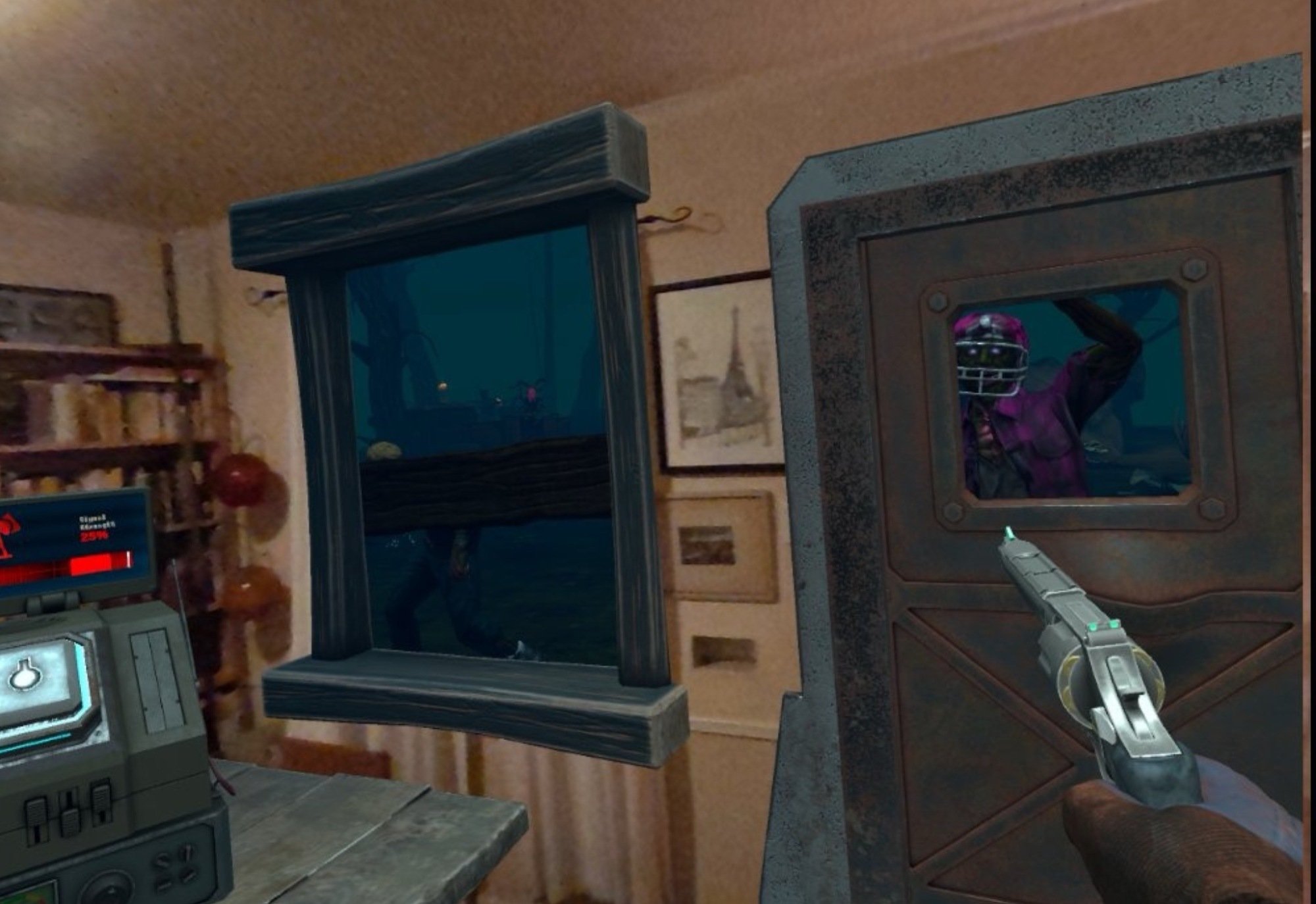
Mixed reality in Drop Dead: The Cabin

Credit: Soul Assembly – Stephen Johnson

Drop Dead: The Cabin: I am in love with the mixed-reality mode of Drop Dead: The Cabin. It replaces the windows and doors of your room with game-specific portals, stocks you up with guns and ammo, and sets zombies loose to invade your home. It’s like living in Dawn of the Dead. 

Assassin’s Creed: Nexus VR: Stealth gaming and virtual reality come together in this Assassin’s Creed game. Nexus really takes advantage of the beefed-up power of the Quest 3 and delivers one of the system’s finest AAA game experiences. 

Asgard’s Wrath 2: At the time of this posting, Asgard’s Wrath 2 has only been out for a few days, so I haven’t played it enough to comment on the complete game, but I will say this: If the rest of the game is as good as the first few hours, it’s the best game ever released in VR. 

Vegas Infinite: This free game is for the casuals out there. It lets you gamble virtual money at poker, blackjack, roulette, craps, and slots in virtual casinos, but the people you’re playing with are real. It’s relaxing, social, and takes advantage of the Quest 3’s pass-through cameras and improved hand and eye tracking too. 

Must-have utilities for the Meta Quest 3

Side Quest: This app lets you download and install apps on your Quest 3 that don’t come from the Meta Store, so if you’re interested in expanding the possibilities of your VR headset, Side Quest is a must. It gives you access to a huge collection of tech demos, games, apps, and more, as well as giving you new options for customizing and improving your Quest 3 experience. You’ll also need Side Quest to install Quest Game Optimizer.

Quest Games Optimizer: If you’re even a little “serious” about gaming, consider this $10 utility. It allows you to control the resolution on games, letting you up-rez the graphics on many Quest games, as well as letting you control frame rates, record video, and access other settings. 

Virtual Desktop: Virtual Desktop allows you to wirelessly connect to your computer in virtual reality. Along with streaming videos, browsing the web, and doing anything else your PC does, you can use this to run PCVR games with your Quest 3 (as long as you are running a Window 10 or 11 PC that’s specced for virtual reality games) unlocking a new level of gameplay. 

Must-have video-streaming apps for the Meta Quest 3

lucha libre wrestler

Credit: Xstadium – Stephen Johnson

Bigscreen: This social video-streaming app lets you watch movies and TV with other folks in the Meta-verse on the VR equivalent of a 100-foot video screen. You can watch YouTube, Disney+, Twitch, and PlutoTV streams, rent movies, or watch videos stored on your computer, either alone or with others. 

XStadium: If you’re into sports, XStadium is a mind-blower. It puts you courtside at live NBA games, giving you a fully immersive, 360 degree, you-are-there basketball experience. You can also immerse yourself in UFC fights from the Octagon, and check out X-games madness, watch some good old fashioned wrestling, and enjoy other sports, either in 360 view or in multi screened mixed reality. 

DeoVR: You can watch and customize all kinds of video content with this app—it’s not just for porn. But if you’re interested in new thresholds of virtual-reality pornography, this is the go-to video app. 

Must-have fitness apps for the Meta Quest 3

The Thrill of the Fight

Credit: Sealost Interactive LLC – Stephen Johnson

Les Mills BodyCombat: Whether you want to sweat in virtual or mixed reality, Les Mills has you covered. BodyCombat features a ton of martial-arts inspired workouts and knowledgable virtual coaches, and it doesn’t require a subscription. 

Supernatural: The subscription-based Supernatural is my favorite fitness app for the Quest. I’m a huge music snob, and finding an app with real music, that I actually like, was downright shocking. The coaches are charismatic, and the workouts are almost as fun as Beat Sabre. My fingers are crossed for Supernatural to take advantage mixed reality somehow. 

The Thrill of the Fight: This boxing simulation provides the hardest workout of any app in virtual reality—full-speed shadow boxing is no joke—but it’s an incredibly addictive game too, so it’ll keep you sweating. The addition of mixed-reality mode takes boxing matches into your home in a surprisingly efficient way.  


Source: LifeHacker – Every App and Game You Need for the Meta Quest 3

Netflix Avatar's Showrunner Discusses Losing the Original Creators

When Netflix first announced it was bringing the world of Avatar: The Last Airbender to live-action, it was doing so with the help of the people who helped shape it in the first place: Bryan Konietzko and Michael Dante DiMartino. Then, two years later, they suddenly weren’t. And for remaining showrunner Albert Kim,…

Read more…


Source: Gizmodo – Netflix Avatar’s Showrunner Discusses Losing the Original Creators

Amazon's AI Product Reviews Seen Exaggerating Negative Feedback

A anonymous reader shares a report: Shopping on Amazon.com has long entailed scrolling through pages and pages of often redundant customer feedback. In an effort to make the task less onerous, the company in August began using artificial intelligence to convert billions of reviews into brief summaries consisting of a few sentences apiece. As is often true with generative AI, the results aren’t perfect. In some cases, the summaries provide an inaccurate description of a product. In others, they exaggerate negative feedback. This has potential implications not just for customers, but for Amazon merchants who depend on positive reviews to boost sales. Making matters worse, merchants say, the summaries were deployed just as they were headed into the crucial holiday shopping season — giving them one more thing to worry about besides inflation-battered shoppers.

Most shoppers can probably tell when the AI has misclassified a product. For example, the home fitness company Teeter sells an inversion table designed to ease back pain. Amazon’s AI generated summary calls it a desk: “Customers like the sturdiness, adjustability and pain relief of the desk.” The technology’s tendency to overplay negative sentiment in some reviews is less obvious. The $70 Brass Birmingham board game, for instance, boasts a 4.7-star rating based on feedback from more than 500 shoppers. A three-sentence AI summary of reviews ends with: “However, some customer have mixed opinions on ease of use.” Only four reviews mention ease of use in a way that could be interpreted as critical. That’s fewer than 1% of the overall ratings, yet the negative sentiment accounts for about a third of the AI-generated blurb.

Read more of this story at Slashdot.


Source: Slashdot – Amazon’s AI Product Reviews Seen Exaggerating Negative Feedback

Four Tricks for Getting Actually Decent Airplane Meals

Air travel remains the fastest and most efficient way to get anywhere—which is unfortunate, because the airlines continue to make the experience worse. Hidden fees, smaller seats, less leg room, annoying people, and baggage restrictions all conspire to make flying commercial an increasingly miserable experience. The decline of perks and service exacerbates this: Where once you actually got a free meal when you flew, these days you’re often lucky to have the opportunity to pay for a snack.

But the, maybe the lack of a meal isn’t so bad: Airplane food is notoriously terrible. There are reasons for that—the air pressure, low humidity, and noise inside the cabin robs our taste buds, and airplane food is typically prepared elsewhere and reheated on the plane, which is not an ideal scenario for great food. But if you plan to eat a meal on your next flight, you can up your game pretty significantly and better your chances of actually enjoying your food by using one of these four tips.

Instant upgrades

You can, of course, eat before you board, or bring food onto the plane. But if you don’t want to blow your budget on expensive airport fare, remember one thing: Flight attendants are generally happy to bring you hot water.

What does that mean? It means you can bring instant noodles or instant oatmeal and instantly have a much better meal option. Making instant noodles and then adding sauces or butter, plus the proteins, veggies, or other parts of your complimentary meal turns a dubious slab of microwaved … stuff into a far more satisfying meal. Similarly, getting a fruit option as your meal and then mixing it into hot oatmeal will give you a filling, happy breakfast instead of a greasy, unfortunate one.

One caveat: The water on your plane may not be the cleanest in the world. If you’d never order coffee on a plane because you’re dubious about the water situation, skip this one—or add your own water first and ask if the ramen can be microwaved.

Go spicy & saucy

Because our taste buds are sandbagged on a plane, most of the meals we’re served will taste bland and probably overly salty (because they’re packed with preservatives, and because the airlines know how bland the food is). One way to improve your airline meal experience is to order the spiciest stuff you can spot. Sometimes your choices are limited, but most airlines make an effort to accommodate religious and dietary restrictions, so check to see if you can pre-order a Hindu meal option. Anyone can order it, and you’re not stealing a meal from anyone. The benefit is the spices: These meals tend to use more of them, which counteracts the tastebud-suppressing effects of cabin pressure and offers a more satisfying experience.

Also, if you have a choice of meals, always choose the sauciest option. Planes are dry, dry places and those meals get cooked to death in order to ensure they won’t make anyone sick, so the more sauce you have, the less likely your meal will remind you of eating cardboard.

BYO condiments

As an airline passenger, you have a superpower: You can bring your own condiments. You know your meal is going to be disappointing—it’s airline food. Of course it’s going to be disappointing. But! You can liven it up with hot sauce, your own salad dressing, spicy mayo or gourmet mustard, homemade spreads—whatever you can cram into your carry-on in a security-appropriate container. There are people in this world who bring hot sauce to every single meal of their lives for a reason—it can transform the blandest, most boring hunk of chicken into a somewhat satisfying meal pretty much instantly. And any high-quality or homemade condiment or spread will allow you to deconstruct a meal and reconstruct it as something much better.

Pre-order

Finally, don’t just sit there like a sucker and wait to see what the airplane gods are going to serve you. Pre-order your meals like a smart person. Most airlines offer a range of options for pre-ordering special meals like vegan or vegetarian meals (or, see above re: the Hindu meal option), and you should do so for two basic reasons:

  1. Speed. Pre-ordered meals tend to come out before the other meals, which means yours will arrive hot and steaming instead of lukewarm and smashed. A vegetarian meal will be lighter and less disastrous to your stomach and digestive system. And many people (including airline professionals) believe the “niche” meals are made in smaller batches, and thus are higher quality.

  2. Planning. By pre-ordering your meal, you’ll know what you’re eating and you can bring condiments to match and plan the rest of your day’s meals.


Source: LifeHacker – Four Tricks for Getting Actually Decent Airplane Meals

TomTom Taps Microsoft To Copilot Its AI-Powered Voice Assistant For Vehicles

TomTom Taps Microsoft To Copilot Its AI-Powered Voice Assistant For Vehicles
TomTom is teaming up with Microsoft to develop an AI assistant that will enable better interaction between customers and TomTom’s products. The company says this new AI assistant means that “drivers can converse naturally with their vehicle and ask the AI-powered assistant to navigate to a certain location, find specific stops along their

Source: Hot Hardware – TomTom Taps Microsoft To Copilot Its AI-Powered Voice Assistant For Vehicles

Grab These Sweet Apple Watch Series 9 Deals Quick Before The Sales Ban

Grab These Sweet Apple Watch Series 9 Deals Quick Before The Sales Ban
Time is ticking for anyone hoping to purchase an Apple Watch Series 9 or Ultra 2 before the semi-voluntary sales ban takes effect. In case you missed it, the ITC has issued an import ban on those models due to a patent dispute over the Apple’s blood oxygen sensor. Apple issue a statement saying it is preemptively taking steps to comply in

Source: Hot Hardware – Grab These Sweet Apple Watch Series 9 Deals Quick Before The Sales Ban

X-Men Games Will Be Sony Exclusives For More Than A Decade, Leak Reveals

If you haven’t heard, over 1.3 million internal documents from Spider-Man and Ratchet & Clank developer Insomniac Games were leaked after Sony didn’t meet ransomware group Rhysida’s demands for $2 million worth of Bitcoin. The documents include early footage of the team’s Wolverine game, the studio’s roadmap for the…

Read more…


Source: Kotaku – X-Men Games Will Be Sony Exclusives For More Than A Decade, Leak Reveals

Watch Blue Origin's first launch in 15 months here at 11:37AM ET

Blue Origin is taking another stab at its first launch in 15 months as New Shepard’s 24th mission is scheduled to take flight on Tuesday. The company had to scrub a planned launch on Monday due to a ground system issue. Today’s launch window opens at 11:37AM ET and the webcast starts 20 minutes beforehand. You can watch the launch below.

The uncrewed science mission has 33 payloads, more than half of which were developed by NASA, Blue Origin says. The other payloads are from K-12 schools, universities and STEAM-centric organizations. The manifest also includes 38,000 student postcards from the Club for the Future initiative.

The Federal Aviation Administration grounded New Shepard after an uncrewed launch attempt in September 2022 didn’t go as planned. The booster failed after takeoff but it was able to separate successfully from the capsule. Although the capsule made a safe parachute landing, the booster was destroyed when it hit the ground in a designated hazard area.

This article originally appeared on Engadget at https://www.engadget.com/watch-blue-origins-first-launch-in-15-months-here-at-1137am-et-160030131.html?src=rss

Source: Engadget – Watch Blue Origin’s first launch in 15 months here at 11:37AM ET

Toshiba To Be Delisted After 74 Years

Toshiba will be delisted on Wednesday after 74 years on the Tokyo exchange, following a decade of upheaval and scandal that brought down one of Japan’s biggest brands and ushered in a buyout and an uncertain future. From a report: The conglomerate is being taken private by a group of investors led by private equity firm Japan Industrial Partners that also includes financial services firm Orix, utility Chubu Electric Power and chipmaker Rohm. The $14 billion takeover puts Toshiba in domestic hands after protracted battles with overseas activist investors that paralysed the maker of batteries, chips, and nuclear and defence equipment. Although it is not clear what shape Toshiba will ultimately take under its new owners, Chief Executive Taro Shimada, who is staying in his role following the buyout, is expected to focus on high-margin digital services.

Read more of this story at Slashdot.


Source: Slashdot – Toshiba To Be Delisted After 74 Years

When (and How) to Set Up 'Repair Mode' on Your Android

When you send your Android phone in for repair, you want to give the specialists involved as much access as they need to run diagnostics and figure out what the problem is. At the same time, you don’t want them flicking through your photos and videos, or posting to any of your social media accounts.

That’s where a dedicated repair mode comes in: If you have an eligible handset, this mode creates a new partition on your phone, separate from the one where you’re logged into your apps, and where all your personal files and data are stored. The phone can still be used and inspected, but it’s in a “factory fresh” state. You can find it on select Pixel phones (where it’s actually called Repair Mode), and select Samsung phones (where it’s called Maintenance Mode).

It doesn’t take long to enable repair mode. The usual precautions still apply, though: Even when you’re turning repair mode on, you should still back up everything on your Android device in advance, just in case a full reset is required to get the gadget working again. We’d also recommend taking out your SIM card.

The repair modes we’re covering here are suitable no matter where you are getting your phone fixed, whether that’s the official Google or Samsung channels, your local Best Buy, or anywhere else you choose to trust with your phone.

Pixel’s “Repair Mode”

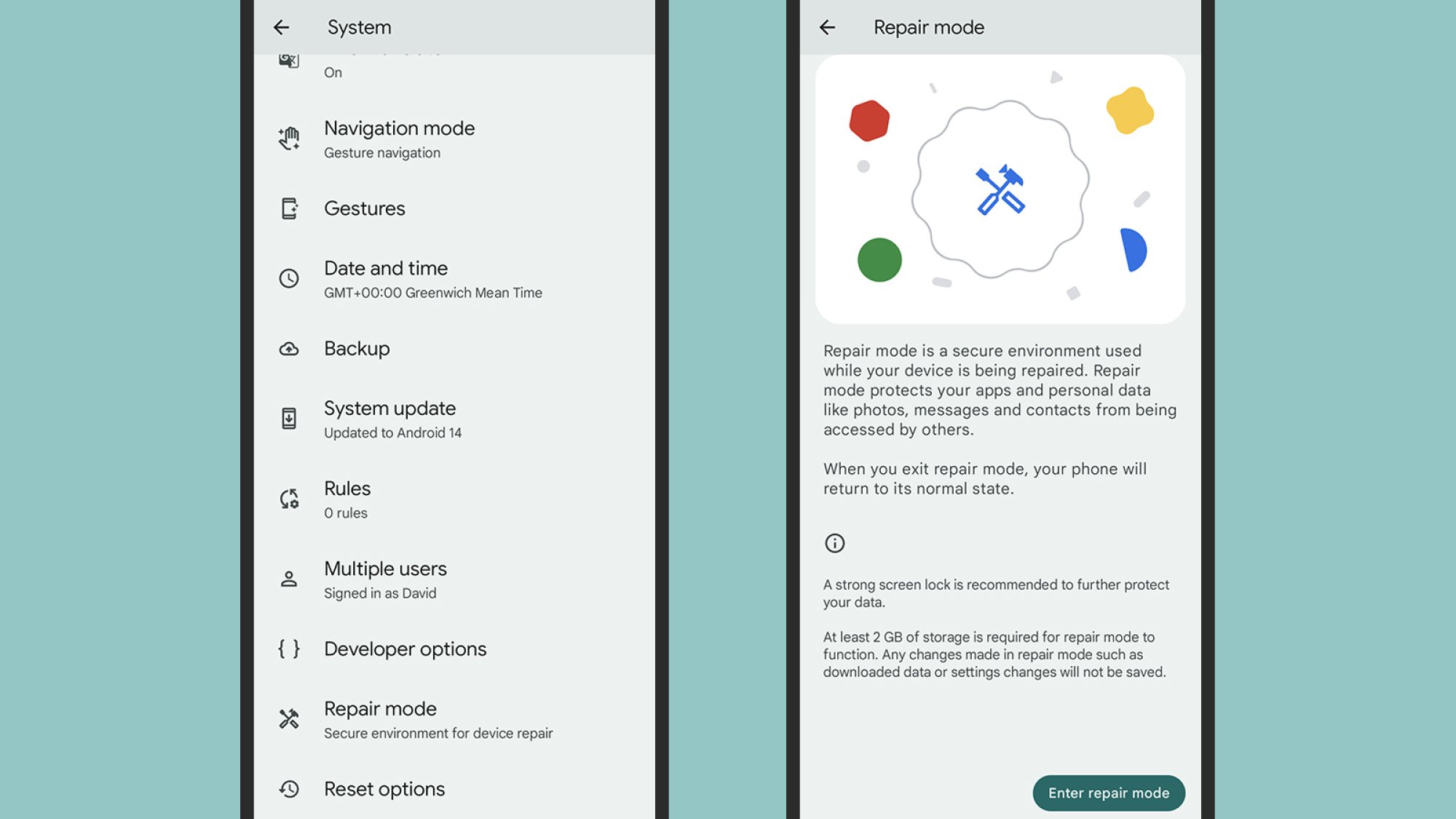
To use Repair Mode on your Pixel, it needs to be running the Android 14 update issued in December 2023, or a later version of the operating system. You also need at least 2GB of storage space left on the phone (select Storage from Settings if you need to check).

To turn Repair Mode on, head to Settings, then tap System and Repair mode. You’ll be given some information about how it works, then you can tap Enter repair mode to launch it. You’ll need to confirm your phone’s security PIN, pattern, or password to keep your data safe. After a reboot, your Pixel phone is ready to be handed over or sent off.

Pixel Repair Mode

Credit: Lifehacker

Once your phone is (hopefully) repaired and returned back to you, you can head back to System and Repair mode to go back to normal, or you can tap the notification at the top of the screen. You’ll need your PIN, password, or pattern to exit repair mode, which stops anyone else from disabling the mode without your permission.

Any saved data or settings changes made during Repair Mode are wiped as you exit it, though any Android system updates that have been applied will stay in place. If you need to go into Repair Mode again, you’ll need to restart the process from the beginning.

Samsung’s “Maintenance Mode”

Samsung’s Maintenance Mode is very similar to the Repair Mode on the Pixel, but has been around a lot longer. It works on all recent flagship Samsung Galaxy handsets running Android 13, going back to the Galaxy S10 series (that includes the Flip and Fold foldable phones, too).

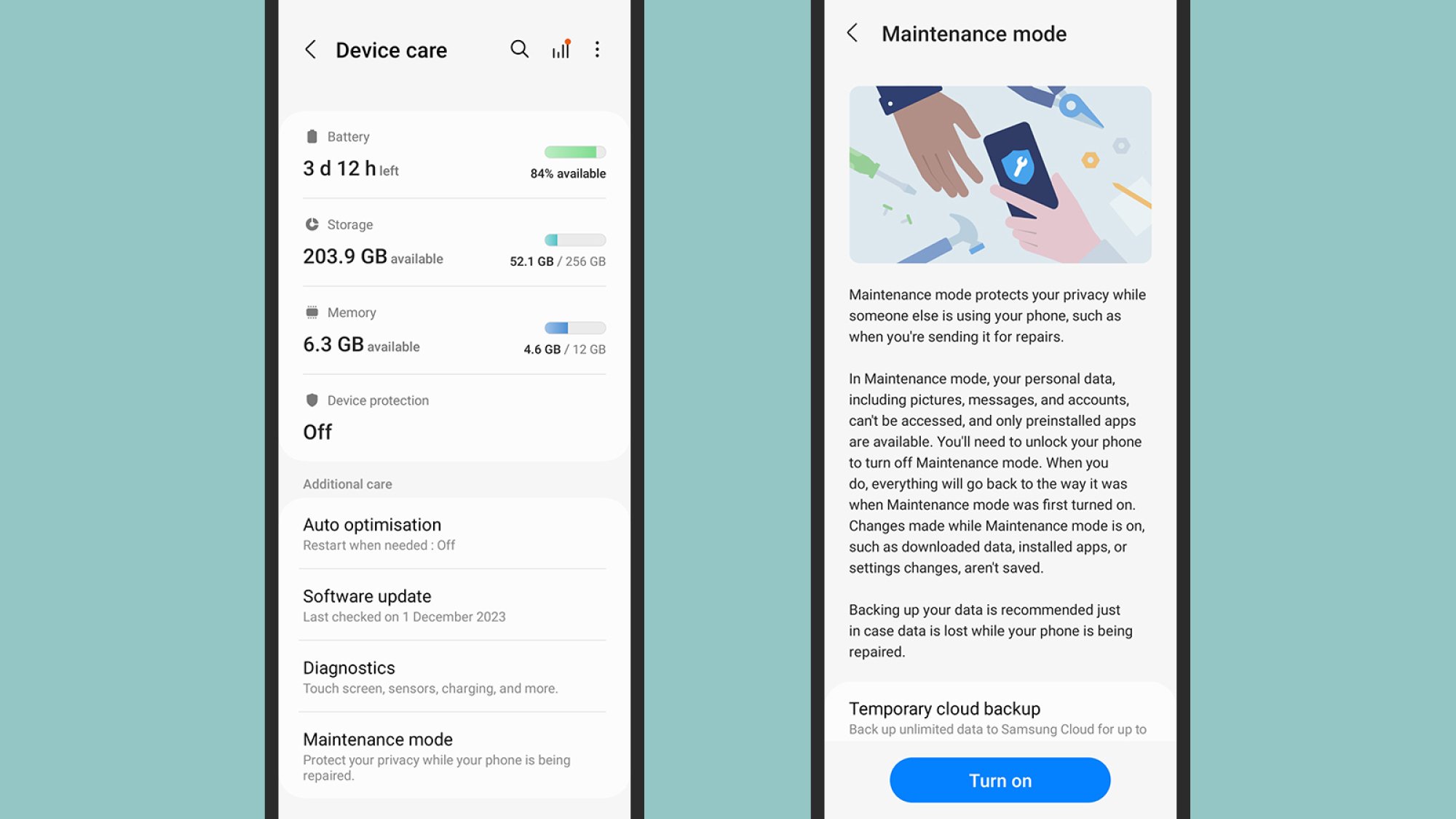
On your Samsung phone, open up Settings, then tap on Battery and device care. Pick Maintenance Mode and you’ll be reminded that it’s wise to create a backup of your data first. You’ll also get the option to create a temporary, 30-day backup in the cloud if you don’t already have one in place.

Samsung Maintenance Mode

Credit: Lifehacker

When you’re happy to proceed, tap Turn on to enable the feature. By default, the phone will make a system log that the repair technicians can analyze, and I’d recommend you don’t turn that off before tapping Restart. Your handset then boots up in Maintenance Mode, and it’s ready to be repaired.

To quit Maintenance Mode, you need to tap the notification at the top of the screen, then choose Exit. Your phone’s normal unlock method (like a PIN or fingerprint) will then be required, to make sure it’s really you taking the action. If you don’t already have a screen lock in place, you’ll be prompted to create one before your phone is rebooted into the Maintenance Mode.


Source: LifeHacker – When (and How) to Set Up ‘Repair Mode’ on Your Android

NASA’s Webb Telescope Captures A Spectacular Image Of Storms Brewing On Uranus

NASA’s Webb Telescope Captures A Spectacular Image Of Storms Brewing On Uranus
NASA’s James Webb Space Telescope (JWST) set its sights on Uranus and captured a brilliant image of a storm brewing on the icy giant. Along with the storms, Webb also captured the planet’s rings, moons, and other atmospheric features.

In the 1980s, Voyager 2 could only image the distant planet as what NASA refers to as “a placid, solid

Source: Hot Hardware – NASA’s Webb Telescope Captures A Spectacular Image Of Storms Brewing On Uranus

Sony Patents A Creative Gaming Solution To Make Boss Battles On PS5 Less Frustrating

Sony Patents A Creative Gaming Solution To Make Boss Battles On PS5 Less Frustrating
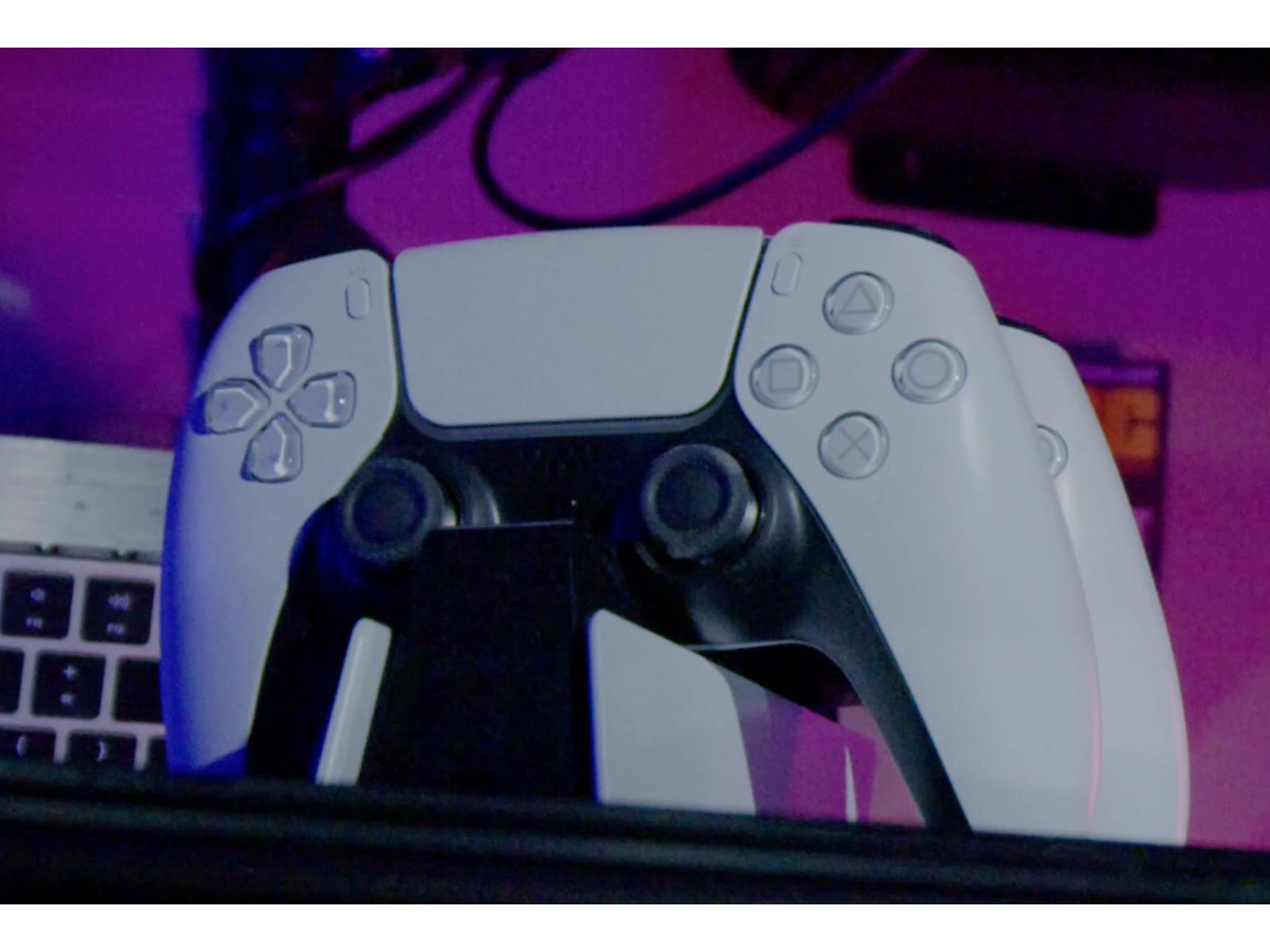
There is nothing like the intense gratification that one gets when defeating an uber hard boss battle in a video game. Some players may only need a couple of repeated attempts, while others may stumble through dozens of frustrating trials before finally claiming victory. This skill gap means that not every experience will be as equally enjoyable

Source: Hot Hardware – Sony Patents A Creative Gaming Solution To Make Boss Battles On PS5 Less Frustrating

Volkswagen Bows to Touchscreen Criticism, Will Bring Back Physical Buttons

There’s more than nostalgia making folks pine for the days of knobs, dials, and buttons. Touchscreens are fine for all-in-one devices but not for something as simple as controlling a car’s air conditioning. Volkswagen had to learn the hard way that just because something can be put in a touchscreen doesn’t mean it…

Read more…


Source: Gizmodo – Volkswagen Bows to Touchscreen Criticism, Will Bring Back Physical Buttons

Google’s loss to Epic Games leads to $700M settlement with users, states

Google’s loss to Epic Games leads to $700M settlement with users, states

Enlarge (credit: SOPA Images / Contributor | LightRocket)

After Epic Games proved that Google’s Android app store monopoly violates antitrust law, Google has agreed to pay a $700 million settlement with US states and consumers, Reuters reported.

Once a judge approves the settlement, the largest chunk—$630 million—will go to consumers who allegedly were hit with unnecessary fees for in-app transactions. Google has not admitted to any wrongdoing, but each eligible consumer will receive at least $2, and some will receive more. Individual payouts will vary, depending on how much consumers spent in the Google Play Store between August 16, 2016 and September 30, 2023.

The remaining $70 million will go to states that joined the settlement, which includes all 50 states, the District of Columbia, Puerto Rico, and the Virgin Islands.

Read 11 remaining paragraphs | Comments


Source: Ars Technica – Google’s loss to Epic Games leads to 0M settlement with users, states