Formula E's version of Drive to Survive will hit Roku in January

Motorsport fans who yearn for juicy behind-the-scenes insights might want to circle January 2 on their 2024 calendar. The third season of Formula E’s unscripted reality show Unplugged will hit the Roku Channel on that date. It’s the first time that the show will be available on Formula E’s new streaming home, while fans around the world will be able to check it out on YouTube. 

Unplugged will arrive on Roku just 11 days before the motorsport’s tenth season starts with the Mexico E-Prix on January 13. That race will also stream on Roku as the platform ventures into live sports.

The latest season of Unplugged follows the events of the 2022-23 Formula E campaign, including a title race that was only decided on the final weekend. Along with the twists and turns and personal drama, the eight-episode season will also highlight some of the motorsport’s tech advancements, such as the new Gen3 racecar that drivers had to get to grips with.

In case you need a refresher of what happened in Formula E’s last campaign (or you just want to rewatch all the action), it’s worth noting that every race from the motorsport’s first nine seasons is available to stream on its website. Every Season 10 race will be available on that platform too, albeit one week after each event. Along with Roku, races will air live on Paramount+ and CBS this season.

This article originally appeared on Engadget at https://www.engadget.com/formula-es-version-of-drive-to-survive-will-hit-roku-in-january-102516767.html?src=rss

Source: Engadget – Formula E’s version of Drive to Survive will hit Roku in January

How Two Pharmacists Figured Out That Decongestants Don't Work

In 2005, the reclassification of pseudoephedrine to behind-the-counter status led to widespread use of oral phenylephrine in OTC decongestants, despite evidence of its ineffectiveness. Randy Hatton, a clinical professor in the College of Pharmacy at the University of Florida, and his colleague worked to bring this issue to the FDA’s attention, revealing loopholes in the regulatory process for older OTC drugs. Hatton writes in an opinion piece for Scientific American: Before the FDA required that drugs had to be proven effective, it determined whether OTC drugs were effective through expert panels that reviewed existing data. These OTC monographs establish what older OTC ingredients can be marketed without FDA approval. The oral decongestant monograph panel reviewed a few published studies and multiple unpublished studies for phenylephrine. Of the unpublished studies, only four studies showed oral phenylephrine was effective, while seven showed it was no better than placebo. We requested copies of all evidence used by the nasal decongestant review panel via a Freedom of Information Act request and performed a systematic review and meta-analysis ourselves. […]

The FDA has multiple regulatory processes for different types of medicinal compounds. People are perhaps most familiar with the New Drug Application process, which leads to clinical trials for prescription drug approvals. However, many OTC or nonprescription drugs are regulated differently. In fact, a law passed in 1951, the Durham-Humphrey Amendment to the 1938 Food, Drug, and Cosmetic Act, created the categories of prescription and nonprescription drugs. In 1962, the act was amended again so that drugs had to be shown to be effective, hence the requirement for well-done clinical trials. But what about the drugs that were approved before 1962? This is the loophole that some OTC drugs fall through. For prescription drugs, FDA tried to address pre-1962 approvals through a review of over 3,000 prescription drugs. Most of those drugs have now been reviewed and addressed, but there are still unapproved prescription drugs on the market today, such as an extended-release form of oral nitroglycerin. For nonprescription drugs, FDA established the OTC monograph process 10 years after the 1962 amendment to the Food, Drug, and Cosmetic Act, which required products not proven effective to be reconsidered. FDA formed advisory panels grouping hundreds of ingredients into 26 categories based on the products’ uses. After gathering all available information, both published and unpublished, from manufacturers, the advisory panels issued final reports to FDA about whether these ingredients were GRASE (generally recognized as safe and effective), not GRASE, or inconclusive. GRASE ingredients can be used in nonprescription drugs without FDA approval if the use matches the monograph. “The oral phenylephrine example shows that FDA needs more funding to look at these old drugs,” concludes Hatton. “We need public funds to support independent researchers who want to examine these products objectively. The government should be able to spend millions to save consumers billions on ineffective products. Companies that market these products have no incentive to prove they don’t work. Nonprescription drugs must be effective — not just safe.”

Read more of this story at Slashdot.


Source: Slashdot – How Two Pharmacists Figured Out That Decongestants Don’t Work

Sony won't take away your PlayStation-bought Discovery shows after all

If you’d previously purchased Discovery shows from the PlayStation Store, you can breathe easily now. Sony has announced that it’s no longer removing shows from the network by December 31 like it had previously planned, thanks to updated licensing agreements. Earlier this month, the company said that it’s pulling Discovery shows from PlayStation and is even removing any purchased title from your library due to content licensing agreements with its providers. The Discovery shows available on the PlayStation Store include MythBusters, Deadliest Catch and Cake Boss.

In all, around 1,200 titles would’ve been affected by the change, and you wouldn’t have gotten a refund for any of them. The announcement came shortly after Warner Bros Discovery, the owner of Discovery Channel, had revealed in an earnings report that its flagship streaming service Max lost 2.5 million subscribers over a six month period.

Both of Sony’s announcements were brief and didn’t elaborate on its licensing troubles with the network. As The New York Times said when the company published the warning that it was going to remove any Discovery show you’d purchased in the past, though, the situation raised questions about the meaning of ownership in the age of digital goods. Supposedly, buying digital would give you access to a piece of content forever, since there’s no physical medium that could break or get lost. As this incident demonstrates, that’s not true at all, and you could only hope that networks and providers never change their licensing deals.

This article originally appeared on Engadget at https://www.engadget.com/sony-wont-take-away-your-playstation-bought-discovery-shows-after-all-083239866.html?src=rss

Source: Engadget – Sony won’t take away your PlayStation-bought Discovery shows after all

California Workers Say Herbicide Is Giving Them Parkinson's

An anonymous reader quotes a report from the Los Angeles Times: It was the late 1980s when Gary Mund felt his pinky tremble. At first it seemed like a random occurrence, but pretty quickly he realized something was seriously wrong. Within two years, Mund — a crew worker with the Eastern Municipal Water District in Riverside County — was diagnosed with Parkinson’s disease. The illness would eventually consume much of his life, clouding his speech, zapping most of his motor skills and taking away his ability to work and drive. “It sucks,” said Mund, 69. He speaks tersely, because every word is a hard-won battle. “I was told the herbicide wouldn’t hurt you.”

The herbicide is paraquat, an extremely powerful weed killer that Mund sprayed on vegetation as part of his job from about 1980 to 1985. Mund contends the product is responsible for his disease, but the manufacturer denies there is a causal link between the chemical and Parkinson’s. Paraquat is manufactured by Syngenta, a Swiss-based company owned by the Chinese government. The chemical is banned in at least 58 countries — including China and Switzerland — due to its toxicity, yet it continues to be a popular herbicide in California and other parts of the United States. But research suggests the chemical may cross the blood-brain barrier in a manner that triggers Parkinson’s disease, a progressive, neurodegenerative disorder that affects movement. Now, Mund is among thousands of workers suing Syngenta seeking damages and hoping to see the chemical banned.

Since 2017, more than 3,600 lawsuits have been filed in state and federal courts seeking damages from exposure to paraquat products, according to Syngenta’s 2022 financial report (PDF). […] Paraquat is 28 times more toxic than another controversial herbicide, Roundup, according to a report from the Pesticide Action Network. (Roundup has been banned in several parts of California, including a 2019 moratorium by the Los Angeles County Board of Supervisors forbidding its use by county departments.) Paraquat also has other known health effects. It is listed as “highly toxic” on the U.S. Environmental Protection Agency’s website, which says that “one small sip can be fatal and there is no antidote.” The EPA is currently reviewing paraquat’s approval status. However, both the EPA and Syngenta cited a 2020 U.S. government Agricultural Health Study that found there is no clear link between paraquat exposure and Parkinson’s disease. A 2021 review of reviews similarly found that there is no causal relationship.

Read more of this story at Slashdot.


Source: Slashdot – California Workers Say Herbicide Is Giving Them Parkinson’s

Hyperloop One is shutting down

Hyperloop One had once dreamed of building a high-speed freight link between Europe and China, one that could take cargo from one end to the other in a single day. That will, however, remain one of the many goals the company won’t be able to fulfill. Hyperloop One is shutting down, a staff member has confirmed to Engadget after Bloomberg published a report about its closure. It was founded in 2014 following the release of Elon Musk’s paper about his vision for hyperloop transportation technologies.

The company originally aimed to provide transportation for both cargo and people in the form of pods traveling through sealed metal tubes across long distances in airplane-like speeds. From 2017 until 2022, it was known as Virgin Hyperloop One due to an investment from Richard Branson’s Virgin Group. But Virgin quietly pulled its branding last year when the company decided to abandon its plans of transporting passengers to focus on building a cargo-only service. Hyperloop One laid off over 100 staff members early last year due to its change in priorities.

According to Bloomberg, the company has been having financial troubles for a while and has notably never secured a contract to build a working hyperloop system. It has now laid off most of its remaining employees, the news organization said, and the ones left will be let go on December 31. Until then, they’re reportedly overseeing the sales of Hyperloop One’s assets, including its machineries and test tracks.

This article originally appeared on Engadget at https://www.engadget.com/hyperloop-one-is-shutting-down-030049106.html?src=rss

Source: Engadget – Hyperloop One is shutting down

Tolkien Estate Wins Court Order To Destroy Fan's 'Lord of the Rings' Sequel

Remy Tumin reports via the New York Times: It was supposed to be what a fan described as a “loving homage” to his hero, the author J.R.R. Tolkien, and to “The Lord of the Rings,” which he called “one of the most defining experiences of his life.” A judge in California had another view. The fan, Demetrious Polychron of Santa Monica, Calif., violated copyright protections this year when he wrote and published a sequel to the epic “Rings” series, U.S. District Judge Stephen V. Wilson of the Central District of California ruled last week. In a summary judgment, Judge Wilson found “direct evidence of copying” and barred Polychron from further distributing the book or any others in a planned series. He also ordered Polychron to destroy all electronic and physical copies of the published work, “The Fellowship of the King,” by Sunday. As of Wednesday, Amazon and Barnes & Noble were no longer listing the book for sale online. Steven Maier, a lawyer for the Tolkien estate, said the injunction was “an important success” for protecting Tolkien’s work. “This case involved a serious infringement of The Lord of the Rings copyright, undertaken on a commercial basis,” he said. “The estate hopes that the award of a permanent injunction and attorneys’ fees will be sufficient to dissuade others who may have similar intentions.”

Read more of this story at Slashdot.


Source: Slashdot – Tolkien Estate Wins Court Order To Destroy Fan’s ‘Lord of the Rings’ Sequel

Windows 11 vs. Ubuntu Linux Performance On The Intel Core Ultra 7 Meteor Lake

Following my Linux benchmarks of the Intel Core Ultra 7 155H processor performance where it ended up being rather disappointing but then with finding great success with the integrated Arc Graphics on Meteor Lake, like I you may be left wondering how much of a role Linux is playing with these results compared to Windows… Well, this article will shed some light on that aspect with looking at the Microsoft Windows 11 vs. Ubuntu Linux performance on the Acer Swift Go 14 Meteor Lake laptop.

Source: Phoronix – Windows 11 vs. Ubuntu Linux Performance On The Intel Core Ultra 7 Meteor Lake

Today’s Wordle Hints (and Answer) for Friday, December 22, 2023

If you’re looking for the Wordle answer for December 22, 2023 read on. We’ll share some clues, tips, and strategies, and finally the solution. I lucked out with today’s puzzle and got it in two! Beware, there are spoilers below for December 22, Wordle #916! Keep scrolling if you want some hints (and then the answer) to today’s Wordle game.

How to play Wordle

Wordle lives here on the New York Times website. A new puzzle goes live every day at midnight, your local time.

Start by guessing a five-letter word. The letters of the word will turn green if they’re correct, yellow if you have the right letter in the wrong place, or gray if the letter isn’t in the day’s secret word at all. For more, check out our guide to playing Wordle here, and my strategy guide here for more advanced tips. (We also have more information at the bottom of this post, after the hints and answers.)

Ready for the hints? Let’s go!


Does today’s Wordle have any unusual letters?

We’ll define common letters as those that appear in the old typesetters’ phrase ETAOIN SHRDLU. (Memorize this! Pronounce it “Edwin Shirdloo,” like a name, and pretend he’s a friend of yours.)

Four of them are in our mnemonic, and the remaining letter is also fairly common. 

Can you give me a hint for today’s Wordle?

If you’ve been reading my hints, you’ll know this as my trusty second starter word, the one I almost always play after ARISE.

Does today’s Wordle have any double or repeated letters?

Nope, five different letters today. 

How many vowels are in today’s Wordle?

There are two vowels in today’s word.

What letter does today’s Wordle start with?

Today’s word starts with T.

What letter does today’s Wordle end with?

Today’s word ends with H.

What is the solution to today’s Wordle?

Ready? Today’s word is TOUCH.

How I solved today’s Wordle

No hits on ARISE, so of course I play my trusty second, TOUCH. Welp, that was a lucky one!

Wordle 916 2/6

⬜⬜⬜⬜⬜
🟩🟩🟩🟩🟩

A primer on Wordle basics

The idea of Wordle is to guess the day’s secret word. When you first open the Wordle game, you’ll see an empty grid of letters. It’s up to you to make the first move: type in any five-letter word. 

Now, you can use the colors that are revealed to get clues about the word: 

  • Green means you correctly guessed a letter, and it’s in the correct position. (For example, if you guess PARTY, and the word is actually PURSE, the P and R will be green.)

  • Yellow means the letter is somewhere in the word, but not in the position you guessed it. (For example, if you guessed PARTY, but the word is actually ROAST, the R, A and T will all be yellow.)

  • Gray means the letter is not in the solution word at all. (If you guessed PARTY and everything is gray, then the solution cannot be PURSE or ROAST.)

With all that in mind, guess another word, and then another, trying to land on the correct word before you run out of chances. You get six guesses, and then it’s game over.

The best starter words for Wordle

What should you play for that first guess? The best starters tend to contain common letters, to increase the chances of getting yellow and green squares to guide your guessing. (And if you get all grays when guessing common letters, that’s still excellent information to help you rule out possibilities.) There isn’t a single “best” starting word, but the New York Times’s Wordle analysis bot has suggested starting with one of these:

  • CRANE

  • TRACE

  • SLANT

  • CRATE

  • CARTE

Meanwhile, an MIT analysis found that you’ll eliminate the most possibilities in the first round by starting with one of these:

  • SALET

  • REAST

  • TRACE

  • CRATE

  • SLATE

Other good picks might be ARISE or ROUND. Words like ADIEU and AUDIO get more vowels in play, but you could argue that it’s better to start with an emphasis on consonants, using a starter like RENTS or CLAMP. Choose your strategy, and see how it plays out.

How to win at Wordle

We have a few guides to Wordle strategy, which you might like to read over if you’re a serious student of the game. This one covers how to use consonants to your advantage, while this one focuses on a strategy that uses the most common letters. In this advanced guide, we detail a three-pronged approach for fishing for hints while maximizing your chances of winning quickly.

The biggest thing that separates Wordle winners from Wordle losers is that winners use their guesses to gather information about what letters are in the word. If you know that the word must end in -OUND, don’t waste four guesses on MOUND, ROUND, SOUND, and HOUND; combine those consonants and guess MARSH. If the H lights up in yellow, you know the solution.

One more note on strategy: the original Wordle used a list of about 2,300 solution words, but after the game was bought by the NYT, the game now has an editor who hand-picks the solutions. Sometimes they are slightly tricky words that wouldn’t have made the original list, and sometimes they are topical. For example, FEAST was the solution one Thanksgiving. So keep in mind that there may be a theme.

Wordle alternatives

If you can’t get enough of five-letter guessing games and their kin, the best Wordle alternatives, ranked by difficulty, include:


Source: LifeHacker – Today’s Wordle Hints (and Answer) for Friday, December 22, 2023

Today's NYT Connections Hints (and Answer) for Friday, December 22, 2023

If you’re looking for the Connections answer for Friday, December 22, 2023, read on—I’ll share some clues, tips, and strategies, and finally the solutions to all four categories. Along the way, I’ll explain the meanings of the trickier words and we’ll learn how everything fits together. Beware, there are spoilers below for December 22, NYT Connections #194! Read on if you want some hints (and then the answer) to today’s Connections game. 

If you want an easy way to come back to our Connections hints every day, bookmark this page. You can also find our past hints there as well, in case you want to know what you missed in a previous puzzle.

Below, I’ll give you some oblique hints at today’s Connections answers. And farther down the page, I’ll reveal the themes and the answers. Scroll slowly and take just the hints you need!

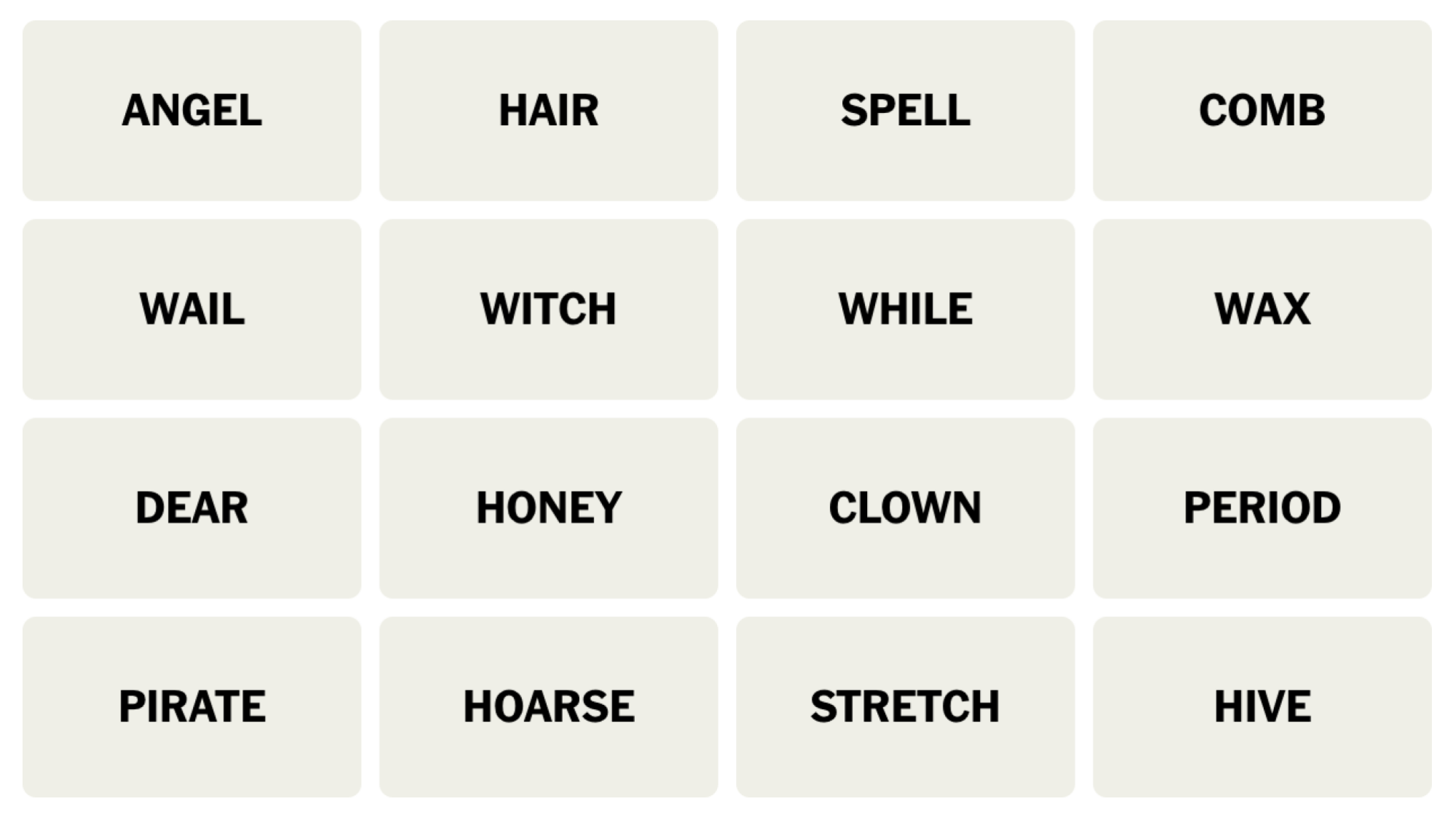
NYT Connections board for December 22, 2023: ANGEL, HAIR, SPELL, COMB, WAIL, WITCH, WHILE, WAX, DEAR, HONEY, CLOWN, PERIOD, PIRATE, HOARSE, STRETCH, HIVE.

Credit: Connections/NYT


Does today’s Connections game require any special knowledge?

Nope, nothing specialized today.

Hints for the themes in today’s Connections puzzle

Here are some spoiler-free hints for the groupings in today’s Connections:

  • Yellow category – Playing dress-up.

  • Green category – Beekeepers will love this one.

  • Blue category – An era.

  • Purple category – Animal sounds, in a way.

Does today’s Connections game involve any wordplay?

The purple category is based on soundalikes.

Ready to hear the answers? Keep scrolling if you want a little more help.


BEWARE: Spoilers follow for today’s Connections puzzle!

We’re about to give away some of the answers. Scroll slowly if you don’t want the whole thing spoiled. (The full solution is a bit further down.)

What are the ambiguous words in today’s Connections?

  • HONEY and DEAR may sound like things you would call a loved one, but today they both relate to the animal kingdom (and they are each in different categories).

  • HAIR and COMB don’t go together, either. A COMB can hold HONEY though, which you might want to keep in mind as you solve.

  • To STRETCH is to lengthen something (your muscles, a batch of taffy) but here it’s a noun meaning a PERIOD of time.

What are the categories in today’s Connections?

  • Yellow: CLASSIC HALLOWEEN COSTUMES

  • Green: BEE CREATIONS

  • Blue: INTERVAL OF TIME

  • Purple: ANIMAL HOMOPHONES

DOUBLE BEWARE: THE SOLUTION IS BELOW

Ready to learn the answers to today’s Connections puzzle? I give them all away below.

What are the yellow words in today’s Connections?

The yellow grouping is considered to be the most straightforward. The theme for today’s yellow group is CLASSIC HALLOWEEN COSTUMES and the words are: ANGEL, CLOWN, PIRATE, WITCH.

What are the green words in today’s Connections?

The green grouping is supposed to be the second-easiest. The theme for today’s green category is BEE CREATIONS and the words are: COMB, HIVE, HONEY, WAX.

What are the blue words in today’s Connections?

The blue grouping is the second-hardest. The theme for today’s blue category is INTERVAL OF TIME and the words are: PERIOD, SPELL, STRETCH, WHILE.

What are the purple words in today’s Connections?

The purple grouping is considered to be the hardest. The theme for today’s purple category is ANIMAL HOMOPHONES and the words are: DEER, HAIR, HORSE, WAIL.

How I solved today’s Connections

I saw the costumes first, 🟨 but got distracted with HONEY and DEAR before realizing I was looking at beeHIVE items. 🟩 I saw the rest all at once: the PERIODs of time, 🟦 and the groan-worthy animal misspellings. 🟪

Connections 
Puzzle #194
🟨🟨🟨🟨
🟩🟩🟩🟩
🟦🟦🟦🟦
🟪🟪🟪🟪

How to play Connections

I have a full guide to playing Connections, but here’s a refresher on the rules:

First, find the Connections game either on the New York Times website or in their Crossword app. You’ll see a game board with 16 tiles, each with one word or phrase. Your job is to select a group of four tiles that have something in common. Often they are all the same type of thing (for example: RAIN, SLEET, HAIL, and SNOW are all types of wet weather) but sometimes there is wordplay involved (for example, BUCKET, GUEST, TOP TEN, and WISH are all types of lists: bucket list, guest list, and so on).

Select four items and hit the Submit button. If you guessed correctly, the category and color will be revealed. (Yellow is easiest, followed by green, then blue, then purple.) If your guess was incorrect, you’ll get a chance to try again.

You win when you’ve correctly identified all four groups. But if you make four mistakes before you finish, the game ends and the answers are revealed.

How to win Connections

The most important thing to know to win Connections is that the groupings are designed to be tricky. Expect to see overlapping groups. For example, one puzzle seemed to include six breakfast foods: BACON, EGG, PANCAKE, OMELET, WAFFLE, and CEREAL. But BACON turned out to be part of a group of painters along with CLOSE, MUNCH, and WHISTLER, and EGG was in a group of things that come by the dozen (along with JUROR, ROSE, and MONTH). So don’t hit “submit” until you’ve confirmed that your group of four contains only those four things.

If you’re stuck, another strategy is to look at the words that seem to have no connection to the others. If all that comes to mind when you see WHISTLER is the painting nicknamed “Whistler’s Mother,” you might be on to something. When I solved that one, I ended up googling whether there was a painter named Close, because Close didn’t fit any of the obvious themes, either.

Another way to win when you’re stuck is, obviously, to read a few helpful hints–which is why we share these pointers every day. Check back tomorrow for the next puzzle!


Source: LifeHacker – Today’s NYT Connections Hints (and Answer) for Friday, December 22, 2023

Android May Soon Tell You When It's Time To Replace Your Phone's Battery

The next version of Android could give you an estimate of your battery’s remaining capacity, which naturally degrades over time. “Android 14 laid the initial groundwork for the OS to track battery health information, but Android 15 could actually bring that information in front of users,” reports Android Authority. It could also tell you whether your device’s battery has been replaced. From the report: The manufacture date and cycle count aren’t the only battery-related statistics that Android 14 exposes to apps through new APIs, though. Other battery health details like the date of first use, charging policy, charging status, and state of health are also available. The state of health is particularly interesting because it’s an estimate of the battery’s current full charge capacity, expressed as a percentage relative to the battery’s rated capacity. For example, if your Pixel 8 battery’s state of health is measured at 90%, that means its remaining full charge capacity is estimated to be about 4118mAh (compared to the rated 4575mAh).

The Settings app currently doesn’t show the battery state of health, but that’s set to change in the future, as the latest version of the Settings Services app (an extension to the Settings app on Pixel and other devices) found within Android 14 QPR2 Beta 2 has a new “battery health” page that is set to show the state of health. […] Strings within the APK suggest this page will show you the “estimated percentage of charge the battery can currently hold compared to when it was new” (i.e. the state of health) before and after “recalibration” of the battery. We don’t have the exact details on what “recalibration” entails, but given that one string suggests the “process may take a few weeks,” we’re guessing that it’s simply the system collecting data over a longer period to provide a more accurate estimate of the battery capacity. Meanwhile, the “initial battery health values” are “based on lab results” and hence “may vary from your actual battery state.”

[…] We also learned that the Settings app itself will surface “tips” to the user when either the battery capacity is degraded or can’t be detected, so the user doesn’t have to manually check the “battery health” page. Lastly, we learned that Google is working on exposing more battery-related information to the OS, such as the part status and the serial number. […] At the very least, we do know that Android will support reading the battery’s part status and serial number, provided the battery exposes that information to the OS, and the vendor implements the new version of the Android health HAL. The health HAL is the software responsible for bridging the gap between the OS APIs that read battery/charging information (i.e. everything we talked about before) with the software that controls the battery/charging chips. Version 2.0 of the health HAL needs to be implemented to support all the new Android 14 battery health APIs like state of health, which is why so few devices support that right now.

Read more of this story at Slashdot.


Source: Slashdot – Android May Soon Tell You When It’s Time To Replace Your Phone’s Battery

Ryzen vs. Meteor Lake: AMD's AI Often Wins, Even On Intel's Hand-Picked Tests

Velcroman1 writes: Intel’s new generation of “Meteor Lake” mobile CPUs herald a new age of “AI PCs,” computers that can handle inference workloads such as generating images or transcribing audio without an Internet connection. Officially named “Intel Core Ultra” processors, the chips are the first to feature an NPU (neural processing unit) that’s purpose-built to handle AI tasks. But there are few ways to actually test this feature at present: software will need to be rewritten to specifically direct operations at the NPU.
Intel has steered testers toward its Open Visual Inference and Neural Network Optimization (OpenVINO) AI toolkit. With those benchmarks, Tom’s Hardware tested the new Intel chips against AMD — and surprisingly, AMD chips often came out on top, even on these hand-selected benchmarks. Clearly, optimization will take some time!

Read more of this story at Slashdot.


Source: Slashdot – Ryzen vs. Meteor Lake: AMD’s AI Often Wins, Even On Intel’s Hand-Picked Tests

How to Set Up Your First Google Nest Mini

Google Nest Minis are the most affordable way to make your home a heck of a lot smarter. First of all, they’re adorable, like pastel M&M’s that can sit or be mounted almost anywhere. And as cute as they are, they’re also powerful little speakers that can interact with you in all sorts of ways—and when you add in the power of Google Home automations, you’ll feel like you’re living in the future.

Google Nest Minis are the cheapest way to get Google Assistant throughout your home

The affordability of the Nest Minis ($49, but often on sale) means you can reasonably deploy a fleet of them throughout your home. For instance, drop a Nest Mini in your bathroom to listen to music in the shower—and even change the song by shouting at the speaker while you’ve got shampoo in your hair. A kitchen Mini can translate cups to tablespoons or remind you what temperature chicken needs to be cooked at. It can even read you a recipe, step by step. A Mini in my office is great for a quick time check, updates about the weather, and what appointments I have coming up. It can even shoot off an SMS, send an email, and make a phone call. Sadly, it cannot call 911, or it would make a great tech replacement for the senior members of your family, but it can make a home so much more accessible overall. (Technically, if you have also bought into Nest Aware, a subscription plan that covers Nest smoke protectors, it will enable emergency services on the Minis, so they can dial e911.) 


Recommended products

The second-generation Nest Mini comes in either chalk (white) or charcoal (black), and retails for about $49:


The rest of the Mini family

There are all kinds of Google Hubs to think about as an alternative if you also want video capability and an even a more powerful speaker. But for now, let’s talk about how to install one of these candy-colored speakers. First of all, Google has a spectacular guided walkthrough you can use, perfect for sharing with your less tech savvy family members. If you’re on your own, follow along below. 

Install the Google Home app

Step one is to get set up with the Google Home app. If you use Android, particularly a Google phone like Pixel, you’ve likely done this already. If not, go ahead and download it for Android or iPhone. You’ll also need the Google app, which is different. 

If you have an Android, make sure it’s running 9.0 or later; on iPhone, make sure it’s at least updated to iOS 15. You’ll need your wifi name and password and a 2.4 wifi connection. (Most people are running both a 2.4 and a 5.0 connection simultaneously.) Lastly, ensure that Bluetooth is turned on within your mobile device. 

The importance of connecting to the right Google account

Lots of people have more than one Gmail account: maybe one for work, one for home. Perhaps you have a Google Workspace account for your domain and also a separate Gmail account. When setting up Google Home, be thoughtful about which account you’re connecting to–it’s particularly important if you use Duo (although I don’t know anyone who does), since you’ll need to connect to that account specifically.  

Connect the Nest Mini to the Google Home app

Unbox your Nest Mini and plug it in, even if it’s not in its final location. If you’re repurposing a Mini that you bought secondhand, you’ll need to factory reset it first. Open the Google Home app on your phone, then set up a home, if you haven’t yet. Tap the button that says Create home and enter a nickname for your home or workplace, wherever the Mini will live. Google will ask for an address, which is important for geolocation services. Google Assistant needs to know where you are in order to provide the right time and weather, for instance. 

Add a device

Tap on the Devices tab and click the plus sign. Now, tap on New device from the list of options.  Google Home will search for this new device, and as long as you’re near the Mini, it should find it. If not, search again. Once it finds the device, click Next. The Mini will make a sound to tell you it’s been found and registered in the app. Continuing following the prompts. 

Now, Google needs to connect the speaker to wifi, so it’ll show you the local networks. Choose the primary network you have in your space that will offer a 2.4 connection. It will ask for the password and then connect the device. You’re almost done! 

Set up Google Nest Mini features

Now comes the fun part: setting up your speaker. To manually adjust the volume, tap the speaker on the right or left side of the speaker. Right for volume up, left for volume down. You can also turn off the voice assistant altogether by toggling the switch on the side. Your Google Home app will walk you through setting up voice match, which is what allows Google to distinguish your voice from everyone else’s. Next, you can set up streaming services for radio, music, video, and TV. Of course, you can easily access controls for your devices in Google Home by talking to your assistant, as well. 

Now that you’re up and running, catapult your home into the future and set up some automations.


Source: LifeHacker – How to Set Up Your First Google Nest Mini

How to Pick the Right Flooring for Each Room in Your Home

Like other aspects of interior design, different types of flooring go in and out of style. Sometimes the trends coincide with when a newly developed material is mass produced and becomes affordable and widely available—like linoleum in the early 20th century, or synthetic-fiber carpeting in the 1950s. Other times, a popular color or palette might dictate what’s considered fashionable in flooring, like the gray vinyl flooring installed when design shows made the color ubiquitous in the 2000s and 2010s.

But the most popular flooring at a given moment isn’t always the most practical choice for every room in a home. (Two words: Carpeted bathrooms.) Instead, you’re better off considering how the room is used and finding flooring to meet its needs. To make that process easier, I asked three flooring experts to identify the best types of flooring for each room and space in a home. Here are their top picks.

The best types of flooring for each room in your home

A quick caveat before we begin: The flooring experts’ recommendations are based on how the rooms are used, rather than budget or style, and were made with the assumption that you’re installing new flooring, rather than working with what you have.

The best types of flooring for a kitchen

Ceramic or porcelain tile

Both Sean O’Rourke, a 30-year veteran of the flooring industry and the national director of merchandising for Floor Coverings International and Mark Buskuhl—the founder and CEO of Ninebird Properties, a company specializing in buying, renovating, and selling houses in Dallas, Texas—identified ceramic and porcelain as the most durable and long-lasting types of flooring for a kitchen. That’s thanks, in part, to being water resistant.

“They also come in a wide range of colors, patterns, and textures, allowing you to create a customized look for your kitchen,” Buskuhl says.

Vinyl flooring

O’Rourke and Buskuhl also agree that vinyl flooring is the next-best option for kitchens. “LVT—luxury vinyl tile or plank—is waterproof and much less expensive,” O’Rourke says. Plus, as Buskuhl points out, vinyl planks or tiles can mimic the look of other materials—like hardwood or stone—at a lower cost.

The best types of flooring for a bathroom

Ceramic or porcelain tile

O’Rourke and Buskuhl are on the same page again: Ceramic or porcelain floors are also their top pick for bathrooms, for much of the same reasons. According to O’Rourke, it’s “the clear winner” for bathrooms, “due to its practicality, durability, and waterproof capabilities for both floors and walls.”

They’re also hygienic and easy to clean, making them a practical option for a space that is frequently exposed to moisture, Buskuhl notes. Plus, “tile also offers design and color options not found in other flooring types,” he adds.

Vinyl flooring

According to Buskuhl, vinyl flooring is also a great option for bathrooms, as it can withstand high levels of humidity without warping or expanding. “Vinyl planks or tiles can also provide a waterproof barrier, making them ideal for bathrooms with shower stalls,” he explains.

The best types of flooring for a living room

Hardwood

This is O’Rourke’s top choice for living rooms “due to its authentic, natural appearance, durability, and warmth.” He says this is especially true in newer, open-floor-plan homes, where it can be incorporated throughout the kitchen area.

Tile

Tile is another solid choice for many of the same reasons, O’Rourke explains, adding that it’s a popular option in “southern & warmer climates.”

Laminate flooring

Don’t overlook laminate flooring, O’Rourke advises. “Today’s laminate floors are almost indistinguishable from the real thing, and most have water-resistant or waterproof warranties, and are considerably less expensive if your budget doesn’t allow for hardwood or tile,” he notes.

The best types of flooring for a bedroom

Carpet

“Carpet may give the bedroom a more cozy feeling, adding extra warmth through its installation,” Rotem Eylor, the founder and CEO of Republic Flooring tells me. From a practical sense, carpet still rules in bedrooms, O’Rourke says, because of its softness and comfort under foot—especially if it’s installed over a high-quality padding.

Hardwood

Hardwood is O’Rourke and Eylor’s other top pick for bedrooms. “Some people may prefer hardwood for a more clean, classic look, and for easier maintenance,” Eylor explains.

The best types of flooring for a hallway

Hardwood

“You can’t go wrong with hardwood flooring for a hallway,” Eylor says. “It’s a timeless look, and easy to sweep and clean.” Plus, as Buskuhl points out, hardwood’s durability means it can withstand heavy traffic and other wear-and-tear, and both hardwood and engineered wood floors can be refinished if necessary.

Carpet

O’Rourke suggests carpet for bedroom hallways. While it can add warmth and a level of comfort, it may require more maintenance than other types of flooring, and may not be the best choice for high-traffic areas, Buskuhl notes.

Laminate or LVT (luxury vinyl tile)

Laminate flooring or LVT are good options for areas considered “living spaces” and connect adjacent rooms, O’Rourke says. And, as Buskuhl points out, it’s also scratch-resistant and easy to clean.

The best types of flooring for a mud room

Porcelain or ceramic tiles

Like kitchens and bathrooms, porcelain or ceramic tiles are a good choice for mud rooms, according to all three flooring experts.

Natural stone flooring

Slate or granite are also durable and options for a mud room, Buskuhl says.

The best types of flooring for a home office

Almost any flooring type can work in a home office, O’Rourke says. “My choice would be a hardwood floor with a stylish area rug under the seating and desk area,” he says. Laminate, LVT, and cork flooring are all solid options as well.

The best types of flooring for a basement

Vinyl flooring

Waterproof vinyl planking is the best option for basements, according to O’Rourke—especially if there are known moisture issues.

Carpet squares

Carpet squares are another practical and durable option, which is why they’re often used in commercial spaces, O’Rourke explains. “Carpet squares have a moisture-resistant backing and can easily be repaired or replaced due to their portability,” he adds.

Ceramic or porcelain tiles

Like other rooms prone to moisture, ceramic and porcelain tiles also work well in basements, Buskuhl says.


Source: LifeHacker – How to Pick the Right Flooring for Each Room in Your Home

Overwatch 2 Left A Trail Of Broken Promises In 2023

Overwatch 2 debuted in late 2022, and the controversial sequel to Blizzard’s beloved hero shooter struggled in its first few months. Messaging around it was confusing (we were meant to get a sequel that shared a multiplayer environment with the original game, instead the original game was shut down), expectations…

Read more…


Source: Kotaku – Overwatch 2 Left A Trail Of Broken Promises In 2023

Take These Steps to Spend Less Money Over the Holidays

The holiday season often leads even the savviest of spenders to overextend their budgets. Gift giving, parties, traveling, food—it all adds up, especially on top of regular monthly bills. If you feel anxiety brewing about your finances this time of year, take a deep breath: There are specific things you can do to prevent overspending, no matter where you are starting from.

Track every dollar

First, start tracking your spending down to every last dollar. Download a budgeting app or use a spreadsheet. The act alone of having to input and record where your money is going each day makes you more aware of bad habits. Analyze the recent data, looking for those frequent little expenses on things you likely won’t even remember or care about next month.

List must-haves vs. nice-to-haves

Next, make your holiday gift list then divide people into must-have and nice-to have categories. Must-haves should be immediate family and very close friends where you feel obligated. Nice-to-haves are those you’d like to get gifts for if possible. Be honest with yourself about priorities and expectations.

Set firm spending limits

For each must-have person, set a firm limit for spending on gifts, say $50 or $75 max. Having the endpoint caps explicitly stated makes it easier to say no to things in stores that exceed boundaries. For nice-to-have folks, set even lower thresholds, gifting only if you have extra money later.

Try cash-stuffing

The cash-stuffing method, “or envelope system,” helps turn your budgeting into a more visceral, even “gamified” experience: You have different physical envelopes for different categories of expenses, and you stuff each envelope with a budgeted amount of cash for one category (or pay period). The key here is you can only spend money in a certain category (say, groceries or gifts) from its designated envelope. Once the envelope is empty, that’s that until your next paycheck arrives.

Cash-stuffing works because it forces you to be more intentional (deciding how much money gets allocated into each envelope) and more disciplined (you can’t put more money into the envelope once it runs out).

Keep perspective

When you feel yourself getting carried away or tempted by holiday commercialism, pause for perspective. Make a list of things most important for well-being—family, friends, doing meaningful things. No material goods you can buy ultimately provide more lasting joy than those pillars. Keep the holiday season about value, not money-sucking excess. Stay intentional with spending while still embracing the spirit of the season.


Source: LifeHacker – Take These Steps to Spend Less Money Over the Holidays

ASML Ships Industry's First High-NA EUV Litho Scanner To Intel

ASML on Thursday said that it had shipped its pilot High-NA EUV scanner to Intel. The Twinscan EXE:5000 extreme ultraviolet (EUV) scanner is AMSL’s very first High-NA scanner, and it has eagerly been awaited by Intel, who first placed an order for the machine back in 2018. Intel will be using the new machine to experiment with High-NA EUV before it deploys commercial grade Twinscan EXE:5200 tool for high-volume manufacturing (HVM) sometime in 2025. The announcement represents a major industry milestone that will have an impact not only on Intel, but eventually on the other leading-edge fabs as well.


“We are shipping the first High NA system and announced this in a social media post today,” a spokesperson for ASML said. “It goes to Intel as planned and announced earlier.”


The ASML Twinscan EXE High-NA scanner is set to make its journey from Veldhoven in the Netherlands all the way to Intel’s facility near Hillsboro, Oregon, where the tool, jokingly referred to by Intel CEO Pat Gelsinger as Dr. Ann Kelleher’s Christmas present, will be installed in the coming months. It is quite a colossal piece of equipment – so large, in fact, that it requires 13 truck-sized containers and 250 crates just to transport it. And once assembled, the machine is 3 stories tall, which has required Intel to build a new (and taller) fab expansion just to house it. It is estimated that each of these High-NA EUV scanners comes with a hefty price tag, likely in the range between $300 million and $400 million.


High numerical aperture (High-NA) EUV lithography tools featuring a 0.55 NA lens are capable of an 8nm resolution, which is a significant improvement compared to current EUV tools with a 13nm resolution. These next-generation High-NA EUV scanners are expected to be important for chip production using process technologies beyond 3nm, which the industry is set to adopt in 2025 – 2026, as they will allow fabs to avoid using EUV double patterning, greatly reducing complexity while potentially enhancing yields and lowering costs.


But ASML’s Twinscan EXE lithography tools with a 0.55 NA will be significantly different than the company’s regular Twinscan NXE litho machines with a 0.33 NA. An avid reader will remember from our previous reports that High-NA scanners are going to be significantly bigger than contemporary EUV scanners, which will require new fab structures. But these is by far not the only difference.


Perhaps the biggest change between the High-NA and regular EUV scanners is the halved reticle size of the High-NA scanners, which will require chipmakers to rethink how they design and produce chips – especially at a time when high-end GPUs and AI accelerators are pushing the limits for reticle sizes. In addition, since High-NA scanners will support a higher resolution and different reticle size, they will require new photoresists, metrology, pellicle materials, masks, and inspection tools, just to name some of the alterations. In short, High-NA tools will require significant investments in infrastructure to go with them.


Although semiconductor production infrastructure is developed by the whole industry, the best way to adopt it for real-world production is to tailor it for actual process technologies and process recipes. Which is why it is so important to start working with pilot scanners early to prepare for HVM using production machines.


Intel was the first company to order ASML’s pilot Twinscan EXE:5000 scanner back in 2018. It was also the first to place an order for ASML’s commercial grade Twinscan EXE:5200 litho tool in 2022. The company is set to start development work on its 18A node (18 angstroms, 1.8nm) in 2024 and then will employ High-NA tools for a post-18A node, presumably in 2025 – 2026.


By getting High-NA tools earlier than its rivals, Intel not only be able to ensure that its tools produce desired results, but it has a chance to set the standards for the industry when it comes to High-NA manufacturing. For Intel this might mean getting a significant advantage over its rivals, Samsung Foundry and TSMC.


ASML announced in 2022 that it will be able to produce 20 High-NA EUV litho tools per year in 2027 – 2028. Meanwhile, the company disclosed earlier this year is that it had a double-digit number of machines in its High-NA backlog, which signals that its partners are set to adopt these scanners in the coming years. And leading that pack will be Intel.


Source: AnandTech – ASML Ships Industry’s First High-NA EUV Litho Scanner To Intel

Steam’s Big Winter Sale Slashes Prices On A Ton Of Great Games

The winter solstice is upon us and Valve is once again celebrating the cosmological event by discounting a bunch of great PC games big and small. The Steam Winter Sale 2023 is going right now through January 4, 2024 with deals on everything from Baldur’s Gate 3 to Call of Duty: Modern Warfare 3.

Read more…


Source: Kotaku – Steam’s Big Winter Sale Slashes Prices On A Ton Of Great Games

The FTC wants to strengthen COPPA to make it harder for companies to monetize kids’ data

The Federal Trade Commission (FTC) is proposing changes to the Children’s Online Privacy Protection Rule (COPPA) to make it harder for tech companies to track and monetize children’s data. Some of the proposed changes include placing limits on how long companies can retain data they collect from minors and forcing parents to consent to, or opt out of, targeted marketing.

COPPA has been around since April 2000 and currently requires some level of transparency from online services and websites. Before collecting data from minors, providers need to obtain “verifiable parental consent.” In 2013, the FTC tried to narrow the definition of what a provider is to any digital service that weaves an advertising network into its platform and collects personal data — regardless of whether or not a website or online service is particularly directed toward children. At the time, they also expanded the scope of what constitutes ‘personal information’ to include geolocation and any photos or videos that depict a child’s image, among other things.

In its new proposal, the FTC wants to expand the scope of personal information in COPPA again to include biometric data. The proposal will also scrutinize digital service providers for sending push notifications that encourage kids to keep using their service and attempt to close any loopholes for data collection to “support for internal operations.”

“When we consider the harms of online behavioral advertising to children, we cannot forget one of the original reasons COPPA was envisioned and enacted: A desire to ensure that companies cannot build a commercial relationship with children that preys on their immaturity, honesty, and trust,” FTC Commissioner Alvaro Bedoya said in a statement.

The FTC also wants to make it harder to monetize children’s data generated in the classroom in an effort to enhance privacy safeguards for students. If passed, COPPA will allow schools to gain more control over whether or not to allow educational tech providers the option to collect or use students’ personal information.

Lina Khan, the chair of the FTC, took to X to voice support for the proposal, writing: “Our proposed changes to COPPA are much-needed, especially in an era where online tools have become essential for navigating daily life,” adding that companies are deploying increasingly sophisticated ways to collect kids’ data. The FTC will collect public comments on the proposal for 60 days before taking any further regulatory action.

This article originally appeared on Engadget at https://www.engadget.com/the-ftc-wants-to-strengthen-coppa-to-make-it-harder-for-companies-to-monetize-kids-data-214459097.html?src=rss

Source: Engadget – The FTC wants to strengthen COPPA to make it harder for companies to monetize kids’ data