A Raclette Party Is Exactly What You Need This Winter

I haven’t met a winter food tradition I didn’t like—gingerbread cookies, plum pudding, roasting chestnuts on the not-so-open fire of my oven—but it’s possible that I’ve finally met my favorite: the raclette dinner. The winter tradition of griddling Raclette cheese is interactive, satisfying, communal, and a treat for cheese fans. Make a night of it with family and friends this holiday season and settle in for some quality time, which is always better with melty cheese.

Over the weekend, I went to my first raclette dinner. It was the coziest and cheesiest way to spend an evening with friends. You may have seen raclette on your Instagram or TikTok feed in the form of a half-wheel of cheese bubbling and browning under a close heating element. An anonymous hand tilts the wheel and scrapes the charred surface, and an impossible gooey glob of cheese slides off the wheel and piles onto a plate, sandwich, or French fries. Like much of social media, it comes off as excessive, like it was created purely for a food shock factor, but raclette is a tradition that has been enjoyed for far longer than the internet box in your hand.

What is raclette?

Raclette is a cow’s milk cheese that has the wonderful ability to melt into a saucy puddle, but it’s also the name of an entire dish. The meal, originating in the Alpine regions of France, Switzerland, and Italy, exhibits the extraordinary melting power of the eponymous cheese. You melt the cheese with direct heat from a nearby flame, or nowadays maybe an electric heating element. Scrape it onto boiled potatoes, cured meats, cornichons, or break away from tradition and scrape the liquified cheese mound onto veggies, pasta, or the closest sandwich. 


Products to consider:


You could enjoy raclette at a restaurant, but it’s much more fun to do it at home with a group of friends or family. Don’t worry, you don’t need a fireplace, and you don’t need to hold a wedge of cheese over your electric stove. There are fantastic raclette grills you can buy that include a flat cooking surface and small, non-stick, angled scoops for you to melt slabs of raclette (like the ones above). There’s a heating element that runs underneath the griddle top and above the raclette scoops, so you can heat up meats or veggies and melt the cheese simultaneously. There are also models that only heat up the cheese scoops from the bottom but you won’t get a browned and bubbled surface with this kind. You can buy an eight-person set for entertaining, or a smaller two-scoop griddle for a constant flow of melted raclette on solo-cheese nights. 

Raclette like you mean it

You can buy wedges of Raclette at specialty cheese stores, but you can also find it at Trader Joes during the winter months. To enjoy raclette at home, add quarter-inch thick slices of the cheese to the metal scoops of your electric griddle set. Place the scoop under the heating element and let it cook while you gather slices of salami, cornichons, onions, and boiled potato hunks onto your plate. In the time that it takes you to do this, about two minutes, the cheese will be a puddle in the bottom of the scoop. Leave it for a minute longer and you’ll notice a crusty, browned surface bubbling up on the cheese. I love the crisp and chewy texture that develops on the cheese after extra time under the heat, so I leave it for extra time. Remove the non-stick scoop from the heater and slide the melted Raclette over your dish of hearty nibbles. There’s no need for a scraper really, the cheese surfs out of the scoop with no more than a tilt and shake.

You could certainly enjoy it year round, but raclette is usually a cold-weather treat. In many regions, this particular cheese is only widely available during the winter, and since melting it requires consistent intense heat, the immediate space tends to heat up. Raclette makes me think of chunky sweaters, mulled wine, and any edible vehicle for cheese. I can see this being the perfect centerpiece activity for Christmas Eve or New Year’s Eve, or any time you want to while away until the wee hours of the morning snacking and chatting with the people you love.


Source: LifeHacker – A Raclette Party Is Exactly What You Need This Winter

Amkor to Build $2 Billion Chip Packaging Fab in Arizona Primarily for Apple

Amkor, the world’s second largest independent outsourced semiconductor assembly and test (OSAT) service provider, has announced their intention to build a new advanced chip packaging facility in the U.S. Carrying a price tag of around 2 billion dollars, the plant in Arizona will primarily serve to package chips produced by TSMC at its Fab 21 nearby.


Adding an interesting (and unusual) wrinkle to the announcement, the notoriously tight-lipped Apple also issued its own press release, officially confirming that it is set to become the largest customer of the facility. All of which has greatly raised the profile of the chip packaging plant.


Huge Packaging Facility


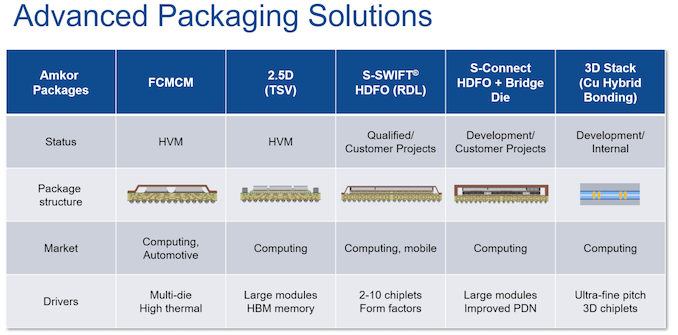
The planned facility will reside in a huge manufacturing campus covering 55 acres near Peoria, Arizona. Amkor does not disclose planned production capacity of the plant or technologies that it will support, but it says that it will serve automotive, high-performance computing, and mobile applications, so we can expect it to support a wide range of 2.5D and 3D packaging technologies.


Meanwhile, the company says that it its upcoming facility will feature 500,000 square feet (46,451 square meters) of cleanroom space when it is fully built and equipped. To some degree, the $2 billion investment implies that the plant will be quite vast. For example, TSMC’s upcoming advanced manufacturing facility expected to come online in 2027 is set to cost $2.87 billion. The facility is expected to become operational in 2025 –2026 and employ some 2,000 people.


Amkor clearly aims that its Peoria facility will serve clients that produce chips at TSMC’s Fab 21, which will greatly simplify their supply chain and will add value for those who need to develop, produce, and package chips in the United States. What is particularly important is that Amkor and Apple say they had worked in close partnership to design the strategic and manufacturing capacity aspects of the Peoria facility.


“Apple is committed to help build a new era of advanced manufacturing, right here in the US,” said Jeff Williams, Apple’s chief operating officer in a statement. “Apple and Amkor have worked together for more than a decade packaging chips used extensively in all Apple products, and we are thrilled that this partnership will now deliver the largest OSAT advanced packaging facility in the United States.”


This is where it gets interesting.


Tailored for Apple’s Needs


This collaboration suggests that the factory will be specifically geared towards meeting Apple’s requirements in the next few years. Apple will be the first and primary customer of this facility, utilizing it for packaging and testing chips from TSMC’s nearby Fab 21.


“Apple silicon has unlocked new levels of performance for our users, enabling them to do things they could never do before, and we are thrilled that Apple silicon will soon be produced and packaged in Arizona,” said Williams.


TSMC’s Fab 21 phase 1 is now set to start making chips on 4 nm and 5 nm-class process technologies sometimes in 2025. Following this, the phase 2 of Fab 21 is expected to start producing chips on TSMC’s 3 nm-class technologies sometimes in 2026. The timing of Amkor’s facility becoming operational aligns with these developments, indicating that Apple will have a substantial need for packaging 3nm and 4nm-class chips around that time.


Typically, Apple is the first company to adopt TSMC’s leading-edge technologies for use in high-volume products. For example, for this year’s iPhone 15 Pro smartphones and MacBook Pro laptops, Apple uses TSMC’s N3B fabrication process to make the A17 Pro, M3 Pro, and M3 Max SoCs. But at the same time Apple hasn’t done a wholesale cutover to N3B; the company continues to use their N4-based A16 Pro and N5P-based M2 SoCs for its respective current-generation iPhone 15 and MacBook Air products. So Apple’s total chip needs remain spread over multiple generations of nodes.


Ultimately, with TSMC’s US fab set to remain a node behind its Taiwan fabs, the significant commitment from Apple to use Amkor’s US packaging plant is a strong sign that the company will continue to make significant use of older nodes going forward.


CHIPS Funding


Finally, to ensure the advanced packaging project’s success in the U.S., Amkor has applied for funding from the CHIPS program, which focuses on advanced chip packaging. The facility is a strong candidate for this government funding, as it will significantly strengthen the American semiconductor supply chain and enable TSMC’s Fab 21 customers in Arizona to access advanced packaging methods without having to transport their wafers out of state.


Source: AnandTech – Amkor to Build Billion Chip Packaging Fab in Arizona Primarily for Apple

You Need Leak Detectors in Your Home, and More Than You Think

Water is humanity’s frenemy. Sure, the stuff is necessary for life and it’s fun to go swimming in, but water is also tirelessly seeking to destroy your property. When you think of the threat that water poses to your existence you might think of drowning and hurricanes, but in many cases the real threat is coming from inside the house; water damage makes up almost a quarter of all insurance claims in the U.S., causing an average of $12,514 in damage.

And that’s if your insurance covers it—most policies only cover water damage caused by sudden emergencies, like a burst pipe. They won’t cover storm-driven water damage, and they won’t cover damage done by a slow, methodical leak.

Those slow leaks can do just as much damage as a flood, eating away at the hidden areas of your home; by the time the leak becomes obvious it’s too late to do anything except rip everything out and replace it. The best way to defend your home from this kind of sneaky (and hella expensive) water damage is leak detectors. And when it comes to leak detectors, the rule of thumb is “the more the merrier.”

Leak detectors

Leak detectors are simple but effective—detecting moisture and triggering an alarm. You can buy dumb ones that simply make a lot of noise when they touch water, or you can buy smart ones that sound an alarm and alert you via text, email, or a connected app. You can also pair many smart leak detectors with automatic shutoff valves that will turn off the water supply when a leak is detected.

These devices can save you a lot of money and trouble because they alert you the moment water appears where it shouldn’t so you can turn off the water and immediately take steps to reduce the damage. That’s incredibly important—but just as important is where to place those leak detectors, because they can’t help you if they’re not in the right places. And you need them in more locations than you think.

Where to place leak detectors

Water leaks can happen in a lot more areas of your home than you might initially think:

  • Water heater. One of the most common sources of water leaks in the home is a traditional tank-type water heater. These appliances typically last about a decade, and when they fail they often leak. Since they continuously refill, that leak can do damage for weeks or even months before it’s noticed.

  • Crawlspace/basement. The spaces under your house are often ignored for long periods (especially if they’re unfinished), so water infiltration from appliances or groundwater can go on for a long time before it’s noticed. Leak detectors placed strategically around crawlspaces or basements—near drains and sump pits especially—can alert you immediately if water is building up under your home.

  • Garage. Failing weather stripping and incorrect grading can lead to regular floods in your garage, which can erode your floor and damage your stuff.

  • Toilets. Slow leaks from faulty water lines or imperfect seals at the flange can sip water into your floors, rotting wood and destroying tile or other flooring materials. This can go on for a long time in guest or basement bathrooms that don’t get used much.

  • Under sinks. Every sink in your home is a potential water damage hotspot. A leaking drain or trap under the sink can rot out cabinets and potentially damage floors and walls as well.

  • Dishwasher. A sensor under the dishwasher will alert you the moment your dishwasher starts to leak, as opposed to months later when the damage starts to spread throughout your kitchen floor.

  • Refrigerator. If your refrigerator has a water line and/or an ice maker, it could start leaking water at any time. Aging refrigerators can also cause water damage if the defrost drain becomes clogged, and if your fridge stops working, the melt-off from the freezer can result in a small-scale flood that can do major damage to your floors.

  • Laundry. There are a lot of ways your washing machine can silently betray you. If it’s an older model, it can rust and leak every time it runs. The hose connection to the water supply can fail and start to leak, or the drain pipe can become clogged and overflow. Since laundry facilities are often installed in tight spaces, the problem may not be visually obvious for some time.

  • Roof. All roofs eventually fail, and many roof leaks start off as subtle, gradual problems that rot the decking. Placing leak detectors in attics or inside the ceilings of rooms directly under the roof can give you a little early warning that your roof has stopped roofing.

  • Boiler/Radiators. If you have a hot water heating system that employs a boiler and radiators, you have water moving through the walls of your home all the time—and leaks can occur at any point along the system. A leak detector under your boiler and near each radiator can help warn you the moment a problem begins.

  • Fish tanks. An enormous container of standing water in your home? Better to know that a tank has cracked or that your cat has gone fishing and knocked it over immediately instead of several hours later.

  • HVAC. Air conditioning systems can leak for a variety of reasons. Clogged drain tubes can back up water into the house, so having a detector under the drip pan to detect overflows can save you a lot of headaches—and alert you that your AC system needs maintenance.

Water can get into your house in a lot of ways, and liberal use of leak detectors can provide just enough warning for you to avoid costly repairs. But they can only help if you deploy them—and enough of them.


Source: LifeHacker – You Need Leak Detectors in Your Home, and More Than You Think

You Don't Own the Digital Shows and Movies That You 'Bought'

The way we purchase movies and TV shows has changed a lot since the invention of home video. In fact, these days, many of us don’t buy anything at all, and stream all our content instead. Still, there are plenty who prefer to buy their entertainment, with a subsection happy to do so digitally. After all, with disc-less devices like Apple TVs and Fire Sticks all the rage, it’s the most convenient way to buy your media.

However, there’s a major catch that many don’t realize when they put their digital card down: You don’t actually own any of the digital movies and TV shows you buy.

PlayStation is the latest to remove titles from buyers’ libraries

Sony recently posted a “legal update notice” on the PlayStation site. That might not normally move headlines, but this time is different: In the notice, Sony outlines hundreds of Discovery-branded shows you will no longer be able to access starting Dec. 31:

As of 31 December 2023, due to our content licensing arrangements with content providers, you will no longer be able to watch any of your previously purchased Discovery content and the content will be removed from your video library.

We sincerely thank you for your continued support.

Thank you,

PlayStation Store

Hey, at least they thanked us for our support.

Is there a refund involved, at least? Nope. If you purchased any of this content on the PlayStation Store in the past, you simply lose both the content and your money at the end of the year. Whether it’s Breaking Amish, Cake Boss, or Mythbusters, you better rewatch your favorite shows now, because you’ll lose access to them before 2024.

If you’re pissed off, I don’t blame you. If you’re scared for the rest of your PlayStation Store content, I don’t blame you. Sony certainly didn’t make it clear when you make a TV or movie purchase that, hey, if we lose the licensing rights to this thing you’re buying, not only will it disappear from the store, we’ll remove it from your PlayStation. Of course, you can’t actually buy shows and movies on your PlayStation anymore, as Sony shuttered the service back in 2021, so you might think you need to look elsewhere for buying shows and movies anyway.

The problem is, you’re not better off buying your digital shows and movies from other platforms, like Amazon, Apple, or Google. Sadly, this issue affects all platforms who sell digital media: Nowhere is safe.

You don’t own digital shows and movies

Here’s the unfortunate truth: Whether you buy The Dark Knight from Amazon, or Community: Season 1 on Google, the digital media you “purchase” isn’t really yours. You don’t own it, and neither does the platform you bought it from. What you’re paying for is the right to watch that content for as long as the provider has the right to host it. As soon as their licensing agreement with the company that actually owns the content expires, and the platform doesn’t renew it, the platform loses the right to “sell” it, and, subsequently, you lose the right to watch it. No refunds, no discounts on future purchases, just a lighter wallet.

As frustrating as it is, we all technically agree to this arrangement when we make a purchase. You find some language outlining these conditions in the terms of service for any platform that doesn’t actually own the content they’re selling. Take Amazon Prime Video, for example. Scroll through their TOS, and you’ll this:

i. Availability of Purchased Digital Content. Purchased Digital Content will generally continue to be available to you for download or streaming from the Service, as applicable, but may become unavailable due to potential content provider licensing restrictions or for other reasons, and Amazon will not be liable to you if Purchased Digital Content becomes unavailable for further download or streaming.

Google’s TOS says something similar:

In certain cases (for example if Google loses the relevant rights, a service or Content is discontinued, there are critical security issues, or there are breaches of applicable terms or the law), Google may remove from your Device or cease providing you with access to certain Content that you have purchased.

Now, it’s not like this happens all the time. If it did, there would probably be more of an uproar about this sort of thing. I have movies and shows in my “Apple TV” library that I bought a decade or more ago that are still happily waiting for the next time I want to watch them, and will likely be there for years to come. But, if for some reason, AMC Networks revokes Breaking Bad from Apple’s platform, or if Amazon MGM Studios decides that Casino Royal doesn’t need to be available on non-Amazon platforms, I could see my library shrink. (Also, this is how I find out Amazon owns MGM now?)

While this situation sucks, it wouldn’t be as bad if they just made it clear. No one—I repeat—no one reads the terms of service for these things, and companies know that. Instead of a “Buy” button, there should be a “Lease” button, with a big pop-up warning you that you’re just renting the movie or show for the indefinite future. At least then, people won’t be as pissed when the $30 they spent on a TV season disappears from their Fire Stick.

If you want to own your content, buy physical

Betamax, laserdisc, and VHS were all beat out by advancing technology, but that doesn’t mean digital media killed physical content. In fact, DVD and Blu-ray sell quite well these days, and you can find them in abundance for just about any title you’re looking for. If you’re going to spend your money to “own” something, you might as well pick something that studios can’t take away from you in the future.

Even if you did own digital copies, there are plenty of benefits to physical media, from video quality to media preservation. Now, if the studios figure out how to block you from watching your discs, that’s another story. But even in 2023, as long as you have a disc and something to play it on, you’re set.


Source: LifeHacker – You Don’t Own the Digital Shows and Movies That You ‘Bought’

FIIO Releases A $150 Mechanical Keyboard For Audiophiles

FIIO Releases A $150 Mechanical Keyboard For Audiophiles
Headphone jacks can be hard to come by in 2023, as smartphones, tablets, and even laptops drop the legacy port to save space. The new Fiio KB3 keyboard is going the other way, however, with not one but two headphone jacks. The KB3 isn’t just a keyboard—it’s also a HiFi amp.

You might not know Fiio, but it’s a popular manufacturer of portable

Source: Hot Hardware – FIIO Releases A 0 Mechanical Keyboard For Audiophiles

Two Titans team up to defeat a new foe in Godzilla x Kong: The New Empire trailer

Warner Bros. debuted the official trailer for the latest film in its Monsterverse saga: Godzilla x Kong: The New Empire.

Legendary Entertainment’s MonsterVerse brought Godzilla, King Kong, and various other monsters (kaiju) created by Toho Co., Ltd into the same fold. There have been four feature films, plus the animated series Skull Island, which debuted on Netflix earlier this year, and Apple TV+’s Monarch: Legacy of Monsters, which debuted last month and picked up where the 2014 film Godzilla left off. (The season finale will air on January 12, 2024.) And now we have the official trailer for the next film installment—Godzilla x Kong: The New Empire—unveiled during CCXP in Sao Paulo, Brazil, over the weekend.

(Spoilers for Godzilla vs. Kong below.)

Directed by Adam Wingard, Godzilla x Kong picks up sometime after its 2021 predecessor. Godzilla vs. Kong showcased not only a major showdown between its titular titans—in which Godzilla emerged the victor—but also the two teaming up in the climactic finale to take out Mechagodzilla, a telepathically controlled creature with the severed head of Ghidorah. Ghidorah’s consciousness took over when Mechagodzilla was activated, and it took both Kong and Godzilla (plus some timely help from humans) to defeat him. (Kong got the final honors, although Godzilla charged the killing ax—made from one of his dorsal plates—with his atomic breath.)

Read 6 remaining paragraphs | Comments


Source: Ars Technica – Two Titans team up to defeat a new foe in Godzilla x Kong: The New Empire trailer

These Are the Best Ways to Study for Your Finals

Finals season is here and if you’re anything like me, you’re feeling overwhelmed and suddenly unsure that you retained a single piece of information from any of your classes. You did retain it, of course—that’s just the stress talking. You can combat the stress by studying effectively, but to do that, you need a plan. I’ve spent months compiling great study and memorization techniques and the ones below are the best for finals. 

The best study methods for reading comprehension

The first step to studying is taking in new information. You can’t interrogate or grasp something you’ve never even read or heard before. Even on your first read-through (or your first time reviewing the material outside of class), you should be strategic. Try these methods. 

The SQ3R method

Use the SQ3R method when you’re taking in unfamiliar information or reviewing information you didn’t quite get enough context for in class. “SQ3R” stands for survey, question, read, recite, and review. You first survey your text (ideally a single chapter in your book) and come up with questions based on the headings, captions, titles, or other notable elements. These questions should be about what you’d like to know and what the titles appear to promise you’ll learn. Then, you read closely, looking for the answers to your questions, and recite by rewriting what you’ve learned in your own words, taking care to answer your own questions. Finally, review your own notes and the material itself. 

The KWL method

KWL is similar to SQ3R, but a little simpler: You make a chart with three columns: Know, Want to Know, and Learn. It’s better to make a separate chart for each chapter or chunk of information you’re tackling. In the “Know” column, write what you already know about the topic. In the “Want to Know” column, write down what you’d like to learn (based on a survey of the material, including titles, heading, captions, charts, and summary paragraphs). As you take a second, more thorough read, write down what you’re learning in the “Learn” column, taking care to mark down any answers to questions you posed in “Want to Know.” 

The THIEVES method

The THIEVES method helps you figure out what a chapter is about before you even start reading it. “THIEVES” stands for title, headings, introduction, every first sentence in a paragraph, visuals/vocabulary, end-of-chapter questions, and summary. Create a chart or write down each of those categories on a piece of paper, then look at each one in order, starting with the title. What can you guess the chapter is about, based on the title? Write that down, along with anything else you glean from the title. What do the headings suggest the subsections are about and why might the author have separated them that way? Make your way through the list before and while you read, taking note of the elements outlined by the acronym. 

The best ways to memorize what you study

Memorization is pretty key to doing well on a test. You’d like to really grasp material and understand it inside and out, but that noble goal isn’t always possible when you’re staring down five major tests in one week. Sometimes, straight memorization just has to be good enough. 

The Method of Loci

The Method of Loci is a solid option if you’re going to be taking your test in the same location where you learned what’s on it, whether that’s in a specific classroom or in your own bedroom for an online class. You can think of the location you’ll be in for the test or just a place you know really well, but there have to be some defining features present, like a room with a lot of items or a street you visit frequently. When studying a bunch of things you have to remember, imagine yourself placing them, one by one, in one of those little loci. One topic can go in the tray that holds whiteboard markers, another on the professor’s desk, and another in the windowsill, for instance. When you want to retrieve or recall the information, imagine yourself walking through the area again, picking up what you need to remember from its proper place.

Association

Use association to help you remember big chunks of information, too. Whether you prefer mnemonic devices like acronyms or painting a “mental picture” of something silly to represent the information you need to know, these associations can stick a fact or idea in your brain well enough for you to recall it at test time. 

The Leitner system

The Leitner system is the best way to incorporate active recall into your studying, but it does take some time. You create flashcards, then drill them on a schedule, sorting them into one of five categories every time you get them right or wrong. Every time you get a card from Stack 1 right, move it to Stack 2, which you won’t study as often as your Stack 1 cards. Click through to the link above for a full explanation, but know that this is the best way to really, really memorize anything you need to know. 

The best study methods for grasping concepts

If you have the time, it’s always worth really understanding your material rather than just memorizing it. That’s where these techniques come in: They enable you to really dig in on subjects, making real-world connections and cementing the information in your brain. 

The Feynman method

Use the Feynman method when you’ve finished reading, reviewing, and memorizing. It calls on you to explain the topic at hand to someone who knows nothing about it, like your mom or your roommate. Explain it as simply as possible and give them the opportunity to ask follow-up questions when you’re done. If you can explain it simply and answer their questions, you really know your stuff. If you can’t, it’s back to studying until you get it down.

Blurting

Blurting is similar to the Feynman method, except you can do it on your own. After reading and reviewing, hide your notes and texts, then write down everything you can remember on a blank piece of paper. Explain the topic as best as you can, then use your materials to check for anything you missed. This helps with memory retrieval, but also gives you an easy way to see exactly what you’re missing, so you can double down on studying the specific elements that are tripping you up. 


Source: LifeHacker – These Are the Best Ways to Study for Your Finals

Watch Counter-Strike 2 Hit A Staggering 1000FPS On A Core i9-14900K And RTX 4090

Watch Counter-Strike 2 Hit A Staggering 1000FPS On A Core i9-14900K And RTX 4090
Out in the wild, you’ll typically find a few types of gamers. The first one is a fan of boosting the visual eye candy to the max—we’re talking ultra settings at a 4K resolution, with path tracing to boot. Alan Wake 2 is a great example of leading edge technology that focuses on the visual aspect of the game. The next type of gamer is the one

Source: Hot Hardware – Watch Counter-Strike 2 Hit A Staggering 1000FPS On A Core i9-14900K And RTX 4090

Spotify Spreads Holiday Jeer By Plotting Big Round Of Layoffs Ahead Of Christmas

Spotify Spreads Holiday Jeer By Plotting Big Round Of Layoffs Ahead Of Christmas
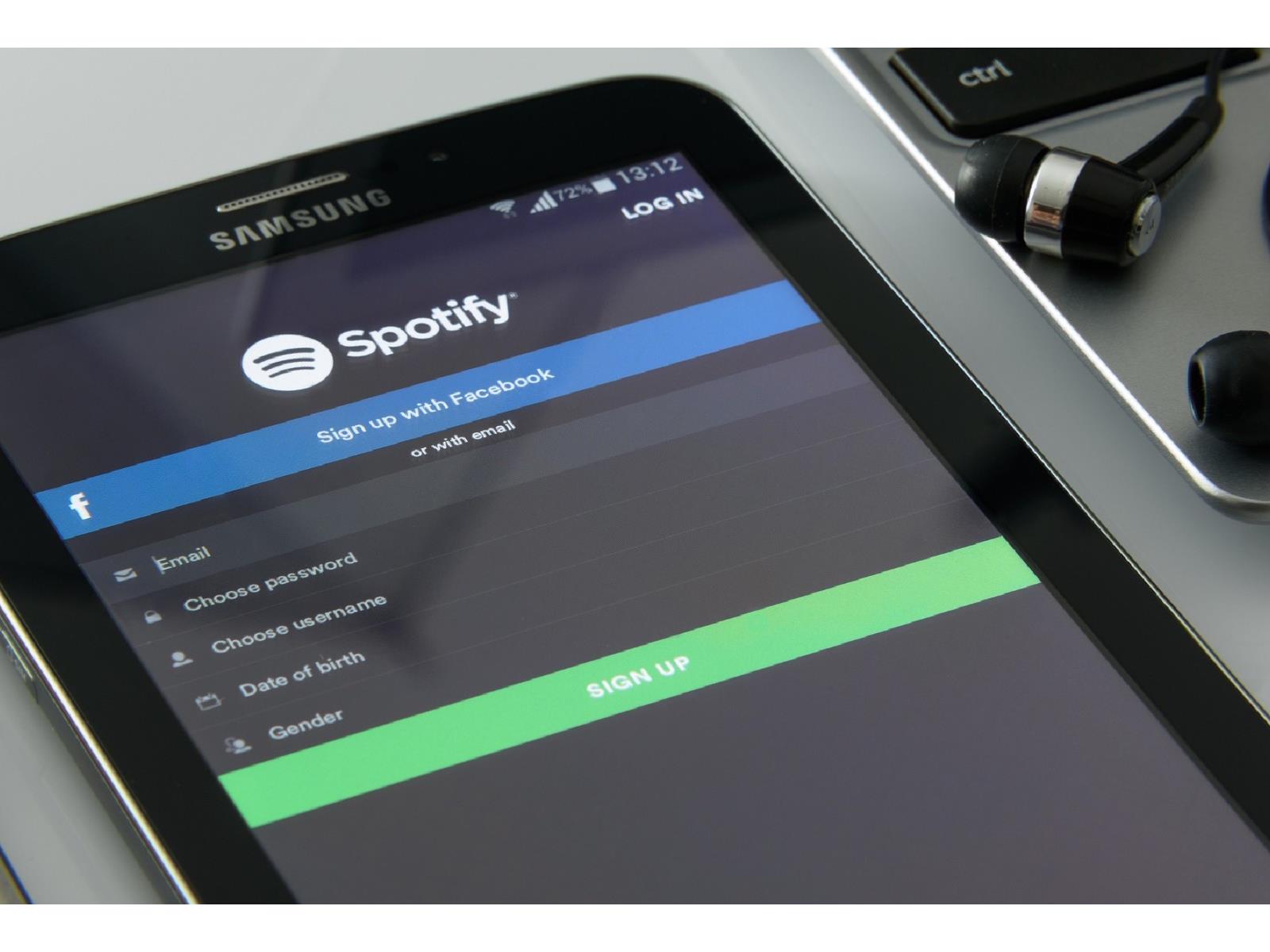
While Spotify fills everyone’s Twitter/X timeline with users posting their most played songs of 2023, the company announced it will be laying off 1,500 workers ahead of Christmas. The number equates to a not-insignificant 17% of Spotify’s total workforce, and follows layoffs of 600 employees in January, plus an additional 200 in June of this

Source: Hot Hardware – Spotify Spreads Holiday Jeer By Plotting Big Round Of Layoffs Ahead Of Christmas

The Meta Quest 2 Is $75 Off at GameStop Right Now

Black Friday and Cyber Monday might be in the rearview mirror, but some deals are sticking around. You can get the Meta Quest 2 for $75 off, matching the lowest price it’s ever been since its release, according to Honey’s price history. The Meta Quest 2 is the most popular VR headset on the market and the cheapest as well, making it the best option for those who want to try a virtual-reality headset but aren’t ready to shell out big bucks for the new Meta Quest 3 (let alone the forthcoming Apple Vision Pro).

The 128GB Meta Quest 2 is currently $224.99 (before tax) on GameStop after a $25 discount that applies when you pick it up in person. The $249.99 base price is the lowest price it’s ever been, matching Black Friday and Cyber Monday deals. (For an extra $50, you can double the memory to 256GB.)


VR products to consider:

There are many VR headsets to choose from. You can buy the Meta Quest 2, 3, or Pro on Amazon. If you’re not sure which one is the best for you, we break it down for you here:


The Meta Quest 2 is an affordable entry into the VR space

Though the Meta Quest 2 has been eclipsed by the Quest 3, most Meta Quest games are still compatible with it—there’s a large library of older games to choose from, and most recently, even Steam Link PC VR games are now available. But you can do more than just play games; you can lounge around watching your favorite streaming movies and shows in a virtual screening room, hang out with your family or friends, or even use it to watch porn. Whatever your plans, the Meta Quest 2 is by far the cheapest and most user-friendly way to dip your toes in the world of VR.

The Quest 2 is currently half the price of its successor headset, but that’s not to say it’s half as good. At its current sale price, the Quest 2 is a great way for families or VR-curious people to jump in without a big initial investment. The Meta Quest 2 got an “outstanding” score in its PCMag review, which praised its minimalistic design, great display, powerful processor, accurate motion tracking, and optional compatibility with PCs.


Source: LifeHacker – The Meta Quest 2 Is Off at GameStop Right Now

What happens in Vega didn’t stay in Vega, as key rocket parts went missing

A Vega rocket rides a column of exhaust from its solid-fueled first stage, kicking off a mission to deliver 12 small satellites into orbit.

Enlarge / A Vega rocket rides a column of exhaust from its solid-fueled first stage, kicking off a mission to deliver 12 small satellites into orbit. (credit: ESA/CNES/Arianespace)

The Italy-based aerospace company Avio has not had the best of luck with its Vega rocket, which has always been something of an odd duck in the launch industry. Now, as the rocket nears its final launch, it’s missing some critical components.

The European Spaceflight newsletter reports that two of the four propellant tanks on the fourth stage of the Vega rocket—the upper stage, which is powered by dimethylhydrazine and nitrogen tetroxide solid fuel—went missing earlier this year.

Now, it seems that the propellant tanks have been found. However, the newsletter says, the tanks were recovered in a dismal state, crushed, alongside metal scraps in a landfill. Someone, apparently, had trashed the tanks. This is a rather big problem for Avio, as this was to be the final Vega rocket launched, and the production lines are now closed for this hardware.

Read 8 remaining paragraphs | Comments


Source: Ars Technica – What happens in Vega didn’t stay in Vega, as key rocket parts went missing

How to Right-Click on Your Mac

No matter what Mac you have, whether you use a Magic Mouse or trackpad, you don’t have a dedicated right-click button. This can be confusing to people new to the Mac—honestly, it’s confusing to some of us who have used Macs for years. As it happens, there are quite a few ways to right-click on Mac, so you can pick the one that works best for your workflow:

Click with two fingers (trackpad)

This is the simplest way to right-click on your Mac. Just click or tap the trackpad with two fingers (if you have Tap to click enabled) and the right-click context menu will pop up. 

Click right side (Magic Mouse)

If you have a Magic Mouse, by default, you can click the right side of the top portion of the mouse to right-click. It’s a bit confusing since the mouse appears to be all one button, but if you imagine the right side having its own button, you should have no problem getting this to work.

If you’d prefer to make the left side the right-click option, you can go to System Settings > Mouse, then, next to Secondary click, choose Click Left Side.

A quick keyboard shortcut to right-click

If you find it hard to press the trackpad with two fingers at the same time, then you can hold down the Control key on your Mac’s keyboard and then click with the trackpad or a mouse. This was Apple’s go-to method for right-clicking back in the day.

Click a corner of your trackpad

If you prefer, you can set up one of the trackpad’s bottom corners as a dedicated right-click zone. You can enable this by going to System Settings > Trackpad and selecting the drop-down menu next to Secondary click. Select Click in the bottom-right corner or Click in the bottom-left corner. You can now click either of these corners of the trackpad to right-click on your Mac.

The three-finger right-click method

Many of us are used to using the two-finger scroll gesture on the Mac, and this right-click method is a natural extension of that. With two fingers on the trackpad, use your thumb to click the trackpad. It’s a similar gesture to the two-finger click, but you might find using your thumb is more convenient in certain situations.

Use a mouse

Of course, for a true right-click experience, you can use a mouse that has two or more buttons with your Mac. You don’t need to make any changes or configure the mouse: In almost all cases, the right button on the mouse will work as a right-click on the Mac.


Source: LifeHacker – How to Right-Click on Your Mac

IBM adds error correction to updated quantum computing roadmap

Read 20 remaining paragraphs | Comments


Source: Ars Technica – IBM adds error correction to updated quantum computing roadmap

The Best R-Rated Movies You Can Actually Watch With Your Kid

My American history teacher was every high schooler’s dream. When we were learning about Prohibition, she showed us The Untouchables. As we discussed the American experience during World War II, she used the film Come See the Paradise to teach us about the horrors in Japanese internment camps.

Both films are R-rated, so I never told my parents we were watching them. Growing up, I was never allowed to see movies with this rating (with some unusual exceptions, like Backdraft and JFK). I never understood why. Watching these films didn’t warp my brain like my mom and dad said they would. They made learning about history a lot more fun and entertaining.

Now that I have kids, I wonder when I can be like my history teacher and stop worrying about a movie’s content and more about the critical or historical message they share. In that spirit, here is a list of R-rated flicks that are significant for their positive and/or important messages. Many contain objectionable content (obviously), so do your research and view them with your child at an age you find appropriate. 

Schindler’s List (1993)

If history teachers aren’t showing this powerful drama in school, they should probably start. Taking place during World War II, it follows a German industrialist (Liam Neeson) in his attempts to save over a thousand Jews from a concentration camp and likely certain death. It’s a harrowing but essential watch and a potent reminder of why it’s essential to never forget the past. 

Where to stream: Digital rental

The Last of the Mohicans (1992)

Is your kid preparing for a book report at the last minute? Unless you want to get stuck writing it yourself, share this masterpiece about love and conflict during the French and Indian War. Director Michael Mann’s epic, starring Daniel Day-Lewis (and his bare chest), is the most entertaining of the multiple film adaptations of James Fenimore Cooper’s novel. Just remind your kid when the movie is over that they’re writing a book report, not a movie review.

Where to stream: Tubi, Digital rental

Rumble Fish (1983)

S.E. Hinton is the scribe behind many young adult fiction staples, including The Outsiders, which Francis Ford Coppola adapted for the screen. The critically acclaimed director followed it up with another Hinton adaptation that aesthetically went in a completely different direction. Instead of using a lush color palette and soaring orchestral score like Coppola did in his previous film, he shot in gritty black and white and asked The Police’s Stewart Copeland to provide an experimental soundtrack. It’s a teen drama disguised as French New Wave, showing viewers how film can be an artistic medium.

Where to stream: Digital rental

The Breakfast Club (1985)

This classic ’80s teen dramedy, one of many by the late great John Hughes, became the blueprint for depicting the social hierarchy of high school. The plot is simple: A princess, athlete, delinquent, nerd, and basket case spend Saturday detention together, only to realize (after smoking weed, mind you) that they have more in common than they thought.

Where to stream: Freevee, Tubi, Digital rental

The Matrix (1999)

Within this groundbreaking (and extremely violent) science-fiction masterpiece are philosophical messages about the mind and the body and themes regarding conformity and class, all the things a young mind needs to take on the status quo. 

Where to stream: Hulu, Max, Digital rental

Ghost World (2001)

Speaking of comic book movies, Ghost World, based on the works of artist Daniel Clowes, is the textbook definition of what critics consider “quirky.” It also perfectly captures how adrift a teen can feel after graduating high school and trying to find their tribe. 

Where to stream: Freevee, Tubi, Pluto TV, Digital rental

Girl, Interrupted (1999)

Winona Ryder and Angelina Jolie give powerful performances in this period piece based on the true story of a young woman institutionalized for a year and a half after a suicide attempt. She bonds with her fellow patients by butting heads with the staff, but she struggles to get the help she needs. The film explores themes like dissent and gender bias, which have continued to be prevalent for over two decades since the movie was released. 

Where to stream: Hulu, Digital rental

Fame (1980)

Follow the trials and tribulations of students discovering their extraordinary abilities. No, it’s not X-Men; it’s Fame, the hit musical about the actors, singers, and dancers attending the New York City High School for the Performing Arts. Sure, it’s a little dated, but who can’t relate to the desire to see their name “light up the sky like a flame,” as the movie’s theme declares? 

Where to stream: Digital rental

Dangerous Minds (1995)

Here’s another tale of high-school life, coming straight from the ’90s. Perhaps known nowadays for spawning the Coolio hit “Gangsta’s Paradise,” this drama revolves around an ex-Marine who becomes a teacher in the inner city, using everything from martial arts to Bob Dylan lyrics to get through to her gifted but underachieving students. 

Where to stream: Digital rental

Stand By Me (1986)

When I was putting this together, several people asked me to include The Shawshank Redemption, an undeniably great movie. However, it can be challenging to watch (unless it’s on cable again; commercials offer some relief). I offer this excellent Stephen King adaptation about the loss of innocence and the bonds of friendship as an alternative, which follows four pre-teens on the hunt for the dead body of a missing classmate, directed with a remarkably deft touch by the great Rob Reiner. 

Where to stream: Netflix, AMC+, Digital rental

Speed (1994)

I included this for personal reasons. While I grew up not seeing many R-rated movies, it seemed like my classmates saw many. For some reason, my parents granted an exception with this fast-paced action flick, which remains one of my favorites 30 years later.

There’s no lesson in this movie. It’s perfectly okay to enjoy the undeniable thrills of seeing a city bus go full speed through the streets of Los Angeles and watching things blow up in its wake. Speed is why we go to the theater to have fun with a few hundred strangers for a few hours.

Where to stream: Starz, Digital rental


Source: LifeHacker – The Best R-Rated Movies You Can Actually Watch With Your Kid

US Issues Apparent Warning To NVIDIA Over Redesigned Chip Shipments To China

US Issues Apparent Warning To NVIDIA Over Redesigned Chip Shipments To China
The United States government seems to be sending a strong message to NVIDIA about the company’s chip exports to China. Gina Raimondo, US Commerce Secretary, spoke about the importance of her department’s work in keeping China from getting access to the cutting-edge chips it needs to continue its AI development.

While speaking at the Reagan

Source: Hot Hardware – US Issues Apparent Warning To NVIDIA Over Redesigned Chip Shipments To China

Automakers’ data privacy practices “are unacceptable,” says US senator

A person sits in a car holding a smartphone, the screen reads

Enlarge (credit: Getty Images)

US Senator Edward Markey (D-Mass.) is one of the more technologically engaged of our elected lawmakers. And like many technologically engaged Ars Technica readers, he does not like what he sees in terms of automakers’ approach to data privacy. On Friday, Sen. Markey wrote to 14 car companies with a variety of questions about data privacy policies, urging them to do better.

As Ars reported in September, the Mozilla Foundation published a scathing report on the subject of data privacy and automakers. The problems were widespread—most automakers collect too much personal data and are too eager to sell or share it with third parties, the foundation found.

Markey noted the Mozilla Foundation report in his letters, which were sent to BMW, Ford, General Motors, Honda, Hyundai, Kia, Mazda, Mercedes-Benz, Nissan, Stellantis, Subaru, Tesla, Toyota, and Volkswagen. The senator is concerned about the large amounts of data that modern cars can collect, including the troubling potential to use biometric data (like the rate a driver blinks and breathes, as well as their pulse) to infer mood or mental health.

Read 3 remaining paragraphs | Comments


Source: Ars Technica – Automakers’ data privacy practices “are unacceptable,” says US senator

Amazon Joins Space Forces With Blue Origin Rival SpaceX On Kuiper Satellite Launch

Amazon Joins Space Forces With Blue Origin Rival SpaceX On Kuiper Satellite Launch
Amazon has inked a deal with Blue Origin rival SpaceX for three Falcon 9 launches to support deployment of Project Kuiper, Amazon’s low Earth orbit (LEO) satellite broadband network. The company previously secured 77 heavy-lift rockets from Arianespace, Blue Origin, and United Launch Alliance, which should be enough launches for most of Amazon’s

Source: Hot Hardware – Amazon Joins Space Forces With Blue Origin Rival SpaceX On Kuiper Satellite Launch

Why don’t EVs have standard diagnostic ports—and when will that change?

Read 13 remaining paragraphs | Comments


Source: Ars Technica – Why don’t EVs have standard diagnostic ports—and when will that change?