Windows 10 gets three more years of security updates, if you can afford them

Windows 10 gets three more years of security updates, if you can afford them

Enlarge (credit: Microsoft)

Windows 10’s end-of-support date is October 14, 2025. That’s the day that most Windows 10 PCs will receive their last security update and the date when most people should find a way to move to Windows 11 to ensure that they stay secure.

As it has done for other stubbornly popular versions of Windows, though, Microsoft is offering a reprieve for those who want or need to stay on Windows 10: three additional years of security updates, provided to those who can pay for the Extended Security Updates (ESU) program.

The initial announcement, written by Windows Servicing and Delivery Principal Product Manager Jason Leznek, spends most of its time encouraging users and businesses to upgrade to Windows 11 rather than staying on 10, either by updating their current computers, upgrading to new PCs or transitioning to a Windows 365 cloud-based PC instead.

Read 6 remaining paragraphs | Comments


Source: Ars Technica – Windows 10 gets three more years of security updates, if you can afford them

You Can Get an Extra Wireless Xbox Controller for $35 Right Now

The Xbox Wireless Controller came out in 2020 and was eclipsed by the Elite Series 2 in the fall of 2022. The controller has been $59.99 somewhat consistently for three years, dropping to $39.99 on Amazon this Black Friday, according to Camelcamelcamel’s price history. But now you can get it for the lowest price since its release date from Lenovo for $34.99 with the limited-time promo code MXBOXWH.

Get the best deal for the Xbox Wireless Controller in time for Christmas

Lenovo does not indicate when the $25 promo code will expire, so be aware that it could end at any moment. Lenovo is also covering the standard shipping, which takes about seven days to get to you, so you can easily get this delivered before Christmas. Keep in mind that only the “Robot White” color is available. You can use this controller for any Xbox console as well as PCs, phones, and tablets, according to IGN’s review.

I used my Xbox Wireless Controller for about two years before I started having problems with it (I did drop the controller countless times during those two years). My controller started having the infamous “stick drift” issue where the stick would register movement even when I wasn’t touching it. I put up with it until a good deal for them came around, which took many months. If you already have an Xbox Wireless Controller, these kinds of deals are great for replenishing your supply so you can have a spare controller ready when you start having issues with one. They don’t come very often, so I recommend you take advantage of them while you can.


Source: LifeHacker – You Can Get an Extra Wireless Xbox Controller for Right Now

You Can Now Scan Documents in Google Files Too

Last week saw some great updates to Google Drive’s document scanner. First of all, it’s finally available on iPhone (thank god), but the Android version also received some exclusive new features, including automatically capturing documents when the camera detects them, an improved viewfinder, and the ability to upload documents directly from your phone.

But apparently Google doesn’t just have its sights set on Drive to serve as your document scanning hub. As Twitter user @Nail_Sadykov discovered, the company is also rolling out similar functionality for Google Files (at least on Android):

Once the feature hits your device, you’ll see a camera icon appear towards the bottom-right of the Files window, just as it appears in Google Drive. When you tap it, you’ll open the same document scanner Google added to Drive, including all the new upgrades.

The tool gives you a choice for how to scan your documents: “Manual” or “Auto Capture.” Manual capture means you can line up the document in the viewfinder yourself and take the scan as you would a photo. Auto Capture, on the other hand, gives the controls over to Files: When the app detects the borders of the document you’re trying to scan, it’ll automatically capture it for you.

According to Nail Sadykov, documents you scan using this tool will be saved to either 0/Files by Google/Scanned, or “Documents & other” in the Scanned tab. Both Google Drive and Google Files’ scanners appear to be using the same underlying tech, so you don’t need to prioritize one over the other iif you’re worried about capturing scans in the best quality. If you prefer to keep your docs in Files, use the Files scanner. If Drive is your app of choice, scan there.

Of course, in order to choose Files, you’ll need to have the feature. At this time, it appears to be rolling out rather slowly. I don’t have it yet on my Pixel 8 Pro, and neither does Rajesh Pandey of Android Police.


Source: LifeHacker – You Can Now Scan Documents in Google Files Too

IBM, Meta form “AI Alliance” with 50 organizations to promote open source AI

Robots shaking hands on a blue background.

Enlarge (credit: Getty Images | Benj Edwards)

On Tuesday, IBM and Meta announced the AI Alliance, an international coalition of over 50 organizations including AMD, Intel, NASA, CERN, and Harvard University that aims to advance “open innovation and open science in AI.” In other words, the goal is to collectively promote alternatives to closed AI systems currently in use by market leaders such as OpenAI and Google with ChatGPT and Duet.

In the AI Alliance news release, OpenAI isn’t mentioned by name—and OpenAI is not part of the alliance, nor is Google. But over the past year, clear battle lines have been drawn between companies like OpenAI that keep AI model weights (neural network files) and data about how the models are created to themselves and companies like Meta, which provide AI model weights for others to run on their own hardware and allow others to build derivative models based on their research.

“Open and transparent innovation is essential to empower a broad spectrum of AI researchers, builders, and adopters with the information and tools needed to harness these advancements in ways that prioritize safety, diversity, economic opportunity and benefits to all,” writes the alliance.

Read 5 remaining paragraphs | Comments


Source: Ars Technica – IBM, Meta form “AI Alliance” with 50 organizations to promote open source AI

This Braised Red Wine Brisket Is the Perfect December Meal

As we enter the middle of December chills, I encourage you to consider a brisket: And this red wine version braises into a gorgeous glaze with meat that is perfectly tender. It starts with the brisket itself. A whole brisket weighs about twelve to fifteen pounds, but is generally is divided into two pieces: the flat and the point. The flat has a texture more like corned beef (it is, in fact, what you make corned beef with), and the point tends to be fattier—but with fat comes the potential for silkiness once that fat melts. However, you likely don’t have to choose. Butchers routinely just cut the briskets into cross sections of five pounds or so, giving you a little flat, and a little point. That is the perfect amount for this recipe.  

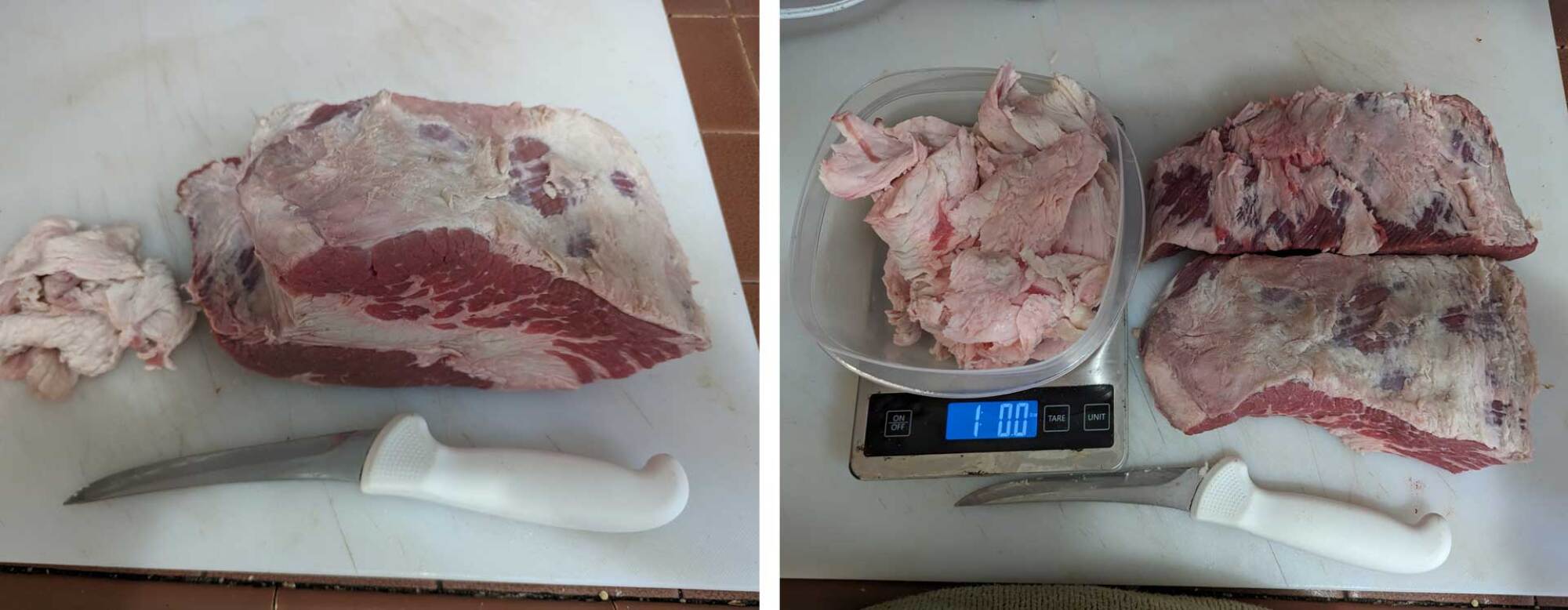
Image of brisket cross cut before and after trimming
on the left, the brisket before being separating into flat and point, and on the right, after being broken down and trimmed of all fat, which took off an entire pound of weight.
Credit: Amanda Blum

You should be able to see a thick line of fat running through the middle of the meat; you’re going to cut the meat into two sections along that fat, then cut off most of the fat on both pieces. You only want to leave about ¼ of an inch of fat anywhere. If this intimidates you, ask the butcher to do it for you before you leave the store. 

Sear the brisket

At this point, it just needs some salt and pepper, liberally, all over; then you’re going to sear it with peanut oil in a large skillet on medium high-to-high heat. Because of the fat, you’ll notice it browns quickly, in thirty seconds or so. Keep turning the pieces of meat with tongs, so they are browned all over. Once that’s done, pull the meat out of the pan, and place it in a baking dish with deep sides. It should easily accommodate the meat, and the sides should come almost all the way up the height of the meat. 

To make the braising liquid, take two large carrots, three stalks of celery, one whole yellow onion, and two large cloves of garlic. Don’t worry about peeling them, just make sure you rinse them well. Then chuck everything into your food processor and pulse until everything is a uniform large chop. Turn the heat back on for the skillet, and sauté the chopped vegetables in the oil for eight to 10 minutes, moving things around often. 

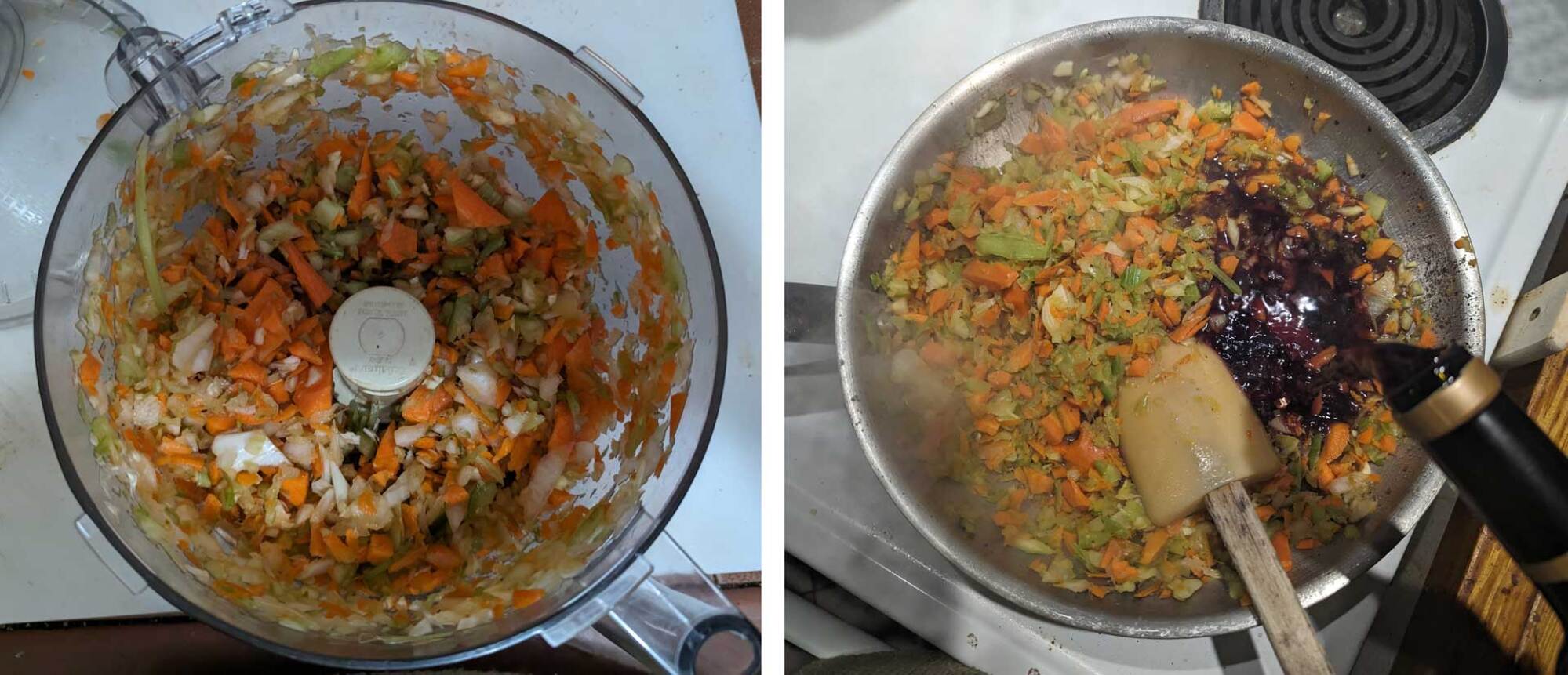
image of veg in the food processor, and once sauteed, wine being added
you can just rough chop the vegetables or toss them into the food processor. They’re just being used for taste, they won’t be part of the final dish. On the right, you see the wine going in after the vegetables are all sauteed.
Credit: Amanda Blum

Add the red wine

Dump in the entire bottle of red wine. An inexpensive Cabernet is the right choice here; I went with an old steady, Clos de Bois. The heat should be on medium at this point; use your wooden spoon to stir the vegetables and wine, trying to scrape up everything from the pan. Add in cherries, pomegranate seeds, herbs, honey, and beef stock, and stir to combine. Allow this to simmer long enough to reduce by a third. 

Now, pour it all over your meat. You’re hoping it covers two-thirds of the meat. If you have too much liquid, just set it aside; if you don’t have enough, you can add more stock. This pan it going to go into the lower third of your oven, on 450°F.  It will cook for about 3.5 hours, but you should check it every half hour, and add more water to the pan to keep the level about the same; turn the meat over each time. The easiest way to add water is to just fill up the wine bottle with water, and pour it into the pan. 

Get your veg all roasty

After two and a half hour—an hour before the brisket should be done—put the peeled cipollinis, red potatoes, and baby carrots into an oven-safe pan with olive oil, salt, and pepper, and toss well to ensure they’re all coated. Add this pan to the oven on another shelf or next to the brisket. 

At three and a half hours, pull both pans out of the oven. Remove the meat to a cutting board, and pour everything else in the pan through a sieve over a bowl. You can toss everything that it’s the sieve. 

Brisket with a bark

Cut the brisket on an angle, against the grain. You’ll see you have two distinctive textures of meat, that from the flat and the point. Both should have a spectacular lacquer or bark on them. Give everyone a little bit from both cuts. Add some of the roasted vegetables and spoon some of the sauce over everything with a sprinkle of flaky salt. 

close up of flat and point cut of finished brisket
Look at the difference between the flat (left) and point (right) in texture. You can see the bark on the meat as well, and how tender they both are.
Credit: Amanda Blum

Red Wine, Cherry and Pomegranate Glazed Brisket Recipe

Ingredients:

  • 5 pound cross cut of brisket, trimmed to ¼ of fat all around (should be 4 lbs. once trimmed)

  • Salt and pepper

  • 3 stalks celery

  • 2 large carrots

  • 1 medium yellow onion

  • 2 large cloves garlic

  • 3-4 few sprigs of thyme

  • 2 bay leaves

  • 1 bottle Cabernet Sauvignon

  • 1 pound cipollini onions

  • 1 pound baby red potatoes

  • 1 pound baby carrots

  • 2 tablespoons olive oil

  • ¼ cup peanut oil

  • 1 cup frozen cherries

  • 1 cup fresh pomegranate seeds

  • 2 tablespoons honey

  • 2 cups beef stock

Finished dish w vegetables and sauce

Credit: Amanda Blum

Directions:

  1. If the brisket wasn’t trimmed at the store, do so now by separating the flat and the point cuts, and cutting through the fat layer. Trim off most of the fat so there is no more than ¼-inch of it anywhere. 

  2. Salt and pepper the cuts liberally and then sear them in a skillet on high heat with the peanut oil. Turn them about every thirty seconds so they just brown on each side. 

  3. Move the meat to a baking dish with high sides. 

  4. Chop the celery, large carrots, yellow onion, and garlic by hand or in the food processor. Sauté the vegetables in the same pan with the oil you used for the brisket. Move the vegetables around so they all soften, for eight to 10 minutes. 

  5. Add the entire bottle of red wine, and simmer while stirring with a wooden spoon to dislodge everything stuck to the skillet, and stir that into the red wine. Add the cherries, pomegranate seeds, herbs, and stock. Simmer until the liquid reduces by a third. 

  6. Pour the mixture over the meat and put the baking dish onto a rack in the bottom third of the oven. Roast at 450°F for three and a half hours. 

  7. After two and a half hours, take the cipollini onions, baby carrots, and red potatoes, and toss them with the olive oil, salt, and pepper in a roasting pan. Place in the oven next to or below the brisket.

  8. Take both pans out of the oven when the full three and a half hours are up. Move the meat to a cutting board to rest. Pour the liquid in the pan through a sieve, reserving the liquid, but tossing the solids. 

  9. Slice the meat thinly, at an angle, against the grain. Serve the brisket with the vegetables, and pour the sauce over them.


Source: LifeHacker – This Braised Red Wine Brisket Is the Perfect December Meal

YouTuber pilot regrets intentionally crashing plane, gets 6 months in prison

YouTuber pilot regrets intentionally crashing plane, gets 6 months in prison

Enlarge (credit: TrevorJacob | YouTube)

Trevor Jacob, a 30-year-old YouTuber pilot who intentionally crashed his plane to drive up views on a sponsored video, has been sentenced to six months in federal prison, the US Attorney’s Office announced Monday.

Earlier this year, Jacob pled guilty to “deliberately” crashing the plane, destroying the plane wreckage, and repeatedly lying to officials, obstructing federal probes into the crash. His sentence is much lower than the maximum sentence of 20 years that he may have faced had he not accepted a plea deal.

An “experienced pilot, skydiver, and former Olympic athlete,” Jacob hatched his plot to crash the plane after a company agreed to sponsor a video in which Jacob would promote a wallet, the US Attorney’s Office said.

Read 10 remaining paragraphs | Comments


Source: Ars Technica – YouTuber pilot regrets intentionally crashing plane, gets 6 months in prison

You Can Turn Your Shop Vac Into a Leaf Blower

It’s been known to happen: You get a sudden deluge of leaves, and you don’t have access to a leaf blower (and a rake just feels like too much work). Since leaf season might catch up with you quickly, or you might not want to get a special tool to use for just once or twice a year maintenance, clearing leaves quickly can be a challenge. Luckily, you can convert your shop vac into a leaf blower with these simple steps.

Unplug and open up your vac

To start, unplug your shop vac and take the motor of the shop vac off of the base. This is usually done by opening up the vacuum the same way you would to empty it. There’s usually a latch or two around the top of the body of the shop vac that holds the housing to the motor. You can remove it by undoing these latches. Underneath the motor housing, you should see either the container that holds the waste or a filter, depending on what type of tool you have. For a backpack-style shop vac, you likely don’t need to open it up to switch ports, but you’ll still need to make sure it’s empty before you proceed. Make sure that the waste container is empty, or everything inside it will be blown back out the vacuum tube when you start blowing leaves.

Detach the vacuum hose

Next, detach the vacuum tube from the motor where it’s usually positioned. Most vacuum tubes are held in by a twist latch, but it could also have a button release to take it off. If you’re trying to clean up, you might want to do this over a trash can or a drop cloth—there will likely be debris in the tube.

Reattach the vacuum tube to the exhaust port

Once you have the tube free, you should locate the exhaust port for your shop vac. It’s usually opposite the intake port that you just disconnected the vacuum tube from. In most cases, there will be a way to attach the tube to the other port built in to the vacuum, but in the case that there isn’t, some duct tape will do to seal it off. For a backpack-style shop vac, the exhaust port is usually located on the back of the vacuum housing.

A word of caution

Because shop vacs are usually pretty powerful, make sure to keep your hair and clothing well clear of the now-exposed intake port. For those of us with long hair, it can be a painful experience to discover just how powerful a shop vac is by having our hair sucked into one.

Use your newly converted vac/blower

When you turn your shop vac on, you should be able to use the hose to blow leaves. Even smaller vacuums will be able to do decent sized areas like a garage floor or a patio, but for longer range, a bigger shop vac is of course a better option. While using your shop vac as a blower in these circumstances can be very handy, if you have larger projects, it can be a slightly unwieldy option. First, having an unprotected intake port going full bast does pose the risk that unintended items will get sucked into it. Also, it might not be the most comfortable way to hold the hose or attachments, so if you have a wide area to cover, you might choose to go with the right tool for the job, rather than a shortcut.


Source: LifeHacker – You Can Turn Your Shop Vac Into a Leaf Blower

Super Nintendo World Theme Park Gets Its First DLC And It's Donkey Kong Country

Super Nintendo World Theme Park Gets Its First DLC And It's Donkey Kong Country
Universal Japan’s Super Nintendo World will be getting its first new area, based on the Donkey Kong Country franchise. This new area will come to the Osaka, Japan based theme park in the Spring of 2024. It will be a space with a lot of greenery, pulling inspiration from the jungle themes found throughout the popular game series.

One of

Source: Hot Hardware – Super Nintendo World Theme Park Gets Its First DLC And It’s Donkey Kong Country

PC players will probably have to wait even longer for Grand Theft Auto VI

That "Coming 2025" probably won't apply to any PC version.

Enlarge / That “Coming 2025” probably won’t apply to any PC version. (credit: Rockstar)

PC players will likely have to wait a bit longer than their console counterparts to play the upcoming Grand Theft Auto VI. In a press release accompanying last night’s earlier-than-scheduled trailer launch, Rockstar specifically says it is “proud to announce that Grand Theft Auto VI is coming to PlayStation 5 computer entertainment systems and Xbox Series X|S games and entertainment systems in 2025.”

The explicit lack of any immediate PC release plans in that statement shouldn’t be a shock to longtime Rockstar Games watchers. Sure, the 2D, top-down Grand Theft Auto actually launched on Windows and MS-DOS(!) a few months before the more popular port to PlayStation in 1998. And the game’s 1999 sequel debuted on PlayStation and Windows on the same day.

Since 2000, though, Rockstar has clearly prioritized its console releases over any PC ports. When one of Rockstar’s console games is released on the PC, the port tends to come anywhere from five months to over two full years after the first console release, according to an Ars analysis. Even Grand Theft Auto DLC like “The Lost and the Damned” and “The Ballad of Gay Tony” hit the PC well after their console launches—420 days and 166 days, respectively.

Read 8 remaining paragraphs | Comments


Source: Ars Technica – PC players will probably have to wait even longer for Grand Theft Auto VI

The 50 Best Christmas Movies You Can Stream Right Now

The holidays are the perfect time to settle into your couch and check out a classic Christmas movie or 12. The proliferation of streaming services has made just about any of them available at will, from traditional classics like Miracle on 34th Street, to potential future classics like Happiest Season, but actually finding your favorite flick can be a chore. So I’ve compiled the best 50 Christmas movies and specials in a one alphabetical list so you can locate and watch your favorite or check out a classic you’ve never seen before.


Recommended products

If you need something on which to stream Christmas movies this year, consider one of these products.

Amazon Fire TV Stick Lite

Chromecast with Google TV (4k)

Roku Ultra

2021 Apple TV 4K with 64GB Storage


Bad Santa (2003)

Cut through the treacle of the season with this classic Christmas-themed black comedy starring Billy Bob Thornton as a very bad Santa. This could have been a purposefully “offensive” comedy, but the holiday-centric redemption arc raises it above the muck.

Where to stream: Fubo, Paramount+, PlutoTV

Carol (2015)

This soft, beautiful, layered film proves that the holiday movies don’t have to be lightheaded fluff. Based on Patricia Highsmith’s seminal lesbian novel The Price of Salt, Carol tells a story of love and loneliness perfect for thoughtful holiday viewing.

Where to stream: digital rental

The Best Man Holiday (2013)

When a movie gets a Christmas-themed sequel, it’s usually a bad sign, but Best Man Holiday is better than the original. This ensemble comedy’s charismatic cast and relaxed vibe turn Christmas cliches into something that feels fresh.

Where to stream: Peacock

A Charlie Brown Christmas (1965)

A Charlie Brown Christmas is an enduring classic because it doesn’t shy away from real pathos. It doesn’t try to protect its child audience from the sadder, bleaker side of life, so the holiday redemption ending is actually earned.

Where to stream: AppleTV

A Christmas Carol (many)

There are too many “traditional” re-tellings of Charles Dickens’ A Christmas Carol to list individually, and everyone has their personal favorite, but I’m going with 1951’s Scrooge as the ultimate version, just because.

Where to stream: Plex

Christmas Evil (1980)

Christmas Evil is the weird, sleazy story of an unbalanced man’s murderous obsession with Christmas. It’s better than it has any right to be and features the best twist ending in cinema history. Plus, it’s one of John Waters’ favorite holiday movies, and that’s good enough for me.

Where to stream: Fubo, AMC+,Roku, Vudu, Tubi, Shudder, Night Flight

Christmas In Connecticut (1945)

1940s Hollywood’s vision of Christmas reaches its reassuring zenith with Christmas in Connecticut, a romantic comedy starring Barbara Stanwyck that can be watched over and over again and never stop being delightful.

Where to stream: Max

The Christmas Setup (2020)

This movie hasn’t been around long enough to tell whether it will sink or swim in the world of Christmas movies, but it’s Lifetime’s first LGBTQ+ Christmas movie, and is sitting at 85% positive on Rotten Tomatoes, so I’m pulling for it.

Where to stream: Hoopla

A Christmas Story (1983)

Packed with quotable lines and unforgettable moments, A Christmas Story is battling It’s a Wonderful Life for the title of most iconic American Christmas movie ever. I’m sure you’ve seen it before, and I’m also sure you watch the whole thing whenever it happens to be on.

Where to stream: Max, TNT, TBS, TruTV

Christmas with the Kranks (2004)

In Christmas with the Kranks, a family throws together a last-minute Christmas for their grown-up child. It’s very dumb, and critics hated it, but it seems to get better and better every year.

Where to stream: Prime Video, AMC+, Hoopla, DirecTV, AMC+

National Lampoon’s Christmas Vacation (1989)

It’s not deep. It’s not important. But Christmas Vacation is funny enough to watch and light enough to ignore when you’re wrapping presents. It’s like a comfortable old slipper of a movie, perfect for the slowed down time of the holidays.

Where to stream: Hulu

Die Hard (1988)

Die Hard is a Christmas movie, no question. It’s also the most action-packed film in the entire genre. Bruce Willis is amazing, and the “average Joe who gets into a huge situation” plot goes down smooth.

Where to stream: Starz, DirecTV

Eight Crazy Nights (2002)

There aren’t many movies about Hanukkah, so this animated Adam Sandler vehicle is a bit of a classic by default. But it’s a fun little movie anyway.

Where to Stream: Prime, Hulu, AMC+

Elf (2003)

Appropriate for kids and hilarious for adults, you just can’t beat Elf when you’re looking for a holiday comedy. Will Ferrell is amazing as Buddy, the fish-out-of-water elf at the center of this story, whose wide-eyed optimism and unwavering belief will melt even the coldest heart.

Where to stream: Max, Hulu, Paramount+

Emmet Otter’s Jug Band Christmas (1977)

The fact that the Riverbottom Nightmare Band clearly won the battle of the bands isn’t enough to ruin this puppet-based Christmas awwww-fest.

Where to stream: Prime Video

Ernest Saves Christmas (1988)

Time has been strangely kind to Ernest movies: Slapstick ages better than any other form of comedy. If you haven’t seen this one, check it out. It’s delightfully stupid Christmas fun.

Where to stream: Disney+

The Family Stone (2005)

Every year, dozens of filmmakers go down in flames trying to capture the subtle mixture of drama, laughs, and pathos that makes a holiday movie a classic. The Family Stone is one of the rare flicks that gets the recipe right.

Where to stream: Fubo

Friday After Next (2002)

Friday After Next isn’t usually thought of as a Christmas movie, but the holiday is integral to the plot. The third flick in Ice Cube’s Friday series begins with Craig and Day-Day’s apartment being robbed by a guy in a Santa suit, setting in motion a slew of Friday style antics centered on Christmas.

Where to stream: Tubi

Frosty the Snowman (1969)

Frosty came out in a time when there were only three channels, so kids liked things on TV because they were the only things that were on the TV. But it rises far over this low bar through the naturalistic performances of its child actors—a rarity at the time.

Where to stream: digital rental on Plex

Gremlins (1984)

Joe Dante’s horror-comedy isn’t afraid to satirize Christmas movies and Christmas itself, and sometimes you need that during the holiday season.

Where to stream: Max

Happiest Season (2020)

Happiest Season breathes new life into the stilted holiday romantic comedy genre by removing the heterosexuality but keeping the Christmas magic intact. It’s my pick for a future classic.

Where to stream: Hulu

The Holiday (2006)

Like the best Christmas movies, this frothy, appreciate-what-you-got romantic comedy will charm you, even if you’re desperately trying to prevent yourself from being charmed.

Where to stream: Fubo, Starz, AMC+, DirecTV

Holiday Affair (1949)

Robert Mitchum plays against type by not being creepy in this lighthearted romantic comedy from the golden age of Hollywood.

Where to stream: Max

Home Alone (1990)

The story of eight-year-old Kevin McCallister being abandoned by his parents and stalked by hardened criminals could easily have been a horror movie, but instead, it’s a Christmas classic. Movies are wild like that.

Where to stream: Disney+, Fubo, Starz, DirecTV

How the Grinch Stole Christmas (1966)

I love any Christmas movie that acknowledges the misanthropes out there, and the Grinch is so hateful, his name has become synonymous with disdain for the holidays. It’s a shame he has to be redeemed in the end—but hey, it’s Christmas.

Where to stream: Peacock

How the Grinch Stole Christmas (2000)

The original is way better than this re-imagining with Jim Carrey, but maybe I only think that because I saw the 1966 version as a kid.

Where to stream: Fubo

It’s a Wonderful Life (1946)

There’s nothing that hasn’t already been said about It’s a Wonderful Life, the ultimate Christmas movie of all time. You know you’re going to watch it, so just give in.

Where to stream: Prime Video

Jack Frost (1998)

Holiday classics get that way either because they’re great movies, or you happened to see them at the right time in your life. Jack Frost seems more like the latter to me, but it’s a lot of people’s go-to sentimental Christmas flick, so who am I to argue?

Jingle All the Way (1996)

Arnold Schwarzenegger drops the action-hero act in this fast-paced, slapstick comedy about consumerism and the holidays. It’s not going to change anyone’s life, but it’s a perfectly paced and seamlessly constructed artifact from big 1990s Hollywood.

Where to stream: Disney+, DirecTV

Klaus (2019)

Christmas stories about “How Christmas came to be the way it is” seem very 1960s, but this beautifully animated Netflix feature brings the genre back in a big way by telling the story of Santa’s team-up with an unlikely ally.

Where to stream: Netflix

Last Holiday (2006)

Driven by the star power of Queen Latifah, LL Cool J, and Timothy Hutton this Christmas movie extols the virtues of living for the moment. Queen Latifah’s performance as a woman who reacts to a terminal diagnosis by saying, “I guess I’ll have fun until I die” is amazing.

Where to stream: Paramount+, PlutoTV

Let It Snow (2019)

This movie breaks the mold by mashing up the teen-romance genre with the snow and tinsel tropes of the holiday movie genre. It works surprisingly well, largely due to its talented young cast.

Where to stream: Netflix

Love Actually (2003)

Despite appearances, good holiday movies and romantic comedies have to be subtle, otherwise they descend into cheap sentiment. Love Actually manages to navigate the tightrope between mawkishness and real emotions as well as any movie ever made.

Where to stream: Netflix, AMC+

Meet Me in St. Louis (1944)

Before she descended into an alcoholic abyss, Judy Garland was as big a star as you could be, and this is Garland at the height of her power. Meet Me in St. Louis is a singing, dancing holiday delight.

Where to stream: Max

Metropolitan (1990)

This is a lesser-known Christmas movie, but it’s gaining currency in recent years for its arch skewering of extremely rich, extremely young urbanites who aren’t nearly as clever as they think they are.

Where to stream: Max

A Miracle on 34th Street (1947)

A Miracle on 34th Street’s tale of Santa Claus’s reality being put on trial is sentimental, cloying hogwash, but so is Christmas, so just sit back and take it. (But don’t watch the version from the 1990s. There’s a limit.)

Where to stream: Disney+, Prime Video

The Muppet Christmas Carol (1992)

Like Bill Murray’s Scrooged, The Muppet Christmas Carol is different enough from other film adaptations of Dickens’ tale to not be lumped in with the others, mainly because most of the cast is made of felt. Other than that, the movie plays it pretty straight, but if you have kids, they’ll like this better than some dusty old black-and-white version.

Where to stream: Disney+

Night of the Hunter (1955)

The genre of “classic Christmas movie” is broad enough to include both Jingle all the Way and Night of the Hunter, an unsettling tale of a murderous preacher with “love” tattooed on one hand and “hate” on the other. Hunter’s portrayal of Christmas as a brief moment of joy and imagination in the lives of joyless children makes it one of the most honest holiday films ever made.

Where to stream: Hoopla, Tubi, DirecTV, Pluto, FreeVee

The Nightmare Before Christmas (1993)

You get two holidays for the price of one in this stop-motion animation classic where Jack Skellington, the King of Halloween Town tries to take over Christmas to bring some much-needed spookiness to the holiday. (Too bad he didn’t succeed.)

Where to stream: Disney+

The Polar Express (2004)

The Polar Express adds a new wrinkle to the hoary legend of Santa Claus by imagining a ghost train that takes children on an express trip to the North Pole to meet the man himself. The dead-eyed animation and too-much-ness of the movie creates a sense of mystery and otherworldliness that’s a little unsettling but so is Santa Claus.

Where to stream: Max, Hulu

Prancer (1989)

Prancer, a movie about a little girl who saves Christmas by nursing an injured reindeer back to health, could easily be a forgotten piece of kiddie trash, but it’s better than it has any right to be. It stays realistic and reveals a deeper story about the nature of faith instead of falling into sentimentality.

Where to stream: AMC+

The Preacher’s Wife (1996)

Pitch-perfect performances from Denzel Washington and Whitney Houston take The Preacher’s Wife from a by-the-numbers holiday rom-com into a watch-every-year comfort movie of the highest order.

Where to stream: Fubo, Tubi, DirecTV

Rare Exports: A Christmas Tale (2010)

Maybe Rare Exports is only a perennial holiday classic at my house, but this horror take on the nature of Santa is pure cinematic inventiveness and a delightful skewering of Christmas mythology—but don’t watch it with your children.

Where to stream: Fubo, Peacock, Hoopla, Tubi, Kanopy, RedBox, PlutoTV, PopcornFlix, Fandor

Rudolph, The Red-Nosed Reindeer (1964)

Rudolph will never be beaten when it comes to perfect Christmas entertainment. The animation is amazing, the songs are unforgettable, and the story has the kind of power usually reserved for myths—it’s like Christmas itself condensed into 55 minutes.

Where to stream: Available for purchase only on AppleTV, Amazon, GooglePlay, YouTube, Vudu

Santa Claus Conquers the Martians (1964)

Christmas is for everyone, even weird freaks who enjoy inexplicable films the rest of the world ignores. For them (us, really) an annual viewing of Santa Claus Conquers the Martians is as much of a holiday tradition as It’s a Wonderful Life is for normal people.

Where to stream: Prime Video, Fubo, MGM+,Roku, Vudu, Tubi, PlutoTV, Night Flight, Shout Factory

The Santa Clause (1994)

Tim Allen stars in this tale of a curmudgeonly guy who kills Santa and must take over the office himself. He learns something about himself, strengthens his bond with his family, and gives in to holiday magic—you know the drill.

Where to stream: Disney+, Fubo

Scrooged (1988)

Bill Murray really sells this reworking of Dickens’ A Christmas Carol with his perfect portrayal of a 1980s-cynical TV executive’s capitulation to Christmasness. It’s not better than Dickens, but it’s close.

Where to stream: Prime Video

The Shop Around the Corner (1940)

There’s something about Jimmy Stewart and movies about Christmas. Like It’s a Wonderful Life, The Shop Around the Corner isn’t strictly a Christmas movie, but the climactic events take place during the holidays, so it’s close enough.

Where to stream: Max

A Very Harold & Kumar Christmas (2011)

Some Christmas movies take themselves very seriously. This is not one of those movies. It’s dumb fun from start to finish, and Neil Patrick Harris is a national treasure. Stoners need Christmas movies too, right?

Where to stream: Max, Paramount+

White Christmas (1954)

Closing out the list is White Christmas, a perennial Christmas classic featuring Bing Crosby and Rosemary Clooney crooning their way through a breezy musical that’s perfect holiday escapism.

Where to stream: Netflix


Source: LifeHacker – The 50 Best Christmas Movies You Can Stream Right Now

Carjackers Return Android Phone To Uber Eats Driver Because It Wasn't An iPhone

Carjackers Return Android Phone To Uber Eats Driver Because It Wasn't An iPhone
A couple was sadly robbed and had their truck stolen in a pair of brazen thieves right outside their Washington D.C. apartment. While occurrences like this happen way too often, what’s bizarre about this theft was in the midst of the robbing, the perpetrators took one look at the victim’s Android phone and decided to give it back. The reason?

Source: Hot Hardware – Carjackers Return Android Phone To Uber Eats Driver Because It Wasn’t An iPhone

GeForce RTX 4080 Super Breaks Cover In Update To A Popular System Utility

GeForce RTX 4080 Super Breaks Cover In Update To A Popular System Utility
You can always leave it to the eagle-eyed gamers to uncover the most subtle hints of new products coming. No, we’re not talking about the ridiculously hyped GTA 6 and its treasure trove of surprises. The next best thing is in new hardware tidbits, and in this case, NVIDIA’s GeForce RTX Super refresh. While it seems to be no surprise that it

Source: Hot Hardware – GeForce RTX 4080 Super Breaks Cover In Update To A Popular System Utility

It's Time to Ditch Evernote for One of These Alternatives

For many productivity enthusiasts, Evernote became the go-to note-taking app of the 2010s. It was fast, and let you create notebooks with notes, images, and even to-dos. It made it easy to share and collaborate with anyone, and had a neat tool for importing anything from the web in a single click. And it did this all mostly for free.

But in the past five years, things kept on changing for the worse. Evernote started limiting the free plans to promote their paid ones, which didn’t cost too much. But then, they kept jacking up the price. Now, in 2023, their base plan for personal use costs a whopping $14.99 per month, or $129.99 per year, with the professional plan coming in at $17.99 per month. That’s more than what Microsoft charges for the entire ecosystem of Office products, including OneNote. To make matters worse, Evernote is now limiting free members to just 50 notes, and a single notebook.

People have been abandoning ship for years now, but this might be the final nail in the coffin for Evernote. But the question is, where to go from here? There is no one-to-one copy of Evernote out there in the world, but there are many great tools that offer note taking, task management, and collaboration, all in one, and many modernize the approach of Evernote.

Microsoft OneNote

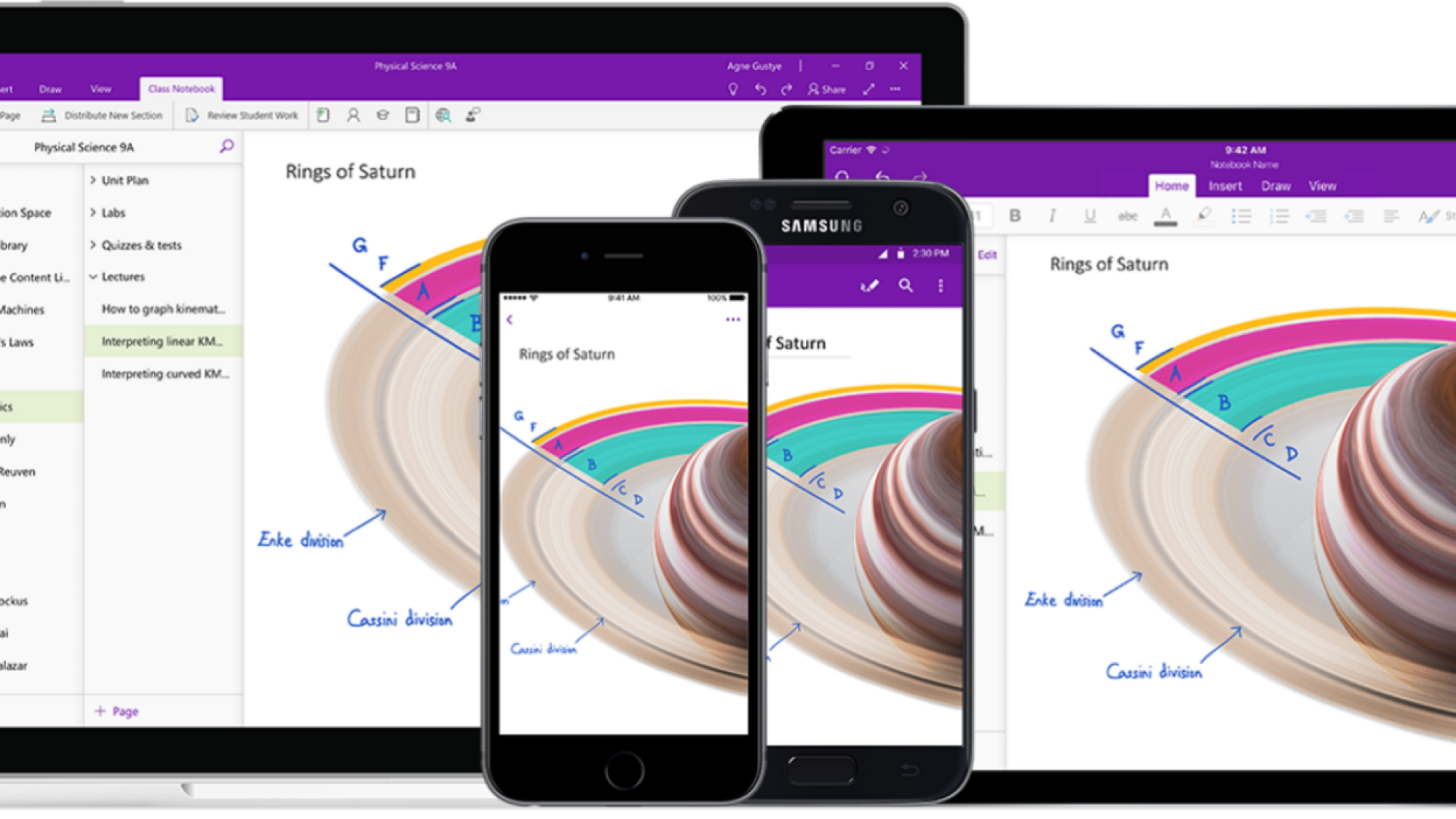
Microsoft OneNote apps across different platforms

Credit: Microsoft

If you want an app like Evernote, something that can handle notes, tasks, and collaboration together, OneNote might be your best bet. Microsoft has made most of its features available for free, but you’ll need a Premium account if you want to store files locally on Windows, or you want more than 5GB of storage. If you’re paying for Microsoft 365, the premium version is already included. 

OneNote offers great tools for creating and organizing notes, and like Evernote, there’s a great web clipper as well. Collaboration is based on sharing notebooks, but you can collaborate with users online, on the same note, similar to Google Docs. One place OneNote lacks, though, is OCR (optical character recognition). While it’s present in some versions of OneNote, it isn’t very intuitive, so you won’t have as much ease in pulling text from images. The workflow is not as intuitive as Evernote, and searching inside PDFs and documents isn’t enabled by default. This is the one thing that Evernote does far better than OneNote. Take a look at the full OneNote review at PCMag to learn more. 

Taskade

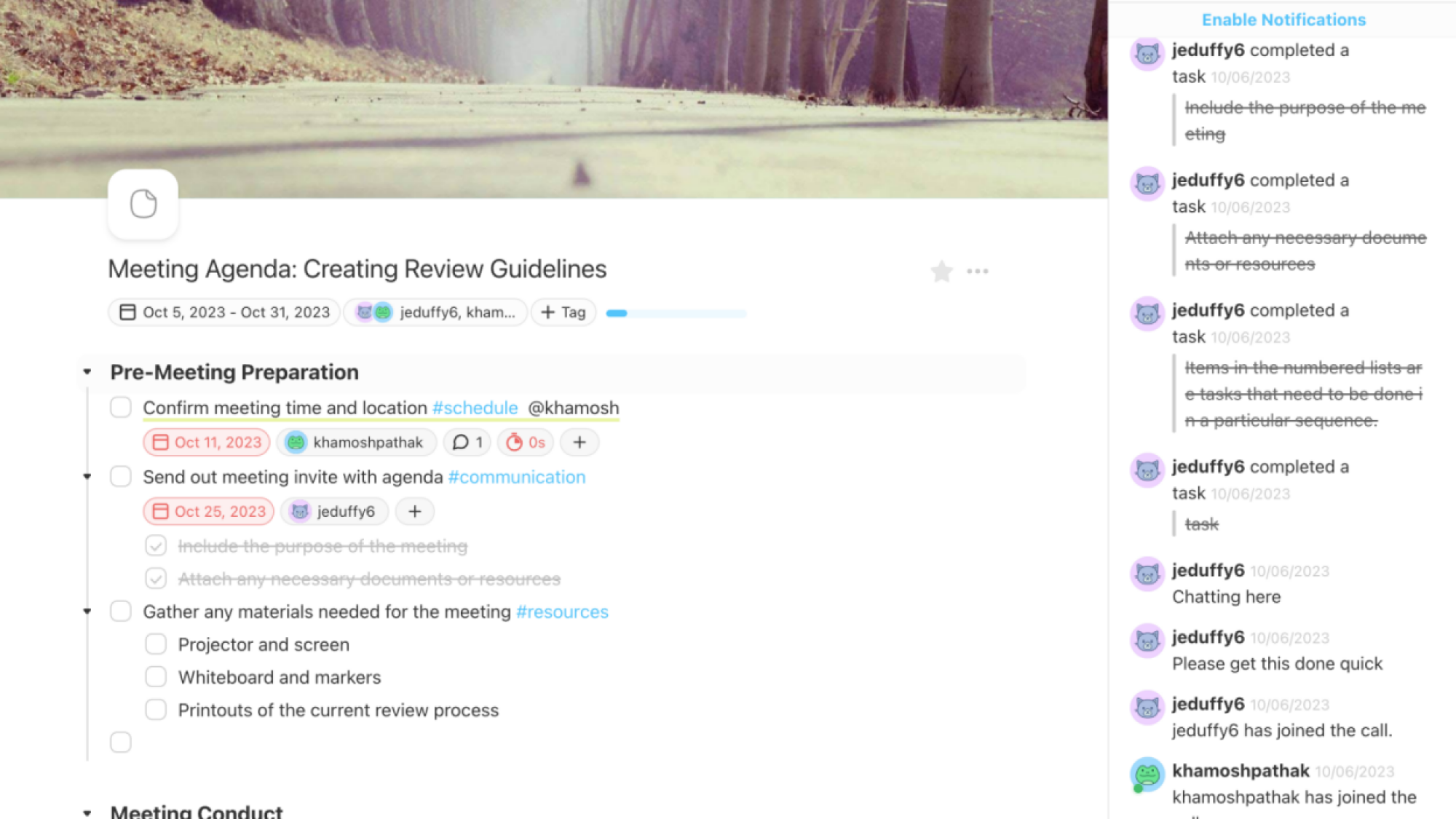
taskade window

Credit: Khamosh Pathak

If you loved Evernote for the collaboration, you’ll get better mileage from Taskade. Taskade integrates ChatGPT everywhere you can enter text, and it takes a collaboration-first approach. The app is centered around projects, but each project is a modular document you can keep on adding on to. And when a project is open, everyone who’s in it, and online, can be seen from the top. It doesn’t do the Google Docs thing of showing you who’s editing what with live cursors, but the version history will help figure that out. 

You’ll also find basic task management features here. It has a web clipper, but there’s no OCR support. Check out the full Taskade review at PCMag for more. 

Notion

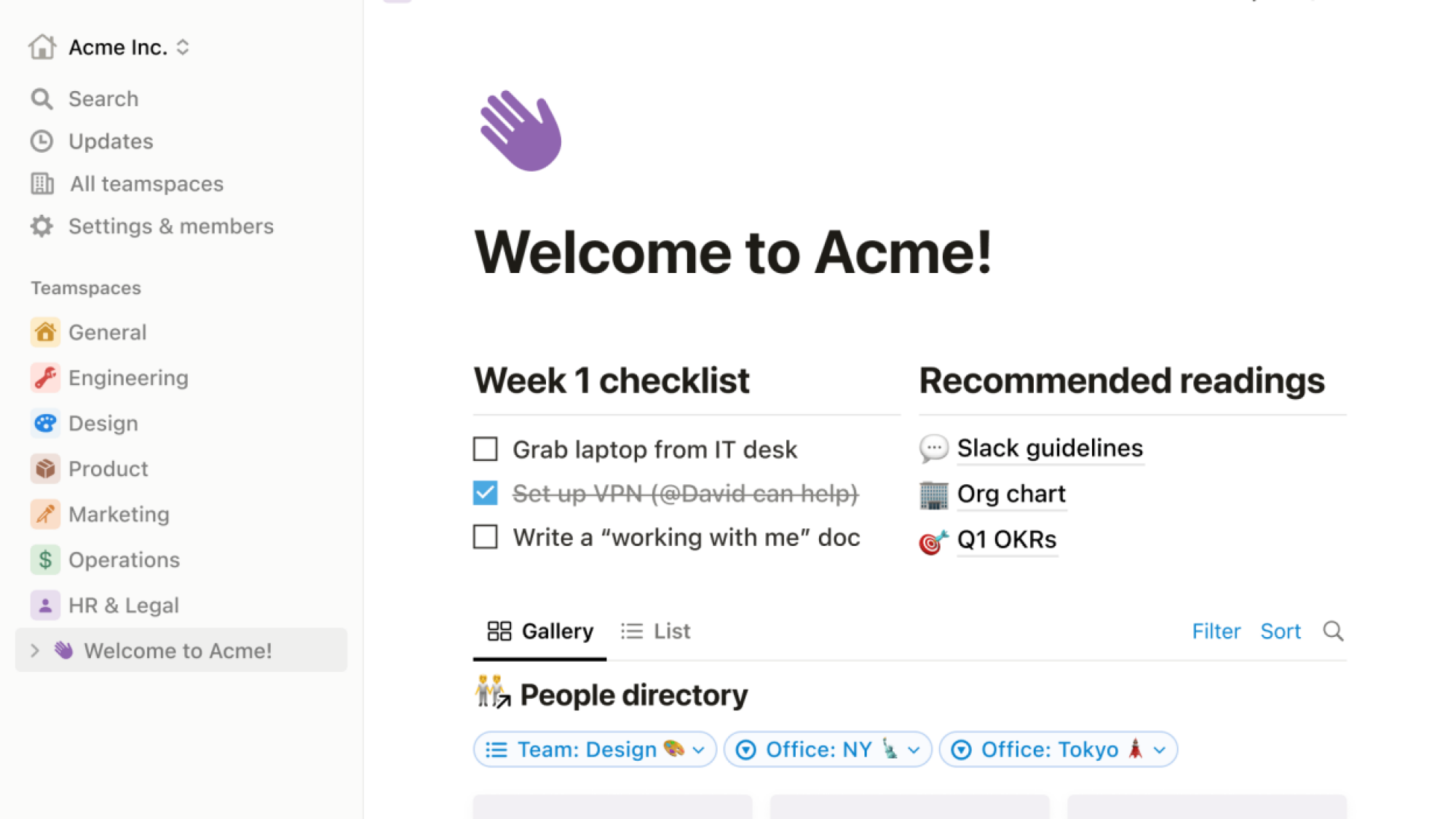
Notion interface

Credit: Notion

Notion is a complex tool, but if you can get in the groove, the payoff is huge. Notion lets you create multiple workspaces, with documents at the core. Notion’s collaboration game is strong, and they have a giant array of templates and customization features. Tables and systems you can create in Notion are sometimes only limited by your imagination. Notion is free to use, and you can collaborate with up to five users without paying a penny. 

Obsidian

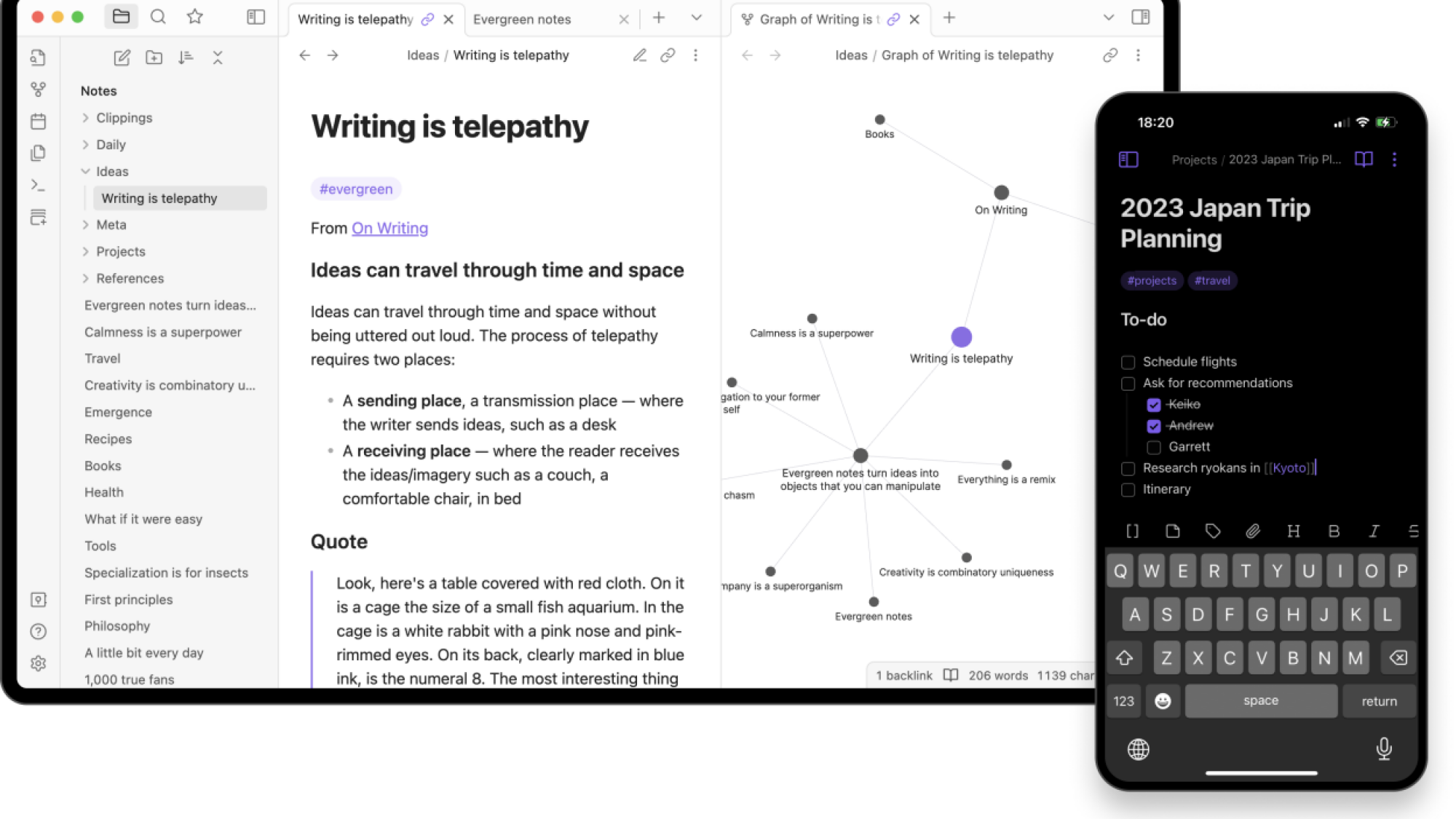
Obsidian apps on desktop and mobile

Credit: Obsidian

Obsidian is not a true replacement for Evernote, but it’s a great note-taking app. It’s built on Markdown and is based on text files that are saved where you choose—locally, on a cloud storage service of your choice, or on obsidian’s servers (which costs $96/year for 10GB storage).

Obsidian lets you create plain text notes and leaves the rest of the functionality to plugins—and there are many. They let you turn Obsidian into a task management system, a calendar app, a daily journal, and what have you. This also means that the learning curve here is massive, and it won’t work for everyone. Plus, there’s no collaboration feature here, nor is there native support for OCR (but it can be added using a plugin). The same goes for the web clipper. While there is no official tool, there is a community-created option. That’s the best way to think of Obsidian. It’s an ecosystem where you start with these simple plain text tools, but you’ll find community tools for most of the features you might want to add. This brings a level of customization and flexibility that is unheard of in the note-taking space. To learn more, check out the full Obsidian review at PCMag. 

Bear

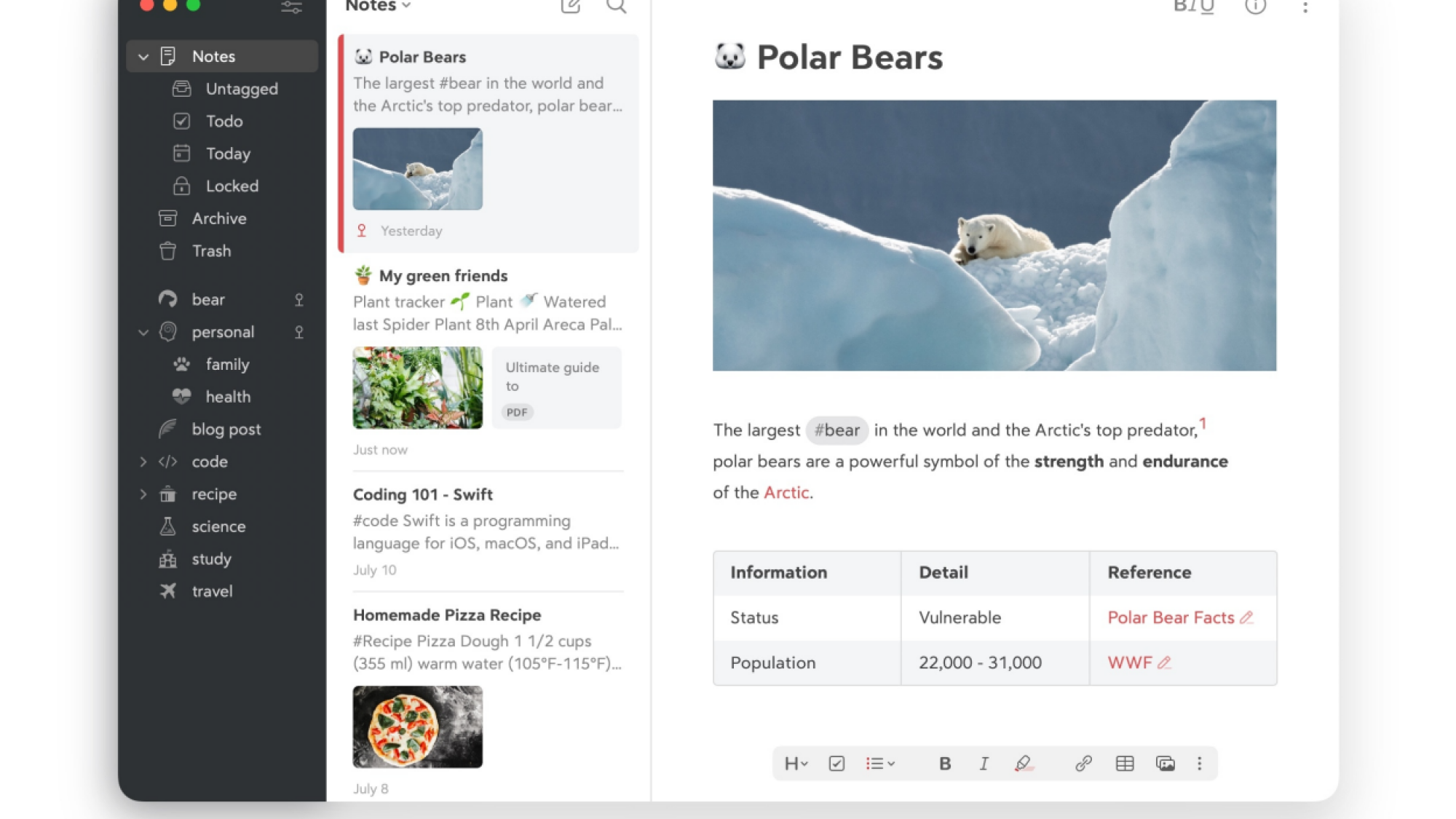
Bear interface on Mac

Credit: Bear Notes

While Bear is exclusively available for Apple platforms, it’s easily the best option when it comes to a simple note-taking app. Think of it as the Apple Notes app, but elevated. Bear supports Markdown, and makes it easy to import and export your notes. Plus, there’s great support for media and documents. You can organize notes using tags, which are quite powerful. If you mostly want to create and organize plain text notes, and want a fast way to search and organize them, Bear will work well for you. While the free app will only work on one device, you can enable cross-device sync, themes, document scanning, OCR, PDF search, and more by paying $2.99 per month. Other than collaboration and web clipper, Bear offers everything that made Evernote such a great note-taking app. And, in my humble opinion, Bear is better designed and much faster to use.

Joplin

Joplin interface on desktop and mobile

Credit: Joplin

Did Evernote leave a sour taste in your mouth? So much so that you can’t trust another third-party note-taking service? Joplin might help. It’s a completely free and open-source note-taking service that works on all major platforms. You can use the app for free, forever. All the data stays with you, and as Joplin uses Markdown, it’s easy to import and export the data, as well.

Feature wise, you get an app that works on all major platforms, a web clipper, a great interface, and tools to import your existing notes. But you won’t find advanced tools like OCR or document scanning.

Joplin supports multiple sync services, and you can use Joplin Cloud if you want. The $1.99 per month subscription will get you 1GB of storage space and collaboration features, but you don’t have to use it for data syncing. You can use Dropbox or Microsoft OneDrive to sync your notes, and continue to have the same experience across all your devices. If you don’t want to trust Dropbox (and we don’t blame you), you can host Joplin on your own servers. Check out the PCMag review to know more.

Simplenote

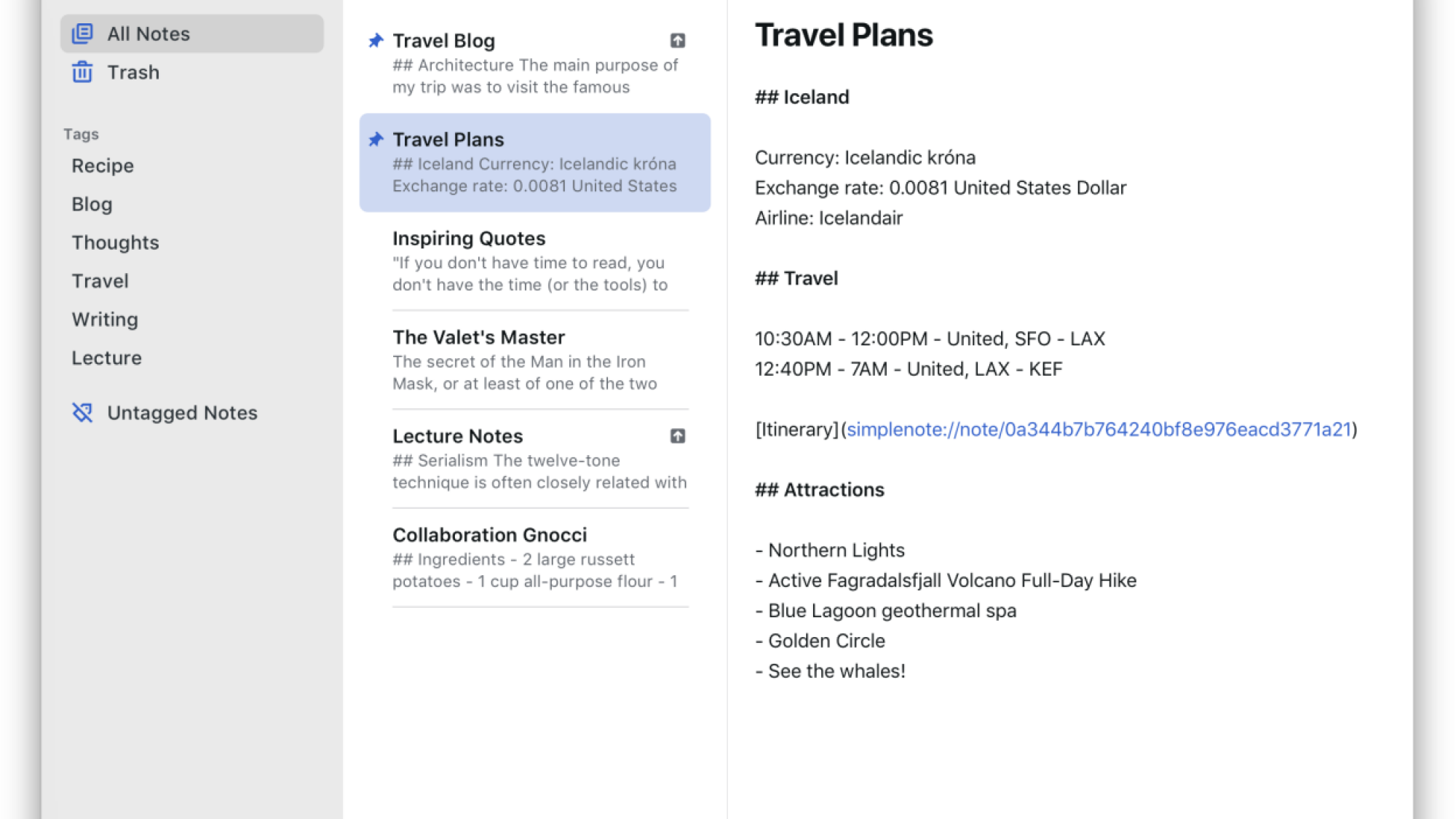
Simplenote interface on Mac app

Credit: Simplenote

The tagline for Simplenote is “The simplest way to keep notes,” which hits the nail right on the head. This is an incredibly simple, free app that works on every popular platform.

It’s owned and maintained by Automattic, the makers of WordPress. It has automatic sync, tags, revision history, and collaboration features. You can even write in Markdown. All of that is made for free, forever.

If you’re looking for a simple, text-based note-taking system, and you don’t need extra features like web clipper, image OCR, and visual organization tools, you can’t go wrong with Simplenote.

Google Keep

Google Keep app on an iPhone

Credit: OpturaDesign/Shutterstock

We’ll be the first to say it: Google Keep is not a full-fledged alternative to Evernote. Keep is incredibly basic, and doesn’t even offer desktop apps, or an import feature to import all your Evernote notes.

That said, it’s colorful, fun, easy to use, and it works well on smartphones. Plus, it has a pretty good web clipper, and it integrates well with other Google apps like Google Tasks, Google Assistant, and more. It’s also quite easy to share and collaborate on Google Keep lists.

It’s free to use as long as you have a Google account. Keep is a good option if you are a light notetaker, you need someplace to record and dump information, and you don’t mind searching through them (instead of meticulously organizing your notes).


Source: LifeHacker – It’s Time to Ditch Evernote for One of These Alternatives

Webb Space Telescope Captures An Evasive Glowing Monster That Keeps Disappearing

Webb Space Telescope Captures An Evasive Glowing Monster That Keeps Disappearing
Astronomers have identified an object in deep space captured by the James Webb Space Telescope (JWST) as being an elusive dusty star-forming galaxy. Object AzTECC71 first appeared as a blob from ground-based telescopes before later vanishing completely from Hubble’s view.

The image captured by Webb is not the typical image some may be used

Source: Hot Hardware – Webb Space Telescope Captures An Evasive Glowing Monster That Keeps Disappearing

Green card applicants targeted by Section 702 foreign intelligence bill

Read 29 remaining paragraphs | Comments


Source: Ars Technica – Green card applicants targeted by Section 702 foreign intelligence bill

GPU Shipments Rebound In A Big Way To End The Post-Covid Black Death Phenomenon

GPU Shipments Rebound In A Big Way To End The Post-Covid Black Death Phenomenon
By the year 2026, there will be nearly 5 billion graphics chips sitting pretty in PC systems, a figure that includes integrated graphics as found on many AMD and Intel processors. As for discrete GPUs, including add-in boards that gamers jam into their PCI Express slots, market penetration in the PC is expected to achieve 30% within the next

Source: Hot Hardware – GPU Shipments Rebound In A Big Way To End The Post-Covid Black Death Phenomenon

Beeper Mini for Android sends and receives iMessages, no Mac server required

Beeper messages looking iMessage-like blue on an Android phone

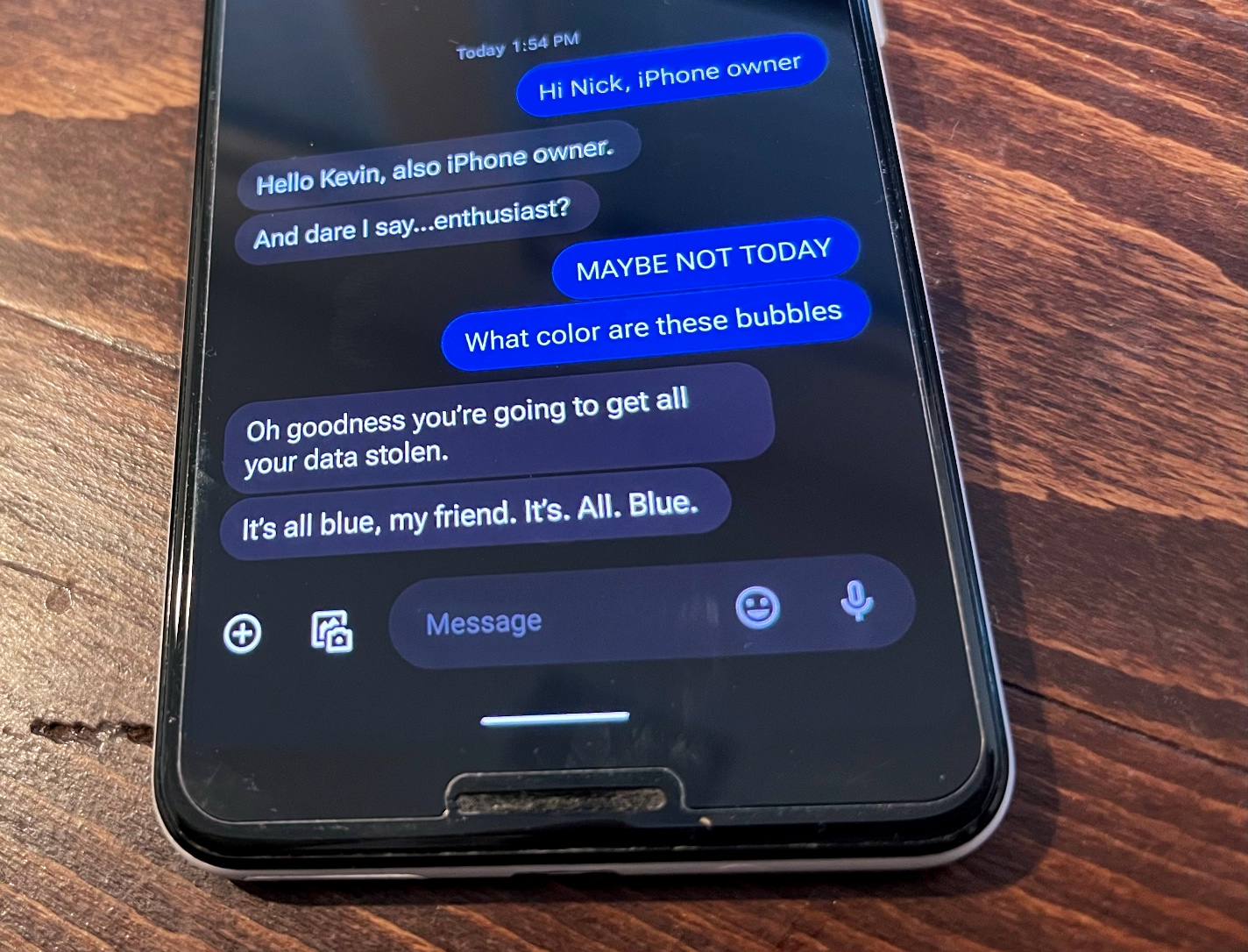
Enlarge / A Pixel 3, messaging a savvy iPhone owner, one with the kinds of concerns Beeper hopes to resolve for its customers. (credit: Kevin Purdy)

In the past week, I have sent an iMessage to one friend from a command-line Python app and to another from a Pixel 3 Android phone.

Sending an iMessage without an Apple device isn’t entirely new, but this way of doing it is. I didn’t hand over my Apple credentials or log in with my Apple ID on a Mac server on some far-away rack. I put my primary SIM card in the Pixel, I installed Beeper Mini, and it sent a text message to register my number with Apple. I never gave Beeper Mini my Apple ID.

From then on, my iPhone-toting friends who sent messages to my Pixel 3 saw them as other-iPhone blue, not noticeably distracting green. We could all access the typing, delivered/read receipts, emoji reactions, and most other iPhone-to-iPhone message features. Even if I had no active Apple devices, it seems, I could have chosen to meet Apple users where they were and gain end-to-end encryption by doing so.

Read 16 remaining paragraphs | Comments


Source: Ars Technica – Beeper Mini for Android sends and receives iMessages, no Mac server required

You Should Make This Elevated Applesauce Immediately

I don’t know why so many of us stop eating applesauce after childhood—turning apples into applesauce is easy to do, takes no time at all, and is completely customizable to your liking. If you remember applesauce only as sweet, one-note mush, it’s time you stepped away from the grocery aisle and made some yourself.

How to make applesauce

Three pounds of apples sounds like a lot, but it’s only about five apples, and it will produce about three cups of applesauce. Choosing apples is a highly personal choice; go all Cosmic Crisp, and you’re making the applesauce equivalent of a Juicy Fruit. Go all Gala, and it may be so tart you want to throw it over some ice cream. I like a mix of apples, with a little tart and a little sweet. 

Apples for applesauce

Credit: Amanda Blum

Peel the apples, and then cut them into chunks, cutting out the core. Keep the saucepan next to you and place the apples in it as you peel and chop. Sprinkle the cut apples with lemon juice as you go to keep them from browning. Pour maple syrup over the apples and mix it in; add the spices and the zest of an orange to the pot. Juice the orange and add that too. Mix everything well in the saucepan, then bring slowly to a boil over medium-high heat, and turn down to medium to lower it to a simmer. Cover the pot and allow it to cook for twenty minutes, stirring every five minutes or so. Turn off the heat, but leave the pot on the stove with the lid on. It will continue to steam, softening the apples. 

Choose your texture

Now it’s about texture. The apples are soft and will break down as much as you let them: If you like consistent mush, use a stick blender or place the mixture in a food processor or blender and blend away. If you prefer a chunkier sauce, use a potato masher to crush the apples to the texture you prefer, leaving as many pieces of apple as you like. 

Finished applesauce

Credit: Amanda Blum

You can adjust the taste, too, if you feel more spice is warranted; consider adding a dash of hot pepper to give it a healthy kick, or Chinese five-spice and ginger for a more nuanced taste profile. You can add more maple syrup or brown sugar, or even molasses. A dash of apple cider vinegar will give it a little bit of an edge. 

Get the sauce into the fridge so it can cool. (You can eat it warm, but most people enjoy it cool or room temperature.) The sauce can stay in the fridge for up for five days or so, but don’t worry, it won’t last that long. 

Elevated applesauce recipe

Ingredients:

  • 3 pounds mixed apples

  • ½ cup maple syrup

  • Juice of ½ a lemon or 2 tablespoons lemon juice

  • 1 clementine or small orange

  • 1 teaspoon ground mace

  • 1 teaspoon ground cinnamon

  • 1 teaspoon ground cardamom

  • 1 teaspoon star anise powder

  • 1 teaspoon ground allspice

  • 1 teaspoon ground cloves

  • 1 teaspoon salt

Directions:

  1. Peel the apples, core them, and cut them into chunks. Place the apple pieces in a saucepan, and toss them with the lemon juice. 

  2. Add maple syrup and spices to the apples. Zest and juice the orange and add them to the other ingredients. Stir it well. 

  3. Bring the mixture to a boil over medium high heat, then lower it to a simmer. Cook for twenty minutes with the cover on, stirring every five minutes or so. 

  4. Turn the heat off, but leave the pot on the burner with the lid on, for another 10 minutes.

  5. Use a blender or food processor to make a smooth applesauce, or use a potato masher to make a chunky applesauce. 

  6. Adjust the seasoning to your taste, and refrigerate.


Source: LifeHacker – You Should Make This Elevated Applesauce Immediately