Phison To Unveil 14.7 GB/s PCIe 5.0 SSD and Cheap USB4 Drives at CES 2024

CES 2024 is a few weeks away, so Phison shared its plans for the consumer electronics industry’s biggest trade show this week. Among the headliners of the event will be the company’s latest PS5026-E26 Max14um platform for top-of-the-range PCIe Gen5 SSDs, as well as the PS2251-21 (U21) single-chip platform for USB4 drives that brings together great speeds and cost efficiency.


The company’s PS5026-E26 Max14um platform, demonstrated back in August, relies on the PS5026-E26 controller with a PCIe 5.0 x4 interface and I/O+ technology coupled with heavily tuned firmware to enable up to 14.7 GB/s sequential reads and up to 12 GB/s sequential writes with Micron’s B58R 3D TLC NAND devices featuring a 2400 MT/s data transfer rate. Perhaps more importantly, drives based on the ‘maximum’ platform are projected to offer 1.5 million random read IOPS and 1.6 million random write IOPS, according to Phison’s slide demonstrated at Flash Memory Summit.


One of the particularly interesting wrinkles of the PS5026-E26 Max14um PCIe Gen 5 SSD platform is that it needs decent cooling (just like other E26-based drives, to be honest), so to get to a 14.7 GB/s sequential read speed, Phison used Frore Systems’s AitJet Mini cooling systems that use tiny vibrating MEMS membranes to generate airflows. We can only wonder whether Phison will recommend using these cooling devices for the PS5026-E26 Max14um-powered drives, but at least SSD suppliers have such an option.


Another product that Phison will demonstrate at CES is its Phison PS2251-21 (U21) single-chip solution suited for small portable storage devices ‘in conventional and unconventional form factors’ with a USB4 interface. The company says that these drives will offer performance of up to 4 GB/s, which is higher than what the best SSDs with a PCIe 3.0 x4 interface provide. A single-chip solution like this could enable inexpensive, high-performance external USB4 drives and direct-attached storage devices, which are non-existent today.


In addition to the maxed-out PS5026-E26 Max14um platform and the PS2251-21 (U21) single-chip USB4 storage solution, Phison will again demonstrate its low-power PCIe Gen5 PS5031-E31T controller platform for low-cost DRAMless SSDs that features a quad-channel NAND architecture and promises a sequential read speed of up to 10.8GB/s and capacities up to 8 TB. Also, the company will showcase its low-power PS5027-E27T, a controller for M.2-2230 SSDs with a PCIe Gen4 interface, which will come in handy for devices like Asus ROG Ally or Valve’s Steam Deck.


Source: AnandTech – Phison To Unveil 14.7 GB/s PCIe 5.0 SSD and Cheap USB4 Drives at CES 2024

AMD’s AI Secret Sauce: Dogfooding

This week AMD had a major AI announcement that was supported by vendors ranging from the leading server, PC and networking vendors, to Microsoft. But the competition in this space is fierce. NVIDIA is the dominant player, but AMD comes with three unique advantages. First, it is a huge advocate of OpenAi which has been a massive disruptor in the software technology space. Second, it has one of the strongest partnering records in the industry and its custom business is arguably the strongest (having captured two of the three major gaming systems). Finally, AMD’s CEO, Lisa Su, is one of the few who was trained to be a CEO. Lisa Su has been recognized as being one of the strongest leaders in any industry.

These advantages are well known. What isn’t well known is how aggressively AMD has implemented AI internally which has allowed it to massively accelerate its own development process and sales efficiency, and to more accurately forecast its future performance.  

Let’s talk about this secret sauce and how AMD is showcasing that in the AI space. It isn’t just what you build but how what you are building helps you become more effective and competitive going forward in terms of AI. 

The Importance of Dogfooding

One of the terms I learned early in my career was “dogfooding.” This is where a vendor who builds a product can prioritize its use internally. Over the years, I’ve worked for and with companies that didn’t aggressively use their own products and then had to defend this lack of use to customers after telling them that the related products were game changers and would pay for themselves. 

When challenged, one CEO I worked for said something to the effect that he could choose whether to supply the technology internally or sell it to customers. This didn’t play well because companies can do both, and there was no reason why a company building a tool that was presented as delivering massive financial benefits couldn’t justify using it internally at cost.

In addition, when a tool is used internally, people have a personal interest in addressing problems that adversely impact their use which can accelerate fixes that otherwise would have to wait for field reports to make it through to development and then be put into a correction plan. When your people are having issues, the speed at which a problem is identified and addressed is much faster.  

AMD is dogfooding its AI technology. Assuming it works (and based on the partners at the launch event, it truly works), this will massively speed up AMD’s development and increase staff productivity with significant potential benefits to the company’s bottom line. 

Applied AI Benefits

One of the bad experiences I had as an internal auditor at IBM was fixing the forecasting process to create an annual 20% inaccuracy only to find that some idiot had applied the 20% correction to the now accurate number. This resulted in the firing of a CFO who I personally liked. Applying AI to financial performance, if done right, not only should shorten the effort required to make that forecast but increase its accuracy by eliminating the human decisions and potential related mistakes inherent in existing processes. So, you get both higher accuracy and a smaller chance that the CFO will get into trouble by significantly increasing forecast accuracy. The stock market really values forecast accuracy, so this creates a significant potential benefit to AMD’s valuation.

In terms of sales performance, IBM’s tests with Watson have indicated significant improvements in close rates and customer satisfaction, suggesting that AMD’s use of this technology in that process should allow it to better address customer needs, more quickly address customer complaints, and better close new business. This too should have a significant impact on AMD’s bottom line and performance in the long term.  

Wrapping Up:

Microsoft is famous for dogfooding, and it has significantly improved its overall market success, product quality and customer satisfaction. The implementation of its AI Copilot feature across the product set and internally should make Microsoft even more powerful going forward. AMD is following that same path with AI (and Microsoft is helping), suggesting that as successful as it is, it will be even more successful going forward.  

AI has that potential. It’s a game changer, and AMD will become (and already is, in a way) a powerful showcase of how effective AI is in improving overall performance and success.  


Source: TG Daily – AMD’s AI Secret Sauce: Dogfooding

The real research behind the wild rumors about OpenAI’s Q* project

The real research behind the wild rumors about OpenAI’s Q* project

Enlarge (credit: Aurich Lawson | Getty Images)

On November 22, a few days after OpenAI fired (and then re-hired) CEO Sam Altman, The Information reported that OpenAI had made a technical breakthrough that would allow it to “develop far more powerful artificial intelligence models.” Dubbed Q* (and pronounced “Q star”) the new model was “able to solve math problems that it hadn’t seen before.”

Reuters published a similar story, but details were vague.

Both outlets linked this supposed breakthrough to the board’s decision to fire Altman. Reuters reported that several OpenAI staffers sent the board a letter “warning of a powerful artificial intelligence discovery that they said could threaten humanity.” However, “Reuters was unable to review a copy of the letter,” and subsequent reporting hasn’t connected Altman’s firing to concerns over Q*.

Read 64 remaining paragraphs | Comments


Source: Ars Technica – The real research behind the wild rumors about OpenAI’s Q* project

Against the Storm feels like WarCraft without the war, and it’s weirdly calming

An advanced Settlement in Against the Storm

Enlarge / I’d like to pretend I’d built a settlement this neatly compact and organized—with street grids, even—but alas, this is a provided screenshot. (credit: Hooded Horse)

Back when WarCraft, StarCraft, and other real-time strategy games were all the rage, I could never actually play them against other people. Even playing against the computer, I might only eke out a victory through dumb luck or an opponent’s huge mistake.

The problem was, I was never ready to attack until I had my base perfectly in order—until the workers carrying oil or crystals or whatnot had the most efficient route from the mine to the base or until my buildings were arranged for optimal use of the revealed land. I just needed one more little guy, one more tower. OK, maybe two. I’m a turtler’s turtler.

1.0 release date trailer for Against the Storm.

Against the Storm, which releases from Early Access on Steam for Windows today, has been a deeply satisfying outlet for this pent-up need to build and prosper—in a delightfully WarCraft-ian manner—without the messy business of war. There is still adversity: an ever-advancing “Impatience” meter, hostile spirits you uncover in the woods, and the typical constraints of resources, supply chains, and worker morale. Plus the rainstorms in the title, which occur both in-level, slowing you down, and at a macro level, washing away your little towns to make you start again.

Read 7 remaining paragraphs | Comments


Source: Ars Technica – Against the Storm feels like WarCraft without the war, and it’s weirdly calming

Rocket Report: The final space shuttle stack; SpaceX may extend booster lifetimes

Solid rocket motors are stacked at the California Science Center for an eventual vertical display of space shuttle <em>Endeavour</em>.

Enlarge / Solid rocket motors are stacked at the California Science Center for an eventual vertical display of space shuttle Endeavour.

Welcome to Edition 6.22 of the Rocket Report! We’re nearing the end of 2023, and it’s been an incredible year for rocket debuts. Early in the year we saw small lift vehicles from Relativity Space and ABL, and in the spring Japan’s H3 and SpaceX’s Starship rocket. There’s one big one left: United Launch Alliance’s Vulcan booster. That will be a nice stocking stuffer to end the year on Christmas Eve.

As always, we welcome reader submissions, and if you don’t want to miss an issue, please subscribe using the box below (the form will not appear on AMP-enabled versions of the site). Each report will include information on small-, medium-, and heavy-lift rockets as well as a quick look ahead at the next three launches on the calendar.

Vega has a missing parts problem. In unhappy news for Italian rocket-maker Avio, two of the four propellant tanks on the fourth stage of the Vega rocket—the upper stage, which is powered by dimethylhydrazine and nitrogen tetroxide fuel—went missing earlier this year. Now, it seems that the propellant tanks have been found. However, Ars reports, the tanks were recovered in a dismal state, crushed alongside metal scraps in a landfill. This is a rather big problem for Avio, as this was to be the final Vega rocket launched, and the production lines are now closed for this hardware.

Read 23 remaining paragraphs | Comments


Source: Ars Technica – Rocket Report: The final space shuttle stack; SpaceX may extend booster lifetimes

Canonical Releases Multipass 1.13 RC With Snapshots Support, Migrated To Qt6

Canonical’s Multipass software that is advertised as “cloud-style VMs at your fingertips” and making it easy to spin-up “Ubuntu VMs on demand for any workstation”, is out with a new test release adding snapshots support and other new features…

Source: Phoronix – Canonical Releases Multipass 1.13 RC With Snapshots Support, Migrated To Qt6

PoCL 5.0-RC1 Released With Experimental OpenCL For Networked Systems

PoCL 5.0-RC1 is out today as the newest feature release being brewed for this “Portable Computing Language” implementation that allows for OpenCL code to run on CPUs as well as running OpenCL code on other back-ends such as atop NVIDIA CUDA and AMD ROCm and other LLVM back-ends…

Source: Phoronix – PoCL 5.0-RC1 Released With Experimental OpenCL For Networked Systems

Today’s Wordle Hints (and Answer) for Friday, December 8, 2023

If you’re looking for the Wordle answer for December 8, 2023 read on. We’ll share some clues, tips, and strategies, and finally the solution. Today’s puzzle is on the easier side; I had it narrowed down to just one possibility after my second guess. Beware, there are spoilers below for December 8, Wordle #902! Keep scrolling if you want some hints (and then the answer) to today’s Wordle game.

How to play Wordle

Wordle lives here on the New York Times website. A new puzzle goes live every day at midnight, your local time.

Start by guessing a five-letter word. The letters of the word will turn green if they’re correct, yellow if you have the right letter in the wrong place, or gray if the letter isn’t in the day’s secret word at all. For more, check out our guide to playing Wordle here, and my strategy guide here for more advanced tips. (We also have more information at the bottom of this post, after the hints and answers.)

Ready for the hints? Let’s go!


Does today’s Wordle have any unusual letters?

We’ll define common letters as those that appear in the old typesetters’ phrase ETAOIN SHRDLU. (Memorize this! Pronounce it “Edwin Shirdloo,” like a name, and pretend he’s a friend of yours.)

Four of the letters are common, and one is sort of medium. No weird or unusual letters today.

Can you give me a hint for today’s Wordle?

It will make you think of a fresh pencil, or a bright student.

Does today’s Wordle have any double or repeated letters?

Nope, five different letters today.

How many vowels are in today’s Wordle?

There is only one vowel in today’s Wordle.

What letter does today’s Wordle start with?

Today’s word starts with S.

What letter does today’s Wordle end with?

Today’s word ends with P.

What is the solution to today’s Wordle?

Ready? Today’s word is SHARP.

How I solved today’s Wordle

ARISE first, as always; the A, R, and S were yellow. I considered SEA_ or SAR_ _ , but those didn’t feel promising. I settled on SCRAP, thinking I might actually get it in two for once. I didn’t, but getting the green S and P, with yellow R and A, only really left S_ARP as a possibility. Had to be SHARP.

Wordle 902 3/6

🟨🟨⬜🟨⬜
🟩⬜🟨🟨🟩
🟩🟩🟩🟩🟩

A primer on Wordle basics

The idea of Wordle is to guess the day’s secret word. When you first open the Wordle game, you’ll see an empty grid of letters. It’s up to you to make the first move: type in any five-letter word. 

Now, you can use the colors that are revealed to get clues about the word: 

  • Green means you correctly guessed a letter, and it’s in the correct position. (For example, if you guess PARTY, and the word is actually PURSE, the P and R will be green.)

  • Yellow means the letter is somewhere in the word, but not in the position you guessed it. (For example, if you guessed PARTY, but the word is actually ROAST, the R, A and T will all be yellow.)

  • Gray means the letter is not in the solution word at all. (If you guessed PARTY and everything is gray, then the solution cannot be PURSE or ROAST.)

With all that in mind, guess another word, and then another, trying to land on the correct word before you run out of chances. You get six guesses, and then it’s game over.

The best starter words for Wordle

What should you play for that first guess? The best starters tend to contain common letters, to increase the chances of getting yellow and green squares to guide your guessing. (And if you get all grays when guessing common letters, that’s still excellent information to help you rule out possibilities.) There isn’t a single “best” starting word, but the New York Times’s Wordle analysis bot has suggested starting with one of these:

  • CRANE

  • TRACE

  • SLANT

  • CRATE

  • CARTE

Meanwhile, an MIT analysis found that you’ll eliminate the most possibilities in the first round by starting with one of these:

  • SALET

  • REAST

  • TRACE

  • CRATE

  • SLATE

Other good picks might be ARISE or ROUND. Words like ADIEU and AUDIO get more vowels in play, but you could argue that it’s better to start with an emphasis on consonants, using a starter like RENTS or CLAMP. Choose your strategy, and see how it plays out.

How to win at Wordle

We have a few guides to Wordle strategy, which you might like to read over if you’re a serious student of the game. This one covers how to use consonants to your advantage, while this one focuses on a strategy that uses the most common letters. In this advanced guide, we detail a three-pronged approach for fishing for hints while maximizing your chances of winning quickly.

The biggest thing that separates Wordle winners from Wordle losers is that winners use their guesses to gather information about what letters are in the word. If you know that the word must end in -OUND, don’t waste four guesses on MOUND, ROUND, SOUND, and HOUND; combine those consonants and guess MARSH. If the H lights up in yellow, you know the solution.

One more note on strategy: the original Wordle used a list of about 2,300 solution words, but after the game was bought by the NYT, the game now has an editor who hand-picks the solutions. Sometimes they are slightly tricky words that wouldn’t have made the original list, and sometimes they are topical. For example, FEAST was the solution one Thanksgiving. So keep in mind that there may be a theme.

Wordle alternatives

If you can’t get enough of five-letter guessing games and their kin, the best Wordle alternatives, ranked by difficulty, include:


Source: LifeHacker – Today’s Wordle Hints (and Answer) for Friday, December 8, 2023

Today's NYT Connections Hints (and Answer) for Friday, December 8, 2023

If you’re looking for the Connections answer for Friday, December 8, 2023, read on—I’ll share some clues, tips, and strategies, and finally the solutions to all four categories. Along the way, I’ll explain the meanings of the trickier words and we’ll learn how everything fits together. Beware, there are spoilers below for December 8, NYT Connections #180! Read on if you want some hints (and then the answer) to today’s Connections game. 

If you want an easy way to come back to our Connections hints every day, bookmark this page. You can also find our past hints there as well, in case you want to know what you missed in a previous puzzle.

Below, I’ll give you some oblique hints at today’s Connections answers. And farther down the page, I’ll reveal the themes and the answers. Scroll slowly and take just the hints you need!

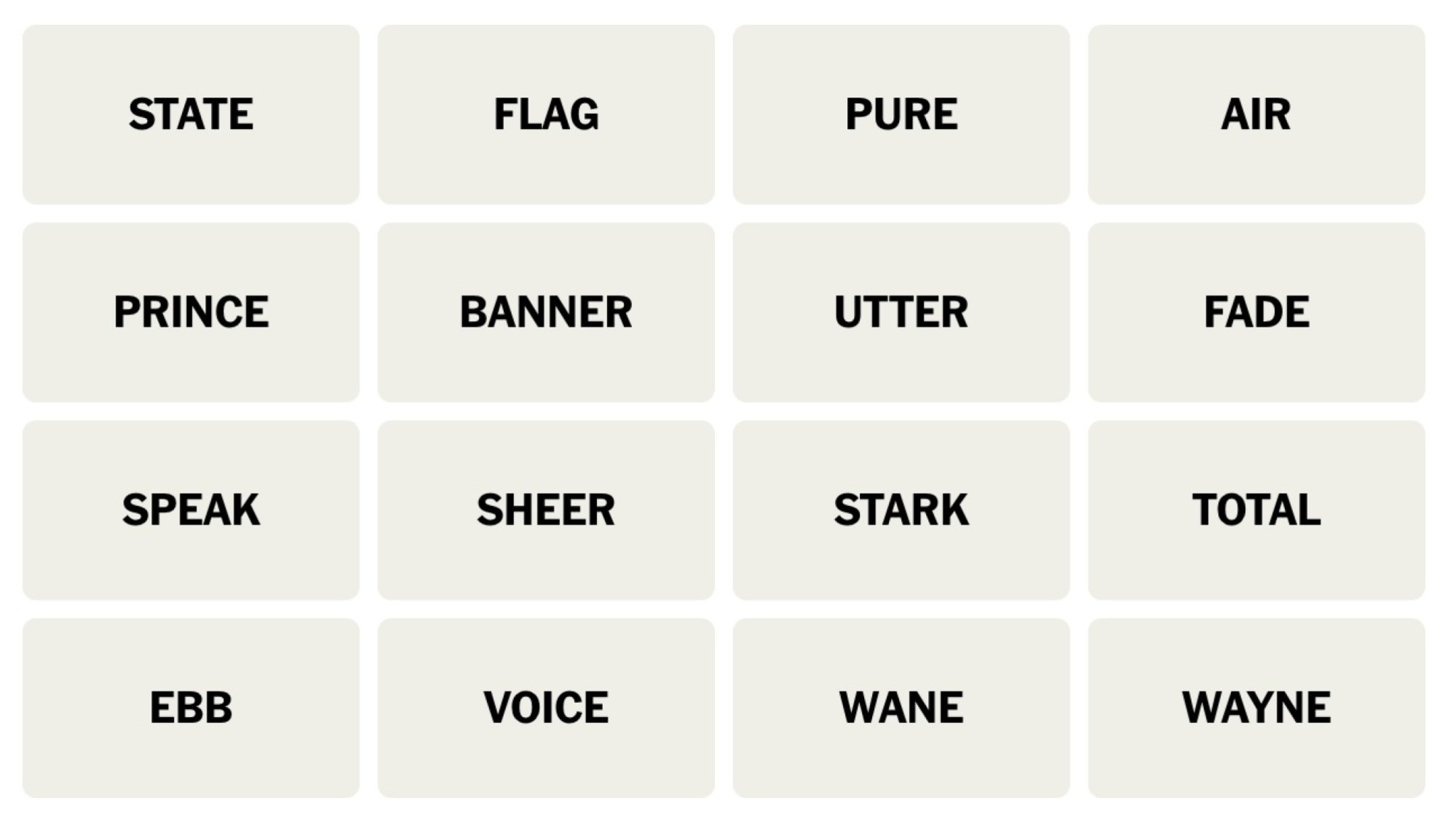
NYT Connections board for December 8, 2023: STATE, FLAG, PURE, AIR, PRINCE, BANNER, UTTER, FADE, SPEAK, SHEER, STARK, TOTAL, EBB, VOICE, WANE, WAYNE.

Credit: Connections/NYT


Does today’s Connections game require any special knowledge?

Some familiarity with comic books (or action movies) would help.

Hints for the themes in today’s Connections puzzle

Here are some spoiler-free hints for the groupings in today’s Connections:

  • Yellow category – Decreasing.

  • Green category – The most.

  • Blue category – Speaking your mind.

  • Purple category – A lesser-known identity.

Does today’s Connections game involve any wordplay?

There are some names that can be confused with dictionary words.

Ready to hear the answers? Keep scrolling if you want a little more help.


BEWARE: Spoilers follow for today’s Connections puzzle!

We’re about to give away some of the answers. Scroll slowly if you don’t want the whole thing spoiled. (The full solution is a bit further down.)

What are the ambiguous words in today’s Connections?

  • FLAG, STATE, and PRINCE may seem like they go together, but they’re all in different categories and have nothing to do with government today. (Think of FLAG and STATE as verbs, and PRINCE as a name.)

  • To UTTER can mean to VOICE a concern, but it can also be an adjective meaning something extreme or utmost. (No relation to “udder,” which a cow has.)

  • A BANNER can be a flag, or an ad on a website; or it might be Bruce BANNER, alter ego of the Incredible Hulk.

What are the categories in today’s Connections?

  • Yellow: DECLINE

  • Green: ABSOLUTE

  • Blue: EXPRESS

  • Purple: SUPERHERO LAST NAMES

DOUBLE BEWARE: THE SOLUTION IS BELOW

Ready to learn the answers to today’s Connections puzzle? I give them all away below.

What are the yellow words in today’s Connections?

The yellow grouping is considered to be the most straightforward. The theme for today’s yellow group is DECLINE and the words are: EBB, FADE, FLAG, WANE.

What are the green words in today’s Connections?

The green grouping is supposed to be the second-easiest. The theme for today’s green category is ABSOLUTE and the words are: PURE, SHEER, TOTAL, UTTER.

What are the blue words in today’s Connections?

The blue grouping is the second-hardest. The theme for today’s blue category is EXPRESS and the words are: AIR, SPEAK, STATE, VOICE.

What are the purple words in today’s Connections?

The purple grouping is considered to be the hardest. The theme for today’s purple category is SUPERHERO LAST NAMES and the words are: BANNER, PRINCE, STARK, WAYNE.

How I solved today’s Connections

First I go for SHEER, STARK, PURE, and TOTAL, figuring that UTTER must go with the speech-related words like SPEAK and STATE. But I’m wrong, and one away! I switch gears and try EBB, WANE, FADE, and FLAG. 🟨

I’m stuck for a while, and still smarting from yesterday’s loss. As I try to figure out what WAYNE is doing here, I realize I might be looking at a Bruce WAYNE (Batman) and a Bruce BANNER (the Hulk). Are there any more Bruces? No, but there’s a Tony STARK (Ironman) and a Diana PRINCE (Wonder Woman). 🟪

That leaves UTTER in the group with SHEER, PURE, and TOTAL, 🟩 and my final grouping as SPEAK, STATE, VOICE, and AIR. 🟦

Connections 
Puzzle #180
🟩🟩🟪🟩
🟨🟨🟨🟨
🟪🟪🟪🟪
🟩🟩🟩🟩
🟦🟦🟦🟦

How to play Connections

I have a full guide to playing Connections, but here’s a refresher on the rules:

First, find the Connections game either on the New York Times website or in their Crossword app. You’ll see a game board with 16 tiles, each with one word or phrase. Your job is to select a group of four tiles that have something in common. Often they are all the same type of thing (for example: RAIN, SLEET, HAIL, and SNOW are all types of wet weather) but sometimes there is wordplay involved (for example, BUCKET, GUEST, TOP TEN, and WISH are all types of lists: bucket list, guest list, and so on).

Select four items and hit the Submit button. If you guessed correctly, the category and color will be revealed. (Yellow is easiest, followed by green, then blue, then purple.) If your guess was incorrect, you’ll get a chance to try again.

You win when you’ve correctly identified all four groups. But if you make four mistakes before you finish, the game ends and the answers are revealed.

How to win Connections

The most important thing to know to win Connections is that the groupings are designed to be tricky. Expect to see overlapping groups. For example, one puzzle seemed to include six breakfast foods: BACON, EGG, PANCAKE, OMELET, WAFFLE, and CEREAL. But BACON turned out to be part of a group of painters along with CLOSE, MUNCH, and WHISTLER, and EGG was in a group of things that come by the dozen (along with JUROR, ROSE, and MONTH). So don’t hit “submit” until you’ve confirmed that your group of four contains only those four things.

If you’re stuck, another strategy is to look at the words that seem to have no connection to the others. If all that comes to mind when you see WHISTLER is the painting nicknamed “Whistler’s Mother,” you might be on to something. When I solved that one, I ended up googling whether there was a painter named Close, because Close didn’t fit any of the obvious themes, either.

Another way to win when you’re stuck is, obviously, to read a few helpful hints–which is why we share these pointers every day. Check back tomorrow for the next puzzle!


Source: LifeHacker – Today’s NYT Connections Hints (and Answer) for Friday, December 8, 2023

Wine Wayland Driver Lands Mouselook Support, Relative Cursor Motion

Friday’s release of Wine 8.22 is expected to be the last bi-weekly feature release before shifting focus to the code freeze and making Wine 9.0 ready for release in early 2024. It’s coming down to the finish line how much more Wine Wayland driver functionality will be merged in time…

Source: Phoronix – Wine Wayland Driver Lands Mouselook Support, Relative Cursor Motion

These Are the Best Christmas Sales on Headphones

Unless you give AirPods to an Android user, you can’t really go wrong with a nice pair of headphones as a gift. Even still, to make things a little easier for you, I rounded up the best deals you can find right now on headphones and who they’re best suited for, so you can rest easy knowing you’re getting a good deal and giving a great gift. 

Noise-canceling headphones for those who work from home

Everyone who works from home could use a nice pair of noise-canceling headphones, especially if they have kids or dogs. Luckily for you (and them), there are many great deals on headphones with Active Noise Cancelling (ANC).

Long battery life for the music lovers

Headphones that can last for than 30 hours of playtime are impressive, but you know what’s even better? 50 hours. If you have someone on your list who appreciates not charging their gadgets, these headphones will impress them.

  • The JBL Live 660NC are over-ear noise-canceling headphones that will give you 50 hours of playtime with ANC turned off (up to 40 hours with ANC off). A 10-minute charge will give them another four hours of playtime. It also has an Ambient Aware feature that lets you hear your surroundings and another feature that lets you have a conversation without taking your headphones off. You can get the JBL Live 660NC for $99.95 (originally $199.95) from Amazon. This is the second-lowest price they’ve ever been, according to Camelcamelcamel’s price history.

  • If you’re looking for a more budget-friendly option with just as impressive battery life, consider the JBL Tune 710BT headphones. These also have a 50-hour battery life, just none of the fancy features. However, you can still take calls and have voice assistant to control your phone with the push of a button. You can get the JBL Tune 710BT headphones for $39.95 (originally $79.95) from Amazon. This matches the lowest price they’ve ever been, according to Camelcamelcamel’s price history.

Headphones for the gamer in your life

If you have a gamer on your list who plays on consoles or PC, the Bang & Olufsen Beoplay gaming headphones are a great gift for an even more impressive discount. The ANC Bluetooth headphones are currently $329 off after a 66% discount from Woot. You can get the Bang & Olufsen Beoplay for $169.99 (originally $499) during the month of December or while supplies last.

Pixel Buds Pro for the Google lovers

People who like Google gadgets, like Google Homes and Pixel phones, are probably invested in the Google ecosystem and want to keep it that way. If they’re in need of new earbuds, consider the Google Pixel Buds Pro, which are 40% off at $119.99 (was $199.99). This matches the lowest price they hit (starting on Black Friday) since their release last summer, according to Camelcamelcamel’s price history. You can read their full PCMag review here.

Beats for the ones who like to show off

We know the type who likes to show off their new headphones to their friends. If you have someone like that on your list, consider the Beats Solo3, which are 50% off at $99.99 (originally $199.95). This matches their Black Friday price, which is the cheapest they’ve ever been, according to Camelcamelcamel’s price history. These headphones give you up to 40 hours of listening time with fast charging (Three hours of playtime with just a five-minute charge) and have a microphone so you can take calls with them. You can read the full Beats Solo3 PCMag review here.


Source: LifeHacker – These Are the Best Christmas Sales on Headphones

You Need to Balance Your HVAC System

When certain rooms in a home are consistently warmer or cooler than others, there may be an obvious cause, like an uninsulated exterior wall or drafty windows. But that’s not always the case.

If you’re unable to determine what’s behind the temperature difference, there’s a good chance that your home’s HVAC system needs to be balanced. Air balancing is an essential part of maintaining effective circulation and air quality throughout your home. To better understand this process and why it’s important, Lifehacker spoke with four HVAC technicians and specialists. Here’s what they told us about HVAC balancing, including how to make some DIY adjustments, and when to call a professional.

What is air balancing?

Balancing an HVAC system (or simply “air balancing”) refers to the process of making adjustments in order to optimize a home’s heating and cooling system, and ultimately, making it more efficient, says Jimmy Hiller, president and CEO of Hiller Plumbing, Heating, Cooling & Electrical.

“The primary goal of air balancing is to ensure the even distribution of air throughout the home, leading to consistent temperatures in all rooms,” Hiller tells Lifehacker. The process involves making sure each room receives an appropriate amount of heated or cooled air based on its size and usage, he explains.

What are the signs an HVAC system needs to be balanced?

According to all of the HVAC experts we spoke with, the telltale sign that your HVAC system needs to be balanced is uneven heating and/or cooling in different areas of the home. In other words, certain rooms or areas being consistently warmer or cooler than others without a (separate) clear cause.

“If you walk into a room in your house and it feels like the temperature dropped five degrees, this could be a sign of a draft, but it could also be a sign of an HVAC system that just needs to be balanced,” says John Gabrielli, owner and founder of Air Temp Solutions.

Noises like whistling vents or loud air handlers may also be a sign of imbalances in an HVAC system, says Hiller. “Balancing the system can help reduce these noises by ensuring that air flows smoothly through the ductwork,” he explains.

What causes HVAC system imbalances?

Temperature imbalance can be due to various factors like the distance from the HVAC unit, the size and layout of the ductwork, or the natural heat gain/loss in different parts of the home.

“Over time, ductwork can become blocked or begin to leak out air,” Gabrielli tells Lifehacker. “Changes in the home, like renovations or additions, can also alter airflow patterns.” Hiller adds shifts in foundations and insulation to the list of changes in a home’s dynamics that can lead to a home’s original HVAC design no longer being optimal.

In other instances, a closed supply register may be the culprit. “A homeowner that closes supply registers may unintentionally reduce total system airflow, which can stress the blower motor,” says Jennie Bergman, senior product manager of Indoor Air Quality at Trane Residential. “This can lead to increased energy usage, and ultimately, may cause premature system failures because of the excessive wear on the HVAC system.” According to Bergman, a closed supply register has a similar negative impact on HVAC system performance as a dirty or clogged air filter.

Why is air balancing important?

As we discussed above, a balanced HVAC system is necessary for even airflow and consistent temperatures throughout the areas of your home. But, as Hiller and Gabrielli explain, air balancing is essential for reasons beyond comfort. Let’s start with those related to money.

“An unbalanced system can lead to inefficiencies, causing the HVAC system to work harder than necessary to maintain the desired temperature,” says Hiller. When your HVAC system is forced to work harder, it will lead to increases in energy consumption, and, in turn, utility bills. And because it’s overworked, this puts extra strain on the system, which could result in components breaking down more frequently and requiring costly repairs, potentially shortening its lifespan.

It could also cost you when you decide to sell your home. “Regular air balancing is important for preserving and potentially increasing the value of the property, as a well-maintained HVAC system is one of the key features that potential buyers look for,” Hiller explains.

But that’s not all: HVAC system imbalances could also end up harming your home, or even your health. “Proper air circulation is essential for maintaining good indoor air quality,” says Hiller. “An unbalanced system might not effectively circulate air in certain areas, leading to issues such as moisture accumulation, mold growth, or stagnant air.”  

How to balance your HVAC system

As the experts have explained, air balancing is a process that involves making adjustments to various parts of your HVAC system to improve its efficiency. Like most processes, there are usually a number of different steps—some of which are more difficult than others.

In this case, there are many complicated aspects of HVAC system balancing that should only be done by a professional. However, there are also some relatively simple DIY adjustments you can try making first. While these adjustments aren’t going to fix every possible problem, they may take care of yours and are worth trying before calling a professional.

Check the filters

Even if you’re already changing your HVAC filters on a regular basis, you’ll need to do it again. “Whether you or an HVAC technician will perform the balancing, it should always start with checking and replacing filters, because dirty air filters can restrict airflow,” Hiller explains. And according to Chris Winters, a tech content specialist at Cielo WiGle Inc. with five years of experience as an HVAC technician, clogged filters can also cause uneven temperatures. “Clean [your HVAC air filters] every two weeks, and replace [them] every three to four months for optimal performance,” he tells Lifehacker.

Inspect the vents

Next, check all of your home’s air vents—meaning the supply vents (i.e. the ones that blow heated or cool air into your home) as well as the return vents (i.e. the ones that pull air from the rooms in your home and return it to the HVAC system), Hiller advises. Make sure that the vents are open and unobstructed.

Clean the vents

If you notice dust and dirt in your air vents—including stuck in their cover or grille—it’s time to clean them. This 2021 Lifehacker post walks through the various steps in the cleaning process.

Sometimes you might get lucky and figure out that a particular room or area was too hot or too cold because one (or more) of its air vents was switched off, or that a piece of furniture, other large object, or an obscene amount of dust and dirt was blocking it completely. If that didn’t happen, move on to the next steps. (Or, if you’re nearing the end of your technical expertise and/or patience, it may be time to call a professional.)

Do a temperature check

While the HVAC system is running, check the air vents in each room. First, make sure air is blowing out of the each supply vent. If it’s not, double check the vent to see if it’s actually open. If it’s open, but there’s no airflow at all—or it’s extremely low—make a note of it: You’ll probably need to call an HVAC technician, and this way, you’ll be able to let them known which vents aren’t working.

If there is air blowing out of the supply vent, use a thermometer (we recommend an infrared thermometer) to check and make note of its temperature. When you’ve hit up all the vents in your home, review the airflow temperatures, identifying rooms or areas that are too hot or too cold.

Find and adjust the dampers

The next step in DIY air balancing involves your HVAC system’s dampers. According to Hiller, many systems have dampers in the ductwork that can be adjusted to control the airflow to each room.

But before you adjust the dampers, you have to find them. “To locate the dampers, follow the ductwork from the furnace,” Hiller explains. “Dampers are typically located where the ducts branch off from the main line.”

If you don’t already know which ducts supply the air to the various rooms and areas in your home, you may need someone to check the airflow coming through the supply vents and let you know whether there are any changes when you adjust a particular damper. The process is similar to figuring out which breaker controls the electricity on an outlet or switch, and also involves some trial and error.

To adjust your HVAC dampers, you’ll need to rotate the levers outside the ducts. As Winters explains, moving the lever will either open or close a metal disk inside the supply line that controls the airflow to different parts of your home. “Rotate the lever for maximum airflow, keeping the metal disk flat, and be mindful that an upright position blocks airflow,” he notes.

Now that you’ve figured out how to make the adjustments, refer back to your list noting the temperature of the air coming through the vents of each room.

“Slightly close the dampers in rooms that are receiving too much air—usually the ones closest to the HVAC unit—and open them more for rooms that are not receiving enough,” says Hiller. “Make small adjustments, about 10 to 20 percent at a time, and wait a day or two to observe the impact before making further changes.”

Over the next few days, monitor the temperatures in each room, and continue making further adjustments to the dampers until you achieve balanced airflow. “Remember: Each home and HVAC system is unique, so what works for one might not work for another,” says Hiller. “Be patient and prepared for a bit of experimentation to achieve the best results.”


Source: LifeHacker – You Need to Balance Your HVAC System

Fungi join the list of organisms that can control when ice forms

Image of stalks of a fungus on a purple-brown background.

Enlarge / A related species of Fusarium. (credit: Wikimedia Commons)

While it may be the reason behind tires skidding, pipes bursting, and closed roads making traffic a nightmare, ice doesn’t always form as easily as it seems. It often gets an assist from proteins made by fungi. 

Never mind the common thinking that ice forms at 0° C (32° F). Though this is water’s freezing point, pure water will only freeze when temperatures plummet as low as minus 46° C (minus 50.8° F). So why does it usually freeze at zero anyway? Organisms such as bacteria, insects, and fungi produce proteins known as ice nucleators (non-protein nucleators can also be of abiotic origin). These proteins can kick-start the formation, or nucleation, of ice at higher temperatures than pure water would freeze at.

While the exact reason fungi make these proteins remains unknown, researchers Valeria Molinero of the University of Utah and Konrad Meister of Boise State University led a study that has revealed more about how fungal ice nucleators can both promote and hold back ice formation more efficiently than those of many other life-forms.

Read 10 remaining paragraphs | Comments


Source: Ars Technica – Fungi join the list of organisms that can control when ice forms

Google calls Drive data loss “fixed,” locks forum threads saying otherwise

Google calls Drive data loss “fixed,” locks forum threads saying otherwise

Enlarge (credit: Google Drive)

Google is dealing with its second “lost data” fiasco in the past few months. This time, it’s Google Drive, which has been mysteriously losing files for some people. Google acknowledged the issue on November 27, and a week later, it posted what it called a fix.

It doesn’t feel like Google is describing this issue correctly; the company still calls it a “syncing issue” with the Drive desktop app versions 84.0.0.0 through 84.0.4.0. Syncing problems would only mean files don’t make it to or from the cloud, and that doesn’t explain why people are completely losing files. In the most popular issue thread on the Google Drive Community forums, several users describe spreadsheets and documents going missing, which all would have been created and saved in the web interface, not the desktop app, and it’s hard to see how the desktop app could affect that. Many users peg “May 2023” as the time documents stopped saving. Some say they’ve never used the desktop app.

Drive has multiple ways of syncing files, which complicates any explanation or diagnosis of what’s going on. The most suspect mode in the whole fiasco is the default “file streaming,” mode which is actually cloud-first. Files get removed from your computer and stored in the cloud, saving space and leaving only a web link in their place. Perhaps a “syncing” issue could remove files from your computer before uploading (that still doesn’t explain the claims of missing web documents, though).

Read 6 remaining paragraphs | Comments


Source: Ars Technica – Google calls Drive data loss “fixed,” locks forum threads saying otherwise

Make These Lazy Air-fried Mac & Cheese Bites

As I sit here, chomping away at my air-fried mac and cheese nuggets, the word that keeps popping into my head is “Cheez-Its.” That’s because the crisp coating paired with the concentrated flavor of cheddar is a dead-on match. I don’t think I’ve ever made a lazier or more gratifying snack. Consider this an early Air Fryday present.

Macaroni and cheese, much like potatoes au gratin or oatmeal, is full of starch. When chilled, the starches in these foods will thicken and set in a process called retrogradation. That’s why leftover pasta is always so stiff. Pair those cold gelatinized starches with saturated fat, like that in melted cheese, and you’ve got a solid brick. You could put a lot of work into scooping the macaroni into balls, coating them with bread crumbs, and deep frying them to make fried mac and cheese balls. Or you can do it my way. This distinctly lazier way requires no breading, but provides just as much crunch.

How to make lazy mac & cheese bites

This works really well if you baked your mac and cheese in a casserole dish because it’s already densely stacked, however if your mac and cheese was refrigerated in a bowl, that’s absolutely fine. The shape doesn’t really matter too much once you cut them into pieces. 

Squares of chopped mac and cheese on a plate.

Credit: Allie Chanthorn Reinmann

Remove the entire lump of mac and cheese from its container and onto a cutting board. Use a sharp knife or serrated blade to slice the macaroni into 1-inch slabs. Turn the slabs and cut them again into 1-inch thick sticks, then decide if you want to cut them again into shorter sticks, or even into cubes. Scatter them into a preheated 400°F air fryer on the “air fry” setting, with at least a half-inch of space between them so they don’t melt together. Air fry the cubes for eight minutes, and sticks for 10 minutes, or until crisp and well browned on the corners. Cool the mac and cheese nuggets on a wire rack for a few minutes before devouring. 


Products to consider:


These bites brown beautifully, and since they’re already loaded with cheese from the original recipe, you don’t have to add a single thing to get a crisp frico-like outer coating. Even the exposed pasta edges crisp-up nicely. If you used a good deal of cheddar in your mix, or topped a baked mac with cheddar, then you’ll get the Cheez-It flavor I’m talking about. 

The bites are crusty on the outside, but the interior is tender and soft. It’s a huge reward for doing almost no work. These would be great as a party hors d’oeuvres since they’re easily hand-held. I like my mac and cheese bites plain, but I wouldn’t fault you for serving these at a party with a bowl of french onion dip.


Source: LifeHacker – Make These Lazy Air-fried Mac & Cheese Bites

Intel's Monstrous 144-Core Sierra Forest Xeon CPU With 172MB Of Cache Gets Benchmarked

Intel's Monstrous 144-Core Sierra Forest Xeon CPU With 172MB Of Cache Gets Benchmarked
If you haven’t heard about Intel’s Sierra Forest Xeons, then no, you haven’t had too much coffee, and yes, you read that headline correctly. These upcoming processors are massive chips that eschew P-cores entirely for a giant platter of tiny little E-cores. That’s left some wondering about performance, and while we indeed have a benchmark

Source: Hot Hardware – Intel’s Monstrous 144-Core Sierra Forest Xeon CPU With 172MB Of Cache Gets Benchmarked

These Are the Biggest Differences Between Google Bard and ChatGPT

AI chatbots are more popular than ever, and there are plenty of solid options out there to choose from beyond OpenAI’s ChatGPT. One particularly strong competitor is Google’s Bard AI, which pulls information from the internet and runs off the latest Gemini language model created by Google.

What is Google Bard?

Bard is Google’s answer to ChatGPT. It’s an AI chatbot designed to respond to various queries and tasks, all while offering the latest AI language model to work off of. Like most other chatbots, including ChatGPT, Bard can answer math problems, help with writing articles and documents, and most other tasks you expect a generative AI bot to accomplish.

How does Bard work?

Much like ChatGPT, Bard is powered by a large language model (LLM) and is designed to respond with reasonable and human-like answers to your queries and requests. Previously, Bard used Google’s PaLM 2 language model, but Google has since released an update that adds in Gemini Pro, the search giant’s most complex and capable language model yet. Running Bard with two different language models has allowed Google to see the bot in action in several different ways. Bard can be accessed on any device by visiting the chatbot’s website, just like ChatGPT.

Who can access Google Bard?

Bard is currently available to the general public via an experimental beta. Google is still hard at work on the AI chatbot and hopes to continue improving it. As such, any responses, queries, or tasks submitted to Bard will be reviewed by Google engineers to help the AI learn more from the questions that you’re asking.

To start using Bard, simply head over to bard.google.com and sign in.

What languages does Bard support?

Bard currently supports over 40 languages. Google hasn’t said yet if it plans to add more language support to the chatbot, but a Google support doc notes that it currently it supports: Arabic, Bengali, Bulgarian, Chinese (Simplified / Traditional), Croatian, Czech, Danish, Dutch, English, Estonian, Farsi, Finnish, French, German, Greek, Gujarati, Hebrew, Hindi, Hungarian, Indonesian, Italian, Japanese, Kannada, Korean, Latvian, Lithuanian, Malayalam, Marathi, Norwegian, Polish, Portuguese, Romanian, Russian, Serbian, Slovak, Slovenian, Spanish, Swahili, Swedish, Tamil, Telugu, Thai, Turkish, Ukrainian, Urdu, and Vietnamese.

What features does Bard offer?

Like ChatGPT, Bard can answer basic questions, help with coding, and solve complex mathematic equations. Additionally, Google added support for multimodal search in July, allowing users to input pictures as well as text into the chatbot. This, along with the other capabilities of the chatbot, allow the bot to complete reverse image searches. Google can also include images in its answers, which are pulled from the search giant’s online results.

Is Bard connected to the internet?

Yes, Google Bard is connected to the internet. The chatbot has actually had internet access more widely available than ChatGPT, meaning that the model is trained on the latest and most up-to-date information found on the internet. This is obviously a nice advantage over ChatGPT, which just added full access to the internet in recent months, but it also introduces some possible room for misinformation.

How accurate is Google Bard?

Now that Bard is using Gemini Pro, it’s expected to be one of the most accurate chatbots available on the web right now. However, past experiences with Bard have shown that the bot is likely to hallucinate or take credit for information that it found via Google searches. This is a problem that Google has been working hard to fix, and it has managed to improve the results and how they are handled exceptionally well over the past few months. However, like any chatbot, Bard is still capable of creating information that is untrue or plagiarized. As such, it is always recommended you double check any information that chatbots like Bard provide, to ensure it is original and accurate.

Is Bard free to use?

Bard is currently free to use and Google has not shared any plans to charge for the chatbot just yet. However, it did announce an advanced Bard option, which will utilize the strongest and most capable version of its Gemini language model, Gemini Ultra. That feature isn’t set to arrive until sometime in 2024, though, and Google will likely charge for it.

How does Bard compare to ChatGPT?

Bard is a solid competitor for ChatGPT, especially now that Gemini should bring results more akin to GPT-4 into the chatbot. The interface is very similar, and the functionality offered by both chatbots should handle most of the queries and tasks that you throw at either of them. Google’s current lack of any paid plans also make Bard an accessible option, and you get the most up-to-date information thanks to Bard’s internet access. To connect ChatGPT to the internet right now, you’d either need to utilize Copilot, which uses GPT-4 with Bing search, or subscribe to ChatGPT Plus. Unfortunately, at the time of writing, new subscriptions for ChatGPT Plus are currently closed.

Google did share some information about how Gemini compares to GPT-4V, one of the latest versions of GPT-4, and it actually achieves more accurate results in several fields. However, it’s hard to say exactly which one is better, as they both have their strengths. Ultimately, I’d recommend trying to complete whatever task you want to accomplish in both, and then seeing which one works best for your needs.

Google is also working on other AI-driven systems, which it could possibly include in Bard’s working systems later down the line. For now, though, the company is keeping some of its more extreme developments, like MusicLM, which uses AI to generate music, to itself.


Source: LifeHacker – These Are the Biggest Differences Between Google Bard and ChatGPT

Where to Find Cheap Home Cleaning Services for the Holidays

With the holidays closing in and so much left to do, now is a good time to consider getting a home cleaning, even if (or maybe especially if) you’ve never done it before. There is a certain etiquette involved when you first hire a cleaner, so keep that in mind, but know that first-timers often get great discounts on the service.

Deals on home cleaning

A lot of the cleaning services you’ll be able to access depend on where you live, but some major brands have wide service areas. For instance, your first three-hour cleaning with Home Aglow is just $19—but you have to check your area here first and be aware that to access the lower prices, you have to pay a $49 monthly membership fee.

Other national brands, like the Maids and Merry Maids, offer prices dependent on if you’re doing a one-time or even holiday-exclusive cleaning and will provide an estimate after you put in some information. 

You can also try apps and services like Handy or Angi, which connect professionals with people looking for plumbing, electrical help, and, of course, cleaning. They almost always have first-time discounts and a wide network of professionals who use the app to book appointments. For instance, I just checked availability on Handy for my childhood home in North Dakota and found that there was not only a professional available there, but the three-hour cleaning would be $55. Angi, meanwhile, lets you compare prices from a number of nearby providers. The professionals and prices they pull together are based on how urgent your need is, how big your space is, and what you need done. 

Things to keep in mind if hiring a holiday cleaner

There are several ways to secure a pre-holiday cleaning on the cheap, with first-time and holiday-specific deals all over. Keep in mind that some (again, like Home Aglow) want you to pay a monthly membership fee to keep your cleanings low-cost on the surface and others won’t always be that cheap if you decide to keep using them after your initial discount. 

It’s also important to keep in mind that this is a skilled and personal service from a human being who is going to be required to touch your dirty stuff no matter how much it costs you. Whether you’re paying $19 for three hours or $100 for two, that person still has to scrub the same amount of gunk and grime, so make sure you tip especially well if you’re using a discount of any kind. It’s hard to know if the discounted money comes out of their pocket or the company’s, so you can always ask—but even if they tell you they’re not allowed to discuss that (which has happened to me), tip well just in case.

If you decide to clean on your own again this year…

If you’re determined to get ready for the holidays on your own or can’t find a cleaner at the right price in your area, here are some the products you’ll need:

  • First, stock up on microfiber cloths. They work on practically everything and aren’t abrasive. Every cleaning tutorial you’ll come across will demand you have these. Here are 50 for $12.99.

  • Get the always-popular O-Cedar mop and wringer set for $24.49 to minimize the sloppiness of mopping and keep your mop nice and clean.

  • You deserve a holiday splurge, so maybe this is the right moment to finally grab a Dyson vacuum. The V11 cordless is $399 right now.

  • Take some of the manual labor out of your cleaning routine with a motorized brush that spins to get gunk and grime out of cracks and off your surfaces. The Voweek scrubber comes with four different heads and is $42.49, plus it’s expandable, so you don’t have to bend down.


Source: LifeHacker – Where to Find Cheap Home Cleaning Services for the Holidays

EV battery swaps will be tested with the Fiat 500e in 2024

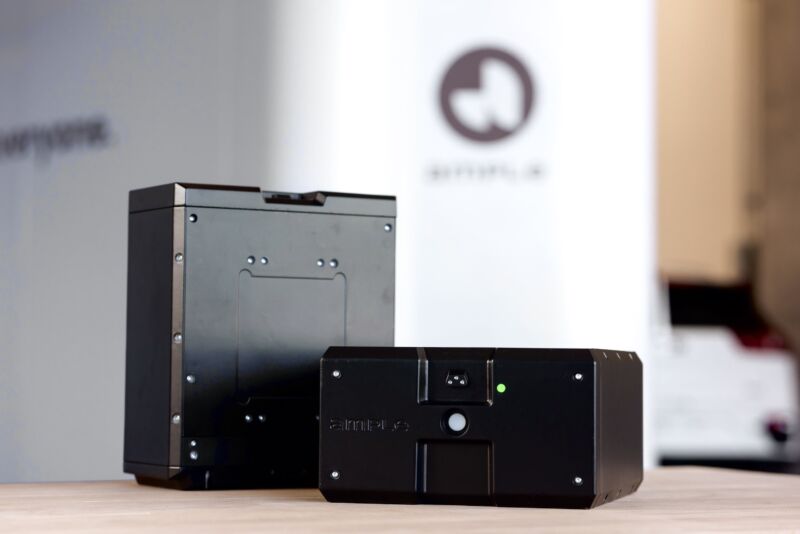
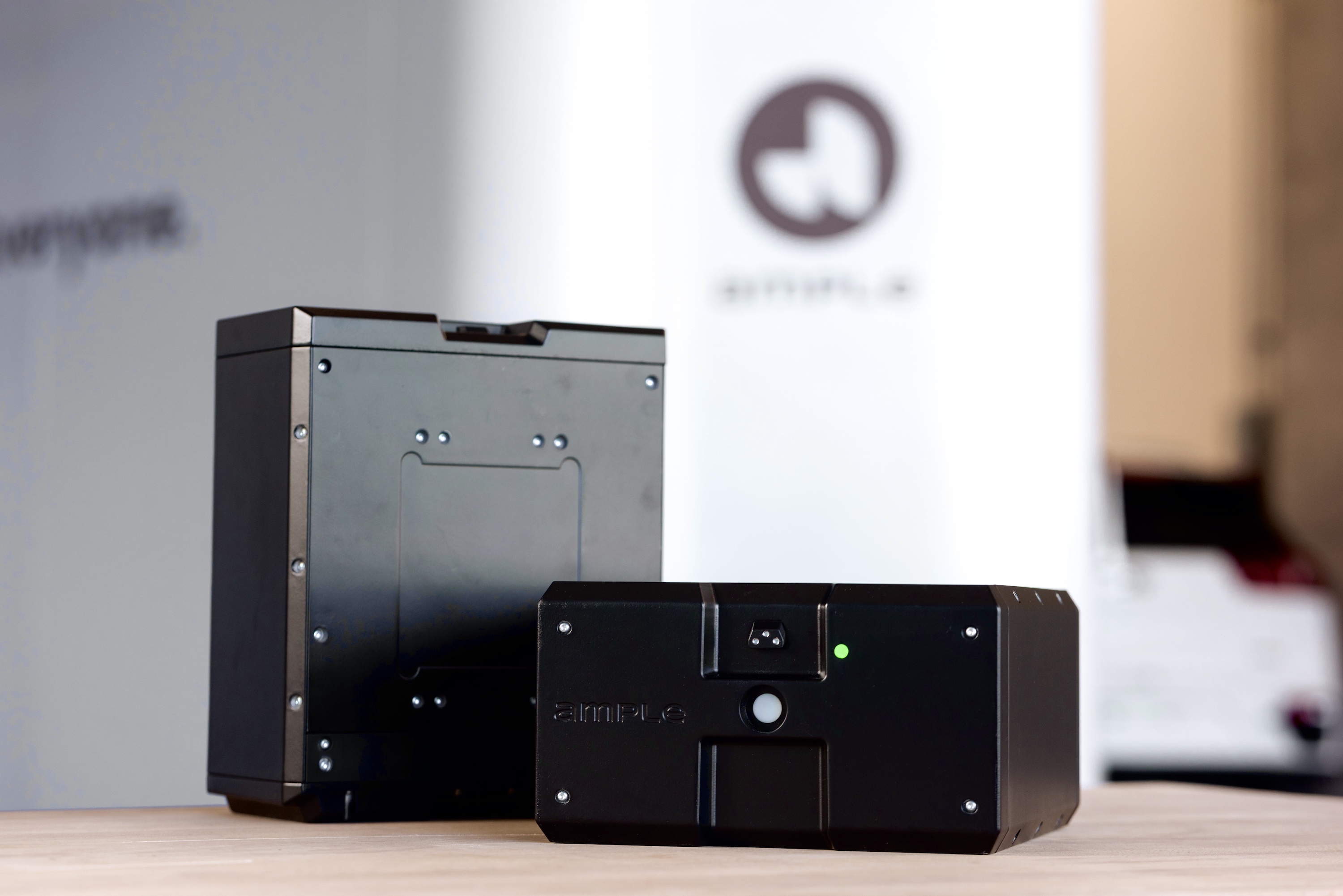
Two Ample battery modules on a table.

Enlarge / This is what Ample’s battery modules look like. (credit: Ample)

A small fleet of rideshare Fiat 500e electric vehicles will become testbeds for battery-swap technology in 2024. The experiment is being conducted by Ample, a startup working on battery swaps, and Stellantis, Fiat’s parent company, the Verge reported today.

This isn’t Ample’s first test of its battery-swapping technology; in 2021 it started a small trial in the Bay Area to demo its modular battery, which replaces the existing traction battery in an EV and allows Ample’s automated swap stations to switch out depleted packs for charged ones. But the fact that this deal was made with an OEM like Stellantis is still significant.

As we detailed last time we looked at Ample’s technology, the EVs require some engineering work for this to all be possible. Ample has to design a structural frame to replace the existing battery pack that will instead contain the swappable modules, while still conforming to the engineering requirements of the original pack—down to the same fasteners, bolts, and connectors.

Read 2 remaining paragraphs | Comments


Source: Ars Technica – EV battery swaps will be tested with the Fiat 500e in 2024

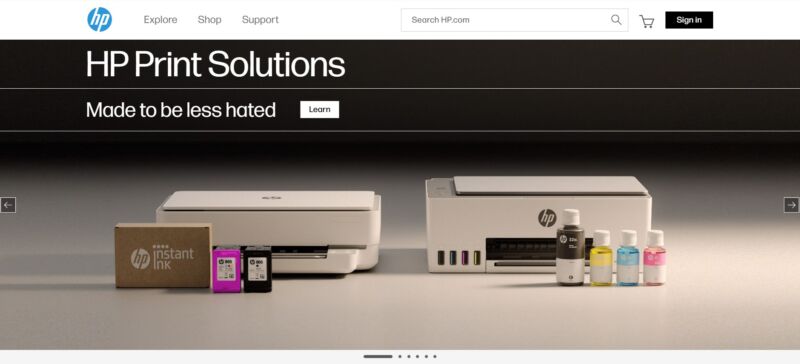
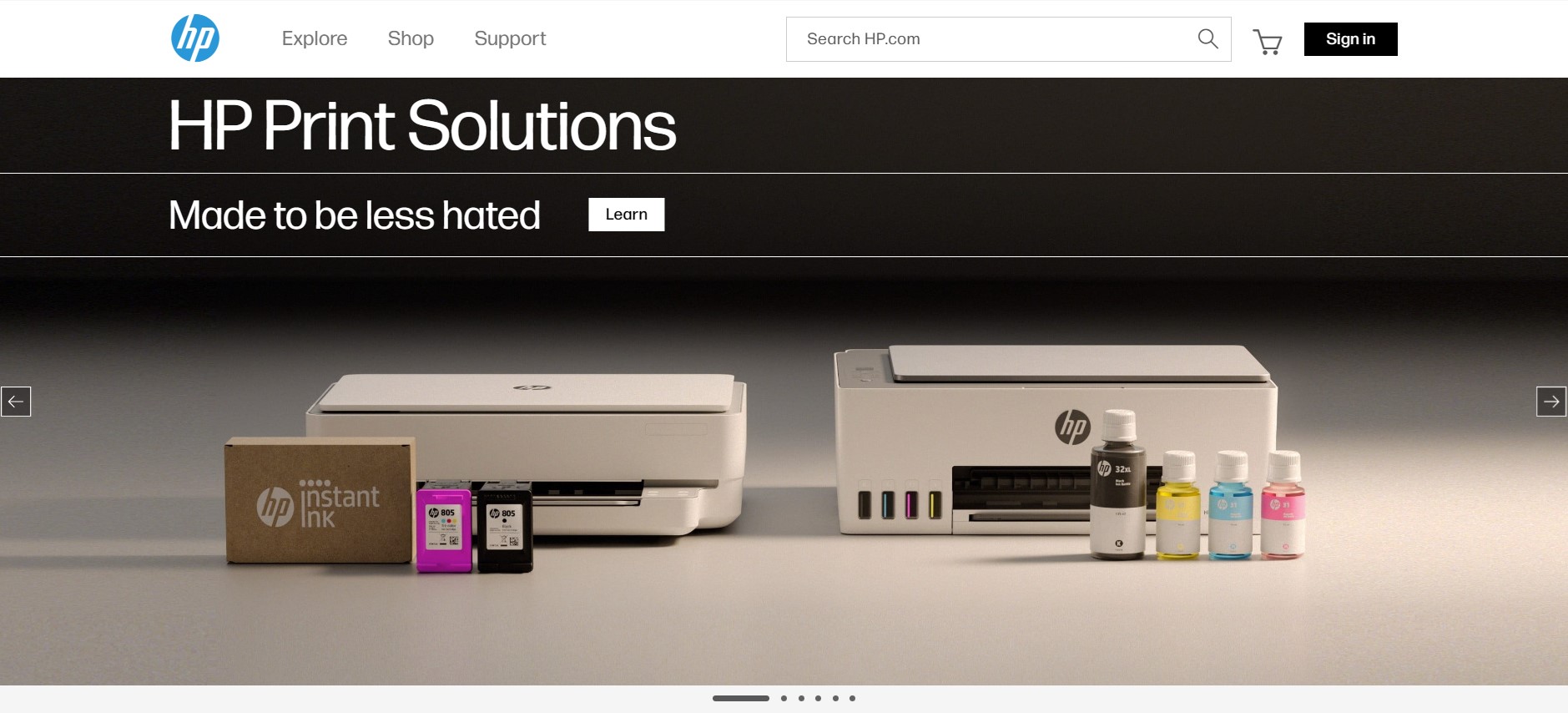
HP misreads room, awkwardly brags about its “less hated” printers

Read 19 remaining paragraphs | Comments


Source: Ars Technica – HP misreads room, awkwardly brags about its “less hated” printers