
Vulkan 1.3.273 was released today as the latest weekly update to this high performance graphics and compute API…
Source: Phoronix – Vulkan 1.3.273 Released With KHR Calibrated Timestamps Extension
Monthly Archives: December 2023
Gene variants that promote having more sex and kids diminish your life span

Enlarge / A large family can come with some unfortunate downsides (in addition to that weird cousin). (credit: Oliver Rossi)

Analysis of genomic and behavioral data from the vast UK Biobank finally demonstrates that genes that promote reproductive behaviors come with the ultimate price.
Aging stinks. You get marks on your skin, you’re slower, you forget stuff, and everything hurts. Your joints crack and pop. Evolution has achieved so many remarkable things; how is it possible that we still have to put up with growing old?
The antagonistic pleiotropy hypothesis states that your body falls apart when you’re old to pay the cost of being reproductively fit when you’re young. If the same gene has different effects (called pleiotropy) at different times of life—if it enhances your chances of reproduction when you’re young but is deleterious somehow once you get older—that gene will still undergo positive selection and remain in the population because reproduction is that important.
Read 8 remaining paragraphs | Comments
Source: Ars Technica – Gene variants that promote having more sex and kids diminish your life span
Intel Striving To Overhaul Their Multiple Ethernet Linux Drivers: "The Great Code Dedup"
Intel engineers maintain multiple Ethernet drivers in the Linux kernel for their wide-range of networking hardware from consumer to high-end data center wares. There’s been an ongoing effort to overhaul their Ethernet driver management to reduce code duplication between the different drivers for better code sharing and with an end goal of more unification…
Source: Phoronix – Intel Striving To Overhaul Their Multiple Ethernet Linux Drivers: “The Great Code Dedup”
Joby-Led Initiative on Vertiport Construction
Akihabara News (Tokyo) — Joby Aviation, ANA Holdings, and Nomura Real Estate Development have entered into a collaborative partnership to establish infrastructure for electric air taxi services in Japan.
Joby Aviation, a key player in the development of all-electric vertical take-off and landing (eVTOL) aircraft, will work alongside ANA and Nomura, one of Japan’s leading real estate developers, to create vertiports, crucial for the deployment of Joby’s electric air taxi service.
The partnership will focus on jointly exploring the design, location, operation, and financing of vertiports, initially targeting metropolitan areas like Tokyo and expanding to various urban areas in Japan. Joby, serving as a technical advisor to the Tokyo Bay eSG Project, will contribute to demonstrating multi-modal mobility solutions, including a floating landing port in the Tokyo Bay.
The collaboration extends beyond infrastructure development, with the companies actively engaging local stakeholders to communicate the technology’s benefits and foster community acceptance of air taxi services.
This collaboration builds upon Joby and ANA’s 2022 partnership to introduce electric air taxi services in Japan. Nomura will add further depth to the initiative.
Joby’s proactive regulatory approach includes applying for validation of its Federal Aviation Administration (FAA) type certification last year, collaborating closely with the Japan Civil Aviation Bureau (JCAB) to prepare for commercial operations in Japan.
Joby’s eVTOL aircraft can carry a pilot and four passengers at speeds of up to 320 kilometers per hour, offering high-speed mobility with reduced noise compared to helicopters and zero in-flight emissions.
As the three companies collaborate to shape the future of air travel in Japan, their involvement in Japan’s Public-Private Conference for Future Air Mobility reflects their broader commitment to advancing aerial ridesharing adoption in the country.
Recent eVTOL Industry Related Articles
KEPCO Collaborates with Vertical Aerospace
SkyDrive and KEPCO to Charge Up Flying Cars
Suzuki Factory to Produce SkyDrive Flying Cars
Hyogo Prefecture Launches New Flying Car Project
Marubeni Links Up with Lift Aircraft
JAL Chief Sees Flying Car Development as Urgent
Flying Car Hits Speed Bump in Nobeoka
SkyDrive Flying Car Gains Weight
Nidec to Build Flying Car Engines
The post Joby-Led Initiative on Vertiport Construction appeared first on Akihabara News.
Source: Akihabara News – Joby-Led Initiative on Vertiport Construction
Google Confirms Its Awesome Gemini AI Demo Was Staged And Explains Why

To the ire of some, Google has confirmed that its Gemini AI hands-on demonstration video it showcased along with Gemini’s launch was somewhat misleading. While the tech giant said it wanted to inspire developers and did nothing wrong, some were quick to reply that the demo was disingenuous.
As it turns out, the actual interaction with Gemini
Source: Hot Hardware – Google Confirms Its Awesome Gemini AI Demo Was Staged And Explains Why
PC User On Reddit Exposes Dirty Trick Cheap PSU Makers Employ To Trick Consumers
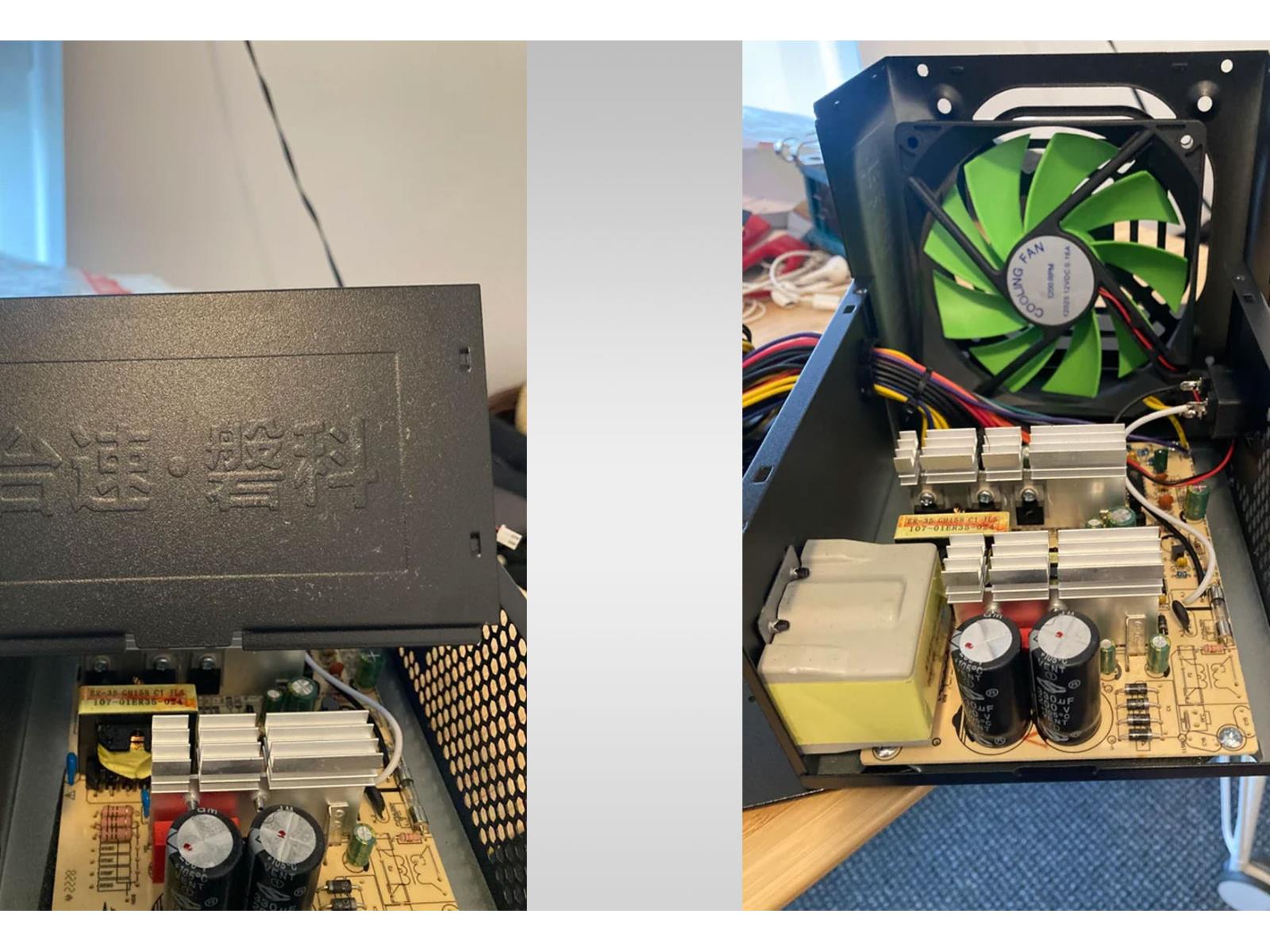
A user on Reddit who goes by the handle RedditCringe990 posted some interesting images of the inside of an off-brand power supply unit (PSU), and it serves as a reminder of why you should never cheap out when buying one of the most important (and underrated) parts of your PC. It doesn’t matter if it’s a modest build or a budget system, it’s
Source: Hot Hardware – PC User On Reddit Exposes Dirty Trick Cheap PSU Makers Employ To Trick Consumers
You've Never Seen A GeForce RTX 4070 With Five Cooling Fans Until Now

While we are in the midst of the current generation of NVIDIA GeForce RTX 40 series GPUs, most of the exciting hardware has already been released. As such, the RTX 40 series is easily recognizable at this point. If waiting for the GeForce RTX Super refresh has got you inpatient, however, there is a unique RTX 40 series GPU to feast your eyes
Source: Hot Hardware – You’ve Never Seen A GeForce RTX 4070 With Five Cooling Fans Until Now
Google admits it fudged a Gemini AI demo video, which critics say misled viewers

Enlarge / A still from Google’s misleading Gemini AI promotional video, released Wednesday. (credit: Google)

Google is facing controversy among AI experts for a deceptive Gemini promotional video released Wednesday that appears to show its new AI model recognizing visual cues and interacting vocally with a person in real time. As reported by Parmy Olson for Bloomberg, Google has admitted that was not the case. Instead, the researchers fed still images to the model and edited together successful responses, partially misrepresenting the model’s capabilities.
“We created the demo by capturing footage in order to test Gemini’s capabilities on a wide range of challenges,” a spokesperson said. “Then we prompted Gemini using still image frames from the footage, & prompting via text,” a Google spokesperson told Olson. As Olson points out, Google filmed a pair of human hands doing activities, then showed still images to Gemini Ultra, one by one. Google researchers interacted with the model through text, not voice, then picked the best interactions and edited them together with voice synthesis to make the video.
Right now, running still images and text through massive large language models is computationally intensive, which makes real-time video interpretation largely impractical. That was one of the clues that first led AI experts to believe the video was misleading.
Read 8 remaining paragraphs | Comments
Source: Ars Technica – Google admits it fudged a Gemini AI demo video, which critics say misled viewers
Linux Dealing With x86 32-bit Software Security Issue For Intel TDX & AMD SEV
AMD Secure Encrypted Virtualization (SEV) and Intel Trust Domain Extensions (TDX) are intended to help provide better security for virtual machines and are key elements to both companies investments around confidential computing. It turns out they have a common enemy in their VM security goals: x86 32-bit software…
Source: Phoronix – Linux Dealing With x86 32-bit Software Security Issue For Intel TDX & AMD SEV
Apple Journal Might Help You Finally Start Journaling
Apple doesn’t release new apps often, so when they announced their own Journal app at WWDC this year, it made a splash. With iOS 17.2, Apple is finally ready to release the Journal app to the public. Once you update, you’ll find the Journal app sitting on your Home Screen, waiting for you to get started.
It’s great that Apple is building its own take on journaling right on the iPhone. We know journaling can help reduce stress and anxiety, but not everyone has the time to spend their mornings journaling (though, if you’re interested in it, I personally recommend the Julia Cameron’s Morning Pages method). If you’re short on time, a simple journaling app is all you need.
How Apple’s Journal app works
Apple takes a simplistic approach to journaling, and I’ve enjoyed using the app for what it is. In short, it’s a simple list of entries. You can create a new blank entry, and it will be logged with the date and time. From there, add some text, locations, photos, or record some audio. Things do get more interesting once you start using Apple’s suggestions and prompts—or “reflections,” as Apple calls them. Apple will ask you what the best part of your week was, or to reflect on the last time you made something. These prompts get you thinking about elements of your day you might not ordinarily think to write about.
And once you give Apple permission to access your photos, music, and fitness data, their suggestions get deeper. If you’re on a day trip, Apple will pool in your location and all the best photos from your travels, and will ask you to journal about it. It can be a great way to note something that might get lost otherwise. It will also suggest places you went and workouts you completed, just to round out the day.
Limitations of Apple’s Journal app
Journal is not without its limitations, however. Yes, this is only the first version of the app, and Apple is sure to add more features going forward. Still, the app misses out on features that have become standard for popular journaling apps.
The biggest issue is that at launch, the app is iPhone only, with no option for iPad or Mac. In my testing, there have been many times when I’ve wanted to continue writing more in-depth about a subject on my Mac. Hopefully, this will be rectified in a year.
Intentionally, Journal is a simple app. You scroll through a list of your entries, in a reverse chronological order. You can bookmark entires, and the app will filter them for you based on photos, reflections, bookmarks, workouts, or places. That’s all there is to it. There is no calendar view, no tagging, no exporting—hell, there’s not even a Search field in sight. And, unlike some competitors, the Journal app doesn’t offer mood tracking.
When you’re starting out, these issues might seem minor. But as you amass hundreds of entries, they’ll stand out like a sore thumb.
Journal is a great gateway app
Let me digress a bit and talk about board game culture. In the wonderful world of tabletop games, we are obsessed with the notion of the gateway game: something simple, yet exciting, that’s just complex enough to hook a player, without being so overwhelming that the new player will run away. A perfect gateway game can make a lifelong gamer out of an unsuspecting citizen.
And Apple has made the best gateway Journal app yet. It’s not perfect, but it’s not complicated. It has some glaring issues, and lacks features you’d expect in a journaling app (like cross-device support and a calendar view). But all that almost doesn’t matter here because Journal is great at what it aims to do, which is to help a large population try journaling, hopefully turning it into a sustainable, frequent hobby.
Sadly, right now, that’s all it is. I hope Journal serves as a way for new users to get started, and that Apple brings out an Export option soon enough. That way, when users start running into walls, they can export their data to a better app like Day One or Journey, and can continue to build their daily journaling habit.
If you are in favor of a simple journal app that’s already on your iPhone, I say go for it. How you journal doesn’t matter much—the fact that you are journaling is enough.
The best alternatives to Apple Journal
Journal is a great gateway app, but if you’re serious about journaling, you should start off with a more feature-rich app to boot; something that will support your journaling for years to come.
Day One: If you’re all-in on the Apple ecosystem, Day One is the best journaling app for you, bar none. Yes, it’s paid, and it might seem silly to spend $35 a year for a journaling app. But you get a beautiful, fast, and feature-rich journaling experience for that price. All your data is stored securely in iCloud, and is easy to import and export.
Journey: If you need to use this data on a PC, Journey might be the right option for you. It’s available on the web, and has mood tracking, shared journals, automation support, and more. A premium membership costs $50/year.
Five Minute Journal: Consider this to be an elevated version of the Journal app. Five Minute Journal is a simple, timeline-based Journal app, but it also offers some important features like a calendar view, password protection, streams, and import and export. This can be another great gateway journaling app for you.
Daylio: This is an easy-to-use mood and activity tracker that can help you quickly journal in short bursts. Use this app to check in with your moods, note down what you did, and how it made you feel. If you find the task of writing down your thoughts and feelings daunting, Daylio’s unique approach might help you get started.
Source: LifeHacker – Apple Journal Might Help You Finally Start Journaling
A Super-Rare Asteroid Eclipse Will Hide The Brightest Star In The Sky, How To Watch

In a cosmic game of hide and seek, an asteroid will pass in front of one of the biggest and brightest stars visible in the night sky. Asteroid Leona will pass in front of the star Alpha Orionis, also known as Betelgeuse (seen in the image above via NASA), which is a red supergiant in the constellation Orion.
Betelgeuse (pronounced BAY-tel-jooz)
Source: Hot Hardware – A Super-Rare Asteroid Eclipse Will Hide The Brightest Star In The Sky, How To Watch
Skull And Bones Closed Beta And PC Requirements Revealed, You Might Need A Bigger SSD

Skull and Bones, Ubisoft’s much maligned pirate game, let players interested in the closed beta know what hardware they’ll need to enjoy the title. One of the requirements that stands out is the hefty 65GB of storage the game will require, and Ubisoft is very specific that the game will need an solid state drive (SSD). The announcement makes
Source: Hot Hardware – Skull And Bones Closed Beta And PC Requirements Revealed, You Might Need A Bigger SSD
Intel Arc GPU Driver Hauls Another Round Of Big Performance Gains Up To 34%

Intel deserves some kudos for maintaining a regular driver update schedule for its Arc GPU family. Even more impressive, though, is the effort its driver team has put into delivering chunky performance gains, with the biggest to date being a massive 750% improvement in Halo: The Master Chief Collection. Intel’s newest Arc GPU driver doesn’t
Source: Hot Hardware – Intel Arc GPU Driver Hauls Another Round Of Big Performance Gains Up To 34%
What People Are Getting Wrong This Week: The 'Vibecession'
This week, the publishers of the Oxford English Dictionary named “rizz” as 2023’s word of the year partly for its “potential as a term of lasting cultural significance or providing a snapshot of social history.” But they got it wrong. The real word that provides a cultural picture of 2023 is “vibecession.”
Coined by Kyla Scanlon, vibecession has come to mean something like “widespread pessimism about the economy regardless of the economy itself.” We’re currently in the middle of a huge vibecession.
According to a recent poll from the Pew Research Center, 81% of Americans think the gap between the rich and poor will grow between now and 2050, despite the fact that it’s (finally) shrinking. Total consumer confidence in the US is lower now than it was in the middle of the Covid lockdown, and 71% of Americans say economic conditions in the country are “poor” or “very poor” with 38% of respondents going with “very poor.”
In the real world, unemployment is hovering around 3.5%, down from 14.7% during the lockdown. The median household income in the US has risen from a pandemic low of $65,100 a year to $74,600. That number doesn’t reflect the “rich getting richer” either. It’s driven from the bottom: In 2022, people in the lower half of income distribution in the U.S. saw their earnings increase by 4.5%, where the average rate for all Americans was 1.2%. The rate of inflation has been steadily falling too: It’s currently 3.24% compared to 3.70% last month and 7.75% last year. The GDP increased by 2% in 2022 and 5% the year before. Despite the constant drumbeat of doom from social media, all major economic indicators suggest things are going pretty well.
America is longing for the good old days—of 1973
In researching the vibecession, one data point stuck out to me most: 58% of Americans say that life for “people like them” is worse today than it was 50 years ago—in 1973, a year that was way shittier for way more people than 2023 in just about any way that can be measured.
To further both realism and optimism, here are the hard numbers on the shittiness of 1973:
In 1973, more than half the population of the earth lived in autocracies, compared to about 13% today. Almost 60% of humans live in democracies today, compared to 25% in the early 1970s. About half of the world lived in extreme poverty in 1973, compared to about 8% in 2023. A total of 988,892 people died in war between 1970 and 1973, where 394,375 died between 2019 and 2022, the most recent years for which we have complete statistics.
In terms of domestic economics, unemployment was at 4.9% in 1973, compared to our current 3.5%. The economy grew at a rate of 5.6% in 1973 compared to 9.2% in 2022. Inflation was at 8.7% in 1973, compared to our current rate of 3.24%. The federal interest rate was 8.74% in 1973, compared to 5.25% today. Women earned about 56.6 cents per dollar of mens’ pay in 1973, compared to 83.7 today.
In 1973, 55,984 Americans died in car accidents compared to 42,795 in 2022, and there are about three times as many cars on the roads. There was more crime of every type in 1973. People lived on average to 71 years in 1973, compared to 79 in 2023. A 20-inch television cost around $500 in 1973 and could probably pick up three blurry channels. Adjusted for inflation, that’s around $3,300. A Chrysler LeBaron cost $7541 in 1973 and could be expected to last around 100,000 miles. That’s $52,255.56 in today’s money, to purchase a vehicle you can expect to drive for twice as long.
Every year is a bad year
I could keep going, but you get the point. It’s not like 1973 was a particularly terrible year either—things really start really going south in 1974, and they kept going south until the early 80s, when the interest rate was nearly 20% and unemployment was near 10%. At the time, I’m sure people looked longingly back to the “good old days” of 1936.
This lack of historical context is at the heart of the vibecession and illustrates its danger. Tangible progress is made through trying to force the real world toward the perfect one we imagine could exist, but misremembering the past and convincing ourselves we let a utopia slip from our fingers does the opposite. It leads to pessimism, inaction, and defeat. People are feeding on that defeatism, too—politicians scaring people into voting for them, corporations profiting from selling comfort to an unsettled populace, social media companies monetizing angst, and more. But buying into to doomerism is not only depressing, it dishonors the people who devoted their lives to making 2023 marginally less shitty than 1973. I mean, who wants to pay $52,000 for a Chrysler LeBaron?
Source: LifeHacker – What People Are Getting Wrong This Week: The ‘Vibecession’
What to Do When You Fail a College Class
Failing a class in college is weirdly taboo, even though it happens to all kinds of students. If you found this post, you’re likely facing the likelihood of failing a class. It’s hard to know what to do after that. Like, what … happens to you? The answer is actually nothing, unless you’ve failed a bunch of them. What’s more important is what you do next. If you just failed your first class, here’s what you do.
Do not freak out when you get your grade
I’ll be honest here: I went back to school for my master’s last year, thinking that because I had a whole decade of adult experience under my belt and I was always a good student, it would be easier than ever to do well in class—especially now that I was taking specific courses I already know I’m interested in. What I did not account for was that there would be math involved at this level. Math is something I struggle with tremendously; I barely scraped by in the intro-level stats class I had to take in undergrad. It did not occur to me, as someone who cannot do math, does not do it in daily life, and has no plans to do it in the post-grad future, that there was a chance of it coming back around. I thought, when I signed up for epidemiology, that I’d be learning about diseases—and I did! But it was basically math. It was a ton of math. And, I soon found out, all of my other classes were based on the foundational stuff I learned in that secret-math class. Despite my best efforts, I did not pass on my first time through it. Even at my big age, this “failure” hit me hard. Was I going to get in trouble? Was I going to get tossed out of my institution? Was I an idiot for thinking I could go back to school at all? No, no, and no, it turned out. What happened was I had to have a slightly embarrassing chat with an advisor and retake the class, since it was a required course.
When you find out your grade at the end of the semester, don’t panic if you didn’t pass a class. It’s not going to help; what’s done is done. As Dr. Kim Crowley, Associate Professor of English at Bismarck State College puts it, “Don’t ruminate.” First, remind yourself this really does happen to people. For instance, Crowley—who has a PhD—had to take college algebra more than once in order to pass it. You’re in good company if there’s a class you struggle with. Next, consider a very simple question: Is the class required or not?
What to do if you fail a required class
If you failed a class that is required for your major or program, you don’t have much of a choice but to take it again. You do have some choices when it comes to how you take it, though. Crowley says you should consider whether you want to take it the next semester “while material is fresh in your mind” or “wait to let the emotion of the whole thing go” and try again after a little break. When I retook epidemiology, I opted to do it right away—but that was because it was a prerequisite for all the other classes I had to take. I found this out by conferring with an advisor, which you should do right away when you find out you didn’t pass. Their job is to help you figure out your next steps; mine worked fast to help me get into a second-semester class. While I had no choice about having to retake it, I did get to choose if I took it online or in person, which is something Crowley says you should think over, as well. My first shot at epidemiology was in one of those big, bowl-shaped halls with hundreds of seats; I didn’t stand a chance of retaining a thing and usually sat in my stadium chair feeling vaguely sick. When I got to go at my own pace, sit in my un-intimidating apartment, and read (and reread and reread again) the materials online, I did way better. (I got a B+!) If you took your failed class in the morning, consider an afternoon slot. If you took it online, try in-person for some extra accountability. If you really hated your professor, you already know whom not to retake it from.
There are some questions you’ll need to ask your advisor when you chat about failing a required course. An academic advisor I spoke to (who will remain anonymous because she forgot to check her employer’s media policy before agreeing to the interview) suggested these:
-
When can/should I retake the class?
-
Does this impact my financial aid?
-
Am I able to remain in my major?
-
Which of my other required classes can I not take until this is done?
-
What is the consequence if I continue to do poorly?
You’ll likely end up on academic probation, which means you’ll have to check in with your advisor periodically. In some universities, you’ll get a humbling email explaining that to you. In others, you might have to reach out to the financial aid office and your advisor directly to see what repercussions you’re facing. The good news is that in most schools, when you retake a failed class, the new grade replaces the old one, shoring up your GPA.
What to do if you fail a class that isn’t required
Here’s where it gets tricky. If that class wasn’t required, you may not want to retake it at all. Crowley suggests calculating your GPA overall to see just how big of a hit one F is going to give you. If it’s a significant drop, retake the same class, if you can, to replace the grade on your transcript. If it’s not, though, it might just be OK for you to skip it. For instance, if you need three credits of some kind of art and you hated theater and ended up failing, there might be wiggle room in your GPA to just sign up for drawing or something and take the loss.
Again, discuss all of this with your advisor before proceeding, but consider if retaking something that was hard for you and sort of unnecessary is really a way to keep morale up while you’re on probation. Bear in mind, too, that required classes are usually offered abundantly at various times, with different professors, and using different structures, but electives are rarer. In your school, it may not be possible to retake the same exact class again, so work this out directly with your advisor. The worst thing you can do is dither over it and let it slow down your progress into the next semester. One F won’t destroy a GPA full of other good grades, but spending weeks agonizing will torpedo your productivity.
What to do about a failed class in the future
Honesty is the best policy here. If you go on to apply for jobs, transfer to a different school, or seek admissions to a program for a higher degree, the failed class is likely to show on some version of your transcript—even if you retook it and your GPA is solid. Not all jobs will ask for transcripts, but as a rule, most schools will. Don’t shy away from discussing it. In a job interview, this would be a great story to pull out when you’re asked about a time you overcame a hardship or adversity (provided you went on to get a better grade the second time). Failing isn’t necessarily a bad thing and won’t destroy your reputation. Being able to detail exactly how you reoriented and did better afterward will make you look good.
Crowley says that when she was applying for grad school, she was clear in her admissions essay about the issues she faced in undergrad that led to some of her worse grades. I know another student who was recently accepted into a school’s “second chance” program after detailing in a letter to administrators why he’d failed so many classes in his previous attempt to secure a degree—and how, after a few years away from the classroom, he was in a much better position to do well.
“Even if you have nothing to write other than, ‘I was a dumb 18-year-old who couldn’t make it to class,’ sometimes just ‘fessing up to that at least shows someone down the line that you’re taking responsibility for it and you’re less likely to do it again,” says Crowley.
Source: LifeHacker – What to Do When You Fail a College Class
GNOME's Dynamic Triple Buffering "Ready To Merge"
It looks like GNOME 46 might finally see the dynamic triple buffering support merged for Mutter to enhance the performance particularly for systems with integrated graphics…
Source: Phoronix – GNOME’s Dynamic Triple Buffering “Ready To Merge”
The NordicTrack Commercial S22i Studio Cycle Is on Sale for Its Lowest Price Ever Right Now
Not everyone can afford a Peloton. Even when they go on sale, you won’t find them going for anywhere near 40% off. Luckily, there are other brands that can get the job done just as well without sending you into a financial crisis.
NordicTrack’s commercial Commercial S22i Studio Cycle spin bike is currently on sale for 40% off, making it $899 (down from $1499.99) on Amazon, which matches the levels it reached on Black Friday and Cyber Monday.
What the NordicTrack Commercial S22i Studio Cycle offers
Founded in 2012, Peloton might be the biggest player in the spin bike scene, but they weren’t there first. NordicTrack has been making home gym equipment since 1975, and is a trusted brand among fitness enthusiasts.
The NordicTrack Commercial S22i Studio Cycle spin bike has a lot of the same features as the basic Peloton Bike, making it an attractive alternative to the leading brand—especially at this price point.
This bike comes with a 22″ rotating touchscreen and a 30-day trial of the iFit subscription (it costs $39 per month afterward) that grants you access to video classes and fitness instructors. It allows for your live trainer to incline, decline, and adjust the resistance for you during your workouts (something the Peloton doesn’t do). There are a variety of fitness-level workouts to choose from, with leaderboards to compare your performances with others. You also get a fan and other accessories (stuff you usually have to pay extra for if you buy a Peloton). You can read PCMag’s “excellent” review of the S22i here.
Recommended products:
NordicTrack 222i spin bike $899
NordicTrack S15I $649
The entry level S15i is a full 50% off
If you are truly price-conscious, NordicTrack’s entry-level bike, the Commercial S15i Studio Cycle, is available at an even bigger discount on Amazon—at $649, it’s a full 50% off the retail price. The S15i has a smaller display than the S221, and doesn’t offer quite as much in terms of resistance or incline, but it’s still a decent choice if that $250 price difference is a deciding factor. (For real-world comparisons between the two machines, check out this Reddit thread.)
Source: LifeHacker – The NordicTrack Commercial S22i Studio Cycle Is on Sale for Its Lowest Price Ever Right Now
GEEKOM A5 mini-PC Review: Affordable Cezanne Zen 3 at 35W
Ultra-compact form-factor (UCFF) desktops have gained significant market share over the last decade. Processors with TDPs ranging from 6 – 15W formed the backbone of this segment in the initial years. With CPU vendors allowing configurable TDPs for their notebook processors, UCFF systems with regular notebook processors (operating in cTDP-down mode) have become common.
GEEKOM, the private label brand of Shenzhen Jiteng Network Technology Co., has introduced multiple UCFF systems in the last year. The brand has become an avenue for the company to market excess inventory from their OEM / ODM production runs. As a result, we are seeing the introduction of fully configured systems based on older CPU generations at affordable price points. The GEEKOM A5, based on the AMD Ryzen 7 5800H from early 2021, is one such product. Read on for a detailed look at the performance profile and value proposition of the GEEKOM A5.
Source: AnandTech – GEEKOM A5 mini-PC Review: Affordable Cezanne Zen 3 at 35W
Daily Telescope: Seeing stars with an iPhone in the bottom of the Grand Canyon

Enlarge / Stars over the Grand Canyon. (credit: Mitchell Yee)

Welcome to the Daily Telescope. There is a little too much darkness in this world and not enough light, a little too much pseudoscience and not enough science. We’ll let other publications offer you a daily horoscope. At Ars Technica, we’re going to take a different route, finding inspiration from very real images of a universe that is filled with stars and wonder.
Good morning. It’s December 8, and today’s photo comes from the floor of the Grand Canyon. The photographer, Mitchell Yee, admits that this is not the best shot one might capture from this remote location, but there’s a reason—he shot it on his iPhone in August.
“While it’s a fairly ordinary photo, what was amazing to me was the level of quality of cell phone photography,” he told me. “Normally, I’d haul out my big Nikon but since we were hiking down to the bottom of the canyon to meet our dories, weight was constrained. So I skipped the extra 15–20 pounds of camera, lens(es), and tripod and instead enjoyed the 9-mile hike with my 18-pound pack. Of course, this shot could have been much improved with a ‘real’ camera on a tripod. But there I was, flat on my back on a sand berm, with the best camera I had at that moment, my iPhone 13 mini, and I still made the shot I wanted.”
Read 4 remaining paragraphs | Comments
Source: Ars Technica – Daily Telescope: Seeing stars with an iPhone in the bottom of the Grand Canyon
You Can Easily Wax Your Own Flower Bulbs This Winter
I have long loved forcing bulbs to flower inside my house all winter, but I am generally not great at remembering to water or upkeep them. Waxed bulbs appeal to me for a lot of reasons, mostly because they are hands off. You really can’t screw them up; you just put them someplace and walk away. They require no watering, just a little sunlight.
How to wax flower bulbs for winter
You’ve likely seen waxed bulbs for sale, usually for around $20-30 a piece. Bulbs themselves, though, are actually quite inexpensive. Even this late in the season, I scored three giant amaryllis bulbs for $21 from Lowe’s. Amaryllis are generally what you use in these waxed bulbs, although you can force narcissus and tulips and all sorts of other bulbs as well this time of year—I just haven’t seen them waxed.
My point is, you can save a lot of money by making your own waxed bulbs, and they make absolutely lovely gifts. All you need is the bulbs and some wax, and once you’ve waxed the bulbs, they don’t need any water or fertilizer; it already has everything it needs in it.
A note worth mentioning: Bulbs are perennial, so they can come back again and again when planted outside, as long as when you cut the flowers that sprout, you leave enough leaves behind for the plant to power through to next year. Once you wax a bulb, it’s quite hard to convert to a bulb you plant outside, though; it would require scraping off all the wax and regrowing roots. Most people who force bulbs inside don’t actually end up planting them outside—they just get tossed after they bloom. It’s also worth noting that if you wax the bulbs, you can’t ever compost them.
Peel the bulbs
Wax won’t stick to the papery outer leaves of a bulb, so the first act is to peel them away until you reach the pale center of the bulb. Like an onion, you simply pull away the outside to reveal the center.

Once you’ve peeled the bulbs, you’ll use a serrated knife to cut off the basal plate, as shown on the right.
Credit: Amanda Blum
Credit: Amanda Blum
Cut off the roots
Bulbs have what’s called a basal plate that the roots grow off of. If you cut that off, the bulb, in an effort to survive, gets the message that they should immediately go to flower and will send up a shoot. It’s also helpful to give the bulb a flat side to rest on. Using a serrated knife, cut above the roots but below the bulb sphere.
Soak it, then dry it
The magic of the waxed bulb is that it keeps all the moisture in the bulb, so it never requires water once it is waxed. But first, you need to saturate the bulb, so take a bowl of warm water, and soak the bulbs for four to eight hours—but no more. You won’t want it waterlogged.
Place the bulb on a towel and let it air dry for a few hours. Don’t worry, the bulb isn’t going to dry out; just its surface will.

soak the bulbs for 4-8 hours, and then allow them to air dry. Prepare your wax, cold water for dipping, and tin foil.
Credit: Amanda Blum
Credit: Amanda Blum
Prepare the wax
There are all kinds of wax out there, from soy to paraffin, or even the kind of wax you use for crayons. I’ve read reviews that suggest you can use any wax, but I prefer soy wax. You can get soy wax online easily; you won’t need more than a pound or two, and you can color the wax using dyes made specifically for it. (Or you can use uncolored soy wax, which is is translucent.) You want to melt it in something you don’t mind destroying, and I find plastic deli containers are the perfect size—they’re just large enough for the bulb to fit in, so you’re not wasting wax by melting too much. You probably have a few around, and they’re microwaveable. Otherwise, getting the wax out of a pot you intend to use for something else will be miserable. Because you want to dip the bulb, you need to melt enough for the bulb to be mostly submerged. Fill the can with soy wax flakes, and let them melt; keep adding wax until the can is two-thirds of the way full. The best way to melt them in the microwave is to fill the container with the flakes, then microwave in thirty second bursts, opening the microwave and checking between each burst. As the wax melts, you’ll need to add more. In all, it took about six minutes of microwaving to get all the wax completely melted; it doesn’t require any stirring.
Before you start dipping, you’ll also need a container of the same size filled with cold water.
Dip the bulb
Hold the bulb by the shoot at the top and slowly dip it into the wax. You’re going to stop about an inch and a half from the shoot at the top. Count to five and then slowly pull the bulb back out, and let it drip above the container of wax. Once it stops dripping, move to the can of water and quickly dunk the bulb. Move fast or you’ll get lines in the wax. This should solidify the wax. Use a kitchen towel to gently dry it off. Water on the bulb won’t let new wax stick to it.

Dip the bulb to an inch below the stem and after a few dunks, let it drip onto the tin foil, making a puddle the bulb can sit in.
Credit: Amanda Blum
Credit: Amanda Blum
In total, you’ll want to dunk each bulb three or four times. On the last time, you’ll take the bulb out and instead of letting it drip off, quickly move the bulb to the tin foil, and set the flat size on the foil. The wax will pool a little at the base. Hold it there until the wax solidifies enough for the bulb to stand on its own and then let the wax cool completely before peeling it off the tin foil.
Now, place the bulb near a window and watch it grow. You’ll see the sprout happening within 10 days or so.
Source: LifeHacker – You Can Easily Wax Your Own Flower Bulbs This Winter