The Best E-bikes for Every Type of Rider

We’re in the middle of an international e-bike surge. With so many companies churning out battery-assisted bikes of all types—from the reputable names in “analog” bikes like Trek and Cannondale, to countless fly-by-night companies offering mail-order rip-off rides—it can be difficult to know where to start. So start here.

The bikes listed below have either been positively reviewed by Lifehacker’s staff or come with high praise from reputable sources. Our focus is on affordable, general-interest electric bicycles; we’re saving the $10,000 super-bikes for another time. Whether you’re buying for yourself or a lucky someone on your list, there will be something here that fits the bill.

Best overall

Aventon Pace 500.3 (currently $1,599)

The Aventon Pace 500.3 e-bike

Credit: Stephen Johnson

No e-bike can be all things to all people, but the Pace 500.3 comes close. It’s affordable, well-designed, and it’s a class 3, so it’s powerful enough to keep up with any e-bike on the bike path. This zippy commuter hits the bullseye between “high performance” and “beginner friendly.”

Read my full review of the Aventon Pace 500.3.

Where to buy an Aventon Pace 500.3

Best budget e-bike

Propella 7S (currently $899)

Propella 7S e-bike on the beach with rider

Credit: Stephen Johnson

The Propella 7S is a lightweight, stylish bike that’s fun to ride even without the extra kick from the motor. If you want to pay less than a grand for a riding-around-town e-bike that performs well and looks snazzy, this is the bike for you. 

Read my full review of the Propella 7S

Where to buy a Propella 7S

Runner-up: JackRabbit OG ($999)

This tiny, pedal-less “micro e-bike” stretches the definition of the word “bicycle.” It weighs only 24 pounds, travels at 20 mph, and costs less than $1,000. As Eletrek put it: “for an urban dweller or a college student trying to get around campus, the JackRabbit is an ideal vehicle.”

Where to buy a JackRabbit OG

Best folding e-bike

Ride1Up Portola ($995)
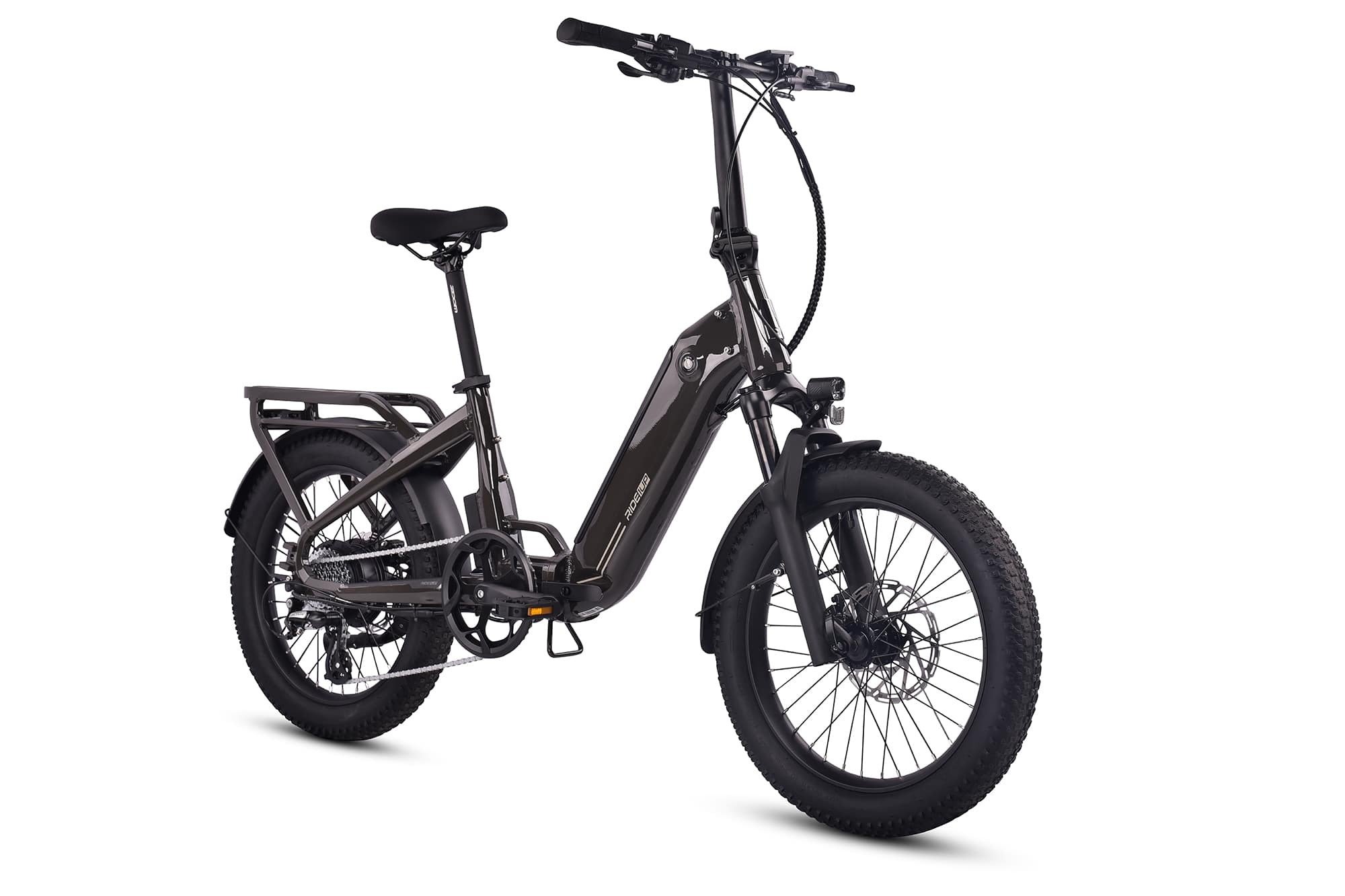
Ride1Up Portola folding e-bike

Credit: Ride1UP

Lifehacker’s Daniel Oropeza reports that the Portola from Ride1Up “fits in my Toyota Corolla, which is surprising and very practical. It’s easy to fold and fits in my living room squared away neatly. It’s great for people who like to take it places with them like road trips or those who have small apartments.”  

Where to buy a Ride1Up Portola

Runner-up: Montague M-E1

A full-size bicycle with 28” wheels that easily folds up small enough to store under your bed, Wired said the Montague M-E1 “comes pretty darn close to perfection.”

Where to buy a Montague M-E1

Best utility e-bike

RadRunner 3 Plus ($2299)
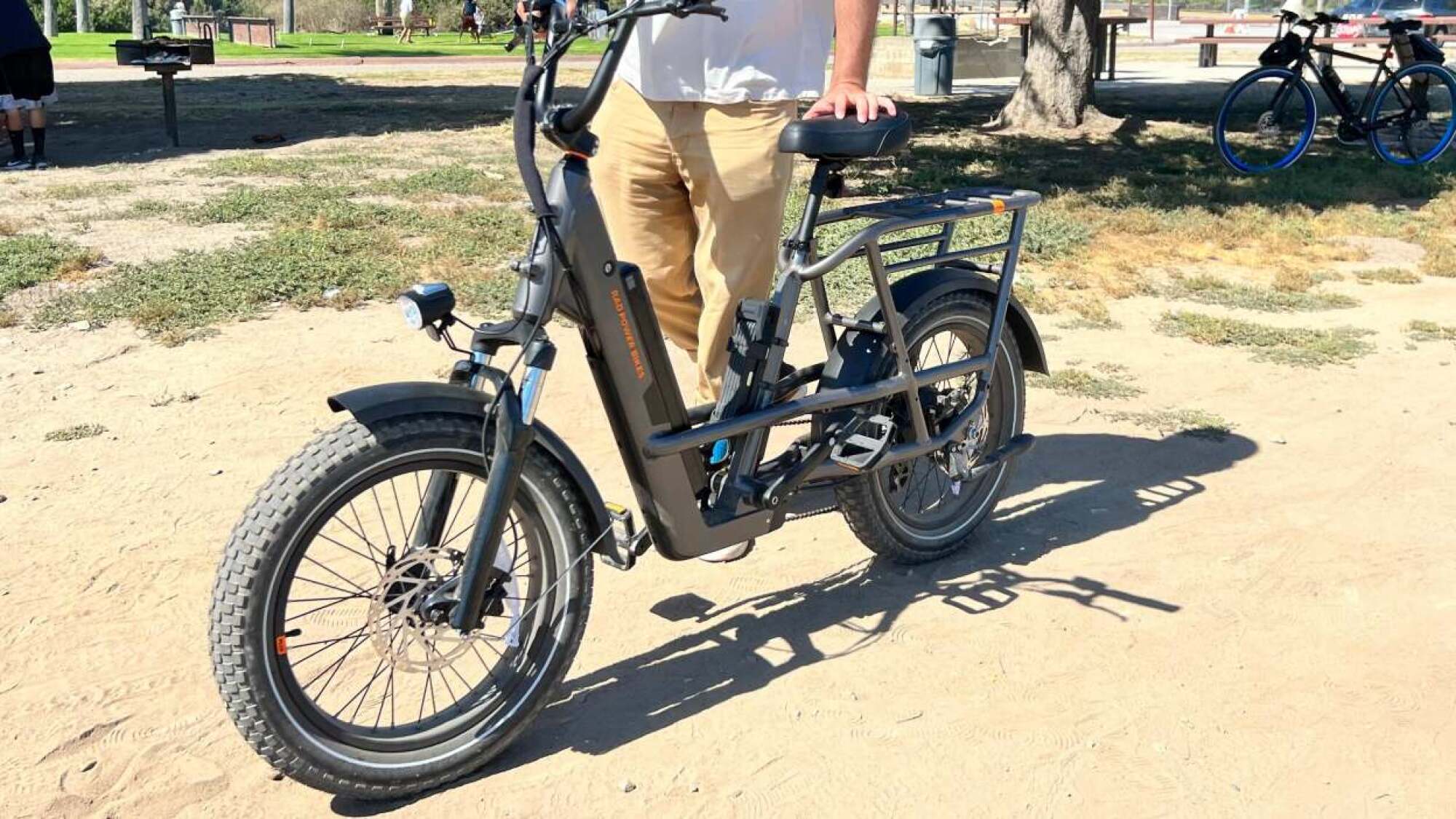
Radrunner 3 Plus e-bike

Credit: Stephen Johnson

The RadRunner 3 Plus is the SUV of e-bikes. It will happily eat up suburban streets, gravel roads, and everything in-between. Powerful, easy to use, ridiculously customizable, and fun to ride, the RadRunner 3 plus is a best-in-class utility e-bike.

Read my full review of the Radrunner 3 Plus

Where to buy a RadRunner 3 Plus

Runner-up: Co-op Cycles Generation e1.1 (currently $898.93)

CNN said REI’s Generation e1.1 is “a near-perfect utility bike for the first-time e-bike rider or anyone electric-curious and looking for an affordable new ride.” Plus, you can pick one up at your local REI.

Where to buy a Co-op Cycles Generation e1.1 Electric Bike

Best cruiser e-bike

Electra Loft Go! 7D e-bike

Credit: REI

Electra Loft Go! 7D EQ ($2,000.00)

According to Wired, the Electra Loft Go! 7D EQ is the perfect all-around cruiser for beginners: “If you want to bike around the beach or your neighborhood, but you’re afraid of electric bikes—or even of bikes in general, what the hey—this is a great place to start.”

Where to buy an Electra Loft Go! 7D EQ

Runner-up: Ride1Up Cafe Cruiser (currently $1,195)

A comfy, cushiony cruiser that can easily be pedaled to nearly 30 mph, Ride 1Up’s Cafe Cruiser is not for beginners. But once you get used to the serious punch under the hood, the Cafe Cruiser is a cool-looking ride that is as at-home at the local coffee shop as it is on a long roadtrip.

Read my full review of the Ride1Up Cafe Cruiser

Where to buy a Ride1Up Cafe Cruiser

Best commuter bike

Aventon Pace 500.3 (currently $1,599)
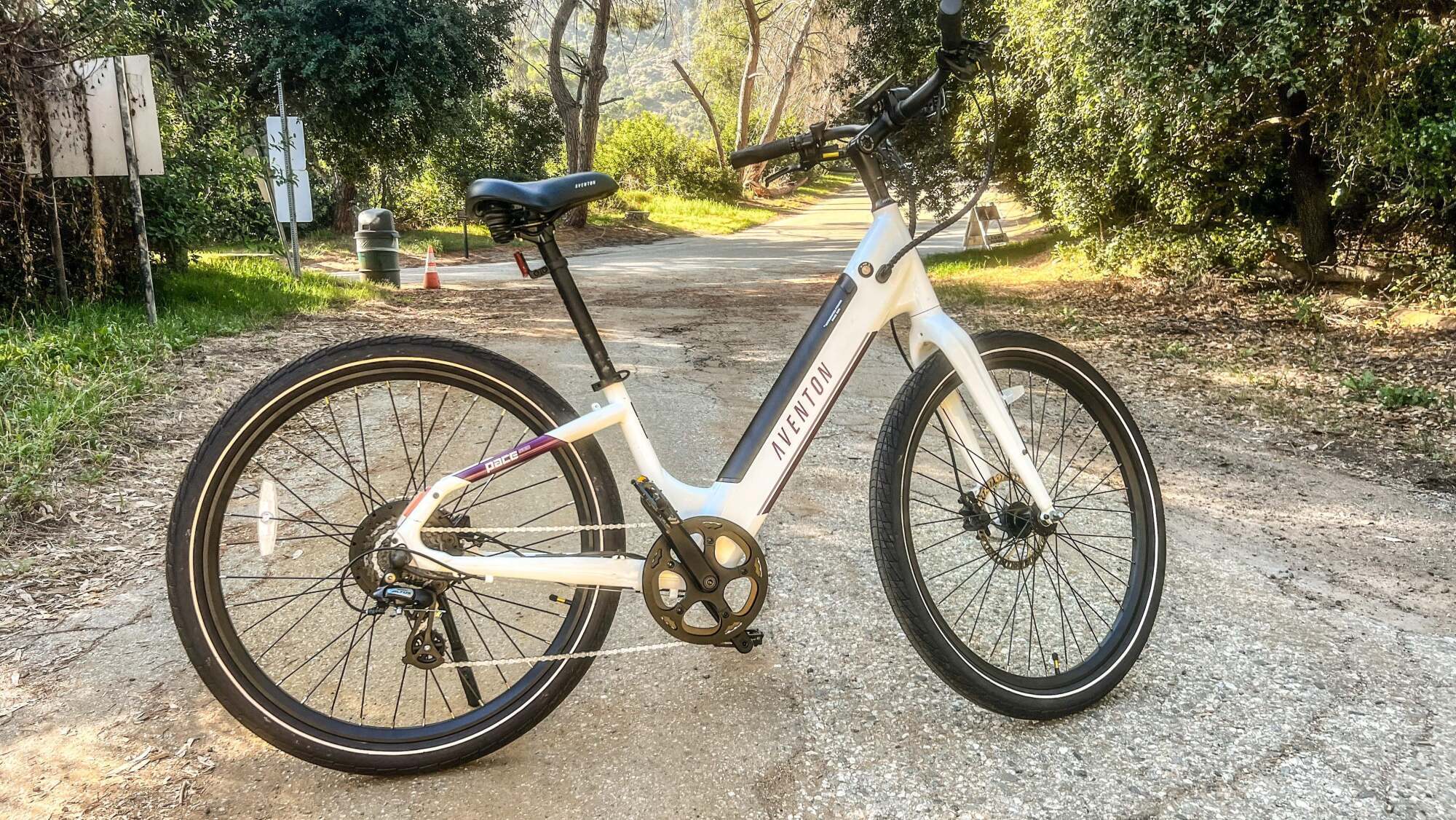
Aventon Pace 500.3

Credit: Stephen Johnson

If you want the most commuter e-bike possible for your cash, I haven’t seen anything better than Aventon’s entry-level class 3 e-bike. The Pace 500.3 goes up to 28mph, but it looks and rides like a friendly step-through, pleasing new riders and experienced ones alike. Highly recommended. 

Read my full review of the Aventon Pace 500.3

Where to buy an Aventon Pace 500.3

Runner-up: Heybike Cityscape ($679.99)

Popular Mechanics gave Heybike’s Cityscape a 4.6/5 rating, lauding its step-through frame, swept-back handlebars, smooth shifting courtesy of its seven-speed Shimano drivetrain, and its built-in rear cargo rack.

Where to buy a Heybike Cityscape e-bike


Source: LifeHacker – The Best E-bikes for Every Type of Rider

Meta's Ray-Ban Smart Glasses Gain AI To See And Identify Everything You See

Meta's Ray-Ban Smart Glasses Gain AI To See And Identify Everything You See
Meta just upgraded its Ray-Ban-collaborated smart glasses with a multimodal AI (artificial intelligence) that can identify and act on what you’re seeing. The system is available via a US-only early access program currently with early signs pointing to something quite a bit more useful than Ray-Ban Stories back in 2021.

View this post on

Source: Hot Hardware – Meta’s Ray-Ban Smart Glasses Gain AI To See And Identify Everything You See

Apple Is Testing A Key iOS Security Change To Thwart iPhone Thieves, How It Works

Apple Is Testing A Key iOS Security Change To Thwart iPhone Thieves, How It Works
Apple has included a key iOS security change with its latest iOS 17.3 beta for iPhone users aimed at keeping potential thieves from accessing pertinent personal data. When the new Stolen Device Protection feature is toggled on, it makes it to where the user has to use Face ID or Touch ID to gain access to critical actions.

A report earlier

Source: Hot Hardware – Apple Is Testing A Key iOS Security Change To Thwart iPhone Thieves, How It Works

Apple's self-repair program now includes the iPhone 15 and more M2-powered Macs

Apple has announced a major expansion of its self-repair program, as the company will now allow iPhone 15 and M2-powered Mac users to fix their own devices. This comes after the tech company opened up the program to include iPhone 14 models and M2-powered laptops earlier this year.

The devices added to the DIY repair roster include the entire iPhone 15 lineup, the Mac Pro, Mac Studio, the 16-inch MacBook Pro and the 15-inch MacBook Air, among others. Additionally, Apple’s bringing the program to 24 new countries, including Croatia, Denmark, Greece, Netherlands, Portugal and Switzerland, bringing the Self Service Repair initiative to a total 33 nations.

There’s also a brand-new diagnostic tool to help users to get to the bottom of things. Apple already offered a System Configuration tool that came up when the device was in Diagnostics mode, but this goes several steps further. The web-based diagnostic tool is now available in the US and can directly test for a number of common issues (assuming you have a second device on hand to run it.) It will require putting the hardware you’d like to test into Diagnostics mode and entering its serial number into the site.

Apple will attempt to diagnose the problem and offer up a step-by-step repair process. This system can test for issues with the display, software integration, audio output, camera functionality and Face ID, with more tests on the way. This essentially gives regular users the same access to diagnostic tests as Apple authorized service providers.

As always, Apple’s not doing this out of the kindness of its M2-powered heart. The company has been facing increasing pressure from various world governments to abide by newly-mandated right-to-repair laws. This program potentially heads off any legal troubles, though Apple still has some more work to do to cement its right-to-repair commitment. Still, additional DIY repair options are always welcome, no matter how we got here.

This article originally appeared on Engadget at https://www.engadget.com/apples-self-repair-program-now-includes-the-iphone-15-and-more-m2-powered-macs-162040671.html?src=rss

Source: Engadget – Apple’s self-repair program now includes the iPhone 15 and more M2-powered Macs

Please Don't Huff Fumes From Your Steam Deck

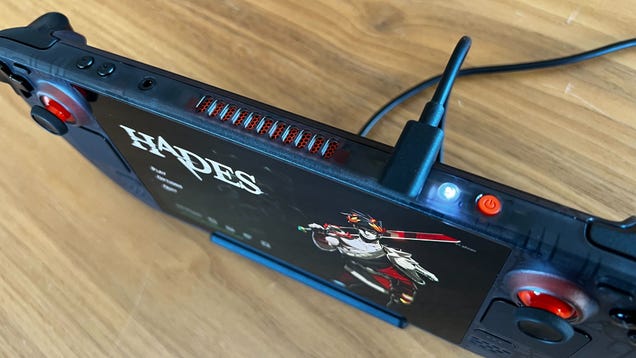
Are you enjoying that new Deck smell a little too much? Valve’s support staff are now telling users that they shouldn’t be huffing the exhaust from the Steam Deck’s grills for their health and safety, though there’s no recorded issue with folks taking a hit off their electronics’ cooling vents.

Read more…


Source: Gizmodo – Please Don’t Huff Fumes From Your Steam Deck

Trademarks May Offer Hints About Kojima's New Horror Game

Despite taking nearly 10 minutes on stage to promote his upcoming game at this year’s Game Awards, we don’t actually know a whole lot about Hideo Kojima’s OD, aside from the fact that it’s a horror game, has some famous actors, and makes use of Xbox’s cloud infrastructure in some way. Some internet sleuths, however,…

Read more…


Source: Kotaku – Trademarks May Offer Hints About Kojima’s New Horror Game

Google Fiber's Blistering 20 Gig Service With Wi-Fi 7 Is Here For $250 Per Month

Google Fiber's Blistering 20 Gig Service With Wi-Fi 7 Is Here For $250 Per Month
We sure have come a long way since the days of dial-up internet access, which for you young folk, was really, really slow compared to what’s available today. As in, you were boss level if you upgraded to a 56.6K baud modem, and achieved god-tier status if you were one of the first to jump aboard DSL or cable. And now? God-tier status on the

Source: Hot Hardware – Google Fiber’s Blistering 20 Gig Service With Wi-Fi 7 Is Here For 0 Per Month

Netflix finally reveals viewing data across its entire catalog

Read 14 remaining paragraphs | Comments


Source: Ars Technica – Netflix finally reveals viewing data across its entire catalog

How To Prevent Xbox From Nuking Your Saved Progress In Baldur's Gate 3

How To Prevent Xbox From Nuking Your Saved Progress In Baldur's Gate 3
The technical difficulties continue for Baldur’s Gate 3 on Xbox, with players experiencing the loss of game save files. It’s another stumbling block for the game on the platform, with Xbox gamers needing to wait months to play the game after it was released on other platforms. This is because the developers were struggling to get the entire

Source: Hot Hardware – How To Prevent Xbox From Nuking Your Saved Progress In Baldur’s Gate 3

Netflix's 2024 game lineup includes Game Dev Tycoon, Sonic Mania and a Cozy Grove sequel

By the end of this year, Netflix will have already released 86 games, and it has no plans to slow down its gaming ambitions anytime soon. The streaming company already has an initial lineup of titles to add to its library in 2024, including Game Dev Tycoon. In the oddly engaging indie business simulator, you can build your own gaming company and create your own video games. You can even research new technologies in your field and invent your own game types like a real developer. 

Sonic Mania Plus, which was originally released for consoles and for PC through Steam, will also debut on mobile through Netflix. The enhanced version of Sonic Mania adds Sonic’s friends, Mighty the Armadillo and Ray the Flying Squirrel, as well as a new mode to the game. Spry Fox is releasing the sequel to its life sim Cozy Grove, as well. Cozy Grove: Camp Spirit introduces new activities, including one wherein you can powerwash a ghost with a blowfish and new furry companions with abilities of their own. And if you’re a fan of Barbie, fashion and dress-up games, there’s Fashionverse, where you can style models and even create outfits for them. Netflix says it’s an AI-enhanced title that puts 3D models against photorealistic backgrounds. 

In addition to announcing some of the games it’s rolling out next year, Netflix Games has also taken a look back at its updates and releases for 2023. It launched 40 games this year, which already include the definitive edition of the Grand Theft Auto Trilogy that will be available starting tomorrow. The streaming company’s gaming arm also debuted two internally developed titles: Night School’s Oxenfree II: Lost Signals and Boss Fight Entertainment’s interactive game, Netflix Stories: Love is Blind. Finally, the company started testing the ability to play its games on smart TVs and browsers in select regions with the intention of eventually making its titles playable on any device. 

This article originally appeared on Engadget at https://www.engadget.com/netflixs-2024-game-lineup-includes-game-dev-tycoon-sonic-mania-and-a-cozy-grove-sequel-160014745.html?src=rss

Source: Engadget – Netflix’s 2024 game lineup includes Game Dev Tycoon, Sonic Mania and a Cozy Grove sequel

Google Debuts Imagen 2 With Text and Logo Generation

Google’s making the second generation of Imagen, its AI model that can create and edit images given a text prompt, more widely available — at least to Google Cloud customers using Vertex AI who’ve been approved for access. From a report: But the company isn’t disclosing which data it used to train the new model — nor introducing a way for creators who might’ve inadvertently contributed to the data set to opt out or apply for compensation.

Called Imagen 2, Google’s enhanced model — which was quietly launched in preview at the tech giant’s I/O conference in May — was developed using technology from Google DeepMind, Google’s flagship AI lab. Compared to the first-gen Imagen, it’s “significantly” improved in terms of image quality, Google claims (the company bizarrely refused to share image samples prior to this morning), and introduces new capabilities including the ability to render text and logos. “If you want to create images with a text overlay — for example, advertising — you can do that,” Google Cloud CEO Thomas Kurian said during a press briefing on Tuesday.

Read more of this story at Slashdot.


Source: Slashdot – Google Debuts Imagen 2 With Text and Logo Generation

The 12 Buggiest Video Games Of 2023

We made it. After a tumultuous 11 months of really high highs (the games) and really low lows (the layoffs), we’re finally rounding out the last month of 2023. Good riddance. And to really underscore that goodbye, we here at Kotaku thought it’d be fitting to take a look back at what felt like the longest year yet to…

Read more…


Source: Kotaku – The 12 Buggiest Video Games Of 2023

How to Make Your Solar Panels Last Longer Than 25 Years

Solar panels are expensive, even after a tax credit. But the good news is that they last for a really long time. (We’re talking about decades here.) It’s not uncommon for a solar panel to last around 25 years. If you’re planning to get a solar power system installed, or you already have one, you might be wondering, “How can I make sure these things go the distance?”

How long can solar panels last?

Thanks to recent developments, solar panels can last a really long time. New systems can come with a 25-year warranty. But the materials used in the panel, glass, and aluminum, are durable enough that they can sometimes last 30, 40, or even 50 years. 

What fails is the electrical components, and many times it’s the fault of the power inverter—the one that converts DC power to AC power. But this can be replaced without even detaching the panel itself. The solar panel itself is modular, so you can replace individual electronic components that have gone bad. You keep doing this and the panel itself can last for decades to come. (But is it the same solar panel you originally bought, asks Plutarch?)

The elements inside the solar panel degrade quite slowly. Most panels have a degradation rate of around 0.5% a year, and if the degradation is faster, the warranty will cover it. Most panels don’t degrade that quickly. Even at the median rate, your panel should still be producing 90% of its original output after 20 years. The world’s first modern solar panel was still producing energy at the age of 60, at least back in 2010. 

How to make your solar panels last longer

Here are a couple of steps you can take to make sure that your solar panels work well past the 25-year mark.

Use a trustworthy installer

There aren’t many choices when it comes to solar panels. There’s no magic “Pro Max” version of solar cells that’s going to be better for you. Solar panels are all mostly the same.

Instead, you should focus on finding a trustworthy installer. Ask around for a personal recommendation, or look for the best option in your local area. And don’t be afraid to ask questions to figure out if they know what they’re talking about. Consider asking things like:

  • How long have you been in business?

  • What components are covered in warranty and for how long?

  • What happens if a part of my system breaks?

  • Can you break down the total cost of my system?

  • How can I track my solar panel performance?

During installation, make sure the panels are installed at the correct angle for optimum electricity generation. Choose an angle that will receive the most amount of sunlight across the year. 

Clean it regularly

A layer of dust will reduce the efficiency of your panels, and over time, it might end up damaging the components as well. Make sure to clean the panels regularly. You can’t walk on the panels, but it’s okay to hose them down. You can also use a push broom to brush away debris—just make sure you don’t apply too much pressure. 

Monitor regularly 

To know how the panels are working, you should monitor their power generation from time to time. Solar power systems are passive, and they also have a safety, auto-shut-off switch. This can get tripped during power surges, or your kids might end up doing it accidentally. 

It’s better to keep an eye on the telemetric display, to see that the power system is enabled and that it’s generating electricity at a proper, and constant rate. If not, it’s time for a checkup. 

Regular maintenance will go a long way

While a solar panel will last for 25 years or more, it might not make it if you plan to just leave it on its own for 25 years. The technology associated with the panel, like wires and electrical components, will require care and replacement now and then, so you should sign up for regular inspections of the solar panel system. 


Source: LifeHacker – How to Make Your Solar Panels Last Longer Than 25 Years

Tesla's latest Optimus robot can handle an egg without breaking it

Tesla has offered a look at the latest version of its Optimus robot. In a new video, the second-gen humanoid machine appears to have greater dexterity than its predecessor, though you’ll likely have to wait quite a while longer before you can pick up one of these to help around the house. Milan Kovac, who works on the Optimus project, noted on X that the footage is in real-time and that there was no CGI involved.

While the previous version of Optimus struggled to walk during a live demo, the latest model is able to move with more grace, perhaps thanks to its Tesla-designed actuators and sensors. The machine has an actuated neck with two degrees of freedom and it’s said to be 30 percent faster at walking while mimicking the geometry of human feet.

The second-gen Optimus has a sleeker design and Tesla says it has been able to reduce the weight of the robot by 10 kilograms without sacrificing any functionality. The company claims this model has improved balance and full-body control — it’s shown squatting and getting back up in the video.

Among the biggest upgrades are to the hands. Tesla says these now have 11 degrees of freedom and they can move more quickly. Optimus is able to handle objects more delicately, as shown by a demo of it picking up and gently placing down an egg. These all seem like marked improvements over the last iteration of Optimus, which we first saw in September last year.

While the robot looks mechanically more impressive than its predecessor, that’s only one piece of the puzzle, as Electrek points out. If the robot is to be used in the real world as a “general purpose, bi-pedal, humanoid robot capable of performing tasks that are unsafe, repetitive or boring” (as Tesla is aiming for), it will need to have a robust artificial intelligence that allows it to operate safely and independently. 

That’s likely many years away from becoming a reality, particularly when Tesla has had problems with the AI features of its cars. In fact, the company just recalled nearly every car it has shipped in the US to fix issues with the Autopilot system.

This article originally appeared on Engadget at https://www.engadget.com/teslas-latest-optimus-robot-can-handle-an-egg-without-breaking-it-154610781.html?src=rss

Source: Engadget – Tesla’s latest Optimus robot can handle an egg without breaking it

Tesla recalls every car with Autopilot as feds say it’s too easily misused

Elon Musk and Barbara Walters in a Tesla. Musk has his hands off the steering wheel as the car is driving.

Enlarge / Tesla says that Autopilot users should always keep both hands on the steering wheel. (credit: CBS)

More than 2 million Tesla electric vehicles are subject to a new safety recall today. At issue is the much-criticized Autopilot driver-assistance feature, more specifically the Autosteer component.

At one time, Tesla claimed that Autosteer cut crashes by 40 percent—a statistic that turned out to be completely false once a third party analyzed the data. Now, following an ongoing engineering analysis by the National Highway Safety Administration Office of Defects Investigation that found Tesla has inadequate driver monitoring and that the system could lead to “foreseeable misuse,” the automaker has finally reacted.

Autopilot is Tesla’s name for a suite of advanced driver assistance systems, but the two principal components are “traffic-aware cruise control” and Autosteer. The former maintains the car’s speed relative to a vehicle in front, and the latter reads lane markers on the road and keeps the car between them. The system was originally based on one supplied by Mobileye, although that relationship broke down, and Tesla was dropped as a customer by Mobileye due to Mobileye’s concern that Tesla was “pushing the envelope in terms of safety.”

Read 14 remaining paragraphs | Comments


Source: Ars Technica – Tesla recalls every car with Autopilot as feds say it’s too easily misused

Apple Makes It Harder for Police to Access Your Push Notifications

Apple says it now requires a judge’s consent before it will hand over your push notification data to law enforcement or government officials, according to an update of Apple’s Legal Process Guidelines on Tuesday. Senator Ron Wyden wrote a letter to the Department of Justice last week accusing foreign governments of…

Read more…


Source: Gizmodo – Apple Makes It Harder for Police to Access Your Push Notifications

Change These Seven Settings on Your New Samsung Galaxy Z Fold 5

If you’ve taken the plunge on a Samsung Galaxy Z Fold 5 then you’re no doubt eager to take advantage of the benefits of a foldable phone over a traditional handset: The new device you’ve got in your pocket operates like a standard phone, but can also open out its main screen to a mini-tablet size, making it much more versatile.

It also means different settings and options are required that you won’t find on other phones—settings that control how the software interface responds to the dual screen setup (and the fact that one screen can be folded in half). These are some key settings that matter on the Galaxy Z Fold 5, and what you can do with them.

Extend flex mode

Samsung Galaxy Z Fold 5 settings

Credit: Lifehacker

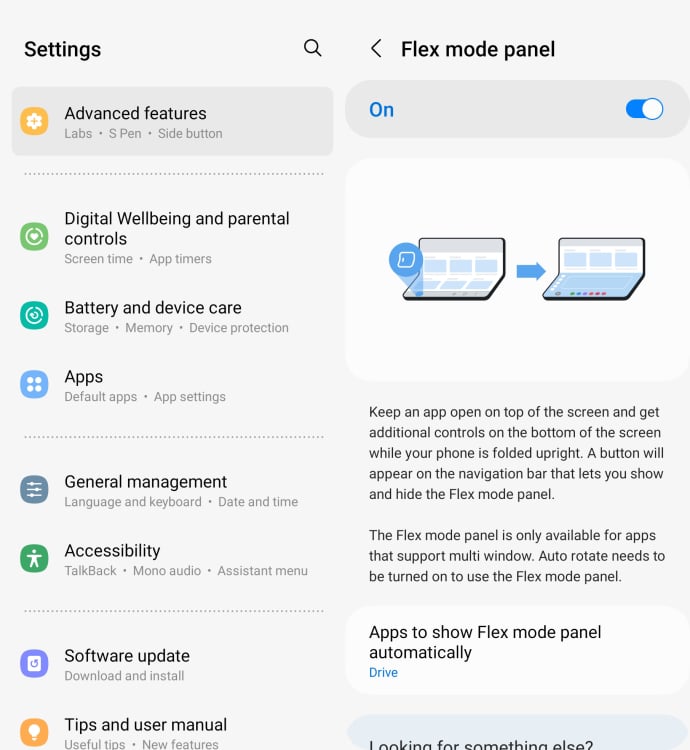
Flex mode is where you have your Galaxy Z Fold 5 partially folded over in a landscape orientation, almost like a tiny laptop, and the display splits accordingly. One app that takes advantage of this is YouTube, which puts your videos on the top half of the display, and playback controls on the bottom.

For apps that don’t have a special flex mode configuration, you can get a touchpad on the lower half of the display, plus shortcuts to split-screen mode and other settings. To make sure this layout also appears, head to Settings, then pick Advanced features, Labs, and Flex mode panel. The next screen lets you enable or disable flex mode, and bring up the touchpad in flex mode for apps that don’t specifically support it.

Always show the multi window menu

Samsung Galaxy Z Fold 5 settings

Credit: Lifehacker

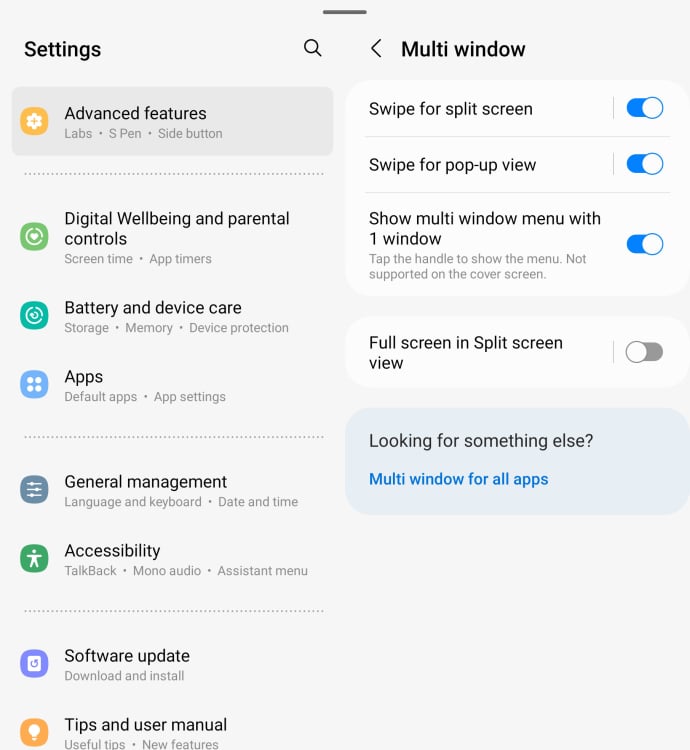
Part of the appeal of the Galaxy Z Fold 5 is you can run apps side by side on the main screen, or even in one quarter of the screen space. This can be managed in a variety of ways, including via the multi window menu—the small horizontal line that shows up at the top of apps when you have more than one app on screen at once.

For even more convenience, you can display this menu even with only one app on screen. For a start, it makes it easier to add a second window if you need to, or shrink down the current one. To make sure this menu is always at your disposal, open Settings, choose Advanced features, then enable Show multi window menu with 1 window.

Enable multi window for all apps

Samsung Galaxy Z Fold 5 settings

Credit: Lifehacker

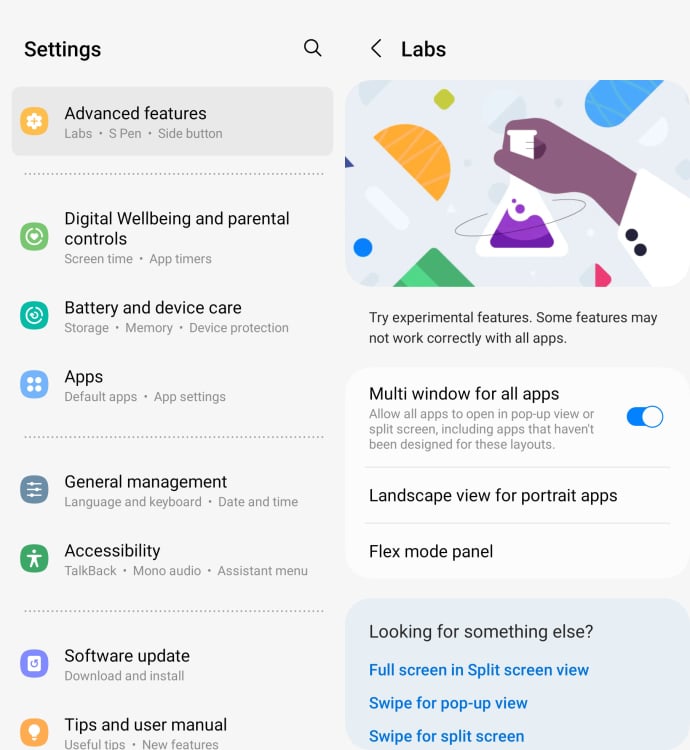
I’ve already mentioned the flexibility that multiple windows can offer you on the main screen, but not every app has been designed to show up on half of the screen or a pop-up window. You can still force apps to be used in this way by opening Settings, then picking Advanced features and Labs, and enabling Multi window for all apps. (Just be prepared for results of varying quality.)

Switch apps between displays

Samsung Galaxy Z Fold 5 settings

Credit: Lifehacker

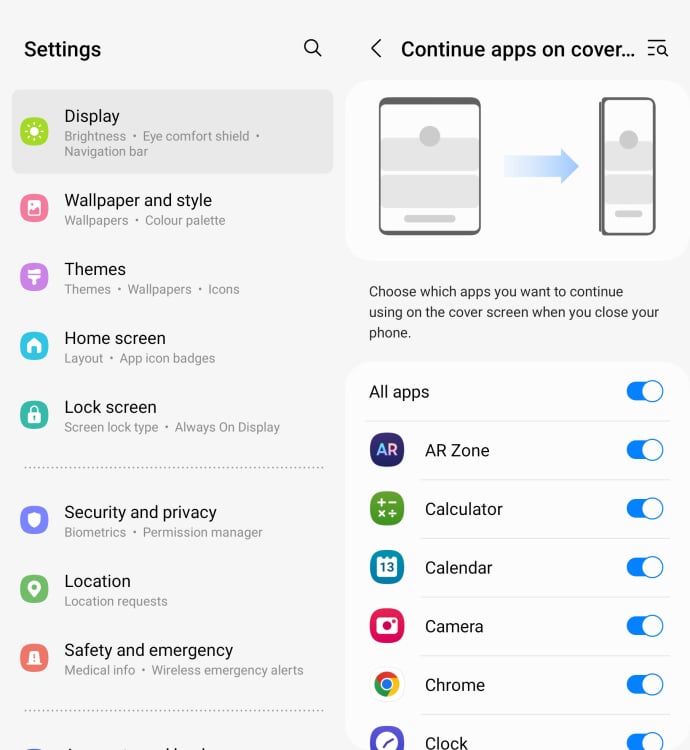
By default, if you’re using an app on the main display of the Galaxy Z Fold 5 and then close the phone, the same app won’t then show up on the smaller cover display on the outside of the device.

You can change this if you want, though: From Settings, pick Display, and then Continue apps on cover screen. You can then pick specific apps that will flow from the main screen to the cover screen, or set them all to behave like this. If you’re going in the other direction—using an app on the outer display and then opening up the phone—the app will always jump to the larger screen automatically. There’s no way to change this behavior.

Keep your home screens in sync

Samsung Galaxy Z Fold 5 settings

Credit: Lifehacker

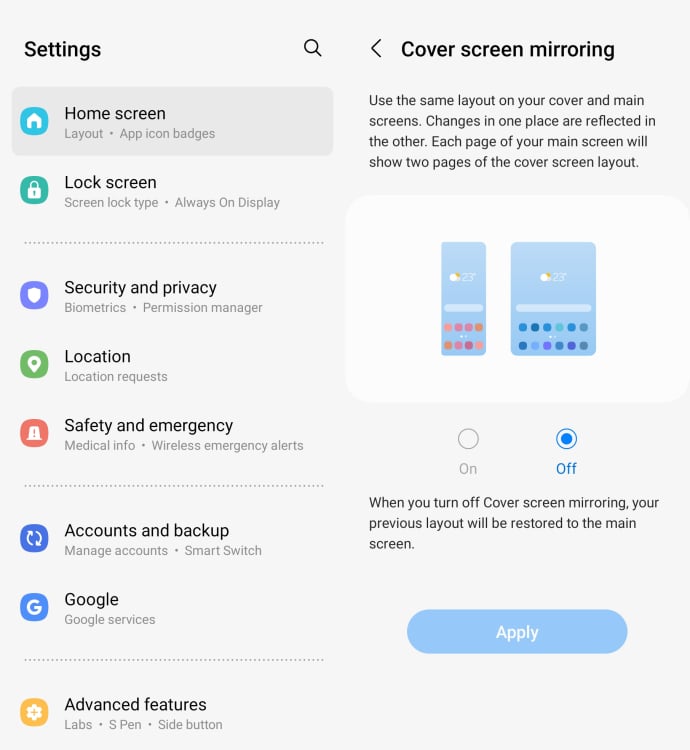
Out of the box, the Galaxy Z Fold 5 will keep the home screens for the inner display and the outer display separate, so changes you make (in terms of widgets or shortcuts) will be kept separate, depending on the screen you’re using.

You can get a more consistent and seamless experience by mirroring the home screens across these two displays. Launch Settings, then choose Home screen and select Cover screen mirroring to turn it on. The cover screen is of course smaller than the main display, so you’ll have to swipe across to see everything. (The main display home screen won’t be squashed to fit.)

Tweak the taskbar

Samsung Galaxy Z Fold 5 settings

Credit: Lifehacker

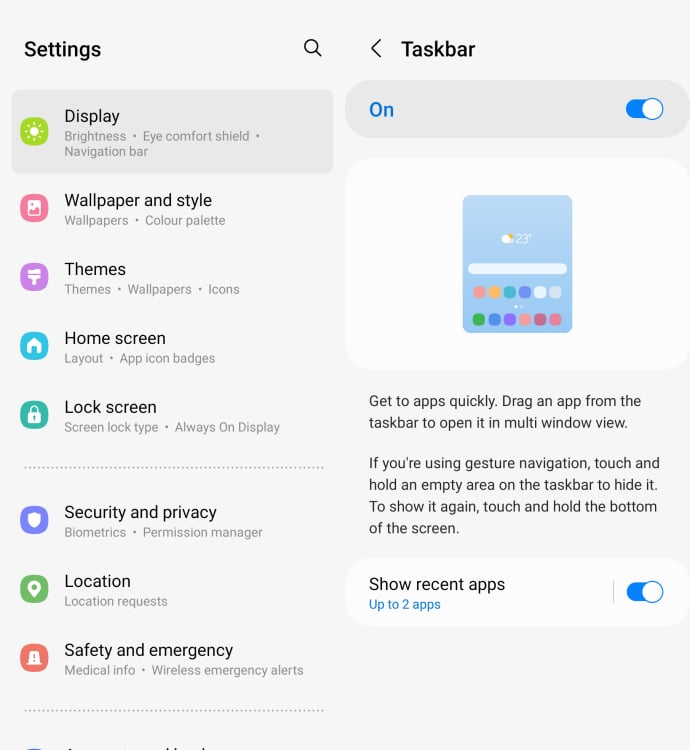
The Galaxy Z Fold 5 has a Windows-style taskbar on its main display to make it easier to jump between apps and to bring them up alongside each other. If you pick Display and then Taskbar from Settings, you can toggle this taskbar on or off, as well as choose how many recent apps (two, three or four) are shown on it.

Force apps to go full screen

Samsung Galaxy Z Fold 5 settings

Credit: Lifehacker

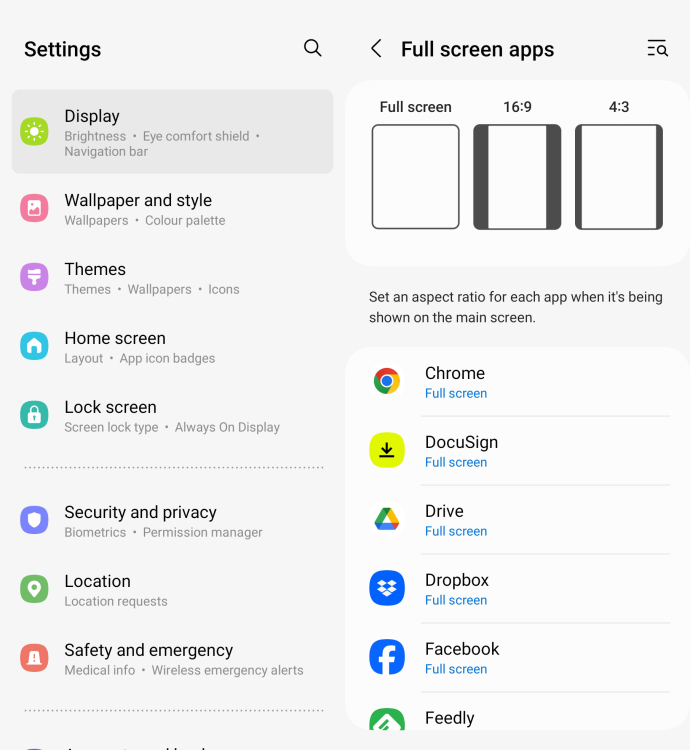
In a perfect world, every Android app would be optimized to run on a large, 1812 x 2176 pixel display like the Galaxy Z Fold 5 has. But we don’t live in a perfect world. As a result, certain apps may look a little odd on the main display, with black bars down the sides.

To force apps to fill the available space, choose Display from Settings, and then Full screen apps. From here you can select installed apps, and force them to run full screen. If an app doesn’t look right, you can also limit it to a more standard 16:9 or 4:3 aspect ratio.


You can pick up a Galaxy Z Fold 5 for 22% off on Amazon as of this article:


Source: LifeHacker – Change These Seven Settings on Your New Samsung Galaxy Z Fold 5

How worried should we be about the “AutoSpill” credential leak in Android password managers?

Read 31 remaining paragraphs | Comments


Source: Ars Technica – How worried should we be about the “AutoSpill” credential leak in Android password managers?

NASA Scrambles To Fix A Serious Glitch In Voyager 1 Probe 15 Billion Miles Away

NASA Scrambles To Fix A Serious Glitch In Voyager 1 Probe 15 Billion Miles Away
NASA’s interstellar Voyage 1 spacecraft has encountered a glitch and needs repaired from 15 billion miles away. For the time being, the spacecraft cannot send any legible science or engineering data back to Earth.

NASA says that the Voyager 1 spacecraft has traveled farther than any other craft to date. The space agency has reported that

Source: Hot Hardware – NASA Scrambles To Fix A Serious Glitch In Voyager 1 Probe 15 Billion Miles Away