
Explore Voyager 23.10, the Ubuntu-based Linux distro with a sleek design and improved performance. Discover its unique features and what sets it apart.
Source: LXer – Voyager 23.10: A Polished GNOME Experience with Extra Flair
Category Archives: Linux
Best Free and Open-Source Alternatives to Adobe Scan
Adobe Scan provides a portable scanner that recognizes text automatically (OCR) and allows you to save to multiple files formats, including PDF and JPEG. We recommend the best free and open-source alternatives to the proprietary software.
The post Best Free and Open-Source Alternatives to Adobe Scan appeared first on Linux Today.
Source: Linux Today – Best Free and Open-Source Alternatives to Adobe Scan
MariaDB Corporation Is Going Through Tough Days, Here’s Why
MariaDB Corporation makes major changes, cutting 28% of its workforce and ending SkySQL & Xpand development to curb operating expenses.
Source: LXer – MariaDB Corporation Is Going Through Tough Days, Here’s Why
GNOME Foundation Names A New Executive Director
The GNOME Foundation has named a new Executive Director for overseeing the foundation responsible for this leading open-source desktop environment…
Source: Phoronix – GNOME Foundation Names A New Executive Director
How to Install VMware Workstation on Linux Systems
This tutorial will show how to install VMware Workstation 17 Pro on RHEL-based distributions such as CentOS, Fedora, Rocky Linux, and AlmaLinux, as well as on Debian-based distributions such as Ubuntu and Linux Mint.
The post How to Install VMware Workstation on Linux Systems appeared first on Linux Today.
Source: Linux Today – How to Install VMware Workstation on Linux Systems
Intel Arc Graphics A580 On Linux: Open-Source Graphics For Under $200
Last week Intel announced the Arc Graphics A580 as a new mid-range DG2/Alchemist graphics card option that comes in between the entry-level Arc Graphics A380 and the higher-end Arc Graphics A750/A770. With the Arc Graphics A580 coming in at under $200, it’s quite an interesting graphics card for those after open-source Linux driver support and/or those wanting to experiment with Intel’s growing oneAPI software ecosystem with excellent open-source GPU compute support.
Source: Phoronix – Intel Arc Graphics A580 On Linux: Open-Source Graphics For Under 0
How to Save And Restore Tmux Environments Across Reboots in Linux
In this tutorial, we will discuss the two Tmux plugins that work together to save and restore your Tmux sessions with minimal configuration.
The post How to Save And Restore Tmux Environments Across Reboots in Linux appeared first on Linux Today.
Source: Linux Today – How to Save And Restore Tmux Environments Across Reboots in Linux
VirtualBox 7.0.12 Adds Initial Support for Linux 6.6, openSUSE 15.5 Kernels
Oracle released today VirtualBox 7.0.12 as another maintenance update in the latest VirtualBox 7.0 series of this open-source, free, and cross-platform virtualization software for GNU/Linux, macOS, Solaris, and Windows systems.
The post VirtualBox 7.0.12 Adds Initial Support for Linux 6.6, openSUSE 15.5 Kernels appeared first on Linux Today.
Source: Linux Today – VirtualBox 7.0.12 Adds Initial Support for Linux 6.6, openSUSE 15.5 Kernels
How to Refresh and Reload Group Membership on Linux
In this guide, discover the easiest and fastest way to refresh user group membership information on Linux after adding them on groups like Docker.
The post How to Refresh and Reload Group Membership on Linux appeared first on Linux Today.
Source: Linux Today – How to Refresh and Reload Group Membership on Linux
[$] Improving C-library scalability with restartable sequences
The Linux kernel has supported restartable
sequences (sometimes referred to as “RSEQ”) since 2018, but it remains
a bit of a niche feature, mostly useful to performance-oriented developers
who do not mind writing assembly code. According to Mathieu Desnoyers, the
behind the kernel’s implementation of restartable sequences, this feature
can be applicable to a much wider range of performance-sensitive code with
proper library support. He came to the 2023 GNU Tools Cauldron to
present the case for use of restartable sequences within the GNU C Library
(glibc).
Source: LWN.net – [$] Improving C-library scalability with restartable sequences
How to Create Symbolic Links in Ubuntu 22.04
This tutorial explains how to create Symbolic Links in Ubuntu 22.04 LTS Jammy Jellyfish with examples and explanations.
The post How to Create Symbolic Links in Ubuntu 22.04 appeared first on Linux Today.
Source: Linux Today – How to Create Symbolic Links in Ubuntu 22.04
NVIDIA R545 Linux Beta Driver Brings HDMI Deep Color, Night Color & FB Consoles
NVIDIA today published their first R545 Linux driver beta series with a number of shiny new features…
Source: Phoronix – NVIDIA R545 Linux Beta Driver Brings HDMI Deep Color, Night Color & FB Consoles
Debian Repeals The Merged "/usr" Movement Moratorium
Debian 12 had aimed to have a merged “/usr” file-system layout similar to other Linux distributions, but The Debian Technical Committee earlier this year decided to impose a merged-/usr file movement moratorium. But now with Debian 12 having been out for a few months, that moratorium has been repealed…
Source: Phoronix – Debian Repeals The Merged “/usr” Movement Moratorium
AMD Takes SEV-SNP Hypervisor To v10, Intel TDX Host Support Up To 14 Revisions
Both AMD and Intel engineers have experienced a lengthy journey getting their latest virtualization security features into the mainline Linux kernel — and one that is still ongoing…
Source: Phoronix – AMD Takes SEV-SNP Hypervisor To v10, Intel TDX Host Support Up To 14 Revisions
Intel's Habana Labs Driver Finishes Adapting To The Linux Accel Subsystem
In addition to Intel putting the finishing touches on Meteor Lake graphics support for the upcoming Linux 6.7 cycle, Intel’s Habana Labs AI accelerator driver also has some notable changes for this next kernel version…
Source: Phoronix – Intel’s Habana Labs Driver Finishes Adapting To The Linux Accel Subsystem
Google Proposes New mseal() Memory Sealing Syscall For Linux
Google is proposing a new mseal() memory sealing system call for the Linux kernel. Google intends for this architecture independent system call to be initially used by the Google Chrome web browser on Chrome OS while experiments are underway for use by Glibc in the dynamic linker to seal all non-writable segments at startup…
Source: Phoronix – Google Proposes New mseal() Memory Sealing Syscall For Linux
Young children’s ScratchJr coding projects: Assessment and support
Block-based programming applications like Scratch and ScratchJr provide millions of children with an introduction to programming; they are a fun and accessible way for beginners to explore programming concepts and start making with code. ScratchJr, in particular, is designed specifically for children between the ages of 5 and 7, enabling them to create their own interactive stories and games. So it’s no surprise that they are popular tools for primary-level (K–5) computing teachers and learners. But how can teachers assess coding projects built in ScratchJr, where the possibilities are many and children are invited to follow their imagination?

In the latest seminar of our series on computing education for primary-aged children, attendees heard about two research studies that explore the use of ScratchJr in K–2 education. The speaker, Apittha (Aim) Unahalekhala, is a graduate researcher at the DevTech Research Group at Tufts University. The two studies looked at assessing young children’s ScratchJr coding projects and understanding how they create projects. Both of the studies were part of the Coding as Another Language project, which sees computer science as a new literacy for the 21st century, and is developing a literacy-based coding curriculum for K–2.
How to evaluate children’s ScratchJr projects
ScratchJr offers children 28 blocks to choose from when creating a coding project. Some of these are simple, such as blocks that determine the look of a character or setting, while others are more complex, such as messaging blocks and loops. Children can combine the blocks in many different ways to create projects of different levels of complexity.

At the start of her presentation, Aim described a rubric that she and her colleagues at DevTech have developed to assess three key aspects of a ScratchJr coding project. These aspects are coding concepts, project design, and purposefulness.
The rubric lets educators or researchers:
- Assess learners’ ability to use their coding knowledge to create purposeful and creative ScratchJr projects
- Identify the level of mastery of each of the three key aspects demonstrated within the project
- Identify where learners might need more guidance and support
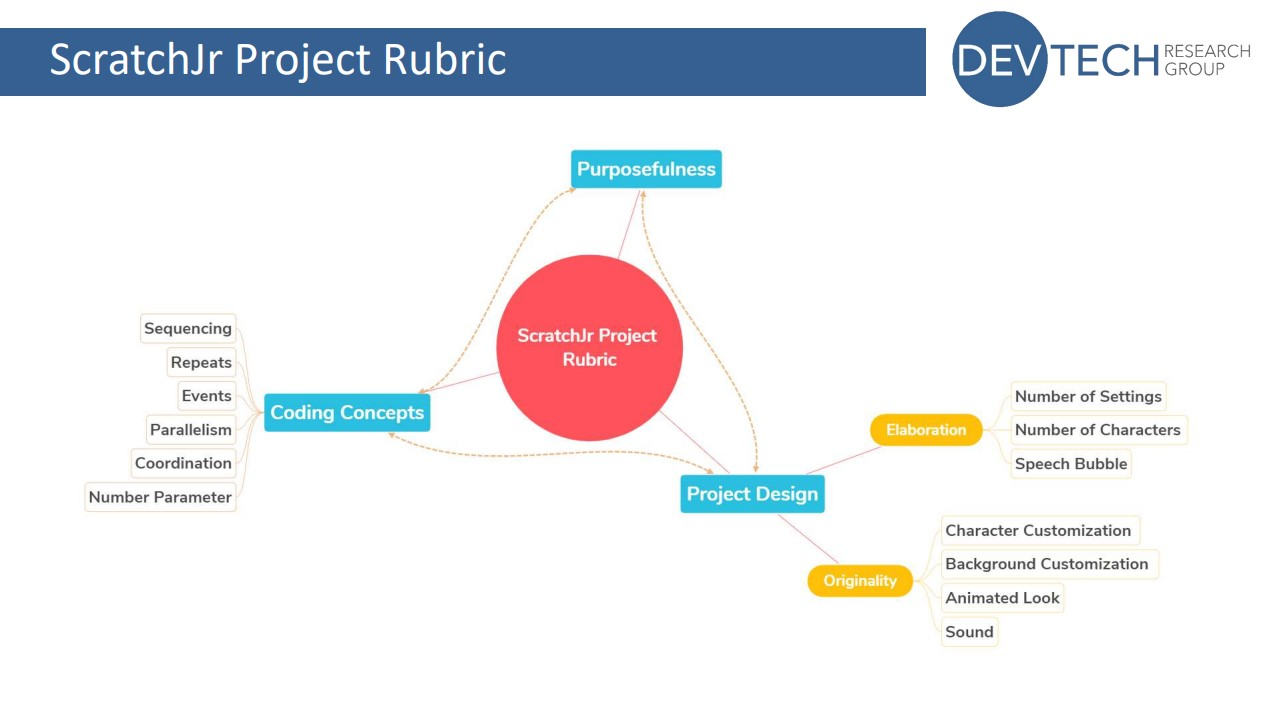
As part of the study, Aim and her colleagues collected coding projects from two schools at the start, middle, and end of a curriculum unit. They used the rubric to evaluate the coding projects and found that project scores increased over the course of the unit.
They also found that, overall, the scores for the project design elements were higher than those for coding concepts: many learners enjoyed spending lots of time designing their characters and settings, but made less use of other features. However, the two scores were correlated, meaning that learners who devoted a lot of time to the design of their project also got higher scores on coding concepts.
The rubric is a useful tool for any teachers using ScratchJr with their students. If you want to try it in your classroom, the validated rubric is free to download from the DevTech research group’s website.
How do young children create a project?
The rubric assesses the output created by a learner using ScratchJr. But learning is a process, not just an end outcome, and the final project might not always be an accurate reflection of a child’s understanding.
By understanding more about how young children create coding projects, we can improve teaching and curriculum design for early childhood computing education.
In the second study Aim presented, she set out to explore this question. She conducted a qualitative observation of children as they created coding projects at different stages of a curriculum unit, and used Google Analytics data to conduct a quantitative analysis of the steps the children took.

Her findings highlighted the importance of encouraging young learners to explore the full variety of blocks available, both by guiding them in how to find and use different blocks, and by giving them the time and tools they need to explore on their own.
She also found that different teaching strategies are needed at different stages of the curriculum unit to support learners. This helps them to develop their understanding of both basic and advanced blocks, and to explore, customise, and iterate their projects.
Early-unit strategy:
- Encourage free play to self-discover different functions, especially basic blocks
Mid-unit strategy:
- Set plans on how long children will need on customising vs coding
- More guidance on the advanced blocks, then let children explore
End-of-unit strategy:
- Provide multiple sessions to work
- Promote iteration by encouraging children to keep improving code and adding details

You can watch Aim’s full presentation here:
You can also access the seminar slides here.
Join our next seminar on primary computing education
At our next seminar, we welcome Aman Yadav (Michigan State University), who will present research on computational thinking in primary school. The session will take place online on Tuesday 7 November at 17:00 UK time. Don’t miss out and sign up now:
To find out more about connecting research to practice for primary computing education, you can find the rest of our upcoming monthly seminars on primary (K–5) teaching and learning and watch the recordings of previous seminars in this series.
The post Young children’s ScratchJr coding projects: Assessment and support appeared first on Raspberry Pi Foundation.
Source: Raspberry Pi – Young children’s ScratchJr coding projects: Assessment and support
OpenWrt 23.05 Adds Support for over 200 New Devices
OpenWrt 23.05 is here, supporting over 1790 devices, and introduces the ability to include rust-written programs. Here’s what’s new!
Source: LXer – OpenWrt 23.05 Adds Support for over 200 New Devices
Weston 13 Alpha Released With New Backends, Other Improvements
Weston 13.0 Alpha was released today as the next iteration of this reference Wayland compositor…
Source: Phoronix – Weston 13 Alpha Released With New Backends, Other Improvements
35+ Advanced Examples of the Find Command in Linux
In this guide, we will talk about the most common and useful find command examples with detailed explanations. The find command is an advanced tool for searching files or directories rigorously in your file system, taking a little longer time than its alternative tools like the locate command.
The post 35+ Advanced Examples of the Find Command in Linux appeared first on Linux Today.
Source: Linux Today – 35+ Advanced Examples of the Find Command in Linux