
Feature development on GCC 14 is now largely over with today marking the start of their stage three of development that is the “general bugfixing mode” and moving past new features for this next annual GNU Compiler Collection release…
Source: Phoronix – GCC 14 Shifts From Feature Development To “General Bugfixing” Mode
Category Archives: Linux
Etnaviv NPU Open-Source Driver Now Twice As Fast For Image Classification Workloads
Tomeu Vizoso has been leading the effort for supporting Vivante’s NPU IP within the Etnaviv driver that began as a reverse-engineered driver for Vivante graphics. The Vivante NPU architecture ends up being close to the graphics cores and Vizoso has been making good progress for enabling the NPUs on this open-source stack. The latest achievement is image classification workloads now running about twice as fast as previously…
Source: Phoronix – Etnaviv NPU Open-Source Driver Now Twice As Fast For Image Classification Workloads
Distrobox 1.6 Released For Easily Launching New Distros Within Your Terminal
Distrobox 1.6 released on Sunday for this open-source project that makes it wasy to launch any Linux distribution inside your terminal. Distrobox builds upon Podman and Docker to allow creating containers of the Linux distribution of your choice and for that to integrate nicely with the host environment. With succeeding releases, Distrobox has built up quite an arsenal of features…
Source: Phoronix – Distrobox 1.6 Released For Easily Launching New Distros Within Your Terminal
Support for new computing teachers: A tool to find Scratch programming errors
We all know that learning to program, and specifically learning how to debug or fix code, can be frustrating and leave beginners overwhelmed and disheartened. In a recent blog article, our PhD student Lauria at the Raspberry Pi Computing Education Research Centre highlighted the pivotal role that teachers play in shaping students’ attitudes towards debugging. But what about teachers who are coding novices themselves?

In many countries, primary school teachers are holistic educators and often find themselves teaching computing despite having little or no experience in the field. In a recent seminar of our series on computing education for primary-aged children, Luisa Greifenstein told attendees that struggling with debugging and negative attitudes towards programming were among the top ten challenges mentioned by teachers.

Luisa is a researcher at the University of Passau, Germany, and has been working closely with both teacher trainees and experienced primary school teachers in Germany. She’s found that giving feedback to students can be difficult for primary school teachers, and especially for teacher trainees, as programming is still new to them. Luisa’s seminar introduced a tool to help.
A unique approach: Visualising debugging with LitterBox
To address this issue, the University of Passau has initiated the primary::programming project. One of its flagship tools, LitterBox, offers a unique solution to debugging and is specifically designed for Scratch, a beginners’ programming language widely used in primary schools.
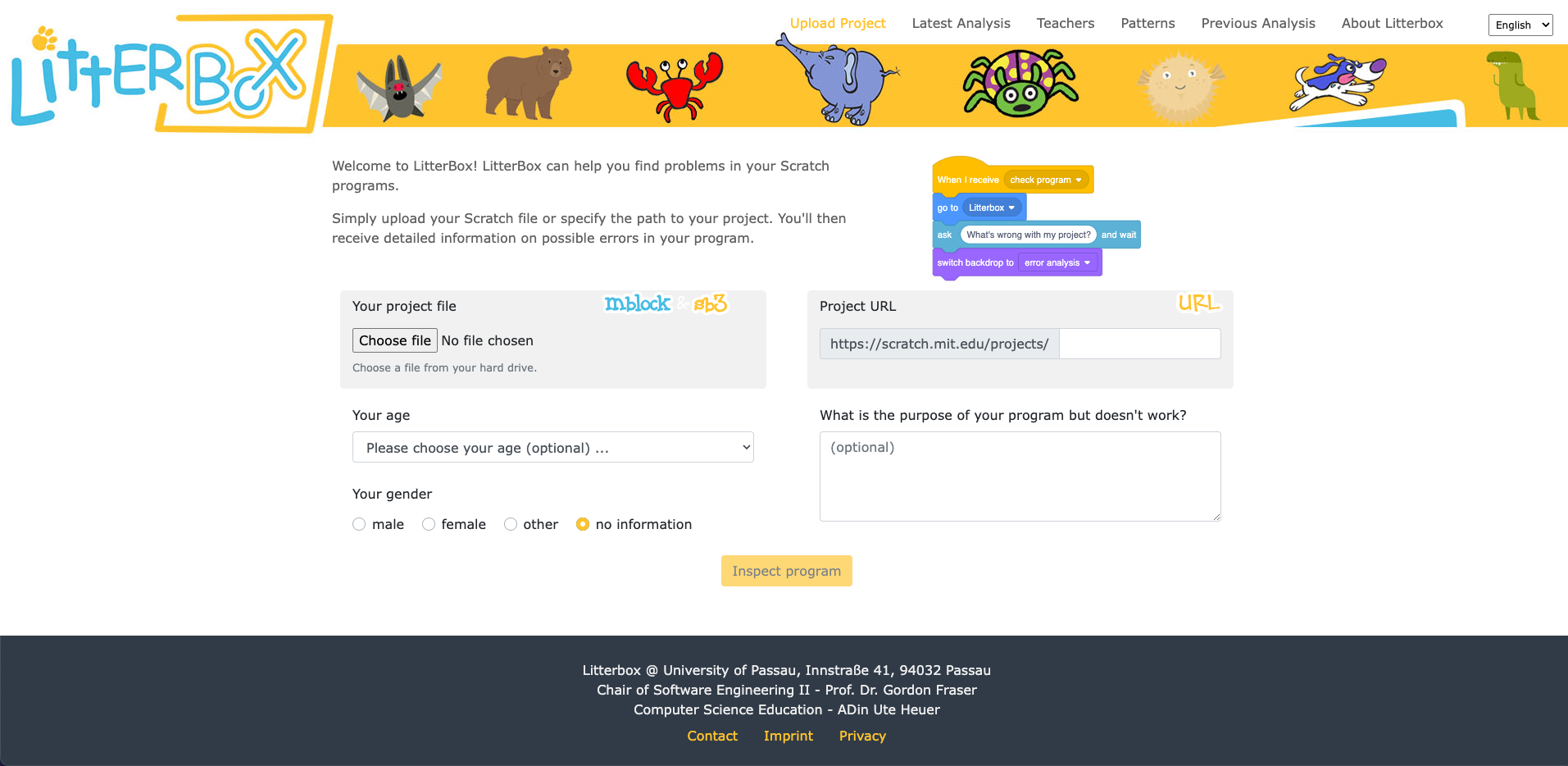
LitterBox serves as a static code debugging tool that transforms code examination into an engaging experience. With a nod to the Scratch cat, the tool visualises the debugging of Scratch code as checking the ‘litterbox’, categorising issues into ‘bugs’ and ‘smells’:
- Bugs represent code patterns that have gone wrong, such as missing loops or specific blocks
- Smells indicate that the code couldn’t be processed correctly because of duplications or unnecessary elements
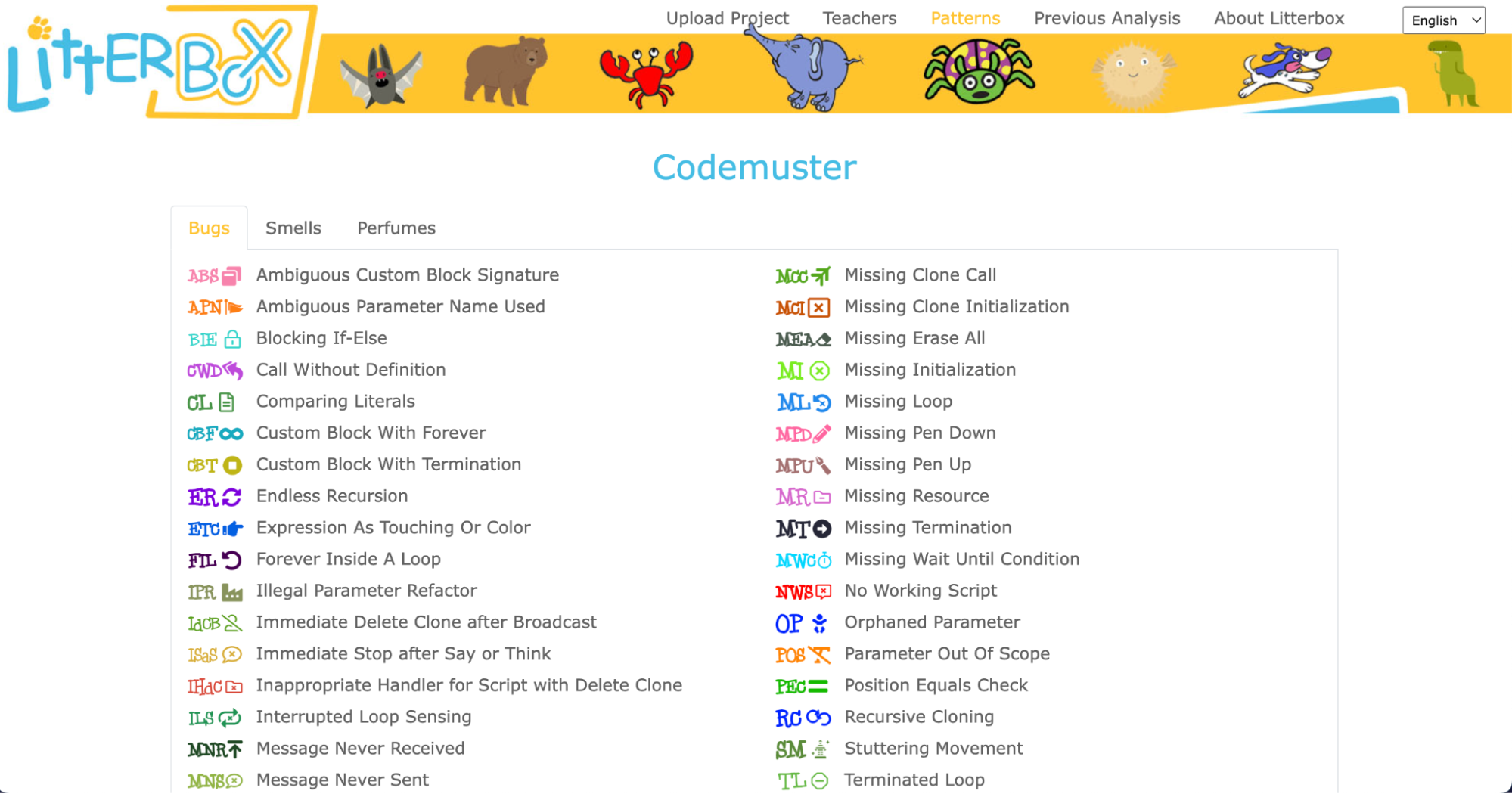
What sets LitterBox apart is that it also rewards correct code by displaying ‘perfumes’. For instance, it will praise correct broadcasting or the use of custom blocks. For every identified problem or achievement, the tool provides short and direct feedback.
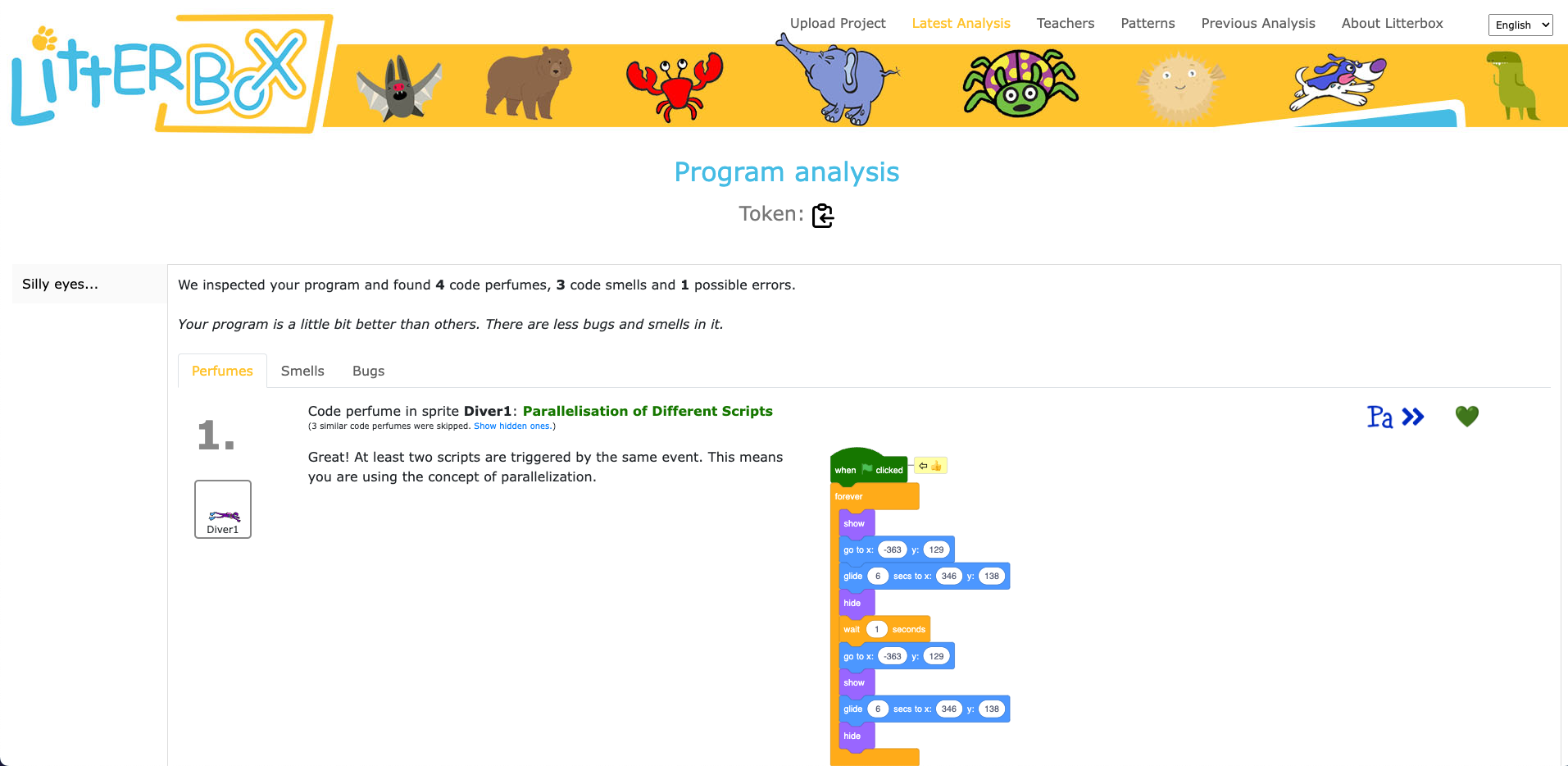
Luisa and her team conducted a study to gauge the effectiveness of LitterBox. In the study, teachers were given fictitious student code with bugs and were asked to first debug the code themselves and then explain in a manner appropriate to a student how to do the debugging.
The results were promising: teachers using LitterBox outperformed a control group with no access to the tool. However, the team also found that not all hints proved equally helpful. When hints lacked direct relevance to the code at hand, teachers found them confusing, which highlighted the importance of refining the tool’s feedback mechanisms.

Despite its limitations, LitterBox proved helpful in another important aspect of the teachers’ work: coding task creation. Novice students require structured tasks and help sheets when learning to code, and teachers often invest substantial time in developing these resources. While LitterBox does not guide educators in generating new tasks or adapting them to their students’ needs, in a second study conducted by Luisa’s team, teachers who had access to LitterBox not only received support in debugging their own code but also provided more scaffolding in task instructions they created for their students compared to teachers without LitterBox.
How to maximise the impact of new tools: use existing frameworks and materials
One important realisation that we had in the Q&A phase of Luisa’s seminar was that many different research teams are working on solutions for similar challenges, and that the impact of this research can be maximised by integrating new findings and resources. For instance, what the LitterBox tool cannot offer could be filled by:
- Pedagogical frameworks to enhance teachers’ lessons and feedback structures. Frameworks such as PRIMM (Predict, Run, Investigate, Modify, and Make) or TIPP&SEE for Scratch projects (Title, Instructions, Purpose, Play & Sprites, Events, Explore) can serve as valuable resources. These frameworks provide a structured approach to lesson design and teaching methodologies, making it easier for teachers to create engaging and effective programming tasks. Additionally, by adopting semantic waves in the feedback for teachers and students, a deeper understanding of programming concepts can be fostered.
- Existing courses and materials to aid task creation and adaptation. Our expert educators at the Raspberry Pi Foundation have not only created free lesson plans and courses for teachers and educators, but also dedicated non-formal learning paths for Scratch, Python, Unity, web design, and physical computing that can serve as a starting point for classroom tasks.
Exploring innovative ideas in computing education
As we navigate the evolving landscape of programming education, it’s clear that innovative tools like LitterBox can make a significant difference in the journey of both educators and students. By equipping educators with effective debugging and task creation solutions, we can create a more positive and engaging learning experience for students.
If you’re an educator, consider exploring how such tools can enhance your teaching and empower your students in their coding endeavours.
You can watch the recording of Luisa’s seminar here:
Sign up now to join our next seminar
If you’re interested in the latest developments in computing education, join us at one of our free, monthly seminars. In these sessions, researchers from all over the world share their innovative ideas and are eager to discuss them with educators and students. In our December seminar, Anaclara Gerosa (University of Edinburgh) will share her findings about how to design and structure early-years computing activities.
This will be the final seminar in our series about primary computing education. Look out for news about the theme of our 2024 seminar series, which are coming soon.
The post Support for new computing teachers: A tool to find Scratch programming errors appeared first on Raspberry Pi Foundation.
Source: Raspberry Pi – Support for new computing teachers: A tool to find Scratch programming errors
Kernel prepatch 6.7-rc2
The second 6.7 kernel prepatch is out for
testing. “The most noticeable thing is probably the turbostat tool
“
update, which actually came in during the merge window, but was delayed by
just waiting for getting the pull request properly signed.
Source: LWN.net – Kernel prepatch 6.7-rc2
Linux 6.7-rc2 Released: "Slightly Larger Than Average"
Linus Torvalds just released Linux 6.7-rc2 as the second test release of what will become Linux 6.7 stable around the end of the calendar year…
Source: Phoronix – Linux 6.7-rc2 Released: “Slightly Larger Than Average”
10 Best Open-Source Reverse Proxy Servers for Linux
In this article, we will review the 10 top open-source reverse proxy servers you can use on a Linux system.
The post 10 Best Open-Source Reverse Proxy Servers for Linux appeared first on Linux Today.
Source: Linux Today – 10 Best Open-Source Reverse Proxy Servers for Linux
How to Install VirtualBox Guest Additions in Ubuntu
Learn how to install VirtualBox guest additions in Ubuntu and other related Linux distributions and enable various features.
Source: LXer – How to Install VirtualBox Guest Additions in Ubuntu
18 Tar Command Examples in Linux
In this article, we will be reviewing and discussing various tar command examples, including how to create archive files using (tar, tar.gz, and tar.bz2) compression, how to extract archive files, extract a single file, view the content of the file, verify a file, add files or directories to the existing archive file, estimate the size of tar archive file, etc.
The post 18 Tar Command Examples in Linux appeared first on Linux Today.
Source: Linux Today – 18 Tar Command Examples in Linux
Polychromatic 0.8.3 Released For Latest Open-Source Razer Experience On Linux
In the absence of Razer providing any official drivers and GUI control panel for Linux systems, the OpenRazer independent open-source project for crafting reverse-engineered driver support and then the likes of Polychromatic as a graphical control utility make for a pleasant Linux experience for Razer hardware on Linux. Out today is a new Polychromatic release…
Source: Phoronix – Polychromatic 0.8.3 Released For Latest Open-Source Razer Experience On Linux
AMD AXI 1-Wire Driver Queued Ahead Of The Linux 6.8 Kernel
Narrowly missing the Linux 6.7 merge window that closed last week is the AMD 1-Wire “AXI” driver but it’s now on tap for the Linux 6.8 kernel in the new year…
Source: Phoronix – AMD AXI 1-Wire Driver Queued Ahead Of The Linux 6.8 Kernel
The AMD-Only TUXEDO Pulse 14 Gen3 Linux Laptop Unveiled: Featuring a Stunning 3K Display, Powerful Ryzen 7 7840HS CPU, and More!
After a rewarding two-year journey with the second generation of the AMD-powered TUXEDO Pulse Linux notebook, I’m thrilled to witness the launch of its highly anticipated successor – the TUXEDO Pulse 14 Gen3. Having found immense satisfaction in its performance, I eagerly look forward to exploring whether the new generation lives up to the high standards set by its predecessor and discovering the unique features that define this latest iteration.
Source: LXer – The AMD-Only TUXEDO Pulse 14 Gen3 Linux Laptop Unveiled: Featuring a Stunning 3K Display, Powerful Ryzen 7 7840HS CPU, and More!
Open-Source Graphics DevRoom Returning For FOSDEM 2024
Luc Verhaegen has announced the return of the Graphics DevRoom for FOSDEM 2024 taking place in early February in Brussels…
Source: Phoronix – Open-Source Graphics DevRoom Returning For FOSDEM 2024
Microsoft Enables OpenGL 4.6 Support Over Direct3D 12
The week began with Microsoft taking its Mesa Direct3D 12 code from OpenGL 4.3 to OpenGL 4.4 and then a short time after that reaching OpenGL 4.5. Microsoft now closed out the week by managing to get OpenGL 4.6 implemented atop Direct3D 12…
Source: Phoronix – Microsoft Enables OpenGL 4.6 Support Over Direct3D 12
Inkscape 1.3.1 Released with More Than 70 Bug Fixes and Two New Features
Inkscape 1.3.1 has been released today as the first major update to the Inkscape 1.3 series of this open-source vector graphics editor that happens to celebrate its 20th anniversary.
Source: LXer – Inkscape 1.3.1 Released with More Than 70 Bug Fixes and Two New Features
Pineberry Pi adds NVMe storage capabilities to the Raspberry Pi 5
Pineberry Pi’s HatDrive Top and Bottom are two new expansion boards compatible with the Raspberry Pi 5 SBC, designed to increase its storage capacity and performance using NVMe technology. The HatDrive Top is designed to integrate with Raspberry Pi 5, offering support for NVMe M-key drives in M.2 sizes 2230 and 2242. This device adheres […]
Source: LXer – Pineberry Pi adds NVMe storage capabilities to the Raspberry Pi 5
Inkscape 1.3.1 Vector Editor Is Out as a Massive Bug-Fix Release
With 70 bug fixes, two new features, and 16 improved user interface translations, Inkscape 1.3.1 promises to enhance user experience. Here’s what’s new!
Source: LXer – Inkscape 1.3.1 Vector Editor Is Out as a Massive Bug-Fix Release
How to Download and Install RHEL 9.3 for Free
Red Hat Enterprise Linux (RHEL) 9.3 is a major release of the enterprise Linux operating system from Red Hat, which was released on November 8, 2023 and comes with a number of new features and enhancements. Learn how to install RHEL 9.3 for free.
The post How to Download and Install RHEL 9.3 for Free appeared first on Linux Today.
Source: Linux Today – How to Download and Install RHEL 9.3 for Free
Inkscape Celebrates 20 Years With New Release
The Inkscape open-source graphics editor application that is popular among Linux users and has evolved into a viable alternative to the likes of Adobe Illustrator is celebrating its 20th anniversary…
Source: Phoronix – Inkscape Celebrates 20 Years With New Release
LLVM Now Using PGO For Building x86_64 Windows Release Binaries: ~22% Faster Builds
The LLVM project is now employing profile-guided optimizations (PGO) when building their x86_64 Microsoft Windows release packages. Making use of PGO is able to make their Clang build a stunning 22% faster…
Source: Phoronix – LLVM Now Using PGO For Building x86_64 Windows Release Binaries: ~22% Faster Builds