Alphabet's 'Renew Home' Company Brings Power Grid Data To Your Smart Home

An anonymous reader quotes a report from Ars Technica: Google’s parent company, Alphabet, is launching a new company called “Renew Home.” The new company will pull in some other projects from Nest and the rest of Alphabet to become a supposed one-stop shop for power savings and clean energy usage. The core concept is partnering with power companies to obtain data about the current condition of the power grid and using that data to change consumer habits. The new company is bankrolled by Sidewalk Infrastructure Partners (SIP), an Alphabet venture capital firm.

The first existing service getting pulled into Renew Home is Nest Renew. This service for Nest Thermostats uses power company data to tell consumers how their electricity is being generated and what it costs. That data lets your thermostat do things like automatically shift heating and cooling to times of day when energy is cheaper or cleaner, and shows various reports about the cleanness of the energy you’ve been using. (Nest’s feature that lets utility companies remotely take control of your thermostat, Rush Hour Rewards, does not seem to be part of Renew Home.)

Another Alphabet service being pulled into Renew Home is OhmConnect, which is the same basic idea as Nest’s grid data-power thermostat adjustments but for more than just your thermostat. OhmConnect is compatible with a very small list of smart devices, like Nest-rival Ecobee and Honeywell thermostats, TL-Link’s “Kasa” smart home system, and Tesla vehicles. The backbone of the service appears to be the in-house “OhmPlug” smart outlet, which can monitor the energy usage of anything that plugs into the wall. By seeing that you’ve turned these smart devices during peak usage times, OhmConnect offers people rewards like gift cards or cash for not using power when the grid is at capacity.

Read more of this story at Slashdot.


Source: Slashdot – Alphabet’s ‘Renew Home’ Company Brings Power Grid Data To Your Smart Home

Epic’s Got a Great Sale on 'Alan Wake 2,' One of the Best Games of the Year

With the likes of Starfield, Diablo IV, and The Legend of Zelda: Tears of the Kingdom, among others, 2023 been a very good year for video game releases. With so many games to choose from, it would be understandable if Alan Wake 2 flew under your radar. But if it did, I have good news for you: this is the best time to buy the award-winning horror shooting game. Currently, you can get Alan Wake 2 on PC for $26.79 (originally $49.99) from Epic Games and get Alan Wake Remastered for free. But it’s not as straightforward as you might think.

About the Game of the Year nominee

It’s not hard to convince anyone why Alan Wake 2 is a game worth their time. The awards the game won at The Game Awards 2023 speak for themselves: Best Game Direction, Best Narrative, and Best Art Direction. It was also nominated for Game of the Year, Best Score and Music, Best Audio Design, Best Performance and Best Action/Adventure. It was also voted Mashable’s 2023 game of the year and received a 9 out of 10 from IGN. If you’re a fan of Resident Evil or just well-made survival games, you should not pass on the Alan Wake series. The game developers have really put in work on its immersive world design, captivating story with well-made characters, and great game mechanics.

How to get the Alan Wake 2 deal

The game is currently 20% off, but Epic Games has a 33% coupon during their holiday sale that you can use to stack on top of the Alan Wake 2 discount. You will need to be logged into your Epic Games account, add the game to your cart, and click on the link above for the coupon. Click the “get my coupon” button and then “view my coupon.” The coupon should be automatically added to your cart if you refresh it, bringing the total down to $26.79. The holiday coupon, as well as the deal for the free copy of Alan Wake Remastered on PC, both expire on January 10, 2024. You will receive an email with the digital voucher code for the first game within 48 hours per the FAQ.


Source: LifeHacker – Epic’s Got a Great Sale on ‘Alan Wake 2,’ One of the Best Games of the Year

Suspects can refuse to provide phone passcodes to police, court rules

A person's hand holding a smartphone while entering the screen-lock passcode.

Enlarge (credit: Getty Images | releon8211)

Criminal suspects can refuse to provide phone passcodes to police under the US Constitution’s Fifth Amendment privilege against self-incrimination, according to a unanimous ruling issued today by Utah’s state Supreme Court. The questions addressed in the ruling could eventually be taken up by the US Supreme Court, whether through review of this case or a similar one.

The case involves Alfonso Valdez, who was arrested for kidnapping and assaulting his ex-girlfriend. Police officers obtained a search warrant for the contents of Valdez’s phone but couldn’t crack his passcode.

Valdez refused to provide his passcode to a police detective. At his trial, the state “elicited testimony from the detective about Valdez’s refusal to provide his passcode when asked,” today’s ruling said. “And during closing arguments, the State argued in rebuttal that Valdez’s refusal and the resulting lack of evidence from his cell phone undermined the veracity of one of his defenses. The jury convicted Valdez.”

Read 18 remaining paragraphs | Comments


Source: Ars Technica – Suspects can refuse to provide phone passcodes to police, court rules

How Rebel Moon Would've Been Different if It Were Star Wars

When Rebel Moon releases in theaters this week (and on Netflix next week) it’ll mark the end of a 10-year journey. A journey that began with a 2013 rumor that director Zack Snyder was working on some kind of Star Wars movie. That rumor, it turns out, was not true. At the time, Snyder had the idea of taking one of his…

Read more…


Source: Gizmodo – How Rebel Moon Would’ve Been Different if It Were Star Wars

What to Do If Your Car Is Overheating, According to Mechanics

When someone has car trouble on TV or in a movie, the scene typically shows the character pulled over on the side of the road, standing in front of their vehicle’s open hood, watching smoke billow out. Regardless what viewers know about cars, that dramatic visual suggests that the car has overheated.

But just because people are aware of the possibility of their car overheating doesn’t mean they know how to tell if it’s happening or how to handle the situation. That’s why Lifehacker enlisted the help of some expert mechanics to walk us through the signs that your car is overheating, and what you should do next.

The signs a car is overheating

When we talk about a car overheating, we’re really referring to the engine overheating. The good news is that your car isn’t going to go from everything running as it should, to smoke (or more likely steam) coming out from under the hood in an instant. First, there will be clues that something is wrong. “When you’ve been around cars as long as I have, you get familiar with the signs of an engine running hot,” says Robert Walden, a longtime mechanic and founder of Vehicle Freak.

But before we get into those, we should point out that these signs are based on some of the most common scenarios and is not an exhaustive list. Plus, as John Lin, a mechanic and the owner of JB Motor Works points out, “different car makes and models may have other specific needs or symptoms.”

Generally speaking, some common signs that a vehicle is overheating include:

You smell something sweet

If your car is beginning to overheat, you may notice a sweet, warm smell, or see a vapor. “This is antifreeze, and will likely be the first symptom that a closer look may be required,” Andy Saari, A.S.E. certified master technician and founder of Nexedge Technician, says. When a car is running properly, we’re not able to smell its various fluids while driving, because they’re busy keeping the car cool, Lin explains. “So, a smell [of fluids] could indicate [that] they’re leaking onto hot parts of the engine,” he says.

A high reading on the temperature gauge

Most traditional temperature gauges don’t include numbers, but instead represent a range from cold to hot (C to H), with the hot end of the scale usually shown in red. “The temperature gauge pushing into the red zone is a dead giveaway—time to back off and give that baby some breathing room,” says Walden.

A dashboard warning light or indicator

Temperature gauges, like the ones described above, are no longer standard in every vehicle, Saari points out. Instead, your check engine or temperature warning light might light up or start to flash, according to Lin. Some vehicles also have a dedicated low-coolant light; if it turns on or flashes, it’s a sign that your car is in danger of overheating.

Strange sounds

According to Walden, if you hear knocking or rattling noises while driving, it probably means that the parts in your car’s engine are in desperate need of oil’s lubrication.

You smell something burning

The scent of an overheating engine isn’t always sweet. According to Michael Dominguez, a certified master mechanic and the founder of Car Fixer Guide, you may also get a whiff of “an unusual smell, like burning rubber or hot oil.” When you notice either of those odors—or the smell of burning plastic—”that’s hot components in the engine bay reaching their limit,” Walden explains.

Weak or sputtering engine

If you notice your engine sputtering and lacking power when you hit the gas, it could be a sign of a problem with your car that’s causing it to overheat, says Walden.

The hood is hot

If you’ve pull over and gotten out of the car, carefully touch the hood. “If the hood feels like a frying pan, with heat wafting up in visible waves, trouble’s brewing under there,” says Walden.

Steam coming from under the hood

Lastly, if you notice what Walden describes as “clouds of steam billowing out from under the hood,” you need to take action as soon as possible.

What to do if your car is overheating

If you recognize one or more signs indicating that your car is likely overheating, it’s important to act immediately. “Understanding and responding correctly to overheating can prevent significant damage to your vehicle and ensure your safety on the road,” Dominguez says. Here’s what to do:

Pull over as soon as you can

Once you suspect that your car is overheating, pull over to the side of the road as soon as you have the opportunity to do so safely, Dominguez, Lin, and Walden all point out. Then “shut off the engine immediately, before it boils over or gets damaged,” says Walden, but “don’t even think about opening the hood till it’s cooled down.”

Turn off the AC and turn on the heat

For a variety of reasons, it’s not always possible to pull over immediately upon realizing your car might be overheating. So while you’re looking for somewhere to stop, Lin recommends switching off your air conditioning and turning on your heat. In fact, Saari and Walden advise cracking the heat up to the highest setting. “This can help draw heat away from the engine,” Dominguez explains. “However, this is a temporary measure and shouldn’t replace stopping and addressing the issue.”

Adjust your driving and route

While you’re looking for somewhere safe to pull over, Lin says that “driving a bit slower and avoiding steep inclines can help.”

Your car might self-adjust

As technology advances, cars getting better at self-regulating—including when it comes to engine temperature. “Modern vehicles have a self-protection mode built into the computer that helps protect the engine in the event it begins to overheat,” Saari explains. “It usually involves shutting down cylinders to reduce engine temperature, and power.”

When this happens, the car may eventually shut down completely, says Saari. “The engine fan will also likely sound much louder than normal, because it will be running at its highest speed,” he adds.

What to keep in your car in case it overheats

Whether you already stock your vehicle with emergency supplies or you’re putting your first kit together, here’s what the experts we interviewed recommend keeping in your car to ensure you’re prepared if it ends up overheating:

If you’re starting from scratch, you may want to purchase a complete car emergency kit. Saari recommends the Everlit Roadside Emergency Kit ($64.95). “It has a warning triangle and a blanket, along with other items that may be helpful in different situations,” he says.


Source: LifeHacker – What to Do If Your Car Is Overheating, According to Mechanics

Proton Mail Finally Gets a Desktop App For Encrypted Email and Calendar

Amrita Khalid reports via The Verge: Proton has released a desktop version of its Proton Mail app that will give users full access to both Proton Mail and Proton Calendar and (eventually) the ability to view your emails offline. The desktop app is available in beta is optimized for both Windows and macOS, and encrypts sent emails end-to-end just like with the browser version, according to the Swiss company, while offline access to emails will be available “soon.” […] It’s important to note that you’ll still need internet access to both send and encrypt your emails on Proton. But the offline feature will let you view and draft emails while traveling, during a power outage, or any other situation where you don’t have access to the internet.

Proton is also bringing encrypted auto-forwarding to paid users, both on its desktop and browser versions, though the encryption for forwards will only apply when the forwarded emails go to other Proton users. The company says it has made improvements to Proton Calendar, too, including a fully searchable web version. Not everyone will be able to access Proton’s desktop app right away. Proton is restricting access to its paid “Visionary” tier for legacy users at first (though the company is reopening subscriptions to that tier through January 3rd, 2024). The plan is to make the desktop app available to all users in early 2024.

Read more of this story at Slashdot.


Source: Slashdot – Proton Mail Finally Gets a Desktop App For Encrypted Email and Calendar

Banishing Instagram Bots Is About to Get Much Easier

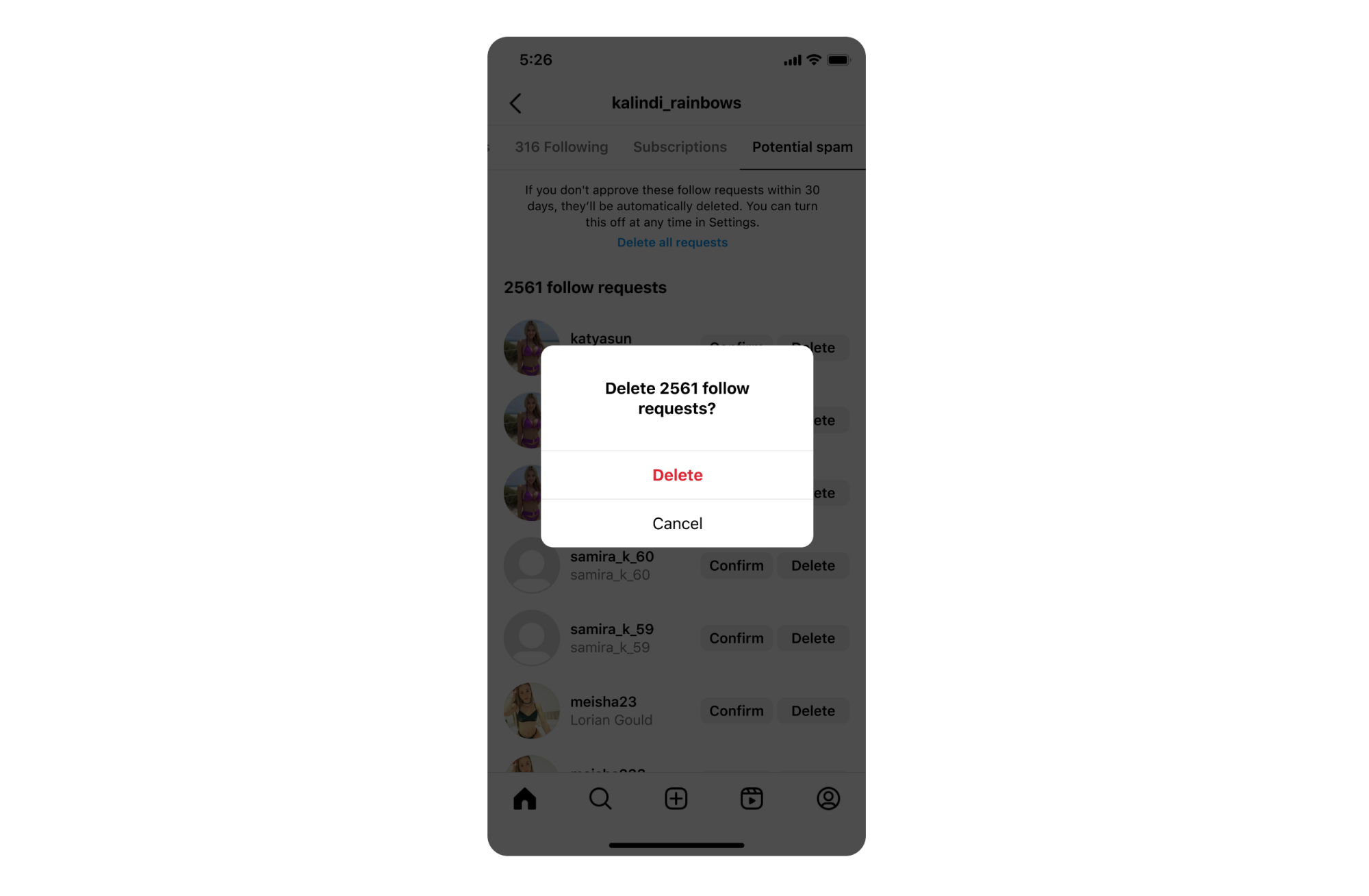
Instagram creators will soon find it much easier to deal with spammy followers and bots. According to a new post on the Instagram blog, you will soon be able to process the removal of spam and bot followers in bulk, cutting down on the time it takes to properly moderate your account. These feature are rolling out over the coming weeks.

Further, the Instagram team says that it will begin rolling out new tools that should automatically detect more spam, allowing for spammy comments, tags, story views, and fake followers to be detected automatically. This improved detection will be key to the bulk-removal options that are coming and will help advance the tools you use to control who has access to your account more easily.

screenshot of instagram asking to delete follow invites

Credit: Instagram

Instagram says that spammy comments and followers will now be automatically filtered into a separate inbox, allowing you to review them and delete them in bulk. It’s a good move that should prove helpful for content creators on Instagram, especially since the Meta-run social media site has had more than its fair share of issues with bots and spam.

Meta also says accounts deleted using the new spam detection tools will not be alerted to your choice to remove them from your followers list, which should help cut down on any concerns over possible backlash from removed users.

Additionally, the new auto detection systems helps filter out spammy tags, requiring you to view them and then mark them as real if they don’t actually fall under spam. Any that appear to just be spam, though, can easily be removed and deleted with a new Delete all requests option. And if you don’t want to deal with the tag requests at all, then you can just wait 30 days, as they’ll automatically be deleted after this time if you don’t take action yourself.

Another addition to the app includes a warning that your content might be against the recommendations guidelines or community guidelines, as well as an experimental feature that will hide possible spam views from your stories, making it easier to see your actual exposure on various posts.


Source: LifeHacker – Banishing Instagram Bots Is About to Get Much Easier

MDMA—aka ecstasy—submitted to FDA as part of PTSD therapy

Read 8 remaining paragraphs | Comments


Source: Ars Technica – MDMA—aka ecstasy—submitted to FDA as part of PTSD therapy

Threads Launches In the European Union

Meta CEO Mark Zuckerberg announced that Threads is now available to users in the European Union. “Today we’re opening Threads to more countries in Europe,” wrote Zuckerberg in a post on the platform. “Welcome everyone.” MacRumors reports: The move comes five months after the social media network launched in most markets around the world, but remained unavailable to EU-based users due to regulatory hurdles. […] In addition to creating a Threads profile for posting, users in the EU can also simply browse Threads without having an Instagram account, an option likely introduced to comply with legislation surrounding online services.

The expansion into a market of 448 million people should see Threads’ user numbers get a decent boost. Meta CEO Mark Zuckerberg said on a company earnings call in October that Threads now has “just under” 100 million monthly users. Since its launch earlier this year it has gained a web app, an ability to search for posts, and a post editing feature.

Read more of this story at Slashdot.


Source: Slashdot – Threads Launches In the European Union

Five Ways to Conserve Fuel When You’re Running on Empty

Considering everything that can go wrong with your car, running out of gas is among the most frustrating, because it’s also one of the most preventable. But when you’re out driving and notice your low-fuel light is illuminated, what can you do to make sure the gas you have will get you to the next gas station?

I talked to a few mechanics to find out the best ways to conserve fuel when you’re running on empty, and to gauge how far you can expect your remaining gas to take you. “We’ve all made mistakes and let the tank get too low,” says Robert Walden, a longtime mechanic and founder of Vehicle Freak, but your mistake doesn’t necessarily need to result in a walk to the nearest gas station.

How far can you drive on empty?

The good news is that unless you’re driving a fairly old car with an analog fuel gauge, “once the low-fuel light comes on, you will probably see a distance to empty mileage that is usually fairly accurate,” says Andy Saari, an A.S.E. certified master technician and founder of Nexedge Technician. But fairly might not be good enough if you aren’t sure how far you are from a gas station—and while your electronic gauge will give you a better idea of how far you can get on your remaining fuel, Saari says this number can fluctuate depending on the driving conditions.

It’s hard to determine precisely how many miles a car can drive on “empty” or with the low-fuel light on, but generally speaking, you’ll typically make it another 30 to 50 miles before your vehicle stops, says John Lin, owner and head mechanic at JB Motor Works. though once again, this can vary with the car’s model, fuel efficiency, and other factors.

“Idling is the least fuel efficient method, since you’re burning gas and not going anywhere,” Saari explains. “This is why many of today’s vehicles have an auto start-stop feature, which under certain conditions, will shut the engine off at stop signs or when idling.”

How to conserve fuel when you’re almost out of gas

In the event that you’re running low on gas while driving in an isolated area, or stuck in traffic with no fuel station accessible, here are a few strategies for making the fuel you have last as long as possible, courtesy of the mechanics I interviewed:

Turn off the air conditioning

When every ounce of fuel matters, switching off the air conditioning may help reduce engine load, says Saari. However, he says that another common suggestion—turning off your car’s stereo—won’t make any difference in your fuel usage. “The energy usage will be insignificant,” he notes.

Avoid rapid acceleration

If you notice that you’re running low on gas, you may be tempted to increase your speed to get to a gas station faster, but Walden warns against that. “Take it easy on the gas pedal, and avoid speeding up too fast, which wastes gas,” he explains. “I know being late can make you hit the gas, but going slow saves fuel when the tank is low.”

Keep your speed down

While we’re on the subject of acceleration, Lin recommends avoiding driving at high speeds, noting, “Your vehicle’s fuel efficiency decreases rapidly at speeds above 50 miles per hour.”

Avoid hard braking

Along with rapid acceleration, slamming on the brakes can also burn more fuel than necessary, Lin says.

Avoid unnecessary stopping and starting

Smooth, steady driving without frequent stops and starts helps to conserve fuel, says Michael Dominguez, a certified master mechanic and the founder of Car Fixer Guide. “Adjusting your route to minimize stop-and-go traffic is also beneficial,” he adds.

Ultimately, it’s best not to make driving with your low-fuel light on a habit. “[Doing so] frequently can potentially harm the fuel system, as debris or sediments which normally settle at the base of the tank may get sucked into the fuel pump and damage it,” Lin says.


Source: LifeHacker – Five Ways to Conserve Fuel When You’re Running on Empty

Ubisoft Just Delisted A Game Without Warning And Will Kill Its Servers Next Year

Ubisoft’s The Crew, which was released in 2014 for Xbox 360, Xbox One, PlayStation 4, and PC, has been delisted without warning. Its servers will shut off next year, too. And because the game is an always-online experience, Ubisoft has confirmed that it will become unplayable once that happens.

Read more…


Source: Kotaku – Ubisoft Just Delisted A Game Without Warning And Will Kill Its Servers Next Year

Buy Alan Wake 2 And Get Alan Wake Remastered For Free On Epic Games Store

Curious about Alan Wake 2 but never played the first? Well if you’re a PC gamer, I’ve got some good news: Grab a copy of Alan Wake 2 on the Epic Games Store during its holiday sale and you’ll get a free copy of the 2021 remastered version of the first game.

Read more…


Source: Kotaku – Buy Alan Wake 2 And Get Alan Wake Remastered For Free On Epic Games Store

Space Force chief: Timing of Chinese spaceplane launch “no coincidence”

Read 23 remaining paragraphs | Comments


Source: Ars Technica – Space Force chief: Timing of Chinese spaceplane launch “no coincidence”

Elizabeth Warren is demanding more transparency from Meta on how its handling content about Palestine on Instagram

Massachusetts Senator Elizabeth Warren is the latest public figure to question how Meta is moderating content during the Israel-Hamas war. In a letter addressed to Mark Zuckerberg, Warren raises several issues reported by Instagram users since October 7, and presses Meta for more information about its underlying policies and how much content the company has taken down related to the conflict.

In the letter, Warren cites reports from the media and human rights groups about inconsistencies in the company’s moderation practices since the start of the war. In particular, she notes that numerous Instagram users have accused the company of “shadowbanning” them for posting about the conditions in Gaza. She also references a third-party audit, commissioned by Meta and published last year, that found the company violated Palestinians’ right to free expression in 2021, the last time there was a major escalation in violence in the Gaza Strip.

“Reports of Meta’s suppression of Palestinian voices raise serious questions about Meta’s content moderation practices and anti-discrimination protections,” Warren writes. “Social media users deserve to know when and why their accounts and posts are restricted, particularly on the largest platforms where vital information-sharing occurs.”

The letter asks for detailed information about how Meta is enforcing its policies in the context of the war. For example, it asks Meta to disclose statistics about the number of posts that have been removed since October 7, and how many of those takedowns have been appealed. It also asks Meta to explain reports that the company hid numerous Instagram comments with Palestinian flags for being “potentially offensive.”

The letter gives Zuckerberg a January 5 deadline to respond to the questions. Meta didn’t respond to a request for comment.

Meta has come under increasing scrutiny for its moderation practices since October 7. The company has publicly blamed several issues on unspecified technical glitches and bugs, but has also acknowledged taking temporary emergency measures to slow the spread of potentially harmful content.

Meta’s independent Oversight Board is also fast-tracking two cases related to the Israel-Hamas war content, the first time the group has opted to expedite its usual months-long process. The board said at the time it had seen a surge in appeals from Facebook and Instagram users since the start of the conflict.

This article originally appeared on Engadget at https://www.engadget.com/elizabeth-warren-is-demanding-more-transparency-from-meta-on-how-its-handling-content-about-palestine-on-instagram-220226606.html?src=rss

Source: Engadget – Elizabeth Warren is demanding more transparency from Meta on how its handling content about Palestine on Instagram

Every Browser Should Have Opera GX’s New ‘Panic Button’

The internet is a wild place. Some of it is appropriate to consume in any environment, but plenty of it is NSFW, for one reason or another. Whether you’re browsing the darker side of the internet at home or at work, there may be times when no one should see your screen—and if they do, you may be mortified, chewed out, or fired.

But what are you going to do: Only look at what the people around you expect you to? Don’t be ridiculous. It’s your right to watch Netflix at work, dammit. So the only thing to do is watch in existential horror, ready to pull the plug on your PC at the first sign of your boss.

It doesn’t have to be this way. Opera GX has a new feature it’s calling the “panic button.” With one press of the button, Opera mutes every tab open in your browser and hides all windows, replacing them with a preset selection of boring, SFW options. That way, should someone walk into the room you’re browsing in, you can “panic” your PC into a socially acceptable state.

How to use Opera GX’s panic button

The panic button is available now in Opera GX; to use it, make sure you’re running the latest version of the gaming browser on your Mac or PC. (This won’t be available in Opera’s standard browser, just FYI.) Once you open Opera GX, head to Settings, then, under GX, scroll down and click Early Bird. This section gives you the option to enable features that are currently being tested and aren’t available as default in the app. It just so happens panic button is one such feature. When you click Early Bird, all in-testing features will be enabled, not just panic button. Scan through the other options to see if they’re things you want in your browser: If not, toggle them off, then hit Relaunch to finalize your choices.

Now that panic button is enabled, try it out! Just hit F12, and, by default, Opera GX will randomly choose one of the following links to replace the windows you currently have open:

  • YouTube

  • Twitter

  • Wikipedia

  • Google Docs

  • Twitch

  • Reddit

  • Gmail

  • Github

  • Google News

  • Steam

Those options may be fine when browsing at home, but if you’re using Opera at work, your boss may raise an eyebrow when they see YouTube or Twitch on your screen. Luckily, you can customize this list to contain any sites you want. Just head back into Settings, then click on Panic button from just above the Early bird option. Add any new sites you want to the rotation, or edit or delete the defaults.


Source: LifeHacker – Every Browser Should Have Opera GX’s New ‘Panic Button’

Adam Driver Says Kylo Ren’s Redemption Was A Star Wars Switcheroo

Will we ever be finished re-litigating the Star Wars sequel trilogy? From The Last Jedi on, the movies have been a black hole of discourse that is near-inescapable if you have even a casual interest in the franchise. 2019’s The Rise Of Skywalker was such a rocky ending that it seems to have impeded Lucasfilm’s…

Read more…


Source: Kotaku – Adam Driver Says Kylo Ren’s Redemption Was A Star Wars Switcheroo

Supply Chain Attack Targeting Ledger Crypto Wallet Leaves Users Hacked

An anonymous reader quotes a report from TechCrunch: Hackers compromised the code behind a crypto protocol used by multiple web3 applications and services, the software maker Ledger said on Thursday. Ledger, a company that makes a widely used and popular crypto hardware and software wallet, among other products, announced on X (previously Twitter) that someone had pushed out a “malicious version” of its Ledger Connect Kit, a library that decentralized apps (dApps) made by other companies and projects use to connect to the Ledger wallet service.

“A genuine version is being pushed to replace the malicious file now. Do not interact with any dApps for the moment. We will keep you informed as the situation evolves,” Ledger wrote. Soon after, Ledger posted an update saying that the hackers had replaced the genuine version of its software some six hours earlier, and that the company was investigating the incident and would “provide a comprehensive report as soon as it’s ready.” After this story was published, Ledger spokesperson Phillip Costigan shared more details about the hack with TechCrunch and on X.

Costigan said that a former Ledger employee was victim of a phishing attack on Thursday, which gave the hackers access to their former employee’s NPMJS account, which is a software registry that was acquired by GitHub. From there, the hackers published a malicious version of the Ledger Connect Kit. “The malicious code used a rogue WalletConnect project to reroute funds to a hacker wallet,” Costigan said. Then, Ledger deployed a fix within 40 minutes of the company becoming aware of the hack. The malicious file, however, was live for round 5 hours, but “the window where funds were drained was limited to a period of less than two hours,” according to Costigan. Ledger also “coordinated” with WalletConnect which “quickly disabled the the rogue project,” essentially stopping the attack, according to Costigan. Costigan also said Ledger pushed out a genuine software update that is “safe to use.” “We are actively talking with customers whose funds might have been affected, and working proactively to help those individuals at this time,” the Ledger spokeperson said, adding that the company believes it has identified the hackers’ wallet.

Read more of this story at Slashdot.


Source: Slashdot – Supply Chain Attack Targeting Ledger Crypto Wallet Leaves Users Hacked

Holiday Gift Guide: Must-Have DC and Warner Bros. Fandom Merch

The big day is drawing near and so are those shipping cut-offs for getting everyone on your list a special fandom holiday gift. Don’t worry, io9’s latest gift guide inspired by the worlds of DC and the WB has some shopping tips at places that offer in-store pickup, including BoxLunch and Target.

Read more…


Source: Gizmodo – Holiday Gift Guide: Must-Have DC and Warner Bros. Fandom Merch