Nintendo’s Virtual Boy app is now available to download

Nintendo’s Virtual Boy app is now available to download on Switch and Switch 2 as part of its Nintendo Classics offering. You’ll need to have a Nintendo Switch Online + Expansion Pack membership to access the launch titles, and unlike Nintendo’s other retro emulators, this one also requires a dedicated accessory.

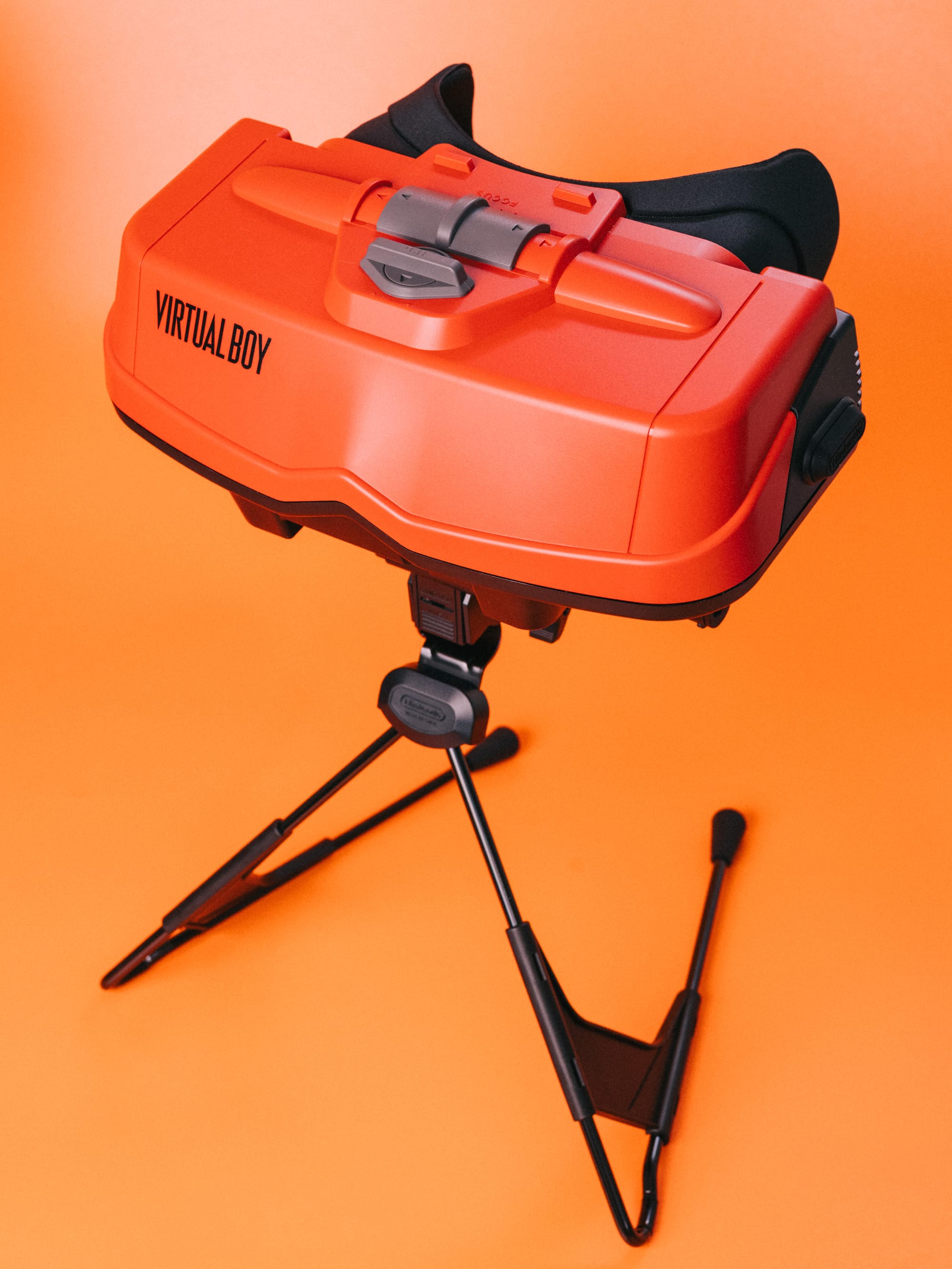
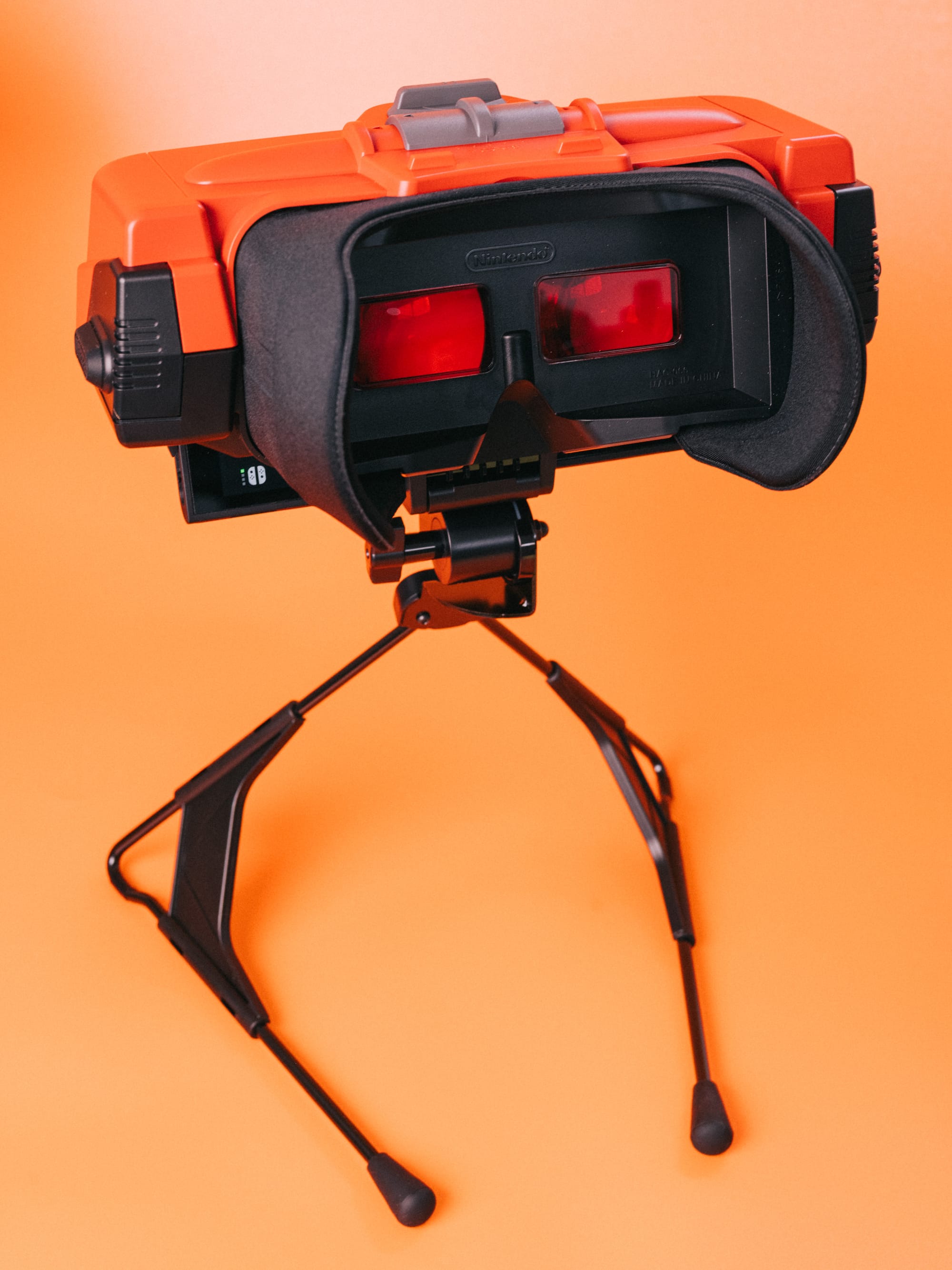
As a reminder, the Virtual Boy was a portable tabletop system released in 1995, and the first console capable of rendering stereoscopic 3D graphics. It had a facemask with a monochrome red display built onto a bipod, so rather than wearing it like a modern VR headset, you had to awkwardly push your face towards it to play games.

Once you enter the third dimension, there’s no going back…#VirtualBoy – Nintendo Classics is available now on #NintendoSwitch2 and #NintendoSwitch, as part of #NintendoSwitchOnline + Expansion Pack! pic.twitter.com/2uLd8iYorB

— Nintendo UK (@NintendoUK) February 17, 2026

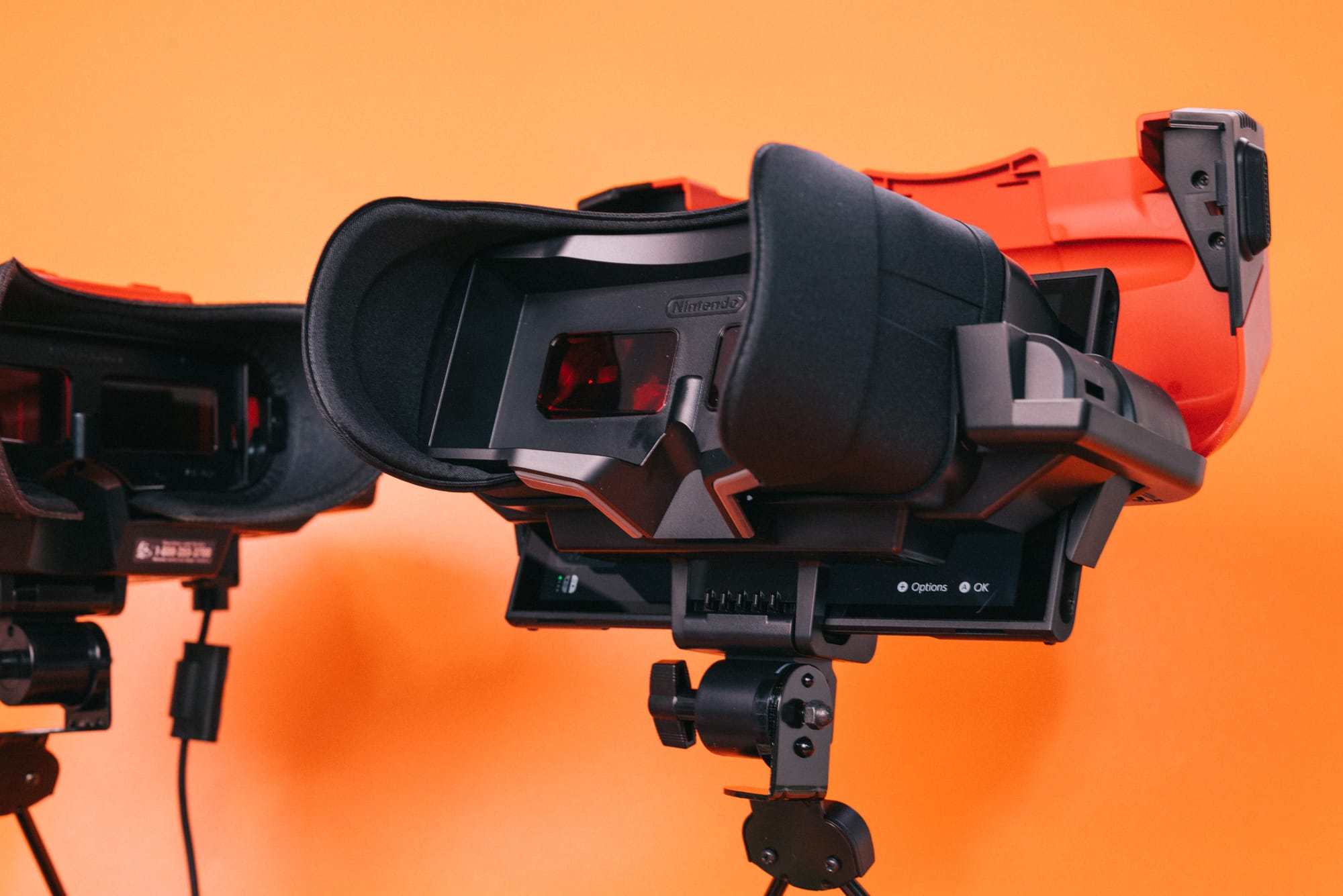
While undeniably innovative for the time, the console never took off (to put it gently), but Nintendo is giving anyone who missed out in the ’90s a chance to experience one of the strangest experiments in its history in 2026. Aesthetically, the $100 Virtual Boy add-on is a near perfect replica of the original console, with the big difference being that rather than a built-in display, it has a slot for sliding in your Switch or Switch 2. And unlike the OG Virtual Boy, this one is also wireless.

If $100 seems a bit steep for something that’ll almost certainly be collecting dust before summer rolls around, Nintendo is also selling a $25 cardboard version (unfortunately your old Labo VR headset won’t work here). Both are available to buy from the My Nintendo Store.

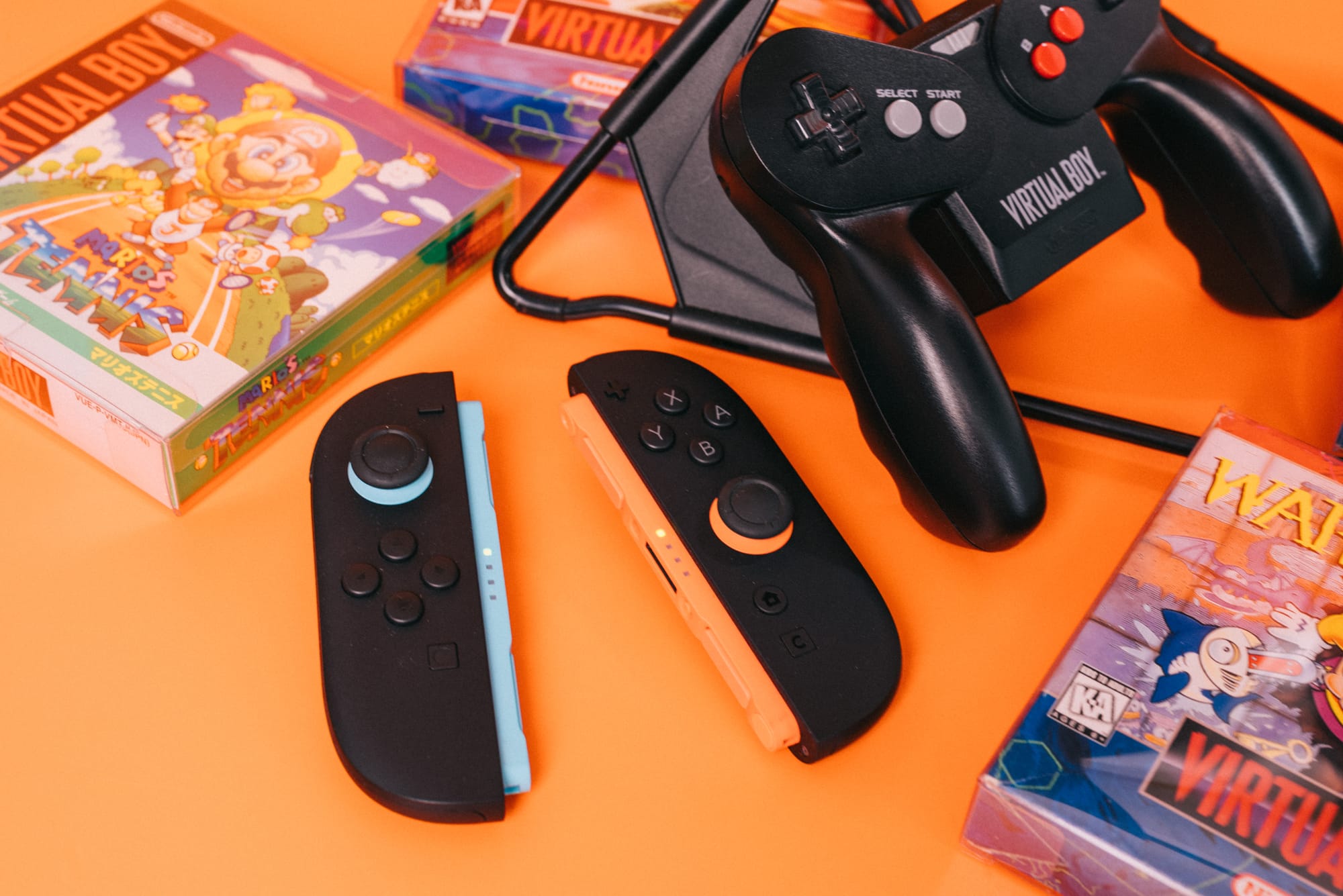
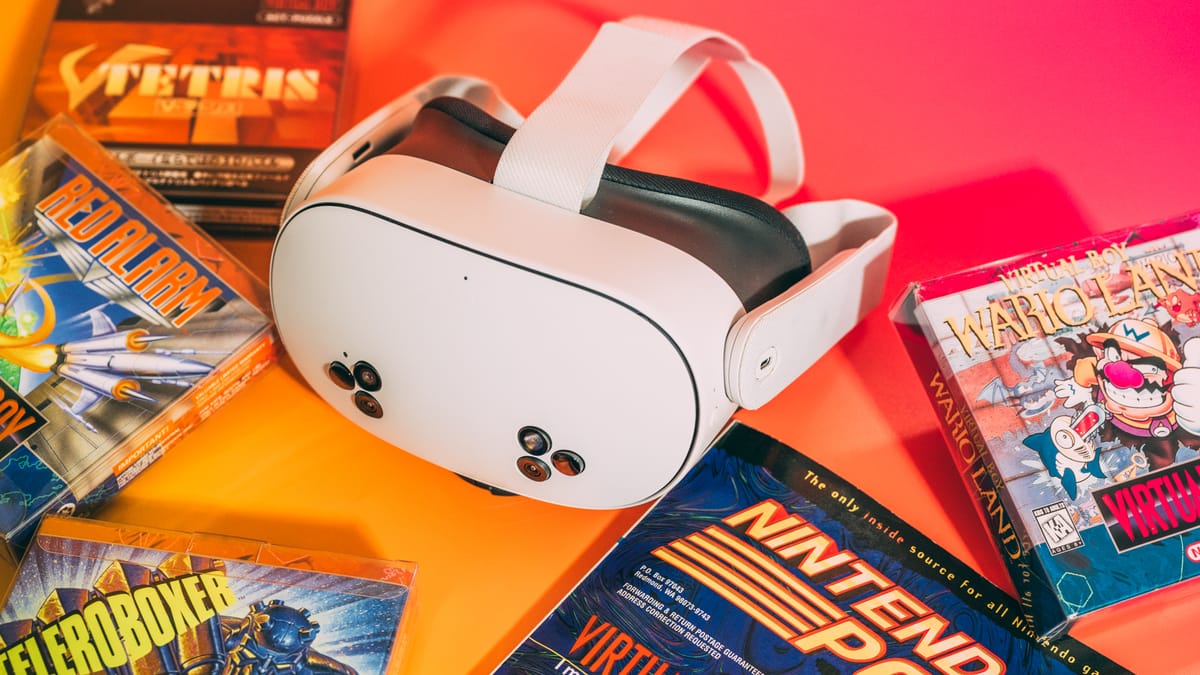
The Virtual Boy app is launching with the following games today: 3d Tetris, Galactic Pinball, Golf, The Mansion of Innsmouth, Red Alarm, Teleroboxer and Virtual Boy Wario Land. More games will be added in the future, including Mario Clash, Mario’s Tennis and Space Invaders Virtual Collection.

This article originally appeared on Engadget at https://www.engadget.com/gaming/nintendo/nintendos-virtual-boy-app-is-now-available-to-download-150705800.html?src=rss

Plasma 6.6.0 released

Version
6.6.0
of KDE’s Plasma desktop environment has been
released. Notable additions in this release include the ability to
create global themes for Plasma, an “extract text” feature in the Spectacle screenshot
utility, accessibility improvements, and a new on-screen keyboard. See
the changelog
for a full list of new features, enhancements, and bug fixes.

The release is dedicated to the memory of Björn Balazs, a KDE
contributor who passed away in September 2025. “Björn’s drive to
help people achieve the privacy and control over technology that he
believed they deserved is the stuff FLOSS legends are made of.
“

Intel Xeon 6 Granite Rapids Memory Scaling Performance From 6 To 12 MRDIMMs

With memory pricing being as wild as it is these days and with MRDIMMs on Xeon 6 Granite Rapids offering much more memory bandwidth than conventional DDR5 RDIMMs, you may be wondering about the performance impact when not populating all twelve memory channels on the Xeon 6900 series processors. In this article are benchmarks to demonstrate the performance difference of MRDIMM-8800 memory across using six, eight, ten, and twelve MRDIMMs with a Xeon 6980P server.

Four Ways to Recover Your ‘Lost’ Work in Microsoft Word

There’s little worse than losing an hour or two of hard work, just by clicking on the wrong button or pressing the wrong key in Microsoft Word—a mistake that sees your well-crafted document (or a sizable portion of it) disappear before your eyes.

A slip of the fingers isn’t the only way you can potentially lose work, either. Maybe you just have the misfortune to be busy at your computer when a power outage happens—taking your desktop, Microsoft Word, and your unsaved work along with it.

However, before you begin all over again, there are some tricks you can try to bring your work back.

Use Undo (Ctrl+Z or Cmd+Z)

Word undo
Word keeps an undo history.
Credit: Lifehacker

Sometimes, all you need is the undo command—hit Ctrl+Z (Windows) or Cmd+Z (macOS) to undo your last action in Word. It might be enough to restore that table you accidentally deleted, or bring back that huge block of text you moved to the clipboard and have since lost track of.

This won’t save you from a power outage, and it doesn’t include all actions (it won’t bring back a file you’ve closed, for example). However, it’ll work a lot of the time when you’ve made a mistake, and Word always keeps a record of your last 100 actions in the app, so you can go back a fair way.

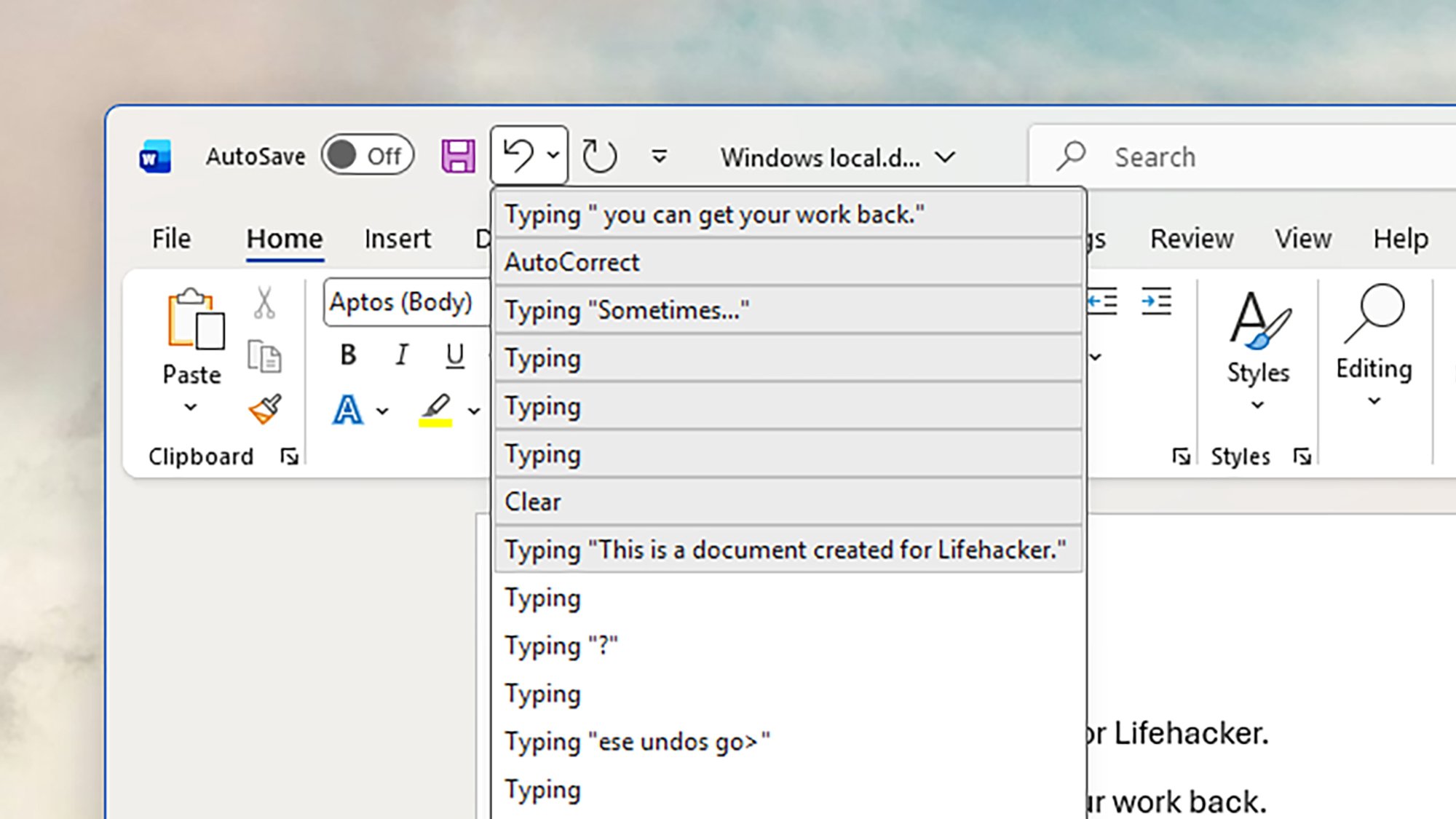
There’s also an undo button up in the top left corner of the Word interface: Click on this to undo the last action, or click the arrow next to it to see a list of previous actions and choose where you want to go back to. To the right of the undo button is the redo button, which works the same way but in the opposite direction.

Open previous file versions

Word version history
Accessing previous versions in Word.
Credit: Lifehacker

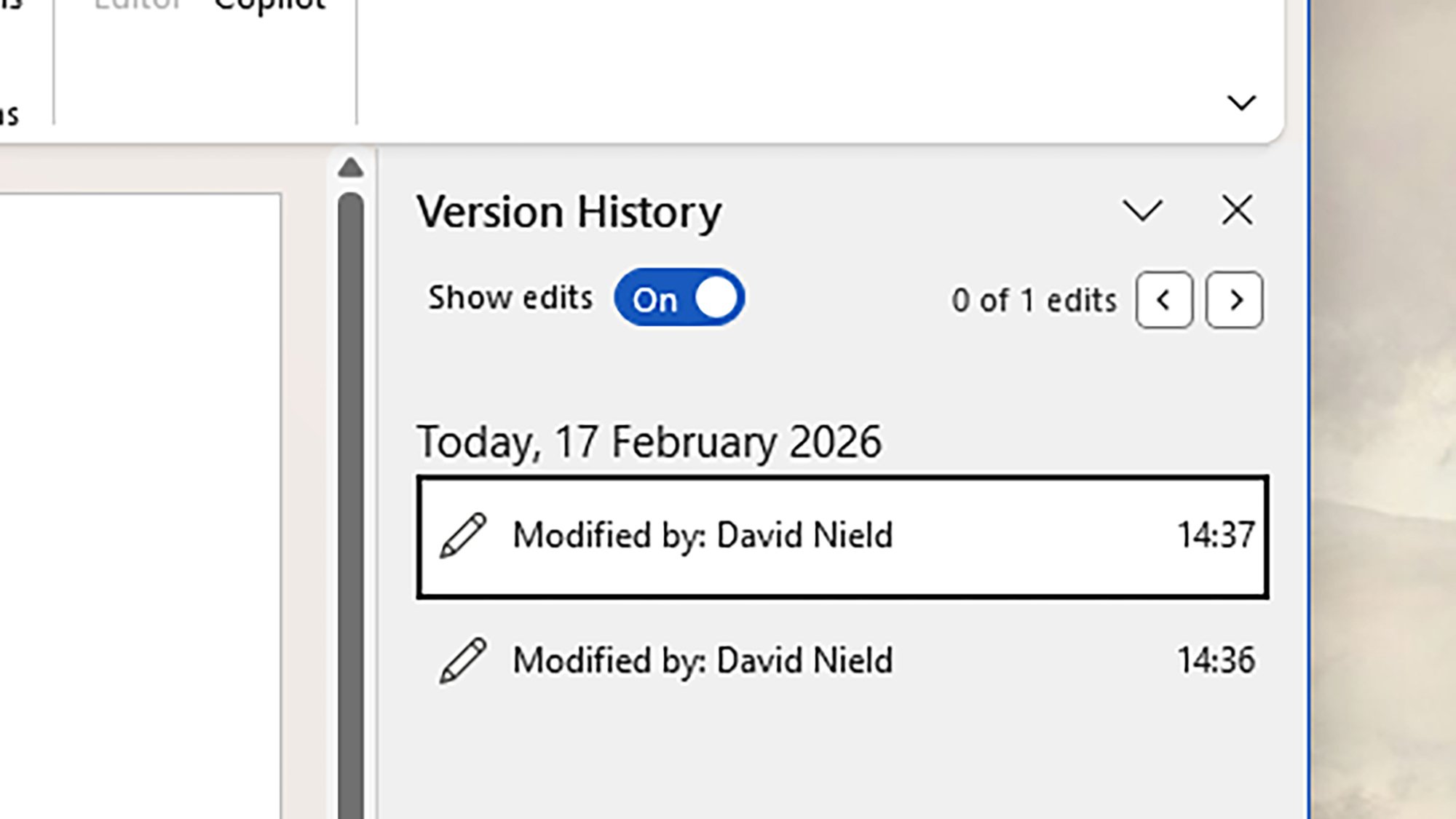
Word also has a file version history feature you can utilize to bring back lost work: It essentially saves past versions of your document at regular intervals, so you can go back in time, and even all the way back to the file’s creation. It’s like a super undo, which works between app restarts as well.

In Word for Windows, you can find these older incarnations of your document by heading to File > Info > Version History. If you’re using Word on macOS, it’s File > Browse Version History. A new sidebar opens on the right, showing all the available previous versions, and the date and time they were saved.

There is a caveat to this, though, which is you have to have your document saved in the cloud (in OneDrive) for this to work. If you’re working with a local file that’s only saved on your computer and you try and access version history, you’ll be prompted to save it to OneDrive instead (which will turn on version history).

Find unsaved documents on your system

Word recovery
Unsaved documents are sometimes still available.
Credit: Lifehacker

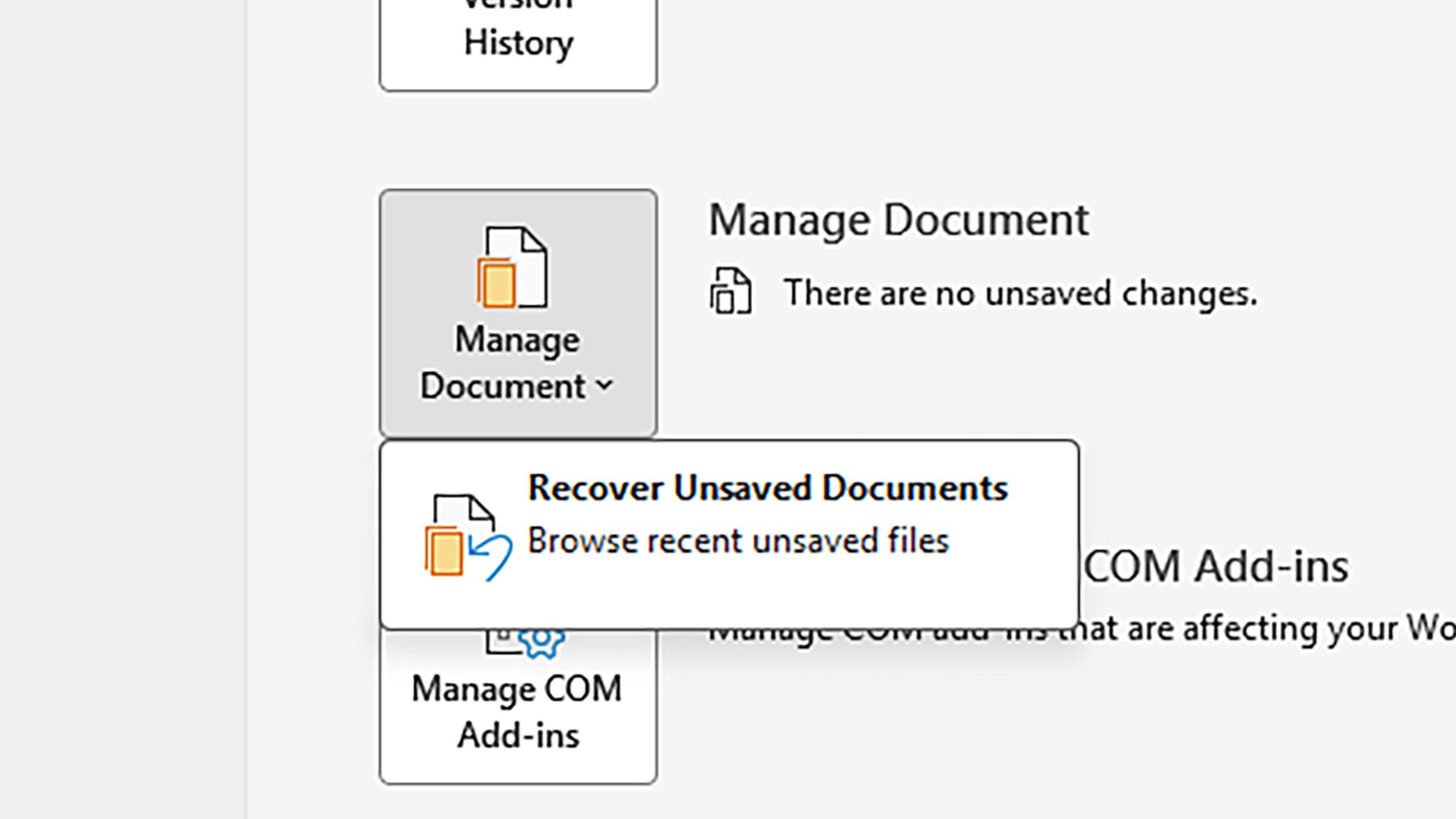
Word actually saves files temporarily to your computer every so often, so if the program crashes without warning, you should see an autorecovery dialog pop up the next time you load Word, asking if you want to recover the old file. If not, you can see partially saved files by clicking Click File > Info > Manage Document > Recover Unsaved Documents.

That’s only for Windows, however—if you’re on macOS, you’re relying on the auto-recovery process. Word for both Windows and macOS lets you set how often auto-recovery files are saved: Head to File > Options > Save (Windows) or Word > Preferences > Save (macOS). The default is every 10 minutes, but you can adjust this if needed.

If you’re still not seeing your file, you can try checking the temporary cache folder manually. On Windows, check “C:Users

Save your work to the cloud

Word AutoSave
OneDrive gives you various extra options—including AutoSave.
Credit: Lifehacker

These days, Microsoft Word will tend to push you to save your work in OneDrive in the cloud. There are multiple benefits for this, including the version history feature mentioned above, and the option to collaborate on documents with other people. It also enables another handy feature: AutoSave.

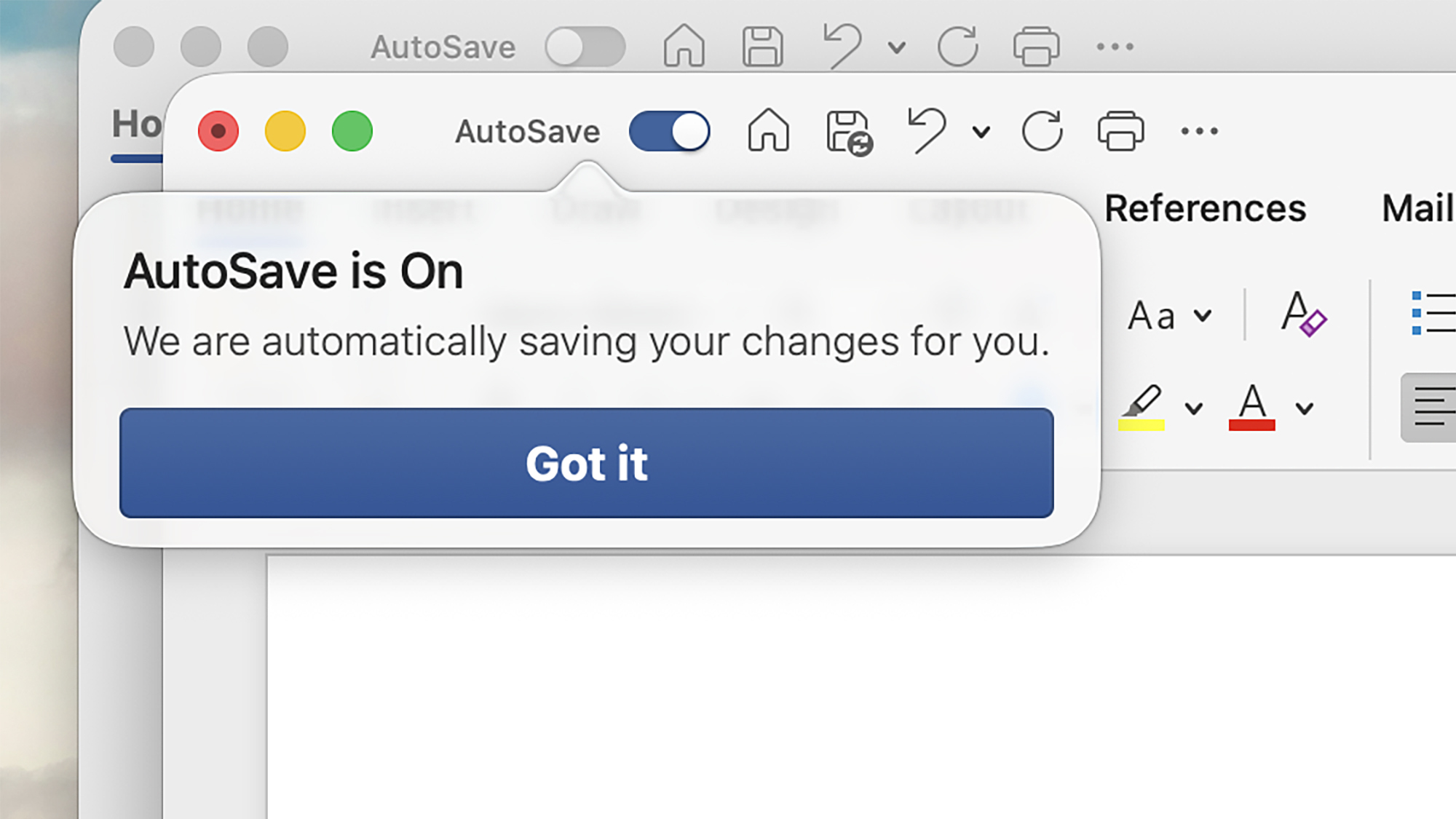
This is exactly what it sounds like, and means that every time something is changed in your document, it quickly syncs to the cloud. You’ll see the AutoSave button in the top left hand corner enabled when it’s active, and the document name at the top of the app window will indicate when saves are in progress.

Should Word or your PC crash, your work should be safe. AutoSave is enabled by default for files saved to OneDrive, but you can customize this behavior by heading to File > Options > Save on Windows) or Word > Preferences > Save on macOS.

Amazon’s Fire TV redesign is rolling out today

During the flurry of CES 2026 news at the start of the year, it might have been easy to overlook Amazon’s announcement that the Fire TV user interface is getting a revamp. But that redesign is rolling out starting today for US viewers. It will be available to users as a free update. 

The main visual updates for the streaming device’s UI are a lot of rounded corners. But Amazon is also emphasizing speed in this new look, claiming that the improvements will offer 20 to 30 percent faster interactions. This version of the UI also makes more apps visible on the screen at a time, with up to 20 apps able to be pinned to the homescreen compared with six in the prior design. The update also has access to the Alexa+ AI voice assistant if you want to use it to pull up viewing suggestions or to organize your viewing queue.

This article originally appeared on Engadget at https://www.engadget.com/entertainment/streaming/amazons-fire-tv-redesign-is-rolling-out-today-150000988.html?src=rss

Apple Launches Video Podcasts To Challenge YouTube’s Dominance

Apple Launches Video Podcasts To Challenge YouTube’s Dominance
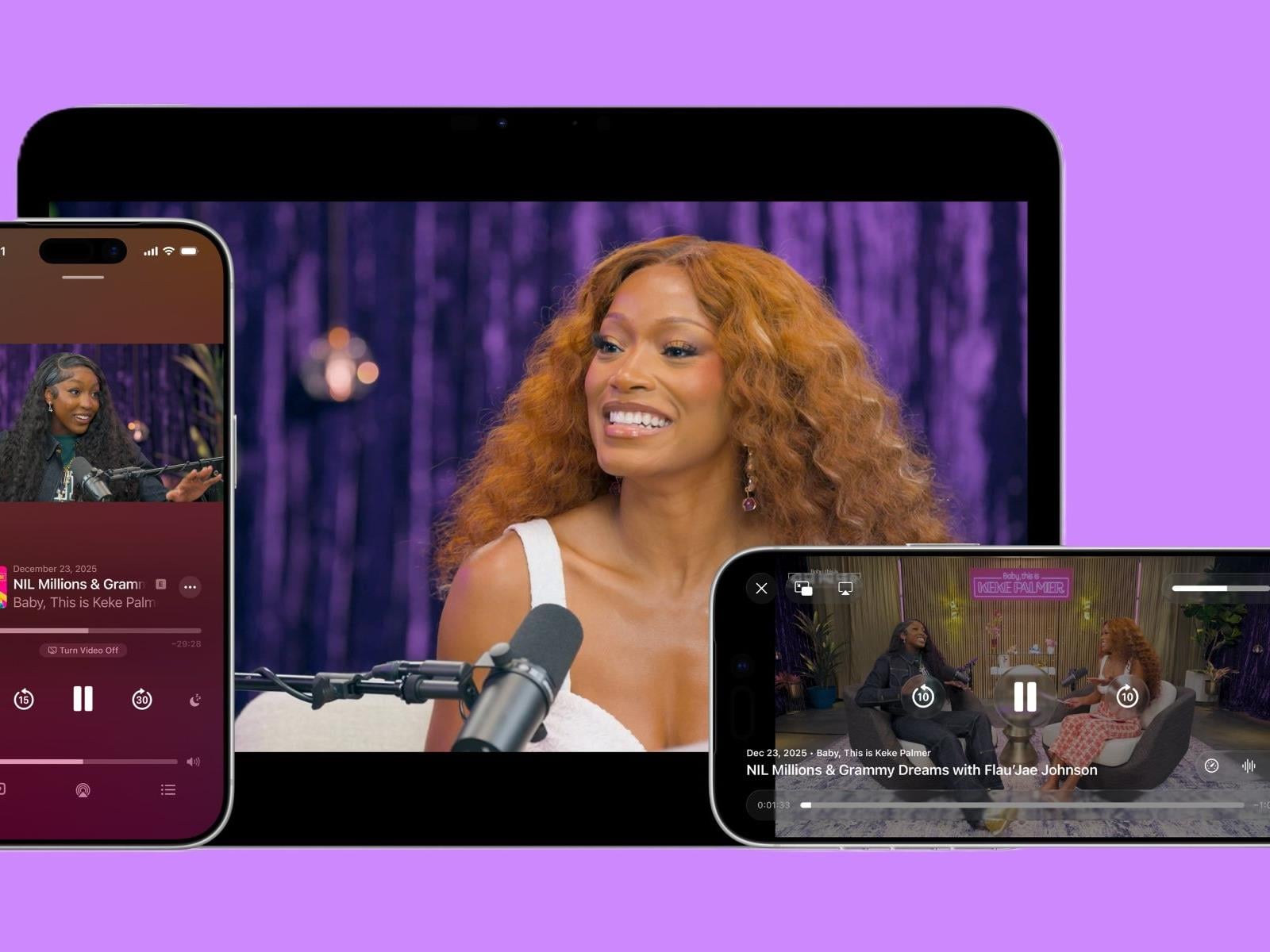
Apple is preparing to integrate a native video experience directly into the Apple Podcasts app this spring (the feature is also currently available in limited beta). With the company aiming to provide a seamless transition between listening and watching, Apple Podcasts is positioning to bring some heat to the likes of YouTube and Spotify.

Announced

Omni One VR Treadmill Joins ‘Made for Meta’ Program, Opening Door to Quest Compatibility

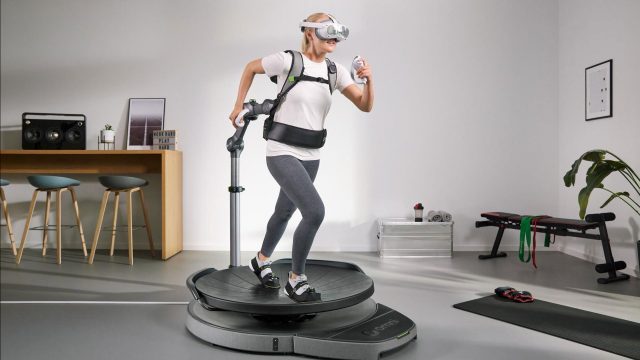
Virtuix announced it’s joined the Made for Meta program, which opens the door to bring official Quest compatibility to the company’s Omni One VR treadmill.

Made for Meta is a hardware partnership that certifies that accessories not only work with Meta devices, but also meet the company’s quality standard. Since the 2023 launch of the program, a wide range of Made for Meta accessories have been certified, including bHaptics TactSuit Pro, Logitech MX Link stylus, and Roto VR Explorer Chair.

As the latest member of the program, Virtuix says it plans to make its Omni One VR treadmill compatible with Quest headsets and games, effectively broadening Omni One’s reach to the world’s largest XR user base.

Image courtesy Virtuix

Official Quest support will be a first for Omni One. Before joining Made for Meta, the VR treadmill supported PC VR headsets through its ‘Core’ device, priced at $2,600, as well as a custom Pico 4 Enterprise Ultra headset through its ‘Complete’ system, priced at $3,500.

“Joining the Made for Meta program expands our addressable market to millions of active Quest users who already own and love their VR headset and games library,” said Jan Goetgeluk, CEO of Virtuix. “We look forward to collaborating with Meta as we continue to scale our consumer business and bring our immersive, full-body gaming experience to a mass audience.”

Speaking to Road to VR, Goetgeluk says Omni One won’t support all Quest games, however the company plans to make “a large number of games compatible,” which will include tight integration with the Omni One SDK. Goetgeluk says we’ll learn more about product and compatibility at a later date.

This follows the VR treadmill creator’s recent stock market debut on the Global Market tier of the Nasdaq, which came alongside an additional $11 million investment from Chicago Venture Partners, with an additional $50 million equity line of credit that the company says it will use to scale sales of Omni One.

The post Omni One VR Treadmill Joins ‘Made for Meta’ Program, Opening Door to Quest Compatibility appeared first on Road to VR.

‘Software Isn’t Dead, But Its Cosy Business Model Might Be’

The software industry’s decades-old habit of charging companies a flat fee for every employee who uses a product is running into a fundamental problem: AI agents don’t sit in chairs, and they don’t need licences.

As autonomous agents take on tasks that human workers once handled, the per-seat pricing model that made SaaS revenue so predictable is giving way to consumption-based and hybrid alternatives. Snowflake and Databricks (valued at $134 billion) already charge based on usage. Salesforce initially priced its Agentforce customer relations bot at $2 per conversation but faced customer pushback and now offers action-based pricing, upfront credits and fixed fees.

ServiceNow’s finance chief Amit Zavery said last month that some customers aren’t ready for purely consumption-based models. Goldman Sachs estimates US software spending will nearly triple to $2.8 trillion by 2037 as automated tasks blur the boundary between IT and wage budgets, but that money will no longer arrive in the neat recurring instalments that investors and private equity firms have come to expect.


Read more of this story at Slashdot.

An update on upki

In December 2025, Canonical announced a plan to
develop a universal Public Key Infrastructure called upki. Jon Seager has published
an update
about the project with instructions on trying it
out.

In the few weeks since we announced upki, the core revocation engine
has been established and is now functional, the CRLite mirroring tool
is working and a production deployment in Canonical’s datacentres is
ongoing. We’re now preparing for an alpha release and remain on track
for an opt-in preview for Ubuntu 26.04 LTS.

Wizherd Is An Interesting Yet Clunky Magical Experience

Earlier this month, No More Rainbows and DigiGods developer Squido Studio announced that it was partnering up with gaming streamer jmancurly’s video game publishing company CurlyBlue to create VR experiences – the first being a colorful dungeon crawler named Wizherd.

The lore of Wizherd goes that in ancient times, the world was protected by a magical group called “the herd.” Life was once peaceful, but now zombies and other evil forces threaten the world. As a result, players now take on the role of wizards as they embark on missions to hold off the forces of darkness.

The Facts

What is it?: A magic-based, dungeon-crawling adventure title that lets players conjure spells and team up with other would-be wizards.
Platforms: Meta Quest
Release Date: February 12, 2026
Developer: Squido Studio
Publisher: CurlyBlue LTD.
Price: Free To Play

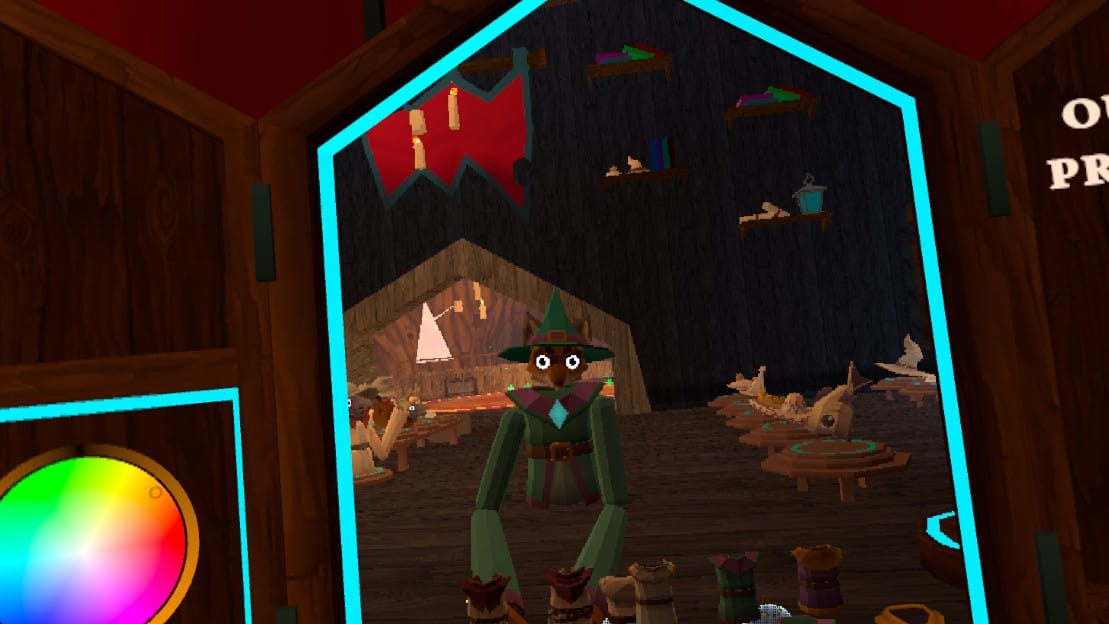
As a fan of magic and fantasy games, I was curious to see Wizherd in action, especially after seeing the game’s blocky art style that calls back to the old Final Fantasy games from the original PlayStation era. Unfortunately, new players are greeted to a steep and confusing learning curve that could sour the experience for most.

When you first boot up Wizherd, you are instantly thrust into a magical hub with little in the way of an introduction to the world you and your fellow would-be sorcerers must explore. There are tutorial missions posted to a bulletin board, but they amount to little more than grinding the player’s experience level by venturing off into the wilderness to battle undead monsters. The bulletin board also features daily and weekly quests that any player can perform. Once you complete a mission, you can claim your reward by opening a treasure chest beside the board.

Players can customize their Wizherd character.

Players can move their character in one of two ways in Wizherd, by either moving the right joystick or physically swinging their arms at the ground to propel forward. The former doesn’t always work, and the latter takes some getting used to. Once the player gets a handle on moving around, the world outside the hub consists of sunny hillsides, castle-like structures, and underground caverns flooded with lava.

Wizherd’s magic system is simple enough: the player chooses between three different elemental spells at the start of the game and equips their selection to their hands. By holding down the trigger and releasing it in the middle of a tossing motion, the player can throw a ball of fire or ice at an enemy, though this action can be somewhat clunky and frustrating in the middle of a frantic battle. Melee-based spells like fire swords, on the other hand, are quite fun to swing around once you have them unlocked.

Spells can be upgraded at certain parts of the hub by spending coins and crystals. You can also customize your wizard avatar’s look by purchasing cosmetic items like robes, hats, and even animal faces you can equip at a vanity. There is even a color slider you can use to adjust your character’s skin tone.

Wizherd is free-to-play, though there are two different types of in-game currency. Coins are earned by defeating enemies, while crystals can be obtained by completing tasks or spending real-world money. The rewards for completing quests can be quite small at first, so you might have to either grind for a while or bust out your wallet.

0:00

/0:26

Combat and exploration can be hit or miss.

The overall presentation can be hit or miss. As mentioned before, there is a sort of retro charm to Wizherd’s blocky graphics, but the music and sound isn’t anything you haven’t heard before in Minecraft. Most of the time you’ll be hearing the chatter of other players who are just as confused as you.

So far, Wizherd has some potential, but getting started can be tedious if you don’t want to spend due to the grind needed to get a decent loadout. There is some potential here, but only time will tell if the game has enough staying power to keep players coming back.

Nintendo’s Virtual Boy For Switch & Switch 2 Review

Nintendo’s strangest Switch 2 accessory has arrived: a remarkably faithful recreation of the Virtual Boy.

Toward the end of last year, Nintendo dropped the surprise announcement that Virtual Boy games would soon be playable on Switch and Switch 2 via the company’s subscription-based membership service, Nintendo Online + Expansion Pack. For the first time in 30 years, Nintendo fans would be able to play Virtual Boy games like Red Alarm, Wario Land, and Mario’s Tennis on a current-gen Nintendo console.

Perhaps even more surprising was the announcement that the catalog of Virtual Boy games would be accompanied by two new accessories: an inexpensive cardboard “headset” priced at $24.99, and a full-on replica Virtual Boy for $99.99. In both cases, the Switch and Switch 2 slot into these accessories (like a dock) in order to play the old games.

Editor’s Note: What Exactly Was The Virtual Boy?

We’re aware that not everyone knows what the Virtual Boy was, so here’s a quick rundown.

Released in 1995, Nintendo’s Virtual Boy was the first standalone home stereoscopic 3D gaming system, providing a 384×224 red-only image to each eye via its two lenses. While often described as a “VR headset”, Virtual Boy lacked any kind of head tracking, not even rotational, and had a tiny field of view of around 20 degrees. That’s not to say it wasn’t an interesting 3D device – it just wasn’t really VR.

Virtual Boy was a market failure, selling very few units, and was discontinued after just one year. But it had a lasting cultural impact in the gaming world, and is looked back on fondly by many in the VR industry.

I’ve been a Virtual Boy fan since I was 11 years old and found one sitting under the Christmas tree in 1995. I’ve written about why I think the retro system is worth experiencing (and owning) in 2026, and I’ve written about alternative ways to play the system’s tiny library of games on modern VR headsets like Meta’s Quest. So it’s quite natural that I’d have bought the new headset the moment it was announced. Which I did.

Well, it’s arrived. And it’s beautiful.

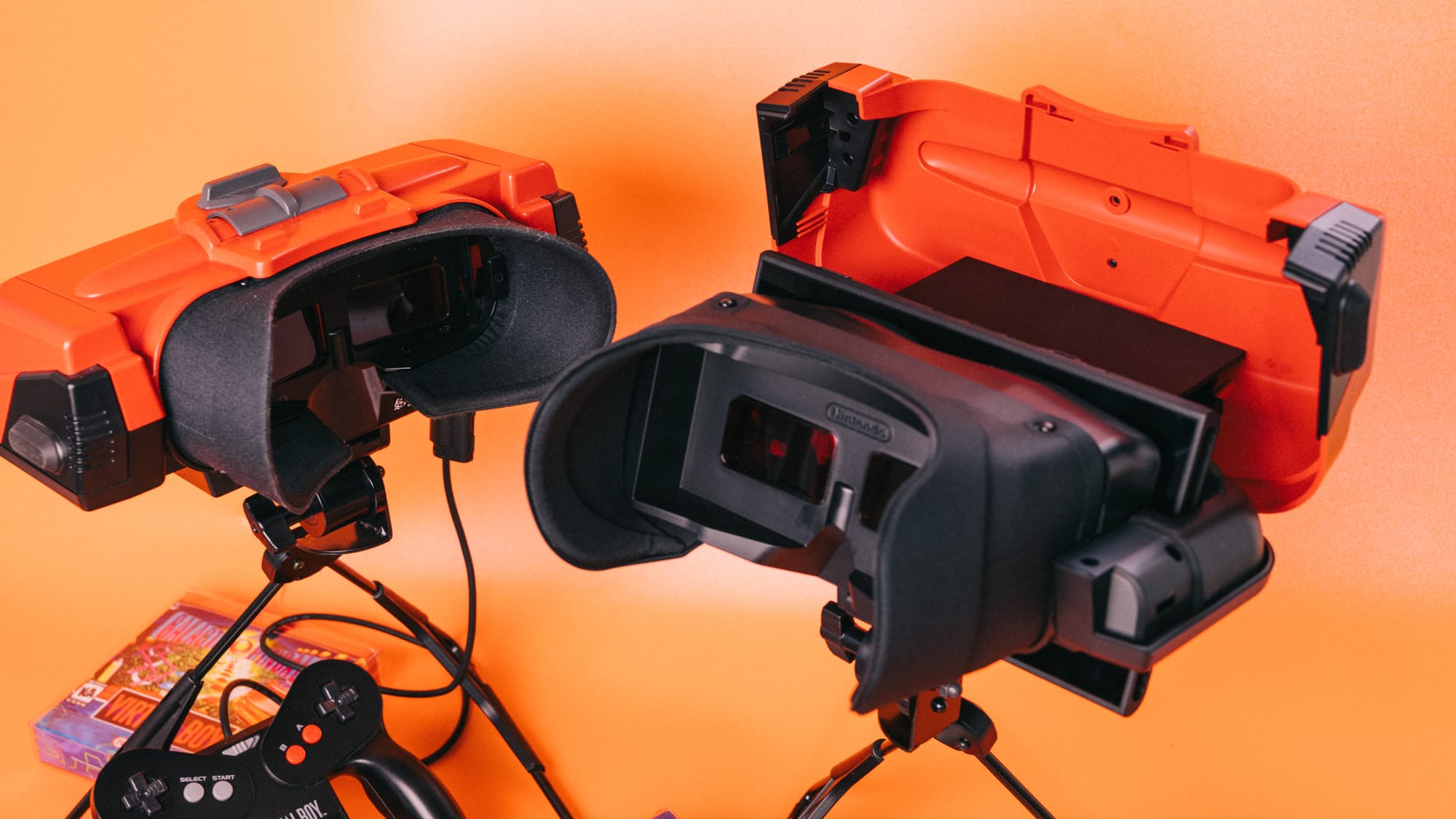
Virtual Boy for Switch (foreground) is a remarkably faithful remake of the original system (background).

A couple of items of note: To start, due to the way that Virtual Boy games are displayed, you will need to buy one of Nintendo’s official accessory “headsets” to play the Virtual Boy’s catalog on Switch and Switch 2.

A Nintendo rep had previously stated that the old Labo cardboard headset would work just fine, but a subsequent statement issued by the company walked back that claim, saying that to play VB games, you’ll need to buy the new gear.

Second, I’m using the term “headset” loosely. Virtual Boy was never, in fact, a headset, as Nintendo opted to sell it on a stand, rather than in a configuration that allowed mounting the unit to your head. This was the right call, since the original Virtual Boy was ridiculously heavy, and though the new replica “headset” is lighter, it’s indeed a replica. The new model is not a headset, either.

Hardware First

What most surprised me when the headset arrived was just how faithful its design is to the original system. Owning my launch edition Virtual Boy from 1995 gave me a great opportunity to put the two pieces of hardware side by side, to compare the units and take some photos.

It’s so identical that my ten-year-old daughter (who I taught to solder on my original Virtual Boy when its ribbon cables detached) saw the new unit and asked, “You bought another Virtual Boy?”

It’s true that the new Virtual Boy is slightly larger than the original, but then again, we need to slot a Switch or Switch 2 inside it. That naturally requires some extra space. That said, the small details are incredibly accurate. The rubber bumpers on the side of the unit, the rubber nubs at the end of the stand’s legs, the focus and IPD controls, the (fake) volume control and headphone jack and EXT. port, they’re all here and replicated perfectly. Even the stand’s adjustment mechanism utilizes a virtually identical acorn nut as the original.

The next thing you’ll notice is that it’s remarkably well made. The stand feels good, deploys tightly, and holds the unit well. The adjustment point on the stand also cinches tightly. The plastic feels dense and solid, the spring-loaded docking cradles work beautifully and hold the Switch in place nicely, and the satin foam of the eye-shroud feels more comfortable than the original.

In short, Nintendo did a great job making an almost perfect replica of their least successful gaming system.

It should also be noted that the new Virtual Boy arrives configured to work with Switch 2. To use the original Switch, we are required to install an adapter plate, which involves unscrewing four screws, swapping the plate, and reattaching the screws. The adapter plate comes packaged with the unit.

Open-Source Emulator Plays Virtual Boy Games On Quest, No Switch Needed
Virtual Boy Go is a nearly perfect Virtual Boy emulator for Quest headsets, no Switch console required.
UploadVRJames Tocchio

Do You Need One?

Do you need to spend $99.99 on a replica Virtual Boy headset? Probably not. Despite it being well made and effective at its one and only job, unless you’re a big fan of weird tech and oddball experimental products, you’ll almost certainly regret buying this thing.

Additional strikes against it would come down to the fact that these games are only accessible on Switch or Switch 2 via Nintendo’s subscription service. You won’t really own these games on Switch unless Nintendo releases some sort of purchasable collection. As of now, you’re buying a headset to play games that you’re essentially renting.

And if you’ve never played Virtual Boy and simply want to try out some old, weird games, there are cheaper and easier ways to experience Virtual Boy’s compact library.

But if you’re like me and love the Virtual Boy, well, you’ve probably already spent the money.

If you’d like your own Virtual Boy for Switch and Switch 2, you’ll have to be a member of Nintendo Online, and then grab one via the company’s website. We’ll have an overview of all the Virtual Boy games playable on Switch and Switch 2 soon.

The Out-of-Touch Adults’ Guide to Kid Culture: What Is a ‘Bebot Girl’?

This week we’re taking a look at some hyper-specific cultures within the larger youth culture. They run the gamut from the truly disturbing Looksmaxxing community, to the strange world of hardcore audiophiles, to the nostalgic domain of the bebot girls. What’s a bebot girl? I’m glad you asked!

What is a “Bebot Girl”?

TikTok is being taken over by Bebot Girls. “Bebot” is Filipino slang from the 2010s that means “babe” or “baddie.” The bebot girl trend is posting videos of the transformation from a regular person to a bebot, that is, a Filipino baddy from the 1990s. This is usually accomplished through period-appropriate makeup like heavy bronzer, frosty inner eyes, and striking metallic eyeshadow. It looks like this:

and this:

The trend started with TikToker @bellepauleen posting this video, which revived the term. The bebot anthem and soundtrack to the these videos is Black Eyed Peas 2005 song “Bebot.” Bebot girls seems like part of the same nostalgia trend that brought us Millennial Optimism and nostalgia for 2016, but with a huge dose of Filipino pride. If you want to watch bedot girl videos all day, check out the hashtag.

Who is Clavicular?

This week in people who are famous to your children but not you, we have Clavicular. His real name is Braden Peters, he was born in 2005, and he is the world’s most famous looksmaxxer.

Looksmaxxing (as you can read in my Gen Z and Gen A slang glossary) is maximizing one’s physical attractiveness through personal grooming, working out, and dressing stylishly. That doesn’t sound terrible in theory, but in practice, looksmaxxing is nihilistic vanity. To the Looksmaxxer, there’s a single standard for male attractiveness: basically being a lantern-jawed white dude. And there is nothing more important than looks. Being smart, cool, interesting, good-hearted, talented etc. does not matter; the only quality that is worthwhile is how you look. Looksmaxxers are insanely obsessive about defining what makes a person attractive. They measure their canthal tilt (the angle of the eyes), obsess over their maxilla (upper jaw), and know their exact biacromial width (the span of the clavicle.) Clavicular’s is 19.5 inches, hence the name.

Clavicular’s fame comes from his Kick channel, where he films himself rating other people’s looks, walking around being handsome, giving advice to his followers on how they can “ascend,” (become more attractive) and going on dates. As expected, he does sell an online course. To achieve his look, Clav says he’s been injecting himself with testosterone since he was 14, takes steroids regularly, and smashed his cheekbones with a hammer so they would grow more prominent. There are rumors that he takes meth to keep his weight down too. Although he describes himself as apolitical, Clavicular’s associates include right-wing influencers Nick Fuentes, Sneako, Andrew Tate, and more. He says the n-word all the time.

So all this is very bad, and it’s all growing in popularity among boys of the brainrot generation. So be warned, I guess: Young boys are not OK.

What is a “Big John machine”?

While niche communities like Looksmaxxers are depressing, many young people are into much less dire interest groups, like audiophiles. Within that community, audio equipment is sometimes referred to as “Big John machines,” because people are demonstrating their ridiculously expensive audio set-ups by playing a Geoff Castelucci cover of Jimmy Dean’s 1961 novelty hit “Big Bad John.”

It started with a post on Reddit’s audiophile subreddit, describing the original song as “an interesting example of how good audio systems can bring out more life in a recording.” So people started posting videos of extremely exotic and expensive systems playing the song. Like this system with $2 million speakers:

Then people started posting their own systems playing the song. Or just middle-of-the-road gear. Then people started posting the cheapest gear that can play “Big Bad John,” like this:

and this:

Viral video of the week: The Leaf Test

Recently, TikTokers Toni & Austin posted the following 11-second video, dubbed “The Leaf Test.”

In it, Toni says, “I found a leaf,” and Austin responds “It’s beautiful, just like you.” She sighs. He panics, presumably having said the wrong thing. It’s mildly funny, but it went viral in a huge way—over 18 million views— for maybe the wrong reasons.

Despite it being very, very clear that the clip is a joke, the video’s comment section is full of anger, with people saying things like, “Dump her ungrateful ass,” “He deserves someone better,” and “Can we normalize not doing test on our boyfriends he gave a perfect and valid answer and how are we still gonna get upset??”

People started making response videos:

It spread off TikTok. Reddit got extra mad about the leaf test.

I don’t know if there’s any way to measure this, but the internet has made people way less able to understand when someone is being ironic or sarcastic, whether it’s misinterpreted written posts on Threads or joke videos on TikTok. The internet seems to have made people less likely to moderate their responses; people are fast on the trigger.

Apple Confirms March Product Launch Event: When And What To Expect

Apple Confirms March Product Launch Event: When And What To Expect
There have been rumblings of Apple launching new products in the coming weeks and there’s now a confirmed event to go along with the chatter. Apple has been sending out invitations for what it’s describing as a “special Apple Experience” in New York. There’s no mention or even hint of what products will be announced, but we have some guesses.
Apple

99% of adults over 40 have shoulder “abnormalities” on an MRI, study finds

Up to a third of people worldwide have shoulder pain; it’s one of the most common musculoskeletal complaints. But medical imaging might not reveal the problem—in fact, it could even cloud it.

In a study published in JAMA Internal Medicine this week, 99 percent of adults over 40 were found to have at least one abnormality in a rotator cuff on magnetic resonance imaging (MRI). The rotator cuff is the group of muscles and tendons in a shoulder joint that keeps the upper arm bone securely in the shoulder socket—and is often blamed for pain and other symptoms. The trouble is, the vast majority of the people in the study had no problems with their shoulders.

The finding calls into question the growing use of MRIs to try to diagnose shoulder pain—and, in turn, the growing problem of overtreatment of rotator cuff (RC) abnormalities, which includes partial- and full-thickness tears as well as signs of tendinopathy (tendon swelling and thickening).

Read full article

Comments

These Three Claude Premium AI Features Are Now Available for Free

Anthropic’s Claude is an AI bot that keeps up a steady pace when it comes to pushing out new features, and the latest upgrade of note sees three useful features make their way down to free users, having previously been exclusive to the paid-for plans.

If you’re choosing between AIs and comparing the features available on the free plans, then there’s now more of a case to be made for choosing Claude over a competitor like ChatGPT or Gemini for your next batch of AI tasks.

The three new features now available to free users on Claude are file creation, external plug-ins called Connectors, and bundles of instructions called Skills. Here’s how you can make use of them.

File creation in Claude

Claude’s file creation capabilities let you create Word documents, PowerPoint slideshows, Excel spreadsheets, and PDFs from right inside a conversation. You can either supply the bot with all text, data, and other information you want included, get Claude to invent everything itself, or something in between.

For example, if you’ve got a long list of names and scores, Claude can put them into a spreadsheet for you. If you’ve got a series of images, Claude can combine them into a PDF and describe them. You can get it to analyze and visualize data, produce presentations based on reports, and create summary documents.

Claude AI
A simple prompt can create a file in Claude.
Credit: Lifehacker

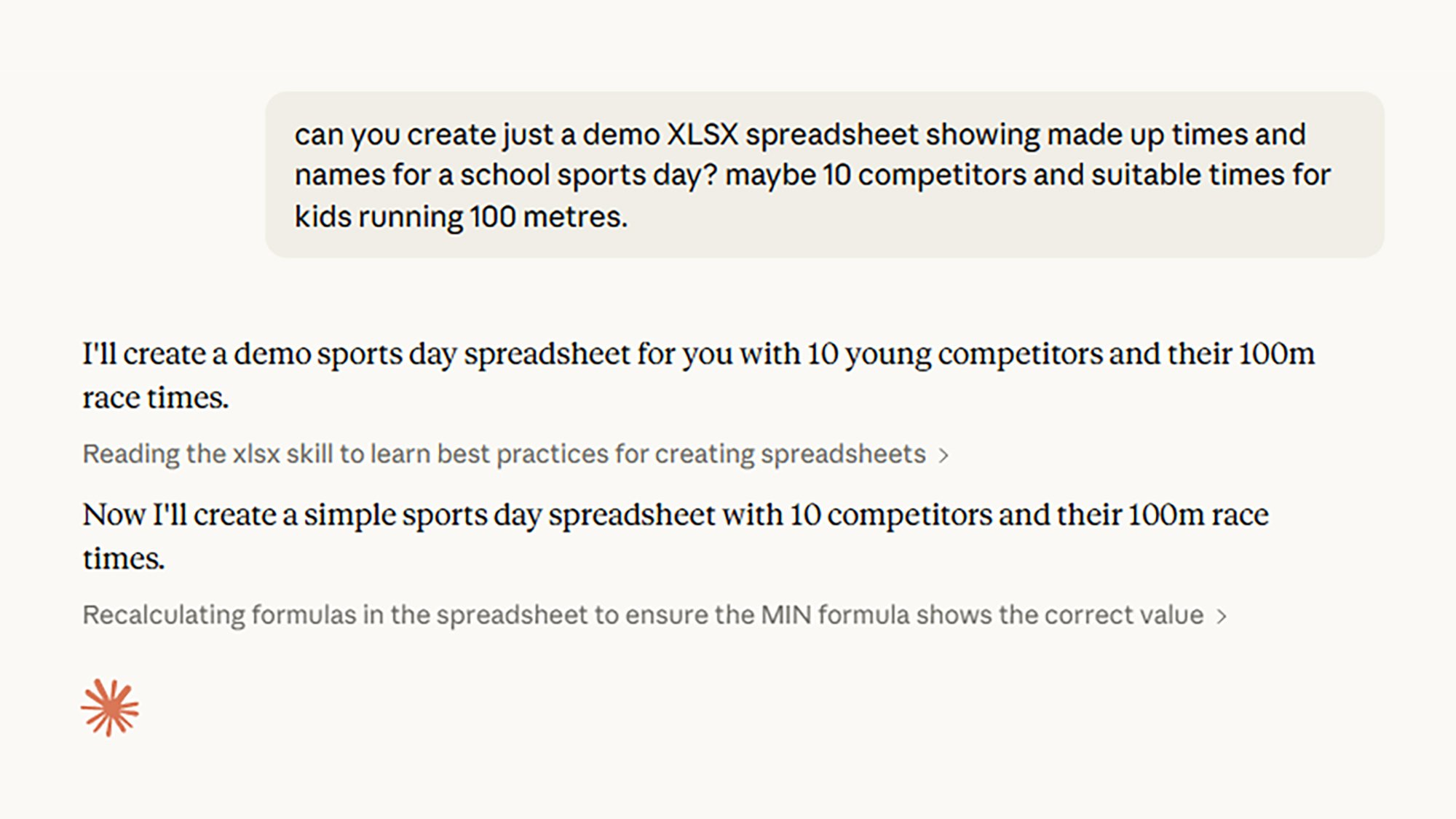
To enable file creation for your account, click your profile icon (bottom left) in Claude on the web, then select Settings > Capabilities and enable Code execution and file creation. With that done, you just have to prompt Claude with the type of file you want to make and what you want included, supplying any information as needed (or telling the AI where to find it online).

As usual with these AI bots, the more detail and specificity you can provide, the better—the end result is then more likely to be closer to what you were aiming for. I got it to quickly come up with the results of a fictional sports day race, and produce a spreadsheet from it. While it’s not the most demanding of tasks, Claude completed it correctly.

Claude Connectors

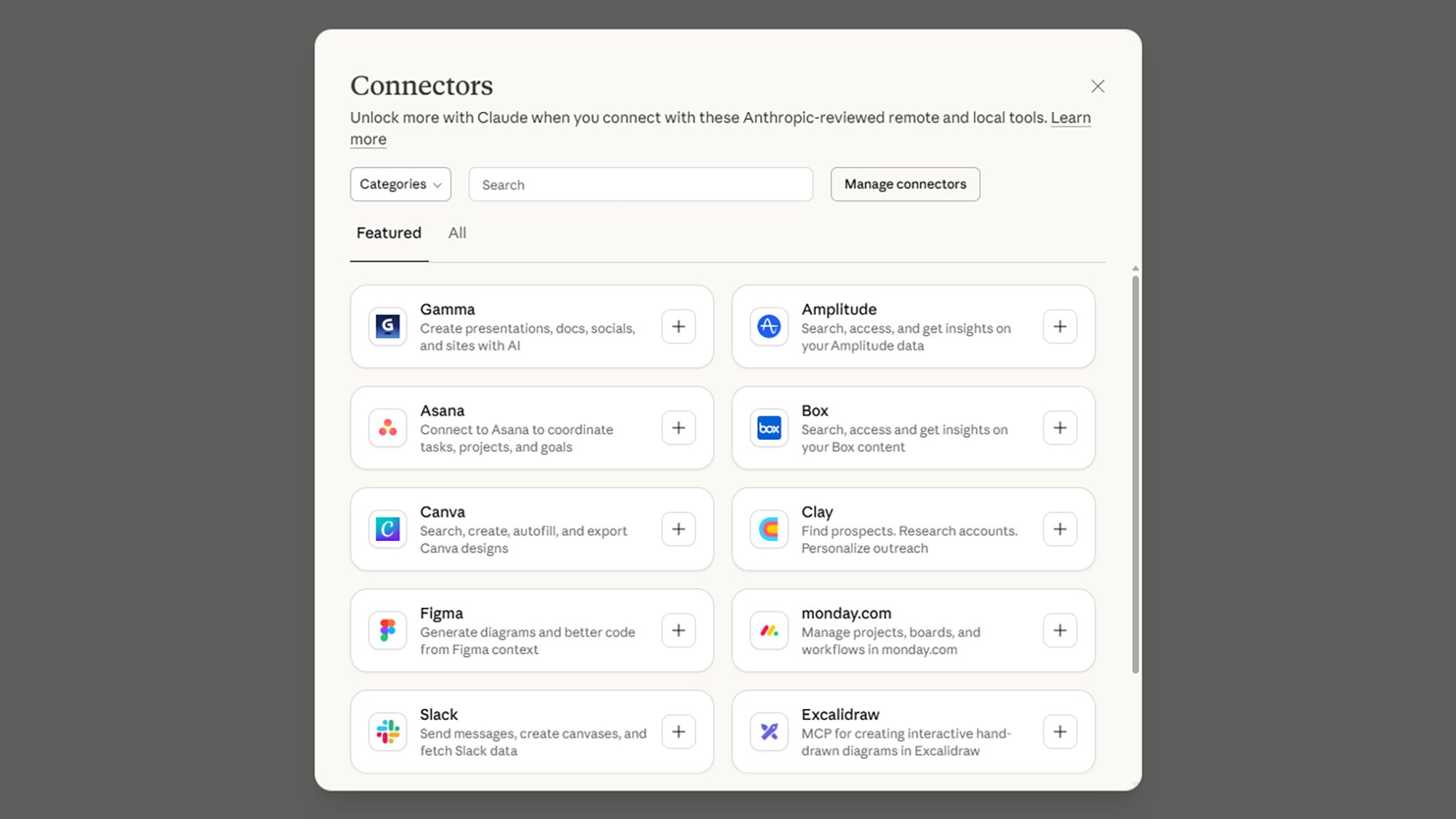
Connectors can hook Claude up to a variety of other apps, sites, and services: So if you want to get it to design something for you in Canva, or manage your messages in Slack, or find some travel deals on Trivago, then Claude can do that for you. The full list of current Connectors gives you some idea of what’s possible.

To get to the Connectors from the Claude prompt box, click the small + (plus) icon in the lower left corner, then choose Add connectors. You can search through Connectors by name, and filter them by type and category. When you select one you like, you’ll need to supply your account credentials and give Claude permission to access your account.

Claude Connectors
Use Connectors to connect Claude to other apps.
Credit: Lifehacker

Your Connectors of choice are then available from the same sub-menu in the prompt box: You can add more plug-ins and remove existing ones from there. You can either select an app, or specify the name of it in your prompt and Claude should understand what you mean. You can ask for outputs, run searches, and communicate through your connected services.

Connectors can give Claude some handy extra talents. With the Canvas Connector, for example, I was able to create a basic bit of artwork for a birthday party flyer—something that the AI wouldn’t have been able to do on its own. I find that access was spotty, however, perhaps a sign of a lot of free users now making use of these tools.

Claude Skills

With Skills, you can “teach Claude how to complete specific tasks in a repeatable way” (in the words of the official support document). In old-school computer talk, they might be referred to as macros: batches of set instructions that Claude can repeat whenever you need something doing in a particular way.

Templates are a good example, whether they’re for emails or documents. Rather than just getting Claude to write an email for you, you can set down some basic parameters for the job that include guidelines on tone, length, and style, as well as crucial bits of information (such as your contact details) that always need to be included.

Claude Skills
You’ve got three options for creating Skills.
Credit: Lifehacker

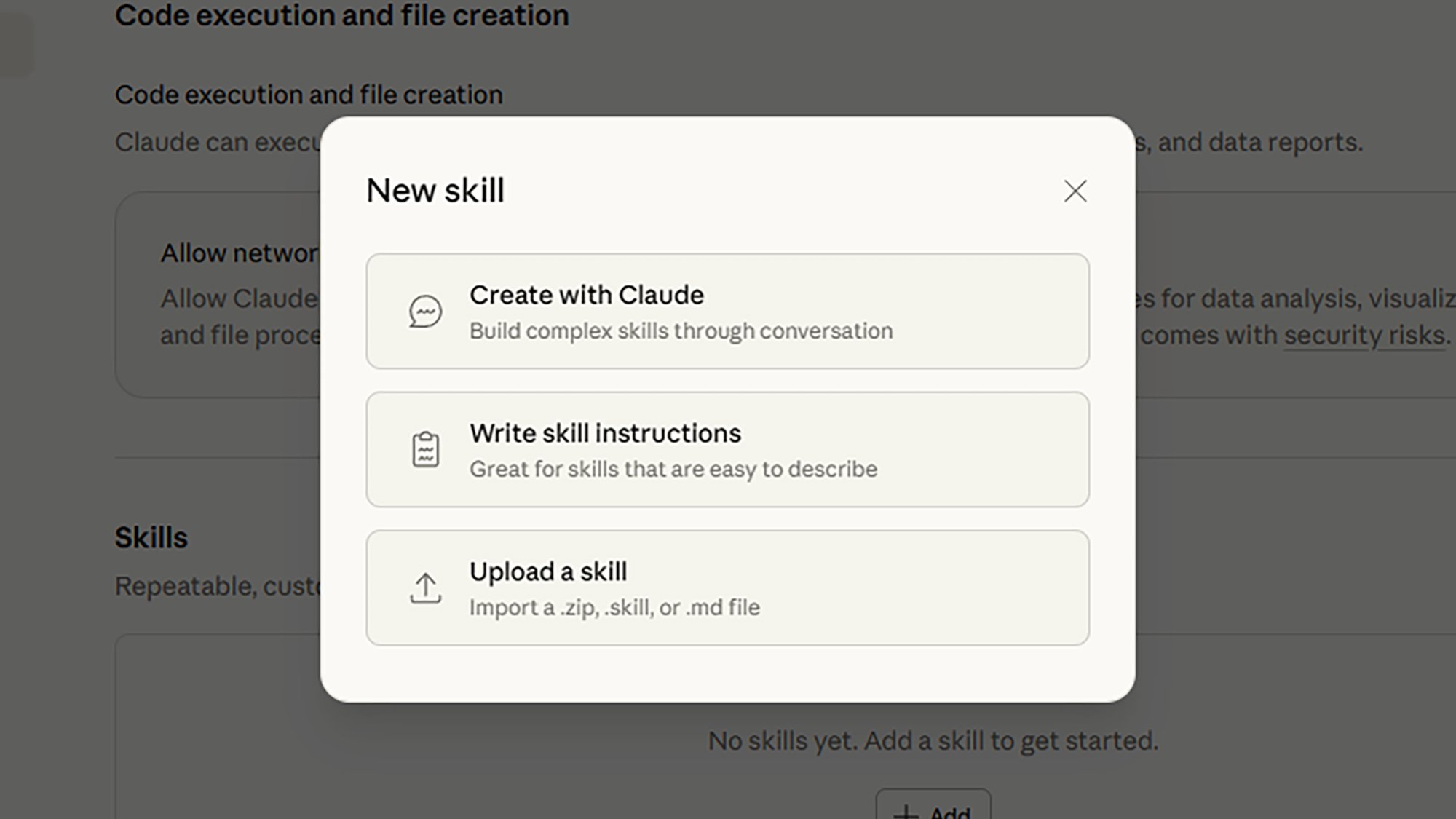
Click your account profile icon (bottom left) in Claude on the web, then choose Settings > Capabilities and click Add under Skills to get started. You can create a Skill through a Claude conversation, by writing out the instructions, or by uploading a Skills file (which is handy for including extra items such as code snippets, as described here).

I took the Create with Claude route to put together a basic way of summarizing PDF reports, with specific guidelines on how many paragraphs and headings to use, and the tone of voice to apply. In the future, rather than typing out those instructions every time I need something summarized, I can just invoke the Skill.

Cannondale updates the SuperSlice for a 10-watt aero gain

Cannondale has launched the third generation of its SuperSlice time trial/triathlon bike, which it says is the fastest Cannondale ever made. There’s a claimed 10-watt saving at 50km/h from its predecessor, representing a 14% drag reduction. 

The new SuperSlice’s overall weight is kept similar to the previous frameset, thanks to Cannondale’s top-spec Lab71 carbon fibre construction in place of the previous frameset’s Hi-Mod carbon. Nevertheless, the brand says the frame weight has increased by 60g due to the additional material needed to maintain strength in the deeper tube sections. 

Cannondale claims a size-M frame weighs 1,122g, with the fork adding 610g, the seatpost 267g and the base bar 321g, for a 2,026g total. 

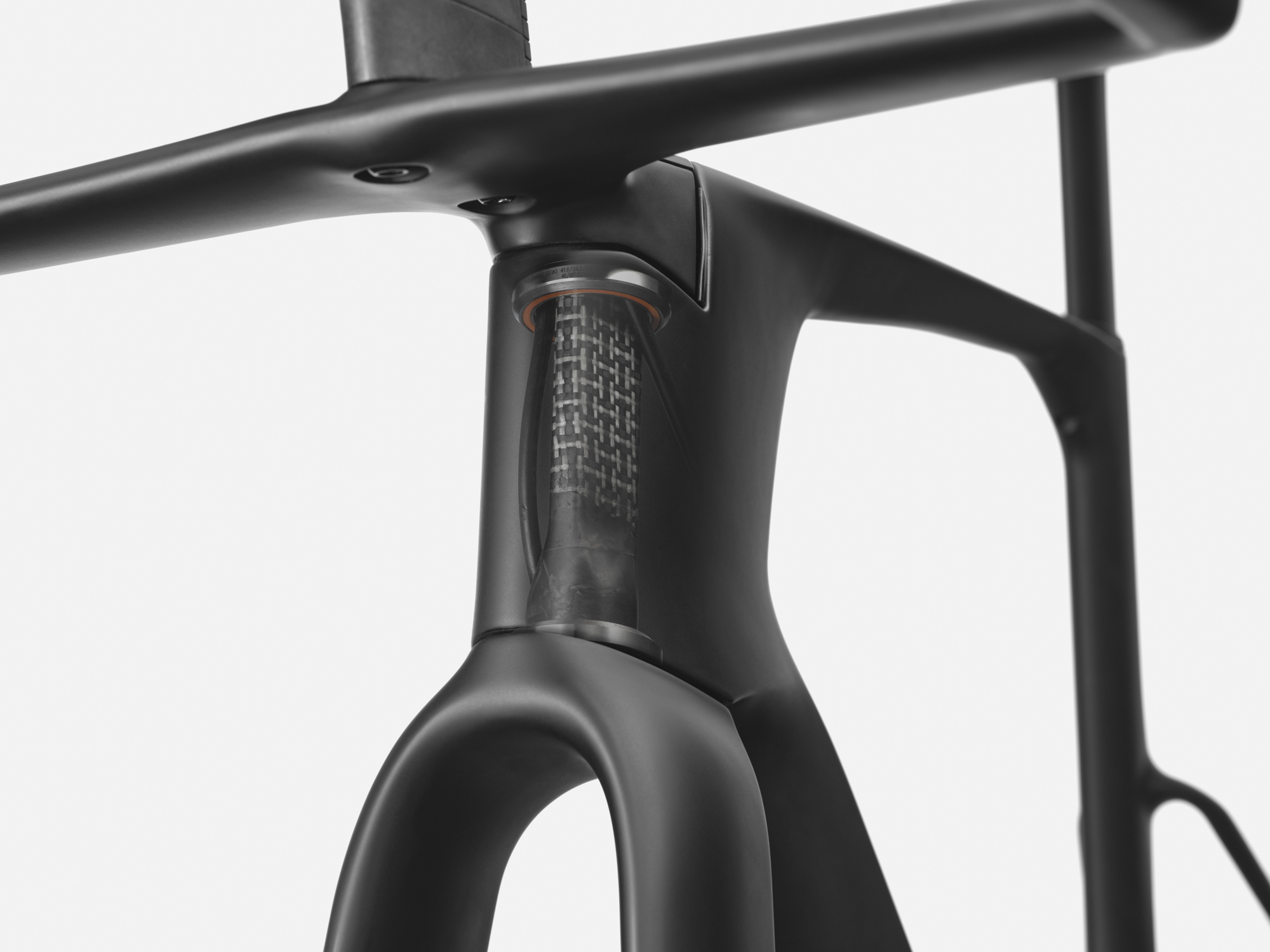
The Delta steerer enables Cannondale to keep the front end narrow.

The design incorporates Cannondale’s Delta steerer, now used on the majority of its road bikes, including the new SuperSix Evo road bike, which also launched today. This design enables integrated hose routing through the narrow head tube with its 1⅛-inch top and bottom bearings.

Cannondale has switched to a Universal Derailleur Hanger and a 68mm BSA bottom bracket. It recommends a maximum 64-tooth 1x chainring or a 60/46-tooth 2x, although it says you could go larger still, as do some of the EF Education pros. The frameset is compatible with electronic groupsets only.

More adjustability and more clearance

Cannondale’s updated design offers more cockpit adjustability and compatibility with Vision mono-riser extensions.

Cannondale has made small changes to the SuperSlice’s steering geometry, claiming its handling is now sharper for fast descents and tight turns.

There’s a larger range of effective seat tube angle adjustability, thanks to a saddle clamp that can be moved forward and back through 45mm. This equates to effective seat tube angles between 74 and 77 degrees. 

There’s also a greater range of cockpit adjustability, with 100mm and 120mm reach adjustment, as well as 0 to 30-degree extension angle adjustment.

The bike has a new base bar, the SystemBar TT, which has a mono-riser and is compatible with Vision Speed JS-Bend and Vision TFE EVO extensions. Cannondale says the new cockpit reduces both weight and drag from the second-generation SuperSlice.

Tyre clearance has increased to 32mm.

As with pretty much every new bike, there’s more tyre clearance, with an increase to 32mm – more than enough to accommodate the new 30mm Vittoria Corsa Pro Speed and Continental’s latest 30mm-wide GP5000 TT TR time trial tyre.

Cannondale enables you to equip the SuperSlice for triathlon use, with the Vision bar providing compatibility with the Metron front and Trimax rear hydration systems. 

The new SuperSlice is available in sizes XS, S, M and L.

Vittoria launches 30c Corsa Pro Speed for wet conditions – and it proves tyre-size labels are a mess

Vittoria has announced a new, 30c version of its Corsa Pro Speed TLR tyres.

Designed for improved grip in wet conditions, Vittoria says this new size was developed “at the request of WorldTour teams”.

The news comes on the same day as Continental announced it has launched a 30mm option for its GP5000 TT TR time trial tyre, and a 35mm option for its G5000 S TR all-rounder.

As in gravel racing, then, it seems the trend towards ever wider road bike tyres shows no signs of abating.

Available now, the 700x30c Vittoria Corsa Pro Speed TLR costs £89.99 / $125.99 / €95.95 per tyre.

The difference a millimetre makes

30c Vittoria Corsa Pro Speed TLR
Vittoria has launched its biggest time trial tyre yet. Vittoria

The addition of a 30c (or 700x30c / 30-622, officially) option to the Corsa Pro Speed TLR range brings the total number of sizes available to five.

The range starts with a skinny – by modern standards – 24c option, and now goes up to 30c in 2mm nominal increments.

Eagle-eyed readers will note a 29c version already existed, though, so the addition of another model ostensibly only one millimetre wider might seem curious.

The claimed weights for the tyres give an insight into what’s likely going on, though.

A 29c Corsa Pro Speed TLR tyre is claimed to weigh 255g, for example, only 5g more than the 28c version.

In contrast, the new 30c version is claimed to weigh 270g per tyre, 15g more than the 29c version.

The difference is due to the fact the 29c tyre is “Wide Rim Optimised”, which is Vittoria’s label for tyres it has designed for optimal aerodynamic performance with 25mm-wide rims (internal width).

In contrast the new 30mm option looks to be designed with a relatively higher volume casing – Vittoria specifically references the tyre’s “larger air volume and contact patch” in its press release – hence the more significant increase in weight.

30c Vittoria Corsa Pro Speed TLR
Despite a nominal difference in size of just 1mm, the casing size – and therefore volume – of the 30 and 29c tyres is actually markedly different. Vittoria

If that all feels exceptionally confusing then don’t worry – you’re not alone.

This mess is why Josh Poertner, CEO of Silca and the former chairman of the Bicycle Wheel Technical Committee, told BikeRadar “currently the sidewall printed number [on a tyre] is meaningless”.

Instead, Poertner believes the industry should instead quote the “unmounted casing lay-flat width” of tyres, as that would enable riders to make better informed decisions about which tyres are safe to use on their rims.

For more on that subject, though, check out our feature on the question of whether hookless rims are safe for road cycling?

A TT tyre for road racing?

Although the Corsa Pro Speed TLR was originally pitched as a pure time trial tyre – given its thin casing, low weight and lack of a puncture protection strip beneath the tread – it, and other time trial tyres, have become increasingly popular in pro road races in recent years.

This was a key tech trend at last year’s Tour de France, for example, with eventual race winner, Tadej Pogačar, using Conti’s GP5000 TT TR tyres for most stages of the race.

The addition of an even wider option for the Corsa Pro Speed indicates Vittoria likely intends to lean into this, rather than push back against it.

Alternatively, or perhaps concurrently, could a rash of new time trial bikes with clearance for big tyres be about to launch?

Cannondale has just launched its new SuperSlice TT bike today, with clearance for 32mm-wide tyres, and we know Pogačar has been testing a new lightweight Colnago TT bike in recent weeks. Doubtless other manufacturers won’t be resting on their laurels ahead of this year’s key stage races either.

As always, we’ll keep our eyes peeled for any developments.